Teradata Database
SQL Fundamentals
Release 13.0 B035-1141-098A March 2010Teradata, BYNET, DBC/1012, DecisionCast, DecisionFlow, DecisionPoint, Eye logo design, InfoWise, Meta Warehouse, MyCommerce, SeeChain, SeeCommerce, SeeRisk, Teradata Decision Experts, Teradata Source Experts, WebAnalyst, and You’ve Never Seen Your Business Like This Before are trademarks or registered trademarks of Teradata Corporation or its affiliates.
Adaptec and SCSISelect are trademarks or registered trademarks of Adaptec, Inc. AMD Opteron and Opteron are trademarks of Advanced Micro Devices, Inc.
BakBone and NetVault are trademarks or registered trademarks of BakBone Software, Inc. EMC, PowerPath, SRDF, and Symmetrix are registered trademarks of EMC Corporation. GoldenGate is a trademark of GoldenGate Software, Inc.
Hewlett-Packard and HP are registered trademarks of Hewlett-Packard Company. Intel, Pentium, and XEON are registered trademarks of Intel Corporation.
IBM, CICS, RACF, Tivoli, and z/OS are registered trademarks of International Business Machines Corporation. Linux is a registered trademark of Linus Torvalds.
LSI and Engenio are registered trademarks of LSI Corporation.
Microsoft, Active Directory, Windows, Windows NT, and Windows Server are registered trademarks of Microsoft Corporation in the United States and other countries.
Novell and SUSE are registered trademarks of Novell, Inc., in the United States and other countries. QLogic and SANbox are trademarks or registered trademarks of QLogic Corporation.
SAS and SAS/C are trademarks or registered trademarks of SAS Institute Inc. SPARC is a registered trademark of SPARC International, Inc.
Sun Microsystems, Solaris, Sun, and Sun Java are trademarks or registered trademarks of Sun Microsystems, Inc., in the United States and other countries.
Symantec, NetBackup, and VERITAS are trademarks or registered trademarks of Symantec Corporation or its affiliates in the United States and other countries.
Unicode is a collective membership mark and a service mark of Unicode, Inc.
UNIX is a registered trademark of The Open Group in the United States and other countries.
Other product and company names mentioned herein may be the trademarks of their respective owners.
THEINFORMATIONCONTAINEDINTHISDOCUMENTISPROVIDEDONAN “AS-IS” BASIS, WITHOUTWARRANTYOFANYKIND, EITHER EXPRESSORIMPLIED, INCLUDINGTHEIMPLIEDWARRANTIESOFMERCHANTABILITY, FITNESSFORAPARTICULARPURPOSE, OR NON-INFRINGEMENT. SOMEJURISDICTIONSDONOTALLOWTHEEXCLUSIONOFIMPLIEDWARRANTIES, SOTHEABOVEEXCLUSION MAYNOTAPPLYTOYOU. INNOEVENTWILL TERADATA CORPORATIONBELIABLEFORANYINDIRECT, DIRECT, SPECIAL, INCIDENTAL, ORCONSEQUENTIALDAMAGES, INCLUDINGLOSTPROFITSORLOSTSAVINGS, EVENIFEXPRESSLYADVISEDOFTHEPOSSIBILITYOF SUCHDAMAGES.
The information contained in this document may contain references or cross-references to features, functions, products, or services that are not announced or available in your country. Such references do not imply that Teradata Corporation intends to announce such features, functions, products, or services in your country. Please consult your local Teradata Corporation representative for those features, functions, products, or services available in your country.
Information contained in this document may contain technical inaccuracies or typographical errors. Information may be changed or updated without notice. Teradata Corporation may also make improvements or changes in the products or services described in this information at any time without notice.
To maintain the quality of our products and services, we would like your comments on the accuracy, clarity, organization, and value of this document. Please e-mail: [email protected]
Any comments or materials (collectively referred to as “Feedback”) sent to Teradata Corporation will be deemed non-confidential. Teradata Corporation will have no obligation of any kind with respect to Feedback and will be free to use, reproduce, disclose, exhibit, display, transform, create derivative works of, and distribute the Feedback and derivative works thereof without limitation on a royalty-free basis. Further, Teradata Corporation will be free to use any ideas, concepts, know-how, or techniques contained in such Feedback for any purpose whatsoever, including developing, manufacturing, or marketing products or services incorporating Feedback.
Preface
Purpose
SQL Fundamentals describes basic Teradata SQL concepts, including data handling, SQL data definition, control, and manipulation, and the SQL lexicon.
Use this book with the other books in the SQL book set.
Audience
System administrators, database administrators, security administrators, application
programmers, Teradata field engineers, end users, and other technical personnel responsible for designing, maintaining, and using Teradata Database will find this book useful.
Experienced SQL users can also see simplified statement, data type, function, and expression descriptions in SQL Quick Reference.
Supported Software Release
This book supports Teradata® Database 13.0.Prerequisites
If you are not familiar with Teradata Database, you will find it useful to read Introduction to Teradata before reading this book.
You should be familiar with basic relational database management technology. This book is not an SQL primer.
Changes to This Book
Release Description
Teradata Database 13.0 March 2010
Changes to This Book
Teradata Database 13.0 November 2009
• Deleted concurrent transaction limit from Appendix C.
• Deleted system maximum for replication groups from Appendix C. Teradata Database 13.0
August 2009
Provided correct system maximum for replication groups.
Teradata Database 13.0 April 2009
• Added material to support No Primary Index (NoPI) tables
• Added material to support Period and Geospatial data types
• Changed material on UDFs to include Java UDFs and dynamic UDTs
• Changed material on stored procedure access rights and default database
• Added new material to support changes to triggers
• Modified material on archiving and restoring views, macros, stored procedures, and triggers
• Updated list of DDL and DCL statements
• Removed restrictions regarding compression on foreign key columns and the USI primary key columns for soft and batch referential integrity
• Updated ANSI SQL:2003 references to ANSI SQL:2008, including reserved and nonreserved words
• Updated Appendix E with changes to SQL syntax Teradata Database 12.0
October 2007
Changed QUERY_BAND from a reserved word to a nonreserved word
Teradata Database 12.0 September 2007
• Changed topic on index hash mapping to reflect increased hash bucket size of 20 bits (1048576 hash buckets)
• Changed the rules on naming objects in Chapter 2 in support of the UNICODE Data Dictionary feature
• Changed the description of profiles to include the option to specify whether to restrict a password string from containing certain words
• Added material to support mutilevel partitioned primary indexes
• Added material to support error logging tables for errors that occur during INSERT … SELECT and MERGE operations
• Removed material on Express Logon
• Updated Appendix E with the following:
• New statements for the online archive feature: LOGGING ONLINE ARCHIVE ON and LOGGING ONLINE ARCHIVE OFF
• New statements for error logging tables: CREATE ERROR TABLE and DROP ERROR TABLE
• LOGGING ERRORS option for INSERT … SELECT and MERGE
• New syntax for CREATE PROCEDURE and REPLACE
PROCEDURE to support C and C++ external stored procedures that use CLIv2 to execute SQL, Java external stored procedures, and dynamic result sets
Additional Information
Additional Information
To maintain the quality of our products and services, we would like your comments on the accuracy, clarity, organization, and value of this document. Please e-mail:
• Updated Appendix E with the following:
• New SET QUERY_BAND statement
• New syntax for ALTER TABLE, CREATE TABLE, and CREATE JOIN INDEX to support multilevel partitioned primary indexes
Release Description
URL Description
www.info.teradata.com/ Use the Teradata Information Products Publishing Library site to:
• View or download a manual:
1 Under Online Publications, select General Search. 2 Enter your search criteria and click Search.
• Download a documentation CD-ROM:
1 Under Online Publications, select General Search. 2 In the Title or Keyword field, enter CD-ROM, and
click Search.
• Order printed manuals:
Under Print & CD Publications, select How to Order.
www.teradata.com The Teradata home page provides links to numerous sources of information about Teradata. Links include:
• Executive reports, case studies of customer experiences with Teradata, and thought leadership
• Technical information, solutions, and expert advice
• Press releases, mentions and media resources
www.teradata.com/t/TEN/ Teradata Customer Education designs, develops and delivers education that builds skills and capabilities for our customers, enabling them to maximize their Teradata investment.
www.teradataatyourservice.com Use Teradata @ Your Service to access Orange Books, technical alerts, and knowledge repositories, view and join forums, and download software patches.
developer.teradata.com/ Teradata Developer Exchange provides articles on using Teradata products, technical discussion forums, and code downloads.
References to Microsoft Windows and Linux
References to Microsoft Windows and Linux
This book refers to “Microsoft Windows” and “Linux.” For Teradata Database 13.0, these references mean:• “Windows” is Microsoft Windows Server 2003 64-bit.
Table of Contents
Preface
. . . .3Purpose . . . .3
Audience . . . .3
Supported Software Release . . . .3
Prerequisites . . . .3
Changes to This Book . . . .3
Additional Information . . . .5
References to Microsoft Windows and Linux . . . .6
Chapter 1: Objects
. . . 13Databases and Users . . . 13
Tables . . . 14
Global Temporary Tables. . . 18
Volatile Tables . . . 23 Columns. . . 25 Data Types . . . 27 Keys . . . 32 Indexes . . . 33 Primary Indexes . . . 38 Secondary Indexes. . . 42 Join Indexes . . . 47 Hash Indexes . . . 50 Referential Integrity . . . 53 Views . . . 59 Triggers . . . 60 Macros . . . 62 Stored Procedures . . . 65
External Stored Procedures . . . 69
User-Defined Functions . . . 69
Roles . . . .72
User-Defined Types . . . .74
Chapter 2: Basic SQL Syntax and Lexicon
. . . .75Structure of an SQL Statement . . . .75
SQL Lexicon Characters . . . .76
Keywords . . . .77
Expressions . . . .78
Names . . . .79
Name Validation on Systems Enabled with Japanese Language Support . . . .83
Object Name Translation and Storage . . . .87
Object Name Comparisons . . . .88
Finding the Internal Hexadecimal Representation for Object Names. . . .89
Specifying Names in a Logon String . . . .90
Standard Form for Data in Teradata Database . . . .91
Unqualified Object Names . . . .93
Default Database . . . .95
Literals . . . .97
NULL Keyword as a Literal . . . .101
Operators . . . .102 Functions . . . .104 Delimiters . . . .104 Separators . . . .106 Comments . . . .106 Terminators . . . .108 Null Statements . . . .110
Chapter 3: SQL Data Definition, Control, and Manipulation
.111 SQL Functional Families and Binding Styles . . . .111Embedded SQL . . . .112
Data Definition Language . . . .113
Altering Table Structure and Definition . . . .115
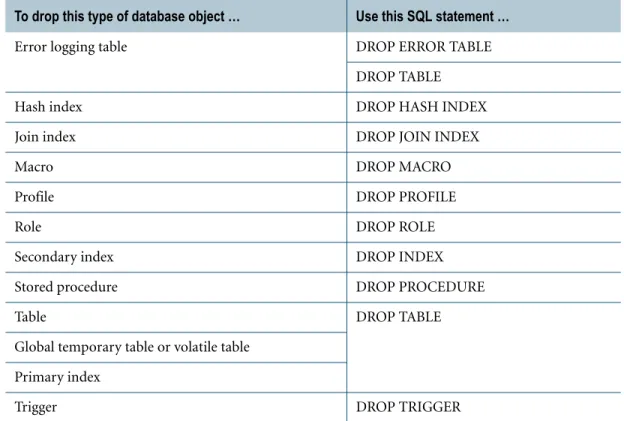
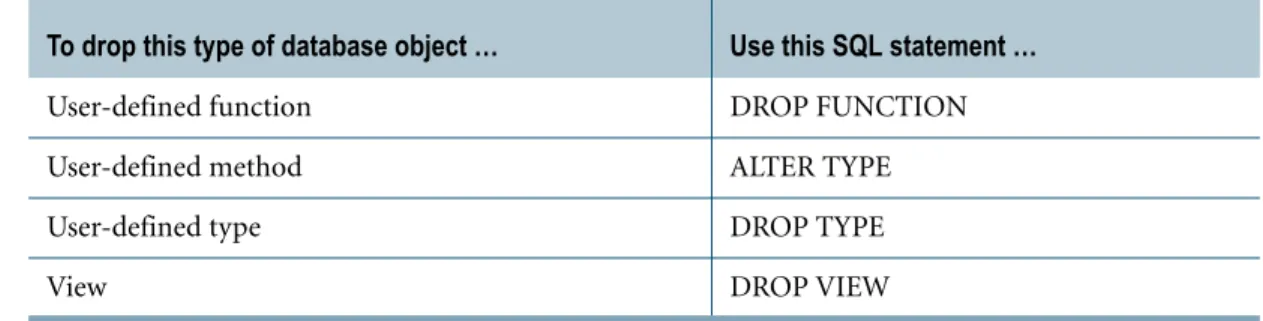
Dropping and Renaming Objects . . . .116
Data Manipulation Language . . . 119
Subqueries . . . 123
Recursive Queries . . . 124
Query and Workload Analysis Statements . . . 128
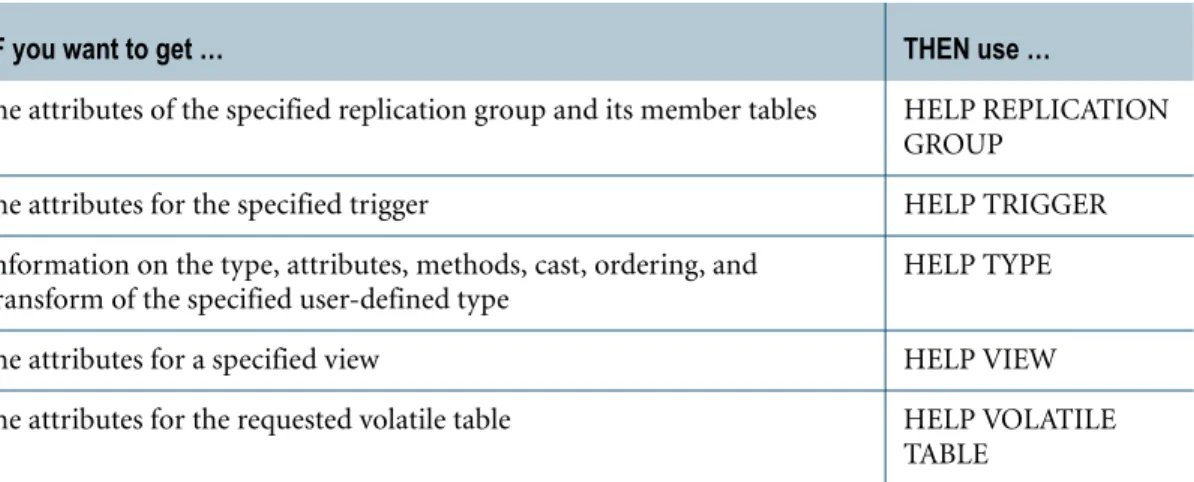
Help and Database Object Definition Tools. . . 129
Chapter 4: SQL Data Handling
. . . 133Invoking SQL Statements. . . 133
Requests . . . 134
Transactions . . . 136
Transaction Processing in ANSI Session Mode . . . 137
Transaction Processing in Teradata Session Mode . . . 137
Multistatement Requests . . . 138
Iterated Requests . . . 141
Dynamic and Static SQL. . . 143
Dynamic SQL in Stored Procedures . . . 144
Using SELECT With Dynamic SQL . . . 146
Event Processing Using Queue Tables . . . 147
Manipulating Nulls . . . 148 Session Parameters . . . 153 Session Management . . . 157 Return Codes . . . 158 Statement Responses. . . 161 Success Response. . . 162 Warning Response . . . 163
Error Response (ANSI Session Mode Only). . . 163
Failure Response . . . 165
Chapter 5: Query Processing
. . . 167Query Processing. . . 167
Table Access. . . 177
Full-Table Scans . . . 179
Appendix A: Notation Conventions
. . . .183Syntax Diagram Conventions . . . .183
Character Shorthand Notation Used In This Book . . . .188
Appendix B: Restricted Words
. . . .191Teradata Reserved Words . . . .191
Teradata Nonreserved Words . . . .194
Teradata Future Reserved Words . . . .197
ANSI SQL:2008 Reserved Words. . . .198
ANSI SQL:2008 Nonreserved Words . . . .200
Appendix C: Teradata Database Limits
. . . .205System Limits . . . .206
Database Limits . . . .210
Session Limits . . . .218
Appendix D: ANSI SQL Compliance
. . . .221ANSI SQL Standard . . . .221
Terminology Differences Between ANSI SQL and Teradata . . . .226
SQL Flagger . . . .227
Differences Between Teradata and ANSI SQL . . . .228
Appendix E: What is New in Teradata SQL
. . . .229Notation Conventions . . . .229
Statements and Modifiers. . . .229
Data Types and Literals . . . .285
Glossary
. . . 301CHAPTER 1
Objects
This chapter describes the objects you use to store, manage, and access data in Teradata Database.
Databases and Users
Definitions
A database is a collection of related tables, views, triggers, indexes, stored procedures, user-defined functions, and macros. A database also contains an allotment of space from which users can create and maintain their own objects, or other users or databases.
A user is almost the same as a database, except that a user has a password and can log on to the system, whereas the database cannot.
Defining Databases and Users
Before you can create a database or user, you must have sufficient privileges granted to you. To create a database, use the CREATE DATABASE statement. You can specify the name of the database, the amount of storage to allocate, and other attributes.
To create a user, use the CREATE USER statement. The statement authorizes a new user identification (user name) for the database and specifies a password for user authentication. Because the system creates a database for each user, the CREATE USER statement is very similar to the CREATE DATABASE statement.
Difference Between Users and Databases
The difference between users and databases in Teradata Database has important implications for matters related to privileges, but neither the differences nor their implications are easy to understand. This is particularly true with respect to understanding fully the consequences of implicitly granted privileges.
Formally speaking, the difference between a user and a database is that a user has a password and a database does not. Users can also have default attributes such as time zone, date form, character set, role, and profile, while databases cannot. You might infer from this that databases are passive objects, while users are active objects. That is only true in the sense that databases cannot execute SQL statements. However, a query, macro, or stored procedure can execute using the privileges of the database.
Tables
Tables
Definitions
A table is what is referred to in set theory terminology as a relation, from which the expression
relational database is derived.
Every relational table consists of one row of column headings (more commonly referred to as column names) and zero or more unique rows of data values.
Formally speaking, each row represents what set theory calls a tuple. Each column represents what set theory calls an attribute.
The number of rows (or tuples) in a table is referred to as its cardinality and the number of columns (or attributes) is referred to as its degree or arity.
Defining Tables
Use the CREATE TABLE statement to define base tables.
The CREATE TABLE statement specifies a table name, one or more column names, and the attributes of each column. CREATE TABLE can also specify datablock size, percent freespace, and other physical attributes of the table.
The CREATE/MODIFY USER and CREATE/MODIFY DATABASE statements provide options for creating permanent journal tables.
Defining Indexes For a Table
An index is a physical mechanism used to store and access the rows of a table. When you define a table, you can define a primary index and one or more secondary indexes.
If you define a table and you do not specify a PRIMARY INDEX clause, NO PRIMARY INDEX clause, PRIMARY KEY constraint, or UNIQUE constraint, the default behavior is for the system to create the table using the first column as the nonunique primary index. (If you prefer that the system creates a NoPI table without a primary index, use DBS Control to change the value of the PrimaryIndexDefault General field. For details, see Utilities.)
For details on indexes, see “Indexes” on page 33. For details on NoPI tables, see “No Primary
Index (NoPI) Tables” on page 17.
Duplicate Rows in Tables
Though both set theory and common sense prohibit duplicate rows in relational tables, the ANSI standard defines SQL based not on sets, but on bags, or multisets.
A table defined not to permit duplicate rows is called a SET table because its properties are based on set theory, where set is defined as an unordered group of unique elements with no duplicates.
Tables A table defined to permit duplicate rows is called a MULTISET table because its properties are based on a multiset, or bag, model, where bag and multiset are defined as an unordered group of elements that may be duplicates.
Temporary Tables
Temporary tables are useful for temporary storage of data. Teradata Database supports three types of temporary tables.
Materialized instances of a global temporary table share the following characteristics with volatile tables:
• Private to the session that created them.
• Contents cannot be shared by other sessions.
• Optionally emptied at the end of each transaction using the ON COMMIT PRESERVE/ DELETE rows option in the CREATE TABLE statement.
• Activity optionally logged in the transient journal using the LOG/NO LOG option in the CREATE TABLE statement.
• Dropped automatically when a session ends.
For more information on … See …
rules for duplicate rows in a table CREATE TABLE in SQL Data Definition Language. the result of an INSERT operation that
would create a duplicate row
INSERT in SQL Data Manipulation Language.
the result of an INSERT using a SELECT subquery that would create a duplicate row
Type Usage
Global temporary
A global temporary table has a persistent table definition that is stored in the data dictionary. Any number of sessions can materialize and populate their own local copies that are retained until session logoff.
Global temporary tables are useful for stroring temporary, intermediate results from multiple queries into working tables that are frequently used by applications. Global temporary tables are identical to ANSI global temporary tables.
Volatile Like global temporary tables, the contents of volatile tables are only retained for the duration of a session. However, volatile tables do not have persistent definitions. To populate a volatile table, a session must first create the definition.
Global temporary trace
Global temporary trace tables are useful for debugging external routines (UDFs, UDMs, and external stored procedures). During execution, external routines can write trace output to columns in a global temporary trace table.
Like global temporary tables, global temporary trace tables have persistent definitions, but do not retain rows across sessions.
Tables
For details about the individual characteristics of global temporary and volatile tables, see
“Global Temporary Tables” on page 18 and “Volatile Tables” on page 23.
Queue Tables
Teradata Database supports queue tables, which are similar to ordinary base tables, with the additional unique property of behaving like an asynchronous first-in-first-out (FIFO) queue. Queue tables are useful for applications that want to submit queries that wait for data to be inserted into queue tables without polling.
When you create a queue table, you must define a TIMESTAMP column with a default value of CURRENT_TIMESTAMP. The values in the column indicate the time the rows were inserted into the queue table, unless different, user-supplied values are inserted.
You can then use a SELECT AND CONSUME statement, which operates like a FIFO pop:
• Data is returned from the row with the oldest timestamp in the specified queue table.
• The row is deleted from the queue table, guaranteeing that the row is processed only once. If no rows are available, the transaction enters a delay state until one of the following occurs:
• A row is inserted into the queue table.
• The transaction aborts, either as a result of direct user intervention, such as the ABORT statement, or indirect user intervention, such as a DROP TABLE statement on the queue table.
To perform a peek on a queue table, use a SELECT statement.
For details about creating a queue table, see “CREATE TABLE (Queue Table Form)” in SQL Data Definition Language. For details about the SELECT AND CONSUME statement, see SQL Data Manipulation Language.
Error Logging Tables
You can create an error logging table that you associate with a permanent base table when you want Teradata Database to log information about the following:
• Insert errors that occur during an SQL INSERT … SELECT operation on the permanent base table
• Update and insert errors that occur during an SQL MERGE operation on the permanent base table
To enable error logging for an INSERT … SELECT or MERGE statement, specify the LOGGING ERRORS option.
Tables
You can use the information in the error logging table to determine how to recover from the errors, such as which data rows to delete or correct and whether to rerun the request. For details on how to create an error logging table, see “CREATE ERROR TABLE” in SQL Data Definition Language. For details on how to specify error handling for
INSERT … SELECT and MERGE statements, see SQL Data Manipulation Language.
No Primary Index (NoPI) Tables
For better performance when bulk loading data using Teradata FastLoad or through SQL sessions (in particular, using the INSERT statement from TPump with the ArraySupport option enabled), you can create a No Primary Index (NoPI) table to use as a staging table to load your data. Without a primary index (PI), the system can store rows on any AMP that is desired, appending the rows to the end of the table.
By avoiding the data redistribution normally associated with loading data into staging tables that have a PI, NoPI tables provide a performance benefit to applications that load data into a staging table, transform or standardize the data, and then store the converted data into another staging table.
IF a MERGE operation or INSERT … SELECT operation generates
errors that … AND the request … THEN the error logging table contains …
the error logging facilities can handle
completes • an error row for each error that the operation generated.
• a marker row that you can use to determine the number of error rows for the request.
The presence of the marker row means the request completed successfully.
aborts and rolls back when referential integrity (RI) or unique secondary index (USI) violations are detected during index maintenance
• an error row for each USI or RI violation that was detected.
• an error row for each error that was detected prior to index maintenance. The absence of a marker row in the error logging table means the request was aborted. reach the error limit
specified by the LOGGING ERRORS option
aborts and rolls back an error row for each error that the
operation generated, including the error that caused the error limit to be reached.
the error logging facilities cannot handle
aborts and rolls back an error row for each error that the operation generated until the error that the error logging facilities could not handle.
Global Temporary Tables
Applications can also benefit by using NoPI tables in the following ways:
• As a log file
• As a sandbox table to store data until an appropriate indexing method is determined A query that accesses the data in a NoPI table results in a full-table scan unless you define a secondary index on the NoPI table and use the columns that are indexed in the query.
Global Temporary Tables
Introduction
Global temporary tables allow you to define a table template in the database schema, providing large savings for applications that require well known temporary table definitions. The definition for a global temporary table is persistent and stored in the data dictionary. Space usage is charged to login user temporary space.
Each user session can materialize as many as 2000 global temporary tables at a time.
How Global Temporary Tables Work
To create the base definition for a global temporary table, use the CREATE TABLE statement and specify the keywords GLOBAL TEMPORARY to describe the table type. Although space usage for materialized global temporary tables is charged to temporary space, creating the global temporary table definition requires an adequate amount of permanent space.
Once created, the table exists only as a definition. It has no rows and no physical instantiation. When any application in a session accesses a table with the same name as the defined base table, and the table has not already been materialized in that session, then that table is materialized as a real relation using the stored definition. Because that initial invocation is generally due to an INSERT statement, a temporary table—in the strictest sense—is usually populated immediately upon its materialization.
For more information on … See …
creating a NoPI table the NO PRIMARY INDEX clause for the CREATE TABLE statement in SQL Data Definition Language.
loading data into staging tables from FastLoad Teradata FastLoad Reference.
loading data into staging tables from TPump Teradata Parallel Data Pump Reference.
primary indexes “Primary Indexes” on page 38.
Global Temporary Tables There are only two occasions when an empty global temporary table is materialized:
• A CREATE INDEX statement is issued on the table.
• A COLLECT STATISTICS statement is issued on the table. The following table summarizes this information.
Note: Issuing a SELECT, UPDATE, or DELETE on a global temporary table that is not materialized produces the same result as issuing a SELECT, UPDATE, or DELETE on an empty global temporary table that is materialized.
Example
For example, suppose there are four sessions, Session 1, Session 2, Session 3, and Session 4 and two users, User_1 and User_2. Consider the scenario in the following two tables.
WHEN this statement is issued on a global
temporary table that has not yet been materialized … THEN a local instance of the global temporary table is materialized and it is …
INSERT populated with data upon its materialization.
CREATE INDEX … ON TEMPORARY … COLLECT STATISTICS … ON TEMPORARY …
not populated with data upon its materialization.
Step Session … Does this … The result is this …
1 1 The DBA creates a global temporary table definition in the database scheme named globdb.gt1 according to the following CREATE TABLE statement:
CREATE GLOBAL TEMPORARY TABLE globdb.gt1,
LOG
(f1 INT NOT NULL PRIMARY KEY,
f2 DATE, f3 FLOAT)
ON COMMIT PRESERVE ROWS;
The global temporary table definition is created and stored in the database schema.
Global Temporary Tables
2 1 User_1 logs on an SQL session and references globdb.gt1 using the following INSERT statement:
INSERT globdb.gt1 (1, 980101, 11.1);
Session 1 creates a local instance of the global temporary table definition globdb.gt1. This is also referred to as a materialized temporary table.
Immediately upon materialization, the table is populated with a single row having the following values. f1=1
f2=980101 f3=11.1
This means that the contents of this local instance of the global temporary table definition is not empty when it is created.
From this point on, any INSERT/ DELETE/UPDATE statement that references globdb.gt1 in Session 1 maps to this local instance of the table. 3 2 User_2 logs on an SQL session and
issues the following SELECT statement.
SELECT * FROM globdb.gt1;
No rows are returned because Session 2 has not yet materialized a local instance of globdb.gt1.
4 2 User_2 issues the following INSERT statement:
INSERT globdb.gt1 (2, 980202, 22.2);
Session 2 creates a local instance of the global temporary table definition globdb.gt1.
The table is populated, immediately upon materialization, with a single row having the following values. f1=2
f2=980202 f3=22.2
From this point on, any INSERT/ DELETE/UPDATE statement that references globdb.gt1 in Session 2 maps to this local instance of the table. 5 2 User_2 logs again issues the
following SELECT statement:
SELECT * FROM globdb.gt1;
A single row containing the data (2, 980202, 22.2) is returned to the application.
6 1 User_1 logs off from Session 1. The local instance of globdb.gt1 for Session 1 is dropped.
7 2 User_2 logs off from Session 2. The local instance of globdb.gt1 for Session 2 is dropped.
Global Temporary Tables User_1 and User_2 continue their work, logging onto two additional sessions as described in the following table.
Step Session … Does this … The result is this …
1 3 User_1 logs on another SQL session 3 and issues the following SELECT statement:
SELECT * FROM globdb.gt1;
No rows are returned because Session 3 has not yet materialized a local instance of globdb.gt1.
2 3 User_1 issues the following INSERT statement:
INSERT globdb.gt1 (3, 980303, 33.3);
Session 3 created a local instance of the global temporary table definition globdb.gt1.
The table is populated, immediately upon materialization, with a single row having the following values.
f1=3 f2=980303 f3=33.3
From this point on, any INSERT/ DELETE/UPDATE statement that references globdb.gt1 in Session 3 maps to this local instance of the table. 3 3 User_1 again issues the following
SELECT statement:
SELECT * FROM globdb.gt1;
A single row containing the data (3, 980303, 33.3) is returned to the application.
4 4 User_2 logs on Session 4 and issues the following CREATE INDEX statement:
CREATE INDEX (f2) ON TEMPORARY globdb.gt1;
An empty local global temporary table named globdb.gt1 is created for Session 4.
This is one of only two cases in which a local instance of a global temporary table is materialized without data. The other would be a COLLECT STATISTICS statement—in this case, the following statement:
COLLECT STATISTICS ON TEMPORARY globdb.gt1;
5 4 User_2 issues the following SELECT statement:
SELECT * FROM globdb.gt1;
No rows are returned because the local instance of globdb.gt1 for Session 4 is empty.
Global Temporary Tables
With the exception of a few options (see “CREATE TABLE” in SQL Data Definition Language
for an explanation of the features not available for global temporary base tables), materialized temporary tables have the same properties as permanent tables.
After a global temporary table definition is materialized in a session, all further references to the table are made to the materialized table. No additional copies of the base definition are materialized for the session. This global temporary table is defined for exclusive use by the session whose application materialized it.
Materialized global temporary tables differ from permanent tables in the following ways:
• They are always empty when first materialized.
• Their contents cannot be shared by another session.
• The contents can optionally be emptied at the end of each transaction.
• The materialized table is dropped automatically at the end of each session.
Limitations
You cannot use the following CREATE TABLE options for global temporary tables:
• WITH DATA
• Permanent journaling
• Referential integrity constraints
This means that a temporary table cannot be the referencing or referenced table in a referential integrity constraint.
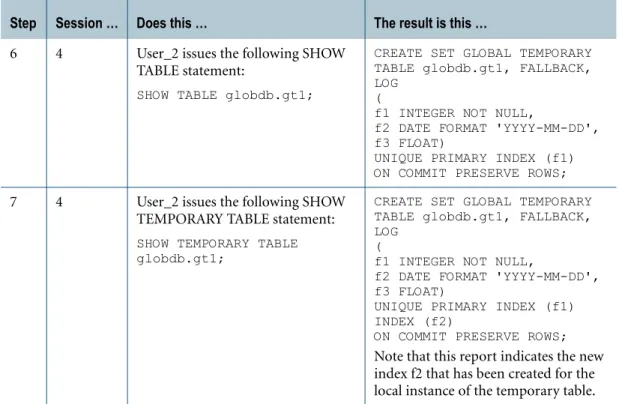
References to global temporary tables are not permitted in FastLoad, MultiLoad, or 6 4 User_2 issues the following SHOW
TABLE statement:
SHOW TABLE globdb.gt1;
CREATE SET GLOBAL TEMPORARY TABLE globdb.gt1, FALLBACK, LOG
(
f1 INTEGER NOT NULL,
f2 DATE FORMAT 'YYYY-MM-DD', f3 FLOAT)
UNIQUE PRIMARY INDEX (f1) ON COMMIT PRESERVE ROWS;
7 4 User_2 issues the following SHOW TEMPORARY TABLE statement:
SHOW TEMPORARY TABLE globdb.gt1;
CREATE SET GLOBAL TEMPORARY TABLE globdb.gt1, FALLBACK, LOG
(
f1 INTEGER NOT NULL,
f2 DATE FORMAT 'YYYY-MM-DD', f3 FLOAT)
UNIQUE PRIMARY INDEX (f1) INDEX (f2)
ON COMMIT PRESERVE ROWS;
Note that this report indicates the new index f2 that has been created for the local instance of the temporary table.
Volatile Tables The Table Rebuild utility and the Archive/Recovery utility (with the exception of online archiving) operate on base global temporary tables only. Online archiving does not operate on temporary tables.
Non-ANSI Extensions
Transient journaling options on the global temporary table definition are permitted using the CREATE TABLE statement.
You can modify the transient journaling and ON COMMIT options for base global temporary tables using the ALTER TABLE statement.
Privileges Required
To materialize a global temporary table, you must have the appropriate privilege on the base global temporary table or on the containing database or user as required by the statement that materializes the table.
No access logging is performed on materialized global temporary tables, so no access log entries are generated.
Volatile Tables
Creating Volatile Tables
Neither the definition nor the contents of a volatile table persist across a system restart. You must use CREATE TABLE with the VOLATILE keyword to create a new volatile table each time you start a session in which it is needed.
What this means is that you can create volatile tables as you need them. Being able to create a table quickly provides you with the ability to build scratch tables whenever you need them. Any volatile tables you create are dropped automatically as soon as your session logs off. Volatile tables are always created in the login user space, regardless of the current default database setting. That is, the database name for the table is the login user name. Space usage is charged to login user spool space. Each user session can materialize as many as 1000 volatile tables at a time.
Limitations
The following CREATE TABLE options are not permitted for volatile tables:
• Permanent journaling
• Referential integrity constraints
This means that a volatile table cannot be the referencing or referenced table in a referential integrity constraint.
• Check constraints
Volatile Tables
• DEFAULT clause
• TITLE clause
• Named indexes
References to volatile tables are not permitted in FastLoad or MultiLoad. For more information, see “CREATE TABLE” in SQL Data Definition Language.
Non-ANSI Extensions
Volatile tables are not defined in ANSI.
Privileges Required
To create a volatile table, you do not need any privileges.
No access logging is performed on volatile tables, so no access log entries are generated.
Volatile Table Maintenence Among Multiple Sessions
Volatile tables are private to a session. This means that you can log on multiple sessions and create volatile tables with the same name in each session.
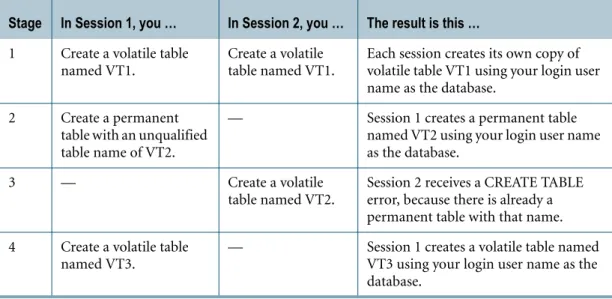
However, at the time you create a volatile table, the name must be unique among all global and permanent temporary table names in the database that has the name of the login user. For example, suppose you log on two sessions, Session 1 and Session 2. Assume the default database name is your login user name. Consider the following scenario.
Stage In Session 1, you … In Session 2, you … The result is this …
1 Create a volatile table named VT1.
Create a volatile table named VT1.
Each session creates its own copy of volatile table VT1 using your login user name as the database.
2 Create a permanent table with an unqualified table name of VT2.
— Session 1 creates a permanent table named VT2 using your login user name as the database.
3 — Create a volatile
table named VT2.
Session 2 receives a CREATE TABLE error, because there is already a permanent table with that name. 4 Create a volatile table
named VT3.
— Session 1 creates a volatile table named VT3 using your login user name as the database.
Columns
Columns
Definition
A column is a structural component of a table and has a name and a declared type. Each row in a table has exactly one value for each column. Each value in a row is a value in the declared type of the column. The declared type includes nulls and values of the declared type.
Defining Columns
The column definition clause of the CREATE TABLE statement defines the table column elements.
A name and a data type must be specified for each column defined for a table.
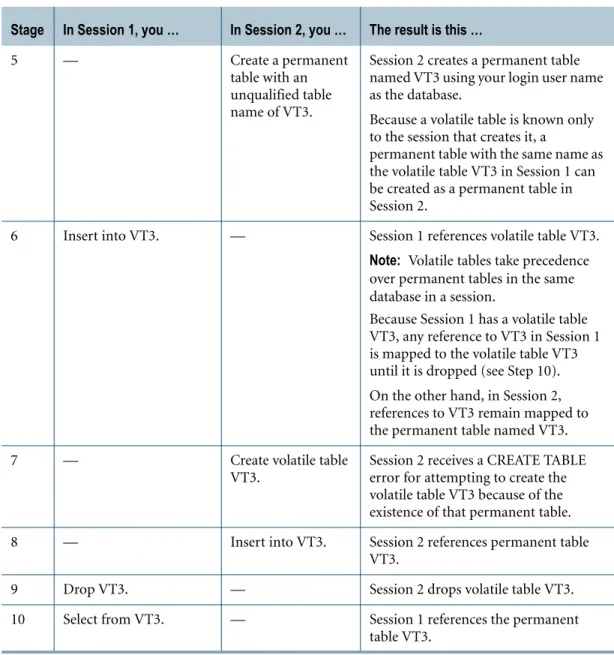
5 — Create a permanent
table with an unqualified table name of VT3.
Session 2 creates a permanent table named VT3 using your login user name as the database.
Because a volatile table is known only to the session that creates it, a
permanent table with the same name as the volatile table VT3 in Session 1 can be created as a permanent table in Session 2.
6 Insert into VT3. — Session 1 references volatile table VT3.
Note: Volatile tables take precedence over permanent tables in the same database in a session.
Because Session 1 has a volatile table VT3, any reference to VT3 in Session 1 is mapped to the volatile table VT3 until it is dropped (see Step 10). On the other hand, in Session 2, references to VT3 remain mapped to the permanent table named VT3.
7 — Create volatile table
VT3.
Session 2 receives a CREATE TABLE error for attempting to create the volatile table VT3 because of the existence of that permanent table. 8 — Insert into VT3. Session 2 references permanent table
VT3.
9 Drop VT3. — Session 2 drops volatile table VT3.
10 Select from VT3. — Session 1 references the permanent table VT3.
Columns
Here is an example that creates a table called employee with three columns:
CREATE TABLE employee (deptno INTEGER ,name CHARACTER(23) ,hiredate DATE);
Each column can be further defined with one or more optional attribute definitions. The following attributes are also elements of the SQL column definition clause:
• Data type attribute declaration, such as NOT NULL, FORMAT, TITLE, and CHARACTER SET
• COMPRESS column storage attributes clause
• DEFAULT and WITH DEFAULT default value control clauses
• PRIMARY KEY, UNIQUE, REFERENCES, and CHECK column constraint attributes clauses
Here is an example that defines attributes for the columns in the employee table:
CREATE TABLE employee (deptno INTEGER NOT NULL
,name CHARACTER(23) CHARACTER SET LATIN ,hiredate DATE DEFAULT CURRENT_DATE);
System-Derived and System-Generated Columns
In addition to the table columns that you define, tables contain columns that Teradata Database generates or derives dynamically.
Column Description
Identity A column that was specified with the GENERATED ALWAYS AS IDENTITY or GENERATED BY DEFAULT AS IDENTITY option in the table definition. Object Identifier
(OID)
For a table that has LOB columns, OID columns store pointers to subtables that store the actual LOB data.
PARTITION For a table that is defined with a partitioned primary index (PPI), the PARTITION column provides the partition number of the combined partitioning expression associated with a row, where the combined
partitioning expression is derived from the partitioning expressions defined for each level of the PPI. This is zero for a table that does not have a PPI. For more information on PPIs, see “Partitioned and Nonpartitioned Primary Indexes” on page 36.
PARTITION#L1 through
PARTITION#L15
For tables that are defined with a multilevel PPI, these columns provide the partition number associated with the corresponding level. These are zero for a table that does not have a PPI and zero if the level is greater than the number of partitions.
ROWID Contains the row identifier value that uniquely identifies the row. For more information on row identifiers, see “Row Hash and RowID” on page 33.
Data Types Restrictions apply to using the system-derived and system-generated columns in SQL
statements. For example, you can use the keywords PARTITION and PARTITION#L1 through PARTITION#L15 in a query where a table column can be referenced, but you can only use the keyword ROWID in a CREATE JOIN INDEX statement.
Related Topics
Data Types
Introduction
Every data value belongs to an SQL data type. For example, when you define a column in a CREATE TABLE statement, you must specify the data type of the column.
The set of data values that a column defines can belong to one of the following groups of data types:
Numeric Data Types
A numeric value is either an exact numeric number (integer or decimal) or an approximate numeric number (floating point). Use the following SQL data types to specify numeric values.
For more information on … See …
data types “Data Types” on page 27.
CREATE TABLE and the column definition clause SQL Data Definition Language. system-derived and system-generated columns Database Design.
• Numeric • Character • Datetime • Interval • Byte • UDT • Period • Geospatial Type Description
BIGINT Represents a signed, binary integer value from
-9,223,372,036,854,775,808 to 9,223,372,036,854,775,807. INTEGER Represents a signed, binary integer value from -2,147,483,648 to
2,147,483,647.
SMALLINT Represents a signed binary integer value in the range -32768 to 32767. BYTEINT Represents a signed binary integer value in the range -128 to 127.
Data Types
Character Data Types
Character data types represent characters that belong to a given character set. Use the following SQL data types to specify character data.
DateTime Data Types
DateTime values represent dates, times, and timestamps. Use the following SQL data types to specify DateTime values.
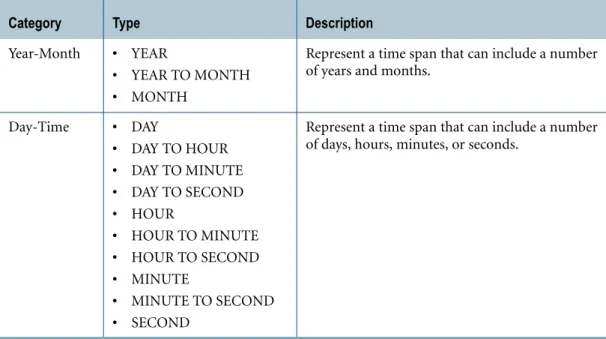
Interval Data Types
An interval value is a span of time. There are two mutually exclusive interval type categories. REAL Represent a value in sign/magnitude form.
DOUBLE PRECISION FLOAT
DECIMAL [(n[,m])] Represent a decimal number of n digits, with m of those n digits to the right of the decimal point.
NUMERIC [(n[,m])]
Type Description
Type Description
CHAR[(n)] Represents a fixed length character string for Teradata Database internal character storage.
VARCHAR(n) Represents a variable length character string of length n for Teradata Database internal character storage.
LONG VARCHAR LONG VARCHAR specifies the longest permissible variable length character string for Teradata Database internal character storage. CLOB Represents a large character string. A character large object (CLOB)
column can store character data, such as simple text, HTML, or XML documents.
Type Description
DATE Represents a date value that includes year, month, and day components. TIME [WITH TIME
ZONE]
Represents a time value that includes hour, minute, second, fractional second, and [optional] time zone components.
TIMESTAMP [WITH TIIME ZONE]
Represents a timestamp value that includes year, month, day, hour, minute, second, fractional second, and [optional] time zone components.
Data Types
Byte Data Types
Byte data types store raw data as logical bit streams. For any machine, BYTE, VARBYTE, and BLOB data is transmitted directly from the memory of the client system.
BLOB is ANSI SQL:2008-compliant. BYTE and VARBYTE are Teradata extensions to the ANSI SQL:2008 standard.
UDT Data Types
UDT data types are custom data types that you define to model the structure and behavior of data that your application deals with. Teradata Database supports distinct and structured
UDTs.
Category Type Description
Year-Month • INTERVAL YEAR
• INTERVAL YEAR TO MONTH
• INTERVAL MONTH
Represent a time span that can include a number of years and months.
Day-Time • INTERVAL DAY
• INTERVAL DAY TO HOUR
• INTERVAL DAY TO MINUTE
• INTERVAL DAY TO SECOND
• INTERVAL HOUR
• INTERVAL HOUR TO MINUTE
• INTERVAL HOUR TO SECOND
• INTERVAL MINUTE
• INTERVAL MINUTE TO SECOND
• INTERVAL SECOND
Represent a time span that can include a number of days, hours, minutes, or seconds.
Type Description
BYTE Represents a fixed-length binary string. VARBYTE Represents a variable-length binary string.
BLOB Represents a large binary string of raw bytes. A binary large object (BLOB) column can store binary objects, such as graphics, video clips, files, and documents.
Type Description
Distinct A UDT that is based on a single predefined data type, such as INTEGER or VARCHAR.
Structured A UDT that is a collection of one or more fields called attributes, each of which is defined as a predefined data type or other UDT (which allows nesting).
Data Types
For more details on UDTs, including a synopsis of the steps you take to develop and use UDTs,
see “User-Defined Types” on page 74.
Period Data Types
A period data type represents a set of contiguous time granules that extends from a beginning bound up to but not including an ending bound.
Geospatial Data Types
Geospatial data types provide a way for applications that manage, analyze, and display geographic information to interface with Teradata Database. Use the following data types to represent geographic information.
Type Description
PERIOD(DATE) Represents an anchored duration of DATE elements that include year, month, and day components.
PERIOD(TIME[(n)] [WITH TIME ZONE])
Represents an anchored duration of TIME elements that include hour, minute, second, fractional second, and [optional] time zone components.
PERIOD(TIMESTAMP[(n)] [WITH TIME ZONE])
Represents an anchored duration of TIMESTAMP elements that include year, month, day, hour, minute, second, fractional second, and [optional] time zone components.
Data Types
The implementation of the ST_Geometry type closely follows ISO/IEC 13249-3, Information technology — Database languages — SQL Multimedia and Application Packages — Part 3: Spatial, referred to as SQL/MM Spatial. The GeoSequence and MBR types are extensions to SQL/MM Spatial.
Related Topics
For detailed information on data types, see SQL Data Types and Literals and SQL Geospatial Types.
Type Description
ST_Geometry A Teradata proprietary internal UDT that can represent any of the following geospatial types:
Type Description
ST_Point 0-dimensional geometry that represents a single location in two-dimensional coordinate space.
ST_LineString 1-dimensional geometry usually stored as a sequence of points with a linear interpolation between points. ST_Polygon 2-dimensional geometry consisting of one exterior
boundary and zero or more interior boundaries, where each interior boundary defines a hole.
ST_GeomCollection Collection of zero or more ST_Geometry values. ST_MultiPoint 0-dimensional geometry collection where the elements
are restricted to ST_Point values.
ST_MultiLineString 1-dimensional geometry collection where the elements are restricted to ST_LineString values.
ST_MultiPolygon 2-dimensional geometry collection where the elements are restricted to ST_Polygon values.
ST_Geometry
(continued) Type Description
GeoSequence Extension of ST_LineString that can contain tracking information, such as time stamps, in addition to geospatial information.
The ST_Geometry type supports methods for performing geometric calculations. MBR A Teradata proprietary internal UDT that provides a way to obtain the minimum
Keys
Keys
Definitions
Keys and Referential Integrity
Teradata Database uses primary and foreign keys to maintain referential integrity. For additional information, see “Referential Integrity” on page 53.
Effect on Row Distribution
Because Teradata Database uses a unique primary or secondary index to enforce a primary key, the primary key can affect how Teradata Database distributes and retrieves rows. For more information, see “Primary Indexes” on page 38 and “Secondary Indexes” on page 42.
Differences Between Primary Keys and Primary Indexes
The following table summarizes the differences between keys and indexes using the primary key and primary index for purposes of comparison.
Term Definition
Primary Key
A primary key is a column, or combination of columns, in a table that uniquely identifies each row in the table. The values defining a primary key for a table:
• Must be unique
• Cannot change
• Cannot be null Foreign
Key
A foreign key is a column, or combination of columns, in a table that is also the primary key in one or more additional tables in the same database. Foreign keys provide a mechanism to link related tables based on key values.
Primary Key Primary Index
Important element of logical data model. Not used in logical data model. Used to maintain referential integrity. Used to distribute and retrieve data. Must be unique to identify each row. Can be unique or nonunique.
Values cannot change. Values can change.
Cannot be null. Can be null.
Does not imply access path. Defines the most common access path. Not required for physical table definition. Required for physical table definition.
Indexes
Indexes
Definition
An index is a mechanism that the SQL query optimizer can use to make table access more performant. Indexes enhance data access by providing a more-or-less direct path to stored data to avoid performing full table scans to locate the small number of rows you typically want to retrieve or update.
The Teradata Database parallel architecture makes indexing an aid to better performance, not a crutch necessary to ensure adequate performance. Full table scans are not something to be feared in the Teradata Database environment. This means that the sorts of unplanned, ad hoc queries that characterize the data warehouse process, and that often are not supported by indexes, perform very effectively for Teradata Database using full table scans.
Difference Between Classic Indexes and Teradata Database Indexes
The classic index for a relational database is itself a file made up of rows having two parts:
• A (possibly unique) data field in the referenced table.
• A pointer to the location of that row in the base table (if the index is unique) or a pointer to all possible locations of rows with that data field value (if the index is nonunique). Because Teradata Database is a massively parallel architecture, it requires a more efficient means of distributing and retrieving its data. One such method is hashing. All Teradata Database indexes are based on row hash values rather than raw table column values, even though secondary, hash, and join indexes can be stored in order of their values to make them more useful for satisfying range conditions.
Selectivity of Indexes
An index that retrieves many rows is said to have weak selectivity. An index that retrieves few rows is said to be strongly selective.
The more strongly selective an index is, the more useful it is. In some cases, it is possible to link together several weakly selective nonunique secondary indexes by bit mapping them. The result is effectively a strongly selective index and a dramatic reduction in the number of table rows that must be accessed.
For more information on linking weakly selective secondary indexes into a strongly selective unit using bit mapping, see “NUSI Bit Mapping” on page 45.
Row Hash and RowID
Teradata Database table rows are self-indexing with respect to their primary index and so require no additional storage space. When a row is inserted into a table, Teradata Database stores the 32-bit row hash value of the primary index with it.
Because row hash values are not necessarily unique, Teradata Database also generates a unique 32-bit numeric value (called the Uniqueness Value) that it appends to the row hash value,
Indexes
forming a unique RowID. This RowID makes each row in a table uniquely identifiable and ensures that hash collisions do not occur.
If a table is defined with a partitioned primary index (PPI), the RowID also includes the combined partition number to which the row is assigned, where the combined partition number is derived from the partition numbers for each level of the PPI. For more information on PPIs, see “Partitioned and Nonpartitioned Primary Indexes” on page 36.
A RowID for a row might change, for instance, when a primary index or partitioning column is changed, or when there is complex update of the table.
Index Hash Mapping
Rows are distributed across the AMPS using a hashing algorithm that computes a row hash value based on the primary index. The row hash is a 32-bit value. Depending on the system setting for the hash bucket size, either the higher-order 16 bits or the higher-order 20 bits of a hash value determine an associated hash bucket.
Normally, the hash bucket size is 20 bits for new systems. If you are upgrading from an older release, the hash bucket size may be 16 bits. If a 20-bit hash bucket size is more appropriate for the size of a system, you can use the DBS Control Utility to change the system setting for the hash bucket size. For details, see “DBS Control utility” in Utilities.
The hash buckets are distributed as evenly as possible among the AMPs on a system.
For tables with no PPI … For tables with a PPI …
For tables with no PPI, the first row having a specific row hash value is always assigned a uniqueness value of 1, which becomes the current high uniqueness value. Each time another row having the same row hash value is inserted, the current high value increments by 1, and that value is assigned to the row.
For tables defined with a PPI, the first row having a specific combined partition number and row hash value is always assigned a uniqueness value of 1, which becomes the highest current uniqueness value. Each time another row having the same combined partition number and row hash value is inserted, the current high value increments by 1, and that value is assigned to the row.
Table rows having the same row hash value are stored on disk sorted in the ascending order of RowID.
Uniqueness values are not reused except for the special case in which the highest valued row within a row hash is deleted from a table.
Table rows having the same combined partition number and row hash value are stored on disk sorted in the ascending order of RowID. Uniqueness values are not reused except for the special case in which the highest valued row within a combined partition number and row hash is deleted from a table.
IF the hash bucket size is … THEN the number of hash buckets is …
16 bits 65536.
Indexes Teradata Database maintains a hash map—an index of which hash buckets live on which AMPs—that it uses to determine whether rows belong to an AMP based on their row hash values. Row assignment is performed in a manner that ensures as equal a distribution as possible among all the AMPs on a system.
Advantages of Indexes
The intent of indexes is to lessen the time it takes to retrieve rows from a database. The faster the retrieval, the better.
Disadvantages of Indexes
Perhaps not so obvious is the disadvantage of using indexes.
• They must be updated every time a row is updated, deleted, or added to a table. This is only a consideration for indexes other than the primary index in the Teradata Database environment. The more indexes you have defined for a table, the bigger the potential update downside becomes.
Because of this, secondary, join, and hash indexes are rarely appropriate for OLTP situations.
• All Teradata Database secondary indexes are stored in subtables, and join and hash indexes are stored in separate tables, exerting a burden on system storage space.
• When FALLBACK is defined for a table, a further storage space burden is created because secondary index subtables are always duplicated whenever FALLBACK is defined for a table. An additional burden on system storage space is exerted when FALLBACK is defined for join indexes or hash indexes or both.
For this reason, it is extremely important to use the EXPLAIN modifier to determine
optimum data manipulation statement syntax and index usage before putting statements and indexes to work in a production environment. For more information on EXPLAIN, see SQL Data Manipulation Language.
Teradata Database Index Types
Teradata Database provides four different index types:
• Primary index
All Teradata Database tables require a primary index because the system distributes tables on their primary indexes. Primary indexes can be:
• Unique or nonunique
• Partitioned or nonpartitioned
• Secondary index
Secondary indexes can be unique or nonunique.
• Join index (JI)
Indexes
Unique Indexes
A unique index, like a primary key, has a unique value for each row in a table. Teradata Database defines two different types of unique index.
• Unique primary index (UPI)
UPIs provide optimal data distribution and are typically assigned to the primary key for a table. When a NUPI makes better sense for a table, then the primary key is frequently assigned to be a USI.
• Unique secondary index (USI)
USIs guarantee that each complete index value is unique, while ensuring that data access based on it is always a two-AMP operation.
Nonunique Indexes
A nonunique index does not require its values to be unique. There are occasions when a nonunique index is the best choice as the primary index for a table.
NUSIs are also very useful for many decision support situations.
Partitioned and Nonpartitioned Primary Indexes
Primary indexes can be partitioned or nonpartitioned.
A nonpartitioned primary index (NPPI) is the traditional primary index by which rows are assigned to AMPs.
A partitioned primary index (PPI) allows rows to be partitioned, based on some set of columns, on the AMP to which they are distributed, and ordered by the hash of the primary index columns within the partition.
A PPI can improve query performance through partition elimination. A PPI provides a useful alternative to an NPPI for executing range queries against a table, while still providing efficient access, join, and aggregation strategies on the primary index.
A multilevel PPI allows each partition at a level to be subpartitioned based on a partitioning expression, where the maximum number of levels is 15.
A multilevel PPI provides multiple access paths to the rows in the base table and can improve query performance through partition elimination at each of the various levels or combination of levels.
A PPI can only be defined as unique if all the partitioning columns are included in the set of primary index columns.
Join Indexes
A join index is an indexing structure containing columns from one or more base tables and is generally used to resolve queries and eliminate the need to access and join the base tables it represents.
Indexes Teradata Database join indexes can be defined in the following general ways.
• Simple or aggregate
• Single-table or multitable
• Hash-ordered or value-ordered
• Complete or sparse
For details, see “Join Indexes” on page 36.
Hash Indexes
Hash indexes are used for the same purposes as are single-table join indexes, and are less complicated to define. However, a join index offers more choices.
For additional information, see “Hash Indexes” on page 37.
Creating Indexes For a Table
Use the CREATE TABLE statement to define a primary index and one or more secondary indexes. (You can also define secondary indexes using the CREATE INDEX statement.) You can define the primary index (and any secondary index) as unique, depending on whether duplicate values are to be allowed in the indexed column set. A partitioned primary index cannot be defined as unique if one or more partitioning columns are not included in the primary index.
To create hash or join indexes, use the CREATE HASH INDEX and CREATE JOIN INDEX statements, respectively.
Determining the Usefulness of Indexes
The selection of indexes to support a query is not under user control. You cannot provide the Teradata Database query optimizer with pragmas or hints, nor can you specify resource options or control index locking.
The only references made to indexes in the SQL language concern their definition and not
their use. Teradata SQL data manipulation language statements do not provide for any specification of indexes.
There are several implications of this behavior.
• To ensure that the optimizer has access to current information about how to best optimize any query or update made to the database, you must use the COLLECT STATISTICS statement to collect statistics regularly on all indexed columns, all frequently joined columns, and all columns frequently specified in query predicates.
You can use the Teradata Statistics Wizard client utility to recommend which columns and indexes to collect statistics on for particular query workloads. The Statistics Wizard also recommends when to recollect statistics.
Primary Indexes
• To ensure that your queries access your data in the most efficient manner possible:
• Use the EXPLAIN request modifier or the Teradata Visual Explain client utility to try out various candidate queries or updates and to note which indexes are used by the optimizer in their execution (if any) as well as to examine the relative cost of the operation.
• Use the Teradata Index Wizard client utility to recommend and validate sets of secondary indexes, single-table join indexes, and PPIs for a given query workload.
Primary Indexes
Introduction
The primary index for a table controls the distribution and retrieval of the data for that table across the AMPs. Both distribution and retrieval of the data is controlled using the Teradata Database hashing algorithm (see “Row Hash and RowID” on page 33 ).
If the primary index is defined as a partitioned primary index (PPI), the data is partitioned, based on some set of columns, on each AMP, and ordered by the hash of the primary index columns within the partition.
Data accessed based on a primary index is always a one-AMP operation because a row and its index are stored on the same AMP. This is true whether the primary index is unique or nonunique, and whether it is partitioned or nonpartitioned.
Primary Index Assignment
In general, most Teradata Database tables require a primary index. (Some tables in the data dictionary do not have primary indexes and a global temporary trace table is not allowed to have a primary index.) To create a primary index, use the CREATE TABLE statement.
For more information on … See …
using the EXPLAIN request modifier SQL Data Manipulation Language
using the Teradata Visual Explain client utility Teradata Visual Explain User Guide
additional performance-related information about how to use the access and join plan reports produced by EXPLAIN to optimize the
performance of your databases
• Database Design
• Performance Management
using the Teradata Index Wizard client utility • Teradata Index Wizard User Guide
• SQL Request and Transaction Processing
collecting and maintaining accurate database statistics
“COLLECT STATISTICS” in SQL Data Definition Language
Primary Indexes If you do not assign a primary index explicitly when you create a table, Teradata Database assigns a primary index, based on the following rules.
In general, the best practice is to specify a primary index instead of having Teradata Database select a default primary index.
Uniform Distribution of Data and Optimal Access Considerations
When choosing the primary index for a table, there are two essential factors to keep in mind: uniform distribution of the data and optimal access.
With respect to uniform data distribution, consider the following factors:
• The more distinct the primary index values, the better.
• Rows having the same primary index value are distributed to the same AMP.
• Parallel processing is more efficient when table rows are distributed evenly across the AMPs.
With respect to optimal data access, consider the following factors:
• Choose the primary index on the most frequently used access path. For example:
• If rows are generally accessed by a range query, consider defining a PPI on the table that creates a useful set of partitions.
• If the table is frequently joined with a specific set of tables, consider defining the primary index on the column set that is typically used as the join condition.
• Primary index operations must provide the full primary index value.
• Primary index retrievals on a single value are always one-AMP operations.
Although it is true that the columns you choose to be the primary index for a table are often the same columns that define the primary key, it is also true that primary indexes often comprise fields that are neither unique nor components of the primary key for the table.
WHEN a CREATE TABLE statement defines a …
THEN Teradata Database selects the … Primary
Index Primary Key Unique Column Constraint
no YES no primary key column set to be a UPI.
no no YES first column or columns having a UNIQUE
constraint to be a UPI.
no YES YES primary key column set to be a UPI.
no no no first column defined for the table to be a NUPI.
If the data type of the first column in the table is UDT or LOB, then the CREATE TABLE operation aborts and the system returns an error message.