Performance on Sybase
®
Devices Using
Direct I/O, Dsync and Raw Partition
DHIMANT CHOKSHI
SERVER PERFORMANCE ENGINEERING AND DEVELOPMENT GROUP SYBASE, INC.
TABLE OF CONTENTS 1 1.0 Introduction 1 2.0 Asynchronous I/O 2 3.0 Synchronous I/O 2 4.0 Dsync writes
3 DBCC Tablealloc test 3 5.0 Direct I/O
1.0INTRODUCTION
Sybase Adaptive Server® Enterprise 15.0 substantially enhances a database platform already known for its superior performance, reliability, and low total cost of ownership (TCO). Prior to ASE 15, it was recommended that the dsync setting be turned on for devices initialized on UNIX operating system files. The dsync flag ensures that writes to the device file occur directly on the physical storage media, and Adaptive Server can recover data on the device in the event of a system failure. This functionality, however, yields much slower performance during write operations, when compared to using raw partitions.
In ASE 15, the directio parameter allows you to configure Adaptive Server to transfer data directly to disk, bypassing the operating system buffer cache. directio performs IO in the same manner as raw devices and provides the same performance benefit as raw devices (significantly better than dsync), but has the ease of use and manageability of file system devices.
Note: The directio and dsync parameters are mutually exclusive. If a device has dsync set to “true,” you cannot set directio to “true” for this device. To enable directio for a device, you must first reset dsync to “false.”
Following few sections explains Asynchronous, and Synchronous system calls, as well as direct I/O and write with Dsync option.
2.0ASYNCHRONOUS I/O
Asynchronous I/O allows the process issuing the I/O to continue executing while OS completes the request. Dataserver process does not block on this request till its completion. Following figure shows how Adaptive server works with asynchronous I/O.
dataserver O/S
call to aiowrite() aiowrite() returns issue
write
write started
Poll for I/O completion
aiowait()
write return I/O status Dataserver does
other work while I/O is in progress
3.0SYNCHRONOUS I/O
Synchronous I/O blocks the I/O issuing process from continuing executing while OS completes the request. The process is blocked till the request is completed. This generally results in poor throughput. Following figure shows how Adaptive Server works with synchronous I/O.
4.0DSYNC WRITES
For devices initialized on UNIX operating system files, the dsync setting controls whether or not writes to those files are buffered. When the dsync setting is on, Adaptive Server opens a database device file using the UNIX dsync flag. The dsync flag ensures that writes to the device file occur directly on the physical storage media, and Adaptive Server can recover data on the device in the event of a system failure.
Use of dsync option with database device files incurs the following performance trade-offs:
• If database device files on these platforms use the dsync option, the Adaptive Server engine writing to the device file blocks until the write operation completes. This can cause poor performance during update operations • Response time for read operations is generally better for devices stored on UNIX operating system files as
compared to devices stored on raw partitions. Data from device files can benefit from the UNIX file system cache as well as the Adaptive Server cache, and more reads may take place without requiring physical disk access. Following figure shows how Adaptive server works when dsync setting is turned on.
dataserver O/S
call to write()
write() returns issue write write started continue write complete Dataserver blocks
waiting for I/O Perform I/O
dataserver O/S
call to aiowrite() aiowrite() returns issue
write
write started
Poll for I/O completion aiowait() write complete return I/O status Dataserver does
other work while I/O is in progress
Perform I/O in a different context
Note: Dsync option is useful in Intel 32bit platforms where system can support up to 64G memory but only 4G can be address by ASE. In such scenario, customers can use file system to cache the data in the remaining memory not used by ASE. But with DIRECTIO and Extended cache we can circumvent the problem and use the memory given to the FS by ASE. This is not applicable to 64bit platform hence Direct I/O is always the preferred way.
DBCC Tablealloc test
Following chart shows advantage of using dsync option on file system devices for read operation. In this test, Dbcc tablealloc command is executed against Sybase file system devices with direct IO, and devices with dsync options enabled. Dbcc Tablealloc reads and checks the pages from specified table or data partition to see that all the pages are correctly allocated and that no page that is allocated is not used. With dsync option enabled, response time is 96 seconds, while with direct IO option, response time is 386 seconds.
5.0DIRECT I/O
Direct I/O is the feature of the file system in which writes directly goes to the storage device, bypassing the operating system buffer cache. Direct I/O is invoked by opening a file with O_DIRECT flag. On Solaris™ platform, directio() system call is used after the normal open() call to open file system device. The direct I/O parameter is used with disk init, disk reinit, and sp_deviceattr commands. Direct I/O performs IO in the same manner as raw devices and provides the same performance benefit as raw devices.
1. ASE requires dirty page in ASE data cache be written written written.
2. ASE issues a write on that page. Write goes directly to disk, bypassing the FS cache
3. Write returns when data hits the disk.
Note: Direct IO, as well as dsync options should not be used for tempdb devices, as recovery is not important for tempdb. 400 350 300 250 200 150 100 50 0 S e co n d s Table Alloc Dsync Direct IO 1. Request write ASE Data Cache
2. Issue write on dirty 3. Write returns
success
File on Disk ASE
Following few charts shows performance improvement of various commands using Direct IO over Dsync option. Summary of all the results are shown in section 9.0.
Reorg Rebuild test
Following chart shows the performance of Reorg-Rebuild test on devices with Direct IO option, and Dsync option enabled. Rebuilding the index to compact the index space and improve the clustering ratio is a typical operation in any database environment. Direct IO provides 90% performance improvement when executing the reorg-rebuild on a table of 24 million rows with clustered index and a non-clustered index. This performance improvement is
attributable to write operations bypassing the operating system buffer cache.
Create Database Test
Create Database operation initializes 256 pages of writes at a time, which amounts to 512k for page size 2k and up to 4 MB for page size of 16K. This allows for full use of the I/O bandwidth of the underlying devices. With Direct IO option, create database command for a 25 GB of database takes 7 minutes compare to 4.5 hours with Dsync option.
Summary of IO Operations
6.0SUPPORTED PLATFORMS
Following chart shows supported platforms for Direct IO.
7.0PERFORMANCE
To analyze the I/O performance on various Sybase devices, TPCH benchmark suite with dbscale of 15 has been used to populate the database. Total database size is 24 GB. Most of the commands used in this benchmark test are I/O oriented.
8.0CONFIGURATION
8.1System Configuration
Feature/Major benefits Version
Asynchronous I/O Allows OS control/no database
interfering
ASE 12.5, ASE15.0
Synchronous I/O IO issuing process is blocked while OS
is executing the IO
ASE 12.5, ASE 15.0
Dsync writes Writes to the device occur directly to
media storage. Recovery is ensured in case of failure
ASE 12.5, ASE 15.0/UNIX only
Direct I/O Bypasses the OS buffer cache.
Provides better write performance
ASE 15.0
Direct I/O Dsync Raw Partition
Solaris SPARC 2-bit/64 bit yes yes yes
IBM® AIX 64 bit yes yes yes
Windows® x86 yes yes yes
Linux® x86 yes yes yes
HP-UX PA-RISC 64 bit No yes yes
Server Machine Sun-Fire-V490
Total Memory 16 GB
# of CPUS 8 X 1050 MHz
8.2ASE 15.0 configuration
ASE 15.0 server is built with 4k page size. In all three tests, ASE 15.0 server configuration is kept identical. Most of the configuration parameters are kept to default value except shown in the table.
9.0RESULTS
All the results are measured in seconds. All the commands used in this benchmark are shown in Appendix A.
9.1Performance comparison between Direct I/O and devices with dsync on
Results are categorized in three sections. In first section, results of the read only commands are shown. In second section, results of the commands that perform read and write operations are shown. And in the third section, results of the commands that perform write operations are illustrated.
9.1.1 Read operations Results
Performance for read operation is better when devices are opened with dsync option. Reads benefit from the UNIX file system cache as well as the Adaptive Server cache, and more reads may take place without requiring physical disk access.
Note: Response time for dbcc tablealloc command was 373 seconds, when executed after clearing file system cache. Data from file system cache was cleared by rebooting the machine.
Configuration Parameter Name Value
Max memory 4 GB
Cache size 3 GB
2k Buffer Pool 1.5 GB
16k Buffer Pool 1.5 GB
Disk I/O Structures 2048
Max network packet size 4096
Default network packet size 4096
Max async i/os per engine 2048
Max async i/os per server 2048
Max online engines 4
Procedure cache size 30000
Number of pre-allocated extents 31
Number of sort buffers 2000
Commands Dsync Direct IO Percentage Gain Comment
Dbcc Tablealloc 96 Seconds 381 Seconds -296% 24 million rows table
9.1.2 Read Write operations Results
9.1.3Write operations results
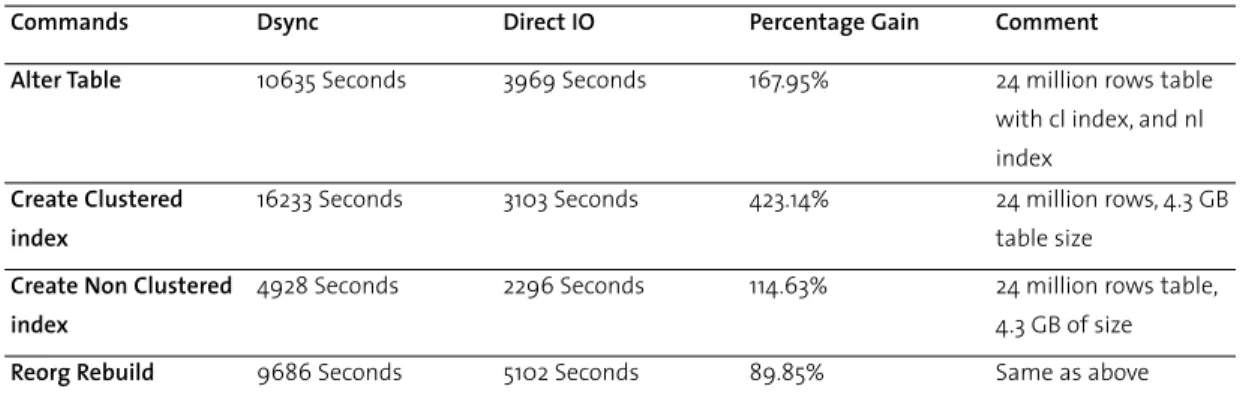
Results clearly demonstrates that commands performing only write operations to the storage device shows significant performance gain with direct IO, as it bypasses operating system buffer cache.
9.2Performance comparison between Direct I/O and Raw partition
Commands Dsync Direct IO Percentage Gain Comment
Alter Table 10635 Seconds 3969 Seconds 167.95% 24 million rows table
with cl index, and nl index
Create Clustered index
16233 Seconds 3103 Seconds 423.14% 24 million rows, 4.3 GB
table size
Create Non Clustered index
4928 Seconds 2296 Seconds 114.63% 24 million rows table,
4.3 GB of size
Reorg Rebuild 9686 Seconds 5102 Seconds 89.85% Same as above
Commands Dsync Direct IO Percentage Gain Comment
Create Database 16343 Seconds 440 Seconds 3614.32% Database size is 25 GB
BCP In 1073 Seconds 334 Seconds 221.26% 6 million rows
Insert 88.3 Seconds 18.8 Seconds 369.68% 100000 rows
Update 11 Seconds 10.4 Seconds 5.77% 10000 rows
Commands Direct I/O Raw Partitions % difference Comments
Create Database 440 Seconds 457 Seconds 3.86% Database size is 25 GB
Update Statistics 323 Seconds 343 Seconds 6.19% 24 million rows table
Alter Table 3969 Seconds 3699 Seconds 7.3% 24 million rows table
with cl index, and nl index
Reorg Rebuild 5102 Seconds 5181 Seconds 1.55% Same as above
Bcp In 334 Seconds 338 Seconds 1.2% 6 million rows
Insert 18.8 Seconds 19.2 Seconds 2.13% 100000 rows
Update 10.4 Seconds 9.2 Seconds 13.04%
Create clustered index 3103 Seconds 2799 Seconds -10.86% 24 million rows table
Create Non Clustered index
2296 Seconds 2224 Seconds -3.24% 24 million rows table,
10.0CONCLUSION
Direct I/O is one of the many features in ASE 15.0 that improves the performance significantly. Above results shows that direct I/O provides same performance benefit as raw devices, but has the ease of use and manageability of the file system devices. On Solaris platform, direct IO provides excellent performance gain over dsync option. The performance gain provided by direct IO varies from platform to platform.
APPENDIX A
1) Create database command
Create database tpcd on tpcd_dev1 = 10000, tpcd_dev2 = 10000 log on tpcd_log1 = 5000
2) Update Statistics command
Update statistics lineitem
3) Alter table command
Alter table lineitem lock datarows
4) Reorg command
Reorg rebuild lineitem
5) Create clustered index command
Create unique clustered index cl on lineitem(l_orderkey, l_linenumber)
6) Create non clustered index command
Create non clustered index nl on lineitem(l_suppkey, l_orderkey,l_extendedprice, l_discount,l_shipdate)
7) Update command
set rowcount 100000
update lineitem set l_comment = “xxxxxxxxxxxxxxxxxxxxxxxxxx”
8) BCP IN command
Bcp tpcd..line in line.out –Usa –P –b 20000 –c –A4096
9) Checkalloc command
Dbcc checkalloc(“tpcd”)
10) Tablealloc command