Document Version 1.2 Prepared by Dory Weiss, ITS Last Edited September 28, 2012 November 15, 2012
Regroup Design Blueprint
Executive Summary
The functionality to send Informational, Operational, and Official messages via the current Group Email application is being replaced with Regroup, a SaaS (Software as a Service) product that provides group mail, text and voice broadcast, email marketing, social media integration, and group management solutions. As a hosted service, Regroup staff are responsible for hardware and server administration, which reduces the maintenance burden for ITS. This design blueprint details the integration between ITS Applications and Regroup. Detailed information about the architecture and design of Regroup itself is available on the Regroup support website (http://help.regroup.com).
System Architecture
Architectural Design Approach
The move to a SaaS solution means that the Regroup application will provide the majority of the Group Email features previously provided by ITS Application custom code. For instance, email sending, group authorization, message tracking, and other key pieces of functionality are now provided by Regroup. ITS Applications will be responsible for ensuring that those pieces of the Regroup system meet all system requirements. Design work performed by ITS Applications will focus on the authentication and data pieces needed to integrate Regroup into the UT application environment.
The data used to generate email lists is owned by the appropriate business area—TRECS owns employee data, Registrar IT owns student data—therefore the design work for this project has focused on
converting the data provided by data owning areas into the format required by Regroup. In order to minimize the impact on data-owning areas, no changes to the interface between the new list generation process and the data owning areas have been made.
The design work assumes that no changes will be made by data-owning areas to underlying data
storage. However, consideration has been given to how the list generation process should change when student and employee data is no longer kept in Natural/ABABAS.
Architecture Design
ADABAS/mainframe
Regroup
Logon via custom Django front end for
Regroup site
Send email via email client
Regroup user
Regroup user Email Group
Recipient email client(s) Data load process
TED / person ID data Authentication Group membership data ( details in data integration diagram) .csv group membership
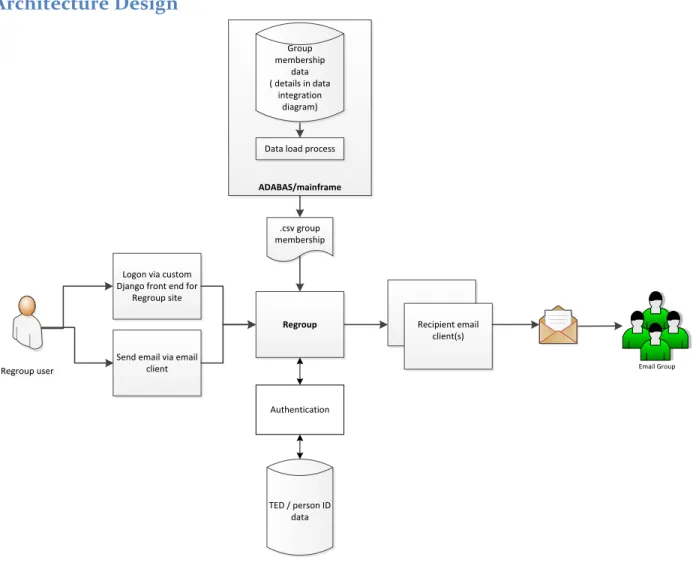
Figure 1 – High Level View of System Architecture
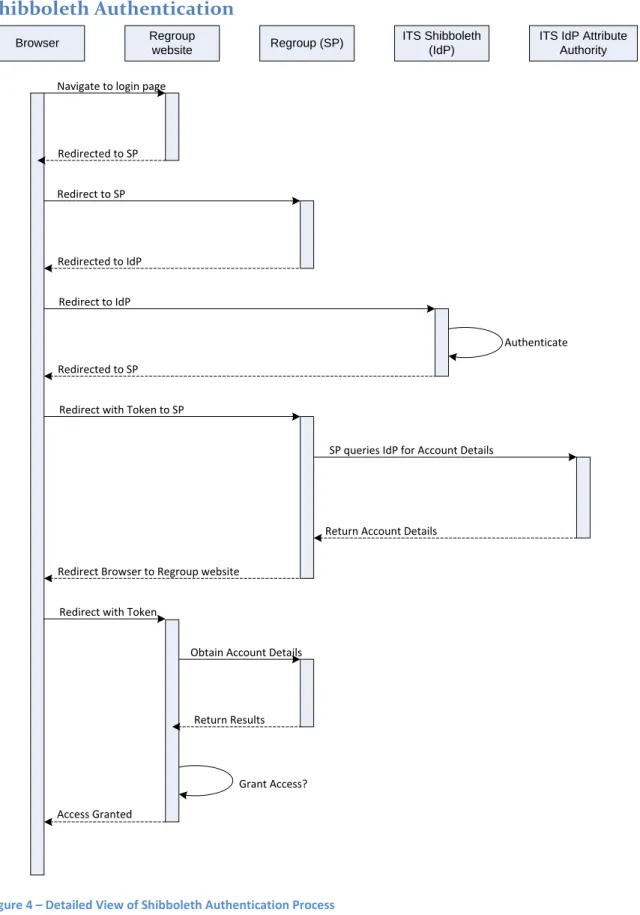
The integration with Regroup consists of a nightly process to generate and upload group membership data to Regroup via SFTP in the form of a .csv file. The list generation process resides on the mainframe and relies on secured modules provided by TRECS, Registrar IT, and ITS Applications Identity and Access Management team to provide email information for UT students and employees. The list generation process is loosely coupled to Regroup—the only dependency between the two processes is that a dataset of recipient emails must be sent to Regroup in the expected format. This will allow the list-generation process to be replaced as the data-providing systems are moved into new technologies. Users will access the Regroup web application through a Python/Django login page provided by ITS, and authorization to use the Regroup web application will be determined by a Shibboleth query of
TED. Users may send email via the Regroup web application or by sending a message from their email client to a Regroup email address. Additional Regroup functionality (i.e., tracking a message, viewing a message archive, etc.) is available via the web application.
List Generation
Mainframe/ Adabas Batch Jobgroup Sort dataset Regroup Dataset ID > Regroup Group ID table Read datasets andcreate dataset of all EID + group ID
Build CSV, retrieving name from T3N$ELKP and email
from T4N$EADR
Group ID data
SFTP
Administrative/ Outside areas Batch process(es)
build datasets of STUDENT email lists
nightly Batch process(es) build datasets of EMPLOYEE email lists nightly GDS Group IDs created by Regroup
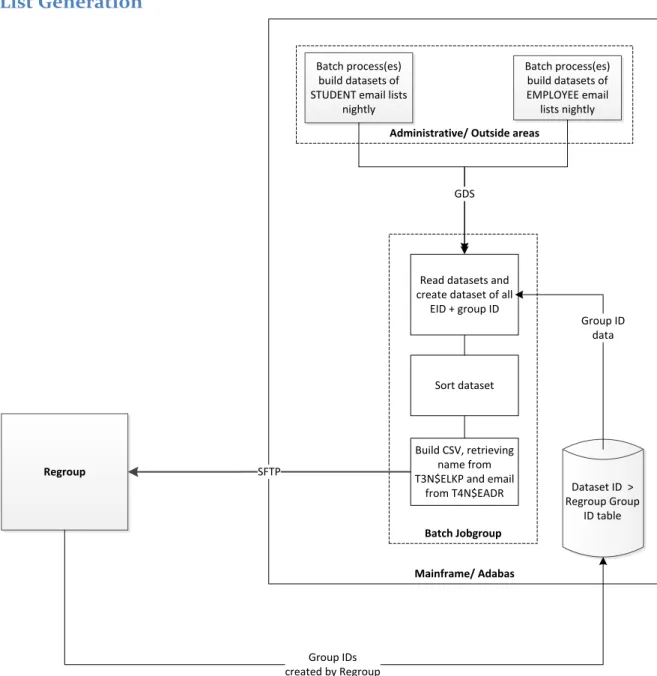
Figure 2 – Mid Level View of List Generation Process
Integration of group membership data with the Regroup system consists of an SFTP transfer of a CSV file containing the groups to which each EID belongs. Source systems will continue to generate lists of EIDs in ADABAS datasets representing the membership for each group. A nightly batch process will run to determine current membership of all EIDs for all groups. The nightly batch process consists of three steps; in the first step, a program reads through the existing group membership datasets and generates a new, generational dataset of all memberships (each record will be of the form EID + group ID). This new dataset will then be sorted by EID in step 2, and in step 3 a separate Natural program will combine all memberships for each EID and add name and email address. Finally, the Natural program will create the desired CSV file and transfer it to Regroup.
Email Sending
User authorized? UT-branded Regroup site
utexas.regroup.com
UT Shibboleth login screen
UT-branded Regroup site utexas.regroup.com Review Messages Send Messages Moderate Messages Review Message Metrics Y N Error message and
no access
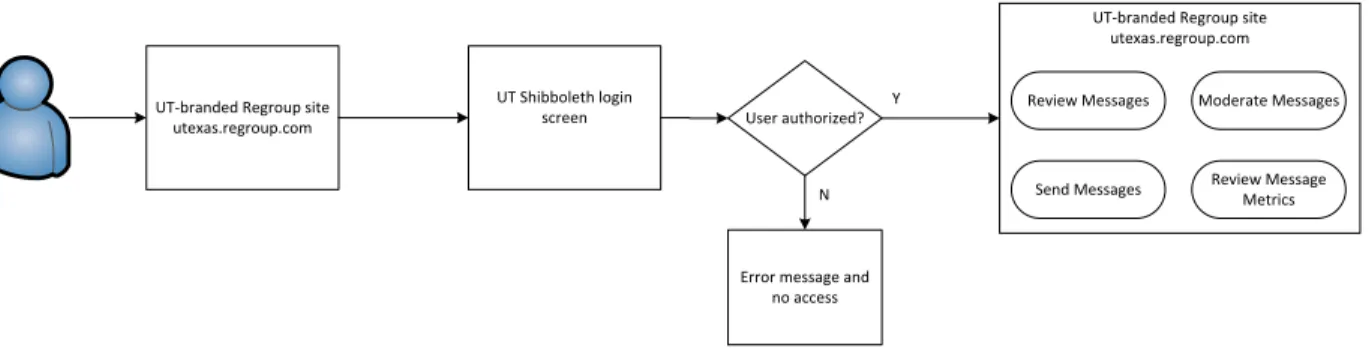
Figure 3.1 – Mid Level View of Email Sending Process
Regroup will provide the web interface for Group Email. When a user accesses the Regroup site
(utexas.regroup.com), she will be automatically redirected to the UT Shibboleth login screen to validate with EID and password. After successful authentication, authorized users are taken to the UT-branded Regroup main page, where they can perform various actions such as reading or sending messages. An error message is displayed for unauthorized users.
Personal email
client Regroup site
User authorized? Sends message to list Moderator approves or denies Y N
Figure 3.2 – Mid Level View of Email Sending Process
Another option for using Group Email is to send a message via an email client (e.g., Outlook), addressing it to a Regroup email list. Regroup receives the message, determines if the user is a member of receiving list and checks the security settings of the list, and either sends the message or forwards it to the list’s moderator to approve and deliver the message.
Shibboleth Authentication
Browser Regroup (SP) ITS Shibboleth
(IdP)
ITS IdP Attribute Authority Regroup
website
Navigate to login page
Redirected to SP Redirect to SP Redirected to IdP Redirect to IdP Redirected to SP Authenticate
Redirect with Token to SP
SP queries IdP for Account Details
Return Account Details Redirect Browser to Regroup website
Redirect with Token
Obtain Account Details
Return Results
Grant Access? Access Granted
Figure 4 – Detailed View of Shibboleth Authentication Process
Data Design
Persistent/Static Data
The ITS-owned portion of the Regroup implementation does not own any data about email recipients. Employee email information is owned by TRECS and stored on the file BD-EMPLOYEES. Student email information is owned by Registrar IT and stored on the file NR-STUDENTS-WHOLE-FILE. Email addresses are retrieved from these files via Natural secured modules provided by each department. Regroup stores recipient data in its own files, which are not documented here.
External Interface Data
Interface with Data-Owning AreasDatasets received from TRECS and Registrar IT are expected to be created in a common format, as documented in the LDA TXDLBMCL:
* **--- 1 #TXDLBMCL
* *--- 2 PREF-EID (A15)
2 EMAIL-ADDRESS (A75)
2 EXCLUDE-EMAIL (A2) /* Employee or student areas can * ** use this field to return the * ** user's subscription option. * ** Emp: 'I' means user has
* ** unsubscribed from receiving * ** informational msgs.
* ** Stu: 'Y' means user has
* ** unsubscribed from info msgs. * ** " " value - pgms will call the * ** area to check the value. 2 FILLER (A30)
2 REDEFINE
3 #EMAIL-SWITCH-SENT (L) /* if true, then EXCLUDE-EMAIL * /* was passed.
Interface with Regroup
The following .csv format is required by Regroup for data integration:
Figure 5 – .CSV Format Example
The following fields will be utilized in the upload process: FirstName, LastName, Email #1, UserName (EID), GroupID (Regroup generated).
User Interface Design
User Interface Navigation Hierarchy
Users may access Regroup by navigating directly to the Regroup website (utexas.regroup.com) or by sending an email message to a Regroup email address.
User Interface Design Overview
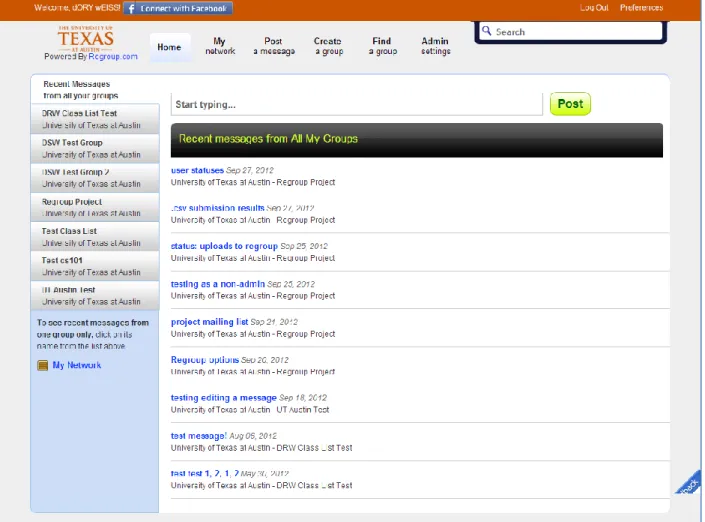
The user interface for Group Email will be provided by Regroup. Users entering the Regroup domain (utexas.regroup.com) will be redirected to the standard UT Shibboleth login screen for authentication. Once they have successfully logged in, they will be redirected back to the Regroup site.
The Regroup web interface allows users to read messages from and post messages to the groups to which they belong. Users who are authorized as administrators also have the ability to create new groups and configure settings through the interface. Additional information about the Regroup interface is available on the Regroup support pages (http://help.regroup.com).
Figure 8 – Screenshot of Regroup Group Overview Page
User Function Categories (or Use Cases)
The following Use Cases have been identified for Regroup.
Use Case Initial upload of dataset of group members
Trigger Manual
Actors Regroup, Dataset provider, ERPS, SFTP agent
Steps 1. ERPS manually initiates list generation process
2. List generation process consolidates datasets from Dataset providers 3. Resulting dataset is SFTPed to Regroup
4. Regroup processes dataset Variations
Use Case Upload updated dataset of group members Trigger Nightly scheduled process
Actors Regroup, Dataset provider, SFTP agent
Steps 1. Dataset provider creates dataset via nightly process
2. List generation process consolidates datasets from Dataset providers 3. Resulting dataset is SFTPed to Regroup
4. Regroup processes dataset Variations
Issues
Use Case Generate dataset of group members
Trigger Nightly scheduled process; manual when creating a brand new list
Actors Dataset provider
Steps Dataset provider creates dataset
Variations Nightly scheduled process; manual when creating a brand new list Issues
Use Case Create new permanent list in Regroup
Trigger Authorized user chooses “create new group” in system
Actors Regroup, List owner
Steps 1. User opts to create new group
2. User fills out group information 3. Regroup creates and saves group
Variations If user needs user data to be regularly refreshed, s/he will need to have the list integrated into the nightly list generation process. This will require that a list generation module is built by the data-owning area.
Issues
Use Case Create new one-off list
Trigger User defines a new group Actors Regroup, Authorized user
Steps 1. User opts to create new group
2. User fills out group information 3. Regroup creates group
Variations Issues
Use Case Send “basic” email via email client
Trigger User sends an email to a Regroup email address
Actors Regroup, Sender
Steps 1. Sender creates email and sends to Regroup email address 2. Regroup distributes mail to group members
Variations If sender is not already authorized to send to group: 2a. List owner (moderator) is notified of email 2b. List owner (moderator) approves/denies email Issues
Use Case Define email type for “basic” email via email client
Trigger User sends an email to a Regroup email address
Actors Regroup, Sender
Steps When creating email, sender includes email type in Subject Line Variations
Issues If no type included, then what?
Use Case Send “basic” email via Regroup website
Trigger User sends an email via Regroup group page
Actors Regroup, Group member
Steps 1. User logs into Regroup
2. User selects group to send to from home page 3. User selects “post a new message”
4. User composes message 5. User hits Send
6. Regroup sends email to address list for group Variations
Issues
Use Case Define email type for “basic” email via Regroup website
Trigger User sends an email via Regroup group page
Actors Regroup, Group member
Steps User selects from available email types when creating message Variations
Use Case Send HTML email (with plain text version) via email client Trigger User sends an HTML-formatted email to a group email address
Actors Regroup, Sender
Steps 1. Sender creates email and sends to Regroup email address
2. Regroup distributes mail to group members in HTML and plain text Variations If sender is not already authorized to send to group:
2a. List owner (moderator) is notified of email 2b. List owner (moderator) approves/denies email Issues
Use Case Define email type for HTML email (with plain text version) via email client
Trigger User sends an HTML-formatted email to a group email address
Actors Regroup, Sender
Steps 1. Sender uses the group email address that corresponds to the intended message type (e.g, [email protected])
2. Regroup prepends the corresponding message type to the subject (e.g., “[Official]”)
Variations Issues
Use Case Send HTML email (with plain text version) via Regroup website
Trigger User sends an HTML-formatted email via Regroup group page
Actors Regroup, Group Member
Steps 1. User logs into Regroup
2. User selects group to send to from home page 3. User selects “post a new message”
4. User composes message and hits Send
5. Regroup sends email to address list for group in HTML and plain text Variations
Issues
Use Case Define email type for HTML email (with plain text version) via Regroup
website
Trigger User sends an HTML-formatted email via Regroup group page
Actors Regroup, Group Member
Steps 1. Sender selects the Regroup group that corresponds to the intended message type.
2. Regroup prepends the corresponding message type to the subject. Variations Not all options may be available for all users
Use Case Send attachment via email client
Trigger User sends an email with an attachment to a group email address
Actors Regroup, Sender
Steps 1. Sender creates email, attaches file, and sends to Regroup email address 2. Regroup distributes mail to group members
Variations If sender is not already authorized to send to group: 2a. List owner (moderator) is notified of email 2b. List owner (moderator) approves/denies email Issues
Use Case Send attachment via Regroup website
Trigger User sends an email with an attachment via Regroup group page
Actors Regroup, Group Member
Steps 1. User logs in to Regroup
2. User fills out information on email, with distribution list and email type 3. User opts to attach file(s) to email and is presented with upload options 4. User uploads file(s) to attach
5. User hits Send
6. Regroup sends email to address list for group Variations
Issues
Use Case Review attachment
Trigger Email recipient reviews an attachment sent to a group email address
Actors Regroup, Recipient
Steps 1. Recipient receives email with attachment 2. Recipient opens attachment
Variations Issues
Use Case Opt-out of Informational messages
Trigger User selects opt-out
Actors Regroup, Group member/recipient, UT Direct
Steps 1. User logs into UT Direct “Message Center Customization” page 2. User selects Informational email opt-out
3. Preference is saved on dataset providers’ files
4. Dataset provider refers to setting when creating Informational Email distribution lists
Variations Issues
Use Case Opt-out of Marketing messages Trigger User selects opt-out
Actors Regroup, Group member/recipient, UT Direct
Steps 1. User logs into UT Direct “Message Center Customization” page 2. User selects Marketing email opt-out
3. Preference is saved on dataset providers’ files
4. Dataset provider refers to setting when creating Marketing Email distribution lists
Variations Issues
Use Case Approve message(s) for distribution
Trigger Sender creates message and hits “send”
Actors Regroup, Admin, Sender
Steps 1. Regroup forwards the message awaiting moderation to list admin 2. List admin uses links in the message to approve
3. Regroup distributes email to recipient list Variations Admin moderates message via Regroup website:
2. Admin logs into Regroup
3. Admin is offered list of messages for approval 4. Admin reviews and approves message(s) 5. Regroup distributes email(s) to recipient list Issues
Revision History
Identify changes to the System Design Description.
Version Date Name Description
1.0 8/31/12 Dory Weiss Initial draft
1.1 9/7/12 Dory Weiss Revisions after internal review
Signatures
Formal written signoff is preferred for larger, more complex projects.