EPAM Cloud Infrastructure
Orchestrator ver. 2.1.4
What’s New
December 2013
CI2WN-S3-5
Version 1.0EPAM SYSTEMS 2
Content
Content ... 2 1. Overview... 3 2. New Features ... 3 New Services ... 3 Cloudify as a Service ... 3Zabbix Monitoring Service ... 5
Default Monitoring... 6
Maestro Stacks ... 8
Eight Amazon Regions ... 9
Tag Usage Simplification... 9
3. Reporting ... 10
Maestro Stack Notifications ... 10
A New Type Of Reports ... 10
Cloud Radar ... 10
HealthCheck Page ... 11
4. Orchestration Knowledge Base ... 11
5. EPAM Orchestration Stacks ... 11
6. User Feedback Processing ... 13
7. Fixes and Improvements ... 14
3 EPAM SYSTEMS
1.
Overview
EPAM Orchestration Framework version 2.1.4 was released on December 14th, 2013. Our main goal is to provide our users with a high-quality product that can meet complicated requirements and be a reliable tool for implementing various projects.
Struggling for the best EPAM Orchestration Service usability and functionality, in this release, we introduced a wide range of updates, improvements and new features that put our service on the new level of quality.
We paid careful attention to your feedback and put our best efforts to make our service meet your expectations and needs.
This document introduces you to major new features and improvements, detailed further below.
2.
New Features
Another portion of new features is out for you, so check them out and share our excitement of working hard to bring them to you.
New Services
EPAM Cloud Orchestrator ver.2.1.4 release brings three new services intended to make your work more comfortable and to give you a range of new abilities.
Cloudify as a Service
In this release, we introduce a major and an important feature, the EPAM Cloudify Service: a PaaS decision that allows you to create your own Private Cloud inside EPAM Private Cloud. In contrast to DevOps tools that simply assist in installing your applications, the Cloudify Service, built on proven technology (our mission-critical high-performance elastic application platform GigaSpace XAP), provides a mechanism for managing the entire lifecycle of your application.
The main idea of introducing Cloudify as a Service in EPAM Private Cloud was to provide every project, every employee with the ability to work with their OWN Cloud. Along with this, the Cloudify Service inherits all the EPAM Private Cloud features (permissions, quotas, multitenancy) for the Cloudify Service
To start using the Cloudify Service, you should perform the following steps:
Install EPAM Private Cloud Orchestrator CLI
Activate your project in EPAM Orchestration Service
Access the EPAM Private Cloud via EPAM Cloud Orchestrator CLI
Using EPAM Private Cloud Orchestrator CLI, create a key for your project in the selected region.
EPAM SYSTEMS 4
The Cloudify Service can be started with only one command. We developed it in order to simplify you work and reduce the necessity to perform a number of operations that are now automated under a single call:
or2-manage-service –a –s Cloudify –p <project> -r <region> -k <key name>
Here, -a stands for the activate option, -s property identifies the name of the service to be activated, and –k property specifies the SSH key name.
When executed, this command will:
1. Download Cloudify package with default recipes 2. Unpack it
3. Set your properties (user, project, region, key, EPAM Private Cloud Orchestrator url – all of them will be taken from EPAM Private Cloud Orchestrator properties) 4. Run Cloudify CLI (only for Windows)
After that all you need to do is just to start working with Cloudify as with an independent application.
Cloudify Commands
The Cloudify service can be easily operated by the following commands:
Command Description
bootstrap-cloud <cloud name> Create a new Cloudify cloud.
The command returns the IP of the created Cloudify Manager and connects the current CLI session to this manager. To work with EPAM Private Cloud you should use ‘epam’ as a cloud name.
Note: Only one Cloudify cloud per project in a region can be created inside EPAM Private Cloud
If a Cloudify cloud has already been created for the project in the given region, the command returns the
NB: It is recommended to use the Cloudify Service with the following images:
CentOS6-template
Ubuntu12.04-template
NB: The Cloudify service is currently not available for EPAM-KZ1 and AWS-* regions
5 EPAM SYSTEMS
Command Description
corresponding Cloudify Manager IP, but CLI session is not connected to the manager.
connect <Cloudify manager IP> Connect to an existing Cloudify manager install-application <application
name>
Install an application from your local ‘recipes’ folder install-service <service name> Install a service from your local ‘recipes’ folder uninstall-service <service name> Uninstall the specified service
uninstall-application <application name>
Uninstall the specified application
shutdown-managers Remove all Cloudify data from Manager VM correctly
teardown-cloud Delete the specified cloud
Changing the Credentials
The credentials used to work with the Cloudify Service can easily be changed with three steps described below:
1. Run the ‘shutdown-managers’ Cloudify command. It will remove all Cloudify data from Manager VM correctly.
2. Change the credentials on your local Cloudify CLI package
3. Perform ‘bootstrap-cloud –use-existing epam’ Cloudify command. It will find Cloudify Manager VM, install and run all required data and restore info about existing hosts, applications and services.
Zabbix Monitoring Service
In EPAMOrchestration release 2.1.4 we provide you with an ability to monitor your Zabbix Server performance.
When the Monitoring Service is set up, you can see the details about the server performance on the UI Monitoring page.
The monitoring service can be started with the following steps:
1. Run or2-manage-service (or2ms) command with the following flags:
or2-manage-service -p project -r region -s monitoring --activate
Here, -s parameter specifies the name of the service to manage (monitoring), and
--activate parameter indicates that the service should be activated (to stop the service, use the --deactivate parameter).
Each project can have only one Zabbix server activated for it. If the server is already activated, you will get the respective command response:
Execution error. code=20054, message='monitoring service already activated.
If there is no Zabbix server activated for your project, a special stack will be run to launch a VM with all the corresponding Zabbix Server settings.
EPAM SYSTEMS 6
2. When the Zabbix server is launched, run the or2-start-monitoring command giving the ID of the instance to be monitored:
or2-start-monitoring –p project –r region –i instanceID
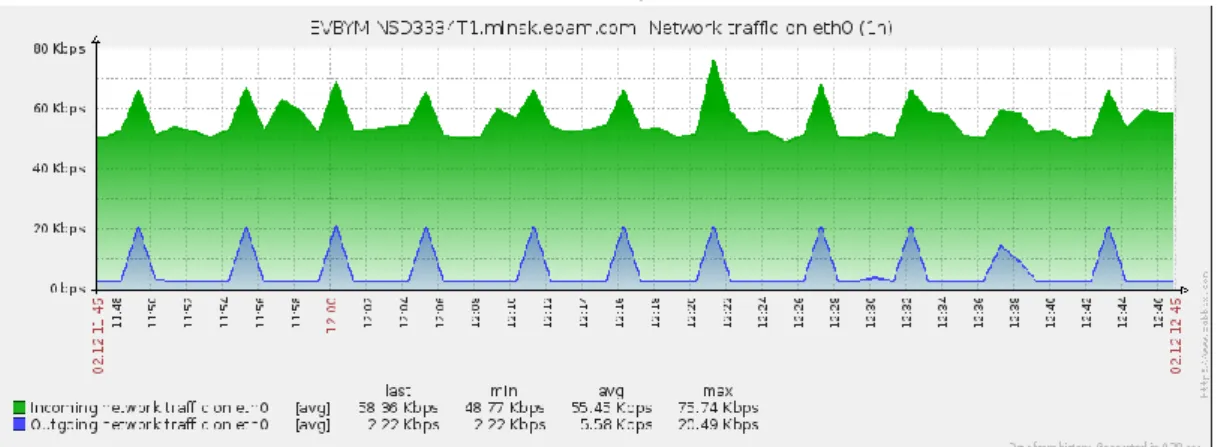
After that, on the UI Monitoring page, Zabbix information on the specified instance will be available.
Figure 1 - Zabbix graph for network traffic
For the correct Zabbix Monitoring service performance, it is recommended to add the custom image based instances to the monitoring list (or2-start-monitoring command) only after they come to the running state.
Otherwise, the custom image can be indicated incorrectly and will be monitored as a Linux image (regardless of its real type).
Default Monitoring
For your convenience, we also introduced a default monitoring service based on Chef Server statistics. This service is also available on the UI Monitoring page and does not need to be set up manually.
Figure 2 - Chef Server graph for incoming traffic
NB: Zabbix Monitoring service is currently not available for EPAM-KZ1 and AWS-* regions
7 EPAM SYSTEMS
This is a passive service that does not load the system and uses standard tools of your operating system.
The table below gives the information on the metrics methods involved into the default monitoring service:
Name Description Command used to retrieve the data:
Traffic_in (Linux)
Data from iptables counters. iptables -L -n -v -x | grep INPUT | awk '{print $7}'
Traffic_out (Linux)
Data from iptables counters. iptables -L -n -v -x | grep OUTPUT | awk '{print $7}
Iops (Linux) Data from ‘iostat’ utility. iostat -d -x 1 1 | awk '{print $1" "$6" "$7}' | grep -v Linux | grep -v dm
Traffic_in (Windows)
Data from system counters. Get-Counter -Counter "\\$vmname\network interface($adapter)\bytes received/sec" | Select-Object -ExpandProperty CounterSamples | SelectObject -ExpandProperty CookedValue Traffic_out (Windows)
Data from system counters. Get-Counter -Counter "\\$vmname\network interface($adapter)\bytes sent/sec" | Select-Object -ExpandProperty CounterSamples | SelectObject -ExpandProperty CookedValue Iops (Windows)
Data from system counters. Get-Counter '\Process(_total)\IO Data Operations/sec' | SelectObject -ExpandProperty CounterSamples | Select-Object -ExpandProperty CookedValue
NB: The Default Monitoring service is currently not available for EPAM-KZ1 and AWS-* regions
EPAM SYSTEMS 8
Maestro Stacks
This release introduces maestro stacks which allow to aggregate a set of CLI commands into one script and run them all using only one command. The main advantage of maestro stacks usage is the appearing ability to automate the flow with CLI commands, thus automating time- and effort-consuming infrastructure creation routine.
The Maestro Stack file can be launched from your computer or previously uploaded to the Orchestrator server with the or2-upload-file (or2uf) command. In both cases, you can launch the stack with the or2-run-stack (or2rstack) command followed by respective flags.
Below is given an example of a .json stack configuration file:
{ context: { timeout:30, checkTime:1 }, flow:[ { command:"runInstance", input:{imageId:"CentOS6-template", shape:"medium"}, set:["instanceId"], next:[{ command:"waitInstance", for:{field: "state",required:"running",current:"starting"}, next:[{ command:"createAndAttachVolume", input:{sizeGb:2}, set:["volumeId"], next:[{ command:"waitVolume", for:{field:"state",required:"ready",current:"creating"} }] }] }] } ] }
The pattern described in this file is equal to the following sequential commands calls:
or2run –r region –p progect –i CentOS6-template –s medium
or2addattvol -s 2 -p region -r project –i <CentOS6-template image ID> -s 2
Wait* and Check* commands have no analogues among CLI and are intended to take some functions of context-dependent user control.
When you run a Maestro Stack, you can get the information about the stack performance by using the following command:
9 EPAM SYSTEMS
Here, <stackID> stands for a ‘StackID’ value assigned to the stack at the stack run. You can see the ‘StackID’ at the or2rstack or or2dstack command output.
When the stack execution is finished, the user receives a corresponding email notification informing on the execution success or failure.
As we can see, using maestro stacks may prove useful when it is needed to perform iterative and time-consuming sets of actions. Special commands allow to take account of the context and ensure the complete and correct execution of the whole stack
Eight Amazon Regions
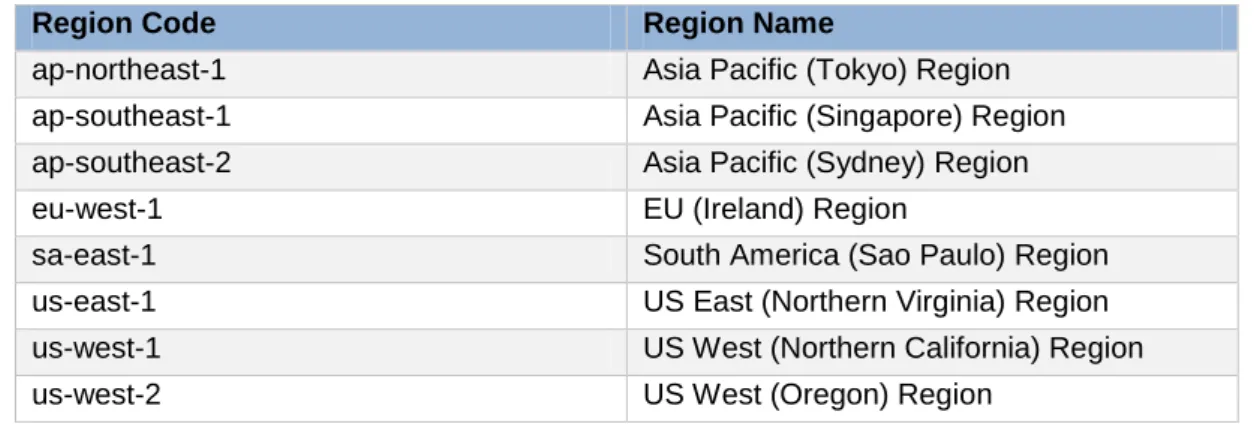
In this release, all Amazon regions that were not supported earlier, are available. The table below give the full list of the Amazon regions that are supported from now on:
Region Code Region Name
ap-northeast-1 Asia Pacific (Tokyo) Region ap-southeast-1 Asia Pacific (Singapore) Region ap-southeast-2 Asia Pacific (Sydney) Region
eu-west-1 EU (Ireland) Region
sa-east-1 South America (Sao Paulo) Region
us-east-1 US East (Northern Virginia) Region
us-west-1 US West (Northern California) Region
us-west-2 US West (Oregon) Region
Tag Usage Simplification
Being guided by the idea of simplifying your work with EPAM Orchestrator, we added an additional option to the or2-set-tag (or2settag) command. The --override (-o) option used with a tag applied to an instance makes this tag be also applied to all the objects related to this instance. For example, the following command:
or2settag -p TRESTPRO -r TESTR -i EVBYMINSD3432T1 -t test1
applied to an instance with an attached volume and a checkpoint will set the ‘test1’ tag not only to the target instance, but also to both volume and checkpoint assigned to it.
An example of the corresponding commands output is given in the screenshot below:
EPAM SYSTEMS 10
Figure 4 – or2dtag response for a checkpoint
You can use a .cmd script to set tags to each of your instances and the objects assigned to them. An example of such script is given below. The resulting tags will match the IDs of the corresponding instances: set ppp=g360-odc set rrr=epam-msq call or2-describe-instances -p %ppp% -r %rrr% > or2-describe-instances.%ppp%.%rrr%
@FOR /F "delims=| skip=6" %%i IN
(or2-describe-instances.%ppp%.%rrr%) DO @IF "%%i" LSS "-" or2settag -p %ppp% -r %rrr% -i %%i -t %%i -o
3.
Reporting
There is also a set of reporting and support updates that allow you to keep abreast of your infrastructure performance more effectively.
Maestro Stack Notifications
From now on, EPAM Orchestrator sends you a notification when a Maestro Stack execution is finished. The notification contains the information about the Stack execution success or fail. You can also get the extended stack performance information by using the or2-audit (or2audit) command.
A New Type Of Reports
EPAM Orchestrator monitors the state of the project. Now, when a project becomes inactive, a corresponding report is created.
Cloud Radar
We implemented a new tool, the Cloud Radar, which allows to get the cloud utilization statistics. This feature is currently available for EPAM managers only. However, in future, we will adapt it so that it will be available for project coordinators use also.
11 EPAM SYSTEMS
HealthCheck Page
To make your EPAM Cloud Service usage more comfortable and the Service performance clearer, we implemented the Orchestration Healthcheck page. It gives real-time detailed information on each of the Orchestrator regions performance (except for EPAM-MSQ) and indicates which regions are unavailable at the moment.
4.
Orchestration Knowledge Base
We carefully considered all your feedback on our Knowledge Base, and being guided by the goal to make it as full and comprehensible, as well as easy to use, we significantly updated and restructured several sections.
We simplified and updated the Documentation page, so that it is easier to navigate through the available docs. We updated the references within the documents, so now each document has links to all the related files, and you can find any necessary information within the shortest period of time.
We updated the Learn page, and following your requests and suggestions, added the Quick
Start section that gives the new users a brief and practical introduction to the EPAM Cloud
Orchestration Service and helps to start using it within the shortest time.
We reviewed and updated the existing FAQ section and added a range of new questions there.
Keeping your feedback and the most frequent issues in mind, we also developed the default troubleshooting flow, documented it and added as one of the FAQ sections.
5.
EPAM Orchestration Stacks
This release introduces Maestro Stacks which allow to aggregate a set of API commands into one script and run them all using only one command. The main advantage of maestro stacks usage is the appearing ability to automate the flow with API commands, thus automating time- and effort-consuming infrastructure creation routine.
The Maestro Stack file can be launched from your computer or previously uploaded to the Orchestrator server with the or2-upload-script (or2ups) command. In both cases, you can launch the stack with the or2-run-stack (or2rstack) command followed by respective flags:
For local Maestro Stacks:
or2rstack –p <project> -r <region> -m –s "stack-name" –c < absolute path to maestro-stack script>
EPAM SYSTEMS 12
or2rstack –p <project> -r <region> -m –s <stack name> -t <template name>
Below is given an example of a .json stack configuration file:
{ context: { timeout:30, checkTime:1 }, flow:[ { command:"runInstance", input:{imageId:"CentOS6-template", shape:"medium"}, set:["instanceId"], next:[{ command:"waitInstance", for:{field: "state",required:"running",current:"starting"}, next:[{ command:"createAndAttachVolume", input:{sizeGb:2}, set:["volumeId"], next:[{ command:"waitVolume", for:{field:"state",required:"ready",current:"creating"} }] }] }] } ] }
The pattern described in this file is equal to the following sequential commands calls:
or2run –r region –p progect –i CentOS6-template –s medium
or2addattvol -s 2 -p region -r project –i <CentOS6-template image ID> -s 2
Wait* and Check* commands have no analogues among API commands and are intended to take some functions of context-dependent user control.
The successful execution of the given stack results into the following API output:
When you run a Maestro Stack, you can get the information about the stack performance by using the or2-audit (or2audit) command. When a Maestro Stack execution is finished, you get an email notification informing about the execution success or failure.
13 EPAM SYSTEMS
As we can see, using maestro stacks may prove useful when it is needed to perform iterative and time-consuming sets of actions. Special commands allow to take account of the context and ensure the complete and correct execution of the whole stack.
6.
User Feedback Processing
Your input has turned out to be invaluable for Orchestrator 2.1.4 quality assurance efforts. We carefully consider each of your suggestions and complaints and try to find the best solutions. We would like to thank the following users for providing their feedback:
Anton Basharin: Downloaded packages should be verified within the auto-configuration
Aliaksandr Kuzikau: Failed to generate aggregation report for a single 31st day
Andrei Davidouski: or2access command text message needs updating
Andrei Paulau: or2-refresh-projects command switches the existing instances to missing state
Ivan Kassubov: EPAM-KZ1 item is missing in Cost Estimator availability region
Pavel Ziankevich: No permission to invoke the operation describeProjects for users with READ permission group mapping for project
Sasha Kazlouski: Unexpected error when user enters an incorrect password for 5 times EPAM Orchestrator maintenance mode per regions on\off is needed
Vladimir Kovalchuk: Audit messages related to the target instance are not shown for personal projects. Document order on Orchestration web page should be reviewed We highly appreciate your participation in making our product better.
From now on, you can keep track of your issues and suggestions via Jira Public tickets.
NB: Jira Public Tickets are accessed via the following link:
https://jira.epam.com/jira/issues/?jql=project%20%3D%20EPMCITA%20AND%20labels %20%3D%20thanks
Here, you can find and keep track of your feedback cases taken into production. There are both issues and improvement suggestions tickets. These tickets are also open for voting. In case an issue gets many votes, its priority can be raised, thus speeding up the implementation.
EPAM SYSTEMS 14
7.
Fixes and Improvements
Guided by our main goals detailed in the Overview section herein, we put our finest efforts into improving the existing features and fixing issues related to performance and usability. We updated the User Interface so that now it became more stable and user friendly. The reporting system was updated in several points.
Our engineers fixed a range of auto configuration issues, including issues with Chef Server and several image-connected problems.
A huge number of CLI issues was also solved, we paid careful attention to the performance of CLI commands, especially those dealing with audit messages and tags processing. Having fixed several issues, found by our quality assurance team, as well as reported by most dedicated EPAM Private Сloud users by contacting EPAM Cloud Consulting Team, we can notice the significant reduction of concerns and unsolved issues.
However, as there is always room for improvements and feature requests, we keep testing our product and gathering you feedback.
The full list of changes and brief description of fixed issues bugs can be found in the ‘Release Notes’ document accompanying this paper.
15 EPAM SYSTEMS
Version History
Version Date Summary
Global
41 University Drive Suite 202, Newtown (PA), 18940, USA Phone: +1-267-759-9000 Fax: +1-267-759-8989
EU
Corvin Offices I. Futó st 47-53 Budapest, H-1082, Hungary Phone: +36-1-327-7400 Fax: +36-1-577-2384