VMware High Availability
Introduction...2
...2
...4
...4
...7
...7
7 ... 10 ... 11 12 14... 15
...15
15
...16
17
18
...18
... 18 ... 19 ... 19...20
... 20...21
...21
...22
...22
... 22
...22
23
NIC Teaming... 23Secondary Service Console Network ... 24
Other HA Cluster Considerations...25
Troubleshooting ... 26
Troubleshooting Cluster Configuration Errors ... 27
Summary ... 28
Introduction to VMware Infrastructure and VMware HA ...
VMware HA Architecture and Conceptual Overview ...
VMware Infrastructure ...
VMware Clusters...
VMware HA...
Traditional High Availability and Failover Solutions... Continuous Availability and Fault-Tolerant HA ...
How Does VMware HA Work? ...
How Does VMware HA Work? ... Clusters and VirtualCenter Failure ...
Using VMware HA...
Enabling VMware HA ...
Creating a VMware Cluster ...
Selecting High Availability Options...
Adding Hosts to a VMware HA Cluster...
Viewing Cluster Information...
Cluster Status Information ...
Valid Clusters ... Overcommitted Clusters ... Invalid Clusters...
Customizing Virtual Machine HA Options ...
Isolation Response Configuration...
Powering On Virtual Machines in a Cluster ...
Host Removal and Virtual Machines ...
Removing Hosts with Virtual Machines from a Cluster...
Removing Virtual Machines from a Cluster ...
VMware HA Best Practices ...
Networking Best Practices ...
Introduction
VMware Infrastructure 3 is the first full infrastructure virtualization suite to empo and small businesses alike to transform, manage, and optimize their IT infra virtualization. VMware Infrastructure 3 delivers comprehensive virtualization, man resource optimization, application availability and operational automation capab integrated offering. VMware H
wer enterprises structure through
agement, ilities in an igh Availability ( VMware HA) helps customers improve service levels
availability solution A and describes how s running in virtual
cture. When you use dware failure g in costly one-to-one mapping of production and backup hardware.
ustomers who want to implement ructure services
ture and virtual SX Server 1.0. VMware Infrastructure 3 brings a revolutionary
esource optimization, high availability, and data v solutions to
er alignment of IT
s a single collection. of a host or a cluster.
ers (processors, memory, rom a single ESX Server
demand. vironment
tructure l machine ement to automate and simplify provisioning, optimize resource allocation, and provide operating system and application-independent high availability to applications at lower cost and without the complexity of solutions used with static, physical infrastructure. One of these distributed services, VMware HA, provides easy-to-manage, cost-effective high availability for all applications running in virtual machines. In the event of server hardware failure, affected virtual machines are automatically restarted on other physical servers. VMware HA minimizes downtime and IT service disruption while eliminating the need for dedicated standby hardware and installation of additional software. VMware HA also protects against multiple server failures in the cluster. Virtual machines are protected as long as there is spare capacity in the cluster.
for any application by implementing a cost-effective virtualization-based high-that is easy to deploy and manage.
This paper provides an architectural and conceptual overview of VMware H you can use VMware HA to provide high availability for any application machines at lower cost than would be possible with static, physical infrastru VMware HA, you can automatically restart virtual machines in the event of har without investin
This paper is intended for VMware partners, resellers, and c
virtual infrastructure solutions and want to know how to use distributed infrast such as VMware HA.
Introduction to VMware Infrastructure and VMware HA
With VMware Infrastructure 3, VMware extends the evolution of virtual infrastruc machines that began with VMware E
new set of infrastructure wide services for r
protection that deliver capabilities that previously required complex or expensi e implement using only physical machines.
Use of these services provides significantly higher hardware utilization and bett resources with business goals and priorities.
VMware Infrastructure introduces two new concepts:
• Clusters that aggregate and manage the combined resources of multiple hosts a • Resource pools that simplify control over the resources
VMware Infrastructure virtualizes and aggregates industry-standard serv their attached network and storage capacity) into logical resource pools (f host or from a VMware cluster) that can be allocated to virtual machines on Resource pools can also be nested and organized hierarchically so that the IT en matches company organization. Individual business units can receive dedicated infras while still profiting from the efficiency of resource pooling.
A set of virtualization-based distributed infrastructure services provides virtua monitoring and manag
d IT environment without nd complexity of failover solutions tied to either operating systems or specific
VMware HA provides uniform high availability across the entire virtualize the cost a
applications.
VMware Infrastructure 3 reduced the frequency of outages for core infrastr percent
ucture services by 100 , saving 416 man hours per year in unplanned maintenance. VMware Distributed
Res performing
VM traditional
clustering technologies.
- Faan DeSwardt, Director of Enterprise Architecture, Wyse Technology ource Scheduler and VMware High Availability are fully automated and
flawlessly.
VMware HA Architecture and Conceptual Overvie
The following sections provide basic information about VMware Infrastruw
cture and describe some which VMware distributed services such as VMware HA interact.
r delivering r provides a robust
ng resources into robust
rtitions a ysical emory,
orking, storage and BIOS — so Windows, Linux, Solaris, and NetWare operating systems and es without any modification.
ock of VMware Infrastructure, VirtualCenter, is used to manage all ESX machines. VirtualCenter Management Server also provides critical services
er and virtual machine management ing
• Performance monitoring • Operational automation • Secure access control
• Migration of live virtual machines of the key elements with
VMware Infrastructure
At the core of VMware Infrastructure, VMware ESX Server is the foundation fo virtualization-based distributed services to IT environments. ESX Serve virtualization layer that abstracts processor, memory, storage, and networki multiple virtual machines that run side-by-side on the same physical server. ESX Server installs directly on the server hardware, or “bare metal,” and inserts a virtualization layer between the hardware and the operating system. ESX Server pa
physical server into multiple secure and portable virtual machines that run on the same ph server. Each virtual machine represents a complete system — with processors, m
netw
software applications run in virtualized machin Another key building bl
Server hosts and virtual such as:
• Centralized serv
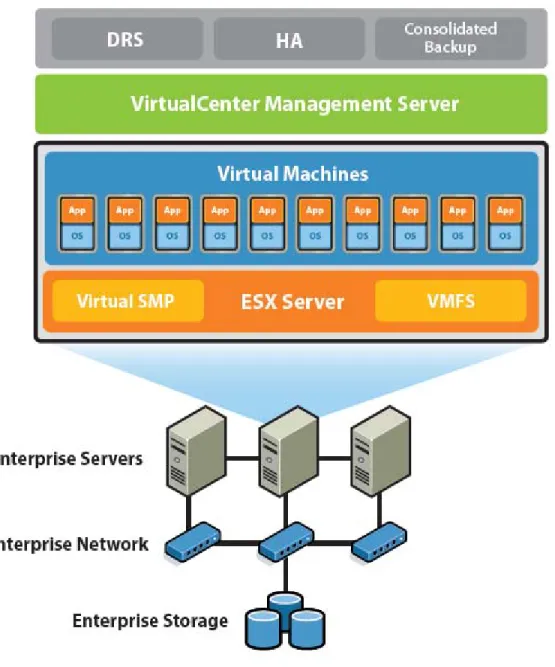
Figure 1 shows the architecture and typical configuration of VMware Infrastructure.
Figure 1: VMware Infrastructure configuration
VMware Infrastructure simplifies management with a single client called the V Client ( VI Client) tha
irtual Infrastructure t you can use to perform all tasks. Every ESX Server configuration task, from
be
The VI Client connects to ESX Server hosts, even those not under VirtualCenter management, and lets you remotely connect to any virtual machine for console access. There is a Windows version of the VI Client, and for access from any networked device, a Web browser application provides virtual machine management and VMware Console access. The browser version of the client, Virtual Infrastructure Web Access, makes it as easy to give a user access to a virtual machine as sending a bookmark URL.
VirtualCenter user access controls provide customizable roles and permissions, so you create your own user roles by selecting from an extensive list of permissions to grant to each role.
configuring storage and network connections to managing the service console, can accomplished centrally through the VI Client.
Responsibilities for specific VMware Infrastructure components such as resou delegated based on business organization or ownership. VirtualCenter also tracking to provide a detailed r
rce pools can be provides full audit ecord of every action or operation performed on the virtual
VMotion™, VMware and the VI Client. In addition, VirtualCenter
arty system one physical server to ies to perform hardware maintenance
allows the mapping in clusters for ation, flexibility, and availability.
ness priorities while t of specific • VMware Consolidated Backup provides an easy-to-use, centralized facility for LAN-free backup of
virtual machines. Full and incremental file-based backup is supported for virtual machines running Microsoft Windows operating systems. Full image backup for disaster recovery scenarios is available for all virtual machines regardless of guest operating system.
infrastructure and who did it
Users can also access virtualization-based distributed services provided by DRS, and VMware HA directly through VirtualCenter
exposes a rich programmatic Web Service interface for integration with third-p management products and extension of the core functionality.
• VMware VMotion enables the live migration of running virtual machines from another. Live migration of virtual machines enables compan
without scheduling downtime and disrupting business operations. VMotion also of virtual machines to hosts to be continuously and automatically optimized with maximum hardware utiliz
• VMware DRS works with VMotion to provide automated resource optimization and virtual machine placement and migration to help align available resources with predefined busi
maximizing hardware utilization.
• VMware HA enables broad-based, cost-effective application availability, independen hardware and operating systems.
VMware Clusters
Clusters, a new concept in virtual infrastructure management, give you the po hosts with the simplicity of managing a single entity
wer of multiple . New cluster support in VMware
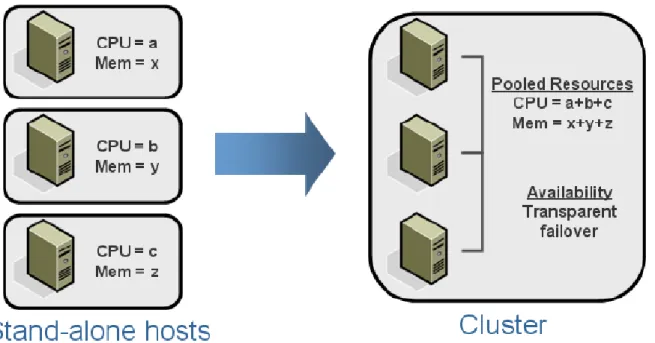
Infrastructure 3 reduces management complexity by combining standalone hosts into a single cluster with pooled resources and inherently higher availability.
Figure 2: Resource aggregation in VMware clusters
VMware clusters let you aggregate the hardware resources of individual ESX Se manage the resources as if they resided on a single host. Now, when you power machine, it can be given resources from anywhere in the cluster, rather than b ESX Server host.
rver hosts but on a virtual e tied to a specific
f VMware clusters, fic hosts to be machine failures. VMware DRS provides automatic initial virtual machine placement and makes automatic
ocation and optimization decisions as hosts are adde or removed from the cluster or the load on individual virtual machines goes up or down. VMware DRS also makes clusterwide
manage operations or virtual
machines running on VMware cluster hosts, see the VMware Infrastructure 3 white paper titled “Resource Management with VMware DRS.”
VMware HA
Traditional High Availability and Failover Solutions
Both VMware HA and traditional clustering and high availability solutions support automatic recovery from host failures. Fundamentally, VMware HA provides simpler, cost-effective high VMware Infrastructure 3 provides two services to help with the management o
VMware HA, and VMware DRS. VMware HA allows virtual machines running on speci restarted automatically using other host resources in the cluster in the case of host
resource rel d
resource pools possible.
Note: For more information about resource pools and using VMware DRS to such as virtual machine placement and providing dynamic resource allocation f
availability across a broader range of your x86 IT infrastructure and workloads complementary to traditional application-based and operating-system–based cl solutions, but they differ in hardware and software requirements, capital and oper
. VMware HA can be ustering
ating expenses, time to recovery, and the degree to which they incorporate application and operating system
l downtime for rastructure must be e (potentially on a
rror each other luster. Once set tering software can then send constant heartbeats between mirrors. Application-aware clustering agents can monitor application services running on each virtual or physical machine. In case of failure on the primary host, the mirror takes over operations after going through failover sequence. tering approach. tise-intensive. tional virtual networking ements, because and requires vast because traditional
er time. astructure 3,
dicated cluster eries of
guration. It is . Failover is quick and seamless with recovery time not exceeding a few minutes.
Breadth of Application Coverage
Given the complexity, expertise requirements, and costs of traditional clustering software, it is typically focused on protecting only a few narrow bands of supercritical tier 1 applications such as awareness.
Capital and Operational Costs of Clustering
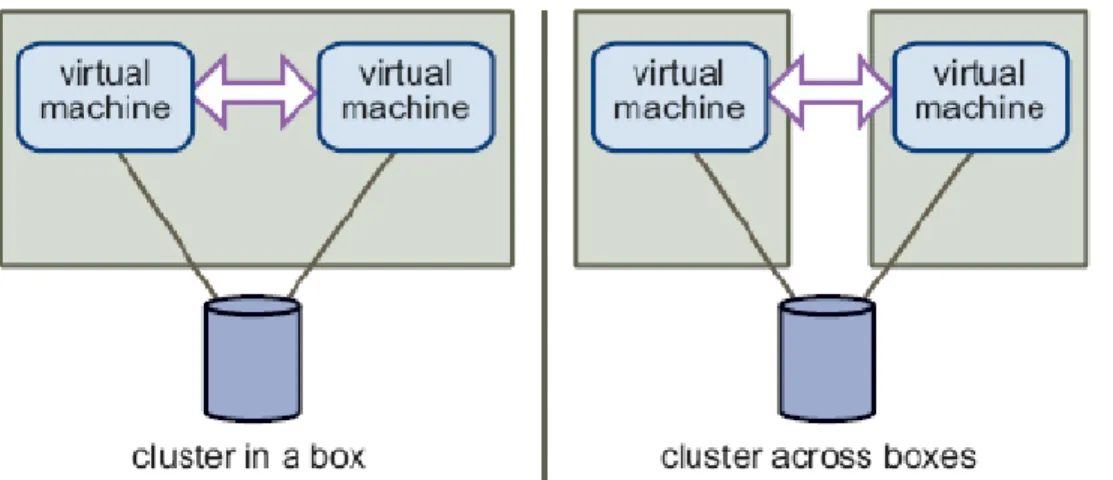
Traditional clustering solutions aim to provide immediate recovery with minima applications in case of host or virtual machine failure. To achieve this, the IT inf set up such that each machine (or virtual machine) has a mirror virtual machin different host). The machine (or the virtual machine and its host) are set up to mi using the clustering software. Often the hardware must be identical across the c up, clus
Figure 3: Traditional clustering configuration
Figure 3 shows the typical host setup for virtual machines using a traditional clus xper ddi
d ering expertise is hard to find experience with application services, cluster configuration, and maintenance,
recalibration because they tend to degrade ov automatically lowers the cost of high availability. VMware HA does not require de administrators or standby hardware. VMware HA makes clustering simple using a s straightforward GUI-based selections within the VI Client to enable the cluster confi agnostic the to applications and operating system that run in the virtual machine Setup and maintenance of traditional clustering solutions is expensive and e Each time you add a new virtual machine, you may need additional hosts and a machines for failover. Traditional clustering tends to require complex systems an setup. It is generally resource-intensive both in terms of labor and systems requir of the need for identical hardware. Traditional clust
cluster configurations often need
enterprise databases, enterprise messaging, OLTP applications, and ERP app critical production environments. This leaves a vast majority of the infrastructu (including middleware, home-grown applications, smaller local databases, file, authentication, DNS, and DHCP servers) expose
lications in mission re workloads
print, fax
d or unprotected. Many of these applications act may be unable to meet
ot require
protect all applications and x86 workloads that are fit for virtualization, not just a favored few applications. It is part of
Enterprise, and the high availability c pability builds on the core
taking applications these clustering solutions
es in a cluster are ting system. VMware HA ghly manageable and flexible HA architecture that accommodates different application and operating system combinations, allows for N-N (any-to-any) failovers that are
ling) and can deliver online . Moreover, g the standard VI
tform
n failures, but they are erating-system– g solutions, they typically are used for
pplications without vices.
implemented at the level of ESX Server on the physical host, offers a ecause the protection is offered to all virtual machines running in the ESX Server cluster, VMware HA “democratizes” high availability by making it available and cost-justifiable for any application.
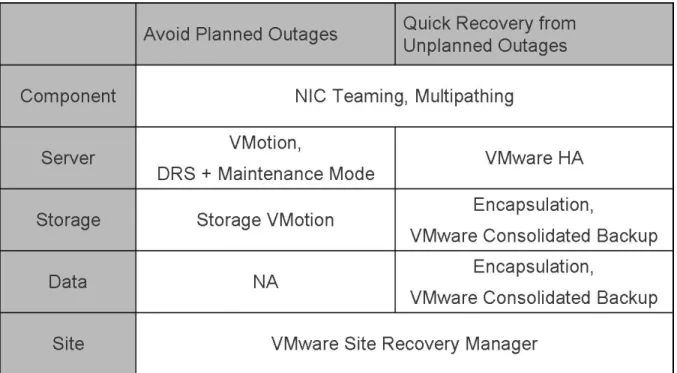
Additionally, VMware Infrastructure is a mature production-proven platform and has rapidly evolved to provide robust availability capabilities that protect against a broad variety of planned and unplanned failure scenarios from component-level to system-level, data-level, and even site-level failover (see Figure 4).
as direct dependencies to your tier 1 applications. If they are offline, you your SLA commitments for key applications and services.
VMware HA is independent of applications and operating systems and does n application agents or manual scripting. It is simple and robust enough to
VMware Infrastructure 3 a
consolidation benefits available from the VMware Infrastructure platform. Manageability and Flexibility
Traditional clusters are rigid, and usually management of a cluster requires offline whenever you need to reconfigure or maintain the cluster. Also, are active-passive or active-active configurations in which standby server nod idle, or they rigidly tie the cluster system to a particular application and opera VMware HA provides availability minus the complexity of traditional solutions. delivers a hi
intelligently managed (using VMware Distributed Resource Schedu
maintenance of physical server configurations without any application disruption VMware HA does not need any special management tools. You manage it usin Client interface.
VMware Infrastructure: a Cost-Effective and Reliable Production Pla To summarize, traditional clustering solutions can protect against applicatio resource- and labor-intensive in addition to typically being application- and op dependent. Because of the cost and complexity of clusterin
a small percentage of enterprise applications, leaving the vast majority of a any failover protection, posing a potential risk to important business-critical ser VMware HA, which is
Figure 4: VMware Infrastructure components for VMware High Availability
Component Failures. VMware HA protects from component-level failures w teaming and multipathing technologies.
Planned
ith the inherent NIC
and Unplanned Server Downtime
otects applications contained in virtual machines from unplanned server failures rce be live migrated to maintenance, with zero application or service .
quired framework to tection and
ee approach.
Infrastructure to Mware Infrastructure, it makes recovery faster, reliable, affordable, and manageable by making it possible for you to program, automate, and test disaster recovery plans that cover your entire production site. Site Recovery Manager is expected to be available in the first half of 2008.
Continuous Availability and Fault-Tolerant HA
VMware is taking the initiative to deliver high availability solutions for a wide range of failure scenarios. Enabling a rich partner ecosystem and via contributions to the community source program, VMware is introducing key solutions to solve real customer problems.
VMware HA pr
(and operating-system–related virtual machine failures). With VMware Distributed Resou Scheduling ( VMware DRS) and VMotion technology, virtual machines can
alternative hosts when you need to perform server downtime
Data Protection
VMware Consolidated Backup, a part of VMware Infrastructure, provides the re protect and back up virtual machine files and images for longer term data pro recovery, using a centralized host-free and LAN-fr
Site Recovery
VMwareSite Recovery Manager, a new VMware product, works with VMware provide automated disaster recovery solutions. Combined with V
es will be able to ew multi-core able to deliver all irtualization plus the unparalleled reliability and availability of a mission-critical server foundation. General availability of the new ftServer models supporting VMware and Fault-Tolerant HA
By working through the VMware Community Source Program, Stratus Technologi support VMware Infrastructure 3 ( VI3) software on Stratus ftServer systems. The n ftServer 4400 and 6200 models will be the first fault-tolerant x86 server platform of the business continuity benefits of v
VMware Infrastructure is expected in early 2008.
While we initially chose VMware virtual infrastructure to address developm by reducing hardware costs and decreasing server deployment time, we so benefits to adopting the technology, including server portability, protection, an advantages provided by VMware software have created an ideal work environm developers, allowing them to deve
ent hardware problems on discovered additional
d availability. All the ent for our
lop applications more efficiently. W ith virtual machines,
developers avoid downtime and brin o envision that the
flexible and efficient virtual infrastructure will allow even greater disaster recovery options, virtual labs, training, and desktop portability.
-
Keith Leahy, Vice President, Merrill Lynch g products to the market faster. We alslures. The hosts in the cluster
s servers in the five-second intervals. If any servers lose heartbeat over three consecutive heartbeat intervals, VMware HA initiates the n of restarting all affected virtual machines on other hosts.
g VMware HA
t all times in order event of host ology in the ESX
ous access to the
When planning the size of VMware HA clusters to provide the desired levels of failover capacity, keep in mind that each host requires some overhead memory and CPU resources and that each virtual machine must be guaranteed its CPU and memory reservation. VMware HA factors in the worst-case failure scenarios when deciding to allow new virtual machines to be powered up. When computing required failover capacity, VMware HA first considers the host with the largest capacity to run virtual machines with the highest resource requirements. VMware HA might therefore be quite conservative in its estimates if the hosts in your cluster vary widely in the individual resources they provide.
How Does VMware HA Work?
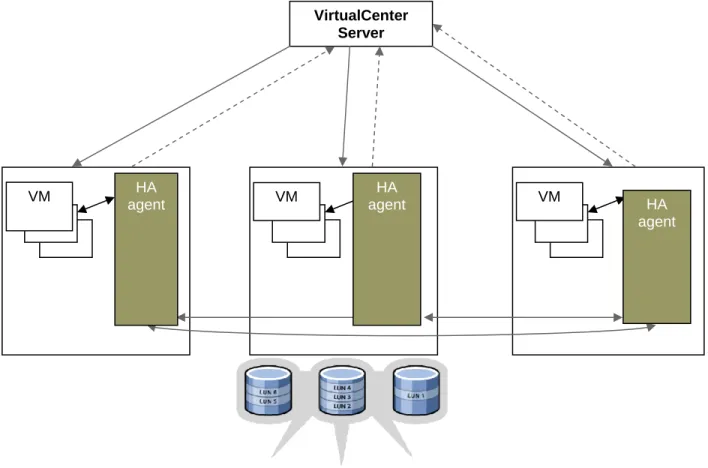
VMware HA continuously monitors all ESX Server hosts in a cluster and detects fai VMware HA agent placed on each host maintains a heartbeat with the other using the service console network. Each server sends heartbeats to the other cluster at
failover actio
VirtualCenter Server
HA agent
HA agent
VM VM VM HA
agent
Figure 5: Host failover usin
VMware HA monitors whether sufficient resources are available in the cluster a to be able to restart virtual machines on different physical host machines in the failure. Safe restart of virtual machines is made possible by the locking techn Server storage stack, which allows multiple ESX Server hosts to have simultane same virtual machine files.
Configuring for Redundancy
Real high availability is achieved with redundancy. Redundancy concepts do not apply only to key resources such as servers, networks, and storage. Management is also an important part of the
h availability. You ant power supplies, . To make shared storage more fail-proof, you can implement multiple pathing from
ough VMware HA agents operate independently of VirtualCenter and can perform failovers tructure are rtualCenter for ths for heartbeats are e from many options to create eats. Whichever way you create redundancy for heartbeats, testing
tches that are w to create
hown as the umber as it al machines in the over capacity.
s with the specified ’ configured CPU lure of the largest hosts in the
, to avoid situations in which virtual machines do not have enough resources to be restarted on new hosts. When the number of host failures exceeds configured spare capacity, virtual machines with the highest priorities are failed over first.
Note: You can choose to allow the cluster to power on virtual machines even when they violate availability constraints; however, this means that failover guarantees may no longer be valid. high-availability configuration.
Using proven systems for servers is an important first step in implementing hig can make servers more resilient to failure by proving better cooling, redund and the like
servers to storage arrays. Mirroring storage volumes also offers additional protection against storage failures.
Even th
without accessing VirtualCenter first, centralized management views of the infras essential for smooth functioning of any business. It is thus critical to protect Vi resiliency.
Heartbeats are a critical element of VMware HA configuration. Redundant pa thus essential for highest reliability of VMware HA. You can choos
multiple paths for heartb
failure scenarios is essential. You must also include the networking and storage swi part of any datacenter today when you plan and test resiliency. Information on ho redundant network paths is included in the best practices section of this paper. Designating Failover Capacity
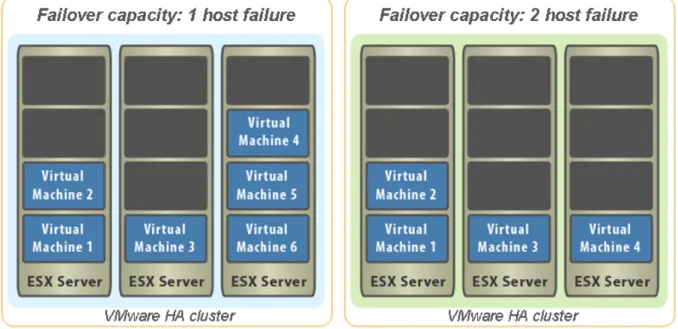
When you enable a cluster for VMware HA, the New Cluster Wizard prompts you to specify the maximum number of host failures you want to protect against. This number is s
Configured Failover Capacity in the Virtual Infrastructure Client. VMware HA uses this n continuously monitors whether there are enough resources to power on virtu
cluster. You need to specify only the number of hosts for which you want fail VMware HA computes the resources that it requires to fail over virtual machine failover capacity. This resource determination is based on the virtual machines and memory resource reservations and capability to handle the fai
Figure 6: Failover capacity
Clusters and VirtualCenter Failure
You create and manage clusters using VirtualCenter. The VirtualCenter Manag an agent on each host in the
ement Server places cluster so each host can communicate with other hosts to maintain
rtualCenter er Management changes as follows: VMware HA clusters can still restart virtual machines on other hosts in case of failure; however, the information about what extra resources are available is based on the state of the cluster before the VirtualCenter Management Server went down.
Note: If you are also using DRS, the virtual machines running on VMware cluster hosts continue running using available resources. However because VirtualCenter Server is not running, it cannot provide further recommendation for resource optimization.
state information and know what to do in case of another host’s failure. ( The Vi Management Server does not provide a single point of failure.) If the VirtualCent Server host goes down, VMware HA functionality
eration tasks you can perform using VMware HA and VirtualCenter — such as creating VMware HA clusters, adding or removing hosts from
ver capacity, and setting properties.
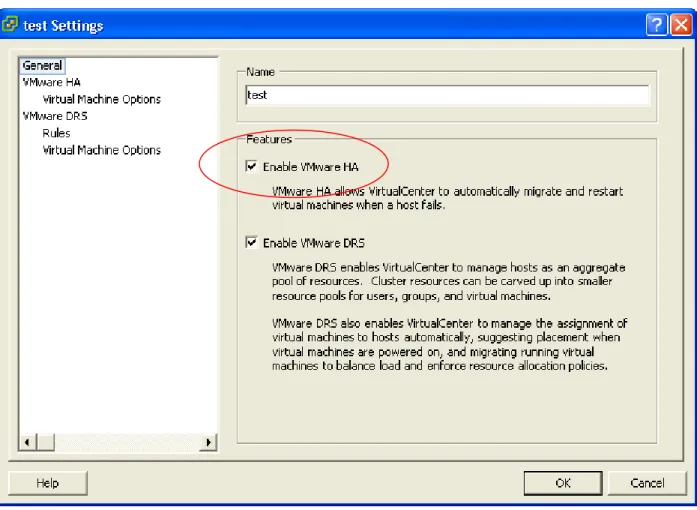
integrated component in VMware Infrastructure 3 Enterprise. It is also available as an add-on license option to VMware Infrastructure 3 Starter and VMware Infrastructure 3 Standard. To enable VMware HA when you create a VMware cluster, you need to set the Enable VMware HA option.
Using VMware HA
This section describes some of the setup and op clusters, planning failo
Enabling VMware HA
VMware HA is included as anFigure 7: Configuring VMware HA
For clusters enabled for VMware HA, the resources of all included hosts are assigned to the cluster. If clusters are also enabled for VMware DRS, you can use VMware DRS to provide dynamic and intelligent resource allocation, optimization, and load-balancing of virtual machines, after failover.
Creating a VMware Cluster
A cluster is a collection of ESX Server hosts and associated virtual machines with shared resources and a shared management interface. When you add a host to a cluster, the host’s resources become part of the cluster’s resources. When you create a cluster, you can enable it for VMware DRS, VMware HA, or both. If you enable VMware DRS, the cluster supports shared resource pools
and performs placement and dynamic load balancing for virtual machines in enable VMware HA, the cluster supports failover. When a host fails, VMware HA au restarts virtual machines on a different host. If you enable clusters for both
the cluster. If you tomatically VMware DRS and
after also meet certain prerequisites to use VMware cluster features successfully. See
ecific requirements ter Wizard to take you through the steps of creating a new
reate a cluster pts you for the clude any hosts or virtual machines. If you
r and restarts virtual l machines. After wered on are usually
load balancing. re HA has moved can set up affinity and anti-affinity rules to start two or more virtual machines preferentially on the same host (affinity) or on different hosts.
source pools and using VMware DRS to manage operations tion for virtual
running on VMware cluster hosts e VMware Infrastructure 3 best practices paper rce Management with VMwar
Selecting High Availability Op
VMware HA, the New Clus ing options. VMware HA, VMware DRS optimizes host placement and balanced resource allocation failover and restart of virtual machines on new hosts.
Your system must
VMware HA Requirements and Best Practices, later in this paper, for more sp and recommendations.
VirtualCenter provides a New Clus
cluster. When you first invoke the wizard, it prompts you to choose whether to c that supports VMware DRS, VMware HA, or both. Following that, the wizard prom corresponding configuration information.
Note: When you create a cluster, it initially does not in
use VMware HA and VMware DRS together, when VMware HA performs failove machines on different hosts, its first priority is immediate availability of all virtua the virtual machines have been restarted, those hosts on which they were po heavily loaded, while other hosts are comparatively lightly loaded.
Using VMware HA and VMware DRS together combines automatic failover with This combination can result in a fast rebalancing of virtual machines after VMwa virtual machines to different hosts. You
Note: For more information about re
such as virtual machine placement and providing dynamic resource alloca machines
titled “Resou
, see th e DRS.”
tions
If you enable ter Wizard allows you to set the follow
Option Description
Host failures or failure
uarantee failover of Specifies the number of host failures (
capacity) for which you want to g virtual machines.
Admission control Offers two choices about ho
allow new virtual machines to Do not power on virtual machin
constraints an
w decisions are made to be powered up:
es if they violate availability d enforce the specified failover capacity limits.
Allow virtual machines to be powered on even if they violate availability constraints. This allows you to power on virtual machines even if failover of the number of specified hosts can no longer be guaranteed. (A warning is issued.)
After initial creation of the cluster, you can add hosts and virtual machines to the cluster or specify additional cluster customization such as setting the priority for individual virtual machines. VMware HA uses virtual machine priority to decide order of restart in case of a red cluster (when configured failover capacity exceeds current failover capacity).
Note: If you are using a cluster enabled for VMware HA, that cluster might be ma warning icon until you have added enough hosts
rked with a red to satisfy the specified failover capacity. See the s paper.
by the VirtualCenter ts to a VMware HA
get cluster. n and specifying the e, and password. Adding a host to the cluster spawns a system
cluded in the f the cluster.
the cluster’s root e DRS, all resource pools are collapsed into the cluster’s
used for starting lfills its failover warning appears and the cluster’s status is changed to invalid • By default, all virtual machines on hosts you add to the cluster are given a restart priority of medium.
You can change the priority and specify other VMware HA customization options to tailor individual virtual machine priorities and other settings. See the section Customizing Virtual Machine HA Options in this paper for more information.
• The system also monitors the status of the VMware HA service on each host and displays information about configuration issues on the Summary page.
Cluster Status Information section in thi
Adding Hosts to a VMware HA Cluster
The VirtualCenter inventory panel displays all clusters and hosts managed Management Server to which the VI Client is connected. Adding managed hos cluster is as simple as selecting and dragging a host machine to the desired tar
Note: You can also add unmanaged hosts by selecting the Add Host optio unmanaged host name, user nam
task called Configuring HA on the host. After you complete this task, the host is in VMware HA service, and virtual machines deployed to the host become part o When you add a new host to the cluster:
• The resources for that host immediately become available to the cluster for use in resource pool.
• Unless the cluster is also enabled for VMwar top-level (invisible) resource pool.
• Any capacity on the host beyond what is required or guaranteed for each running virtual machine becomes available as spare capacity in the cluster pool. This spare capacity can be
virtual machines on other hosts in case of a host failure.
• If you add a host with several running virtual machines, and the cluster no longer fu requirements because of that addition, a
Viewing Cluster Information
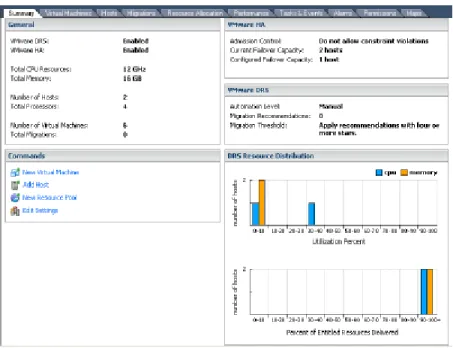
When you select a cluster from the VirtualCenter inventory panel, the Summary page displays high-level information about the selected cluster.
Figure 8: Viewing cluster information
The Summary pane of the VI Client provides various information about the clust machi
er and virtual nes assigned to the cluster. VMware HA configuration details on the pane include the
lover capacity for or VMware DRS, the Summary pane also displays automation level and
, outstanding migration recommendations, and real-time histograms w balanced the
een added to or removed from the cluster or when virtual machines have been powered on or powered off.
an become overcommitted or the Summary The VI Client indicates whether a cluster is valid (green), overcommitted (yellow), or invalid (red).
Valid Clusters
A cluster is considered valid unless something happens that makes it overcommitted or it no longer satisfies failover capacity requirements. For example, a VMware HA cluster becomes invalid if the current failover capacity is lower than the configured failover capacity.
If a cluster is labeled green (valid), this indicates available resources can meet all reservations and support all running virtual machines. In addition, at least one host has enough resources to run cluster’s admission control setting, current failover capacity, and configured fai
clusters enabled for VMware HA.
Note: For clusters enabled f migration threshold settings
of utilization percent and percent of entitled resources delivered, to show ho cluster is.
The Summary pane updates the current failover capacity whenever a host has b
Cluster Status Information
As hosts and virtual machines are added or removed, clusters c
invalid because of VMware HA or VMware DRS violations. Messages displayed on pane indicate the status of the currently selected cluster.
each virtual machine assigned to the cluster. If you use a particularly large virtual example, a virtual machine with a 16GB memory reservation — you mu
machine — for st have at least one host ry. It is not enough if two hosts together fu ill the requirement.
yellow (overcommitted) when capacity is removed from the cluster, for
use a host fails or is removed and there are no longer enough resources to support .
ual machines capacity is pen, for example, if you first check
nts for that cluster fficient resources to ilover for the specified number of hosts. A cluster can also become red if you power
st failure in a four-le to satisfy a If a cluster enabled for VMware HA becomes red, it can no longer guarantee failover for the specified number of hosts, but it does continue performing failover. In case of host failure, VMware HA first fails over the virtual machines of one host in order of priority, then the virtual machines of the second host in order of priority, and so on.
with that much memo lf
Overcommitted Clusters
A cluster becomes example, beca all requirements
Invalid Clusters
A cluster enabled for VMware HA becomes red (invalid) when the number of virt powered on exceeds the requirements of strict failover — that is, current failover smaller than the configured failover capacity. This can hap
Allow virtual machines to be started even if they violate availability constrai
and later power on so many virtual machines that the cluster no longer has su guarantee fa
on a virtual machine or perform other operations directly on the host. A cluster can also become red, for example, if VMware HA is set up for two-ho host cluster and one host fails. The remaining three hosts might no longer be ab two-host failure.
ns. To turn off VMware gs panel.
figure VMware HA — for example, to customize VMware HA behavior for individual virtual machines —select the cluster and select HA Services from the Edit Settings > Cluster Settings
dialog box.
control
failure. t is
A has grates om the
A host in a VMware HA cluster might lose its console network connectivity. Such a host is isolated from other hosts in the cluster. Isolation is a special case in which an ESX Server host has not actually failed, but its service console network is broken (for example, due to switch failure, Ethernet adapter failure, or some similar cause). Isolation is handled as a special case of failure in VMware HA. The isolated host intentionally shuts down the virtual machines running on that host, so they can be restarted on hosts in the cluster that are not isolated.
Customizing Virtual Machine HA Options
Reconfiguring VMware HA can mean turning it off or reconfiguring its optio HA, select the cluster and deselect the VMware HA check box from the Edit Settin To recon
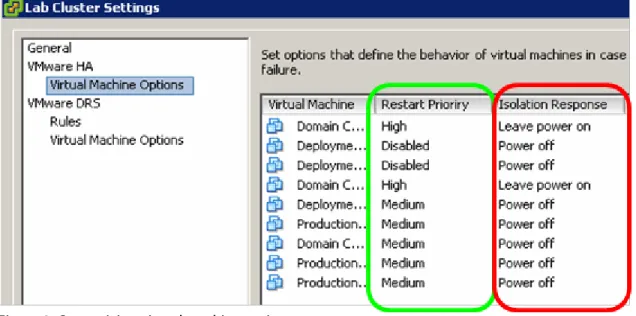
Figure 9: Customizing virtual machine options
This dialog box lets you make changes to the number of host failovers or the admission b
rmines the order in which virtual machines are restarted upon host ered, but i
er of hosts and more than that number of hosts VMware H
rst mi chines fr second host in order of priority, and so on.
Isolation Response Configuration
ehavior.
You can customize VMware HA for restart priority and isolation response. Restart priority dete
Higher priority virtual machines are started first. Restart priority is always consid especially important in the following cases:
• If you set host failure capacity to a certain numb actually fails.
• If you turn off strict admission control and have started more virtual machines than been set up to support.
Note: This priority applies only on a per-host basis. If multiple hosts fail, VMware HA fi all virtual machines from the first host, in order of their priority, then all virtual ma
By default, about 12 seconds after heartbeats have ceased arriving, the isol
special procedure called isolation response. This typically involves shutting down its machines. About 15 seconds after the start of the isolation event, other hosts in consider tha
ated host itself starts a virtual the cluster t isolated host as failed and attempt to restart the virtual machines. You can change
d options in isk locking g a “split-brain” condition.
ss to the network. leases their shared for individual virtual
ion, you can r to false indicates the host can no longer
d. If you choose to municate over the network, they may become unavailable. If
d storage, such as NAS or iSCSI, you run the risk that storage if they lose access to the network.
ult to a restart priority
al Machines in a Cluster
is part f a cluster, the resulting
ter first checks whether f host failovers if you
e default), a t using strict rces to
ter turns red.
hich restricts virtual machines in preparation for shutting down the host. While in maintenance mode, the host does not allow you to deploy or power on new virtual machines. Virtual machines that are already running on the host continue to run normally. You can either migrate them to another host or shut them down. When there are no more running virtual machines on the host or cluster, its icon changes and its summary indicates the new state. In addition, menu and command options involving virtual machine deployment are disabled when this host or cluster is selected.
Because a host must be in maintenance mode before you can remove it from a cluster, all virtual machines must be powered off first — unless VMware DRS is also enabled, in which case virtual both of these timeout values from their defaults using VMware HA advance
VirtualCenter.
If a virtual machine is configured to continue to run on the isolated host, VMFS d prevents it from being powered on elsewhere, avoidin
If virtual machines share the network adapter that failed, they do not have acce It might be advisable to start the virtual machine on another host.
By default, virtual machines are powered off in case of a host isolation incident. This re
storage locks, which allows the virtual machines to be started up on other hosts. Carefully review networking best practices for avoiding Isolation. You can change the default behavior
machines in case of Isolation. Using the advanced option das.poweroffonisolat change the default isolation response behavior of the cluster. Setting this paramete that the virtual machines on isolated hosts should continue running even if
communicate with other hosts in the cluster. This change must be carefully considere do this and the virtual machines cannot com
you choose to use this option with network-base virtual machines might be unable to access their
Note: If you add a host to a cluster, all virtual machines in the cluster defa of medium and an isolation response of power off.
Powering On Virtu
When you power on a virtual machine on a host that o VirtualCenter behavior depends on the type of cluster.
If you power on a virtual machine and VMware HA is enabled, VirtualCen there are enough resources to continue supporting the specified number o power on the virtual machine.
If there are enough resources, the virtual machine is powered on.
If there are not enough resources and you are using strict admission control (th message informs you that the virtual machine cannot be powered on. If you are no admission control, a message informs you that there are no longer enough resou guarantee failover for all hosts. The virtual machine is powered on but the clus
Host Removal and Virtual Machines
Both stand-alone hosts and hosts within a cluster support maintenance mode, w virtual machine operations on the host to allow the user to shut down running
machines are automatically removed from the host. When you then remove the h cluste
ost from the r, the virtual machines that are currently associated with the host are also removed from the
e cluster decrease. When you ines are removed as abled for VMware HA loses so many resources that it can no longer fulfill its failover requirements, a message appears and the cluster turns red. The cluster will fail over virtual
aranteed to have enough resources available to fail
ing a host with om a cluster to another tandard drag-and-drop method or selecting Migrate from the virtual machine’s right-button menu or the VirtualCenter menu bar. If the cluster is also enabled for VMware DRS
er of a VMware DRS cluster affinity group, VirtualCenter displays tes that dependent virtual the warning before
migration can proceed.
Server working architecture.
tion of ESX Server host networking and name resolution, as well as the networking ical to optimizing he following suggestions are best practices for configuring these components
PortFas or an equivalent) setting, enable it on the physical n events. For
networking • Ensure that the following firewall ports are open for communication by the service console for
all ESX Server 3 hosts:
Incoming Port: TCP/UDP 8042-8045 Outgoing Port: TCP/UDP 2050-2250
• For better heartbeat reliability, configure end-to-end dual network paths between servers for service console networking. You should also configure shorter network paths between the servers in a cluster. Routes with too many hops can cause networking packet delays for heartbeats.
cluster.
Removing Hosts with Virtual Machines from a Cluster
If you remove a host from a cluster, the available resources for thremove a host with virtual machines from a cluster, all that host’s virtual mach well. You can remove a host only if it is in maintenance mode or disconnected.
Note: If a cluster en
machines in case of host failure but is not gu over all virtual machines.
Removing Virtual Machines from a Cluster
You can remove virtual machines by migrating them out of a cluster or remov virtual machines from the cluster.
You can migrate a virtual machine from a cluster to a standalone host or fr cluster, using the s
and the virtual machine is a memb
a warning before it allows the migration to proceed. The warning indica machines are not migrated automatically, so you have to acknowledge
VMware HA Best Practices
Use the VMware HA best practices in this section that are applicable to your ESX implementation and net
Networking Best Practices
The configurainfrastructure external to ESX Server hosts (switches, routers, and firewalls), is crit VMware HA setup. T
for improved HA performance:
• If your switches support the t (
network switches connecting servers. This helps avoid spanning tree isolatio more information on this option, refer to the documentation provided by your switch vendor.
• Disable VMware HA (using VirtualCenter, deselect the Enable VMware H
cluster’s Settings dialog box) whe
A check box in the n performing any networking maintenance that might
tion rather than th ethod of manually editing the ou must include sed to reconfigure access to the network by virtual machines. If the names are used on the original server and
from their networks labels on all servers in a VMware HA cluster. Virtual
liability. Redundant er 3i) allows the om occurring, because heartbeats t over multiple networks.
sole or VMkernel dancy, but you can use
y.
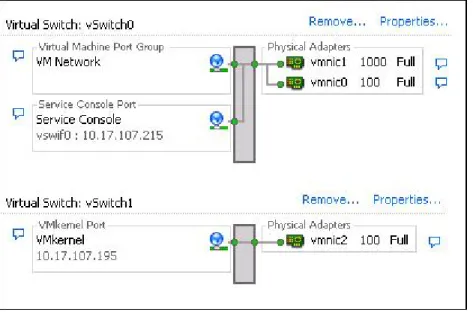
wn in Figure 10, using a team of two NICs connected to separate physical switches can ity of a service console (or, in ESX Server 3i, VMkernel) network. Because to each other through two NICs (and through separate switches) have two
eats, the cluster is more resilient.
To configure a NIC team for the service console, configure the vNICs in vSwitch configuration for the ESX Server host, for Active/standby configuration. The recommended parameters for the vNICs are:
• Rolling Failover = Yes
• Default Load Balancing = route based on originating port ID disable all heartbeat paths between hosts.
• Use DNS for name resolu e error-prone m
local /etc/hosts file on ESX Server hosts. If you do edit /etc/hosts, y both long and short names.
• Use consistent port names on VLANs for public networks. Port names are u the failover server are inconsistent, virtual machines are disconnected after failover.
• Use valid virtual machine network
machines use these labels to reestablish network connectivity upon restart.
Setting Up Networking Redundancy
Networking redundancy between cluster nodes is important for VMware HA re service console networking on ESX Server 3 (or VMkernel networking on ESX Serv reliable detection of failures and prevents isolation conditions fr
can be sen
You can implement network redundancy at the NIC level or at the service con port level. In most implementations, NIC teaming provides sufficient redun or add service console or port redundancy if you need additional redundanc
NIC Teaming
As sho
improve the reliabil servers connected
owing example illustrates the use of a single service console network with NIC teaming for
some risk if you configure hosts in the cluster with only one service console example uses two teamed NICs to protect against NIC
iontime =
u can create a
ttach that port to a for network and
k, VMware HA orks. If one path fails, ill send and receive heartbeats over the other path.
ce console network ration is used as the isolation address. Each service console network should have one
ncy, you must s2) for the
on address, VMware also recommends that you increase the das.failuredetectiontime setting to 20000 milliseconds or greater.
Also, make sure you configure isolation addresses properly for the redundant service console network that you create. Follow the networking best practices when designating isolation addresses.
A further optimization you can make (if you have already configured a VMotion network) is to add a secondary service console network to the VMotion vSwitch. As shown in Figure 11, a virtual switch can be shared between VMotion networks and a secondary service console network.
Figure 10: Service console redundancy using NIC teaming
The foll
network redundancy: • You assume
network (subnet 10.20.XX.XX), so this failure.
• The default timeout is increased to 60 seconds (das.failuredetect
60000).
Secondary Service Console Network
As an alternative to NIC teaming for providing redundancy for heartbeats, yo secondary service console network (or VMkernel port for ESX Server 3i), then a separate virtual switch. The primary service console network is still used
management purposes. When you create the secondary service console networ sends heartbeats over both the primary and secondary service console netw VMware HA can st
By default, the gateway IP address specified in each ESX Server host’s servi configu
isolation address it can reach. When you set up service console network redunda specify an additional isolation response address (das.isolationaddres secondary service console network. When you specify this secondary isolati
o service consoles. Each of l NIC. The two networks are also
lationaddress2 = Increase the
e = 20000).
ter include:
an HA-enabled still guaranteeing failover
ith many virtual • To define the sizing estimates used for admission control, set reasonable reservations for the minimum
resources needed.
• Admission control exceeds failover capacities when reservations are not set; otherwise, VMware HA uses the largest reservation specified as the “slot” size.
• At a minimum, set reservations for a few virtual machines considered average.
• Admission control may be too conservative when host and virtual machine sizes vary widely. Perform your own capacity planning by choosing Allow virtual machines to be powered on even if they violate availability constraints. VMware HA will still try to restart as many virtual machines as it can.
Figure 11: Network redundancy with a secondary service console
As the figure shows, each host in the cluster is configured with tw these service console networks is co
on different subnets.
nnected to a separate physica
20 seconds (das.failuredetectiontim
Oth
ster Considerations
Oth the performance of your HA clus •
host failures while Use the default gateway for the first network and specify das.iso
192.168.1.103 as the additional isolation address for the second network.
default timeout to
er HA Clu
er considerations for optimizing
Use larger groups of homogenous servers to allow higher levels of utilization across cluster (on average).
• More nodes per cluster can tolerate multiple capacities.
• Admission control heuristics are conservatively weighted so that large servers w machines can fail over to smaller servers.
Troubleshooting
Typically, troubleshooting VMware HA involves following the steps below and taking correctivegement Server must be ay on the service e networks for redundancy, each of the
r information on hooting, refer to the ESX Server Configuration guide.
nectivity at server, rage, and switch levels.
n issue error ation related to an
leshooting VMware ogs. Always start by looking for ESX Server service console networking errors, followed by VMware HA agent logs.
• Use the Reconfigure for HA menu in the VI Client as a last resort to reconfigure a host when the VMware HA agent on the host has failed or is intermittently failing. This option initiates configuration and restart of the VMware HA agent on the selected ESX Server host.
action to see if the problem is fixed:
• Verify the network is working properly. At a minimum, your VirtualCenter Mana able to reach the ESX Server hosts, and the hosts must be able to ping the gatew console networks. If you are using multiple service consol
service consoles must be able to ping the gateway IP address on that network. Fo networking troubles
• Verify shared storage is accessible from all hosts in the cluster. Carefully verify con sto
• Pay attention to cluster warnings, task details, and events. Task details, configuratio messages, and event histories in VirtualCenter are useful places to look for inform error.
• Check logs for clues. Logs on the ESX Server hosts are the best place to start troub HA. You should check service console and VMware HA l
Troubleshooting Cluster Configuration Errors
Figure 12: Looking for messeges on screen to help troubleshoot
If you see errors while configuring a VMware HA cluster, they are most likely displayed in the wn in Figure 12, the
his case, admission to allow VMware meet the admission control criterion.
e cluster name yellow box ware HA
st as it is added to the cluster. It contains all available information about the failures. VMware HA logs are stored on each ESX Server host that has VMware HA enabled.
If installation of VMware HA has finished successfully but VMware HA services are not starting, as a last resort, you can try starting the services manually on individual hosts or the entire cluster. To do this on individual hosts, select the host in the VI Client. Click the Summary tab, then click
Reconfigure for HA. To reconfigure VMware HA for the entire cluster, select the cluster and choose Edit Settings. In the wizard, deselect VMware HA and click OK. Once reconfiguration is complete, select VMware HA again to reconfigure VMware HA.
yellow error box that appears in the VirtualCenter clustering screen. As sho on-screen message provides enough information to point out the problem. In t control constraints are turned on, and the cluster does not have enough servers HA to function and
The VMware HA cluster thus turns red, as indicated by the red triangle in front of th in the left pane of the VI Client window. The Configuration Issue message in the indicates the nature of the problem.
If you encounter errors during installation or initial configuration, check the VM installation log that is created on each ESX Server ho
cent Tasks pane of details on the error, select the host on which the error occurred and click the Tasks and Events tab.
When VMware HA encounters an error, VirtualCenter shows the error in the Re the VI Client. To get more
Figure 13: Viewing detailed error messages using the VI Client
Summary
VMware HA — along with new VMware Infrastructure capabilities of clusters andand tighter integrat
resource pools ion with other VMware tools such as VirtualCenter, VMotion, and VMware DRS — greatly simplifies virtual machine provisioning, resource allocation, load balancing, and migration, while also providing an easy-to-use, cost-effective high-availability and failover
solution for applications running in virtual machines. Using VMware Infrastructure and VMware HA helps to eliminate single points of failure in the deployment of business-critical applications in virtual machines. At the same time, it allows you to maintain other inherent virtualization benefits such as higher system utilization, closer alignment of IT resources with business goals and
priorities, and more streamlined, simplified, and automated administration of larger infrastructure installations and systems.
VMware, Inc. 3401 Hillview Ave. Palo Alto CA 94304 USA Tel 650-475-5000 Fax 650-475-5001 www.vmware.com © 2007 VMware, Inc. All rights reserved. Protected by one or more of U.S. Patent Nos. 6,397,242, 6,496,847, 6,704,925, 6,711,672, 6,725,289, 6,735,601, 6,785,886, 6,789,156, 6,795,966, 6,880,022, 6,961,941, 6,961,806, 6,944,699, 7,069,413; 7,082,598, 7,089,377, 7,111,086, 7,111,145, 7,117,481, 7,149, 843, 7,155,558, 7,222,221, 7,260,815, 7,260,820, 7,269,683, 7,275,136, 7,277,998, 7,277,999, 7,278,030, and 7,281,102; patents pending. VMware, the VMware “boxes” logo and design, Virtual SMP and VMotion are registered trademarks or trademarks of VMware, Inc. in the United States and/or other jurisdictions. All other marks and names mentioned herein may be trademarks of their respective companies.