JEEECCS, Volume 4, Issue 11, pages 13-26, 2018
Implementation of SSL/TLS-based security
mechanisms in e-commerce and e-mail
applications using Java
Tulsi Pawan Fowdur, Muhammad Shafeeq Aumeeruddy, Yogesh Beeharry
Department of Electrical and Electronic Engineering Faculty of Engineering, University of Mauritius
Réduit, Mauritius
[email protected], [email protected], [email protected]
Abstract – E-commerce applications and e-mail communication are very popular in today's sophisticated society. However, without proper security protocols in place, these applications are susceptible to different types of attacks. The Man-In-The-Middle (MITM) attack for example is becoming an increasing threat for e-mail and e-commerce applications. Spoofing attacks are also a major issue for e-mail applications. In this paper, a review of the Secure Sockets Layer (SSL) and Transport Layer Security (TLS) protocols is performed along with some common security attacks for both applications. Firstly, a Hyper Text Transfer Protocol (HTTP) and HTTP Secure (HTTPS) web server was implemented for the e-commerce application using Java. The HTTPS server employs the SSL/TLS protocol and uses a cryptographic self-signed certificate in order to secure messages between the client and the server. The e-mail application was implemented using the Javamail API. It was secured using the TLS protocol to address MITM attacks on e-mail. The MITM attack was performed using the Wireshark software by sniffing data. With the SSL/TLS protocol enabled, data transmitted was encrypted and MITM attack was successfully blocked. Spoofing attacks were also tested and tackled with the SSL/TLS protocol.
Keywords: Man-In-the-Middle attack, SSL, TLS, Javamail.
I. INTRODUCTION
In this modern era, e-commerce and e-mail communication have become an integrated part in the world of businesses and consumers. E-commerce permits consumers to exchange goods and services by the medium of the internet with no barriers of time or distance and e-mail permits correspondence between any individual around the globe [1]. According to an e-mail statistic report published by Radicati group, the total number of worldwide e-mail accounts has increased from 4.9 to 5.2 billion e-mail accounts between 2017 and 2018, and by the end of 2019, it will be increased to about 5.5 billion e-mail accounts [2]. As stated in Statistia, a business intelligence portal, sales using e-commerce approximated to around 2.3 trillion US dollars is expected to increase to 4.88 trillion US dollars in 2021 [3]. Despite all the
benefits that e-commerce and e-mail provide to businesses and consumers, cyber security remains one of the most crucial aspects to be handled while exchanging information which can result into potential damage for both parties. E-mail applications are exposed to threats and vulnerabilities such as e-mail spoofing, phishing attacks, social engineering, e-mail spamming, transmission of malware and viruses. In addition, e-commerce applications are also susceptible to dangers such as phishing, MITM Attack, and network sniffing attacks. In 2016, Alibaba's Taobao e-commerce website was attacked by hackers where they gained access to over 20 million accounts which resulted in a great loss for the company [4]. If data are being transmitted over a network insecurely, an attacker may get access to these data. Consequently, the substance of e-mail messages and attachments may be intercepted and viewed by an attacker. A small attack from an attacker may infect a host with malware, allowing interception of e-mail messages and exfiltration of sensitive information [5]. Securing applications is the use of software, hardware, and procedural methods to protect applications against dangers. E-mail and e-commerce applications utilize a lot of security mechanisms such as Transport Layer Security/ Secure Socket Layer, Pretty Good Privacy encryption, Secure Multipurpose Internet Mail Extensions, Sender Policy Framework record, Domain Keys Indentified Mail, SenderID. An overview of research conducted on e-mail and e-commerce security is given next.
encryption techniques, PKI infrastructure and digital signature, intruders may have access to sensitive information in an e-commerce environment. To avoid MITM attack on the SSL protocol, front end authentication, back end authentication and the recognition of forged Certificate Authority were proposed. In [9], the author focused on the possible attacks on SSL over HTTP known as HTTPS protocol. The most popular e-mail services and online transactions rely mostly on HTTPS to provide end-to-end security. The Diffie-Hellman and blowfish algorithms were further added to enhance the SSL over HTTPS. In [10], a description of the use of some SMTP security extensions; STARTTLS, Sender Policy Framework, DomainKeys Indentified Mail and Domain Message Authentication Reporting and Conformance for confidentiality of e-mail was given. The STARTTLS extension encapsulates SMTP within a TLS session. The client is able to transmit messages and attachments over an encrypted path. The DKIM allows the SMTP server to know whether an e-mail is spoofed or not during transmission. SPF permits a range of hosts that are authorized to send mail for its domain. DMARC assembled on DKIM and SPF enables senders to suggest a protocol for authenticating the received mail. In [11], the author used the technique of memory forensics to detect if a client has received any spoofed e-mail. The memory forensics approach also detects if a client has replied to any spoofed e-mails. The memory on the client machine is often analyzed on a scheduled basis to check for spoofing attacks. If spoofing attacks are detected, the log files stored on the memory may be used by cybercrimes investigation for inspection. The Identity-Based cryptography concept to secure e-mail systems was introduced in [12]. The technique was applied to three schemes: client encryption to third party, mail server encryption before transmission and industry private network SM9 encrypting alliance. The three solutions were compared for reconstruction of a secure e-mail system. In [13], the author discussed about the confidential information being transferred when carrying out e-commerce transactions. The different threats to e-commerce applications and the technologies used to counter them were discussed. In [14], the authors designed a web-based client oriented anti-spoofing mechanism to detect, monitor and control e-mail spoofing. When a spoofed e-mail is detected, an alert message is displayed. The authors made us of the SSL protocol to counteract spoofing attacks.
Although several works have shown the efficiency of the SSL/TLS protocol, few have focused on its implementation using the Java Secure Socket Extension. The JSSE allows the implementation of secure sockets for both servers and clients. Moreover the JavaMail Application Programming Interface allows flexibility in designing the e-mail applications for testing security attacks. This paper provides a detailed overview of the implementation of a secure e-commerce and e-mail application using the TLS/SSL protocols in Java. The application was tested with both MITM and spoofing attacks. This paper is organized in the following way: Section II gives an overview of the SSL security mechanism and security attacks on
e-commerce and e-mail applications. Section III describes the application of SSL to counteract security attacks. Section IV describes the implementation and testing of the developed application. Section V concludes the paper.
II. OVERVIEW OF THE SSL SECURITY MECHANISM AND SECURITY ATTACKS ASSOCIATED WITH E
-COMMERCE AND E-MAIL APPLICATIONS.
The Secure Socket Layer (SSL) Protocol predecessor of the Transport Layer Protocol (TLS) was invented by Netscape in 1994 (Version 1.0) as a solution to the increasing concerns over internet security. The goal was to establish an encrypted path between the client and the server platforms. In 2003, Netscape additionally exploited new encryption plans, by using the Advanced Encryption Standard (AES), regarded as being more robust than the Data Encryption Standard (DES) [15]. The AES was chosen by the U.S government to protect classified information and is said to suffice to serve the purpose of protecting classified information up to the SECRET level [16]. Updates have been made and SSL version (3.0) is now operable on almost all web servers and with its popularity, it has become a standard. During the development of SSL version 3.0, developers were also creating SSL certificates. The genuineness of websites is approved by these certificates.
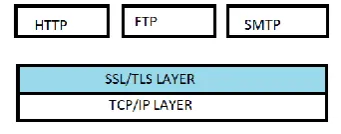
The SSL protocol employs a series of cryptographic processes to secure transmission of data. It gives a secure improvement to the standard TCP/IP sockets protocol used in Internet communications. Figure 1 illustrates the location of the SSL/TLS layer [17].
Figure 1. Location of SSL
The SSL/TLS protocol is used as a transport layer security control. This layer ensures confidentiality and integrity of data and peer authentication. The goals of using the SSL protocol are that it is efficient and utilizes a combination of cryptographic procedures. The public key cryptography and secret key are adopted to authenticate, and digital signatures are made to provide privacy and data integrity [17].
order to alter it or change it. The attacker may gain important information like login credentials for a website, important financial information or messages exchanged between two parties [18]. Figure 2 illustrates the MITM attack.
Figure 2. MITM attack.
During an HTTP transaction between two hosts on a network, there is a TCP connection. In a MITM attack, the connection is split into two parts. The first part leads the victim to the attacker, while the second part leads the attacker to a server [19]. An interception process is done before the user's network traffic reaches its destination. It passes through the attacker's network traffic. The most credulous way an attacker does a passive MITM attack is by setting a malicious Wi-Fi hotspot which is available to the public. Once the victim connects to the hotspot, the attacker gains full visibility to any online data exchanged [20]. The main technique used to perform MITM attack is sniffing of packets. Attackers use packet capturing tools like Wireshark to carry out such attacks. The sniffing tool is used to capture confidential information on a network. Wireshark is a free, commercial-quality sniffer program. It comes with a GUI and runs on multiple platform: Windows, Linux, Mac OS X. It can decode over 400 protocols. Other examples of sniffing tools are: TCPDUMP, Nmap and Cain and Abel [21, 22].
Spoofing attacks on e-mails occur when an attacker sends a recipient an mail using another e-mail address, that is, not the originating address. It is possible to perform such an attack due to the SMTP protocol. This type of attack happens when the authentication process is not respected [23]. The attacker manipulates the e-mail header (the 'From' field) to make the e-mail appear legitimate [24].
The SSL/TLS protocol is employed to provide security on web applications and e-mail applications. On web applications, the security protocol is combined with the HTTP protocol to provide secure communication between users resulting in HTTP over SSL/TLS which is the HTTPS protocol. The protocol enables users to securely access and interact with their online accounts, and protects, among other things,
common user authentication credentials, such as passwords and cookies. In e-mail applications, the TLS/SSL protocol is used to encrypt data being transmitted and allows a client to authenticate with a server [25].
III. IMPLEMENTATIONOFE-COMMERCE
ANDE-MAILAPPLICATION
This section gives details about the implementation of the e-commerce and e-mail applications.
III.1 The E-Commerce Application
A GUI was designed for the HTTP and HTTPS web server on the NetBeans IDE and is shown in Figure 3.
Figure 3. Java Web Server Application
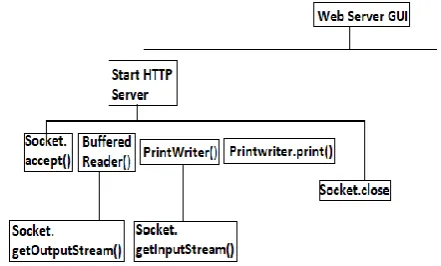
The "Start WebServer on port 800" button starts the server on HTTP port 800 and the client will have access to the unsecure web page. The "Start WebServer with SSL on port 900" allows the exchange of certificates between the server and client hence providing secure connection. The exit button is located on the top right upper corner to exit the application. An overview of the methods implemented for the application is given in Figures 4 and 5.
Web Server
GUI
Start HTTP Server
Start Server
with SSL EXIT
Keystore.
load() TrustManagerFactory.getInstance() SSLserverSocket.CreateSocket() getSupportedCipherSuites()SSLserverSocket. SSLserver.accept()
Figure 5. Java class structure for HTTPS server Java methods structure for the HTTPS server
The start web browser button relies on several methods to function. After a socket is created to communicate, the Socket.accept() function is used to listen to a connection to be made to this socket. When a client connects to the socket, it accepts the connection. The BufferedReader() is combined with the InputStream() method to accept user input, for example when a client is sending information to the server. The BufferedReader() allows sending characters instead of bytes. To send bytes to the client, means the getOutputStream() method is used. However, it can be combined with PrintWriter() to be able to send text to a remote application. The printWriter.print() will print the strings. Here this method will output an HTML page to the web browser of a client.
The start web brower with SSL shown in Figure 5 provides secure communication. Different methods are used to obtain an SSL connection. The keystore.load() function is used to access the server and the client, certificated by using the
FileInputStream() method. The
Trustmanagerfactory.getInstance() method manages the type of trust material used by the secure socket. The SSLserverSocket.getSupportedCipherSuites() method allows to choose the cipher suites to be used by the server. It selects the strongest cipher suites to be used by the server. The SSLserversocket.accept() listens to the connection and accepts any trusted incoming connection.
An HTML form was designed for the e-commerce application where the user can input information as shown in Figure 6. The form consists of three labels and three input elements. The input elements are of type text. The "text" creates a basic single-line text field. The width for the input is of length 20 characters. A button of type submit is also included and named "Buy Now". This button submits the data to the server. The HTML form was written and tested on a source code editor called Notepad++.
Figure 6. HTML form
After testing the form, it is embedded in the web browser program. The Printwriter() method is combined with the OutputStream() method to output the HTML form to the client. To accept the user input, a BufferedReader() is combined with an InputStreamReader() to send data back to the server. The flowchart shown in Figure 7 illustrates the operation of the HTTP server application.
g
Figure 7. Flowchart for HTTP server
the Bufferedreader() method will send the data in the form of text to the web server. Once the client has finished, the socket is closed. The flowchart shown in Figure 8 illustrates the operation of the HTTPS server application.
Figure 8. Flowchart for HTTPS server
When the HTTPS server is started, it waits for a client to connect to it on port 900. When a client connects to it, the SSL handshake is started. The client sends the server information about the SSL version it uses and also a list of cipher suites. The server chooses the highest version of SSL and the best cipher suite to be used. The certificates are exchanged and the server certifies the certificates. The secret keys are exchanged and the client asks for a change in cipher specification. In the next step, the server tells the client to change the encrypted mode, the SSL handshake is terminated and ready to send data securely. The server and the client send data and receive data using the same scheme as in the HTTP server.
SSL/TLS needs to be implemented for secure communication and is accomplished in several steps. For the creation of certificates, a tool known as keytool will be used. It is available in the JDK software.
Four different certificates will be generated namely:
1. One keystore for the server 2. One keystore for the client 3. One truststore for the server 4. One truststore for the client
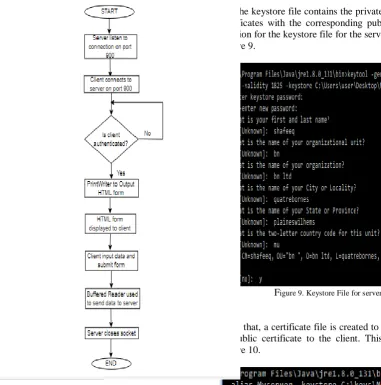
The keystore file contains the private keys and the certificates with the corresponding public keys. The creation for the keystore file for the server is shown in Figure 9.
Figure 9. Keystore File for server
After that, a certificate file is created to be distributed as public certificate to the client. This is shown in Figure 10.
Figure 10. Server's public certificate
Keystore file for the client
Figure 11. Keystore File for client
After the creation of the keystore file for the client, a certificate file is created, that may be distributed as public certificate to the server and is illustrated in Figure 12.
Figure 12. Client's public certificate
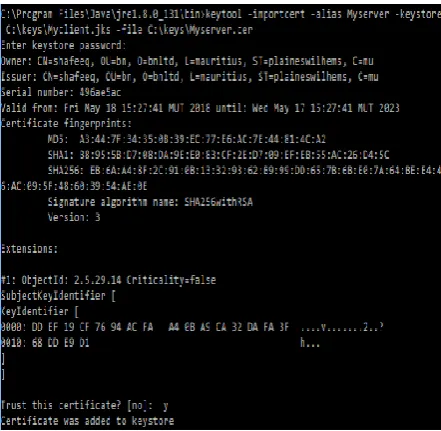
In order for a two-way Authentication, the Server should recognize the client's public certificate and the client should be aware of the server's certificate. This is achieved by:
1. Adding the server certificate to the client's truststore. This is shown in Figure 13.
Figure 13. Adding Server certificate to client truststore
2. The client certificate is added to the server truststore. This is illustrated in Figure 14.
Figure 14. Adding client certificate to server's truststore.
The server's certificate is imported into the client's local browser. This is achieved by:
1. The local browser is opened. Here Mozilla Firefox was chosen. Navigate through the browser's option as shown in Figure 15.
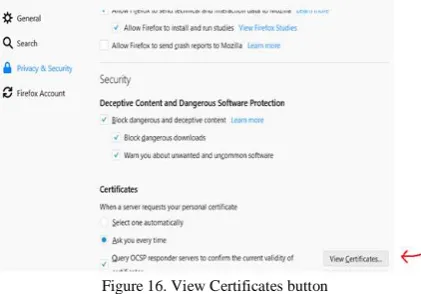
2. Click on options button and navigate through the privacy and security and go to view certificates as shown in Figure 16.
Figure 16. View Certificates button
3. After clicking on view certificates, select the import button to view all available certificates. This is shown in Figures 17 and 18.
Figure 17. Importing certificates
Figure 18. All available certificates listed
From Figure 18, all the listed certificates are shown and the server certificate is selected.
III.2 The E-mail Application
The secure e-mail application was developed in Java with the NetBeans IDE. The application is GUI-based and is used to send and receive e-mails over an SSL/TLS connection. The GUI for the complete system is illustrated in Figure 19.
Figure 19. E-mail sender and receiver GUI
To send e-mails, the application makes use of the Javamail API. Several steps are followed to send an e-mail as follows:
1. The properties are placed for the session in a properties object.
2. A mail session is started with the Session.getInstance() method.
3. A message object is then created.
4. Set the message's From: address, To: address, and subject.
5. Set the content of the message.
6. A transport is used from the session and is connected to a named host using a username and password.
and To addresses are specified and the message subject is written. The transport is used to send the message to the recipient alongside with the send() method which connects the mail server and sends the message [26].
The application allows to send attachments also. To send an attachment, means the application makes use of a MimeMultipart object. The attachment is added by the use of a Datahandler and is sent over the transport [27].
The Javamail API allows e-mails to be received and the procedures are as follows [27]:
1. The properties are set up as before to be used for the authentication
2. The authenticator is constructed to be used for connection.
3. A session object is used with the Session.getInstance() method.
4. The session's getStore() method is used to return a store.
5. Connect to the store.
6. The INBOX folder from the store is retrieved with the getFolder() method.
7. The INBOX folder is opened.
8. The messages are retrieved from the folder as an array of message objects.
9. Close the folder and the store.
The authenticator class is used to ask a user for a password and validates this password. The session asks for a store from the provider, for example a POP3 provider. The connect() method is used to connect to the store using the hostname, username and password. The folder is opened by using the open() method and messages are available to read. After reading the messages, the folder is closed using the close() method [26].
Figure 20 illustrates the Java class structure for the e-mail application.
Figure 20. Java class structure for e-mail application
The send() method allows the user to send an e-mail. Different methods work together to provide this service. Different fields for the properties method need to be input; the hostname, the port number, use of authentication and enabling TLS connection. The session method authenticates with the e-mail provider. Next, the message needs to be built up by
setting the From and To addresses as well as the subject of the message. The mimebodypart is used to send attachments.
are retrieved by the multipart function where each message is stored in an array of messages. After the messages are retrieved, the folders and the store are closed.
The system flowchart for sending e-mail is illustrated in Figure 21.
Figure 21. System flowchart to send e-mail
When the program is started, the user inputs details about username, passwords and composes the message. If the startTLS command is enabled, the TLS handshake is performed with the e-mail provider and the message is sent encrypted. If the command is not enabled, the message is sent in plain text to the mail provider.
The system flowchart for receiving e-mail is shown in Figure 22.
Figure 22. System flowchart for receiving e-mail
When the program is started, the user inputs details about the port number, hostnames, user login and password. If correct information is input, the user is authenticated with the server and can have access to his respective inbox.
IV. TESTINGANDANALYSIS
In this section, the operation of both e-commerce and e-mail applications are illustrated and tested.
IV.1 E-Commerce Application Testing
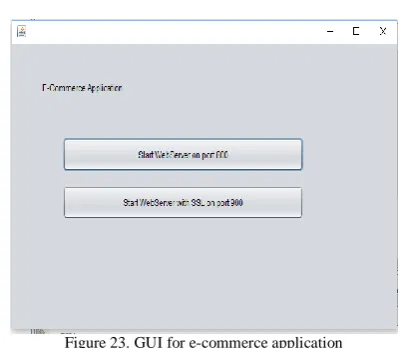
Figure 23. GUI for e-commerce application
The user can access the web page by inserting the following address in the browser: http://localhost:800. Figure 24 illustrates the web page:
Figure 24. Accessing server in HTTP mode
The HTTPS server is started by clicking on the button "start web server with SSL". The user can access the web page by inserting the following link in the web browser: https://localhost:900. Figure 25 displays the web page when started on HTTPS.
Figure 25. Accessing server in HTTPS mode
TLS/SSL handshake is done with the server and the encryption mode being used is shown in Figure 26:
Figure 26. HTTPS connection and encryption being used.
The Wireshark application allows a user to sniff packets over a network. First sniffing is done over the HTTP port and secondly on the HTTPS port. The information is intercepted and shown respectively.
Figures 27 and 28 describe the information when the network port was sniffed by Wireshark when a transaction was done. It shows clearly that the data are transmitted in plain text to the server. Anyone using a packet sniffer program may intercept the data.
Figure 27: Information input by a client
Figure 28. Sniffing of client's information
The same information was used as for the HTTP server and was input on the webpage of the HTTPS server and the packets were sniffed and shown in Figure 29.
Figure 29. Sniffing packets over HTTPS port
The program was able to sniff the port but the data is encrypted and not sent in plain text.
IV.2 E-mail Application Testing
The e-mail application is tested next. The GUI for the sender/receiver program, allows a user to send or receive an e-mail easily. To send an e-mail, the following steps are followed:
1. The hostname should be specified, for example if we are using G-mail, the hostname will be smtp.gmail.com for sending e-mail. The port number should be input. For g-mail, the port 587 is used to send e-mail over a TLS connection. The starttls extension may be set to either "true" or "false". This allows us to upgrade our connection using SSL/TLS.
2. The username and password should be entered correctly and set the destination e-mail address.
3. Add any attachment if necessary and type the message and click on mail to send the message. Figure 30 shows when an e-mail is sent using the G-mail e-G-mail provider.
Figure 30. Sending an E-mail with javamail
After the e-mail is sent, a notification is sent to tell the user the e-mail is sent successfully. Now using the Wireshark packet sniffer, the data being sent are sniffed and shown in Figure 31.
Figure 31. Wireshark capture on javamail
Figure 32. Testing starttls false on gmail
As shown in Figure 32, the G-mail provider does not accept insecure connections. The e-mail was not sent and an error message is displayed. A TLS/SSL handshake must be issued to connect to the e-mail provider.
To receive an e-mail, the IMAP protocol is used to retrieve e-mails from the folders. The following steps are followed to open the e-mail:
1. Set the hostname, port number and starttls command according to the e-mail provider being used.
2. Input the username and password for correct authentication.
3. Click on the inbox button to display the messages. An example of the output is shown in Figure 33.
Figure 33. Inbox test
Next Wireshark is used to try to sniff packets when receiving an e-mail.
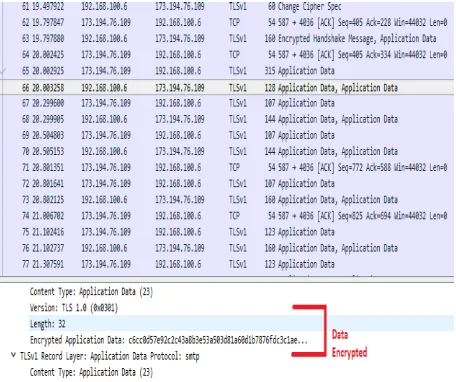
Figure 34 shows an extract of the output from the Wireshark software. It shows that the packets are encrypted and the TLS protocol is being used. If an attacker tries to sniff the packets, he will not be able to decrypt any information.
Figure 34. Sniffing packets when receiving mail
As it can be seen from the previous testing, when the G-mail provider was used, we can see that both sending and receiving data are secured.
The application was also tested on an insecure e-mail service. The SMTP2GO was selected as it provides sending e-mails without the TLS protocol. The extract from Wireshark is given in Figure 35 with the startTLS command disabled while sending an email.
Figure 35. Disabling TLS on SMTP2GO
From Figure 35, the details are captured in plain text when the startTLS command was disabled and all the details such as the username and password were obtained.
Figure 36. Testing SMTP2GO with TLS enabled
Spoofing attacks was tested with different email providers, to see whether the application is able to carry out spoofing attacks. Gmail and SMTP2GO were used for testing the spoofing attacks as shown in Figure 37.
1. Testing spoofing attack on G-mail.
Figure 37. Spoofing attack on G-mail
A spoofing attack was carried out using the G-mail eG-mail provider. The 'From' field was changed to '[email protected]' as shown encircled in red in Figure 36. The e-mail was sent successfully with TLS set to true. Here the destination e-mail address is '[email protected]'. The next step, the inbox of the correspondent e-mail address is checked and shown in Figure 38.
Figure 38. Checking inbox on G-mail.
The receiver received the e-mail successfully but the spoofed e-mail is immediately changed to the originating e-mail address. This shows carrying out spoofing attack on G-mail provider was unsuccessful.
2. Testing spoofing attack on SMTP2GO
A spoofing attack was carried out on SMTP2GO, where the originating e-mail was changed as encircled in red in Figure 39 and also TLS was disabled. The e-mail was sent to '[email protected]'. In the next step, the inbox of the recipient will be checked to see whether to see if the spoofed is received.
Figure 39. Spoofing Attack on SMTP2GO
Checking Spoofed E-mail on SMTP2GO.
not using TLS. This clearly illustrates the weakness of not using SSL/TLS.
V. CONCLUSION
In this paper, an e-commerce and e-mail application were implemented in Java with and without the SSL/TLS protocol. For the e-commerce application, both an HTTP and HTTPS server were implemented. It was then shown how the HTTPS server could mitigate a MITM attack performed by Wireshark software. For the e-mail application, it was shown that secure e-mail providers like G-mail could easily prevent MITM and spoofing attack by using SSL/TLS. However, with some e-mail services such as SMTP2GO, it was possible to perform MITM and spoofing attacks. Spoofing attacks were tested in different e-mail providers and the TLS protocol successfully blocked sending spoofed emails on G-mail. While the relay service SMTP2GO could not mitigate the spoofing attack when the TLS protocol was not used. This paper therefore has provided a framework for testing the security of e-commerce and e-mail application by the use of Java, with relevant implementation details.
ACKNOWLEDGMENT
The authors would like to acknowledge the financial support of the University of Mauritius.
REFERENCES
[1] Anon. 2018. What is Ecommerce?. [ONLINE] Available at: http://www.networksolutions.com/education/what-is-ecommerce/. [Accessed 22 February 2018].
[2] The RADICATI group, 2017-2021, Email Statistics Report.
[3] Statista. 2018. • Global retail e-commerce sales 2014-2021 | Statistic. [ONLINE] Available at:
https://www.statista.com/statistics/379046/worldwide-retail-e-commerce-sales/. [Accessed 03 April 2018].
[4] U.S. 2018. Hackers attack 20 million accounts on Alibaba's Taobao shopping site | Reuters. [ONLINE] Available at: https://www.reuters.com/article/us-alibaba-cyber/hackers-attack- 20-million-accounts-on-alibabas-taobao-shopping-site-idUSKCN0VD14X. [Accessed 22 February 2018].
[5] SearchSecurity. 2018. The importance of email encryption software in the enterprise. [ONLINE] Available at:
http://searchsecurity.techtarget.com/feature/The-importance-of-email-encryption-software-in-the-enterprise.
[Accessed 25 February 2018].
[6] Er, P.K. and Er, G.K., 2017. Review of Role of SSL in Cyber Security. International Journal of Advanced Research in Computer Science, 8(4).
[7] Baumgäertner, L., Höchst, J., Leinweber, M. and Freisleben, B., 2015, August. How to Misuse SMTP over TLS: A Study of the (In) Security of Email Server Communication. In Trustcom/BigDataSE/ISPA, 2015 IEEE (Vol. 1, pp. 287-294). IEEE.
[8] Arshad, M. and Hussain, M.A., 2016. Secure Framework to Mitigate Man-in-the-Middle Attack over SSL Protocol. Indian Journal of Science and Technology, 9(47).
[9] Shubh, T. and Sharma, S., 2016. Man-In-The-Middle-Attack Prevention Using HTTPS and SSL.
[10] Durumeric, Z., Adrian, D., Mirian, A., Kasten, J., Bursztein, E., Lidzborski, N., Thomas, K., Eranti, V., Bailey, M. and Halderman, J.A., 2015, October. Neither snow nor rain nor
MITM...: An empirical analysis of email delivery security. In Proceedings of the 2015 Internet Measurement Conference(pp. 27-39). ACM
[11] Iyer, R.P., Atrey, P.K., Varshney, G. and Misra, M., 2017, October. Email spoofing detection using volatile memory forensics. In Communications and Network Security (CNS), 2017 IEEE Conference on (pp. 619-625). IEEE.
[12] Xuan, J., Wang, D., Li, Z. and Zhang, S., 2016, October. Design of secure and independent controllable email system based on Identity-Based Cryptography. In Computer and Communications (ICCC), 2016 2nd IEEE International Conference on (pp. 217-222). IEEE.
[13] Hussain, M.A., 2013. A study of information security in e-commerce applications. International Journal of Computer Engineering Science (IJCES), 3(3), pp.1-9.
[14] Fowdur, T.P. and Veerasoo, L., 2016, January. An email application with active spoof monitoring and control. In Computer Communication and Informatics (ICCCI), 2016 International Conference on (pp. 1-6). IEEE.
[15] History of SSL Certificate | When was SSL Certificate Introduced. 2018. History of SSL Certificate | When was SSL Certificate Introduced. [ONLINE] Available at:
https://www.evsslcertificate.com/ssl/ssl-history.html. [Accessed 28 February 2018].
[16] SearchSecurity. 2018. What is Advanced Encryption Standard (AES)? - Definition from WhatIs.com. [ONLINE] Available at: http://searchsecurity.techtarget.com/definition/Advanced-Encryption-Standard. [Accessed 28 February 2018].
[17] IBM Knowledge Center. 2018. IBM Knowledge Center. [ONLINE] Available at:
https://www.ibm.com/support/knowledgecenter/en/SSYKE2_7.1.0/
com.ibm.java.security.component.71.doc/security-component/jsse2Docs/ssloverview.html. [Accessed 17 March 2018].
[18] Andrew Peterson. 2018. The myth of the sophisticated hack - O'Reilly Media. [ONLINE] Available at:
https://www.oreilly.com/learning/the-myth-of-the-sophisticated-hack?log-out. [Accessed 07 April 2018].
[19] Techopedia.com. 2018. What is a Man-in-the-Middle Attack (MITM)? - Definition from Techopedia. [ONLINE] Available at: https://www.techopedia.com/definition/4018/man-in-the-middle-attack-mitm. [Accessed 14 March 2018].
[20] Incapsula Team. 2018. MAN IN THE MIDDLE (MITM) ATTACK. [ONLINE] Available at:
https://www.incapsula.com/web-application-security/man-in-the-middle-mitm.html. [Accessed 14 March 2018].
[21] Orebaugh, A., Ramirez, G. and Beale, J., 2006. Wireshark & Ethereal network protocol analyzer toolkit. Elsevier.
[22] Kaur, I., Kaur, H. and Singh, E.G., 2014. Analysing Various Packet Sniffing Tools. International Journal of Electrical Electronics & Computer Science Engineering, 1(5).
[23] Gupta, S., Singhal, A. and Kapoor, A., 2016, April. A literature survey on social engineering attacks: Phishing attack. In Computing, Communication and Automation (ICCCA), 2016 International Conference on (pp. 537-540). IEEE.
[24] Derouet, E., 2016. Fighting phishing and securing data with email authentication. Computer Fraud & Security, 2016(10), pp.5-8.
[25] IBM Knowledge Center Error. 2018. IBM Knowledge Center Error. [ONLINE] Available at:
https://www.ibm.com/support/knowledgecenter/en/SSLTBW_2.1.0 /com.ibm.zos.v2r1.gska100/csdcwh.htm. [Accessed 21 March 2018].
[26] Harold, E.R., 2013. JavaMail API: Sending and Receiving Email with Java. " O'Reilly Media, Inc.".
[27] tutorialspoint.com. 2018. JavaMail API - Core Classes. [ONLINE] Available at: