Paper: AF
Web databases: A better Solution for
Organising the Internet Resources
Rajeev K R
SASKEN Communication Technologies Limited Bangalore - 560008
and
Abdul Jaleel Tharayil
IBM India, Airport Road Bangalore
Abstract
The web databases have become very popular in the Internet
world for organizing the Information resources. Library &
Information centers can effectively utilize this web technology
for improving as well as delivering new services. This paper
discusses the tools and the techniques of the 'Database - Web'
connectivity in brief and also provides the examples of Perl -
Search engines and meta-search engines are now intelligent and capable of
retrieving the required information from the sea of information resources on the
net. But to consult a set of specialized net resources more frequently, for several
reasons, search engines may not be the right choic e.
Many organizations have started identifying and organizing internet resources for
their internal use. Very often, they consult these resources to retrieve the required
information. There are two ways to organize these resources.
♦ Static WebPages
♦ Database driven WebPages
Static WebPages
As and when the number of resources grows, complexity in organizing the static
pages will also grow and it becomes very unfriendly to the end -users. In this
situation one may have to think about database driven WebPages that would help
the end users to interact with the stored information to retrieve the required
information.
Database driven WebPages
Database driven WebPages facilitate the end-user to see only the resources that
he/she wants to see and can hide the other unwanted resources that he/she doesn't
want.
To make this happen the following are required.
♦ A Database server
♦ Webserver
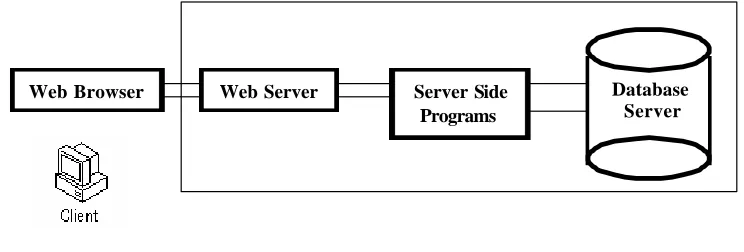
In simple words, a webserver accepts the query from client (Web browser) and
orders the server sid e scripts/executables to collect the required information from
the database server. After collecting the information from the database server,
server side scripts/executable processes it and gives it to the webserver. Webserver
in turn sends this processed information to the web browser as an answer to its query. (See Fig . 1)
Fig. 1
As of today there are a number of free as well as licensed Database Management
Systems, Webservers and Server side script engines which are capable of creating
databas e driven WebPages. Among these, two database management systems
(MySql & MS-Access) and two scripting programs (ASP & Perl) are discussed
here briefly. Most of the popular web servers such as Apache, Microsoft Internet
Information Server (IIS) etc supports ASP (Active Server Pages) & Perl.
ASP and PERL
Active Server Pages (ASP) is a server side program designed by Microsoft
basically to run on their Internet Information Server (IIS). Active Server Pages are
text based files, comprised of HTML tags and active server scripts. The active
server scripts, whether in VBScript, JSScript, or your own script compliant
language, are interpreted by Active Server Pages. Today it is available with other web servers also.
Database Server
Web Browser Web Server Server Side
Perl is a general language (basically for scripting purposes) designed to run on unix platforms. Today it is also available on other platforms. Both these scripting engines are free and available from many sources.
MySql and MS -Access
MySql and MS -Access are mini database management systems, which supports Structured Query Languages (SQL). MySql is available on Unix and Windows platforms and has many added security features compared to MS-Access and it is absolutely free. Another exciting feature of MySql is that it supports variable field length. MS -Access is available only in Windows platform.
Creating Web Databases
Microsoft uses Open Database Connectivity (ODBC) technology to query the databases. So the Active Server Pages (ASP) also requires ODBC technology to connect to the database. Where as Perl uses Perl-DBI module to connect to the databases. An example of how to connect ASP- MS-Access database and Perl-MySql database to organise Internet resources on the subject ‘leadership’ is given below.
ASP and MS -Access connectivity (Windows Platform)
Open MS-Access and create a table with the following specifications.
Database name : Library Table name : leadership
Field I : title (Title of the web site) Field II : abstract (Abstract of the web site) Field III : URL (Duplicates are not allowed ) Field IV : Date (Entered date)
source name (DSN) has to be created. To create DSN, go to control Panel, select ODBC - System DSN - Microsoft Access Driver - Provide one DSN name (say
mylibrary) - Select the database named library from the corresponding path. This DSN name has to be provided in ASP to access the database.
Now one html form (see Fig. 2) has to be created to collect the queries from the browser (From the user) and also one .asp file has to be created to collect the queries from client (browser) to connect to the database to retrieve and processes the required information. Both the .html file and .asp file can be stored in one of the web directories and script executable permission should be given to the directory where the .asp file is stored.
See Appendix I for the source the code of the leadership.htm & leadership.asp file
Perl - MySql Connectivity (Unix platform)
Open MySql and create a table with the following specifications.
Database name : Library Table name : leadership
Field I : title (Title of the web site) Field II : abstract (Abstract of the web site) Field III : URL (Duplicates are not allowed) Field IV : Date (Entered date)
After creating and entering the records in the table called ‘leadership’, save the library database under one of the system/web directories.
file can be stored in one of the web directories and executable permission should be given to the Perl script file and to the directory where it is stored.
When user queries using the form available in the leadership.htm file,
leadership.asp file/ leaderhip perl script file captures all the information from the form and integrates it with Structured Query Language (SQL). And then queries the database to retrieve the information and process it into the html language which the browser understands. The final result of the query can be seen in the (Fig.3). See Appendix II for the source the code of the leadership.htm & leadership Perl
script file
Fig. 3
Security and Web Server features are not discussed here. Database, SQL interface and Scripting language features are also not covered in its full length. However an attempt has been made to show how databases can be connected to the web to make use of them to organise the internet resources. Web -Database connectivity has been increasingly used in all fields of the Internet technology and it is sure that Library & Information centers can do a lot more services using this technology.
References
1. YARGER (Randy Jay), REESE (George) and KING (Tim). MySQL & mSQL. O'reilly'99.
3. POWERS (Shelly) Developing ASP components. O'reilly'99. 4. Learnasp.com. http://www.learnasp.com/
5. Perlguy Inc. http://www.inlink.com/~perlguy/sql/
6. Mysql.com. http://mysql.com /
7. O'reilly's Perl site. http://perl.oreilly.com/
Appendix I Leadership.htm
<html><head><title>Search books</title></head>
<body BGCOLOR="#FEFCEF" link="#000080" vlink="#000080" alink="#000080"> <center><b>Leadership Search Page</b></center>
<form METHOD="POST" ACTION="http://localhost/library/leadership.asp"> <p>Title Keyword:  <input NAME="title" SIZE="25"><b>OR</b> </dt> <p>Subject Keyword: <input NAME="subject" SIZE="15">
<input TYPE="SUBMIT" value="Submit"><input TYPE="RESET"></dt> </form>
</body> </html>
Leadership.asp
<%@ LANGUAGE = VBScript %>
<html><head>
<title>Leadership</title> </head>
<body>
<p><center><b><font size="4">SEARCH RESULTS</font></b></center><p>
<%
Set OBJdbConnection = Server.CreateObject("ADODB.Connection") OBJdbConnection.Open "mylibrary"
title= Request.Form("title") subject= Request.Form("subject") if title="" and subject="" then norecord
else
SQLQuery = "SELECT * from leadership WHERE title Like '%"& title &"%' OR summery Like '%"& subject &"%';"
Set RSleadership = OBJdbConnection.Execute(SQLQuery)
Do while not RSleadership.Eof counter = counter + 1
entereddate = RSleadership("entereddate") newdate = date - entereddate
%>
<br><% if newdate < 15 then %>
<font size="1" face="Arial Narrow" color="#FF0000"><b>New </b></font>
<%end if %>
<b><%=RSleadership("title")%></b> <br><%=RSleadership("summery")%>
<br><a href="<%=RSleadership("url")%>"><%=RSleadership("url")%> </a> <br><%=RSleadership("entereddate")%><br>
<%
Loop
if counter < 1 then norecord
end if end if
%>
<% Function norecord %>
<P><b> No records found!!! Search again </b>
<% end function %>
</body> </html>
Appendix II
Leadership.htm
<html><head><title>Search books</title></head>
<body BGCOLOR="#FEFCEF" link="#000080" vlink="#000080" alink="#000080"> <center><b>Leadership Search Page</b></center>
<form METHOD="POST" ACTION="http://localhost/library/leadership">
<p>Title Keyword:  <input NAME="title" SIZE="25"><b>OR</b> </dt> <p>Subject Keyword: <input NAME="subject" SIZE="15">
<input TYPE="SUBMIT" value="Submit"><input TYPE="RESET"></dt> </form>
</body> </html>
Leadership(Perl Script)
#!/usr/bin/perl -w
use Date::Calc qw(Delta_Days); use CGI ':standard';
use DBI;
my $mycgi = new CGI; $flag=1;
my $dbh = DBI->connect('DBI:mysql:library:localhost','username','password') or die "$!\n";
%months = ( Jan => "1", Feb => "2", Mar => "3", Apr => "4", May => "5", Jun => "6", Jul => "7", Aug => "8", Sep => "9", Oct => "10", Nov => "11", Dec => "12" );
if (param()){
$title = param('title'); $subject = param('subject'); print $mycgi->header();
print $mycgi->start_html(-title => "Leadership");
$rows = $sth->execute; if ($rows eq '0E0') { $rows = 0;
print "<b>", "No records found" ,"</b>","<br>\n"; }
while ($rows){ if ($flag==1){
print "<b>","<center>", "Search Results","</center>" ,"</b>", "<br>\n"; }
@data = $sth->fetchrow_array(); $title = $data[0];
$subject = $data[1]; $url = $data[2]; $date = $data[3]; $flag = 0;
($dummy,$mm1,$dd1,$dummy,$dummy,$yy1)= split(" ",`date`); ($yy2,$mm2,$dd2) = split("-",$date);
$datediff=Delta_Days($yy2,$mm2,$dd2,$yy1,$months{$mm1},$dd1);
if ($datediff<15) {
print "<b><font color=red>New</font></b>\n"; }
print $title ,"<br>\n"; print $subject ,"<br>\n";
print "<A HREF='$url'>$url</A> </b> <br>\n"; print $date ,"<br>\n";
print "<br>\n"; $rows = $rows-1; }
$sth->finish();
print $mycgi->end_html(); }