and Virtual Teamwork
RIVERA-CHANG, Jose
Available from Sheffield Hallam University Research Archive (SHURA) at:
http://shura.shu.ac.uk/538/
This document is the author deposited version. You are advised to consult the
publisher's version if you wish to cite from it.
Published version
RIVERA-CHANG, Jose (2009). Case Study: “Hair meets Design”: The Application of
Storytelling in the Context of Long-Distance Collaboration and Virtual Teamwork. In:
Undisciplined! Design Research Society Conference 2008, Sheffield Hallam
University, Sheffield, UK, 16-19 July 2008.
Copyright and re-use policy
Abstract
Virtual teamwork and long distance collaboration is an increasingly attractive option in design education especially when students and other participants, (for example, industry guests or sponsors) cannot meet in the same physical place or classroom.
The constant improvement in technology allows this type of electronic communication to be increasingly accepted as an appropriate format for collaboration and evaluation of student projects.
This paper discusses the collaboration between members of a company in Germany and a group of industrial design students in California. It will present the work flow, the evaluation tools and the formats introduced during the process.
Since the participants of this project could not meet physically to discuss and evaluate ideas, it was imperative for the teams to develop standard visual formats that were easy to understand and re-utilize. These formats had to be flexible enough for the purpose of adding comments from the evaluators.
Because the physical presence of the presenter is missing, it is necessary to adjust the content and layout of the messages in order to make them more relevant and self-explanatory. The message has to be easy to understand without the help of a presenter or lecturer.
One of the most significant questions in this project was how to present multiple “layers of information” in one single image at the same time (for example, how to depict work flow, time sequence and object hierarchy in one single frame.)
In a normal situation (where the presenter is physically present in front of an audience) he/she can verbally add secondary information that would not be visually included but it is necessary in order to understand the relevance of the image being presented. This additional verbal information could be related to time, hierarchy, etc.
This paper will discuss the development and evaluation of visual formats that present multiple layers of information in one single image. It describes the methods used and reports the solutions. Ultimately, this paper explains the relevance of using storytelling in the context of long-distance design collaboration.
Keywords
Creating the project
The first contacts
Members of a German company in the beauty industry contacted several industrial design schools in California. They were looking to sponsor a student project in America.
This German company is specialized in hair products and wanted to create its own line of hair salon furniture. The aim of the project was to develop ideas for a hair salon moving cart (with wheels) created by industrial design students in California.
Working with design students during research and concept development added a new challenge to the overall process. The German company
decided to call the project “Hair meets Design” to highlight the collaboration between a company in the hair product industry and an industrial design school.
This company already had experience sponsoring student projects in
Germany. Working with local design schools was a natural choice because of the location. They usually worked with either 3rd or 4th year Industrial Design students.
The German company was interested in a school-partner that could collaborate in a long-distance situation. This was especially critical since travelling from Germany to California on a weekly basis was simply not possible.
Only one trip to California was scheduled during the whole student project (the kick-off session). The rest was going to be a combination of conference calls, email attachments and delivery of packages by mail.
The role of the design educator
The role of the professor or educator in this project was the one of a mediator / facilitator between both teams. It was critical that the professor understood the culture of each team and developed a set of rules for interaction
between both parties.
A team may have a form of preferred communication format depending on their particular culture. For example, some design companies rely heavily on drawings in order to communicate because most of their team members are designers themselves and have no problems understanding hand drawings, technical drawings, and so on.
Selected forms of telecommunication like conference calls and email
attachments were natural options but they have their own specific limitations.
For example, conference calls are appropriate if the participants want to interact in real time -obtaining instant feedback during the process-. But, if both teams are separated by 9 time zones (9 hours difference) because they are located in different continents, then the opportunities to interact in real-time are very limited.
Another example is the use of email or email attachments. This application is relevant and convenient for distance collaboration because is not time dependent. When one team is sleeping in one continent, the team in the other continent is working, thus creating a 24-hour work cycle.
The real advantage in the use of emails is that, in addition to text, images and video could be added and sent to the other team (by using email
attachments).
Images and video are powerful communication tools but they need to be organized in a manner that is easy to understand otherwise they are not relevant. Since both teams have never worked together before, it was not clear what kind of format or protocol should be used. The educator should also consider the fact that one team is a group of professionals and the other team, a group of students.
Methods used
Developing a visual format
Since the team in Germany was a mixed group of professionals from different backgrounds (design, marketing, legal, technicians, etc.), then we considered the development of a visual format that could be easily understood not only by designers but by non-designers as well.
Since the group of students in California are design students, they would be in charge of executing the visual formats in coordination with their professor. The execution of this format was also considered part of their design challenge.
Due to the fact that this project involved virtual teamwork and long-distance collaboration, the teams would have to take full advantage of the
technology available for this purpose like conference calls, internet/email and also design-related software applications like Adobe Creative Suite and
Autodesk Alias Studio.
images had to be arranged in a manner that conveyed multiple layers of information and had to be self-explanatory because the students would not be physically present to explain the content of the images.
Although there were no specific guidelines regarding the way the images should be created or edited, the professor provided information about a technique called storytelling in combination with infographics. Students were encouraged to use this type of graphic technique.
A more graphical form of storytelling is also identified as design scenarios by some authors. Welker and Sanders (1997) utilized design scenarios extensively as part of their research work conducted at Fitch Inc. an American design firm. Joe (1997) used scenarios as storyboard frames to describe user interactions.
Another concern was the number of images in one given sequence. Since, the same electronic file-sequence (for example a MS PowerPoint file) had to be shared by members of the German team, then it was recommended not to exceed 12 slides per file (about 5-10 minutes.)
Finally, it was agreed upon that the resulting visual file-format could be re-utilized for feedback purposes. Members of the German team would add their own comments on top of the same images that were delivered by students.
Application of storytelling and infographics
During the initial phase of the project, the design students were assigned to conduct research in order to understand and document the hair dressing process (a process they were not familiar with). The research included image documentation of the hair dressing process plus interview of the primary user: hair dressers or stylists.
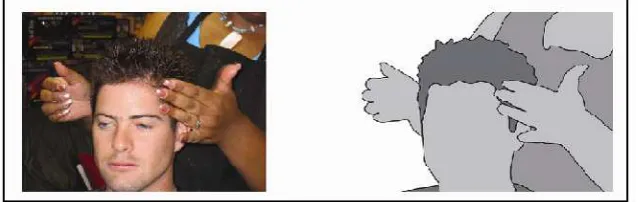
[image:5.595.122.441.521.622.2]The images were analyzed and selected. Later they applied the storytelling and infographics techniques explained by the professor earlier. Images had to be simplified in terms of line and color in order to focus on specific tasks. Facial expressions were removed (see figure 1.)
Figure 1. Example of image (left) converted to infographics (right)
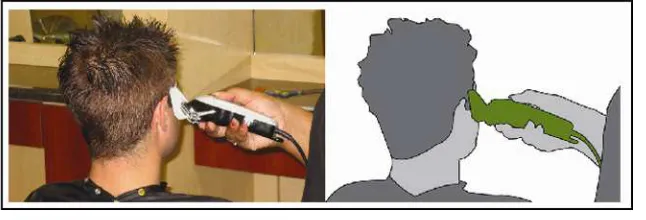
Figure 2. Use of trimmer is highlighted by using the green color
Several digital images taken by students at different hair salons were
transformed into infographics. The challenge was to find the right sequence of images (for storytelling purposes) that could explain the different hair dressing processes without the help of a presenter.
Organizing information visually
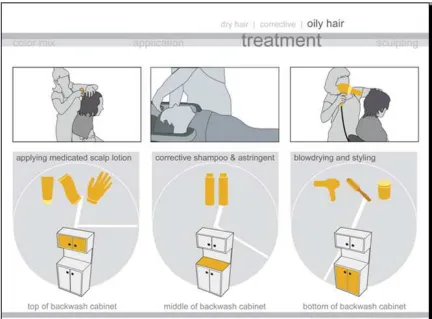
Different sequences of images were organized to understand different types of processes like: color mixing, color application, hair treatment and hair sculpting.
Figure 3. Example of template (schematic)
This type of arrangement/layout could be read either horizontally or vertically, read in one category or multiple categories. Students were encouraged to improve the visuals of the schematic template but at the same time
maintaining the suggested categories.
The process of creating and refining the visual format could take about 4 class sessions and requires students to use image editing software like Adobe
Photoshop and Illustrator. Supervision by the design professor is necessary during the whole process.
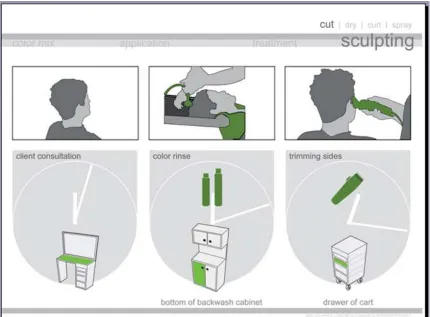
Figure 4. Example of visual format created by students (showing hair sculpting process)
When the format is read horizontally and vertically the different layers of information will combine and produce a complete understanding of a given process. For example, Figure 4 refers to the process of hair sculpting. This process is subdivided in 3 stages: 1.client consultation, 2.color rinse and 3.trimming sides.
Because the images are self-explanatory, there is no need for a conference call to help the German team understand the sequence prepared by students. Presenters are not necessary.
For example, the left-vertical area of Figure 4 refers to the client consultation that takes about 3 minutes and suggests that the counter top area is being used.
The center-vertical area of Figure 4 refers to the color rinse process that takes an additional 10 minutes, utilizing hair products located at the bottom of the backwash cabinet.
Finally, the right-vertical area of Figure 4 refers to the trimming process that takes an additional 5 minutes, utilizing a trimmer that is normally stored in one drawer of the cart.
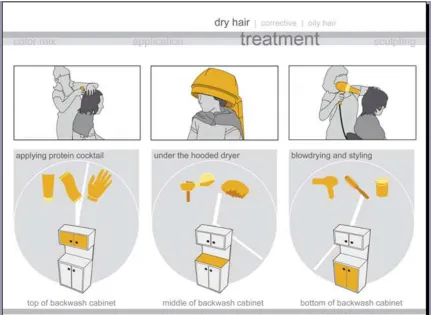
Figure 6. Example of visual format created by students (hair treatment, oily hair)
Adding comments using the same visual format
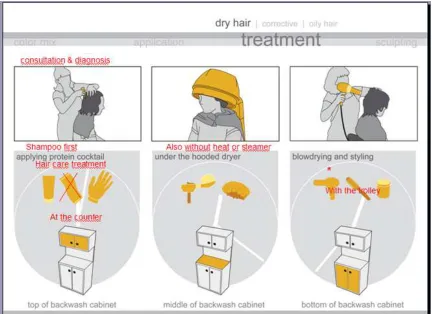
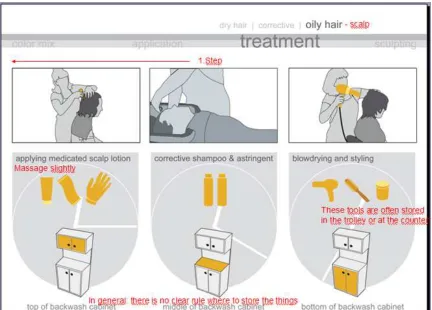
Images like those presented in figures 4, 5 and 6, could be arranged in a small sequence using software like Microsoft PowerPoint. Then the file could be sent as an email attachment to the team in Germany for review and feedback utilizing the same software.
Each member of the German team can share the same PowerPoint file and type their own comments (written in red color) directly on top of the image (see Figure 7 and 8).
At the end of the day, the manager of the German team will send the PowerPoint file back to the students in California who will open the file the next day in the morning, thus completing a “24 hours” work cycle (students received their feedback the next day early in the morning.)
The above mentioned cycle is typical of long-distance collaboration and virtual teamwork.
Figures 4, 5 and 6 also show that the need for a long explanatory text is
Figure 8. Example of professional critique and feedback (comments written in red)
Figures 7 and 8 show that the feedback provided by the German team (written in red) was short and direct to the point. The written feedback was a building process in which each member of the German team added his/her own text to the same visual format.
The re-utilization of the same visual format between members of both teams to communicate back and forth is what made this long-distance
collaboration relevant. The format proved to be an effective tool in this type of situation reducing the need for real-time conference calls.
Other examples of visual formats
The professor encouraged design students to create additional examples of visual formats in which the images are not only arranged following a color scheme but also arranged following a theme with different proportions. He suggested students to review storytelling examples from the book The Work of the Sony Design Center by P. Kunkel (1999). It presents different ways of
arranging graphic elements following a theme, following a color scheme, following proportion, etc.
The professor also explained to students that design firms like Ideo in California have documented their use of storytelling as part of their research and
The Author (2005) Article in an electronic proceeding has also documented student work that utilized storytelling arranging images with themes shown in different proportions.
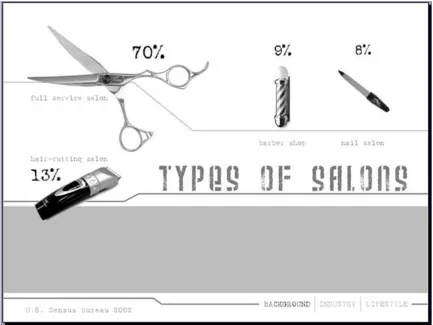
Figure 9 shows a visual format developed by students in the “Hair meets Design” project. For example, statistics, a boring subject for some people, could be designed and presented in a more visually appealing, entertaining manner. The elements of the visual format have been arranged following a proportion-scheme and salon-themed elements to highlight percentages. The size of the scissor corresponds to the highest percentage (70%) while the other elements (trimmer, barber sign and nail tool) of smaller sizes correspond to a lower percentage (13%, 9% and 8% respectively). All of these objects
[image:13.595.120.553.278.603.2]represent different types of salons.
Figure 9. Example of visual format created by students (types of salons and percentages)
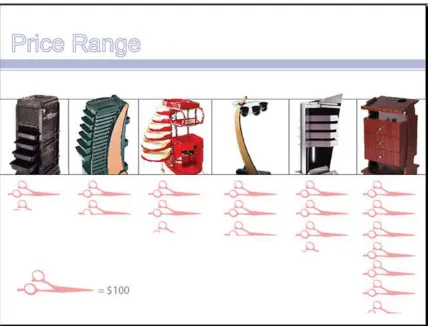
Figure 10. Example of visual format created by students (price range for different cart models)
Concept development and refinement
Use of video clips, infographics and 3D models
Communicating during the concept development and refinement process between both teams represented a significant challenge because, again, it was not possible for students to present their ideas in real-time to the German team. A typical 2-3 hour ideation presentation-discussion was not practical because of the 9-hours time difference between California and Germany.
In addition to storytelling and infographics (used during the research process,) additional tools like video clips and 3D models were used in the student
project.
Normally, in a typical design ideation process, students present their ideas using sketches but after some refinement they needed to move very quickly into 3D using virtual and real models to test their ideas. The challenge was to present these 3D models in the context of long-distance collaboration. For this purpose, the professor suggested the use of a video format.
Raw video footage recorded by students required to be edited and combined with 3D virtual and real models to explain a proposed idea-function (Figure 11).
Figure 11. Example of student visual format (combination of virtual and real models
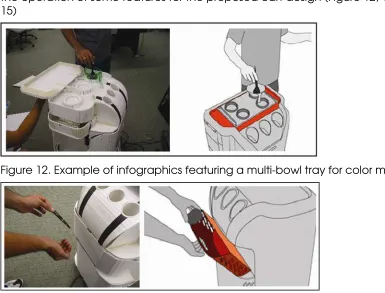
[image:15.595.129.442.130.291.2]In other cases, infographics-type images needed to be created to highlight the operation of some features for the proposed cart design (Figure 12, 13, 14, 15)
Figure 12. Example of infographics featuring a multi-bowl tray for color mixing
[image:15.595.120.505.355.648.2]Figure 14. Example of infographics featuring a hair dryer holder
Figure 15. Example of infographics featuring multi-purpose compartment
Once the infographics were finished, students assembled a sequence using MS PowerPoint software utilizing the infographics images as individual frames. Each frame explained one feature of the cart (Figure 15A). Later, the file was sent to the German team for evaluation.
Figure 15A. Example of sequence using infographics (individual cart design features shown)
After the evaluation of the PowerPoint file by the German team, the file was sent back to the students including professional feedback. Their comments were written in red color (Figure 15B)
[image:16.595.114.520.477.551.2] [image:16.595.116.507.642.717.2]Regarding the utilization of video, any compression format like AVI, MP4 or MOV is appropriate for long-distance collaboration. Small compressed files are easy to attach to an email message. Most digital pocket cameras can handle this type of formats. The use of expensive cameras was completely unnecessary.
It was recommended that each video clip was limited to no more than one minute in length. There are two reasons for this:
The file size could increase significantly after the first minute making it impractical for email use.
Small size videos are easier to edit and handle by the computer.
[image:17.595.116.541.293.373.2]Due to the complexity of the proposed designs, the professor recommended students to use both: 3D virtual models and 3D cardboard models for their video clips (figure 16 and 17)
Figure 16. Example of video clip created by a group of students (virtual 3D model presented by one industrial design student)
Figure 17. Example of video clip created by a group of students using a 3D cardboard model
A conference call was scheduled at the end of the concept development stage. The German team already received and evaluated all the necessary documentation sent by email: the research files, the ideation files and the video clips. It was time for them to make a decision and to give a
recommendation before the final models were built.
The professor input is critical at this point. He provided an assessment and gave a recommendation about what scale should be used for the model construction and the degree of complexity for the proposed features.
[image:17.595.122.522.415.527.2]functionality and overall design), the level of execution had to be very close to a working prototype with emphasis on appearance and functionality.
The industrial design professor, in consultation with the professor of the prototypes class, recommended a schedule-plan for students to follow.
The final execution of prototypes had to be closely monitored by the design and prototype professors to ensure that material selection, structure, color and overall appearance follow the initial recommendations.
The communication of students with the German team at this stage was minimal. They were focused on prototype execution and delivery in a timely manner.
After several weeks of work and under supervision by their design professors, the team of students was ready to test their prototypes. A camera was used to document the process.
Several video files were created. The video clips showed the design,
[image:18.595.115.519.475.549.2]appearance and other existing features in their prototypes. Students tested the models, for example, by pulling drawers, opening hidden compartments, hanging hairdryers and so on. The prototypes were full-size and fully functional (figure 18 and 19)
Figure 18. Example of video clip created by a group of students (prototype being shown)
Figure 19. Example of video clip created by a group of students (prototype being shown)
The appearance of the prototypes resembled those of the computer renderings submitted to the German team previously.
[image:18.595.125.520.586.666.2]A conference call was scheduled at the end of the prototyping stage. The German team already received the necessary documentation: the
prototypes video clips. It was time for them to provide the final feedback to students and to wrap-up the project.
Finally, all students in the class were commended for their high level of execution and received scholarships sponsored by the German company. Their prototypes were later sent to Europe for additional evaluation by the German team.
Conclusion
Conference calls, email messages, computer images and videos are some of the tools that could be used by virtual design teams in the context of long-distance collaboration.
All of these formats are powerful communication tools for students and professionals but they have to be edited and visually formatted for content and delivery.
Because students in this project could not travel to Germany to present their ideas in person, it was necessary to create these visual formats in order to make them more relevant and self-explanatory for the German team.
Storytelling combined with infographics was one way to visually format this content. It helped students to deliver their message across in a faster and more efficient manner. It also helped the German sponsor to better
understand student’s proposals and to provide them with quicker feedback by re-utilizing the same formats.
Collaborating with overseas sponsors in the context of long-distance collaboration added relevance to the project. Industrial Design students, professors and sponsors could work as virtual teams regardless of time and location. Virtual teamwork resembles current business practices conducted by global companies around the world.
References
Welker, K. & Sanders, E. (1997, Fall). To understand the user. Innovation, 24-27.
Joe, P. (1997, Fall). Stories for success. Innovation, 20-23.
Kunkel, P. (1999). Digital Dreams: The Work of the Sony Design Center, New York: Universe Publishing.
Rivera-Chang, J. (2005). Schools of Creativity and Innovation: Drawing Table Out, Storytelling In. Proceedings of the Joining Forces Conference, World Design Congress ERA 05 [CD-ROM]. Helsinki: University of Art and Design.