DOI: 10.4236/ait.2017.74007 Sep. 5, 2017 97 Advances in Internet of Things
Cloud Enabled Text Reader for Individuals with
Vision Impairment
Abul K. M. Azad
1*, Mohammed Misbahuddin
21Department of Technology, Northern Illinois University, DeKalb, USA
2Department of Electrical Engineering, Northern Illinois University, DeKalb, USA
Abstract
The paper describes the development of a text reader for people with vision impairments. The system is designed to extract the content of written docu-ments or commercially printed materials. In terms of hardware, it utilizes a camera, a small embedded processor board, and an Alexa Echo Dot. The software involves an open source text detection library called Tesseract along with Leptonica and OpenCV. The system in its current version can only work with English text. By using the Amazon cloud web services, a skill set was deployed, which would read aloud the detected text utilizing a OpenCV pro-gram via the Alexa Echo Dot. For this development, a Raspberry Pi was uti-lized as the embedded processor system.
Keywords
Text-to-Speech Converter, Cloud Computing, Image Processing, Embedded Processor, Internet of Things
1. Introduction
It is challenging for an individual with vision-impairment to extract information from a printed document. Either they have to use a Braille version of the docu-ment or someone has to read the docudocu-ment for them. Over the past few decades, machine reading has grown extensively with a number of practical applications
[1]-[6]. A unique insight into the process in text-to-speech synthesis is reported by Kind [7]. In this work, a large number of competing techniques have been constructed to make direct comparison between the techniques. In one ap-proach, researchers used LabVIEW to implement an Optical Character Recogni-tion (OCR) based speech synthesis system [8]. One of the limitations of this is
How to cite this paper: Azad, A.K.M. and Misbahuddin, M. (2017) Cloud Enabled Text Reader for Individuals with Vision Impair-ment. Advances in Internet of Things, 7, 97-111.
https://doi.org/10.4236/ait.2017.74007
Received: July 25, 2017 Accepted: September 2, 2017 Published: September 5, 2017
Copyright © 2017 by authors and Scientific Research Publishing Inc. This work is licensed under the Creative Commons Attribution-NonCommercial International License (CC BY-NC 4.0).
http://creativecommons.org/licenses/by-nc/4.0/
DOI: 10.4236/ait.2017.74007 98 Advances in Internet of Things
the cost involved with the LabVIEW software itself. In another work, researchers surveyed methods related to character recognition as well as approaches used for text-to-speech conversion for machines [9]. A similar application is a portable bar code reader; designed to help people with vision impairment to identify dif-ferent products in an extensive product database. This allows one to access product information through speech [10] [11] [12]. A limitation is that it is challenging for a user who is visibly impaired to position the bar code correctly for the reader.
Another approach to assist a person with vision impairment with this is to ex-tract the text from a printed document with a camera and then process it to produce an audible sound. The first part of this can be done by obtaining an image of the printed material and using an OCR technique, while the second part can be implemented through speech synthesis and reproduction of corres-ponding sound. Ferreira and his co-workers adopted this approach and tested the performance without any control on the camera settings for font type and size as well as for the background [13]. OCR is the process of converting images of printed or handwritten texts (numerals, letters, and symbols) into a computer format text and has become one of the most successful applications of technolo-gy in the field of pattern recognition and artificial intelligence [14][15]. Similar-ly, speech synthesis is the artificial generation of human speech and is widely used for text-to-speech conversion [16][17][18].
All these reported systems have one limitation; they require a standalone ded-icated computing system for processing. This makes the system expensive as well as running a larger physical footprint, thereby making it difficult to carry for everyday use. To address this issue this paper describes the design, development, implementation, and evaluation of a system, in which an individual only needs to carry a small hand held system (camera and embedded processor board). The complete system will cost around US$120. A large volume of the processing is performed over the cloud. The operation of the system involves text extraction from an image and converting the text-to-speech utilizing Amazon cloud. The Amazon cloud is formally known as Amazon Web Services (AWS). On the user side, the system involves a camera, an embedded processor, and an Amazon Echo Dot. Dedicated software has been developed for the embedded processor and AWS. The device is very portable, can be deployed within few minutes, and only requires an Internet access. The developed system then tested for perfor-mance in terms of text font, background color, text noise level, and commercial-ly printed materials.
2. System Design
DOI: 10.4236/ait.2017.74007 99 Advances in Internet of Things Figure 1. System configuration.
2.1. System Configuration
The hardware system is composed of a USB camera, a Raspberry Pi, and an Amazon Echo Dot (2nd generation). The Raspberry Pi run the Raspbian Jessie OS
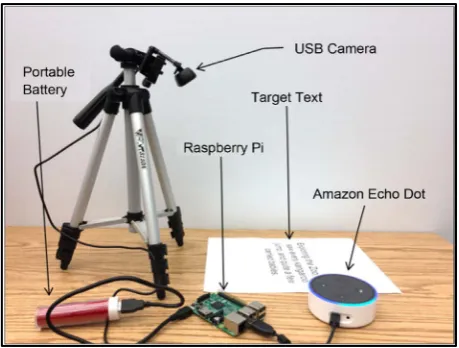
4.4, with OpenCV 2.3 installed along with Python 2 for compilation. The camera is directly connected with the Raspberry Pi. Both the Raspberry Pi and Amazon Echo Dot are connected to the Internet. A flow diagram of the system is shown in Figure 1 and a picture of the developed system is provided in Figure 2. The user triggers the system with a voice command via the Alexa Echo Dot. This in-vokes the AWS to instruct the Raspberry Pi to run the text reader application. The Raspberry Pi then instructs the camera to take an image of the script that is placed in front of it. The collected image is received by Raspberry Pi and is processed to extract the text. The software details of the text reader application and AWS are provided in Sections 2.2 and 2.3.
2.2. Image Processing
The image processing activity involves the initial image acquisition. This is fol-lowed by image pre-processing and subsequent image text extraction. All of these are implemented within a Raspberry Pi.
2.2.1. Image Acquisition
The first step is the image acquisition from a printed document that needs to be read. This is done with either a high definition (HD) camera or a normal web-cam. The camera is directly connected to the Raspberry Pi, when the Raspberry Pi is connected with the web. An HD camera is preferred to enhance the image quality.
2.2.2. Image Pre-Processing
DOI: 10.4236/ait.2017.74007 100 Advances in Internet of Things Figure 2. An image of the developed system.
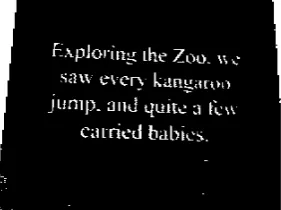
and converted into gray scale image such that it will be more useful for further processing. Then the discrete cosine transformation is applied to the gray image to compress the image, which helps to improve the processing rate. Unwanted high frequency components present in the image are also eliminated by setting the vertical and horizontal ratio. To achieve decompression, the inverse discrete cosine transform is applied. The image then undergoes morphological opera-tions like erosion and dilation [19][20][21].
The erosion of an image f
(
x y,)
by a structural elements
is denoted byf sθ , where θ denotes the erosion between f and 5. Resultant image 5 (5,
5) can be presented by Equation (1) [22]. Figure 3 shows the threshold and eroded images.
g= f sθ (1)
The dilation operation is performed to add pixels to the boundaries of the ob-jects present in the image. The number of pixels added to the obob-jects depends on the size and shape of the structuring element defined to process the image. The dilation of the image g x y
(
,)
by a structural element ś results in the image(
,)
h x y . The relationship is provided in Equation (2) [22].
h= ⊕g ś (2) Figure 4 shows a sample of the dilated image. A line of Python code utilized for the dilation process implementation is provided below:
DOI: 10.4236/ait.2017.74007 101 Advances in Internet of Things (a) (b)
Figure 3. Preprocessing-Erosion. (a) Threshold image; (b) Eroded image.
Figure 4. Preprocessing-Dilation.
2.2.3. Image Text Extraction
To extract text from an image, the OCR is used in conjunction with pattern rec-ognition, artificial intelligence, and computer vision. The OCR is a process of the electronic conversion of images of typed, handwritten, or printed text into ma-chine-encoded text. It is widely used as a form of data entry from printed data records, whether passport documents, invoices, bank statements, computerized receipts, business cards, mail, printouts of static-data, or any other documenta-tion. It is a common method of digitizing printed texts so that it can be elec-tronically edited, searched, stored more compactly, displayed online, and used in machine processes such as machine translation, text-to-speech, key data, and text mining.
[image:5.595.305.446.228.333.2]addi-DOI: 10.4236/ait.2017.74007 102 Advances in Internet of Things
tion, the availability of Tesseract to process multiple languages has made it even more popular in the field of text extraction. In this project, OCR was performed using the Tesseract library (discussed in Section 2.2.4) coupled with OpenCV to render images. The image taken by the camera is passed onto the OpenCV for thresholding and filtering. The image is then passed to the Tesseract library, which recognizes the texts and returns it in a string format. Finally, the string format text is passed to Alexa services for text-to-speech conversion.
2.2.4. Tesseract
The image is taken by the web camera connected to the Raspberry Pi and is quickly processed through morphological thresholding and subsequently processed by Tesseract. Tesseract is composed of only two arguments; one is the image and the other is the output file where the detected text will be stored [24][25]. Tes-seract by default picks the extension of output file as. txt. A Python program opens the .txt file and passes the detected text to the AWS to read aloud through Alexa Echo Dot. Tesseract supports about 110 languages around the world. Each language comes with a trained language data file. However, with the limitation of AWS to read English and German and for the ease of this application, the text reader system was confined to English. The Python code to operate Tesseract is provided below:
2.3. Utilization of Amazon Web Services (AWS)
The AWS is a secure cloud services platform hosted by Amazon. This can facili-tate Internet of Things (IoT) systems, networking, databases, storage, analytical, and mobile development applications. One such service of the AWS is the Alexa voice recognition and speech system, which is a speech recognition and speech synthesis service. Through this service developers can connect their applications to the Alexa speech system. For a given application, the user needs to create an Alexa skill set on the cloud that can interact with the application. In this project, the AWS receives the text from the Raspberry Pi after text extraction and reads the detected text through the Alexa speech synthesis service. Alexa servicesin-voke the text reader application running from the Raspberry Pi to extract the text from the printed document and then pass it onto Alexa services for speech synthesis. Alexa speech then reads the text loud using the Amazon Echo Dot de-vice [26].
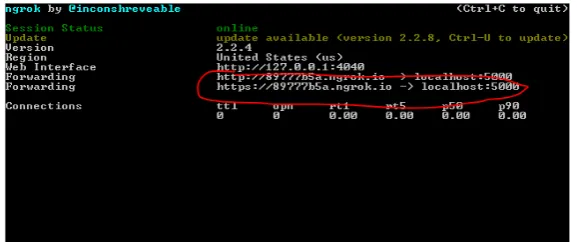
The first step in this process is to download, install, and run ngrok on the Raspberry Pi. ngrok is a command line program that creates a secure terminal and can be accessed by an https address generated by the application (Figure 5).
Figure 6 shows the ngrok services running on Raspberry Pi with the https ad-dress highlighted in red.
DOI: 10.4236/ait.2017.74007 103 Advances in Internet of Things Figure 5. Terminal command in Raspberry Pi to run ngrok on port 5000.
Figure 6. Image of the ngrok services on Raspberry Pi.
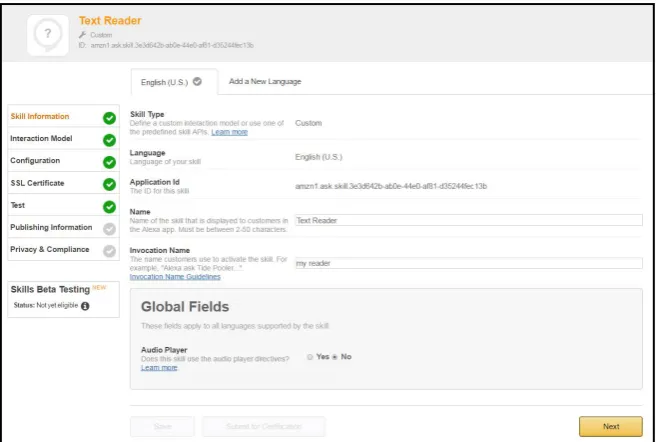
Figure 7. Creatiing Alexa skill set.
dow on the Amazon developer portal to create a skill. Figure 8 shows how the skill information is created within the AWS. The invocation name specifies the name of the skill set, which is invoked when Alexa is instantiated to access the text reading skills.
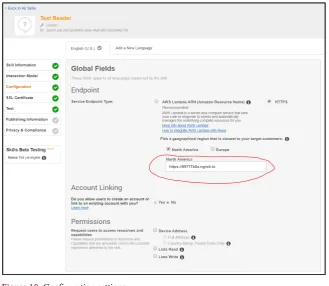
Figure 9 shows the creation of an interaction model, which is used to com-municate with the Python script running on the Raspberry Pi. The intent speci-fies different functions that need to be assessed within the Python script. The configuration settings that need to be entered on the AWS are provided in Fig-ure 10. The service end-point allows the user to enter the ngrok https link used to invoke the Python script on the Raspberry Pi. Once the Python script accesses the text, the reader detects the printed/written text and passes the value to the Alexa services, which then reads it aloud.
3. System Evaluation
DOI: 10.4236/ait.2017.74007 104 Advances in Internet of Things Figure 8. Creating skill set within the AWS.
Figure 9. Interaction model.
3.1. Variation of Text Font
DOI: 10.4236/ait.2017.74007 105 Advances in Internet of Things Figure 10. Configuration settings.
(a) (b) (c) (d)
(e) (f) (g) (h)
Figure 11. Samples of few fonts and background colors used for the evaluation process. (a) Time New Roman; (b) Lucida Calligraphy; (c) Lucida Handwriting; (d) Manual Handwriting; (e) Red paper; (f) Green paper; (g) Orange paper; (h) Purple paper.
of the number of characters misread and was expressed in % of error. The ex-pression used for % of error calculation is shown in Equation (3).
Number of alphabets or characters mis-spelled 100 Total number of characters in the sente
% of
nce
error= × (3)
DOI: 10.4236/ait.2017.74007 106 Advances in Internet of Things Table 1. Error in identifying text with different fonts using various background colors.
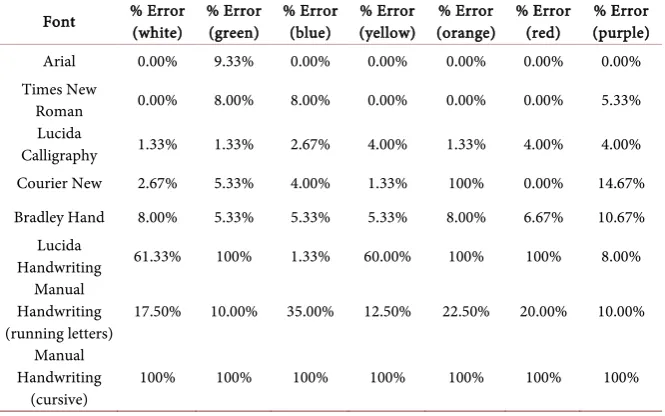
Font % Error (white) % Error (green) % Error (blue) (yellow) % Error (orange) % Error % Error (red) (purple) % Error
Arial 0.00% 9.33% 0.00% 0.00% 0.00% 0.00% 0.00% Times New
Roman 0.00% 8.00% 8.00% 0.00% 0.00% 0.00% 5.33% Lucida
Calligraphy 1.33% 1.33% 2.67% 4.00% 1.33% 4.00% 4.00% Courier New 2.67% 5.33% 4.00% 1.33% 100% 0.00% 14.67% Bradley Hand 8.00% 5.33% 5.33% 5.33% 8.00% 6.67% 10.67%
Lucida
Handwriting 61.33% 100% 1.33% 60.00% 100% 100% 8.00% Manual
Handwriting
(running letters) 17.50% 10.00% 35.00% 12.50% 22.50% 20.00% 10.00% Manual
Handwriting
(cursive) 100% 100% 100% 100% 100% 100% 100%
background colors. With computer-generated fonts, most of the cases the purple shows higher % Error than others. So, it can say that the purple background was the worst performer.
3.2. Variation of Noise Level
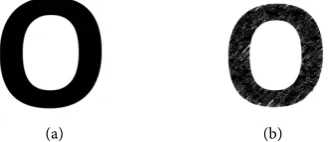
This part of the test was conducted with a phrase in which the texts were eroded/faded with an increased number of non-zero pixels. This reduction of pixel introduces a level of noise for the camera. A level of noise has been intro-duced for letter ‘O’ and Figure 12 shows both the distorted and undistorted im-ages.
To illustrate the development process of the eroded/faded text, let us assume a small section of the image from an undistorted font:
255 255 0
255 0 0
0 0 0
UT
I = (4)
Similarly, assume a small section of the image from a distorted font:
255 230 200
0 255 0
255 0 255
DT
I = (5)
The difference between Equations 4 and 5 generated the difference equation 6:
(
)
0 20 200
255 255 0
255 0 255
UT DT
I −I = (6)
DOI: 10.4236/ait.2017.74007 107 Advances in Internet of Things
[image:11.595.292.458.75.146.2]
(a) (b)
Figure 12. Sample of undistorted and distorted font for the letter “O”. (a) Undistorted font; (b) Distorted font.
(
)
Number of non-zero pixels
100 Number of pi
% o
xels in
f noise UT DT
UT
I I
I −
×
= (7)
where, IUT = Image with undistorted text, DT
I = Image with distorted text.
The evaluation exercise was performed with only white paper. Figure 13
shows three sample texts with different noise levels. The outcome of the exercise is provided in Table 2. The table shows that for N1 and N2 the system reads the text without any error, but for N5, it cannot read the text at all. One notable is-sue is that the % Error is less for N4 than N3. When the % Noise is 3.63 for N4 and 3.26 for N3. Usually one can expect a higher % Error for N3.
3.3. Partial Removal of Alphabet
In this approach, part of the text was removed to verify the level of accuracy in readability. An example of the partially removed texts is provided in Figure 14. The samples are 75% visibility from the bottom, 75% visibility from the top, and 25% washed out from center. In this case, only the Arial font was used with dif-ferent background colors. The readability performance of the system with par-tially removed text with different background colors is provided in Table 3. It shows some level of readability only for the case in which 75% is visible from the top. Other two cases cannot be read at all.
3.4. Commercially Printed Materials
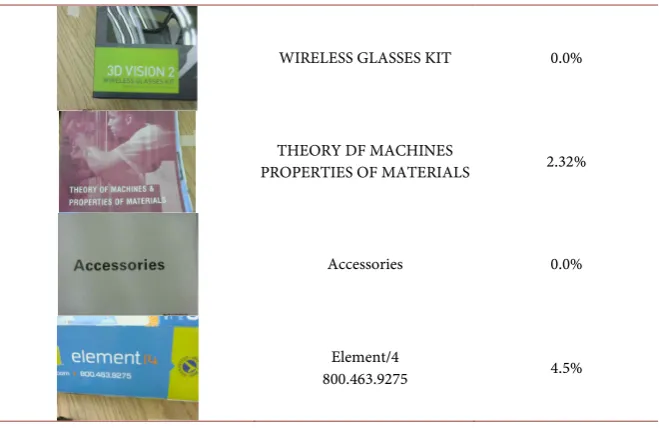
The last evaluation exercise involved commercially printed materials. Under this category, four items were investigated. The items are product catalog, product package, and product brochure—all of them in combination with dif-ferent background colors. This exercise allows one to understand how to use this system to extract information from everyday household items beyond standard printed letters and documents. Findings of this exercise are provided in Table 4. As it appears all of the cases, the system read the text with very lit-tle error.
3.5. Timing for Text Reading Process
DOI: 10.4236/ait.2017.74007 108 Advances in Internet of Things (a) (b) (c)
Figure 13. Text with different levels of noise. (a) Noise level-N0 (0.8%); (b) Nosie lev-el-N1 (1.2%); (c) Nosie level-N5 (5.58%).
[image:12.595.210.535.163.236.2](a) (b) (c)
Figure 14. Text with different levels of visibility. (a) 75% visibility from bottom; (b) 75% visibility from top; (c) Center washed out.
Table 2. Error in identifying text with different levels of noise.
Noise Level % Noise No. Character in Error % Error
Level-N0 0.80% 0 0.00%
Level-N1 1.20% 0 0.00%
Level-N2 2.91% 2 7.14%
Level-N3 3.26% 8 28.57%
Level-N4 3.63% 5 17.86%
Level-N5 5.58% Not Readable 100%
Table 3. Error in identifying partially erased text with different background colors.
Text Visibility % Error (white) % Error (green) % Error (blue) (yellow) % Error (orange) % Error % Error (red) (purple) % Error
75% Visibility
from top 48.00% 52.00% 53.33% 52.00% 49.33% 66.67% 46.67% Center washed
out 100% 100% 100% 100% 100% 100% 100%
75% Visibility
from bottom 100% 100% 100% 100% 100% 100% 100%
embedded processor and the other part is for AWS. Evaluation was performed for the embedded processor’s processing time, the time taken by the AWS de-pend on the speed of the Internet from a given location (influenced by various factors) and cannot be evaluated with a certainly. Python’s time function was utilized to conduct this exercise. Test was performed using three different sen-tences with different background colors. There is almost no effect of background colors in terms of timing. The sentences and their corresponding processing time are provided below:
[image:12.595.207.540.299.408.2] [image:12.595.208.538.444.556.2]DOI: 10.4236/ait.2017.74007 109 Advances in Internet of Things WIRELESS GLASSES KIT 0.0%
THEORY DF MACHINES
PROPERTIES OF MATERIALS 2.32%
Accessories 0.0%
Element/4
800.463.9275 4.5%
Can you read me Read me Aloud: 1.29 seconds [printed text]
The Quick Brown Fox Jumps Over the Lazy Dog: 4.13 seconds [handwritten text].
4. Conclusions
The paper describes the design, development, and evaluation of a cloud based text reader. A person who is visually impaired could utilize this for everyday ac-tivities. The user needs to carry a small hardware system composed of a camera, an embedded processor board, and an Alexa Echo Dot. The software developed utilizes an open source platform and is easy to access and modify. The evalua-tion exercise was conducted using texts with different fonts, background color, and level of noise on the text. The system is proven to be mostly accurate while reading commonly used fonts with a variety of background colors. Evaluation was also extended to manually written text as well as commercially printed ma-terials with variety of background colors. In terms of future expansion the eval-uation process can be extended to verify some other factors, such as total processing time under different circumstances, different length of sentences, and scientific notations.
[image:13.595.209.539.87.301.2]DOI: 10.4236/ait.2017.74007 110 Advances in Internet of Things
Acknowledgements
The authors would like to thank the National Science Foundation (NSF) for its support for the reported work. This paper is based on an NSF TUES project, award number DUE-1140502. Any opinions, findings and conclusions, or rec-ommendations expressed in this paper are those of the authors and do not nec-essarily reflect the view of the NSF.
References
[1] Leon, M., Vilaplana, V., Gasull, A. and Marques, F. (2013) Region-Based Caption Text Extraction. In: Adami, N., Cavallaro, A., Leonardi, R. and Migliorati, P., Eds.,
Analysis, Retrieval and Delivery of Multimedia Content, Springer, New York. https://doi.org/10.1007/978-1-4614-3831-1_2
[2] Chucai, Y. (2015) Text Extraction from Natural Scene: Methodology. Ph.D. Disser-tation, The City University of New York, New York.
[3] Srivastava, A., Kumar, D., Gupta, O.P., Maurya, A. and Sribastava, S.K. (2013) Text Extraction in Video. International Journal of Computational Engineering Research, 3, 48-53.
[4] Kumar, S., Kumar, S. and Gopinath, S. (2012) Text Extraction From Images. Inter-national Journal of Advanced Research in Computer Engineering & Technology, 1, 34-36.
[5] Prabaharan, M. and Radha, K. (2015) Text Extraction from Natural Scene Images and Conversion to Audio in Smart Phone Applications. International Journal of Innovative Research in Computer and Communication Engineering, 3, 19-23. https://doi.org/10.15680/ijircce.2015.0301004
[6] Gómez, L. and Karatzas, D. (2013) Multi-Script Text Extraction from Natural Scenes. Proceedings of the 12th International Conference on Document Analysis
and Recognition, Washington DC, 25-28 August 2013. https://doi.org/10.1109/ICDAR.2013.100
[7] King, S. (2014) Measuring a Decade of Progress in Text-to-Speech. Loquens, 1, 1-12. https://doi.org/10.3989/loquens.2014.006
[8] Singla, S.K. and Yadav, R.K. (2014) Optical Character Recognition Based Speech Synthesis System Using LabVIEW. Journal of Applied Research and Technology, 12, 919-926. https://doi.org/10.1016/S1665-6423(14)70598-X
[9] Shetake, P.S., Patil, S.A. and Jadhav, P.M. (2014) Review of Text To Speech Conver-sion Methods. International Journal of Industrial Electronics and Electrical Engi-neering, 2, 29-35.
[10] Al-Khalifa, H.S. (2008) Utilizing QR Code and Mobile Phones for Blinds and Vi-sually Impaired People. In: Miesenberger, K., Jlaus, J., Zagler, W. and Karshmer, A., Eds., Proceedings of 11th International Conference, ICCHP 2008, Austria, 9-11 July 2008, Springer-Verlag, Berlin, Heidelberg, 1065-1069.
[11] Mate Galaxy, I.D. (2017). http://www.envisionamerica.com/products/idmate/ [12] Talking Barcode Scanner (2017) Vision Australia.
http://www.visionaustralia.org/learn-more/learning-to-live-independently/using-te
chnolo-gy-and-computers/technology-overview/identifying-day-to-day-items-with-technol
ogy/talking-barcode-scanner
Innova-DOI: 10.4236/ait.2017.74007 111 Advances in Internet of Things Recognition Systems. In: Optical Character Recognition System for Different Lan-guages with Soft Computing, Studies in Fuzziness and Soft Computing, Springer International Publishing, New York.https://doi.org/10.1007/978-3-319-50252-6_2 [15] Eikvil, L. (1993) Optical Character Recognition. Research Report,
NorskRegnesen-tral, Blindern.
[16] Sercan, O.A., Chrzanowskiy, M., Coates, A., Diamos, G., Gibiansky, A., Kang, Y., Li, X., Miller, J., Ng, A., Raiman, J., Sengupta, S. and Shoeybi, M. (2017) Deep Voice: Real-Time Neural Text-to-Speech. International Conference on Machine Learning, Sydney, 6-11 August 2017.
[17] Thomas, S. (2007) Natural Sounding Text-to-Speech Synthesis Based on Sylla-ble-Like Units. Masters Dissertation, Indian Institute of Technology Madras. [18] Tiomkin, S., Malah, D. and Shechtman, S. (2010) Statistical Text-to-Speech
Synthe-sis Based on Segment-Wise Representation with a Norm Constraint. IEEE Transac-tions on Audio, Speech, and Language Processing, 18, 1077-1082.
https://doi.org/10.1109/TASL.2010.2040795
[19] Vaghela, K. and Patel, N. (2013) Automatic Text Detection using Morphological Operations and Inpainting. International Journal of Innovative Research in Science,
Engineering and Technology,5, 1333-1336.
[20] Bawa1, R.K. and Sethi, G.K. (2014) A Binarization Technique for Extraction of De-vanagari Text from Camera Based Images. Signal & Image Processing: An Interna-tional Journal, 5, 29-37.
[21] Babu, G.R.M., Srimaiyee, P. and Srikrishna, A. (2010) Text Extraction from Hetro-genous Images using Mathematical Morphology. Journal of Theoretical and Ap-plied Information Technology, 16, 39-47.
[22] Shih, F.Y. (2010). Image Processing and Pattern Recognition. John Wiley& Sons
Inc.https://doi.org/10.1002/9780470590416
[23] Gera, D. and Jain, N. (2015) Comparison of Text Extraction Techniques—A Re-view. International Journal of Innovative Research in Computer and Communica-tion Engineering, 3, 621-626.https://doi.org/10.15680/ijircce.2015.0302003
[24] Smith, R. (2007) An Overview of the Tesseract OCR Engine. 9th International Con-ference on Document Analysis and Recognition, Brazil, 23-26 September 2007. https://doi.org/10.1109/ICDAR.2007.4376991
[25] Patel, C., Patel, A. and Patel, D. (2012) Optical Character Recognition by Open Source OCR Tool Tesseract: A Case Study. International Journal of Computer Ap-plications, 55, 50-56.https://doi.org/10.5120/8794-2784
[26] Amazon (2017) Amazon Echo Dot.