Data as a Means
Designing and Developing ”Smart” Product Experiences.
MSc Thesis Communication Studies
Rogier Jansen
MSc Communication Studies
University of Twente
Abstract
”Smart” Products have been a popular interest and desire of many researchers and practitioners in the Human-Computer-Interaction field. By their promise to change how people interact with everyday things, ”smart” products have the potential to allow for types of user experiences that cannot be reached with other types of sys-tems. Although these products include a strong emphasis on end-users’ perceptions and experiences, in-depth research on these user experiences is scarce. Scrutiny of UX research on ”smart” products in the HCI-field shows that rather than focused on the needs of end-users, most research is technology-oriented. Therefore, detailed understanding of experiences that are desirable and opportune in ”smart” product systems is necessary to guide the design of successful implementations, providing designers with insights on the kind of target experiences that these systems should support. For this reason, the course of this project was to develop a User Experience Framework, to guide the design and development of ”smart” product experiences in practice.
Although a shared definition of ”smart” products lacks, there is a tension to agree that the nature of these products is centered around data. Often enabled by sensors and inter(net)-connectivity, the usage of data by ”smart” products en-ables them to learn patterns, behaviours, about environments and to act upon these aspects, setting them apart from other interactive products within the HCI-field. Emerging from this differentiation, the UX of ”smart” products is also different. Emerging from technology and data, the UX of these products is often distributed among devices, contexts, users, applications and services. Considering system char-acteristics, contexts of use and the user’s internal state is therefore of importance when designing for ”smart” product UX. As developing these experiences can be challenging due to confusion in user analysis, the implicitly of ”smart” product in-teraction and challenging task analysis, the development of ”smart” product UX should be focused on rapid prototyping and evaluation in short cycles of designing - prototyping and evaluation, together with real end-users in real contexts-of-use.
Contents
1 Introduction 1
2 Methodology 3
3 The Foundations of ”Smart” Products & UX 4
3.1 ”Smart” Products . . . 4
3.1.1 Classifying ”Smart” Products . . . 5
3.1.2 Differentiating ”Smart” Products within the HCI-domain . . . 6
3.1.3 The Working of ”Smart” Products . . . 8
3.2 User Experience Design . . . 9
3.2.1 Towards a definition of UX . . . 10
3.2.2 The Attributes of User Experience . . . 11
3.2.3 Types of Experiences . . . 12
3.2.4 The Influencing Dimensions of UX . . . 12
3.3 User Experience Development . . . 13
3.3.1 Current approaches to UX Development . . . 14
3.3.2 User Experience Prototyping . . . 14
3.3.3 User Experience Evaluation . . . 18
3.4 Towards ”Smart” Product UX . . . 19
4 Designing & Developing Smart Product UX 20 4.1 The Experience of ”Smart” Products . . . 20
4.1.1 The End-User Perception of ”Smart” Products . . . 20
4.1.2 Separating ”Smart” Product UX in the HCI-domain . . . 22
4.1.3 The Influencers of ”Smart” Product UX . . . 25
4.2 Developing ”Smart” Product UX . . . 27
4.3 Heuristics for ”Smart” Product UX . . . 29
4.3.1 User Experience Heuristics . . . 29
4.3.2 Interaction Design Heuristics . . . 29
4.3.3 UX Development Heuristics . . . 32
5 A User Experience Framework 34 6 Evaluation of the UX Framework 36 6.1 Dummy Project . . . 36
6.1.1 Project Goals . . . 36
6.1.2 Methodology . . . 37
6.1.3 Project Summary . . . 38
7 Discussion 52
Chapter 1
Introduction
Secondary to the rise of the smartphone, seen as the catalyst of the rapid adoption of ”smart”1 technologies, the notion of ”smart” has taken on a new meaning in the context of information technology and computing, and has been well adopted within the domain of interactive technologies at large. By equipping products with infor-mation and communication technologies as sensors, microchips and wireless chip-sets, enhancements in technology empowered products to take a bigger prevalence in the lives of ordinary people. Products like smart thermostats, smoke detectors, smart door-locks, activity trackers and further mobile devices gain ubiquity within everyday environments and are expected to reach a 212 billion by the end of 2020 [1].
To describe the omnipresence of ”smart” products within everyday environments, the term ”Internet of Things” (IoT) gained a lot of interest among researchers and practitioners in the human-computer interaction (HCI) field. IoT is a term to de-scribe the strategy of enhancing ”smart” product systems by connecting devices and sensors to the Internet2, gaining understanding of system interaction and usage [2]. Contradictory to most technical products, common thread in the conceptions about IoT is that the underlying technology resides in the background, where the intercon-nection of intelligent objects, big data analysis and cloud infrastructure enable the achievement of user tasks without explicit user interaction [3]. Furthermore, ”smart” products induce other paradigmatic changes to the field of interactive products as their context awareness, pro-activity and engagement [4]. A smart thermostat for example, is able to use sensors to determine the presence of a user in a room and to use weather data from the Internet, all to ensure a constant desired temperature by the user. The potential of ”smart” products has been widely endorsed within the HCI-field as it ”promises to transform the way we interact with everyday things” [5, p.25], which could allow for types of user experiences that cannot be reached with other types of systems [6].
Problem Statement
Although ”smart” products include a strong emphasis on end-users’ perceptions and experiences, in-depth research on the user experience (UX) of these products is scarce [6], [7]. Scrutiny of the adoption of UX in the HCI-field shows that most research on ”smart” products is technology-oriented rather than focused on UX, as many research projects concentrate on how technology can be used, rather than looking at the users’ needs [6], [7]. Although user-centered design (UCD) and its resulting pleasurable experiences are becoming important competitive factors in the
1”Smart” is placed between quotation marks, primarily to avoid the self-description of this term
that the industry self produces for their own goods by placing their products on the wave of the ”smart” hype.
services offered by ”smart” product systems [6], only a very small amount of re-search focuses on the subjective user experiences that ”foster deep understanding of how these systems are experienced” [6, p.395]. Moreover, detailed understand-ing of experiences that are desirable and opportune in ”smart” product systems is necessary to guide the design of successful implementations, providing designers of these systems with insights on the kind of target experiences that these systems should support [6]. Rather than concentrating on the ”core technical workability” of ”smart” products, research on these products should shift its focus to the value for end-users [8].
This research aims to address these limitations by providing understanding of the UX of ”smart” products, focusing on the unique capabilities of these products, the perception of these products by end-users, their differentiating, subjective user experiences and development and evaluation processes consequentially. As designers of ”smart” products can benefit from insights on the kind of target experiences that these systems should support [6], this research will subsequently present a practical UX framework for the design, development and evaluation of ”smart” product systems, to guide the design of these systems in practice. In general, this research aims to answer the following research questions:
1. [RQ.1] What is the User Experience of ”smart” products?
• [RQ.1.1] What are ”smart” products?
• [RQ.1.1.1] How can ”smart” products be defined?
• [RQ.1.1.2] How do ”smart” products work and interact?
• [RQ.1.2] What is User Experience?
• [RQ.1.2.1] How can User Experience be defined?
• [RQ.1.2.2] How can User Experiences be designed and developed?
• [RQ.1.3] How do end-users perceive ”smart” products?
• [RQ.1.4] Is the User Experience of ”smart” products different from that of other interactive products?
• [RQ.1.5] How can Smart Product experiences be designed and devel-oped?
2. [RQ.2] What are the heuristics for the design and development of ”smart” product experiences?
Chapter 2
Methodology
Before an integrated UX framework for the design and development of ”smart” prod-ucts can be constructed and presented, understanding of the concepts of UX and ”smart” products independently is vital. As both concepts have been researched thoroughly within the domain of HCI, existing literature is used to introduce and clarify these concepts, as outlined in chapter 3. After both concepts are clarified, chapter 4 focuses on the desired UX of ”smart” products specifically. As this re-search belongs to the multidisciplinary field of HCI, the focus of this chapter is on humans and their reactions and behavior in interaction with technology. Consequen-tially, by outlining the role, perceptions and subjective experiences of end-users when interacting with ”smart” products, together with the unique nature and capabili-ties of these products and the unique challenges in the development and evaluation processes of the UX, specific heuristics are provided to guide the design and de-velopment of the UX of ”smart” products in practice. The use of pre-established guidelines or heuristics has been widely adopted within the HCI-field, providing practitioners with a comprehensive basis to evaluate usability [9]–[12], aesthetic de-sign [13], emotional dede-sign [14], interaction dede-sign [15], [16] and user experience [17], [18]. Consequentially, the heuristics provided are incorporated in a framework that serves as a practical tool for designers in the field to use when designing for ”smart” product” UX. As ”smart” products may differ widely in the exact form they take, from ”smart” toothbrush to ”smart” car, the framework provided concentrates on the reuse of the design and development methods throughout the entire ”smart” product domain. Thereby, the framework shoulders the central responsibilities in a ”smart” application but also provides ways to customize the framework for specific needs [19].
Chapter 3
The Foundations of ”Smart” Products & UX
Plenty of research has been conducted to describe the domains of ”smart” products and UX independently. Although many research projects focused on clarifying their concepts, conclusions often contradict providing no clear instantiated understanding nor any shared agreement among researchers how these concepts should be defined. To provide somewhat clarity in the scope of this research, this section aims at introducing both the concepts of UX and ”smart” products. First, Section 3.1 will introduce the concept of ”smart” products, elaborating on the construction of its concept and how these products work and interact. Next, section 3.2 will introduce the concept of UX, clarifying its definition, attributes and influencing dimensions. Subsequently, section 3.3 will focus on UX development specifically, looking at UX prototyping and evaluation methods. To conclude, section 3.4 will give a short summary about the insights presented in this chapter.
3.1
”Smart” Products
Although ”smart” products and IoT are hot topics nowadays because of their promise to induce radical changes within various domains, their concepts are not entirely new. Already at the beginning of the 21th century Kevin Ashton [20], seen as one of the pioneers who emphasized the promise of ”smart” products, laid the foundation for what would become our current understanding of this term. According to Ashton, if all objects in daily life were equipped with identifiers and wireless connectivity, these objects could communicate with each other and their operation could be controlled and managed by computers. More specifically, Ashton wrote in an online article [20]:
“If we had computers that knew everything, there was to know about things—using data they gathered without any help from us we would be able to track and count everything, and greatly reduce waste, loss and cost. We would know when things needed replacing, repairing or recalling, and whether they were fresh or past their best. We need to empower computers with their own means of gathering information, so they can see, hear and smell the world for themselves, in all its random glory. RFID and sensor technology enable computers to observe, identify and understand the world—without the limitations of human-entered data.”
As Ashton envisioned, emerging from the usage of ”smart” products within lo-gistic environments, more and more daily objects were equipped with identifiers and wireless connectivity’s and became available for ordinary people, taking a grow-ing presence in everyday environments. Consequentially, more and more research on ”smart” products within the HCI-field focused on these products as being consumer-centered. However, based on Ashton’s notion that computers should be equipped with sensor and wireless connectivity technologies ”so they can see, hear and smell the world for themselves”, most researchers phrase their definition of these products around the technological, failing to address the interaction of these products with the social lives of ordinary people. Consequentially, ”smart” products are cast as the inevitable consequence of a technological juggernaut with a life of its own, acting entirely outside the social. Furthermore, most articles on the subject of ””smart” products” commence with an effort to define them. This suggests that a reasonable definition of these products has not been achieved yet. The argument here is that a standardized, shared definition of ””smart” products has not been found because researchers continue to view it as a technological object [6], [7]. The inadequacy of this view forces researchers to return to the same ground over and over again. Therefore, efforts should not focus on how these products should be defined, but what specific abilities they should possess to be called ”smart”.
3.1.1 Classifying ”Smart” Products
Instead of using a specific definition to describe a ”smart” product, the level of intelligence of a product can be used to describe how ”smart” that product actually is. Rijsdijk & Hultink define [22] a set of ”smart” product abilities and use these to classify the level of product intelligence: the more capabilities a product has, the more it can be referred to as being intelligent:
• Adaptability. The ability of an intelligent product to learn and improve the match between its functioning and its environment. A conversational agent for example may learn that certain user queries are related to certain environ-mental conditions;
• Autonomy. The extent to which an intelligent product is able to operate in an independent and goal-directed manner without user interference. Example is an intelligent vacuum cleaner, that cleans the room by itself when a user is not at home;
• Cooperation. The ability of an intelligent product to cooperate with other devices to achieve a common goal. Example is a weather-station that commu-nicates with a ”smart” thermostat, that rises the inside temperature when the outside temperature drops;
• Human-like Interaction. Concerns the degree to which the intelligent prod-uct communicates and interacts with a user in a natural, human manner. A conversational agent for example communicates and interacts with a user via speech;
product is the ”smart”phone. It is not only capable of calling, but also of browsing, taking pictures, sending messages etc;
• Personality. Refers to the intelligent product’s ability to show the properties of a credible character. The old Microsoft Office Paperclip for example suggested that it assisted the user;
• Reactivity. Refers to the ability of an intelligent product to react to its environ-ment in a stimulus-response manner. A ”smart” thermostat for example may increase the inside temperature when it senses the presence of someone in the room, but may decrease it when the user leaves the house.
Beside the efforts of Rijsdijk & Hultink, other researchers also [23], [24] make a classification of the level of product intelligence, based on:
• Information handling. An intelligent product should at least be able to manage its own information, given by sensors, RFID-readers and other techniques. Without this capability, it can hardly be called intelligent. When an Intelligent Product is only capable of information handling it is not in control of its own life, as full control of the product is external or outside the product.
• Problem notification. A more intelligent product is a product which can notify its owner, when there is a problem. Such a problem could be that the temper-ature is too high, there is traffic on the way to work etc. Still the product is not in control of its own life, but it is able to report when there are problems with its status or the action that need to be performed.
• Decision making. The most intelligent product is the product which can com-pletely manage its own life and is able to make all decisions relevant to this by itself, without any external intervention. In this case, the product has full control over itself and there is no external control of the product.
Although a unified definition of a ”smart” product lacks, it is evident that its concept is built on the usage of data to be used in processes of information han-dling, communication and interaction, and decision-making between product and user, environment or between other products or systems. However, some of the abilities of these products, as multi-functionality and reactivity, may not be unique for these products. Other interactive products available may possess one or more of these abilities as well. Consequentially, setting ”smart” products apart from other interactive products available can be challenging. Therefore, the subsequent section will outline the key differences between those kind of products.
3.1.2 Differentiating ”Smart” Products within the HCI-domain
Data-entry
Users in a Web-based environment actively manipulate devices to interact directly with the web. For example, a user may use a laptop to surf the web for a particular product, ending up buying it online. This entire process consists of user initiated interactions, as clicking through webpages and entering transaction information. Although users can interact with IoT-based products, in many cases they do not enter the data themselves. Rather, the devices monitor and retrieve relevant data from the environment. For example, a ”smart” thermostat can monitor and analyze temperature conditions and user behavior and use pre-defined preferences to learn and optimally manage the temperature in house. A user does not have to actively participate in this process of data-gathering, as the device is able to do this on its own.
Data-sharing
Consumer information related to Web behavior is typically shared internally within an organization or with other third-parties. In an IoT-environment though, data is not only shared with the vendor but also with other devices. For example, a ”smart”phone or ”smart”-car equipped with location tracking technology may share a user’s location and arrival time to a ”smart” thermostat at home. This would enable it to set the right temperature based on the preferences of the user, ensuring the house is heated or cooled down when the user arrives.
Learning
Providers, marketers and other interested parties may learn about their users based on their behavior within the digital-world, e.g. shopping online and using social media. This behavior may be recorded through the use of cookies or transactional information. On the other hand, intelligent products learn about their users by observing their habits, tendencies, preferences and environments. This learning is based on behavior and phenomena occurring in the natural, physical world as opposed strictly to the online world in which users behave within a Web-based environment.
Decision making.
Marketers and providers use Web-related data to make decisions to engage and serve users with a better experience. Decisions are not necessarily made in real-time, but are mostly consequences of analyzed online behavior over time. On the other hand, ”smart” products are constantly monitoring their environment through sensors and are dynamically making decisions and associated changes in real-time, based on environmental conditions or users’ preferences. For example, a ”smart”watch may monitor the user’s heart rate and may alert the user if it falls to a critic level.
3.1.3 The Working of ”Smart” Products
To gain better understanding of the continuous interaction between the core com-ponents of a ”smart” product within the working of a device, a model is used to show the specific interaction model of ”smart” products (see figure 3.1) which is explained in the following.
Theinput needed is given by data-entry through either implicit (e.g. data from other devices, data from sensors) or explicit (e.g. user entry, user defined rules or preferences) interaction. Next, this data isanalyzed on the device itself or on e.g. a server to determine what data should be used for the decision-making process.
[image:12.595.86.413.236.493.2]images/framework.png
Figure 3.1: Flowchart of the Working and Interaction of ”smart” Products
Furthermore, this data can be shared (e.g. send to a remote server of the com-pany) to not only give a company a good view on overall system and data use, but also to use this data to let the algorithms involvedlearn, leading to better decision-making in the future. When the data is analyzed, the system will make thedecision
what action to perform. This decision will lead to the output as prompting the user, heat the house, open the door etc. The data of this whole process (input data, analyzed data, decision making and output) can also be used to optimize the system for future use, since if the output is accepted the process of interaction is sufficient for future use. Therefore, this will be logged and used by the system on the device itself or by remote servers, to learn and optimize the decision making process for a next interaction alike.
the HCI-field [6], [7]. Therefore, traditional methods of human factors need to be adapted to these contexts, because the potential of experiential design deserves to be explored [6]. To introduce this way of thinking about experiences, the subsequent section will introduce the concept of user experience design.
3.2
User Experience Design
The concept of UX has been well adopted among researchers and practitioners within the HCI-field. As the previous narrow focus on interactive products as tools did not capture the variety and emerging aspects of the technology in use [26], UX has be-come the term to describe how the user experiences the system in real contexts as necessity for system acceptance [6], and a quality attribute and important success factor of any technology [6].
While UX is seen as a vague and fuzzy concept without any form of shared agreement on what it exactly means, the definition of UX is an initial and crucial step towards an integrated framework of UX [29]. As this research aims to provide such a framework, the concept of UX should be enclosed and defined.
3.2.1 Towards a definition of UX
Although a shared agreement on the definition of UX among researchers is lacking, efforts have been conducted to standardize its concept. One of these efforts is the ISO-9241 definition of UX, which reads:
“A person’s perceptions and responses that result from the use or antic-ipated use of a product, system or service.”
The ISO-9241 definition focuses on the immediate consequences of use (percep-tions and reac(percep-tions) and the concept of anticipated use of a product, system or service. In an effort to clarify the definition of UX, Law et al. [29] compared this ISO-9241 definition with views on UX from researchers and practitioners in the HCI-field and concluded that indeed the immediate consequences of use and the an-ticipated use of a product, system or service seem to be important factors of a UX definition [29]. Furthermore, there seems to be a tension to agree on a concept of UX as dynamic, context-dependent and subjective, in line with research conducted by Buchenau, who states that an experience is a ”very dynamic, complex and subjec-tive phenomenon” [35, p.424]. However, due to their different backgrounds, actual shared agreement between the participants on the concept of UX lacks. Law et al. [29] therefore stated that inclusion and exclusion of particular variables within UX definition seems arbitrary, depending on the participant’s background and interests. This may indicate that the nature of UX is actually dynamic and subjective, what means that using a specific UX definition within a study depends on the contexts and the phenomena this study is trying to addresses. Therefore, it seems arbitrary to use a definition of UX that covers the subjects studied. Hence the following definition is used to describe the understanding of UX in this research:
“All the aspects of how people use an interactive product3: the way it
feels in their hands, how well they understand how it works, how they feel about it while they’re using it, how well it serves their purposes, and how well it fits into the entire context in which they are using it.” [15]
The definition of UX as formulated by Alben [15] covers the understanding of UX in this research best as it is focused on interactive products and the interaction between these products and its user(s), which are central to this particular study. Furthermore, it addresses the user’s needs to use the product and the contexts of product usage; important aspects of ”smart” product UX (see 4.3). Or, a simple way to think about what influences an experience is to think about the components of a user-product interaction, and what surrounds it [36]. More and more studies emphasize this non-instrumental attributes of UX and delve into understanding of the physio, socio, psycho and ideo needs of human beings [37], [38], as addressed in the next section.
3A product that is able to foster interaction with a user through elements like aesthetics, motion,
3.2.2 The Attributes of User Experience
In contrast to the concept of usability, UX is often used to cover a broad set of users’ experiences based on instrumental (pragmatic) and non-instrumental (hedo-nic) system qualities [26]. However, the focus on utility and other hard attributes central to usability, turned out to be insufficient [39], as product use does not only fulfill a pragmatic, utilitarian function but also emotional wants [26], [32]. There-fore, a second, hedonic dimension was added to the concept of UX to describe the aspects that go beyond the utilitarian. Since HCI is traditionally a task-oriented discipline, and therefore pragmatic product attributes have always been the focus of attention, the explicit consideration of hedonic attributes, was a revolutionary step. Consequentially, many of the available models of UX broadly distinguish be-tween utilitarian, task-oriented, pragmatic and self-oriented, hedonic attributes of interactive products [see 26]. The hedonic dimension of UX captures intangible and subjective product attributes, built on the emotive and fantasy aspects of one’s experience with a product [39]. Fantasy refers to the self-constructed reality in ac-cordance with one’s ideal self with the help of a product, so the quality derived from this hedonic consumption is built on what consumers desire reality to be, i.e. how they want to be [39]. Although the importance of hedonic quality for the positive experience of interactive products may seem surprising due to the strong focus of i.e. task-fulfillment in the interaction between system and user, there are several reasons why especially hedonic attributes are crucial for product experience: (i) the close relation of these attributes to universal human needs and the user’s Self, (ii) their role as motivator, directly contributing to positive affect and (iii) their prior impact on the formation of product evaluation [40]. This perspective on the dis-tinction between pragmatic and hedonic dimensions of product use is related to the distinction of do-goals (instrumental tasks) and be-goals (i.e. how people want to be), which was introduced by Carver and Scheier [41] and then adopted and adapted to the domain of UX in the HCI-field [42], [43]. Pragmatic attributes have to do with the product’s perceived ability to support the achievement ofdo goals, such as ”making a telephone call” or ”finding a book in a book-store”. But people do things for a reason: ”making a telephone call” should not be regarded as being an end in itself but serves higher-level (hedonic) goals such as ”being related to someone” or ”being stimulated when bored.” These hedonic attributes summarize the product’s perceived ability to support the achievement of these be goals ”and thus can be regarded as the essential reason for product interaction” [40].
of expectation towards hedonic and pragmatic quality. As Hassenzahl et al. [43] point out, especially in the domain of interactive products a certain level of prag-matic quality may be taken for granted. For example, a decent quality of a mobile phone’s speaker is expected. If the phone fails to deliver this quality, this will be experienced as negative. On the other hand, decent speaker quality is expected and will not lead to a more positive experience when this criterion is met. Furthermore, hedonic quality, such a beautiful design, is able to directly evoke positive emotions and desire and can thus more easily impress by exceeding expectations. Finally, hedonic attributes have a more continuous influence on product experience, influ-encing a user’s perception and attention more direct. On the other hand, pragmatic attributes are experienced over time while the user is actually using the product. Altogether, research shows that hedonic attributes are more relevant for positive ex-periences and pragmatic attributes more relevant for avoiding negative exex-periences. In general, the tension is that the concept of UX is mainly formed around the hedo-nic attributes of a product. Although pragmatic attributes as usability are still very important, they only act as gatekeepers against negative experiences. However, one may argue that the pragmatic attributes of UX are the base of building positive user experiences as before these positive experiences can be designed, the possibilities of negative experiences should be avoided.
3.2.3 Types of Experiences
As shown, the distinction between pragmatic and hedonic aspects of motivation in product experience have been widely discussed within the HCI-field. Borrowed from these insights and research conducted by others [47], [48], two different non-exclusive types of UX can be defined:
1. Pragmatic experiences focus exclusively on the fulfillment of the user’s need or intention of use, without considering other UX dimensions as emotional state or context of use. This type of experience would correspond with a purely functional application that uses the most common and straightforward way of interaction with a user, e.g. using a touch screen on a mobile phone.
2. Hedonic experiences focus on the fun and enjoyment when using an appli-cation. Beside the fulfillment of the user’s need, other aspects as usability, aesthetics and fun are considered in the design process. This results in an application that is not only intuitive to use, but is also enjoyable to use.
Emerging from these two types of experiences, UX encompasses several distinct dimensions, which are used by UX designers to design for product experiences. These dimensions are described in the subsequent section.
3.2.4 The Influencing Dimensions of UX
experience as it relates to the product and a third group tries to understand UX through the interaction between these two. However, these dimensions turned out to be insufficient to cover the complexity and diversity showed by these terms [32]. Therefore, extended lists of dimensions influencing UX are presented, emphasizing theuser’s internal stateconsisting of theuser’s needs, resources, emotional state, experiences, expectations [49] and cognition [32]; the physical, social, temporal and task [49] contexts of use [29], [32], [35], [49], [50]; and the products, objects, ser-vices, people, infrastructure [49] and usability [32] involved in the system. Based on the work of [26] and others, the following dimensions as influencers of UX are distinguished:
1. The User’s Internal state consists of the user’s expectations, mood, emo-tions, meaningfulness of the activity and prior knowledge and the intentions of use, composed by the user’s needs and motivations. The user’s needs that an application should fulfill may be seen as the most fundamental aspect of UX [51].
2. Context of Use includes the social, temporal, physical, technological and task-specific aspects of the context a product is used in.
3. System Characteristics consist of the functionality, usability and complex-ity of a system.
Designers often use one or more of these dimensions in their effort to design for product UX 4. In their efforts, they use specific development methods to address each dimension individually and thoroughly, as discussed in the next section.
3.3
User Experience Development
Hedonic and pragmatic attributes and the dimensions that influence the UX form important aspects to consider in the design process, as UX designers aim to design for the best experience possible. To achieve this, the use of User-Centered Design (UCD) methods is widely adopted within the HCI-field, because of the focus on the central role of the user in the entire design process. UCD is a design philosophy where the needs and requirements of end-users are in focus at each stage of the design process [52], emphasizing (i) explicit understanding of users, their tasks and contexts of use, (ii) driving and refining the design by user-centered evaluation, and (iii) addressing the whole user experience. Prototyping and evaluation together with end-users has become a prominent way of evaluating the UX by reflecting on the hedonic and pragmatic attributes of the UX designed. This section will outline several UCD methods used in practice, showing how both UX prototyping and evaluation methods are incorporated and can be approached during the UX development process.
4In this research the use of designing for an experience is used deliberately as designers can
3.3.1 Current approaches to UX Development
UCD methods based on experiential design thinking, as Agile, Lean or Scrum, have become the prominent trend in HCI [6] and are preferred over other methods by designers in the field [53]. Originating from the field of software development, the integration of user experience design and Agile-like methods has caught the atten-tion of Agile researchers and practiatten-tioners alike [32]. Methods as Agile, Lean and Scrum consist of an environment in which system requirements and solutions result from the collaboration between self-organizing, multidisciplinary teams in rapid it-erative cycles. These methods are based on the focus on the user during the whole development process, the collaboration with end-users during this process and quick adaption to change during the process itself. Taken together, Agile, Lean and Scrum consist of the following principles [54]–[56]:
1. Focus on the user. The highest priority is the satisfaction of the user, so everything that does not add value for the user should be eliminated;
2. Learn from the user. Short iterative cycles in cooperation with users should be used to gain more knowledge about the desired objective. User input should be used during the whole development process to evaluate on design choices made;
3. Decide as Late as Possible. The team should decide as late as possible based on the gained insights from user feedback;
4. Deliver as fast as possible. By delivering products as fast as possible their feedback can be used within the next iteration. Implementing just-in-time delivery by using tools as user stories and scenario’s can improve time and effort stimulation;
5. Empower the team. Build the development process around motivated in-dividuals, give them the environment and support they need and trust them to get the job done;
UCD methods as Agile, Lean or Scrum consist of many iterative development cycles: sprints. In the beginning of the project the product backlogs and specifica-tions for the final product are defined. These are seperated in multiple, graspable user stories. Next, the set of user stories is incorporated in different sprints, which each have a specific time-frame (usually two to three weeks). In the end of a sprint, the outcomes and feedback are presented and used as input for the next iteration. At regular intervals, the team reflects on how to become more effective, discussing the progress of each team and individual and discuss new goals and tasks.
3.3.2 User Experience Prototyping
active participation of end-users to generate relevant subjective experiences. This so called ”Experience Prototyping” (ExP) enables ”design team members, users and clients to gain first-hand appreciation of existing or future conditions through active engagement with prototypes” [35, p.424]. They find that ExP contributes to the design process in three ways:
1. The exploration and evaluation of ideas, generation of specific requirements and making design choices must be done in an early phase of designing. Low fidelity prototypes are especially suitable for this. ;
2. Communicating ideas to different audiences as other designers, users, devel-opers or clients. The level of fidelity corresponds to the current design and development phase.;
3. Helps to foster understanding about the essential factors of an existing appli-cation and its context. To achieve this, high fidelity prototypes are necessary.;
As can be seen, the fidelity levels of the prototypes within the ExP method needs to raise to be able to gain sufficient insights according to the time of product release [35]. However, as efforts in time, cost and work-force are high for the creation of high-fidelity prototypes [57], the use of low-fidelity prototypes in fast iterative design processes as Agile, Lean or Scrum are more common in industry. Some examples of these kind of prototypes and the way these prototypes relate to the domain of ”smart” products are discussed below [57], [60], [61], based on their level of fidelity.
Moodboards & Visualizations
Low-fidelity prototypes as moodboards or collages are often used in the initial phase of the design process to discuss ideas and concepts and to discover potential prob-lems. Visualizations as collages are tools for the creation of semi-realistic mockups that help non-experts imagine unfamiliar devices in an early stage of the design process [61]. The visualizations can be rough and imperfect and usually consist of a collection of photographs of existing applications or renderings. In the domain of ”smart” products, considering the use of low-fidelity prototypes in the initial design phase is important to gain sufficient understanding of the components of a product and its inter-operability with other systems.
Wireframing & Paper Prototyping
of prototyping with paper is that changes to the interaction flow or interface can be made quickly, requiring no technological efforts. On the other hand, paper pro-totypes are not suitable for gaining insights in the technical feasibility of a product and design choices as colors and fonts. Due to their visual nature, wireframes and paper prototypes are not very suitable for prototyping ”smart” product systems, as most of the interactions of these products occur in the background [3]. However, paper prototypes are suitable when a ”smart” product has a user-interface or when paper is used to make scale models of objects or scenery [60].
GUI Prototyping
Evolving from a wireframe or paper prototype, software can be used to create a digital prototype of an interface or object. Although creating digital prototypes increases efforts in time and costs, they can provide a better understanding of the actual interaction by the ability to evaluate a prototype on the desired device itself.
Scenario’s and Storyboards
Scenario’s tell ”a short story about people, situations, and how products introduced into that situation change people’s experience” [60]. The goal of writing scenario’s is to create a detailed story of the UX, by focusing on people, time, space, objects and context [60]. Scenario’s enable designers to understand everyday practices of users [57], share understanding with them and mediate concept experiences to clients and end-users [60]. Storyboards elaborate on the created scenario’s, visualizing sequences and transitions in interactions by the use of images of people, objects and environments, and diagrams and symbols [61]. The creation of scenario’s is especially useful in the concept generation [57], [61] phase of ”smart” products, as, due to the space for imagination, it provides a means for discovering future uses and interactions. Due to the space for imagination, users should be actively involved in the creation of scenario’s, to gain more understanding of their behaviors when interacting with or acting within the context of a ”smart” product. On the other hand, storyboards, due to the addition of visual aspects, make active user involvement challenging as it provides more restrictions. Therefore, getting valuable user feedback on storyboards is difficult [57].
Rapid Video Prototyping
Wizard-of-Oz
Wizard-of-Oz is a technique in which a person (the Wizard) observes the input of a system (e.g. by a user) and simulates the system’s responses in real-time [57]. The Wizard-of-Oz technique enables the simulation of complex interactions such as speech or gesture input or the interaction with a ”smart” product system. The effectiveness of this way of prototyping depends on the level of understanding and skill of the Wizard to control the system [57]. Unfortunately, due to the complex and multi-modal interactions of ”smart” products (see 4.3.2), high-fidelity imple-mentations of these products are challenging and are complicated further by the difficulty of testing these prototypes in the context of use, as human perception of these contexts is limited.
Functional Component Prototyping (FCP)
FCP is a way of creating high-fidelity prototypes to make the experience of specific capabilities or functional components available. By using specific tools, as micro-computers, high fidelity prototypes can be created to simulate a near-real experience. However, due to the high efforts in creating these prototypes, often only components of systems are prototyped. Prototyping an entire ”smart” product system would re-quire even higher efforts due to the diversity of contexts and according functionality, and would not be suitable in rapid iterative design processes. Therefore, the use of functional prototyping of ”smart” products for UX design seems inadvisable with conventional tools for technical prototyping.
3.3.3 User Experience Evaluation
To test the UX designed, evaluation is key. In the following a short introduction is given of the most common methods used in UX evaluation as found by [6] and others.
Questionnaires
Questionnaires can be used after the interaction of a user with a prototype. Ques-tionnaires can aim for quantitative or qualitative data or can use a combination of both. They are easy to distribute and standardize but offer little insight when compared to e.g. interviews.
Interviews
Interviews can take place in a one-on-one or in a group setting [60]. The structure of an interview may differ between a structured, semi-structured or open approach, regarding the level of user recognition and data outcomes preferred. Evaluation of the interviews conducted may be challenging depending on the desired level of details.
Logging
Logging of system metrics is done to gather quantitative data. To extract meaning, an UX expert is needed to process, analyze and interpret the data.
Observation
Observation is usually conducted to analyze how a user interacts with a given prod-uct. This observation may be done in direct presence of a user, hidden behind a ”magic mirror” or recorded by audio or video.
Diaries & Probes
Diaries & probes are long-term studies conducted by the participants themselves [60]. The participants are asked to document on e.g. the activities, emotions, impressions and many more aspects in a diary. An additional probe, as a prototype, can be provided to the participant to act as research material. Close on-going contact between researcher and participant is necessary to ensure correct execution and handling of the probe, ensuring validity of the research.
Forums & Blogs
The use of digital platforms, as forums and blogs, where users can provide feedback and ask for help with problems is a popular approach in industry. Several compa-nies use their employees as help-desk, as they react on inquiries by users, e.g. on a problem or new feature. The gathered user feedback from these platforms can be used to develop a specific further.
focus on and collaboration with end-users during the entire design process. Short sprints are used to create a quick, continuous loop of designing, prototyping and evaluating, ensuring that user feedback is gathered and incorporated in subsequent iterations. Only by working according to this procedure, active user involvement in the design process is ensured. For ”smart” products specifically, this is important as user studies in real contexts with real users are necessary to increase the validity of UX findings [6].
3.4
Towards ”Smart” Product UX
Chapter 4
Designing & Developing Smart Product UX
Now that the concepts of ”smart” products and UX have been introduced, this chapter will converge both concepts, focusing on providing specific heuristics to guide the design and development of the UX of these products in practice. As ”deep, detailed understanding of experiences that are desirable and opportune for ”smart” products is necessary to guide the design of successful implementations” [6, p.385], this chapter will kickoff by elaborating on the specific nature of UX of these products, outlining how end-users perceive ”smart” products, how the nature of UX is different for these products compared to other interactive products and what the influencing dimensions of ”smart” product UX are. Next, challenges to the UX development process of ”smart” products are outlined. Subsequently, based on the insights presented, specific heuristics for the design and development of ”smart” product UX are presented.
4.1
The Experience of ”Smart” Products
Before heuristics can be defined, it is important to provide understanding of how end-users perceive these products and how the nature of UX is different compared to other interactive products, shifting the focus from a technology-oriented view to deep understanding of how these systems are experienced. This is important as UX studies ”need to take a broad spectrum of human experiences into account to provide guidance for design and experiments for ubicomp and similar systems due to the novel and versatile technology involved” [6, p.385].
4.1.1 The End-User Perception of ”Smart” Products
With the rise of the amount of ”smart” products available, interest has increased in how users perceive these products. By researching ”smart” products currently available on the market, different researchers [22], [63] have studied the influences of the ”smart” dimensions of these products (see 3.1.1) on the perceptions of end-users. Derived from the work of Rijsdijk & Hultink [64] the following will outline these influences, regarding the individual dimensions.
Autonomy.
the other hand, as with all ”smart”ness dimensions, autonomy increases the risk consumers perceive [22], [64].
Adaptability.
The adaptability of a product according to the context or user’s needs has its advan-tages in that it increases the perceived levels of compatibility and observability. A product that is adaptable is likely to better fit with users’ needs, acting as one of the primary drivers of value perception and perceived emotional value [63]. However, adaptability also increases complexity and perceived risk. Alpert et al. [66] found that users of user-adaptive interface had difficulty to understand how the interface worked.
Reactivity.
Researching the use of smartphones, Park & Lee [63] found that reactivity positively influences the perceived emotional value a user has of a product. This may be different for other products though. Therefore, the art of creating reactive products appears to be to develop latent functionality that remains unnoticed as long as needed. As it becomes necessary, reactive functionality should require little user involvement. As a result, this functionality will be perceived as advantageous and not complex.
Multi-functionality.
The multi-functionality of a product increases the complexity and risk that con-sumers perceive. Beside the complexity that will be perceived at first, users also may perceive complexity in ”smart” products in later phases of use. Due to the nature of ”smart” products, most of their functionality is hidden inside a black box [67]. Many users have difficulties understanding and using these products [67]. As technology has advanced, we have understood less and less about the inner work-ings of the systems under our control [68]. This is partly because users don’t receive feedback in the form of movements or noise when using these products. On other cases, users give up on using certain functions because their operation is too difficult [69]. However, Park & Lee [63] found that multi-functionality is one of the primary antecedents of functional and experiental utility, which may be due to the fact that they researched the use of smartphones specifically. Because of all the functions ”smart”phones have, multi-functionality as primary driver of functional utility may not be that surprising. However, Rijsdijk & Hultink [22] found that there appears to be a maximum level of multi-functionality that consumers appreciate.
Ability to Cooperate.
Human-like Interaction.
Park & Lee [63] found that human-like interaction is positively related to the per-ceived emotional value of a product.
4.1.2 Separating ”Smart” Product UX in the HCI-domain
Designing for experiences of ”smart” products comes with a bunch of challenges due to the unique capabilities of these products and the lack of research that focuses on the subjective user experiences these products may enable. How complex these challenges are in the actual design process depends on [61]:
• The maturity of the technology involved;
• The context of use or expectations users have of the system;
• The complexity of the service (e.g. how many devices the user has to interact with).
The nature of ”smart” products differs on several points from that of their non-intelligent counterparts. This means that the UX of these products is also different. There are several key distinctions between the UX of ”smart” products and the UX of other digital services, as outlined below [61].
IoT is All About Data
As mentioned, ”smart” products use a lot of data to learn and to make decisions. Essentially, information has become a design material. Designers have to take this in mind when designing intelligent products, so that it is clear for users what data is collected for what purpose. Aspects as security and privacy are key to this. As shown earlier, the use of data sets ”smart” products apart from their Web-based counterparts and may be seen as one of the most important aspects of the UX of ”smart” products. All of the following distinctions emerge from this data usage.
Functionality may be distributed across multiple devices.
”Smart” products come in a variety of different devices, all with their own charac-teristics. Some of these devices may use screens to interact with a user, others may use only a blinking LED to communicate or some may have no input or output capa-bilities at all. Interactions can also be handled by separate ”smart”phone apps. For users, it is important that they need to feel as if they are using a coherent service, rather than a set of separated user interfaces (UI) of different devices. Therefore, for designers it is important to consider not just the usability of each separate UI but theinter-usability: distributed user experiences across multiple devices.
The focus of the UX may be in the service.
the UX, if not more so, than the device itself. For example, an iPhone comes with a bunch of service-oriented apps for cloud-storage and music, book and film subscription/storage. The services these apps provide are important influencers of the overall UX of the iPhone itself.
We don’t expect Internet-like glitches in the real world.
It is frustrating when a webpage on a computer loads very slowly or fails to load at all. However, users accept these frustrations because they are part of the nature of the Internet. By contrast, objects presented in the real-world often respond imme-diately and reliably. When interacting with a ”smart” product over the Internet, e.g. interacting with a ”smart” thermostat at home from the office, this interaction is subject to the same latency and reliability issues as any other Web-based inter-action. This could make the real world start to feel broken: imagine turning on the lights and having to wait for a few minutes before they respond.
”Smart” products are largely asynchronous.
When users interact with desktops, ”smart”phones and tablets they tend to assume that they all have constant connectivity. User expect that an interaction on one device transfers smoothly into an interaction on another device. For example, if they delete an e-mail on their smartphone, they expect that that same e-mail is deleted on their tablet as well. However, this same flow will not always occur in IoT systems. One characteristic of a ”smart” product is that it is connected to the Internet. However, this networking consumes a lot of power. Therefore most of these devices only connect intermittently, which means that parts of the system may be out of sync with one another, creating a discontinued UX. For example, when raising the indoor temperature from a mobile application, it can take several minutes for a ”smart” thermostat to go online and check for new instructions. This discontinuities won’t always be noticed though, as sometimes the delays are very short or the user won’t notice the delay at all because it turns its attention to something else. So, the UX may feel synchronous, even it isn’t sometimes. This may not form always a problem but when a user does notice a delay, the UX may feel incoherent.
Devices are distributed in the real world.
The shift from desktop to mobile computing means that computers are used in a wide variety of contexts. Consequentially, mobile design requires a greater emphasis on understanding the user’s needs in particular contexts of use. Because computing is embedded in more and more objects and environments, the social and physical contexts in which these devices can be used are more complex and varied.
Remote control and Automation are programming-like activities.
syntax, and rapid incremental reversible operations whose effect on the object of in-terest is immediately visible [71]. This strategy can lead to user interfaces that are comprehensible, predictable and controllable [71]. Ever since, the use of direct ma-nipulation has been the prevailing trend in UX design. Direct mama-nipulation is so successful because interface actions are aligned with the user’s understanding of the task, as they receive immediate feedback on the consequences of their actions. In contrast, ”smart” products create the potential for interactions that are misplaced in time and space: configuring things to happen in the future, or remotely. For example, a user may set up a home automation rule to cool down the house, enable the security camera and raise the alarm when a motion sensor detects that the house is unoccupied. Or a user may set up a rule that his car will heat automatically the next morning, based on the weather conditions. These examples both break the principles of direct manipulation, as a user needs to anticipate on its future expec-tations and needs and need to translate them in a set of logical actions. This is basically programming [72]. This doesn’t have to be a bad thing, but it may be inappropriate for some users as it impacts overall usability and accessibility.
Complex services can have many users, multiple UI’s, many devices, many rules and many applications.
Although a simple IoT service may consist of just two devices communicating with each other, the connected nature of these products enables them to act in a much bigger IoT-environment. This adds more ways to coordinate with one another. For example, a user may set up his alarm system to go off when a motion sensor and security camera detect presence in the house. To frighten the intruder, the user may set up the lightning system in his house in such a way that all lights will turn on when the alarm system goes off. Or, a user may connect the house’s heating system to the alarm system so it uses information from the motion sensor and secu-rity camera to know if the house is empty and can be pre-heated. However, if the family consists of four people, who are not intruders obviously, the user has to set up a rule that the motion sensor and security camera won’t trigger the alarm system when their presence is detected. To add more complexity to the puzzle, all these de-vices have their own user-interfaces, with their own options and own configurations. What started as a straightforward system and user goal has become a complex web of interrelationships. For a user, understanding all the different devices and their role in the overall system will become more and more complex when more devices and services are added.
4.1.3 The Influencers of ”Smart” Product UX
This section provides a general outline for the UX of ”smart” products by elaborating on the UX dimensions mentioned in section 3.1.3. This section provides details concerning the UX of these products regarding the Intention and Context of Use and specific aspects of UX and Interaction Design (IxD) that originate from the system characteristics and unique capabilities of ”smart” products. Consequentially, specific heuristics will be presented for the UX design of ”smart” products.
User’s Internal State
As mentioned in section 3.1.3, many aspects of the internal state of a user are highly subjective. Aspects as the user’s expectations, moods, emotions and prior knowledge are dynamic factors of the interplay between the user’s personality, the product itself and the context of use. Based on the capabilities of ”smart” products, the uniqueness of the UX of these products and its perception by end-users, the following Intentions of Use of ”smart” products, as a consequence of the user’s internal state, can be distinguished.
1. Efficiency of user’s resources. Not only can ”smart” products facilitate in a more efficient use of energy (e.g. ”smart” thermostats), these products also deliver savings in time and effort of users due to their multifunctional and autonomic nature. Consequentially, users have more time to do other things in their lives;
2. Empowerment. ”smart” products could allow for types of user experiences that cannot be reached with other types of systems [6] and enable users to do things they thought were never possible. For example, they can facilitate in the cure of loneliness among elderly or help children to learn a language (e.g. by social robots);
3. Convenience and Comfort. Due to the autonomous and adaptable nature of ”smart” products they can take over routine tasks, increasing convenience and comfort. An experience can be transferred easily from one device to another (e.g. controlling a ”smart” thermostat with a ”smart”phone from a remote location). ”smart” products are able to adapt to user activities, e.g. changing the colour of the lights and are able to take over complex cognitive tasks, enabling more convenient and comfortable user experiences;
4. Security and Safety of the user can be enhanced due to the monitoring and surveillance capabilities of ”smart” products. A camera and motion sensor for example can monitor a user’s house constantly for abnormal activity. This enables a more secure and safe feeling of the user.
Context of Use
As mentioned earlier, the context of use forms an important aspect of the overall experience of a ”smart” product. This context is not always fixed, as it can transfer between users, devices and applications and may be used in all kinds of different contexts (e.g. smartphones). Borrowed from research of predecessors [29], [49], the following contextual dimensions are distinguished.
1. Physicalcontext, referring to everything a person can see or feel. For example, variables as location, physical surroundings, temperature and humidity form important aspects of the working of a ”smart” thermostat, and therefore of the whole user experience;
2. Social context, referring to the expectations and influences other people have on the user and/or the willingness of the user to participate in a social situ-ation, creates challenges for the behavior of ”smart” products. For example, the desired temperature in a room should consider all persons present. Addi-tionally, certain actions of a system may be desirable by one person but may not be desirable when there are other people around, e.g. the use of speech when interacting with a virtual agent;
3. Temporal context, referring to the time period that the user is able to ded-icate for the system given the context restrictions, can influence the way a system reacts to a user. For example, displaying the current status of a user’s fitness goals on a ”smart”watch may be desired during a run but would be highly inappropriate when in a business meeting;
4. Technological context, referred to as the infrastructure of other devices around, should be incorporated in the design of the system when appropriate. For example, the use of multiple devices should be considered when deter-mining the location of a user or its activities. For example, video playback on a smartwatch should be ideally transferred to a smartphone or TV screen when present, due to their bigger screen sizes, to achieve the best possible experience;
5. Task-specific context, referred to as the role of the system in the higher-goal the user has in a use case, is an important aspect as well. A sub-task performed by a user can have a big impact on how a ”smart” product should react/interact. For example, a user may get a telephone call in his car from a client that wants to set up an appointment. The user then triggers his virtual assistant, using speech, to set up the meeting. When prompted to set up an appointment, the system should know that the next step should be on what date and time the meeting should take place. Hence the context of a specific task may differ widely between tasks. A system should know how to react and interact in each specific context to provide the best experience possible.
System Characteristics
The third dimension of UX [26] is the characteristics of the system involved. As ”smart” products can take many forms, these characteristics can barely be general-ized. However, as outlined earlier, general characteristics of IoT systems exist. The specific characteristics of the system developed could influence the overall UX by providing means for specific ”smart” features. For example, a motion sensor on a ”smart” alarm system enables the device to detect presence in a house and thereby can notify a user when an intruder is detected.
As shown above, several aspects of the intentions of use, contexts of use and system characteristics of ”smart” products should be taken into account when de-veloping for ”smart” product UX. Furthermore, the UX development of ”smart” products itself also comes with some unique challenges, which are discussed below.
4.2
Developing ”Smart” Product UX
As mentioned earlier, UCD methods as Lean, Agile or Scrum offer an attractive way to manage the inherent risk of loosing the link to the user in the design processes of ”smart” products [73]. However the unique requirements of these products (such as embracing the contextual changes, implicit interaction and localized scalability) make the existing approaches in UCD inappropriate for ”smart” product systems [57]. A major problem in UCD is how to determine the desired functions and tech-nical features, which would bring new challenges in designing pervasive applications [57]. The heterogeneous and dynamic contexts wherein ”smart” products (inter)act makes it challenging to generate and predict scenario’s and potential problems. Fur-thermore, as UX is highly subjective [35], the prediction of users’ behaviour within these contexts is difficult as well [57]. These are not the only challenges to the UX development of ”smart” product systems. The following will outline other challenges to the development process of ”smart” product UX.
Confusion in user analysis
In UCD, understanding the users’ individual characters and situations are impor-tant tasks, but become a major concern for the design of ”smart” products because the diversity of situations will put varying constraints on the applications, leading to different choices among design means [57]. Development of interactive prod-ucts usually considered a simple application environment with fixed hardware and straightforward interaction, but this situation is very different for ”smart” products. Due to the attachment of the computation to the user itself or to the surroundings, the application environment becomes complex consisting of uneven hardware, soft-ware and human factors, that all have different attributes. Hence it is necessary to combine such complex and dynamic users’ contexts in user analysis in order to design an adaptation strategy [57].
Challenging tasks analysis
challenging, as sensing, decision-making, actuation, computation, networking and physical processes are mixed and all function in a context-aware manner (see 4.1.3). As mentioned earlier, ”smart” products are more focused on the context of use, interacting with physical processes within the environment. Although it is essential to analyze these processes, they are often uncertain, uncontrolled and unpredictable within the ”smart” product environment. So, describing the relations between the computation and physical processes for refining the task analysis is still very chal-lenging [57].
User Intent vs. Implicit Interaction
One of the paradigmatic changes of ”smart” products within the domain of interac-tive products is their shift towards implicit, rather than explicit, interaction [4] (see 4.3.2). In order to make these implicit interactions effective, it is crucial to trace the user’s intent for an application, since it is essential to determine which actions of the system would help, rather than distract or disturb the user [57]. This all depends on what the user is trying to achieve. The need to capture the user intent generates a number of new design issues for ”smart” products and brings a greater demand for novel design approaches and technologies. Without a careful design, an application would distract or disturb the user and defeat the goal of invisibility [74].
Rapid Prototyping of Applications
In UCD development methods as Agile or Scrum, rapid prototyping is one of the key principles. Although rapid prototypes can provide the effective means for identifying and tackling core design problems, it is still a critical task to choose the right kind of prototypes to serve a particular purpose in the ”smart” product environment. The implicit input and variety of contexts of these products must be considered in the creation of an appropriate prototype [57].
Long-term, context-dependent evaluations
4.3
Heuristics for ”Smart” Product UX
Based on the insights presented in the previous sections, this section will outline specific heuristics for the UX, IxD and UX development of ”smart” products.
4.3.1 User Experience Heuristics
As mentioned earlier, the UX for ”smart” products differs from that of stand-alone, digital products/services. Based on the described UX of ”smart” products and the work from predecessors, the unique nature of ”smart” product UX:
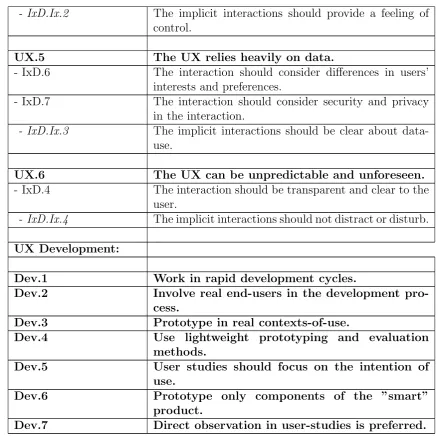
• [UX.1] Is dynamic and distributed. The interaction in an IoT environment can occur over many different users, devices, rules, applications and UI’s. Also the functionality can be distributed among devices, which can also be added dynamically to the system at a later time.
• [UX.2]Depends more on the Context of Use. In contrast to the UX of other interactive, Web-based products, the context of use of ”smart” products is more dynamic, diverse and complex [57], [60], [61].
• [UX.3] Can be discontinued. As the functionality within an IoT environment can transfer from one device to another, drops in connectivity may cause a dis-continued UX between those devices, creating a asynchronous and incoherent experience [61].
• [UX.4]Can be cognitively demanding. As an IoT environment can consist of many devices, users and applications, connecting and setting up these devices to work together may feel like a complex and cognitive demanding task for the user. Furthermore, the lack of a form of direct manipulation may cause a higher cognitive load when interacting with a ”smart” product system [61].
• [UX.5]Relies heavily on data. The functionality of a ”smart” product heavily relies on the amount of data it is able to process. Beside the use of sensors, the data of users of these products are key to providing the most functionality and the best user experience. Furthermore, this can have consequences for topics as security and privacy [61].
• [UX.6] Can be unpredictable and unforeseen. As ”smart” products heavily depend on the context of use, preferences or rules set by other users or devices may cause a surprising and unforeseen experience.
4.3.2 Interaction Design Heuristics