Online Learning App
Aditi Sinha1, Budhil Vyas2
1, 2
Department of Information Science & Engineering, NHCE, Bangalore
Abstract: Education is moving towards global openness and accessibility facilitated by new learning environments and tools based on technologies that have become key drivers in educational innovation. This is the general setting where MOOCs (Massive Open Online Courses), the recent breakthrough in the field of education, are flourishing. Online Learning App is an android app that help you to Learn easily. I have developed an android app because Acc. To survey 50% of teenagers, access internet though mobile and android has 815 market shares of mobile market. In this you can learn technologies as well as discuss your doubts with your other mates. The user Register then login and explore the best video lectures as well as the help of his/her mates. I have used a Server for storing the details of users and also the whole data of chatting between users. This app helps us to fulfill our basic need as teaching- learning is ongoing process. It also helps parents by making single search they can find a technology to explore there. This app also helps the parents to monitor their ward’s progress. At last this app is all about helping today’s students towards the knowledge of different technologies and language
Keywords: Android, Cloud, servers, MOOCs, learning, education.
I.INTRODUCTION
Education is moving towards global openness and accessibility [1] facilitated by new learning environments and tools based on technologies that have become key drivers in educational innovation [2]. This is the general setting where MOOCs (Massive Open Online Courses), the recent breakthrough in the field of education, are flourishing. Even though the ideas behind the idea can be traced rather earlier, the term was coined in 2008 in the context of e-learning by Stephen Downes and George Siemens, when they were defining their course on Connectivism and Connective Knowledge - CCK08 [3]. Despite their short story, MOOCs are conceptualized as the evolution of networked learning and indeed it has become the educational buzzword of 2012 [4], as some of the most prestigious US Universities have enthusiastically embraced and developed the concept. In fact, early examples prompted by the best American Universities, such as EdX (Harvard, MIT and Berkeley to name a few) and Coursera (Princeton, Stanford and Brown amongst others), have attracted hundreds of thousands of participants who contribute to both the materials and organization of the course.
In this paper, we are going to propose an app for online learning. Nowadays, every person has a smartphone and most used platform for smartphones are android, so it is important to have an app which helps the teenagers to study online. The proposed app has all the videos related to new technologies and programming languages along with the notes related to it. Users can first register on the app and then login.
The app also has the chatting facility using which users can interact among themselves and also to the mentors. The users can check their knowledge gained by undertaking the quiz challenges available on the app. The parents can also monitor their child’s progress on the app by logging in if they wish to. It helps the users to learn all the technologies and programming languages at one place along with their friends, thus helping students to gain more and more knowledge.
II. SOFTWAREREQUIRED
The Android Technologies course is intended for experienced developers who have Java programming experience and know the fundamentals of how to build an Android app using the Java programming language. This course assumes you have mastered the topics in Android Technologies course.
A. Android Studio
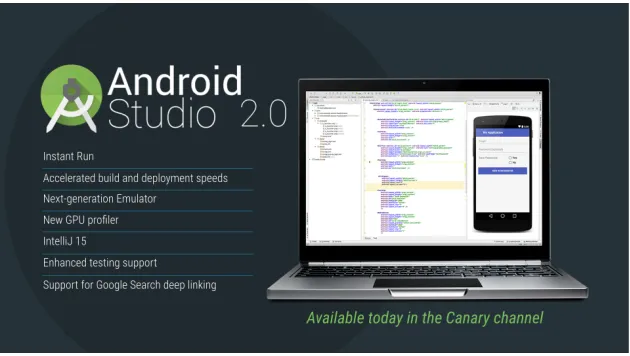
[image:2.612.156.471.208.386.2]Android Studio is the official integrated development environment (IDE) for Google's Android operating system, built on JetBrains' IntelliJ IDEA software and designed specifically for Android development. It is available for download on Windows, macOS and Linux based operating systems. It is a replacement for the Eclipse Android Development Tools (ADT) as the primary IDE for native Android application development.
Figure 1. Android Studio.
B. A flexible Gradle Based System
The Android build system compiles app resources and source code, and packages them into APKs that you can test, deploy, sign, and distribute. Android Studio uses Gradle, an advanced build toolkit, to automate and manage the build process, while allowing you to define flexible custom build configurations. Each build configuration can define its own set of code and resources, while reusing the parts common to all versions of your app. The Android plugin for Gradle works with the build toolkit to provide processes and configurable settings that are specific to building and testing Android applications.
Figure 2. Gradle versions.
C. A fast and Rich Emulator
[image:2.612.234.390.485.620.2]Figure 3. Best Emulator for Android.
D. Code Templates and GitHub Integration
[image:3.612.166.461.326.481.2]GitHub Apps are the officially recommended way to integrate with GitHub because they offer much more granular permissions to access data, but GitHub supports both OAuth Apps and GitHub Apps. For information on choosing a type of app, see "About apps" and "Differences between apps". Apps on GitHub allow you to automate and improve your workflow. You can build apps to improve your workflow.
Figure 4. Guide for GitHub Integration.
E. Extensive tools and Framework
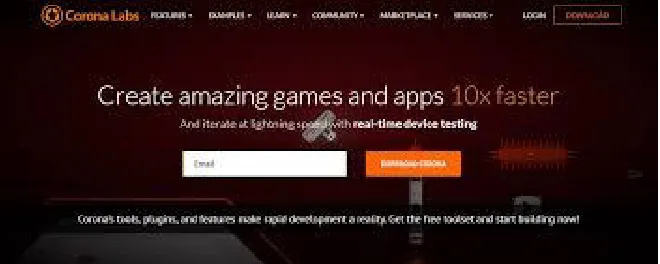
Cross-platform frameworks provide developers with a complete set of tools designed to increase productivity by resolving common issues. The question is which framework is the best for you. To help you answer this question, we’ve prepared this list of cross-platform frameworks for mobile development. Corona SDK promises up to 10-times faster game and mobile development. How is that even possible? Because the Corona app backend framework relies entirely on Lua, a lightweight multi-paradigm programming language with a focus on speed, portability, extensibility, and ease-of-use.
[image:3.612.149.479.581.713.2]F. C++ and NDK support
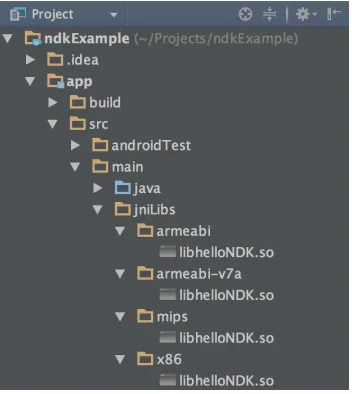
[image:4.612.226.402.143.340.2]The Native Development Kit (NDK) is a set of tools that allows you to use C and C++ code with Android, and provides platform libraries you can use to manage native activities and access physical device components, such as sensors and touch input. The NDK may not be appropriate for most novice Android programmers who need to use only Java code and framework APIs to develop their apps.
Figure 6. NDK Support in Android Studio
G. Google Cloud Platform for chat application
Google Cloud Platform (GCP), offered by Google, is a suite of cloud computing services that runs on the same infrastructure that Google uses internally for its end-user products, such as Google Search and YouTube. Alongside a set of management tools, it provides a series of modular cloud services including computing, data storage, data analytics and machine learning. Registration requires a credit card or bank account details. Google Cloud Platform provides Infrastructure as a service, Platform as a service, and Serverless computing environments.
Figure 7. Google Cloud Platform
III.METHODOLOGY
1) Waterfall Methodology: It is a sequential design process, in which development is steadily downwards like a waterfall. It starts from conception till the closing of the project.
2) Why Waterfall: – It is a traditional approach, which makes sure that the product is exactly as per the customer expectations.
3) What is Agile Approach: Agile development is quick and iterative. The tasks are divided into short phases of work, frequent assessment and adaptation to plans.
5) The usual question asked by developers is which method is best for Mobile App development. Here is a quick comparison between Agile & Waterfall development:
a) Agile is a fast team based approach, while Waterfall is methodical and sequential.
b) Agile focuses on addition of new features and evolving trends unlike waterfall
c) Since testing happens almost simultaneously the project (App) can be launched sooner.
6) Types Of Agile Development
a) Agile Scrum: It’s a technique in which development is broken into small chunks called scrum. A project manager is assigned to each Scrum. He is known as a Scrum Master.
b) Lean development: Used in Lean manufacturing Principles. For instance, sticking out notes to discuss the next task.
Usually app development firms are focused on offering the best possible solutions in a quick time. Agile methodology is followed more often. But there are cases where Waterfall would make more sense.
IV.PROPOSEDSYSTEM
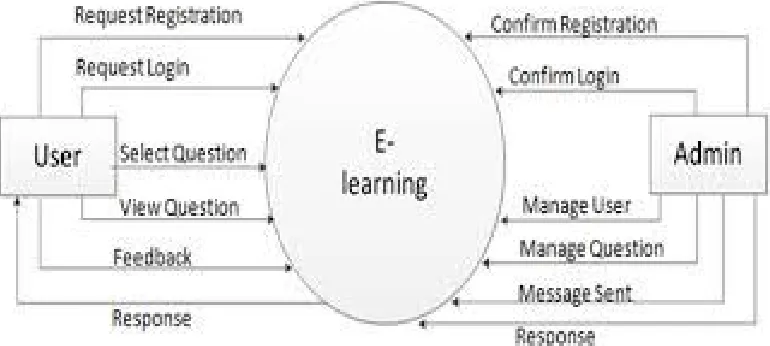
[image:5.612.119.504.344.517.2]Online Learning App is an android app that help you to Learn easily. WE have developed an android app because Acc. To survey 50% of teens access internet though mobile and android has 815 market share of mobile market. In this you can learn technologies as well as discuss your doubts with your other mates. The user Registers then login and explore the best video lectures as well as the help of his/her mates. We have used a Server for storing the details of users and also the whole data of chatting between users. This app helps us to fulfil our basic need as teaching- learning is on-going process. It also helps parents by making single search they can find a technology to explore there. At last this app is all about helping today’s students towards the knowledge of different technologies.
Figure 8. Data Flow Diagram
A. Sample Code
package com.cetpainfotech.onlinelearning.WelcomeScreen; import android.content.Context;
import android.content.SharedPreferences; public class PrefManager {
SharedPreferences pref;
SharedPreferences.Editor editor; Context _context;
// shared pref mode int PRIVATE_MODE = 0; // Shared preferences file name
private static final String PREF_NAME = "androidhive-welcome";
this._context = context;
pref = _context.getSharedPreferences(PREF_NAME, PRIVATE_MODE); editor = pref.edit();
}
public void setFirstTimeLaunch(boolean isFirstTime) {
editor.putBoolean(IS_FIRST_TIME_LAUNCH, isFirstTime); editor.commit();
}
public boolean isFirstTimeLaunch() {
return pref.getBoolean(IS_FIRST_TIME_LAUNCH, true); }
}
For interface:
<?xml version="1.0" encoding="utf-8"?>
<manifest xmlns:android="http://schemas.android.com/apk/res/android" package="com.cetpainfotech.onlinelearning">
<uses-permission android:name="android.permission.INTERNET" />
<uses-permission android:name="android.permission.ACCESS_NETWORK_STATE"/> <application
android:allowBackup="true"
android:icon="@mipmap/ic_launcher" android:label="@string/app_name"
android:roundIcon="@mipmap/ic_launcher_round" android:supportsRtl="true"
android:usesCleartextTraffic="true"
android:networkSecurityConfig="@xml/network_security_config" android:theme="@style/AppTheme">
<activity android:name=".WelcomeScreen.WelcomeActivity" android:theme="@style/AppTheme.NoActionBar"> <intent-filter>
<action android:name="android.intent.action.MAIN" />
<category android:name="android.intent.category.LAUNCHER" /> </intent-filter>
</activity>
<activity android:name=".Authentication.LoginActivity"></activity> <activity android:name=".Chat.ChatActivity"></activity>
<activity android:name=".Authentication.RegisterActivity"></activity> <activity android:name=".Chat.UserActivity"
android:screenOrientation="portrait"></activity> <activity
android:name=".Activity.HomeActivity" android:screenOrientation="portrait"
android:theme="@style/AppTheme.NoActionBar"> </activity>
B. Steps for running the app: 1) Install and use Android Studio
a) If you downloaded an .exe file (recommended), double-click to launch . If you downloaded a .zip file, unpack the ZIP, copy the android-studio folder into your Program Files folder, and then open the android-studio > bin folder and launch studio64.exe (for 64-bit machines) or studio.exe (for 32-bit machines).
b) Follow the setup wizard in Android Studio and install any SDK packages that it recommends. 2) Run apps from Android Studio on both a device and an emulator
C. Set Up Your Device As Follows
1) Connect your device to your development machine with a USB cable. If you're developing on Windows, you might need to install the appropriate USB driver for your device.
2) Enable USB debugging in the Developer options as follows.
First, you must enable the developer options:
a) Open the Settings app.
b) (Only on Android 8.0 or higher) Select System.
c) Scroll to the bottom and select About phone.
d) Scroll to the bottom and tap Build number 7 times.
e) Return to the previous screen to find Developer options near the bottom. Open Developer options, and then scroll down to find and enable USB debugging.
D. Run the app on your device as follows:
1) In Android Studio, click the app module in the Project window and then select Run > Run (or click Run in the toolbar).
2) In the Select Deployment Target window, select your device, and click OK. Run the app on an emulator as follows:
a) In Android Studio, click the app module in the Project window and then select Run > Run (or click Run in the toolbar).
b) In the Select Deployment Target window, click Create New Virtual Device.
c) In the Select Hardware screen, select a phone device, such as Pixel, and then click Next.
d) In the System Image screen, select the version with the highest API level. If you don't have that version installed, a Download link is shown, so click that and complete the download
e) Click Next.
f) On the Android Virtual Device (AVD) screen, leave all the settings alone and click Finish.
g) Back in the Select Deployment Target dialog, select the device you just created and click OK.
3) Use View Instances To Create Your App's User Interface
A well-designed custom view is much like any other well-designed class. It encapsulates a specific set of functionality with an easy to use interface, it uses CPU and memory efficiently, and so forth. In addition to being a well-designed class, though, a custom view should:
a) Conform to Android standards
b) Provide custom style attributes that work with Android XML layouts
c) Send accessibility events
d) Be compatible with multiple Android platforms.
The Android framework provides a set of base classes and XML tags to help you create a view that meets all of these requirements. This lesson discusses how to use the Android framework to create the core functionality of a view class.
<button>Click me</button> <p>No handler here. </p> <script>
let button = document.querySelector("button"); button. addEventListener("click", () => { console.log("Button clicked.");
}); </script>
That example attaches a handler to the button node. Clicks on the button cause that handler to run, but clicks on the rest of the document do not.
Giving a node an onclick attribute has a similar effect. This works for most types of events—you can attach a handler through the attribute whose name is the event name with on in front of it.
But a node can have only one onclick attribute, so you can register only one handler per node that way.
The addEventListener method allows you to add any number of handlers so that it is safe to add handlers even if there is already another handler on the element.
The removeEventListener method, called with arguments similar to addEventListener, removes a handler. <button>Act-once button</button>
<script>
let button = document.querySelector("button"); function once() {
console.log("Done.");
button.removeEventListener("click", once); }
button. addEventListener("click", once); </script>
The function given to removeEventListener has to be the same function value that was given to addEventListener. So, to unregister a handler, you’ll want to give the function a name (once, in the example) to be able to pass the same function value to both methods.
5) Save data in a local SQL database: Saving data to a database is ideal for repeating or structured data, such as contact information. This page assumes that you are familiar with SQL databases in general and helps you get started with SQLite databases on Android. The APIs you'll need to use a database on Android are available in the android.database.sqlitepackage.
E. Define A Schema And Contract
One of the main principles of SQL databases is the schema: a formal declaration of how the database is organized. The schema is reflected in the SQL statements that you use to create your database. You may find it helpful to create a companion class, known as a contract class, which explicitly specifies the layout of your schema in a systematic and self-documenting way.
A contract class is a container for constants that define names for URIs, tables, and columns. The contract class allows you to use the same constants across all the other classes in the same package. This lets you change a column name in one place and have it propagated throughout your code.
A good way to organize a contract class is to put definitions that are global to your whole database in the root level of the class. Then create an inner class for each table. Each inner class enumerates the corresponding table's columns.
F. Create A Database Using An SQL Helper
Once you have defined how your database looks, you should implement methods that create and maintain the database and tables. Here are some typical statements that create and delete a table:
Just like files that you save on the device's internal storage, Android stores your database in your app's private folder. Your data is secure, because by default this area is not accessible to other apps or the user.
G. Put Information into a Database
insert data into the database by passing a Content Values object to the insert() method: he first argument for insert() is simply the table name.
The second argument tells the framework what to do in the event that the Content Values is empty (i.e., you did not put any values). If you specify the name of a column, the framework inserts a row and sets the value of that column to null. If you specify null, like in this code sample, the framework does not insert a row when there are no values.
The insert() methods returns the ID for the newly created row, or it will return -1 if there was an error inserting the data. This can happen if you have a conflict with pre-existing data in the database.
V. EXPERIMENTALRESULTS
[image:9.612.247.366.249.469.2]The app was checked repeatedly by opening different courses and tutorials related to it. A feedback was taken for the app and 70% of the college students found the app helpful for their studies. The feedback was taken just to check that the app was working fine. The chatting facility helped the students to interact with each other and learn the concepts in a very easy way by clearing doubts.
Figure 9. Login Page
The above figure shows the login page. The user has to enter the name and password and if they are not registered in the app they can do so by tapping on click here to register option.
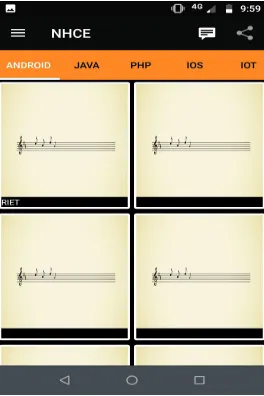
[image:9.612.240.372.520.718.2]The above figure shows the home page of the app. The name of the app is NHCE. To its top right corner, it has the option to share so that people can send the app’s link to download to their friends. Next to it is the button for start the chat facility. The left corner has the options menu where it provides various options regarding the app.
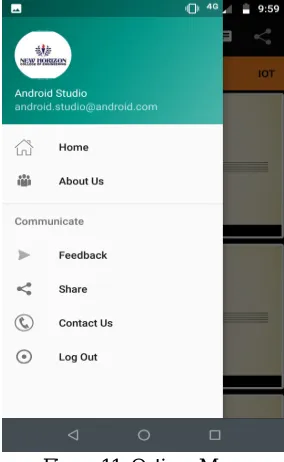
Figure 11. Options Menu
The above figure shows the options related to app. First is the logo of the app. Then it has home option which directs the user to the home page. Then about us option which tells you about the app. Then is the option for giving the feedback followed by share and then logout.
Figure 11. Tutorials related to Python
[image:10.612.229.383.409.669.2]Figure 12. Chat Screen
The above figure shows the chat screen of the app where users can easily interact with each other and clear the doubts. It is a kind of a messenger app as well.
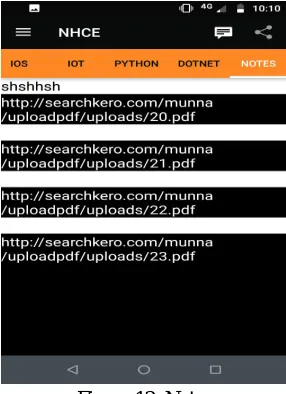
Figure 12. Notes
The above figure shows the notes screen of the app. Here the notes related to any course can be uploaded and the user gets access to download it in their mobile phones and save it for future use. In this way, the teachers can easily upload their notes on the app and send it to students and easily students can get it. The manual labor will be reduced.
VI.CONCLUSIONANDFUTUREENHANCEMENTS
[image:11.612.234.377.332.529.2]REFERENCES
[1] Vandana CP, "Security improvement in IoT based on Software Defined Networking (SDN)",International Journal of Science, Engineering and Technology Research (IJSETR) Volume 5, Issue 1 ,Pages 291-295
[2] Vandana cp,"Internet of Things and Security",International Journal of Computer Science and Mobile Computing ,Volume 5 ,Issue 1 Pages 133-139 ,IJCSMC, Vol. 5, Issue. 1, January 2016
[3] Vandana cp,Study of Resource Discovery trends in Internet of Things (IoT) ,Journal Int. J. Advanced Networking and Applications ,Volume 8,Issue 3 Pages 3084-3089
[4] Vandana cp,IOT future in edge computing ,Journal International Journal of Advanced Engineering Research and Science Volume 3 ,Issue 12 , AI Publications [5] Dr. Mohan Kumar S & Dr. Balakrishnan, Classification Of Breast Mass Classification – CAD System And Performance Evaluation Using SSNE, IJISET –
International Journal of Innovative Science, Engineering & Technology, Vol. 2, Issue 9, 417-425, ISSN 2348 – 7968
[6] Sujithra ks,Baswaraju Swathi, sonia singh, INCLUSIVE ANALYSIS OF INCOMPLETE DATA SETS USING IKNN SEARCH, International Journal of Innovative Research in Computer and Communication Engineering,Volume 5
[7] Subathra Muthuraman, Mrs Swathi Baswaraju, Mrs B Mounica, LARGE SCALE IMAGE RETRIEVAL USING DESCRIPTORS AND DISTANCE
MEASURE, International Journal of Computer Science and Mobile Computing, Vol.4 Issue.5
[8] Swathi Baswaraju, Balani Somesh, Shrestha Niza Barun-SURVEY ON HOME SECURITY SURVEILLANCE SYSTEM BASED ON WI-FI
CONNECTIVITY USING RASPBERRY PI AND IOT MODULE, International Journal of Advanced Research in Computer Science . Mar/Apr2018, Vol. 9 Issue 2.
[9] Dr. Mohan Kumar S, Dr. Balakrishnan, Classification Of Breast Mass Classification – CAD System With Performance Evaluation, International Journal of Engineering And Computer Science, Volume 4, Issue 09, 14187-14193, ISSN 2319-7242, September, 2015
[10] Dr. Mohan Kumar S, Dr. Balakrishnan, Classification Of Breast Microcalcification- CAD System And Performance Evaluation Using SSNE, International Journal of Advanced Research in Computer Science and Software Engineering, Volume 5 , Issue 9, 824-830, ISSN: 2277 128X, Sep- 2015
[11] Dr. Mohan Kumar S, Karthikayini, Essential Best Practices And Processes In Higher Educational Technical Institutions, International Journal Of Engineering Research And General Science, Volume 3, Issue 6, 231-236, ISSN 2091-2730 231, December, 2015
[12] Dr. Mohan Kumar S, Karthikayini, LNW-A System Model For A High Quality Effective E-Learning Using Cloud Environs, International Journal of Current Research and Review, Volume 7, Issue 23, 21-25, ISSN: 0975-5241, December, 2015
[13] Dr. Mohan Kumar S, Ayurveda Medicine Roles In Healthcare Medicine, And Ayurveda Towards Ayurinformatics, International Journal of Computer Science and Mobile Computing, Volume 4, Issue 12, 35-43, ISSN 2320-088X, December, 2015
[14] Dr. Mohan Kumar S, Muralidhara, Importance Of Accreditation And Autonomous Status In HEI – An Assessment With Special Orientation To Karnataka State, International Journal of Engineering Sciences & Research Technology, Volume 5, , Issue 1, 472-479, ISSN : 2277-9655, January, 2016
[15] Dr. Mohan Kumar S , Interrelated Research Works And Importance Of Object Oriented Analysis And Modeling, International Journal of Engineering Sciences & Research Technology, Volume 5, Issue 1, Page Numbers:59-62, ISSN : 2277-9655, January, 2016
[16] Dr.S Mohan Kumar, R.Jaya, A Survey On Medical Data Mining – Health Care Related Research And Challenges, International Journal of Current Research, Volume 8, Issue 01, Page Numbers; 25170-25173, ISSN:0975-833X, January, 2016
[17] R.Jaya, Dr S Mohan Kumar, A Study On Data Mining Techniques, Methods, Tools And Applications In Various Industries, International Journal of Current Research & Review, Volume 8, Issue 04, Page Numbers:35-43, ISSN:0975-5241, January, 2016
[18] Clara K, Dr S Mohan Kumar, Cyber Crime Varient Activities And Network Forensic Investigation, International Journal of Emerging Technology and Advanced Engineering, Volume 6, Issue 04, Page Numbers: April 2016, ISSN:2250-2459, March, 2016,
[19] Clara.K, Dr S Mohan Kumar,Exploratory Study Of Cyber Crimes, Digital Forensics And Its Tools, International Journal of Emerging Technology and Advanced Engineering, Volume 6, Issue 04, Page Numbers: April 2016, ISSN:2250-2459, March, 2016
[20] Revathi Y, Dr S Mohan Kumar, Efficient Implementation Using RM Method For Detecting Sensitive Data Leakage In Public Network International Journal of Modern Trends in Engineering and Research, Volume 3, Issue 04, Page Numbers: 515-518, ISSN (Online):2349–9745 ISSN (Print):2393-8161 , April, 2016
[21] Revathi Y , Dr S Mohan Kumar, Review On Importance And Advancement In Detecting Sensitive Data Leakage In Public Network, International Journal Of Engineering Research And General Science, Volume 4, Issue 02, Page Numbers:263-265, ISSN:2091-2730, April, 2016
[22] Revathi Y, Dr S Mohan Kumar, A Survey On Detecting The Leakage Of Sensitive Data In Public Network International Journal of Emerging Technology and Advanced Engineering, Volume 6, Issue 03, Page Numbers:234-236, January, 2016
[23] Mr.Dilish Babu.J, Dr.S Mohan Kumar, A Survey On Secure Communication In Public Network During Disaster , IJESRT -International Journal Of Engineering Sciences & Research Technology, Volume 5, Issue 3, Page Numbers:430-434, ISSN: 2277-9655, March 2016
[24] Mr.Dilish Babu.J, Dr.S Mohan Kumar, Survey On Routing Algorithms During Emergency Crisis Based On MANET, IJETAE, International Journal of Emerging Technology and Advanced Engineering, Volume 6, Issue 3, Page Numbers: 278-281, ISSN: 2250–2459, Mar-16
[25] Mr.Dilish Babu.J, Dr.S Mohan Kumar, Emergency Communication Sysytem For Natural Disaster Using MANET, IJRDO, International Journal of Research and Development Organization, Volume 2, Issue 5, Page Numbers:01 to 10, ISSN:2456-1843, May, 2016
[26] Ms.Sulochana Panigrahi, Dr S Mohan Kumar, Social Data Analysis Using Big-Data Analytic Technologies- Apache Flume, HDFS, HIVE, IJRDO, International Journal of Research and Development Organization, Volume 2, Issue 5, Page Numbers:16 to 21, ISSN:2456-1843, May, 2016
[27] Ms.Sulochana Panigrahi, Dr S Mohan Kumar, Social Media Analysis Using Apache Flume, Hdfs, Hive, International Journal of Current Trends in Engineering & Technology, Volume 2, , Issue 2, Page Numbers:282 to 285, ISSN:2395-3152, March, 2016
[28] Dr. V. ILANGO and Dr. S. Mohan Kumar, Factors For Improving The Research Publicatons And Quality Metrics International Journal of Civil Engineering & Technology (IJCIET) ISSN 0976-6308 and 0976-6316(Print&Online) Volume 8, Issue 4, 04-17,
[30] V Karthik, Dr.S . Mohan Kumar and Ms. Karthikayini, A Novel Survey On Location Based Node Detection And Identifying The Malicious Activity Of Nodes In Sensor Networks International Journal of Civil Engineering & Technology, (IJCIET), ISSN 0976-6367 and 0976-6375(Print & Online), Volume 8, [31] Karthik V, Ms.Karthikayini, Dr S Mohan Kumar, Ms Gayathri T, Geocentric Based Node Detection And Revoking Malicious Node In WSN, International
Journal for Science and Advance Research in Technology (IJSART), ISSN 2395-1052 (Print&Online), Volume 3, Issue 4, 04-17
[32] Dr.S. Mohan Kumar and Dr G. Balakrishnan, Wavelet And Symmetric Stochastic Neighbor Embedding Based Computer Aided Analysis For Breast Cancer, Indian Journal of Science and Technology ISSN 0974-6846 and 0974-5645(Print&Online), Volume 9, Issue 47, 12-16
[33] Sruthi Hiremath, Sheba Pari N and Dr.S. Mohan Kumar, Booster in High Dimensional Data Classification, (DOI: 10.15680/IJIRCCE.2017. 0503349), International Journal of Innovative Research in Computer and Communication Engineering, Vol. 5, Issue 3, March 2017, 5984-5989.
[34] Dr S. Mohan Kumar & Dr.T.Kumanan, Skin Lesion Classification System and Dermoscopic Feature Analysis for Melanoma Recognition and Prevention, IJETAE, International Journal of Emerging Technology and Advanced Engineering, ISSN: 2250–2459 and Volume 7, Issue 7, July 2017,
[35] Dr S. Mohan Kumar & DrJitendranathMungara, J. Karthikayini, Design and implementation of CNN for detecting Melanoma through image processing, International Journal for Research in Applied Science and Engineering Technology, ISSN : 2321 – 9653, Volume 6, Issue - 3, March – 2018 in (DOI : 10.22214) pp. No.: 2249-2253
[36] Dr S. Mohan Kumar & J. Karthikayini, Surveys on Detection of Melanoma through image processing Techniques, International Journal for Research in applied science and Engineering Technology (IJRASET), ISSN : 2321 – 9653, volume 6, Issue III, March 2018 in IJRASET, DOI: 10.22214, pp. no.: 1699-1704
[37] Dr S. Mohan Kumar, Automated Segmentation of retinal images, International Journal of Engineering and Technology, UAE, July 2018, International Journal of Engineering and Technology, UAE
[38] Dr. S. Mohan Kumar & Anisha Rebinth, Automated detection of Retinal Defects using image mining, A review, European Journal of Biomedical and Pharmatical Sciences, European ISSN : 2349 – 8870, Volume 5 , Issue : 01 year : 2018, pp No.: 189 – 194
[39] Dr. S. Mohan Kumar& Dr.T.Kumanan, Analysis on skin Lesion classification systems and Dermoscopic Feature Analysis for Melanoma International Journal for Research in Applied Science and Engineering Technology (IJRASET), ISSN : 2321 – 9653, Volume 6, Issue - 3, March – 2018 in (DOI : 10.22214), pp. no.:1971-78
[40] Dr. S. Mohan Kumar & Dr.T.Kumanan, Study on skin Lesion Classifications system and Dermoscopic Feature Analysis for Melanoma, International journal of Creative Research Thoughts (IJCRT), IJCRT1802680, ISSN : 2320 – 2882, Volume 6, issue-1, March 2018, Page No . 1863 – 1873
[41] Dr. S. Mohan Kumar & Dr.T.Kumanan, Classification System and Dermoscopic Features Analysis for Melanoma recognition and Prevention, International journal of Creative Research Thoughts (IJCRT), IJCRT1802680, ISSN : 2250 – 2459 , Volume 7 , Issue 8, August 2017 , pp no: 351 – 357
[42] Dr. S. Mohan Kumar& Darpan Majumder, Healthcare Solution based on Machine Learning Applications in IOT and Edge Computing, International Journal of Pure and Applied Mathematics, ISSN: 1311-8080 (printed version) ISSN: 1314-3395 (on-line version) Jul 2018 issue.
[43] Dr. S. Mohan Kumar, Ashika.A, A Survey on Big Data Analysis, Approaches and its Applications in the real World, Journal of Emerging Technologies and Innovative Research, ISSN: 2349-5162, May 2018 , Volume 5, Issue 5, pp. no.: 93-100
[44] Shreya R, Sri Lakshmi Chandru, Vivek Kumar, Shwetha M, Dr. S. Mohan Kumar, Classification of Skin Cancer through image processing and implementating CAD System International journal of Creative Research Thoughts (IJCRT)IJCRT1802680m, ISSN : 2320 – 2882, Volume 6, issue-2 , April 2018 Page No . 1863 – 1873
[45] S Mohan Kumar & Dr. Balakrishnan, Statistical Features Based Classification of Micro calcification in Digital Mammogram using Stocastic Neighbour Embedding, International Journal of Advanced Information Science and Technology, 2012, ISSN:2319-2682 Volume 07, Issue 07 , November 2012, Page Numbers: 20-26
[46] S Mohan Kumar & Dr. Balakrishnan ,Breast Cancer Diagnostic system based on Discrete Wavelet Transformation and stochastic neighbour Embedding, European Journal of Scientific Research, 2012, ISSN:1450-216X ,Volume 87, Issue 03 , October 2012, Page Numbers: 301-310
[47] S Mohan Kumar & Dr. Balakrishnan, Classification of Microclacification in digital mammogram using SNE and KNN classifier, International Journal of Computer Applications - Conference Proceedings published in IJCA, 2013 ISBN: 973-93-80872-00-6, ICETT proceedings with IJCA on January 03,2013, Page Numbers: 05-09
[48] S Mohan Kumar & Dr. Balakrishnan, Mutiresolution analysis for mass classification in Digital Mammogram using SNE, IEEE international Conference- ICCSP-13 organized by Athiparasakthi Engineering College, Chennai , 2013, ISBN:978-1-4673-4864-5, Page Numbers: 2041-2045.
[49] S Mohan Kumar & Dr. Balakrishnan, Categorization of Benign And Malignant Digital Mammograms Using Mass Classification – SNE and DWT, Karpagam Journal of Computer Science, 2013, ISSN No: 0973-2926, Volume-07, Issue-04, June-July-2013, Numbers: 237-243.
[50] S Mohan Kumar & Dr. Balakrishnan, Classification of Micro Calcification And Categorization Of Breast Abnormalities - Benign and Malignant In Digital Mammograms Using SNE And DWT, Karpagam Journal of Computer Science 2013, ISSN No: 0973-2926, Volume-07, Issue-05, July-Aug, 2013. Page Numbers: 253 to 259
[51] S Mohan Kumar & Dr. Balakrishnan, The Performance Evaluation of the Breast Mass classification CAD System Based on DWT, SNE AND SVM , International Journal of Emerging Technology and Advanced Engineering, 2013, ISSN 2250–2459, Volume 3, Issue 10, October 2013, Page Numbers: 581-587