Supporting Creative Composition: the FrameWorks Approach
Polfreman, Richard
Music Department, University of Hertfordshire. College Lane, Hatfield, Herts. AL10 9AB.
Abstract:
We present a new system for music composition using structured sequences. FrameWorks has been developed on the basis of Task Analysis research studying composition processes and other user-centred design techniques. While the program only uses MIDI information, it can be seen as a ‘proof of concept’ for ideas generally applicable to the specification and manipu-lation of other music control data, be it raw audio, music notation or synthesis parameters. While this first implementation illustrates the basic premise, it already provides composers with an interesting and simple to use environment for exploring and testing musical ideas. Fu-ture research will develop the concept, in particular to enhance the scalability of the system.
Keywords:
Music Composition Environments, MIDI Sequencing, Midishare, Musical Structures, Java Applications.
1 Introduction
in order to preserve the integrity of the composition. In most software packages (i.e. not algor-ithmic composition systems) such changes are not propagated automatically by the system and so a high viscosity can be present. Typically composers are also committed to developing material into a musical structure or form rather than being allowed to start from higher level concerns and then input material.
FrameWorks itself is an early implementation of the ideas emerging from the TA work and it is planned to extend the system in various ways in future work. In its current state it does al-low composers to do much that is difficult to achieve with typical software sequencers and encourages composers to experiment with different musical ideas. That said, significant ex-tensions to the current software are needed to produce a truly effective implementation of the concept. FrameWorks is a Java application (1.1.5 or later + Swing/JFC) which uses Grame’s free MidiShare system. A free preview release that runs on Windows and Mac OS is available from the University of Hertfordshire from April 2001. A Linux version should be available in the near future.
2 GTM Involvement
The GTM identified three main (interrelated) areas of task performance:
• Design framework whichinvolves the setting out of what can be seen as a set of (musical
and practical) constraints within which the piece will be composed. This involves defining instrumentation, selecting tools, developing structural ideas and devising systems for cre-ating musical material.
• Research which may be necessary before a work can be completed, including many
dif-ferent topics that may be of interest to composers.
• Produce music whichinvolves creating the music itself and setting it down in an external
form so that it can be performed or tested. This involves the creation of the final deliver-able product of the composition process. This can be seen as the application of ideas de-veloped in the first two areas.
In many systems this last task has usually been over-emphasised in typical sequencing tools at the cost of research and design framework areas. In other cases, in order to achieve more so-phisticated musical structures and generation of material, the systems generally require a pro-gramming approach to composition, rather than a more intuitive musical one. The GTM ana-lyses these areas further and the structure of FrameWorks reflects at least some of these GTM components. In particular, FrameWorks allows the composer to experiment with some struc-tural aspects of musical composition without using computer programming languages or mathematical constructs. In future development, further parts of the GTM will be imple-mented in the system in order to support these areas more fully and effectively.
3 FrameWorks
3.1 Overview
as the products of research that a composer has undertaken may be used here. The framework is where a musical work is actually put together. A composition is defined in terms of compo-nents and relations. Components are simply containers for musical material. These are placed on tracks (where tracks have a similar role as in typical MIDI sequencers) and can be inter-connected via relations. These dynamically maintain relationships between the material in source components and transformed copies of that material in destination components. The sequence level displays the composition without any structural information on a track-based display similar to a traditional software sequencer. This is not for editing but merely to give the composer a flattened view of the completed musical content.
3.2 Workbench
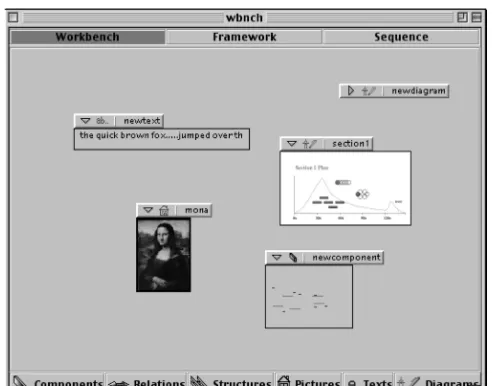
In the current implementation there are five types of element that can be placed on the work-bench. These are: texts, pictures, diagrams, components and relations:
• Text: These are sections of (currently plain) text. These might be notes taken by the
com-poser relating to musical ideas, inspirational material (e.g. quotes from poetry/prose), texts to be set to music, reminders, etc. These can be created and edited in FrameWorks.
• Pictures: These are picture files (currently .gif) that can be imported into FrameWorks,
which then saves its own copy. Again these could be inspirational images, or perhaps pic-tures of scores or graphics to be used in order to guide some musical aspect of the work.
• Diagrams: These are diagrams of a form similar to those that can be made using packages
such as AppleWorks® or Adobe Illustrator®, but less sophisticated. A simple editor is contained within FrameWorks for creating and manipulating diagrams. These might be sketches of the overall shape of a piece or a planned timeline, for example.
• Components: These are sections of musical material (currently just MIDI note events),
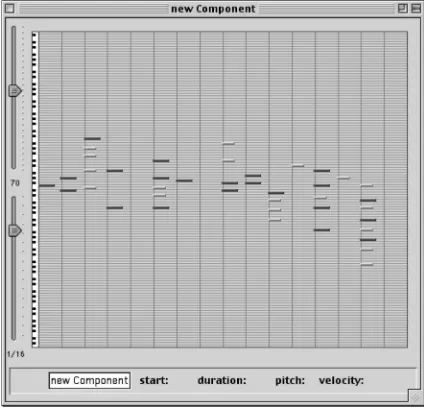
having a duration, start point and MIDI channel, and are created and edited using a simple piano roll style notation.
• Relations: These express musical relationships between components and invoke
transfor-mations such as transposition, inversion, time manipulations and filtering.
Figure 1: A workbench.
3.3 Framework
In the framework, components are placed on tracks and can be interconnected via relations. There are several types of relation currently used in FrameWorks and we aim to extend this range in future development. At the moment there are four main types:
• Time Relations: These represent a set of time based transformations utilising an arbitrary
number of time maps. Each map delineates a segment of the source component (with start and end points expressed as percentages of the source duration) which can be played for-wards or backfor-wards with a user specifiable speed factor (1.0 = original speed, 0.5 = half speed, 2.0 = twice speed, etc). A time relation comprises a series of time maps applied successively to the source material. These relations can be used simply for time stretch-ing/compressing or to deconstruct and reassemble components in complicated ways.
• Value Relations: These represent time varying transformations of parameters specifying
the musical material. In the preview release these only apply to pitch and velocity values in the source material. By using a simple envelope that is stretched to fit the extent of the source material, the composer can shift, scale or invert these source values.
• Filter Relations: These relations pass only some of the source material onto the destination
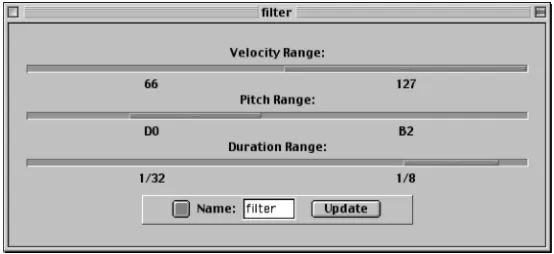
component. They filter by pitch, velocity and duration, with independent control of each.
• Multi-Relations: These are simply combinations of other defined relations into a single
relation. An arbitrary number of time, value, filter and multi relations can be used.
Components themselves can be manually stretched and compressed to any duration (within the limits of the program), which correspondingly stretches and compresses the material con-tained within them (and their dependent components). Figure 2 shows an example framework.
Figure 2: A component-relation framework.
In the framework the left hand area contains the transport controls, time information displays and access to change the duration of the piece. The central area contains the framework with components as parallelogram shapes suspended on diagonal tracks (time flowing from top-left to bottom-right). Relations are indicated by coloured lines between components. At the top of the framework are the controls for each track: MIDI channel/port, mute, solo etc.
Figure 3: A component editor.
[image:5.595.191.403.435.639.2]of subdivisions from 1 to 64. By using different time grids with the snap option on, it is very easy to create complex rhythmic patterns of, say, fours against sevens against thirteens.
[image:6.595.214.381.112.199.2]
Figure 4: A time relation editor.
Relations are modified using various editors. Figure 4 shows a time relation editor. These have a series of time maps that can be rearranged into any order. Each map has a time line with draggable markers for specifying the segment of material to capture, a direction button and a numerical speed factor. In the figure, the relation simply plays the whole source ma-terial backwards then forwards at the original speed. Clicking the expander button on the bot-tom time map adds another time map to the relation, and any number can be added in this way.
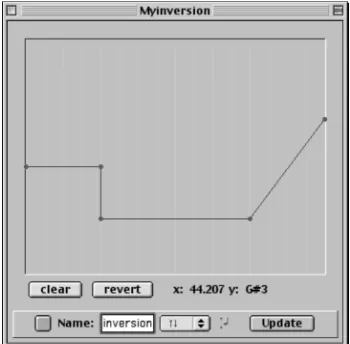
Figure 5 shows a value relation. The editor uses a breakpoint envelope for specifying the value modification over time. A popup menu is provided for choosing the type (shift, scale or inversion) and a button selects between pitch and velocity as the parameter to control.
Figure 5: A value relation editor.
[image:6.595.210.385.404.576.2]Figure 6: A filter relation editor.
Figure 7 shows a multi relation editor. It can contain as many relations as desired by the user. It is similar in appearance and behaviour to the time relation editor, but each row represents a relation rather than a time map. The relations are applied successively from top to bottom.
Figure 7: A multi relation editor.
3.4 Sequence
[image:7.595.168.429.530.695.2]The sequence layer is not intended as an editing level, but purely as an aid to visualise a com-plete composition without the structural information carried by components and relations.
It uses a simple piano-roll type display of the framework tracks. However, the composer can add and remove tracks here as well as change performance parameters such as track MIDI channel/port, mute and solo, and activate the performance controls - play, pause, rewind, etc.
3.5 Stores
[image:8.595.241.353.221.376.2]Accessible from all levels are the stores. These are simply points of quick access to director-ies containing different element types associated with the current workbench. The idea is that a workbench or framework does not have to have all its associated elements loaded at any one time. A workbench has the file structure indicated in Figure 9.
Figure 9: Workbench directory structure.
The workbench is stored in a directory containing the file itself, a sub-directory of frame-works (only one of which can be loaded at a time) and a sub-directory of elements, which in turn has sub-directories for each element type – these are the stores directories. A framework itself saves all of its components and relations independently of the workbench. Currently
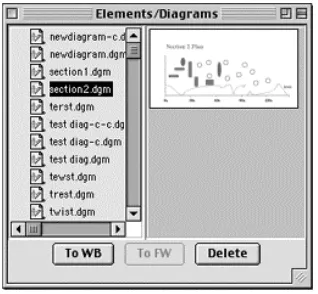
structures are not implemented as an element type, but the idea is that these would be frame-works without any events in their components – a kind of empty template for a part or the whole of a piece. Clicking a stores button (these are along the bottom of the main window) opens a window for accessing the files in that particular store, as shown in Figure 10.
Figure 10: A (diagram) store.
[image:8.595.219.378.539.686.2]work-bench, or if it is a relation or component, add a copy of it to the framework. Components and relations can also be copied between the workbench and framework. Deleting elements from the workbench does not delete their corresponding files, but these can be deleted using the stores window.
4 Musical Examples
In this section we demonstrate using simple examples some of the ways in which the frame-work area of the software can be effective in exploring musical ideas.
4.1 Clapping Music
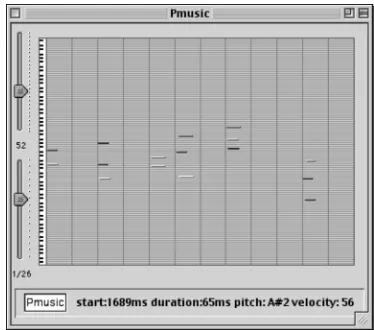
We start by implementing an abbreviated version (i.e. without repeats) of Steve Reich’s Clap-ping Music. This is a simple composition written for two performers clapClap-ping. The entire piece is based around a simple rhythmic pattern – ta-ta-ta_ta-ta_ta_ta-ta_. One part simply repeats this pattern from start to end. The second part cycles this pattern using the iterative application of a rule that takes the first beat of the phrase and moves it to the end each time. This part cycles all the way round until arriving back at the original pattern and plays again in unison with the stationary part. We can implement this relatively easily in FrameWorks. First we define a component that contains this rhythmic pattern (Figure 11).
Figure 11: ‘Theme’ from Clapping Music. Figure 12: The relation for Clapping Music.
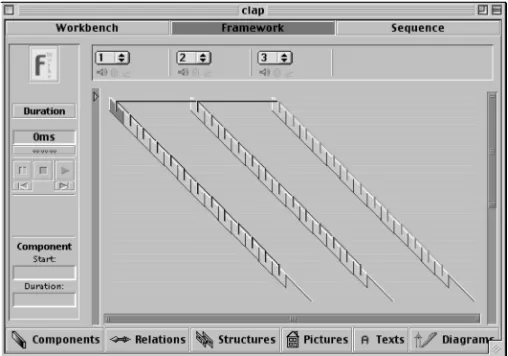
We then define a time relation that carries out the transformation, playing the last eleven twelfths first and the first twelfth last. This is shown in Figure 12. We can then build up a framework using this single source component and the clapping music relation (plus a built-in identity relation).
Figure 13: Clapping Music framework.
4.2 Extensions to Clapping Music
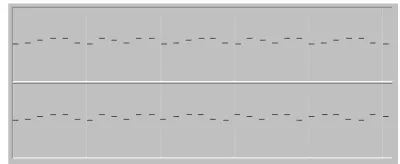
Having created a framework for Clapping Music we can extend the composition in simple ways. A first change to make could be to replace the source material. We can preserve or change the rhythmic pattern or assuming a tuned instrument, rather than a simple clap, we can use pitched relationships in the source. Here we try using a theme from another Steve Reich piece, Piano Phase, as the source material (which also uses a pattern in twelve beats) to create a new work - ‘Piano Music’ perhaps. Figure 14 shows the new source contents, and Figure 15 shows a part of the sequence produced.
Figure 14: Piano Phase ‘theme’. Figure 15: Start of the sequence ‘Piano Music’.
[image:10.595.77.267.458.623.2] [image:10.595.294.494.541.623.2]Figure 16: Reverse clapping music relation.
We then add a new track that uses this relation to create a third part that cycles in the reverse direction to the original moving part, as shown in the framework in Figure 17.
Figure 17: Framework with anti-phase moving parts.
Finally we again replace the source material, here with an original ‘theme’, shown in Figure 18, producing a sequence with the opening shown in Figure 19. We can of course experiment by editing this material freely and immediately being able to hear the results on the entire piece without having to edit any other information. Thus we can explore different possibilities within the same musical structure very easily, as well as experiment with different structures using the same material.
[image:11.595.171.425.234.412.2]
Figure 18: Final ‘theme’. Figure 19: Opening of piece using the final theme.
5 Conclusions & Further Research
FrameWorks is an early prototype system developed in order to try out our design ideas and allow composers to test them in practice. FrameWorks has currently several limitations:
• Flat Structures: There is no support for nesting components within other components to
create hierarchical musical structures. This is necessary in order to handle large-scale musical works and allows even short works to be represented more effectively. Graphical presentation of the frameworks with added hierarchy would be difficult in a two-dimensional system and so we will be exploring the use of three-two-dimensional notations in the system.
• Data Types: FrameWorks only supports MIDI note events and should be extended to
al-low for MIDI controller and other data. In the longer term we hope to develop an open system that can be used with a variety of data types (e.g. audio, synthesis parameters), pre-ferably via a plugin architecture. The use of the Java Sound API rather than Midishare may be useful in developing for a wider range of hardware platforms.
• Notations: The notation systems used are quite primitive and need to be enhanced with
possible multiple notation options.
• Relations: These are limited to a few key types and should be extended to other
transfor-mations. An important enhancement would be to make the system aware of musical keys so that transformations can conform to key signatures rather than being absolute. Input from composers and perhaps analysis of extant works will be important in defining these. Again it would be desirable to use a plugin architecture for these.
• Generation Systems: Currently the composer can only enter events into components by
[image:12.595.308.499.108.233.2]• General: There are some general useful features lacking in the preview release that we
hope to add before version 1.0 Final is made available, particularly in terms of full editing support and on-line help one expects in modern software products. Feedback from users of the preview release will be taken into account in the development process. There are also some efficiency issues noticeable with complex frameworks, some rounding prob-lems (due to a millisecond time resolution) and other current bugs.
In conclusion, we believe that FrameWorks even in its current form provides a novel system for music composition that offers composers interesting ways of working that in some ways better reflect the conceptual levels used by composers in composition tasks. While the exam-ples used here were simple and lent themselves readily to the FrameWorks model, more so-phisticated and less process driven music can also be created effectively within the system, although hierarchical arrangements are yet to be supported. We hope to gain substantial feed-back from composers regarding their use of the system and use their needs as a guide to future development. As the system develops in sophistication we hope to use it in the analysis of ex-tant works and believe that it will also provide a useful pedagogical tool for music educators.
Acknowledgements
My thanks go to Stephane Letz at Grame for help with MidiShare/Java in the development of FrameWorks.
References
Blackwell, A.F, Green, T.R.G. and Nunn, D.J.E. 2000. Cognitive Dimensions and Musical Notation Systems. Workshop on Notation and Music Information Retrieval in the Computer Age. At the 2000 ICMC, Berlin.
Green, T. R. G. 1989. Cognitive dimensions of notations. People and Computers V, Pro-ceedings of the HCI '89Conference. 443-460 Eds. A. Suttcliffe and L. Macauley, CUP.
Johnson, P. 1992. Human computer interaction: psychology, task analysis and software engi-neering. McGraw-Hill.
Polfreman, R. and Sapsford, J. 1995. A human factors approach to computer music systems user-interface design. In Proceedings of the 1995 ICMC. ICMA.
Polfreman, R. 1997. User-interface design for software based sound synthesis systems (PhD Thesis). University of Hertfordshire.
Polfreman, R. 1999. A task analysis of music composition and its application to the develop-ment of Modalyser. Organised Sound, 4(1):31-43, CUP.