Notebook: PenPoi nt Techni cal P a p e r s · {
1
>
... -... 0-.·.·.·.·.·.·.·.·.·.·.·.·0·.·.·.·.·.·.·.· .... •.·.•.·.· ..•..•...•... -...•... -...•...•.•.•.•.•.•.•.•.•....•...•...•...•.•...•... , ... -.-... -... , .. -.-... -... .Document Edi t
Opt
i
ans Vi ev'I Create
The P enP oint.
Technical Papers
r···1···1
~tl
EG
(5:~
~4
~ ~ ~
("") o 3 3
c: ::!.
("') CtJ
=.
o
:::J
The Vision of Mobile Computing ...
F
rom mainframe to mini to workstation to PC, computers have gone from remote, mysterious objects of interest only to highly trained specialists behind glass walls, to personal productivity tools available to any reasonably handy person willing to invest some time and effon. The computer industry grows in waves, rather than through consistent, smooth expansion. Each wave exploits advances in component technologies to deliver new solutions in new formats to new users, making computers more accessible.We are at the beginning of the next great wave of computing. Advances in hardware, software and communication make possible a new class of machine: the mobile, pen computer. These machines are operated with a pen rather than with a keyboard and a mouse.
Mobile pen computers combine the convenience of a notebook with the power of a computer. This new format more akin to a paper notebook or clipboard than to today's PCs
-will
once again expand the computer industry by serving new users with new uses.The pen itself promises simplicity to the new user. I t is a single, familiar tool to enter data and issue commands. Good tools fit their function so well that they are transparent to their user. The user focuses only on the result; the tool becomes a natural extension of the individual. The tennis racket, the violin, and the sewing needle merge with a skilled practitioner to the point of invisibility. Some tools are more extensions of the mind than of the body; the pen is a tool for manipulating information and ideas rather than physical objects.
Future computers must be better tools. They must become extensions of ourselves, processing information and communicating when and where the need arises. To meet this challenge, computer design must break with the past and derive from the pen, rather than the typewriter. Mobile pen computers can meet the needs of business professionals, students, and even consumers, by combining the power of a computer with the convenience of a pen.
The PenPoint Technical Papers contained in this document describe GO's unique approach to serving the needs of mobile computer users. We hope that you find them enlighten-Ing.
CONTACfS:
Background Infonnation
GO Corp.'s PenPoint™ Operating System
For Mobile, Pen Computers
MarciaMason (415) 358-2000
GOCorp.
950
Tower Lane, Suite1400
Foster City, CA
94404 .
Mari Mineta Clapp (415) 354-4449
Regis
McKenna Inc.
1755
EmbarcaderoRoad
Contents
A New Market With Unique Requirements ... ... .... ...
1
'Wlty
aNew Operating System? . ... ... ... ... ... .... ...
1
PenPoint: Designed for the Pen and Mobility... ... ... ... .... ... ...
2The Pen and Paper Interface Delivers
a NewLevel
of Ease of Use ...
2Simple Navigation and Intuitive Organimtion ...
0..
3
A Table of Contents Instead of File Directories and
Windows...
3
Gestures ...
3The Direcmess oj'the Pm... ...
4Handuniting Transla.tion...
5
Simple, Practical Applications ...
6
Live Docu.mmt Embedding ... ... .... ... ... ...
6
Reftrence Buttons...
7
PenPoint Delivers Mobility . ... ... .... ...
7Insttlnt On ...
7Diferred Inpu.t and Output .. ... ... .... ... ...
8Deta.chable Connectivity ...
8Connecting PmPoint
toOther Systems ... .... .... ... ... ...
8PenPoint
isFlexible... ... ... ... ... ... ...
9
Device 11lIieperldence. ...
9Scala.ble User Interj'ace ...
9No Keyboard Required... ...
10
Memory Conservation...
10
Diffirmt Memory Configu.rations ... ... ...
10
An Operating System for the 1990s... ... ... ... ... ... ....
11
Summary ...
11
Glossary ...
13
The PenPoint operating system, from GO Corporation, is the only general purpose operating system designed for mobile, pen-based computers. PenPoint delivers major new benefits to users and developers of pen-based applications. These innovations include:
• the Pen and Paper Interface • simple, practical applications
• features to suppon mobile connectivity • a flexible design
• a rich, object-oriented design for the 1990s
A New Market
With Unique Requirements
When GO Cotp. founders established the company in 1987, they had one goal: to create a market for mobile, based computers. In exploring the needs of this market, GO quickly discovered that mobile, pen-based computing represented a new market, distinct from the existing desktop computer market. Many of the users and applications would be different from the desktop environment.
By vinue of their form faaor and lack of a keyboard, mobile, pen-based computers can be used in new settings where desktop or portable computers have in the past been inappropriate or impractical. They are patticularly suitable for face-to-face activities, such as meetings and customer visits, where keyboards can be disruptive or socially unacceptable. Since pen-based computers do not require typing, they can also be used while walking, standing or moving about, allowing a machine to be held in one hand and operated with a pen held in the other.
Pen-based computers should fade into the background and be as unobtrusive as possible, not just to the user, but also to those with whom the user is working. Many mobile, pen-based users will use their computers to suppon other tasks that demand their concentration. For example, an insurance salesperson needs to con-centrate on a client, not on a computer.
Because of the way in which mobile, pen-based computers
will
be
used, a general purpose operating system for pen-based computing must meet two key requirements: it must provide unparalleled ease of use, and it must provided suppon for mobile connectivity so users can move from one work site to another without restrictions. In addition, it must provide a rich development environment suitable for developing a wide range of vertical and horizontal applications.Why
a
New
Operating System?
In investigating operating systems for mobile, pen computers, GO's founders quickly realized that existing systems were not suitable for the kind of mobile, easy-to-use, compact computing systems its founders envisioned. GO faced three choices:
• Build a "pen compatibility layer" onto an existing operating system.
• Merge selected components of several existing operating systems to create a new mobile, pen-based system.
• Create a new operating system from the ground up.
The first approach, layering a pen interface on top of an existing system, was rejected because it was likely to significandy compromise the ease of use promised by the pen. Layering a pen on top of an existing system doesn't, by itself, make a computer easy to use, just as a mouse doesn't guarantee ease of use. In
faa,
the layered approach could well increase the complexity of the user interface.With a layered approach, the pen becomes an alternate form of keyboard and mouse. Because pen events are mapped onto a keyboard and mouse, users must select a mode by pressing a button on the pen or
screen. To emulate the special control characters used by desktop systems, users must have a way of entering
them by tapping with the pen on a piaure of a keyboard. Furthermore, a pen interface, by itsdf does nothing
to simplify the complexities associated with desktop operating systems such as starting applications, opening
and saving files, working with directories, and so on.
Because many mobile, pen-based applications will be fundamentally different from desktop
applica-tions - for example, forms completion, electronic calendars, freehand sketching and notetaking - the benefit of
using an existing operating system for the sake of application compatibility is lost. Even traditional applications
such as spreadsheets and word processors will require enough rethinking for the pen that the amount of
rewrit-ing
willbe
substantial.
Apart from these reasons, using an existing operating system poses several other hurdles. Existing
systems are designed for desktop use. They assume that the user is always plugged into a power source, and that
any network connections are in place. Moreover, existing systems assume that unlimited disk space is available
to suppon large applications. Mobile, pen-based computers, on the other hand, must be lightweight, compact,
power-efficient and easily moved from one place to another.
For these reasons, GO saw no clear advantage in assembling an operating system from existing
compo-nents.
I t was clear that
if
GO built an operating system from the ground up, it could be expressly tailored to
meet the needs of mobile, pen users. The system could
be
built around the unique benefits of the pen to
achieve a new level of ease of use. In addition, the system could
be
optimized for mobile use and connectivity
to a variety of other systems.
PenPoint: Designed for the Pen and Mobility
PenPoint is designed expressly to meet the needs of the mobile, pen-based computing market.
Itincorporates five key features that make possible a new class of computers that
areeasier to use
than
existing
systems:
Pen and Paper Interface - Familiar pen and paper concepts make it easier to use than conventional
operating systems. PenPoint incorporates a simple organizing metaphor - the Notebook - combined with a
document model, commands (called "gestures") issued with a
pen, and powerful handwriting translation.
Simple, Practical Applications -
PenPoint's simple pen and paper interface enables innovative new
categories of applications and fresh approaches to existing applications. Object-oriented design guarantees that
applications inherit the best of the pen and paper interface.
Mobile Conneaivity - Consistent send interface,
InlOutBox (deferred
110),Instant
Connect/Discon-nect, compatibility with industty standards, and the Connections Notebook make possible truly portable
computers for mobile users.
Flexibility - While expressly designed for small, lightweight, portable computers, PenPoint
ishighly
hardware-independent and scales to a
varietyof formats, from pocket-size to wallboard-size computers.
Rich OS for the
19905 -A true, 32-bit, multitasking,
flat
memory model architecture
that
supports
the Intel 386 architecture and easily portable to other processor families. PenPoint also provides a powerful and
compact imaging model, ImagePoint
TM •The Pen
and
Paper Interface Delivers a New
Level
of
Ease
of Use
By combining intuitive organization and navigation with gestures and handwriting translation, PenPoint's Notebook User Interface, delivers unparalleled ease of use.
Simple Navigation
and
Intuitive Organization
PenPoint uses a notebook metaphor to organize the user's work. Users are insulated from the com-plexities of applications and files, and interact instead with doruments. .
Like the notebook it imitates, PenPoint's makes navigation simple and
easy
to learn. On thefirst
pageis a Table of Contents (Toe) that lists
all
of the documents in the Notebook. Associated witheach
documentis a page number. Doruments can be grouped into sections. Tabs can be attached to any dorument or semon. To move from the TOe to a dorument, the user simply touches the appropriate page number in the TOC, the
tab,
or the dowment's icon.The user can easily reorganize the contents of the Toe by dragging documents to different locations. The Notebook's pages are then automatically renumbered.
Below the TOe is the Bookshelf, where users can access often-used functions such as Help and Prefer-ences.
A Table of
ContentsInstead of
Pile DirectlJries
and
Windows
Because the Notebook User Interface and its TOe provide immediate access to every file in the computer, it is more appropriate for mobile, pen-based users
than
a desktop operating system's windows. With a traditional GUI, users must open every application and file they wish to use concurrendy. The number of applications the system can accommodate is limited by the amount of memory available - usually only two or three.But
if
the user wishes to open a new document, he or she mustfirst
decide if the appropriate application is running, and if not, select the application and load a file. Or, the user must go back to the desktop, find the correa file, attempt to load it, dismiss a different application if necessary tofree
up sufficient memory, and then retry to open the application. Once the user has the correct file open, it may need to be enlarged tofull
screen.This
process is acceptable in a desktop environ-ment where the user's concentration is focused on the computer, but it does not meet the needs of mobile, pen-based users who require quick access toall
of their data. PenPoint provides this access by allowing users to move easily from page to page.To provide
this capability,
PenPoint implements the dowment model on top of a ttaditional file system.r. ...
F?!.~~.~!.~!'::!. ... ~.~.~. "nDocument Edit Insert Case Format ~
·~22:··1991
... ···· .... · ... ··· ... · ... ··· ... · ... · ... ··· ... ,... ...
~... · ... · ... · ... · ...
·f
!
~~Profesa::lr Pasrici.a OuTison CroU Instiwse of Design
School of Architecture
• ~ • r • ,
~ :>
~ ~
I
!171 Sbedet'Awnue
PbJen1x,AZ 87652 : I ; I : I ;
~ .. y..l..Qj. U . .i. r .. i ...
t ... ;
Dear Professaor Garrison: ~-:~f.$':.~:s!)_r* ~l.~~::
.. ::.: .: .. ~~:~
... : ..
::.~~: As we discussed on the pboae ~ay, I am inated oflliD expen opinion on the hisroric Ans and Leuers BuUdi~ in San Fl'aD:isco.Specifically, can lOU wrify that the adUtect is in feet Clement MokweU? I'm pm:zted by the detail shown below, "bleh does
mt seem consistent with his olller work.
Arly light }'Ou can shed on UUs problem wU1 be greet1y
appreciaud.
Sizx:erely,
I·~····~~···:
; ... .1
Karen Krickaoen
SeDior Property Appraisor
cc: Mark Molson
Switching from one page to another automatically starts
the application on the new page and loads the appropri-ate data. Then, PenPoint dismisses the previous applica-tion after ftling its data. All of this activity is hidden from the user.
Gestures
Gestures are commands issued with a pen. They enable a pen to
be
significandy easier to usethan
a mouse and keyboard because they combine selection and action into a single, intuitive motion. Examples of gestures include crossing out words orgraphics
with anX, turning
pages or scrolling with a flick, and moving text or graph-ics by dragging them with a pen. Users may
also
use the menu equivalents of gestures if they prefer.Because PenPoint was designed for the pen from the ground up, its 11 basic gestures work consistendy throughout the system and applications. The same gestures are used to edit text, control the Table of Con-tents or operate a drawing application. PenPoint users never fall back into a character-oriented world in which they must type onto a keyboard in order to modify a configuration or restan the environment, as they would in a desktop OS-based system.
In addition, PenPoint users don't have to press a button on the pen or the screen to differentiate between gestures and text. For example, a user can draw a circle on the screen in different applications, or even within the same application, and be assured oflogically different results, depending on the context surrounding the circle.
In one case, the user might write a circle that will
be
translated as the letter "0," while in another instance, itwill be
interpreted as the gesture meaning" correct this word." In a third case, the user could draw a cirde that PenPoint will interpret as a shape, while in a fourth instance, the drawn circle mightbe
part of a signature.PenPoint understands the difference between these four circles, allowing the freedom to "write" in a manner that comes naturally. This is possible because PenPoint applications supply contextual information that helps determine the meaning of a user's pen strokes, freeing the user from seleaing a mode. This capability makes PenPoint easier to use than desktop-based systems and allows users to concentrate on their surroundings instead of their computers.
The
Directnessof
the
PenUnder the PenPoint operating system, a user can touch the pen down wherever or whenever desired, and write onto as many areas of the screen as desired,
just
as one would with apad
of paper. In contrast, desktop operating systems assume that input comes from one place - the keyboard - andthat
input is direaed to a single location chosen by the mouse or cursor keys.PenPoint applications can also preselVe a user's writing context when inserting text. For example, if a user adds a new sentence in the middle of a paragraph, the paragraph splits open so the user can see the
Insurance Policy <9;·
... ~
Document Edit Insert Case Format a.
"",""".,.""""v.'W _ .... ""'''''-''''''''' ... '' .... , ... '''''''''''''' ... , ••
'''''1
!
ing and subsequent sentences. Text is not obscured by input pads, nor must text always be entered into a reselVed
area on the screen.
hJe.J ..
LL.LL
!
I
~T~S~:!n
IIt
edd.reais ADDRESS IUd C1uQc IIlS\It1IrIoC8 Group (ltlmurer"). '("
~=_':I
_____
~'
i!
comialng of a :1 J
!!:,:.:!::,if~j}~~H:l€~~.,:::.:·:·:·,:·:···.·:1
i
I
PenPoint users never need to drag a cursor around the screen, nor do they have to move a sdection point or
tap in a field before they can write. Cursors, insertion points and fidd sdection are mouse and keyboard com-plexities that PenPoint users don't have to think about. Instead, they touch the pen to the screen and
work.
:1 It\ : ()
!cfl
J e. ;,( ll""1! : I ~ i r! I i <. :k
! ! ~:t-Handwriting Translation
r::::l::.J)::::::i::::::t:::::f.:~.:~t:::T:::.i:::::I::::·I:::
.. i::.:::!...
~
I
building (the ·Bui1~M) of approximately SQEEEl: square feet, :1
i
CO%DImnlykm"nKBLPONAME locatedatSI DOADPRESS :j
and ' '{ ~
:~ ~
r·· ... ··· ..
···;~:K~···:~~~~:···Cc:~~lj··... : ';
~: ... : ii ."
Il.~
.
..t~
..
l.~
.. l.~.J.t..l
.. ~
... l ..
~J..~.l.~
... l ...
~ ... ; ...
i.~
...
t ... :::1 I
.' . , i . • . . : . i i : :; ~
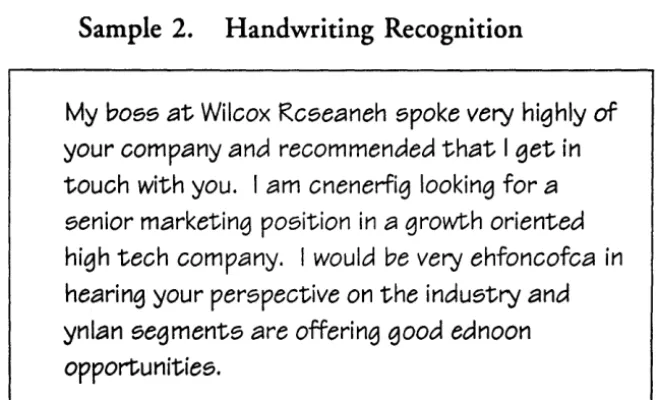
PenPoint's provides a powerful handwriting transla-tion system that accommodates a wide variety of hand writ-ing styles. It is designed to reduce the amount of time required to input correaed text into a document. To achieve this goal, PenPoint's handwriting translation system provides:
l!
~
l
i~
!
i ..
L ...
.l.. ....L; : ...
J
~
i
-1~
1('" '. . ; .... \ ... :
...
~......
i : :~ IL:::::~::::::::::::::::::::~::::::::::::::::::.~::::::~::::::::::::::::::::::::::::::::::: ....
1
:1 g. mont panicular1y described in Exhibit A at1aCbed herelO, which :1 bdudes NUMBER buildirlgs, adjecem ~ areas,land;cap~ iland related impr'oWm8ms. 1
~,
• Standard user interface components such as input pads that are tighdy coupled with the translation system. After text is written into an input pad, it is translated and presented to the user in easy-to-correct editing
pads.
Then, when any necessaty corrections are made, the user inserts the text intothe docu-ment. This close coupling speeds the input of corrected
text.
• The
ability
toaccept
upper and lower case charaaers, numerals, punctuation and some overlapping charaaers. The translation system is stroke order-indepen-dent, so users can dot an "i" or cross a "t" after they have finished writing a word.• High levels of translation
acruracy,
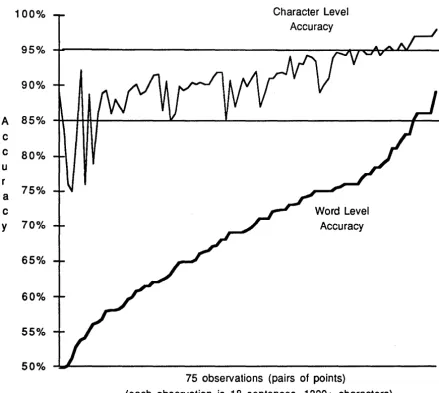
measured not only by the percentage of charaaers translated cor-rectly, but also by the percentage of words translated correctly. Word-level accuracy is important because it determines the number of corrections a user must make. High word-Ievdaccuracy
translates into faster, more efficient text entry.• A two-way link between applications and the translation system that allows applications to supply context to improve translation results. For example, an application can indicate whether it is expecting alpha or numeric input in a given fidd, or whether a circle will be interpreted as the letter" 0" or an edit gestUre.
Professor Patricia Garrison Crou lmtlane of Declgn School of Afochit.ecture
171 Shader A 'Y8n1»
Phoenix,AZ 87652
Dear Professor Garrison:
As "e dlllCUSUd on the phone ~ay, I am in need of ')lOUr
ezpen opinion on me biatoric _IUd Letters Buildi~ in Sen
Fl'1InC1sco. ArIa ItA'S Ama
Ida IVca My
~_--':':=-:":'=:'-_ _ --I"hlch does
Slncerely,
r'~""~~""""']
.. ... .1 Karen Krickstoen
Seaior ProperlY Appnaisor
cc: Mark Molson
... ~.r.:.~.~~ .. I~~~~ ... .
nt Edit Size Pen Ink Orient Pegs
"",u.,~
:~~fIt.
~~*.
a..~.('.A._ ~N::
=r=w ... ,. ... -_ ...
t.w.rMarNlIllt~...
r
;;
"I~;:-..=.~ (5.~ ~o ~\+-.
~_~...,. ....,wI .. ~):.O.3. ~'J ~.c;.u-.. Qr,k",of\5:WI,., ...
- ... ~!'"' ...
.. ~ ~ 1CqU;~ s ....
'S.,...
"w_:,..
pIIft . . . . ef. YCitif t'I4t • • ,1... ,.· . . ~r ... ' _;pft...-. 1\,
W-"',. ... rit ... IilxIlt*iitClI: _.ICIP)l
1I'OO' • ...w .... tI'!' _ _ _ . . Wlnor'»1o) _ _ .llt:h~
S'll~ • ..-601 fl\')' .... mI
SK_".
"'~4c""..Jr.1t,1;J~L-r.e.ca~... ~
-~
• The ability to present alternative tranSlations so that users
can
select another if the first is incorrect.• Case heuristics that capitalize words in a sentence appropriately. These heuristics also allow the 20 to 30
percent of users who prefer to write upper case to do so, while allowing their input to
be
translated correaly into the appropriate combination of upper and lower case characters.• User-definable preferences that allow users to write in character boxes of various sizes or on ruled lines of various heights.
• The ability to train the handwriting system to recognize an individual's unique style of writing. Several users
can
share a single machine, easily switching between different handwriting profiles without re-booting or com-plex reconfiguration.• Application Programming Interfaces (APIs) that allow other vendors to incorporate their own handwriting translation systems into PenPoint. This ensures that PenPoint users
will
always have access to the best available handwriting translation technology.11
~I ~ ~ iii .~ I)..!. .!. n-n...:...'s... " P • • • _ Too~ StatONIY Dl51s K.yboe.ld Ins .... r In Out J,-Ol1-UllL
also has the ability to preserve handwriting without translating it into text.
This
is patticularly applicable where annotation or signature capture is required. For example, considerfax
mark-up. A user might receive afax
on his PenPoint computer, make edits and comments in his own handwriting, andfax
the marked-up dowment back to the sender.Professor Pauicia Oarrlson
Inssitute of Des.igo
School of Arcbhec:un 171 Shader Awnus
PbJenix,AZ 87652
Dear profe.x Oarriaon:
As "e diacuaed on 1M pboae "esterday, I em in need of"our expert opinion on the historic Arts and Leuers Bui1di~ in San
Francisco. PenPoint also allows users to defer the translation of their
handwriting into text, allowing them to preserve the visual context of their handwritten notes.
Specifically, can JOU -.erlfy that. the architect is in fact Clement Mokwel1? I'm puzzled by the delaU shown below, wbleb cloes
conslstent with his mber work
Simple, Practical Applications
PenPoint inrorporates an object-oriented develop-ment environdevelop-ment which enables application developers to design simple, praaical applications. Design innovations
like
Embedded Document Architeaure - EDA - thatallows users to embed live documents, PenPoint's Applica-tion Framework, and rich new data types (raw ink and annotation) are
all
provided to the developer "for free".Live Document EmbedJing
EDA allows any PenPoint application to be
embedded within any other to create compound
docu-ments. For example, the user can use a word processor to
create a letter and embed a drawing into it. But, unlike
traditional operating systems, both applications are "live" in
the same document - the user can edit the letter or the
embedded drawing at the same time. The user can even
drag
text from the letter into the drawing and vice versa.
Reference Buttons
EDA allows users to create reference buttons that
can be used to navigate between locations in the notebook.
Users can even place reference buttons in accessory
applica-tions such as clocks. Developers can use this capability to
create fully configured Notebooks with predefined
naviga-tion paths. For example, a customer setvice Notebook
might present its user with a series of buttons that lead to
forms, customer selVice information - even a special help
system. Yet EDA allows developers to provide this
capabil-ity without writing any code. These reference buttons
work in embedded documents, too. In fact, any document
- even a compound document - can be linked to any other.
PenPoint Delivers Mobility
. Noebook:Conents <1>
...•..•..•...•..••••••.•.••.•..••...•••.•.•...••.•..•...•..••.••••••..••••..•.•.•••••.••.••••••.. SI
Document Edit Cleat!! Vfi Show Sort a.
.... ~v.NIo ... "'Io ... "YA"" ... "...""...."''"'''A~ ... " ... y.,oo..y. ... ''' ... ,...".."... ... ' ' ... ' ' ... ''A ... " ' ' " ' ' ' ' ... ~ ... ~ 1
V ~~I~lnc ... 6
ll:
t.J Budc:hng Dllections ... 7 :1
i
Cl.~ppraisal Form ... ... ... 8 ~ f
~ =.~I""
.. :... .. :
....
~o
I!
II Architectural Detail... ... . ... . ... 11 11
!
~ DraftofL.eUlsr ... ... ... 12 11 ;
~ Letter tI Proessor Garrison.. .. . .. .. ... .. .. .. .... . .. .. ... 13 ~
I
D Comparables Report ... 14
ii
f~ Org Chart· Wesem Region ... . .. 15 11 :..
I}
I~'=ct R~.~... :~
!
i
I] ,... . .... 18 1= f
g
= ..
:::~I!~E~::5I~~~:~~I
::: ..
:::~:
!
I
~ rc;Ist;;;"' i= '3
I.JIF ... ·.~ ... 28 f.~
I}
t~~:::::::::~:~::::::::::: ~
II
=
=:::~::.~,~:
.. : ... :..
~
I
g~ Org Chart· Wesem Region.. ... ... ... 43 11 ~
PenPoint computers are truly mobile devices that can be used while walking, standing or kneeling.
PenPoint
isuniquely capable of meeting the needs of mobile users because it provides instant on, deferred input
and output, detachable networking, and the ability to connect with a wide range of systems.
Instant On
Became a PenPoint computer can be consulted "on the fly," it can be used just like a physical notebook
or organizer. Documents are available immediately because a PenPoint machine does not need to be re-booted
when it is turned on. Booting is typically required only when a new version of the operating system
isinstalled.
When PenPoint users tum their machine on, they are returned to the page
that
wasbeing viewed when
the computer
wasturned of[ In contrast, desktop operating systems must be re-booted whenever the machine
isturned on, and the applications and files must be re-Ioaded.
PenPoint's code
isloaded into memory at boot time and stands ready to operate as soon as the
proces-sor aWclkens. The same
isttue of applications, which are loaded when they are installed. Starting and stopping
PenPoint, then,
issimple: The processor simply
freezes,
and all processes halt in place to begin again when the
" waken "
system a
s.
If the PenPoint machine has backing store such as a hard disk, power-off causes the contents of
memory to be copied to disk before the processor freezes. When power
returns,the minimum required
data
isreloaded. All of
this
happens
so quickly that the user experiences instant access.
In contrast, desktop operating systems typically require code and data to be relocated into memory when-ever they are powered on. The time required to load code and data prevents these machines from delivering instant-on capability.
PenPoint's instant-on capability is closely related to its power-saving technology. A PenPoint machine enjoys a long battery life because the processor and many of the hardware subsystems spend most of their time in a dormant state.
Deferred Input and Output
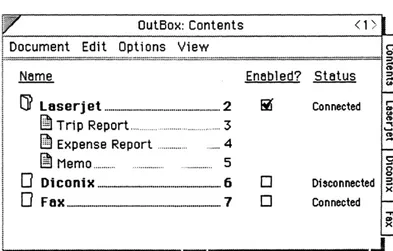
Even when they are away from any physical connection, PenPoint users can issue commands for printing, faxing, filing or any other form of data transfer. PenPoint simply moves a copy of the document to be transferred to the Out box, which is accessible from the Bookshelf When the user makes the appropriate connec-tion, the document is transferred out of the Out box automatically - without any assistance or intervention from the user.
Similarly, a PenPoint machine can awaken to request data from a host computer or receive a
fax,
even ifitis
left unattended. The incoming data is placed in the In box, also accessible from the Bookshelf When the user... ~~~.!I?.~~~~.~.~~.~ ... ~~~~ __ ~~ ___ ~~~J~ Edit Insert Case Format
Checkpoint 1
Revert
"e dilCUSSed on 1M phone yesterday, I am in need of -your
opinion on the historic Arts am. Leuers Building in San
I Fnncill::O.
Spec.ifically, can you "f'erify that the architect is in fact Clement
J Mokwelll? 'm puzzled by 1M detail shown below. which does
WI. seem consistent "it.b his other work
~
) (f) F8IGeS To Send ... . ... 2
D
L.e~rt) PlOtessorGarrison 3D Architectural Detail.. .. .... 4
returns to the machine, PenPoint informs the user that documents have arrived in the In box, which the user can subsequendy check.
This capability, called Deferred I/O, is a critical feature for mobile users because it frees them from having to remain connected to outside services. It is accomplished through a set of connectivity Application Programming Interfaces (APIs). These APIs provide communications protocols, automatic detection of connections (to networks, for example), suppon for direa access to files formatted for a variety of operating systems, translation of files to and from PenPoint internal fonnats, deferred I/O and easy access to, and man-agement of, connected devices.
Detachable Connectivity
PenPoint users can connect and disconnect from networks without re-booting or performing special manipulations. The user simply unplugs the network cable, and network operations are suspended. Later, when the cable is reconnected, network operations are resumed and any documents waiting in the Out box can be transferred.
In addition, PenPoint users can switch between different netWorks by simply plugging in the relevant cables. This is possible because several protocols can be installed in a PenPoint machine simultaneously. When PenPoint senses that a network connection has been attempted, it awakens the appropriate protocol and resumes the connection.
Finally, PenPoint
is
ideal for use with wireless network connections because itwill
not losedata
when sessions are interrupted by a netWork interference. PenPoint can simply suspend and resume the conneaion as a user's PenPoint machine moves in and out of the netWork range.Connecting PenPoint
toOther Systems
Because mobile, pen-based computers must access data stored in many places, PenPoint is designed to connect with a wide variety of systems.
• PenPoint can use a special version of TOPS networking software to move, copy, and manipulate files on PCs and Macintoshes, and any network volumes available to them.
• PenPoint allows other network protocols to be installed and configured on the fly. GO is rurrendy working with Novell to provide a Netware client for PenPoint.
• PenPoint provides an extensible file system that can be adapted to support any operating system's file format. In its frrst implementation, PenPoint reads and writes MS-I.X)S formatted disks.
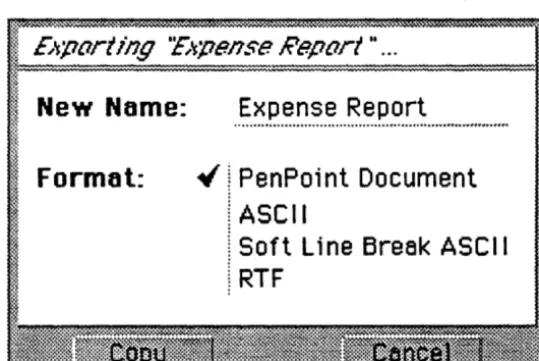
• PenPoint provides a consistent, easy-to-use import and export system. When a user attempts to copy a foreign data file into PenPoint, a dialog appears which lists the document types (applications) that will accept the file.
For example, if a user copied a
Lotus
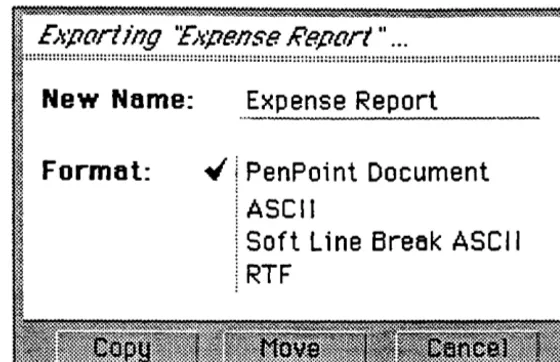
1-2-3 file called BUDGET.WK1 into PenPoint, the dialog would list the installed applications that accept 1-2-3 files. The user might select a spreadsheet, in which case a new document would appear in the table of contents called "Budget.» When the user selected that page, the Budget spreadsheet would appear.Export is equally simple. The user selects the desired file format, and the application performs the translation. The file is placed on the user's floppy disk or in a directory on an attached PC.
PenPoint
is
Flexible
The mobile, pen-based market demands different sizes of computers that can run the same applica-tions. PenPoint's compact and scalable design supports these diverse configurations, yet its hardware-indepen-dent APls allow the same applications to run unmodified on any PenPoint machine.
PenPoint machines can:
• Vary gready in format, from shirt-pocket to wallboard-size. In fact, a PenPoint machine could
be
designed to sit directly on any overhead projector, allowing it to selVe as an electronic acetate.
• Use many types of pens, tethered or untethered; proximity sensing or not.
• Provide single-or two-tier memory architectures.
• Include cellular modems,
fax
modems, conventional modems, etc.Device Independence
PenPoint provides this unique opportunity for hardware differentiation because its hardware dependen-cies are isolated in a small portion of Pen Point called the Machine Interface Layer, or MIL The MIL connects PenPoint to hardware. When PenPoint is ported to new hardware, only the MIL must be rewritten.
Since PenPoint applications don't communicate directly with hardware, the same applications run unmodified on any PenPoint machine.
Scal4ble User Inter/ace
PenPoint's user interface components provide a device-independent coordinate system and auto-layout capability that allow applications to present themselves attractively regardless of screen size, resolution or aspea ratio.
PenPoint's auto-layout capability allows developers to set parameters for user interface components in
F' No1l!book: Contents ; 1)
:~~~:~.:~.~~~:.:.§.~.~~~.:.~.~:.:.:!~.:.:.~.:.:.:.:.:.:.:.:.:.:.:.:.:.:.:.:.:.:.:.:.:.:.:.:.:.:.:.:.:.:.:.:.:.:.:.:.:.:.:.:.:.:.:.:.:.:.:.:.:.:.:.:.:.:.:.:.:.:.:.:.:.:.:.:.:.:.:.:.:.:.:.:.:.:.:.:.:.:.:.:.:.:.:.:.:
1
~ ~
it
~ Reed Me FISt... ... ... . . . 2 · ~
0' &.nIpIaa ... .. .. ... .. ... .. .. ... .. ... .. ... . ... .. ... ... .. . ... ... 3 ~
i
fl New Product Ide ... 4 !.J1
~ Pa::kege Design Leta ... ... ... ...5 '; i 0' IIaIIupaIB I ... In:. ... ... 6 " .. D Building Directions ... . ... ... ... ... ... ... ... 7 :; r D '! , Appraise! Form ... - ... _ ... ... e ~] ~ ~ InswancePolicy... ... ... ... ... .. ... ·9D FIoorplen.. ... . .. 10
D Archiectl.ral Detail.. .. .. ... .. .... .. .. ... . .... .... .. ... .. .. ... .... .... 11
~ DraftofL.eID' ... 12
~ LeID' b Professor Q..,ilon ... ... ... ... ... .. ... ... 13
~ Comperables Report ... ... 14
~ OrgChlll1·W __ n Region... ... ... ... ... ... ~:
.1.1 ~~ .19 lSi iii ;: ()..!. .!. Ll ..
"Ip PN .... - . Too. StUDMrY Dills K • .,-,cs 1_1Ir 11'1 0\1 CtJck Not.bOOk
relative terms. For example, in the table of contents, the page numbers and tabs are positioned relative to the right side of the screen, while the document titles are positioned with respea to the left. When the screen orientation is switched from landscape to ponrait, the table of contents still looks logical. This same capability allows PenPoint applications to "look right" on any size screen -from shin-pocket to wallboard-size.
No
Keyboard Required
Notebook: Contents < 1 >
.~~~~,~:.~~~~~~,~~,~:~.~:.~~~~:.~~~~~~~~~~~~~~~~~~~~~~~~~~~~~~~~l ~
twa f.Im tit
~ Reed Me First... ... ... ... ... 2 ~~I
!'!I Now P..,,,,Ide ... 3
loo
~FAX:
Building DileCti:lns .. 13 11~I
Ll Appraise! Form .... ... ... ... 14 ;:
t!J
!~~I~:::~
Ii
i) Compan1b1e8 Report.... ... ... ... 21 ~~~:ljI ~ Oeg Chart· Weatlm Region ... 22 ;: ! :I
DE::
I!~
0'... ..31
llW
IJF_ ... _ .. :
lr
1l .'1 ~ ~ if ~o...!.
.!. "Ip P . . . . - . Too. , .. tOM." DlJIs ~od ... , III OutSince PenPoint machines do not require a keyboard, they can be significantly smaller than keyboard-based ponables. Of course, PenPoint accepts keyboard input and even provides an on-screen, "vinual" key-board that allows users to tap out charaaers
if
they wish.Memory
Conservation
PenPoint requires less memory than a desktop operating system with a pen because PenPoint was designed with low memory oonsumption in mind. In contrast, reduced memory consumption was not a key design criteria for desktop operating systems.
Reduced memory requirements meant fewer memory chips and smaller oomputers. In oontrast to desktop GUI applications,
which
typically require multiple megabytes of memory, PenPoint applications typically require only 100 to 200 kilobytes.PenPoint conserves memory by using a single copy of code instead of requiring one copy in memory and another on disk, as is required by desktop operating systems. PenPoint also allows code to
be
shared. Its objea-oriented design allows devdopers to inherit most of their applications' behavior from romponents included in PenPoint. Because these objects are re-entrant and re-usable, multiple PenPoint applications do not require multiple copies of code.Different MemJJry ConfiguratWns
PenPoint supports different physical memory architectures, from all-DRAM to a combination of dynamic random access memory (DRAM), static random access memory (SRAM), and rotating or silicon hard disks.
Each
of these combinations meets a particular market need.• All DRAM. Suitable for small, inexpensive PenPoint systems where small form fu.ctor and/or low hardware costs are imponant
• SRAM and FLASH. Suitable for small PenPoint systems in
which
proteaion of data against power loss sustained periods of time is imponant. FlASH memory does not lose data when the system loses power.• DRAM and backing store. Suitable for PenPoint users who require rapid access to large amounts of
data.
An
Operating System
for
the
1990s
Because PenPoint is built on a strong foundation of advanced technologies, it will serve the mobile, pen computing market through the 1990s and beyond. These technologies include:
• Object-oriented interfaces down to the kemal. Developers can make use of object-oriented interfaces of every function that PenPoint provides.
• Pre-emptive multitasking. PenPoint's multitasking capabilities are similar to OS/2's, enabling smooth user interface interactions, background communications and smooth translation of hand writing while the user is writing.
• True 32-bit architecture. PenPoint's 32-bit addresses and
flat
memory model takefull
advantage of the 386 processor and provide PenPoint with the opportunity tobe
ported to other processor families.• Modular and extensible. PenPoint contains installable components: file systems, network protocols, peripheral drivers. Replaceable modules, including the imaging model, the handwriting engine.
• A compact and powerful imaging model. PenPoint's ImagePoint imaging model unifies screen display and printing. All text operations are fully integrated with graphics operations. Oudined fonts are used to render text on demand at any size. In addition, ImagePoint provides scaling, translation, rotation and sampled image rendering.
• Automatic installation of applications. Users don't have to deal
with
complicated installation scripts. Instead, they just insert a disk into a drive, and the PenPoint Installer handles the rest.• Dynamic binding. Applications can leverage software components provided
with
other applications by bindingwith
them at installation time.Swnmary
The potential of pen-based computing is best realized with an operating system designed from the ground up to meet the special requirements of mobility and the pen. In this way, applications can fully exploit the capabilities of the pen while simplifying what the user needs to mow to operate a mobile, pen computer.
PenPoint meets these requirement with the five innovations described in this paper:
• The Pen and Paper Interface, that combines a notebook metaphor with gestural control and handwriting translation;
• Simple, Practical Applications, that are devdoped through leveraging PenPoint's object-oriented development environment.
• Features for mobile connectivity that detachable networking, simultaneous installation and residence of multiple protocols, deferred lIO, and an easy-to-use import and export facility.
• A flexible design that allows PenPoint machines to take on a wide variety of physical characteristics; and,
• A combination of advancements including object-oriented interfaces, a highly portable, processor-independent architecture and modular and extensible components that make PenPoint an operating system for the
1990s
and beyond.With PenPoint, users have a natural way to apply the power of romputing in new situations, developers have a modem operating system that they can use with existing tools and skills, and hardware companies have the opportunity to build exciting, differentiable products.
###
The GO and PenPoint logos and names are trademarks of GO Corp., EDA and ImagePoint are trademarks of GO Corp. All other marks are trademarks or registered trademarks of the manufacturers with which the marks are associated..
Glossary
Automatic constraint-based layout:
Bookshelf.
Deferred I/O:
Detachable networking:
Document model:
Editing Pad:
Embedded Dowment Architecture (EDA):
Flick: Handwriting profde: ImagePoint: In box: Input pad: MIL:
A mechanism for describing the design of
graphical
user interface elements in relative rather that absolute tenns.This
allows the user to display charaaeristia such as resolution, size and aspect ratio.
Found at the bottom of the PenPoint screen, the bookshdf contains icons that represent PenPoint accessories.
Documents and files to be transmitted via E-mail or
fax
or to be printed are queued until the appropriate connections are made.The ability to disconnea and reconnect to networks without the need for special commands or re-booting.
A feature of the Notebook that overlays a dowment model on top of a traditional file system, allowing users to deal with documents rather than
with
applications and files.All
documents are immediately available, and the user can easily switch betweenthem by simply turning pages in the Note book.
A pad containing text the user wants to change.
A design innovation that allows users to embed live docu-ments inside
each
other and to create hyperlinks between and within documents.A gesture that is used to scroll documents and move between pages in the Notebook.
A customized handwriting prototype set created and saved when a User runs the Handwriting Customization accessory.
A compact and powerful imaging model that provides scaling, translation, rotation, bezier curves, sampled image rendering and oudine fonts.
A system service that stores incoming network transmissions such as E-mail, faxes and file transfers.
An area on the screen into which the user enters handwriting.
Input pads come in various sizes and types, such as boxed or ruled.
The Machine Interface Layer. A portion of Pen Point that isolates hardware-specific code.
Out box:
Notebook:
Notebook User Interface:
Pre-emptive multitasking:
Reference Button:
Tab:
Tap:
TOPS:
A system service that stores outgoing transmissions such as E-mail, faxes and printing tasks until the appropriate conneaion is established.
The strutture containing doruments, applications and information in PenPoint.
Provides a simple organizing concept (the Notebook meta phor), a dorument model, gestural commands and a powerful handwriting translation system.
An
approach to multitasking that allows the operating system to determine when and to whom system cycles are allocated. This is in contrast to "cooperative multitasking," in which the applications themselves determine when theywill
release the resources they are using.A button that is created by the user or programmer to allow automatic navigation to another location in the Notebook or within the same document.
A
marker for a document or section in the Notebook The user taps a tab to go to that page.The user puts the pen down on the screen and
lifts
it away. The tap is used to open menus, choose commands, turn to pages and selett some items in the NotebookA
networking protocol fromSITKA Corp.
which, when installed on a PenPoint system, allows a user to move, copy and manipulate files on PC and Macintosh computers.Background Information
GO Corp.'s PenPoint™ Development
Environment
CONTACTS:
Marcia Mason (415) 358-2000GO Corp.
950 Tower Lane, Suite 1400 Foster City, CA 94404
Mari Mineta' Clapp (415) 354-4449 Regis McKenna Inc.
Contents
Overview: An Accessible and Modern Software Environment... 1
What Developers Need to Know ... 2
The PenPoint Kernel... 2
The Class Manager... 2
Application Framework... 3
Embedded Document Architecture... 4
VI Toolkit... 4
Handwriting Recognition Subsystem ... 5
Mobile Connectivity ... 5
Components and System Services ... ~... 6
The Development Environment... 6
Current Tools ... ... ... 7
Documentation and Samples ... 8
Future Develo.pment Environments ... .... ... 9
Overview:
An
Accessible and Modern Software Environment
The PenPoint operating system is fully object-oriented and provides programmers with a rich development environment. This environment includes much of the infrastructure necessary to develop complex applications very quickly. The system provides many functional components (objects) that make it easy to develop applications with a consistent user interface.
Furthermore, PenPoint is designed for pen computing, but provides all the functionality expected from an advanced operating system.
PenPoint is written in the C programming language and provides application programming interfaces (APIs) written in C. Therefore,
developers familiar with C will quickly become productive in the Pen Point environment. They will also find that substantial portions of their existing C programs can be po ned to PenPoint.
GO's primary product for software developers is the PenPoint Software Development Kit (SDK). The SDK contains things necessary to develop applications and includes the following:
• PenPoint binaries
that run on a PC as well as on pen based machines.• Software development tools
such as debuggers, compilers, and classbrowsers.
• Sample programs
that illustrate the salient features of the PenPointenvironment. Many of the sample programs are explained in detail in the documentation.
• Documentation
that covers all aspects of programming in thisenvironment. This includes a detailed explanation of the PenPoint object-oriented architecture, the user interface guidelines, the programming interface, and the development environment.
What Developers Need to Know
The PenPoint Kernel
The PenPoint kernel provides many advanced operating system features that are still not provided by most commercial operating systems. The PenPoint kernel suppotts hardware memory protection, preemptive multitasking, multi-threading, and the dynamic link library (DLL)
mechanism. The PenPoint memory management system has been designed to provide optimal performance in limited memory configurations. In order to do this, it extensively shares code and data among applications.
PenPoint provides sophisticated object-oriented file system features such as memory-mapped flIes, extensible attributes, and installable file systems. It also suppotts a special in-memory file system to let applications run transparently on RAM-only hardware configurations. The PenPoint file system is patticularly robust and designed to prevent information loss even if the machine is turned off unexpectedly.
The PenPoint kernel is also modular, with well-defined interfaces between its components. This makes PenPoint panicularly ponable across hardware architectures because its machine dependent ponion is distinct from its machine independent ponion.
The Class Manager
PenPoint is an extensible operating system that uses a "Class Manager" to suppon Object Oriented Programming (OOP).
The Class Manager provides all the object functionality that developers have come to expect from environments such as SmallT alk and Object Pascal. Developers can use the Class Manager to create classes and class hierarchies, to manipulate class instances, to inherit functionality from existing classes, and to send messages between objects.
Since the Class Manager is a subsystem of PenPoint rather than a language extension, its capabilities are available via standard C syntax. In addition, these same capabilities can be made available to other languages, such as Pascal and C++.
Virtually all PenPoint application programming interfaces are based on Class Manager messages and objects. This encourages developers to reuse and adapt system code at many levels. As a result, applications are smaller and provide a consistent user interface because they share standard functionality provided by PenPoint subsystems.
The Class Manager object model is also dynamic: It allows program objects to communicate with other objects that were undefined when the program was compiled and linked.
Application Framework
The entire PenPoint system is one large class library based on the PenPoint Class Manager. One of the most imponant portions of this class library is the PenPoint Application Framework.
The PenPoint Application Framework is a collection of classes that define and implement a standard application protocol. These classes define how applications behave when they are installed or removed from the system, when they are activated or embedded within another application and when some part of a document is linked to any part of another document. All these capabilities are provided as shared code, which new applications "inherit" automatically.
For example, extra code does not have to be written for users to add a hyperlink button to their documents. This capability is already in the
Application Framework. To implement more application-specific behavior, such as turning a selected word into a link, the programmer need only
implement a set of standard messages.
Users see only documents in the PenPoint Notebook, not system abstractions such as files and application programs, because the Pen Point Application Framework does a lot of work behind the scenes. For example, PenPoint applications automatically file data for the user, and when the user selects a page in the notebook, PenPoint automatically activates the application code associated with that document.
Embedded Document Architecture
One of the more interesting aspects of the Application Framework is its Embedded Document Architecture (EDATM).
With EDA, documents created by different applications can be
embedded "live" within each other as needed by the user. Fot instance, EDA
enables the user to embed spreadsheets and business graphics into a text file or
any other PenPoint application without any additional code.
The result is a true compound document capability in which users can
mix and match applications seamlessly within a single document. Vsers do not
need to be aware of which application is active - the correct application responds automatically to the ponion of the document on which the user is
working.
UI Toolkit
Pen Point' s user interface is a graphical one that supports the pen while
employing a familiar "notebook" organizing concept to help users learn and
manage their system and data.
The VI Toolkit is a PenPoint class library that supports graphical user
interface features. It operates in a memory-constrained environment,
automatically scales to various screen sizes, integrates pen input, and operates
modelessly.
In addition to menus, windows, and familiar controls such as buttons
and scroll bars, the Toolkit has a hierarchy of specialized classes that know how to respond to pen input according to the application context. For example, one
class knows how to respond to the standard gestural interface, while another can capture data input from form-field uses.
The VI Toolkit allows applications to scale automatically to available
screen sizes in device-independent fashion. This is because GO designed the PenPoint operating system to run on a wide range of computers from pocket
sized to drafting-table sized. GO engineers built a constraint-based automatic layout mechanism into all user interface toolkit objects, ensuring that programs
using the Toolkit classes will work well on any size display.
Handwriting Recognition Subsystem
GO's Handwriting Recognition Subsystem is an integral part of the
PenPoint operating system. Developers can easily and quickly use the standard
services, or they can add specialized recognition capabilities.
With the subsystem, a developer can optimize recognition algorithms
to an application's needs and improve its recognition rates, including
word-level (as compared with character) recognition rates, which are key in text applications. The developer can also use the system to recognize other symbols
and even shapes for drawing.
The Handwriting Recognition Subsystem also interprets gestures, an
important pan of the user interface. The developer can either use the standard
recognition of gestures or adapt gestural interpretation for the specialized needs
of an application.
Mobile Connectivity
PenPoint suppotts networking and communications in a mobile environment. Users can connect and disconnect from networks without
rebooting or performing special functions, and they can switch back and forth
between different networks simply by plugging in the relevant cables. To
terminate a session, the user need only unplug the cable. Later, when the cable is
reconnected, the session is re-established exactly where the user left off.
PenPoint provides facilities for deferred network transmission - an essential capability for a mobile environment. The In box and Out box
facilities are available throughout the system, allowing applications to batch
print,
fax
or mail transmissions until a network connection has been established. When the system senses that a connection has been made, the Out boxautomatically sends the data without additional program intervention.
Components and System Services
PenPoint must operate well in memory-constrained hardware. Therefore, PenPoint designers maximized code sharing by using object-oriented programming, and also by sharing functionality through the
Application Component System and the System Service Architecture. For example, an installation subsystem - built into PenPoint - is used by applications, the Application Component System and the System Service Architecture.
The Application Component System allows developers to package functionality in a dynamic link library (DLL). PenPoint automatically checks for the presence of this DLL when the application is installed, ensuring that extra copies are not installed if more than one application uses it.
GO provides a bundled component to handle standard text editing behavior and licenses an object-oriented drawing component for use and redistribution by third-parry developers.
The System Service Architecture provides globally shared facilities, , such as file transferltranslation mechanisms, additional networking protocols or
databases. In this way, programmers have a single, well-defined way to provide systemwide services within their applications.
GO provides a number of system services, including the In box and the Out box and some networking protocols. Third parties will provide
additional services.
The Development Environment
Currently, PenPoint applications can be developed in two
configurations. Developers can use either a PC-only development environment or a cross-development environment consisting of a PC and a tablet computer.
For the PC-only configuration, the programmer compiles and links code under MS-DOS and then runs a version of PenPoint on the PC, where the program can be tested. Either a mouse or digitizer tablet can be used to emulate the pen. GO provides the PC drivers to suppon both. GO
recommends programmers use a PC configured with at least 8MB of RAM.
In the dual-machine environment, the programmer still uses the PC and MS-DOS to compile and link the PenPoint program, but then transfers the program via a fast communications link (GO initially supports TOPS Flashcard) to the PenPoint computer.
There, the program can be tested and debugged in its native hardware environment. GO provides a remote debugging capability as part of the SDK, allowing the programmer to debug a program running on the PenPoint tablet from the PC. This frees the programmer from having to boot PenPoint after each compilation, and it allows the developer to test the program in its final environment.
Current Tools
The SDK provides several programming tools that aid the
development of PenPoint applications. Many of them are those typical of any software development environment, but some are particularly useful in
PenPoint's object oriented environment.
• Compiler -An optimized version of the WATCOM C 8.5 80386 compiler is available to developers from GO Corporation. This compiler contains several necessary optimizations for PenPoint, but retains the efficiency and speed of the standard WATCOM C8.5 compiler.
• Debuggers -
A source-level symbolic debugger that runs underMS-DOS and PenPoint. The symbolic debugger can be used to debug PenPoint running on the PC, or as a remote debugger with PenPoint running on a tablet machine and the debugger running on both the PC and the tablet. It allows the programmer to examine Class Manager objects and messages, set break points at the source and message level, manage multiple tasks, and execute sophisticated debugging scripts. A complete profiling capability lets developers use the debugger for performance tuning.
• Class Browser -
A static class browser that enables one to traverse the class hierarchy and obtain information on each class. This ispanicularly useful for searching information about classes in the system.
• Resource management tool -
PenPoint uses resource files to storefrequently modified objects. The SDK includes tools allowing
developers to create and compile resource files and associate these
resources with applications.
• Bitmap Editor -
A PenPoint based development tool that allows thedeveloper to modify and create bitmaps for use in PenPoint icons.
GO also supplies a program to create and modify outline fonts for
use with PenPoint.
• Document preparation tool -
Several utilities are provided to helpdevelopers create effective documentation. These include facilities
that allow developers to take snap shots of the screen and to develop
documentation that has the look of PenPoint documentation.
Documentation and Samples
GO understands that an invaluable pan of any successful software product is the support documentation and sample programs that go along with
it. This is even more important for a system like PenPoint which introduces
many new concepts. The SDK includes documentation that explains the various
parts of the system in detail and uses the sample programs to illustrate concepts
with concrete examples. Some important pieces of the documentation set are
given below.
• User Interface Guidelines -
A guide to the PenPoint Notebook UserInterface (NUl) and its use in designing application user interfaces.
• Application Development Guide -
Introductory material aboutPenPoint programming concepts, the configuration of the PenPoint development environment and how to use the SDK tools.
• Architectural Reference -
Detailed explanations for using PenPointsubsystems and programming interfaces.
• Application Programming Interface Reference -
A complete, structured reference to the programming interfaces of PenPoint,showing the correct use and options of all PenPoint objects and APIs.
Future Development Environments
Although the PenPoint Development Environment provides many
facilities for efficient program development, there is tremendous scope for
further improvement. GO is already in the process of planning its next
generation of products in this area, and is eager to work with other companies
who are interested in developing such products.
Summary
PenPoint is the state-of-the-art, 32-bit, object-oriented operating
system designed specifically for mobile pen computers. It is accessible today to programmers who can work in a familiar development environment using the
C language, familiar programming tools, and existing hardware. The
PenPoint Software Developers Kit provides PenPoint software, developer tools, object-oriented programming interfaces, sample code, and the
documentation programmers need to develop new and compact applications
for the emerging pen computing market.
###
The GO and PenPoint logos and names and EDA are trademarks of GO Corp. All other marks are trademarks or registered trademarks of the manufacturers with which the marks are
associated.
Background Information
GO Corp.'s PenPoint™ Operating System
Communications Capabilities
CONTACTS:
Marcia Mason (415) 358-2000GO Corp.
950 Tower Lane, Suite 1400 Foster City, CA 94404
Mari Mineta Clapp (415) 354-4449 Regis McKenna Inc.
Contents
Overview: A Connectivity Architecture for People on the GO ... 1
PenPoint Services: "The PenPoint Connectivity Framework" ... 2
Consistent Interface ... 6
Deferred Connectivity ... 6
Automatic Detection of Connections ... 7
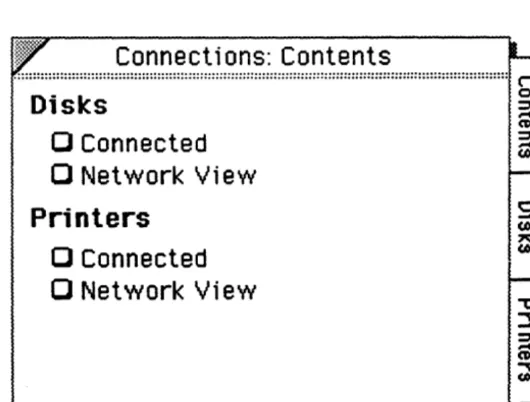
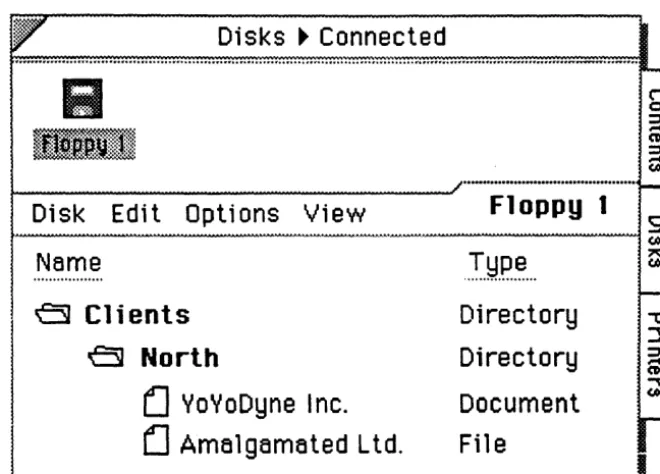
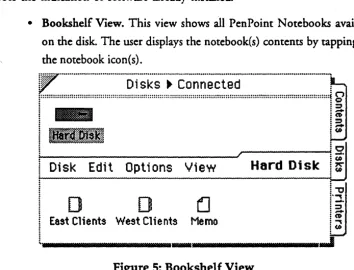
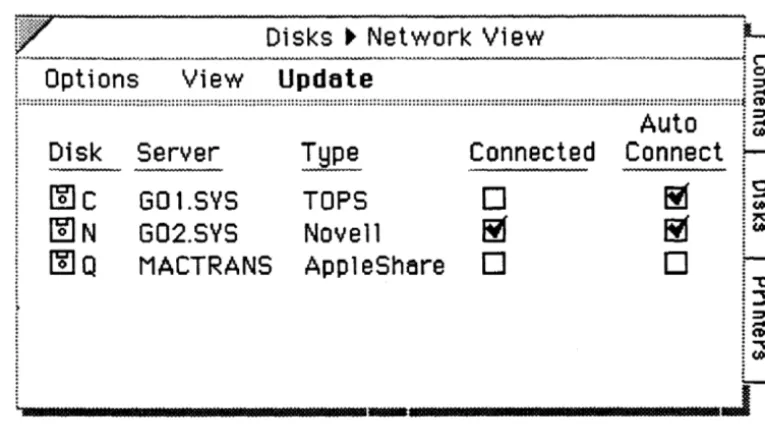
Connections Notebook ... 8
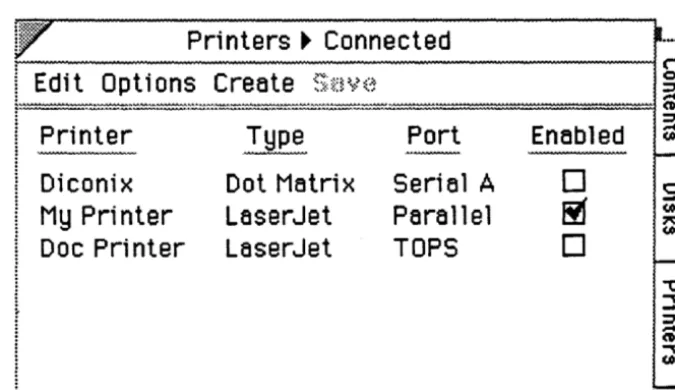
PenPoint Printing ... 13
Compatibility with Industry Standards ... 15
PenPoint Information Architecture ... 17
Overview: A Connectivity Architecture for People on the GO
The PenPoint operating system, from GO Corporation, is the new general purpose operating system designed to meet the unique needs of people on the go. PenPoint meets the needs of this market by providing the key user and developer benefits listed below:
• Pen and paper interface
• Simple, practical applications
• Mobile connectivity
• Flexibility
• Rich OS for the '90s.
GO used the following criteria to define the needs of the target market, and to derive PenPoint's communications capabilities:
• Adapt PenPoint to the way people on the go work today: Users move from site to site, network to network.
- Constant connection and disconnection to peripherals and networks. All peripherals and networks can be disconnected at any
time-disconnection should not be an error condition.
• Address ease of use:
- Manual configuration should not be required to connect to different networks and peripherals.
- Should be possible to utilize remote resources and networks
evm
if
the
system is disconnected.
• Address wireless network and communications requirements - Independence between applications, protocols and network - Automatic detection of connection and disconnection.
PenPoint achieves these goals through a number of enabling technologies built into PenPoint and into every PenPoint application. A description of each of these technologies follows.