Wireless Menu Ordering System for Restaurant
Sadiq Basha.G
1,
Shanthi.A
2, Madumitha.P
31 Assistant Professor, Dept. of ECE, V.R.S College of Engineering & Technology, Villupuram,TamilNadu, India
2 Assistant Professor, Dept. of ECE, V.R.S College of Engineering & Technology, Villupuram,TamilNadu, India
3 Third year UG student, Dept. of ECE, V.R.S College of Engineering & Technology, Villupuram,TamilNadu, India
ABSTRACT: In today’s world we have automation in all areas; there is one field where technology not entered yet. It is
the menu display & ordering system. In this paper no need of a person to take the order from the table. The menu will be display on the table electronic system and we can order directly with the help of touch screen. The ordered food items are transmitted to kitchen system through Zigbee wireless technology. From there services to the appropriate table would be provided. Low power consumption No need of a person to take order from table, easy to install, long-life. The system gives rich environment to the restaurants.
KEYWORDS: Touch Screen, GLCD display screen, PIC Microcontroller and Zigbee.
I. INTRODUCTION
Touch screens as a popular user interface are more and more common. Applications span from public information systems to Customer self-service terminals. Thus, as a Logical step, more and more devices today Feature this kind of user interface, e.g. Bank Automatic teller machines (ATMs), personal Digital assistants (PADs), mobile phones and displays. A touch screen is a display that can detect the presence and location of a touch within the display area. Let’s one do so without requiring any intermediate device, again, such as a stylus that needs to be held in the hand. Such displays can be attached to computers or, as terminals, to its networks. Therefore it is very suitable for restaurant & time saving. It enables one to interact with what is displayed directly on the screen, where it is displayed, rather than indirectly call the waiter & ordered the menu. These devices also allow multiple users to interact with the touch screen simultaneously. Touch based interfaces have been around for a long time in consumer electronic devices, and even longer in research labs, but it has only been recently that the wider public has taken a keen interest in this mode of human-computer interaction. The touch screen is an assistive technology. This interface can be beneficial because it is time saving. The purpose of this project is to introduce a wireless Zigbee based ordering systems for restaurants. Compared to traditional restaurant system, by using this system customer get faster and better service, restaurant staff co-operates more efficiently with less working mistakes and enterprise owner thus receives more business profit. GLCD-Touchpad Based Restaurant Ordering & Automatic serving System is a concept with a new innovative idea in the field of Hospitality Industry. The concept of this project has conceived in mind on observing take away fast food out lets , M.C. Donald counters, Sub Way counters, Punch screens at various fast food restaurants etc. In restaurant most items are listed in menu by names only. They don’t have brief or detailed description of any dish, so fearing how would they taste, what would be the ingredients, we end up ordering regular items. Considering these problems we came up with an idea of having digital ordering system. The concept is we can browse the menus/sub-menus by jus fingertip. The items would be well defined & descript and the selected order will be served over the conveyer belt to the particular table.
seen an atomized vending machine which will serve a hot or soft drinks, Chocolates &many things. There is automation of tickets on railway station. So into day’s world due increased demand and competition we need to serve the people as user friendly as fast as possible. In restaurants menu cards are available on each table .We can refer it & place our order to waiter. But we never noticed disadvantages of this conventional method. You need to wait for the waiter to attend to you. Even it becomes difficult for the restaurant manager to keep the changing prices on menu card. At the same time adding the new menu to the same card becomes tedious job for anyone who is responsible for this job since changing menu card within less time may result in cost rise.
II. BLOCK DIAGRAM DESCRIPTION
Touch screen verifies resistive values and sends to PIC controller. The PIC controller transmits appropriate ordered menu to kitchen system via Zigbee modem. The transmitted menu data will be received by kitchen Zigbee module and fed to Pc through RS-232 port A visual basic 6.0 developed GUI system displays the order menu.
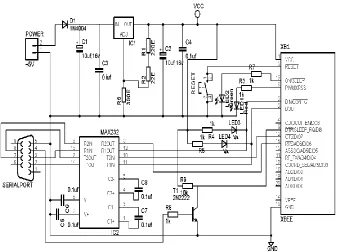
Fig. 2: Transmitter Circuit Diagram
III. WORKING DETAILS
Touch screen verifies resistive values and sends to PIC controller. The PIC controller transmits appropriate ordered menu to kitchen system via Zigbee modem the transmitted menu data will be received by kitchen Zigbee module and fed to Pc through RS-232 port. A visual basic 6.0 developed GUI system displays the order menu.
IV. METHODOLOGY
A. Hardware
i) PIC microcontroller:
PIC Microcontroller is the heart of the complete system. It is actually responsible for all process being executed. It will monitor & control all the peripheral devices or components connected in this unit. The controller here we use will be PIC16F877A family. The code will be written in Visual Basic. This unit require +5VDC for its proper operation.
Features of PIC16f877:
High performance CPU.
Only 35 single word instruction to learn.
Operating frequency is about 20MHZ.
8K*14 words of program flash memory.
368 Bytes of data RAM.
256 Bytes of EEPROM data memory.
There are total 14 interrupts are present.
There are total 5 ports called A, B, C, and Danew. It is having 10 bit ADC for 8 input channels
ii) Touch screen
iii) ZIGBEE:
The past several years have witnessed a rapid development in the wireless network area. So far wireless networking has been focused on high-speed and long range applications. However, there are many wireless monitoring and control applications for industrial and home environments which require longer battery life, lower data rates and less complexity than those from existing standards. What the market need is a globally denied standard that meets the requirement for reliability, security, low power and low Cost. For such wireless applications a new standard called Zigbee. It uses the standard of IEEE 802.15.4 physical and MAC (Medium Access Control) layers to provide standards-based, reliable wireless data transfer. Zigbee adds network structure, routing, and security (e.g., key management and authentication) to complete the communications suite. Zigbee uses the license-free ISM bands, which provide unrestricted geographic use. Zigbee and the underlying 802.15.4 standard offer the system designer several classes of devices: the reduced-functionality device (RFD), the full-functional device (FFD), and the network coordinator.
All Zigbee networks have at least one RFD or FFD and a network coordinator. Most sensor applications fall natively into the RFD class, with extended networks making use of both FFDs and network coordinators to form bridges and links required by the network topology. Zigbee networks can form autonomously, based on connectivity and function. The IEEE 802.15.4 standard targets home and building control, automation, security, consumer electronics, PC peripherals, medical monitoring, and toys.
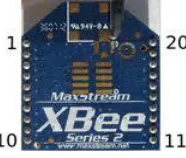
Fig. 4: Zigbee module Specifications:
RF data rate: 250 kbps
Indoor/urban range: 133ft. (40 m)
Outdoor/fry line-of-sight range: 400 ft. (120 m) Transmit power: 1.25 mw (+1 dB)
Receiver sensitivity (1% per):97 dBs Serial data interface: 3.3v cmos uart
Configuration method: API or at commands, local or over-the-air Frequency band: 2.4 GHz
Interference immunity: DSSS (direct sequence spread spectrum) Serial data rate: 1200 bps - 1 mbps
ADC inputs :( 4) 10-bit ADC inputs (4) Digital I/O: 10
iv) Serial communication
converter converts the microcontroller output level to the RS232 voltage levels, and vice versa. IC MAX232, also known as line driver, is very commonly used for this purpose. The simplest connection between a PC and microcontroller requires a minimum of three pins, RxD (receiver, pin2), TxD (transmitter, pin3) and ground (pin5) of the serial port of computer
B. Software
i) VISUAL BASIC 6.0
Visual Basic is a third-generation event-driven programming language and integrated development environment (IDE) from Microsoft for its COM programming model first released in 1991. Microsoft intends Visual Basic to be relatively easy to learn and use.[1][2] Visual Basic was derived from BASIC and enables the rapid application development (RAD) of graphical user interface (GUI) applications, access to databases using Data Access Objects, Remote Data Objects, or ActiveX Data Objects, and creation of ActiveX controls and objects. A programmer can create an application using the components provided by the Visual Basic program itself. Programs written in Visual Basic can also use the Windows API, but doing so requires external function declarations. Though the program has received criticism for its perceived faults, version 3 of Visual Basic was a runaway commercial success, and many companies offered third party controls greatly extending its functionality. A dialect of Visual Basic, Visual Basic for Applications (VBA), is used as a macro or scripting language within several Microsoft applications, including Microsoft Office. Like the BASIC programming language, Visual Basic was designed to accommodate beginner programmers. Programmers can not only create simple GUI applications, but to also develop complex applications. The final release was version 6 in 1998. Microsoft's extended support ended in March 2008 and the designated successor was Visual Basic .NET (now known simply as Visual Basic).Though VB6 is no longer officially available there remains a sizable number of developers who still prefer VB6 over .NET. A dialect of Visual Basic, Visual Basic for Applications (VBA), is used as a macro or scripting language within several Microsoft applications, including Microsoft Office.
Like the BASIC programming language, Visual Basic was designed to accommodate beginner programmers. Programmers can create both simple and complex GUI applications. Programming in VB is a combination of visually arranging components or controls on a form, specifying attributes and actions for those components, and writing additional lines of code for more functionality. Since VB defines default attributes and actions for the components, a programmer can develop a simple program without writing much code. Programs built with earlier versions suffered performance problems, but faster computers and native code compilation has made this less of an issue. Though VB programs can be compiled into native code executables from version 5 on, they still require the presence of around 1 MB of runtime libraries. Runtime libraries are included by default in Windows 2000 and later. Earlier versions of Windows (95/98/NT), require that the run time libraries be distributed with the executable.
Forms are created using drag-and-drop techniques. A tool is used to place controls (e.g., text boxes, buttons, etc.) on the form (window). Controls have attributes and event handlers associated with them. Default values are provided when the control is created, but may be changed by the programmer. Many attribute values can be modified during run time based on user actions or changes in the environment, providing a dynamic application. For example, code can be inserted into the form resize event handler to reposition a control so that it remains centered on the form, expands to fill up the form, etc. By inserting code into the event handler for a key press in a text box, the program can automatically translate the case of the text being entered, or even prevent certain characters from being inserted.
Visual Basic can create executables (EXE files), ActiveX controls, or DLL files, but is primarily used to develop Windows applications and to interface database systems. Dialog boxes with less functionality can be used to provide pop-up capabilities. Controls provide the basic functionality of the application, while programmers can insert additional logic within the appropriate event handlers.
unused memory using reference counting, which depends on variables passing out of scope or being set to nothing, avoiding the problem of memory leaks common to other languages. There is a large library of utility objects, and the language provides basic object oriented support. Unlike many other programming languages, Visual Basic is generally not case sensitive though it transforms keywords into a standard case configuration and forces the case of variable names to conform to the case of the entry in the symbol table. String comparisons are case sensitive by default.
V. RESULT
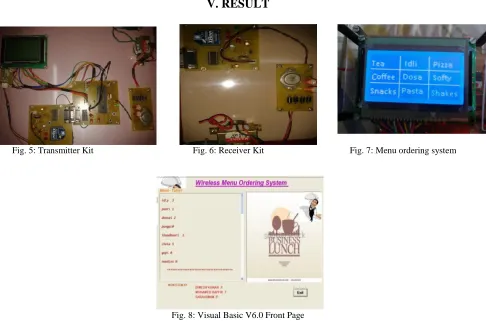
Fig. 5: Transmitter Kit Fig. 6: Receiver Kit Fig. 7: Menu ordering system
Fig. 8: Visual Basic V6.0 Front Page
VI. CONCLUSION
booking of tables and ordering of food items. There can be a provision that accepts feedback from the customers and a registration form so that next time the customer can order his previously ordered food item.
REFERENCES
[1] Peng Zhang, “Data Communications in Distributed Control System”, Industrial Control Technology 2008, Pages 675-774
[2] A.H.G Al-Dhaher, “Integrating hardware and Software for the development of microcontroller Based systems”, Microprocessors and Microsystems, Volume 25, Issue 7,15 October 2001, Pages 317-328
[3] Hamit Erdem, “Implementation of software-based sensor linearization algorithms on low cost microcontrollers” Original Research Article ISA Transactions, Volume 49, Issue 4, October 2010, Pages 552-558.
[4] Wireless Two-way Restaurant Ordering System Via Touch Screen Komsun Tongsap1 and Daranee Hormdee Embedded System Research Group, Department of Computer Engineering, Faculty of Engineering, KhonKaen University, KhonKaen, Thailand, 40002
[5] Bent STUMPE (1978), “Experiments to find a manufacturing process for an x-y touch screen”, CERN. Bent STUMPE “A new principle for x-y touch system”
[6] Zigbee wireless standard, StanislavSafaric, KresimirMalaric Faculty of Electrical Engineering and Computing, Unska 3, HR-10000 Zagreb, Croatia
BIOGRAPHY
Mr.Sadiq Basha.G received the bachelor’s degree in Electronics and Communication Engineering from
Periyar University Tamilnadu, India, in 2003 and Master’s degree in VLSI Design from Sathyabama University, Tamil Nadu, India in 2009. At present he is working as Associate Professor in the Department of ECE, V.R.S College of Engineering and Technology, Villupuram. His main research interests include design of Low power VLSI, Microwave Engineering and Waveguides.