Centralized Database for Android and Web
Application
Nihaal Mehta
1, Sudarshan Shinde
2, Nishi Tiku
3P.G. Student, Dept. of M.C.A., VES Institute of Technology, Mumbai, Maharashtra, India 1,2 H.O.D., Dept. of M.C.A., VES Institute of Technology, Mumbai, Maharashtra, India3
ABSTRACT: This paper presents a method for creating a centralized database which will be used by both Android as well as Web Application. The android application will be having its own local database (SQLite database) which will be used for offline storage of data. This offline data needs to be updated on the centralized database for which web services will be used. There will be synchronization between the android’s local database and the centralized database.
KEYWORDS: Android, Android Database, Centralized Database, Common Database, Web Services
I. INTRODUCTION
The growing android market has forced a lot of web applications to have a companion mobile application. Since the web application is already built and is having a database which is already online and being used, we need to use that same database for both android as well as web application. This will reduce data redundancy.
The android application will have its own local database (SQLite Database) which will be used by the android application to store data in offline mode. When the android application goes online this data needs be updated to the online database which will be common for both applications–Android and Web. Both the applications will be able to connect to the database using the web service. There will be a mechanism to synchronize the local database on android application to the online database and vice-versa. The local database will keep track of whether the data is synchronized or not. The web service will get the local data from the android application and check for similar data on the online database, if no similar data is found then the local data will be added to the online database otherwise the local data will be replaced by the online data. Similarly reverse process will take place i.e. to synchronize the online data in local database. In this paper the web application and web service will be developed in C# ASP .NET and the centralized database will be using SQL Server because it is by default compatible with .NET
II. THE STUDY
We have performed a lot of searching on 'Using databases with Android and Web Application' (in particular ASP .Net). We always found 2 different results for the same. The first would show us how to connect the web application to a database and the other would show us how to use database in android. The expected result was to find a method which can be used to connect both the application to a common database. So now we changed the search - How to connect android to online database (since the web application is already online we dint use that to search) -. This search gave us the techniques to connect android to the network and use different API's to fetch online data. There was very less information on creating a custom web service that will provide the connection between the online database and android.
III. DATABASE FOR ANDROID APPLICATION
store the data in SQLite database in structured format. The data of an Android application can also be stored on the web through the network server.[1]
A. WHAT IS SQLITE?
SQLite is an open source database application available free of cost for any purpose, commercial or private. It is a software library that zero-configuration, self-contained, server less, transactional SQL database engine. SQLite database's primary goal is to be simple to operate, administer, embed in a larger program and maintain and customize. SQLite is embedded into android and available in every android device [2],[3].
SQLite in android supports the following data types:
● TEXT (like String in Java)
● INTEGER (like long in Java)
● REAL (like double in Java)
All other data types must be converted into TEXT, INTEGER or DOUBLE before saving them in the database. SQLite cannot validate if the data in the column is of the defined type or not, e.g. writing an integer into a string column and vice versa [3].
SQLite database in Android does not require any additional database setup or administration. We only need to define SQL statements for creating and updating the database and the rest of the database is managed by the Android platform for user.
B. USING DATABASE IN ANDROID
Imagine you want to create an android application that store all the employee information of an organization. In such an application huge amount of data needs to be stored and it is not feasible to store it in text files or documents. For this you need to create a database that can store the data in the form of records [3]. This is where the SQLite database comes in picture.
SQLite database is fully supported by Android. Any databases that you create can be accessed by any class in the application by using its name but an outside application cannot access it.
To create a new SQLite database we need to create a subclass of SQLiteOpenHelper and override its onCreate() method. In this method we need to execute the SQLite command to create the tables in the database. For example see Fig 1.
Fig 1: Example for creating SQLiteOpenHelper Class [4]
Both these functions return a SQLiteDatabase object that represents the database. This object provides various methods for SQLite operations.[4]
For more information on creating SQLite Database refer [5].
C. JSON
JSON is an independent data exchange format which stands for JavaScript Object Notation. It is the best alternative for XML. It is based on a subset of the JavaScript Programming Language, Standard ECMA-262 3rd Edition - December 1999. JSON is language independent text format but uses conventions used in C-family of languages, including C, C++, Java, JavaScript and many others.[6]
Four different classes are provided by Android to manipulate JSON data. These classes are JSONObject, JSONArray, JSONTokenizer and JSONStringer.
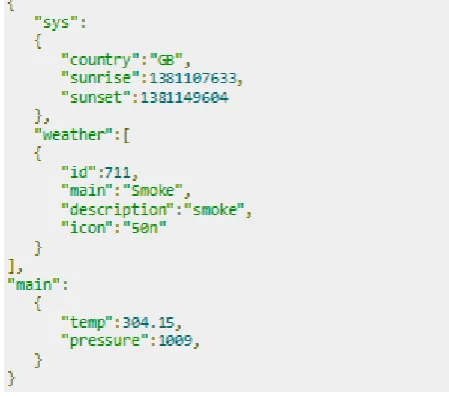
Step one is to identify the fields in the JSON data in which we are interested in. For example, in the following JSON example we are interested in getting only temperature data.
Fig 2: Example of JSON File [7]
Elements in JSON
There are many components in a JSON file. Table 1 shows the components of a JSON file. [7]
Component Description
Array([) Square bracket ([) represents a JSON array
Objects({) Curly bracket ({) represents a JSON object
Key A JSON object contains a key that is just a string. Pairs of key/value make up a JSON object
Value Each key has a value that could be string , integer or double etc.
Parsing JSON
To parse a JSON object, we need to create an object of class JSONObject. We need to specify a string containing JSON data to this object. Fig 3 shows the syntax
Fig 3: Syntax to create JSON Object [7]
The final step is to parse the JSON file. A JSON file consists of different objects with different key/value pair etc. For this reason JSONObject has separate functions for parsing each of the different components of JSON file. Fig 4 shows the syntax for using methods of JSONObject Class.
Fig 4: Syntax for using methods of JSONObject class. [7]
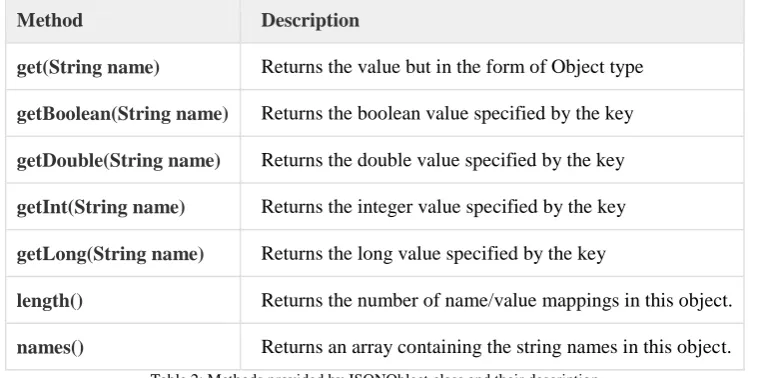
The method getJSONObject returns the JSON object. The method getString returns the string value of the specified key. Apart from these methods, there are other methods provided by this class for better parsing JSON files. These methods are listed in Table 2 [7]:
Method Description
get(String name) Returns the value but in the form of Object type
getBoolean(String name) Returns the boolean value specified by the key
getDouble(String name) Returns the double value specified by the key
getInt(String name) Returns the integer value specified by the key
getLong(String name) Returns the long value specified by the key
length() Returns the number of name/value mappings in this object.
names() Returns an array containing the string names in this object.
Table 2: Methods provided by JSONOblect class and their description
D. TRANSMITTING NETWORK DATA USING VOLLEY
Volley is an HTTP library which is used by Android apps to make networking for Android apps easier and faster. Volley is available in the open AOSP repository [8].
Volley provides the following benefits:
● Transparent disk and memory response caching with standard HTTP cache coherence.
● Ease of customization, for example, for retry and backoff.
● Automatic scheduling of network requests.
● Debugging and tracing tools.
● Cancellation request API. You can cancel a single request, or scopes of requests to cancel or you can set blocks.
● Support for request prioritization.
Volley excels at RPC-type operations which are used to populate a UI, such as fetching a page of weather results as structured data. It easily integrates with any protocol and supports strings, images, and JSON out of the box.
Volley should not be used for large download or streaming operations because Volley stores all responses in the memory during parsing. Hence, for large download operations try using an alternative like Download Manager.
The core Volley library is developed in the open AOSP repository at frameworks/volley and contains the main request dispatch pipeline as well as a set of commonly applicable utilities, available in the Volley "toolbox."[8]
Request JSON
Following classes are provided by Volley for JSON requests [9]:
● JsonObjectRequest – This class provides a request for retrieving a JSONObject response body at the given URL, allowing for an optional JSONObject to be passed in as part of the request body.
● JsonArrayRequest – This class provides a request for retrieving a JSONArray response body at the given URL.
Both classes are derived from the common base class JsonRequest. We can use them like any other type of requests. See Fig 5 for example.
Fig 5: Code snippet to fetch a JSON feed and displays it as text. [9]
For Example on implementing Volley in android refer [10].
IV. DATABASE FOR WEB APPLICATION
The backbone of every application is its backend. Since we are going to synchronize our system into single database. For web application we will directly connect to a database using n-tier architecture to be more secured. If we are developing application in ASP then for better performance we should go for SQL Server and if PHP then go for mysql.Always try to use local database system of development system for efficiency.
SQL Server 2008
Microsoft SQL Server is a Relational Database Management System developed by Microsoft. It is product to store and retrieve data in a structured and organised way. Data can be requested from any computer on the network [11].
Microsoft released various versions of SQL Server such as 2005, 2008, 2012 and so on. We will focus on Server 2008 as it is more stable and has lots of information available throughout internet so that others can get it easily.
Microsoft SQL Server was released on Aug-06-2008 keeping aim in the mind to provide self tuning, organised and self maintained functionality. It support for structured and semi-structured data which also includes various digital formats such as audio, pictures, video or other multimedia data. [11]
SQL Server includes various features to improve scalability and performance. Server 2008 enhanced indexing algorithm for faster and secured search. It introduced resource governor that allows reserving the resources for users and groups. It also support for ADO.NET and reporting tools for accessing reports and statistical data. It allows configuring policies and managing user and groups of data. [11]
SQL Server management studio tool are usually used to develop database in SQL Server, we can use some other tool such as Navicat premium.
For detailed knowledge of how to create database and its structure refer [12].
V. WEB SERVICE
For synchronize we should create a web services that will fetch and update data from and to online database. Here while connecting with android we should consider concept of JSON. While inserting a data to online database we need to decode JSON sent by android application and then we can insert it to tables.
In the same way while sending data from database to android application we need to encode the data into JSON format and send it to android application over the network then android app will process the JSON file and update local database.
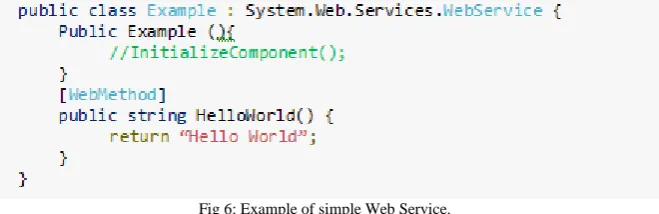
Web services are nothing but classes or namespace which include various methods. The difference between normal namespace and web service is we can access the methods within namespace by using web reference link of that service. In simple word, web services are services on the web.
Fig 6: Example of simple Web Service.
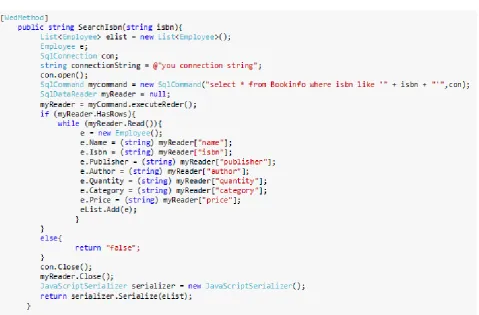
JavaScriptSerializer is a class used to covert string to JSON. It is used internally at asynchronous communication layer which will help to serialize and deserialize the data. This serialize or deserialize data is exchanged between browser and web server. This class exposes a public API, therefore we can use this class, when we want to work with JSON in managed code.
Fig 6: Simple example of JavaScriptSerializer.
VI. CONCLUSION
This paper can be divided into two sections, the first describes about the database in Android and the second describes about the database in Web Application along with Web Services.
The first section will help to create a local database (SQLite database) for the Android application and also provides details about the JSON parsing which can be used with Volley for transmitting data between the local database in android and online database i.e. Web Server.
The second section describes about the online database that can be created in Microsoft SQL Server. This section provides details about creating Web service which will be used for connecting to the database. It also provides details about using JSON parsing in the Web Service. By using JSON parsing this web service can also be used for passing the data to and from android application.
By combining the knowledge from both these section one can create a centralized database for Android as well as Web Application. The common link between both the applications is the Web Service and JSON which acts as the common format for data transfer.
REFERENCES
[1] Pradeep Kothari and Kogent Learning Solutions Inc., “Android Application Development (with Kitkat Support) Black Book”, Dreamtech Press, ISBN: 978-93-5119-409-5, 2014
[2] http://www.sqlite.org/
[3] http://programmerguru.com/android-tutorial/what-is-sqlite/
[4] http://developer.android.com/guide/topics/data/data-storage.html#db.
[7] http://www.tutorialspoint.com/android/android_json_parser.htm [8] http://developer.android.com/training/volley/index.html
[9] http://developer.android.com/training/volley/request.html#request-json [10] http://www.androidhive.info/2014/05/android-working-with-volley-library-1/ [11] https://en.wikipedia.org/wiki/Microsoft_SQL_Server#SQL_Server_2008 [12] https://msdn.microsoft.com/en-us/library/ms176061.asp
![Fig 1: Example for creating SQLiteOpenHelper Class [4]](https://thumb-us.123doks.com/thumbv2/123dok_us/1660412.1208361/2.595.149.447.562.748/fig-example-creating-sqliteopenhelper-class.webp)
![Fig 5: Code snippet to fetch a JSON feed and displays it as text. [9]](https://thumb-us.123doks.com/thumbv2/123dok_us/1660412.1208361/5.595.111.486.421.607/fig-code-snippet-fetch-json-feed-displays-text.webp)