Available online: https://edupediapublications.org/journals/index.php/IJR/ P a g e | 701
Regression Automation using Robot Framework
Monica1,Sanket N Shettar2 1PG Student,2Assistant professor
Department of Electronics and Communication Engineering GSSS Institute of Engineering and Technology for Women, Mysuru
Abstract
Manual testing is a time
consuming process. In addition, regression testing, because of its repetitive nature, is error-prone, so automation is highly desirable. Robot Framework is simple, yet powerful and easily extensible tool which utilizes the keyword driven testing approach. Easy to use tabular syntax enables creating test cases in a uniform way. Ability to create reusable high-level keywords from
existing keyword ensures easy
extensibility and reusability. Simple library API(Application Program Interface), for creating customized test libraries in Python or Java, is availab le, while command line interface and XML(Extensible Mark-up Language) based output files ease integration into existing build infrastructure, for example continuous integration systems. All these features ensure that Robot Framework can be used to automate test cases.
Keywords: Software Testing, Regression Testing, Test Automation, Robot
Framework, Keyword Driven Testing.
I. Introduction
Test cases are re-executed in order to check whether previous functionality of application is working fine and new changes have not introduced any new bugs. This test can be performed on a new build when there is significant change in original functionality or even a single bug fix. This is the method of verificatio n. Verifying that the bugs are fixed and the newly added features have not created in problem in previous working version of software. Testers perform functio na l testing when new build is available for verification. The intend of this test is to verify the changes made in the existing
functionality and newly added
Available online: https://edupediapublications.org/journals/index.php/IJR/ P a g e | 702
II. Literature Survey
What We Do in Regression Test: Re-running the previously conducted tests and Comparing current results with previously executed test results. This is a continuous process performed at various stages throughout the software testing life cycle. A best practice is to conduct regression test after the sanity or smoke testing and at the end of functional testing for a short release [2].
Automated Regression Testing is the testing area where we can automate most of the testing efforts. We run all the previously executed test cases on new build. This means we have test case set available and running these test cases manually is time consuming. We know the expected results so automating these test cases is time saving and effic ie nt
regression test method. Robot
Framework is used for automation of existing regression test cases within short time and with great success and thus saving costs and enhancing the quality of the software project [3].
Why Robot Framework: Robot
Framework was found to satisfy all needed requirements. It is created in Python which can be implemented on all
major platforms. Therefore,
multiplatform requirement was
completely fulfilled. Among other open source tools, Robot Framework seems to be one of the very few tools, which supports multi-platform environment and
it is maintained regularly [4]. The tool is sponsored by Nokia Siemens Networks and released under Apache 2.0 license.
III. Robot Framework
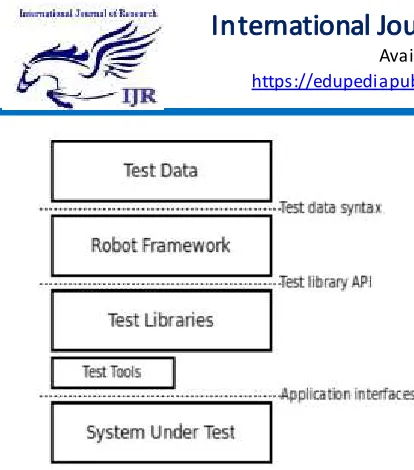
Robot Framework is a generic test automation framework for acceptance testing and acceptance test-driven development (ATDD). It has easy-to-use tabular test data syntax and it utilizes the keyword-driven testing approach. Its testing capabilities can be extended by test libraries implemented either with Python or Java, and users can create new higher-level keywords from existing ones using the same syntax that is used for creating test cases. Robot Framework is operating system and applicatio n independent. The core framework is implemented using Python and runs also on Jython (JVM) and IronPython (.NET). It has a highly modular architecture as illustrated in the figure1 [4].
Available online: https://edupediapublications.org/journals/index.php/IJR/ P a g e | 703 Figure 1: High Level Architecture
There are several standard libraries that are bundled in with the framework, and galore of separately developed external libraries that can be installed based on needs. Test libraries has standard libraries, external libraries and other libraries. For example, Swing Library is used from external libraries for testing Java applications with Swing GUI,
Operating System library is used from standard libraries which enables various operating system related tasks to be performed in the system where Robot Framework is running. Test Tools ease everything surrounding tests: editing, running, building and so on. Most of these tools are developed as separate projects, but some are built into the framework itself. There are tools like Built-in, Editors, Build and others. For example, Testdoc is a Built-in tool which
generates high level HTML
documentation based on Robot
Framework test cases, Ride is a Editor tool for standalone Robot Framework test data editor [5].
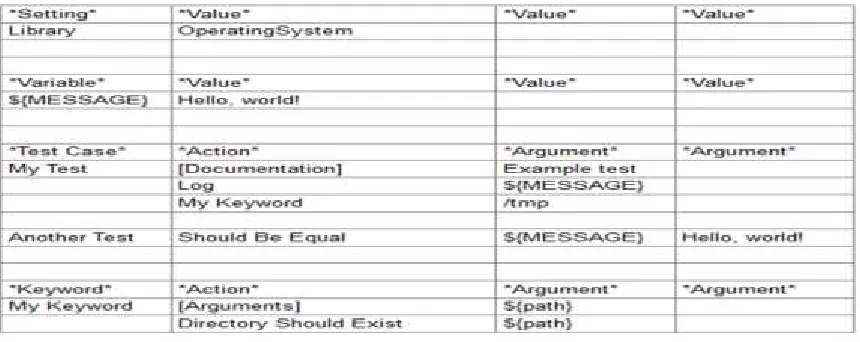
Robot Framework test data is structured in four types of tables [6] as in figure 2 and defined in tabular format, using either hypertext markup language (HTML), tab-separated values (TSV), plain text, or restructured Text (reST) formats.
Available online: https://edupediapublications.org/journals/index.php/IJR/ P a g e | 704 Usage of the TSV format is shown in
figure 3, TSV files can be edited in spreadsheet programs and, because the syntax is so simple, they are easy to generate programmatically. They are also pretty easy to edit using normal text editors and they work well in version control. In a TSV file, all the data is in
one large table. Test data tables are recognized from one or more asterisks (*), followed by a normal table name and an optional closing asterisks. Everything before the first recognized table is ignored similarly as data outside tables in HTML data [7].
Figure 3: TSV format
Test data in TSV files can be edited with whichever editor you prefer, but a graphic editor, where you can actually see the tables, is recommended. RIDE which stands for Robot Framework Integrated Development Environment [8] as shown in figure 4, its purpose is to be an easy to- use editor for creating and maintaining test data for Robot Framework.
Available online: https://edupediapublications.org/journals/index.php/IJR/ P a g e | 705 There are several different ways in which
test cases may be written [9]. Test cases that describe some kind of workflow may be written either in keyword-driven or behavior-driven style. Data-driven style can be used to test the same workflow with varying input data.
It is possible to execute suite or just some test cases directly from the RIDE GUI, however there is a need to run test cases from the command line so its execution could be easily automated – for example from some continuous integration server. Since Robot Framework is command line tool this is usually done this way. One of
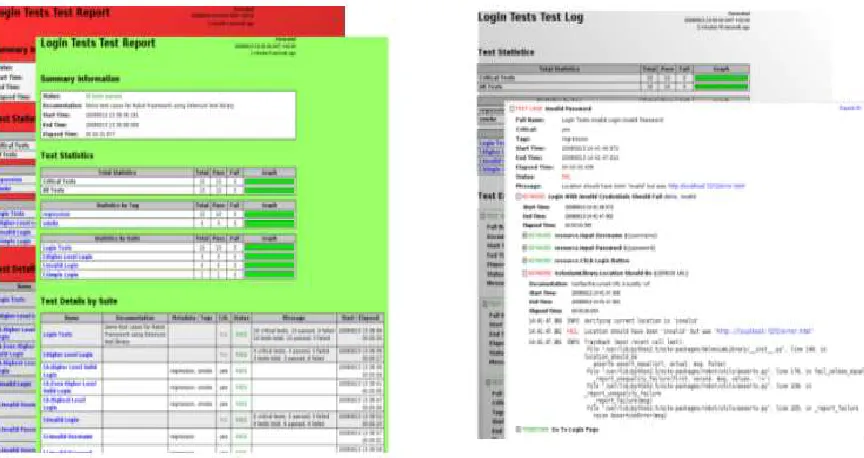
many things that can be specified (via test case name pattern matching) is the critical test cases definition. In order to complete the test suite successfully, all critical test cases have to pass. After executing test suite HTML report is generated, as shown in figure 5[10] and the background colour undoubtedly tells whether the whole test suite finished correctly. Critical test cases must be specified with a caution. If critical test cases pass successfully, regardless of other test cases results, the report will be marked as OK. However, statistics will show the number of test cases failed and specify these cases, if any.
Available online: https://edupediapublications.org/journals/index.php/IJR/ P a g e | 706 For further manual analysis, there is also
detailed log file generated, as shown in figure 5 with all actions, detailed description of the input and output parameters and keyword output with marked actions that went wrong. There is a keyword “Log” defined, so it is also possible to write additionally whatever need to the log file.
IV. Conclusion
Benefit of working with Robot Framework is that writing test cases follows natural work flow with test case preconditions, action, and verifica tio n and finally clean-up. Real language is used for keyword description, so it’s easy to follow test case – even for non-technical person, which, together with its simple usage and easy library extension, make it great tool for test case automation. Everything is checked automatically and all reports are automatically generated and published on the web pages. This also saved lot of time when decision to introduce continuo us integration was made. The cost of automating a test is best measured by the number of manual tests prevented from running and the bugs it will therefore cause to miss and this is probably the biggest strength of the Robot Framework.
Acknowledgement
This paper was based on the task performed as an intern at Nokia Solutions and Networks, Bengaluru. I would like to
thank Mr Murali Venkat, Line Manager, Nokia Solutions and Networks who gave me great opportunity to be part of the Test Automation, also all team members of Nokia. Great thanks to all my lectures who supported me lot during completio n of my internship. I also thank almighty, my family and friends without them this work would be impossible.
References
[1] R. M. Sharma, “Quantitative Analysis of Automation and Manual Testing”, International Journal of Engineering and Innovative Technology (IJEIT), ISSN: 2277-3754, Volume 4, Issue 1, July 2014. [2] Priyanka, Harish Kumar, Naresh
Chauhan “A Novel Approach for Selecting an Effective Regression Testing Technique”, IEEE 2016. [3] Jaspreet Singh Rajal, Shivani
Sharma “A Review on Various Techniques for Regression Testing and Test Case Prioritization”, International Journal of Computer Applications, Volume 116 – No. 16, April 2015.
Available online: https://edupediapublications.org/journals/index.php/IJR/ P a g e | 707 [5] Overview on robot framework
[online] available at http://robotframework.org/
[Accessed on 28-10-2016]
[6] Overview of test cases [ online]
available at
https://blog.codecentric.de/en/2012/ 04/robot-framework-tutorial-a-complete-example/ [Accessed on 1-11-2016]
[7] Study on variables and keywords usage [ online ] available at
http://robotframework.org/robotfr
amework/latest/RobotFrameworkU
serGuidehtml [Accessed on 8-11-2016]
[8] Overview on RIDE [ online ]
available at
https://github.com/robotframework/ RIDE/wiki/Keyword-Completion [Accessed on 11-11-2016]
[9] P. Laukkanen, Data-Driven and Keyword-Driven Test Automation Frameworks, Master Thesis, Helsinki University Of Technology. [10] Usage of RIDE [online] available at