GOOGLE WEB TOOLKIT (GWT) AND JAVA EE - THE SYNERGY FOR MODERN WEB APPLICATION DEVELOPMENT
FAIZ BASHIR MUHAMMAD
A thesis submitted in fulfilment of the requirements for the award of the degree of
Master of Computer Science (Real Time Software Engineering)
Center for Advanced Software Engineering (CASE) Faculty of Computer Science and Information System
Universiti Teknologi Malaysia
iii
ABSTRACT
v
ABSTRAK
TABLE OF CONTENTS
CHAPTER TITLE PAGE
ABSTRACT iv
ABSTRAK v
LIST OF FIGURES ix
1 CHAPTER ONE 1
INTRODUCTION 1
1.1 Web 2.0 And Ajax 1
1.2 Modern Web Application 3
1.3 Google Web Toolkit (GWT) 4
1.3.1 GWT and Software Engineering 5
1.4 Java EE 6
1.5 The CASE Application Management System 7
1.6 Objectives 8
1.7 Scope 8
2 CHAPTER TWO 10
LITERATURE REVIEW 10
2.1 Introduction 10
2.2 Client-Side Technologies 10
2.2.1 JavaScript 10
2.2.2 Web 2.0 11
2.2.3 Ajax 13
2.2.4 Google Web Toolkit (GWT) 16
vii
2.3 The Server-Side Technology 23
2.3.1 Java EE 23
2.4 Modern Web Application 29
2.5 Tools and Development Environment 30
2.5.1 Unified Modeling Language (UML) 30
2.5.2 Netbeans Integrated Development Environment (IDE) 31 2.5.3 Eclipse Integrated Development Environment (IDE) 32
2.5.4 JUnit 32
2.5.5 Summary 33
3 CHAPTER THREE 34
METHODOLOGY 34
3.1 Introduction 34
3.2 Setting Up the Environment 34
3.3 Software Engineering 35
3.3.1 Model 35
3.3.2 Documentation 35
3.3.3 Testing 35
3.4 Implementation 36
3.4.1 The Client Side With GWT 36
3.4.2 Server Side With Java EE 37
3.4.3 Integration 37
3.4.4 Deployment 37
3.4.5 Challenges 38
4 CHAPTER FOUR 39
IMPLEMENTATION DETAILS 39
4.1 Introduction 39
4.2 Analysis, Design and Documentation 39
4.3 Setting-up the Development Environment 42
4.4 Client Side Implementation 44
4.4.1 CAMS User Interface 44
4.4.2 Application List 45
4.5 Server Side Implementation 49
4.5.1 Managing Persistence 49
4.5.2 Transaction Management 56
4.5.3 Client and Server Sides Integration 57 4.5.4 Transferring Objects Between the Client and the Server 62
4.5.5 File Upload 64
4.7 Improving Performance 67
4.7.1 Caching 68
4.8 Testing 68
4.8.1 Unit Testing on the Server Side 68
4.8.2 Unit Testing on the Client Side 69
4.9 Deployment 70
4.10 Conclusion 72
5 CHAPTER FIVE 73
CONCLUSION 73
5.1 Summary 73
5.2 Shortcoming 75
5.3 Recommendations and Further Enhancements 76
5.4 Conclusion 76
ix
LIST OF FIGURES
FIGURE NO. TITLE PAGE
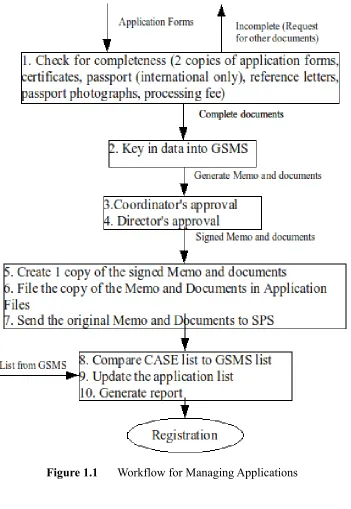
1.1 Workflow for Managing Applications 9
2.1 Traditional and Ajax Web Application Models 15
2.2 GWT Components 18
2.3 GWT RPC Model 22
2.4 Java EE Architecture 26
4.1 CAMS Use Case Diagram 40
4.2 CAMS High Level Architecture 41
4.3 Setting-up CAMS Development
Environment – Step 1 42
4.4 Setting-up CAMS Development
Environment – Step 2 43
4.5 Setting-up CAMS Development
Environment – Step 3 43
4.6 CAMS Development Environment Structure 44
4.7 CAMS Main User Interface 45
4.8 CAMS User Interface – Application List 48
4.9 CAMS User Interface – Add Application Dialog 48 4.10 CAMS User Interface – Candidate Details
and Status History 49
4.11 Glassfish Admin Interface 71
4.12 Specifying the Datasource in Glassfish 71
CHAPTER ONE
INTRODUCTION
Web applications which run on the browsers have seen massive acceptance because of its platform independence and without the requirement of installing the applications on client computers before using them. Users simply point to the address of an application and start using it immediately. Several web technologies have emerged to satisfy the requirements of web applications of good performance and usability. CASE Application Management System (CAMS) is developed using some of these technologies (Google Web Toolkit and Java EE) to achieve the features of a modern web application. This chapter introduces the underlying technologies and the goals and objectives of this work.
1.1 Web 2.0 And Ajax
The web has matured and seen significant transformation since its invention in 1989 by Tim Berners Lee. Beginning as a document-oriented platform of interlinked-hypertext documents, it gained popularity in the 1990s (a period called the dot-com bubble) which burst in 2001 [1].
2
The new business model is called the Web 2.0, a term coined by Dale Dougherty of O’Reilly Media in 2003 [3]. Web 2.0 was popularized by Tim O'Reilly during the first Web 2.0 Summit organized by O'Reilly Media [1].
Tim defined Web 2.0 as a set of principles and practices that tie together, a veritable solar system of sites that demonstrate some or all of those principles, at a varying distance from that core [3].
These principles include sites using light programming models to provide rich user experiences. Their users are part of the system developers and their continuous contribution make the sites more valuable. This is called harnessing collective intelligence (of the users). Web 2.0 sites have no limitation on the device they run. Applications can be accessed via the PC, PDAs, mobile or even TV.
The Web became a de-facto standard as a platform for applications, networking, collaboration and businesses. Rich applications (rich user experience) was thus necessary. The combination of the web technologies to solve this problem gave birth to Ajax (Asynchronous Javascript and XML) which is coined by Jesse James Garrette. In his definition of Ajax he outlined that Ajax is not a technology, rather it is a combination of technologies, each flourishing in its own right, coming together in powerful new ways [4].
Ajax includes:
• standards-based presentation using XHTML and CSS;
• dynamic display and interaction using the Document Object Model; • data interchange and manipulation using XML and XSLT;
• asynchronous data retrieval using XMLHttpRequest;
1.2 Modern Web Application
With the rise of Web 2.0, new approach for developing web applications became obvious. Ajax-based applications with high user experience and scalability are required. Applications that fulfill Web 2.0 criteria powered by all the technologies that provide rich user experience both at the client and server side can be referred to as a Modern Web Application. Although there is no any trace for the origin of the term, it used in published materials.
Modern web applications often contain three or more tiers. The client-side which includes technologies such as HTML, JavaScript, and CSS. The server-side is used to deliver content and scripts to the client while data is managed at the DBMS layer [4].
The success of the modern web application highly depends on the browsers. Modern web browsers supports the combination of these web standards and de-facto HTML and XHMTL, which should be rendered in the same way by all browsers. Modern Web browsers are composed of several parts. They have a rendering engine to create the layout and appearance of a Web page, a scripting engine to interpret and execute JavaScript (or similar scripting code) on a Web page, and a user interface that includes page navigation controls, as well as many other features (e.g., history, preferences, plugins) [5]. Modern web browsers should therefore be able to deliver modern web applications that have the same functionality as rich clients such as desktop. Modern web applications allow personalized dynamic content to be pulled down by users according to individual preferences and settings. E.g. Google Maps, Gmail and Yahoo Mail.
In essence, modern web applications are driven by JavaScript, modern browsers, DOM, layout engine, better support for CSS standards, XMLHttpRequest, Ajax and server interactions.
4 manipulates the DOM to give a high user experience interface. Also with XMLHttpRequest, the JavaScript can communicate with server to exchange data with the client without the need of refreshing (posting) the whole page to the server. Javascript is therefore highly dependent upon, hence the the Javascript code quickly grows and become complex. To ensure the efficiency of the code and that it is bug free becomes a very complex task. Javascript is not a type-safe language. It is also a scripting language making testing difficult.
As the demand of rich Internet applications increases and Javascript becoming a most-use tool but difficult to manage, solutions for this problem became necessary. Several libraries such as Jquery, Dojo Toolkit, Scriptaculous that eases the task were produced. While all these are going on, Google Web Toolkit emerged with a promise of good management of the client-side code, as well as employing all the Software Engineering principles.
1.3 Google Web Toolkit (GWT)
With the increase use of Ajax technologies to develop rich Internet applications, re-usability and maintenance is an obvious requirement. Achieving these goals with raw Ajax technologies is quite difficult. There is problem of JavaScript code compatibility across all platforms; also the non-typed nature of JavaScript makes it difficult for write and debug instantly.
There are several benefits that can be deduced from GWT. In GWT official website the ease of development is mentioned. There is the benefit of being able to debug and step through your Java code line by line. When you are ready to deploy, GWT compiles your Java source code into optimized, standalone JavaScript files. The GWT compiler performs comprehensive static analysis and optimizations across the entire GWT codebase which produces JavaScript that loads and executes faster than equivalent handwritten JavaScript. The GWT compiler safely eliminates dead code (unused classes, methods, fields, and even method parameters) to ensure that your compiled script is the smallest possible. It also selectively inlines methods, eliminating the performance overhead of method calls.
Cross-compilation affords you the maintainable abstractions and modularity you need for development without incurring a runtime performance penalty [7].
1.3.1 GWT and Software Engineering
Google Web Toolkit is arguably the most powerful tool for creating Ajax applications [2]. What makes GWT different from other JavaScript libraries is the wealth of software engineering tools from Java that can be used for Ajax applications. The GWT compiler ensures that your application contains only web-standards, a good feature of modern web applications. No runtimes or plugins are required.
To the browser it appears like any Ajax application, but to the developer it is like building a regular desktop application. With GWT, the Ajax application development process can leverage high-quality software engineering tools such as JUnit for test-driven development and IDEs like Eclipse that provide superior debugging support and compile-time error checking on the fly [2].
6 1.4 Java EE
Modern Web Applications must deliver scalable, reliable, fast and secure applications. On the server side therefore, there is a need for distributed, transactional, and portable applications that leverage the speed, security, and reliability of server-side technology [8]. To achieve this you need to implement and manage the concurrency issues, transaction, locking, sessions and security. The main challenge of every distributed system is to keep all the data synchronized and consistent [9]. Implementing all these requires big investment in both resources and time. The business logic of the application is also jeopardized; instead of spending time on the logic, most time will be spent implementing distributed computing. To address this problem standard frameworks are provided to manage concurrency, transaction, security, etc.
Java EE has become a very popular and a widely used framework and provides a simplified programming model to achieve this purpose.
It is an application development platform for building robust enterprise systems. It includes numerous Java APIs and tools including Enterprise JavaBeans, JavaServer Pages, and Servlets [10]. With Java EE, instead of coding, you can mostly rely on the provided defaults or configure the desired behavior declaratively in XML files. You will also have choice of Java EE vendors. Your business logic will be clearly separated from infrastructure, which can be provided by (as of summer 2009) thirteen certified application servers [9].
The current version of Java EE is version 5. It introduces a simplified programming model over its previous versions which reduces development time, application complexity and improves performance.
Java EE 5 introduces dependency injection which simplifies resource lookups by components effectively hiding complex codes for finding resources from application code.
enterprise beans, web components, and application clients [8].
1.5 The CASE Application Management System
The CASE Application Management System (CAMS) would provide solution for managing Msc and Phd applications submitted to CASE either through the School for Postgraduate Studies (SPS) or directly to CASE. The system will manage the details of applications, their statuses and provide reports of the applications. Presently this is done manually. The work-flow for managing the application is shown in figure 1-1. CAMS would therefore automate the process which include:
• Saving application information
• Updating the status of application as it is being processed
• Approving/Rejecting application by coordinators and the Director of CASE • Generate comprehensive report of applications
• Generate memo for applications
• Manage statuses of registered applications and forward deferred or applications with pending requirements such as English language to the subsequent semester.
CAMS system would be operated by three actors: the Admission clerk that receives applications, populate the details of the application and update application statuses; the coordinators that review applications and approve or reject them; and the director who makes the final approval of applications approved by coordinators.
CAMS system is a web-based system making it easily accessible by all the actors of the system. The system is intended to achieve the features of modern web applications, providing rich user experience, fast and good software engineering.
8 Java EE-based applications must run on dedicated web servers that support Java EE commonly known as Java Application Servers. CAMS would therefore be deployed on Sun's Glassfish Application server.
1.6 Objectives
Using CAMS as the case study, the objectives of this work include:
1. To show how to implement rich user interface on the client side using GWT
2. To describe the implementation of server side functionalities with support for transaction management, concurrency and Object Relational Management (ORM) using Java EE
3. Describe how to seamlessly integrate the client and server sides using GWT RPC
4. Show how to achieve big results with minimum effort (coding)
5. Describe how good software engineering practices are achieved using GWT and Java EE in developing Modern Web Applications
1.7 Scope