An open source data transfer tool kit for research data
Daniela Bauer1,∗, David Colling1, Simon Fayer1, Janusz Martyniak1, and Alexander Richards1
1HEP Group, Department of Physics, Imperial College London, London, SW7 2AZ, United Kingdom
Abstract. We present the prototype of an open source data transfer tool kit. It provides an easy to use ‘drag-and-drop’ web interface for users to transfer files between institutions that do not have a grid infrastructure in place. The underlying technology leverages standard grid technologies. e.g. automatic generation of X.509 certificates, but remains completely hidden from the user.
1 Introduction
The LHC experiments have built a global e-Infrastructure in order to handle hundreds of petabytes of data and massive compute requirements. At the same time many areas of academic research are increasingly catching up with the LHC experiments when it comes to data volumes. And just as in particle physics they often require large data sets to be moved between analysis locations. This project makes use of the fact that there is nothing intrin-sically particle physics specific in the LHC e-Infrastructure, but focuses on the adaptations needed to extend this infrastructure to institutions that do not have a grid infrastructure in place. Core issues addressed in the prototype are that users outside HEP/WLCG typically have no X.509 certificates or any other shared authentication system and are instead relying on access to multiple endpoints being available via site specific logins. Many of them also prefer to use graphical interfaces, rather than the command line tools common to particle physics.
2 Design
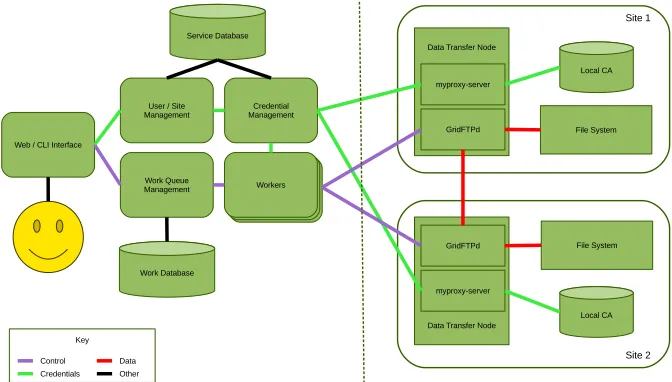
The design of the prototype took into account the following considerations: It had to be secure enough to ensure the integrity of the users’ data. It must be scalable to allow for an (almost) arbitrary number of users, endpoints and simultaneous transfers. All non-central services must be easy to deploy and users should find an intuitive interface. Finally the design should allow for easy integration of new features. A schematic of the data transfer system is shown in fig. 1.
2.1 Web-interface
For reasons of simplicity and to be able to run on a variety of different platforms we chose a web site as the main user interface. Once the user accesses the web portal they will be able to use their site specific credential to list and copy their data. Any user can create an account on the portal, but this does not grant them any special privileges at the registered endpoints.
2.2 Endpoint specific logins
When a user logs in at a site, we do not store their credentials, authentication is purely handled by the site itself. The central service must only store a token/proxy for the user. This allows files to be transferred for a limited amount of time, without the users having to re-authenticate. Any security compromise of the central system doesn’t allow any further access to the user accounts beyond the cached token.
2.3 Data transfer nodes
Data transfer nodes are installed by the site administrators. Consideration was given to the simplicity of deployment, by providing packaged version for common operating systems. They sit in front of a file system a user already has access to and might already have files stored on. This might be a shared file-system in which case you can letup multiple transfer nodes for redundancy and performance reasons.
2.4 Central service
The central service needs to keep a queue of user requests (ls, delete, copy etc) and process them in a fair manner. All data transfers should go directly between the sites, i.e. third party copies rather than through the central service for performance and bandwidth reasons. This scalable design allows for increasing numbers of users.
2.1 Web-interface
For reasons of simplicity and to be able to run on a variety of different platforms we chose a web site as the main user interface. Once the user accesses the web portal they will be able to use their site specific credential to list and copy their data. Any user can create an account on the portal, but this does not grant them any special privileges at the registered endpoints.
2.2 Endpoint specific logins
When a user logs in at a site, we do not store their credentials, authentication is purely handled by the site itself. The central service must only store a token/proxy for the user. This allows files to be transferred for a limited amount of time, without the users having to re-authenticate. Any security compromise of the central system doesn’t allow any further access to the user accounts beyond the cached token.
2.3 Data transfer nodes
Data transfer nodes are installed by the site administrators. Consideration was given to the simplicity of deployment, by providing packaged version for common operating systems. They sit in front of a file system a user already has access to and might already have files stored on. This might be a shared file-system in which case you can letup multiple transfer nodes for redundancy and performance reasons.
2.4 Central service
The central service needs to keep a queue of user requests (ls, delete, copy etc) and process them in a fair manner. All data transfers should go directly between the sites, i.e. third party copies rather than through the central service for performance and bandwidth reasons. This scalable design allows for increasing numbers of users.
Figure 1.A schematic of the data transfer system.
3 Implementation
The code is written in Python 2.7 on CentOS 7 and compatible operating systems. It is fully open source and available on GitHub[7].
3.1 Services
The central service consists of a number of WSGI[1] components, based on Flask[2]. We picked Flask as it is a well established framework and the WSGI interface means it can be used with a number of different web-services. The individual components interoperate using a RESTful protocol over HTTPS connections using their host certificates for authentication. An access control file specifies the clients which are allowed to access each RESTful operation. There are three databases: The site database consists of two tables: one of all available site endpoints and one for caching the site-specific user proxies. The user data base contains a list of users registered with the data transfer service. The workqueue database contains all user requests and their statuses. All databases are accessed via SQLAlchemy[6] and can be hosted by any SQLAlchemy compatible engine; currently SQLite is used for testing. The user service handles registering, updating, authenticating and deleting users. The endpoint service handles creating, updating and deleting endpoints in the site database. It also processes the user logins at sites. The workqueue service similarly handles operations on users’ requests in the work queue database. The workers request tasks from the work queue service, fetch the relevant proxy from the site service and execute the task, returning the result.
A site endpoint consists of a MyProxy server and one or more GridFTP services. It can be installed and set-up via a standalone script that is provided with the software [7]. This checks that the correct packages are installed and creates the CAs and the relevant configuration files.
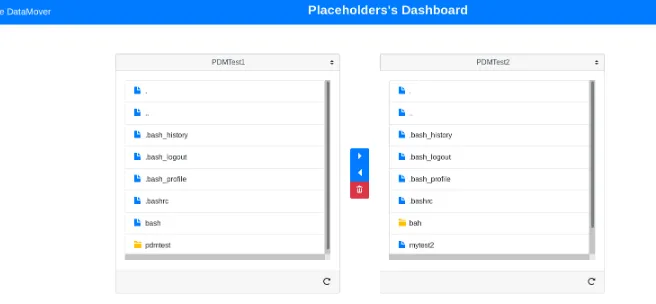
Figure 2.A screenshot of the user facing web-interface.
The web-interface (fig. 2) is also built on Flask[2] and the Jinja2[8] templating engine. The actual web-pages are based on the Bootstrap[9] and jQuery[10] JavaScript libraries to achieve a responsive layout and intuitive user interface.
cookie or file in the web-interface and CLI respectively. The cookies have a fixed lifetime, so the users need to re-authenticate at a configurable interval.
3.2 Authentication at sites
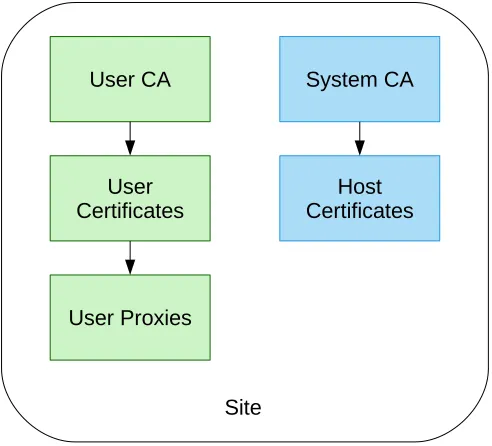
The endpoint software includes two CAs (fig. 3): One to issue a host certificate for the site. By default this is the host certificate for the host the endpoint is installed on. The other CA is used to issue X.509 certificates for users. When a user logs into a site, the site’s user CA will generate a X.509 certificate for this user. From this certificate a time-limited user proxy is generated and delegated back by the MyProxy server[3] to the central service (see fig. 1). When transferring data from one site to another, two proxies are used. Initially the system was designed with a single central CA, but this would grant anyone with access to this CA access to any account at all endpoints. This model was considered too weak.
There are other online CA services available, such as the Security Token Service[4]. These services typically convert a federated login such as eduGAIN[5] to a X.509 user certificate or proxy. While integrating a service like this is a long term objective the current implementation of the Identity Providers (IdP) for the target user base do not support all of the attributes generally required by these services.
Figure 3.Set-up of the two certification authorities at each endpoint.
3.3 Data transfers
cookie or file in the web-interface and CLI respectively. The cookies have a fixed lifetime, so the users need to re-authenticate at a configurable interval.
3.2 Authentication at sites
The endpoint software includes two CAs (fig. 3): One to issue a host certificate for the site. By default this is the host certificate for the host the endpoint is installed on. The other CA is used to issue X.509 certificates for users. When a user logs into a site, the site’s user CA will generate a X.509 certificate for this user. From this certificate a time-limited user proxy is generated and delegated back by the MyProxy server[3] to the central service (see fig. 1). When transferring data from one site to another, two proxies are used. Initially the system was designed with a single central CA, but this would grant anyone with access to this CA access to any account at all endpoints. This model was considered too weak.
There are other online CA services available, such as the Security Token Service[4]. These services typically convert a federated login such as eduGAIN[5] to a X.509 user certificate or proxy. While integrating a service like this is a long term objective the current implementation of the Identity Providers (IdP) for the target user base do not support all of the attributes generally required by these services.
Figure 3.Set-up of the two certification authorities at each endpoint.
3.3 Data transfers
The data transfers are between two GridFTP servers, one at each site. The central service creates the control connection with the appropriate proxies and then a direct data connection between the two sites is created. Recursive operations are possible by running a list opera-tion at the start of a copy request. Internally this is achieved by using gfal2 library Python bindings. Due to its limitation to copy and delete operations the FTS queuing system was
considered not sufficient at this time. Instead the chosen design features a single prioritised queue (e.g. listing requests take precedence) for all user requests.
4 Conclusions and Outlook
We developed a prototype of an Open Source Data Transfer Tool kit, emphasizing a user friendly interface. The next steps will be end user testing, transfer monitoring and throughput optimisation. We are also looking to extend this project to other communities and integrate it with a federated login service such as EGI Check-in[11], to keep the user experience as streamlined as possible.
References
[1] PEP 3333: Python Web Server Gateway Interface v1.0.1 [software] https://www.python. org/dev/peps/pep-3333/[accessed 2018-08-20]
[2] Flask: A Python Mircoframework [software] http://flask.pocoo.org/[accessed 2018-08-20]
[3] J. Novotny, S. Tuecke, and V. Welch. An Online Credential Repository for the Grid: MyProxy. [software] Proceedings of the Tenth International Symposium on High Perfor-mance Distributed Computing (HPDC-10), IEEE Press, pages 104-111 (2001)
[4] H. Short, A. Manzi, V. De Notaris, O. Keeble, A. Kiryanov, H. Mikkonen, P. Tedesco and R. Wartel. x509-free access to WLCG resources, Journal of Physics: Conference Series, IOP Publishing,898, 102001 (2017)
[5] eduGAIN [software] https://www.edugain.org [accessed 2019-02-08]
[6] SQLAlchemy - The Database Toolkit for Python [software] https://www.sqlalchemy.org/ [accessed 2018-08-20]
[7] PDM [software] https://github.com/ic-hep/pdm [accessed 2018-08-20] [8] Jinja2 [software] http://jinja.pocoo.org/docs/2.10/[accessed 2018-08-25] [9] Bootstrap [software] https://getbootstrap.com/[accessed 2018-08-25] [10] jQuery [software] https://jquery.com/[accessed 2018-08-25]