ISSN(Online): 2320-9801 ISSN (Print): 2320-9798
I
nternational
J
ournal of
I
nnovative
R
esearch in
C
omputer
and
C
ommunication
E
ngineering
(An ISO 3297: 2007 Certified Organization)
Vol. 3, Issue 5, May 2015
Location Based Reminder Using Android and
Google Maps
Neelu.L, Aruna Kumara.B, Shashidhar.V, Bharath J
Asst. Professor, Department of CSE, Raja Rajeswari College of Engineering, Bangalore, India
ABSTRACT: Android is a new generation of smart mobile phone platform launched by Google. Android provides the support for mobile map and location service. Android is free and open, providing an easy-to-use development kit containing flexible map display and control functions. Google Maps API provides a number of utilities for adding individual content to the Google map and various web map applications can be explored based on Google Maps API. The application for GPS expands the use of GPS devices. It has a simple design and intuitive operation and environment. The basic characteristic of the application is alerting the user regarding the reminder that is set with the event and the location of the event, when the user is within the range of the destination location and to display a route between the present user location and the set location. The big advantage is an on-line access to the application. The results prove that the solution of mobile navigation system based on Google Maps is feasible and valid, and it can be installed in PDA, mobile phones and other portable devices which run on Android platform.
KEYWORDS: REOMAP, Android, Google maps
I. INTRODUCTION
Android was built from the ground-up enabling developers to create compelling mobile applications that take full advantage of all that a handset has to offer. It was built to be truly an open-source. For example, an application can call upon any of the phone's core functionality such as making calls, sending text messages, or using the camera, allowing developers to create richer and more cohesive experiences for users. Android is built on the open Linux Kernel. Furthermore, it utilizes a custom virtual machine that was designed to optimize memory and hardware resources in a mobile environment. Android systems can be liberally extended to incorporate new cutting edge technologies as they emerge. The platform will continue to evolve, as the enthusiastic community of developers work together to build innovative mobile application, with new releases of API with each version.
Google Maps is a web mapping service application and technology provided by Google, that powers many map-based services. Google maps can display map images, topographic maps, satellite images and hybrid images. It can also achieve global location search, classified information access, traffic information queries, driving direction lines and even street scene 3-dimensional view and so on. Android lets the developer to create activities that include interactive Google Maps as part of the user interface, with full access to the maps which the developer can control programmatically and annotate using Android’s rich graphics library.
Geo-coding is a feature that allows developers to translate between street addresses and latitude-longitude map coordinates. This gives a recognizable context for the locations and co-ordinates used in location-based services and map-based Activities. To combine maps with locations, Android includes an API for forward and reverse geo-coding that lets the user find map co-ordinates for an address, and the address of a map position.
Rapid and efficient data storage and retrieval are essential for a device whose storage capacity is limited by its compact nature. Android provides a lightweight relational database for each application using SQLite. The applications can take advantage of this managed relational database engine to store data securely and efficiently.
ISSN(Online): 2320-9801 ISSN (Print): 2320-9798
I
nternational
J
ournal of
I
nnovative
R
esearch in
C
omputer
and
C
ommunication
E
ngineering
(An ISO 3297: 2007 Certified Organization)
Vol. 3, Issue 5, May 2015
Every mobile comes with a built-in reminder widget which is used to set the reminders for a particular time interval. REOMAP is an application which alerts the user regarding the reminder that is set with the event and its location, when
the user is within the proximity of the destination.
Motivation
In today’s busy schedule people usually tend to miss out on important tasks, even though they are nearby the place. This leads to much kind of issues which makes people’s life miserable. There must be some means which make the work simple and easy.
Marketing people who have to travel wide range of areas to accomplish their tasks find it difficult remember all the areas. People suffering with amnesia, which is the inability of a person to remember things for long period of time.
II. RELATED WORK
Google Maps API provides number of utilities for adding individual contents to the Google Map and various web application can be explored based on it. Google Maps API is a JavaScript technology, which allows users to embed Google Maps in their own web pages and applications.It is fully integrated with Google AJAX API. This framework allows us to load one API key for all supported Google AJAX APIs and also provides a common namespace for each API, allowing different Google APIs to operate together. [1]
The development of mobile map and location applications is complex and difficult, and it is often required to pay high copyright fees to map makers. Android is free and open, providing an easy to use development kit containing flexible map display and control functions. This paper introduces the architecture and component models of android, and analyses the anatomy of an android application including the functions of Activity, Intent Receiver, Service,Content Provider, and etc. Based on android’s support over various components a location based mobile service can be implemented to draw the driving trace, to perform query and to flexibly control and real-time map on android. [2]
The application for GPS devices expands the use of GPS devices. It is very simply designed and has intuitive operation and environment. The big advantage is an online access to the application. The basic characteristic of similar applications is planning and rendering the route which was taken. Therefore, this application provides both of these functions. Route from point A to point B might be planned. It is also possible to add other via points. It can also render the route already traveled. Rendering has been designed to allow a different number of ways. Either from own Web source, or uploaded by a waypoint file.
In order to upload waypoints files into the application, user was allowed to create his own account and to manage his files.This feature is only available in few applications. It is possible to use five basic formats of GPS devices. Combining all of these features is currently the most popular choice. Since the application is available online, most of it is programmed in the programming language PHP and JavaScript. The features of Ajax were also used and Cake PHP framework should facilitate the work. MySQL database is used as a data warehouse. [3]
ISSN(Online): 2320-9801 ISSN (Print): 2320-9798
I
nternational
J
ournal of
I
nnovative
R
esearch in
C
omputer
and
C
ommunication
E
ngineering
(An ISO 3297: 2007 Certified Organization)
Vol. 3, Issue 5, May 2015
III. PROPOSED WORK
This work proposes the following architecture (Figure 1)
System architecture is the conceptual model that defines the structure, behavior, and views of a system. It comprises of system components, the externally visible properties of those components, and the relationships between them. It can provide a plan from which products can be developed, that will work together to implement the overall system. The architecture is based on many components which are mentioned in the architecture diagram as follows:
1Process Controller
This component controls the functioning of a process, and performs activities like invoking the services component in android and changing the status of a process from foreground to background. It also restarts the application automatically once the cellphone is switched on after switching it off.
2 Notification Manager
This component sends notification to the user when the user is in proximity of the destination. This also displays a notification on the system bar and notification bar. On selection of the notification in the notification bar, the task and a MapView of the destination is shown to the user. The system bar is used to display a small identifiable icon of the application to distinguish from other notification.
3 ConnectivityManager
This module represents the Network Connectivity Service. It establishes the internet connection of the application with network using GSM, 3G or Wi-Fi, if the connection is not being established the application shows informative messages to the user to check internet connectivity. This also tries to maintain the least amount of internet data charges applicable for the application.
4 SQLite Manager
This manages the application’s database by creating, updating and modifying the database whenever the user changes the task list information in Show-Task view. Whenever the user uses the application for the first time, the database is created, and further-on when the user enters new task information, the database is updated by checking the integrity of the information before storing the data. In-case the user enters wrong field values, the application generates appropriate message to the user. When the set task is completed by the user, the data is automatically removed from the database.
5 LocationManager
This checks for location information by getting the best provider by selecting either GPS or NETWORK based location services so that the application can use the information to process further instruction. If the GPS connection is not available then the application tries to use the NETWORK location information which are based on cell location. This also helps in updating present location of the device whenever the device moves around.
REOMAP
APPPLICATION PROCESS
CONTROLLER
NOTIFICATION MANAGER
CONNECTIVITY MANAGER
MAPVIEW MANAGER SQLITE MANAGER
ISSN(Online): 2320-9801 ISSN (Print): 2320-9798
I
nternational
J
ournal of
I
nnovative
R
esearch in
C
omputer
and
C
ommunication
E
ngineering
(An ISO 3297: 2007 Certified Organization)
Vol. 3, Issue 5, May 2015
4 Map View Manager
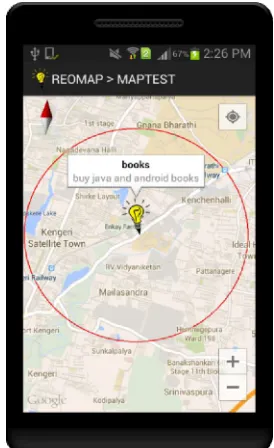
This manages the display of map information in Show-Task layout when the user clicks on the task. If the user clicks on the task, then map view will be generated. This also overlays a custom icon as the marker to be placed on map, it also includes the generation of radius around the set destination.
IV. IMPLEMENTATION AND RESULTS
The proposed approach was implemented in Google Android platform. The android platform was chosen to exploit the user friendly features of android and this work used the Google search engine as the backend search engine.
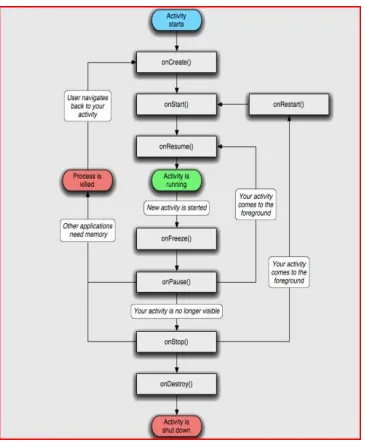
In Android, every application runs in its own process, which gives better performance in security, protected memory and other benefits. Therefore, Android is responsible to run and shut down correctly these processes when it is needed. It is important that application developers understand how different application components (in particular Activity, Service, and BroadcastReceiver) impact the lifetime of the application's process. Not using these components correctly can result in the system killing the application's process while it is doing important work. To determine which processes should be killed when low on memory, Android places each process into an "importance hierarchy" based on the components running in them and the state of those components.
These process types are (in order of importance) shown in figure 2:
A foreground process is one that is required for what the user is currently doing. Various application components can cause its containing process to be considered foreground in different ways. A process is considered to be in the foreground if any of the following conditions hold, if an Activity is running at the top of the screen that the user is interacting with (it’s on Resume() method has been called). If it has a Broadcast Receiver that is currently running(its BroadcastReceiver.onReceive() method is executing). If it has a Service that is currently executing code in one of its callbacks (Service.onCreate(), Service.onStart(), or Service.onDestroy()). There will only ever be a few such processes in the system, and these will only be killed as a last resort if memory is so low that not even these processes can continue to run. Generally, at this point, the device has reached a memory paging state, so this action is required in order to keep the user interface responsive.
A visible process is one holding an Activity that is visible to the user on-screen but not in the foreground (its onPause() method has been called). This may occur, for example, if the foreground Activity is displayed as a dialog that allows the previous Activity to be seen behind it. Such a process is considered extremely important and will not be killed unless doing so is required to keep all foreground processes running.
ISSN(Online): 2320-9801 ISSN (Print): 2320-9798
I
nternational
J
ournal of
I
nnovative
R
esearch in
C
omputer
and
C
ommunication
E
ngineering
(An ISO 3297: 2007 Certified Organization)
Vol. 3, Issue 5, May 2015
Figure 2: Lifecycle of Application activity
A background process is one holding an Activity that is not currently visible to the user (its onStop() method has been called). These processes have no direct impact on the user experience. Provided they implement their Activity life-cycle correctly (see Activity for more details), the system can kill such processes at any time to reclaim memory for one of the three previous processes types. Usually there are many of these processes running, so they are kept in an LRU list to ensure the process that was most recently seen by the user is the last to be killed when running low on memory.
An empty process is one that doesn't hold any active application components. The only reason to keep such a process around is as a cache to improve startup time the next time a component of its application needs to run. As such, the system will often kill these processes in order to balance overall system resources between these empty cached processes and the underlying kernel caches.
The application basically contains three activities that are represented with respective algorithms.
Set-Task
Show-Task
Background Process Set Task Activity
This activity allows the user to set the task details like task name, task description, location and date. Once the details are entered it is verified to check whether the user has entered all the fields in the activity. If the user has left any one of the fields then a toast is generated which asks the user to enter the left out field.
When the verification process is done user is alerted by a confirmation pop-up where the user can confirm about the reminder or else can go back and do required modifications. Later the task details is inserted into the application database. Once everything is done the process runs in the background.
ALGORITHM 1 Algorithm SET-TASK
//Purpose: To set the reminder using set task activity //Input:task_name, task_description, location, date //Output: Store task information in application database
STEP 1: Set the task information, location and date using the Set-Task activity STEP 2: Verify if data input by user is valid
if(verify())
ISSN(Online): 2320-9801 ISSN (Print): 2320-9798
I
nternational
J
ournal of
I
nnovative
R
esearch in
C
omputer
and
C
ommunication
E
ngineering
(An ISO 3297: 2007 Certified Organization)
Vol. 3, Issue 5, May 2015
else
generate toast message end if-else
STEP 3: Confirmation of task if(confirm())
then insert task and location information into application database, and set the task status as pending then go to STEP 4
else
go to STEP 1 end if-else
STEP 4: Run application in the background Show Task Activity
This activity is used to display the entered task in the form of list view. The application initially fetches the data from the application database and lists it in the form of list view. The application provides 2 features
LongClick
Click
On LongClick, the user gets options to modify the task or delete the task. If the user chooses to modify then the set task activity is opened wherein the user can make necessary changes. If the user chooses to delete the selected task is deleted. All the changes are updated in the database and same is reflected in the listview.
If the user clicks, a mapview of the current task is displayed. Again the activity runs in the background.
ALGORITHM 2 Algorithm SHOW-TASK
//Purpose: To display the reminders //Input: LongClick, click
//Output:ListView and MapView of tasks
STEP 1: Fetch the data from the application database STEP 2: Display fetched data inListView
STEP 3: if(on_click())
then display location of the current task on the map end if
STEP 4: if(on_LongClick())
choose modify() or delete() if(modify())
then open Set-Task activity end if
if(delete())
then delete the selected task and update database end if
end if
STEP 5: Run the application in background
Background Process Activity
The activities so far discussed runs in the background. The applications uses the services provided for the background process and keep running without disturbing the foreground process. It constantly checks for the pending tasks. If any tasks are available then it checks for the connection availability and GPS.
If connections are available then it checks for the current location of the user. If connection is not available, then it notifies the user about the connectivity. If the user is in proximity then a notification is raised informing user about the task. Or else it keep running in the background. If no tasks are pending then the background process stops working.
ALGORITHM 3
ISSN(Online): 2320-9801 ISSN (Print): 2320-9798
I
nternational
J
ournal of
I
nnovative
R
esearch in
C
omputer
and
C
ommunication
E
ngineering
(An ISO 3297: 2007 Certified Organization)
Vol. 3, Issue 5, May 2015
//Purpose: To check the tasks running in background //Inputs: tasks, location
//Outputs: Notifications
STEP 1: Run background services STEP 2: Check for pending tasks if(pending)
check for connection availability else
stop end if-else
STEP 3: Check for connection and GPS availability if(connection_available& GPS_ON) location_check() else
notify() // notify about connection unavailability end if-else
STEP 4: Check for proximity if (In_Proximity())
notify() // notify user about task else
STEP 3 end if-else
In the experimental work, a cell phone with android platform was used. This involves the tasks such as show task, set task, change date, change location etc.
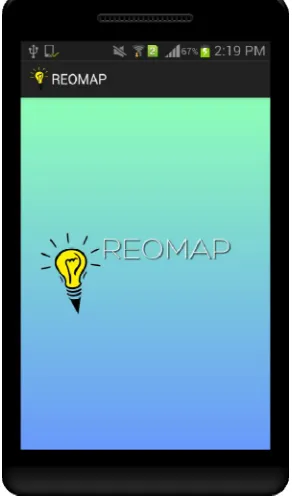
This is the splash screen which occurs when the application is initially started. From this screen we would direct the user to traverse to the other screenswhich is illustrated in the below screenshots.
Figure 3: Splash screen of REOMAP
ISSN(Online): 2320-9801 ISSN (Print): 2320-9798
I
nternational
J
ournal of
I
nnovative
R
esearch in
C
omputer
and
C
ommunication
E
ngineering
(An ISO 3297: 2007 Certified Organization)
Vol. 3, Issue 5, May 2015
Figure 4 Welcome screen of REOMAP
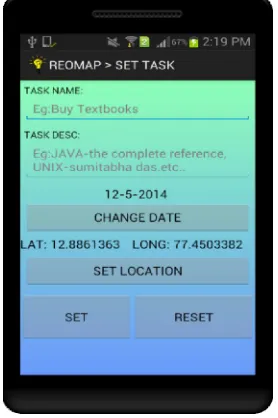
Figure 5 shows the setting of the task and task description where user stores their tasks along with the task name, task description, date and location.
Figure 5 Screen to set task
ISSN(Online): 2320-9801 ISSN (Print): 2320-9798
I
nternational
J
ournal of
I
nnovative
R
esearch in
C
omputer
and
C
ommunication
E
ngineering
(An ISO 3297: 2007 Certified Organization)
Vol. 3, Issue 5, May 2015
Figure 6 Screen when task is set successfully
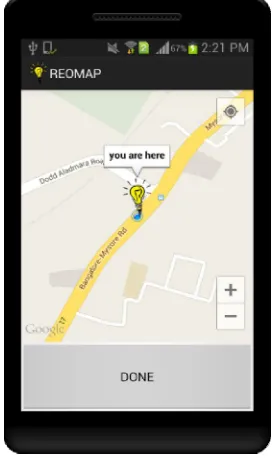
Figure 7 occurs when the user presses the set location button in the set task activity.
Figure 7 Screen to set the location
ISSN(Online): 2320-9801 ISSN (Print): 2320-9798
I
nternational
J
ournal of
I
nnovative
R
esearch in
C
omputer
and
C
ommunication
E
ngineering
(An ISO 3297: 2007 Certified Organization)
Vol. 3, Issue 5, May 2015
Figure 8 Screen when clicked on the task in showtask
V. CONCLUSION AND FUTURE ENHANCEMENTS
This work provides a viable solution to upgrade the features of the existing system using the technologies which are already available and reducing the data charges making the application available to the users. Implementation of the GPS services, which provides an accurate route detecting technology makes the system most reliable. Reliability and reduced number of false positives means greater adoption by the users.Here we are using an Android based Smartphone which is widely in use around the globe. Thus we also integrate the advantages of Android in our application. Every Android phone provides the GPS services along with Google maps and the navigation features, thus we make complete utilization of it to detect the locations dynamically. Android has a very secure software stack for mobiles and is very reliable, thus making our project highly reliable. The proposed system provides an effective and efficient way of using the application without any complicated user interfaces. The familiar interface, non-intrusiveness, reliability and cost effectiveness makes it affordable and user-friendly.
Further Enhancements
The reminders can be set for groups. If one of the members of the group reaches the destination, then other members will get the notification.
Make the application available on other platforms.
REFERENCES
[1] “Study and implementation of mobile GPS Navigation System Based on Google Maps”, He Li, Lai Zhijian, 2011. [2] “Research on mobile location service design based on Android”, XianhuaShu, ZhenjunDu, Rong Chen, 2009. [3] “Software application for GPS devices using Google Maps”, Jan Babic and Igor Podlubny, 2011.
[4] “The research of Android System Architecture and application programming”, Chao Wang, Wei Duan,Jianzhang Ma, ChenhuiWang,December 24-26, 2011.
WEBSITES
http://Create Listview With ListActivity - Android Example
http://Dynamically Create View Elements – Android Example
ISSN(Online): 2320-9801 ISSN (Print): 2320-9798
I
nternational
J
ournal of
I
nnovative
R
esearch in
C
omputer
and
C
ommunication
E
ngineering
(An ISO 3297: 2007 Certified Organization)
Vol. 3, Issue 5, May 2015
http://Screen Wake Sleep Event Listner Service - Android Example
http://Time Picker Basics Part 1 - Android Example
http://Grid Layout - Android Example
http://GPS Basic Example - Android Example
http://Date Picker - Anroid Example
http://Populate ListView from DB: Android Programming - YouTube
http://Android: List view from Database with Cursor Adapter | Solved Programming Problems
http://Android date picker example
http://Part 4 - Using CursorAdapters | Xamarin
http://layout - how to set width of buttons in android to cover screen width? - Stack Overflow