Application Bulletin
TSPI Description V2.15
Purpose
The following technical material is used for software engineers and programmers developing third party TAPI applications with Toshiba telephone systems.
Introduction
Microsoft® Windows® Telephony is a component of Windows Open Services Architecture.
This architecture provides for the operation of telephony services when connected to many different telephone switches. Therefore, an application needs to know only the definition of the API and not its implementation.
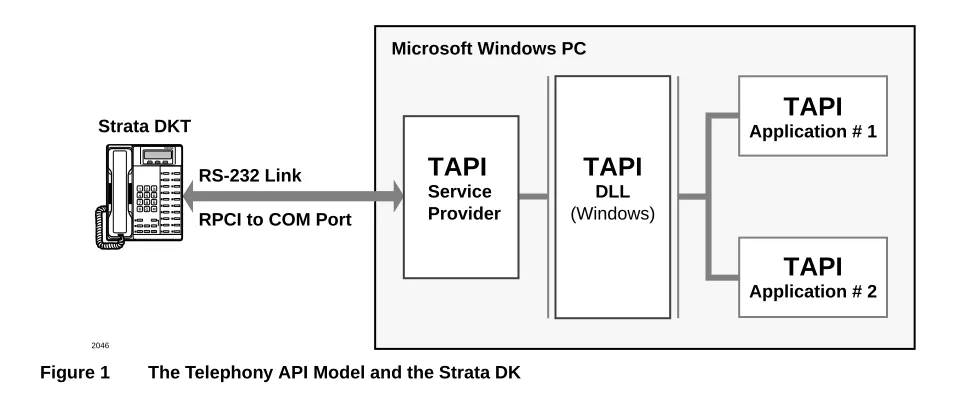
The telephony model supplies a DLL component, called TAPI.DLL. This component resides between the Telephony API called by applications and the Telephony SPI implemented for the specific switch to which the PC is connected. The software applications call TAPI functions that are managed by TAPI.DLL and routed to the Service Provider Interface (e.g., Toshiba’s DKT SPI) for execution. The relationship between these components is shown in Figure 1.
2046
Microsoft Windows PC
TAPI
Service ProviderTAPI
DLL(Windows)
TAPI
Application # 1TAPI
Application # 2 Strata DKTRS-232 Link
RPCI to COM Port
Figure 1 The Telephony API Model and the Strata DK
AB50-0003 April 1, 1997
P
rel
imin
ar
y an
d
Co
nfiden
ti
al
The Telephone Applications Programming Interface (TAPI) was a joint development of Microsoft and Intel® to provide a standard method of connecting Windows based PCs to all
types of telephone systems. The standard allows software developers to create applications without having to worry about how the telephone network interface functions. This interface provides three levels of service: Basic, Supplementary, and Extended.Levels of Service
Levels of Service
Basic
Basic Services are centered around Plain Old Telephony Service (POTS) including a set of re-defined call states and information messages which pass events to the application. Features of POTS include answering calls, making calls, numbering plans to support dialing, and the ability to translate numbers based upon type and location of the user.
Supplementary
Supplementary Services provide additional features commonly found in most PBX’s. These include call features such as Call Transferring, Forwarding, Conferencing, Hold, Park, and Pickup. Additional services are defined for interfacing Media Services such as providing interfaces for fax, modems, voice response, and tone detection/generation. Release 2.0 of the TAPI specification includes third party call control services for Automatic Call Distribution (ACD) and future Asynchronous Transfer Mode (ATM).
Extended
Extended Services provide a method to access features and services beyond the Basic or Supplementary Services. TAPI provides for the passing of messages directly between the telephone system and the application. TAPI only passes these messages directly to either end and does not take action or make interpretations of them. The application, therefore, is responsible for the complete interaction of the feature or service provided.
Interfaces
The Windows Open System Architecture provides two interfaces for Telephony Devices. The TAPI interface provides for the control of calls using a well defined interface and the audio connection is handled in what Microsoft calls a Media Stream. To allow for a standard interface for playing and recording messages, interfacing fax, modem or other devices uses a separate application interface. The WAV API is a common interface that can provide these services in an open manner that can be controlled using the TAPI interface.
Strata DK’s TSPI Model
P
rel
imin
ar
y an
d
Co
nfiden
ti
al
Line Device Model
The Strata DK TSPI models its interface as a single-line device with multiple addresses, each having no more than one call appearance. The specific capabilities of the line device and each of the addresses are explained under the function description for lineGetDevCaps and
lineGetAddressCaps.
Phone Device Model
At present, the DKT TSPI does not support the phone device model.
The DKT TSPI Call State Flow
The Toshiba TAPI Service Provider V2.15 has been released with the following call state flow as illustrated in the diagram below:
2045
Dial Tone
Offering
Ringback
Hold
Connected Start
Idle
Busy
I-Hold E-Hold I-Use
I-Use I-Use
Deallocate Call Handle
Allocate Call Handle
I-Ring C-Ring C-Hold
Busy LED
OFF Busy
LED OFF
P
rel
imin
ar
y an
d
Co
nfiden
ti
al
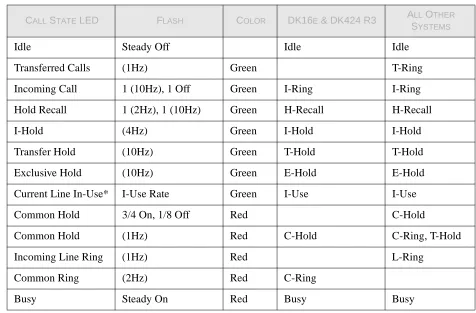
Table 2-1 Call State Descriptions
*I-Use rate is generated in the phone. The cycle consists of 2 seconds on followed by 1/8 second off, 1/8 second on, 1/8 second off state.
System Messages
An application receives information in two ways: solicited and unsolicited. Solicited
information is requested by the application through a function call such as lineGetDevCaps or lineGetAddressCaps. Unsolicited information arrives in the form of messages. Often, the two mechanisms are used together, as when an application receives a LINE_CALLSTATE
message, after which it checks the information contained in the LINECALLINFO structure by calling lineGetCallInfo.
Strata DKT TSPI supports the following messages providing unsolicited information:
LINE_CALLSTATE
Sent to an application to notify it about changes in a call’s state.
LINE_LINEDEVSTATE
Sent to the application to notify it about changes in the line status. This message indicates which status item has changed.
CALL STATE LED FLASH COLOR DK16E & DK424 R3 ALL OTHER
SYSTEMS
Idle Steady Off Idle Idle
Transferred Calls (1Hz) Green T-Ring Incoming Call 1 (10Hz), 1 Off Green I-Ring I-Ring Hold Recall 1 (2Hz), 1 (10Hz) Green H-Recall H-Recall I-Hold (4Hz) Green I-Hold I-Hold Transfer Hold (10Hz) Green T-Hold T-Hold Exclusive Hold (10Hz) Green E-Hold E-Hold Current Line In-Use* I-Use Rate Green I-Use I-Use Common Hold 3/4 On, 1/8 Off Red C-Hold
Common Hold (1Hz) Red C-Hold C-Ring, T-Hold Incoming Line Ring (1Hz) Red L-Ring
Common Ring (2Hz) Red C-Ring
P
rel
imin
ar
y an
d
Co
nfiden
ti
al
LINE_ADDRESSSTATE
The Service Provider follows with this callback message giving changes to the state of any address.
LINE_CALLINFO
A callback message that notifies of additional information about the call.
LINE_REPLY
Messages generated for all asynchronous requests. Toshiba DKT TSPI always uses lineMakeCall in this asynchronous manner.
LINE_NEWCALL
A message to notify the application of a new call event arriving.
Startup and Shutdown of TAPI
lineInitialize
An application registers a TAPI connection by calling this function. This function is not passed through to the TSPI but handled by TAPI.DLL. One of the main purposes is to establish a pointer to the application’s callback function to allow unsolicited messages to be registered. Two pieces of information is returned to the application: an application handle and the number of available line devices. Strata DK TSPI supports multiple line devices.
lineShutdown
When the application is done, this command releases the resources and the TAPI environment is disconnected.
lineNegotiateAPIVersion
This function is used to negotiate the API version number to used. The application provides the range of versions it is compatible with and TAPI.DLL in turn negotiates with the TSPI to determine which version range it supports.
lineOpen
This function opens the specified device ID for the purpose of monitoring or control by the application. Opening the line returns the handle for the device. The application can then use this handle to answer inbound calls, make outbound calls, or monitor call activities on the line for logging purposes. The application should query the capabilities of the line, (using
lineGetDevCaps) before opening the line device. Upon opening the line, a serial port will be allocated and initialized.
lineSetStatusMessages
P
rel
imin
ar
y an
d
Co
nfiden
ti
al
lineGetStatusMessages
This function queries the TSPI for current status messages.
lineClose
This function closes the specified open line device after aborting all outstanding calls and asynchronous operations on the device.
Receiving Information
lineGetDevCaps
This function queries a specified line device to determine its telephony capabilities. It is important for an application to call this function before opening the line device. This allows the application to determine which of possibly several line devices to use. Returns the supplementary and extended capabilities of a given line device as a data structure of type lineDevCaps:
FIELD NAME SETTING
dwProviderInfoSize dwProviderInfoOffset
The memory area referenced by these fields will contain the NULL-terminated string describing the service
provider. The Strata DK service provider is “Toshiba DKT TSPI”.
dwSwitchInfoSize dwSwitchInfoOffset
This memory area is not used by the Toshiba DKT TSPI.
dwPermanentLineID This field will contain the permanent device ID, as found in TELEPHON.INI.
dwLineNameSize dwLineNameOffset
This memory area contains the name of the device as defined in Setup of the driver installed.
dwStringFormat STRINGFORMAT_ASCII
dwAddressModes LINEADDRESSMODE_ADDRESSID
dwNumAddresses This field reports the number of addresses found for this device. This is defined in Setup of the driver installed. dwBearerModes LINEBEARERMODE_VOICE
dwMaxRate 0
dwMediaModes LINEMEDIAMODE_INTERACTIVEVOICE dwGenerateToneModes
dwGenerateToneMaxNumFre q
Not supported by Toshiba DKT TSPI.
dwGenerateDigitModes LINEDIGITMODE_DTMF dwMonitorToneMaxNunFreq
dwMonitorToneMaxNumEntr ies
P
rel
imin
ar
y an
d
Co
nfiden
ti
al
lineGetAddressCaps
This function queries the specified address on the specific line device to determine its telephony capabilities. The Toshiba DKT TSPI returns two sets of values depending whether
dwMonitorDigitModes Not supported by Toshiba DKT TSPI. dwGatherDigitsMinTimeout
dwGatherDigitsMaxTimeout
Not supported by Toshiba DKT TSPI.
dwMedCtlDigitMaxListSize dwMedCtlMediaMaxList dwMedCtlToneMaxListSize dwMedCtlCallStateMaxListS ize
Not supported by Toshiba DKT TSPI.
dwDevCapFlags 0 dwMaxNumActiveCalls 1
dwAnswerMode LINEANSWERSTATE_DROP dwRingModes 0
dwLineStates LINEDEVSTATE_OTHER | LINEDEVSTATE_CONNECTED | LINEDEVSTATE_DISCONNECTED | LINEDEVSTATE_OPEN |
LINEDEVSTATE_CLOSE | LINEDEVSTATE_NUMCALLS | LINEDEVSTATE_REINIT |
LINEDEVSTATE_TRANSLATECHANGE dwUUIAcceptSize
dwUUIAnswerSize dwUUIMakeCallSize dwUUIDropSize
dwUUISendUserUserInfoSiz e
dwUUICallInfoSize
Not supported by Toshiba DKT TSPI.
MinDialParams MaxDialParams DefaultDialParams
These will indicate the dial speed, duration, and dial pause duration set by the phone system and are not changeable at the device level.
dwNumTerminals Not supported by Toshiba DKT TSPI. dwTerminalCapsSize
dwTerminalCapsOffset dwTerminalTextEntrySize dwTerminalTextOffset
Not supported by Toshiba DKT TSPI.
dwDevSpecificSize dwDevSpecificOffset
Not supported by Toshiba DKT TSPI.
P
rel
imin
ar
y an
d
Co
nfiden
ti
al
the line type defined in Setup of the driver was set for Prime Line / Intercom or any of the other types listed. This function fills the data structure of type LineAddressCaps:
FIELD NAME SETTING
dwLineDeviceID The device ID of the line with which the address is associated.
dwAddressSize dwAddressOffset
A NULL-terminated string reflecting the name of the key on the station. This is defined during Setup of the driver. dwDevSpecificSize
dwDevSpecificOffset
Not supported by Toshiba DKT TSPI.
dwAddressSharing LINEADDRESSSHARING_PRIVATE dwAddressStates LINEADDRESSSTATE_OTHER |
LINEADDRESSSTATE_INUSEZERO | LINEADDRESSSTATE_INUSEONE | LINEADDRESSSTATE_NUMCALLS |
LINEADDRESSSTATE_FORWARD (PDN or INT only) dwCallInfoStates LINECALLINFOSTATE_OTHER |
LINECALLINFOSTATE_APPSPECIFIC | LINECALLINFOSTATE_NUMOWNERINCR | LINECALLINFOSTATE_NUMOWNERDECR | LINECALLINFOSTATE_NUMMONITORS | LINECALLINFOSTATE_DIALPARAMS dwCallerIDFlags LINECALLPARTYID_UNAVAIL
dwCalledIDFlags LINECALLPARTYID_UNAVAIL dwConnectedIDFlags LINECALLPARTYID_UNAVAIL dwRedirectionIDFlags LINECALLPARTYID_UNAVAIL dwRedirectingIDFlags LINECALLPARTYID_UNAVAIL dwCallStates LINECALLSTATE_IDLE |
LINECALLSTATE_OFFERING | LINECALLSTATE_DIALTONE | LINECALLSTATE_RINGBACK | LINECALLSTATE_BUSY |
LINECALLSTATE_CONNECTED | LINECALLSTATE_PROCEEDING | LINECALLSTATE_ONHOLD |
LINECALLSTATE_CONFERENCED | LINECALLSTATE_ONHOLDPENDCONF | LINECALLSTATE_ONHOLDPENDTRANSFER | LINECALLSTATE_UNKNOWN
dwDialToneModes LINEDIALTONEMODE_UNAVAIL dwBusyModes LINEBUSYMODES_UNAVAIL dwSpecialInfo LINESPECIALINFO_UNAVAIL
P
rel
imin
ar
y an
d
Co
nfiden
ti
al
dwMaxNumActiveCalls 1 dwMaxNumOnHoldCalls 1 dwMaxNumOnHoldPending Calls
1
dwMaxNumConference 4 dwMaxNumTransConf 1
dwAddrCapFlags LINEADDRCAPFLAGS_BLOCKIDDEFAULT | LINEADDRCAPFLAGS_DIALED |
LINEADDRCAPFLAGS_ORIGOFFHOOK | LINEADDRCAPFLAGS_AUTORECONNECT | LINEADDRCAPFLAGS_PARTIALDIAL | LINEADDRCAPFLAGS_PICKUPCALLWAIT dwCallFeatures LINECALLFEATURE_ADDTOCONF |
LINECALLFEATURE_ANSWER |
LINECALLFEATURE_BLINDTRANSFER (R3 only) | LINECALLFEATURE_COMPLETETRANSF |
LINECALLFEATURE_DIAL | LINECALLFEATURE_DROP | LINECALLFEATURE_HOLD | LINECALLFEATURE_PARK |
LINECALLFEATURE_PREPARETOADDCONF | LINECALLFEATURE_SETUPCONF |
LINECALLFEATURE_SETUPTRANSFER LINECALLFEATURE_UNHOLD
dwRemoveFromConfCaps LINEREMOVEFROMCONF_NONE dwRemoveFromConfState Not supported by Toshiba DKT TSPI. dwTransferModes LINETRANSFERMODE_TRANSFER |
LINETRANSFERMODE_CONFERENCE dwParkModes LINEPARKMODE_NONDIRECTED
FIELD NAME SETTING
dwForwardModes LINEFORWARDMODE_UNCOND | LINEFORWARDMODE_BUSY | LINEFORWARDMODE_NOANSW | LINEFORWARDMODE_BUSYNA dwMaxForwardEntries
dwMaxSpecificEntries
1 1 dwMinFwdNumRings
dwMaxFwdNumRings
3 3 dwMaxCallCompletions
dwCallCompletionConds dwCallCompletionModes
Not supported by Toshiba DKT TSPI.
P
rel
imin
ar
y an
d
Co
nfiden
ti
al
lineGetAddressStatus
This function queries the specified address for its current status. The current status is returned using the data structure lineAddressStatus:
lineGetCallInfo
This function returns detailed information about the specified call. The information is returned in a data structure of the type LineCallInfo:
dwNumCompletionMessages dwCompletionMsgTextEntry Size
dwCompletionMsgTextSize dwCompletionMsgTextOffset
Not supported by Toshiba DKT TSPI.
FIELD NAME SETTING
dwNumInUse 1 if there is a call associated with the address, 0 otherwise. dwNumActiveCalls 1 if there is a call in any state other than ONHOLD at the
address, 0 otherwise.
dwNumOnHoldCalls 1 if there is a call holding at the address, 0 otherwise. dwNumOnHoldPendingCalls 1 if there is a call in either the ONHOLDPENDINGCONF
state or the ONHOLDTENDTRANSFER state, 0 otherwise.
dwAddressFeatures If there is no call associated with the given address, this field will contain the value
LINEADDRFEATURE_MAKECALL. Otherwise, it will be 0.
FIELD NAME SETTING
dwLineDeviceID The number of the line device being addressed. dwAddressID The address ID for the call associated.
dwBearerMode LINEBEARERMODE_VOICE
dwRate 0
dwMediaMode LINEMEDIAMODE_INTERACTIVEVOICE dwAppSpecific Retains the value passed in lineSetAppSpecific. dwCallID Not supported by Toshiba DKT TSPI.
dwRelatedCallID Not supported by Toshiba DKT TSPI.
dwCallParamFlags If this call was initiated with lineMakeCall, this field will be the same as the dwCallParamFlags field passed into that function via the LINECALLPARAMS structure.
Otherwise, it will be 0.
P
rel
imin
ar
y an
d
Co
nfiden
ti
al
dwCallStates
dwMonitorDigitModes dwMonitorMediaModes
Not supported by Toshiba DKT TSPI.
DialParams dwOrigin dwReason
dwCompletionID Not supported by Toshiba DKT TSPI. dwNumOwners 1
dwNumMonitors 0 dwCountryCode
dwTrunk Always xffffffff (Unknown) dwCallerIDFlags
dwCallerIDSize dwCallerIDOffset
Provides Caller ID name and number when provided by the public network. Internal calls give caller ID number if LCD Name is off and Caller ID name if the LCD name feature is on.
dwCalledIDFlags dwCalledIDSize dwCalledIDOffset
The DNIS/DID number received and Strata DK alphanumeric tag are provided.
dwConnectedIDFlags Not supported by Toshiba DKT TSPI dwConnectedIDSize
dwConnectedIDOffset
Not supported by Toshiba DKT TSPI
dwRedirectionIDFlags Not supported by Toshiba DKT TSPI. dwRedirectionIDSize
dwRedirectionIDOffset
Not supported by Toshiba DKT TSPI.
dwRedirectingIDFlags Not supported by Toshiba DKT TSPI. dwRedirectingIDSize
dwRedirectingIDOffset
Not supported by Toshiba DKT TSPI.
dwAppNameSize dwAppNameOffset
dwDisplayableAddressSize dwDisplayableAddressOffset
Not supported by Toshiba DKT TSPI.
dwCalledPartySize dwCalledPartyOffset
Not supported by Toshiba DKT TSPI.
dwCommentSize dwCommentOffset dwDisplaySize dwDisplayOffset
If the call being referenced is the active call on the line, these fields will contain the contents of the two line LCD display currently being shown.
P
rel
imin
ar
y an
d
Co
nfiden
ti
al
lineGetCallStatus
This function returns the current status of the specified call as a data structure of type lineCallStatus:
lineGetID
This function returns a device ID for the specified device class associated with the selected line, address, or call. Toshiba DKT TSPI uses this function to identify the real device ID when the line device was opened using LINE_MAPPER as a device ID. This function call also be used to obtain the device ID of the phone or media (e.g., mci, waveform, mci midi, wave, fax, etc.) associated with a call, address or line. The result in returned in a data structure
VARSTRING pointed to by lpDeviceID:
lineGetLineDevStatus
This operation queries the specified open line device for its current status. If successful it returns the current status of the specified open line device using a data structure
LineDevStatus: dwUserUserInfoSize dwUserUserInfoOffset
Not supported by Toshiba DKT TSPI.
dwHighLevelCompSize dwHighLevelCompOffset
Not supported by Toshiba DKT TSPI.
dwLowLevelCompSize dwLowLevelCompOffset
Not supported by Toshiba DKT TSPI.
dwChargingInfoSize dwChargingInfoOffset
Not supported by Toshiba DKT TSPI.
FIELD NAME SETTING
dwCallState This field will reflect the actual state of the call.
dwCallStateMode This field will reflect the actual mode of the state listed above.
dwCallPrivilege This reflects the privilege granted to the call.
dwCallFeatures This field will indicate all of the features allowable, given the current state of the call.
dwDevSpecificSize dwDevSpecificOffset
Not supported by Toshiba DKT TSPI.
FIELD NAME SETTING
dwStringFormat STRINGFORMAT_BINARY dwStringSize dwStringOffs
et
4
A DWORD containing the ID for the line device specified.
P
rel
imin
ar
y an
d
Co
nfiden
ti
al
lineGetAddressID
This function is used to map a phone number assigned to a line device back to is dwAddressID in the range of 0 to the number of addresses minus 1 returned in the line’s device capabilities. LineMakeCall allows the application to make a call by specifying a line handle an address on the line. The address can be specified either as dwAddressID, as a phone number, or as a device specific name or identifier.
FIELD NAME SETTING
dwNumOpens The number of instances this application opened, normally 1.
dwOpenMediaModes LINEMEDIAMODE_INTERACTIVEVOICE dwNumActiveCalls The number of calls ringing and/or connected. dwNumOnHoldCalls The number of calls that are on hold.
dwNumOnHoldPendCalls The number of calls pending in the ONHOLDPENDCONF or the ONHOLDPENDTRANSFER states.
dwLineFeatures LINEFEATURE_MAKECALL if no active calls exist, otherwise 0.
dwNumCallCompletions
dwRingMode Always 0.
dwSignalLevel Not supported by Toshiba DKT TSPI. dwBatteryLevel Not supported by Toshiba DKT TSPI. dwRoamMode LINEROAMMODE_UNAVAIL dwDevStatusFlags The current status of the device. dwTerminalModesSize
dwTerminalModesOffset
Not supported by Toshiba DKT TSPI.
dwDevSpecificSize dwDevSpecificOffset
P
rel
imin
ar
y an
d
Co
nfiden
ti
al
Basic Call Control
lineMakeCall
This function places a call on the specified line to the specified address. The application has the option to specify an originating address on the specified line. The TSPI models the addresses based upon the line type when Setup was used to define the driver.
If the line is busy when a call attempt is made, the currently active call will be disconnected. If no destination address is provided, a new call will be created and the line will transition to the LINECALLSTATE_DIALTONE state. The lineDial function can be used at this point to dial the destination address.
LINECALLPARAMS (default)
lineDial
This function dials the specified dialable number. Use this operation in all situations where you need to send address information to the switch on an existing call; such as dialing the address of the party to transfer a call, etc.
FIELD NAME SETTING
dwBearerMode LINEBEARERMODE_VOICE dwMinRate
dwMaxRate
0 (3.1kHz) 0
dwMediaMode LINEMEDIAMODE_INTERACTIVEVOICE dwCallParamFlags 0
dwAddressMode LINEADDRESSMODE_ADDRESSID dwAddressID any available
DialParams 0, 0, 0, 0 dwOrigAddressSize
dwOrigAddressOffset
0
dwDisplayableAddressSize dwDisplayableAddressOffset
0
dwCalledPartySize dwCalledPartyOffset
0
dwCommentSize dwCommentOffset
0
dwUserUserInfoSize
dwUserUserInfoOffset 0 dwHighLevelCompSize
dwHighLevelCompOffset
0
dwLowLevelCompSize dwLowLevelCompOffset
0
dwDevSpecificSize dwDevSpecificOffset
P
rel
imin
ar
y an
d
Co
nfiden
ti
al
lineAnswer
This function accepts the specified OFFERED call. The optional user-to-user information is ignored.
lineDrop
This function drops or disconnects the specified call, or abandons a call attempt in progress. When this function returns, the call will be in the IDLE state. The optional user-to-user information is ignored.
Because the DKT TSPI can drop calls only to which it is connected, this feature is allowed for calls in the CONNECTED state only. In addition, the service provider keeps track of whether a given call is owned by a TAPI application, in order to avoid dropping calls initiated or
answered by other applications. The call is considered owned by a TAPI application, it must be either initiated, answered, or placed on hold by a TAPI application.
lineDeallocateCall
This function releases resources used to keep track of a given call. This function can only be called while the state is idle.
Holding Calls
lineHold
This function places the specified call on hard hold. This can used when in either LINECALLSTATE_CONNECTED or LINECALLSTATE_PROCEEDING states. The application can place a call on hold even if it did not originate or answer that call.
lineUnhold
This function retrieves the specified held call. This feature is only valid when the call is in the LINECALLSTATE_ONHOLD state.
Transferring Calls
TAPI provides two mechanisms for call transfer: blind transfer or consultation transfer.
♦ In blind transfer, an existing call is transferred to a specified destination address in one phase using lineBlindTransfer (Supported on DK280 R3 or DK16e and later systems).
♦ In a consultation transfer, the existing call is first prepared for transfer to another address using lineSetupTransfer. This places the existing call on consultation hold, and identifies the call as the target for the next transfer-completion request. This command also allocates a consultation call that can be used to establish the consultation call with the party to which the call will be transferred.
P
rel
imin
ar
y an
d
Co
nfiden
ti
al
lineBlindTransfer
This function performs a single-step transfer of the specified call to the specified destination address. The lpszDestAddress is interpreted in the same manner as lineMakeCall function.
lineSetupTransfer
This function initiates the transfer of the specified call. It establishes a consultation call, lphdConsultCall, on which the party can be dialed that can become the destination of the transfer. The original call transitions to the ONHOLDPENDTRANSFER state.
lineCompleteTransfer
This function completes the transfer of the specified call to the party, or enter a three-way conference, connected in the consultation call.
Conferencing
A conference call must begin as regular two-party call. Additional parties can be added, one at a time. Calling lineSetupConference prepares a given call for the addition of another party, and this action establishes the conference call. This operation takes the original two-party call as input, allocates a conference call, connects the original call to the conference, and allocates a consultation call whose handle is returned to the application.
The application can then use lineDial on the consultation call to establish a connection to the next party to be added. lineDrop can be used to abandon this call attempt. The third party is added with the function lineAddToConference, which specifies both the conference call and the consultation call.
To add additional parties to an existing conference call, the application uses
linePrepareAddToConference. When calling this function, the application supplies the handle of an existing conference call. The function allocates a consultation call that can later be added to the conference call and returns a consultation call handle to the application. This conference call is then placed on conference hold. Once the consultation call exists, it can be added to the existing conference call with lineAddToConference.
Once a call becomes a member of the conference call, the member’s call state reverts to CONFERENCED while the conference call’s state becomes CONNECTED. The call handle to the conference call and all the added parties remain valid as individual calls.
lineSetupConference
P
rel
imin
ar
y an
d
Co
nfiden
ti
al
lineAddToConference
This function adds a consultation call, specified by hdConsultCall, to an existing conference call, specified by hdConfCall.
linePrepareAddToConference
This function prepares an existing conference call for the addition of another party. It creates a new, temporary consultation call which can subsequently be added to the conference with the lineAddToConference function.
Call Parking
linePark
Parks a given call at another address.
lineUnpark
Retrieves a parked call.
Call Forwarding
lineForward
Set or cancel call forwarding requests.
Call Pickup
linePickup
Pick up a call that is alerting at another station
Miscellaneous Functions
lineConfigDialog
This function displays a configuration dialog for the DKT TSPI device. The configurable options are the minimum number of digits necessary for an outside number and the access code that should be used to obtain an outside line. These two parameters are used when a complete destination address is supplied with lineMakeCall to determine whether the
P
rel
imin
ar
y an
d
Co
nfiden
ti
al
lineSetAppSpecific
This operation sets the application-specific field of the specified call’s LINECALLINFO structure. Its usage is entirely defined by the application and is uninterrupted by the Telephony API or the service provider.
When this field is changed, the service provider sends a LINE_CALLINFO message with an indication that the dwAppSpecific field has changed.
Commands and Messages Not Supported
lineSecureCall lineSetTerminal
lineSwapHold lineRemoveFromConference lineSetCallParams lineSetMediaControl
lineMonitorMedia lineMonitorDigits lineMonitorTone lineGatherDigits lineGenerateDigits lineGenerateTone lineAccept lineRedirect
lineCompleteCall lineUncompleteCall lineNegotiateExtVersion lineDevSpecific
lineDevSpecificFeature LINE_MONITORMEDIA LINE_MONITORDIGITS LINE_MONITORTONE LINE_CALLDEVSPECIFIC LINE_DEVSPECIFIC LINE_CALLDEVSPECIFICFEATU
RE