---
---
-
- ---
-
- - - -
-
----
-
-
-- -- _
.
-o
,....
IBM 5110
BASIC User's Guide
,....
,First Edition (December 1977)
o
c'
o
Preface
Before using this manual, you should be familiar
with the information in the IBM 5110 BASIC
Introduction, SA21-9306, such as:
o ·
Entering data from the keyboard• The arithmetic operators
• How to enter a program
o ·
Using data files• Using arrays
This manual gives you conceptual information about using the 5110 with the BASIC language
and is intended to be used with the IBM 5110
BASIC Reference Manual, SA21-930B. The topics covered in this manual include:
• Computer concepts for data processing
• An approach to breaking your application into small parts to make programming easier
• Changing the sequence of execution within your BASIC program
• Formatting the data on the display screen
• Entering uppercase and lowercase characters
• Using a procedure file to replace keyboard input
• Sounding the audible alarm
• Using tape and diskette storage
• Formatting printed reports
o ·
Additional tips and techniquesSince this manual is not intended to give you a complete description of the syntax and rules required for each BASIC command and statement,
you must use the IBM 5110 BASIC Reference
Manual for this description.
This manual does not need to be read chapter by chapter. Instead, you can read the appropriate chapters as required. For example, you might read
Chapter 3, Changing the Sequence of Execution In
Your BASIC Program, when you need information on program loops.
Prerequisite Publication
IBM 5110 BASIC Introduction, SA21-9306
Related Publications
IBM 5110 BASIC Reference Manual, SA21-930B
IBM 5110 BASIC Reference Handbook, GX21-9309
~,
l.
"" .... ","
c
Contents
o
CHAPTER 1. 5110 DATA PROCESSING CONCEPTS .. 1 Chapter 6. Tape Concepts . . . 55
Introduction . . . 1 How to Format the Tape . . . 55
o
Advantages of Computer Data Processing . . . 5 How to Determine the Storage Available on a Tape Cartridge . . . 58CHAPTER 2. ELEMENTS OF A BASIC PROGRAM . . . . 9
Defining a Program . . . 9 Chapter 7. Diskette Concepts . . . 61
Processing Information . . . 10 Diskette Wear . . . 62
Output . . . 10 Diskette Addressing and Layout . . . 63
o
Input . . . 11Process . . . 12
Track and Cylinder . . . 63
Sector . . . 64
Putting it all Together . . . 12 Index Cylinder . . . 64
Additional Levels of Input, Process, and Output . . . 13 Alternate Cylinders . . . 65
Conclusion . . . 15 Diskette Types and Formats . . . 6.5 Basic Statements Most Commonly Used for Information Diskette Initialization . . . 66
Processing . . . 16 Volume ID, Owner 10, and Volume-Protect Indicator .. 66
Process Statements . . . 17 File ID ., . . . 66
Output Statements . . . 18 Diskette File Write-Protect Indicator . . . 66
Diskette File Organization . . . 67
CHAPTER 3. CHANGING THE SEQUENCE OF Reallocating Diskette File Space . . . 67
EXECUTION IN YOUR BASIC PROGRAM . . . 19 Determining the Storage Available on a Diskette . . . 68
Loops . . . 19 Number and Size of the Diskette Files . . . 70
o
Using the I F Statement . . . 20The Computed GOTO Statement . . . 24
More about Loops-Using FOR and NEXT Statement .. 24
How the File Space is Allocated . . . 71
Chapter 8. Introduction to Data Files . . . 73
Functions and Subroutines . . . 27 Files, Records, and Fields . . . 73
Functions . . . 27
Subroutines . . . 30 CHAPTER 9. CHARACTERISTICS OF ACCESSING Computed GOSUB Statement . . . 32 DATA FILES . . . 77
Program Chaining . . . 33 Sequential Access . . . 77
Direct Access by Relative Record Number . . . 77
CHAPTER 4. FORMATTING A REPORT . . . 35 Direct Processing by Index Key . . . 78
Print Using and the Image Statement . . . 35 Sequential Accessing . . . 78
Print Using and the Form Statement . . . 38 Direct Accessing . . . 79
Numeric Specification-PIC . . . 38 Maintaining Data Files . . . 79
Character Specification-C . . . 41 Adding Records . . . 80
C)
Format Control Specifications-X, POS, SKIP . . . 42Print Using with a Character Variable . . . 46
Printer Spacing Control . . . 47
Tagging Records for Deletion . . . 80
Updating Records . . . 81
Reorganizing a File . . . 81
CHAPTER 5. SAVING AND LOADING THE WORK AREA . . . 49
1
0
Determining the Size a File Should Be . . . 49Saving and Loading Data on a Tape or Diskette File . . . . 49
Controlling the Files on Tape or Diskette . . . 50
Maintaining Data Security . . . 50
Protecting Your Programs . . . 50
Protecting Your Data Files . . . 51
o
Removing Sensitive Data . . . 53Contents iii
-CHAPTER 10. DESIGNING A RECORD AND DETERMINING FILE SIZE FOR RECORD I/O
FILES . . . 83
Designing a Record . . . 83
Determining Field Size . . . 83
Providing for a Delete Code . . . 84
Record Expansion . . . 84
Designing a Sample Record . . . 84
Determining the Size of a File . . . 85
Calculating File Space . . . 86
Calculating Index File Space . . . 86
Review-Calculating File Space . . . 87
CHAPTER 11. PROCESSING A DATA FILE . . . 89
Processing Stream I/O Files . . . 89
Opening and Closing Stream I/O Files . . . 89
Writing to and Reading from Stream I/O Files . . . 91
Accessing Record I/O Files . . . 94
Opening and Closing Record I/O Files . . . 95
Writing to and Reading from Record I/O Files . . . 97
More Information About Processing Record I/O Files . . . 106
Summarizing Record-Oriented Statements . . . 113
CHAPTER 12. CONTROL OF YOUR 5110 . . . 115
Using the Display Screen for Input and Output . . . 115
Using Procedure Files . . . 119
Using the System Control Functions . . . 120
READ FILE F LS Statement . . . 120
WRITE FILE FLSStatement . . . 121
Additional Use of File F LS . . . 122
Using the UTI L Command . . . 122
CHAPTER 13. USING ARRAYS . . . 125
Naming Arrays . . . 126
Defining Arrays . . . 126
Placing Values into Arrays . . . 129
Redimensioning Arrays . . . 131
Difference Between Mat and Let . . . 132
Array Operations . . . 133
Array Addition and Subtraction . . . 133
Scalar Multiplication . . . 134
Indexing Function . . . 134
Matrix Multiplication . . . 135
CHAPTER 15. TIPS AND TECHNIQUES . . . 143
Performance Considerations . . . 143
Program Design . . . 144
Index File Sorting . . . 144
Print Overlap . . . 144
Display Off . . . 145
Main Storage Index Area . . . 145
Data File Access Selection . . . 148
Storage Considerations . . . 149
Use r Storage. . . . . . 149
Program Design . . . 150
Variables . . . 150
Progra m Statements . . . 152
Buffers . . . 152
Printer. . . . 153
Using A$ . . . 153
Precision Long and Short . . . 153
Program Analysis Using a Cross-Reference Program .. 154
Skipping to a New Page While Printing . . . 159
Using File F LS . . . 159
User Program Control. . . . 161
Locating a Character in a String . . . 162
Testing for an Error . . . 162
Sorting an Index File . . . 164
Another Way to Read a Stream Input File . . . 165
Different File Access Methods . . . 167
Creating an Index File . . . 168
Direct Access and Update with Key Index . . . 170
Sequential Access by Key Index . . . 172
Direct Access by Relative Record Number . . . 175
Create Multiple Index . . . 177
o
o
o
o
o
o
Chapter 1. 5110 Data Processing Concepts
INTRODUCTION
What can you expect a computer to do with information? How do you get information into a computer? How does a computer know what to do with your information? What final results can you expect?
Today the computer is doing many jobs, from accounting to predicting election results to guiding spaceships. It is often looked upon as some kind of magical machine, but the computer performs no magic.
Everything a computer does is dependent on the people who use it and the instructions they supply. For every job you want a computer to do, you must give a step-by-step procedure (a program) for it to follow. This procedure is then stored inside the computer. The information you want is processed according to the stored instructions.
A computer can do a wide variety of operations. It can retrieve, almost instantly, any item of information stored in it. It can compare any two items of information and do any arithmetic operations you want-add, subtract, multiply, or divide. It can be instructed to do any combination of these things in any sequence you want them done.
The computer works methodically, doing one thing at a time. When it finishes one step, it goes on to the next, then the next, and the next, according to instr·uctions. But it performs these steps at an almost unbelievable speed until it comes up with the answer you want.
The work performed by a computer is called data processing. Data processing means that information is handled according to a set of rules. Whether you process information by hand or use a computer, the requirements of a job remain about the same. You must have
input,
which is the data you want to do something with; you mustprocess
the data, which is the act of doing something with dataaccording to instructions; and you must have
output,
which is theresult of your processing.
5110 Data Processino Concepts
. _._---. _ - - - ._----_._._---. - - - _ . _ - - _
-To help you understand the 5110 and data processing, let's first look at how an employee might process information for the. job of billing. Assume for this job that the employee works with the following data:
• Customer orders
• Price catalogs
• Customer records
• Accounts receivable records
• Inventory files
~,
I,
o
o
o
o
10
The employee receives a copy of the customer order after the order is shipped. He uses this document to prepare the invoice that he sends to the customer. To prepare the invoice, the employee:
1. Looks up, in a price catalog, the price of each item in the order
2. Multiplies the price of each item by the quantity shipped
3.
Adds the total price of each item to get the total amount of theinvoice
4. Checks the customer records to see if any special discounts
apply, and adjusts the invoice accordingly
5. Types the invoice
6. Adjusts the accounts receivable records to show what the
customer owes
7. Updates the inventory files to show the reduced stock
For each invoice he prepares, the employee follows the same
procedure. In computer terms, the procedure is his program for doing
the job. The customer order is his
input;
the calculating and fileupdating he does is
processing;
and the results of processing-theinvoice and the updated records-are his
output.
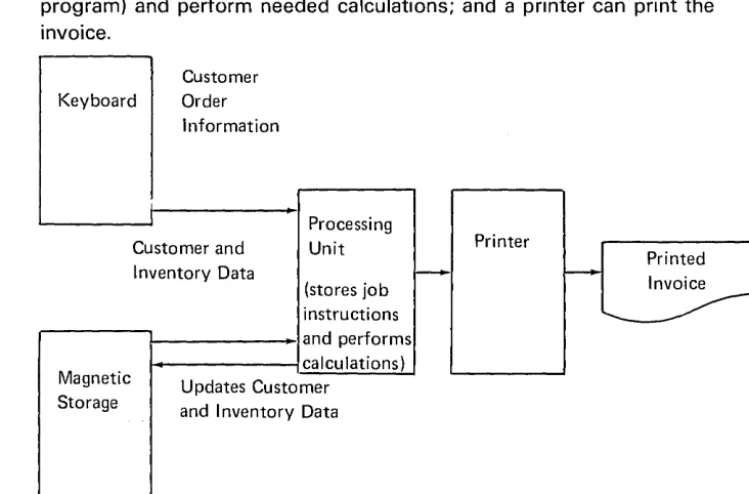
As shown in Figure 1, computer data processing can speed up a billing operation and reduce costly errors. Data (customer order information) can be entered at high speed via the keyboard; many records can be quickly referenced and updated in a magnetic storage medium (tape or diskette); the processing unit can store and carry out instructions (a program) and perform needed calculations; and a printer can print the invoice.
Customer
Keyboard Order
Information
I
I Processing
Customer and Unit Printer
I nventory Data
(stores job
-instructions and performs calculations)
Magnetic Updates Customer
Storage and Inventory Data
Figure 1. Computer Data Processing
[image:9.627.135.510.479.726.2]The 5110 Model 1 Computing System (Figure 2) contains the following elements, which are components of the data processing system:
• Input Elements-keyboard, tape, diskette
• Output Elements-tape, diskette, printer, display screen
• Processing Elements-main storage, tape, diskette, programs
Drives
Figure 2. 5110 Computing System Data Processing Elements
The keyboard is the device the operator uses to key (enter) data into the processing unit.
The tape and diskette are used either as input or output devices. Input data or programs can be entered into the system using the tape or diskette. Output data can be stored on the tape or diskette for use in other programs.
The printer records on paper (prints) the data sent to it by the
processing unit. This printed material is sometimes referred to as the hard copy output.
The display screen displays output data sent to it by the processing unit. The system uses the display screen to communicate with the operator by displaying information keyed on the keyboard so that the operator can verify the information· before it enters the system. The
~
'-. ... , -,," [image:10.626.157.512.175.316.2]o
o
o
o
o
o
o
The processing unit is made up of the main storage, tape or diskette, and programs. The tape or diskette is used to store files of
information and programs that are used by the system. Main storage is the part of the processing unit that holds a program so that the system can execute the steps in the program. Data is moved from tape or diskette into main storage for use by the program being executed.
ADVANTAGES OF COMPUTER DATA PROCESSING
If data processing is always a matter of input, processing, and output, how is computer data processing different from manual or mechanical data processing? Computers process large volumes of data faster, more accurately, in less space, and with greater versatility .
• Speed. Because computers process data electronically, they operate at remarkable speeds that save a tremendous amount of time .
• Accuracy. A computer does exactly what it is told to do and only what it is told to do. Because of this constant dependence on instructions, a computer follows program after program, second after second and hour after hour, with unvarying accuracy.
Computers also reduce transcription errors by dramatically reducing the need for manual transcription. Once you record data on a tape or diskette that data may never have to be written by hand
again-you can update as many different customer records, complete as many different kinds of forms, and create as many different reports from that data as you have application programs that use the data. By referring to the display screen while first recording the data, you can insure that the data is keyed correctly. Programs that use the data can perform control total checks and balances to continually validate the accuracy of the data.
5110 Data Processing Concepts 5
--•
Data Compression. Computers miniaturize data. Suppose a business enters its accounts receivable transactions in a machine-posted register like the one shown below.ACCOUNTS RECEIVABLE TRANSACTION REGISTER
07/11/-- PAGE 001
CUST CUSTOMER JOURNAL INVOICE CASH INVOICE JOURNAL
DATE NO NAME NO NO AMOUNT AMOUNT AMOUNT
07/11/-- 759820 SOUND OF THE SEVENTIE 063420 $ 46.23
07/11/-- 633870 OLDE VILLAGE SHOPPE 063421 89.70
07/11/-- 642990 PARAGON TV SALES 063422 20.30
07/11/-- 122620 CANNIZONI STUDIOS 063423 129.76
07/11/-- 682030 RAYMONDS RAPID REPAIR $ 63.80 07/11/-- 742950 SARATOGA VARIETY 29.72
07/11 /-- 014280 BAKER BRADLEY & CO. 43.50 07/11 /-- 872060 UNIVERSITY ELECTRIC 97.75
07/11/-- 883290 VILLAGE MUSIC & TV 07-036 07/11/-- 006280 ALLSTONS 07-037
TOTALS $234.77* $285.99*
The preceding example shows 10 sample entries, or records. Several thousand such transaction records can be stored by the system on one diskette. That is, the system enables you to store large volumes of business information in an economical and manageable form that can be processed by a machine.
$18.23CR
10.70CR
$28.93CR*
(~
~~,
I
\ ,
"'-_ ...
o
C)
o
C)
o
o
o
• Versatility. The number of different tasks a computer can do is limited only by the number of different programs run on it. The computer can do much more than just add, subtract, multiply, and divide. The 5110 can, for example, prepare invoices, keep accounts receivable up to date, print weekly paychecks, and analyze data for thorough cost and sales analysis.
Speed, accuracy, data compression, and versatility combine to reduce data processing errors and increase productivity. But a less obvious advantage of computers has a more fundamental effect.
Computers impose discipline. As explained, a computer is helpless without programs-it cannot think for itself. Neither can a computer guess whether its programs really reflect the problems at hand-you must see that they do. In other words, you must carefully analyze the data processing requirements of your organization in order to take full advantage of a computer. For instance, with the data processing capabilities provided by a 5110, what additional cost analysis,
inventory control, and auditing procedures would you like to implement in your organization?
The responsibility for analyzing an organization's data processing requirements falls, of course, to management. But the discipline imposed by a computer extends throughout the data processing activities of the organization. Once you've designed or selected computer programs that reflect management directives, you've established management control that is automatically practiced each time those programs are used.
5110 Data Processing Concepts 7
-I PAGE 189
---
("(f
~---~"II
ACCOUNTS RECEIVABLE TRANSACTION REGISTER II
--DATE 07/11/--CUST NO 759820 63387Q 642990 122620 682030 742950 014280 872060 883290 006280 07/11/--CUSTOMER NAME SOUND OF THE SEVENTIE OlDE VILLAGE SHOPPE PARAGON TV SALES CANNIZONI STUDIOS RAYMONDS RAP ID REPAI R SARATOGA VARIETY BAKER BRADLEY & CO. UNIVERSITY ELECTRIC VillAGE MUSIC & TVALLSTONS TOTALS
JOURNAL • INVOICE CASH
NO NO AMOUNT
063420 063421 063422 063423 07 -036 07-037
$ 63.80 29.72 43.50 97.75
I NVOI CE AMOUNT $ 46.23
89.70 20.30 129.76
$234.77* $285.99*
PAGE 001
JOURNAL AMOUNT $18.23CR 10.70CR I ,1'1
I,
$28.93CR*
II
:I
D
Accts Receivable Transaction Register07/11/--~I
o
o
o
o
o
o
o
Chapter 2. Elements of a BASIC Program
Before reading this chapter, you should be familiar with the
information in the 5110 BASIC Introduction, such as:
• Entering data from the keyboard
• The arithmetic operators
o Numeric and character variables
• The arithmetic operator hierarchy
o Entering a BASIC program
o The BASIC language statements REM, INPUT, GOTO, STOP, LET, IF, FOR, NEXT, READ, DATA, RESTORE, PRINT, OPEN, CLOSE, RESET, PUT, GET, and DIM
(I The system command used to store and retrieve programs on a
tape or diskette
In this chapter, the following topics are discussed:
o Defining a program
G Analyzing an application (problem) so that BASIC programs can be
used to process information
o The most commonly used BASIC statements
DEFINING A PROGRAM
A program is a procedure or set of instructions you establish for doing a job. These instructions are necessary because a computer cannot think for itself. When defining a program for the 5110, you can use a programming language called BASIC. BASIC is a simple-to-use programming language with which you describe how you want the 5110 to do the job.
The next section presents an approach to analyzing an application so that a BASIC program can be used to help process information. This approach helps you break down an application into manageable parts so that you can apply BASIC statements you know can process the information. Breaking down an application into manageable parts promotes thoroughness and allows the application to be solved (programmed) faster.
Elements of a BASIC Program 9
~---.---PROCESSING INFORMATION
Every problem consists of three parts:
• The input data required to generate the final result
• The process (BASIC statements) required to generate the final
results
• The output, which is the final result
Each part might consist of one statement or several statements. In the following sections, each part is discussed in more detail. Also, an example for finding the compound interest is used to illustrate each part.
Output
Because the output is the primary reason for a program to exist, considering the output provides the best place to start solving a problem. To do this, consider these questions:
1. What results are required?
2. How should the results be formatted?
3. Who uses the results? For example, should the results be
displayed or printed, or should the results be stored in the main storage, on tape, or on diskette for later use?
Now, for the compound interest example, assume the answers to these questions are:
1. The amount of interest earned
2. The message THE INTEREST EARNED IS: followed by the
calculated interest earned
3. Finance officers need the displayed results to evaluate different
o
o
o
o
o
o
o
Input
After the output, you should consider what input data is required to generate the output. To do this, consider such questions as:
1. What input is required?
2. Where does the input come from?
3. How is the input provided?
For the compound interest example, the answers to these questions are:
1. The interest rate, number of years, and principal
2. From finance officers who need to know the amount of interest
earned for different plans
3. Through the 5110 keyboard
In our example, most of the input data will come from the keyboard; however, other ways also exist. For example, some data might be permanent and be included within the program (for example, headings and labels). There might also be data that is usually constant but, for certain applications, must be changed. This data might be coded in the program as variables that can be modified. And, of course, data might also be from tape or diskette.
The following list summarizes the input and output considerations so far:
Device
Data
Input
Keyboard
I nterest rate Number of years Principal
Output
Display
THE INTEREST EARNED IS: The calculated interest earned
Elements of a BASIC Program 11
-Process
Once the input and output are well defined, all of the characteristics work together to make the process part the most straightforward.
For our compound interest example, the process part consists of:
1. Defining the algorithm used to calculate the compound interest
2. Using the input to generate the results
The formula used in this example for the compound interest is:
COMPOUND INTEREST
=
PRINCIPAL (1+
Rate)Years100
The BASIC statements that use the input to generate the results might be as follows:
(:, :::: 1 + I~~ / :I. 0 0
"(:{ :::: p, -J"' Y
C,- p·j(·:O
PUTTING IT ALL TOGETHER
R is the interest rate Y is the time in years P is the principal
C is the compound interest
Now that you have considered the three parts of information processing, it is time to write your program. For the compound interest example, your program might look like this:
00:1. I] PHI j\lT I [i\~T[ I? THE I j\!TE PE~:)T.. p F~ I NC I Pr,!... (~IN:O \'E(:" Pfl ·
o
O:::?O INPI . ..IT F~! P! Y0030 (:,:::::!.+P/100
o
0 I.j. 0n :::: (::, .,.. y
o (}
~.:.:.; 0 C :::: P .)(. Do
0 6 0 P I~~: I j\~ T . T H [: I i\! T E I~ E ~:) T E (; Pi",! E DIG: .OO"?O PPINT C: .... p
So far, you have taken a simple application and designed a program to
c
c
o
o
o
\
0
'·
o
o
o
ADDITIONAL LEVELS OF INPUT, PROCESS, AND OUTPUT
For complex or large applications, you might want to break the INPUT, PROCESS, and OUTPUT down into additional levels of input, process, and output.
Program
1
INPUT PROCESS OUTPUT First Level
I
IInput Process Output Additional Levels
This allows you to break each first-level INPUT, PROCESS, and OUTPUT part into manageable parts. Let's continue with the
compound interest problem and expand the first-level INPUT portion into additional levels of input, process, and output. That is, the INPUT portion is going to be treated as a separate problem in itself.
First, consider the output of the INPUT portion. Here the output is actually the input for the first-level PROCESS portion. In this case,
assume that the output must be an interest rate not greater than 18 %,
a number of years not greater than 40, and a principal not greater than 500,000.00.
Next, consider the input for the INPUT portion. The input is the same as before (the interest rate, number of years, and principal for which the interest earned must be calculated). However, in this case, the finance officers might be unfamiliar with the program; therefore, there should be prompting messages telling them what to enter.
Finally, consider the process for the INPUT portion. In this case, the processing consists of error checking and validation of all the input data, because you want to make sure that the interest rate is not
greater than 18 %, the number of years is not greater than 40, and the
principal is not greater than 500,000.00.
Now, taking these considerations into account, the BASIC statements for the first-level input portion might be:
() 0 :I. 0 P I;~ J j") T 'E N T E I;{ THE I j"'! TEn E ~:~ T I;~ (~, T I::: I ' { E
t,
PH (, N n P P I i'··f C I P p,!... 'o
o::.~o Ii\!PUT I., Y .. Po
0 :3 0 J F I ::; :I. B Ci D'r
D 6 0o
0 1./. () P F~ I , .. I T 'T H E I ,',·1 T E P E ~:) T p (~,'r
E J ~:) Cl PI::: ti T E R T H (:', N 1 U P [: F~ C E NT'o
0 ~:.:; (I CiDTD :I. 0o
0 (\ 0 I F "'i' ::; '-/. 0 [i 0 T D ? 0o
0
'l0 P R I NT' THE N U
/'1DE
H (IF \' E
j~',PSI
~::) Ci P F (:', T [: P T H P,I"'! '-I. 0 .OODO
GO TO
10
o
0 9 0 I F P ::; :::; 0 0 0 0 0 GOT (] :1. ~;.:: 0o :I.
0 0 P P I
j\!T . THE P
nI ;--,} C I P
(:i I...I
~:) CiPEt·,
TEn T H (:', N ~:.; 0 0 J 0 0 (I , 0 0 .0:1.:1.0 GUlO :1.0
For complex or large applications, you could also break down the first-level PROCESS and OUTPUT portions; however we are not going to do that for this example.
As you break an application down into manageable parts, you might want to have a separate program for each part. For example:
o ()
O!5 U~:)[ I, Y , P0010 PF<INT
'ENTEF~:THE
INT[I~ESTH(,:,TE,
YE{~f<~:)1t.i\lD
PHIi'·ICIPt.I...·-0020 INPUT I .. Y,P
o ()
?:0 I F
I~;:I.B GOT [)
lJ0
o
0
'+
0 P
r·~I NT' THE I NT E
HE:B T
I~ t"t'r
E I B G
HE
i~iT E
Ix T H tl N 1 B PER C E NT'o
O!.:SOGOlD
:I. 00060 IF
Y~40GOTD 90
o
0 "{' 0 P I~I NT'
"r
HEN U M B [ ~~ D F YEt, PBIB
G HE (.:) T E I~ "i' HAN'+
0 'OOBO
GOlD
:to
IF
P~500000GOlD
120
0090
0:1.00
0:1.:1.0
PRINT 'THE PRINCIPAl... IS GREATER THAN 500000.00'
OO"i'D 1. 0
o
o
o
c)
o
o
o
o
0 O~5 I . ..I~:)E I IYIP
Ie
1 _ - - - T h e output program0010 PRINT
'THEINTEF<EST
E(.~RNEDIf):'
is loaded from0020 P R I NT
c·-
P file 3 and executed.0030 BTDP
CONCLUSION
When solving a problem using the 5110, break the problem down into
manageable parts. To do this, first focus on the program output; this is the primary interface to the user. The output also defines what the real purpose of the program is. Next, consider all the input data that is required to generate the output. Finally (and only then), plan the actual processing.
Thinking in this way should help you make the transition from knowing
the BASIC language to being able to use the BASIC languag~ and then
to generating programs that solve real problems.
Elements of a BASIC Program 15
-BASIC STATEMENTS MOST COMMONLY USED FOR INFORMATION PROCESSING
Following is a description of some BASIC statements that you will use (~
' ... ~., .. ",
for the input, process, and output portions of a BASIC program.
Input Statements
Statement Description
(~,'
,-_ •... / 'INPUT Requests that you enter data
from the keyboard during the
execution of the program. The (~-'"
data entered from the keyboard
~j
is assigned to a corresponding name (variable) specified by the statement.
DATA Creates a string of numeric and/or
character values that can be used by the program. The values are assigned to a corresponding name specified by a READ statement.
READ Assigns values to variables and
arrays from the values created by (-~
a DATA statement. '--_
....
OPEN Causes specified input and/or
output files to be activated. The files can then be used for the input and/or output operations.
CLOSE Causes the specific input and/or
output file to be deactivated. The files cannot then be used for input and/ or output operations
C
Process Statements
o
StatementLET
FOR
o
NEXT GOSUB
0
RETURN
0
GOTOIF
0
Description
Assigns the value of an expression to a variable.
Marks the beginning of a loop and specifies the condition of its execution and termination .. The N EXT statement is used to mark the end of the loop:
o
J 0 0 F Dn
I< :::: :I.'r
0 :1. 0See the FOR statement. Transfers control to the first statement of a subroutine. Then
when a RETURN statement is executed, control returns to the next
statement following the GOSUB statement:
GD~:)UB 2~.:,:,; 0
(j:l.~!J
[
0:1.00
I:::: : 1 . - - - ,
,,'
n
2~.::.; ()O?9 (I nF TU H i \ ! - - - J
A subroutine is useful when the same statements must be executed several times in the program. See the GOSUB statement. Transfers control to a specified statement.
Causes the program action to be determined as the result of the evaluation of a condition.
Output Statements
Statement Description
PRINT Causes data to be displayed on
the display screen.
PRINT FLP Causes data to be printed on the
51;03 Printer. Data can be formatted as it is being printed if the
PRINT FLP statement is used in conjunction with the IMAGE and FORM statements.
WRITE FILE Adds a new record at the end of
a record I/O file.
REWRITE FILE Updates (rewrites) a record that
already exists in a record I/O file.
PUT Writes data from specified variables
to a stream I/O file.
( '
"
--'
(~~'
\ ... _./'
(~~
\' ...
-r'"
\'--o
o
o
C)
o
o
o
Chapter 3. Changing the Sequence of Execution in Your BASIC Program
In this chapter, the following topics are discussed:
o Using loops to do the same calculations repeatedly
• Using functions or subroutines to do the same operation several times
• Changing to another BASIC program from a program currently being executed
LOOPS
Suppose you want to display credit amounts of $100 to $5000 in
increments of $100, along with the monthly finance charge of 18
%
peryear (.015 per month). You could do it simply enough by writing the following statements:
o
0 :I. 0 P P I j"'! T :I. 0 O! 1 0 0 .)(. , 0 1 ~.:.:j0020 PPlj\lT ~?OO., ~,:.~OO·)(·, O:l.~:.:.;
[I
0 3 0 P PIN T :';:; 0
O! :30 0 .)(. ,
(}:I. ~:.=.;o
0'+
0 P F! I i'-.~ T'+
0 O!'+
0 0 .)(. , 0 1 ~:.:.i-::.
() I.j. (? 0 P F! I j'··l T ",. 9 0 0., 1.1. ? 0 0 .)(. I 0 :I. ~::.;
0500 PRINT 5000, 5000*.0:1.5
Although this technique works correctly, it is time consuming and tedious. In displaying an amount and its finance charge for all
amounts from 100 to 5000, what we are really doing is performing the same operation repeatedly, but using different numbers each time. Calculations that are to be repeated can generally be done efficiently
by a simple programming device known as a loop.
Changing the Sequence of Execution in Your BASIC Program 19
_--Here's a concise method of performing the same operations shown previously:
o
0 :I. 0 P :::: :I. 0 0o
0 ~2 [I P P I ;-") T P.. P :)(. . 0 :I. ~.:.:.;o
0 ::::;. 0 P :::: P + :I. 0 (Io
0
'-I. 0 G D T D ~2 0Here, we have created a loop in statements 20 through 40. When the program is run, the PRINT statement will be executed once each time the value of P increases by 100. The statement that makes the loop possible is the GOTO statement. It alters the normal sequence of execution by directing the computer to execute a different statement. It does this by referring to the number of that statement. The
statement GOTO 20 directs the computer back to statement 20, which displays the value of P and its finance charge. Statement 30 then increases the value of P by 100, and statement 40 is executed again, branching the program back to statement 20.
There is one problem with the loop we have shown here: there is no provision for ending the loop. Consequently, not only will we get results for values from 100 to 5000, but also for 5100, 5200, and so on, unless we take some action to stop execution. In this program, we want the loop to end after we reach the value 5000, or, put another way, we want the loop to continue as long as P is less than or equal to 5000. To provide this action, we should build into the loop a test from some condition, so that when the condition is met, the loop will end automatically.
Using the IF Statement
An IF statement says it quite concisely:
o
o
o
o
o
o
AS long as P satisfies the condition, P less than or equal to 5000,
execution will loop back to the PRINT statement. However, when P no longer satisfies the condition-when P is greater than 5000-the loop will end automatically and the execution will fall through the IF statement to the next statement, which in this case is an EN D statement signifying the end of the program.
The IF statement has many applications, some of which can be quite sophisticated, depending on the condition tested in the statement. For example, conditions such as the following can be tested:
o
:I. 6 0 1Ft, :::: 0 Ci 0 T D (~ 0o
:t ./ 0:r
F (, :::: 0 Ci 0 T D b 00:1.
n
[I IF 1:< .... X/'-( -:::Z ·1' :.:.~ GUlD B 0The first example is quite simple: if the value of the variable A is equal to 0, branch to statement number 60. The second statement tests the same condition as the first statement, but substitutes the word THEN for GOTO. In the IF statement, THEN and GOTO have exactly the same meaning. The third statement makes a test between
two sets of expressions. The first expression evaluates 8-X/Y. The
second expression evaluates Z
t
2. If the value of the first expressionis less than «) the value of the second expression, the program is to
branch to statement 80.
Relational Operators
The IF statements illustrated in these examples used the symbols <, >,
and
=.
These symbols are part of a set of operators called relationaloperators. Relational operators are used only in I F statements; they test the relationship between two expressions. It is important to note that relational operators do not perform any arithmetic operations. They simply test whether or not a condition is satisfied. For example, in statement 40, the equal sign does not mean that P is to be given the value 5000; it tests whether the value already assigned to P equals 5000. If a condition is satisfied (if P does equal 5000 in this example}, then the condition is considered true. If a condition is not satisfied (if P does not equal 5000), the condition is considered false. Thus, a relational operator says that if the condition being tested is true, the action specified is taken; otherwise, the action is not taken. Reviewing
this concept using the example IF A
=
0 GOTO 60, if the condition istrue (A does equal 0), then the branch to statement number 60 is made; otherwise the branch is not made. Instead, the program continues with the next statement in sequence.
Changing the Sequence qf Execution in Your BASIC Program 21
The relational operators and their definitions are:
Operator
=
< > or ~
> > = or ~
<
=
or ~Here are some examples:
Meaning
Equal to Not equal to Greater than
Greater than or equal to Less than or equal to
00:30 IF (:'i::::E{ GDlD ~::;
n n
(I :I. ? 0 I F ' P PIN T . ,:' . P P J Z E' G U
'r
U :.-::) (I 0o
BOO I F (:'[ 'Ii :,:(~ D ':!I Ci U'r n
~,:,:,;:I.~? 0In the first example, a test is made between the values contained in the arithmetic variables A and B. The second example illustrates comparison of character data. For character data, a comparison is made according to the EBCDIC collating sequence of each character in corresponding positions in the constant. In other words, the first character of one constant is compared to the first character of the other constant, the second compared to the second of the other, and so on. In this example, the first three letters of the constants compare equal, but when the letter N is compared to Z, they compare unequal. The letter N, occurring before the letter Z in the alphabet, registers less than in the collating sequence. At this point, the condition tested would be met; that is, the character string PRINT is indeed less than PRIZE.
In the third example, character variables are compared. Let's assume that the variable A$ contains the value ON and the variable D$ contains ONLY. The first 2 characters match, but when the letter L is compared to a blank, which is assumed for comparison purposes, they do not match. Thus, the result in this case would also be true,
because the value of A$ is not equal to the value of D$. If, however, A$ and D$ do contain matching strings, say both contain the
characters ONLY, then the test results would be false-A$ and D$ would be equal, thereby not satisfying the condition of the test.
o
o
C)
o
o
o
o
Logical Operators
The example I F A = B tests the relationship between two expressions.
Suppose, however, that you wish to take action if more than one relationship is true. For example, suppose that not only must A equal
B but also X must equal Y. You could make these comparisons by
using the logical AND operator, written as &:
[I I) I.j. 0 I F tl :::: D .~.« X:::: .'-(' G D T 0 :I. 0 0
Statement 40 says that if A equals B and X equals Y, then statement
100 is executed. If only one comparison, or neither comparison, is
true, program execution continues with statement 60.
The IF statement can specify two logical operators:
Operator
&
I
Meaning
AND OR
The AND operator states that both conditions of a test must be true
for the entire expression to be true; the OR operator states that either
condition (or both) must be true for the expression to be true.
If you want to branch to statement 100 if either A equals B or X
equals V, you could write this statement:
0050 IF
A=BIX=Y
GOlD 100
Here are other examples of the AN D and OR operators:
o
0 "l 0 I F C '=1; ::- D '=1; ~=~ J '=1; :::: I( '=1=· G [I'r
C) !:5 0DODO IF
(:·I:I.:.:(~(:i~?8: ....I·l::-·
CtIT' CiC)TO:::;00
The first example tests an OR condition using character variables. It
says that if the value in the variable C$ is greater than the value in D$ or if the values in J$ and K$ are equal, then a branch is made to statement 50.
The second example tests an AND condition using mixed variables. It says that if the value in the arithmetic variable A 1 is not equal to the value in A2 and the value in the character variable J$ is greater than the character string CAT, then the program is to branch to statement 300; otherwise, program execution is to continue with the next sequential statement.
Changing the Sequence of Execution in Your BASIC Program 23
-THE COMPUTED GOTO STATEMENT
The computed GOTO statement is a version of the GOTO statement that gives you the ability to branch to different statements during various stages in a program.
A computed GOTO could look like this:
A branch is made to statement 30, to statement 40, or to statement 50, based on the integer portion of the value contained in the variable
J. The integer portion may contain a value of from 1 to 3. If the value
is 1, a branch is made to the first statement shown in the list,
statement number 30. If the value is 2, the branch is to be the second statement, number 40. If the value is 3, the branch is to the third
statement, number 50. If the value is greater than or equal to (~) 4 or
less than «) 1, program execution falls through to the statement
following the computed GOTO statement.
The expression determining the branch to be made can be a simple
variable, such as J above, or a more complicated expression, say (A +
B) / 2. If such an expression were used, its computed value would determine the branch to be made. Consider this example:
The expression (A + B) / 2 is evaluated, and a branch is made to
statement number 200, 220, 100, or 240, depending on whether the value is 1, 2, 3, or 4, respectively. Note also that the statement numbers shown in the list do not have to be specified in sequential order; that is, statement number 100 can be the third number in the list even though it is a lower number than the others.
More about Loops-Using FOR and NEXT Statement
A still more concise method of specifying a loop is by using the FOR and NEXT statements. For example, our program for finding and displaying the finance charge for $100 to $5000 could be further simplified to look like this:
C~
~
(
.o
o
o
u
o
o
c····
IThe FOR statement identifies the beginning of the loop; the NEXT statement identifies the end of it. I n between is the statement, or sequence of statements (we need only one for this example) that will be executed repeatedly until the specification in the FOR statement has been satisfied.
In our example, the FOR statement specifies that the statement in the loop (the PRINT statement) will be executed repeatedly for successive values of P from 100 through 5000. (An increment of 100 is added to P for each execution of the NEXT statement.) When the value of P exceeds 5000, execution of the loop is ended, and control is passed to the next logically executable statement following the NEXT statement. In this case, the following statement is a STOP statement denoting the end of the program. However, other statements could precede it, or the NEXT could be the last statement prior to the STOP.
The increment is always 1 unless it is explicitly stated to be otherwise; for example:
0010 FOR P=100 TO 5000 STEP 200
This FOR statement explicitly states an increment (or step) of 200. Thus, the statement(s) in the loop will be executed once for every odd multiple of P from 100 to 5000 (that is, the range is 100, 300,
500, .. .4900). When the value of P exceeds 5000 (that is, when it reaches 5100)' execution of the loop will end. The value of P will be set back to 4900 before the next logically executable statement is executed.
If you want to execute the loop once for every even multiple of 100 to 5000 (that is 200, 400, 600, ... 5000), you would say the following:
o
0 J 0 F D F~ P :::: ~2 0 0 T 0 ~:.=.; 0 0 0 ~:> T E P ~? 0 0Again, when the value of P exceeds 5000 (in this case, when it reaches 5200), execution of the loop will end. The value P will be set back to 5000 when the next logically executable statement is executed.
As with expressions appearing in assignment statements and in the body of PRINT statements, the specifications in FOR statements can be quite complicated. For example, the following FOR statements are permitted:
0030
FOR
I=A TO B0040 FOR J=8*M+Y TO At3
o
0 ~::.; 0 FOR 1< :::: ~:::; G!n (
B ) .... C T 0 ~.:.:.; ~.:.=.; 0 ~:) T E P (:i ./ B·r
~?The first example states that the initial value of I is to be taken from the variable A and that the loop is to be executed repeatedly until the
value exceeds the value of B. The second example states that the
initial value of J is the value of the expression 8
*
M + Y, and the loopis to be executed until this value exceeds the value of A
**
3. Thethird example states that the initial value of K is to be the square root of B minus C; the loop is to be executed until the value 550 is
exceeded, and each time through the loop the value of K is to be increased by the value of the expression A / B
+
2.You can also use more than one set of FOR/NEXT statements together in a program by nesting one loop. Let's look at a program that computes compound interest and uses nested FOR loops in the process.
The mathematical formula to compute compound interest is:
A
=
P (1
+~)
t100
where A is the amount to be calculated, P is the principal, R is the rate of interest, and T is the time period.
The program below shows how you can enter any amount as the
principal (P), compute interest on it using interest rates from 1 % to
20%, for each of 10 years, and display all the amounts-a total of 200 values.
I] 0':/0 PHIj\~T . ENT!:::!? PPINCI Pt'I!...·
0:1.00 I(!PI..JT P
o
1 0 ~.:.:.; P F~ I i\l T · l I i"1 E . ! •n
t! T F . ! • ( , i"I 0 U j\l T .o :I. 1 0 FOP T :::: :1. T C} :I. 0
01 ::? 0 F n I~~ n:::::I.
or
D ;.:.~ 0o
:I. :.'::) 0t, ::::
P .)(. ( :I. + F~ ./ :I. 0 0 ) "!'" To
:I.1+ 0 P P I
j\!T T} H
! ('Io
:I. ~.:5 (} N E X'r
I;~0:1.(;)0 NE>:T T
Statement 130 duplicates, in BASIC terms, the compound interest
formula. The FOR statement numbered 120 and the NEXT statement
c
( '
'--_
..o
(~
o
o
o
However, this loop is enclosed, or
nested,
within the loop delimited bythe FOR and NEXT statements numbered 110 and 160. This outer loop
changes the value of T, the time variable, from 1 to 10. Each time the
value of T changes, the inner loop cycles through 20 times changing
the value of R. Since T changes value 10 times, the loop changing the
value of R is executed 200 times. Each time, the PRINT statement prints new values.
A nested loop is one that is enclosed by another loop. That is, the FOR/NEXT statements of one loop occur between the FOR/NEXT statements of another loop, as illustrated:
Outer Loop
Nested Loop 1
Nested
Loop 2
FUNCTIONS AND SUBROUTINES
0 0 0 0 () 0
:I. 0 0
:I. [I 0
:I.
20
. ::. .::. \:. -::.,:;.
1 ~.::.; 0
'1 I
.. <:) 0
:I. "i' 0
I
FOF~ P ,::.
FO
F~ P c·FD I~:~ T .:: .
NEXT
T ..::.NEXT
I'" ':. i:·NEXT
P ..::.As part of the BASIC language, you can define functions or write a program segment, called a subroutine, which you expect to use several times in your program.
Functions
User-written functions can be arithmetic or character. An arithmetic function is named by the letters FN followed by a single letter. A character function is named by the letters FN followed by a single
letter and the currency symbol ($).
The following can be names of arithmetic functions:
FNA FNB FNR FN#
_ ... ,.-.. '" .. , .. _ - - - -..
_-_._
.. _-Changing the Sequence of Execution in Your BASIC Program 27
-The following can be names of character functions:
FNA$ FN#$
A user-written function is named and defined by the DEF statement. For example:
defines the natural exponential of X squared, using the intrinsic
function EXP. The arithmetic variable X, enclosed in parentheses after the function name FNE, is called a dummy variable. You can have more than one dummy variable, and the list of variables can contain both arithmetic and character dummy variables. (The expression value substituted for each dummy variable is called an argument.) After defining a function, the function name and its accompanying argument(s) can be used anywhere in your program. For example:
o
0 :I. 0 :0 E F F j\~ E(><) ::::
E >< P(><
l ~? )0050 Y
=
FNE (.5)
o
0 () 0:? ::::
F' N E (C + :,,:,~ :>o
0 "{' 0 P I~~ I i\~ T F N E (::!~. "? ~:,:,i ) + ,,{ ,/ ZUser-defined functions can be defined in one statement or over a group of statements. A function defined in one statement, such as the function illustrated above, is called a single-line function. A function defined over many statements is called a multiline function. A multiline function begins with the word DEF, the function name, and any arguments, the same as single-line functions. However, the DEF statement does not contain the equal sign or an expression. Rather, the value of the function is developed by the statements following the DEF and is defined in a RETURN statement, which computes the value and returns the value to the program. The end of a multiline function is defined by the FNEND statement. Here is the way the statements in a multiline function must be sequenced:
o
o
o
o
Here is an example of a multiline function:
o (} :::) 0 fiEF Fi\)(:', < >< ! y)
o
01+
0 1 F :/::- 0 8~ \'::- 1 Ci [I'r
0 .S 0o
0 ~.:.=.; 0 G [I T 0 (, ~.:5 [I 0 .::) 0 PET U H j\! X + yo
0 (. ~.::.;n [ 'r
1...1 P N >< .... "'j'DO"? 0 FNE:i\lD
This function uses two dummy arithmetic variables (X and Y) as arguments. The function tests the values of both arguments. If X is greater than 0, and Y is greater than 1, the values are added and the sum is returned to the program. If the values do not satisfy the tested conditions, program control transfers to statement 65. If this function were used in the following program, C would have a value of 7 and D would have a value of -2.
(I 0 ::::~ 0 :0 F F F i"II (:', (><., \( )
o
01+
0 J F X::- 0 S 'Y::- 1 D Dor
D oS 0o
0 ~:5 0 G D T D <:> !:.:.io 0 (:) 0 !~~ [: T 1...1 F~ j\) :;( 0{--'y
o
0 /) ~:.:o; F;~ E T 1...1 F: i') X· .. · \!00'/0 FNFND
.::.
o
:l 0 [I (, :::: ~::.;o
:I. ~.:.:: 0:0 ::::
;.:.~o
:I. :-:; 0 C :::: F () (', (PI! B :>o
ll.j· 0 It ;::; F j\!t,
(O! ~.:o~ )Changing the Sequence of Execution in Your BASIC Program 29
Subroutines
Another way of writing a group of statements to be executed at different times in your program is to group them into a subroutine. Execution of a subroutine begins with the GOSUB statement, where the number specified in the statement specifies the number of the first statement in the subroutine. For example:
100 GOSUB 200
causes the computer to skip, or branch, to statement 200, the first
statement in the subroutine. Program execution continues from that
point. To cause the computer to branch back to statement 100
(actually, to the next sequential statement following statement 100),
the last statement of the subroutine must be a RETURN statement. This RETURN statement, unlike a RETURN used with a function, contains no expression. A program containing a subroutine could be sequenced like this:
r-100 GOSUB 200
...---;--..11 0 120 130 140 150 160 170 180
190 STOP
200 210 220 230 240 250
L....---260 RETURN
270 END
These are the statements that will be executed after the RETURN.
First statement of the subroutine.
Statements executed as part of the subroutine.
Statement 100 branches to statement 200. Statement 260 returns
o
o
o
o
o
A program illustrating the use of a subroutine is shown below. This program determines the greatest common divisor of three integers. The first two numbers are selected in program statements 30 and 40, and their greatest common divisor (CD) is determined in the
subroutine, statements 200 through 310. The CD just found is assigned to X in statement 60. The third number read in from the INPUT statement is assigned to Y in statement 70. The subroutine is entered a second time from statement 80 to find the greatest common divisor (CD) of these two numbers. The result is, of course, the greatest common divisor of the three given numbers. It is displayed with them in statement 90.
0010 P F~ I i····!·r I Ei\!TE n 'rH F~EE I j·· •• !TFDE I~~~:) I
0020 Ii\!PI...IT t"l}
n ..
C0030 :;(::::{'\
() 0 l.J. 0 Y::::B
o
0 ~.:5 0 Ci [I ~:) 1...1:0
::? 0 00060 :;<::::[i
o 0 .. ? 0 'y :::: C
oono
GCJGUB 200() 090 P P I NT I ( : , I I I B I .' I C I ! I CD .
o
0 ?~:5 pn
I NT (I .. BIe ..
G0:1.00 STDP
O:~:.:O 0 C!::::Ii\!T (x/··/)
o
~.:.~ :I. 0 P :::: X····0
1(' .. {o
:\:.~ ~.:.~ 0 I F !~~ :::: 0 G D T D :3 0 0o :'?3 () x::::··/
o
21.!· 0 .. (:::: pI) ~?~.:.:.; 0 GOlD
:?
000300 G::::'Y O:3:!' 0 PE'ru F·::N
Changing the Sequence of Execution in Your BASIC Program 31
_---_.-Let's assume these numbers are entered when the INPUT statement is executed:
ENTER THREE INTEGERS
?
60 / 90,120
The output will be:
1.
19
(.~ B
60
90
:37
C :1.20
1::'1::'
.... 1 .... 1
CD ~5
0
Another example of input and resulting output is:
A
ENTER THREE INTEGERS
"C, .0
38
ll·c
'-,r)
( .: ..
COMPUTED GOSUB STATEMENT
CD
B
(print positions)
The computed GOSUB statement is similar to the computed GOTO statement discussed in this chapter. They both cause a branch to one of a number of statements based on the computed value of an
expression. The difference between the two statements is that the GOSUB branches to a subroutine; the RETURN statement in the subroutine returns program execution to the statement following the computed GOSUB statement.
Consider this example:
o
0 :3 [I GOb 1...1 :B :I. ~.? 0 ! :I. '? ~.:.:.; .. 1 9 ~:.:.i 0 N ::< ....y
A branch is made to one of three subroutines, either the one
beginning with statement 120, the one beginning with statement 175, or the one beginning with statement 195, depending on whether the
o
o
o
PROGRAM CHAINING
With the program chaining technique, a BASIC program can be shared with other BASIC programs. For example, suppose that when writing a program you discover that an operation you want to perform is available as a separate program. It could be time saving to you to be able to use that program in conjunction with the one you are currently writing. The CHAIN and USE statements can help you access data and execute that program.
The CHAI N statement is used in one BASIC program to tell the computer to stop executing the current program and start executing another BASIC program. To tell the computer which program to start executing, you name it in the CHAIN statement. Here's an example:
0500 CHAIN 'D40', 'PROGB'
This statement instructs the computer to begin executing the program (in diskette drive 2) named PROGB. Note that when the CHAIN statement is executed, the current program (the program containing the CHAIN statement) is terminated.
Variable values in the chaining program are passed to the chained program; that is, they become accessible for use in that program only if they were defined in a USE statement.
In the program being chained, the USE statement specifies a list of variables that will receive the values passed from the CHAIN statement. For example, the value passed by J$ to PROGB can be received by PROGB in the statement:
o
2 () () U BEl( ~I) :I. BNote that the USE statement is written in both programs and the CHAIN statement is written in the chaining program (the program requesting execution of another program). The USE statement must be the first statement referencing a variable in each program.
The CHAIN and USE statements derive their value in being able to help you string two or more programs together instead of having to code similar program sections for individual programs. Also, CHAIN and USE statements allow you to segment large programs. The following is an example of CHAIN and USE.
Changing the Sequence of Execution in Your BASIC Program 33
".-Page of SA21-9307-0 Issued 28 April 1978
By TNL: SN21-0277
0010 REM THIS IS PROGA
0020 USE
,J~I;()
o
3 0 0 C H
(.~I N
I III·I·0
I I IP
I:~ 0G B
I0010 REM THIS IS PROGB
o ()
~:j 0 USE I( ~j;(:.
Chaining program
Program being chained
The CHAIN statement at 0300 of PROGA causes PROGB to be loaded
into storage, then execution transfers to PROGB. The value in
J$
ofPROGA is passed to K$ as specified by the USE statements in both
programs.
(~
'I
\.~ ... /
/-...,
o
o
o
o
o
o
Chapter 4. Fonnatting a Report
The PRINT USING FLP statement is useful for controlling the format of a report. PRINT USING FLP is used in conjunction with an Image or FORM statement or character variable to print values according to the format specified by the statement or variable. The PRINT USING FLP statement includes the values to be printed and the statement number or character variable of a corresponding Image or FORM statement that specifies the format of the print line. For example:
0030 PRINT USING 40 / FLP,N / A
This statement refers to statement number 40, an Image or FORM statement, which will cause the computer to format the arithmetic variables N and A on the print line.
PRINT USING AND THE IMAGE STATEMENT
Statement 40 could look like this:
0040 : IN "" YRS AMT
=
$#""#.##The colon beginning statement 40 identifies it as an Image statement. The alphabetic characters are printed exactly as they appear in the
statement, and the pound sign (#) is the symbol used to indi~ate that a
value will be supplied from the output list in the PRINT USING
statement. The value of N replaces the first set of
#'
s, and the valueof A replaces the final set. The decimal point in the final set indicates
that the value of A is to be aligned on the decimal point in the image specification.
If N contains the value 10 and A contains the value 1628.88, the output line produced by statements 30 and 40 would look like:
IN 10 YRS AMT
=
$1628.88
In the Image statement, the pound sign (#) is used as a placeholder. In statement 40, the first set of #'s indicates that a value is to be displayed using two positions; the second set displays a value over six positions aligned on a decimal point between the fourth and fifth positions. If the value to be printed is smaller than six digits (say the value 300.40), the first, or high-order position, would be printed with a blank. Excess decimal positions are rounded to the number of decimal position # signs.
Page of SA21-9307-0 Issued 28 April 1978 By TNL: SN21-0277
The Image statement can also contain a placeholder consisting of the
symbols
I I I I
for an exponential value. If you want to print a valuecontaining an exponent, the Image statement could contain the following sequence of symbols:
*H:~ I *H:~ ~ ~ ~ ~
JHLJHJIIII
This sequence states that a value is to be printed with four digits followed by an exponential value. An exponential value is always printed with four positions for the format: E±dd. The letter E is followed by a plus or minus sign indicating a positive or negative
exponent, followed by two digits. Therefore, a set of four
I
s mustalways be specified as placeholders for exponents. If an Image specification contains this sequence:
the following shows how different values would be printed by that sequence:
Value
:1.2:'3
:1,2 I :'5 I :1,2:'5
Printed Format
:1.2
I30E+0:1.
:1.2
I:'50E+0 0
:I.;,:,~ I
30E· .. ·02
The specification calls for four digits to be printed aligned on the decimal point. Therefore, the number 123 is represented as 12.30 with an exponent of +1. The exponent tells us two things: the direction in which the decimal point is to be moved (+, to the right, and -, to the left), and the number of digits over which it is to