Volume 3, No. 7, Nov-Dec 2012
International Journal of Advanced Research in Computer Science
CASE STUDY AND REPORTS
Available Online at www.ijarcs.info
ISSN No. 0976-5697
a re-examine of gen on an assortment of images, compression techniques and its
algorithms
G. Thippanna* Y. Hema Suresh
Research scholar Dept. Of Computer Science & Technology, S.K. University, Anantapur, A.P. India.
Dr. T. Bhaskar Reddy
Research Supervisor Dept of Computer Science
India
Abstract : - Now a day’s images are essential thought and lasting impression at mass communication. The awesome thing is that image compression also essential for its applications such as transmission and store in database. An endeavour of this paper to give a guideline for an assortment of images, compression, need for compression, compression principles, compression techniques, classifications of compression techniques, and several of algorithms for image compression. And also study of this review to choose a engender guidelines to get the best compression algorithm for an images to compress, communicate (transmit) and how the images, compression and its algorithms are helpful to mass communication.
Key Words: - Image, Compression, Compression Techniques, algorithms.
I. INTRODUCTION
A. Image:
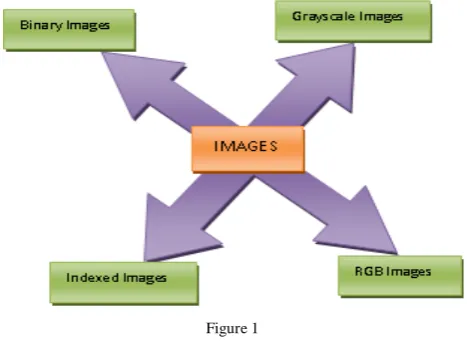
[image:1.595.41.275.527.706.2]An image is something than a regular digital photograph of a beautiful sight but in the framework of discipline, digital images are sample of gen, sampled at vertex points of n-dimensional grids. In the human visual system mode the images are essential in 2D signal process basically the images are usually in anolog form at their signal representation, however for processing of store and transformation of images by the computer applications they are converted into analog to digital form. But the digital images are basically in 2-dimentional array of pixel [1] i.e. an image is collection of pixels here 0 - 255 different pixels shows assortment of colors. According to image properties the bellowing diagram figure - 1 shows classification of images gallery in image processing [2].
Figure 1
a. Binary Images: - It is one type of an image; it has two conditions called ON or OFF. Here the conditions refer to some values one (1) and zero (0) with respectively. This type images are commonly used as a multiplier to mask regions within another image.
b. Indexed Images: - It is second type of image which is referring to instead of intensities, here the pixel value within an indexed image relates to a colour value within a colour. Since an indexed images reference colour composed up to 256 colours. These data values usually scale between 0 and 255 ranges.
c. Gray scale Images: - These images referring the intensities the pixel range from least intense called BLACK colour to most intense called WHITE colour, but these pixels intensities scale range is from 0 to 255.
d. RGB Images:- This is a fourth category image, it is also called as TRUE Colour image / Graphical images which were referring the images in three dimensional arrays and two dimensional at specify the location of pixel within an image. The other dimension specifies the colour of each pixel the colour dimension always has a size of [3] and is composed of the RED, GREEN, and BLUE colour bands of the image
The images are refers in different categories such types of all typed images are saved in different formats usually (jpg, bmp...).
Image Formats:
Figure 2
and responsible for 24, 48 bits also. At every time this type of images almost use for lossless image store not support at every time to compress, these are not used in web-pages.
f. GIF- GIF (Graphic Interchange Format) type of images contain 256 (28) color per image and also block and Wight text, for this cause these are not Suitable to photographic image. GIF images may lose the pixels 99.998% possibility here 8 bits occupy per pixel.
g. PNG:- can replace GIF today (web browsers show both), and PNG also offers many options of TIF too (indexed or RGB, 1 to 48-bits, etc). PNG was invented more recently than the others, designed to bypass possible LZW compression patent issues with GIF, and since it was more modern, it offers other options too (RGB colour modes, 16 bits, etc). One additional feature of PNG is transparency for 24 bit RGB images. Normally PNG files are a little smaller than LZW compression in TIF or GIF [4] (all of these use lossless compression, of different types), but PNG is perhaps slightly slower to read or write. That patent situation has gone away now, but PNG remains excellent. Less used than TIF or JPG, but PNG is another good choice for lossless quality work.
h. JPEG- JPEG (Joint Photographic Expert Group) type images are very high in quality images maintain to store 24-bit photographic images [5], i.e. motion of images, multimedia applications. This format is useful to save results and not to analyze images. In computing, JPEG is a commonly used standard method of lossy compression for photographic images. The file format which employs this compression is commonly also called JPEG; the most common file extensions for this format are .jpeg, .jfif, .jpg, .JPG, or .JPE although .jpg is the most common on all platforms. One of the strong points of JPEG is that its compression ratio is adjustable. This format is especially useful to save results.
i. JPG- JPG is a big exception. JPG compression is not lossless. JPG compression is lossy. Lossy means "with losses" to image quality. JPG compression has very high efficiency [6] (relatively tiny files) because it is intentionally designed to be lossy, designed to give very small files without the requirement for full recoverability. JPG modifies the image pixel data (color values) to be more convenient for its compression method. Tiny detail that doesn't compress well (minor color changes) can be ignored (not retained). This allows amazing size reductions on the remainder, but when we open the file and expand the
data to access it again, it is no longer the same data as before. This lost data is like lost purity or integrity. It can vary in degree, it can be fairly good, but it is always unrecoverable corruption of the data. This makes JPG be quite different from all the other usual file format choices. This will sound preachy, but if your use is critical, you need a really good reason to use JPG.
j. RAW- Raw image files are sometimes called digital pessimistic [7], as they fulfil the same role as is not directly method as an image, but has all of the information needed to create an image. Likewise, the process of converting a raw image file into a viewable format is sometimes called developing a raw image, by analogy with th Convert selection of the final choice of image rendering is part of the process of
k. MIX- MIX stands for Microsoft Image Extensions, the forma of this is .mix, is the Microsoft PhotoDraw native file format and can display millions colours. It maintains all the objects in the image separately, allowing us to edit the individual objects when we reopen the file PhotoDraw, but one can save to other file formats.
l. BMP- BMP (Bitmap) is an acronym for Bitmap, it is open format image developed by Microsoft and IBM. It is the most simple image format. BMP images can be 1-bits (Line-art), 4-bits (16 colours for a gray scale image or a duotone image) 8 bits (256 colours for a gray scale image or a duotone image), 16-bits (65 536 colours for a gray scale image or a duotone image) ... or 24-bits (RGB color with 8-bits for each primary colour). The BMP format don't use compression, they are generally a big files and use in windows programming [8].
We could argue that there really is no concept of RAW files from the scanner. Vuescan does offer an output called RAW, which is 16 bits, includes the fourth Infrared noise correction channel data if any, and defers gamma correction. Vuescan itself is the only post-processor for these. But scanner color images are already RGB colour, instead of Bayer pattern data like from cameras. Camera RAW images are not RGB (the meaning of RAW), and must be converted to RGB for any use.
Here
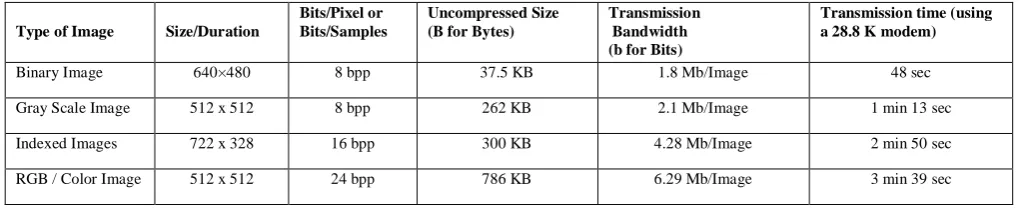
a) Table 1 shows the classifications images, and shows its properties 2.
[image:2.595.43.555.672.776.2]b) Table 2 shows classifications of image formats and its properties.
Table 1: Describe Types Of Images Its Properties
Type of Image Size/Duration
Bits/Pixel or Bits/Samples
Uncompressed Size (B for Bytes)
Transmission Bandwidth (b for Bits)
Transmission time (using a 28.8 K modem)
Binary Image 640×480 8 bpp 37. 1.8 Mb/Image 48 sec
Gray Scale Image 512 x 512 8 bpp 262 KB 2.1 Mb/Image 1 min 13 sec
Indexed Images 722 x 328 16 bpp 300 KB 4.28 Mb/Image 2 min 50 sec
Medical Image 2048 x 1680 12 bpp 5.16 MB 41.3 Mb/Image 23 min 54 sec
Table 2: Best file types for these general purposes
Photographic Images Graphics, including
Logos or Line art
Properties Photos are continuous tones, 24-bit color
or 8-bit Gray, no text, few lines and edges
Graphics are often solid colors, with few colors, up to 256 colors, with text or lines and sharp edges
For Unquestionable Best Quality
TIF or PNG (lossless compression and no JPG artifacts)
PNG or TIF (lossless compression, and no JPG artifacts)
Smallest File Size JPG with a higher Quality factor can be decent.
TIF LZW or GIF or PNG (graphics/logos without gradients normally permit indexed color of 2 to 16 colors for smallest file
size)
Maximum Compatibility
(PC, Mac, Unix) TIF or JPG TIF or GIF
Worst Choice 256 color GIF is very limited color, and is
a larger file than 24 -bit JPG JPG compression adds artifacts, smears text and lines and edges
II. COMPRESSION
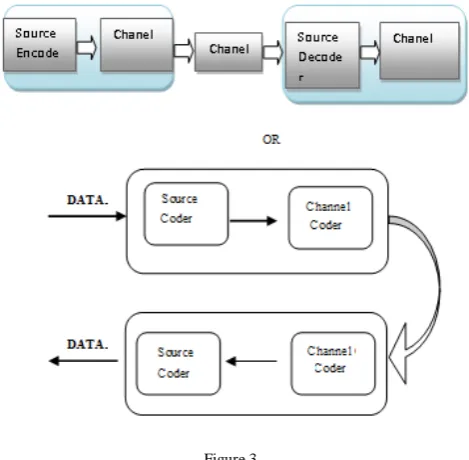
A. Compression Definition [19]:
Compression, or "data compression," is used to reduce the size of one or mor takes up less disk space than an uncompressed version and can be transferred to other systems more quickly. Therefore, compression is often used to save disk space and reduce the time needed to transfer files over th
Figure 3
There are two primary types of data compression:
a.
b.
File compression can be used to compress all types of data into a compressed archive. These archives must first be the decompression file(s). Decompressed with a decompression to open the original file(s)
Media compression is used to save compressed image, audio, and video files. An example of compressed media formats includes.
B. Need of Compression [21]:
The change from the cine the flicks to digital methods of image switch and archival is mainly stimulated by the ease and suppleness of handling digital image in sequence instead of the film media. While preparing this step and developing standards for digital image communication, one has to make absolutely sure that also the image quality of coronary angiograms and ventriculograms is maintained or improved. Similar requirements exist also in echocardiography.
Regarding image quality, the most critical step in going from the analog world (cine film or high definition live video in the catheterization laboratory) to the digital world is the digitization of the signals. For this step, the basic requirement of maintaining image quality is easily translated into two basic quantitative parameters
i. the rate of digital image data transfer or data rate (Megabit per second or Mb/s)
ii. and the total amount of digital storage required or data capacity (Megabyte or MByte).
a. Principles of compression20:
A common characteristic of most of the images is that the neighbouring pixels are correlated and therefore contain redundant information. Two fundamental components of compression are redundancy and irrelevancy reduction [3]. In general, three types of redundancy can be identified:
a) Spatial Redundancy or correlation between neighbouring pixel values.
b) Spectral Redundancy or correlation between different colour planes or spectra bands.
c) Temporal Redundancy or correlation between adjacent frames in sequence of image (in video application).
Since, we focus only on still images, for image compression there are three types of redundancies, they are.
i. Coding redundancy ii. Inter pixel redundancy iii. Psycho visual Redundancy.
(a). Advances and Dis-advances of compression:
Here using the compression for images/data there few advances and dis-advances are there among them
(i). Advances:
(a). Size Reduction:
File size reduction remains the single most significant benefit of image compression. Depending on what file type you're working with, you can continue to compress the image until it's at your desired size. This means the image takes up less space on the hard drive and retains the same physical size, unless you edit the image's physical size in an image editor. This file size reduction works wonderfully for the Internet, allowing webmasters to create image-rich sites without using much bandwidth or storage space.
(b). Slow Devices:
Some electronic devices, such as computers or cameras, may load large, uncompressed images slowly. CD drives, for example, can only read data at a specific rate and can't display large images in real time. Also, for some webhosts that transfer data slowly, compressed images remain necessary for a fully functional website. Other forms of storage mediums, such as hard drives, will also have difficulty loading uncompressed files quickly. Image compression allows for the faster loading of data on slower devices.
(i) Disadvance:
Here to take much time to archive Data/original image from it compressed data/image.
(c). Degradation:
When you compress an image, sometimes you will get image degradation, meaning the quality of the image has declined. If saving a GIF or PNG file, the data remains even though the quality of the image has declined. If you need to show a high-resolution image to someone, large or small, you will find image compression as a disadvantage.
(d). Data Loss:
With some common file types, such as JPEG, when an image shrinks in size the compression program will discard some of the photo's data permanently. To compress these images, you need to ensure you had an uncompressed backup before starting. Otherwise, you will lose the high quality of the original uncompressed image permanently.
III. CLASSIFICATIONS OF COMPRESSION TECHNIQUES
(a). Compression: - Compression, or "data compression," is used to reduce the size of one or mor file is compressed, it takes up less disk space than an uncompressed version and can be transferred to other systems more quickly
(b). Technique:- a way of carrying out a particular task, especially the execution or performance of an artistic work or a scientific procedure.
According compression basics it can be classified into two categories they are mainly
(a). Lossy Compression Technique (b). Lossless Compression Technique
a. Lossy compression [9] is a compresses data by discarding (losing) some of it. The procedure aims to minimize the amount of data that needs to be held, handled, and/or transmitted by a computer. The different versions of the photo of the dog at the right demonstrate how much data can be
dispensed with, and how the images become progressively coarser as the data that made up the original one is discarded (lost). Typically, a substantial amount of data can be discarded before the result is sufficiently degraded to be noticed by the user. Lossy compression is most commonly used to compress especially in applications such as required for text and data files, such as bank records and text articles. In many cases it is advantageous to make a master lossless file that can then be used to produce compressed files for different purposes; for example, a multi-megabyte file can be used at full size to produce a full-page advertisement in a glossy magazine, and a 10 kilobyte lossy copy can be made for a small image on a web page. It is possible to compress many types of digital data in a way that reduces the size of a the full information contained in the original file. A picture, for example, is converted to a digital file by considering it to be an array of dots and specifying the colour and brightness of each dot. If the picture contains an area of the same colour, it can be compressed without loss by saying "200 red dots" instead of "red dot, red dot, (197 more times)..., red dot."
The original contains a certain amount of information; there is a lower limit to the size of file that can carry all the information. As an intuitive example, most people know that a compress repeatedly compressing the file will not reduce the size to nothing and will in fact usually increase the size.
In many cases, files or data streams contain more information than is needed for a particular purpose. For example, a picture may have more detail than the eye can distinguish when reproduced at the largest size intended; likewise, an audio file does not need a lot of fine detail during a very loud passage. Developing lossy compression techniques as closely matched to human perception as possible is a complex task. Sometimes the ideal is a file that provides exactly the same perception as the original, with as much digital information as possible removed; other times, perceptible loss of quality is considered a valid trade-off for the reduced data.
It is reduces a file by permanently eliminating certain redundant information.
(a). It is Exploit redundancy and human perception. (b). It is applied to audio, image, and video.
(c). Examples of Lossy compression JPEG and MPEG
b. Lossless data compression [10] is a class of data to be reconstructed from the compressed data. The term lossless is in contrast to which only allows an approximation of the original data to be reconstructed, in exchange for better
joint stereo pre-processing by the other lossy audio encoders).
Lossless compression is used in cases where it is important that the original and the decompressed data be identical, or where deviations from the original data could be deleterious. Typical examples are executable programs, text documents, and source code. Some image file formats, like others like methods. archiving or production purposes, with smalle files being typically used on portable players and in other cases where storage space is limited and/or exact replication of the audio is unnecessary.
Lossless compression is an enable exact reconstruction of the original document from the compressed information.
(a). Exploit redundancy in image/data. (b). Applied to general image/data.
[image:5.595.317.560.609.750.2](c). Ex:- Run length, Huffman, LZ77, LZ78 and LZW The bellow diagram is referring the classifications of Lossless Compression.
Figure 4
a) Static Lossless Compression: In a Static method the mapping from the set of massage to the set of codeword’s is fixed before transmission being, so that a given massage is represented by the same codeword every time it appears in the massage being encoded. It has requires two passes
(a). Pass to computer probabilities / frequencies and determine the mapping.
(b). Pass to encode.
An example is Static Huffman Coding.
b) Adaptive / Dynamic lossless compression: in this method the mapping from the set of messages to the set of codeword’s changes over time.
Note- All adaptive / dynamic methods are one-pass methods, only one scan of the message is required.
Examples are- LZ77, LZ78, LZW, and Adaptive Huffman Coding.
c) Hybrid lossless compression: it is a neither completely static nor completely dynamic method.
IV. COMPRESSION ALGORITHMS
Basically according to graphics, the compression algorithms are fall into two categories those were,
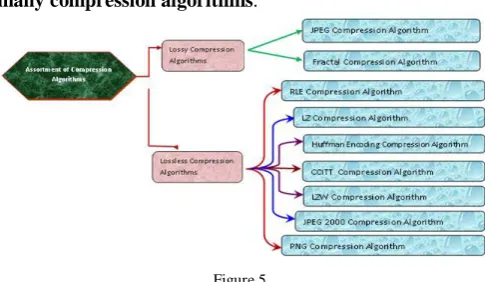
A. Lossy Compression Algorith:
It achieves its effect at the cost of a loss image quantity by removing some image gen.
But it has classified into two types
i. JPEG compression algorithm[12-16]. ii. Fractal Compression Algorithm [11].
a. JPEG Compression Algorithm- JPEG is a lossy technique which is provides best compression rates with complex 24 bit images. Its algorithm has its origins in moves to develop compression techniques for the transmission of colour and greyscale images. It was developed in 1990 by the Joint Photographic Experts Group of an International Standards Organisation (ISO) and CCITT. It then applies Huffman encoding to achieve further compression. It has included,
(a). It allows its decoder to build up and display an image progressively and useful for applications which need to stream image data.
(b). An arithmetic encoding is an extension of baseline to JPEG which offers higher compression rates.
(c). Lossless JPEG uses a different algorithm to baseline JPEG to provide lossless compression.
The JPEG specifications are allows users to set the degree of compression, using an abstract quality setting, this is provides a trade between compression rate and image quality. It is an essential to be aware that even the maximum quality setting for baseline JPEG involves some degree of lossy compression. In addition a patent claim on the baseline JPEG DCT (Discrete Cosine Transform) compression algorithm was made by forget networks in 2002.
b. Fractal Compression Algorithm[11]– It is a lossy technique, which can achieve large compression rates. Unlike other lossy methods, higher compression does not result in pixilation of the image. The original fractal compression algorithm was developed by Michael Barnsley in 1991. This compression algorithm uses the mathematical principles of fractal geometry to identify redundant repeating patterns within images. This compression algorithm is an extremely computationally intensive, although decompression is much faster. The fractal compression algorithm works best with complex images and high colour depths
The following diagram will refers to an assortment of many compression algorithms.
Figure 5
This technique is used to read size whilst preserving all of the original image information, and therefore without degrading the quality of the image.
But it has classifieds in many ways among them,
(a). RLE (b). LZ
(c). Huffman Encoding
(d). CCITT Compression Algorithms (e). LZW
(f). JPEG 2000 (g). PNG
a. RLE (Run Length Encoding) [17] - It is perhaps the simplest compression technique in common use. These algorithms are lossless, and work by searching for run of bits, bytes, or pixels of the same valve, and encoding the length and value of the run. So that it has being achieves best result with images containing large areas of contiguous colour and especially monochrome images. But there are a no. of RLE variants in common use, which are encountered in the TIFF, PCX and BMP graphic formats.
Example 1:- the following string is
CCCCYYDDZZZZYYYYWWAAAA
Can be encoded more compactly by replacing each repeated string of characters by single instance of the repeated character and number that represents the number of items it is repeated like, 4C2Y2D4Z4Y2W4A Here 4C means four C’s, 2Y means two Y’s, and so on..,. Compressing a string in this way is called run-length encoding.
a) Another example is: according to RLE definition a gray scale images it is represented as combination of intensity of pixel and no. of consecutive pixels with its intensities. Like gray scale image is {Vi, Ri} here Vi is intensity of pixel and Ri is no. of consecutive pixels with its intensities
80 80 80 80 80 78 78 78 78 90 90
b. LZ compression Algorithm: - The compression algorithms are a group of lossless compression schemes developed by Abraham Lempel and Jakob Ziv in 1977-8the first LZ compressor is LZ77 compressor underlies the deflate algorithm which is used in compressed archive formats such as PKZIP and the PNG compression algorithm, and LZ78 compression is more commonly used for images, and forms the basis of the LZW algorithm implementation of the LZW algorithm. But LZW is encountered in a range of common graphics file formats, including TIFF and GIF.
c. Huffman Encoding [22]: - It was developed by David Huffman in 1952; Huffman encoding is one of the oldest and most established compression algorithm. It is lossless and it is used to provide a final compression stage in number of more modern compression scheme. Huffman Encoding Trees
This section provides practice in the use of list structure and data abstraction to manipulate sets and trees. The application is to methods for representing data as sequences
of ones and zeros (bits). For example, the ASCII standard code used to represent text in computers encodes each character as a sequence of seven bits. Using seven bits allows us to distinguish 27, or 128, possible different characters. In general, if we want to distinguish n different symbols, we will need to use log2n bits per symbol. If all our messages are made up of the eight symbols A, B, C, D, E, F, G, and H, we can choose a code with three bits Per character, for example
A 000 C 010 E 100 G 110
B 001 D 011 F 101 H 111 With this code, the message
BACADAEAFABBAAAGAH is encoded as the string of 54 bits
001000010000011000100000101000001001000000000110 000111 Codes such as ASCII
Figure 6
Initial
leaves {(A 8) (B 3) (C 1) (D 1) (E 1) (F 1) (G 1) (H 1)}
Merge {(A 8) (B 3) ({C D} 2) (E 1) (F 1) (G 1) (H 1)}
Merge {(A 8) (B 3) ({C D} 2) ({E F} 2) (G 1) (H 1)}
Merge {(A 8) (B 3) ({C D} 2) ({E F} 2) ({G H} 2)}
Merge {(A 8) (B 3) ({C D} 2) ({E F G H} 4)}
Merge {(A 8) ({B C D} 5) ({E F G H} 4)}
Merge {(A 8) ({B C D E F G H} 9)}
Final
merge {({A B C D E F G H} 17)} – Example#1:
111110101111111100101111101100 – Blocks of 3:
111110101111111100101111101100 – Example#2:
101111011111110111111011111100 – Unequal probabilities: p(1) = 0.75, p(0) = 0.25 – Example #3: "We, the people, in order to form a..." – Unequal character probabilities: e and t are common,
j and q are uncommon
– Example #4: {we, the, people, in, order, to, ...} – Unequal word probabilities: the is very common
A = 0 B = 100 C = 1010 D = 1011 R = 11
ABRACADABRA = 01001101010010110100110
This is eleven letters in 23 bits, A fixed-width encoding would require 3 bits for five different letters, or 33 bits for 11 letters
In this example, A was the most common letter • In ABRACADABRA:
– 5 As code for A is 1 bit long – 2 Rs code for R is 2 bits long – 2 Bs code for B is 3 bits long – 1 C code for C is 4 bits long – 1 D code for D is 4 bits long
d. CCITT Compression Algorithm:- This is a lossless compression algorithm, which is developed by International Telegraph and Telephone Consultative Committee in the year of 1985 for encoding and compressing 1-bit images. It has been primarily used in tax transmissions, and its optimised for scanned printed image documents. But officially CCITT is developed of the two-dimensional standard. However being designed as storage rather than transmission format, it does not incorporate the error detection. Here Group 3 and 4 classifications are there but compression is most commonly used in TIFF file format.
e. LZW Compression Algorithm:- LZW (Lempel-Ziff-Welch) Compression Algorithm was developed by Terry Welch in 1984, it is mostly used for an image, it is a modifications of LZ78 compressors. It is lossless technique compression algorithm which can be applied almost any type of images. Its efficiency is very effective to colour images with the colour depth is from 1-bit to 24-bit i.e. mono-colour to a true colour. LZW compression is encountered in a range of common graphics file formats, including TIFF and GIF.
f. JPEG 2000 Compression Algorithm:- This compression algorithm is replaced with JPEG algorithm, it has developed by ISO JPEG group in 2000. It is provides for lossless compression, and it has been used to wavelet compression to achieve higher compression, it rating of compression is low reduction in image quality. It may utilise to few patent technologies. But JPEG 2000 standard defines a minimum file interchange format (JP2), similar manner to JFIF and SPIFF.
g. PNG Compression Algorithm:- The PNG compression algorithm is uses to the Deflate compression methods. It was developed in the year of 1996as a part of PNG file format alternative to the LZW compression employed by GIF and other few file formats. It is uses to the deflate compression methods and it is effective with colour depth from 1-bit (mono colour) to 48-bit (True colour). It is implemented for only in the PNG file format.
V. CONCLUSIONS AND RECOMMENDATIONS
In this review an endeavour to explained the assortment of the images which were available in Image processing system concepts, compression definition, express the principles of an image processing, and explained what was the need to compression the images before transmission, what were advances and disadvancess of image compression and this paper an endeavour of what were library
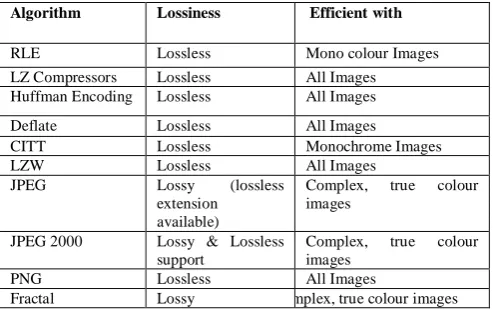
[image:7.595.315.562.143.298.2]compression techniques available in image processing, explained those definitions and mentioned where those need at different positions, the bellowed given tables summaries the lossiness of the algorithms described, the circumstances in which they are most efficient and how the compression among different image formats.
Table: - description of Compression Techniques
Algorithm Lossiness Efficient with
RLE Lossless Mono colour Images
LZ Compressors Lossless All Images Huffman Encoding Lossless All Images
Deflate Lossless All Images
CITT Lossless Monochrome Images
LZW Lossless All Images
JPEG Lossy (lossless
extension available)
Complex, true colour images
JPEG 2000 Lossy & Lossless support
Complex, true colour images
PNG Lossless All Images
Fractal Lossy mplex, true colour images
Table:[18] - Compression among different image formats.
Action
B M P
G I F
J P G
MI X
PN G
T I F F
Post image on web page X X
Export easily to other program X X
Compress large image for e-mail X Use transparent area in image X X Create animation file X Decompress image without loss X X
Create highest quality images X
Edit individual objects in an image X
Display millions of colour X X X X X Retain image quality X X X X
It is recommended that algorithms should only be used in circumstances for which they are most efficient. It is also strongly recommended that archival master versions of image should only be created and stored using lossless algorithm. The intellectual property rights status of compression algorithm is primarily an issue for developers of format specifications, and software encoder/decoders. However, the use of, non-proprietary compression techniques are recommended for the purposes of sustainability. And also this paper would recommend knowing what minimum principle it has followed to compress the images.
The Diagrams Representations
a. Figure 1:- Basic classifications of an image according Image Processing System. b. Figure 2:- Basic assortments of image formats. c. Figure 3:- Compression Technique Methodology d. Figure 4:- fsVarious Lossless compression
Techniques.
e. Figure 5:- Assortments of Image compression Techniques.
f. Figure 6:- Huffman Encoding Technique.
[1]. Subbramanya A. “Image compression Technique,” potentials IEEE, vol. 20, issues 1, pp 19-23, Feb-March 2011.
[2]. Jeffrey M. Gilber, Robert W. Brodersen; “A Lossless 2d image compression technique for synthetic discrete tone image” University of California at Bekeley, Electrical Engineering & Computer Science Bekeley, CA 94720-1770, Unpublished.
[3]. Subhasis Saha “Image Compression – from DCT to Wavelet: A Review,” unpublished
http://www/acm/org/crossroads/xrds63/sahaimagcoding.ht ml
[4]. “Understanding image types”
http://www.contentdm.com/USC/tutorial/images-file-types.pdf.1997-2005, DiMeMa, Inc, Unipublished.
[5]. http://www.find-images.com
[6]. http://www.wfu.edu
[7]. Majid Rabbani, Paul W.Jones; “Digital Image Compression Techniques” Edition-4, 19991.page 51.
[8]. John Miano; “Compressed Image formats: JPEG, PNG, GIL, XBM, BMP” Edition-2, January-2000, page 23.
[9]. W.S.lee “Edge adaptive predication for loss less image coding ”in proc. IEE data Compression Conference, Snowbird Utah march 199,pp 483-490
[10]. http://www.ijcse.com/docs/IJCSE10-01-04-23.pdf
[11]. A.E Jacquin, Image coding based on fractal theory of integrated contractive image contractive image transformation IEEE trans on image processing vol 1 pp 18-30 1992.
[12]. W.B. Pennebaker, J. Mitchell, JPEG Still image Compression Standard, New York: Van Nostrand Reinhold, 1993.
[13]. N.M Nasrabadi and R.A. King, Image coding using vector quantization: a review IEEE trans. On Communications, Vol.36, 957-571, 1988.
[14]. A. Said and W.A. Pearlman, A new, fast and efficient image codec based on set partitioning in hierarchial trees, IEEE trans. On circuits and Systems for Video Technology, Vol. 6, 243-250, 1996.
[15]. J.M. Shapiro, Embedded image coding using zerotree of wavelet coefficients, IEEE trans. On Signal Processing, vol. 41, 3445-3462, 1993
[16]. G.K. Wallace, The JPEG still picture compression standard, communication ACM, vol. 34, 31-44, 1991.
[17]. G. Thippanna; IOSR Journal of Computer Engineering (IOSRJCE) ISSN: 2278-0661 Volume 2, Issue 1 (Sep-Oct. 2012), PP 34-38 www.iosrjournals.org
[18]. Rafael C.Gonzalez ,Richard E.woods “Digital image processing ” second edition Pearson education, printiceHall
[19]. http://www-mtl.mit.edu/Courses/6.050/notes/chapter3.pdf
[20]. https://dspace.ist.utl.pt/bitstream/2295/130803/1/licao_4.pd f
[21].
www.uni-kiel.de/Kardiologie/dicom/1999/compression1.html
[22]. Sindhu M, Raj Kamal R, “Image & its Compression Techniques” IJRTE vol. 2 No.4, Nov 2009.
Short Bio Data for the Author