Launching Automated Security Attacks through Unit-level
Penetration Testing
Michael Gegick and Laurie Williams
Department of Computer Science, North Carolina State University
Raleigh, NC 27695
1-919-513-4151
{mcgegick, lawilli3}@ncsu.edu
Abstract
Penetration testing is a software security practice typically conducted late in the software development lifecycle when a system has been completed. A penetration test is an authorized attempt to violate specific constraints stated in the form of a security or integrity policy. However, penetration testing should start earlier in the development lifecycle when corrective action is more affordable and feasible. To support earlier penetration testing, we are building SecureUnit, a framework of reusable, automated, and extendable Java-based unit test cases. We present the initial installment of SecureUnit comprised of a test to detect cross-site scripting (XSS) vulnerabilities. We illustrate the effective use of the XSS test case via its use to identify vulnerabilities in WebGoat, an open source test bed. In the future, we will extend the test cases for the identification of a wide variety of security vulnerabilities. Our long term vision is to use a static analyzer to identify vulnerabilities (such as an input field); automatically extract relevant parameters (such as URL, form name, and field name); and launch an attack by running a SecureUnit test case with these parameters.
Categories and Subject Descriptors
D.2.4 [Software Engineering]: Software/Program Verification
Assertion checkers
General Terms
Security, Verification
Keywords
HttpUnit, security testing, penetration testing, black box testing, unit testing, security, cross-site scripting
1. INTRODUCTION
Penetration testing is the most commonly used software security best practice [3]. However, penetration testing is most often considered a black box, late lifecycle activity [3]. A penetration test is an authorized attempt to violate specific constraints stated in the form of a security or integrity policy [4]. A penetration test is designed to characterize the effectiveness of security mechanisms and controls to prevent attack by attempting unauthorized misuse of, and access to, target assets [3, 4]. Penetration testing should start at the feature, component, or unit level, prior to system integration [3] for more affordable and robust fortification.
In this paper, we present initial steps in the building of SecureUnit, a testing framework, similar to JUnit1 and the other xUnit2 testing frameworks, of reusable security unit test cases that can launch attacks of web applications at the unit level. Our research objective is to build a framework of reusable, automated, and extendable Java-based test cases through which developers can launch security attacks to identify vulnerabilities early in the development lifecycle. Developers building applications can iteratively use and extend the SecureUnit test cases during the code development phase.
As shown in Figure 1, SecureUnit builds upon the HttpUnit3 web application testing framework. HttpUnit in turn, is coupled with the JUnit testing framework. HttpUnit emulates the relevant portions of browser behavior. Our SecureUnit utilizes the emulation provided by HttpUnit to launch attacks at the web application. In Figure 1, dotted arrows represent calls to the API of the framework and solid arrows represent data flow. White boxes represent that source code is analyzed for test case development whereas shaded boxes represent that the code not utilized for test case development. Malicious input may be prevented from being sent to the application by the presence of an effective choke point. A choke point is a small, easily-controlled interface through which control must pass [13]. Choke points are a means of channeling input into a common stream to be monitored. SecureUnit test cases for selected security vulnerabilities will be aimed at testing the choke point and/or identifying the lack of a chokepoint. A SecureUnit test case will fail if malformed input can reach the application.
1
http://junit.org/index.htm
2
http://xprogramming.com/software.htm
3
http://httpunit.sourceforge.net/
Permission to make digital or hard copies of all or part of this work for personal or classroom use is granted without fee provided that copies are not made or distributed for profit or commercial advantage and that copies bear this notice and the full citation on the first page. To copy otherwise, or republish, to post on servers or to redistribute to lists, requires prior specific permission and/or a fee.
Figure 1: Security Testing with SecureUnit
Our technique is a black box testing technique because the tests can be written without knowledge of the underlying choke point and web application code. Our long term vision is to use a static analyzer to identify vulnerabilities (such as an input field); automatically extract relevant parameters (such as URL, form name, and field name); and launch an attack by running a SecureUnit test case with these parameters.
In the first installation of SecureUnit, we focus on cross-site scripting (XSS) attacks of Java-based web applications. XSS is an evil input problem that falls into the Input Validation and Representation category of the “Seven Pernicious Kingdoms taxonomy” [12]. XSS belongs to the Open Source Vulnerability Database (OSVDB)4 classification input manipulation (as does SQL injection and overflow) which constituted more than half of all of the vulnerabilities reported in 2003-4 [12]. In this paper, we provide an illustrative example of SecureUnit that involves launching XSS attacks against a web application and then determining whether the application is vulnerable to XSS exploits. We used WebGoat5, an open source test bed, created for security engineers to test their dynamic and static analyzers as a realistic means of demonstrating the capability of SecureUnit. The results of the illustrative example indicate that SecureUnit combined with security tests is a viable method of security testing.
The paper is organized as follows. Section 2 discusses the background and related work. Section 3 provides information about the SecureUnit testing framework. Section 4 provides an illustrative example of a cross-site scripting attack test case. Finally, Section 5 presents the conclusions and future work.
2. BACKGROUND AND RELATED WORK
In this section, we provide background information on cross-site scripting and security testing.
2.1 Cross-site Scripting (XSS)
A XSS vulnerability is a design flaw that occurs when untrusted user input is allowed to display on a victim’s machine. The malicious input is usually in the form of a script (e.g. JavaScript, Jscript, VBscript, ActiveX) or embedded object (e.g. <APPLET>) [7, 8] An example of an innocuous XSS script is
4
http://www.osvdb.com/
5
http://www.owasp.org/software/webgoat.html
one that pops up an alert box on the victim’s machine containing the attacker’s desired text, such as:
<script>alert(“Boot sector corrupted”);</script>
Rather than an alert, the script can be more insidious, such as obtaining the victim’s session information or cookies, such as:
<script>baseForm.cookie.value=document.cookie; baseForm.submit();</script>
An even more insidious attack would tie up system resources [12]:
<script>while(true){};</script>
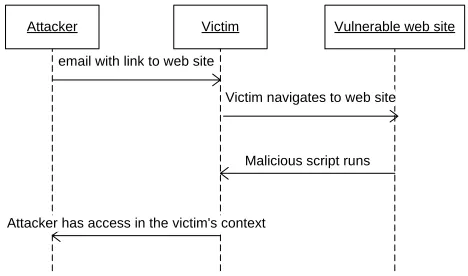
When a victim visits the web page, the script is executed on the victim’s machine (see Figure 2). In this way, an attacker can gather confidential information or steal user’s credentials.
Attacker Victim Vulnerable web site
email with link to web site
Victim navigates to web site
Malicious script runs
Attacker has access in the victim's context
Figure 2: Sequence diagram of a XSS attack
Malicious input can come from objects such as HTML forms, HTML headers, database queries, cookies, and certain HTML tags (e.g. anchor tag, image tag) [7, 8]. Input with a percent sign in it can be masking a script by utilizing hexadecimal encoding (or other encoding methods) for malicious characters to make it less suspicious. Any web browser supporting scripting is potentially vulnerable [7]. All the attacker needs is the name of a web server (including those inside a firewall) that does not validate data input via a web page. XSS attacks are resistant to security mechanisms such as SSL and TSL [7] thus defending against XSS must be accomplished with software security. There are three categories of XSS vulnerabilities: DOM-based6, reflected and stored. [12] With DOM-based XSS vulnerabilities, the problem exists within a page’s client side script itself. For example, some JavaScript accesses a URL request parameter and uses this information to write some HTML to its own page, and this information is not HTML quoted; a XSS vulnerability is present. For this paper we will concentrate on reflected and stored XSS vulnerabilities. A reflected XSS vulnerability occurs when a script is used immediately by server-side scripts to generate a page of results for that user. The script is not stored on the server. Stored XSS vulnerabilities, which enable the most powerful kinds of attacks, occur when a script is injected into a system and persists there because the server stores it (e.g. in a database, cookie, etc).
6
A session is used to support the connection between two hosts. This session can be managed with a session ID, which uniquely identifies the session between the client and server. The session ID’s can be stored in a session (or transient) cookie, which are usually only temporary, residing in memory during the duration of the session. Some applications have different variables for session ID’s and user ID’s. If the user ID is the only means of authentication and the session ID is always trusted, then an attacker can simply change their session ID and “become” another client currently on the system [6, 11]. An attacker simply needs the session ID to hijack a session and wreak havoc for the victim.
2.1.1
Creating Choke Points to Prevent XSS
Securing for XSS attacks is usually accomplished with choke points and filters. Using a choke point simplifies a system that would otherwise have multiple inputs and require each input to have security code associated with it [13]. Simplification of a system with choke points is a practice suggested by a fundamental principle of software security, Principle of Economy of Mechanism7. In the case of XSS, the monitor can
be a filter that scans all input to ensure it is well formed and safe. Filtering malicious input can be achieved using a white list. A white list describes exactly what input is allowed [6]. An example filter based upon a white list may look like the following
if(/^(?:[\s\w\?\!\,\.\’\”]*|[(?:\</?(?:i|b|p|br| em|pre)\>))*$/i){
//Allow the user input to be processed }
else{
//input is malformed, reject! }
The filter is an if statement that matches input based on a white list in the form of a regular expression. If the user input matches the regular expression, then the input is valid otherwise the input is rejected. This white list allows for the HTML tags <EM>, <PRE>, <BR>, <P>, <I>…<I> and <B>…<B> and the characters, space, A-Z,a-z0-9,’_’, to be processed by the web application [7]. A white list for filtering is preferable to a black list, which describes invalid input and may be infinitely large [6].
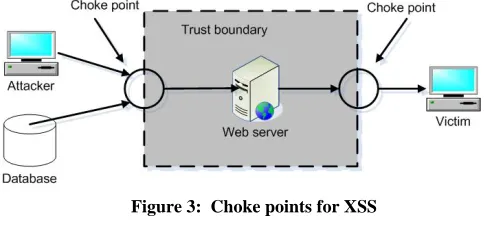
We illustrate the use of choke points in Figure 3. A web server reads input from an untrusted user, potentially an attacker, and a database that may contain XSS exploits, both of which are outside the trusted boundary.
Figure 3: Choke points for XSS
7
https://buildsecurityin.us- cert.gov/portal/article/knowledge/principles/economy-of-mechanism.xml
Since both of these input sources are read by the server and displayed to a client (or victim), the input can be channeled into the same choke point where it is tested with the same filter to insure it is well-formed and safe. After the input flows through the choke point, the input can be assumed to be safe. But, it is prudent to follow another fundamental principle of software security, the Principle of Defense in Depth8, and insert a second choke point (and filter) to assure that anything streamed outward from the server to a user is also filtered. This type of layered defense has shown to be effective for XSS in industry [7]. We demonstrate the usefulness of the second filter with an example of a SQL injection attack. A SQL injection attack is a programming error that results from a lack of sanitizing input from untrusted users. If an attacker is able to change the logic of a SQL statement by injecting malicious input in objects such as HTML forms or query strings, then they can exploit a database. A filter for a SQL injection attack that scans for single quotes, ‘--‘, ‘select’, and ‘union’ is not sufficient. For instance, an attacker can submit uni’on sel’ect @@version-‘-
into a SQL database knowing that the filter will search for “union” “select” and single quotes. When the filter reads the SQL exploit, the filter does not recognize “union” and “select” nor the comment delimiter (‘--‘) because there are single quotes in the keywords that thus do not fit the pattern match. The filter does recognize that there are single quotes in the input and removes them because the developer blindly thought all single quotes were dangerous. The result of the filtering is now a SQL injection exploit, union select @@version--, which is now permitted to flow to the SQL code. If a second filter was installed, the attack may have been subverted because the filter would recognize the keywords, “union” and “select” [2].
2.1.2 Testing for XSS
Testing for script injection attacks involves pasting script into an input field and observing the result [6]. A fortified system will prevent any input from being accepted until it is checked to ensure it is valid, safe data and reject all other data [7]. Testers can attempt to penetrate the system via the following three steps [7]:
1. Identify all points of input into the Web application, such as fields, headers (including cookies), and query strings. 2. Populate each identified input point with various forms of
good and invalid strings (based upon the white list and the black list) and send the request to the server. Testers must verify that the implementation of the white list is in accordance to that of the security requirements.
3. Check the HTTP response to see whether the string is returned to the client. If any invalid strings are echoed back unchanged, a XSS vulnerability has been identified. SecureUnit automates steps 2 and 3. In our future work, we will use a static analyzer to automate step 1.
2.2 Security Testing
8
Security testing is fundamentally different than typical functional testing. Testers are typically trained to look for the presence of some specific correct behavior. Instead, security testing requires testing for the absence of additional behavior [14]. For example, while there is no stated requirement that an attacker must not be able to display an alert box on another’s display, it is possible this unwanted functionality has inadvertently been implemented. A security test (for XSS) would reveal this unwanted additional behavior.
Testing early in the software process is important because it has been shown that finding and assessing software bugs late in the software cycle is more expensive than if done early [5]. A study at IBM shows that the cost may be 100 times more expensive [10] . Allowing security vulnerabilities to slip into the release can damage an organization’s brand, contribute to loss of sales, customer trust and have liability and legal issues.
2.3 JUnit/HttpUnit
HttpUnit v1.6 is an open source tool that emulates browser behavior including JavaScript, form submission, cookies, and gives Java testers an API to analyze returned pages from a server. The web API and functionality of HttpUnit can be integrated with JUnit to provide for a web-based testing framework (see Figure 4) to test web applications.
Figure 4: The web testing framework is provided by
the browser functionality and web API of HttpUnit
and the testing functionality of JUnit. Testers can
send data to the web application and analyze the
response.
The core functionality of HttpUnit does not extend JUnit, however HttpUnit does extend JUnit’s TestCase class for additional assert statements beyond those provided by JUnit. The fundamental difference between an HttpUnit test and a JUnit test is that an HttpUnit test utilizes the HttpUnit API to access web features, which is not normally accessible to a JUnit test.
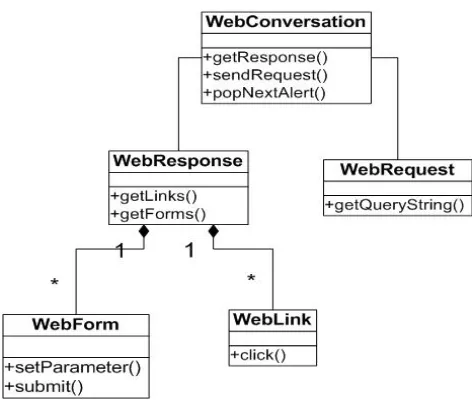
In Figure 5, we show a simplified class diagram of some of the essential classes in HttpUnit that are utilized by the SecureUnit methods.
Figure 5: Sample class diagram of HttpUnit
The WebConversation class is responsible for emulating the browser functionality. It is this class that allows the developer to run the test without using a web browser such as Internet Explorer or Mozilla Firefox. The WebResponse and
WebRequest classes provide developers a way to request information from the servlet container and obtain a response that can be analyzed. The WebResponse class has methods that allow the developer to access HTML elements in the response such as forms and hyperlinks. A developer need not run a servlet container while they test their code. The developer can opt to run the ServletUnit API, the foundation of HttpUnit, to bypass both the web browser and servlet engine.
3. SECUREUNIT TESTING FRAMEWORK
In this section, we explain the SecureUnit testing framework and its limitations.
3.1 SecureUnit
Our research proposes the automation of security testing of Java-based web applications via HttpUnit tests so that developers can build security into their system early in the software process. During the implementation of a web application and before the entire application is complete, developers can test their source to determine if an XSS vulnerability is present and secure the code, if needed. Performing these tests during the construction of the software enables developers to fortify their code while the code is fresh in their mind. By providing extendable and reusable security test cases via SecureUnit, we are also increasing the security awareness in the development community. Lack of security awareness has been cited as responsible for the prevalence of security attacks today [7, 13].
We base our initial framework on a stored and reflected XSS attack scenario where a user enters form data, possibly malicious, and then submits the form data, which is stored in a database. In the case of the stored XSS attack, the server returns a new page to the client that has the malicious script embedded in a hyperlink. If a user clicks on the link, then the malicious script (an alert window) is executed in the user’s browser demonstrating that the web application is vulnerable to XSS exploits. The framework is easily modified to also test for a reflected XSS attack where a user enters an alert script into the form field, submits the form, and an alert window is immediately bounced back to the user.
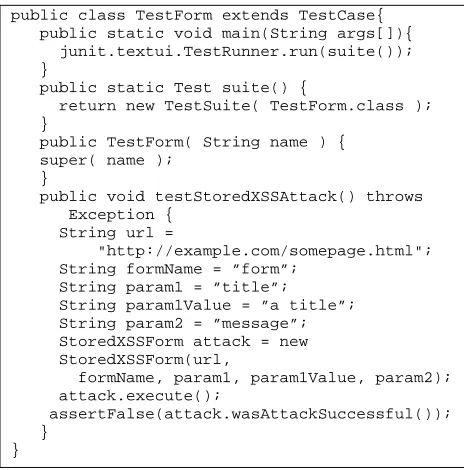
By accessing the HttpUnit framework SecureUnit can launch known XSS attacks derived from vulnerability databases into web applications to determine if the system is unsecured. We require HttpUnit to obtain access of HTML elements and emulate browser behavior to launch an attack. The SecureUnit framework encapsulates the security aspect of the developer’s test (see Appendix A). Developers call SecureUnit methods to launch a security attack on the web application. SecureUnit returns the result of the attack (e.g. a boolean), which the tester inserts in the assert statement of their security test. We have created a class called StoredXSSForm that handles the above-mentioned stored XSS attack. A developer can call two methods in the the API of the StoredXSSForm object: execute() and wasAttackSuccessful(). The following code demonstrates how a developer would write a test utilizing SecureUnit.
public class TestForm extends TestCase{ public static void main(String args[]){ junit.textui.TestRunner.run(suite()); }
public static Test suite() {
return new TestSuite( TestForm.class ); }
public TestForm( String name ) { super( name );
}
public void testStoredXSSAttack() throws Exception {
String url =
"http://example.com/somepage.html"; String formName = ”form”;
String param1 = ”title”; String param1Value = ”a title”; String param2 = ”message”; StoredXSSForm attack = new StoredXSSForm(url,
formName, param1, param1Value, param2); attack.execute();
assertFalse(attack.wasAttackSuccessful()); }
}
Figure 6: A sample security test case (written by a developer) to access SecureUnit.
The developer writes a JUnit test case and then instantiates a new StoredXSSForm giving it the following parameters: the URL of the web site, the name of the HTML form that is to be tested, the name of the first input field, a value for the first input field, and the name of the second input field. The value of the second input field is the value that is displayed to a user and is thus potentially vulnerable to attack. SecureUnit uses these parameters to utilize the functionality of HttpUnit. First a
WebConversation is instantiated using values the passed in
parameters. Next, the tester calls the execute method to execute the attack on their web application. The SecureUnit framework obtains the HTML form identified by the form name and submits the parameter value passed in for the first parameter. SecureUnit inserts,
<script>alert(document.cookie);</script>
the XSS exploit, into the second parameter of the form.
In the next installation of SecureUnit, StoredXSSForm will repeat the test for different XSS exploits that will be stored in an available exploit library containing a black list [6] of known XSS attacks. SecureUnit can run the same test multiple times using different XSS exploits. SecureUnit will enumerate to the developer which of the exploits were successful so the developers can tighten their input filter. Control proceeds to click on the submit button and the server sends the response to SecureUnit. Next, the link with the embedded alert script is clicked using the link method in HttpUnit and the alert pop window is grabbed by SecureUnit. SecureUnit compares the values of the session ID of the window to the session ID held in memory for the current session. A match represents that the XSS exploit was successful. The developer’s next call is to use the JUnit assertFalse() method with the method call wasAttackSuccessful() in the SecureUnit API as the parameter. SecureUnit returns the value of the matched session ID’s. If the test fails, then the developer knows that their web application is vulnerable.
SecureUnit can be used for testing both white lists (functional testing) and black lists (penetration testing) follows from the idea that there are “two sides of software security – attack and defense, exploiting and designing, breaking and building--into a coherent whole. Like the yin and the yang, software security requires a careful balance” [9].
3.2 Limitations
Most often, filters for bad input are written as white lists since a there are infinitely many variations of XSS exploits but only a limited amount of forms of safe, well-formed input. However, the test cases need be based upon a subset of the infinite black list of forms for bad input. Therefore, it is impossible to have a fully-encompassing test suite to account for every bad input variation. When a developer tests their web application with SecureUnit and all tests pass, one can only infer that the filter is effective at blocking the exploits launched by the test and not that the input field is fully secure. If the application is exploited by an actual attacker, developers can insert the XSS exploit into a new test case and run the test to determine where the application fails. Once the developer is aware of the vulnerability, they can write the code to fortify the code and test until the web application is secured.
4. ILLUSTRATIVE EXAMPLE
In Section 4.1 we describe WebGoat, a test bed we have used for the illustration of SecureUnit, in Section 4.2 we show give the methodology and results of our example, discuss the significance of our example in Section 4.3.
4.1 Test Bed
To execute an XSS attack, we required a test bed that could serve as a realistic web application. We chose Stanford SecuriBench .91a9, an open source suite of software applications that are designed for running static and dynamic tests. These test beds are vulnerable to XSS, SQL injection, HTTP splitting and path traversal attacks.
Specifically, we demonstrate the use of SecureUnit on WebGoat 3.7, a J2EE application implemented in part to demonstrate XSS attacks. WebGoat is an educational-based program in that there are security lessons in the program that teach one how to attack the system. There are two lessons for XSS; “Stored XSS” and “Reflected XSS.” In the Reflected XSS lesson, an example of an online purchase form is displayed with two submit buttons, Update Cart and Purchase. The lesson suggests that the user enter the XSS exploit <script>alert(document.cookie);</script> into the credit card number field. When the script is entered and the Purchase submit button is clicked, an alert dialog box pops up, showing the session ID for the Internet connection. Displaying a session ID in the alert pop up box demonstrates that the WebGoat application is vulnerable to reflected XSS attacks because JavaScript was bounced back to the client and executed in their browser.
The Stored XSS lesson is a small example of XSS attacks that could be applied to cases such as online bulletin boards. This lesson involves an HTML form with two fields; title and message. When a user enters the information, the result is entered in a message list at the bottom of the page. The title is encapsulated in anchor tags and when clicked on, the message is displayed. The lesson in WebGoat suggests that a user enter the XSS exploit, <script>alert(document.cookie);</script> into the title field. If a user of the application clicks on the title link to read the message, then the script, embedded in the link, executes on the client machine showing the session ID in an alert pop up box. This is an example of a stored XSS attack because the title and message are stored in a database, thus persisting (stored) in the web application. Note, that when WebGoat is shut down, the information is lost.
4.2 WebGoat Example
A fully-automated XSS test would log into WebGoat (using basic authentication), click the links that point to the Stored XSS and Reflected XSS lessons, traverse the web pages to the vulnerable HTML form, enter the form data including the XSS exploit, submit the form, and assert that the exploit was successful or not. We wrote the SecureUnit framework (see Appendix A) that automated the XSS lessons described in Section 4.1 using HttpUnit.
9
http://suif.stanford.edu/~livshits/securibench/
4.2.1 WebGoat SecureUnit Tests
We begin by describing the code required to test the Reflected XSS lesson. WebGoat requires that basic authentication to access the web application. Basic authentication is a scheme where a username/password are sent in plaintext to the server. Authentication is achieved by verifying the password submitted in the login form is the same as the password encrypted on the server [1].
To start the communication between HttpUnit and WebGoat, a
WebConversation, WebRequest, and WebResponse
object is needed to emulate the browser and access the requests and responses during the communication. We also require a
WebLink object to capture HTML hyperlinks and image inputs from the response and call the click() method to click those links to navigate to the vulnerable HTML form in the Reflected XSS lesson. Once the form page is reached, we use the WebForm
object to set the parameters of the form and submit the form to the server. For the XSS attack we entered the exploit <script>alert(document.cookie);</script> into the credit card number field. The WebConversation object allows us to read the session ID that is displayed on the alert pop up box. We compare that alert ID to the session ID of the system using the getCookieValue(“JSESSIONID”) call to the
WebConversation object. By comparing the session ID’s we can determine if we accurately obtained the session ID with the XSS exploit. The assert statement used is assertFalse(Boolean match) and fails if the two IDs are the same. The methodology for writing code for the Stored XSS lesson is the same except that we navigate to the Stored XSS lesson, enter the same XSS exploit in the title field, and then click on the new title link in the message list.
Since the HTML is dynamically generated via Element Construction Set10 and no HTML pages were available, we had to have some overhead in telling SecureUnit which page to go to. Since a tester cannot access the page directly, the tester had to start the session and then navigate to the page where the form resided. Once the response was available, the tester could automate the test with SecureUnit.
4.2.2 Results of SecureUnit Tests
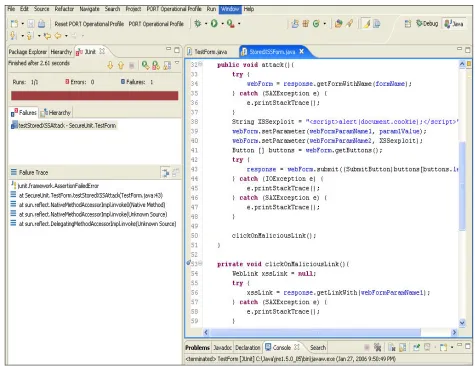
To run the tests, we installed the WebGoat WAR file in the Apache Tomcat v.5.5.12 WebGoat context path. We launched Tomcat and ran our HttpUnit test in the Eclipse IDE. The tests resulted in the execution of the alert pop up boxes displaying the session ID as was expected from the lesson in WebGoat. Our JUnit tests resulted in an AssertionFailedError because the HTML form in WebGoat is vulnerable to XSS attacks (see Figure 7). The tests represent that an attacker can maliciously obtain the session ID of the client’s session with Tomcat.
10
Figure 7: SecureUnit returns a failed test after testing for a stored XSS vulnerability.
4.3 Discussion
We have showed that SecureUnit, JUnit combined with HttpUnit can automate the testing for XSS vulnerabilities in HTML forms. A test suite encompassing more types of XSS exploits including special character encoding, insertion of script in events such as OnLoad and in different HTML tags would more thoroughly test the application at hand. This type of testing is unit testing because we are specifically testing the filter (a small unit of code relative to the overall software system). The implementation and execution of SecureUnit did not require any modification of source code in HttpUnit or WebGoat. The results suggest that XSS tests can be automated and easily run in a JUnit environment without any manual intervention from a tester or developer.
Our current strategy for handling HTML forms requires an advanced knowledge of which form field should be targeted for inserting a XSS exploit. We thus require that the developer insert the all the parameters and values for the form except for the value that is displayed to the user. Future versions of SecureUnit will experiment with a blanket approach of inserting a XSS exploit into each parameter of the form and submitting the form. Determining if an XSS exploit was accepted as valid
user input to the system will result in a failed test. The test will also fail if XSS exploits enter the system even though they cannot cause an XSS attack (i.e. they are never displayed to the user). In rare cases will malicious scripts be accepted as user input and allowed to be processed and thus a thorough checking of input is needed to provide for good security and reliability.
5. SUMMARY AND FUTURE WORK
In this paper, we have presented an initial installment of SecureUnit. SecureUnit is a framework of reusable, automated, and extendable Java-based test cases through which developers can launch security attacks to identify vulnerabilities early in the development lifecycle. The initial installmentfocuses on the prominent XSS vulnerability which can be used to steal the identity of users, hijack a session, tie up system resources, and other ill effects. Developers would include the SecureUnit package in their test code, as many do today with the JUnit testing framework. Then, the developer could call the
testStoredXSSAttack method to launch XSS attack(s).
SecureUnit records a failed test case if bad input can reach the application.
vulnerabilities in software security. We follow the taxonomy provided by Fortify Software [12] and will continue with the Input Validation and Representation kingdom and the remaining seven (API Abuse, Security Features, Time and State, Errors, Code Quality, Encapsulation, Environment). Secondly, we will automate the detection of vulnerabilities (such as input fields) via a static analyzer. We will then automatically extract relevant parameters (such as URL, form name, and field name); and launch an attack by automatically running a SecureUnit test case with these parameters. Ultimately, an application can be passed to our testing application and automatically vulnerabilities can be identified and attacks can be launched at the vulnerabilities.
Acknowledgements
We would like to thank the North Carolina State University Software Engineering Realsearch reading group for their helpful suggestions on this paper. This research was supported by the National Science Foundation.
REFERENCES
[1] Authentication, Authorization, and Access Control,http://httpd.apache.org/docs/1.3/howto/auth.html#b asic
[2] C. Anley, "Advanced SQL Injection In SQL Server Applications," Next Generation Security Software Ltd, 2002.
[3] B. Arkin, S. Stender, and G. McGraw, "Software Penetration Testing," IEEE Security and Privacy, vol. 3, pp. 84-87, January/February 2005.
[4] M. Bishop, Computer Security: Art and Science. Boston: Addison-Wesley, 2003.
[5] B. Boehm, Software Engineering Economics. New Jersey: Prentice-Hall, 1981.
[6] G. Hoglund and G. McGraw, Exploiting Software. Boston: Addison-Wesley, 2004.
[7] M. Howard and D. LeBlanc, Writing Secure Code, 2nd ed. Redmond: Microsoft Corporation, 2003.
[8] M. Howard, D. LeBlanc, and J. Viega, 19 Deadly Sins of Software Security: Programming Flaws and How to Fix Them. Emeryville: McGraw-Hill/Osborne, 2005.
[9] G. McGraw, Software Security: Building Security In. Boston: Addison-Wesley, 2006.
[10] C. C. Michael and W. Radosevich, Risk-Based and Functional Security Testing ,https://buildsecurityin.us-cert.gov/portal/article/bestpractices/security_testing/, 2005 [11] J. Ramachandran, Designing Security Architecture
Solution. New York: John Wiley & Sons, 2002.
[12] K. Tsipenyui, B. Chess, and G. McGraw, "Seven Pernicious Kingdoms: A Taxonomy of Software Security Errors," presented at Automated Software Engineering, Long Beach, CA, 2005.
[13] J. Viega and G. McGraw, Building Secure Software How to Avoid Security Problems the Right Way. Boston: Addison-Wesley, 2002.
Appendix A
The SecureUnit Framework
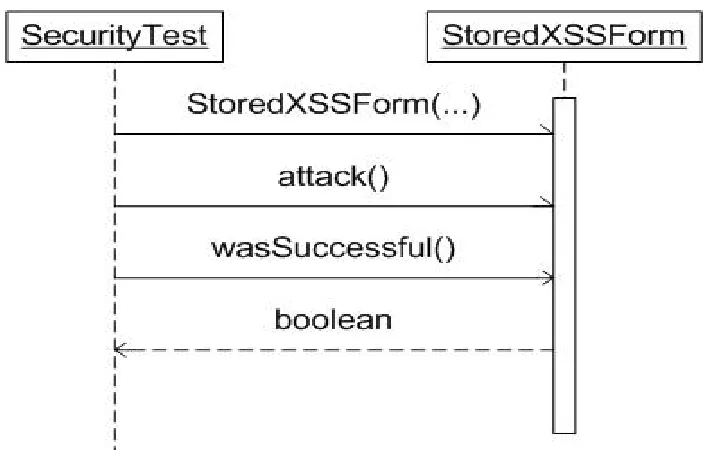
Figure 8: Sequence diagram of a security testing calling the API of SecureUnit
package SecureUnit; import java.io.IOException; import org.xml.sax.SAXException; import com.meterware.httpunit.Button; import com.meterware.httpunit.SubmitButton; import com.meterware.httpunit.WebConversation; import com.meterware.httpunit.WebForm; import com.meterware.httpunit.WebLink; import com.meterware.httpunit.WebRequest; import com.meterware.httpunit.WebResponse;
public class StoredXSSForm {
private WebForm webForm;
private WebConversation conversation; private WebResponse response; private String webFormParamName1; private String webFormParamName2; private String param1Value;
private String formName;
public StoredXSSForm(WebConversation conv, WebResponse resp, String fName, String formParam1, String formValue1, String formParam2){
formName = fName;
webFormParamName1 = formParam1; webFormParamName2 = formParam2; param1Value = formValue1;
conversation = conv; response = resp; }
public void attack(){ try {
webForm = response.getFormWithName(formName); } catch (SAXException e) {
e.printStackTrace(); }
String XSSexploit =
"<script>alert(document.cookie);</script>"; webForm.setParameter(webFormParamName1, param1Value); webForm.setParameter(webFormParamName2, XSSexploit); Button [] buttons = webForm.getButtons();
try {
response =
webForm.submit((SubmitButton)buttons[buttons.length-1]); } catch (IOException e) {
e.printStackTrace(); } catch (SAXException e) { e.printStackTrace(); }
clickOnMaliciousLink(); }
private void clickOnMaliciousLink(){ WebLink xssLink = null;
try {
xssLink = response.getLinkWith(webFormParamName1); } catch (SAXException e) {
e.printStackTrace(); }
try {
e.printStackTrace(); } catch (SAXException e) { e.printStackTrace(); }
}
private String getAlertSessionID(){ int indexOfSessionID = 11;
String alert = conversation.popNextAlert();
String sessionID = alert.substring(indexOfSessionID); return sessionID;
}
private String getCookieValueSessionID(){ String cookieValue =
conversation.getCookieValue("JSESSIONID"); return cookieValue;
}
public boolean wasAttackSuccessful(){ String alertSessionID = getAlertSessionID();
String cookieValueSessionID = getCookieValueSessionID(); boolean match =
alertSessionID.equals(cookieValueSessionID); return match;