Vol. 3, Issue 11, November 2015
Software Automation and Validation
Achal R. Puranik
1, Santosh S. Patil
21
SITE, Vellore Institute of Technology, Vellore, India
2 Assistant Professor, School of Engineering, CUK, Kalaburagi, India
ABSTRACT: The world around us now completely relies on technology that should be faster, reliable, and easy to
complete a given task in a stipulated time. From home entertainment to military services and automobiles to healthcare the essence of the automation is required in order to bring upon effective results without much human intervention. With this notion of support to the fast growing technology in mind to optimize productivity of the service being provided, the automation of software becomes the prime importance. Automation helps to increase the productivity and also the quality beyond the human capability.
In this thesis, the Automation techniques are employed in converting the data present in one file format to another format. The data used for parsing was extracted from stored files with particular extension and it is consolidated to generate an excel report file. Both white box and black box testing is carried out for the same to validate the result with the given requirements.
Automation is also employed with the help of macros that generate chart according to the input values given. Automation is also employed on dumping the data where the data from the data source of one category is extracted and dumped into several other sheets of same category. This data retrieval and data consolidation simplified the task of the user who otherwise would have to work and give instructions manually thereby increasing overall productivity and reliability.
KEYWORDS: Automation Testing, gtk2-perl, Parsing.
I.INTRODUCTION
Today, as per the latest business and marketing trend and the day to day changing technologies there is need to maintain the growth rate and productivity of any software or products that are coming into the market. In this agile software technology the requirements from the end user keep on changing. Regardless of the size, most organizations strive for the growth and always seek ways to increase their productivity.
Automation can be best defined as use of control systems and information technologies to reduce the need for human effort in the production of goods and services. Many of the day to day tasks that we perform are repetitive, cumbersome, time consuming and error prone and fortunately most of these tasks can be automated. Automation can be done in almost all the fields that may include eliminating repetitive data entry, automating software installations, automating and scheduling system & network tasks, data retrieval and data consolidation, automating file transfers and internet downloads, automating internet and web tasks, extracting data & generating reports, automated software & web testing, copying data out of excel and into a web form and so on.
This approach of automation will drastically bring up the productivity of an organization and help in increased throughput, improved quality. It also helps in maintaining consistency of output and reduced direct human labor costs and expenses.
II.LITERATURE SURVEY
Vol. 3, Issue 11, November 2015
that includes software code behind it. The technology of automation has evolved from the related field ofmechanization. Replacement of human power with mechanical power of some form is mechanization. Automation does not depend on human power whereas mechanization requires human participation to provide information or give instructions.
III.PROBLEM DEFINITION
The world around us now completely relies on technology that should be faster, reliable, and easy to complete a given task in a stipulated time. From home entertainment to military services and automobiles to healthcare the essence of the automation is required in order to bring upon effective results without much human intervention. With this notion of support to the fast growing technology in mind to optimize productivity of the service being provided, the automation of software becomes the prime importance. Automation helps to increase the productivity and also the quality beyond the human capability.
IV.PROPOSED METHODOLOGY
The paper includes automation of software that is shown with the help of automating software, in the automation procedure considered in this paper the tool first extracts the data from a file of a particular format and then dumps the data into excel sheet. The parsing feature of perl is used in the automation of the tool and the GUI feature of gtk2-perl is used to build the GUI. In another tool, according to the values in the excel sheet the chart for each sheet is generated and the link is made for each input name in the cell.
The tool mainly extracts the data from the user input file and generates the excel report. i.e., the data is consolidated and put into different format. This is mainly developed with help of perl scripting that allows parsing data through its unique regular expressions concept. The GUI that helps the user to interact with the tool to give inputs, generate report and so on is developed with the help of gtk2-perl.
The sample input files chosen here are taken according to the user requirement which is in .rdb extension format. In these files there exist a number of columns each with unique column name. Out of many columns, few columns data are parsed and dumped into excel report.
System Preliminary Design:
Vol. 3, Issue 11, November 2015
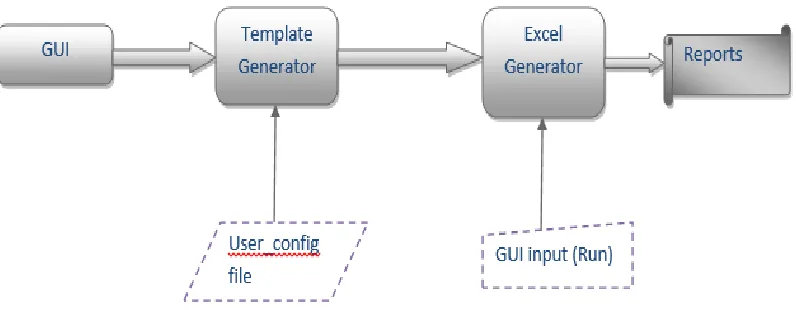
The various modules in the system architecture are described as follows,
GUI: GUI helps to avoid the need of operating the tool from the terminal.This also helps to avoid the necessity of
giving the inputs into the user input file by generating the input file when the user selects the inputs through the GUI.
Template Generator: This module takes the user input file after the user selects the input files through the GUI.
The template generator generates the template file(as shown in fig 12). This template file can be used multiple times to generate the excel report later whenever required.
Excel generator: The excel generator takes the template file as input and generates the excel reports for each
input file selected by the user depending upon the mode (single_dk,multi_dk) chosen. The data from each input file path from the template file is extracted and dumped into the excel sheet by the excel generator.
Architecture:
Vol. 3, Issue 11, November 2015
The tool extracts the data from .rdb files and generate the reports in excel format. The detail description of the tool is as described below.
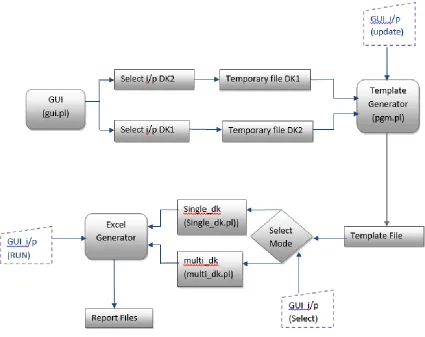
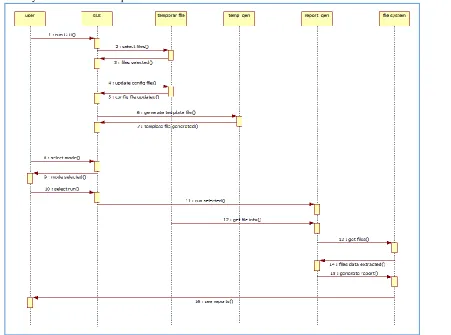
The tool can be operated with the help of GUI by typing the command GUI.pl in the terminal. First the input files are selected for which the excel report is to be generated. The config file is now generated so that the file can be used multiple times to generate the report i.e. the config file is unique for the inputs selected each time the tool is run.
After the config file generation, the mode is now selected with the help of GUI. This is as follows,
Single_dk mode: Here the reports for each different input files from both DK1 and DK2 are generated in different
sheets with sheet name same as that of file name. If mode selected is single_dk mode, the tool generates report describing EXTRACT name and Corresponding Min, Max values.
Multi_dk mode: Here the difference between the two input files selected is generated. If mode selected is multi_dk Comparison mode, the tool generates report describing EXTRACT name, Corresponding Min, Max, Min Diff, Max Diff values. Extract names which are not common amongst the two .rdb files for multi DK mode will not have any values in the final report.
Vol. 3, Issue 11, November 2015
Test Cases:
TS.No Operation Expected Result Actual Result Final Status Comments
1 Browse file- file not
selected
report error error reported as "File not selected"
Pass
2 Generate chart
without input file
report error error reported as "Pl select input file and
then press generate chart"
Pass
3 "VALUE" col not
present in input sheet
report error error reported as
"VALUE col not found in <sheet_name> sheet"
Pass Analog chart gen only
takes "VALUES" & "SIGNAL VALUES" col as input to generate
the charts.
4 "SIGNAL
VALUES" col not present in input
sheet
report error eror reported as
"SIGNAL VALUES col not found in <sheet_name> sheet"
Pass
5 Generate chart Generate the
charts with proper chart formats and
values
Pass Pass
6 Path name display path name
with date and time stamp
Pass Pass
7 del few sheets in
input sheet
generate the chart without any error for the rest of the
sheets
pass Pass
8 summary_sheet
missing
report error error reported as
"summary_sheet not found"
Pass
Vol. 3, Issue 11, November 2015
V. RESULTS AND ANALYSIS
The automation for extracting the data from file stored in a specific format and generating the report in excel format was successfully achieved by parsing the data in the files. This was achieved through Perl scripting. Proper user interface was built to enable user to directly provide inputs through the GUI. This reduced the overhead by taking the user input through GUI instead of giving the inputs manually in the user configuration input file. The user was enabled to save the template file once generated and use the same in the future to generate the excel report of the files stored in that template file. This helped in faster generation of the reports when the numbers of files to be parsed are many.
The automation for generating the chart in excel was achieved through macros. The required input for generating charts was properly read in the user provided input sheet and charts were generated in the same sheets. Proper Exception handling was done to account for any wrong inputs given like input file not given, check for column names. The automation for dumping data was achieved in the same manner.
VI. CONCLUSION AND FUTURE WORK
The widespread use of automation techniques is now seen almost in everywhere in our day to day life. Automation has a big role in adding the business value to the organizations that increases the overall productivity. Automation helps to develop more products and provide services within short span of time. It also helps to add new features to the already existing software’s without affecting the original part. All the repetitive tasks can be avoided that helps to reduce the workload and in turn reducing the CPU time. It also helps in maintaining consistency of output and reduced direct human labor costs and expenses.This report proposes automation techniques that convert data in one format to another format. The future work is focused on making the automation more generic dynamic and helping to convert data in any given file format into excel report.
REFERENCES
1. Alan Dennis, Barbara Haley Wixom, David Tegarden, “Systems Analysis and Design with UML Version 2.0” ,An Object-Oriented Approach, John Wiley & Sons, Inc.
2. ZhiQuan Zhou, Bernhard Scholz, Giovanni Denaro, “Automated Software Testing And Analysis: Techniques, Practices And Tools”, Proceedings Of The 40th Annual Hawaii International Conference On System Sciences (Hicss'07) 0-7695-2755-8/07
3. Test Automation: Http://Researcher.Watson.Ibm.Com/Researcher/View_Group.Php?Id=3208
4. Manjit Kaur, Raj Kumar, “Comparative Study Of Automated Testing Tools: Test Complete And Quick Testpro”, International Journal Of Computer Applications (0975-8887) Volume 24-No. 1, June 2011.
5. B. Korel, “Automated Software Test Data Generation", IEEE Trans on Software Engineering, Vol. 16, No.8, pp. 870-879, 08/1990 6. http://en.wikipedia.org/wiki/Automation
7. http://msdn.microsoft.com/en-IN/library/aa292197(v=vs.71).aspx 8. http://en.wikibooks.org/wiki/Programming_with_Gtk2-Perl/Introduction 9. http://gtk2-perl.sourceforge.net/doc/
10. http://gtk2-perl.sourceforge.net/