Face Objects Detection in still images using
Viola-Jones Algorithm through MATLAB
TOOLS
Dr. Mridul Kumar Mathur1, Priyanka Bhati 2
Asst. Professor (Selection Grade), Dept. of Computer Science, LMCST, Jodhpur, Raj, India1
M. Tech. Student, Dept. of Computer Engineering, Jodhpur National University (JNU), Jodhpur, Raj, India 2
ABSTRACT:A human face is used in many applications such as gender classification, biometric, information cryptography, forensic identification, access control, border surveillance and human interactions etc. In this paper, MATLAB Computer vision system tool is used to identify various parts of human face like nose, face, eyes etc. This MATLAB tool is based on Viola-Jones face detection algorithm. After applying different threshold values various parts of face is identified successfully for different images containing one to multiple faces in it.
KEYWORDS: image processing, face detection, learning, Boosting I. INTRODUCTION
Face Recognition is the most popular research area now days. Face and various parts of face can be detected in images and videos also for various purposes. Face recognition system has two main tasks: verification and identification.
A. FACE DETECTION TECHNIQUES
Some of the face detection techniques are as follows:
(i) Traditional
Traditional algorithms identify facial features by extracting most important features as landmarks from an image of the subject’s face. Some of the popular face recognition are principal component analysis , the hidden Markov model, the multilinear subspace learning using tensor representation ,linear discriminant analysis etc.
(ii) Three-Dimensional Recognition
It uses 3D sensors to capture information about the shape of a face. This information is then used to identify distinctive features on the surface of a face, such as the contour of the eye sockets, nose, and chin.
(iii) Skin texture analysis
This technique uses skin spots and particular patterns apparent on a person’s skin known as called skin texture analysis.
(iv) Thermal cameras
These are special cameras which will only detect the shape of the head and it will ignore the subject accessories such as sun-glasses, hats, or make up.
II. LITERATURE REVIEW
the facial features [2][3], skin color [4][5]and combined multiple features [6]of the face for better accuracy and detection speed. A steady and uniformly scaled images using template matching method was employed. Predefined face templates [7] and deformable templates [8] were incorporated which was completely based on the template (a predefined structure) without using learning. Appearance based methods gives faster detection speeds, more accurate results and adaptive nature that could distinguish a face from a non-face in any environmental conditions.
III. INTRODUCTION TO VIOLA–JONES OBJECT DETECTION FRAMEWORK
The Viola–Jones object detection framework is the first object detection framework to provide competitive object detection rates in real-time proposed in 2001 by Paul Viola and Michael Jones[9][10] . Although it can be trained to detect a variety of object classes, it was motivated primarily by the problem of face detection.
VIOLA JONES APPROACH
A very fast and accurate approach to detect an object was devised by viola and Jones [11] in the year 2001.
This method is very commonly used in cell phone cameras, security perimeters and list goes on. Computational speed is increased due to the use of Haar features and adaboost machine learning and a face can be detected in a frame within a millisecond. Initially the value of all pixels in greyscale images which are in black accumulated. Thereafter, these values are subtracted from the total of white boxes. Finally, the result will be compared to the defined threshold and if the required criterion is met, the feature considers is identified [12, 13].
In this approach objects are detected through these four key concepts.
1. Simple rectangular features, called Haar-like features. 2. Integral image for rapid features detection
3. AdaBoost machine-learning method
4. Cascade classifier to combine many features efficiently
1. Haar like features
Haar like features are used to detect variation in the black and light portion of the image. This computation forms a single rectangle around the detected face. Based on the color shade near nose or forehead a contour is formed [14]. Some commonly used Haar features are:
Two, Three and Four rectangle features
2.Integral Images
They are also known as summed area tables. Integral image is used to felicitate quick feature detection [14]. The meaning of integral image is the outline of the pixel values in the original images.
3. Adaboost machine learning method
AdaBoost algorithm helps to select small features from the face that facilitates fast and easy computation [9,10].Unlike other methods, AdaBoost algorithm gives desired region of the object discarding unnecessary background. The working model can in interpreted by using neural networks [15,16].
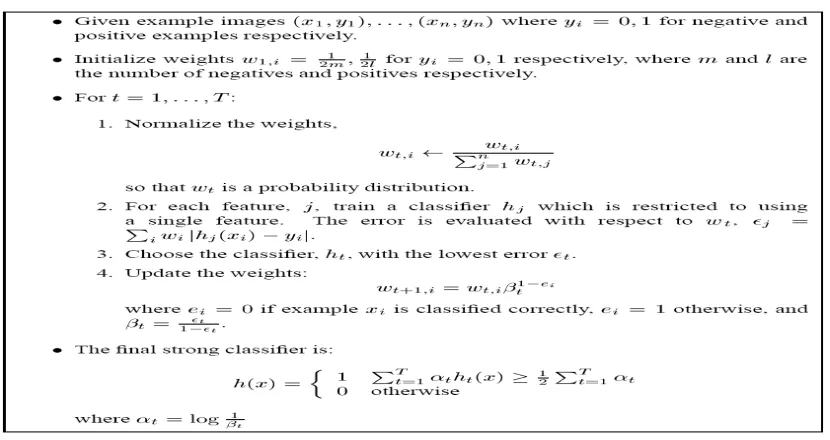
Fig 1: AdaBoost Learning algorithm
AdaBoost learning process is fast and gives more number of desired data. This data can be classified into classifier. A classifier contains small features the face. It is commonly employed for pattern detection.This method has high accuracy and detection speed with about 1% false detection but requires more time to train.
4. Cascade classifier
This algorithm eliminates face candidates quickly using a cascade of stages. The cascade eliminates candidates by making stricter requirements in each stage with later stages being much more difficult for a candidate to pass. Candidates exit the cascade if they pass all stages or fail any stage[17]. If the candidate passes all the stages then only the face is detected. This process is shown in Fig. 2.
IV. METHODOLOGY AND RESULTS
In this work, MATLAB in-built APIs are used to detect face, upper body, nose, mouth and eyes etc. Viola-Jones face detection algorithm, the computer vision system toolbox contains vision. Cascade Object Detector System object which detects objects based on above mentioned algorithm. MATLAB 2014 is used in this work, which has Computer vision system toolbox in the default tool box list.This complete work is divided into six segments in which various parts of the face is detected.
A. Face Detection B. Upper Body Detection C. Single Eye Detection D. Mouth Detection E. Eye Pair Detection F. Nose Detection
The details of these segments are as follows:
A. FACE DETECTION
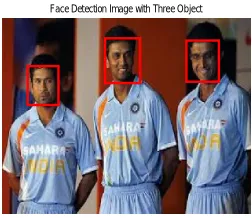
The face object can be detected using vision.CascadeDetector function which has face as default object. In this work face detection is performed on various types of images which include images with one, two, three and ten different faces as objects.Figures 3, 4, 5 and 6 shows images with one, two, three and ten faces respectively as an image object.
Fig 3: Face detection with one object Fig 4: Face detection with two objects
A rectangle is shown in this entire figure to identify face related area of that object.
Face Detection Image with One Object Face Detection Image with Two Object
Face Detection Image with Three Object
It can be seen from these figure face portion of each images is successfully identified for all types of images. Figure 6 shows the ten faces in one images and that has been identified successfully.
B. UPPER BODY DETECTION
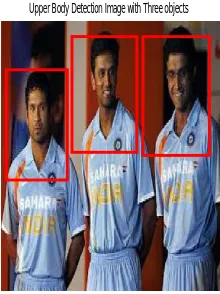
Figure 7, 8, 9 and 10 shows the upper body of the objects in the one, two , three and four respectively.
Fig 7: Upper body detection with one object Fig 8: Upper body detection with two object
It can be seen from these figures that the upper body portion is clearly visible for single and two objects. The size of rectangle clearly shows the difference between face and upper body.
Fig 9: Upper body detection with three objects Fig 10: Upper body detection with four objects
Figure 9 and 10 shows the upper body for three and four different objects respectively. It can be observe that this method identified three and four upper body portions of different objects successfully.
Upper Body Detection Image with One objects Upper Body Detection Image with Two objects
A. SINGLE EYE DETECTION
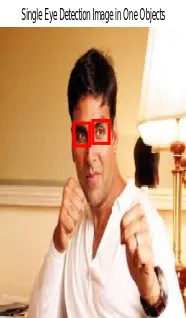
In this method single eye of one and two objects is detected which is shown in figure 11 and 12. Both the eyes are separately differentiated through two rectangles. Right and left eye is shown with different rectangles.
Fig 11: Single eye detection with one object Fig 12: Single eye detection with two objects
B. MOUTH DETECTION
In this mouth of different objects can be detected which is shown in figure 13, 14 and 15.
Fig 13: Mouth detection with one objects Fig 14: Mouth detection with two objects
Figure 13 and 14 shows the mouth detection in image with one and two objects respectively which is properly identified.
Single Eye Detection Image in One Objects
Single Eye Detection Image in Two Objects
Mouth Detection with one object
Fig 15 : Mouth detection with ten objects
It is shown is these figures that the mouth is properly detected for images with one, two and ten objects as well. In figure 15 there are ten different faces, but this method is successfully identifying different mouth structures in different faces.
C. EYE-PAIR DETECTION
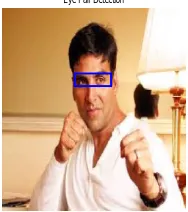
Figure 16 shows the eye pairs detected using this method. A zoomed image of eye pair is shown in figure 17.
Fig 16: Eye pair detection Figure 17: Zoomed version of figure 16
D. NOSE DETECTION
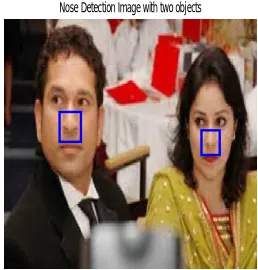
To identify nose section in different types of pictures, a threshold is also applied with this method.The default threshold is 4 which can be varied from 3 to 18 for different types of face gestures. Figures 18, 19 and 20 shows Nose detection with one, two and ten objects respectively.
Mouth Detection with Multiple objects
Fig 18: Nose detection image with one object Fig 19: Nose detection image with two objects
In figure 19 two objects in one image are having different postures but they are also very clearly identified.
Fig 20: Nose detection image with ten objects
It can be seen from these figures that the nose object is clearly identified in all types of images.
IV. CONCLUSION
In this work image processing capability of MATLAB is used to identify various parts of human face. In this work viola jones algorithm for face detection is used. MATLAB provides this algorithm in the form of in-built function in the vision.CascadeDetector package. Eye, mouth , nose and upper body portion of human are detected for images having one , two up to ten different objects of different postures and faces. This is concluded that this method successfully finds all the above mentioned features of human face and body for almost all types of pictures.
Nose Detection Image with One object
Nose Detection Image with two objects
REFERENCES
[1] G. Yang and T. S. Huang,”Human Face Detection in Complex Background”, Pattern Recognition, vol. 27, no. 1, pp. 53-63, 1994. [2] I. Craw, D. Tock, and A. Bennett, “Finding Face Features” Proc. Second European Conf. Computer Vision, pp. 92-96, 1992
[3] T.K. Leung, M.C. Burl, and P. Perona, “Finding Faces in Cluttered Scenes Using Random Labeled Graph Matching”, Proc. Fifth IEEE Int’l Conf. Computer Vision, pp. 637-644,1995.
[4] K.C. Yow and R. Cipolla,”Feature-Based Human Face Detection”, Image and Vision Computing, vol. 15, no. 9, pp. 713-735, 1997. [5] J. Yang and A. Waibel, “A Real-Time Face Tracker”, Proc. Third Workshop Applications of Computer Vision, pp. 142147, 1996.
[6]S. McKenna, S. Gong, and Y. Raja, “Modelling Facial Colour and Identity with Gaussian Mixtures”, Pattern Recognition, vol. 31, no. 12, pp. 1883-1892, 1998
[7] R. Kjeldsen and J. Kender, “Finding Skin in Color Images”,Proc. Second Int’l Conf. Automatic Face and Gesture Recognition, pp. 312- 317, 1996.
[8] I. Craw, D. Tock, and A. Bennett, “Finding Face Features”, Proc. Second European Conf. Computer Vision, pp. 92-96,1992
[9] A. Lanitis, C.J. Taylor, and T.F. Cootes, “An Automatic Face Identification System Using Flexible Appearance Models”, Image and Vision Computing, vol. 13, no. 5, pp. 393-401,1995.
[10] Hsu, Rein-Lien, Mohamed Abdel-Mottaleb, and Anil K. Jain. "Face detection in color images." Pattern Analysis and Machine Intelligence”, IEEE Transactions on 24.5 (2002):696-706.
[11] A.S. Georghiades, P.N. Belhumeur, D.J. Kriegman, “From few to many: illumination cone models for face recognition under variable lighting and pose”, IEEE Trans. Pattern Anal. Mach. Intell. 23 (6) (2001) 643–660.
[12] Mayank Chauha and Mukesh Sakle. “Study & Analysis of Different Face Detection Techniques” International Journal of Computer Science and Information Technologies, Vol. 5 (2), 2014, 1615-1618.
[13]A. Lanitis, C.J. Taylor, and T.F. Cootes, “An Automatic Face Identification System Using Flexible Appearance Models”, Image and Vision Computing, vol. 13, no. 5, pp. 393-401, 1995.
[14] H. Rowley, S. Baluja, and T. Kanade, “Neural NetworkBased Face Detection”, IEEE Trans. Pattern Analysis and Machine Intelligence, vol. 20, no. 1, pp. 23-38, Jan. 1998.
[15] S. McKenna, S. Gong, and Y. Raja, “Modelling Facial Colour and Identity with Gaussian Mixtures”, Pattern Recognition, vol. 31, no. 12, pp. 1883-1892, 1998
[16] T.K. Leung, M.C. Burl, and P. Perona, “Finding Faces in Cluttered Scenes Using Random Labeled Graph Matching”, Proc. Fifth IEEE Int’l Conf. Computer Vision, pp. 637-644, 1995.