SP40S
Multi-Function Facility
Communication System
Installation, Testing,
Operation, and
Maintenance
Manual
About Cooper Wheelock, Inc.:
Cooper Wheelock, Inc. fulfills its mission of
Helping People Take Action by providing high
quality and advanced products and services for
the life safety, communications, and security
markets. Cooper Wheelock has served the
needs of commercial, educational, industrial,
health care, and government users for more
than eighty-five years.
Today the company continues to focus on
designing and manufacturing advanced
technological products to meet the world’s
needs for Emergency Incident Management
and Notification, Multi-Function
Communica-tions, and Mass Notification.
For more information, contact:
Cooper Wheelock, Inc.
273 Branchport Avenue
Long Branch, NJ 07740-6899
Telephone: (800) 631.2148
Fax: (732) 222.2588
Table of Contents
Chapter:
1
Foreword 1
1.1 Intended Use...1
1.2 Design Change Disclaimer...1
1.3 User Operation Assistance ...1
1.4 Typographical Notation Conventions ...2
Chapter:
2
Safety Precautions
1
2.1 Read This Manual ...12.2 Operational Safety...1
2.2.1 Expected Equipment Lifecycle...2
2.2.2 Periodic Testing ...2
2.3 Compliance with Applicable Codes, Regulations, Laws, Standards, and Guidelines....3
2.4 Insurance Recommendation ...3
2.5 Audio Output Considerations...3
2.6 RF Interference...4
2.7 General ...4
Chapter:
3
Overview 1
3.1 Compatibility with Existing Safepath4 Products ...13.2 Standard Features ...2
3.3 Enclosure and Configuration...5
3.4 Nominal Electrical Data...5
3.5 User Interface ...6
3.5.1 Basic Operation of User Interface...6
3.6 Additional Drawings ...8
3.7 User Settings ...144
3.7.1 Switch Descriptions ...144
3.7.2 Jumper Descriptions ...177
3.7.3 LED Descriptions...188
Chapter:
4
Installation 1
4.1 Introduction...14.2 Fire Alarm Control Panel Wiring Applications ...1
4.3 General Installation Instructions ...2
4.4 Preparing the System Wiring Diagram ...6
?<4.4.1Unpacking and Taking Inventory ...6
4.4.2 Locating the Panel ...6
4.4.3 Installing Field Wiring Connections...9
4.4.4 Installing Strobe Connections...9
4.4.5 Installing Audio Output Connections ...10
4.4.6 Installing Auxiliary Circuit Connections ...11
4.4.9 Installing Ancillary Audio Input Connections...12
4.4.10 Setting Adjustable Audio BGM Sources ...13
4.4.11 Installing Alarm, System Trouble, and AC Trouble Output Connections...14
4.5 Wiring the System...15
4.5.1 Wiring Guidelines...15
4.5.2 Field Wiring Connections...15
4.5.3 Preparing a System Wiring Diagram ...15
4.5.4 Visual Notification Appliance Output Wiring...16
4.5.5 Speaker Notification Appliance Output Wiring...16
4.5.6 Wiring Diagrams for Audio/Visual Notification Appliances ...16
4.5.7 Wiring the Alarm Output Contact...17
4.5.8 Wiring the System Trouble Connections...18
4.6 Performing System Checkout ...19
4.6.1 System Control Settings...19
4.6.2 Checkout Procedure...19
4.7 Ground Fault Detection...21
4.8 Battery Care and Backup Battery Calculations...22
4.8.1 Caring for Sealed Lead Acid Batteries ...22
4.8.2 Storing Batteries ...22
4.8.3 Calculating Backup Battery Requirements...22
4.9 Installing AC Power and Batteries ...24
4.9.1 Installing AC Power...24
4.9.2 Installing Batteries ...25
Chapter:
5
Operation 1
5.1 Introduction...15.2 User Interface ...1
5.3 Supervision...1
5.3.1 Visual Notification Appliance Output Circuit Supervision ...2
5.3.2 Audio Notification Appliance Output Circuit Supervision...2
5.3.3 Amplifier Supervision...2
5.3.4 Ground Fault Supervision...2
5.4 Actions that Initiate Audio Alarms ...3
Chapter:
6
Operational Procedures
1
6.1 Making Live Announcements ...16.2 Recording Digital Voice Messages ...1
6.3 Recording Messages on the Digital Voice Section ...2
6.4 Verifying Messages...3
Chapter:
7
Periodic Testing and Maintenance
1
7.1 Introduction...17.2 Periodic Testing ...1
7.2.1 Test Frequency...1
7.2.2 Equipment...1
Chapter:
8
Troubleshooting 1
8.1 Introduction...1
8.2 General ...2
8.2.1 Procedure A ...5
8.2.2 Procedure B...5
8.2.3 Procedure C...6
8.2.4 Procedure D ...6
8.2.5 Procedure E...7
8.2.6 Procedure F...7
8.2.7 Procedure G ...7
8.2.8 Procedure H ...8
8.2.9 Procedure I...8
8.2.10 Procedure J...9
8.2.11 Procedure K ...9
8.2.12 Procedure L...9
8.2.13 Procedure M...10
8.2.14 Procedure N ...10
8.2.15 Procedure O ...10
8.2.16 Procedure P ...11
8.2.17 Procedure Q ...11
8.2.18 Procedure R...11
8.2.19 Procedure S ...12
Chapter:
9
Technical Data
1
9.1 Mechanical ...19.2 Environmental ...1
9.3 Electrical ...2
9.3.1 Input...2
9.3.2 Battery Current Calculations ...2
9.3.3 Activation ...2
9.3.4 Outputs...3
9.4 Wiring Connections ...3
9.4.1 End of Line Resistor (EOLR) ...3
Chapter:
10
Warranty 1
10.1 Limited Warranty ...110.2 Limitation of Liability...2
List of Figures
Figure 3-1 Basic Capabilities of the SP40S Panel ... 4
Figure 3-2 Layout of SP40S Panel... 5
Figure 3-3 SP40S User Interface... 6
Figure 3-4 SP40S Terminal Blocks... 8
Figure 3-5 SP40S Jumpers ... 9
Figure 3-6 SP40S Switches ... 10
Figure 3-7 Diagnostic LEDs/Fuses ... 11
Figure 3-8 SP40S Potentiometers ... 12
Figure 3-9 Grounding Screws and grounding Standoff Locations ………. 3-13 Figure 4-1 Location of Field Wiring Connections ... 2
Figure 4-2 SP40S Panel Mounting and Grounding Location... 7
Figure 4-3 Removable Terminal Block... 9
Figure 4-4 Strobe Connections... 10
Figure 4-5 Audio Output Connections ... 11
Figure 4-6 Digital Voice Initiating Connections... 11
Figure 4-7 Ancillary Audio Input Connections... 12
Figure 4-8 Wiring Diagram for Visual Only Notification Appliances... 16
Figure 4-9 Wiring Diagram for Combination Audio/ Visual Notification Appliances... 17
Figure 4-10 Wiring Diagram for Audio Only Notification Appliance Output... 17
Figure 4-11 Alarm Connections... 18
Figure 4-12 System Trouble Connections (Trouble Status Relay Contact) ... 18
Figure 4-13 120VAC Input Connection... 24
Figure 4-14 Battery Wire Connections ... 25
Figure 4-15 Battery Alignment and Jumper Connection ... 26
Figure 6-1 SP40S User Interface... 3
List of Tables
Table 3-1. SP40S User Interface Pushbuttons/Indicators... 3-6
Table 4-1. Terminal Block Connection Definitions ... 4-3 Table 4-2. Digital Voice Message Tests... 4-20
Table 5-1. Audio Alarm Conditions and Results ... 5-3
1 Foreword
1.1 Intended Use
This manual is designed to serve the installers and operators of the SP40S Multi-Function Facility Communication System. All operating instructions, product illustrations, troubleshooting/error messages, and other relevant information are contained in this manual. It is the user’s
responsibility to ensure that all instructions in this manual are applied strictly.
1.2 Design Change Disclaimer
Due to design changes and product improvements, information in this manual is subject to change without notice. Cooper Wheelock reserves the right to change product design, including
illustrations and diagrams, at any time without notice to anyone, which may subsequently affect the contents of this manual.
Cooper Wheelock assumes no responsibility for any errors that may appear in this manual. Cooper Wheelock will make every reasonable effort to ensure that this manual is up to date and corresponds with the shipped Cooper Wheelock SP40S Multi-Function Facility Communication System.
1.3 User Operation Assistance
Should you experience any difficulty in installing or operating your SP40S Multi-Function Facility Communication System, please contact your Cooper Wheelock representative. The Troubleshooting chapter in this manual (Chapter 8) includes a list of common system problems, possible causes, and corrective operator actions. The information given here is general. Feel free to contact the Technical Support department of Cooper Wheelock at 1-800-631-2148. Hours are 8:00 a.m. - 7:00 p.m. (Eastern Time), Monday through Thursday and 8:00 a.m. –
1.4 Typographical Notation Conventions
Thank you for using our products. Use this product according to this instruction manual. Please keep this instruction manual for future reference.
Any material extrapolated from this document or from Cooper Wheelock manuals or other documents describing the product for use in promotional or advertising claims, or for any other use, including description of the product's application, operation, installation, and testing is used at the sole risk of the user and Cooper Wheelock will not have any liability for such use.
Certain information contained in this manual has been extracted from the NFPA 72 Manual and the Life Safety Code 101™ Manual.
WARNINGS
WARNING: A Warning indicates a potentially hazardous
situation that, if not avoided, could result in serious personal injury or
death to you or others. Warnings are set off in boldface type, within
boxed rules, indented, and referenced to a warning symbol.
CAUTIONS
2 Safety Precautions
2.1 Read This Manual
1. Cooper Wheelock recommends that, before performing any actions to specify, apply, install, maintain, and operationally test the SP40S Multi-Function Facility
Communication System, personnel properly qualified in the application and use of life safety equipment read this manual carefully.
2. Keep this manual with the SP40S Multi-Function Facility Communication System for reference during the life of the product. Make this manual available to all qualified personnel who operate, test, maintain, or service the SP40S Multi-Function Facility Communication System. It is strongly recommend that such personnel read and understand the entire manual.
2.2 Operational Safety
WARNING: If safety precautions, installation, and testing
instructions are not performed properly, the SP40S Multi-Function
Facility Communication Systems may not operate in an emergency
situation, which could result in serious injury or death to you and/or
others.
WARNING: If the protective signaling system sounds and/or
flashes, it is a warning that a possible serious situation requires
immediate attention.
CAUTION: A SP40S Multi-Function Facility Communication System printed circuit board is sensitive to static electricity and has delicate components mounted on it.
(a) Before handling the board or any component on it, discharge any static electricity from your body by touching a grounded object, such as a metal screw, which is connected to earth ground.
(b) Handle the board by its edges and be careful not to twist or flex it. Install the SP40S Multi-Function Facility Communication System in a static-free area.
Reference TESAN number S002-99 for recommended manufacturers of surge protection equipment.
This TESAN (Technical Engineering Support Application Notice) is available from the Cooper Wheelock website (www.cooperwheelock.com) and is found under the Technical Support tab.
NOTE:This SP40S Multi-Function Facility Communication System will not work without power. The SP40S Multi-Function Facility Communication System is powered by 120VAC. 24VDC re-chargeable batteries provide backup power, should be purchased separately. If both sources of power are cut off for any reason, the SP40S Multi-Function Facility Communication System will not operate.
1. DO NOT assume any installation, operation, and testing details not shown in this manual.
CAUTION: DO NOT operate the SP40S Multi-Function Facility Communication System without the dead front panel being properly in place.
2.2.1 Expected Equipment Lifecycle
Notification equipment cannot last forever. Even though the SP40S Multi-Function Facility Communication System is expected to last up to ten years, any of its parts or components could fail before then.
2.2.2 Periodic Testing
1. Cooper Wheelock recommends testing of the entire protective signaling system, including the SP40S Multi-Function Facility Communication System, all notification equipment, as well as all messages and their output channel, and priority assignment, at least twice each year, or more often as required by local, state and federal codes, regulations and laws, by qualified personnel.
2. If the notification equipment is not working properly, immediately contact the installer and have all/any problems corrected immediately.
3. Replace any malfunctioning components immediately; do not attempt to repair malfunctioning components. Return malfunctioning components for factory repair or replacement. In the event you cannot contact the installer, contact the manufacturer.
WARNING: Certain hardware functions on the SP40S
Multi-Function Facility Communication System are not supervised. If any
such hardware functions fail, the SP40S Multi-Function Facility
Communication System may not provide the intended warning and/or
not indicate a trouble condition.
2.3 Compliance with Applicable Codes,
Regulations, Laws, Standards, and Guidelines
Comply with all of the latest applicable codes, regulations, laws, standards, and guidelines.
WARNING: Ensure that for emergency, life safety applications
using the SP40S Multi-Function Facility Communication System,
installation, testing and maintenance always be performed by
qualified personnel in accordance with all the latest National Fire
Protection Association (NFPA), Underwriter’s Laboratory (UL),
National Electric Code (NEC), Occupational Safety and Health
Administration (OSHA), state, county, local, province, district,
federal, and other applicable building and fire standards, guidelines,
regulations, laws, and codes including, but not limited to, all
appendices and amendments and requirements of the Local Authority
Having Jurisdiction (AHJ).
It is recommended that the local Authority Having Jurisdiction (AHJ) inspect and approve the proposed placement of all the notification appliances.
2.4 Insurance Recommendation
The SP40S Multi-Function Facility Communication System is not a substitute for insurance. Make sure that you have adequate levels of life and property insurance.
2.5 Audio Output Considerations
WARNING: Audible signals may mask medical equipment
monitoring alarms. Where medical equipment monitoring alarms are
in use, do not use audible signals; provide visual notification
appliances in highly visible locations.
CAUTION: The output of the audio system may not be heard in all cases. Sound can be blocked or reduced by walls, doors, carpeting, wall coverings, furniture, insulation, bed coverings, and other obstacles that may temporarily or
especially those who are asleep, those who are hearing-impaired, those who are wearing devices that plug or cover the ears, and those who have recently used drugs or alcohol.
The output of the audio system may not be heard by an alert person if the output device is placed in an area which is isolated by a closed door, or is located on a different floor from the person in a hazardous situation or is placed too far away to be heard over ambient noise such as, but not limited to, running water, traffic, air conditioners, machinery or musical appliances.
If live microphone announcements, audible tones and/or voice messages cannot be readily heard and understood clearly within the protected areas as intended, increase the number and/or sound output intensity of speakers within those areas so that they are heard and understood clearly when activated.
2.6 RF Interference
The SP40S Multi-Function Facility Communication System has been tested and found to comply with the limits for a Class A digital device, pursuant to Part 15 of the FCC Rules. These limits are designed to provide reasonable protection against harmful interference when the equipment is operated in a commercial environment. This equipment generates, uses, and can radiate radio frequency energy and, if not installed and used in accordance with the instruction manual, may cause harmful interference to radio communications. Operation of this equipment in a residential area is likely to cause harmful interference, in which case the user is required to correct the interference at his own expense.
2.7 General
Each manufacturer's panel and notification appliances operate differently and have different features. Before specifying, installing, operating, testing, maintaining, or servicing a system, carefully read the installation, operation, and testing manual for each piece of equipment and applicable codes.
Additional copies of this manual may be obtained from:
Cooper Wheelock, Inc. 273 Branchport Ave. Long Branch, N.J. 07740 Tel: (800) 631-2148 Fax: (732) 222- 2588
E-mail: [email protected]
3 Overview
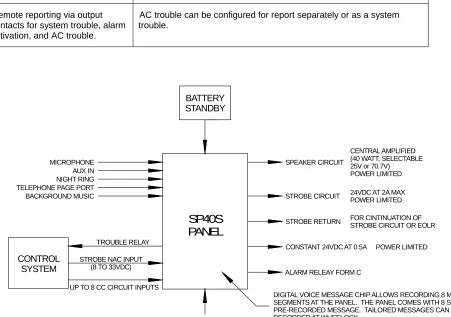
The SP40S Multi-Function Facility Communication System is capable of supplying the following:
• 40 Watts of audio power
• 2 Amps of strobe power
• There is an additional 0.5 Amps of auxiliary power at 28 Volts that can be used to power other Safepath Products.
The SP40S Multi-Function Facility Communication System is used for Alarm and Non-Alarm Announcements.
3.1 Compatibility with Existing Safepath4 Products
3.2 Standard Features
Feature Description
One strobe NAC output section • 24VDC @ 2 Amps Maximum.
• Requires separate NAC Circuit (8 to 33VDC) input or can be programmed to operate when Digital Voice messages are played. • Microphone (MIC) is active.
• Auxiliary (AUX) input is active and/or Digital Voice message are played. (Each message can be programmed individually to activate the strobe circuitry.)
• Return allows pass-through for Cooper Wheelock synchronized strobes, remote SP40S panels, additional strobe appliances, or EOLR.
• Synchronized output when using Cooper Wheelock’s synchronized strobe products.
• Supervised with 10K Ohm end-of-line resistor (EOLR). • Trouble LEDs for Open and Short conditions.
• Power limited to minimize overload condition.
40-Watt Audio Amplifier section • Selection of 25Vor 70V speaker output. • Supervised with 10K Ohm EOLR.
• Trouble LEDs for Open and Short Conditions • Power limited to avoid overload condition.
Digital Voice Section • Capable of playback and record (via 1/8” audio jack).
• Digital Voice Message Chip contains the recording program and memory for eight message sections.
• Memory in eight sections with corresponding inputs. o A total of four minutes of messages.
o Each message is 30 seconds in duration. o Messages can be combined for longer durations. • Activated by one of eight contact closure inputs (IN1 – IN8) or
manual activation on user interface.
• Each CC input (contact closure) can be supervised for an OPEN. • Prealert tones can be chosen for each message (code 3,
continuous, or no pre-tone).
• Messages can be selected to have a post-tone that matches the pre-tone.
Feature Description
Alarm Audio Processing Section • Three Priority ordered audio inputs
Hand-held, push-to-talk (PTT) microphone, and Priority 1. For live, emergency voice announcements and instructions. The microphone overrides (mutes) any voice message or tones in progress.
• Auxiliary Input (AUX IN, CC/NAC), Priority 2. o CC or NAC initiates AUX IN audio o CC is supervised. NAC is not supervised.
o For use with SAFEPATH4 – Remote Microphone Expander (SP4-RMX) or SAFEPATH4 – Remote Microphone (SPRM) • Digital Voice Section inputs (IN1, IN2, IN3, IN4, IN5, IN6, IN7,
IN8).
o IN1, IN2, IN3, IN4, IN5, IN6, IN7, IN8 have priorities 3, 4, 5, 6, 7, 8, 9, and 10 respectively.
o IN1 – IN8 are initiated via Contact Closure.
o IN1, IN2, IN3, IN4, IN5, IN6, IN7, IN8 are supervised for an OPEN.
o Messages can also be initiated via user interface.
Non-Alarm Audio Processing Section
• Night Ring (NR), Priority 6. o Contact closure activated. o Non-alarm.
o Does not operate if on Battery. • Telephone Page (TEL), Priority 7.
o Accepts a Telephone Page Port Input. o Will not operate if the panel is on Battery. • Background Music (BGM), Priority 8.
o Line Level Input.
o Will mute when any other input is used. o Will not operate if the panel is on Battery.
Ground Fault Detection Section Monitors inputs and outputs for 40K Ohms minimum in relation to ground.
A Dual-Tone Tone Generator with two field selectable sounds (Code 3 Tone, Slow Whoop) that sound when there is a Digital Voice Section Failure in alarm condition.
Provides Code 3 tone or Slow Whoop (user selectable) in the instance of a Digital Voice failure or system timeout.
Full supervision with on-board diagnostics and trouble reporting circuits for:
Audio NAC circuit wiring -- open and short conditions during standby AND active (Alarm and BGM) Ground Fault detection
Strobe NAC circuit wiring -- open and short conditions PTT Microphone -- not installed or damaged
Feature Description
Form C relay trouble contacts for external notification.
Form C contact normally energized. Contacts transfer during a trouble, an alarm trouble, or an AC trouble: 2.0 amps at 24VDC max, resistive load. Non-Supervised.
Built-in Sounder To indicate trouble, with a trouble silence switch to silence it. If the trouble is not corrected in 20 hours, the sounder reactivates. (Trouble Silence Switch does not change the state of the Form C Trouble relay.)
Remote reporting via output contacts for system trouble, alarm activation, and AC trouble.
AC trouble can be configured for report separately or as a system trouble.
TROUBLE RELAY
SP40S PANEL
STROBE NAC INPUT (8 TO 33VDC)
UP TO 8 CC CIRCUIT INPUTS
CONTROL SYSTEM
TELEPHONE PAGE PORT NIGHT RING AUX IN MICROPHONE BACKGROUND MUSIC BATTERY STANDBY CENTRAL AMPLIFIED (40 WATT, SELECTABLE 25V or 70.7V) POWER LIMITED SPEAKER CIRCUIT
24VDC AT 2A MAX POWER LIMITED STROBE CIRCUIT
FOR CINTINUATION OF STROBE CIRCUIT OR EOLR STROBE RETURN
POWER LIMITED CONSTANT 24VDC AT 0.5A
ALARM RELEAY FORM C
120VAC
DIGITAL VOICE MESSAGE CHIP ALLOWS RECORDING 8 MESSAGE SEGMENTS AT THE PANEL. THE PANEL COMES WITH 8 STANDARD PRE-RECORDED MESSAGE. TAILORED MESSAGES CAN BE RECORDED AT WHEELOCK.
3.3 Enclosure and Configuration
For technical specifications, see Chapter 9.
3.4 Nominal Electrical Data
For technical specifications, see Chapter 9.
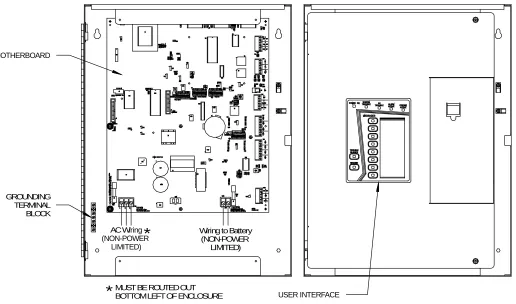
AC Wiring (NON-POWER
LIMITED)
Wiring to Battery (NON-POWER
LIMITED)
*
*
GROUNDING TERMINAL BLOCK
MOTHERBOARD
USER INTERFACE
MUST BE ROUTED OUT BOTTOM LEFT OF ENCLOSURE
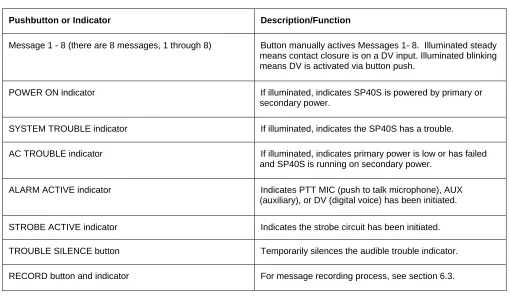
3.5 User Interface
• The User Interface of the SP40S Multi-Function Facility Communication System displays the basic status of the unit as well as allowing for a limited amount of user controls. Table 3-1 identifies the pushbuttons and
indicators.
Message 1 Message 2 Message 3 Message 4 Message 5 Message 6 Message 7 Message 8
Figure 3-3 SP40S User Interface
Table 3-1. SP40S User Interface Pushbuttons/Indicators
Pushbutton or Indicator Description/Function
Message 1 - 8 (there are 8 messages, 1 through 8) Button manually actives Messages 1- 8. Illuminated steady means contact closure is on a DV input. Illuminated blinking means DV is activated via button push.
POWER ON indicator If illuminated, indicates SP40S is powered by primary or
secondary power.
SYSTEM TROUBLE indicator If illuminated, indicates the SP40S has a trouble.
AC TROUBLE indicator If illuminated, indicates primary power is low or has failed and SP40S is running on secondary power.
ALARM ACTIVE indicator Indicates PTT MIC (push to talk microphone), AUX
(auxiliary), or DV (digital voice) has been initiated.
STROBE ACTIVE indicator Indicates the strobe circuit has been initiated.
TROUBLE SILENCE button Temporarily silences the audible trouble indicator.
3.5.1 Basic Operation of User Interface
When a Message button is pressed, the user interface microcontroller processes the signal and outputs it to the Digital Voice microcontroller which plays the corresponding message. The user interface illuminates the
3.6 Additional Drawings
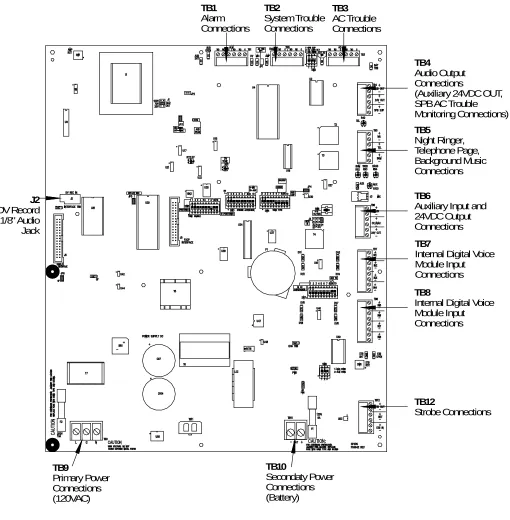
J2 DV Record 1/8" Audio Jack TB9 Primary Power Connections (120VAC) TB10 Secondaty Power Connections (Battery) TB12 Strobe Connections TB8Internal Digital Voice Module Input Connections
TB7
Internal Digital Voice Module Input Connections
TB6
Auxiliary Input and 24VDC Output Connections
TB4
Audio Output Connections
(Auxiliary 24VDC OUT, SPB AC Trouble Monitoring Connections) TB5 Night Ringer, Telephone Page, Background Music Connections TB1 Alarm Connections TB3 AC Trouble Connections TB2 System Trouble Connections
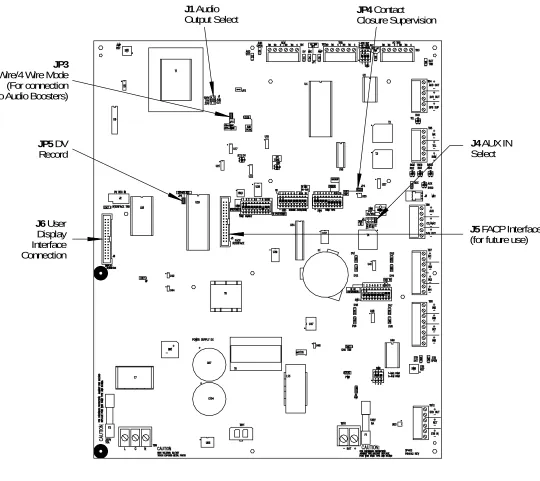
J4 AUX IN Select
J6 User Display Interface Connection
J5 FACP Interface (for future use)
JP4 Contact Closure Supervision
J1 Audio Output Select
JP5 DV Record
JP3
2 Wire/4 Wire Mode (For connection to Audio Boosters)
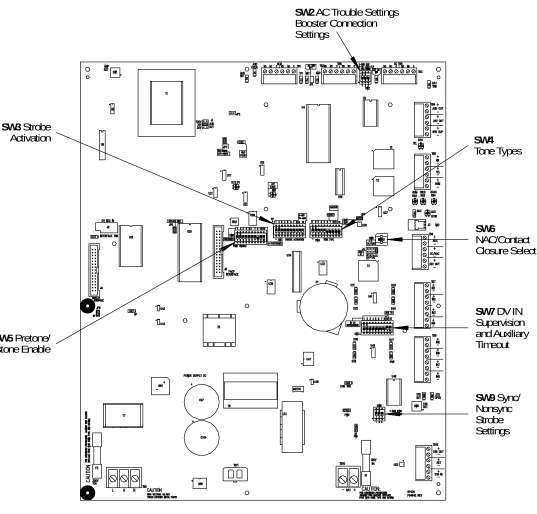
SW2 AC Trouble Settings Booster Connection Settings
SW3 Strobe Activation
SW5 Pretone/ Postone Enable
SW4
Tone Types
SW6
NAC/Contact Closure Select
SW7 DV IN Supervision and Auxiliary Timeout
SW9 Sync/ Nonsync Strobe Settings
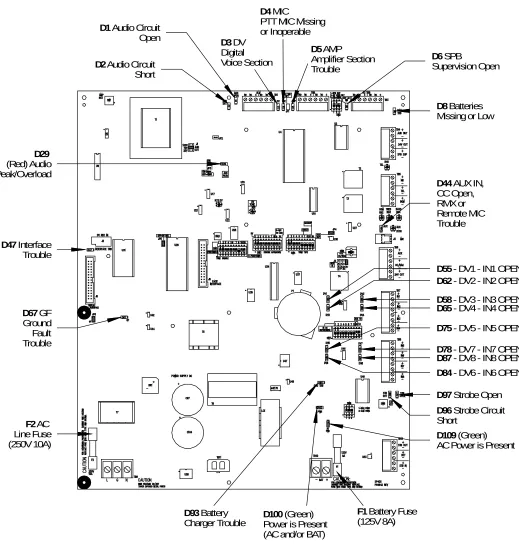
D65 - DV4 - IN4 OPEN
D58 - DV3 - IN3 OPEN
D78 - DV7 - IN7 OPEN
D87 - DV8 - IN8 OPEN
D75 - DV5 - IN5 OPEN
D62 - DV2 - IN2 OPEN
D55 - DV1 - IN1 OPEN
D84 - DV6 - IN6 OPEN
D97 Strobe Open
D96 Strobe Circuit Short
D44 AUX IN, CC Open, RMX or Remote MIC Trouble
D8 Batteries Missing or Low
D4 MIC
PTT MIC Missing or Inoperable
D3 DV Digital Voice Section
D1 Audio Circuit Open
D2 Audio Circuit Short
D5 AMP Amplifier Section Trouble
D6 SPB
Supervision Open
D109 (Green) AC Power is Present
F1 Battery Fuse (125V 8A)
D100 (Green) Power is Present (AC and/or BAT)
D93 Battery Charger Trouble
F2 AC Line Fuse (250V 10A)
D67 GF Ground Fault Trouble
D47 Interface Trouble
D29
(Red) Audio Peak/Overload
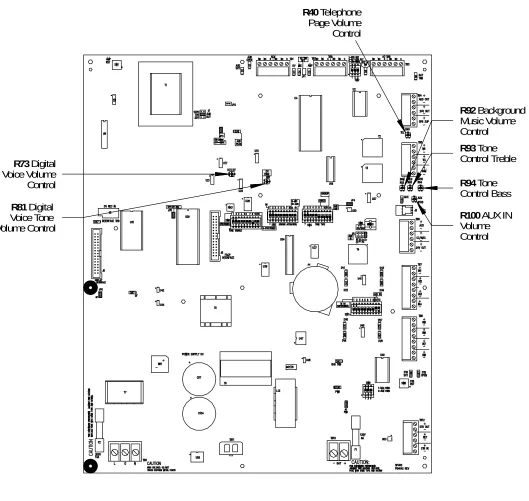
R73 Digital Voice Volume Control
R81 Digital Voice Tone Volume Control
R94 Tone Control Bass
R93 Tone Control Treble
R92 Background Music Volume Control
R100 AUX IN Volume Control
R40 Telephone Page Volume Control
Figure 3-9 Grounding Screws and Grounding Standoff Locations
3.7 User Settings
3.7.1 Switch Descriptions
SW2 (AC Trouble Settings, Booster Connection Settings)
PIN FUNCTION ON
1 Ext. AC Loss Sup. 10k EOLR supervision On For SPB SUP Contacts
2 AC Loss Delay 170 minute AC Loss Delay (For Off Premise AC Loss Reporting)
3 Ext AC TRB Mode Audio Booster AC Trouble Reported To SP40S Separately
SW3 (Strobe Activation)
PIN FUNCTION ON
1 DV1 Strobe STB on when DV1 active
2 DV2 Strobe STB on when DV2 active
3 DV3 Strobe STB on when DV3 active
4 DV4 Strobe STB on when DV4 active
5 DV5 Strobe STB on when DV5 active
6 DV6 Strobe STB on when DV6 active
7 DV7 Strobe STB on when DV7 active
8 DV8 Strobe STB on when DV8 active
9 MIC Strobe STB on when MIC active
SW4 (Tone Types)
PIN FUNCTION ON
1 Tone Type - DV1 Code 3 (OFF = continuous)
2 Tone Type - DV2 Code 3 (OFF = continuous)
3 Tone Type - DV3 Code 3 (OFF = continuous)
4 Tone Type - DV4 Code 3 (OFF = continuous)
5 Tone Type - DV5 Code 3 (OFF = continuous)
6 Tone Type - DV6 Code 3 (OFF = continuous)
7 Tone Type - DV7 Code 3 (OFF = continuous)
8 Tone Type - DV8 Code 3 (OFF = continuous)
9 Backup tone Code3 (OFF = slow whoop)
10 unused --
SW5 (Pre-tone/Post-tone Enable)
PIN FUNCTION ON
1 Pre-tone - DV1 Pre-tone ON for Message 1
2 Pre-tone - DV2 Pre-tone ON for Message 2
3 Pre-tone - DV3 Pre-tone ON for Message 3
4 Pre-tone - DV4 Pre-tone ON for Message 4
5 Pre-tone - DV5 Pre-tone ON for Message 5
6 Pre-tone - DV6 Pre-tone ON for Message 6
7 Pre-tone - DV7 Pre-tone ON for Message 7
8 Pre-tone - DV8 Pre-tone ON for Message 8
9 Post-tone - All Post-tones enabled (Post-tone Matches Pre-tone)
10 Message Repeat ON = Message plays a minimum of 3 times
OFF = Message plays a minimum of 1 time*
*NOTICE TO USERS, INSTALLERS, AUTHORITIES HAVING JURISDICTIONS AND OTHER INVOLVED PARTIES: In order for this product to comply with the requirements in the Standard for Control Units and Accessories for Fire Alarm Systems, UL 864, Position 10 of SW5 must be kept in the ON position. UL 864, 9th Edition, section 34.2.1.1
SW6 (Initiation mode select for Aux IN)
SETTING DESCRIPTION
CC Contact Closure Mode for use with RMX or SPRM
NAC 8 to 33VDC NAC Input
SW7 (DV IN Supervision and Auxiliary Timeout)
PIN FUNCTION ON
1 DV MES 1 CC Supervision 10k EOLR supervision ON for IN1
2 DV MES 2 CC Supervision 10k EOLR supervision ON for IN2
3 DV MES 3 CC Supervision 10k EOLR supervision ON for IN3
4 DV MES 4 CC Supervision 10k EOLR supervision ON for IN4
5 DV MES 5 CC Supervision 10k EOLR supervision ON for IN5
6 DV MES 6 CC Supervision 10k EOLR supervision ON for IN6
7 DV MES 7 CC Supervision 10k EOLR supervision ON for IN7
8 DV MES 8 CC Supervision 10k EOLR supervision ON for IN8
9 AUX Input Timeout Timeout active
10 unused --
SW9
PIN FUNCTION ON
1 Sync mode (NAC input) Standard Sync (OFF = PASS THRU SYNC MODE)
2 Sync mode (Alarm) Standard Sync (OFF = 28 volts)
3.7.2 Jumper Descriptions
Jumper Description Additional
J1 Audio Output Level Select (25/70/100V)
J4 AUX IN Select (1/25/70/100 V)
J5 FACP Interface (for future use)
J6 User Display Interface Connection Trouble occurs if Interface is not connected
JP2 NOT USED NOT USED
JP3 2-Wire / 4-Wire Mode Removed = 4-Wire Mode
JP4 Contact Closure Supervision (AUX SUP) REMOVED = CC input supervision active
JP5 DV Record REMOVED = DV Record can be activated
3.7.3 LED Descriptions
Head Description Additional
D1 Audio Output Open ON = Audio Output is open or missing EOLR
D2 Audio Output Short ON = Audio Output is shorted
D3 DV, Digital Voice Section ON = DV Audio is low or DV is damaged
D4 MIC, PTT MIC Missing or inoperable ON = MIC missing or inoperable;
Blinking = MIC preamp trouble
D5 AMP, Amplifier Section Trouble ON = Amplifier trouble or audio current limiting;
Blinking = AUX preamp trouble
D6 External AC Wiring trouble ON = SPB SUP missing EOLR
D8 Battery Trouble ON = BATT missing or low
D29 Audio Peak/Overload ON = Audio level is too high
D44 AUX IN Trouble ON = CC Open, RMX, or Remote MIC Trouble
D47 User Interface trouble User Interface is improperly connected
D55 DV1 – IN1 OPEN ON = IN1 open or missing EOLR
D58 DV3 – IN3 OPEN ON = IN3 open or missing EOLR
D62 DV2 – IN2 OPEN ON = IN2 open or missing EOLR
D65 DV4 – IN4 OPEN ON = IN4 open or missing EOLR
D67 GF, Ground Fault Trouble
D75 DV5 – IN5 OPEN ON = IN5 open or missing EOLR
D78 DV7 – IN7 OPEN ON = IN7 open or missing EOLR
D84 DV6 – IN6 OPEN ON = IN6 open or missing EOLR
D87 DV8 – IN8 OPEN ON = IN8 open or missing EOLR
D93 Battery Charger Trouble ON = Battery charger circuit in trouble
D96 Strobe Short ON = Short on strobe out
D97 Strobe Open ON = Strobe out open or missing EOLR
D100 (Green) Power ON = AC and or BAT Power is present
4 Installation
4.1 Introduction
Remember, the lives of people depend upon the safe and proper installation of the voice evacuation system and the SP40S Multi-Function Facility Communication System. Please read, understand, and follow the specific installation instructions set forth in this chapter carefully to avoid damage to the panel and equipment connected to it. Ensure that only qualified personnel in accordance with the procedures in this manual conduct the
installation.
WARNING: Shut off all power before starting the installation. Electrical
shock can cause death or serious injury.
WARNING: Do not connect AC power or battery backup power until system
wiring has been connected, modules have been installed, and field wiring has been
inspected.
CAUTION: The SP40S printed circuit board is sensitive to static electricity and has delicate components mounted on it. Before handling the board or any component on it, discharge any static electricity from your body by touching a grounded object such as a metal screw, which is connected to earth ground. Install the panel in a static-free area; properly attach grounded wrist straps before touching any static-sensitive areas.
• If you or the installer have any questions about the installation, consult with the authorities having jurisdiction (AHJ), prior to installation.
4.2 Fire Alarm Control Panel Wiring Applications
The SP40S Digital Voice Section inputs and the strobe input require an 8 to 33VDC. The Fire Alarm Control Panel (FACP) NAC Circuit of 12VDC or 24VDC initiates this circuit.
4.3 General Installation Instructions
For a view of the location of wiring connections used in the installation of the SP40S Multi-Function Facility Communication System, refer to Figure 4-1. Table 4-1 explains the functions of the different wiring connections.
Section 9 Primary Power (120VAC) Connections
Section 10 Secondary Power (Battery) Connections
Section 11 Strobe Connections
Sections 7 and 8 Internal Digital Voice Connections
Section 6 Auxilary Input and 24VDC Output Connections Section 5
Night Ring, Telephone Page, Background Music Connections
Section 4 Audio Output Connections Section 3
AC Trouble Connections Section 2
System Trouble Connections Section 1
Alarm Connections
Table 4-1. Terminal Block Connection Definitions
Terminal Block
Symbol Alarm Connections Definitions
Alarm Connections
ALM Alarm connections Alarm Form C relay changes state in Audio Alarm Conditions. These conditions are: Push-to-talk Button on MIC depressed. AUX initiated via CC or NAC, and IN1- IN8 inputs present. Contacts are rated at 24VDC, 2A. Resistive load.
NO Normally open Alarm Relay contact open to Common (COM) in non-alarm condition.
NC Normally closed Alarm Relay contact closed to Common (COM) in non-alarm condition.
TB1 Terminal Block 1 Section 1
COM Common Alarm Relay Common (COM).
System Trouble Connections
TRB System Trouble connections Trouble Form C relay changes state in Trouble Conditions. Contacts are rated at 24VDC, 2A. Resistive load.
NO Normally open Trouble Relay contact open to Common (COM) when a system trouble is NOT present.
NC Normally closed Trouble Relay contact closed to Common (COM) when a system trouble is NOT present.
TB2 Terminal Block 2 Section 2
COM Common Trouble Relay Common (COM).
AC Trouble Connections
AC TRB AC Trouble connections AC Trouble Form C relay changes state when primary power is missing or low. Contacts are rated at 24VDC, 2A. Resistive load.
NO Normally open AC Trouble Relay contact open to common (COM) when primary power is sufficient.
NC Normally closed AC Trouble Relay contact closed to common (COM) when primary power is sufficient.
TB3 Terminal Block 3 Section 3
Terminal Block
Symbol Alarm Connections Definitions
Audio Output Connections
AUD OUT
Audio Output Audio Output for 25V or 70V speakers. Supervised using UL Listed 10K Ohm, ½ W EOLR. Power Limited.
24V OUT
24 VDC, 0.5A Output 24 VDC, 0.5A Continuous Output Connection, Power Limited auxiliary power source. NOTE: Two 24V outputs combine for 0.5A. TB4 Terminal Block 4 Section 4 SPB SUP SAFEBAPTH4 Booster Supervision
Contact Closure indicates a primary power loss on the audio booster. Input is supervised using 10k Ohm EOLR. Used only when AC loss is reported separately from system trouble. Active only when SW2 Position 3 is ON.
Night Ringer, Telephone Page, Background Connections
NR Night Ring Contact Closure Input initiates chime sound for Night Ring. Non-supervised. Night Ring does not operate without 120VAC input and the Panel is operating on Battery.
TEL Telephone Page Input Telephone Page Input from a telephone Page Port. Non-Supervised. Telephone Page does not operate without 120VAC input and the Panel is operating on Battery.
TB5 Terminal Block 5 Section 5
BGM Background Music Input Line Level, 600 Ohm Background Music Input. Automatically mutes when any other input is in use. Non-Supervised. Background Music input does not operate without 120VAC input and the panel is operating on Battery
Auxiliary Input and 24VDC Output Connections (For Connection To SPRM or SP4-RMX)
AUX Auxiliary Input Audio Line Level Audio Input, Remote MIC, or SP4-RMX Priority 2.
CC/NAC Contact Closure/NAC Contact closure or NAC will initiate AUX IN Audio. CC is supervised. Connects to RMX or Remote MIC (CC Mode).
TB6 Terminal Block 6 Section 6,
24V Out 24VDC, 0.5A output Regulated, 24 VDC, 0.5A Continuous Output Connection, Power Limited auxiliary power source. NOTE: Two 24V outputs combine for 0.5A. Connects to RMX or Remote MIC.
Terminal Block
Symbol Alarm Connections Definitions
Internal Digital Voice Module Input Connections
IN 1 Input 1 Digital Voice Initiating connection for message #1 (contact closure). Priority 3.
IN 2 Input 2 Digital Voice Initiating connection for message #2 (contact closure). Priority 4.
IN 3 Input 3 Digital Voice Initiating connection for message #3 (contact closure). Priority 5.
TB7 Terminal Block 7 Section 7
IN 4 Input 4 Digital Voice Initiating connection for message #4 (contact closure). Priority 6.
Internal Digital Voice Module Input Connections
IN 5 Input 5 Digital Voice Initiating connection for message #5 (contact closure). Priority 7.
IN 6 Input 6 Digital Voice Initiating connection for message #6 (contact closure). Priority 8.
IN 7 Input 7 Digital Voice Initiating connection for message #7 (contact closure). Priority 9.
TB8 Terminal Block 8 Section 8
IN 8 Input 8 Digital Voice Initiating connection for message #8 (contact closure). Priority 10.
TB9 Terminal Block 9 Section 9
Primary Power (120VAC) Connections
AC Primary Power (AC) AC Input Voltage. Make sure Line (L), Neutral (N), and Ground (G) are connected. Non-power limited. Make sure power cord is run properly (see wiring diagram Figure 4-13 in Section 4.9.1).
Secondary Power (Battery) Connections TB10
Terminal Block 10 Section 10
BAT Secondary Power (Battery) 24VDC, up to 33 Ah Battery input connection. The enclosure can accommodate up to 12 Ah. Batteries greater than 12 Amp-Hours (Ah) are required to be installed in a UL listed battery box. Non-power limited.
Strobe Connections. See Appendix E for strobe compatibility list.
STB OUT
Strobe Output 8-33 VDC, Regulated, 2A Maximum Strobe NAC Output
Supervised with UL Listed 10k Ohm, ½ W EOLR. (Power limited).
RET Return Strobe Input Return for connecting additional strobe circuits, or UL Listed 10k Ohm, ½ W EOLR.
TB12 Terminal Block 12 Section 11
STB IN Strobe Input 8-33 VDC, Strobe NAC Input. Triggers strobe in Alarm condition.
4.4 Preparing the System Wiring Diagram
• Keep a copy of the system-wiring diagram with the SP40S manual as a permanent record of the system wiring.
4.4.1 Unpacking and Taking Inventory
Carefully unpack the panel and make sure each item described on the packing slip is present and undamaged. 1. Check the exterior of the shipping container(s) for any exterior damage, then the interior of the
container(s).
2. Notify both the carrier and Cooper Wheelock immediately on the straight bill of lading (supplied by the carrier) if any damage is found both verbally and in writing; you may also request an inspection by the carrier. Such requests must usually be made within a specified time period from date of shipment. Cooper Wheelock is not responsible for damage to equipment occurring during shipping, and only furnishes replacement parts against a written purchase order. It is the customer’s responsibility to file a claim with the carrier.
3. Follow any instructions Cooper Wheelock and/or the carrier may supply about possible damage. 4. If no damage is found, compare the contents of the Inventory List against the contents of the shipping
container(s), to ensure receipt of all components.
5. Save all shipping materials (any “bubble wrap” or plastic) for possible future use. Store in a safe, dry location.
4.4.2 Locating the Panel
Mount the panel in a location within the environmental limits specified in the latest UL Standard 864 for indoor/dry control panels. DO NOT locate the panel in a hazardous area.
CAUTION: To comply with the latest NFPA and UL requirements for interconnection of fire alarm control equipment, locate the SP40S Multi-Function Facility Communication System in the same room, and within 20 feet of, a listed compatible fire alarm control panel. Enclose the wiring in conduit and connect it properly to such control panel.
1. See Figure 4-2 for the panel mounting hole layout.
2. Mark and drill mounting holes for appropriate screws and anchors to ensure secure mounting to the type of surface at the selected location.
3. Prevent dust and dirt contamination of the SP40S Multi-Function Facility Communication System during installation. This contamination can interfere with the operation and reduce the life of the equipment.
14.00"
17.00"
3/4" - 1" Conduit
Knockouts (18 Places)
Grounding Terminal Block
2" - 2 1/2" - 3" Conduit
Knockouts (2 Places)
Figure 4-2 SP40S Panel Mounting and Grounding/Conduit Location
Wire Distance Chart For 25V Speaker Line in feet
Watts 12 AWG 14 AWG 16 AWG 18 AWG
5 2179 1374 865 543
10 1090 687 432 271
15 726 458 288 181
20 545 344 216 136
25 436 275 173 109
30 363 229 144 90
35 311 196 124 78
40 272 172 108 68
Wire Distance Chart For 70V Speaker Line in feet
Watts 12 AWG 14 AWG 16 AWG 18 AWG
5 17087 10775 6780 4256
10 8543 5387 3390 2128
15 5696 3592 2260 1419
20 4272 2694 1695 1064
25 3417 2155 1356 851
30 2848 1796 1130 709
35 2441 1539 969 608
4.4.3 Installing Field Wiring Connections
NOTE: The terminal blocks on the SP40S Multi-Function Facility Communication System are removable. To remove a terminal block, pull the block straight up from the circuit board, as shown in Figure 4-3. Attach wires to the desired connections, then plug the terminal block back on the board, being careful to match the pins.
Figure 4-3 Removable Terminal Block
NOTE: For power limited circuits, make sure that all input power sources (Alarm and Trouble relay connections, NAC inputs, and auxiliary inputs) are power limited.
NOTE: The AC Power input wiring is non-power limited. Route it on the left side of the enclosure, using one of the knockouts on the left side of the enclosure. Route all power limited inputs and outputs on the right side and top of the enclosure.
Install field wiring in conduit when required, following the most current National Electrical Code (NFPA-70) and local codes for the type of system being installed. Make all necessary connections at any additional wiring or junction boxes.
CAUTION: Provide proper strain relief for all wiring not in conduit.
NOTE:Shielded wire is not required on any output circuits. If shielded wire is used, connect the shields to the ground terminal block as shown in Figure 4-2.
4.4.4 Installing Strobe Connections
allows for pass-through of the synchronized NAC Circuit on the RET connections. When connected with an SPB-80/4, strobe compatibility is system-wide.
Section 11
Strobe Connections
Figure 4-4 Strobe Connections
1. Connect the Strobe Appliance Circuit to the Strobe output STB OUT connection on TB12. Observe correct polarity. See Figure 4-1 for TB12’s location. Figure 4-4 is an enlarged picture of the referred area. The Strobe Appliance Output Circuit is supervised. A UL Listed 10K Ohm, ½ W EOLR is required at the end of the circuit for proper supervision.
NOTE: The strobe output circuit can be activated four ways: (1) If the strobe output is to be activated during a live PTT MIC page, turn ON SW3-position 9. (2) If the strobe output is to be activated during an AUX activation, turn ON SW3-position 10. (3) If the strobe output is to be activated when one or all the digital voice messages are initiated, operate DIP switch SW9 as explained in Section 3.7.1. (4) The fourth way is to connect a NAC circuit input from an FACP to STB IN as described below.
2. Connect Strobe Circuit input (8 to 33VDC) from the FACP or other UL Listed control panels to the Strobe Input circuit (STB IN) connection on TB11. Observe correct polarity. The maximum line impedance of the strobe circuits is 40 ohms.
3. Connect the FACP EOLR, additional appliances or additional SP40S panels to RET connection on TB11.
• The Digital Voice Initiating Connections (IN1, IN2, IN3, IN4, IN5, IN6, IN7, and IN8) can also initiate the strobe output circuit. Strobes can be initiated by the MIC, AUX, IN1, IN2, IN3, IN4, IN5, IN6, IN7, and IN8.
• Positions 1, 2, 3, 4, 5, 6, 7, and 8 of SW3 control the strobe initiation for inputs IN1, IN2, IN3, IN4, IN5, IN6, IN7, and IN8, respectively. If positioned in the ON or UP position, the strobes operate during message playback.
• Position 9 of SW3 in the ON position initiates the strobe circuit during a PTT MIC live announcement.
• Position 10 of SW3 in the ON position initiates the strobe circuit during an AUX activation.
• Position 2 (ON) of SW9 selects the Wheelock Sync Mode during an alarm strobe activation.
4.4.5 Installing Audio Output Connections
supervised. A UL Listed 10K Ohm, ½ W EOLR is required at the end of the circuit for proper supervision.
Section 4
Audio Output
Connections
Figure 4-5 Audio Output Connections
2. Select the proper output voltage (25V or 70V) using the Audio Output Select Jumper J1.
4.4.6 Installing Auxiliary Circuit Connections
Refer to the Remote MIC or RMX Installation Manual for proper connections from 24V OUT, AUX IN, and CC/NAC to these products. All connections to these products are made from TB6.
4.4.7 Installing Audio Input Connections
The SP40S panel has thirteen inputs. The highest priority input is the on board Push-To-Talk Microphone; it overrides all other audio inputs. The second highest priority input is the AUX. This could be a Remote MIC or RMX. Next are the IN1, IN2, IN3, IN4, IN5, IN6, IN7, and IN8 respectively, followed by Night Ring (NR), Telephone Page (TEL), and Background Music (BGM). Background Music is muted when any other audio input is initiated. Night Ring (NR), Telephone Page (TEL), and Background Music (BGM) are considered non-alarm audio and operate only when the panel has 120VAC applied.
4.4.8 Installing Digital Voice Initiating Connections
The Digital Voice Initiating Connections (IN1, IN2, IN3, IN4, IN5, IN6, IN7, and IN8) provide the initiation of the stored messages in the Digital Voice Section of the SP40S panel. Each initiation circuit requires a Contact Closure input to trigger the respective voice message. Additionally, each initiating circuit is supervised for an open. A 10k Ohm, ½ W EOLR is required for each input that is supervised. If an input is not being used, supervision can be turned off via DIP switch (SW7, positions 1-8).
Sections 7 and 8
Internal Digital Voice
Connections
• While observing correct polarity, connect the Digital Voice Initiating connections (IN1, IN2, IN3, IN4, IN5, IN6, IN7, IN8) to the connections on TB7 or TB8 as desired. See Figure 4-1 for TB7 and TB8’s locations. Figure 4-6 is an enlarged picture of the referred area.
4.4.9 Installing Ancillary Audio Input Connections
The SP40S panel has three ancillary audio inputs. Listed in order of priority, they are Night Ring (NR),
Telephone Page (TEL), and Background Music (BGM). These inputs do not operate when the SP40S panel is in the alarm condition or when the input voltage (120VAC) is not applied and the panel is on battery backup. In addition, these inputs are not supervised.
The Telephone Page input requires input from a Telephone Page Port. The Night Ring input requires a dry contact closure. The Background Music input requires a line level, 600 Ohm, 1Vrms signal.
1. Connect Telephone Page Input (TEL) to TB5. See Figure 4-1 for TB5’s location. Figure 4-7 is an enlarged picture of the referred area.
2. Connect Night Ring Input (NR) to TB5.
Section 5
Night Ring, Telephone
Page, Background
Music Connections
Figure 4-7 Ancillary Audio Input Connections
NOTE: The Night Ring (NR) input requires a contact closure from the phone system to activate. The NR must be connected to the phone line in the same room.
NOTE: When installed in New York City, the background music feature and telephone paging features are not permissible.
WARNING: Excessive BGM voltage input can cause amplifier failure. Make
sure that the preferred audio source output for the BGM input of the SP40S panel
(CD player, tuner, equalizer, etc.) is a fixed line level voltage less than 2.5v peak to
peak or 300mv rms. Audio sources marked “line level output” are typically within
this limit. Audio sources with other than fixed line level outputs (that is, adjustable
speaker outputs, etc.) require that the audio source be adjusted using a multi-meter
across the output of the signal source (see below).
Once the level has been set properly, secure the adjustable audio source so that the
level cannot be inadvertently changed. Failure to set adjustable audio sources
appropriately or failure to secure audio adjustable sources can lead to failure of the
amplifier section of the SP40S Panel. This failure, in turn, could result in serious
injury or death to you and/or others.
4.4.10 Setting Adjustable Audio BGM Sources
NOTE: Use a good multi-meter that provides true RMS readings in the AC voltage scale and calculates the results through average sampling. Some multi-meters can select instant or average sampling readings. Always do this adjustment in the “averaging” mode. Most digital multi-meters use the average sampling method in the “AC Volts RMS” setting.
1. Ensure that power is disconnected from the SP40S panel. 2. Set the Audio Source volume control to the minimum setting.
3. Connect the Audio Source output to the BGM input terminals (TB5) on the panel. 4. Set the multi-meter to the AC Volts scale, which is capable of reading 300mV RMS. 5. Connect the multi-meter across the BGM terminals on the panel.
6. Adjust the output control of the audio source to obtain a reading of 300mV RMS on the multi-meter. 7. Secure the output control of the audio source so that it cannot be changed inadvertently.
4.4.11 Installing Alarm, System Trouble, and AC Trouble Output
Connections
The Alarm Form C relay contacts change state when a MIC, AUX, or a DV (Digital Voice) message is active. The AC Trouble Form C relay contacts change when primary power is missing or low. The System Trouble Form C relay contacts change state when the panel goes into any trouble condition. For additional information, see Table 4-1. An AC Loss can be delayed 170 minutes before it is reported as a system trouble (SW2 – Position 2 set to ON).
1. Connect the external alarm circuit to the proper Alarm (ALM) connections. See Figure 4-1, TB1, Section 1, for location.
2. Connect the external Trouble circuit to the proper Trouble (TRB) connections.
3. Connect the SP40S panel to earth ground, following the National Electrical Code and local codes for the type of system being installed. Wire gauge selection of the earth ground wiring involves consideration of all factors, including maximum allowable wire resistance and length. The panel is tied to earth ground by connecting the ground terminals to an earth ground. The location of the ground terminals within the panel is shown in Figure 4-2.
CAUTION: Do not connect input voltage to any equipment until the field wiring has been tested, inspected and approved.
4. Check the integrity of all field wiring. Confirm that the specified cable is installed, and that there is continuity between required points (no open circuits), with no unwanted shorts to other conductors, chassis, or earth ground.
a) Verify that the field wiring complies with the instructions of this manual and the detailed wiring diagram prepared for this installation.
b) Ensure that no unwanted voltages are present on circuit conductors and ground. c) Test all ungrounded connectors for electrical isolation from ground.
d) Measure and record the resistance of each NAC circuit. Conduct this test reversing polarity. 5. Perform Ground Fault Installation procedure as described in Section 4.7.
6. Calculate and install properly sized backup batteries as described in Section 4.8.3. The SP40S panel is UL approved for 24VDC for a maximum of 33 Ah. Batteries greater than 12 Amp-Hour (Ah) are required to be installed in a UL listed battery box. The enclosure can accommodate up to 12 Ah.
WARNING: Two different sources of power should be connected to this unit.
Disconnect both sources of power before servicing. Failure to disconnect both
power sources before servicing could result in serious injury, or death to you
and/or others.
WARNING: Always apply AC voltage before applying battery backup voltage.
Failure to do so may cause damage to the SP40S panel.
4.5 Wiring the System
4.5.1 Wiring Guidelines
Although the SP40S panel incorporates signal verification and noise filtering circuitry on its inputs, induced voltages or noise on the input wiring can cause improper operation. Therefore, use shielded twisted pair wire for all dry contact input wiring.
• Connect the shield of each cable only at one end.
• Connect each shield of each cable that connects to the panel to the grounding points provided near the knockout locations on the chassis (see Figure 4-2).
The National Electrical Code defines two types of circuits for protective signaling systems: power limited circuits and non-power limited circuits. All outputs (STB OUT, AUDIO OUT, and ± 24VDC auxiliary power source) are power-limited circuits.
WARNING: Route all SP40S Multi-Function Facility Communication System
audio wiring away from any high voltage or high current wiring (such as AC or DC
power wiring, audio power wiring, and motor or relay actuation wiring). Failure to
do so may cause electrical shock, resulting in serious injury or death to you and/or
others.
CAUTION: The National Electric Code limits the maximum number of conductors that can be installed in conduit and wiring boxes depending on the size of the conduit, the volume of the boxes, and the gauge of the wire used. Make sure that wiring used for SP40S installation complies with the latest NEC, NFPA, Local, State, County, or Province requirements.
4.5.2 Field Wiring Connections
All SP40S wiring terminals are designed to accept #12 AWG through #18 AWG wiring for one wire per terminal or #16 AWG to #18 AWG for two wires per terminal. Proper wire gauge considerations for the Notification Circuit must take into account current requirements versus length of run.
NOTE: Only speakers with DC blocking capacitors provide for proper speaker supervision.
4.5.3 Preparing a System Wiring Diagram
Prepare a system-wiring diagram to include all Notification Appliances, and internal connections and power sources as required.
4.5.4 Visual Notification Appliance Output Wiring
Wire gauge selection involves consideration of all factors including, wire loop length, maximum current draw of each appliance, number of appliances, and maximum voltage drop allowable.
• Strobe NAC has a regulated 24VDC, 2.0 Amps maximum output.
• Strobe NAC meets Class B supervision requirements for notification appliance circuits.
• For the strobe output circuit, install a UL Listed 10K Ohm, ½ W EOLR across the last visual notification appliance. If the output is unused, place a UL Listed 10K Ohm, ½ W EOLR across the output terminals.
4.5.5 Speaker Notification Appliance Output Wiring
Wire gauge may vary for each audio appliance output on the panel. When:
• Speaker (with transformer) appliances are used with supervised audio amplifier module. Wire gauge selection involves consideration of all factors including, wire length, appliance power ratings, and the number of appliances.
• The amplified output is either a selectable 25 or 70.7Vrms audio output, rated for 40 watts maximum.
• The output meets Class B supervision requirements for notification appliance circuits.
• To meet Class A requirements, a Cooper Wheelock splitter (SP4-A/B or SP4-APS) is required.
• For the audio output circuit, install a UL Listed 10K Ohm, ½ W EOLR installed across the last notification appliance. If the output is unused, place a UL Listed 10K Ohm, ½ W EOLR across the output terminals.
4.5.6 Wiring Diagrams for Audio/Visual Notification Appliances
+
-STROBE
UL LISTED 10K OHM, 1/2 WEND OF LINE RESISTORFigure 4-8 Wiring Diagram for Visual Only Notification Appliances
+
-+
-AUDIO
STROBE
UL LISTED 10K OHM, 1/2 W END OF LINE RESISTOR
UL LISTED 10K OHM, 1/2 W END OF LINE RESISTOR
Figure 4-9 Wiring Diagram for Combination Audio/
Visual Notification Appliances
CAUTION: Do not loop wire under terminals. Break wire run to provide supervision of the connection.
+
-AUDIO
UL LISTED 10K OHM, 1/2 WEND OF LINE RESISTORFigure 4-10 Wiring Diagram for Audio Only Notification Appliance Output
CAUTION: Do not loop wire under terminals. Break wire run to provide supervision of the connection.
4.5.7 Wiring the Alarm Output Contact
The location of the Alarm Output Connections (TB1) is shown in Figure 4-1. A magnified view of this area on the motherboard is shown in Figure 4-11.
• Wire gauge selection of the Alarm Status output contact wiring involves consideration of all factors including, wire loop length, maximum current capacity, and maximum voltage drop allowable.
• The Alarm Status output contact is Form C, rated for 2.0 amps at 24VDC, resistive load.
• For terminal connection details of the Alarm Status output contact (shown in the non-alarm mode), see Figure 4-11.
• Contacts are duplicated for ease of IN and OUT wiring.
Section 1
Alarm Connections
Figure 4-11 Alarm Connections
4.5.8 Wiring the System Trouble Connections
The locations of the System Trouble (Trouble Status Output) Connections (TB2) are shown in Figure 4-1. A magnified view of this area on the motherboard is shown in Figure 4-12.
• Wire gauge selection of the system Trouble Status output contact wiring involves consideration of all factors including, wire length, maximum current capacity, and maximum voltage drop allowable.
• The system Trouble Status output contact is Form C, rated for 2.0 amps at 24VDC, resistive load.
• For a detail of the system Trouble Status output contact terminal connections (shown in the trouble position), see Figure 4-12 below.
• An external 24VDC or the internal 24VDC connection (TB1) can be used to power Trouble indicating appliances.
Section 2
System Trouble Connections
4.6 Performing System Checkout
For guidelines on testing notification systems, refer to the latest NFPA 72 code.
4.6.1 System Control Settings
Figures 3-4 thru 3-8 show the location of the controls used to configure the SP40S Multi-Function Facility Communication System. Table 4-1 identifies and explains the functions of the terminal blocks, Section 3.7 the other user settings. The following procedure is a basic setup for the panel.
1. Ensure that the AC and Battery Power are not connected.
2. Plug in the microphone.
3. Select the proper audio output (25V or 70V) on J1 Audio Output Select.
4. Connect the speaker circuit(s) to terminal block TB4 AUD OUT. Verify that the speaker circuit has a UL Listed 10K Ohm, ½ W EOLR.
5. If applicable, connect the strobe circuit to TB12 STB OUT. Verify that the strobe circuit has a UL Listed 10K Ohm, ½ W EOLR.
6. If Strobe synchronization is to be defeated, turn OFF positions 1 and 2 of SW9 Strobe Synchronization Defeat.
4.6.2 Checkout Procedure
WARNING: Always connect the AC power source before connecting the
battery backup power. Always disconnect the AC power source before
disconnecting the battery backup power.
NOTE: All terminal blocks, jumpers, switches, LEDs, Fuses, and Potentiometers are illustrated in Figures 3-4 thru 3-8.
• Connect the interface ribbon cable to J6.
• Connect AC power, then connect the batteries.
When the AC power source is applied to the panel, the battery voltage check circuitry is activated. If batteries are not connected within 20 seconds, the panel trouble circuit activates. The battery voltage check circuitry re-checks for batteries every two minutes. If the batteries are installed during the two-minute period, the panel remains in trouble mode until the next re-check.
• D100 PWR LED and POWER ON (Interface) LED should be “ON” to indicate normal operation. • If SYSTEM TROUBLE (Interface) LED (Yellow) is “ON,” and the internal sounder is operating, a
trouble condition is indicated.