Available online: https://edupediapublications.org/journals/index.php/IJR/ P a g e | 2315
Study of Wi-Fi Signal Strength Measurement and it‟s
Optimization
Rohit Sonawane
1, Sachin Doge
2, Prof. Rambabu Vatti
3Department of Electronics Engineering Vishwakarma Institute of Technology, Pune, Maharashtra, India
ABSTRACT:
Very often slow speed of network leads to
limited connectivity and delay in processing
hours, so we all tend to use wireless technology
either at home or at coffee shop or at
airport.We deal with the different ways of
wireless networking. Wi-Fi is the most
accepted technology and is the wireless way to
handle networking. This networking might be
interrupted either by server failure or by lost in
range.
We found that Wi-Fi networking issues occurs
mainly due to the range of particular network.
The range of the particular WLAN router is
restricted to certain limit. We cannot access
Wi-Fi at these dead zones which are present beyond
that limit.
The main aimof our paper is to measure signal
strength of the particular Wi-Fi network at
different places and optimize Wi-Fi network
such that it can be accessible at dead zones.
The ultimate result is to identify all the access
points before installing WLAN routers and then
install WLAN routers such that Wi-Fi network
will cover dead zones and provide ease in
accessing particular network.
Keywords: Wi-Fi, Measurement, Optimization, Routers, Access Points, Dead Zones, Frequency Band, Device.
I. INTRODUCTION
Wi-Fi is the technology for local area networking on devices based on IEEE 802.11 standards. Wi-Fi are having very wide range of applications nowadays and their deployment in near future is expected to increase since it provides a low
cost service regarding both installation and maintenance.
Wi-Fi uses the 2.4 GHz (12 cm) UHF and 5 GHz (6 cm) SHF ISM radio bands. Various frequency bands (2.4GHz, 3.6 GHz, 4.9 GHz, 5 GHz, and 5.9 GHz) have their own range of channels. Usually routers uses the 2.4GHz band with a total of 14 channels.
For the network to operate it requires a transmitter and a receiver at both ends to provide connection. Sometimes this technology is used for direct point to point links but more usually there is an access point with an omni-directional antenna allowing 360o access. To transmit and receive the
2.4 GHz signals, an antenna is required at each end [3].
Table 1. Overview of the 802.11 a/b/g/n standards
Over the past 20 years, wireless LANs based on 802.11 have become common in office, at home and campus environments. Recent survey suggest over 10 billion Wi-Fi devices have been sold in total. Among those over 4.5 billion devices are in use today. These devices use the same underlying frequency bands and standards defined in the mid-1990s, which results in an increasingly crowded wireless environment [7].
Standard Name
802.11 a
802.11b 802.11
c
802.11 n
Standardizati
on Time January 2000 December 1999
June
2003 June 2009
Maximum
Bandwidth 54 Mbps 11 Mbps 54 Mbps 600 Mbps Channel
Available online: https://edupediapublications.org/journals/index.php/IJR/ P a g e | 2316 The major problem in this technology is
improper installation of WLAN routers which cannot cover the area that need to be covered. This may leads to slow data rate, poor signal strength and poor signal quality.
The problem associated with Wi-Fi technology cannot be solved because of illiteracy in this field. People are not aware of different technical work, technical issues related to Wi-Fi technology. We have to find proper solution to solve the problem.
We have found that the related problem can be solved by making awareness among people about Wi-Fi technology. Adding to it; proper installation of WLAN router in office, at home or at the campus can solve the problem.
The result of the paper is organized as follows: We have presented a literature review in chapter II. The detailed carried experiment, its result and analysis in chapter III and chapter IV respectively.
II. RELATED WORK
Many researches and lots of work done in this domain. The critical task is to identify a proper tool to measure Wi-Fi network signal strength. We have collected various Wi-Fi signal measurement tools, also their suitability with our task. We have selected one tool from following tools for our task:
Table 2.Overview of the different measurement tools
Sr. No Name of the tool Windows based or Android URL
1. Network Master Speed Test
Android Android Play Store 2. Speed Test
and Wi-Fi Maps
Android Android Play Store 3. Simple
Speedcheck
Android Android Play Store 4. Internet Android Android
Speed Meter Lite
Play Store 5. My Wi-Fi
Free Speed Test
Android Android Play Store 6. 4G Speed
Test and Meter
Android Android Play Store 7. WPA-WPS
Tester
Android Android Play Store 8. Speed Test-
Internet Speed Meter
Android Android Play Store
9. Wi-Fi Mobile Network
Speed
Android Android Play Store
10. Fast Speed Test
Android Android Play Store 11. Wi-Fi
Analyzer
Android Android Play Store 12. My Speed
(TRAI}
Windows Windows Store 13. Top Wi-Fi
Booster
Windows Windows Store 14. NETGEAR
Wi-Fi Analytics
Windows Windows Store
15. Speed Tester
Windows Windows Store 16. Speed
Smart Speed Test
Windows Windows Store
17. WiFive- Free Wi-Fi
Tools
Windows Windows Store
18. FasTest Speed Test
Windows Windows Store 19. CM Data
Manager - Speed Test
Windows Windows Store
20. Top Wi-Fi Booster
Available online: https://edupediapublications.org/journals/index.php/IJR/ P a g e | 2317 Store
The mentioned tools are available on Android play store as well as on Windows Store. We have selected WPA-WPSTester tool for our task.The app shows following information:
Channel: This tool helps user to the select proper channel. This tool gives appropriate range of the different Wi-Fi network at different point. It also scan the wireless access pointwith least complicationsand traffic.
List: It contains basic information for all detected Wi-Fi network: Name of the network, Mac address, Vender name, Channel.
III. EXPERIMENTATION
We have carried out the experiment of Wi-Fistrengthmeasurementat the campus of Vishwakarma Institute of technology, Pune. We selected „VIT_CAMPUS‟ (Wi-Fi network available at campus) as our signal measuring network. The device which we used for the measurement is Asus Zenfone 5 (due to availability of the device) with the help of an application “WPA-WPS Tester”. We observed following things:
- Wi-Fi network strength - Range of the Wi-Fi network - Dead zones
- Network configuration - Channel
We also mapped signal strength at different locations in our campus. Some important locations where signal strength is good and some locations where Wi-Fi signal is required.
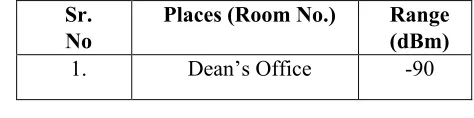
Table 3.Overview of the measurements taken in the campus
Abbreviation used in the table - No: Number, Sr.No: serial number, dBm: decibel meter, NR: No Range
Sr. No
Places (Room No.) Range (dBm)
1. Dean‟s Office -90
2. Boat club -65
3. Student section NR
4. Internet Lab -62
5. 1410 -80
6. 1401 -85
7. 1321 -65
8. 1308 -85
9. 1201 -70
10. 1215 -68
11. 1224 -84
12. 1101 NR
13. 1110 -60
14. 1124 -62
15. Workshop -69
16. Nescafe NR
17. Auditorium -66
18. Library NR
19. Poona Bakery NR
20. Canteen NR
21. Minus 2 NR
IV. RESULT
We have successfully carried out the experiment. Firstly we have identify the coverage area of the Wi-Fi network. This helps us to locate preliminary wireless access point locations.
We found that there are some locations where Wi-Fi network cannot be accessible. We summarize all the obtained detail of accessible and inaccessible locations and mapped it.
Available online: https://edupediapublications.org/journals/index.php/IJR/ P a g e | 2318 mapped these three zones onto it. It gives pictorial
representation of our data. .
Figure 1: Overview of the signal strength
The above map contain summarized form of all locations:
- Green zone: It shows the locations where Wi-Fi network signal strength and its quality is strong. - Yellow zone: The zone shows the locations where
signal strength and its quality is good enough. - Red zone: It shows the inaccessible locations which
are beyond the Wi-Fi network range.
-Figure 2: Distance versus signal strength
Figure 3: Distance versus signal strength
The Above graph shows the signal strength of the network with respect to distance. We observed that as we move away from network the signal strength goes on decreasing. We calculated the signal strength which is required to access network and to enjoy high speed connectivity easily, we found that the signal strength should be less than -60dB.
V. CONCLUSION
Increasing the distance from Wi-Fi network leads to a drop in Wi-Fi signal strength. Identify the coverage area and preliminary access locations before installation WLAN router so that it can be optimize to most of the part of office or home or campus. Verifying the access locations can increase signal strength, signal quality and data rate of download/upload. Wi-Fi strength can be increase by proper placement of WLAN routers, changing channels of WLAN signal of the WLAN router, replacement of WLAN router‟s antenna and switch to IEEE 802.11 standard devices and so on. Study can be made further to show influence of different object and factors on signal strength of wireless network.
0 5 10 15 20 25
Available online: https://edupediapublications.org/journals/index.php/IJR/ P a g e | 2319
VI. REFERENCES
[1] IEEE Standard 802.11-2012. Part 11: Wireless LAN Medium Access Control (MAC) and Physical Layer (PHY) specifications.
[2] Throughput Improvement of High Density Wireless Personal Area Networks, Rambabu A. Vatti, 2014.
[3] J.N.Davies, V.Grout and R.Picking, Prediction of Wireless Network Signal Strength within a Building.
[4] Wi-Fi Parameter Measurements and Analysis I. Soldo, K. Malarić, 2013.
[5] ANALYSIS AND MEASUREMENT OF WI-FI SIGNALS IN INDOOR ENVIRONMENT 1Ahsan Sohail, 2Zeeshan Ahmad, and 3 Iftikhar Ali, 2013.
[6] Measuring Round Trip Times to Determine the Distance between WLAN Nodes Andr´e G¨unther and Christian Hoene, 2005.
[7] Large-scale Measurements of Wireless Network Behavior Sanjit Biswas, John Bicket, Edmund Worng, Raluca Musaloiu, Apurv Bhartia and Dan Aguayo.
[8] Basavarai P. et all. IP in Wireless Networks. Prentice Hall, 2003.
[9] Radovan M. Računalne mreže. Digital Point tiskara, 2010.