Data Entries with Color Coding in Flex Control
Manpreet Kaur
Guide Name: - Ms. Anita Kapoor Guru Kashi University Talwandi Sabo, India
Email Id: - [email protected]
ABSTRACT
Visual Basic is a popular programming
package because of its user-friendly interface
and data access features. Two popular data
access mechanisms are data bound controls
with data access objects, and remote data
controls with remote data objects.
The main difference between these methods
are that data bound controls are usually used
to connect to desktop databases, and remote
data objects are used to connect to
client/server data (for client database
manipulation of a remote database).
Using Microsoft's FlexGrid control
(MSFLXGRD.OCX) you can create utilities
to display, filter, edit, validate and update
your data. For example, such utilities could
include:
1. data entry & validation
2. high level reports
3. ported spreadsheet macro
applications retaining cell layout &
format
Also, users do not require any addition
software or tools for it to connect it
accurately in order to provide authentication.
This technique is helpful for connect with
database programming system and it save the
extra time which is wasted for connect with
different Sheets i.e. Excel Sheet and other
Style Sheets and we connect the database
with this programming tool and access the
data.
The research on Data Entries with Color
Coding in Flex Control is completely
attached with database system. In this
research we can attach MS – Flex Grid
programming tool with database system. At a
time we can attach with database and access
the data from the database table in the grid.
If we required enter information in the grid
then we are helpless because this tool do not
use the entries and in other words we cannot
enter the data in the MS – flex grid cells. So
my research is that if we required enter the
data or modify the data in the grid then we
can do this with the coding and some
techniques and we use the colors in the grid
columns. This research is completely based
Keywords:
- Visual Basic 6.0Programming, Database, Visual Basic Programming Control i.e. ADO and MS – Flex Grid tool
INTRODUCTION
Using Microsoft's FlexGrid control (MSFLXGRD.OCX) you can create utilities to display, filter, edit, validate and update your data. For example, such utilities could
include:
4. data entry & validation 5. high level reports
6. ported spreadsheet macro
applications retaining cell layout & format
Included in VB4 (32-bit), VB5 and VB6, are several grid-orientated controls aimed at managing rows and columns of data, however one of the most versatile, hence its
name, is the FlexGrid. Most of the other grid objects are specifically designed for data binding, whereas the FlexGrid has many collections of properties, methods and events that lend themselves to several environments
in addition to just data-binding.
One of the most powerful applications of the FlexGrid is in managing data from database tables in an unbound state. That is, to populate & edit the FlexGrid and writes the
contents back to the database in code. This may seem a pointless exercise as objects such Microsoft's Data Bound Grid Control are written specifically for this purpose, except these grids simply display the contents of a
recordset, record by record, field by field. Whereas the FlexGid can populate the grid in any manner, examples of which are:
1. separating grouped data with blank
rows/columns,
2. adding sub/grand-total rows/columns,
3. changing the color of the cell
background or text in individual or multiple cells,
4. reacting to the state of the data, e.g.
highlighting negative values,
5. Validating entered data e.g., numeric
values, positive values, permitted date ranges etc.
These are just a few of the possibilities available with FlexGrids; we'll take a look at more later on.
Basic, many third party grid controls are
available that boast impressive features such as embedded combo boxes, picture boxes, custom data validation etc. Many of these are
excellent controls; however they all come at a price proportional to the size of their feature list.That said, most of the functionality found in these third party grids can be accessed with FlexGrid with a little extra code which we'll
cover in this article and as well as saving money, you'll gain knowledge of creating and
customizing your grid controls to suit your specific application and you won't have to remember to distribute those third part runtime dll's that custom controls often
require.
Using the FlexGrid
To use the FlexGrid in your application, right
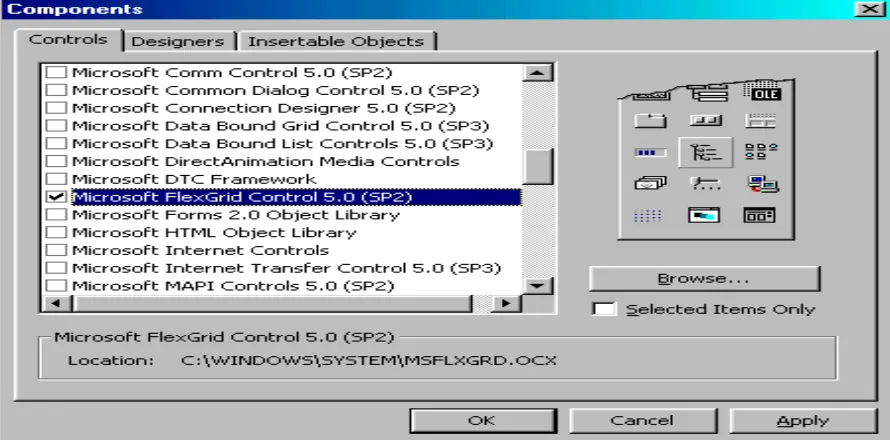
click the Toolbox or select the Project menu and choose 'Components'. The Components dialog box appears as shown in Figure 1.
Figure 1: Components Dialog Box
Figure 2: Default FlexGrid Appearance
There are a few simple formatting tips to improve to appearance of the FlexGrid:
First of all, it's good practice to determine the initial number of grid rows and columns using the Row and Col properties respectively. Then set the number of fixed rows and columns (those that hold row and
column headings - raised and in grey) with the FixedRow and FixedCol properties respectively.
To ensure the columns are the correct width to fit inside to FlexGrid, first set a variable to the width of the FlexGrid, allowing for a vertical Scrollbar width. Then use this
variable to resize to individual column widths, by dividing it by the number of columns.
The height of individual rows can be changed to accommodate multi-line headings. This is done by simply multiplying the appropriate
row height by a scaling factor, in this case two, to double the height.
When increasing the size of a row height, to make sure text uses the extra available space, use the WordWrap property the ensure text continues on the next cell line.
Regarding writing text to the grid there are two main methods. The first one is using the Additem method; this writes text to an entire
row in one action and is therefore useful for adding headings. The vbTab constant is used to distinguish adjacent cells. The second method to populate grid cells with text is to directly address individual cells and using the
TextMatrix or Text property and set the cell's text.
PROBLEM FORMULATION
Before developing research we keep following things in mind so that we can develop powerful and quality research.
PROBLEM STATEMENT
Problem statement was to design a module: Which will be user friendly?
Which will restrict the user from accessing other user’s data?
Which will help the user in viewing his data and privileges?
Which will help the administrator to handle all changes?
Which would restrict the server
traffic?
Another problem was that the data should be accessed from the server and accordingly changes should be made on the data in the server only. The main problem comes with Excel Sheets and other sheets, because Excel Sheet or other sheets do not connect with database and it does not support the programming language. When the situation is that when we connect the database with programming language then we use the programming tools on run time and if we require the data which support the database and connect with database then using Excel Sheets and other sheets are helpless at that time.
FUNCTIONS TO BE PROVIDED
The various features that the proposed system will possess will be:
The system will be user friendly and completely menu-driven so that users shall have no problem in using all the options provided.
The system will be efficient and fast in response by careful programming. The system will be customized according to the needs of the organization.
It will provide overall security to database both from user as well as administrator side.
OBJECTIVE
According to the situation of the problem, a solution is provided to use a Visual Basic programming Tool that is MS – Flex Grid which has been connect with database
according to requirement of the user.
Unlike the databases of MS Access, SQL Server database and the Oracle database if we connect the MS-Flex Grid with database then we access the data from the database in the
MS-Flex Grid tool, because in programming language this tool fully support the database and second objective of this research is that when we enter the data into the grid then by using color coding we can change the color
code and every column has different color into the grid. But this is possible only with the help of color coding. But this technique or research helps us to connect the database and
access the data from the database in the grid. And second solution is that any database which is Access, SQL Server and Oracle database has been used with this
programming tool.
Also, users do not require any addition software or tools for it to connect it accurately in order to provide authentication. This technique is helpful for connect with database
programming system and it save the extra time which is wasted for connect with different Sheets i.e. Excel Sheet and other Style Sheets and we connect the database
with this programming tool and access the data.
My Research is Data Entries with Color
Coding in Flex Control The research on
Control is completely attached with database
system. In this research we can attach MS – Flex Grid programming tool with database system. At a time we can attach with database
and access the data from the database table in the grid. If we required enter information in the grid then we are helpless because this tool do not use the entries and in other words we cannot enter the data in the MS – flex grid
cells. So my research is that if we required enter the data or modify the data in the grid then we can do this with the coding and some techniques and we use the colors in the grid
columns. This research is completely based on coding.
RESEARCH METHODOLOGY
What is Algorithm in Computer Science?
Algorithm is a process of problem-solving in
step by step to get result. Algorithm is very importance for programmers to do computer programming because it figures out the
programming process. Algorithm is a part of problem-solving techniques. After the problem has been raise, we have to analyze the problem first then the inputs and outputs
are defined. After that we start to design the algorithm that is a process to transform inputs into outputs.
FIGURE.Problem – Solving Technique
FIGURE.Flow – Chart of a Problem
Problem: - First of all the main question
arises that what is the problem? The problem is that we can enter the information or data in
Excel Sheets and other Sheets but these Sheets do not support a database system with programming language. If we want to enter the data or information in excel sheet or other
sheet then we want to modify or support these sheets with database and programming language then we are unable to do this. So in this problem we waste a lot of time cost for support the database or programming and
Analyze: - I analyze this problem which is
serious and it should have easy solution. Then I have made an algorithm which is necessary to solve this problem. With the help of this
algorithm and database model diagram in my research I am able to access the data or also able to enter the data in MS – Flex grid which is programming tools and support with database and give the results better than excel
sheet or other.
Design Algorithm: - The steps of this
algorithm used in my research are as follow:
1. Firstly I have made a database which is Payroll.mdb in MS Access. This
database has several tables which are necessary for my research project. 2. My research project front-end is
Visual Basic 6.0 and back-end is MS Access and platform used in this
research is Window XP.
3. Then I have made the Attendance
form which is used in visual basic programming language and make a
connection provider with ADO control which is used in VB components.
4. I connect this form with database and
database table through the connection provider OLEDB.
5. This form consist the MS – flex grid
which is used to access the data from the database table and we can enter
the data in this grid for modification, updating and deletion. Four buttons which are Save Cancel, Delete and Exit.
6. Finally I am able to connect MS –
Flex grid with database table to access the data and also enter the data in the grid. And I am able to fill the different
colors into the grid columns. This algorithm is used to reduce the time cost and another coding procedure.
Coding: - The following form show the
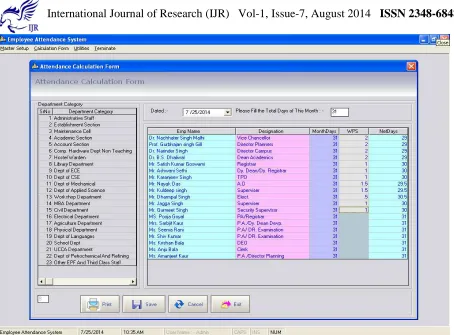
FIGURE 6.Attendance Form with MS – Flex Grid and Color Column
RESULT
EXPERIMENTAL RESULTS
6.1 FLEX GRID CONTROL WITH
COLOR CODING
My Research is Data Entries with Color
Coding in Flex Control The research on
Data Entries with Color Coding in Flex Control is completely attached with database system. In this research we can attach MS –
Flex Grid programming tool with database system. At a time we can attach with database and access the data from the database table in
the grid. If we required enter information in the grid then we are helpless because this tool do not use the entries and in other words we cannot enter the data in the MS – flex grid
cells. So my research is that if we required enter the data or modify the data in the grid then we can do this with the coding and some techniques and we use the colors in the grid columns. This research is completely based
on coding.
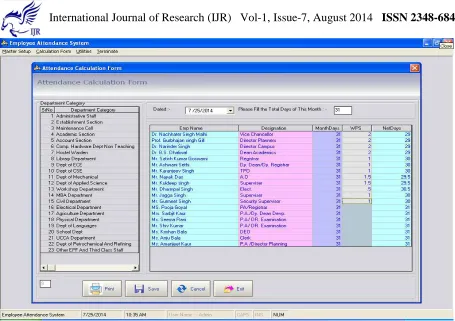
FIGURE 9.My Research of Attendance Form with MS Flex Grid with color
This Form Show the entries in the MS – Flex Grid and Color of Column connect with database table on run time window
CONCLUSION AND FUTURE
WORK
One of the most powerful applications of the FlexGrid is in managing data from database tables in an unbound state. That is, to
populate & edit the FlexGrid and writes the contents back to the database in code. This may seem a pointless exercise as objects such Microsoft's Data Bound Grid Control are
written specifically for this purpose, except these grids simply display the contents of a
recordset, record by record, field by field. Whereas the FlexGrid can populate the grid in any manner, examples of which are:
1. separating grouped data with blank
rows/columns,
2. adding sub/grand-total rows/columns,
3. changing the color of the cell
background or text in individual or multiple cells,
4. reacting to the state of the data, e.g.
5. Validating entered data e.g., numeric
values, positive values, permitted date ranges etc.
Unlike the databases of MS Access, SQL Server database and the Oracle database if we connect the MS-Flex Grid with database then
we access the data from the database in the MS-Flex Grid tool, because in programming language this tool fully support the database. But this technique or research helps us to connect the database and access the data from
the database in the grid. And second solution is that any database which is Access, SQL Server and Oracle database has been used with this programming tool.
Also, users do not require any addition
software or tools for it to connect it accurately in order to provide authentication. This technique is helpful for connect with database programming system and it save the extra
time which is wasted for connect with different Sheets i.e. Excel Sheet and other Style Sheets and we connect the database with this programming tool and access the
data.
REFERENCES:
1. Chapin, John K., et al. "Real-time control of a robot arm using simultaneously recorded neurons in the motor cortex."
Nature neuroscience 2.7 (1999): 664-670.
2. Gouldson, Stanley F. "Method and system for color coding sizes of garments." U.S. Patent No. 5,944,237. 31 Aug. 1999.
3. Eaton, Eric Thomas, William J. Kuznicki, and Salvador Sibecas. "Method for transmitting paging communication on a cellular communication system." U.S. Patent No. 5,940,756. 17 Aug. 1999. 4. Nettles, Kendall W., et al. "Allosteric
control of ligand selectivity between estrogen receptors α and β: implications for other nuclear receptors." Molecular cell 13.3 (2004): 317-327.
5. Schwerdt, Kurt R. "Interactive display system with touch data entry." U.S. Patent No. 4,310,839. 12 Jan. 1982. 6. Streitparth, F., et al. "MR-guided laser
ablation of osteoid osteoma in an open high-field system (1.0 T)." Cardiovascular and interventional radiology 32.2 (2009): 320-325.
7. Streitparth, F., et al. "MR-guided laser ablation of osteoid osteoma in an open high-field system (1.0 T)." Cardiovascular and interventional radiology 32.2 (2009): 320-325.