Linux
®
Bible
Linux
®
BIBLE
Ninth Edition
John Wiley & Sons, Inc.
10475 Crosspoint Boulevard Indianapolis, IN 46256
www.wiley.com
Copyright © 2015 by John Wiley & Sons, Inc., Indianapolis, Indiana Published simultaneously in Canada
ISBN: 978-1-118-99987-5 ISBN: 978-1-118-99989-9 (ebk) ISBN: 978-1-118-99988-2 (ebk)
Manufactured in the United States of America 10 9 8 7 6 5 4 3 2 1
No part of this publication may be reproduced, stored in a retrieval system or transmitted in any form or by any means, electronic, mechanical, photocopying, recording, scanning or otherwise, except as permitted under Sections 107 or 108 of the 1976 United States Copyright Act, without either the prior written permission of the Publisher, or authorization through payment of the appropriate per-copy fee to the Copyright Clearance Center, 222 Rosewood Drive, Danvers, MA 01923, (978) 750-8400, fax (978) 646-8600. Requests to the Publisher for permission should be addressed to the Permissions Department, John Wiley & Sons, Inc., 111 River Street, Hoboken, NJ 07030, (201) 748-6011, fax (201) 748-6008, or online at http://www.wiley.com/go/ permissions.
LIMIT OF LIABILITY/DISCLAIMER OF WARRANTY: THE PUBLISHER AND THE AUTHOR MAKE NO REPRESENTATIONS OR WARRANTIES WITH RESPECT TO THE ACCURACY OR COMPLETENESS OF THE CONTENTS OF THIS WORK AND SPECIFICALLY DISCLAIM ALL WARRANTIES, INCLUDING WITHOUT LIMITATION WARRANTIES OF FITNESS FOR A PARTICULAR PURPOSE. NO WARRANTY MAY BE CREATED OR EXTENDED BY SALES OR PROMOTIONAL MATERIALS. THE ADVICE AND STRATEGIES CONTAINED HEREIN MAY NOT BE SUITABLE FOR EVERY SITUATION. THIS WORK IS SOLD WITH THE UNDERSTANDING THAT THE PUBLISHER IS NOT ENGAGED IN RENDERING LEGAL, ACCOUNTING, OR OTHER PROFESSIONAL SERVICES. IF PROFESSIONAL ASSISTANCE IS REQUIRED, THE SERVICES OF A COMPETENT PROFESSIONAL PERSON SHOULD BE SOUGHT. NEITHER THE PUBLISHER NOR THE AUTHOR SHALL BE LIABLE FOR DAMAGES ARISING HEREFROM. THE FACT THAT AN ORGANIZATION OR WEB SITE IS REFERRED TO IN THIS WORK AS A CITATION AND/OR A POTENTIAL SOURCE OF FURTHER INFORMATION DOES NOT MEAN THAT THE AUTHOR OR THE PUBLISHER ENDORSES THE INFORMATION THE ORGANIZATION OR WEBSITE MAY PROVIDE OR RECOMMENDATIONS IT MAY MAKE. FURTHER, READERS SHOULD BE AWARE THAT INTERNET WEBSITES LISTED IN THIS WORK MAY HAVE CHANGED OR DISAPPEARED BETWEEN WHEN THIS WORK WAS WRITTEN AND WHEN IT IS READ.
For general information on our other products and services please contact our Customer Care Department within the United States at (877) 762-2974, outside the United States at (317) 572-3993 or fax (317) 572-4002.
Wiley publishes in a variety of print and electronic formats and by print-on-demand. Some material included with standard print versions of this book may not be included in e-books or in print-on-demand. If this book refers to media such as a CD or DVD that is not included in the version you purchased, you may download this material at http://booksupport.wiley.com. For more information about Wiley products, visit
www.wiley.com.
Library of Congress Control Number: 2015937667
Chris Negus is a Red Hat Certifi ed Instructor (RHCI), Red Hat Certifi ed Examiner (RHCX), Red Hat Certifi ed Architect (RHCA), and Principal Technical Writer for Red Hat Inc. In more than six years with Red Hat, Chris has taught hundreds of IT professionals aspiring to become Red Hat Certifi ed Engineers (RHCE).
In his current position at Red Hat, Chris produces articles for the Red Hat Customer Portal. The projects he works on include Red Hat Enterprise Linux 7, Red Hat Enterprise OpenStack Platform, Red Hat Enterprise Virtualization and Linux containers in Docker format.
Besides his RHCA certifi cation, Chris is a Red Hat Certifi ed Virtualization Administrator (RHCVA) and Red Hat Certifi ed Datacenter Specialist (RHCDS). He also has certifi cates of expertise in Deployment and Systems Management, Clustering and Storage Management, Cloud Storage, and Server Hardening.
Before joining Red Hat, Chris wrote or co-wrote dozens of books on Linux and UNIX, includ-ing Red Hat Linux Bible (all editions), CentOS Bible, Fedora Bible, Linux Troubleshootinclud-ing Bible, Linux Toys and Linux Toys II. Chris also co-authored several books for the Linux Toolbox series for power users: Fedora Linux Toolbox, SUSE Linux Toolbox, Ubuntu Linux Toolbox, Mac OS X Toolbox, and BSD UNIX Toolbox.
For eight years Chris worked with the organization at AT&T that developed UNIX before moving to Utah to help contribute to Novell’s UnixWare project in the early 1990s. When not writing about Linux, Chris enjoys playing soccer and just hanging out with his wife, Sheree, and son, Seth.
About the Technical Editor
Credits
Project Editor Martin V. Minner
Technical Editor Richard Blum
Production Manager Kathleen Wisor
Copy Editor Gwenette Gaddis
Manager of Content Development & Assembly Mary Beth Wakefield
Marketing Director David Mayhew
Marketing Manager Carrie Sherrill
Professional Technology & Strategy Director
Barry Pruett
Business Manager Amy Knies
Associate Publisher Jim Minatel
Project Coordinator, Cover Brent Savage
Proofreader Amy Schneider
Indexer John Sleeva
S
ince I was hired by Red Hat Inc. more than six years ago, I have been exposed to many of the best Linux developers, testers, support professionals and instructors in the world. Since I can’t thank everyone individually, I instead salute the culture of cooperation and excellence that serves to improve my own Linux skills every day.I don’t speak well of Red Hat because I work there; I work at Red Hat because it lives up to the ideals of open source software in ways that match my own beliefs. There are a few people at Red Hat I would like to acknowledge particularly. Discussions with Victor Costea, Andrew Blum, and other Red Hat instructors have helped me adapt my ways of thinking about how people learn Linux. I’m able to work across a wide range of technologies because of the great support I get from my supervisor, Adam Strong, and my senior manager, Sam Knuth, who both point me toward cool projects but never hold me back.
In this edition, particular help came from Ryan Sawhill Aroha, who helped me simplify my writing on encryption technology. For the new content I wrote in this book on Linux cloud technologies, I’d like to thank members of OpenStack, Docker, and RHEV teams, who help me learn cutting-edge cloud technology every day.
As for the people at Wiley, thanks for letting me continue to develop and improve this book over the years. Marty Minner has helped keep me on task through a demanding schedule. Mary Beth Wakefi eld and Ken Brown have been there to remind me at the times I forgot it was a demanding schedule. Thanks to Richard Blum for his reliably thorough job of tech editing. Thanks to Margot Maley Hutchison from Waterside Productions for contracting the book for me with Wiley and always looking out for my best interests.
Finally, thanks to my wife, Sheree, for sharing her life with me and doing such a great job raising Seth and Caleb.
Acknowledgments ... xi
Introduction ... xxxiii
Part I: Getting Started . . . 1
Chapter 1: Starting with Linux ... 3
Chapter 2: Creating the Perfect Linux Desktop ... 29
Part II: Becoming a Linux Power User . . . 63
Chapter 3: Using the Shell ... 65
Chapter 4: Moving around the Filesystem ... 97
Chapter 5: Working with Text Files ... 117
Chapter 6: Managing Running Processes ...137
Chapter 7: Writing Simple Shell Scripts ...153
Part III: Becoming a Linux System Administrator . . . 171
Chapter 8: Learning System Administration ...173
Chapter 9: Installing Linux ...201
Chapter 10: Getting and Managing Software ...233
Chapter 11: Managing User Accounts ...259
Chapter 12: Managing Disks and Filesystems ...283
Part IV: Becoming a Linux Server Administrator . . . 313
Chapter 13: Understanding Server Administration ...315
Chapter 14: Administering Networking ...347
Chapter 15: Starting and Stopping Services ...377
Chapter 16: Confi guring a Print Server ...423
Chapter 17: Confi guring a Web Server ...449
Chapter 18: Confi guring an FTP Server ...477
Chapter 19: Confi guring a Windows File Sharing (Samba) Server ...499
Chapter 20: Confi guring an NFS File Server ...527
Chapter 21: Troubleshooting Linux ... 551
Part V: Learning Linux Security Techniques . . . 589
Chapter 22: Understanding Basic Linux Security ...591
Chapter 23: Understanding Advanced Linux Security ...627
Chapter 24: Enhancing Linux Security with SELinux ...669
Part VI: Extending Linux into the Cloud . . . 727
Chapter 26: Using Linux for Cloud Computing ...729
Chapter 27: Deploying Linux to the Cloud ... 749
Part VII: Appendixes . . . 769
Appendix A: Media ...771
Appendix B: Exercise Answers...781
Acknowledgments . . . . xi
Introduction . . . xxxiii
Part I: Getting Started
1
Chapter 1: Starting with Linux . . . . 3
Understanding What Linux Is ... 4
Understanding How Linux Differs from Other Operating Systems ... 6
Exploring Linux History ... 6
Free-fl owing UNIX culture at Bell Labs ... 7
Commercialized UNIX ... 9
Berkeley Software Distribution arrives ... 9
UNIX Laboratory and commercialization ... 10
GNU transitions UNIX to freedom ...11
BSD loses some steam ... 13
Linus builds the missing piece ... 13
OSI open source defi nition ... 14
Understanding How Linux Distributions Emerged ... 16
Choosing a Red Hat distribution ... 17
Using Red Hat Enterprise Linux ... 17
Using Fedora... 18
Choosing Ubuntu or another Debian distribution ... 19
Finding Professional Opportunities with Linux Today ... 20
Understanding how companies make money with Linux ... 21
Becoming Red Hat certifi ed ... 22
RHCSA topics ... 23
RHCE topics ... 24
Summary ... 26
Chapter 2: Creating the Perfect Linux Desktop . . . . 29
Understanding Linux Desktop Technology ... 30
Starting with the Fedora GNOME Desktop Live image ... 32
Using the GNOME 3 Desktop ... 33
After the computer boots up ... 33
Navigating with the keyboard ... 38
Setting up the GNOME 3 desktop ...41
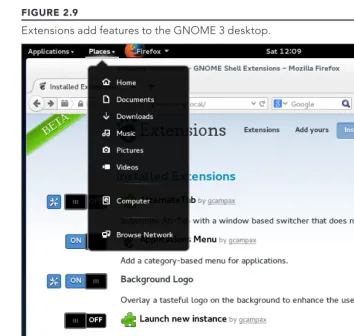
Extending the GNOME 3 desktop ... 42
Using GNOME shell extensions ... 42
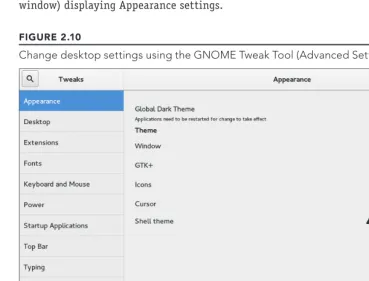
Using the GNOME Tweak Tool ... 44
Starting with desktop applications ... 45
Managing fi les and folders with Nautilus ... 45
Installing and managing additional software ... 46
Playing music with Rhythmbox ... 48
Stopping the GNOME 3 desktop ... 49
Using the GNOME 2 Desktop ... 49
Using the Metacity window manager ... 50
Changing GNOME’s appearance ... 52
Using the GNOME panels ... 53
Using the Applications and System menus ... 54
Adding an applet ... 54
Adding another panel ... 55
Adding an application launcher ... 55
Adding a drawer ... 56
Changing panel properties ... 57
Adding 3D effects with AIGLX ... 58
Summary ... 60
Exercises ...61
Part II: Becoming a Linux Power User
63
Chapter 3: Using the Shell . . . . 65
About Shells and Terminal Windows ... 66
Using the shell prompt ... 67
Using a terminal window ... 68
Using virtual consoles ... 69
Choosing Your Shell ... 69
Running Commands ... 70
Understanding command syntax ... 71
Locating commands ...74
Recalling Commands Using Command History...76
Command-line editing ... 77
Command-line completion ... 79
Command-line recall ... 80
Connecting and Expanding Commands ... 82
Piping between commands ... 82
Sequential commands ... 83
Background commands ... 83
Expanding arithmetic expressions ... 84
Expanding variables ... 85
Using Shell Variables ... 85
Creating and using aliases ... 87
Exiting the shell ... 88
Creating Your Shell Environment ... 88
Confi guring your shell ... 88
Setting your prompt ... 89
Adding environment variables ... 91
Getting Information about Commands ... 92
Summary ... 94
Exercises ... 95
Chapter 4: Moving around the Filesystem . . . . 97
Using Basic Filesystem Commands ...100
Using Metacharacters and Operators ...102
Using fi le-matching metacharacters ...102
Using fi le-redirection metacharacters ...103
Using brace expansion characters ...105
Listing Files and Directories ...105
Understanding File Permissions and Ownership ...109
Changing permissions with chmod (numbers) ... 111
Changing permissions with chmod (letters) ... 111
Setting default fi le permission with umask ...112
Changing fi le ownership...113
Moving, Copying, and Removing Files ... 114
Summary ... 115
Exercises ... 115
Chapter 5: Working with Text Files . . . 117
Editing Files with vim and vi ... 117
Starting with vi ... 119
Adding text ... 119
Moving around in the text ...120
Deleting, copying, and changing text ...121
Pasting (putting) text ...122
Repeating commands ...122
Exiting vi ...122
Skipping around in the fi le ...123
Searching for text ...124
Using ex mode ...124
Learning more about vi and vim ...124
Finding Files...125
Searching for fi les with fi nd ...127
Finding fi les by name ...127
Finding fi les by size ...128
Finding fi les by user...128
Finding fi les by permission ...129
Finding fi les by date and time ...130
Using ‘not’ and ‘or’ when fi nding fi les ...131
Finding fi les and executing commands ...131
Searching in fi les with grep...132
Summary ...134
Exercises ...134
Chapter 6: Managing Running Processes . . . . 137
Understanding Processes ...137
Listing Processes ...138
Listing processes with ps ...138
Listing and changing processes with top ...140
Listing processes with System Monitor ...142
Managing Background and Foreground Processes ...144
Starting background processes ...144
Using foreground and background commands ...145
Killing and Renicing Processes ...146
Killing processes with kill and killall ...146
Using kill to signal processes by PID ... 147
Using killall to signal processes by name ...148
Setting processor priority with nice and renice ...148
Limiting Processes with cgroups...149
Summary ... 151
Exercises ... 151
Chapter 7: Writing Simple Shell Scripts . . . . 153
Understanding Shell Scripts ...153
Executing and debugging shell scripts ...154
Understanding shell variables ...154
Special shell positional parameters ...156
Reading in parameters ...157
Parameter expansion in bash ...157
Performing arithmetic in shell scripts ...158
Using programming constructs in shell scripts...159
The “if…then” statements ...159
The case command ...162
The “for…do” loop ...163
The “while…do” and “until…do” loops ...164
Trying some useful text manipulation programs ...164
Remove sections of lines of text (cut) ...165
Translate or delete characters (tr) ...165
The stream editor (sed) ...166
Using simple shell scripts ...167
Telephone list ...167
Backup script ...168
Summary ...168
Exercises ...169
Part III: Becoming a Linux System Administrator
171
Chapter 8: Learning System Administration . . . 173
Understanding System Administration ...173
Using Graphical Administration Tools ... 175
Using system-confi g-* tools ... 175
Using browser-based admin tools ...177
Using the root user account ...177
Becoming root from the shell (su command) ... 178
Allowing administrative access via the GUI ...180
Gaining administrative access with sudo ...180
Exploring Administrative Commands, Confi guration Files, and Log Files ...182
Administrative commands ...182
Administrative confi guration fi les ...183
Administrative log fi les and systemd journal ...188
Using journalctl to view the systemd journal ...188
Managing log messages with rsyslogd ...189
Using Other Administrative Accounts ...189
Checking and Confi guring Hardware ...190
Checking your hardware ...191
Managing removable hardware ...194
Working with loadable modules ...197
Listing loaded modules ...197
Loading modules ...198
Removing modules ...198
Summary ...199
Exercises ...199
Chapter 9: Installing Linux . . . . 201
Choosing a Computer ...202
Installing Fedora from Live media ...203
Installing Red Hat Enterprise Linux from Installation Media ...208
Understanding Cloud-Based Installations ...211
Maintaining your RPM package database and cache ... 251 Downloading RPMs from a yum repository ...252 Installing, Querying, and Verifying Software
Mounting Filesystems ...301 Supported fi lesystems ...301 Enabling swap areas ...303 Disabling a swap area ...304 Using the fstab fi le to defi ne mountable fi le systems ...305 Using the mount command to mount fi le systems ...307 Mounting a disk image in loopback ...308 Using the umount command ...309 Using the mkfs Command to Create a Filesystem ...310 Summary ... 311 Exercises ... 311
Part IV: Becoming a Linux Server Administrator
313
Accessing Samba Shares ...521 Accessing Samba shares in Linux ...522 Accessing Samba shares in Windows ...524 Using Samba in the Enterprise ...525 Summary ...525 Exercises ...526
Chapter 20: Confi guring an NFS File Server . . . . 527
Troubleshooting System V initialization ...560 Troubleshooting rc.sysinit ...561 Troubleshooting runlevel processes ...562 Troubleshooting systemd initialization ...566 Troubleshooting Software Packages ...568 Fixing RPM databases and cache ...572 Troubleshooting Networking ...573 Troubleshooting outgoing connections ...573 View network interfaces ... 574 Check physical connections ... 574 Check routes ...575 Check hostname resolution ... 576 Troubleshooting incoming connections ...577 Check if the client can reach your system at all...577 Check if the service is available to the client ...578 Check the fi rewall on the server ...578 Check the service on the server ...579 Troubleshooting Memory ...580 Uncovering memory issues ...581 Checking for memory problems ...583 Dealing with memory problems ...584 Troubleshooting in Rescue Mode ...585 Summary ...587 Exercises ...587
Part V: Learning Linux Security Techniques
589
Controlling access to network services ...708 Working with Firewalls ...710 Understanding fi rewalls ...710 Implementing fi rewalls ... 711 Starting with fi rewalld ...712 Understanding the iptables utility ...713 Using the iptables utility...716 Summary ...724 Exercises ...724
Part VI: Extending Linux into the Cloud
727
Chapter 27: Deploying Linux to the Cloud. . . 749
Getting Linux to Run in a Cloud ... 749 Creating Linux Images for Clouds ... 751 Confi guring and running a cloud-init cloud instance ... 751 Investigating the cloud instance ...753 Cloning the cloud instance ...754 Trying an Ubuntu cloud image ...756 Expanding your cloud-init confi guration ...757 Adding ssh keys with cloud-init ...757 Adding network interfaces with cloud-init ...758 Adding software with cloud-init ...758 Using cloud-init in enterprise computing ...759 Using OpenStack to Deploy Cloud Images ...760 Starting from the OpenStack Dashboard ... 761 Confi guring your OpenStack virtual network ... 761 Confi guring keys for remote access ... 763 Launching a virtual machine in OpenStack ...764 Accessing the virtual machine via ssh ...765 Using Amazon EC2 to Deploy Cloud Images ...765 Summary ...766Part VII: Appendixes
769
Appendix A: Media . . . . 771
Appendix B: Exercise Answers . . . . 781
Introduction
Y
ou can’t learn Linux without using it.I’ve come to that conclusion over more than a decade of teaching people to learn Linux. You can’t just read a book; you can’t just listen to a lecture. You need someone to guide you and you need to jump in and do it.
In 1999, Wiley published my Red Hat Linux Bible. The book’s huge success gave me the opportunity to become a full-time, independent Linux author. For about a decade, I wrote dozens of Linux books and explored the best ways to explain Linux from the quiet of my small home offi ce.
In 2008, I hit the road. I was hired by Red Hat, Inc., as a full-time instructor, teaching Linux to professional system administrators seeking Red Hat Certifi ed Engineer (RHCE) certifi cation. In my three years as a Linux instructor, I honed my teaching skills in front of live people whose Linux experience ranged from none to experienced professional.
In the previous edition, I turned my teaching experience into text to take a reader from someone who has never used Linux to someone with the skills to become a Linux professional. In this edi-tion, I set out to extend those skills into the cloud. The focus of this ninth edition of the Linux Bible can be summed up in these ways:
■ Beginner to certified professional: As long as you have used a computer, mouse, and keyboard, you can start with this book. I tell you how to get Linux, begin using it, step through critical topics, and ultimately excel at administering and securing it.
■ System administrator–focused: When you are fi nished with this book, you will know how to use Linux and how to modify and maintain it. All the topics needed to become a Red Hat Certifi ed Engineer are covered in this book. That said, many software developers have also used this book to understand how to work on a Linux system as a development platform or target for their applications.
■ Emphasis on command-line tools: Although point-and-click interfaces for managing Linux have improved greatly in recent years, many advanced features can only be utilized by typing commands and editing confi guration fi les manually. I teach you how to become profi cient with the Linux command-line shell and occasionally compare shell features with graphical tools for accomplishing the same tasks.
■ Many, many demos and exercises: Instead of just telling you what Linux does, I actually show you what it does. Then, to make sure you got it, you have the oppor-tunity to try exercises yourself. Every procedure and exercise has been tested to work in Fedora or Red Hat Enterprise Linux. Most work in Ubuntu as well.
■ Lead into cloud technologies: Linux is at the heart of most technological advances in cloud computing today. That means you need a solid understanding of Linux to work effectively in tomorrow’s data centers. Learn Linux basics in the front of this book. Then in the last few chapters, I demonstrate how you can try out Linux systems as hypervisors, cloud controllers, and virtual machines, as well as manage virtual networks and networked storage.
How This Book Is Organized
The book is organized to enable you to start off at the very beginning with Linux and grow to become a professional Linux system administrator and power user.
Part I, “Getting Started,” includes two chapters designed to help you understand what Linux is and get you started with a Linux desktop:
■ Chapter 1, “Starting with Linux,” covers topics such as what the Linux operating system is, where it comes from, and how to get started using it.
■ Chapter 2, “Creating the Perfect Linux Desktop,” provides information on how you can create a desktop system and use some of the most popular desktop features. Part II, “Becoming a Linux Power User,” provides in-depth details on how to use the Linux shell, work with fi lesystems, manipulate text fi les, manage processes, and use shell scripts:
■ Chapter 3, “Using the Shell,” includes information on how to access a shell, run commands, recall commands (using history), and do tab completion. The chapter also describes how to use variables, aliases, and man pages (traditional Linux com-mand reference pages).
■ Chapter 4, “Moving around the Filesystem,” includes commands for listing, creat-ing, copycreat-ing, and moving fi les and directories. More advanced topics in this chapter include fi lesystem security, such as fi le ownership, permissions, and access control lists.
■ Chapter 5, “Working with Text Files,” includes everything from basic text editors to tools for fi nding fi les and searching for text within fi les.
■ Chapter 6, “Managing Running Processes,” describes how to see what processes are running on your system and change those processes. Ways of changing processes include killing, pausing, and sending other types of signals.
In Part III, “Becoming a Linux System Administrator,” you learn how to administer Linux systems:
■ Chapter 8, “Learning System Administration,” provides information on basic graphical tools, commands, and confi guration fi les for administering Linux systems.
■ Chapter 9, “Installing Linux,” covers common installation tasks, such as disk partitioning and initial software package selection, as well as more advanced installation tools, such as installing from kickstart fi les.
■ Chapter 10, “Getting and Managing Software,” provides an understanding of how software packages work and how to get and manage software packages.
■ Chapter 11, “Managing User Accounts,” discusses tools for adding and deleting users and groups, as well as how to centralize user account management. ■ Chapter 12, “Managing Disks and Filesystems,” provides information on adding
partitions, creating fi lesystems, and mounting fi lesystems, as well as working with logical volume management.
In Part IV, “Becoming a Linux Server Administrator,” you learn to create powerful network servers and the tools needed to manage them:
■ Chapter 13, “Understanding Server Administration,” covers remote logging, monitoring tools, and the Linux boot process.
■ Chapter 14, “Administering Networking,” discusses how to confi gure networking. ■ Chapter 15, “Starting and Stopping Services,” provides information on starting and
stopping services.
■ Chapter 16, “Confi guring a Print Server,” describes how to confi gure printers to use locally on your Linux system or over the network from other computers.
■ Chapter 17, “Confi guring a Web Server,” describes how to confi gure an Apache Web server.
■ Chapter 18, “Confi guring an FTP Server,” covers procedures for setting up a vsftpd FTP server that can be used to enable others to download fi les from your Linux system over the network.
■ Chapter 19, “Confi guring a Windows File Sharing (Samba) Server,” covers Windows fi le server confi guration with Samba.
■ Chapter 20, “Confi guring an NFS File Server,” describes how to use
Network File System features to share folders of fi les among systems over a network.
In Part V, “Learning Linux Security Techniques,” you learn how to secure your Linux sys-tems and services:
■ Chapter 22, “Understanding Basic Linux Security,” covers basic security concepts and techniques.
■ Chapter 23, “Understanding Advanced Linux Security,” provides information on using Pluggable Authentication Modules (PAM) and cryptology tools to tighten sys-tem security and authentication.
■ Chapter 24, “Enhancing Linux Security with SELinux,” shows you how to enable Security Enhanced Linux (SELinux) to secure system services.
■ Chapter 25, “Securing Linux on the Network,” covers network security features, such as firewalld and iptables fi rewalls, to secure system services.
Part VI, “Extending Linux into the Cloud,” takes you into cutting-edge cloud technologies:
■ Chapter 26, “Using Linux for Cloud Computing,” introduces concepts of cloud com-puting in Linux by describing how to set up hypervisors, build virtual machines, and share resources across networks.
■ Chapter 27, “Deploying Linux to the Cloud,” describes how to deploy Linux images to different cloud environments, including OpenStack, Amazon EC2, or a local Linux system confi gured for virtualization.
Part VII contains two appendixes to help you get the most from your exploration of Linux. Appendix A, “Media,” provides guidance on downloading Linux distributions. Appendix B, “Exercise Answers,” provides sample solutions to the exercises included in chapters 2 through 26.
Conventions Used in This Book
Throughout the book, special typography indicates code and commands. Commands and code are shown in a monospaced font:
This is how code looks.
In the event that an example includes both input and output, the monospaced font is still used, but input is presented in bold type to distinguish the two. Here’s an example:
$ ftp ftp.handsonhistory.com
Name (home:jake): jake
Password: ******
As for styles in the text:
■ New terms and important words appear in italics when introduced.
■ Filenames, URLs, and code within the text appear like so: persistence. properties.
The following items call your attention to points that are particularly important.
A Note box provides extra information to which you need to pay special attention.
A Tip box shows a special way of performing a particular task.
A Caution box alerts you to take special care when executing a procedure, or damage to your computer hardware or software could result.
Jumping into Linux
If you are new to Linux, you might have vague ideas about what it is and where it came from. You may have heard something about it being free (as in cost) or free (as in freedom to use it as you please). Before you start putting your hands on Linux (which we will do soon enough), Chapter 1 seeks to answer some of your questions about the origins and fea-tures of Linux.
Take your time and work through this book to get up to speed on Linux and how you can make it work to meet your needs. This is your invitation to jump in and take the fi rst step to becoming a Linux expert!
Visit the Linux Bible website
Part I
Getting Started
IN THIS PART
Chapter 1Starting with Linux
Chapter 2
Starting with Linux
IN THIS CHAPTER
Learning what Linux is
Learning where Linux came from
Choosing Linux distributions
Exploring professional opportunities with Linux
Becoming certifi ed in Linux
L
inux is one of the most important technology advancements of the twenty-fi rst century. Besides its impact on the growth of the Internet and its place as an enabling technology for a range of computer-driven devices, Linux development has been a model for how collaborative projects can surpass what single individuals and companies can do alone.Google runs thousands upon thousands of Linux servers to power its search technology. Its Android phones are based on Linux. Likewise, when you download and run Google’s Chrome OS, you get a browser that is backed by a Linux operating system.
Facebook builds and deploys its site using what is referred to as a LAMP stack (Linux, Apache web server, MySQL database, and PHP web scripting language)—all open source projects. In fact, Facebook itself uses an open source development model, making source code for the applications and tools that drive Facebook available to the public. This model has helped Facebook shake out bugs quickly, get contributions from around the world, and fuel Facebook’s exponential growth.
Financial organizations that have trillions of dollars riding on the speed and security of their operating systems also rely heavily on Linux. These include the New York Stock Exchange, the Chicago Mercantile Exchange, and the Tokyo Stock Exchange.
As “cloud” continues to be one of the hottest buzzwords today, a part of the cloud that isn’t hype is that Linux and other open source technologies are the foundation on which today’s greatest cloud innovations are being built. Every software component you need to build a private or public cloud (such as hypervisors, cloud controllers, network storage, virtual networking, and authentication) is freely available for you to start using from the open source world.
The widespread adoption of Linux around the world has created huge demand for Linux expertise. This chapter starts you on a path to becoming a Linux expert by helping you understand what Linux is, where it came from, and what your opportunities are for becoming profi cient in it. The rest of this book provides you with hands-on activities to help you gain that expertise. Finally, I show you how you can apply that expertise to cloud technologies.
Understanding What Linux Is
Linux is a computer operating system. An operating system consists of the software that manages your computer and lets you run applications on it. The features that make up Linux and similar computer operating systems include the following:
■ Detecting and preparing hardware—When the Linux system boots up (when you turn on your computer), it looks at the components on your computer (CPU, hard drive, network cards, and so on) and loads the software (drivers and modules) needed to access those particular hardware devices.
■ Managing processes—The operating system must keep track of multiple processes running at the same time and decide which have access to the CPU and when. The system also must offer ways of starting, stopping, and changing the status of processes.
■ Managing memory—RAM and swap space (extended memory) must be allocated to applications as they need memory. The operating system decides how requests for memory are handled.
■ Providing user interfaces—An operating system must provide ways of accessing the system. The fi rst Linux systems were accessed from a command-line interpreter called a shell. Today, graphical desktop interfaces are commonly available as well. ■ Controlling filesystems—Filesystem structures are built into the operating system
(or loaded as modules). The operating system controls ownership of and access to the fi les and directories (folders) that the fi lesystems contain.
■ Providing user access and authentication—Creating user accounts and allowing boundaries to be set between users is a basic feature of Linux. Separate user and group accounts enable users to control their own fi les and processes.
■ Offering administrative utilities—In Linux, hundreds (perhaps thousands) of commands and graphical windows are available to do such things as add users, manage disks, monitor the network, install software, and generally secure and manage your computer.
1
Linux provides different ways of starting and stopping these services. In other words, while Linux includes web browsers to view web pages, it can also be the computer that serves up web pages to others. Popular server features include web, mail, database, printer, fi le, DNS, and DHCP servers.
■ Programming tools—A wide variety of programming utilities for creating applications and libraries for implementing specialty interfaces are available with Linux.
As someone managing Linux systems, you need to learn how to work with those
features just described. While many features can be managed using graphical interfaces, an understanding of the shell command line is critical for someone administering Linux systems.
Modern Linux systems now go way beyond what the fi rst UNIX systems (on which Linux was based) could do. Advanced features in Linux, often used in large enterprises, include the following:
■ Clustering—Linux can be confi gured to work in clusters so that multiple systems can appear as one system to the outside world. Services can be confi gured to pass back and forth between cluster nodes, while appearing to those using the services that they are running without interruption.
■ Virtualization—To manage computing resources more effi ciently, Linux can run as a virtualization host. On that host, you could run other Linux systems, Microsoft Windows, BSD, or other operating systems as virtual guests. To the outside world, each of those virtual guests appears as a separate computer. KVM and Xen are two technologies in Linux for creating virtual hosts.
■ Cloud computing—To manage large-scale virtualization environments, you can use full-blown cloud computing platforms based on Linux. Projects such as OpenStack and Red Hat Enterprise Virtualization can simultaneously manage many virtualiza-tion hosts, virtual networks, user and system authenticavirtualiza-tion, virtual guests, and networked storage.
■ Real-time computing—Linux can be confi gured for real-time computing, where high-priority processes can expect fast, predictable attention.
■ Specialized storage—Instead of just storing data on the computer’s hard disk, many specialized local and networked storage interfaces are available in Linux. Shared storage devices available in Linux include iSCSI, Fibre Channel, and Infi niband. Entire open source storage platforms include projects such as Ceph (http://ceph.com) and GlusterFS (http://gluster.org).
Understanding How Linux Differs from Other
Operating Systems
If you are new to Linux, chances are good that you have used a Microsoft Windows or Apple Mac OS operating system. Although Mac OS X has its roots in a free software operating system, referred to as the Berkeley Software Distribution (more on that later), operating systems from both Microsoft and Apple are considered proprietary operating systems. What that means is:
■ You cannot see the code used to create the operating system.
■ You, therefore, cannot change the operating system at its most basic levels if it doesn’t suit your needs—and you can’t use the operating system to build your own operating system from source code.
■ You cannot check the code to fi nd bugs, explore security vulnerabilities, or simply learn what that code is doing.
■ You may not be able to easily plug your own software into the operating system if the creators of that system don’t want to expose the programming interfaces you need to the outside world.
You might look at those statements about proprietary software and say, “What do I care? I’m not a software developer. I don’t want to see or change how my operating system is built.”
That may be true. But the fact that others can take free and open source software and use it as they please has driven the explosive growth of the Internet (think Google), mobile phones (think Android), special computing devices (think Tivo), and hundreds of technology companies. Free software has driven down computing costs and allowed for an explosion of innovation.
Maybe you don’t want to use Linux—as Google, Facebook, and other companies have done— to build the foundation for a multi-billion-dollar company. But those and other companies who now rely on Linux to drive their computer infrastructures need more and more people with the skills to run those systems.
You may wonder how a computer system that is so powerful and fl exible has come to be free as well. To understand how that could be, you need to see where Linux came from. So the next section of this chapter describes the strange and winding path of the free software movement that led to Linux.
Exploring Linux History
1
Linus Benedict Torvalds
Hello everybody out there using minix
-I’m doing a (free) operating system (just a hobby, won’t be big and professional like gnu) for 386(486) AT clones. This has been brewing since april, and is start-ing to get ready. I’d like any feedback on thstart-ings people like/dislike in minix, as my OS resembles it somewhat (same physical layout of the fi le-system (due to practical reasons, among other things)…Any suggestions are welcome, but I won’t promise I’ll implement them :-)
Linus ([email protected].fi )
PS. Yes — it’s free of any minix code, and it has a multi-threaded fs. It is NOT protable [sic] (uses 386 task switching etc), and it probably never will support anything other than AT-harddisks, as that’s all I have :-(.
Minix was a UNIX-like operating system that ran on PCs in the early 1990s. Like Minix, Linux was also a clone of the UNIX operating system. With few exceptions, such as Microsoft Windows, most modern computer systems (including Mac OS X and Linux) were derived from UNIX operating systems, created originally by AT&T.
To truly appreciate how a free operating system could have been modeled after a proprietary system from AT&T Bell Laboratories, it helps to understand the culture in which UNIX was created and the chain of events that made the essence of UNIX possible to reproduce freely.
To learn more about how Linux was created, pick up the book Just for Fun: The Story of an Accidental Revolutionary
by Linus Torvalds (HarperCollins Publishing, 2001).
Free-fl owing UNIX culture at Bell Labs
From the very beginning, the UNIX operating system was created and nurtured in a communal environment. Its creation was not driven by market needs, but by a desire to overcome impediments to producing programs. AT&T, which owned the UNIX trademark originally, eventually made UNIX into a commercial product, but by that time, many of the concepts (and even much of the early code) that made UNIX special had fallen into the public domain.
After a project called Multics failed in around 1969, Bell Labs employees Ken Thompson and Dennis Ritchie set off on their own to create an operating system that would offer an improved environment for developing software. Up to that time, most programs were written on punch cards that had to be fed in batches to mainframe computers. In a 1980 lecture on “The Evolution of the UNIX Time-sharing System,” Dennis Ritchie summed up the spirit that started UNIX:
What we wanted to preserve was not just a good environment in which to do programming, but a system around which a fellowship could form. We knew from experience that the essence of communal computing as supplied by
remote-access, time-shared machines is not just to type programs into a terminal instead of a keypunch, but to encourage close communication.
The simplicity and power of the UNIX design began breaking down barriers that, until this point, had impeded software developers. The foundation of UNIX was set with several key elements:
■ The UNIX filesystem—Because it included a structure that allowed levels of sub-directories (which, for today’s desktop users, looks like folders inside folders), UNIX could be used to organize the fi les and directories in intuitive ways. Furthermore, complex methods of accessing disks, tapes, and other devices were greatly simpli-fi ed by representing those devices as individual device simpli-fi les that you could also access as items in a directory.
■ Input/output redirection—Early UNIX systems also included input redirec-tion and pipes. From a command line, UNIX users could direct the output of a command to a fi le using a right-arrow key (>). Later, the concept of pipes (|) was added where the output of one command could be directed to the input of another command. For example, the following command line concatenates (cat) fi le1 and fi le2, sorts (sort) the lines in those fi les alphabetically, paginates the sorted text for printing (pr), and directs the output to the computer’s default printer (lpr):
$ cat file1 file2 | sort | pr | lpr
This method of directing input and output enabled developers to create their own specialized utilities that could be joined with existing utilities. This modularity made it possible for lots of code to be developed by lots of different people. A user could just put together the pieces as needed.
1
To make portability a reality, however, a high-level programming language was needed to implement the software needed. To that end, Brian Kernighan and Dennis Ritchie created the C programming language. In 1973, UNIX was rewritten in C. Today, C is still the primary language used to create the UNIX (and Linux) operating system kernels.
As Ritchie went on to say in a 1979 lecture (http://cm.bell-labs.com/who/dmr/ hist.html):
Today, the only important UNIX program still written in assembler is the
assembler itself; virtually all the utility programs are in C, and so are most of the application’s programs, although there are sites with many in Fortran, Pascal, and Algol 68 as well. It seems certain that much of the success of UNIX follows from the readability, modifi ability, and portability of its software that in turn follows from its expression in high-level languages.
If you are a Linux enthusiast and are interested in what features from the early days of Linux have survived, an interesting read is Dennis Ritchie’s reprint of the fi rst UNIX programmer’s manual (dated November 3, 1971). You can fi nd it at Dennis Ritchie’s website: http://cm.bell-labs.com/cm/cs/who/dmr/1stEdman.html. The form of this documentation is UNIX man pages, which is still the primary format for documenting UNIX and Linux operating system commands and programming tools today.
What’s clear as you read through the early documentation and accounts of the UNIX system is that the development was a free-fl owing process, lacked ego, and was dedicated to making UNIX excellent. This process led to a sharing of code (both inside and outside Bell Labs), which allowed rapid development of a high-quality UNIX operating system.
It also led to an operating system that AT&T would fi nd diffi cult to reel back in later.
Commercialized UNIX
Before the AT&T divestiture in 1984, when it was split up into AT&T and seven “Baby Bell” companies, AT&T was forbidden to sell computer systems. Companies that would later become Verizon, Qwest, and Alcatel-Lucent were all part of AT&T. As a result of AT&T’s monopoly of the telephone system, the U.S. government was concerned that an unrestricted AT&T might dominate the fl edgling computer industry.
Because AT&T was restricted from selling computers directly to customers before its divestiture, UNIX source code was licensed to universities for a nominal fee. There was no UNIX operating system for sale from AT&T that you didn’t have to compile yourself.
Berkeley Software Distribution arrives
For most of the next decade, the BSD and Bell Labs versions of UNIX headed off in separate directions. BSD continued forward in the free-fl owing, share-the-code manner that was the hallmark of the early Bell Labs UNIX, whereas AT&T started steering UNIX toward commercialization. With the formation of a separate UNIX Laboratory, which moved out of Murray Hill and down the road to Summit, New Jersey, AT&T began its attempts to commercialize UNIX. By 1984, divestiture was behind AT&T and it was ready to really start selling UNIX.
UNIX Laboratory and commercialization
The UNIX Laboratory was considered a jewel that couldn’t quite fi nd a home or a way to make a profi t. As it moved between Bell Laboratories and other areas of AT&T, its name changed several times. It is probably best remembered by the name it had as it began its spin-off from AT&T: UNIX System Laboratories (USL).
The UNIX source code that came out of USL, the legacy of which was sold in part to Santa Cruz Operation (SCO), was used for a time as the basis for ever-dwindling lawsuits by SCO against major Linux vendors (such as IBM and Red Hat, Inc.). Because of that, I think the efforts from USL that have contributed to the success of Linux are lost on most people.
During the 1980s, of course, many computer companies were afraid that a newly divested AT&T would pose more of a threat to controlling the computer industry than would an upstart company in Redmond, Washington. To calm the fears of IBM, Intel, Digital Equipment Corporation, and other computer companies, the UNIX Lab made the following commitments to ensure a level playing fi eld:
■ Source code only—Instead of producing its own boxed set of UNIX, AT&T continued to sell only source code and to make it available equally to all licensees. Each company would then port UNIX to its own equipment. It wasn’t until about 1992, when the lab was spun off as a joint venture with Novell (called Univel), and then eventually sold to Novell, that a commercial boxed set of UNIX (called UnixWare) was produced directly from that source code.
■ Published interfaces—To create an environment of fairness and community to its OEMs (original equipment manufacturers), AT&T began standardizing what different ports of UNIX had to be able to do to still be called UNIX. To that end, Portable Operating System Interface (POSIX) standards and the AT&T UNIX System V Interface Defi nition (SVID) were specifi cations UNIX vendors could use to create compliant UNIX systems. Those same documents also served as road maps for the creation of Linux.
1
■ Technical approach—Again, until the very end of USL, most decisions on thedirection of UNIX were made based on technical considerations. Management was promoted up through the technical ranks, and to my knowledge, there was never any talk of writing software to break other companies’ software or otherwise restrict the success of USL’s partners.
When USL eventually started taking on marketing experts and creating a desktop UNIX product for end users, Microsoft Windows already had a fi rm grasp on the desktop market. Also, because the direction of UNIX had always been toward source-code licensing destined for large computing systems, USL had pricing diffi culties for its products. For example, on software that it was including with UNIX, USL found itself having to pay out per-computer licensing fees that were based on $100,000 mainframes instead of $2,000 PCs. Add to that the fact that no application programs were available with UnixWare, and you can see why the endeavor failed.
Successful marketing of UNIX systems at the time, however, was happening with other computer companies. SCO had found a niche market, primarily selling PC versions of UNIX running dumb terminals in small offi ces. Sun Microsystems was selling lots of UNIX workstations (originally based on BSD but merged with UNIX in SVR4) for programmers and high-end technology applications (such as stock trading).
Other commercial UNIX systems were also emerging by the 1980s as well. This new ownership assertion of UNIX was beginning to take its toll on the spirit of open
contributions. Lawsuits were being initiated to protect UNIX source code and trademarks. In 1984, this new, restrictive UNIX gave rise to an organization that eventually led a path to Linux: the Free Software Foundation.
GNU transitions UNIX to freedom
In 1984, Richard M. Stallman started the GNU project (http://www.gnu.org), recursively named by the phrase GNU is Not UNIX. As a project of the Free Software Foundation (FSF), GNU was intended to become a recoding of the entire UNIX operating system that could be freely distributed.
The GNU Project page (http://www.gnu.org/gnu/thegnuproject.html) tells the story of how the project came about in Stallman’s own words. It also lays out the problems that proprietary software companies were imposing on those software developers who wanted to share, create, and innovate.
It turned out that not only could the same results be gained by all new code, but in some cases, that code was better than the original UNIX versions. Because everyone could see the code being produced for the project, poorly written code could be corrected quickly or replaced over time.
If you are familiar with UNIX, try searching the thousands of GNU software packages for your favorite UNIX command from the Free Software Directory (http://directory. fsf.org/wiki/GNU). Chances are good that you will fi nd it there, along with many, many other available software projects.
Over time, the term free software has been mostly replaced by the term open source software. The term “free software” is preferred by the Free Software Foundation, while open source software is promoted by the Open Source Initiative (http://www.opensource.org).
To accommodate both camps, some people use the term Free and Open Source Software (FOSS) instead. An underlying principle of FOSS, however, is that, although you are free to use the software as you like, you have some responsibility to make the improvements you make to the code available to others. In that way, everyone in the community can benefi t from your work as you have benefi ted from the work of others.
To clearly defi ne how open source software should be handled, the GNU software project created the GNU Public License, or GPL. Although many other software licenses cover slightly different approaches to protecting free software, the GPL is the most well known— and it’s the one that covers the Linux kernel itself. Basic features of the GNU Public License include the following:
■ Author rights—The original author retains the rights to his or her software. ■ Free distribution—People can use the GNU software in their own software,
chang-ing and redistributchang-ing it as they please. They do, however, have to include the source code with their distribution (or make it easily available).
■ Copyright maintained—Even if you were to repackage and resell the software, the original GNU agreement must be maintained with the software, which means all future recipients of the software have the opportunity to change the source code, just as you did.
There is no warranty on GNU software. If something goes wrong, the original developer of the software has no obligation to fi x the problem. However, many organizations, big and small, offer paid support (often in subscription form) for the software when it is included in their Linux or other open source software distribution. (See the “OSI open source defi nition” section later in this chapter for a more detailed defi nition of open source software.)
1
BSD loses some steam
The one software project that had a chance of beating out Linux to be the premier open source kernel was the venerable BSD project. By the late 1980s, BSD developers at University of California (UC) Berkeley realized that they had already rewritten most of the UNIX source code they had received a decade earlier.
In 1989, UC Berkeley distributed its own UNIX-like code as Net/1 and later (in 1991) as Net/2. Just as UC Berkeley was preparing a complete, UNIX-like operating system that was free from all AT&T code, AT&T hit them with a lawsuit in 1992. The suit claimed that the software was written using trade secrets taken from AT&T’s UNIX system.
It’s important to note here that BSD developers had completely rewritten the copyright- protected code from AT&T. Copyright was the primary means AT&T used to protect its rights to the UNIX code. Some believe that if AT&T had patented the concepts covered in that code, there might not be a Linux (or any UNIX clone) operating system today.
The lawsuit was dropped when Novell bought UNIX System Laboratories from AT&T in 1994. But, during that critical period, there was enough fear and doubt about the legality of the BSD code that the momentum BSD had gained to that point in the fl edgling open source community was lost. Many people started looking for another open source alternative. The time was ripe for a college student from Finland who was working on his own kernel.
Today, BSD versions are available from three major projects: FreeBSD, NetBSD, and OpenBSD. People generally characterize FreeBSD as the easiest to use, NetBSD as available on the most computer hardware platforms, and OpenBSD as fanatically secure. Many security-minded individuals still prefer BSD to Linux. Also, because of its licensing, BSD code can be used by proprietary software vendors, such as Microsoft and Apple, who don’t want to share their operating system code with others. Mac OS X is built on a BSD derivative.
Linus builds the missing piece
Linus Torvalds started work on Linux in 1991, while he was a student at the University of Helsinki, Finland. He wanted to create a UNIX-like kernel so that he could use the same kind of operating system on his home PC that he used at school. At the time, Linus was using Minix, but he wanted to go beyond what the Minix standards permitted.
As noted earlier, Linus announced the fi rst public version of the Linux kernel to the comp .os.minix newsgroup on August 25, 1991, although Torvalds guesses that the fi rst version didn’t actually come out until mid-September of that year.
assembly code rewritten in the C programming language, which made it possible to start porting it to other machines.
The Linux kernel was the last—and the most important—piece of code that was needed to complete a whole UNIX-like operating system under the GPL. So, when people started putting together distributions, the name Linux and not GNU is what stuck. Some distributions such as Debian, however, refer to themselves as GNU/Linux distributions. (Not including GNU in the title or subtitle of a Linux operating system is also a matter of much public grumbling by some members of the GNU project. See http://www.gnu.org.)
Today, Linux can be described as an open source UNIX-like operating system that refl ects a combination of SVID, POSIX, and BSD compliance. Linux continues to aim toward compliance with POSIX as well as with standards set by the owner of the UNIX trademark, The Open Group (http://www.unix.org).
The non-profi t Open Source Development Labs, renamed the Linux Foundation after merging with the Free Standards Group (http://www.linuxfoundation.org), which employs Linus Torvalds, manages the direction today of Linux development efforts. Its sponsors list is like a Who’s Who of commercial Linux system and application vendors, including IBM, Red Hat, SUSE, Oracle, HP, Dell, Computer Associates, Intel, Cisco Systems, and others. The Linux Foundation’s primary charter is to protect and accelerate the growth of Linux by providing legal protection and software development standards for Linux developers.
Although much of the thrust of corporate Linux efforts is on corporate, enterprise computing, huge improvements are continuing in the desktop arena as well. The KDE and GNOME desktop environments continuously improve the Linux experience for casual users. Newer lightweight desktop environments such as Xfce and LXDE now offer effi cient alternatives that today bring Linux to thousands of netbook owners.
Linus Torvalds continues to maintain and improve the Linux kernel.
For a more detailed history of Linux, see the book Open Sources: Voices from the Open Source Revolution (O’Reilly, 1999). The entire fi rst edition is available online at http://oreilly.com/catalog/opensources/book/ toc.html.
OSI open source defi nition
1
Although the primary goal of open source software is to make source code available, other goals of open source software are also defi ned by OSI in its open source defi nition. Most of the following rules for acceptable open source licenses serve to protect the freedom and integrity of the open source code:
■ Free distribution—An open source license can’t require a fee from anyone who resells the software.
■ Source code—The source code must be included with the software and there can be no restrictions on redistribution.
■ Derived works—The license must allow modifi cation and redistribution of the code under the same terms.
■ Integrity of the author’s source code—The license may require that those who use the source code remove the original project’s name or version if they change the source code.
■ No discrimination against persons or groups—The license must allow all people to be equally eligible to use the source code.
■ No discrimination against fields of endeavor—The license can’t restrict a project from using the source code because it is commercial or because it is associated with a fi eld of endeavor that the software provider doesn’t like.
■ Distribution of license—No additional license should be needed to use and redistribute the software.
■ License must not be specific to a product—The license can’t restrict the source code to a particular software distribution.
■ License must not restrict other software—The license can’t prevent someone from including the open source software on the same medium as non–open source software.
■ License must be technology-neutral—The license can’t restrict methods in which the source code can be redistributed.
Open source licenses used by software development projects must meet these criteria to be accepted as open source software by OSI. About 70 different licenses are accepted by OSI to be used to label software as “OSI Certifi ed Open Source Software.” In addition to the GPL, other popular OSI-approved licenses include:
■ LGPL—The GNU Lesser General Public License (LGPL) is often used for distributing libraries that other application programs depend upon.
As a result, proprietary software vendors such as Apple and Microsoft have used BSD code in their own operating systems.
■ MIT—The MIT license is like the BSD license, except that it doesn’t include the endorsement and promotion requirement.
■ Mozilla—The Mozilla license covers the use and redistribution of source code associated with the Firefox web browser and other software related to the Mozilla project (http://www.mozilla.org). It is a much longer license than the others just mentioned because it contains more defi nitions of how contributors and those reusing the source code should behave. This includes submitting a fi le of changes when submitting modifi cations and that those making their own additions to the code for redistribution should be aware of patent issues or other restrictions associated with their code.
The end result of open source code is software that has more fl exibility to grow and fewer boundaries in how it can be used. Many believe that the fact that numerous people look over the source code for a project results in higher-quality software for everyone. As open source advocate Eric S. Raymond says in an often-quoted line, “Given enough eyeballs, all bugs are shallow.”
Understanding How Linux Distributions Emerged
Having bundles of source code fl oating around the Internet that could be compiled and packaged into a Linux system worked well for geeks. More casual Linux users, however, needed a simpler way to put together a Linux system. To respond to that need, some of the best geeks began building their own Linux distributions.
A Linux distribution consists of the components needed to create a working Linux system and the procedures needed to get those components installed and running. Technically, Linux is really just what is referred to as the kernel. Before the kernel can be useful, you must have other software such as basic commands (GNU utilities), services you want to offer (such as remote login or web servers), and possibly a desktop interface and graphical applications. Then, you must be able to gather all that together and install it on your computer’s hard disk.
Slackware (http://www.slackware.com) is one of the oldest Linux distributions still being developed today. It made Linux friendly for less technical users by distributing software already compiled and grouped into packages (those packages of software components were in a format called tarballs). You would use basic Linux commands then to do things like format your disk, enable swap, and create user accounts.
1
customizable Linux), and Mandrake (later called Mandriva, which was one of several desk-top Linux distributions). But two major distributions rose to become the foundation for many other distributions: Red Hat Linux and Debian.
Choosing a Red Hat distribution
When Red Hat Linux appeared in the late 1990s, it quickly became the most popular Linux distribution for several reasons:
■ RPM package management—Tarballs are fi ne for dropping software on your computer, but they don’t work as well when you want to update, remove, or even fi nd out about that software. Red Hat created the RPM packaging format so a software package could contain not only the fi les to be shared, but also information about the package version, who created it, which fi les were documentation or confi guration fi les, and when it was created. By installing software packaged in RPM format, that information about each software package could be stored in a local RPM database. It became easy to fi nd what was installed, update it, or remove it.
■ Simple installation—The anaconda installer made it much simpler to install Linux. As a user, you could step through some simple questions, in most cases accepting defaults, to install Red Hat Linux.
■ Graphical administration—Red Hat added simple graphical tools to confi gure printers, add users, set time and date, and do other basic administrative tasks. As a result, desktop users could use a Linux system without even having to run commands.
For years, Red Hat Linux was the preferred Linux distribution for both Linux professionals and enthusiasts. Red Hat, Inc., gave away the source code, as well as the compiled, ready-to-run versions of Red Hat Linux (referred to as the binaries). But as the needs of their Linux community users and big-ticket customers began to move further apart, Red Hat abandoned Red Hat Linux and began developing two operating systems instead: Red Hat Enterprise Linux and Fedora.
Using Red Hat Enterprise Linux
In March 2012, Red Hat, Inc., became the fi rst open source software company to bring in more than $1 billion in yearly revenue. It achieved that goal by building a set of products around Red Hat Enterprise Linux (RHEL) that would suit the needs of the most demanding enterprise computing environments.
Instead of just selling RHEL, Red Hat offers an ecosystem of benefi ts for Linux customers to draw on. To use RHEL, customers buy subscriptions that they can use to deploy any version of RHEL they desire. If they decommission a RHEL system, they can use the subscription to deploy another system.
Different levels of support are available for RHEL, depending on customer needs. Customers can be assured that, along with support, they can get hardware and third-party software that is certifi ed to work with RHEL. They can get Red Hat consultants and engineers to help them put together the computing environments they need. They can also get training and certifi cation exams for their employees (see the discussion of RHCE certifi cation later in this chapter).
Red Hat has also added other products as natural extensions to Red Hat Enterprise Linux. JBoss is a middleware product for deploying Java-based applications to the Internet or company intranets. Red Hat Enterprise Virtualization is composed of the virtualization hosts, managers, and guest computers that allow you to install, run, manage, migrate, and decommission huge virtual computing environments.
In recent years, Red Hat has extended its portfolio into cloud computing. RHEL OpenStack Platform and Red Hat Enterprise Virtualization offer complete platforms for running and managing virtual machines. Red Hat Cloudforms is a cloud management platform. RHEL Atomic and Linux containers in Docker format offer ways of containerizing applications for the cloud.
There are those who have tried to clone RHEL, using the freely available RHEL source code, rebuilding and rebranding it. Oracle Linux is built from source code for RHEL but currently offers an incompatible kernel. CentOS is a community-sponsored Linux distribution that is built from RHEL source code. Recently, Red Hat took over support of the CentOS project.
I’ve chosen to use Red Hat Enterprise Linux for many of the examples in this book because, if you want a career working on Linux systems, there is a huge demand for those who can administer RHEL systems. If you are starting out with Linux, however, Fedora can provide an excellent entry point to the same skills you need to use and administer RHEL systems.
Using Fedora
While RHEL is the commercial, stable, supported Linux distribution, Fedora is the free, cutting-edge Linux distribution that is sponsored by Red Hat, Inc. Fedora is the Linux system Red Hat uses to engage the Linux development community and encourage those who want a free Linux for personal use and rapid development.
1
Because the focus of Fedora is on the latest technology, it focuses less on stability. So expect that you might need to do some extra work to get everything working and that not all the software will be fully baked.
However, I recommend that you use Fedora for most of the examples in this book for the following reasons:
■ Fedora is used as a proving ground for Red Hat Enterprise Linux. Red Hat tests many new applications in Fedora before committing them to RHEL. By using Fedora, you will learn the skills you need to work with features as they are being developed for Red Hat Enterprise Linux.
■ For learning, Fedora is more convenient than RHEL, yet still includes many of the more advanced, enterprise-ready tools that are in RHEL.
■ Fedora is free, not only as in “freedom” but also as in “you don’t have to pay for it.”
Fedora is e