Protecting Browser State from Web Privacy Attacks
Collin Jackson
Stanford University [email protected]Andrew Bortz
Stanford University [email protected]Dan Boneh
Stanford University [email protected]John C Mitchell
Stanford University [email protected]ABSTRACT
Through a variety of means, including a range of browser cache methods and inspecting the color of a visited hyper-link, client-side browser state can be exploited to track users against their wishes. This tracking is possible because per-sistent, client-side browser state is not properly partitioned on per-site basis in current browsers. We address this prob-lem by refining the general notion of a “same-origin” policy and implementing two browser extensions that enforce this policy on the browser cache and visited links.
We also analyze various degrees of cooperation between sites to track users, and show that even if long-term browser state is properly partitioned, it is still possible for sites to use modern web features to bounce users between sites and invisibly engage in cross-domain tracking of their visitors. Cooperative privacy attacks are an unavoidable consequence of all persistent browser state that affects the behavior of the browser, and disabling or frequently expiring this state is the only way to achieve true privacy against colluding parties.
Categories and Subject Descriptors
K.6.5 [Management of Computing and Information Systems]: Security and Protection—Unauthorized access; K.4.4 [Computers and Society]: Electronic Commerce— Security
General Terms
Design, Security, Human Factors
Keywords
web browser design, privacy, web spoofing, phishing
1.
INTRODUCTION
The web is a never-ending source of security and privacy problems. It is an inherently untrustworthy place, and yet users not only expect to be able to browse it free from harm, they expect it to be fast, good-looking, and interactive — driving content producers to demand feature after feature, and often requiring that new long-term state be stored inside the browser client. Hiding state information from curious or Copyright is held by the International World Wide Web Conference Com-mittee (IW3C2). Distribution of these papers is limited to classroom use, and personal use by others.
WWW 2006, May 23–26, 2006, Edinburgh, Scotland.
ACM 1-59593-323-9/06/0005.
malicious attackers is critical for privacy and security, yet this task often falls by the wayside in the push for function-ality.
An important browser design decision dating back to Net-scape Navigator 2.0 [10] is the “same-origin” principle, which prohibits web sites from different domains from interacting with another except in very limited ways. This principle enables cookies and JavaScript from sites of varying trust-worthiness to silently coexist on the user’s browser without interfering with each other. It is the failure to apply an ap-propriate adaptation of the same-origin principle to all per-sistent browser state that is the source of the most alarming web privacy leaks. We discuss variations on this principle and outline the privacy guarantees that a same-origin policy can offer.
Caching of web content is a performance-enhancing fea-ture that improves browsing speed and reduces network traf-fic. However, because caching stores persistent information from one site on the local machine without hiding its exis-tence from other sites, it is a tempting target for web privacy attacks. We describe how a site can use this caching behav-ior to snoop on a visitor’s activities at other sites, in viola-tion of the same-origin principle, and we show how it can be used to share persistent identifiers across domain bound-aries. We provide a Firefox browser extension that prevents these attacks by enforcing a same-origin policy for caching. Another web feature, visited link differentiation, presents a similar risk to web privacy, and is even harder to fix with-out changing the user experience. By observing the way browser renders links, a site can query the browser’s history database, and by instructing the browser to visit pages, it can insert new information into this database. We present another Firefox extension that prevents the abuse of this feature by enforcing a same-origin policy, at a minor func-tionality cost to the user.
There are undoubtedly other web features in need of a similar same-origin policy. But assuming that we found all these features and constructed an ideal browser orga-nized around the same-origin principle, what kind of pri-vacy would our users be able to expect? Surprisingly, very little privacy against cooperating sites. A variety of sim-ple techniques ranging from redirection to simsim-ple cross-site links can be used to transmit same-origin state between par-ticipating sites, allowing them to uniquely identify visitors and construct a comprehensive cross-domain profile of their activities.
Many web browsers, such as Internet Explorer and Mozilla Firefox, provide “third-party cookie blocking” capabilities,
TRACKER
NORMAL
NORMAL
TRACKER
TRACKER
TRACKER
Cooperative
Noncooperative
Semicooperative
NORMAL
NORMAL
No tracking
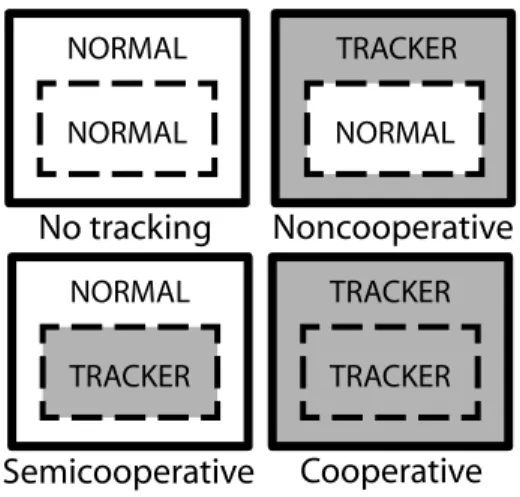
Figure 1: Basic cross-site embedded content scenar-ios. The outer rectangle represents the site that is hosting the page with embedded content. The inner rectangle represents the site where the embedded content is hosted.
which place restrictions on tracking that uses cross-site em-bedded content. Although these two browsers differ in their blocking policy, neither blocks third-party cookies completely; we propose a new third-party cookie blocking mechanism that combines the strengths of both browsers.
However, even if a complete same-origin policy and third-party blocking policy were correctly enforced on cookies and all other web features, these policies would do nothing to stop the methods that sites can use to share informa-tion with each other. Unless the user is willing to disable all browser features that maintain long-term state, or fre-quently reset this state, no modern browser can offer mean-ingful privacy guarantees against cooperative attackers.
2.
SAME-ORIGIN BROWSING
A folklore “same-origin” principle has developed as a com-mon way of treating JavaScript and cookies in browser de-sign. However, this principle has not been stated generally or applied uniformly to the many ways that a web site can store or retrieve information from a user’s machine. We pro-pose a general same-origin principle and suggest that this should be used as a uniform basis for additional privacy mechanisms that give users control over the ways that they are tracked.
2.1
Tracking types
Whenever a web feature leaks some of its long-term browser state to outside parties, there is a potential for the user to be tracked. Each user may have their own standards regarding the types of tracking that are acceptable to them. These standards often rest on the user’s understanding of a site as a distinct location. For the purposes of our discussion, a site is defined as a fully qualified domain name and all the pages hosted on it. It is also possible to define a site more specifi-cally, as a path on a particular domain, or more generally, as a partially qualified domain name; the corresponding track-ing techniques would differ only in implementation details.
User web activity may be tracked from many vantage points, ranging from single-session tracking at a single site, to multi-session tracking across sites that do not cooperate with each other:
• Single-session trackingis an unavoidable consequence of the way the web works. For example, sites can em-bed query parameters in URLs to identify users as they click around the site, and track them as they follow links to other cooperating sites.
• Multiple-session tracking allows a single site to identify a visitor over the course of multiple visits. This is probably the extent of the tracking that most users are comfortable with. Unfortunately, as we argue in Section 5, it is not possible for a browser to allow this kind of tracking without also allowing cooperative site tracking.
• Cooperative tracking allows multiple cooperating sites to build a history of a visitor’s activities at all of those sites, even if the user visits each site separately. It allows the user’s personal information at one site to be linked together with activities at a different site that appears to be unrelated. Contrary to popular belief, third-party cookie blocking does not defeat this kind of tracking.
• Semi-cooperative, single-site tracking allows an attacker’s site to determine information about a vis-itor’s activities at another “target” site, by convinc-ing the target site to embed content that points to the attacker’s site. For example, a forum may allow visitors to post remotely hosted images in public ar-eas, but does not want the images to uniquely identify “anonymous” users as they browse from one page to the next. Semi-cooperative tracking is consistent with the same-origin principle, but may be undesirable for the visitor or the target site. It is possible to allow some types of cross-site embedded content without al-lowing semi-cooperative tracking, using a third-party blocking policy as described in Section 2.3.
• Semi-cooperative, multiple-site tracking is sim-ilar to semi-cooperative, single-site tracking, except that the tracking can be used to follow users across multiple target sites and even onto the attacker’s own site.
• Non-cooperative trackingallows one site to deter-mine information about a visitor’s activities at another target site without any participation from the target site.
The main cross-site tracking scenarios are illustrated in Figure 1. A paranoid user might want to turn off all web fea-tures and allow only single-session tracking, but the default configuration of modern browsers today allows all of these tracking types, including non-cooperative tracking. An ideal browser that enforced a same-origin policy on all web fea-tures would not allow non-cooperative tracking.
In this paper, we address onlyweb privacy attacks, that is, tracking performed by a remote site based on some leaked persistent browser state. The task of building a browser that
protects againstlocalprivacy and security attacks (originat-ing from “spyware” or other users of a shared machine) is a separate problem that merits its own discussion elsewhere.
We assume that sites are not able to reliably track users using just their IP address and user-agent string. Laptop users may frequently change IP addresses, while users be-hind a NAT firewall may share a single IP address. Thus, using this information alone, it is not possible to identify the user across visits. Storing unique identifiers into browser state and reading them back on subsequent visits is the most common way to track users without obtaining any personal information from them.
2.2
Same-origin policies
Our formulation of the same-origin principle can be stated as follows:
Same-origin Principle
Only the site that stores some information in the browser may later read or modify that information.
The goal of this principle is to isolate multiple sites with respect to their ability to read and modify browser state, thereby allowing a user to browse as if each site and ses-sion are completely independent of each other. However, in-terpreted broadly, this principle would dramatically change many important features of the web, including such sim-ple things as cross-site hyperlinks and embedded content. Therefore, we consider in the rest of this paper same-origin policieswhich apply this principle to specific aspects of the browser while allowing exceptions for cooperation.
As an example of an exception that a same-origin policy might allow, consider the case where multiple sites jointly observe the event of storing information in browser state. We believe it is reasonable for a same-origin policy to allow both sites to later read back as much information as they observed. Similarly, it is possible for multiple sites to jointly observe the read event. A same-origin policy can allow that read, so long as each reader observes no more information at the read event than it observed at the store event. The rea-son is that these parties had the opportunity to save the in-formation into their private per-site state at the store event, so at the time of the read event, each reader should already have access to the jointly stored information. We discuss concrete applications of this policy in Sections 3.5 and 4.3.
In this paper, we focus on access control policies for read-ing rather than modification. The types of browser state we use as examples (cache and visited links) cannot be easily modified once sent. Same-origin policies should also be used for modifiable state, and for information entered by the user into a webpage, such as saved passwords.
2.3
Third-party blocking policies
To prevent semi-cooperative tracking, a browser may aug-ment its same-origin policy with a third-party blocking pol-icy. This policy restricts a site’s access to its own client-side persistent state if the site’s content is embedded on a differ-ent site. The browser enforces this policy by checking the domain of the top-level browser frame, which is generally where the user thinks they are currently “located” and can also be identified by the URL in the address bar.
Depending on whether the site in the top-level frame matches the site that is trying to access its state, a browser may:
Normal IE Firefox Ideal cookies 3rd-party 3rd-party 3rd-party
Reading X X
Writing X X
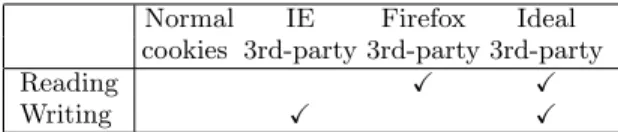
Table 1: Top-level frame checking for cookies
• Allowthe site to access its state, ignoring the domain of the top level frame. This policy allows multiple-site semi-cooperative tracking.
• Partitionthe site’s state into disjoint segments, one for each possible domain of the top level frame. This policy allows single-site semi-cooperative tracking. • Expirethe feature’s state at the end of the browser
session, preventing it from being used for long-term tracking.
• Blockthe feature from working at all.
Third-party blocking is a useful way to prevent semi-cooperative tracking for simple types of embedded content, such as images. However, embedded frames are designed with too many capabilities for this policy to have meaning-ful effect, and thus a site that embeds a frame to another site implicitly allows cooperative tracking. We describe how a page in a cross-site frame can easily circumvent third-party blocking and regain access to its state in Section 5.
Many options are available to the browser designer as to the exact implementation of a third-party blocking policy. Instead of checking the domain of the top-level frame, it would also be appropriate to check the domain of the im-mediate parent frame; because cross-site frames are a form of cooperation, these checks are equivalent. Most modern browsers do not enable full third-party blocking by default, and they provide Platform for Privacy Preferences (P3P) functionality [2] that allows sites to bypass third-party re-strictions in exchange for promises not to misuse the visitor’s information.
Third-party blocking policies have their place, but they are greatly surpassed in importance by same-origin poli-cies, which defend against more powerful web privacy at-tacks that do not require even minimal cooperation from the target site.
2.4
Example: Cookies
Cookies are an ideal example of a feature that is governed by a same-origin policy, because they are designed to be sent only to the site that set them. Although it is possible for one site to gain unauthorized access to another site’s cookies, these privacy leaks are generally a consequence of flaws in the web site that allow cross-site scripting, which is an accidental form of cooperation.
The third-party cookie blocking option on modern web browsers allows users to block cookies if the top-level frame domain does not match the cookie origin. However, as shown in Table 1, neither Internet Explorer 6.0 nor Mozilla Firefox 1.0.7 checks the top-level frame domain at both the time the cookie is set and the time it is read. Because of this partial blocking behavior, both browsers are exposed to semi-cooperative multiple-site tracking even while third-party cookie blocking is enabled.
Internet Explorer checks the top-level frame domain when the cookie is set, so a user who first visitsdoubleclick.net directly can now be tracked via a unique cookie all other sites where doubleclick.net has embedded content. By con-trast, Mozilla Firefox will letdoubleclick.netset a cookie at each site you visit even with third party cookie blocking enabled, but only when you visitdoubleclick.netdirectly can the cookie be read.
If a user wishes to prevent both types of semi-cooperative tracking, it would be wise to adopt a third-party blocking policy that checks the domain of the top-level frame both when the cookie is set and when it is read. However, as we discuss in Section 5, this setting will not prevent cooperative tracking.
3.
CACHE TRACKING
About 60% of Web accesses are requests for cacheable files [11]. These files are stored on the client browser to speed up further downloads. Because sites can embed cross-domain content, without a same-origin policy to restrict the caching behavior, this feature presents a variety of track-ing opportunities. In this section, we summarize some pre-viously published cache-based tracking methods based on timing and explain additional tracking techniques that we have developed and tested. We then discuss the principles of same-origin caching policies and describe a web browser ex-tension, available for free download, that implements same-origin policy for cache tracking.
3.1
Cache timing
By measuring the time it takes to load cached files, it is possible to determine whether an image or page from a non-cooperative site is already in the browser’s cache [3]. Using JavaScript or Java, a site could load a set of control files and test files, measuring the time it takes before the load is complete. If the control files take significantly longer to finish loading than the test files, the test files are probably already in the browser’s cache.
3.2
DNS cache timing
Web privacy attacks using the DNS cache measure the time it takes to perform a DNS lookup to determine whether a given domain has been recently accessed by the user’s browser [3]. These attacks are less powerful and less reliable than attacks that use the regular content cache. If it were possible to assign an origin to requests for DNS lookups, it might be possible to segment the DNS cache using a same-origin policy, although in practice this might not be worth-while.
3.3
Cache control directives
For cache-based privacy attacks on non-cooperative sites, timing attacks may be the only available option. However, for semi-cooperative tracking, there is no reason to resort to statistical techniques. It is sufficient to simply hide meta-information meta-information in the cache and read it back later. Entity tags (Etags) are meta-information about a page that is used for caching. When an entity tag is provided along with a server response, the browser client will in-clude the tag on subsequent requests for the page. Using this information, perhaps in conjunction with referrer meta-information, the server can link together multiple requests for the same content. With slightly more effort, the
Last-Modified date header and other caching directives can also be used to store and retrieve information.
3.4
Cached content
Rather than timing the cache or hiding meta-information, it is often simpler to put the identifying information in the content itself. As an example, consider a small JavaScript file generated by server-side script, as shown in Figure 2. This file can by included into any HTML page with a simple
<script> tag, and does not need to be on the same domain
as the page that includes it.
This example adds a unique, persistent, cross-domain user identifier to all links on the page, allowing webmasters of cooperating sites to build a master database of user activity across all participating sites. Of course, a unique identifier could also be used in other ways that are more difficult to detect.
Many other cached content types besides JavaScript al-low this type of cooperative tracking. We have constructed demonstrations that use cached stylesheets, images, and fra-mes to accomplish a similar effect.
3.5
Same-origin caching policy
We believe that the browser can prevent cache tracking by non-cooperative sites by changing the caching behavior to enforce a same-origin policy. In our method, the browser considers the two main observers involved in writing the cache entry: the site embedding the content (which may be null for top-level content), and the host of the content. Dur-ing the write event, the site embeddDur-ing the content learns only that some content was cached, whereas the hosting site knows the full cache directive headers.
If the same site embeds the same content, it is appropriate to allow the existing cached content to be used. As explained in Section 2.2, neither observer of the read event learns more information than it learned during the write event.
However, if adifferent site embeds the same content, the existing cached content may not be used; the embedding site would observe the fact that some content was cached, which is information that it did not observe at the store event. Instead, a separate cache entry is created and jointly owned by the new pair (embedding site, hosting site). Thus, some cache “hits” are turned into “misses,” but no information is leaked from non-cooperating sites.
If desired, the third party blocking policy may be used to further constrain offsite cache requests on the basis of the top level frame. This policy could prevent cache directives like Etags for being used in semi-cooperative tracking. Co-operative tracking is also made more difficult through this technique; however, as we show in Section 5, it is not entirely eliminated.
Because this approach affects only the way information is stored in the local browser cache, it is transparent to web caches and does not break them. However, because these caches do not enforce the same restrictive policies that the browser does, they may leak information. If content can be downloaded from a web cache faster than from the real site, an attacker can determine that the web cache is being used. The consequences of this attack are mitigated by the fact that a web cache may have many users, and it is not easy to distinguish among them purely on the basis of the cached content. We suspect that same-origin policies de-signed specifically for web caches may be possible, but they
<?php /* --- SERVER-SIDE CACHE DIRECTIVES --- */
if (getallheaders()[’If-Modified-Since’]) { // Check if the browser has a cached copy.
header(’HTTP/1.1 304 Not Modified’); // If so, tell browser to continue using it,
exit(); // and we don’t need to send a new identifier.
} // Otherwise, send cache headers to the browser:
header(’Expires: ’ . gmdate(’D, d M Y H:i:s’, time()+365*24*60*60)); // expires one year from today
header(’Last-Modified: ’ . gmdate(’D, d M Y H:i:s’, time())); // content was modified today
$id = rand(); // Also, generate a unique identifier for this user.
?> /* --- CLIENT-SIDE JAVASCRIPT --- */
var links = document.getElementsByTagName(’a’); // Get a list of <a> tags in the current document.
for(var i = 0; i < links.length; i++) // For each hyperlink found, change the href by
links.item(i).href += ’?userid=<?php echo $id ?>’; // appending the server-generated user id to the end.
Figure 2: A PHP file that can be embedded into an HTML page using a <script> tag. Using server-side script, it instructs the browser to use the cached copy of itself; if no cached copy exists, it sets an expiration date far in the future and generates a new unique identifier. Using client-side script, it appends the identifier to all links in the current page.
would add significant storage overhead and complexity while reducing performance.
3.6
Implementation
We implemented this same-origin caching policy as a Mozilla Firefox browser extension, available for download at www. safecache.com. Rather than require a separate user inter-face for cache behavior, the extension hooks in to the user’s cookie policy to decide how to handle caching. (We envision that an ideal browser would provide a unified privacy setting that does not require users to tweak individual features to obtain the desired level of privacy.)
The extension overrides the browser’s default caching ser-vice and installs itself as an intermediary. For each site, if cookies are disabled, caching for that site is blocked. If only session cookies are allowed, the cache for that site is allowed but cleared on a per-session basis. If third-party cookie blocking is enabled, the third-party caching is blocked. If cookies are fully enabled, third-party caching is allowed but partitioned as described above. Finally, if the user clears cookies for a site, the extension automatically clears the ap-propriate cache entries.
Our extension, signed with the Stanford University code signing certificate, was reviewed and approved by the official Mozilla extensions website, addons.mozilla.org. Several thousand users downloaded the software. We did not expect nor did we receive any complaints of degradation of browser speed due to cache partitioning.
4.
VISITED LINK TRACKING
Using different colors for visited and unvisited links is a popular feature that can be found on about 74% of web-sites [9]. This feature can make the navigation easier, espe-cially for users who are unfamiliar with the site. However, because this feature maintains persistent client-side state, this single bit of information per link can be used for track-ing purposes. The color of the link can be read directly ustrack-ing JavaScript, or subtle side effects of the link’s rendering can be detected. On-site links can be used for multiple-session tracking, and because the feature is not segmented according to a same-origin policy, off-site links can be used to execute non-cooperative web privacy attacks. In this section, we de-scribe some attacks and present a browser extension,
avail-able for download, that implements a same-origin policy for user history.
4.1
Chameleon sites
Even without using JavaScript, there are simple ways to customize a site based on the visitor’s history, and eventually obtain this information. In Figure 3, a series of hyperlinked bank logo images are stacked on top of each other. Using a few simple CSS rules, the site operator can cause the un-visited links to vanish. The resulting page appears to be customized to whichever bank site that the user has visited. By creating the login button as another stack of hyper-linked images, an attacker running the site could determine which site the user thought they were logging in to. Mi-crosoft Outlook 2002 accepts stylesheets in emails and some versions use the Internet Explorer history database to mark visited links, so an attacker could even use this HTML code as the starting point for an email phishing attack.1 These types of “chameleon” pages could also easily be used for marketing purposes, displaying discount offers only to visi-tors who have been to competitor sites.
4.2
Link cookies
On-site links can be also used for multiple-session track-ing. A website could load a carefully chosen subset of a col-lection of blank pages into an iframe, generating a unique identifier for each user. On subsequent visits, links to the blank pages could be used to recover the user’s identifier. Because this technique requires only on-site links, it is yet another cookie replacement technique that can be used for semi-cooperative and cooperative tracking. These “link cook-ies” are perfectly acceptable from the point of the same-origin principle.
4.3
Same-origin visited link differentiation
Applying a same origin policy described in Section 2.2 to visited hyperlinks, there are two sites that can observe when a page is visited by the user: the host of the referrer 1The other email clients we tested, Thunderbird and Gmail, do not accept stylesheets. An attacker could define a default email style to be displayed in this case. Note that if the attacker obtained the user’s email address directly from a web interaction with the user, the user’s visited links could also be queried at that time.
<html><head>
<style>a { position:absolute; border:0; } a:link { display:none }</style> </head><body>
<a href=’http://www.bankofamerica.com/’><img src=’bankofamerica.gif’></a> <a href=’https://www.wellsfargo.com/’><img src=’wellsfargo.gif’></a> <a href=’http://www.usbank.com/’><img src=’usbank.gif’></a>
...
</body></html>
Figure 3: Phishing page that automatically displays the logo of the user’s bank.
page, and the host of the visited page. Of course, both hosts may be the same. The same-origin policy allows this jointly stored browser state to be read by either observer, so either site should be able to distinguish links to the visited page. No other site should be able to obtain this information, so a hyperlink located on page A and pointing at a visited page B would appear unvisited unless both of the following conditions are met:
• The site of page A is permitted to maintain persistent state.
• Page A and page B are part of the same site, or the user has previously visited the exact URL of page B when the referrer was a page from site A.
We note that browsers that support URL reputation ser-vices or whitelisting of domains might allow certain trusted sites (like major search engines) to bypass the requirements and always show the true state of visited links. Major browsers that include built-in URL reputation services in-clude Netscape 8 and Internet Explorer 7.
4.4
Implementation
We implemented this same-origin policy in a Mozilla Fire-fox browser extension, available at www.safehistory.com. The extension modifies the browser’s history service to pre-vent visited links from being treated differently, then selec-tively re-enables the standard behavior for visited links for each link that meets the same-origin requirements.
As with our other implementation described in Section 3.6, our extension inspects the user’s cookie preferences to de-termine the appropriate policy to enforce. Depending on whether the user allows all cookies, first-party cookies, ses-sion cookies, or no cookies, we ensure that offsite visited links are marked as long as they meet the requirements above, partitioned by top level frame origin, expire at the end of a session, or are disallowed entirely. If the user clears cookies for a site, the extension automatically marks the as-sociated history entries as unusable for purposes of visited link differentiation.
This extension is also available on the official Mozilla ex-tensions website, addons.mozilla.org. After the initial beta release, we received helpful feedback from users on how to more efficiently integrate with the browser’s history database. This process of distributing prototypes as browser extensions allows new security and privacy features to gain wide exposure and acceptance before being fully integrated into the browser.
5.
COOPERATIVE TRACKING
Third party cookie blocking is often described as a way to discourage advertising networks from building up a com-prehensive profiles of web users, including their personal preferences and the sites they have visited, without those users explicitly providing personal information that would link together their activities at different domains. Although this kind of privacy against cooperating sites would be very beneficial for users, in practice it is not possible to attain while allowing persistent browser state that persists over the course of multiple browser sessions. The reason is that a variety of web features that do not themselves maintain any state can nonetheless be used to pass state information between cooperating sites.
Clearly, the simplest thing that cooperative attackers can do is to share the same domain for all of their hosted con-tent. However, this technique would make the cooperation obvious to the user, and site owners may not wish to entrust their all their web hosting to a central tracking authority.
If instead, the sites use different domains, there are still a variety of techniques that they can use to link together the state at one site with a visitors’s activities at another. We present a few illustrative examples.
• JavaScript Redirection. JavaScript-induced browser navigation has become an indispensible web feature, and it also provides a method for enabling cooperative tracking. A site (even inside an frame) can redirect the top level frame to a tracker page on a different do-main by modifying thetop.locationproperty, or by calling the submit() method of a form that targets the top level frame. The tracker site reads the user’s per-sistent state, then redirects back to the original page using a similar technique. The sites may communicate through query parameters passed in the URL, the re-ferrer of the request, or hidden form variables. This transition may only take a fraction of a second, is in-visible to the user, and allows the user’s state at the two different domains to be linked together, requiring no further interaction between the main site and the tracker site.
• Meta Refresh. Instead of using JavaScript to per-form the redirection, a site may instead send a<meta
http-equiv=refresh> tag to induce the browser to
navigate to the tracker site and back to the original page.
• Popup Windows. Another technique is for one site to use JavaScript to open a popup window on the do-main of another site. The popup window can be closed using JavaScript almost immediately, as soon as the
popup site is done retrieving its per-site state. Most popup blockers do not prevent popup windows from being opened as long as they are opened in response to a user click event, and popup windows opened by Macromedia Flash are usually not affected by popup blockers.
• Hyperlinks. A low-tech solution that may not be noticed by some users is to simply hyperlink to the tracking site, and at that site, induce the user to click a hyperlink back to the main site. One site that uses this technique frequently is ign.com, which hosts its interstitial ads on a different domain from its content servers.
If our goal is to prevent cooperative site tracking, then it might make sense to try to disable features that use per-sistent state when site transitions are induced by a website in such a way that the user has not had an opportunity to inspect the URL of the site where the browser is navi-gating. This was the approach recommended in the original RFC for cookies [7], which instructed user agents not to send cookies when these types of cross-site “unverifiable transac-tions” occur. Unfortunately, this goal is no longer realistic on the modern web due to the popularity of script-driven navigation and the high frequency of cross-site transitions. A site may trick a user into clicking a cross-site link and then redirect back to the origin site. By the time the redirection occurs, the persistent state has already been accessed by the tracker. Although it might be possible to detect an initial cross-site transition and disable access to persistent state, there is no obvious point at which it is safe to return the browser back to its normal behavior.
6.
RELATED WORK
Specific web privacy attacks using DNS and browser cache timing were first introduced by Felten and Schneider in [3]. They proposed a “domain tagging” approach to segment the cache by origin, which is an example of the same-origin poli-cies described in this paper. If a user wishes to also enforce a third-party blocking policy, a more restrictive caching policy than domain tagging is necessary.
Clover disclosed the technique for reading the user’s his-tory using visited link differentiation in [1]. As a counter-measure, Clover proposed that only on-site links be marked visited. Our choice of same-origin policy provides additional functionality due to our observation that both the referrer and the target site are jointly observing the storing of per-sistent information into the browser client. Thus, we allow off-site links to be marked visited as long as a referrer from the same origin pointing to the target page appears in the history database.
Clover observed that in the Mozilla browser, it is possible to set a persistent user identifier by visiting a unique se-quence of pages in a hidden iframe. Internet Explorer does not add automatic iframe navigation to the browser history, so it was thought to be immune to this form of tracking. However, we observed that Internet Explorer can still be manipulated in a similar way, using the JavaScript click() method on a hidden hyperlink that targets a hidden iframe. As an alternative to enforcing a same-origin policy on vis-ited links, a 2002 patch for the Mozilla Firefox browser [8], was proposed to prevent JavaScript from determining the re-sults of the:linkand:visitedpseudoclass selectors and to
prevent browsers from selectively downloading images based on these selectors. However, there are often subtle side ef-fects of a style rule that can be detected in JavaScript, and in any case, chameleon pages such as the example in Figure 3 do not require JavaScript at all.
Jakobsson and Stamm suggested a different solution to non-cooperative web privacy attacks [6], using as an exam-ple a context-aware phishing attack demonstration [4]. They proposed changes to web servers to protect visitors of that site, whereas we implemented client-side countermeasures that protect users at all sites. Client-side techniques place the burden of restricting access on the browser, while server-side techniques require resources to be dynamically assigned unique identifiers that will be hard for an attacker to guess. The techniques are complementary; our extensions provide a solution for end users while the majority of servers remain unprotected, while their server-side techniques provide a so-lution for webmasters while the majority of web users remain unprotected.
Because the same-origin policy relies on a trustworthy DNS framework, same-origin policies are vulnerable to pharm-ing attacks, where an attacker poisons the cache in an effort to steal the browser state belonging to another site. The privacy implications of a pharming attack are dwarfed by the enormous security consequences of intercepted traffic. Luckily, pharming attacks are difficult to execute. For sites that need to store sensitive information such as login creden-tials, Jakobsson and Juels show how to interactively query the persistent browser state (including the cache and his-tory) in order to construct secure “cookies” that are resis-tant to noninteractive theft [5]. These replacement cookies are compatible with the present work and can be shared among cooperating sites as described in Section 5.
7.
CONCLUSION
The complexity of the modern browser and the web it interacts with make privacy, a hard goal in principle, even harder in practice. This paper summarizes previously known privacy problems and presents some more powerful tracking methods based on caching various kinds of files. In pur-suit of meaningful privacy guarantees, we propose that a general same-origin principle should be applied uniformly across different types of information stored on a web user’s machine. We also develop ways for users to limit track-ing, in the form of browser extensions that are available for download. While these browser extensions provide control over cache-based tracking and visited link tracking, we show that there are limits to user control over tracking from co-operating web sites. In particular, although cookie policies provided by some browsers may suggest otherwise, we argue that it is not feasible to allow multiple-session tracking by a single site without also allowing multiple-session tracking by any collection of cooperating sites.
Some of the primary ways in which the web works, de-tailed in its original specifications and further expanded by years of use, have resulted in unfortunate, unavoidable com-promises between functionality and privacy. However, there is no good reason to disallow one feature on the basis of pri-vacy, while allowing another feature that presents an equal privacy risk. Specifically, it seems irrational for browsers to provide selective control over treatment of cookies, with-out providing similar control over other mechanisms that are equally effective for storing and retrieving state on the
client. The framework presented in this paper enables users to make informed choices and achieve the maximum func-tionality for a desired privacy level. The incorporation of this global privacy decision into a simple, built-in user in-terface suggests useful functionality for web browsers in the future.
8.
ACKNOWLEDGMENTS
We thank Darin Fisher, Markus Jakobsson, Ari Juels, Fritz Schneider, Goli Shariff, and Brett Wilson for helpful discussions about privacy implications of persistent browser state.
9.
REFERENCES
[1] A. Clover. Css visited pages disclosure, 2002.http:// seclists.org/lists/bugtraq/2002/Feb/0271.html. [2] W. W. W. Consortium. P3P public overview, 2005.
http://www.w3.org/P3P/.
[3] E. W. Felten and M. A. Schneider. Timing attacks on web privacy. InACM Conference on Computer and Communications Security, pages 25–32, 2000.
[4] M. Jakobsson, T. Jagatic, and S. Stamm. Phishing for clues: Inferring context using cascading style sheets and browser history, 2005.
http://www.browser-recon.info/.
[5] M. Jakobsson and A. Juels. The positive face of cache cookies, 2005.
[6] M. Jakobsson and S. Stamm. Invasive browser sniffing and countermeasures. Manuscript, 2005.
[7] D. Kristol and L. Montulli. RFC 2109: HTTP state management mechanism, Feb. 1997.
[8] Mozilla.org. Bugzilla bug 147777, 2002.https: //bugzilla.mozilla.org/show bug.cgi?id=147777. [9] J. Nielsen. Change the color of visited links, 2004.
http://www.useit.com/alertbox/20040503.html. [10] J. Ruderman. The same origin policy, 2001.
http://www.mozilla.org/projects/security/ components/same-origin.html.
[11] A. Wolman, G. Voelker, N. Sharma, N. Cardwell, M. Brown, T. Landray, D. Pinnel, A. Karlin, and H. Levy. Organization-based analysis of web-object sharing and caching. InProceedings of Second USENIX Symposium on Internet Technologies and Systems, pages 25–36, 1999.