Theme-Based Literate Programming
A thesis
submitted in partial fulfilment
of the requirements for the Degree
of
Master of Science
in the
University of Canterbury
by
Andreas Kacofegitis
Examining CommitteeNeville Churcher (University of Canterbury) Supervisor, Examiner Robert Biddle (Victoria University of Wellington) Examiner
University of Canterbury
2002
To my little brother Christophoros and my nephews, Christopher and Michael Davis.
Abstract
In this thesis we introduce and evolve the paradigm of theme-based literate programming (TBLP). TBLP enhances on the literate programming (LP) model, as invented by Donald Knuth in the early 1980s. TBLP provides a generic model that copes with current and future software development methodologies and practices. We show that through this extended chunk and processing model, XML-based support, and a pipelined document develop-ment process, an elegant and powerful system of exposition and developdevelop-ment is facilitated. We introduce the concept of themes as a solution to breaking the tyranny of dominant decomposition and show how TBLP can provide equal opportunity perspectives.
Table of Contents
Chapter 1: Literate Programming 2
1.1 The Comprehension Problem — What? . . . 2
1.2 A Brief Overview of Program Literacy . . . 5
1.2.1 A Birds’ Eye View of LP . . . 5
1.2.2 The Chunk . . . 6
1.2.3 Ground-level . . . 7
1.3 Human(e) Order vs. Computer Order — Psychological Ordering 10 1.4 Common Literate Programming Features . . . 11
1.4.1 Chunks versus Macros . . . 11
1.4.2 Pretty-printing . . . 16
1.4.3 Cross-Referencing and Indexing . . . 16
1.5 When is One Considered Literate? . . . 17
1.6 The Propaganda on Programming Literately . . . 18
1.7 Summary . . . 18
Chapter 2: A Review of Literate Programming Applications 20 2.1 WEB . . . 21
2.2 Noweb . . . 23
2.3 Nuweb . . . 26
2.4 Funnelweb . . . 27
2.5 CLiP . . . 29
2.6 LP Integrated Development Environments . . . 30
2.7 Leo . . . 32
2.8 Spider . . . 34
2.9 Documentation Tools . . . 35
2.9.1 Javadoc . . . 35
2.9.3 perlpod . . . 39
2.10 Summary and Comparison . . . 41
Chapter 3: A Review of XML-Based Literate Programming Applications 45 3.1 xmltangle . . . 45 3.2 xml-lit . . . 47 3.3 xLP . . . 49 3.4 LPML . . . 49 3.5 litXML . . . 54 3.6 xmLP . . . 56 3.7 DBLP . . . 58 3.8 Summary . . . 59
Chapter 4: Literate Programming’s Limitations 61 4.1 Application Specific Shortcomings . . . 61
4.1.1 Debugging . . . 61
4.1.2 The Three-Syntax Problem . . . 62
4.1.3 Monolithic Files . . . 64
4.1.4 Tangling Creates Tangled Code . . . 65
4.1.5 Scoping . . . 66
4.1.6 Object-Oriented Limitations . . . 67
4.1.7 Primitive Cross-Referencing . . . 67
4.1.8 Limited Output Formats . . . 68
4.1.9 Static Documentation . . . 69
4.1.10 Disparity between Document Editing and the Format-ted Document . . . 69
4.2 Model-Centred Shortcomings . . . 70
4.2.1 One Psychological Flow — Limited Readership . . . . 71
4.2.2 Asymmetric Processing Model . . . 72
4.2.3 Fixed Chunk Typing Mechanism — Real World Over-loading . . . 76
4.2.4 Refactoring — Chunk Version Control . . . 77
4.3 Literature versus Documentation . . . 79
4.4 Summary . . . 80
Chapter 5: Theme-Based Literate Programming 82 5.1 Theme Weaving . . . 84
5.1.1 The Need for a Tool of Abstraction . . . 85
5.1.2 Theme or Psychological Order? . . . 88
5.2 Multiple Themes: Theme-Paths and Chunk-Nesting . . . 89
5.2.1 Processing Model: Separation of Content and Ordering 90 5.2.2 Enhancing Chunk Composition . . . 96
5.2.3 Chunk Representation . . . 105
5.2.4 The Repository of Chunks . . . 106
5.2.5 Theme Model . . . 107
5.2.6 Processing Model: Blending Weave and Tangle . . . 108
5.3 TBLP Development Emphasises Expression over Development 112 5.4 Equality of Concerns . . . 113
5.5 Multiple Distributed Webs . . . 113
5.6 Summary . . . 114
Chapter 6: Implementation of the Theme-Based Literate Pro-gramming Model 115 6.1 Why XML? . . . 116
6.2 The Literate Document Development Process . . . 117
6.2.1 The Repository — Chunk Composition . . . 121
6.2.2 XML Theme Source Document . . . 125
6.3 The Context-Based Development Environment . . . 128
6.3.1 The Repository Widget . . . 130
6.3.2 The Theme Tree Widget . . . 138
6.3.3 The Theme-View Text Widget . . . 145
6.3.4 Editing . . . 151
6.3.5 The “Chunk Development” Panel . . . 157
6.3.6 The Variant Attribute . . . 164
6.3.7 Theme Functionality . . . 166
6.3.8 Loading and Saving — Repositories, Themes, and Projects166 6.4 Internal Architecture . . . 168
6.5 Summary . . . 175
Chapter 7: Document Output, Version Management, and Stor-age Concerns 176 7.1 XML Theme Document . . . 176
7.1.1 An Condensed Processing Model . . . 177
7.1.2 Theme Document Validity . . . 179
7.2 Theme Document Output: Formatting . . . 179
7.2.1 Is XSLT the Only Option? Other Technologies . . . 179
7.2.2 Stylesheet Development . . . 181
7.3 Chunk and Theme Storage . . . 189
7.3.1 Storage Options . . . 190
7.4 The ID attribute . . . 193
7.4.1 Multi-Valued Chunk Identifiers . . . 195
7.5 Version Control — Evolution and Utilisation . . . 195
7.5.1 Themes of Versions . . . 196
7.5.2 Branched Hierarchies of Chunks — Chunk Version Con-trol . . . 198
7.5.3 Theme-Based Version Control . . . 199
7.6 Summary . . . 200
Chapter 8: An Approach to the Practice of Theme-Based Literate Programming 201 8.1 Underlying Aims . . . 202
8.2 TBLP in Software Engineering . . . 202
8.3 Guidelines for the Good . . . 203
8.3.1 Target the Intended Audience . . . 203
8.3.2 Atomic Chunk Mapping Must be Strong . . . 204
8.3.3 Consider Physical Chunk Scope as a Cohesive Measure 204 8.3.4 Use the Consequence of Cohesion To Determine a Chunk’s
Size . . . 205
8.3.5 Distinguish Comments from the Source Code . . . 205
8.3.6 One chunk — one idea. . . 206
8.3.7 Chunk first, code later . . . 208
8.3.8 Dissassociate intent from implementation . . . 208
8.3.9 Create Self-Documenting Hierarchies . . . 212
8.3.10 Use Smooth Transition Between Levels of Abstraction . 213 8.3.11 Be lazy — write self-documenting chunk names . . . . 214
8.3.12 Avoid Temporal Commentary — Reduce Chunk Cross-Coupling . . . 216
8.3.13 Chunkify Programming Language Abstractions . . . . 217
8.3.14 Don’t Use Implementation-Level Commands as Chunk Substitutes . . . 219
Chapter 9: Future Work 220 9.1 Extending the Model . . . 221
9.2 Tool Support . . . 223
9.3 Human Computer Interaction . . . 227
Chapter 10: Conclusion 230 Appendix A: Thoughts on Literate Programming 233 A.1 Documentation — How Should It Function? . . . 233
A.1.1 LP Documentation versus Source Code — Audience Specific . . . 234
A.1.2 Perspective Simplifies Complexity . . . 237
A.1.3 LP Versus Plain Old Documentation/Comments . . . . 239
A.2 An Abstract Process . . . 240
A.3 The Affect of Programming Languages on LP Abstraction . . 241
A.3.1 The Power Paradigm of Literate Programming . . . 242
A.3.2 Psychological Scope . . . 243
A.3.3 Medium of Focus . . . 248
A.3.4 A Super-Language . . . 249
A.3.5 LP as Program Description Language . . . 249
A.4 Unordered Programming Languages vs. Psychological Ordering251 A.4.1 Are Programming Languages Literately Enabled? . . . 251
A.5 Mis-direction of Focus? . . . 253
Appendix B: TBLP Methods in Software Engineering 254 B.0.1 A Layered Approach to Themes . . . 255
B.0.2 Cross-Sections of Layers . . . 257
B.0.3 Flexibility of Approach . . . 259
B.1 A Set of Example Themes . . . 260
Appendix C: Example Literate Programs 269 C.0.1 Example NowebProgram . . . 270
C.1 An example of noweb . . . 270
C.1.1 Counting Words . . . 271
C.2 Personal Greeter . . . 283
C.3 Scoping (In)capabilities . . . 285
C.4 Identifier Cross-Referencing (nuweb) . . . 287
Appendix D: Theme Enabling Literate Tools 288 D.1 Supporting Multi-Themed Requirements with a Traditional Literate Tool . . . 288
D.1.1 The Journey to Enlightenment . . . 288
D.1.2 Nowebas a Development Platform . . . 289
D.1.3 The Bubblesort Theme-Set . . . 290
D.2 Requirements for an Alteration to Noweb . . . 291
D.2.1 Model Enhancement of Noweb— The Initial Attempt . 294 D.2.2 A Summary of the Initial Implementation . . . 298
D.3 Initial Model++: The Displacement Model . . . 299
D.3.1 Implementation of an Enhanced Model . . . 299
D.3.2 A Summary of the Second Implementation . . . 303
D.4 Does Chunk Displacement Suffice? . . . 305
D.4.1 Duplicate Chunks . . . 306
D.4.2 Non-fixed Chunk Types — Higher Order Documentation308 D.5 Theme 1 Example: Bubblesort . . . 314
D.6 Theme 2 Example: Bubblesort Evaluation . . . 321
D.6.1 Test Environment . . . 324
D.7 Theme 3 Example: Bubblesort Algorithm . . . 326
D.8 NowebTheme Converter . . . 328
D.9 NowebDisplacement Theme Converter Overview . . . 335
D.10NowebDisplacement Theme Converter Elide . . . 338
D.11NowebDisplacement Theme Converter Displace . . . 344
Appendix E: Theme-Based Version Control 353 E.1 Multi-chunk version control . . . 353
Appendix F: Reverse Engineering 356 F.1 Psychological Scope — Its Affect on LP . . . 356
F.2 Object Orientation . . . 358
F.2.1 Class-Level Chunking . . . 359
F.2.2 Method-Level Chunking . . . 359
F.2.3 Abstract Class Chunking . . . 360
F.2.4 Interface Chunking . . . 361
F.2.5 Try/Catch Chunking . . . 362
F.2.6 Sub-Method Level Chunking . . . 364
F.3 Imperative Languages . . . 364
References 367
Acknowledgments
I’d like to thank my supervisor, Dr. Neville Churcher, for his friendly and willing support, influential ideas and ever-available advice. I’d also like to acknowledge Ben Schmidt for acting as my (in)sanity checker during the initial stages of this thesis. Malcom Williams for his interest and the many interesting and thought-provoking discussions that we shared. James McNeill deserves special mention for his help in the reasoning of the Cbde’s editing environment (but moreso for the loaves of bread that he supplied me with). Yen-Rong Sun (Dan) for his interest and insightful comments and impor-tantly, cheerful personality. Dr. Greg Albertson for his advice and eagerness to help. Stacey Mickelbart repaired the broken English that was this thesis. And finally Nadine Fea for her support and understanding throughout (if not solely for her coffee making abilities).
This is a good idea to be sure; if you don’t understand it, then I haven’t explained it well. If you don’t like it, then you don’t understand it. — Andreas Kacofegitis June 12, 2002 13:03:28
Chapter I
Literate Programming
... my enthusiasm is so great that I must warn the reader to discount much of what I shall say as the ravings of a fanatic who thinks he has just seen a great light. — D.E. Knuth [45]
Donald Knuth coined the term literate programming (LP) in the same manner as the naming of the 1970’s phenomenon structured programming, which encouraged the development of readable and maintainable programs. Much as no-one would admit to writing an unstructured program, he dared anyone to admit writing an illiterate program.
In this chapter, we define literate programming; what it means to be ‘literate’. We define literate programming by describing:
• the mechanical process of developing a literate program.
• what LP offers over other programming paradigms.
1.1 The Comprehension Problem — What?
“Even first hand instruction doesn’t help, as Chaim Weizmann found when he took a long Atlantic crossing with Einstein in 1921: “Einstein explained his theory to me every day,” Weizmann said, “and soon I was fully convinced that he understood it.” — [8]
“Program comprehension is the process of acquiring sufficient knowledge about a software artefact so as to be able to successfully accomplish a given task.” [15]
Literate programming facilitates the development of programs in an ex-pression and order that a programmer would use to explain them to a fellow programmer, colleague, or maintainer: the target audience may vary. In this way, literate programming aids in the comprehension of software.
Maintenance programmers spend about half their time studying source code and related documentation [61], and 30–90 percent of software expen-diture, over the lifetime of a system, is spent on software maintenance. It makes sense to seriously consider how to best communicate what the original programmer was thinking.
Software development is a difficult task. According to Brooks [10], it re-quires the programmer to possess both general semantic knowledge (program language and semantics) and domain knowledge (knowledge about the area of program application). The transfer of domain knowledge from the real world to source code must be communicated to the reader. Experimentation has suggested that programmers with good domain knowledge are better able to understand a program than programmers with general semantic knowl-edge [15].
If we assume a programmer’s instructions to the computer are complete and correct, and therefore reliable, it must follow that mis-comprehension can only occur because a reader is unable to understand what was previ-ously communicated to the computer. This is likely due to the loss of domain knowledge information, rather than general semantic knowledge. Figure 1.1 exemplifies this scenario. The reader is unable to acquire enough domain knowledge to accomplish his task, causing a break-down in communication. If, however, the mental model of a software artifact is successfully gener-ated, program comprehension is successful. Note that programmer A and programmer B are separated by a period of time — LP does not attempt to solve the immediacy of communication. Programmer B therefore could well be programmer A some time in the future attempting to comprehend his own work.
The ability to comprehend software is dependent upon the efficiency of software comprehension. We determine that the efficiency of software com-prehension is based on two criteria:
Figure 1.1: Programmer A expresses the problem domain to the computer. Because the explanation of the problem domain is directed towards the com-puter, a loss of domain-specific information occurs — Programmer B mis-comprehends the instructions.
1. the speed of software comprehension, and
2. the ease of software comprehension.
Much as the analogy of the shortest distance between two points may not be the quickest to travel (by land — a boggy marsh may prevent this), so does it stand with comprehension. The most concise of program source code is not always the best understood. A map is often used as a navigational and distance measure even though the destination may be visible. So is it the case with software development — although the functionality of the software is apparent, further, more abstract instruction is required as to its method of implementation. The point? Program source code itself is not always its best descriptor (or documentation); contrary to what others may suggest [62].
How can literate programming aid in the speed and efficiency of compre-hension? Let us answer this question by considering how literate program-ming attempts to aid software comprehension.
1.2 A Brief Overview of Program Literacy
Knuth provided the term psychological order, based on the idea that a com-puter program should be aimed at humans rather than the compiler that produces the program. Realising that the ordering of source code for a com-puter is different to the ordering of source code for a human, he developed the WEB literate programming tool (discussed in Section 2.1 on page 21 of Chapter 2), giving programmers the ability to promote comprehension by both of these audiences.
Literate programming fundamentally facilitates program comprehensi-bility by allowing the programmer to associate documentation with code. Furthermore, it allows the author of a program to place these segments of documented code in an order deemed pertinent to a reader’s understanding. Literate programming is not a panacea for application development. It does not necessarily make programming easy, nor does it attempt to. The literate programming process makes one think — hard. Literate program-ming is not a substitute for good design: a bad literate program will be worse than its non-literate equivalent. Literate programming is not a programming language per se, but rather, a technique — an approach to the practice of software development.
Having sufficiently lowered the reader’s expectations, we can raise them again by noting that literate programming promotes the development of qual-ity software. By virtue of the imposed overhead of thought, good quality literate programs ensue.
1.2.1 A Birds’ Eye View of LP
What exactly is LP? How does LP aid in software comprehension? This section considers the semantic and physical capabilities that must be offered by a literate enabled environment.
To allow programming literacy, the following requirements must be met:
granularity of expression: It must possible to divide the program source code into discretely large or small units.
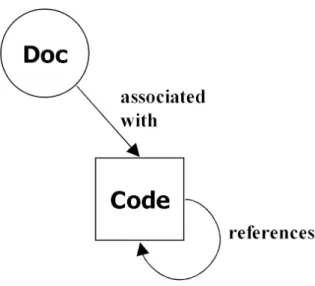
Figure 1.2: A documentation chunk has a relationship with a code chunk. This relationship is implied. Together, they form an atomic chunk. A code chunk may reference other code chunks.
multiple orders of exposition: It must be possible to present the pro-gram source units in at least two orderings, so that units are presented in a manner, or order, that promotes comprehension of the intended audience.
abstract representation: It must be possible to document each program source unit such that it is explained in a manner that satisfies the reader’s comprehension.
1.2.2 The Chunk
Although terminology differs among literate tools, we choose to adopt the definition of a segment of code or documentation as used by LP tool devel-opers such as Norman Ramsey — achunk1.
A literate program is composed of a number of chunks. A code chunk is accompanied by a documentation chunk. A code chunk may reference any number of other code chunks. Together, a documentation and code chunk
1Other tools, some of which are covered in Chapter 2, use terms such as macro, module,
for an atomic chunk, therefore representing the same unit of abstraction. atomic chunk
Figure 1.2 on the preceding page illustrates this relationship. The referencing ability of code chunks builds a tree-like structure that, when processed in a depth-first order, outputs the source code. This relationship is implied from the lexical ordering of documentation and code chunks in the source web.
A code chunk receives a label that describes the purpose of the code chunk. That is, a chunk’s label describes what it does, e.g., <<variable declarations and initialisations>> or <<calculate grand total>>. At initial glance, a chunk may seem similar to a function or method; however this is not always the case, as discussed further in Section 1.2.3.
A documentation chunk is able to explain, in further detail, how the pro-grammer arrived at the contained segment of code, why it was implemented the way it was, alternate avenues that may have been explored, and other pertinent information aimed at the intended reader.
In literate programming, documentation is commonly written before the code is developed. Therefore, a documentation chunk generally physically appears immediately before a code chunk. This is termed as a prevenient approach to programming practice [56]. This is opposed to a post-hoc method of documentation; that is, documenting what the code is doing, rather that what it is meant to do.
A code chunk may reference, or include, any number of other code chunks. A code chunk may not, however, reference itself. The lexical ordering of code chunks throughout the document is what determines the “psychological flow” of a program.
1.2.3 Ground-level
In order for a literate tool to develop literate programs, it must possess funda-mental capabilities/functionality. We describe, using a minimalist approach, what a literate programming tool must offer. A maximalist approach would warrant a more speculative perspective, something employed by tools such as Leo(see Section 2.7).
hierarchy of code chunks: It must be possible to develop an implicit hi-erarchy of chunks, which is generally performed by referencing defined
chunks of code.
In order to build such a hierarchy, it must be possible to reference a chunk from within the body of another chunk. For example, the follow-ing chunks (extracted from the greet.nw Noweb file in Appendix C.2) without their documentation or code content form:
<<*>>=
<<greet process>> <<greet declarations>> <<greet process>>=
<<ask what the user’s name is>> <<read name from input>>
<<print greeting>>
Figure 1.5 on page 13 presents the hierarchy derived by following the references made by each chunk.
code chunk implementation: code chunks can be defined anywhere through-out the literate program.
chunk labelling: In order to reference a code chunk, it must have a unique identifier. This unique identifier has traditionally been the chunk’s name or label (our tool differs by introducing a separate chunk attribute for chunk referencing — see Section 7.4).
granular code chunks: Chunks of all sizes must be allowed. As an ex-ample, it should be possible to encapsulate the entire program source code withinone chunk2. Conversely, it should be possible to generate
chunks of zero characters in size. While these extremes of granularity may not be considered good practice, the “normal” granularity of a chunk would occur somewhere in between.
accompanying documentation: It must be possible to accompany a code chunk with documentation. No restrictions should be placed on the size of the documentation chunk.
Childs [17] provides a list of requirements that he considers imply the definition of a literate program. These add context to our formal definitions and therefore aid in the understanding of what literate programming is. A selection of the list is presented:
• Documentation should include an examination of alternative solutions and suggest future maintenance problems and extensions.
• Documentation should include a description of the problem and its solution.
• The system should be presented in an order of logical consideration, rather than syntactical constraints.
When chunks of the program are presented in an order aimed towards the human reader, the psychological order of the program is expressed. The ability to nest code chunks and the ability to attach to them supporting documentation is what differentiates literate programming from other pro-gramming and documentation techniques. Without this functionality, a tool is not literate enabling (or enabled).
Implicit Chunk Typing
Note that chunks are not explicitly typed. A chunk’s type is implied from a delimiter, or the previous chunk’s terminating character. For example, Noweb uses the ‘@’ character as a documentation chunk delimiter (and code chunk terminator) and the ‘<<>>’ characters to begin a code chunk.
Documentation Changes With Code
Documentation and code chunks form an atomic unit; both normally are an expression of the other, implemented in a different level of abstraction
however. The atomic chunk is contained in the same source file, in a cen-tral physical location. The physical proximity of documentation chunks to code chunks ensures the likelihood of simultaneous update to both chunks when an edit occurs. This decreases the chance of obsolete or inconsistent documentation or code.
1.3 Human(e) Order vs. Computer Order — Psychological Or-dering
We know, from Section 1.2.2, that literate programming combines documen-tation with code. We also know that a code chunk may reference a number of other chunks.
Literate programming allows the programmer to express the ordering of code chunks to the human differently than he would express this ordering to a compiler.
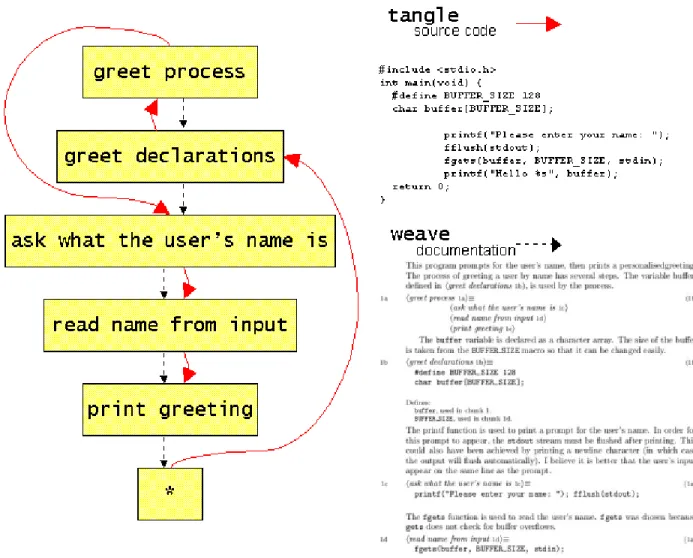
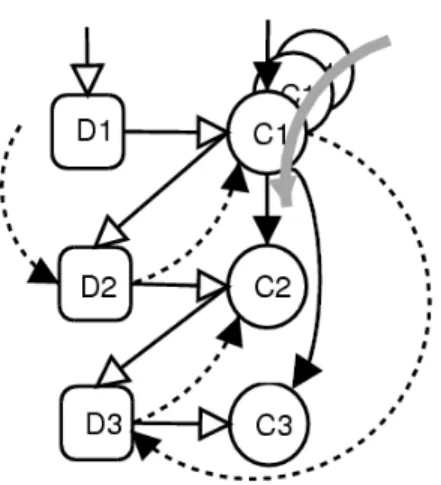
Figure 1.3 presents a flow diagram that abstractly represents the nature of a literate program. Each named rectangle represents a code chunk in a literate program3. (The name of each rectangle is the name of the chunk.)
Two orderings of chunks exist:
weave ordering The top–down, or sequential, ordering of chunks, where order is maintained by the connecting dashed line from one chunk to the next, occurs in the order in which chunks are displayed in the lit-erate document. Effectively, this is derived from the lexical ordering of chunks in the source file. This is the “psychological order” suggested by Knuth — the program directed to the human. The process of gen-erating the literate document is commonly known as weaving.
weave
tangle ordering The order in which the computer will receive these chunks — the traditional order. This is indicated by the solid line that begins from the “root” (rectangle labelled ‘*’) chunk. The root chunk in this example happens to be the last chunk in the literate program. Following the thick directed line from chunk to chunk presents a different chunk
order to the compiler. The chunks are output to the source code file.
This process is known as tangling. tangle
The process of tangling and weaving is shown in Figure 1.4. The literate source can be found in Appendix C.2.
The ability of a code chunk to reference a number of other code chunks essentially generates a tree-like structure of chunks. Although Figure 1.4 represents the order of traversal of the chunks of code, Figure 1.5 more accurately reflects the nested nature of code chunks. It illustrates that the body of a code chunk may be composed of other code chunks.
Note also that each edge in the tree is a reference to a chunk — chunk definitions do not occur more than once in the literate source. A chunk reference can, however. The referencing of chunks is known as composition by reference.
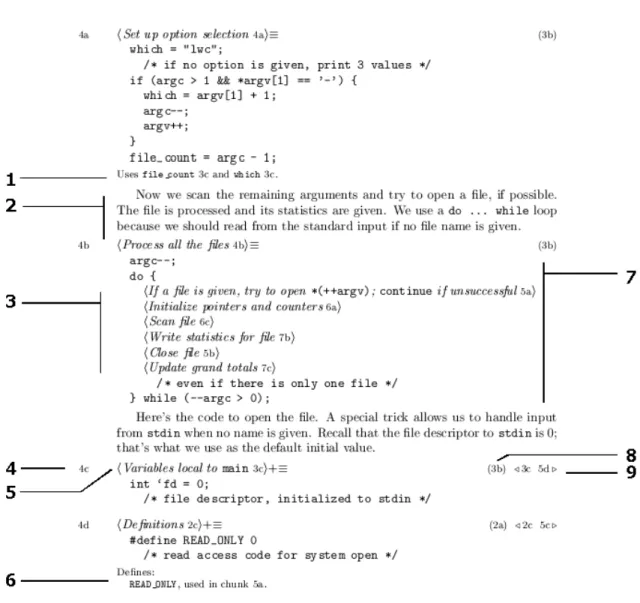
Figure 1.6 shows the nesting of chunks in greater detail. Note that <<Process all the files>> contains references to several other chunks. Each chunk is enclosed in angle brackets. Note also that program source code may be interspersed throughout a code chunk (marker ‘7’ indicates the content of the <<Process all the files>>chunk).
Summarising, an LP tool generally offers the ability to tangle and weave a literate program. The tangling process produces source code. The weaving process produces the literate document.
1.4 Common Literate Programming Features 1.4.1 Chunks versus Macros
The chunk is described in Section 1.2.2. Some literate programming tools, such as WEB and FunnelWeb (examined in Chapter 2) offer parameterised macros. These are simply chunks that accept arguments. The arguments are represented in the chunk body by substituting the argument name with the argument value within the chunk defintion. These are similar to a C macro that is expanded in the source code by the C pre-processor. The most basic of chunks is the one that accepts no parameters. Unless otherwise stated, the word chunk throughout the rest of this text shall refer generically to
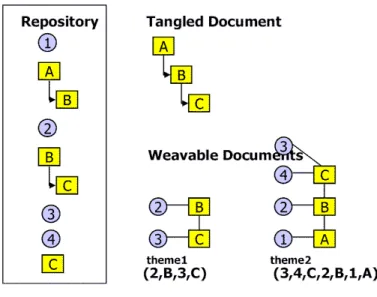
Figure 1.3: The helloworld LP. Weave/psychological order (dashed arrow) and tangled order (solid arrow) are shown on the left. Upper right is the tangled source. Lower right is the woven document.
Figure 1.4: The document development process.
Figure 1.5: Code chunks may be nested such that a natural tree hierarchy is generated.
Figure 1.6: A woven extract of Ramsey’s wc LP. The markers illustrate features employed by some literate programming tools. ‘1’ and ‘6’: cross-referencing of the uses and definitions of identifiers. ‘2’: demonstrates a doc-umentation chunk. ‘3’: demonstrates chunk referencing, ‘4’: shows a chunk’s reference marker, ‘5’: a chunk’s name and cross-reference to where its initial definition occurs, ‘7’: illustrates the body of a code chunk, ‘8’: cross-reference details indicating in which chunks the chunk is referenced, and ‘9’: cross-references to an additive chunk’s definitions.
both parameterised and parameterless chunks. When specifically addressing parameterised chunks, we shall use the term macro.
Additive Chunks
Many literate tools allow a code chunk to be augmented throughout a pro-gram. The resulting code chunk is a concatenation of all like-named code chunks in order of implementation. Thus, code chunks such as the<<Variables local to main>> chunk in Figure 1.6 on the preceding page are combined to create one segment of source code, and are termed as additive. Note the ‘3c’ identifier after the chunk’s name which is a cross-reference to the chunk’s initial definition. Also note the ‘+=’ symbols, which indicate that a chunk is additive. The chunks that comprise <<Variables local to main>> can be found in 3c and 5d as denoted by the cross-reference information for that chunk (indicated by marker ‘9’ in Figure 1.6).
Labels and Abbreviated Identifiers
Using a chunk’s name, one is able to cross-reference or reference a chunk in the body of another chunk. Thus, the name of a chunk is a chunk’s identification (in the case of additive chunks, multiple chunks can possess the same name). Furthermore, the chunk’s name is displayed in the resulting literate document (as illustrated by marker ‘5’ in Figure 1.6).
Some literate tools provide the ability to use abbreviated identifiers so that if the abbreviated name of a chunk is unique, the literate tool will re-solve the reference. For example, a chunk may be named “alphabetically sort all elements”. Referencing this chunk may be possible by simply enter-ing “alphabetically sort...” if “alphabetically sort” uniquely resolves to the intended chunk. Note the points of ellipses, which commonly indicate that the identifier is abbreviated.
1.4.2 Pretty-printing
Language-aware tools such as WEB offer pretty-printing of code. Pretty-printing is a point of debate in the literate programming4 community. Many
argue that pretty-printing distorts source code such that it becomes unrecog-nisable and difficult to read. Fox [26], in particular comments that pretty printing can be far removed from its initial presentation in the source file that it becomes unrecognisable. Others argue that pretty-printing offers the ability to accentuate important parts of the source and thus makes it easier to comprehend. Many of these issues are influenced by the nature of the pretty-printer (some pretty-printers, for example the a2ps package simply highlights key words, rather than combining and replacing symbols).
It is our opinion that pretty-printing, while making source code visually pleasing, suffers because it is an automated process — which also happens to be one of its stengths. As such, it is unable to highlight semantically important areas of interest.
Chunks are abstract entities that capture a point of interest in the pro-gram. They tend to be smaller segments than those of methods or functions. With the help of an abstract and definitive chunk name and perhaps sup-porting documentation, it is usually unnecessary to use pretty-printing to highlight important areas of code. Pretty-printing is useful when a large amount of code is presented in sequence; it is then able to uniformly repre-sent syntactic features of the programming language.
1.4.3 Cross-Referencing and Indexing
Cross-referencing of chunks facilitates navigation throughout the document. In a woven document, it can be used to follow the computer-oriented or-der rather than the psychological flow imposed by the author. Figure 1.6 illustrates chunk’s<<Variables local to main>>cross referencing details. Marker ‘4’ indicates that ‘4c’ is the chunk’s referencing identifier. Marker ‘8’ indicates in which chunk’s <<Variables local to main>> is referenced. Locating ‘3b’ will reveal this information. Marker ‘3’ illustrates a number of
chunk references. Each chunk reference displays the referenced chunk’s name and a cross-reference to its place of definition.
The declaration and use of identifiers allows the programmer to identify the scope and manipulation, or use, of an identifier. Language-aware tools usually generate this information automatically. Language-unaware tools rely upon the author of the program to manually signal the declaration of an identifier. The tool then uses a heuristic approach to find the uses of each identifier.
For example, Figure 1.6, markers ‘1’ and ‘6’ show the definition and uses of identifiers, respectively.
1.5 When is One Considered Literate?
What should a literate program look like? How should it read? What must be communicated by the author to the audience? In Chapter 8, we examine these questions and propose a number of guidelines for writing ‘good’ literate programs. This section considers how a literate program should read, rather than how it should be written.
Undue effort on the presentation of the documentation should not de-tract from the quality of the program.
Bentley [6] and Knuth assert that a literate program should resemble a novel-like entity that can be read from cover to cover; a work of literature; something that can be read whilst sitting in a “comfortable chair” whiling the evening away. Certainly the opportunity is available, through literate programming, to develop interesting documentation; however, the emphasis should ultimately lie in the quality of the program being developed. Effective documentation is necessary and important to the comprehension of a pro-gram, but should not be at the expense of the program’s quality. The two are intimately related; however, the program is usually the ultimate expression of concept5, and documentation the supporting agent.
We therefore suggest that a literate program is one that presents the reader with the correct domain model such that he is able to understand and extend the program effectively and efficiently. This would imply that in order to correctly transfer domain knowledge, a literate program is not necessarily read in its entirety. It could be (and is most likely) read as a reference source. For example, the reader may need to alter one particular part of the program. He therefore would need to know how that part of the program works, and how it affects the program as a whole. Enabling this understanding would allow the programmer to effectively and correctly alter the program — without reading the entire literate program.
In summary, we consider literate programming to be the act of develop-ing programs usdevelop-ing psychological orderdevelop-ing, cross-referencdevelop-ing, and supportdevelop-ing documentation to capture and present information that helps the reader af-firm a complete mental model in order to alter, enhance, and/or understand the program.
1.6 The Propaganda on Programming Literately
Little research has been performed on the effectiveness of LP in real-world scenarios. Although research suggests [71, 20] suggest that LP is an effective means for software development, and can help to reduce the learning curve required to understand programs, the wider programming community has been reluctant to adopt LP. This in itself does not suggest that LP is an ineffective programming medium. It does, however, convey the need for supporting tools and perhaps more concrete research on its effectiveness as (1) a software development medium and (2) a medium of comprehension.
1.7 Summary
In this chapter, we have defined literate programming; at both the physical and semantic level. We have considered its importance to the problem of software comprehension. The rest of this dissertation is focused on delivering and realising our enhancement on the LP paradigm. Our work in this area evolves the concept of theme-based literate programming (TBLP).
Before introducing TBLP, and its physical realisation in Chapters 5 and 6 respectively, we consider existing literate and documentation tools — Chap-ter 2 focuses on common liChap-terate tools, ChapChap-ter 3 focuses on XML-based literate tools — in order to determine both their strengths and weaknesses. Chapter 4 examines these weaknesses.
From the analysis of LP’s weaknesses and shortcomings, we propose, in Chapter 5 a new set of models for literate programming, and thus, establish the paradigm of theme-based literate programming. We also introduce a framework for theme document development. Chapters 6 and 7 demonstrate and discuss the implementation of our TBLP model.
Finally, Chapter 8 presents a styleguide for theme-based literate program-ming.
Our work on TBLP extends that presented in [39]6.
Chapter II
A Review of Literate Programming Applications
In this chapter, we introduce the reader to literate programming and documentation tools and the functionalities that they offer. The process of literate program development was discussed in Chapter 1. Understanding this process aids one’s appreciation of the approach to developing literate programs that the tools covered in this chapter enable.
A range of literate programming applications exist (an up-to-date list can be found in [49]). There have been many attempts to improve upon Knuth’s prototypicalWEB. We first examine WEBand then investigate the offerings made to the literate programming paradigm by these other tools. Specifi-cally,Noweb,Nuweb,FunnelWeb,CLiP,Jaba,LeoandSpiderare investigated. We also investigate documentation tools. Namely, Javadoc, elucidative pro-gramming, and Perlpod are examined.
In choosing a subset of literate programming tools, the following factors were considered: originality of approach, contribution to LP, specific archi-tecture, and functionality offered. We remain aware that other good LP tools do exist.
Knuth wrote in his introductory paper on literate programming [45] that LP is not suitable for the masses. Specifically, he targeted the computer scientist as a potential user of literate programming. Many of the tools that were based onWEBfocused on a different user: the programmer. This should be kept in mind whilst reading the comparisons of available tools. Tools may make “improvements”, but many of these improvements are a simplification of WEB. Through simplification, however, functionality can be reduced.
WEB is introduced first because it archetypically encompassed many of the functionalities available from other LP tools. Thereafter, no order of
significance is given to the ensuing discussion of each tool.
2.1 WEB
WEB was developed by Donald Knuth in 1983 [44] following several proto-type systems since 1981. WEB itself is also considered a prototype tool. It is used to document programs written in the Pascal programming language and uses TEX1 as its document formatter. Knuth, however, suggested that
potentially any combination of document formatting language and program-ming language could be used. Although prototypical, WEB contains many of the concepts common in today’s LP tools. Anecdotally, it was developed before the term became a popular one for the internet.
Knuth intended the editing of a literate program to be the sole means of program development. To enforce this intention, he made the by-product of WEB’s tangling process (the program source code) essentially unreadable; identifiers are shortened and altered to upper-case equivalents, all comments are removed from the program source code, and entries of the relative posi-tions of the source code in the literate program are added. This unreadable code helped enforce what Knuth saw as one of the ideals of literate program-ming — the literate program provided the sole means of access to program development. As such, the programmer is forced to develop the literate pro-gram without referring to the raw propro-gram source code at all. We do not adhere to this point of view and address it in Section 1.5.
WEB supports the use of ‘CHange’ files. These are used to facilitate the update and maintenance of a program. The idea, which has since been disregarded in LP tools, warrants special mention. A CHange file remains external to the literate program. Updates to program source code may be entered into this file. Upon tangling and weaving, these changes are reflected in the ensuing documents. Multiple CHange files may exist and may be used conditionally. It is therefore possible to develop a single program that can be adapted to run under several different environments by using multiple
1As an aside, Knuth also wrote the programs for TEX and METAFONT entirely in
WEB, eventually publishing them in book form [46], [47]. These are probably the largest literate programs ever published.
CHange files. Supporting tools such as webMERGE exist, which aid the merging of CHange files with the literate source.
Brown and Childs [11] realised CHange files’ importance when developing their prototypical GUI (graphical user interface) environment for LP. They considered their use as ‘good’ practice, as did Sewell [77].
WEB’s functionality is driven by the use of directives (27 in total2). Of
these directives, WEBprovides two levels of macros. We define these as: 1. non-parameterised
2. parameterised
Both macro types may be referenced as abbreviated identifiers (see Sec-tion 1.4.1). Non-parameterised macros are akin to the ‘chunk’, as discussed in Section 1.4.1. Parameterised macros possess the added ability to pro-cess an argument, and present this argument anywhere in the body of the macro. In offering program macros, WEB provided support to compensate for shortcomings in the Pascal programming language [41, 45]:
... it is impossible to have a PASCAL array whose bounds are ‘0..n − 1’, or to write ‘20 + 3:’ as the label of one of the cases in ‘case x+y’: WEB’s numeric macros make it possible for TANGLE to preprocess such constraints [45].
Being Pascal-aware (possessing syntactical and semantic knowledge of Pascal) allowsWEB to:
• pretty-print and type-set program source code (code chunks), and
• automatically index and cross-reference identifiers in code chunks.
Being language specific, however, prevents the programmer from devel-oping programs in other programming languages. Also, because TEX is the document formatter, no other formatter may be used.
2This abundance of directives, however, drove the development of theNoweb LP tool
Pretty-printing is performed automatically, and although there is some basic functionality to override aspects of this pretty-printing, it is otherwise impossible to alter the nature of the layout and presentation.
WEB’s restrictions on the programming language and document formatter prompted the development of a family of LP tools. Some were based directly on WEB and used a fixed formatting and programming language. WEB directly affected the development of CWEB, and later FWEB, (each of which cater to an increasing variety of programming languages — C and (later) C++, Fortran, and Ratfor). Each implementation, however, was restricted to a set of programming languages.
Although WEB’s output is limited to LATEX-based documents, the latest
CWEBsupports output to PDF (portable document format), and navigatable cross-referencing is achieved through hyper-links.
Some programmers were intolerant of language restrictions. This sparked the creation of language-neutral, or language-unaware, general purpose liter-ate programming tools, such as Noweb, FunnelWeb, and Nuweb.
2.2 Noweb
Noweb [70] is a popular LP tool. Its utilisation, along with CWEB, in GUI tools such as Leo (covered in Section 2.7) and LyX (see Section 2.6), is perhaps, a testament to its popularity. It was developed by Norman Ramsey and derives its name from an attempt to overcome some of what Ramsey considered to be shortcomings of the WEB family [68] — hence ‘no web’. Noweb addresses the following WEBdeficiencies:
• language dependencies,
• a complex array of directives — too much effort was required to master WEB,
• unadaptable pretty-printing, and
Fundamentally, Ramsey’s argument was thatWEBmakes the exploration of literate programming difficult [67]. He did not dispute the effectiveness of WEBas an LP tool, but rather as an explorative aid.
Noweb provides a solution to these shortcomings by providing program-ming language independence, a smaller set of directives, and no enforced pretty-printing of source code. Perhaps coinciding with the attempt to sim-plify and minimise the set of directives,Noweboffers an extremely extensible pipeline architecture.
Noweb’s pipeline architecture follows the UNIX pipeline model. The pipeline approach allows the output of one process to be treated as the input of another process. This architecture allows ‘expert’ users to create filters through which Noweb code is passed and altered. Such filters may take the form of specific language cross-referencing agents (Chapter 5 discusses the de-velopment of a set of Noweb filters as an attempt to enhance the LP model; Appendices D.9 – D.11 contain the source code for these filters). Pretty-printing is also enabled through use of a filter. Indeed, Pretzel [30] is a tool that has been specially adapted to offer such functionality3. This pipeline
architecture provides an extremely flexible manner in which to add function-ality to Noweb whilst keeping the directives used in literate program source code minimal.
A filter may be developed in any language (awk and Perl are examples), so long as it is executable on the necessary operating system, and obeys the relatively simple syntactic constraints set byNoweb[66]. Nowebdistributions come complete with a standard set of filters, two of which are:
disambiguate: allows abbreviated chunk identifiers.
elide: removes a code chunk from the literate document.
3Pretzel itself is a tool that can be used not only in Noweb implementations, but as a
general purpose pretty-printer. Given a grammar and layout rules for that grammar, Pretzel generates a module that is able to process the input source code file and output a pretty-printed LATEX version. With some difficulty, it is possible to extend Pretzel
to cater to formatting languages such as Troff. Implementations currently exist for C, Java, and Pascal.
Noweb permits identifier cross-referencing; it provides a framework and sample filters for a wide range of languages. This cross-referencing can be performed either manually (through use of the @Ã%def directive), or auto-matically via a filter (that automates the inclusion of the @Ã%def directive). A language-independent heuristic is used to locate occurrences of known identifiers. Using such a heuristic can produce falsely-found identifiers, while others may not be found at all. For example, Noweb will consider the two identifiers var1and var1-temp to be the same, which is incorrect.
LATEX is generally used as the document formatting language; however,
Troff, HTML, or TEX are also supported. Although a diverse set of format-ting languages may be used, the set is still fixed, thereby rendering the use of a markup language such as XML impossible.
Noweb inherently supports multiple languages because it has the ability to specify which code chunk is the root chunk when tangling the Nowebfile. Nowebdoes not support multiple input files. However, this limitation can be circumvented utilising the document formatter’s file inclusion capabilities. For example, use can be made of LATEX’s\includedirective to include other
Noweb literate program segments. This method has restrictions, however. Although it is possible to generate identifier references and indices that span multiple documents (using thenoindexcommand), it is not possible to refer-ence chunks from different files. A chunk’s scope exists solely within the file in which it is defined. Therefore, multiple file support is very limited, and is purely enabled or disabled by the formatting language used.
Noweb cannot weave documentation that spans across several separate, linked documents. For example, HTML output is constrained to one page — cross-linking among pages is not possible. The scalability of this approach is not feasible for large programs. Tools such as LaTeX2HTML, however, can be used to convert LATEX documentation to HTML, providing a method to
circumvent the problem.
Noweb is available as a cross-platform (both *NIX and Microsoft Win-dows) distribution, but requires the installation of the Icon programming language.
Future improvements planned for Noweb4 are:
• the ability to cross-reference among documents,
• easier porting and installation, and
• improved performance.
2.3 Nuweb
Nuweb5, developed by Preston Briggs [9], receives its inspiration from a
num-ber of LP tools: WEB, FunnelWeb, and Noweb. Simplicity is its emphasis. WhereasNoweb’s extensibility lies in its command line options and filters, Nuwebprovides, as do most other tools, extensibility via in-source directives. Nuwebuses directives to perform such operations as source code output (tan-gling) to multiple files (utilising the ‘@o’ directive). Although multiple file tangling is allowed, multiple file weaving is not; it is impossible to split wo-ven output into separate, interlinked files. Nuweb is programming language independent and utilises LATEX as its document formatter.
Source files are output by Nuweb only if the newer version differs from the existing version. This process can be overridden, but can save significant time spent on compiling source code that has not changed since the last compilation.
Nuweb allows the programmer to manually define identifiers. As with Noweb, a heuristic-based approach is then used to find occurrences of this identifier. However, Nuweb does not perform cross-referencing of identifiers, so identifier definitions can only be used for indexing purposes. Like Noweb, this heuristic is not infallible. For example, the variablevarin the expression ++$var is not recognised and thus not included as part of the index. Code chunks are automatically cross-referenced.
The output of indices of file names, macros, and identifiers is optional and can be included anywhere in the document.
4http://www.eecs.harvard.edu/~nr/noweb/plans3.html 5which is itself a very good written example of LP
Nuweb’s relatively simplistic design takes the form of one monolithic C program and allows it to be ported easily to different operating systems. As such, it is not extensible beyond its own fixed functionality. For example, Nuweb does not offer pretty-printing, and there is no facility to attach a pretty-printing module (unlike Noweb’s extensible pipeline architecture, for example).
Nuweb allows multiple input files to a maximum nesting of ten. Included files are simply expanded within the parent file. This allows cross-referencing among files.
nutweb [35] is an improvement on Nuweb and enhances its output capa-bilities by enabling the output of TEX, as well as LATEX. It also provides
pa-rameterised macros, abbreviated identifiers, and the referencing of macros. Additionally, it allows the layout of side-by-side code and documentation. nutweb was developed by John Hurst of Monash University, Australia. xLP was also developed by John Hurst and is an extension of nutwebthat converts XML-orientedNuwebdocuments and outputs documentation in HTML. xLP is discussed in Section 3.1 on page 45.
2.4 Funnelweb
FunnelWeb[90] introduces its own typesetting language. Using this language, the programmer is able to disassociate himself from a third-party document markup language and use the macros provided. With this neutral approach, the programmer is then able to select either HTML or TEX as the output document set.
FunnelWeballeviates, but does not solve the 3-syntax problem, by provid-ing its own translatable set of typesettprovid-ing commands. The 3-syntax problem requires the author to utilise (1) a programming language, (2) a documen-tation language, and (3) an LP language (discussed further in Section 4.1.2) and thus, arguably, places undue overhead on the LP author.
FunnelWeb’s typesetting commands are translated to either HTML or TEX as selected by the programmer. This set is limited, however. It provides only a subset of the typesetting commands offered by the other layout languages; for example, the inclusion of graphics and figures is not supported. It is
possible to combine FunnelWeb-specific formatter commands with those of other formatting language commands. The ability to bind to a particular typesetter has a negative effect on portability to other typesetters, and thus counters the attempt to keep FunnelWeb markup-neutral.
TheFunnelWebtypesetting language contains a limited set of macros that allow:
• new page headers,
• sectioning commands, and
• emphasis and literal commands for in-text typesetting.
Unlike inNoweb and Nuweb, macros can occur anywhere throughout the literate program. That is, FunnelWeb allows the development of macros within documentation chunks by allowing the programmer to insert documentation-specific comments — a functionality in many other LP tools. The ability to write comments allows the author to make informal notes that are not pre-sented to the reader of the tangled or the woven document.
Like Nuweb, FunnelWeb has nested file support to a maximum depth of ten, and source code may be output to multiple files.
FunnelWeb macros (which can accept a maximum of nine arguments) make use of the ‘@’ character to delimit macros. Because macros may oc-cur in documentation, in typesetting commands, and in chunk-related macro definitions, a FunnelWeb program tends to present a rather littered look (es-pecially to the untrained eye).
If the programming language coincidentally makes regular use of the macro delimiter symbol,FunnelWeballows the programmer to define his own delimiter symbol to be used throughout the program. This helps reduce the clutter that occurs when the delimiter symbol is also a commonly used sym-bol in the program and documentation source. This approach can, however, detract from the comprehensibility of the literate program — a programmer used to reading a FunnelWeb program delimited by the standard @ symbol may find the # symbol, for example, difficult to read. Another downfall to this approach is that the code might not be reusable. If a program uses the
default @ symbol, and imports a file written for another literate program, which has been delimited using a # symbol, the programmer will be forced to convert one of the files (which can have further repercussions upon the reusability of the literate programs).
As default behaviour, macros (code chunks) can be defined and used once, and once only; this contrasts with WEB, for example, which allows the use of a chunk as many times as necessary. This default behaviour, which allows for accurate error messages, may be overridden by the author by explicitly stating that a particular macro may be used many times (@M), or not at all (@Z). Macros can also be overridden, so that a particular macro can be defined more than once, by adding up to five ‘@L’ symbols onto the end of the macro. The macro with the fewest number of ‘@L’ symbols is used in the tangling and weaving processes. Code chunks are additive.
Pretty-printing and identifier cross-referencing is unavailable in Funnel-Web. FunnelWeb’s linear numbering of chunks in its literate documents can make cross-referenced chunks difficult to find. Furthermore, code chunk def-initions are encased in parentheses, which can give the reader the impression that each chunk is correctly scoped and functionally independent.
FunnelWeb is well documented. A complete set of documentation6 sets
exist for three target audiences — tutorial, developer, and reference.
2.5 CLiP
CLiP[87, 86] (Code from Literate Programming) is an attempt to free literate programming from specific document formatters, thereby enabling program-mers to use commonplace document editors such as word processors7 and text
editors to develop literate programs. The text editor used must be capable of saving files in a text-based format (most editors are).
CLiP, like FunnelWeb, allows a user-definable token set to delimit docu-mentation from CLiP parsable code.
CLiP is essentially a tangling agent. No explicit weaving takes place; therefore, the literate program itself is also the final literate document. This
6Seewww.ross.net/funnelweb/ for an internet-based version.
is an interesting approach because it has the derived benefit of solving the 3-syntax problem. One might argue, however, thatCLiPhas a distinct disad-vantage because it is impossible to add formatting to documentation chunks in any way. This is unfortunate because word-processors such as Microsoft Word offer strong WYSIWYG (what you see is what you get) support. In addition, source code cannot be pretty-printed.
Navigation within the document can be difficult due to CLiP’s inability to support hyperlinks within the document. Programmers cannot utilise the hyperlinking abilities of word processors such as Microsoft Word because they require the markup to be saved with the final document, which would disrupt transferability between text editors. Emacs users may find its bookmarking system is useful to overcome this problem.
One interesting feature is the ability to suppress comments when tangling CLiP. This can be beneficial when extracting data files from literate code, for example.
An extension to CLiP, CLiPPrep8, provides macro support.
2.6 LP Integrated Development Environments
Several attempts at developing LP IDEs (integrated development environ-ments) have been made. Some were developed as explorative aids to pro-gramming, others to effect visualisation techniques, and still others to facili-tate LP.
Applications range from applying GUI extensions to existing command line systems. For example, Cockburn and Churcher [20] utilise Noweb as their tools’ LP language to incorporate novel visualisation techniques such as fisheye views [28], degree of interest, and holophrastic [81] chunk display. Jaba9 [19] also supports direct-manipulation such that common LP
instruc-tions like chunk referencing are automated via the GUI. Other techniques, such as Østerbye [58] and Trygve Reenskaug and Anne Lise Skaar [74], utilise a programming environment, such as Smalltalk, to develop Smalltalk-based LP IDEs (a programming environment within a programming environment).
8http://www.ddj.com/ftp/1997/1997.06/literate.zip/ 9Jabaonly allows literate programming at the chunk level
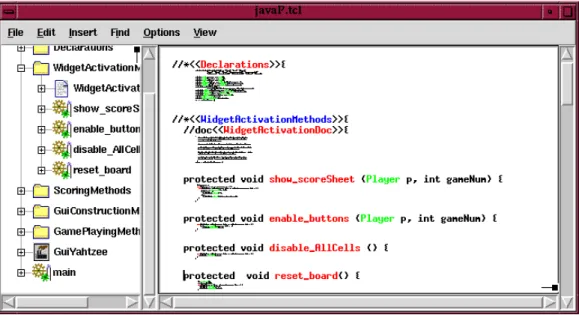
Figure 2.1: TheJabaLP editing environment. The left window displays a tree view of the literate program (in woven scope). The right pane demonstrates chunk holophrasting.
Most tools support, to varying degrees, navigation through hyperlinked chunks. Thus, a chunk’s definition and implementation are cross-referenced. Brown and Childs [11] WEB Interactive Environment cross-referenced and therefore hyperlinked identifier definitions and uses. The degree of navigation allowed is commonly dependant on the IDE’s support for the programming language.
Many tools also present a separate hierarchical view of the literate pro-gram, often as a tree-based representation of the tangle order of the docu-ment. The text-based view displays the literate program, and therefore, the psychological ordering of chunks.
Other attempts at IDE development are truly exploratory, such as that of Gurari and Wu [32], who utilised pre-determined fonts to determine a chunk’s type. This technique could be used to develop a comment-style chunk by simply marking up the chunk with a non-conforming font type, such that it is not processed in either the tangle or weave operations.
en-vironments for Noweb, Nuweb, and the WEB family facilitate literate pro-gramming. Thenoweb-outline.el package generates outlined, hierarchical views of the tangle order of a literate program, for example.
LyX [2], the LATEX word processor (since release 1.04) supports
Noweb-based literate programming10 .
A significant and relatively successful contribution to LP IDEs is Leo, which remains under active development (version 3.2 released in August 2002).
2.7 Leo
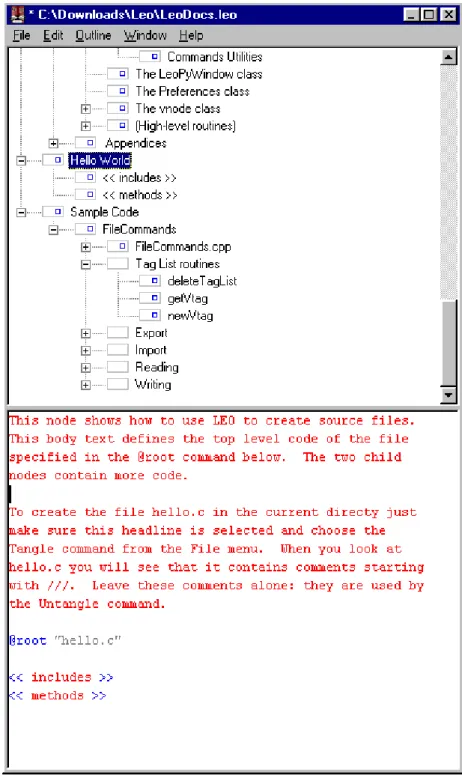
Leo [72] is a GUI-based LP tool. It supports Noweb and CWEB literate programs. Literate programs are presented as trees of nodes. These nodes form what is aptly called an outline of the literate program. Each node in an outline displays either a chunk’s name, or the name attributed to the outline node. The hierarchical view offered by an outline helps to establish an overview of a literate program. Each outline node is edited and viewed in the separate text editor as illustrated in Figure 2.2 on the next page.
Aside from developing new nodes, outlines may also be composed by copy-ing and cloncopy-ing nodes. Copycopy-ing an outline node permits the author to edit the copied node without affecting the original node’s content. Conversely, a cloned outline node’s edits affect all other clones.
The concept of cloning is unique to Leo, and allows multiple views of a literate program to be composed. Given that a clone’s edits affect all other clones, literate programs may suffer the penalties of decontextualised edits (see Section 6.3.4).
Leo decouples the hierarchical representation of a literate program from the nested hierarchy of chunks. Thus, a chunk <<a>> may reference chunk <<b>>, but may contain outline nodec as its immediate child in the outline. Nodes may be moved about (up, down, left, right) the outline tree as necessary. Nodes are viewed and edited as separate entities of a literate program.
Figure 2.2: The Leo LP editing environment. The upper window displays the outline view. The lower pane displays the content of an outline node.
Leo’s interface, in which nodes may only be edited individually, eliminates temporal, “chatty” writing, and helps maintain the mapping between docu-mentation and code chunks — both chunk types are forced to represent the same unit of abstraction. The lack of an overall low-level view of the literate program, however, makes the scope of program, and indeed, documentation artefacts difficult to ascertain (unless of course the entire literate document is published). For example, variable i in a code chunk is presented in an outline node. It is not immediately obvious what the scope of this variable is.
Leo insists that code chunks be defined within the scope of the chunk that they are referenced in. This means that a chunk’s implementation may not appear anywhere throughout the literate document/outline, which is a requirement of literate programming (see Section 1.2.3). Although a chunk may be cloned and included elsewhere in the literate program, the method of development puts an emphasis on the traditional development of the tangled structure and not literate program development.
2.8 Spider
Spider [69, 65] was written by Norman Ramsey (also the author of Noweb). Given a language description, Spider creates instances of a tangle program and a weave program. These program instances are then able to specifically tangle and weave any literate documents composed with any programming language.
Spider is an awk program that uses Silvio Levy’s WEB for C, (CWEB), with the C interpreter removed and replaced by Spider. This approach to LP, however, did not allow the creation of multi-language literate programs due to restrictions inherited from the WEB family. Although potentially any language is supported using Spider, arbitrary language support is not possible; the language must be predefined.
Production on Spider has been frozen and Ramsey has since developed the more successful Noweb.
2.9 Documentation Tools
In-source documentation tools allow the embedding and extracting of docu-mentation or comments within the source code. The tools presented in this section are not considered literate because they do not satisfy the require-ments laid out in Chapter 1, Section 1.2.1. Namely, they either do not have granularity of expression, or they do not possess the ability to psychologically order code for the reader’s benefit (multiple orders of exposition).
The tools covered in this section generate static documentation. The document development process must be rerun in order to maintain current documentation. Literate programs undergo tangling and weaving upon com-pilation, thus ensuring the continual update of documentation and source code.
This section is not a taxonomy of existing documentation tools, however we have selected three tools of particular interest. We highlight their features and functionality in order to contrast them with the literate programming tools covered in Sections 2.1 — 2.5.
2.9.1 Javadoc
Javadoc was influenced by Knuth’s work on WEB [27]. As the name sug-gests, it is a Java documentation utility. It uses comments embedded in the program source code and knowledge of the Java programming language to generate HTML pages that describe the class structure of a Java program.
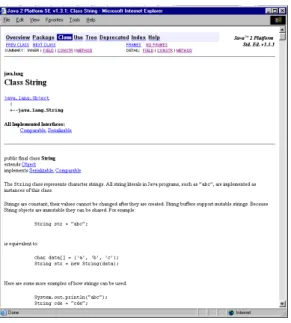
The output of Javadoc is a set of highly interlinked web pages, whereby the reader may dynamically explore the inheritance structure of a class, its methods — overridden and overloaded, and a method’s parameters and re-turn values.
Javadoc provides an effective mapping to Unified Modelling Language (UML) class diagrams. Using HTML hyperlinks, it is possible to traverse the class structure of a given program or set of classes. The consistent layout and formatting of a Javadoc document adds to this mapping.
Javadoc generates its documentation by looking for predefined tags em-bedded in comments. Documentation tags include:
Figure 2.3: Javadocformatted API documentation of thejava.lang.String (Java 1.3) class.
• @see: adds a hyperlinked “See Also” entry to the class
• @param: parameter definitions
• @exception: descriptions for exceptions
• @return: methods return value
• @author: the author of the document
• @version: the document version
Javadoc, for all its power of expression, is a lightweight documentation system. It is simple to use and encourages a structured approach towards documentation. Combined with a styleguide [53], documentation consistency can be readily achieved. The styleguide also suggests a specific order of tag layout.
Javadoc is aimed at providing API (application programming interface) specification documentation. Specific documentation techniques are encour-aged11.
One differentiating feature of Javadoc is the use of inheritance of doc-umentation artefacts. A subclass inherits superclass docdoc-umentation if sub-class documentation does not exist. Documentation is also transferred to overloaded methods, or to classes that implement a method in an interface. That is, documentation used for a method m() is also used for the method m()’, wherem()’ overloads m().
Documentation comments are only recognised when placed immediately before class, interface, constructor, method, or field declarations. The scope of documentation is therefore fixed; the ability to document method-level
statements is unavailable. Although limiting, this approach does add to the limited scope
uniformity of documentation, and avoids the problems of defining rules for method-level programming abstractions of documentation. It is difficult to generate consistent rules for method-level documentation, which in turn cre-ates difficulties in the layout and presentation of the JavadocHTML output.
As noted by Cockburn [19],
Javadocis a post-hoc documentation strategy that requires that the class has been developed into a syntactically correct (and presumably complete) class specification.
This contrasts with LP, which promotes a pre-emptive documentation ap-proach. Moreover, literate documents may be generated with syntactically incorrect code chunks.
Java Doclet Technology
The Java Doclet documentation technology allows programs that “specify the content and format of the output of theJavadoc tool” [52] to be written in Java. The programmer is able to customise the output of Javadoc. Using Java code and an API toJavadoc, the programmer may create custom