Column Technologies, Inc.
ITSM Academy
CMDB Session Report
for the
State of Oregon
August 31, 2007
Table of Contents
Table of Contents...2
Document Revisions ...2
Executive Overview...3
Summary Recommendations...4
Session Agenda, August 20 - 22 ...7
Session Summary Notes...10
Day 1 (8/20/2007) ...10
Day 2 (8/21/2007) ...14
Day 3 (8/22/2007) ...17
Working Common Data Model definition exercise, CI Dependency Diagram ...20
ITIL / ITSM Application Readiness...21
Recommended Program...22
General Program Recommendation ...22
Foundation Data Workshop Project ...23
ITSM 7 Pilot Project ...24
“Enterprise” Scope ITSM Requirements Analysis ...26
Document Revisions
Version Date Author Revision1.0 8/25/2005 Avi Maltzman Original Document Materials 1.1 8/27/2007 John Riegel Analysis and Format
1.2 8/28/2007 Rob Tucker Content Validation 1.3 8/30/2007 CTI Team Column Team Review
Executive Overview
On August 20, 21, and 22 Column Technologies Inc. (Column) consultants facilitated three days of sessions with ITSM Academy members. Participants included representatives from multiple Departments and Agencies in Salem.
The purpose of the sessions was for analysis of requirements sufficient to recommend a path for deploying the BMC Remedy ITSM 7 applications for the State of Oregon. It is recognized that a successful program can have significant impact on State technology operations spanning
multiple organizations.
Please refer to the ITSM Academy web site for information on objectives and participants:
http://www.oregon.gov/DAS/EISPD/ITSM/index.shtml.
This report is the deliverable from the three days of sessions, conducted under PO-051507AO against RFP 102-7525-5 and Price Agreement 5266-PA. This is the first substantive work resulting from the RFP and Price Agreement. The report scope is to provide professional recommendations for implementation of the BMC ITSM 7 applications including Incident, Problem, Change, Asset, and Service management.
The primary recommendation for implementation is to establish a program sponsoring multiple projects. These are identified below. Two initial projects are detailed – a Foundation Data Workshop, and a CMDB/Change management pilot. Two additional projects are suggested within three months.
Summary Recommendations
The following recommendations summarize Column’s professional opinion to the State of Oregon’s ITSM Academy to move forward towards implementation of the goals established in the Academy’s charter. Supporting information for these recommendations follows, with details at the end of this document.
• Manage a set of parallel projects under a 2 year program. The purpose of the program is to divide efforts into manageable work which can be successfully implemented.
Managing timelines for required projects, and removing politics from tactical progress are recommended objectives.
• Initiate a Foundation Data Workshop project. Significant operational advantages of the BMC ITSM 7 suite require clean, consistent data inputs to enable automation and enrich dashboards with powerful analytics. Foundation data requirements include people, organizational hierarchies, locations, product categories, and operational categories.
• Deploy a Remedy ITSM 7 pilot project including the Atrium Configuration Management Data Base (CMDB) supported either by the Asset OR Change Management application (there are considerations for either choice). The objective of a pilot project is to prove the concepts promoted by the ITSM academy. Pilot objectives are simple and easily obtained. It is suggested that the scope of the pilot be limited to the DAS shared-service data center. A primary benefit of the proof of concept will be real-world experience with the ITSM suite. Optionally include topology discovery in the pilot project.
• Initiate analysis work for the “Enterprise”. Scope ITSM 7 deployment envisioned by the ITSM Academy three months after initiation of the Foundation Data Workshop and Pilot recommended above.
• Contract consulting services for one-time non-repetitive tasks, and for tasks where risk from politics of organizational change is high. Scope for projects should be adequate for desired results.
Best Practices Recommendations
Column Technologies’ consulting and implementation recommendations are based on ITIL methodologies and industry best practices. Figures below demonstrate our approach to an
Enterprise-wide ITSM implementation process (Fig. 1), and process integration between Incident Management, Problem Management, Configuration Management processes and Disaster
Recovery (Business Continuity Management).
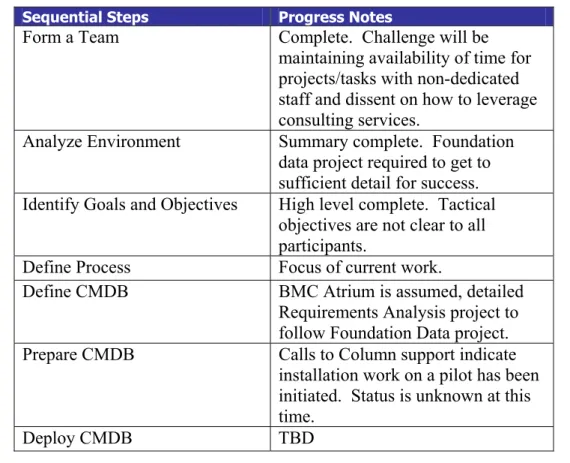
Figure 1 demonstrates that sequential, iterative goals must be followed to build a successful CMDB. Progress to date on the project has not been sequential.
Sequential Steps Progress Notes
Form a Team Complete. Challenge will be maintaining availability of time for projects/tasks with non-dedicated staff and dissent on how to leverage consulting services.
Analyze Environment Summary complete. Foundation data project required to get to sufficient detail for success. Identify Goals and Objectives High level complete. Tactical
objectives are not clear to all participants.
Define Process Focus of current work.
Define CMDB BMC Atrium is assumed, detailed Requirements Analysis project to follow Foundation Data project. Prepare CMDB Calls to Column support indicate
installation work on a pilot has been initiated. Status is unknown at this time.
Deploy CMDB TBD
The relationships between supporting ITIL disciplines indicated in Figure 2 above could not be sufficiently analyzed in the session length scheduled by the State of Oregon. Column suggests that Academy participants self-evaluate these relationships within their individual organizations. With deployment of ITIL best-practices, these relationships will significantly change together with staff roles and responsibilities.
With regards to the CMDB component of ITIL, which was the exclusive focus for the sessions, Column presents the following best-practice recommendations to the ITSM Academy:
CMDB Best Practices recommendations for the ITSM Academy Plan for a multi-phase implementation program.
Inform stake holders with open, timely communications of risks issues, and expectations.
Plan ahead in detail on a rolling 30/60/90 day basis. Leverage experience of others to ask and answer right questions.
Each project phase must have defined requirements, scope and phasing. Promote processes aligned with business needs with supportable facts. Begin with Configuration Items which are under formal Change Management.
Carefully document and validate data reconciliation strategy from all inputs.
Session Agenda, August 20 - 22
Topic Length Outcome
1 Welcome
• Session Overview & Agenda
• Review Pre-work
Monday August 20, 2007
8:30am to 9:30 am
• Manage scope and expectations. 2 Configuration Management
Review of the Remedy Atrium CMBD Common Data Model (CDM)
Monday August 20, 2007
9:45am to Noon
• Define Business Objectives and Scope
• Walk through the different classes of configuration items in the Remedy Atrium CMDB 2.0 Common Data Model (CDM)
• This will form the basis for what classes will be populated in the CDM and the relationships that are possible between the different CI’s
3 Configuration Item Class and Attribute Identification
Monday August 20, 2007
1:30pm to 3:30pm
• Identification of CDM classes that will be tracked in the CMDB
• Identification of the attributes for the identified CDM classes
4 Data Sources Monday August 20, 2007
3:45pm to 4:30pm
• Define Data Sources (Discoverable, Not Discoverable and Manual)
• Identify and define content,
dynamics, and state of Data Sources 5 Data Sources (Continued) Tuesday August 21,
2007
8:30am to 10:30am
• Review Data Sources
• Initial Source to Configuration Item Class mapping
• Initial Source to Configuration Item attribute mapping
6 Configuration Item Life cycle Tuesday August 21, 2007
10:45am to Noon
The Lifecycle (Status) of a Configuration Item. How does a CI get registered into the CMDB For example: • Ordered • Received • Assembled • Deployed • In Repair • Down • End of Life
7 Configuration Item Associated
Contracts and Schedules Tuesday August 21, 2007
1:30pm to 3:30pm
Identify Support, Warranty, software contracts associated with CI’s Identify Maintenance and Audit Schedules associated with CI’s 8 Review of Foundation Data
Structures Tuesday August 21, 2007
Topic Length Outcome
3:45pm to 4:30pm 9 Defining Companies/Agency’s or
Bureaus
• Working with “Companies (Agency’s or Bureaus)
• Roles & Security Access
• Workflow • Navigation Tiers Wednesday August 22, 2007 8:30am to 9:30am Identification of:
• Company Names (Agency’s or Bureaus)
• Company Types
• Navigation Tiers
• Overall access within or between Companies (Agency’s or Bureaus).
• Workflow consideration within or between companies. (Single vs Multi-Tenancy)
10 Defining Organizations & Physical Locations
• Working with “Company (Agency or Bureau)” fields
• Reporting needs, automated assignment routing and service level management mapping requirements. Wednesday August 22, 2007 9:45am to 10:45am Identification of: • Organizational structure
• Physical Location attributes
11 Defining Support Groups
• Working with “Support groups” for assignment
• Support Staff associated with Support Group
• Virtual support groups
Wednesday August 22, 2007
11am to Noon
Identification of:
• Agencies’ IT Support Structure and high level procedures or functions
12 Defining Service & Product Categorizations • Working with “Categorizations” • Tier 1, 2 & 3 Wednesday August 22, 2007 1:30pm to 3:30pm Identification of:
• Service & Product Tiers 13 Defining People
• customers (internal or external) and support staff (internal or external)
• “Company (Agency or Bureaus)” and Location attributes for contact profile
• Permission Groups and Functional Roles
• Individual access to data
• People associated to CIs and Support Groups. • Approval mappings Wednesday August 22, 2007 3:45pm to 4:45pm Identification of:
• Customer contact info
• Vendor contact info
• IT Staff roles within Agency or Bureau support organization
Session “Homework” Assignments
The following assignments were completed by all participants, with results collected by Academy staff. Details have not bee provided to Column.
1. Review the Atrium CMDB Common Data model diagram classes and attributes. 2. Review current configuration item (Asset) life cycles in your organization.
3. Review current support, warranty and software license contracts in your organization. 4. Complete “Agency location/organization” assignment sheet.
Column recommends that session homework assignments be validated, consolidated and posted for periodic review and evaluation of progress every six months.
An additional measurement exercise would be for each organization to self-evaluate ITIL maturity (from 0 to 5), both in terms of current state, and six a rolling six-month goal.
Session Duration Focuses Results
The duration for the engagement was the subject for significant negotiation, with sessions originally planned for June, 2007. The August sessions were significantly shorter in duration that recommended by Column to the State of Oregon. The level of information gathered in the sessions validates that additional analysis is required prior to formulating a complete program. By limiting duration, and thus limiting the level of detail which Column can return in this report, the Academy focuses the results on the projects summarized in introduction and outlined in this report’s conclusion.
Session Summary Notes
Following are general session notes which are significant. Other session notes may be found in the following analysis sections.
Day 1 (8/20/2007)
State of Oregon Agencies representatives: DHS SDC DEQ DAS ODOT Forestry Revenues
Each Agency has its own Change Management board. Each Agency has its own Remedy administrator.
Impact Analysis is been practiced between agencies and SDC. There is no one central repository for Foundation Data.
Purpose of Configuration Management: Facilitate better business decisions
Enable advanced planning Provide Accountability
Asset Management Objective: Tracking of tagged assets Manage assets Life Cycle Procurement – Disposal Location / Status tracking End of Life / Salvage value Tracking TCO
Acquisition Compliance with IT policies License and software compliance management Linking assets to owners
CI -> Customer Incidents Auto discovery
Real Time / Near Real Time reporting
Multi level permission model for CMDB access Segregation of CI’s by agencies
Topology / Configuration and relations between CI’s and Impact Total Impact Analysis. Technical and Business.
Objects currently tracked in Asset Management (Under Change Management Process)
Draft CI Structure Main CI Classes: PC’s Telco Mainframe Servers Applications Processes PC Classes
Personal Computer (Desktop) PC (Laptop / Notebook) Tablet PC Thin Client Mobile Devices Cell phones Blackberries Network Routers Gateways Switches Access Points Mainframe Controllers Tape Storage Disk Storage Midrange Servers File Print Web Database Firewall Email Application Printers / Plotters SAN Telecom Network Appliances Imaging Applications Web Database Server Agency Developed
COTS GOTS MOTS App. Licenses TS/CITRIX Apps Security Communications Management Financial Contracts Warranties Leases Facilities UPS Generators HVAC Racks
Data Sources identified in Sessions Access DB
Excel Spreadsheet
Remedy Asset Line (Helpdesk) FAS (Filename and Acct. System) PPDB
Security DB’s
Reports for Computers (SQL) NetScout
ZenWorks Auto Inventory SMS
Supplier Data Manual Entry
Other Remedy Applications Exchange
GroupWise State Mail HUB
Various Monitoring Tools DS Meter
DS Razor LDAP AD/NDS Tivoli / IDM
Day 2 (8/21/2007)
Agenda for the day
1. Mapping Exercise
2. Agree on Initial CI’s to be tracked for Pilot, based on Available data sources. 3. Initial CI attributes
4. How do we get and maintain the data? 5. Asset Life cycles
6. Asset Details – Warranty, Contracts, etc. 7. Main., Schedules, Audits, etc.
Initial CI Draft
Exchange Profile User Account Work Station
Info for Exchange Svr. Domain File Firewall RFC Developer New_PC DEV_OS_PC DEV_MSWord_PC DEV_Email_PC Network Switch Network Router Router_OS Email Firewall Firewall_OS ARServer ARSvrApp ARUserProd BMC_HelpDesk BMC_DBApp ARServerOS Process Firewall Staging AMD Server_File e-Dir Server_SW e-Dir Server_HW Console Chng Prev Accidents Create Ch Request Remedy AR System SW Remedy AR System DB Staging Process Staging Doc SD AMD Group e-Dir Account GW Account Remedy Acct SDPC GW Client GW Server SW GW Server HW Printer Print Svr. HW Print Svr. SW Manual Sort Ms Access AMD DB File System Svc. Remedy User Remedy Server HW
Tasks
SDC – Managed CI’s Phase 1 – Network Services Phase 2 – Mainframe
Phase 3 – Distributes Servers SCD – Providers
Phase 1 – Remedy (Asset Lite), Excel (Supplemental) Phase 2 – Vendor Data, Excel
Phase 3 – Vendor, Excel, Physical, Inv., Shared Srvs.Move, Server Agents Agencies – All Agencies physical Inventory
Phase 1 – Work Stations. Servers Not Managed by SDC Phase 2 – Network Printers
Phase 3 – Discovered Software and License Recovery Agencies – Providers
Phase 1 –
DHS (Vendor Data), Logon script, BAtchfile, ZenWorks Forestry – Vendors Data, SMS
DEQ – Asset Database, SMS, Vendor Data DAS – ScriptLogic, AD
ODOT – SMS, Remedy, Asset, Quarterly Phys. Inventory Revenue – ZenWorks
Phase 2 –
DHS – Vendor Data, TBD Discovery tool Forestry – Vendor Data, Physical, Inventory DEQ – Asset DB (Oracle)
DAS – ScriptLogic ODOT – Remedy User Revenue – Vendor Data Phase 3 –
DHS – ZenWorks, Remedy, Manual Entry of Licenses Used Forestry – Excel, SMS
DEQ – SMS, ScriptLogic PAS – ScriptLogic
ODOT – SMS, Remedy Asset Mngmt. Revenue – ZenWorks
Operational Asset Life Cycle States Requisition Acquisition Received Configuration Deploy Maintain Retrieve Dispose
Day 3 (8/22/2007)
Foundation Data Operational Hierarchy DHS Division Office Sector / Unit Team SDC Domain Unit DAS Division Sector ODOT Division Section District Revenue Division Section Unit DEQ Region Division Program Forestry Division Section Unit
Foundation Data Location Hierarchy DAS City Street Address SDC City Street Address DEQ Headquarters Region ODOT Street City Zip Region District Other (BLdg $ Flr. Svc. Group) DHS County Site (Address) Forestry H.Q. Area District Revenue Building Field
Foundation Data Support Group Hierarchy DHS
Section CSS
Team (Back Office) Role ( External Admin) SDC Service Desk Domain Units Tier 2 Tier 3 DAS Help Desk Tech Support Front Office Back Office Forestry Help Desk Tech Support Sys Admin Field Coordinator DEQ Headquarters Region Revenue Billing Field Office
Foundation Data Categories and actions required.
Company (Agencies, Vendors, Customers, Partners, etc.) Organization – Discuss and Normalize structure
Location – Collect Data
Support Groups – Collect Data
People (Where we are getting our data) – (Use Home Address as Secondary Address)
Product Categorizations – Determine Tier 1 (Should be Global) Operational Categorizations
Possible Operational Categories (Example) Unable to Logon
PW Reset
Cannot Use email Install Software No Internet Received Spam
Operational Categorization Example
Do What To What Install Create Repair Add Validate Relocate Remove Suspend Training / Inquiry Account Hardware Connectivity Software Desktop Email SAN Network Requestor System Peripheral Application Process
Across all classes of foundation data, issues were identified and discussed. To leverage any ITIL or ITSM process in a systematic way across organizations mandates a project to rationalize foundation data into a consistent, cohesive, and effective structure.
ITIL / ITSM Application Readiness
This section of the report summarizes application readiness for primary ITIL disciplines supported by the BMC ITSM suite. The State’s agenda and limited time did not support full analysis; limitations in this section validate the recommendation for the Enterprise Scope Analysis project.Incident Management
The majority of participating organizations deployed Remedy Help Desk applications around 2000, with a range of ARS and Application versions in production today. The scope of the sessions did not focus on analysis of details of Incident Management so evaluation is limited. General observations indicate that the level of effort to maintain and upgrade multiple parallel systems to be inefficient. The scale of operations is reasonable for consolidation or a shared system. Use of Knowledge Management could facilitate operational efficiency.
Problem Management
Problem management processes are not well supported by current tools. Processes are effective in the major organizations, although not measurable. Problem management efforts should be formalized and leveraged across organizations.
Asset Management
A significant effort was made about seven years ago to improve IT Asset Management by legislative mandate. The results are generally healthy operations within organizations. An
economy of scale exists for significant savings in federating or consolidating data into a common, shared CMDB.
Change Management
Change management processes vary between organizations. Although Remedy Change tools may be available, manual processes are dominant. The lack of a Configuration Management tool to validate compliance limits effectiveness (see below). This application is recommended as the pilot process to leverage a CMDB.
Service Level Management
Insufficient details were available to assess maturity or make recommendations. Service Request Management
Insufficient details were available to assess maturity or make recommendations. Configuration Management
Major departments have deployed common configuration management agents to workstations, and in some cases to servers. No agency revealed a successful network topology discovery toolset. Both management agents and network scanning technology are appropriate tools to populate a CMDB with accurate data, and monitor the process of change on a network over time.