Sybase
®
IQ
Copyright © 1991-2004 by Sybase, Inc. All rights reserved.
This publication pertains to Sybase software and to any subsequent release until otherwise indicated in new editions or technical notes. Information in this document is subject to change without notice. The software described herein is furnished under a license agreement, and it may be used or copied only in accordance with the terms of that agreement.
To order additional documents, U.S. and Canadian customers should call Customer Fulfillment at (800) 685-8225, fax (617) 229-9845. Customers in other countries with a U.S. license agreement may contact Customer Fulfillment via the above fax number. All other international customers should contact their Sybase subsidiary or local distributor. Upgrades are provided only at regularly scheduled software release dates. No part of this publication may be reproduced, transmitted, or translated in any form or by any means, electronic, mechanical, manual, optical, or otherwise, without the prior written permission of Sybase, Inc.
Sybase, the Sybase logo, ADA Workbench, Adaptable Windowing Environment, Adaptive Component Architecture, Adaptive Server, Adaptive Server Anywhere, Adaptive Server Enterprise, Adaptive Server Enterprise Monitor, Adaptive Server Enterprise Replication, Adaptive Server Everywhere, Adaptive Warehouse, Afaria, Answers Anywhere, Anywhere Studio, Application Manager, AppModeler, APT Workbench, APT-Build, APT-Edit, APT-Execute, APT-Translator, APT-Library, AvantGo Mobile Delivery, AvantGo Mobile Inspection, AvantGo Mobile Marketing Channel, AvantGo Mobile Pharma, AvantGo Mobile Sales, AvantGo Pylon, AvantGo Pylon Application Server, AvantGo Pylon Conduit, AvantGo Pylon PIM Server, AvantGo Pylon Pro, Backup Server, BizTracker, ClearConnect, Client-Library, Client Services, Convoy/DM, Copernicus, Data Pipeline, Data Workbench, DataArchitect, Database Analyzer, DataExpress, DataServer, DataWindow, DataWindow .NET, DB-Library, dbQueue, Developers Workbench, Direct Connect Anywhere, DirectConnect, Distribution Director, e-ADK, E-Anywhere, e-Biz Impact, e-Biz Integrator, E-Whatever, EC Gateway, ECMAP, ECRTP, eFulfillment Accelerator, Embedded SQL, EMS, Enterprise Application Studio, Enterprise Client/Server, Enterprise Connect, Enterprise Data Studio, Enterprise Manager, Enterprise SQL Server Manager, Enterprise Work Architecture, Enterprise Work Designer, Enterprise Work Modeler, eProcurement Accelerator, EWA, Financial Fusion, Financial Fusion Server, Gateway Manager, GlobalFIX, iAnywhere, iAnywhere Solutions, ImpactNow, Industry Warehouse Studio, InfoMaker, Information Anywhere, Information Everywhere, InformationConnect, InternetBuilder, iScript, Jaguar CTS, jConnect for JDBC, M2M Anywhere, Mail Anywhere Studio, MainframeConnect, Maintenance Express, Manage Anywhere Studio, M-Business Channel, M-Business Network, M-Business Server, MDI Access Server, MDI Database Gateway, media.splash, MetaWorks, mFolio, Mirror Activator, My AvantGo, My AvantGo Media Channel, My AvantGo Mobile Marketing, MySupport, Net-Gateway, Net-Library, New Era of Networks, ObjectConnect, ObjectCycle, OmniConnect, OmniSQL Access Module, OmniSQL Toolkit, Open Biz, Open Client, Open ClientConnect, Open Client/Server, Open Client/Server Interfaces, Open Gateway, Open Server, Open ServerConnect, Open Solutions, Optima++, Orchestration Studio, PB-Gen, PC APT Execute, PC DB-Net, PC Net Library, PocketBuilder, Pocket PowerBuilder, Power++, power.stop, PowerAMC, PowerBuilder, PowerBuilder Foundation Class Library, PowerDesigner, PowerDimensions, PowerDynamo, PowerScript, PowerSite, PowerSocket, Powersoft, PowerStage, PowerStudio, PowerTips, Powersoft Portfolio, Powersoft Professional, PowerWare Desktop, PowerWare Enterprise, ProcessAnalyst, QAnywhere, Rapport, RemoteWare, RepConnector, Replication Agent, Replication Driver, Replication Server, Replication Server Manager, Replication Toolkit, Report-Execute, Report Workbench, Resource Manager, RFID Anywhere, RW-DisplayLib, RW-Library, S-Designor, SDF, Secure SQL Server, Secure SQL Toolset, Security Guardian, SKILS, smart.partners, smart.parts, smart.script, SQL Advantage, SQL Anywhere, SQL Anywhere Studio, SQL Code Checker, SQL Debug, SQL Edit, SQL Edit/TPU, SQL Everywhere, SQL Modeler, SQL Remote, SQL Server, SQL Server Manager, SQL SMART, SQL Toolset, SQL Server/ CFT, SQL Server/DBM, SQL Server SNMP SubAgent, SQL Station, SQLJ, STEP, SupportNow, S.W.I.F.T. Message Format Libraries, Sybase Central, Sybase Client/Server Interfaces, Sybase Financial Server, Sybase Gateways, Sybase IQ, Sybase MPP, Sybase SQL Desktop, Sybase SQL Lifecycle, Sybase SQL Workgroup, Sybase User Workbench, SybaseWare, Syber Financial, SyberAssist, SybFlex, SyBooks, System 10, System 11, System XI (logo), SystemTools, Tabular Data Stream, TradeForce, Transact-SQL, Translation Toolkit, UltraLite, UltraLite.NET, UNIBOM, Unilib, Uninull, Unisep, Unistring, URK Runtime Kit for UniCode, VisualWriter, VQL, WarehouseArchitect, Warehouse Control Center, Warehouse Studio, Warehouse WORKS, Watcom, Watcom SQL, Watcom SQL Server, Web Deployment Kit, Web.PB, Web.SQL, WebSights, WebViewer, WorkGroup SQL Server, XA-Library, XA-Server, XcelleNet, and XP Server are trademarks of Sybase, Inc. 10/04
Unicode and the Unicode Logo are registered trademarks of Unicode, Inc.
All other company and product names used herein may be trademarks or registered trademarks of their respective companies.
Use, duplication, or disclosure by the government is subject to the restrictions set forth in subparagraph (c)(1)(ii) of DFARS 52.227-7013 for the DOD and as set forth in FAR 52.227-19(a)-(d) for civilian agencies.
About This Book ... v
CHAPTER 1 Running the Database Server ... 1
Starting the database server ... 1
Stopping the database server ... 29
The Stop utility (dbstop) ... 30
The stop_asiq utility (UNIX only) ... 31
Troubleshooting the database server... 33
CHAPTER 2 Using Interactive SQL (dbisql)... 35
Introduction to dbisql ... 35
dbisql and dbisqlc... 35
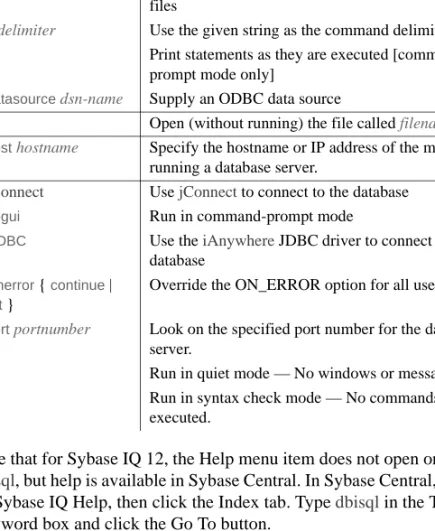
The Interactive SQL (dbisql) utility ... 36
Opening Interactive SQL using the dbisql command-line utility 37 Starting dbisql ... 41
Supplying connection parameters ... 43
Main dbisql window description... 46
Opening multiple windows ... 47
Keyboard shortcuts ... 47
Using the Interactive SQL toolbar ... 49
Using Interactive SQL to display data ... 50
Working with commands in Interactive SQL... 51
Combining multiple statements ... 52
Looking up tables, columns, and procedures ... 52
Recalling commands ... 53
Saving, loading, and running command files... 54
Logging commands ... 54
Canceling an Interactive SQL command ... 55
Configuring Interactive SQL ... 56
Options dialog: General tab... 57
Options dialog: Results tab ... 58
Options dialog: Import/Export tab ... 59
Options dialog: Editor tab ... 61
Leaving dbisql ... 65
The Interactive SQL Classic (dbisqlc) utility ... 65
Starting dbisqlc... 68
The dbisqlc command window ... 69
dbisqlc Command window on UNIX ... 69
dbisqlc Command window on Windows ... 74
CHAPTER 3 Database Administration Utilities ... 81
Administration utilities overview ... 81
The CP874toUTF8 utility ... 82
The Collation utility (dbcollat) ... 83
The Data Source utility (iqdsn) ... 87
The Information utility (dbinfo)... 91
The Log Translation utility (dbtran) ... 92
Translating a transaction log using the Translate Log File wizard 92 Translating a transaction log using the dbtran command-line utility 93 The Ping utility (dbping) ... 98
The Server Location utility (dblocate)... 100
The Transaction Log utility (dblog) ... 101
The Validation utility (dbvalid) ... 104
CHAPTER 4 The SQL Preprocessor ... 109
Introduction to the SQL preprocessor ... 109
Running the SQL preprocessor (sqlpp)... 109
Sybase® IQ is a high-performance decision support server designed specifically for data warehouses and data marts. This book, Sybase IQ Utility Guide, provides reference material for the utility programs used with Sybase IQ. Utility programs are commands that you invoke directly from the operating system. Other manuals provide more context on how to carry out particular tasks. This reference manual is the place to look for information such as available syntax, parameters, and options.
Audience This manual is a reference for all users of Sybase IQ.
How to use this book This book provides comprehensive descriptions of the Sybase IQ utility programs. However, it does not describe when and why you may want to use each utility. This manual is designed to be used as a reference together with the other books in the Sybase IQ documentation set.
The following table shows which chapters fit a particular interest or need. Table 1: Guide to using this book
Note The Windows information in this book applies to all supported Windows platforms, unless noted otherwise. For supported Windows platforms, see the Release Bulletin Sybase IQ for Windows.
Related documents Documentation for Sybase IQ: • Introduction to Sybase IQ
Read and try the hands-on exercises if you are unfamiliar with Sybase IQ, with the Sybase Central™ database management tool.
• New Features in Sybase IQ 12.6
To learn how to... Refer to...
Stop and start the database server Chapter 1, “Running the Database Server”
Use Interactive SQL (dbisql) Chapter 2, “Using Interactive SQL (dbisql)”
Run the database administration utilities Chapter 3, “Database Administration Utilities”
Read just before or after purchasing Sybase IQ for a list of new features. • Sybase IQ Performance and Tuning Guide
Read to understand query optimization, design, and tuning issues for very large databases.
• Sybase IQ Reference Manual
Read for a full description of the SQL language, stored procedures, data types, and system tables supported by Sybase IQ.
• Sybase IQ System Administration Guide Read to manage the IQ Store.
• Sybase IQ Troubleshooting and Error Messages Guide
Read to solve problems, perform system recovery and database repair, and understand both IQ error messages which are referenced by SQLCODE,
SQLSTATE, Sybase error code, and message text, and SQL preprocessor errors and warnings.
• Large Objects Management in Sybase IQ
Read to understand storage and retrieval of Binary Large Objects (BLOBs) and Character Large Objects (CLOBs) within the Sybase IQ data repository. You need a separate license to install this product option. • Sybase IQ Installation and Configuration Guide
Read the edition for your platform before and while installing Sybase IQ, when migrating to a new version of Sybase IQ, or when configuring Sybase IQ for a particular platform.
• Sybase IQ Release Bulletin
Read just before or after purchasing Sybase IQ for last minute changes to the product and documentation. Read for help if you encounter a problem.
Note Because Sybase IQ is an extension of Adaptive Server® Anywhere, a component of SQL Anywhere® Studio, IQ supports many of the same features as Adaptive Server Anywhere. The IQ documentation set refers you to SQL
Anywhere Studio documentation where appropriate. Documentation for Adaptive Server Anywhere: • Adaptive Server Anywhere Programming Guide
Intended for application developers writing programs that directly access the ODBC, Embedded SQL™, or Open Client™ interfaces, this book describes how to develop applications for Adaptive Server Anywhere. • Adaptive Server Anywhere Database Administration Guide
Intended for all users, this book covers material related to running, managing, and configuring databases and database servers. • Adaptive Server Anywhere Error Messages
This book lists all Adaptive Server Anywhere error messages with diagnostic information.
• Adaptive Server Anywhere SQL Reference Manual
Intended for all users, this book provides a complete reference for the SQL language used by Adaptive Server Anywhere. It also describes the Adaptive Server Anywhere system tables and procedures.
You can also refer to the Adaptive Server Anywhere documentation in the SQL Anywhere Studio 9.0.1 collection on the Sybase Product Manuals Web site. To access this site, go to Product Manuals at
http://www.sybase.com/support/manuals/. Other sources of
information Use the Sybase Getting Started CD, the SyBooks CD, and the Sybase Product Manuals Web site to learn more about your product: • The Getting Started CD contains release bulletins and installation guides
in PDF format, and may also contain other documents or updated information not included on the SyBooks CD. It is included with your software. To read or print documents on the Getting Started CD, you need Adobe Acrobat Reader, which you can download at no charge from the Adobe Web site using a link provided on the CD.
• The SyBooks CD contains product manuals and is included with your software. The Eclipse-based SyBooks browser allows you to access the manuals in an easy-to-use, HTML-based format.
Some documentation may be provided in PDF format, which you can access through the PDF directory on the SyBooks CD. To read or print the PDF files, you need Adobe Acrobat Reader.
Refer to the SyBooks Installation Guide on the Getting Started CD, or the README.txt file on the SyBooks CD for instructions on installing and starting SyBooks.
• The Sybase Product Manuals Web site is an online version of the SyBooks CD that you can access using a standard Web browser. In addition to product manuals, you will find links to EBFs/Maintenance, Technical Documents, Case Management, Solved Cases, newsgroups, and the Sybase Developer Network.
To access the Sybase Product Manuals Web site, go to Product Manuals at http://www.sybase.com/support/manuals/.
Sybase certifications
on the Web Technical documentation at the Sybase Web site is updated frequently. ❖ Finding the latest information on product certifications
1 Point your Web browser to Technical Documents at http://www.sybase.com/support/techdocs/.
2 Select Products from the navigation bar on the left. 3 Select a product name from the product list and click Go.
4 Select the Certification Report filter, specify a time frame, and click Go. 5 Click a Certification Report title to display the report.
❖ Creating a personalized view of the Sybase Web site (including support pages)
Set up a MySybase profile. MySybase is a free service that allows you to create a personalized view of Sybase Web pages.
1 Point your Web browser to Technical Documents at http://www.sybase.com/support/techdocs/.
2 Click MySybase and create a MySybase profile. Sybase EBFs and
software maintenance
❖ Finding the latest information on EBFs and software maintenance 1 Point your Web browser to the Sybase Support Page at
http://www.sybase.com/support.
2 Select EBFs/Maintenance. If prompted, enter your MySybase user name and password.
3 Select a product.
4 Specify a time frame and click Go. A list of EBF/Maintenance releases is displayed.
Padlock icons indicate that you do not have download authorization for certain EBF/Maintenance releases because you are not registered as a Technical Support Contact. If you have not registered, but have valid information provided by your Sybase representative or through your support contract, click Edit Roles to add the “Technical Support Contact” role to your MySybase profile.
5 Click the Info icon to display the EBF/Maintenance report, or click the product description to download the software.
Syntax conventions This documentation uses the following syntax conventions in syntax descriptions:
• Keywords SQL keywords are shown in UPPER CASE. However, SQL keywords are case insensitive, so you can enter keywords in any case you wish; SELECT is the same as Select which is the same as select. • Placeholders Items that must be replaced with appropriate identifiers
or expressions are shown in italics.
• Continuation Lines beginning with ... are a continuation of the statements from the previous line.
• Repeating items Lists of repeating items are shown with an element of the list followed by an ellipsis (three dots). One or more list elements are allowed. If more than one is specified, they must be separated by commas.
• Optional portions Optional portions of a statement are enclosed by square brackets. For example:
RELEASE SAVEPOINT [ savepoint-name ]
It indicates that the savepoint-name is optional. The square brackets should not be typed.
• Options When none or only one of a list of items must be chosen, the items are separated by vertical bars and the list enclosed in square brackets. For example:
[ ASC | DESC ]
It indicates that you can choose one of ASC, DESC, or neither. The square brackets should not be typed.
• Alternatives When precisely one of the options must be chosen, the alternatives are enclosed in curly braces. For example:
It indicates that exactly one of ON or OFF must be provided. The braces should not be typed.
Typographic
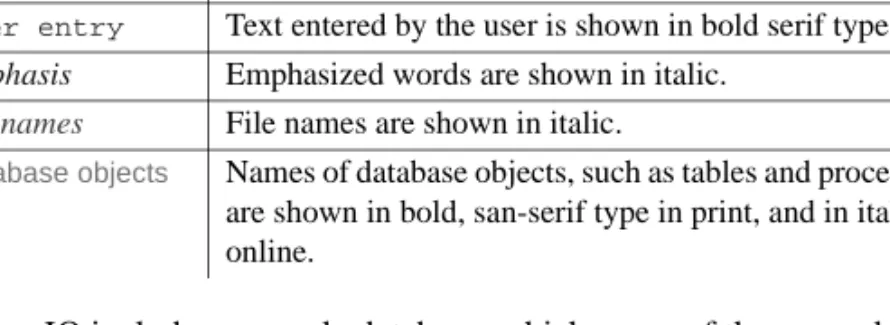
conventions Table 2 lists the typographic conventions used in this documentation. Table 2: Typographic conventions
The sample database
Sybase IQ includes a sample database, which many of the examples in the IQ documentation use.
The sample database represents a small company. It contains internal information about the company (employees, departments, and financial data), as well as product information (products), sales information (sales orders, customers, and contacts), and financial information (fin_code, fin_data). The sample database is held in a file named asiqdemo.db, located in the directory $ASDIR/demo on UNIX systems and %ASDIR%\demo on Windows systems.
Accessibility features
This document is available in an HTML version that is specialized for accessibility. You can navigate the HTML with an adaptive technology such as a screen reader, or view it with a screen enlarger.
Sybase IQ 12.6 and the HTML documentation have been tested for compliance with U.S. government Section 508 Accessibility requirements. Documents that comply with Section 508 generally also meet non-U.S. accessibility guidelines, such as the World Wide Web Consortium (W3C) guidelines for Web sites.
Item Description
Code SQL and program code is displayed in a mono-spaced (fixed-width) font.
User entry Text entered by the user is shown in bold serif type. emphasis Emphasized words are shown in italic.
file names File names are shown in italic.
database objects Names of database objects, such as tables and procedures, are shown in bold, san-serif type in print, and in italic online.
For information about accessibility support in the Sybase IQ plug-in for Sybase Central, see “Using accessibility features” in Introduction to Sybase IQ. The online help for this product, which you can navigate using a screen reader, also describes accessibility features, including Sybase Central keyboard shortcuts.
Note You might need to configure your accessibility tool for optimal use. Some screen readers pronounce text based on its case; for example, they pronounce ALL UPPERCASE TEXT as initials, and MixedCase Text as words. You might find it helpful to configure your tool to announce syntax conventions. Consult the documentation for your tool and see “Using screen readers” in Introduction to Sybase IQ.
For information about how Sybase supports accessibility, see Sybase Accessibility at http://www.sybase.com/accessibility. The Sybase Accessibility site includes links to information on Section 508 and W3C standards. For a Section 508 compliance statement for Sybase IQ, go to Sybase Accessibility at http://www.sybase.com/products/accessibility.
If you need help Each Sybase installation that has purchased a support contract has one or more designated people who are authorized to contact Sybase Technical Support. If you cannot resolve a problem using the manuals or online help, please have the designated person contact Sybase Technical Support or the Sybase subsidiary in your area.
About this chapter This chapter describes the utility programs used to start and stop the Sybase IQ database server and the available startup options. There are other ways to start and stop the database server in addition to these utility programs. For a complete discussion of methods to start and stop the database server, and when each method is appropriate to use, see Chapter 2, “Running Sybase IQ” in the Sybase IQ System Administration Guide.
Starting the database server
The database startup utility start_asiq starts a Sybase IQ network database server.
The UNIX versions of Sybase IQ provide the script start_asiq and the Windows version of IQ provides start_asiq.exe. These scripts verify that your environment is set correctly and start the server with all required switches preset to recommended defaults (along with any switches you add). start_asiq also includes some parameters and calculates others. For more information about switches specific to your operating system, see the Sybase IQ Installation and Configuration Guide.
Note The Start Database Server utility in Sybase Central provides an easy graphical interface for starting servers and is the recommended method for starting IQ multiplex servers. For details, see Chapter 2, “Running Sybase IQ” in the Sybase IQ System Administration Guide.
Syntax start_asiq-nserver-name
[ server-options ] [ database-file [ database-options ] ]
Parameters The following tables list the available switches for the start_asiq server-options and database-options parameters.
You can list the start_asiq options using the command
Server switches Table 1-1: start_asiq server-options
Option Description
@filename Read in options from configuration file @envvar Read in options from environment variable -c cache-size Set initial Catalog Store cache size. -ca 0 Disable dynamic Catalog Store cache sizing -ch size Set Catalog Store cache size upper limit -cl size Set the cache size lower limit
-ct { + | - } Enable/disable character set translation (enabled by default) -cw Enable use of Address Windowing Extensions on
Windows 2000, Windows XP, and Windows Server 2003 for setting the size of the database server cache.
-ec encryption-options
Enable packet encryption [network server].
-ek key-spec Starts an encrypted database, when key value is provided as an argument.
-ep (Windows) Displays a dialog box that prompts you for an encryption key to start an encrypted database. Provides extra security by never allowing the encryption key to be seen in clear text.
-ga Automatically unload database after last connection closed -gb level Set database process priority class to level [Windows] -gc num Set checkpoint timeout period to num minutes
-gd level Set the permission required to start and stop the database -ge size Sets the stack size for threads that run external functions
[Windows]
-gk level Set the permission required to stop the server -gl level Set the permission required to load data
-gm level Limit the number of connections to the server that can be active at one time. If this number is greater than the number that is allowed under licensing constraints, this option has no effect. The value should approximate the number of users expected to connect to the server. The default is 10 connections.
-gn integer Set the number of execution threads that will be used for the Catalog Store and connectivity while running with multiple users.
-gp size Set maximum page size to size bytes -gr num Set maximum recovery time to num minutes
-h or -? Display usage information; show a list of all options -iqgovern num Specify the number of concurrent queries
-iqlocalreplay { all | none | [ grants | procedures | views ] ...}
Specify what gets recreated during TLV log replay from the local store after IQ server synchronization. The default is -iqlocalreplay all.
-iqmc size Specify the main cache size in MB. (Overrides default.) -iqmt num Specify the number of threads that IQ can use on a
multi-threaded system. The default is
60*numCPU+2*num_conn+1. The minimum value is 2*num_conn+1.
-iqmpx_ov 1 For use starting multiplex databases only. Starts the server with override to acknowledge that the write server is starting (1) on a different host, (2) with a different server name, or (3) using a different path to its catalog (.db) file. Do not start two write servers against the same database.
-iqmpx_sn 1 For use starting multiplex databases only. Starts the write server in single-node operating mode, for certain types of recovery.
-iqnumbercpus Override the number of physical CPUs with the number available to IQ
-iqpartition Specify number of partitions in main and temp buffer caches -iqtc size Specify temporary cache size in MB. (Overrides default.) -iqtss size Specify the thread stack size in KB.
-iqwmem size Specify the size in MB of a special memory pool that cannot be paged for HP and Sun UNIX platforms
-m Truncate transaction log after checkpoint -n name Use name as the name of the database server
Note There are two -n options.The -n option is positional. If this option appears after a database file name, it has a different meaning. See“Database options” on page 4.
-o filename Output server messages to the specified file -os Specify maximum size of file for server messages -p packet-size Set maximum network packet size
-qi Control whether database server tray icon and window appear [Windows]
-qp Do not display messages about performance in the database server window
Database options Table 1-2: start_asiq database-options
Multiplex options Sybase recommends that you start and stop multiplex databases using the Sybase Central interface. If you cannot run Sybase Central, or if you need to start multiplex databases from a script, use the startup commands described in this section instead.
Startup or shutdown operations require multiple commands: -qs Suppress startup error dialogs [Windows] -qw Do not display database server screen
-s Set the syslog facility ID (none, user, daemon, local0,..., local7) [UNIX]
-sb {0 | 1} Specify how the server reacts to broadcasts on TCP/IP -ti min Client idle time before shutdown:—default 4400 minutes -tl sec Default liveness timeout for clients in seconds—default is
120 seconds -tq time Set quitting time
-ud Run as a daemon [UNIX] (not recommended; not used with start_asiq)
-ut min Touch temporary files every min minutes [UNIX] -v or -v2 Display database server version
-x list Comma separated list of communication links to try -xs Specify server side web services communications protocols. -z Provide diagnostic information on communication links -zl Capture most recently-prepared SQL statement for each
connection to a database on the server -zo Specify file for logging server requests -zr level Enable server request-level logging -zs integer |
integerG | integerK | integerM }
Specify maximum size of file for server request logging
Option Description
Option Description
-m Truncate transaction log after checkpoint -n name Name the database
Note There are two -n options.The -n option is positional. If this option appears after a database file name, it is a database option. Otherwise, it is a server option.
• A start_asiq command to start the appropriate server(s).
• One or more dbremote command(s) to control communication between the write and query servers. dbremote is always run on the write server host.
• A dbstop or stop_asiq command to stop the server(s).
You can specify the following multiplex options on the start_asiq command line for managing multiplex databases.
Note If used improperly, these options can cause problems. Make sure you read the following descriptions carefully before using the multiplex startup options.
Table 1-3: start_asiq multiplex options
For help on dbremote options, type:
dbremote -h
Table 1-4 lists the dbremote options that are recommended when running IQ multiplex servers.
Switch Description
-iqmpx_ov 1 For use starting multiplex databases only. Starts the server with override to acknowledge that the write server is starting (1) on a different host, (2) with a different server name, or (3) using a different path to its catalog (.db) file. Do not start two write servers against the same database.
-iqmpx_sn 1 For use starting multiplex databases only. Starts the write server in single-node operating mode, for certain types of recovery. Query server(s) cannot run while the write server is in single-node mode.
Table 1-4: Recommended dbremote options for multiplex servers
Sybase provides shell scripts in the write server database directory to start
dbremote for each server in the multiplex. There is currently no service mechanism to start these processes automatically; this is up to the user. For example, on a Windows system, a DBA may add an entry in the Windows registry so that these processes start as soon as the DBA logs into the system. Note that dbremote is only required for data replication and servers run without it are still viable. Old data versions will not be recovered at the write server when dbremote is running.
Multiplex startup
example The following example starts the multiplex server Server02. If it was configured to be a query server, it will come up as a query server automatically. start_asiq @params.cfg -n Server02
-x "tcpip(port=1234)" mpxdb.db Then, on the write server’s host:
dbremote -c
"uid=DBA;pwd=SQL;eng=Server02;links=tcpip{host=ciaran; port=1234};dbf=mpxdb"
-v -o outfile.out
For more examples of startup and dbremote commands, generate the
administrative scripts as described in Sybase IQ System Administration Guide. Use a text editor to view the commands in the scripts.
Always run dbremote on the write server’s host, whether you are starting a query server or the write server. You can customize the administrative scripts to run dbremote. For more information, see “Using administrative shell scripts” in Chapter 5, “Working with Database Objects” of the Sybase IQ System Administration Guide.
On Windows systems, a SQL Remote screen will appear. You can minimize this screen.
Recovery options The start_asiqrecovery-options are a subset of the database-options that are used only for database recovery operations.
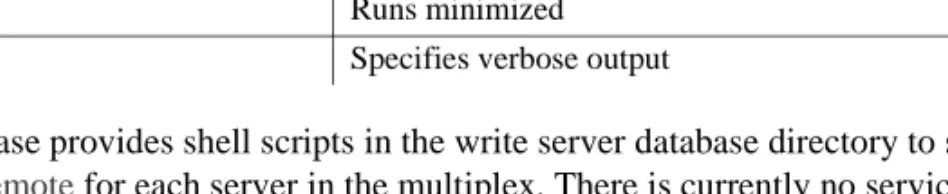
Switch Description
-k Closes window when finished
-ooutput_filename Specifies an output file
-q Runs minimized
Table 1-5: start_asiq recovery-options
Usage -n server-name Specifies the name of the database server.
database-file Specifies the database filename. If database-file is specified without a file extension, Sybase IQ looks for database-file with extension .db. If you use a relative path, the path is read relative to the current working directory of the server. You can supply a full path. On Windows you can supply a path that conforms to the Universal Naming Convention (UNC) format:
\\server\volume\path\file.ext
Warning! The database file must be on the same machine as the database server. Managing a database file that is located on a network drive can lead to file corruption.
Server command-line options
@filename Reads in command-line options from the supplied file. The file may contain line breaks, and may contain any set of command line options. For example, the following Windows command file holds a set of command line options for a server named myserver that allows 15 connections, sets the maximum Catalog page size to 4 MB, and loads the sample database:
-gm 15 -gp 4096 -n myserver
c:\sybase\ASIQ-12_5\demo\asiqdemo.db
If this configuration file is saved as c:\config.txt, the file can be used in an command line as follows:
start_asiq @c:\config.txt
@environment-variable Reads in command-line options from the supplied environment variable. The environment variable may contain any set of command line options. For example, the first of the following pair of Windows statements sets an environment variable holding a set of command line options and loads the sample database. The second statement starts the database server:
set envvar= “-gp 4096 -gm 15”
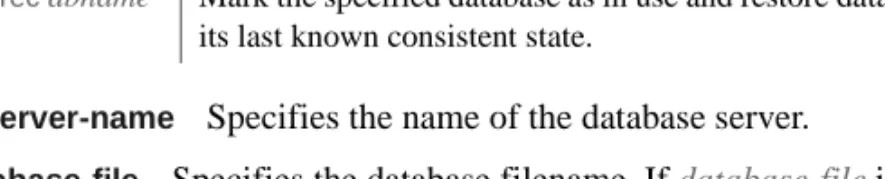
Description Option
-iqdroplks
dbname
Allow the sp_iqcheckdb stored procedure to recover leaked storage within the specified database.
-iqfrec dbname Mark the specified database as in use and restore database to its last known consistent state.
c:\sybase\ASIQ-12_5\demo\asiqdemo.db start_asiq @envvar
Note If you have both a file and an environment variable with the value of your @ command-line option, the result is unpredictable. Use only one of these methods to set a given @ command line option.
-c cache-size Sets initial memory reserved for caching Catalog Store pages and other server information. The database server uses extra memory for caching database pages if the memory is set aside in the cache. Any cache size less than 10000 is assumed to be KB (1K = 1024 bytes). Any cache size 10000 or greater is assumed to be in bytes. The cache size may also be specified as nK or nM or nP (1M = 1024 KB).
The default value of -c in the default.cfg file and start_asiq is 32MB (-c 32M) for Windows platforms, and 48MB (-c 48M) for UNIX platforms. For IQ databases, Sybase recommends that you use this default or set -c to a higher value.
The unit P is a percentage of the physical system memory. You can use % as an alternative to P, but as most non-UNIX operating systems use % as an environment variable escape character, you must escape the % character. For example, to use 20 percent of the physical system memory, you would specify:
start_asiq -c 20%% ...
On UNIX operating systems, if the cache size specified with -c is greater than the amount of available memory, the database server uses a maximum cache size that is calculated as follows:
If no -c option is provided (either on the command line or using the start_asiq
default), the database server computes the initial Catalog Store cache allocation as follows:
1 The database server uses 32MB as the minimum default cache size. 2 The database server computes a runtime-specific minimum default cache
size, which is the lesser of the following items: • 25% of the physical memory of the machine
• The sum of the sizes of the main database files specified on the command line. Additional dbspaces apart from the main database files are not included in the calculation. If no files are specified, this value is zero.
Do not use -c in the same configuration file or command line with -ch or -cl. For related information, see the -ch cache-size option.
See also the -ca 0 option.
-ca 0 Enforces a static Catalog cache size. The zero argument is required. Ordinarily, the database server automatically takes additional cache as needed. You can disable automatic cache increase due to high server load by using -ca 0 on the command line. The cache size still increases if the database server would otherwise run into the error
Fatal Error: dynamic memory exhausted
or if the Java VM requires memory that would lead to a fatal error.
-ch cache-size Limits the Catalog Store cache that the database server can take during automatic cache growth. By default the upper limit is
approximately the lower of 256 MB and 90% of the physical memory of the machine.
You specify the cache-size using the K, M, and P characters as in the -c option. For the meaning and usage of the cache size argument and the K, M, and P characters, see -c cache-size.
In some cases the standard Catalog cache size may be too small, for example, to accommodate certain queries that need a lot of parsing. In these cases, you may find it helpful to set -cl and -ch. For example, on 32-bit platforms, try these settings
-cl 128M -ch 256M
Warning! To control Catalog Store cache size explicitly, you must do either of the following, but not both, in your configuration file (.cfg) or on the UNIX command line for server startup:
• Set the -c parameter
• Set specific upper and lower limits for the Catalog Store cache size using the -ch and -cl parameters
Specifying different combinations of the parameters above can produce unexpected results.
-cl cache-size Sets a lower limit to the Catalog Store cache during automatic cache growth. By default the lower limit is the initial cache size.
The amount of cache memory available to the Catalog Store can affect performance, especially when many users are connected. You specify the cache-size using the K, M, and P characters as in the -c option. For the meaning and usage of the cache size argument and the K, M, and P characters, see -c cache-size.
-ct { + | - } By default, character set translation is turned on. Character set translation converts strings between character sets that represent the same characters, but at different values. This is useful when the client machine and the database use different character sets. To disable character set translation, specify -ct-. To enable character set translation, specify -ct+.
Prior to version 12.6, the + or - values were not accepted: specifying the -ct option enabled character set translation.
For more information, see Chapter 11, “International Languages and Character Sets” of the Sybase IQ System Administration Guide. -cw Enables use of Address Windowing Extensions (AWE) on
Windows 2000, Windows XP, and Windows Server 2003 for setting the size of the Catalog Store cache.
Because Windows 2000, Windows XP, and Windows Server 2003 support Address Windowing Extensions, you can use the -cw option to take advantage of large cache sizes based on the maximum amount of physical memory in the system. Remember, though, that the size of the Catalog Store cache has much less impact on performance for IQ databases than the IQ main and temporary buffer caches.
Operating system
Maximum non-AWE cache size
Maximum amount of physical memory supported by Windows Windows 2000 Professional 1.8 Gb 4 Gb Windows 2000 Server 1.8 Gb* 4 Gb Windows 2000 Advanced Server 2.7 Gb* 8 Gb Windows 2000 Datacenter Server 2.7 Gb* 64 Gb Windows XP Home Edition 1.8 Gb 2 Gb Windows XP Professional 1.8 Gb 4 Gb Windows Server 2003, Web Edition 1.8 Gb 2 Gb
*You must boot the operating system using the /3GB option to use a cache of this size.
When using an AWE cache, almost all of the available physical memory in the system can be allocated for the cache.
If you can set a Catalog Store cache of the desired size using a non-AWE cache, this is recommended because AWE caches allocate memory that can only be used for the Catalog Store. This means that while the database server is running, the operating system and the IQ Store caches cannot use the memory allocated for the Catalog Store cache.
AWE caches do not support dynamic cache sizing. Therefore, if an AWE cache is used and you specify the -ch or -cl options to set the upper and lower cache size, they are ignored.
To start a database server with an AWE cache, you must do the following: • Have at least 130 Mb of memory available on your system.
• If your system has between 2 Gb and 16 Gb of memory, add the /3GB option to the Windows boot line in the “[operating systems]” section of the
boot.ini file.
If your system has more than 16 Gb of memory, do not add the /3GB option to the Windows boot line in the “[operating systems]” section of the
boot.ini file because Windows will not be able to address memory beyond 16 Gb.
• If your system has more than 4 Gb of memory, add the /PAE option to the Windows boot line in the “[operating systems]” section of the boot.ini file. • Grant the “Lock pages in memory” privilege to the user ID under which
the server is run. The following steps explain how to do this on Windows 2000.
a Log on to Windows as Administrator. Windows Server 2003, Standard Edition 1.8 Gb 4 Gb Windows Server 2003, Enterprise Edition 2.7 Gb* 32 Gb Windows Server 2003, Datacenter Edition 2.7 Gb* 64 Gb Operating system Maximum non-AWE cache size
Maximum amount of physical memory supported by Windows
b From the Start menu, choose Settings > Control Panel. c Open the Administrative Tools folder.
d Double-click Local Security Policy. e Open Local Policies in the left pane.
f Double-click User Rights Assignment in the left pane.
g Double-click the Lock Pages In Memory policy in the right pane. The Local Security Policy Setting dialog appears.
h In the Local Security Policy Setting dialog, click Add. The Select Users or Groups dialog appears.
i Select the user ID from the list and click Add. j In the Local Security Policy Setting dialog, click OK. k Restart the computer for the setting to take effect.
If you specify the -cw option and the -c option on the command line, the database server attempts the initial cache allocation as follows:
1 The AWE cache is no larger than the cache size specified by the -c option. If the value specified by the -c option is less than 2 Mb, AWE is not used. 2 The AWE cache is no larger than all available physical memory less
128 Mb.
3 The AWE cache is no smaller than 2 Mb. If this minimum amount of physical memory is not available, an AWE cache is not used.
When you specify the -cw option and do not specify the -c option, the database server attempts the initial cache allocation as follows:
1 The AWE cache uses 100% of all available memory except for 128 Mb that is left free for the operating system.
2 The AWE cache is no larger than the sum of the sizes of the main database files specified on the command line. Additional dbspaces apart from the main database files are not included in the calculation. If no files are specified, this value is zero.
3 The AWE cache is no smaller than 2 Mb. If this minimum amount of physical memory is not available, an AWE cache is not used.
When the server uses an AWE cache, the Catalog cache page size is at least 4 KB and dynamic cache sizing is disabled.
For more information about dynamic cache sizing, see the -ch and -cl server options.
–ec Encrypts all native Sybase IQ packets (DBLib, ODBC, and OLE DB) transmitted to and from all clients. TDS packets are not encrypted.
{ dbsrv9 | dbeng9 } -ecencryption-options …
encryption-options:
{ NONE | SIMPLE | ECC_TLS(CERTIFICATE=filename;
CERTIFICATE_PASSWORD=password) | RSA_TLS(CERTIFICATE=filename;
CERTIFICATE_PASSWORD=password) | ALL } , …
The -ec option instructs the database server to accept only connections from ODBC, OLE DB, or embedded SQL interfaces that are encrypted using one of the specified types. Connections over the TDS protocol, which include Java applications using jConnect, are always accepted, regardless of encryption. By default, communication packets are not encrypted, which poses a potential security risk. If you are concerned about the security of network packets, use the -ec option. Encryption affects performance only marginally. The -ec option controls the server's encryption settings and requires one or more of the following parameters in a comma-separated list:
• none — Accepts only connections that are not encrypted.
• simple — Accepts connections that are encrypted with simple encryption. This type of encryption is supported on all platforms. Simple encryption is not as strong as Certicom encryption.
• ECC_TLS — Currently not supported by Sybase IQ.
• RSA_TLS — Accepts connections that are encrypted using RSA-based encryption technology. To use this type of encryption, both the server and the client must be operating on Solaris, Linux, AIX, or any supported Windows platform, and the connection must be over the TCP/IP port. This parameter accepts the following arguments:
• certificate — the file name of the certificate. The default value is
rsaserver.crt.
• certificate_password— the password for the certificate named above. The password for rsaserver.crt is test.
• all — Accepts connections that are not encrypted (none), or encrypted with simple encryption (simple). This is the default.
Warning! The sample certificate should be used for testing purposes only. The sample certificate provides no security in deployed situations because it and the corresponding password are widely distributed with Sybase software. To protect your system, you must create your own certificate.
The dbtls9.dll and dbrsa9.dll files contain the Certicom code used for encryption and decryption. When you connect to the server, if the appropriate file cannot be found, or if an error occurs, a message appears on the server console in debug mode. The server does not start if the types of encryption specified cannot be initiated.
The client's and the server's encryption settings must match or the connection will fail. The server automatically encrypts client transmissions that request encryption if -ec none is not specified.
The following sample startup lines show how you start the server with each of the three types of encryption:
start_asiq -ec simple,certicom(certificate=sample.crt; certificate_password=tJ1#m6+W) -x tcpip asiqdemo.db start_asiq -ec ecc_tls(certificate=sample.crt; certificate_password=tJ1#m6+W) -x tcpip asiqdemo.db start_asiq -ec rsa_tls(certificate=rsaserver.crt; certificate_password=test) -x tcpip asiqdemo.db For more information, see “Encryption connection parameter [ENC]” in Sybase IQ System Administration Guide.
-ek Provided after the filename of a strongly encrypted database. Requires the key value as an argument to start an encrypted database. The key value is a string, including mixed cases, numbers, letters, and special characters. If you have a strongly encrypted database, you must provide the encryption key to use the database or transaction log in any way. For a strongly encrypted database, you must specify either -ek or -ep, but not both. If you do not specify a key for a strongly encrypted database, the command will fail.
-ep (Windows) Displays a dialog box that prompts user to enter encryption key for running a strongly encrypted database. This option provides an extra measure of security by never allowing the encryption key to be seen in clear text. For a strongly encrypted database, you must specify either -ep or -ek, but not both. The command will fail if you do not specify a key for a strongly encrypted database.
The engine must either not be a Windows service, or be a Windows service with the interact with desktop option turned on.
When used with supported tools, this option always prompts the user for the encryption key, even if a key is not necessary. If you know that a key is not necessary, you can click Cancel to continue when the dialog box prompt appears.
-ga Specifying this switch on the network server causes each database to be unloaded after the last connection to the database is dropped. The database server itself does not shut down.
-gb level (Windows) Sets the database process priority class to level. Level must be one of idle, normal (the default), high, or maximum. The value idle is provided for completeness, and maximum may interfere with the running of your computer. The commonly used settings are normal and high.
-gc num Sets the maximum number of minutes the database server runs without doing a checkpoint on each database. The default value is 20 minutes. -gd level Sets the permission level required to start a database on the server, or to stop a database:
• DBA Only users with DBA authority can start a database or stop a database.
• ALL All users can start a database or stop a database (default in start_asiq
and default.cfg). Use this setting so that the DBA does not need to issue START DATABASE commands. (Note that users still need permission to access a database once they have started the database.)
• NONE Starting a database from Interactive SQL is not allowed. (Running stop_asiq on UNIX or Shutdown on Windows still allows you to stop the server and database.)
Both uppercase and lowercase syntax are acceptable.
-ge size (Windows) Sets the stack size for threads running external functions, in bytes. The default is 16384 (16KB).
• DBA Only users with DBA authority can use dbstop to stop the server (the default).
• ALL All users can use dbstop to stop the server. • NONE The server cannot be stopped using dbstop. Both uppercase and lowercase syntax are acceptable.
-gl level Sets the permission required to load data using LOAD TABLE. The LOAD TABLE statement reads files from the database server machine. To control access to the file system using these statements, the -gl command-line switch allows you to control the level of database permission that is required to use these statements.
The allowed values are as follows:
• DBA Only users with DBA authority can load data. • ALL All users can load data.
• NONE Data cannot be loaded.
Both uppercase and lowercase syntax are acceptable.
The default settings are all for servers started with start_asiq and dba for other servers. Sybase recommends that you use the setting all on all systems for consistency with earlier versions. The all setting is used in the asiqdemo.cfg
and default.cfg configuration files. For more about these configuration files, see Table 2-1: Configuration files in Sybase IQ System Administration Guide. -gm num Limits the number of connections to the server that can be active at one time. If this number is greater than the number that is allowed under licensing and memory constraints, this switch has no effect. The default varies by machine capacity, but 15 is recommended. The value should approximate the number of users expected to connect to the server.
The database server allows one extra DBA connection above the connection limit to allow a DBA to connect to the server and drop other connections in an emergency.
-gn num Sets the number of execution threads that will be used for the Catalog Store and connectivity while running with multiple users. This parameter applies to all operating systems and servers.
Each connection uses a thread for each request, and when the request is completed the thread is returned to the pool for use by other connections. As no connection can have more than one request in progress at one time, no connection uses more than one thread at a time.
An exception to this rule is if a Java application uses threads. Each thread in the Java application is a database server execution thread.
On Windows you need to specify this parameter in the start_asiq command. To calculate its value use the following formula:
gn_value = gm_value + 5
Specify a minimum of 25. The total number of threads (-iqmt plus -gn) must not exceed a platform-specific maximum; see “-iqmt num” on page 18 for details. The start_asiq utility sets this parameter. See the Sybase IQ Installation and Configuration Guide for your platform for more information.
-gp size Sets the maximum page size allowed, in bytes, for the Catalog Store. The size specified must be 1024, 2048, 4096, 8192, 16384, or 32768. The minimum page size on all UNIX platforms is 2048 bytes. Sybase highly recommends that you set the -gp switch to 4096.
-gr num Sets the maximum length of time, in minutes, that the database server will take to recover from system failure.
For more information, see “RECOVERY_TIME option” in Chapter 2, “Database Options” in the Sybase IQ Reference Manual.
-gu level Sets permission levels for commands such as CREATE DATABASE and DROP DATABASE. The level can be set to one of following:
utility_db, all, none, dba.
The utility_db level restricts the use of these commands to only those users who can connect to the utility database. The all, none, and dba levels
respectively permit all users, no users, or connected users with dba authority to execute utility commands.
To connect to the utility database, you must specify utility_db as the database name (that is, there is no database file) and the utility database password (stored in the file util_db.ini) must be known.
-h Displays usage information. Sybase IQ also displays usage information if you specify any non-valid switch, such as -help.
-iqgovern num Sets the number of concurrent queries allowed by the server. The number of concurrent queries is not the same as the number of connections. This switch can help Sybase IQ optimize paging of buffer data out to disk and avoid overcommitting memory. The default value of this switch is equal to 2 times the number of CPUs on your machine plus 10. You may find that another value, such as 2 times the number of CPUS plus 4, provides better throughput, especially when large numbers of users are connected.
-iqlocalreplay { all | none | [ grants | procedures | views ] ... } Specifies what is reconstituted on the query server during TLV log replay from a Local IQ Store after query server synchronization. IQ tables and user-defined data types must always be enabled for replay.
The allowed values are as follows:
• all The log replays all DDL commands. • none The log replays no DDL commands.
• grants The log replays GRANT and REVOKE commands, reflecting changes in user names, groups, and permissions.
• procedures The log replays actions that affect stored procedures and functions, including user messages.
• views The log replays actions that affect views. For example,
-iqlocalreplay "all"
This example replays all DDL commands from the local TLV log if the server was just synchronized.
-iqmc size Specifies main IQ Store cache size in MB. Overrides default of 16MB, or value, if any, set by MAIN_CACHE_MEMORY_MB database switch. Applies to all databases started from the time the IQ server is started until the IQ server is shut down. In other words, if you start one database at server startup and another later, you need 2 * -iqmc available for the main cache. In general, Sybase does not recommend running multiple databases with a Sybase IQ server.
-iqmpx_ov 1 For use starting multiplex databases only. Starts the server with override to acknowledge that the write server is starting (1) on a different host, (2) with a different server name, or (3) using a different path to its catalog (.db) file. Do not start two write servers against the same database. For details about using this parameter, see “Multiplex options” on page 4
-iqmpx_sn 1 Use only with a multiplex database. Starts the write server in single-node operating mode for certain types of recovery. Do not use to start query servers.
-iqmt num Specifies the number of Sybase IQ threads to create. The default is 60*numCPU+2*num_conn+1. The minimum value is 2*num_conn+1. The total number of threads (-iqmt plus -gn) must not exceed 4096 on 64-bit platforms, 1000 on AIX 32-bit servers, or 2048 on all other 32-bit platforms. The default -iqtss setting should be adequate to support these maximum numbers of threads.
-iqnumbercpus num Specifies the number of CPUs available to IQ, overriding the physical number of CPUs for resource planning purposes. The value of the parameter defaults to the total number of CPUs, but the range of available values is 1 through 128.
Sybase recommends using -iqnumbercpus only in the following situations: • On machines with Intel® CPUs and hyperthreading enabled, setting
-iqnumbercpus to the number of CPUs available
• On machines where an operating system utility has been used to restrict Sybase IQ to a subset of the CPUs within the machine
Setting -iqnumbercpus higher than the number of available CPUs may affect performance.
-iqpartition Specifies the number of partitions in the IQ main and temp buffer caches. Must be a power of 2. Allowed values are: 0 (default), 1, 2, 4, 8, 16, 32, 64. By default, IQ computes the number of partitions automatically as number_of_cpus/8, rounded to the nearest power of 2, up to a maximum of 64. You may be able to improve performance by adjusting the number of cache partitions. The -iqpartition switch sets this value for an IQ server, and overrides the value set by the Cache_Partitions database option. To set the number of partitions for a particular database, use the Cache_Partitions database option. See “CACHE_PARTITIONS option” in Chapter 2, “Database Options” of the Sybase IQ Reference Manual, and “Managing lock contention” in Chapter 10, “Transactions and Versioning” of the Sybase IQ System Administration Guide for more information on whether you should set one of these options, and factors that affect them.
-iqtc size Specifies IQ Temporary Store cache size in MB. Overrides default of 8MB, or value, if any, set by TEMP_CACHE_MEMORY_MB database option. Applies to all databases started from the time the IQ server is started until the IQ server is shut down. In other words, if you start one database at server startup and another later, you need 2 * -iqtc available for the temp cache. In general, Sybase does not recommend running multiple databases with a Sybase IQ server.
-iqtss size Sets the stack size of the internal execution threads in the server. The default value is 200 KB for 32-bit platforms and 300 for 64-bit platforms, which is the recommended value. However, some very complex queries may return an error indicating that the depth of the stack exceeded this limit, so the DBA may need increase this value. On 32-bit platforms, the best setting depends on the available memory, number of CPUs, number of connections and type of queries run. On 64-bit platforms, the value 1000 is reasonable because the memory of 64-bit systems is not constrained as it is in 32-bit systems. Do not choose a value less than the default or you may find that some queries cannot run.
-iqwmem size Creates a pool of “wired” memory on HP and Sun UNIX systems. This memory is locked down so it cannot be paged by the operating system. You specify the size in MB of memory. Use this switch only if you have enough memory to dedicate for this purpose. Otherwise, you can cause serious performance degradation.
-m Deletes the transaction log when a checkpoint is done, either at shutdown or as a result of a checkpoint scheduled by the server. This provides a way to automatically limit the growth of the transaction log. Checkpoint frequency is still controlled by the CHECKPOINT_TIME and RECOVERY_TIME options (which also can be set in the command line).
The -m server switch is useful where high volume transactions requiring fast response times are being processed, and the contents of the transaction log are not being relied upon for recovery or replication.
Warning! When you select the -m server switch, there is no protection against media failure on the device that contains the database files.
To avoid database file fragmentation, when you use this switch place the transaction log on a separate device or partition from the database itself. If you start the server with the -m switch, you cannot create a database.
Note Do not use the -m switch with databases that are being replicated, as replication inherently relies on transaction log information. For this reason, never use the -m switch on a multiplex database.
For information on truncating the transaction log file using the-m switch, see “The transaction log file” in Chapter 4, “Managing System Resources” of the Sybase IQ Performance and Tuning Guide.
-n name Sets the name of the database server. By default, the database server receives the name of the database file with the path and extension removed. For example, if the server is started on the file c:\sybase\ASIQ-12_6\demo\asiqdemo.db and no -n switch is specified, then the name of the server is asiqdemo. You should, however, change the default name.
Each server name must be unique across the local area network (domain). This prevents you from unintentionally connecting to the wrong server. The host name and port number combination does not uniquely identify the server. The server name is interpreted according to the character set of the machine, as no database collation exists at startup time. The server name must be a valid identifier. Long server names are truncated to 40 characters. On NetBIOS, 16 characters is the maximum length. For multiplex server names, 30 characters is the maximum.
The server name specifies the name to be used on client application connection strings or profiles.
Note There are two -n switches.The -n switch is positional. If this switch appears after a database file name, it is a database option. Otherwise, it is a server option. For example, in the following start_asiq command line, the first -n indicates a server name and the second -n, which follows the database file name mydb.db, indicates a database name:
start_asiq -n svrname mydb.db -n dbname
The server name must be used on the connect statement to specify to which server you wish to connect. In all environments, there is always a default database server that will be used if no server name is specified provided at least one database server is running on the system. Always specify a server name to avoid using the default name. Each server name must be unique across the local area network (domain). This prevents you from unintentionally connecting to the wrong server. The host name and port number combination does not uniquely identify the server.
Multiple database servers with the same name are not allowed to run on TCP/IP anywhere on the network, even on separate ports.
-o filename Prints all server message window output to a file, in addition to displaying the output on the screen. You can use this option to specify a nondefault name for the server log file, and keep using the same file after restarting the server. Be careful that you do not fill this file.
Note If the -o file is located within a file system that fills up, then the IQ server will hang. Once this condition exists, the only way to bring down the server is to kill it. To prevent this problem from occurring, specify the -os switch. -os size Limits the size of the log file used by the -o switch. The default is no limit. The units G, K, and M can be either lower case or upper case. If G, K, or M is not supplied, any integer less than 10 000 is assumed to be in kilobytes, and any integer 10 000 or greater is assumed to be in bytes.
-p packet-size Sets the maximum size of communication packets. The default is 1460 bytes. The minimum value is 300 bytes and the maximum value is 16000 bytes. To set this value for a connection, see “CommBufferSize connection parameter [CBSize]” in the Sybase IQ System Administration Guide.
-qi On Windows servers, controls whether database server tray icon and window appear. This option leaves no visual indication that the server is running, other than possible startup error dialogs. You can use either (or both) the -o or -oe logs to diagnose errors.
-qp Disables display of messages about performance in the database server window. Messages that are suppressed include the following:
• No unique index or primary key for table 'table_name' • Database file “mydatabase.db” consists of nnn fragments Specifies no server screen display (no console for the server).
-qs On Windows servers, suppresses startup error dialogs. Startup errors include errors such as:
• Could not open/read database file: <database file> • A database server with that name has already started
On Windows platforms, if the server is not being autostarted, these errors appear in a dialog and must be cleared before the server stops. These dialogs do not appear if the -qs option is used.
If there is an error loading the language DLL, no dialog appears if -qs was specified on the command line and not in @environment-variable or
@filename syntaxes. This error is not logged to the -o or -oe logs, but rather to the Windows Application Event Log.
Usage errors are suppressed if -qs is on the command line, but not in @filename or @environment-variable expansion.
-qw Suppresses the database server window (Windows platforms) and displays messages on the console (non-Windows platforms).
-s For UNIX servers, sets the system user ID used in messages to the syslog facility. The default is user, which uses the user ID for the database server process. A value of none prevents any syslog messages from being logged.
-sb { 0 | 1 } Specifies how the server reacts to broadcasts on TCP/IP. Using -sb 0 causes the server not to start up any TCP/UDP broadcast listeners. In addition to forcing clients to use the DoBroadcast=NONE and HOST= options to connect to the server, this option causes the server to be unlisted when using dblocate.
Using -sb 1 causes the server to not respond to broadcasts from dblocate, while leaving connection logic unaffected. You can connect to the server by specifying LINKS=tcpip and ENG=<name>.
-ti minutes Disconnects connections that have not submitted a request for minutes minutes. The default is 4400 (72 hours), so that a user with a long query will not be logged off over a long weekend. A client machine in the middle of a database transaction holds locks until the transaction is ended or the connection is terminated. The -ti switch is provided to disconnect inactive connections, freeing their locks. The -ti switch does not disconnect clients that use the shared memory communications link. Setting the value to zero disables checking of inactive connections, so that no connections are disconnected. You can set the connection timeout for individual connections using the IDLE connection parameter. For more information, see “Idle connection parameter [IDLE]” in Sybase IQ System Administration Guide.
-tl seconds Sets the liveness timeout period for the server. A liveness packet is sent periodically across a client/server TCP/IP communications protocol to confirm that a connection is intact. If the server runs for a liveness timeout period (default 2 minutes) without detecting a liveness packet, the communication is severed. The server drops any connections associated with that client. UNIX non-threaded clients and TDS connections do not do liveliness checking.
The -tl switch on the server sets the liveness timeout for all clients that do not specify a -tl switch.
When there are more than 200 connections, the server automatically calculates a higher LivenessTimeout value based on the stated LivenessTimeout value. This enables the server to handle a large number of connections more efficiently.
Clients send liveness packets at an interval of between one third and two thirds of the LivenessTimeout on each idle connection. Large numbers of liveness packets are not sent at the same time. If liveness packets take a long time to send (depending on the network, the machine's hardware, and the CPU and network load on the machine), it is possible that liveness packets will be sent after two thirds of the LivenessTimeout. A warning appears in the server console if the liveness sends take a long time. If this warning occurs, consider increasing the LivenessTimeout value.
-tq time Shuts down the server at a specified time. The format for the time is in HH:MM (24 hour clock), and can be preceded by an optional date. If a date is specified, the date and time must be enclosed in double quotes and be in the format “YYYY/MM/DD HH:MM”.
-ud For UNIX servers, causes the process to run as a daemon in the root directory. (Not recommended for IQ.)
-ut min For UNIX servers, causes the server to touch Catalog Store temporary files at intervals specified by min.
-v Displays the database server version in a message box, and then stops. -x list Specifies server side network communications protocols.
The list is a comma-separated list of settings taken from the following list: TCPIP, or NamedPipes.
For example, -x tcpip,ipx
allows only TCP/IP and IPX communications.
The default is to try all settings supported by database server on your operating system.
For some protocols, additional parameters may be provided, in the format -x tcpip(PARM1=value1;PARM2=value2;...)
For UNIX, quotation marks are required if more than one parameter is supplied: