CS-695 NoSQL Databases
CS-695 NoSQL Databases
CS-695 NoSQL Databases
CS-695 NoSQL Databases
CS-695 NoSQL Databases
CS-695 NoSQL Databases
CS-695 NoSQL Databases
CS-695 NoSQL Databases
CS-695 NoSQL Databases
CS-695 NoSQL Databases
CS-695 NoSQL Databases
CS-695 NoSQL Databases
CS-695 NoSQL Databases
CS-695 NoSQL Databases
CS-695 NoSQL Databases
CS-695 NoSQL Databases
CS-695 NoSQL Databases
CS-695 NoSQL Databases
CS-695 NoSQL Databases
CS-695 NoSQL Databases
CS-695 NoSQL Databases
Fall 2015
Fall 2015
Fall 2015
Fall 2015
Fall 2015
Fall 2015
Fall 2015
Fall 2015
Fall 2015
Fall 2015
Fall 2015
Fall 2015
Fall 2015
Fall 2015
Fall 2015
Fall 2015
Fall 2015
Fall 2015
Fall 2015
Fall 2015
Fall 2015
Thursdays 1910 – 2150, Dragas Hall, room 2110
Thursdays 1910 – 2150, Dragas Hall, room 2110
Thursdays 1910 – 2150, Dragas Hall, room 2110
Thursdays 1910 – 2150, Dragas Hall, room 2110
Thursdays 1910 – 2150, Dragas Hall, room 2110
Thursdays 1910 – 2150, Dragas Hall, room 2110
Thursdays 1910 – 2150, Dragas Hall, room 2110
Thursdays 1910 – 2150, Dragas Hall, room 2110
Thursdays 1910 – 2150, Dragas Hall, room 2110
Thursdays 1910 – 2150, Dragas Hall, room 2110
Thursdays 1910 – 2150, Dragas Hall, room 2110
Thursdays 1910 – 2150, Dragas Hall, room 2110
Thursdays 1910 – 2150, Dragas Hall, room 2110
Thursdays 1910 – 2150, Dragas Hall, room 2110
Thursdays 1910 – 2150, Dragas Hall, room 2110
Thursdays 1910 – 2150, Dragas Hall, room 2110
Thursdays 1910 – 2150, Dragas Hall, room 2110
Thursdays 1910 – 2150, Dragas Hall, room 2110
Thursdays 1910 – 2150, Dragas Hall, room 2110
Thursdays 1910 – 2150, Dragas Hall, room 2110
Thursdays 1910 – 2150, Dragas Hall, room 2110
Instructor: Dr. Cartledge
Instructor: Dr. Cartledge
Instructor: Dr. Cartledge
Instructor: Dr. Cartledge
Instructor: Dr. Cartledge
Instructor: Dr. Cartledge
Instructor: Dr. Cartledge
Instructor: Dr. Cartledge
Instructor: Dr. Cartledge
Instructor: Dr. Cartledge
Instructor: Dr. Cartledge
Instructor: Dr. Cartledge
Instructor: Dr. Cartledge
Instructor: Dr. Cartledge
Instructor: Dr. Cartledge
Instructor: Dr. Cartledge
Instructor: Dr. Cartledge
Instructor: Dr. Cartledge
Instructor: Dr. Cartledge
Instructor: Dr. Cartledge
Instructor: Dr. Cartledge
http://www.cs.odu.edu/˜ccartled/Teaching
http://www.cs.odu.edu/˜ccartled/Teaching
http://www.cs.odu.edu/˜ccartled/Teaching
http://www.cs.odu.edu/˜ccartled/Teaching
http://www.cs.odu.edu/˜ccartled/Teaching
http://www.cs.odu.edu/˜ccartled/Teaching
http://www.cs.odu.edu/˜ccartled/Teaching
http://www.cs.odu.edu/˜ccartled/Teaching
http://www.cs.odu.edu/˜ccartled/Teaching
http://www.cs.odu.edu/˜ccartled/Teaching
http://www.cs.odu.edu/˜ccartled/Teaching
http://www.cs.odu.edu/˜ccartled/Teaching
http://www.cs.odu.edu/˜ccartled/Teaching
http://www.cs.odu.edu/˜ccartled/Teaching
http://www.cs.odu.edu/˜ccartled/Teaching
http://www.cs.odu.edu/˜ccartled/Teaching
http://www.cs.odu.edu/˜ccartled/Teaching
http://www.cs.odu.edu/˜ccartled/Teaching
http://www.cs.odu.edu/˜ccartled/Teaching
http://www.cs.odu.edu/˜ccartled/Teaching
http://www.cs.odu.edu/˜ccartled/Teaching
•
•
•
•
•
•
•
•
•
•
Big data is quadrupling every year!!
Big data is quadrupling every year!!
Big data is quadrupling every year!!
Big data is quadrupling every year!!
Big data is quadrupling every year!!
Big data is quadrupling every year!!
Big data is quadrupling every year!!
Big data is quadrupling every year!!
Big data is quadrupling every year!!
Big data is quadrupling every year!!
•
Big data is quadrupling every year!!
•
Big data is quadrupling every year!!
•
Big data is quadrupling every year!!
•
Big data is quadrupling every year!!
•
Big data is quadrupling every year!!
•
Big data is quadrupling every year!!
•
Big data is quadrupling every year!!
•
•
•
•
Big data is quadrupling every year!!
Big data is quadrupling every year!!
Big data is quadrupling every year!!
Big data is quadrupling every year!!
– Everyone is creating it
– Everyone is creating it
– Everyone is creating it
– Everyone is creating it
– Everyone is creating it
– Everyone is creating it
– Everyone is creating it
– Everyone is creating it
– Everyone is creating it
– Everyone is creating it
– Everyone is creating it
– Everyone is creating it
– Everyone is creating it
– Everyone is creating it
– Everyone is creating it
– Everyone is creating it
– Everyone is creating it
– Everyone is creating it
– Everyone is creating it
– Everyone is creating it
– Everyone is creating it
– Everyone wants to use it
– Everyone wants to use it
– Everyone wants to use it
– Everyone wants to use it
– Everyone wants to use it
– Everyone wants to use it
– Everyone wants to use it
– Everyone wants to use it
– Everyone wants to use it
– Everyone wants to use it
– Everyone wants to use it
– Everyone wants to use it
– Everyone wants to use it
– Everyone wants to use it
– Everyone wants to use it
– Everyone wants to use it
– Everyone wants to use it
– Everyone wants to use it
– Everyone wants to use it
– Everyone wants to use it
– Everyone wants to use it
– Most does not fit in a RDBMS
– Most does not fit in a RDBMS
– Most does not fit in a RDBMS
– Most does not fit in a RDBMS
– Most does not fit in a RDBMS
– Most does not fit in a RDBMS
– Most does not fit in a RDBMS
– Most does not fit in a RDBMS
– Most does not fit in a RDBMS
– Most does not fit in a RDBMS
– Most does not fit in a RDBMS
– Most does not fit in a RDBMS
– Most does not fit in a RDBMS
– Most does not fit in a RDBMS
– Most does not fit in a RDBMS
– Most does not fit in a RDBMS
– Most does not fit in a RDBMS
– Most does not fit in a RDBMS
– Most does not fit in a RDBMS
– Most does not fit in a RDBMS
– Most does not fit in a RDBMS
•
•
•
•
•
•
•
•
•
•
Objectives:
Objectives:
Objectives:
Objectives:
Objectives:
Objectives:
Objectives:
Objectives:
Objectives:
Objectives:
•
Objectives:
•
Objectives:
•
Objectives:
•
Objectives:
•
Objectives:
•
Objectives:
•
Objectives:
•
•
•
•
Objectives:
Objectives:
Objectives:
Objectives:
– Learn about different data models
– Learn about different data models
– Learn about different data models
– Learn about different data models
– Learn about different data models
– Learn about different data models
– Learn about different data models
– Learn about different data models
– Learn about different data models
– Learn about different data models
– Learn about different data models
– Learn about different data models
– Learn about different data models
– Learn about different data models
– Learn about different data models
– Learn about different data models
– Learn about different data models
– Learn about different data models
– Learn about different data models
– Learn about different data models
– Learn about different data models
– Learn how to query different models
– Learn how to query different models
– Learn how to query different models
– Learn how to query different models
– Learn how to query different models
– Learn how to query different models
– Learn how to query different models
– Learn how to query different models
– Learn how to query different models
– Learn how to query different models
– Learn how to query different models
– Learn how to query different models
– Learn how to query different models
– Learn how to query different models
– Learn how to query different models
– Learn how to query different models
– Learn how to query different models
– Learn how to query different models
– Learn how to query different models
– Learn how to query different models
– Learn how to query different models
•
•
•
•
•
•
•
•
•
•
Technologies to be used:
Technologies to be used:
Technologies to be used:
Technologies to be used:
Technologies to be used:
Technologies to be used:
Technologies to be used:
Technologies to be used:
Technologies to be used:
Technologies to be used:
•
Technologies to be used:
•
Technologies to be used:
•
Technologies to be used:
•
Technologies to be used:
•
Technologies to be used:
•
Technologies to be used:
•
Technologies to be used:
•
•
•
•
Technologies to be used:
Technologies to be used:
Technologies to be used:
Technologies to be used:
– neo4J, HBase
– neo4J, HBase
– neo4J, HBase
– neo4J, HBase
– neo4J, HBase
– neo4J, HBase
– neo4J, HBase
– neo4J, HBase
– neo4J, HBase
– neo4J, HBase
– neo4J, HBase
– neo4J, HBase
– neo4J, HBase
– neo4J, HBase
– neo4J, HBase
– neo4J, HBase
– neo4J, HBase
– neo4J, HBase
– neo4J, HBase
– neo4J, HBase
– neo4J, HBase
– MongoDB, Redis
– MongoDB, Redis
– MongoDB, Redis
– MongoDB, Redis
– MongoDB, Redis
– MongoDB, Redis
– MongoDB, Redis
– MongoDB, Redis
– MongoDB, Redis
– MongoDB, Redis
– MongoDB, Redis
– MongoDB, Redis
– MongoDB, Redis
– MongoDB, Redis
– MongoDB, Redis
– MongoDB, Redis
– MongoDB, Redis
– MongoDB, Redis
– MongoDB, Redis
– MongoDB, Redis
– MongoDB, Redis
– Hazelcast
– Hazelcast
– Hazelcast
– Hazelcast
– Hazelcast
– Hazelcast
– Hazelcast
– Hazelcast
– Hazelcast
– Hazelcast
– Hazelcast
– Hazelcast
– Hazelcast
– Hazelcast
– Hazelcast
– Hazelcast
– Hazelcast
– Hazelcast
– Hazelcast
– Hazelcast
– Hazelcast
•
•
•
•
•
•
•
•
•
•
Learn about NoSQL technologies:
Learn about NoSQL technologies:
Learn about NoSQL technologies:
Learn about NoSQL technologies:
Learn about NoSQL technologies:
Learn about NoSQL technologies:
Learn about NoSQL technologies:
Learn about NoSQL technologies:
Learn about NoSQL technologies:
Learn about NoSQL technologies:
•
Learn about NoSQL technologies:
•
Learn about NoSQL technologies:
•
Learn about NoSQL technologies:
•
Learn about NoSQL technologies:
•
Learn about NoSQL technologies:
•
Learn about NoSQL technologies:
•
Learn about NoSQL technologies:
•
•
•
•
Learn about NoSQL technologies:
Learn about NoSQL technologies:
Learn about NoSQL technologies:
Learn about NoSQL technologies:
– When does RDBMS representation make sense
– When does RDBMS representation make sense
– When does RDBMS representation make sense
– When does RDBMS representation make sense
– When does RDBMS representation make sense
– When does RDBMS representation make sense
– When does RDBMS representation make sense
– When does RDBMS representation make sense
– When does RDBMS representation make sense
– When does RDBMS representation make sense
– When does RDBMS representation make sense
– When does RDBMS representation make sense
– When does RDBMS representation make sense
– When does RDBMS representation make sense
– When does RDBMS representation make sense
– When does RDBMS representation make sense
– When does RDBMS representation make sense
– When does RDBMS representation make sense
– When does RDBMS representation make sense
– When does RDBMS representation make sense
– When does RDBMS representation make sense
– When do other representations make sense
– When do other representations make sense
– When do other representations make sense
– When do other representations make sense
– When do other representations make sense
– When do other representations make sense
– When do other representations make sense
– When do other representations make sense
– When do other representations make sense
– When do other representations make sense
– When do other representations make sense
– When do other representations make sense
– When do other representations make sense
– When do other representations make sense
– When do other representations make sense
– When do other representations make sense
– When do other representations make sense
– When do other representations make sense
– When do other representations make sense
– When do other representations make sense
– When do other representations make sense
•
•
•
•
•
•
•
•
•
•
Prerequisites: CS 450/550 Database Concepts
Prerequisites: CS 450/550 Database Concepts
Prerequisites: CS 450/550 Database Concepts
Prerequisites: CS 450/550 Database Concepts
Prerequisites: CS 450/550 Database Concepts
Prerequisites: CS 450/550 Database Concepts
Prerequisites: CS 450/550 Database Concepts
Prerequisites: CS 450/550 Database Concepts
Prerequisites: CS 450/550 Database Concepts
Prerequisites: CS 450/550 Database Concepts
•
Prerequisites: CS 450/550 Database Concepts
•
Prerequisites: CS 450/550 Database Concepts
•
Prerequisites: CS 450/550 Database Concepts
•
Prerequisites: CS 450/550 Database Concepts
•
Prerequisites: CS 450/550 Database Concepts
•
Prerequisites: CS 450/550 Database Concepts
•
Prerequisites: CS 450/550 Database Concepts
•
•
•
•
Prerequisites: CS 450/550 Database Concepts
Prerequisites: CS 450/550 Database Concepts
Prerequisites: CS 450/550 Database Concepts
Prerequisites: CS 450/550 Database Concepts
Other notes:
•
This course will explore different technologies. We will look at different problems and different
mod-eling techniques.
•
You will learn different languages, different representation, different perspectives.
•
This is not a programming course. You will learn to use an existing framework, not a new language.
•
There will be approximately six programming assignments, and a project.
•
Text: None required, information is available via different web sites. Recommended readings incldue:
Contents
1 Resources 2
2 Transmitting code 3
2.1 Introduction . . . 3
2.2 How to access attachments in a PDF . . . 4
2.3 Sample code . . . 4
2.4 Makefile target to add attachment . . . 5
2.5 Attaching files using pdfLatex . . . 5
3 Virtual office contact information 8 3.1 Via Google+Hangout . . . 8
3.2 Via Skype . . . 8
3.3 Via office hours . . . 8
3.4 Via e-mail . . . 8
3.5 Via Google groups . . . 8
4 Shortcuts to attached files 9
1
Resources
Resources that might be useful are shown in Table 1.
Table 1: Useful resources. Long URLs are broken for readability.
Database URL to manual
CouchDB http://docs.couchdb.org/en/1.6.1/ Hbase http://hbase.apache.org/book.html MongoDB https://docs.mongodb.org/manual/ Neo4J http://neo4j.com/docs/stable/ PostgreSQL http://www.postgresql.org/docs/manuals/ Redis http://redis.io/documentation Riak http://docs.basho.com/riak/latest/
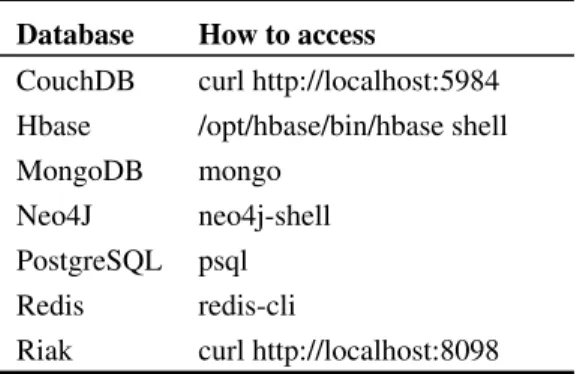
Table 2: Useful commands. Unless otherwise noted, all commands are executed using the bash shell on the host: cs695-nosql.cs.odu.edu
Database How to access
CouchDB curl http://localhost:5984 Hbase /opt/hbase/bin/hbase shell MongoDB mongo
Neo4J neo4j-shell PostgreSQL psql Redis redis-cli
Riak curl http://localhost:8098
2
Transmitting code
2.1
Introduction
Almost every “programmer’s guide,” software instructional book, or article about software has at least one listing. If we limit these documents to electronic versions of some sort, and specifically PDFs then there are a few ways for the reader to get the listing out of the PDF and into an editor where it can be played with.
These include:
1. Copy and paste— the reader highlights the code and then uses whatever copy command or keystrokes
the operating system provides to copy and paste the code into the editor. This works well if: (a) The listing is small and doesn’t cross page boundaries, or
(b) The listing has not been reformatted to “look good” on the page (pretty printing and so on), or (c) The listing is a stand alone entity and doesn’t depend on other pieces of code.
2. Download from somewhere— the reader has access to the site to download a complete soft copy of
the listing. This works well if:
(a) The software remains at particular location on the site, and (b) The site is still alive, and
(c) The user has access to the site. Downloading may be problematic if some sort of authentication is required.
3. Encode the software in the document — the reader can copy and paste an encoded version of the
listing from the document, “decode” it, and process it an editor. This works well if: (a) Detailed decoding instructions are available, and
(b) The reader has access to the decoding tools, and
(c) The “copy and paste” procedure is accurate and complete. This is not necessarily true.
4. Attach the software to the PDF — a PDF file can have attachments and the reader can save those
attachments to their local file system. This works well if:
(a) Detailed instructions are available to the reader about how to access attachments, and
(b) The PDF reader permits the attachments to be saved to the local file system. By default, certain file extensions can not be saved locally.
2.2
How to access attachments in a PDF
The specific steps to access attachments in a PDF differ slightly depending on which version of Adobe Reader is used. These are the general steps:
1. Display the Navigation Panes— specifically the Attachments button. Displaying this button may be
under:
• View −> Show/Hide −> Navigation Panes −> Attachments, or
• View −> Navigation Panes −> Attachments, or
• Pressing CTR H
2. Click the paper clip icon— then
(a) Search for and highlight the file of interest, (b) Save the file to your local file system.
2.3
Sample code
Here is a portion of an XSD file used as sample code that the user wants to get into an editor. This is a snippet from CustomerOders.xsd (http://msdn.microsoft.com/en-us/library/bb675181.aspx).
<?xml version="1.0" encoding="utf-8" ?> <xs:schema xmlns:xs="http://www.w3.org/2001/XMLSchema"> <xs:element name=’Root’> <xs:complexType> <xs:sequence> <xs:element name=’Customers’> <xs:complexType> <xs:sequence>
<xs:element name=’Customer’ type=’CustomerType’ minOccurs=’0’ maxOccurs=’unbounded’ /> </xs:sequence> </xs:complexType> </xs:element> <xs:element name=’Orders’> <xs:complexType> <xs:sequence>
<xs:element name=’Order’ type=’OrderType’ minOccurs=’0’ maxOccurs=’unbounded’ /> </xs:sequence>
</xs:complexType> </xs:element>
... (Lots of stuff omitted.)
<xs:element name=’ShipAddress’ type=’xs:string’/> <xs:element name=’ShipCity’ type=’xs:string’/> <xs:element name=’ShipRegion’ type=’xs:string’/> <xs:element name=’ShipPostalCode’ type=’xs:string’/> <xs:element name=’ShipCountry’ type=’xs:string’/> </xs:sequence>
<xs:attribute name=’ShippedDate’ type=’xs:dateTime’/> </xs:complexType>
</xs:schema>
The complete code is in the attached fileCustomerOders.xsd.
2.4
Makefile target to add attachment
attachFile:
emptyFile=$(SRC).pdf ;\
filledFile=/tmp/temp_attached.pdf ;\
files="CustomerOders.xsd attachFiles.tex sample.zip attachFiles.pdf";\ for f in $$files ;\
do \
pdftk $$emptyFile attach_file $$f to_page 3 output $$filledFile ;\ echo Attached $$f to $$filledFile ;\
cp $$filledFile $$emptyFile ;\ done ;\
2.5
Attaching files using pdfLatex
Use pdflatx to compile this file (assuming that the included files are in the correct location) : \ d o c u m e n t c l a s s [ t w o s i d e , a 4 p a p e r , 1 0 p t ] { a r t i c l e } \ u s e p a c k a g e { a t t a c h f i l e } \ u s e p a c k a g e { g r a p h i c x } \ b e g i n { d o c u m e n t } \ t i t l e {A s i m p l e e x a m p l e } \ a u t h o r { L i l ’ Ole Me} \ m a k e t i t l e H e r e i s t h e f i l e I a t t a c h e d : \ a t t a c h f i l e { C u s t o m e r O d e r s . x s d }
T h i s i s t h e t e s t t e x t \ t e x t a t t a c h f i l e [ a u t h o r =" L i t t l e ’ o l me " , i c o n = P a p e r c l i p , c o l o r = 0 . 0 0 . 0 0 . 0 ] { C u s t o m e r O d e r s . x s d }{ H e l l o t h e r e . } T h i s i s t h e a t t a c h e d f i l e \ a t t a c h f i l e [ a u t h o r = L i t t l e ’ o l me , d e s c r i p t i o n ={ H e r e i s a l o t o f t e x t t h a t may , o r may n o t be u s e f u l t o t h e r e a d e r . } , mimetype = t e x t / xml , s u b j e c t ={ T h i s i s t h e s u b j e c t l i n e . } ] { C u s t o m e r O d e r s . x s d } . T h i s i s t h e t e s t \ t e x t a t t a c h f i l e [ a u t h o r =" L i t t l e ’ o l me " , i c o n = P a p e r c l i p , c o l o r = 0 . 0 0 . 0 0 . 0 ] { C u s t o m e r O d e r s . x s d }{ T h i s i s s i l l y t e x t } . \ t e x t a t t a c h f i l e [ c o l o r = 0 . 0 0 . 0 0 . 0 ] { C u s t o m e r O d e r s . x s d } { $ \d i s p l a y s t y l e \ f r a c { \p a r t i a l E_ p } { \p a r t i a l w_{ j i }^ h } = −\sum_ k ( y _{ pk } − o _{ pk } ) f _ k ^{ o } { } ’ ( \ mbox{ n e t }_{ pk }^ o ) w_{ k j }^ o f _ j ^ h { } ’ ( \ mbox{ n e t }_{ p j }^ h ) x _{ p i }$} T h i s i s t h e t e s t \ t e x t a t t a c h f i l e [ a u t h o r =" L i t t l e ’ o l me " , c o l o r = 0 . 0 0 . 0 0 . 0 , d e s c r i p t i o n ={ H e r e i s a l o t o f t e x t t h a t may , o r may n o t be u s e f u l t o t h e r e a d e r . H e r e i s a l o t o f t e x t t h a t may , o r may n o t be u s e f u l t o t h e r e a d e r . H e r e i s a l o t o f t e x t t h a t may , o r may n o t be u s e f u l t o t h e r e a d e r . H e r e i s a l o t o f t e x t t h a t may , o r may n o t be u s e f u l t o t h e r e a d e r . H e r e i s a l o t o f t e x t t h a t may , o r may n o t be u s e f u l t o t h e r e a d e r . H e r e i s a l o t o f t e x t t h a t may , o r may n o t be u s e f u l t o t h e r e a d e r . H e r e i s a l o t o f t e x t t h a t may , o r may n o t be u s e f u l t o t h e r e a d e r . } , mimetype = t e x t / xml , s u b j e c t ={ T h i s i s t h e s u b j e c t l i n e . } ] { C u s t o m e r O d e r s . x s d } { \ i n c l u d e g r a p h i c s [ h e i g h t =10 p t ] { I m a g e s / x m l F i l e } } . F o u r s c o r e and s e v e n y e a r s ago o u r f a t h e r s b r o u g h t f o r t h on t h i s c o n t i n e n t , a new n a t i o n , c o n c e i v e d i n L i b e r t y , and d e d i c a t e d t o t h e p r o p o s i t i o n t h a t a l l men a r e c r e a t e d e q u a l . Now we a r e e n g a g e d i n a g r e a t c i v i l war , t e s t i n g w h e t h e r t h a t n a t i o n , o r any n a t i o n s o c o n c e i v e d and s o d e d i c a t e d , c a n l o n g e n d u r e . We a r e met on a g r e a t b a t t l e−f i e l d o f t h a t war . We h a v e come t o d e d i c a t e a p o r t i o n o f t h a t f i e l d , a s a f i n a l r e s t i n g p l a c e f o r t h o s e who h e r e g a v e t h e i r l i v e s t h a t t h a t n a t i o n m i g h t l i v e . I t i s a l t o g e t h e r f i t t i n g and p r o p e r t h a t we s h o u l d do t h i s . But , i n a l a r g e r s e n s e , we c a n n o t d e d i c a t e −− we c a n n o t
c o n s e c r a t e −− we c a n n o t h a l l o w −− t h i s g r o u n d . The b r a v e men , l i v i n g and dead , who s t r u g g l e d h e r e , h a v e c o n s e c r a t e d i t ,
f a r a b o v e o u r p o o r power t o add o r d e t r a c t . The w o r l d w i l l l i t t l e n o t e , n o r l o n g remember w h a t we s a y h e r e , b u t i t c a n n e v e r f o r g e t w h a t t h e y d i d h e r e . I t i s f o r u s t h e l i v i n g , r a t h e r , t o be d e d i c a t e d h e r e t o t h e u n f i n i s h e d work w h i c h t h e y who f o u g h t h e r e h a v e t h u s f a r s o n o b l y a d v a n c e d . I t i s r a t h e r f o r u s t o be h e r e d e d i c a t e d t o t h e g r e a t t a s k r e m a i n i n g b e f o r e u s −− t h a t f r o m t h e s e h o n o r e d d e a d we t a k e i n c r e a s e d d e v o t i o n t o t h a t c a u s e f o r w h i c h t h e y g a v e t h e l a s t f u l l m e a s u r e o f d e v o t i o n −− t h a t we h e r e h i g h l y r e s o l v e t h a t t h e s e d e a d s h a l l n o t h a v e d i e d i n v a i n −− t h a t t h i s n a t i o n , u n d e r God , s h a l l h a v e a new b i r t h o f f r e e d o m −− and t h a t g o v e r n m e n t o f t h e p e o p l e , by t h e p e o p l e , f o r t h e p e o p l e , s h a l l n o t p e r i s h f r o m t h e e a r t h .
3
Virtual office contact information
3.1
Via Google+Hangout
Depending on your Hangout settings, you may have to install software to get this URL to work.
https://plus.google.com/hangouts/_/g62sxa5y4ymawyhgrutb6lscaia
3.2
Via Skype
My Skype contact name is:
DrChuckCartledge
3.3
Via office hours
See the calendar on class home page for virtual office hours.
3.4
Via e-mail
3.5
Via Google groups
A Google group has been set up for the class. You must send a membership request to become a member of the group. The group is called:
ODU NoSQL Course
You can search for the group’s URL starting at this location:
https://groups.google.com/forum/#!overview
and searching using the tokens:
4
Shortcuts to attached files
Aren’t these pushpins ugly?? Put don’t worry too much. The pins don’t print.
Sometimes you will want better control over how the user/reader interacts with your document. See the attached file named: attachFiles.pdf