University of South Florida
Scholar Commons
Graduate Theses and Dissertations Graduate School
3-24-2017
Tradeoffs in Protocol Designs for Collaborative
Authentication
Jacob Venne
University of South Florida, [email protected]
Follow this and additional works at:http://scholarcommons.usf.edu/etd Part of theComputer Sciences Commons
This Thesis is brought to you for free and open access by the Graduate School at Scholar Commons. It has been accepted for inclusion in Graduate Theses and Dissertations by an authorized administrator of Scholar Commons. For more information, please [email protected].
Scholar Commons Citation
Venne, Jacob, "Tradeoffs in Protocol Designs for Collaborative Authentication" (2017).Graduate Theses and Dissertations. http://scholarcommons.usf.edu/etd/6633
Tradeoffs in Protocol Designs for Collaborative Authentication
by
Jacob Venne
A thesis submitted in partial fulfillment of the requirements for the degree of Master of Science in Computer Science Department of Computer Science and Engineering
College of Engineering University of South Florida
Major Professor: Jay Ligatti, Ph.D. Dmitry Goldgof, Ph.D.
Xinming Ou, Ph.D. Date of Approval:
March 9, 2017
Keywords: token authentication, security, access control Copyright © 2017, Jacob Venne
TABLE OF CONTENTS
LIST OF TABLES iii
LIST OF FIGURES iv
ABSTRACT v
CHAPTER 1: INTRODUCTION 1
1.1 Overview of Related Work 1
1.2 Collaborative Authentication 2
1.3 Contributions and Overview 3
CHAPTER 2: RELATED WORK 5
2.1 Single-Factored Authentication 5 2.1.1 Passwords 5 2.1.2 Biometrics 6 2.1.3 Physical Tokens 7 2.2 Multi-Factored Authentication 7 2.3 Collaborative Authentication 8
CHAPTER 3: SURVEY OF APPLICATIONS 12
3.1 Computer Applications and Webservers 12
3.1.1 Computer Unlocking and Network Login 13
3.1.2 Webserver Application Login 15
3.2 Physical Access: Doors, Gates, Surveillance 17
3.2.1 Vehicle Gates 17
3.2.2 Building and Vehicle Doors 18
3.3 Internet of Things 20
3.3.1 Smart Home Devices and Child Proofing 20
3.3.2 Vehicle Devices 22
3.4 Financial Institutions and Applications 23
3.4.1 ATMs 23
3.4.2 Mobile Payment 24
3.4.3 Safes and Vaults 24
3.4.4 Retail Locks 25
3.5 Military Applications 26
3.5.1 Sensitive Networks and Classified Information 26
3.5.2 Deployment of Military Action 27
3.6.1 Requiring a Group to Access 29
3.6.2 Group Access 29
3.6.3 Anonymous Access 30
3.6.4 Human Verification 30
CHAPTER 4: ANALYSIS OF DESIGN TRADEOFFS 32
4.1 Manual vs. Automatic Requesting 32
4.2 Manual vs. Automatic Collaborating 33
4.3 Message Sending 34
4.3.1 Broadcasting and Multicasting 34
4.3.2 Unicasting 35
4.4 Single Collaborator Protocol Variations 35
4.4.1 RCRAR 37
4.4.2 RCACR 38
4.4.3 RCAR 39
4.4.4 CACR 40
4.4.5 CAR 41
4.4.6 Summary of Single Collaborator Unicasting Schemes 42
4.4.7 Single Collaborator Broadcasting Scheme 43
4.5 Multiple Collaborators Protocol Variations 44
4.6 Continuous Authentication 47
CHAPTER 5: CONCLUSION 48
5.1 Summary 48
LIST OF TABLES
LIST OF FIGURES
Figure 2.1 Diagram depicting co-authentication requiring m=2 devices. 10
Figure 4.1 Diagram depicting RCRAR co-authentication requiring m=2 devices. 37
Figure 4.2 Diagram depicting RCACR co-authentication requiring m=2 devices. 38
Figure 4.3 Diagram depicting RCAR co-authentication requiring m=2 devices. 39
Figure 4.4 Diagram depicting CACR co-authentication requiring m=2 devices. 40
Figure 4.5 Diagram depicting CAR co-authentication requiring m=2 devices. 42
Figure 4.6 Co-authentication where an Authenticator broadcasts an availability
message. 43
Figure 4.7 RCRAR Chained Collaboration 45
Figure 4.8 Authenticator Broadcast scheme where an Authenticator broadcasts
ABSTRACT
Authentication is a crucial tool used in access control mechanisms to verify a user’s identity. Collaborative Authentication (co-authentication) is a newly proposed authentication scheme designed to improve on traditional token authentication. Co-authentication works by using multiple user devices as tokens to collaborate in a challenge and authenticate a user request on single device.
This thesis adds two contributions to the co-authentication project. First, a detailed survey of applications that are suitable for adopting co-authentication is presented. Second, an analysis of tradeoffs between varying protocol designs of co-authentication is performed to determine whether, and how, any designs are superior to other designs.
CHAPTER 1: INTRODUCTION
Access control, in the fields of physical security and information security, is a process for providing protection of an object or resource against unauthorized access by setting limitations on the interactions a subject can make on them [20].
Authentication is the process of verifying that a person or piece of data claiming an attribute is true and is a crucially important tool for implementing proper access control because it ensures that a person is who they say they are [3], [22].
1.1 Overview of Related Work
This section provides an overview of the authentication schemes; more details appear in Chapter 2.
There are three main factors used in various authentication methods: passwords, biometric identifiers and tokens [22]. Password authentication involves remembering a secret phrase or password and presenting it when requesting access to a system or resource. An authenticator checks the presented password with a stored password to determine if access should be granted. Biometric authentication uses an identifier unique to a user such as a fingerprint, retina scan, facial recognition, etc. to perform authentication. The third authentication factor is using a physical token as a key. Token
but the state of the art has evolved to using electronic devices with cryptographic protocols to transmit a digital key which provides more security and convenience. This factor is susceptible to theft attacks where an adversary steals a token or key and uses it to access a system or resource unpermitted to them.
Each of these authentication factors has its own caveats that can render them vulnerable to attacks. One solution is to combine two or more of these factors together, called multi-factored authentication, such as using physical tokens in conjunction with passwords or biometrics. Multi-factored methods can provide added security but lack convenience and still suffer many of the caveats of the single-factor methods that make it up.
1.2 Collaborative Authentication
Recent work from a research group at the University of South Florida has proposed a new authentication protocol called Collaborative Authentication
(co-authentication) [12], [13], [14]. Co-authentication is an authentication scheme designed to improve on traditional authentication in several ways, including (1) mitigating
vulnerability to theft-based attacks on token authentication, (2) also mitigating
vulnerability to device loss and denial-of-service attacks, and (3) possibly better usability than other authentication schemes. Co-authentication is a single-factor authentication scheme that makes use of multiple associated user devices as hardware tokens to authenticate a request on a single a device. One or more of the associated user devices is required to collaborate with the requester in a challenge to perform authentication and grant access to the requesting device.
Co-authentication has been carefully designed with the pitfalls of token
authentication in mind. By requiring multiple associated user devices to be present to pass authentication, unwarranted access will no longer be granted to a single token that has been lost, stolen or copied. By having multiple associated devices in a trusted set participate in the authentication process a user can still pass authentication even if they forget to carry a device. Co-authentication also does not require auxiliary hardware such as a hardware token because the all of the functionality can be performed on devices users already own, such as phones, laptops, etc.
The research group has submitted two patent applications on the topic of
collaborative authentication, one of which has been awarded [12], [13], [14]. The group furthermore hypothesizes that the new scheme has usability advantages while
mitigating some of the vulnerabilities surrounding token authentication. By using tokens instead of passwords, users aren’t required to remember long and difficult phrases. Also, co-authentication can be configured to automatically request access and perform authentication when within a certain proximity, providing a more hands-free option for users. Co-authentication also mitigates attacks wherein a token is stolen or lost and used for unwarranted access by requiring at least one other device collaborate in the authentication process.
1.3 Contributions and Overview
I have recently joined the research group working on collaborative authentication. My contribution to this project will come in two forms. First, this thesis is the first work to
present a detailed (but non-exhaustive) survey1 of applications well suited to use
co-authentication (in Chapter 3). Second, this thesis analyzes the tradeoffs between varying designs of the authentication scheme to determine whether there are any implementations clearly superior (in Chapter 4).
The following chapter provides a detailed background of the related work surrounding co-authentication.
CHAPTER 2: RELATED WORK
This chapter provides a detailed background on the related work surrounding co-authentication. First, it discusses the single-factored authentication schemes along with their strengths and weaknesses. Multi-factored authentication is discussed as a solution to combat some of the pitfalls that the single factors pose. Lastly, co-authentication is explained in technical detail to give an understanding of the protocols that are discussed in Chapter 4.
2.1 Single-Factored Authentication
Typically, there are three main factors used in performing authentication: passwords, biometric identifiers, and physical tokens [3], [22]. Each of these factors provides their own unique tradeoffs between security, convenience, and cost.
2.1.1 Passwords
Passwords are a form of authentication using “what you know” [7]. This is usually done by requiring a user to remember a secret phrase or password and present it when requesting authentication [19]. Passwords are a commonly used single-factor
remember a password for all the different resources they need to protect. A 2013 Ofcom study shows that 35% of internet users have difficulty remembering their passwords. The study also showed that 55% of users use the same password for all of their internet accounts [19]. Another study shows that users care more to have a password that’s easier to remember than hard to guess [28]. Thus, passwords can be susceptible to brute force or other guessing attacks, and once a user’s password is stolen it can likely be used to access all their internet accounts. It is also nearly impossible to detect that someone knows your password until you begin to notice malicious activity on your account. This problem makes frequently changing passwords an inconvenient, but needed requirement for providing adequate security.
2.1.2 Biometrics
Authentication using biometric identifiers is a method of authentication using “what you are” or a unique characteristic of a user’s person [7], [ 22]. This would include using things such as a fingerprint, palm print, retina scan, facial recognition or DNA. Authentication using biometrics also requires additional hardware sensors not needed by other methods of authentication, increasing the cost of production. Biometric systems face issues with accuracy as developers have to determine how strict to configure
authenticators. Overly-strict authenticators could deny proper access to a user and lenient authenticators could allow improper access to an unauthorized user [24]. Biometrics is more of an identity-based mechanism for authentication and doesn’t depend on secrecy [7]. It is much harder to steal biometric information to impersonate a
user than passwords or tokens but is also much harder problem to address once they’ve been stolen because it’s not as simple as resetting a password [7].
2.1.3 Physical Tokens
Token authentication is a form of authentication using “what you have” such as a physical token or key [7]. Traditionally, token-based authentication used a metal key and a lock designed to only open when that key is inserted. Digital tokens, such as smart cards and key fobs, have begun to replace metal keys and use cryptographic protocols to transmit keys to an authenticating body when requesting access. This can be convenient for users because it doesn’t require them to remember a difficult
password. An example of this is how some newer automobiles use an electronic key that can unlock the door without the use of a metal key when entering a certain range. An advantage this authentication method has over the others discussed is that users will most likely notice when a token becomes lost or stolen. When a token is lost or stolen the user can unregister it to prevent anyone else access. However, this authentication mechanism is still susceptible to theft attacks [24]. In the event that a user’s physical token gets into the hands of an unwanted adversary, their resources become vulnerable until the token is unregistered from the authenticating body [9].
2.2 Multi-Factored Authentication
Multi-factor authentication is a proposed solution to combat a lot of the varying problems that these single-factor mechanisms face by using them in conjunction [26], [2], [17]. An example is a two-factor scheme using a physical token and a password for
authentication. If the physical token gets stolen, the system still remains inaccessible to the adversary until they can provide the correct password as well. This scheme provides more security than a traditional token-based scheme but adds the inconvenience of remembering a complex password.
Another example of a multi-factored authentication scheme is using a physical token mixed with a biometric identifier for authentication. In the event that a hardware token gets stolen, an adversary will still be required to replicate your identity, and if a user’s identity gets stolen, an adversary will still be required to steal the hardware token to gain unwarranted access. This two-factor authentication example also helps to
improve the security of the traditional token-based approach but adds the unreliability and extra hardware costs that come with using biometrics.
A big disadvantage of multi-factored authentication schemes relates to usability [4]. Both 2-factor authentication schemes described above, informally speaking, double the amount of work a user has to do. Using passwords with tokens requires a user to remember a password and carry additional hardware tokens on them. The second example, using tokens and biometrics, also has major usability issues. A user must remember to carry their token hardware on them and submit a biometric identifier that requires expensive hardware accompanied with accuracy caveats.
2.3 Collaborative Authentication
Collaborative Authentication, as mentioned in the previous chapter, is an authentication scheme designed to improve on traditional authentication in several ways, including (1) mitigating vulnerability to theft-based attacks on token
authentication, (2) also mitigating vulnerability to device loss and denial-of-service attacks, and (3) possibly better usability than other authentication schemes.
Co-authentication works by having multiple user devices participate in
authentication. A user has n devices registered to a trusted set of associated user
devices where n is two or greater [12], [13], [14]. In the simplest implementation, to be granted authorization to a protected resource a user is required to perform
authentication with m devices, where m is greater than or equal to two and less than or
equal to n (2 ≤m ≤n). More complex employments could require specific devices
collaborate, disallow certain devices from collaborating, etc.
People are starting to carry multiple devices with them on a daily basis making co-authentication a suitable solution for day-to-day authenticating needs. Users commonly carry devices such as a smartphone, smartwatch, tablet, laptop, smart glasses, fitness monitors, etc. all of which would require no auxiliary hardware to perform co-authentication. Even devices such as smart rings, smart jewelry, RFID tags and other wearable items that are currently not developed could be suitable candidates for co-authentication. Applications and protocols discussed in this thesis will mostly depict co-authentication using a smartphone and smartwatch because they are currently more common but hypothetically any type of device could be used.
Before being able to perform authentication, user devices need to go through a registration process to join the group of associated devices. During registration, the devices will receive a private key to encrypt communications. Co-authentication assumes the integrity of the registration process and that associated devices are properly assigned private keys.
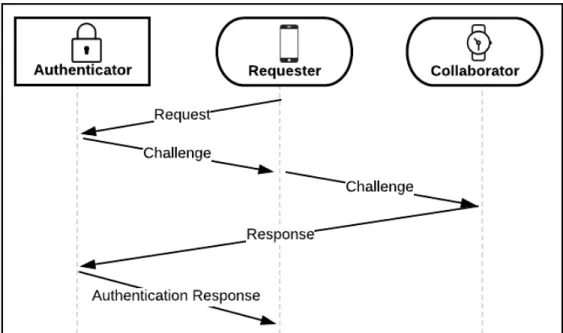
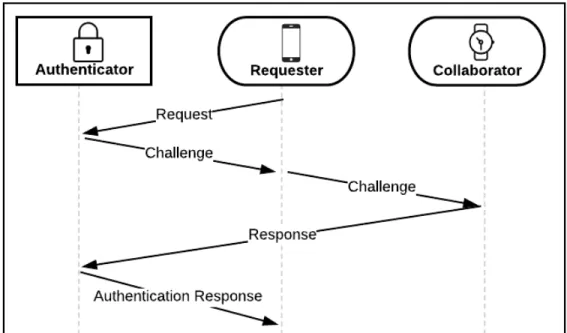
Figure 2.1 depicts a simple scenario requiring m = 2 devices to authenticate has 3 devices involved: (1) one protecting resources a user would like to access called the Authenticator and two user devices, (2) one requesting access called the Requester and (3) one that is used to verify a challenge known as a Collaborator [12], [13], [14]. There are many possible variations of the protocol that are analyzed by their tradeoffs in Chapter 4.
Figure 2.1: Diagram depicting co-authentication requiring m=2 devices. A requesting
device uses one other associated user device to collaborate in a challenge to successfully authenticate to a system protected by an Authenticator.
The protocol starts by a device sending a request message to the Authenticator containing its identification and a timestamp, signed by its private key [12], [13], [14]. The Authenticator receives the request message, decrypts it, and confirms the
Requester is valid. Upon a valid request, a challenge is generated by the Authenticator and returned to the Requester. The Requester forwards the challenge to the
and completes it by adding its identification and a timestamp, signing it with its private key, and sending the response back to the Authenticator.
Once the Authenticator receives the challenge response, it confirms the
Collaborator is valid [12], [13], [14]. If the Collaborator is valid, paired with the Requester and provided the correct challenge originally generated by the Authenticator, then
authentication is passed. An authentication response message is generated including a session key to access the system and transmitted back to the Collaborator. The
Collaborator then forwards the authentication response message containing the session key back to the original Requester.
In summary, co-authentication can be used to require m-out-of-n devices to properly respond to an authenticator’s challenge. In this way, authentication only occurs when a user proves, to the authenticator, possession of multiple devices.
Although co-authentication is a single-factor scheme (the single factor being hardware tokens), additional factors can also be incorporated. For example, an
authenticator may require a password in addition to co-authentication (this implements a server-side password check), or a co-authentication application (e.g., running on a client device) may require a password before collaborating (this implements a client-side password check).
CHAPTER 3:
SURVEY OF APPLICATIONS
Co-authentication suits access control needs for many physical and informational security systems. This chapter will survey potential applications as embodiments of co-authentication as described in the patent applications.
3.1 Computer Applications and Webservers
Computers and webserver applications are some of the most common resources protected by authentication. Passwords are currently the most commonly used factor to authenticate a user digitally. They protect the files of a user on a computer, their bank account, social media accounts, ecommerce, secure networks, etc.
Password authentication, however, is vulnerable to social engineering where a user is convinced into sharing their password or details related to it [1], [8], [10], [15], [16], [18], [23], [28]. Phishing attacks can be used to convince users to enter their credentials into a fake website or to download malware onto a user’s computer and log their keystrokes for a password. Because a user has to physically enter their secret, someone watching or monitoring surveillance cameras might see the password, or parts of it. It is also susceptible to brute force guessing attacks where an adversary
password, but used with information gathered from social engineering, phishing and eavesdropping could expedite the attack.
Once the password for one user resource is compromised, many of their other accounts are susceptible to a breach because of how commonly passwords are reused. A CSID consumer survey on password habits found that 61% of users use the same password for multiple accounts and 54% of people have less 5 passwords or less [6]. If a compromised password is also used to authenticate to the user’s email service an adversary can hypothetically log in and change the passwords to all of the user accounts registered to that email.
3.1.1 Computer Unlocking and Network Login
Co-Authentication provides an interesting alternative to using passwords for authenticating to webservers and computers. Most people feel the need to lock their computers when stepping away but are required to reenter their password when they return. One of the most obvious applications is using their smartphone and smartwatch to authenticate to a work or home computer. The application could work by having a
user automatically log in when they get within a certain proximity of the computer with m
required devices. The application could also continuously check that m devices are
within proximity and lock the computer if not.
Assume a user carrying a smartwatch and a smartphone and m = 2 required
devices. Using co-authentication to unlock a computer can either be a manual or automatic process. If a user wants to automatically log into their computer, their smartphone and smartwatch could be used as a requester and collaborator. The
computer plays the role of the authenticator. This implementation could be modeled to have one of the two user devices, we’ll assume the smartphone, send an authentication request to the computer once in a desired proximity. The authenticator could then return with a challenge that the smartphone must collaborate with the smartwatch to complete.
Once logged in, the authenticator can periodically send challenges to the
requester to be completed. Another option, if it can be guaranteed that all m devices are
in proximity of the authenticator when access the computer, is to have the authenticator periodically ping each device that participated in authentication to ensure they are still in range. If any of the devices fail to respond, it is likely that the user left, and the
authenticator will logout of the session.
In some cases, it may be safer to require a user to manually log into their
computer instead of assuming a user wishes to authenticate when a device is in range. A user manually logging into their computer using co-authentication could be required to select a user account. The authenticator could then broadcast a challenge and wait for
m successful responses to the challenge before unlocking. In this case, requesting
would be done by selecting a profile to log into and both user devices would be used to collaborate in the challenge. Another example could require a user to press a button on one or more of their collaborating devices to manually confirm the access request. This prevents an attack where a device is stolen and a collaborator unknowingly
authenticates the requests of the stolen device.
Both of these examples, provide advantages over using passwords. First, users gain the convenience of not having to enter their password every time they want to log into their computer and could potentially login automatically when in range. Second,
many of the problems password authentication faces are mitigated. Social engineering and surveillance is no longer effective for collecting information about the secret or key because the private keys are stored on the devices, unknown to the user. Guessing attacks are still a possibility but by requiring multiple devices participate in
authentication, m keys would have to be consecutively guessed correctly for this attack
to work.
Attacks on this application would require an adversary steal/clone at least m user
devices in order to login to their computer. A user would likely notice when a device is physically stolen and can unregister the device from the trusted set of devices before a second device is stolen. Cloned devices would be hard for a user to discover but devices could use rotating keys dictated by the authenticator after each successful authentication, making the cloned device useless after a user uses the original device for authentication again. One disadvantage of this application would be in the event that
a user forgets, loses, or breaks multiple devices putting their total count below m
devices. The user would no longer be able to authenticate to their computer without m
devices so some type of password backup or management service needs to be in place to prevent locking yourself out of your resources.
3.1.2 Webserver Application Login
Another application of co-authentication is using multiple devices to authenticate to personal webserver accounts and applications. There could be an option when logging into a website for singing in using co-authentication. When the user selects this option, the computer the browser is running on could broadcast its availability to nearby
devices. A user could then manually press a button on one of their devices to request access and initiate co-authentication.
A service could be created on user devices to manage web accounts, keys and associated devices. Whenever a user wants to authenticate to a webpage they can simply use their personal devices instead of remembering difficult passwords and worrying about the vulnerabilities that accompany them.
There is currently an account management service similar to this called LastPass that generates unique passwords for each of a user’s registered web accounts to
prevent social engineering and guessing attacks [11]. The service requires 2-factor authentication, using a password and a registered phone or device to confirm access. Once authenticated, LastPass will automatically enter login information and passwords when a user needs to log into a web account. This service, however, is verified with a single device protected by a PIN. If the PIN is discovered and the phone is stolen, an adversary could gain access to all of the user’s accounts. Also, if the phone is lost or stolen the user has no way to authenticate to any of their web accounts because verification happens through their phone. The user would need to prove to LastPass they are the actual owner to authenticate to their account and in the meantime would be locked out of all of their other web accounts.
An account management service using co-authentication would still provide a lot of the security benefits that LastPass offers without a single device being an Achilles Heel. For instance, a scheme requiring two devices for co-authentication wouldn’t allow access if a single device is lost or stolen but would still allow the user to access their resources using another device.
3.2 Physical Access: Doors, Gates, Surveillance
Co-authentication also fits the requirements of physical access control mechanisms. Many physical access control systems currently implement token authentication requiring a key to gain access. For example, most doors protecting homes, buildings, secured rooms, cars, etc. unlock using a metal key or a keycard that transmits a digital key.
These methods of authenticating are particularly susceptible to key loss. If a person loses their key or an adversary steals/copies it, then someone unauthorized could access the physical location the door protects. Co-authentication could be used to mitigate the vulnerability of theft-based attacks on these applications of access control by forcing an adversary to obtain multiple devices from the user instead of just one key.
3.2.1 Vehicle Gates
Vehicle gates are used as authenticators in residential homes and
neighborhoods as well as by businesses to prevent unknown people and vehicles from entering their facility. Some implementations have an RFID tag placed on registered vehicles that acts as a token. If a user’s car or the RFID tag gets stolen the thief would be able to gain unauthorized access to the location. Others use a keycard or
smartphone instead that is more likely to be on the user’s person; however, this is still susceptible to a similar theft attack.
Consider a scenario using co-authentication: the authenticating vehicle gate
could require m = 2 devices, the RFID tag in the vehicle could be used as the Requester
vehicle enters in range of the gate, it initializes the authentication process with a request message. Users could have an option for requesting access with their smartphone and collaborating with their smartwatch in the event that they are in an unregistered vehicle but still need to access the location.
The implementation described could prevent a stolen car or someone with a stolen phone from entering the gate. Depending on if access control is desired on a vehicular or user level, there could also be deployments of this application specifically requiring one of the m devices to be a registered vehicle tag.
3.2.2 Building and Vehicle Doors
Building and vehicle doors are commonly protected with either a key or a PIN. PINs are subject to eavesdropping and guessing attacks and a single key can easily be stolen. Co-authentication provides a solution that doesn’t face these pitfalls while also being more usable. A person would no longer be required to remember a PIN or carry any extraneous keys because their everyday devices would do the work for them.
In an application embodied by co-authentication, the locking mechanism in the door can be used as the Authenticator requiring two user devices, e.g. a smartphone and smartwatch can be used as the Requester and Collaborator, or vice versa.
Whenever a button on the door or the handle is pressed, the Authenticator broadcasts that it is accepting requests. Either the smartphone or smartwatch would be designated for automatically sending a request once receiving the broadcast to start the
should be low to prevent someone from requesting access to the door with a user in range to authenticate but not notice the unwarranted request.
This application could also implement a different manual step to start the authentication process. The user could request access to the door using their smartphone or watch to prevent the unwarranted request explained above. Another possibility could use a dedicated mobile device such as a key fob to make locking and unlocking requests. A user’s smartphone or smartwatch could be set to automatically collaborate in requests, this way the key fob only works when in proximity of another user device. The application could also send an alert to the collaborating device to require a manual acceptance before granting access.
Another design could have the user devices automatically request access once in a certain proximity of the door and automatically collaborate in the challenge. The door could have a mechanism to slide open once authentication is passed to provide an automatic opening solution. This design could be used in hospitals that need to
transport beds between secured areas, businesses that need to transport large carts around different departments and any other system that desires the convenience of an automatic, door opening, access control solution.
Implementations of co-authentication could also continue to use a traditional key in conjunction with user devices. A traditional key could be used to request access but require one or multiple user devices verify the request. This would prevent unwarranted access in the event a physical key is lost or stolen.
3.3 Internet of Things
More and more devices are becoming “smart” and connected to an internetwork of other smart devices called the Internet of Things (IoT). Smart home devices such as thermostats, voice-activated assistants, security and surveillance systems, lights, kitchen appliances, TV’s, etc. are being connected to the internet to provide the
convenience of updating and being controlled remotely. Many automobiles are having their locks, ignition, GPS navigation, vehicle trackers, communication devices and other functionalities connected as IoT solutions. Businesses such as hospitals are also
starting to implement IoT solutions by having medical equipment and devices connected to track and control their uses. IoT applications require access control mechanisms to prevent its devices from being used for malicious use.
3.3.1 Smart Home Devices and Child Proofing
Most smart home IoT devices can be controlled remotely by users on their smartphone to conveniently monitor and control the operation of their homes. An adversary gaining remote access to smart home applications poses a significant threat to the residents for obvious reasons. People who own smart homes devices need a robust, but convenient authentication scheme for controlling their devices and appliances.
An embodiment of co-authentication to protect remote access could require m
devices to remotely monitor and control applications. Another embodiment could allow
user could use their smartphone, tablet, or computer to access their applications remotely and use a smartwatch and other devices they carry to collaborate.
Smart home applications should also require authentication for physical control as well to prevent malicious use by guests, children or intruders. User devices are connected to the smart home network so applications such as thermostats, cameras, security systems and kitchen appliances could adopt a scheme of co-authentication that uses a smartwatch to broadcast an authentication request once in proximity of an
appliance. Another device in range could be used to collaborate in the request but this is inconvenient for a person having to carry multiple devices while in their home.
Instead, smart home appliances could adopt a scheme of co-authentication that queries devices connected to the network for authentication. For example, if a user’s
smartphone, smartwatch and vehicle are connected to the network, the user is home and likely making a valid request. This implementation could prevent appliances being tampered with while someone is away from there home but there is still the possibility for unwarranted control while they are home and do not notice.
To prevent this, an implementation could require a dedicated requester, such as a smartwatch or smartphone, be present on the user when making requests. Certain devices such as a vehicle or personal computer on the network would validate that a user is home and automatically collaborate with the requesting device. This employment of co-authentication compared to the previous helps prevent unnoticed changes while the user is home but adds inconvenience by requiring a device to be present on the user.
3.3.2 Vehicle Devices
Most vehicle devices are authenticated with token authentication using a single key device to unlock and access functionalities. A user is vulnerable to key loss or theft and even carjacking once the user has started the vehicle. An embodiment of
co-authentication could be used to authenticate to vehicle devices to prevent these attacks. Vehicles could also use co-authentication to load user-specific settings such as seat position, music and common GPS locations based on which registered user is authenticated.
An implementation may replace the current key or use it in conjunction with other user devices to collaborate in requests. In order for an adversary to hijack or steal a car, they would be required to obtain multiple user devices. This may make it harder for an attacker to obtain than a traditional key but could put the user in danger and make it harder for them to evade the situation.
Another possible scheme could continue to use a traditional key in conjunction with multiple user devices. If a certain number of user devices are removed from the vehicle but not the key, an alert could be sent to the removed device(s) inquiring about the situation. An option could be to report a carjacking that would shut down
functionalities, lock the attacker inside, and alert police to the location of the vehicle. The victim could allow the vehicle to continue operation for a small amount of time and to get a safe distance before disabling the vehicle.
3.4 Financial Institutions and Applications
Financial institutions are frequently the target of theft making it essential to provide a strong authentication scheme for accessing resources. There are many financial applications that co-authentication fits the security requirements for.
3.4.1 ATMs
An automatic teller machine, universally known as an ATM, allows bank users to withdraw money from their accounts electronically without the need of a human. ATMs are accessed using a bank card with information about the account and usually a 4-digit PIN the user enters to verify their identity. This scheme prevents an adversary from stealing a user’s bank card and accessing their money without the PIN; however, ATMs and other financial machines can have skimmers installed that record and clone the cards information and the PIN without the user’s knowledge.
ATMs using co-authentication for their authentication scheme could mitigate the threat of these types of attacks. By using multiple user devices to communicate with the ATM there is no longer a need to carry and protect a banking card or remember its PIN. Instead, a user could press a button on their smartwatch when in range that broadcasts a request to authenticate to the ATM with co-authentication. The user’s smartphone could then be used to automatically collaborate with the challenge or the ATM could prompt the user to verify the request on their smartphone first.
Co-authentication for authenticating ATM transactions could make a suitable counter to credit card skimmers because they can no longer record the PIN used to
verify users. It also prevents access from being granted if a single user’s device is stolen because at least one other would be required to verify the identity.
3.4.2 Mobile Payment
Banking and credit cards are starting to be integrated into our smart devices. Users are able to use their smartphone at stores and restaurants to pay for things without the need to carry physical cards. Co-authentication could be used to implement authentication for mobile payment applications. An embodied application may have a user register their smartphone and smartwatch to the payment service. When a
payment is desired, a user may open an app or tap their phone to a payment scanner. Their smartwatch could then receive and alert that a payment request was made and give the user a small window of time to accept or reject the request.
3.4.3 Safes and Vaults
People and banks use safes and vaults are used to protect physical access control to a specific resource, usually valuable items such as money, jewelry, weapons and sentimental material. Typically, safes and vaults require a key, PIN, or number combination. These factors suffer from the attacks mentioned in previous applications in this chapter and could instead adopt co-authentication to reduce the risk of intrusion.
Users with personal safes could register their smart devices and set m devices
required to be present to open. This allows users to dictate the tradeoffs they receive between security strength and convenience when protecting the belongings in their safe.
Financial Institutions with vaults to protect money and safety deposit boxes could deploy schemes of co-authentication to ensure one single person isn’t alone with
valuable resources at any time. By requiring not only multiple devices to authenticate but multiple users as well, banks can ensure better protection with a more secure auditing of access.
3.4.4 Retail Locks
Retail stores lock valuable and commonly stolen merchandise in glass cabinets that require an employee of the store to unlock with a key. These are not carefully tracked and susceptible to loss by careless workers. One way to prevent lost or stolen retail keys from being used maliciously is to implement a scheme of co-authentication for authenticating to retail locks.
Stores could use embedded chips within nametags or smartwatches to monitor employee activity and broadcast notifications throughout the day. These devices could also be used to verify the identify of a worker and make great candidates for
Collaborators used in conjunction with an electronic lock and key to perform co-authentication. Electronic keys could be used solely as requesters and only given to designated employees. When a customer wants to purchase a locked item, an
employee could use their key to request authentication and use their nametag and/or smartwatch to collaborate in the request.
Another implementation could do away with physical keys and require employees have both a smart nametag and smartwatch. Smartwatches could be picked up when a work shift begins and used to as a requester for locked merchandise and other
employee-related tasks. Nametags could be registered to employees used to identify them and collaborate in authentication requests. Nametags could be granted specific permissions and only be an acceptable collaborator when the employee is scheduled to work to prevent access by employees on their off time.
3.5 Military Applications
Government and military agencies require robust physical and informational access control. Resources such as vehicles, buildings, weapons, information and intelligence need secure authentication methods for use and access. A few, non-exhaustive, military applications that could adopt co-authentication will be briefly discussed in this section.
3.5.1 Sensitive Networks and Classified Information
Accessing classified information and networks can pose national security threats. A lot of these databases and surveillance tools can be protected using co-authentication similar to the computer applications described in Section 3.1. An embodiment of co-authentication could require a user with permissions to have multiple devices registered to them and require all of them to be present when authenticating to a network or
database. This scheme could require devices manually request and collaborate in and each device could be protected with its own authentication factor. Once access is granted, a user can continuously authenticate by having their devices remain in range. After a period of time, the authenticator can require a manual step to verify that the user hasn’t left and someone else is accessing the system. An attack against this system
would require all user devices be stolen and authenticated separately to manually perform co-authentication. A government worker would likely discover that one or multiple devices are missing and deactivate them before any malicious actions can be done.
3.5.2 Deployment of Military Action
In some cases, deploying military action that puts lives at stake should require approval and authentication from multiple leaders. A commonly known example requires two keys be turned by different people in order to prevent accidental or
malicious launching of nuclear weapons [25]. Co-authentication embodies a solution for authenticating the authorization of military attacks. In a scenario where numerous military leaders register their personal device, specific rules could be created to achieve authentication. For example, a rule could allow the president of a country to request an action but be required to have approval by at least two generals. Another may allow a general to request an action on their device and only require the president collaborate in the approval. A situation where the president doesn’t collaborate could require the rest of the military leaders to approve the request. This is just one example of a possible implementation as co-authentication could be set up in various ways to guard the authorization of military action.
3.5.3 Vehicle and Weaponry Authentication
Certain military vehicles and weapons require security mechanisms to be as convenient as possible for allies and as hard as possible for an adversary to access.
Various implementations of co-authentication can be used to achieve such a
mechanism. Soldiers on a battlefield can be deployed with multiple devices such as a phone for communications, a smartwatch or tablet for communications, weapons, a helmet or glasses with augmented vision, GPS dog tags to locate soldiers and even embedded tags in their uniform clothing. These tags and devices could be used to continuously authenticate the soldier as a valid user and authorize the use of their devices.
By requiring the tools and devices to authenticate each other, a device stolen or lost can no longer be used without multiple other devices. Each group of devices for a given soldier could have an expiration timeout that gets reset when brought back to an ally base. This would prevent a stolen or lost group of tools from being used by an enemy. Soldiers in combat could be given a shared group to allow them to pick up a fallen ally weapon and still use it with their equipment while rendering it useless to an opponent.
3.6 Group Access and Anonymous Access
A group of registered user devices can contain devices belonging to multiple people. Group access can be set up to allow multiple people in the same group to authenticate or to require multiple people in the same group be present to authenticate. Co-authentication proposes an interesting solution for group authentication that also provides a layer of anonymity for users.
3.6.1 Requiring a Group to Access
This scheme could be used for valuable resources that shouldn’t be left alone with a single user. Two or more business partners may want all members to be present in order to access the storage or inventory they own together. A few applications
discussed could benefit from implementing this type of authentication scheme such as store managers and financial institutions that would like to require multiple users be present for proper checks and balances. Military applications with great implications such as nuclear arsenals, drones and other weapons that require multiple approvals for authorization might benefit from including such a scheme.
In an embodiment of co-authentication requiring a group to authenticate, more than one user must be present. A group of a users could be formed and given
permissions such as the ability to request and/or collaborate. Each user in the group of users could have their own set of registered devices that they use to authenticate each request or collaboration with or just have one master device. For example, a scheme may require two users be present and require they each provide two or more of their own user devices to request or collaborate. Another scheme could require two or more users but may require that each user in the group have just one device, protected by a PIN or other factor.
3.6.2 Group Access
In certain circumstances where a set of users access the same resource, it may be more convenient to group user devices with similar permissions together. For instance, households may want all users of their residence to have their devices
registered under the same group. An embodiment of co-authentication providing group access could have each employee of a department register their smartphone,
smartwatch and laptop and use them to control physical access to their department.
Having multiple users registered in a group increases n, the number of registered
devices, which may give an attacker more options for devices to steal but could require stealing devices from multiple people.
3.6.3 Anonymous Access
Depending on how the registration process was performed, group access can also provide a scheme to allow users to authenticate anonymously. Consider recording only a device identifier and a key during registration. Groups could be set up to contain devices from multiple different users but not have information about a particular user. When an Authenticator receives a request or challenge response it can only check that the device is in the group of trusted devices, not which specific user sent the message. This can be used to provide a layer of anonymity for applications where a user prefers their identity remain unknown.
3.6.4 Human Verification
Websites and advertisements want to ensure that activity on their servers are being controlled by humans and not computer bots. Bots and botnets are used to control user devices and perform malicious activity on behalf of the user such as
creating several accounts on a webserver, clicking on advertisements, etc. Proving that a computer is a human is often an important task to complete in order to prevent spam,
denial of service and other imitation acts. A recent Russian attack known as Methbot has been launched on advertisement companies where an army of bots imitate users and click on ads [5]. The attack cost advertisers $3-5 million per day and an estimated $180 million total [5].
Traditional methods for human verification take form in a captcha where a user is required to enter the text from a picture into a dialog box or click a checkbox saying “I am not a robot”. These methods can be circumvented by programmatically scanning webpages and using character recognition [27]. A form of co-authentication could be used to perform human verification. A user would register two or more of their devices with a trusted, reputable 3rd party verification service. When an application needs to
prove that one of its users is a human, it could require the user click a button and perform co-authentication similar to the applications described in Section 3.1. Users click a button that starts the authentication process using the devices they have on them and the verification service acts as an authenticator to inform the web application
CHAPTER 4:
ANALYSIS OF DESIGN TRADEOFFS
This chapter will discuss and analyze the tradeoffs between different protocol designs embodied by co-authentication. Versions of the protocol may incorporate manual or automatic requesting and collaborating, message sending via broadcast messages or paired-device sending, and different variations of the communication protocol.
4.1 Manual vs. Automatic Requesting
When a user or device wants to request access to the authenticator they will do so by sending an access request message. A scheme of co-authentication needs to determine if it should require authentication requests to happen automatically or by a manual action. Authenticators could continuously broadcast their availability while resources are unused and available. Devices configured for automatic requesting would receive a broadcast once in a certain proximity of an Authenticator and automatically send an access request. Authenticator broadcasts received by devices configured for manual requesting could prompt the user with a notification that the Authenticator is within range and allow the user to press a button to initiate a request.
Authenticator broadcast that a device may manually or automatically request access to. This way, requests are made by a user action rather than automatically when a user is within proximity.
Depending on an application’s needs, requesting may want to be automatic or manual. Automatic requesting gives users the convenience of a hand-free
authenticating solution that needs minimal user effort. Physical doors in high mobility, access controlled environments such as hospitals, businesses, warehouses, etc. make good candidates for applications using co-authentication with automatic requesting.
Manual requesting offers users a more controlled environment and has the added benefit of preventing accidental requests that may occur with automatic
requesting. Systems that cannot afford to receive accidental requests for access would be better suited to adopt manual requesting. Most physical and informational access control systems such as banks, vaults, doors, computer applications, ecommerce, etc. are systems that require manual requesting.
4.2 Manual vs. Automatic Collaborating
When a user device receives an authentication challenge message it must complete the challenge and forward it to either another user device or an Authenticator. Manual and automatic requests and collaborations go hand-in-hand because
collaborations, like requests, can be automatic or manual. Applications adopting automatic requesting that want to implement a completely hands-free scheme could also use automatic collaborating to do such.
Schemes configured to automatically request may wish to use manual
collaborating as a last verification step. This will prevent the event in which an attacker steals a device used to request and the user accidentally collaborates in the malicious request. Manually requesting and automatically collaborating is similar to the policy previously discussed but a device used for requesting would need a mechanism to prevent unwarranted requests since collaborations will be made automatically.
Applications such as computer applications and physical doors may choose to have an automatic step to provide better usability.
Manual requesting with manual collaborations are suitable for applications with tighter security requirements such as group access and financial applications. By requiring both manual requests and collaborations, an adversary would need to steal multiple devices to access a user’s resources. Any scheme containing an automatic request or collaboration is susceptible to a single device being stolen and a user’s non-stolen device automatically participating in co-authentication with it.
4.3 Message Sending
Communication between devices occurs via sending messages. When a device needs to transmit a message to another device it can do so by either broadcasting the message to a proximity or by sending it to a paired-device on the same network.
4.3.1 Broadcasting and Multicasting
There are times where devices may choose to broadcast or multicast messages to one another. Broadcast messages would likely be used where devices
communicating are doing so via proximity rather than over a network [21]. Multicast messages could be used by devices on a network to transmit messages to a set of multiple devices [21]. Broadcasting may be used by Authenticators to announce their availability to devices in the area. Authenticators and user devices may be configured to multicast challenges over a network or broadcast within proximity to allow multiple devices the opportunity to participate as a Collaborator. Broadcasting also allows devices to send messages to devices out of range by using intermediary devices to forward messages between the devices.
4.3.2 Unicasting
There are implementations that may benefit by using unicasting to send
messages to specific devices rather than broadcasting them to a range of devices [21]. A device using automatic requesting or collaboration with broadcasting may accidentally request or collaborate for a stolen user device. Unicasting allows for a more private communication between devices.
4.4 Single Collaborator Protocol Variations
The order in which messages are sent and received may vary amongst different applications embodied by co-authentication. For instance, a system may require a Collaborator return the challenge response to the Authenticator instead of the
Requester. This section will describe schemes requiring the minimum number of user devices, two, containing an Authenticator, Requester, and Collaborator. As shown depicted in Figure 2.1, there are four main message types sent between devices
successfully participating in co-authentication: (1) a request message coming from a Requester to an Authenticator, (2) an authentication challenge that the Authenticator generates to be completed by a Collaborator, (3) a challenge response that a
Collaborator must transmits back to the Authenticator and (4) an authentication
response the Authenticator must pass to the Requester. An Access Request message will always come from a Requester directly to an Authenticator but any other message type may travel between an intermediary device.
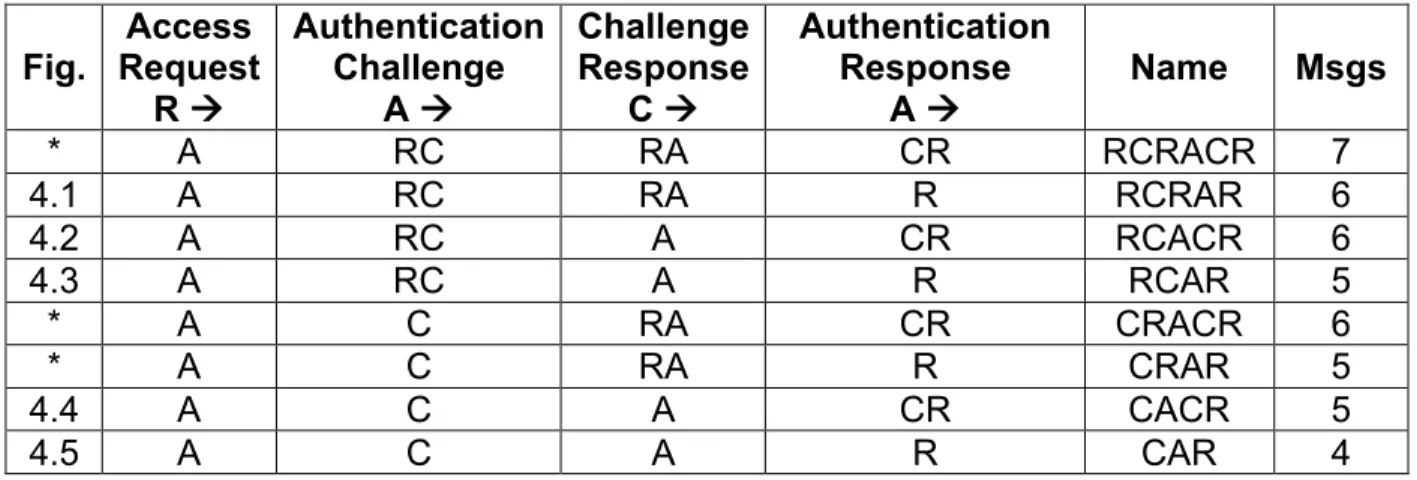
Table 4.1 below shows possible transactions of messages for a three device system where A is the Authenticator, R is the Requester and C is the Collaborator. For example, ARC indicates a message travelled from the Authenticator to the Requester then from the Requester to the Collaborator. In this scheme the Requester always sends a request message to the Authenticator directly, but there are two transmission variations for challenges, challenge responses and authentication responses. In the table, figures labeled with an asterisk are schemes that don’t give any added benefits. The schemes not discussed lacked any practicality and will not be discussed.
Table 4.1. Co-Authentication Schemes Using a Single Collaborator
Fig. Request Access R à Authentication Challenge A à Challenge Response C à Authentication Response A à Name Msgs * A RC RA CR RCRACR 7 4.1 A RC RA R RCRAR 6 4.2 A RC A CR RCACR 6 4.3 A RC A R RCAR 5 * A C RA CR CRACR 6 * A C RA R CRAR 5 4.4 A C A CR CACR 5 4.5 A C A R CAR 4
4.4.1 RCRAR
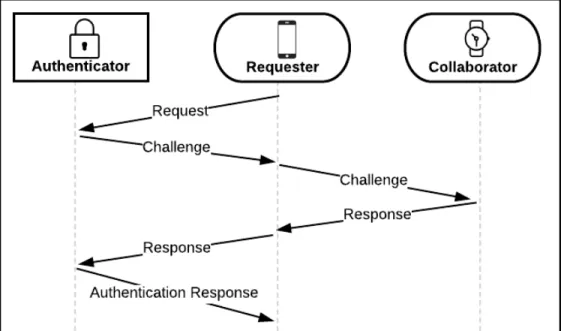
Figure 4.1: Diagram depicting RCRAR co-authentication requiring m=2 devices. Every
communication involves the Requester.
To summarize, the following scheme starts with a Requester sending an access request to an Authenticator. The Authenticator validates the request and generates a challenge for the Requester to get signed by one of its Collaborators. The Requester receives the challenge and forwards it to one of its registered devices. The Collaborator receives the challenge, signs it and returns the challenge response back to the
Requester. The Requester passes the challenge response back to the Authenticator who validates the collaboration and returns an authentication response.
The pros of this scheme are that only the requesting device communicates with the Authenticator. This design could be used in implementations where only certain user devices are used as Requesters so that stolen Collaborators cannot make requests. This is also helpful for instances where collaboration is done via proximity and the Collaborator is in range of the Requester but not the Authenticator (e.g., the
Collaborator may be a smartwatch that can only communicate with a paired smartphone).
The cons of this design are that the Collaborator doesn’t communicate with the Authenticator, so it will need some way to inform the Collaborator what it’s signing for and to prove that the challenge is valid.
4.4.2 RCACR
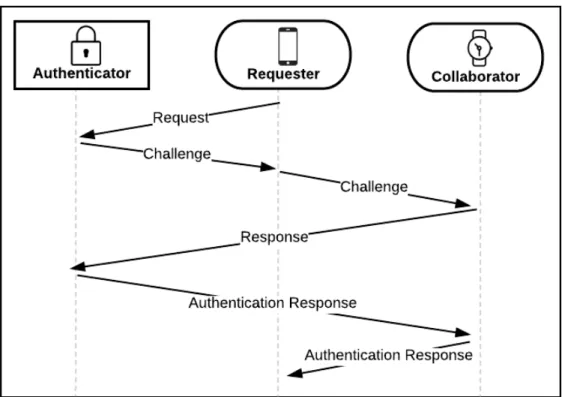
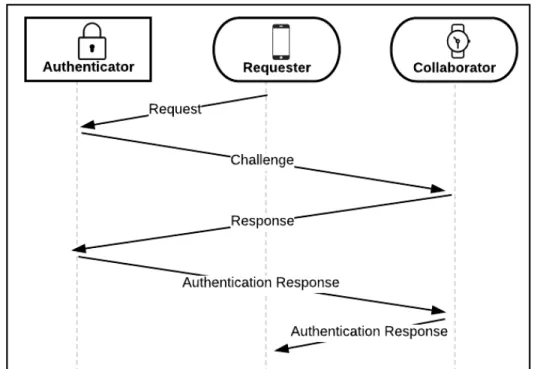
Figure 4.2: Diagram depicting RCACR co-authentication requiring m=2 devices. A
requesting device uses one other associated user device to collaborate in a challenge to successfully authenticate to a system protected by an Authenticator.
To summarize, the design above is similar to Figure 4.1 in that a Requester sends a request to an Authenticator who generates a challenge for the Requester to get signed by one of its Collaborators. The difference is that instead of the Collaborator returning the message to the Requester, it will return it directly to the Authenticator. The
to the Collaborator containing a session key that the Collaborator will forward to the Requester.
The pros of this scheme are that the Collaborator communicates directly with the Authenticator device. This will allow it to receive a message from the Authenticator indicating what and who the session key is for and make a decision before transmitting it back to the Requester.
The cons of this scheme are that it requires both the Requester and the
Collaborator to be in range of the Authenticator, considering they are not on a network together. Having devices connected via LAN network rather than an ad-hoc network could allow devices to remotely collaborate; although, this may not be desired if a system wishes to require devices to be physically present during authentication.
4.4.3 RCAR
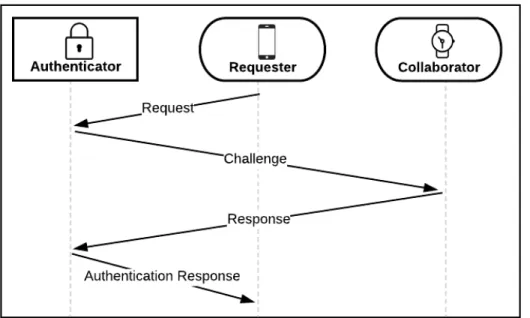
Figure 4.3: Diagram depicting RCAR co-authentication requiring m=2 devices. A
requesting device sends an authentication challenge to one of its Collaborators who returns it to the Authenticator. Upon validation, the Authenticator relays an
To summarize, the scheme above depicts a design similar to Figure 4.2. The difference is that the authentication response is sent directly to the Requester instead of going through the Collaborator first.
The pros of this scheme are that only the Requesting device would receive a message with a session key. The challenge the Collaborator signs could also contain a message indicating what resources they are collaborating for. This scheme also takes one less message transaction than in Figure 4.2.
The cons of this scheme are that this design doesn’t have the Collaborator forward the authentication response to the Requester. This step is not necessarily needed but is the difference in trusting the intended use from the Requester instead of the Authenticator.
4.4.4 CACR
Figure 4.4: Diagram depicting CACR co-authentication requiring m=2 devices. An
To summarize, this design differs from the previous because instead of sending the authentication challenge to the Requester, the Authenticator sends it directly to the Collaborator. The message may contain the Requester’s identification information and the resource they are trying to access. The Collaborator signs the challenge and
responds directly to the Authenticator. Once the Authenticator validates the challenge it responds with an authentication response containing the session key to Collaborator. The Collaborator may then automatically send the message to the Requester or have an option to manually approve the final communication.
The pros of this scheme is that it allows the Collaborator to receive a message
directly from the Authenticator indicating who and what is requesting access. The Requester is only responsible for sending an initial request and doesn’t have to forward messages between the Authenticator and Collaborator.
The cons of this scheme are that the Collaborator needs to be in range of the Authenticator and the Requester must be in range at least for the initial request. The Authenticator could also return the authentication message directly to the Requester without the need for an extra message to the Collaborator.
4.4.5 CAR
To summarize, this scheme is similar to the one described in the previous section in that the Authenticator and Collaborator communicate authentication challenges and challenge responses directly between each other. The difference is that instead of sending the authentication response to the Collaborator, the Authenticator transmits it directly to the Requester.
Figure 4.5: Diagram depicting CAR co-authentication requiring m=2 devices. The Authenticator sends and receives challenges with the Collaborator directly.
The pros of this scheme are that the Collaborator receives the challenge directly from the Authenticator. There is not a last step where the Collaborator returns the authentication response to the Requester because it is assumed that if it signed the challenge it is okay with allowing access. This scheme also has the smallest cost for message transactions only require 4 total messages.
The cons of this scheme are that both the Requester and Collaborator must be in range of the Authenticator.
4.4.6 Summary of Single Collaborator Unicasting Schemes
Of the five schemes discussed for single collaboration using unicasting, RCRAR, RCACR and CAR appear to have better practical tradeoffs. RCRAR has the Requester send and receive messages from the Collaborator. This is desirable if a system wishes to have communications to Collaborators be strictly controlled by the Requester.
Authenticator and is responsible for forwarding the authentication response back to the Requester. This system has an added layer of protection because the Collaborator can receive a notification to accept or decline the forwarding of the access granted message to the Requester in the event that it becomes compromised and attempts to make a request. CAR is the last practical single collaborator design. In CAR, communications amongst Authenticators and Collaborators happens directly between the two. This scheme requires the least amount of communication transactions between devices and can inform the Collaborator what resources a Requester is attempting to access. This method doesn’t require any communication between Collaborators and Requesters but it does require that the Collaborator be in range of the Authenticator during the
authentication process.
4.4.7 Single Collaborator Broadcasting Scheme
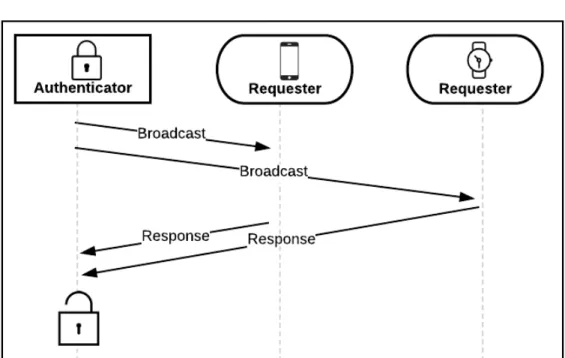
Figure 4.6: Co-authentication where an Authenticator broadcasts an availability message.
To summarize, another protocol design could be to have an Authenticator continuously broadcast its availability by sending a notification to devices in range. If a user wants to authenticate, they send a response to the Authenticator’s notification on both of their user devices. The authenticator could record which devices have sent a
response in a given time period and if m devices in a group are validated, access can
be granted.
The pros of this scheme are that communications only happen between an Authenticator and a user device. User devices won’t be required to communicate with each other thus, an adversary wouldn’t be able to request or collaborate in
co-authentication with a valid user device without being in the same proximity.
The cons of this scheme is that by having the Authenticator keep a count of the amount of validated user device could be troublesome. For example, if the Authenticator waits for m user devices to validate within a given time period, an adversary could just
continuously spam requests hoping to guess m user devices or to launch a denial of
service attack.
4.5 Multiple CollaboratorsProtocol Variations
All principles and concepts discussed in the previous section for single
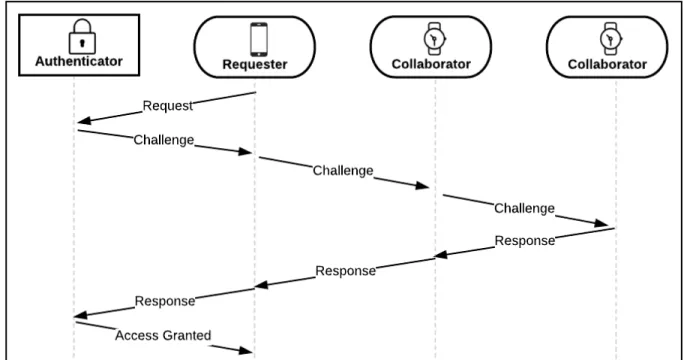
collaborators also apply for multiple collaborators. The question to answer now is: How should the second Collaborator receive the challenge? In a unicasting system, the first Collaborator could forward its signed challenge to the second Collaborator or the Requester or Authenticator could be responsible for distributing challenges amongst Collaborators. For instance, in Figure 4.7 below, the first Collaborator forwards its
completed challenge to the second Collaborator once it has finished signing. This
scheme is similar to RCRAR as described in Section 4.4.1, but could also be configured to have the first Collaborator return the challenge to the Requester then from the
Requester to the second Collaborator.
Figure 4.7: RCRAR Chained Collaboration. The first Collaborator forwards its signed challenge to the second Collaborator to be completed. Once completed, each device returns the challenge to the sender they received it from.
Another unicasting design may require the Requester to send challenges directly to Collaborators and have challenges returned directly to the Requester. Upon receiving a signed challenge from one Collaborator, the Requestor could forward the message to the next collaborator and so on. This way challenges and responses happen directly between Collaborators and Requesters and wouldn’t require one Collaborator to talk to another. The pitfall to this method is when using messaging based on proximity and one of the Collaborators is not in range of the Requester, it will have no way to receive or return a challenge. The previous method described, RCRAR Chained Collaboration