Student’s Performance Assessment and Learning Skill
towards Wireless Network Simulation Tool – Cisco
Packet Tracer
https://doi.org/10.3991/ijet.v14i07.10351
Vasanthi Muniasamy (*),Intisar Magboul Eljailani, M. Anandhavalli King Khalid University, Abha, Kingdom of Saudi Arabia
Abstract—Practical Learning is a great way of learning as it aids to in-crease a learner’s interest in a certain subject. It entails the use of visual aids to convey ideas even more effectively. Students can more easily understand and adapt the information from the subject, when they can visually see how it really works. Rather than just explaining the theory concepts, using ani-mating slides, simulation software that explain the theory concepts easily can be used by the instructor to develop the student’s skill in the particular subject. Simulation tools provide significant cost savings in Education. This is because a topic can be taught effectively to large numbers of people without the need of buying expensive equipment. Like wireless networking labs, if we want to construct the lab with the equipment like wireless router, access points, different cabling it is more cost effective. Now in net, we can find out more simulation software for networking. One of the best simula-tion tools for Networking is Packet Tracer which can be freely down-loadable from Cisco Networking Academy Students. It includes assessment task with automatic scoring and reporting. This paper presents the features of the simulation tool and analyzes the student’s performance over this sim-ulation software with the given questionnaires. This study provides evi-dence in support of the instructional effectiveness of the use of Simulation software tool for the teachers and the learners who are interested in net-working concepts.
Keywords—Packet Tracer, wireless access points, basic service set, extended service set, independent basic service set, DNS, HTTP.
1
Introduction
Visual learning engages the use of visual aids like video to deliver educational content even more effectively. It greatly benefits and enhances the learning pro-cess as interactive effects are used to reinforce the material being studied. Visual learning is a great way of learning as it aids to increase a learner’s interest in a certain subject, makes the learning process more enjoyable, and retains the stu-dent’s interest for longer periods. By using visual learning, an audience is better
served when they are provided certain elements that classroom notes or text can-not fully convey. Over the last ten years, several national efforts have been initi-ated to develop multi-media and web-based educational material [4]. It is a proven method in which ideas, concepts ,data and other information are associated with images and animation, resulting is an easier and more effective method of trans-mitting skills. With the rapid advancement of information technology, virtual reality technology has also gradually developed, accompanied by the dramatic growth of virtual reality experiment technology [5]. Students can understand theo-retical concepts of wireless networks much easier if they can see them, or interact with them in virtual environment. Learning networking course with packet tracer simulation tool helps students to open their minds, understand the concepts easily and think broadly about networking. Packet tracer is a GUI environment and user friendly tool. It is very tough to teach wireless networking course to the diploma community college students. In this paper, we discuss the teaching learning expe-rience of wireless network course with the packet tracer as a practical tool.
The rest of the paper is organized as follows. In section II, we give brief introduc-tion about the available wireless devices in the packet tracer simulaintroduc-tion software. Section III deals with Research Methodology and Results, final Section discuss the Conclusion and future work.
2
Wireless Devices Available in Packet Tracer Simulation Tool
Wireless networks are growing everywhere. We can find Wi-Fi hotspots at most public places. Packet Tracer has a limited number of wireless devices but provides an unlimited number of possibilities.
2.1 Wireless Access Point (WAP)
In computer networking, a wireless access point (AP) is a device that al-lows wireless devices to connect to a wired network using Wi-Fi, or related standards. The AP usually connects to a router (via a wired network) as a standalone device, but it can also be an integral component of the router itself.
• Access points are the basic elements of a wireless network – They scan for the wireless devices in its range and all the neighboring Wi-Fi systems connect to the Access Point to communicate with the network.
• Access points offer a standard for connectivity – a, b/g, b/g/n which are all ratified by IEEE so that the Wi-Fi systems from various vendors can connect to the network.
• Access points connect to PC’s, laptops, PDA’s, mobiles, Wi-Fi phones, Wi-Fi Cameras, Wi-Fi display management systems and a host of other devices that work on the Wi-Fi standard.
• Access points can also scan the network for wireless threats and attacks
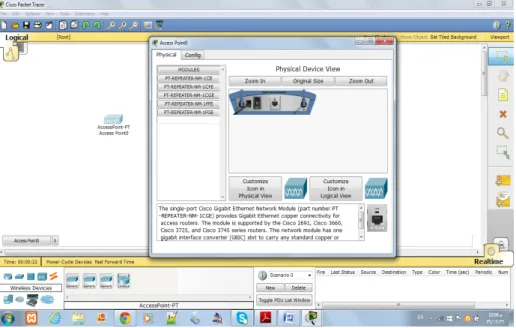
• Access Point-PT / Access Point-PT-A / Access Point-PT-N: These are generic wireless access points with minimal configuration options. All of them have an antenna and a port to connect to a device, such as a router or DHCP server.
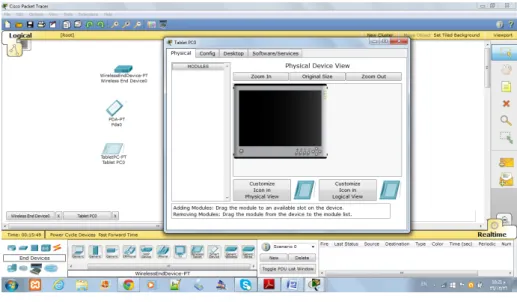
• Tablet PC-PT / PDA-PT / Wireless End Device-PT: These three devices pro-vide the same functionality, they only represent different things. These devices come with a built-in wireless interface.
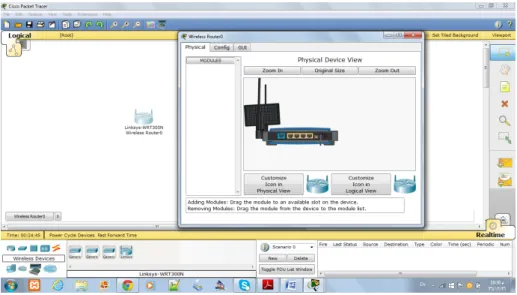
• Linksys-WRT300N: This wireless device provides a web interface similar to the one provided by a real Linksys model for configuring a SSID (Service Set Identifier) , wireless authentication, WAN port, and much more. This device has four Ethernet LAN ports and 1 Ethernet WAN port, which can be connect-ed to a router or model that provides internet.
Fig. 1. Wireless Access Point in Packet Tracer
The function of a wireless access point is to allow wireless devices such as pro-jectors, laptops and PDAs to access a local area network. Wireless access points mainly act as switches to spread connections wirelessly. The difference between an access point and a router is that access points do not assign IP addresses nor do they have firewalls; they only lock out traffic that does not have the wireless key.
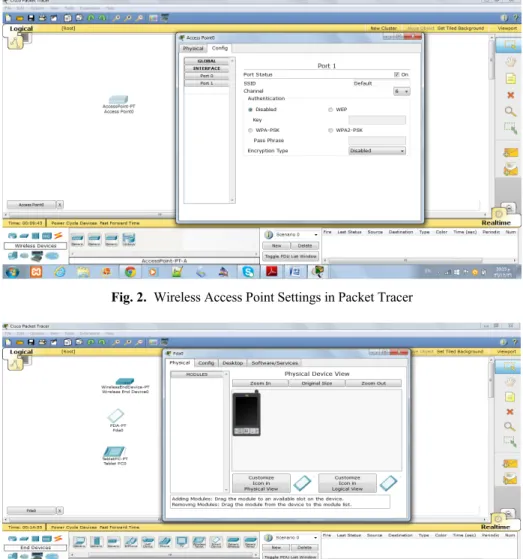
In Fig.2 given configuration of AP in that port status is on. SSID which in our case it is default [It can be changed by other names] also we can set any numeri-cal value for simple security purpose and also given different security protocols like WEP and WPA. According to the channel authentication, we can choose the Encryption types.
Fig. 3, Fig. 4 and Fig. 5 show the three devices namely PDA-PT / Tablet PC-PT / Wireless End Device-PC-PT. These all devices provide the same functionality,
they only represent different things. These devices come with a built-in wireless interface. No need of reconfiguration.
Fig. 2. Wireless Access Point Settings in Packet Tracer
Fig. 4. Wireless Tablet PC -PT in Packet Tracer
Fig. 5. Wireless End device PC -PT in Packet Tracer
As given in Fig 6 and Fig 7 wireless router configuration is given in packet tracer so by practical, students will easily know how to configure original physi-cal router.
Fig. 6. Linksys Wireless Router in Packet Tracer
Fig. 7. Linksys Wireless Router with GUI based Configuration
2.2 Wireless Network Interface Card(NIC)
Every host you want to connect to a wireless network needs a wireless network interface card (NIC) to do so. Basically, a wireless NIC does the same job as a traditional NIC, only instead of having a socket/port to plug a cable into; the wire-less NIC has a radio antenna. [1]
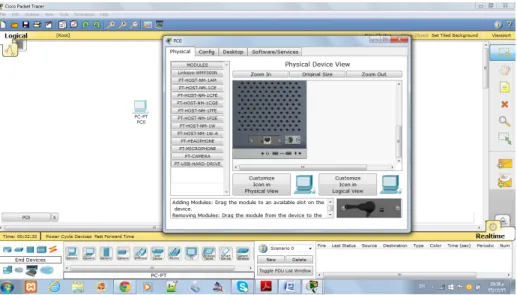
As given in Fig 8 and Fig 9 facility provided in packet tracer by which we can remove Ethernet connector (wired NIC) and by drag and drop we can add wire-less NIC card to PCs and Laptops.
Fig. 8. Wireless Configuration of PC - PT
2.3 Students Assessment in Packet Tracer
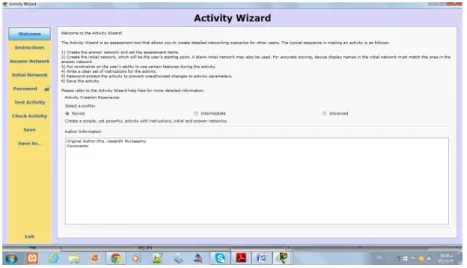
Activity Wizard facility is provided in packet tracer as given Fig 10. The activ-ity wizard is an assessment tool that allows you to create detailed networking scenarios for students or other users. Grouping of networks users and resources connected to administrative defined ports on a switch. When you create VLANs, you are given the ability to create in our session we have given students to com-plete scenario given as.
Fig. 10.Activity Wizard Module in Packet Tracer
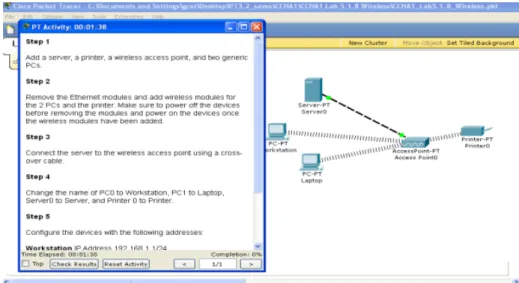
As Shown in Fig 10. And Fig 11: Activity Wizard Module and activity steps. Teacher can create their activity given as below. If activity is completed or not, message will be display on the screen after clicking on check activity button and also how many activities completed out of total activities. Here I have given one example of such activity. That we have given during our class session.
Activity 1: Adding and configuring network devices Open the “Wireless.pka”
file and follow the Instructions, which are repeated here:
Step 1: Add a server, a printer, a wireless access point, and two generic PCs.
Step 2: Remove the Ethernet modules and add wireless modules for the 2 PCs
and the printer. Make sure to power off the devices before removing the modules and power on the devices once the wireless modules have been added.
Step 3: Connect the server to the wireless access point using a crossover cable.
Step 4: Change the name of PC0 to Workstation, PC1 to Laptop, Server0 to
Server, and Printer 0 to Printer.
Step 5: Configure the devices with the following addresses:
• Workstation – IP Address 192.168.1.1/24
• Laptop – IP Address 192.168.1.2/24
• Server – IP Address 192.168.1.3/24
Step 6: Verify connectivity. From Workstation, use the PING command to test connectivity to Laptop.
Fig. 11.Activity Wizard with steps in Packet Tracer
Fig. 12.Activity Result in Packet Tracer
Activity Results given in above Fig 12.in our session several such activity have been given to the students and after completion, assessment result will be gener-ated which include time Elapsed, completed items, required items etc.
3
Research Methodology and Result
3.1 Purpose of the Study
The purpose of this study was to examine the student’s experience and learning skills and assessments towards the simulation software packet tracer for con-structing the Wireless networking environment virtually.
3.2 Participants
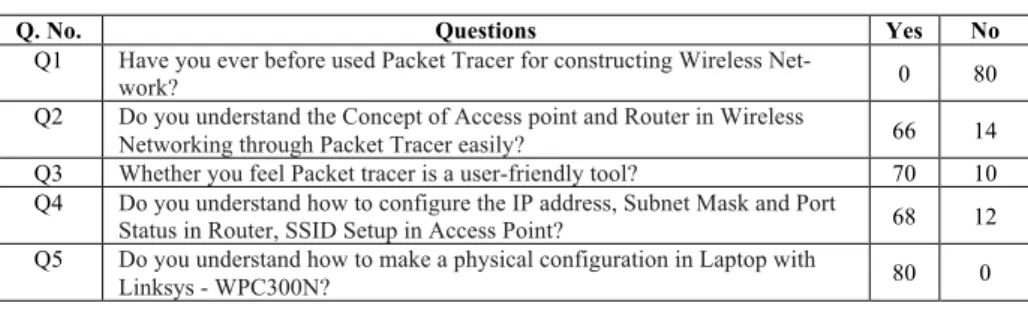
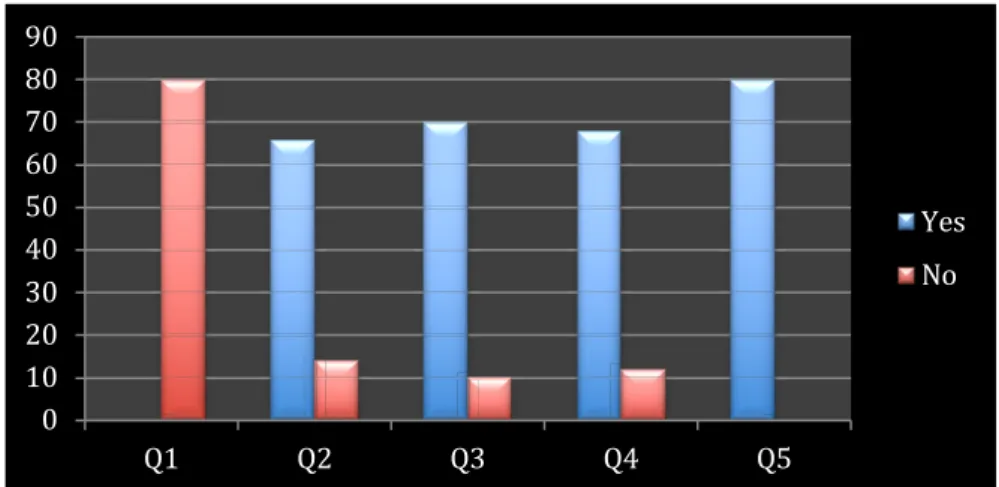
The sample included 41 students of level 5 Diploma Community College under King Khalid University enrolled in a course entitled ”Computer Wireless Net-working” in the Fall Semester 2015. This course is a traditional lecture-style course for one semester. The class met 2 days a week for one hour theory session for 2 day and two hours practical session for 1 day. First two weeks we explained the concepts of Packet tracer, various wireless devices and how to configure the devices based on our choice to construct wireless networking. The third week we prepare and give one activity wizard to the students to construct the wireless net-working to send and receive the packet in between two laptops by using two ac-cess points and one Router. After completion of Activity Wizard, Feedback was collected from each student in the form of simple questions to evaluate student’s understand towards the concepts, viewpoint of their experience in the sessions as well as participating in the activities. Questions are showed in Table 1. There are 5 questions in the feedback form. The students sample is less than eighty and the questionnaires are simple to understand, we received full response from the stu-dents.
Table 1. Students Feedback Form
Q. No. Questions Yes No
Q1 Have you ever before used Packet Tracer for constructing Wireless
Net-work? 0 80
Q2 Do you understand the Concept of Access point and Router in Wireless
Networking through Packet Tracer easily? 66 14
Q3 Whether you feel Packet tracer is a user-friendly tool? 70 10
Q4 Do you understand how to configure the IP address, Subnet Mask and Port
Status in Router, SSID Setup in Access Point? 68 12
Q5 Do you understand how to make a physical configuration in Laptop with
Fig. 13.Students Feedback Result Chart
4
Conclusion
Simulation is a rising subject recently, along with the methods and application techniques of simulation researching deeply, with digital computer the simulation to practice system or imaginary system has been more and more recognized. Because a lot of high and new techniques have progressed, as net technique, graphics and image technique, multimedia, software engineering, information processing and auto-control etc., these have expedited the progressing step of simulation technique [6]. Wireless network is complex concepts that are not easy to understand at first glance. To facili-tate the teaching and learning process of Wireless networks, visual tools can be used. . Cisco Packet Tracer is a network simulator that can be used not just by students but also by instructors and network administrators. This software provides a wide range of Cisco switches and routers running on IOS 12 and IOS 15, wireless devices from Linksys, and several end devices such as PCs and servers with a command line. It is more than just a simulator and provides physical simulation as well as an assessment tool. The assessment tool can be used to create practical networking questions with a complex scoring model. The physical workspace provided can be used to determine the range of wireless devices
In this paper, we presented a well-known tool (Packet Tracer) that can significantly help students to become familiar with wireless networks. This tool allows users to do labs with several simulated access points with number of PCs or Laptops with wire-less NICs, that is, without the need of a real and expensive devices and software like AP wireless routers etc. They have advanced GUIs to ease settings, and animations to facilitate the understanding of ideas. This tool enables a virtual look inside of a differ-ent configuration of wireless devices. Therefore, studdiffer-ents can visually see and there-fore more easily understand that what is really going on in the Wireless networks. We recommend the teachers, students, and networking professional to use this packet
0 10 20 30 40 50 60 70 80 90 Q1 Q2 Q3 Q4 Q5 Yes No
tracer as a practical tool for improving their knowledge in networking both wired and wireless networking areas through virtual learning.
5
Acknowledgement
The authors would like to thank Scientific Research Deanship, King Khalid University, Abha, Kingdom of Saudi Arabia for supporting this study.
6
References
[1]Todd Lammle, CCNA Wireless Study Guide, Wiley Publishing. Inc 2010. CISCO Press June 2009.
[2]Brandon James Carroll, CCNA Wireless Official Exam Certification Guide.
[3]Michael Watkins and Kevin Wallace CCIE NO.7945, CCNA Security Official Exam Study guide, CISCO Press June 2008.
[4]Shadi MS. Harb, Ahmad Harb, Issa Batarseh, Development, Implementation, Assessment of a Web-based Circuit Solver for Teaching Basic Electrical Circuits Theory, University of Central Florida, Orlando, FL ,USA. Online: https://online-journals.org/index.php/i-joe/article/view/4727/3566. https://doi.org/10.3991/ijoe.v11i4.4727
[5]A Space Design Teaching Model Using Virtual Simulation Technology, Jialing Wu Uni-versity of Science and Technology Liaoning, Anshan, Liaoning. Online: https://online-journals.org/index.php/i-jet/article/view/8585/4999.
[6]Application of Visual Simulation Technology in College English Teaching, Bing-jun Ma Fuyang Normal College, Fuyang, China. Online: https://online-journals.org/index.php/i-jet/article/view/6243/4195.
7
Authors
Vasanthi Muniasamy received the B.Sc and M.Sc degree in computer Science from Madurai Kamaraj University, India. She received her M.Phil degree in Comput-er Science from Manonmanium Sundaranar UnivComput-ersity, India. She is currently doing her Ph.D. in Annamalai University, India. She started her career as a Senior Faculty member in Tamilnadu Government Project Scheme, NIIT (2000), India and then worked as a Guest Lecturer in Government Arts College for women, Madurai Kama-raj University, India meanwhile she worked as a lecturer in Madurai KamaKama-raj Univer-sity Evening College (2001 – 2006). From 2006 – 2009, she is working as a Lecturer in Department of Computer Science, KM College of Pharmacy, India. Her areas of interest are Pattern Recognition, Image Processing and E-Learning. Currently she is an Assistant Professor in the Department of Computer Science at King Khalid Uni-versity, Abha, Kingdom of Saudi Arabia since 2012. She has published a book and 10 research publications in highly reputed international journals and with the total citations around 7. She had attended and presented in more than 12 national & inter-national conferences and served as a manuscript reviewer for Electronic Journal of
QM Certificate of Course Recognition for successfully meeting the Quality Matter Rubric Standards for her course.
Dr. Intisar Magboul Ejalani completed Ph.D in the year 2012 from Nile Valley
University, Sudan. She started her career as a TA at Nile Valley University (1993), Sudan. Her areas of interest are Data Analysis, Business Administration and E-Learning. She has published 10 research publications in highly reputed international journals and with the total citations around 7. She had attended and presented in more than 8 national & international conferences and serving as editorial board member for a few conferences. She is the Quality Coordinator from 2015 - 2017. Currently she is an Assistant Professor in the Department of Management at King Khalid University, Abha, Kingdom of Saudi Arabia since 2011.
Dr. M. Anandhavalli completed Ph.D. in the year 2010 from Sikkim Manipal University of Computer Science Engineering, India. She started her career as a lectur-er at Kamaraj Univlectur-ersity (1998), India, and then worked at SRM Univlectur-ersity, India and later joined as a Reader in Sikkim Manipal Institute of Technology (SMIT), India. Her areas of interest are data mining and soft computing. She has published more than 20 research publications in highly reputed international journals and with the h index of 5, and with the total citations around 170. She had attended and pre-sented in more than 18 national & international conferences. She served as a principal investigator for the funded project from All India Council for Technical Educa-tion (AICTE) and served as a manuscript reviewer for renowned international jour-nals for past 8 years, and Ph.D. thesis reviewer for several universities. She has been invited to give guest lectures and serving as editorial board member for a few journals and conferences. Currently, she is an Associate Professor, at the College of Computer Science, King Khalid University, Abha, Kingdom of Saudi Arabia since 2011.
Article submitted 2019-02-20. Resubmitted 2019-03-28. Final acceptance 2019-03-29. Final version published as submitted by the authors.