Unicorn: Two-Factor Attestation for Data Security
∗Mohammad Mannan
Concordia Institute for Information Systems
Engineering Concordia University
Montreal, Canada
Beom Heyn Kim
Computer Science University of TorontoToronto, Canada
Afshar Ganjali and David Lie
Electrical and ComputerEngineering University of Toronto
Toronto, Canada
ABSTRACT
Malware and phishing are two major threats for users seek-ing to perform security-sensitive tasks usseek-ing computers to-day. To mitigate these threats, we introduce Unicorn, which combines the phishing protection of standard security to-kens and malware protection of trusted computing hard-ware. The Unicorn security token holds user authentication credentials, but only releases them if it can verify an attesta-tion that the user’s computer is free of malware. In this way, the user is released from having to remember passwords, as well as having to decide when it is safe to use them. The user’s computer is further verified by either a TPM or a remote server to produce atwo-factor attestation scheme.
We have implemented a Unicorn prototype using com-modity software and hardware, and two Unicorn example applications (termed as uApps, short for Unicorn Applica-tions), to secure access to both remote data services and encrypted local data. Each uApp consists of a small, hard-ened and immutable OS image, and a single application. Our Unicorn prototype co-exists with a regular user OS, and significantly reduces the time to switch between the secure environment and general purpose environment using a novel mechanism that removes the BIOS from the switch time.
Categories and Subject Descriptors
D.4.6 [Security and Protection]: Access controls, Au-thentication
General Terms
Human Factors, Security
Keywords
Trusted Computing, Authentication, Attestation, Security Token, Malware, Phishing
∗Contact: [email protected]. Majority of this work was done when the first author was a post-doctoral fellow at the University of Toronto.
Permission to make digital or hard copies of all or part of this work for personal or classroom use is granted without fee provided that copies are not made or distributed for profit or commercial advantage and that copies bear this notice and the full citation on the first page. To copy otherwise, to republish, to post on servers or to redistribute to lists, requires prior specific permission and/or a fee.
CCS’11,October 17–21, 2011, Chicago, Illinois, USA. Copyright 2011 ACM 978-1-4503-0948-6/11/10 ...$10.00.
1.
INTRODUCTION
Malware is one of the greatest security threats for Internet users today. Evidence suggests that 53% of computers (out of 21 millions scanned worldwide) are infected with mal-ware [1]. Much of this malware is designed to steal sensitive information from and invade the privacy of the computer user. Aside from malware, computer users also have to con-tend with phishing attacks, where the adversary social en-gineers the user into leaking authentication credentials by producing a web page or interface that appears similar to a legitimate one. By acquiring these credentials the attacker can then proceed to steal the user’s identity and access sen-sitive information that belongs to the user.
Passwords and other authentication credentials can be protected using security tokens that implement one-time passwords, or that are able to respond to cryptographic chal-lenges (e.g., RSA SecurID, and the split trust paradigm [3]). By introducing the security token, users are protected from phishing since convincing the user to leak an authentication credential they know (such as a password) is not sufficient for the adversary to gain access to the user’s data. How-ever, even with token authentication, the user’s data is still vulnerable to theft during an active session by malware on their computer.
In contrast, trusted-computing hardware can be used to measure and report integrity of the software stack running on a computer [7,8,20,21,25,35]. Trusted-computing hard-ware, developed by the Trusted Computing Group (TCG), Intel and AMD enables software to utilize a root of trust based in hardware, which is significantly more difficult for a remote attacker to subvert than a root of trust based in software. These systems use hardware to measure the in-tegrity of software running on the computer, allowing the hardware to assert, via an attestation, that a system is free of malware. This attestation may be conveyed to the user over a trusted channel. Unfortunately, interpreting this at-testation is difficult for humans and user studies have shown that users are not always diligent enough to interpret or no-tice signals that indicate that the attestation has failed [16] (cf. “the barn door property” [36]).
Our key insight is that security tokens and trusted com-puting can be combined to produce a system that is as resis-tant to phishing as standard security token authentication, but is additionally resistant to attacks by malware. We pro-pose the use of a Personal Security Device (PSD), which, like a security token, holds personal authentication credentials, but differs in that a PSD can verify an attestation from the user’s computer. Thus, rather than having the user decide
when to release their authentication credential, the PSD ver-ifies the attestation from the user’s computer and releases the authentication credential on behalf of the user only if the attestation is correct. In addition to the attestation by the PSD, the computer’s software stack is also verified ei-ther by a remote server that holds user data or the trusted computing hardware on the computer. Thus user data is in effect protected by atwo-factor attestation.
To evaluate this idea, we have designed a system called Unicorn.1 Rather than trying to preventing malware and phishing attacks altogether, Unicorn takes a mitigating ap-proach by safe-guarding Unicorn-protected data from these attacks. We implement a Unicorn prototype that uses Intel TXT and TPM as the trusted computing implementation, and an Android smartphone as the user’s PSD.2. In our prototype, a user starts initially from an untrusteduser op-erating system (OS), which could be infected with malware. When the user wishes to access their secure data, which could be stored on a remote service requiring authentication (such as banking information), or encrypted on the local disk, the user uses Unicorn to invoke aUnicorn application (uApp) from her computer. A uApp is a small, hardened and immutable OS image with a single application that will be used to access the user’s sensitive data. Unicorn uses the trusted computing hardware on the user’s computer to boot and measure the uApp, generating an attestation that the user’s PSD will verify. Only by combining this attestation with the authentication credential on the PSD will the uApp be able to access the user’s data.
The result is that an adversary may only gain unautho-rized access to data protected by Unicorn in one of two ways: the adversary must either (1) simultaneously gain physical access to the user’s computer and compromise or clone the user’s PSD, or (2) find and exploit a run time vulnerability in the uApp that has access to the sensitive data. In the first case, requiring the adversary to compromise two com-ponents simultaneously is a straightforward application of the principle of defense in depth. In the second case, uApps are intended to be smaller and simpler than the commodity user OS, giving the adversary fewer vulnerabilities that they can find and exploit. Consequently, Unicorn serves as a sec-ond line of defense so that a successful malware or phishing attack does not expose Unicorn-protected data.
Contributions.
1. We present and perform a security analysis of the de-sign of Unicorn, which combines an authentication to-ken with trusted computing to implement two-factor authentication protection for user data. Unicorn raises the bar for attackers, forcing them to either gain phys-ical access to the user’s computer and compromise the user’s PSD simultaneously, or to find and exploit a run time compromise in a small hardened uApp.
2. We implement a Unicorn prototype using widely avail-able commodity hardware and software tools. Unicorn enables users to use trusted and untrusted systems on the same computer, switching between them without a full reboot. Compared to existing solutions, Unicorn does not require hypervisor support, and does not suf-fer from performance degradation, while achieving
sig-1
A unicorn is a mythical single-horned creature, commonly known as a protector of innocence, and a symbol of purity.
2
For background on trusted computing, see AppendixA
nificantly faster switching time. Our prototype uses a novel mechanism that reduces the time to invoke a uApp to approximately 25.5 seconds, which is almost twice as fast as existing systems [35].
3. We demonstrate the utility of Unicorn with two rep-resentative uApps. The first is a banking application, which represents a scenario where sensitive user data is stored on a remote service requiring authentication. The second uApp is a secure document reader, which represents a scenario where sensitive user data is en-crypted and stored locally on the user’s computer. We first begin in Section2by defining the attacker model that Unicorn defends against, the guarantees that Unicorn provides and the limitations that Unicorn has. We then de-scribe the design and operation of Unicorn in Section3. The implementation of our prototype is given in Section 4 and we describe the two representative uApps we created in Sec-tion5. We evaluate both the security of our Unicorn design and the performance of our Unicorn prototype in Section6. Finally we discuss related work in Section 7 and give our conclusions in Section8.
2.
SECURITY MODEL AND GUARANTEES
2.1
Attacker Model
The goals of the attacker are to compromise the user’s Unicorn-protected sensitive data in the local machine or a remote server, or to assume control of a Unicorn-session be-tween the user and server (session hijacking). We explicitly distinguish Unicorn-protected data from arbitrary data that the user may know or have on their computer, which we con-sider out of scope for Unicorn. Unicorn-protected data must either be stored on a secure remote server, which requires authentication for access, or in encrypted format with keys available only to the user’s computer and PSD.
We assign the attacker the following capabilities. First, the attacker is capable of infecting the user OS with arbi-trary malware such that she has full control over the user’s software platform. For example, she may tamper with the Master Boot Record (MBR), bootloader, user OS kernel, applications running on the user OS, and uApp binary im-ages. Attackers can also tamper with device, BIOS and CPU configurations, and send arbitrary commands to de-vices before invoking a uApp. Second, the attacker can fake interaction with the user to try to convince them that they have correctly launched a uApp. We note that Unicorn does not prevent such an attacker from extracting secrets from the user through the equivalent of a phishing attack, but will ensure that Unicorn-protected data is not compro-mised. Third, the attacker may either gain physical access to the user’s computer, or compromise the user’s PSD, but not both. Compromising the user’s PSD includes infecting the PSD with malware, cloning the PSD, gaining access to PSD secrets, or stealing the PSD. We note that there have been instances where attackers have compromised both the computer and PSD at the same time, e.g., the Zeus banking trojan [6]. However, compromising the user’s computer and having physical access are not equivalent.
The following attacks are out of scope for Unicorn. While the attacker may have physical access to user’s computer, we assume that he cannot subvert the hardware root of trust as provided by the TPM version 1.2 chip and CPU’s late launch
QR coded TPM quote
uApp OS
User OS
2. Snap
Figure 1: Overview of Unicorn user steps feature; i.e., attacks against hardware trust (e.g., [11,37]) are
considered out of scope. However, the attacker can reset the TPM and change ownership password. We also assume that compromises of the remote server storing Unicorn-protected data are out of scope. Unicorn does not mitigate flaws in the remote server storing the user data. Finally, we assume that the attacker cannot compromise the operation of a uApp after it has launched. This is a standard limitation of trusted computing hardware, which can only attest to the state of the computer at the time the measurements are made.
For the communication between the user’s computer and remote server, a Dolev-Yao (DY) attacker is assumed, who also can arbitrarily modify and observe any plain text data in transit. However, the attacker is unable to circumvent any standard cryptographic mechanisms (e.g., SSL).
2.2
Properties, Guarantees and Limitations
Properties. Unicorn provides two properties from which we may derive the security guarantee it provides. (1) Unicorn-protected data is accessible only from the user’s computer. Access is bound to a secret signing key stored in the TPM of the user’s computer. Unicorn also deals with relaying attacks [32], as described in Section 6.1 (under item (d)). (2) Access to protected data is only granted if the PSD is present, which will release its secret only if it can verify the running uApp on the computer.
Guarantee. Unicorn protects user data unless (1) the ad-versary simultaneously gets physical access to the user com-puter, and compromises/clones the PSD; or (2) adversary finds and exploits a run time vulnerability in a uApp. Mal-ware is defeated because Unicorn-protected data is only ac-cessible from a verified environment. Unicorn provides equiv-alent protection to phishing attacks as security tokens – phishing attacks targeting Unicorn credentials cannot suc-ceed since Unicorn authentication requires the presence of the PSD to succeed.
Limitations. Unicorn’s major limitations are the follow-ing. (1) Unicorn requires a secure setup phase where the user must be diligent. Both TPM secrets and authentica-tion credentials for the PSD must be transmitted securely and to the correct parties (e.g., by out-of-band methods). Resetting a Unicorn-protected account also requires a sim-ilar secure bootstrap. (2) Unicorn’s phishing protection is limited to the user data explicitly protected by Unicorn. Phishing and social engineering attacks that trick user into revealing arbitrary information that users know (including
information that Unicorn is protecting) cannot be prevented by Unicorn. (3) Unicorn is not an intrusion detection sys-tem and cannot detect if a uApp has been compromised after the measurements are taken. An attacker who com-promises a uApp after the measurement phase will be able to usurp all privileges the uApp has, including access to the Unicorn-protected data.
3.
SYSTEM DESCRIPTION
3.1
Unicorn Architecture
Unicorn requires a setup phase where the PSD is initial-ized with a long-term authentication credential and correct measurements of the user’s uApps. This phase requires users to be diligent, as described below. After this, the regular use of Unicorn is broken into four steps as described in Figure1. In the first step, the user uses Unicorn to invoke a uApp on their computer. Unicorn suspends or terminates the user OS and invokes the uApp in a Measured Launch Environment (MLE). The MLE uses trusted computing hardware to per-form aquoteby computing a hash of the uApp and signing it with a key in the TPM. This quote is then displayed as a QR-code image on the screen of the user’s computer. In the second step, the user scans the quote using her PSD, which then verifies the correctness of the quote. If correct, the PSD uses the long-term secret to proceed to the third step, which grants the uApp access to the user’s data and allows the user to access the remote service if applicable. If the quote is not correct, indicating tampering of the soft-ware stack, Unicorn halts and the user will be unable to use the uApp or access her data. In the final step, the user can terminate the uApp and return to the user OS.
Setup phase. In this phase, the PSD must be securely initialized with the two pieces of information: (1) user au-thentication credentials (e.g., a user ID and high-entropy secret); and (2) the hashes of the uApp, in the form of ex-pected PCR values. In addition, if the uApp uses a remote service, the remote service must be given the public half of the AIK of the user’s computer. If the uApp accesses en-crypted data stored on the user’s computer, then a sub-key of the encryption key must be sealed to the uApp on the TPM of the user’s computer. If the user plans to access their data from more than one computer, then the AIK or sub-key must be initialized for each such computer. Note that sharing of AIKs with remote services will mandate a re-initialization of Unicorn in some cases, including:
updat-ing or resettupdat-ing the TPM hardware. For distributupdat-ing uApps, vendors may choose any channel, including web download. However, we assume that the vendor’s copy of a uApp is malware-free.
It is important that the authentication credentials are not leaked to an adversary, since this would allow the adversary to clone the PSD. Similarly, if an adversary is able to modify the values of the hashes associated with a uApp before they are saved on the PSD, the adversary will be able to cause the authentication secret to be used with a tampered uApp. Finally, if an AIK of a computer other than the user’s is transmitted to the remote server, or the sub-key of the en-cryption key for local data is leaked, this would allow the adversary to access the user data from a computer other than the user’s.
Unicorn requires an out-of-band secure channel during the setup phase. For example, in our online banking example of a uApp with a remote service, the PCR hashes of the uApp and authentication credentials must be transmitted through a secure channel. Such a channel might be in-person registration at a branch or postal mail. In these cases, the information can be conveniently installed via a QR-coded image. Similarly, the secure channel can also be used to transmit a one-time authentication credential, with which the user may login to the remote service and initialize it with the AIK public-key(s) of their computer(s). The user must be diligent throughout this process and not inadvertently leak their credentials to the adversary, provide the wrong AIKs to the service, or install the wrong hashes.
Starting a uApp. When invoking a uApp, the user may choose one of two options as shown in Figure 1: (1) im-mediate execution of the uApp loader; or (2) save the user OS and application states into disk using e.g., suspend-to-disk before executing the uApp loader. The former option mandates that users will save any unsaved documents before initiating the switch. The later allows users to resume the saved environment, but adds the suspend time to switch.
After the user OS has suspended itself to disk (if users choose this option), it would normally power off the hard-ware. To invoke the uApp, we modify the user OS to load theuApp loaderinto memory and transfer control to it. The uApp loader sets up the MLE and then transfers control to theuApp kernel, which then resets the devices to a known state, completes its boot process and starts the application in the uApp. Since the uApp kernel now has control of all the devices, the entire system acts as a shared platform for both the user OS and the uApp.
Verifying the uApp. Once the user OS transfers control to the uApp loader, the loader will take measurements of itself, the hardware state, the uApp kernel and boot pa-rameters, and store them in the TPM. The uApp kernel then measures the entire file system image it will use be-fore mounting the image, and also extends the measurement into the TPM. uApps are immutable so the measurement of a correct uApp will produce the same value every time. These measurements are used to attest the state of the soft-ware platform. This attestation ensures that the uApp has not been tampered with in anyway.
The exact attestation procedure depends on the uApp be-ing invoked. For uApps that interact with remote servers, attestation is performed with both the user’s PSD and the remote server, while uApps that do not interact with
re-mote servers only require attestation with the PSD. We dis-cuss different attestation and authentication modes in more detail in Section3.2.
Switch back to user OS.To return to the user OS, the uApp kernel loads the image of the user OS kernel into memory and transfers control to it. Since uApp images are immutable, any persistent state (e.g., user data) must be saved outside of the uApp, either on the remote server, or encrypted and saved on the local disk. After this, when con-trol is transferred to the user OS kernel, it will load a new OS instance or restore the suspended image.
Hardening uApps. uApps must be resistant to run time attacks since a compromise of the uApp after it has loaded means that the adversary will gain access to the user data. Several standard mechanisms can be used to harden uApps. First, uApps should be built with a smaller trusted comput-ing base (TCB). Unnecessary code and functionality should be removed as uApps are meant to be task-specific appli-ances. Second, uApps can be built on top of hardened oper-ating systems, such as SELinux, which have stronger access control mechanisms designed to mitigate attacks. Finally, the attack surface of a uApp may also be restricted by lim-iting its functionality. For example, in the case of a banking uApp, one could restrict the uApp to only be able to con-nect to IP addresses or domain names belonging to the bank, or modify the browser to only accept SSL certificates that belong to the bank.
Updating uApps. To fix vulnerabilities or to offer new fea-tures, vendors may distribute updated uApps (a new image or only the differences) via any channel, secure or otherwise (e.g., downloaded from a website). However, measurements of the new image must be updated securely on user’s PSD. For example, the PSD client may accept only signed mea-surements from a vendor (the signature verification key is also stored on the PSD) and only when the updating ver-sion is newer than the existing one; cf. [26,34].
3.2
Attestation and Authentication
Unicorn supports two scenarios in which user data may be stored. The first is where the data is stored on a remote server, such as financial information stored on a bank web-site. The second is where data is stored locally encrypted on the user’s computer. An example of this might be an encrypted document repository.
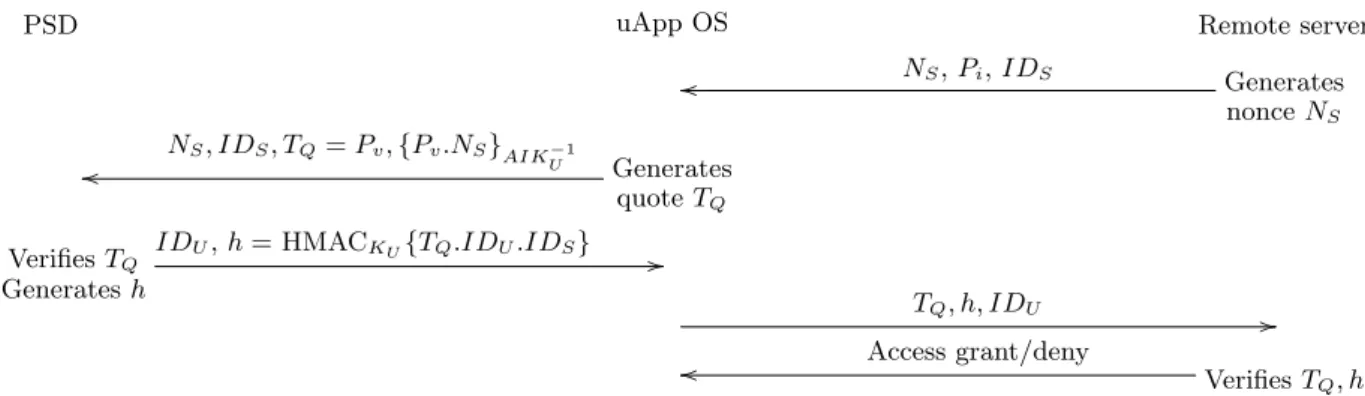
Remote server. Our combined attestation and authenti-cation protocol is shown in Figure 2. When the uApp is launched, the client browser loads the remote site over SSL and initiates attestation (e.g., by sending an attestation re-quest). The server responds with a random nonceNS, a list
of PCR indicesPito be included in the TPM quote, and the
server ID (IDS). LetKU be a key that represents the
long-term authentication secret stored on the PSD. The uApp then retrieves PCR values Pv, generates a quoteTQ using
the TPM, and forwards this quote, server ID and nonce to the PSD. If PSD can verify the quote (with the help of the pre-stored AIK and expected values of PCRs as indexed by
IDS), it generates an HMAChof (TQ.IDU.IDS) usingKU.
User ID and hare forwarded to the client browser, which then forwards these values along with the TPM quote to the server. If the server can verify the quote, and can cal-culate the sameh, access is granted to the user. Note that, if the PSD has Internet connectivity, it can directly forward
PSD uApp OS Remote server o o NS,Pi,IDS Generates nonceNS o o NS, IDS, TQ=Pv,{Pv.NS}AIKU−1 Generates quoteTQ VerifiesTQ Generatesh
IDU,h= HMACKU{TQ.IDU.IDS} //
TQ, h, IDU //
o
o Access grant/deny VerifiesT
Q, h
Figure 2: Attestation message flow for remote server. The setup phase initiates the PSD and the remote server with the shared authentication keyKU, AIKU, and expected PCR values.
(TQ, h, IDU) to the server instead of requiring another
PSD-to-computer communication channel. The remote server will only accept quotes signed with an AIK private key matching the AIK public that was registered with it during the setup phase, preventing access to the user data from any computer that wasn’t registered during the setup phase. Security of the protocol remains unaffected even if attackers can col-lect and replay the response from the PSD as the server will check freshness of its nonce as used in the protocol. The pro-tocol in Figure 2does not establish a session key between the uApp and remote server. We assume that they negotiate a session key as part of the secure channel setup (e.g., SSL session key); see e.g., Goldman [9] for alternatives.
One might be concerned that the PSD does not generate a nonce and send it to the computer, allowing an attacker with a tampered uApp to replay quotes to the PSD. In this case, the PSD will generate HMAC of the quote with the replayed nonce in it. However, the tampered uApp will still be unable to authenticate to the remote server, since the server checks freshness of its nonces. On top of the key-based authentication, an optional password authentication mechanism may be deployed.
Locally encrypted data. For applications that do not ac-cess a remote server, there is no party to share the public AIK with. Instead, we break the key used to encrypt the user’s data into two sub-keys. One sub-key is stored on the PSD as the user’s authentication secret, and the other is sealed in the TPM to the uApp. Unlike the remote server scenario, the PSD must send a nonce (ND) to prevent
re-play attacks against the quote operation. The PSD’s sub-key (Kpsd) is released to the uApp application only if the PSD
can verify the quote. See Figure 3. In this example, we assume the PSD-to-computer channel is physically secure, otherwise an attacker may learnKpsd. When the uApp
re-ceivesKpsd, it will retrieve the sealed part of the encryption
key from the TPM (Ktpm), which will succeed only if the
correct uApp is loaded. The decryption key is then gener-ated as follows: Kdec=Kpsd⊕Ktpm.
4.
IMPLEMENTATION
In this section, we give implementation details of our Uni-corn prototype, including how we are able to quickly switch between the user OS and uApp OS, and the implementa-tions of the uApp OS and our server- and PSD-based at-testors. Because our prototype is intended more of a proof
PSD uApp OS Generates nonceND ND,Pi // o o TQ=Pv,{Pv.ND}AIK−U1 Generates quoteTQ VerifiesTQ ProvidesKpsd Kpsd //
Figure 3: Attestation flow for locally encrypted data
of concept than a polished implementation, we relax some of the security requirements on the components in our Unicorn implementation for convenience. First, instead of running a specialized security OS with a minimal TCB, our uApp OS is based on a stock Ubuntu 10.04 Linux distribution running the Linux 2.6.34 kernel. This allows us to make use of exist-ing open source software packages in our prototype. Second, because we don’t have the means to program and implement a real security token as our PSD, we implement our PSD as an application running on an Android smartphone. In real-ity, there should not be any other applications running on our PSD that could allow the adversary to gain access to the authentication secrets.
4.1
Switching between User OS and uApp
Tools used. To implement fast switching between user OS and uApp, we leverage two components already present in the Linux kernel – suspend-to-disk and kexec. Suspend-to-disk enables the kernel to save its running state to a Suspend-to-disk so that the machine may be powered down and then later resumed back to the same running state. This functionality can be found on most commodity OSs. Kexec [22] is a fea-ture in the Linux kernel that can load another kernel into memory and transfer control to the new kernel. Kexec is intended to be used during kernel development to invoke a crash kernel for debugging after a kernel crash. The kernel image can be loaded into memory and executed immediately, or at a later time (e.g., when a crash actually happens). Be-cause kexec transfers control directly to the new kernel, it does not need to reset the machine and or invoke the BIOS.
User interaction.When the user wishes to invoke a uApp, she calls a user-space application. First, we use kexec to load the uApp loader, uApp kernel, initrd and Authenti-cated Code (AC) module into kernel memory, but we do not transfer control to the uApp loader yet. We then invoke the suspend-to-disk operation in the user OS kernel, if the user chooses to save her OS and application states. The user can also use kexec to invoke the uApp loader directly without suspend-to-disk; this enables faster switching at the expense of not being able to resume the user OS. When suspend-to-disk is complete, the Linux kernel normally powers down the machine. We modify the kernel implementation of suspend-to-disk to instead call a kexec function that transfers control to the uApp loader. If the uApp loader is not present in memory, the transfer of control fails. This would happen if the user directly called suspend-to-disk in the user OS with the intention of rebooting or powering down the machine. In this case, we proceed with the standard suspend-to-disk code to retain the existing kernel functionality. This change required only to add a single line of C code to the kernel.
4.2
uApp Loader and OS Implementation
uApp loader. Our uApp loader builds on tboot [13], an open-source project initiated by Intel. Tboot currently pro-vides a pre-kernel module as an MLE that uses Intel TXT to perform a measured and verified launch of the Linux ker-nel or Xen hypervisor. Normally, tboot is invoked by the GRUB bootloader. However, to remove the bootloader and BIOS execution from the switch time, Unicorn invokes tboot using kexec as discussed above. Tboot creates the MLE and then extends PCR 17 with several chipset and AC module specific measurements using GETSEC[SENTER], PCR 18 with measurements of the tboot kernel binary, uApp kernel binary and boot parameters, and PCR 19 with hashes of the initrd binary used to boot the uApp Linux kernel. It is im-portant to measure boot parameters as well as the binaries, since kernel behavior can be significantly altered by chang-ing the boot parameters. The final component of the uApp that must be measured is the partition that will be used to boot the uApp OS. Unfortunately, tboot is unable to access the disk directly to perform the measurement, so we modify the uApp kernel to measure its root partition just before the kernel mounts the partition, and extend PCR 20 with this measurement. We set the TPM locality of the uApp ker-nel to 1 (default is 0), as PCR 20 cannot be extended from locality 0. This PCR is reset by tboot during initialization. Cleanup at exit. When exiting from a uApp, we must en-sure TXT tear down and clean up of residual states so that secrets used in the uApp session are not exposed to the user OS. Tboot contains this functionality, so one possibility was to simply reuse this functionality by exiting the uApp ker-nel and returning execution back to tboot. However, tboot does not have support for kexec, so it would not be able to return directly back to the user OS and instead would have to reboot the machine to return to the user OS. Thus, we reimplement the tboot cleanup code in the uApp kernel and then use kexec to load the user OS kernel and transfer control to it. We also reset the TPM locality to 0 from the uApp kernel.
Hardening uApp OS.We take two approaches to harden the OS in our uApp prototype. First, we reduce the net-work attack surface by constraining the uApp to only being
able to access a minimal set of network services. We also cryptographically authenticate the remote services. Net-work restriction is achieved by using the iptablesfirewall to constrain network connections by IP address, and SSL with client-side verification to authenticate remote servers (without allowing any user-end override options if certifi-cate errors are detected). Second, we reduce the code foot-print of uApps to keep the TCB as small as possible. For our prototype, this meant removing unnecessary services and bi-naries from the uApp OS. Hardening of the uApp OS could be taken further by using a security-oriented high-assurance OS instead of a commodity OS like Linux. Candidate sys-tems include: formally verified seL4 micro-kernel [15], en-forcing security policies via SELinux [17], ensuring kernel integrity with SecVisor [27], continuous integrity monitor-ing usmonitor-ing HyperSentry [2], and the Nexus OS [28] designed with trusted computing in mind.
Read-only uApp image and reducing image size. To make the uApp OS verification possible, we need a read-only uApp base image which is not changed after being invoked. However, a read-only root image is problematic to a regular Linux OS, as certain utilities in Linux require a modifiable root file system. For example, it is common for applications to write their PIDs (e.g., into/var/run), and log messages to disk. To address these issues, we use AUFS (Another Union File System [23]), which allows several file systems to be simultaneously mounted at a single mount point and act as a single file system. AUFS overlays the file systems, creating a unified hierarchy. Each file system can be con-figured as read-only or writable. During boot, the uApp creates a temporary rewritable in-memory file system using
tmpfs. It then combines the root read-only uApp file system with temporary file system using AUFS. This combined file system is mounted as the root file system for our uApp OS. As a result, modifications will be stored in the in-memory file system and will be discarded when the user exits the uApp. The uApp starts from its pristine state the next time it is invoked.
Another challenge is the large size of the uApp base image. Since a hash must be performed over the entire uApp root partition, it is critical that the partition be as small as pos-sible. To achieve this, one might start by removing unneces-sary applications and kernel modules from the uApp OS. We made a smaller image by installing Ubuntu in command line mode and adding X server (Xorg), a simple window man-ager (openbox) and a login manman-ager (SLiM).3Another way of reducing the image size is using a compressed file system. We use squashfs [30], an open source compressed read-only file system for Linux. In our setup, squashfs shrinks the size of our uApp base image to less than one-third of its original size. Altogether, with our optimizations we made a uApp base image of size less than 260 MB (about 900MB in ext4). We then copy this image to a 275MB partition.
4.3
Server and PSD Attestors
Attestation can be performed by the remote server, a PSD, or both. To demonstrate remote server attestation, we implement a web server that performs attestation of clients connecting to it using the Twisted [33] networking engine version 10.0.0 written in python. The web server’s python
3We use auto-login, but without the login manager, Ubuntu
module uses a signature verification function we developed in C throughctypes(a Python wrapper of C library). Ver-ification of the TPM quote received from the uApp client requires the RSA signature algorithm and SHA-1 hash func-tion; we use the openssl library (version 0.9.8k) for these cryptographic operations.
To perform a quote operation of a uApp client connect-ing to it, our web server sends a quote request to another Twisted instance, called the TPM server, running in the uApp. When the user connects to the remote service, it con-tacts the TPM server on the uApp client with a nonce, PCR indices, and requests a quote. The TPM server retrieves the quote from TPM, and responds to the web server. We note that in reality, uApp clients are likely to be behind firewalls so it may not be possible for the remote service to initiate a connection to the uApp instance in the same way as our prototype. In this case, we would have to tunnel the quote request over the existing connection that was initiated by the uApp client. We leave this for future work.
Our PSD client prototype is implemented on an Android phone. This client is used for verification and authentica-tion as follows. First we copy the expected platform mea-surement values, public part of the AIK, and the long-term shared secret to the PSD. Communications between the PSD and uApp are done via QR-codes. After receiving the server nonce, the TPM server on uApp generates the TPM quote, converts the quote data into a QR-code image and displays the image on a browser page. The user scans the image by the PSD. After the PSD client retrieves the quote data from the scanned image, it attempts to verify the quote using the stored AIK and PCR values. We use Java crypto packages for performing crypto operations on Android. If verification is successful, an HMAC response is generated (see Figure2) and displayed as a base64 response. Normally, the HMAC response would be transmitted automatically to the uApp, but in our prototype we manually copy the response to the uApp TPM server. Note that ease of use is not the focus of our prototype implementation; see below. The HMAC value and quote are then sent to the web server, which can now verify the platform, and authenticate the user.
Communication channels. As shown in Figures 2 and
3, we assume communication channels exist between the re-mote server, uApp OS, and PSD. Between the rere-mote server and uApp OS, we secure the connection using SSL. The server’s domain name is included in the uApp OS. The OS does not allow any connection beyond this embedded do-main. This prevents relay attacks. To defeat rogue or com-promised CA attacks [29], hash of the server’s SSL certificate may be included in the uApp OS, and checked during con-nection establishment. Similar to current browser-initiated SSL connections, this process remains transparent to users. For transferring data from uApp to PSD, we use QR-code as outlined above. This provides an intuitive and secure channel for users without requiring any setup. For PSD-to-computer data transfer, the PSD may communicate directly with the computer over the network, or through a common 3rd party Internet site (such as a Twitter account or Google Docs page). This channel need not be secure. Instead, keys for encryption and signing are transferred from computer to PSD via the QR-code displayed in Step 2 of Figure 1. We are also exploring the feasibility of areverse QR-code channel where the PSD’s QR-coded response is scanned by a PC webcam.
5.
UNICORN APPLICATION EXAMPLES
We built two applications as examples of how the Unicorn architecture may be realized in practice. We chose these ex-ample uApps to be representative of different types of ap-plications people use often. Since these are proof-of-concept applications, we envision that commercial deployments may have updated authentication mechanisms, incorporate bet-ter security techniques (e.g., strict SELinux policies) and have spent more effort in reducing the uApp image size (e.g., dropping unnecessary functionality).
Secure online financial transactions.Our online-banking application represents services that would like to verify the integrity of the user platform and authenticate users before serving sensitive data and allowing financial transactions (re-call Figure2). The banking application uses both the local TPM server and the remote bank server. After booting into the uApp OS, the Chromium web browser is opened with the bank server’s URL. The user requests for validation by click-ing on a button on the page. The web server then contacts the TPM server with a nonce, PCR indices, and requests a quote. A pre-distributed shared secret is stored on the PSD. The TPM server retrieves the quote from TPM (via a Python C wrapper), and displays the QR-coded quote data on a web page to be scanned by the PSD. If the PSD client can verify the quote, it uses the stored shared secret to gen-erate the HMAC response. After receiving the HMAC value from PSD, the TPM server responds to the bank server with this value and the quote. The user is logged into her bank account only if verification is successful at the server. She can then continue using her account from the browser with-out involving her PSD again.
Secure access to encrypted data. For this case, we built a uApp with a PDF reader application which repre-sents environments that would want to verify the integrity of the user platform locally before allowing access to en-crypted data stored on the user PC or a mobile storage (re-call Figure3). Assume a corporate IT department where ad-ministrators want that their users can access sensitive data from anywhere as long as a verified environment is used. This application does not involve a remote party. Half of the decryption key is stored on the PSD (Kpsd), and the
other half is sealed into the computer’s TPM (Ktpm, with
PCR values dependent on the uApp binary). After booting into this uApp, we use a custom program to getKpsdfrom
the PSD if attestation is successful, and unsealKtpm from
the TPM if correct PCR values are initialized by the loaded uApp; these keys then form the decryption key (Kdec, see
Section3.2). Retrieving the decryption key implicitly indi-cates the uApp’s correctness. We use openssl to encrypt a PDF file, and store the encryption key parts in the PSD, and TPM. Afterwards, when we boot into this uApp, the decryp-tion key is formed upon a successful verificadecryp-tion, openssl is used to decrypt the file, and then the PDF reader displays the content; cf. Kells [5] which enables a mobile storage sys-tem to perform attestation to verify a host’s integrity state before allowing access to sensitive data.
6.
EVALUATION
We evaluate Unicorn along two axes. First, we qualita-tively evaluate the security of Unicorn against a variety of attacks. Then, we evaluate the time it takes to switch be-tween the user OS and a uApp.
6.1
Security Evaluation
(a) Tampering with uApp before launch. As men-tioned in Section2, we assume the attacker can compromise and gain complete control over the user OS. Since the uApp image is stored on storage accessible to the user OS, the at-tacker may arbitrarily modify the uApp image. However, the integrity of the entire uApp image is measured and stored in the TPM so any tampering of any component of the uApp will necessarily alter those measurements. This will result in a failed uApp launch as the integrity verification test by the PSD will fail. We note that this allows an adversary to mount a denial of service attack. Moreover, by controlling the user OS, the adversary could encourage the user to re-enter the setup phase when the uApp launch fails. Thus, it is important that the setup phase be constructed to en-sure user diligence, even at the cost of convenience, since the setup phase should be a rare event in benign scenarios. (b) Run time attacks. The attacker can try to mount run time attacks against the uApp in three ways. First, she may try to tamper with the hardware platform the uApp will run on so that the effect of the tampering will only be felt after the uApp is running. Second, she may try to find a vulnerability in the uApp and exploit it while it is running. Finally, she may try to extract information left in the machine after the uApp has terminated.
To tamper with the platform, the attacker initiates resid-ual commands on a device from the user OS that would be executed after the uApp is launched (e.g., after measure-ments have been taken and stored in the TPM). For exam-ple, before being suspended, a sophisticated attacker might schedule a DMA transfer to overwrite critical memory pages in the uApp. Such attacks are not possible because the MLE protects its content from being tampered by DMA. Also, our uApp kernel enables DMA remapping using VT-d, which re-stricts all DMA-capable devices to only be able to write to regions for which they are authorized.
Another potential vector for hardware tampering is to modify the contents of the TPM. If the attacker can learn the TPM ownership password, she can create new AIKs and delete existing AIKs from the TPM. However, new AIKs are not a threat unless the attacker can convince the user to add them to their PSD. Deleting an AIK will make the TPM unable to attest the state of the uApp to the remote server or the user’s PSD. This means the user will not be able to use the uApp, but does not result in the compromise of any user information.
The attacker may attempt to find and exploit a vulnera-bility in the uApp while it is running (known as time of check to time of use attacks, see, e.g., [4]). We believe that the smaller attack surface of the uApp, achieved by constrain-ing the network servers it communicates with, along with the smaller TCB of the uApp, achieved through reducing the functionality in the uApp OS, make such an attack diffi-cult for an adversary to mount. Other hardening techniques can also be employed to limit these attacks; see Section4.2. Finally, after uApp terminates and the user OS is re-sumed, attackers can look for sensitive information on the memory and disk. On exiting uApp, we tear down the MLE and zero-out in-memory states. To prevent accidental stor-age of Unicorn secrets on the disk (e.g., due to swapping), uApps may be run without a swap partition or file; this may however affect some applications’ functionality.
(c) Communication channel attacks. We assume the communication channel between a trusted application and the remote server is encrypted and integrity-checked. In ad-dition, since the uApps have a specific use, we constrain their network access capabilities to the bare minimum nec-essary – thus they may only communicate with (trusted) servers which are needed for the uApp’s operation. This severely limits an adversary’s ability to find and exercise a vulnerability in a uApp.
Because the PSD has a direct communication channel with the user’s computer, we assume that an attacker cannot tam-per or snoop on this channel. If part of this channel uses a wireless technology, like 802.11 or bluetooth, this must be protected via cryptographic means, depending on how this channel is used (see Section3.2).
(d) Attestor attacks. The attacker may attempt to fool the attestors in two ways. First, she may try to mount a spoofing attack by tricking the user into believing that the uApp has started, when in fact the computer is still running a malicious user OS. Second, she may try to use a relaying attack [32], where she relays attestation requests to a valid uApp running on another machine.
A spoofing attack is detected by the user’s PSD since the spoofed uApp cannot generate a proper response to the quote request from the PSD. A correct quote response is signed by the AIK private key, which is only stored on the TPM. The user may not notice the spoofed uApp and continue to interact with it, but since she does not input any authentication credentials, no passwords or such may be leaked. In addition, no sensitive information the server can be compromised.
In a relaying attack, the adversary loads a tampered uApp. To generate a proper quote response, she can have a sec-ond machine running a valid uApp to which she relays the quote request, records the response and relays that back to the attestor. However, this attack is defeated by our Uni-corn design. If the attestor is a remote server, the authentic uApp client will not respond to an attestation request from the attacker because its network interface is constrained to communicate only with authentic servers. In the case where the attestor is the user’s PSD, then the AIK of the user’s machines has been registered with the PSD and it will not accept a quote request by an AIK other than the one stored on the PSD. The quote response format for user and server attestation requests are different so that an attacker cannot convert one to the other without forging the AIK signature.
6.2
Performance Evaluation
Because uApps run natively on the hardware, there is no run time overhead for applications running inside a uApp. Therefore we focus our evaluation on the time to switch from the user OS to a uApp and back. All measurements are per-formed on a machine with an Intel Core 2 Quad processor Q9550 (2.83 GHz, 12M cache), Intel DQ45CB motherboard (Intel Q45 chipset and TPM 1.2), 4GB DDR2 memory, and a 500GB SATA2 disk (Western Digital WD5000AAKS, 7200RPM, 16MB cache). Ubuntu 10.04 (x86 64) with ker-nel 2.6.34 is used as user OS and uApp OS. The user OS has been used a kernel/application development platform. Switching from user OS to uApp. As mentioned in Section4, the uApp OS image is stored in a 275MB parti-tion using the squashfs file system. The user OS is initially
uApp loader
kernel,
X OS hash Total Suspend
Total with suspend Resume Switch with reboot Resume with reboot Run 1 3.40 7.19 3.95 14.54 11.34 25.88 24.8 48.57 45.6 Run 2 2.87 7.49 3.85 14.21 11.09 25.30 24.7 47.75 45.3 Run 3 3.02 6.98 3.85 13.85 11.06 24.91 23.6 45.72 44.1 Run 4 3.76 7.30 3.83 14.89 11.32 26.21 22.5 47.83 44.8 Run 5 3.40 7.04 3.76 14.20 11.00 25.20 23.1 48.61 46.4 Average 3.29 7.20 3.85 14.34 11.16 25.50 23.7 47.70 45.2
Table 1: Time distribution (in seconds) for switching user OS to uApp OS and back configured to use 1GB of memory. To simulate an activity
on the user OS when a uApp is invoked, we run the Firefox browser with five open tabs and play a movie using the VLC media player. In addition, default Ubuntu services, such as SSH and the Gnome desktop are also running. Under this load, the user OS had about 300MB of active memory usage. We measure the time from when the user gives a user-level command to switch to the uApp to the time the X server in the uApp comes online (note that the uApp is configured to automatically log in). We break this process into several components and also record the intermediate times for each component. The components are: (1) the time for the user OS to suspend its state to disk; (2) the time from the end of suspend to when the uApp loader (tboot) transfers control to the uApp kernel; (3) the time from when the uApp kernel starts booting, to when X becomes available, excluding the uApp image’s hash measurement time; and (4) the time to measure the hash of the uApp image. We measure the above times usingdo_gettimeofdayinside the kernel, and thedate
andtime shell commands. We do not include the time to load the uApp loader into memory as this usually took below one second to complete.
We switched between user OS and uApp OS for five rounds and give the results in Table1.4 We also performed a full reboot between each round to initiate switching from a sim-ilar state. Without suspending the user OS, the switch time is 14.34 seconds on average (std. deviation 0.39); in this case, after using a uApp, the user initiates a new user OS instance via kexec or regular reboot (as opposed to resume). The switching time including the time to save a suspended user OS takes an average of 25.5 seconds (std. deviation 0.53). While fairly fast, there are several parameters that could vary depending on the implementation and usage en-vironment of the uApp. Because our uApp loader is based on tboot, there is a significant amount of functionality that is performed but not needed by the uApp. We believe that with more tuning, the uApp loader time could be reduced.
The suspend time is dependent on the amount of user OS state that must be saved to disk, which in turn depends on the amount of memory used by applications and the user OS kernel, and the total amount of memory that the user OS kernel has. To illustrate, we varied the amount of mem-ory allocated to the user OS and found that average suspend durations for 2GB and 4GB memory are 11.86 and 16.64 sec-onds respectively (std. deviation 0.4 and 0.85 respectively). However, we note that if the uApp has lower memory re-quirements than the user OS, the suspend-to-disk code in the user OS could be modified to only write the amount of memory needed by the uApp to disk. Thus, with enough
4Ideally, we would have preferred more rounds for deriving
our results. However, each round requires manual opera-tions. Also, note that standard deviations were small for each measured item.
engineering, the suspend time of the user OS will be ulti-mately dependent on the lesser of the memory requirements of the uApp and the amount of active state in the user OS. Another highly variable factor is the size of the uApp disk image. Our measurements on the test machine show that it takes about 1.4 seconds to hash every 100MB of the uApp OS partition, and that this time is dominated by the disk bandwidth, so it is unlikely to change even with a faster CPU. By using a smaller Linux distribution instead of Ubuntu (as used in our prototype), the uApp image size may be further reduced.
Switching from uApp to user OS.To measure the time to switch back to the user OS, we measure the time from when the user initiates shutdown of the uApp to the time the video running in the VLC player resumes in the user OS (assuming the user chooses suspend-to-disk before switching to uApp). Because there is no easy way to programmatically measure when the video resumes, and the switch time takes on the order of seconds, we measure the time to perform this switch operation using a stop watch. We also believe this better represents the user experience. This was measured to be an average of 23.7 seconds over 5 runs (std. deviation 1.0); see the “Resume” column in Table1.
Switching with regular reboot. We also measure switch time with regular reboot, i.e., going through the BIOS and GRUB boot loader. We run applications in the user OS, and then suspend to disk with the reboot option. We do not load the uApp image via kexec into memory, which causes the suspend code in user OS kernel to initiate a regular re-boot after suspend. We use GRUB to load the uApp loader (from a separate disk partition as GRUB cannot read from a squashfs partition), and continue to boot into the uApp OS. For switch back, we use the regular reboot command, and then initiate the resume of the user OS via GRUB. Results are in the last two columns of Table 1. Both switching to uApp and resume took much longer (nearly twice as long) than the uApp switch. Thus, bypassing the BIOS and boot-loader indeed saved us significant amount of time.
7.
RELATED WORK AND COMPARISON
There have been numerous publications on establishing trust in computers via hardware support; for a summary, see e.g., Parno et al. [24]. We discuss only few here which are most relevant to our work.
Secure kiosk computing. To enable users to use their own computing environment (e.g., a VM) on a public kiosk computer, Garriss et al. [8] designed a protocol for estab-lishing trust on the kiosk. Unicorn is not intended for kiosk computing; technical differences with secure kiosk comput-ing include the followcomput-ing. First, kiosk computcomput-ing requires the user to notice whether the trusted PSD successfully
ver-ifies the kiosk before the user proceeds to use the kiosk. In contrast, Unicorn relies on the PSD to make such deci-sions on the user’s behalf. Second, kiosk computing uses IMA [25] to measure the VMM/OS software and verifies only what is loaded up to the point of the attestation re-quest. In addition, variances in loading order and software execution can result in different PCR values and the at-testor must be aware of all valid PCR values that could be returned in a quote response. Unicorn performs verification on the entire uApp image, which includes all software that could be executed while using the uApp. Finally, to switch from the untrusted to the trusted OS, the kiosk computer is then rebooted (i.e., shutdown, run BIOS and bootloader, late launch, run the OSLO secure loader [14], and boot into OS/VMM). Since uApps short circuit the process by avoid-ing the BIOS and bootloader, switchavoid-ing is nearly 10 times faster with uApps.
Lockdown. Lockdown [35] is a small hypervisor that pro-vides one environment for regular tasks and another for all sensitive web transactions. Lockdown uses Advanced Con-figuration and Power Interface (ACPI) and AMD’s Nested Page Table (NPT) features to partition system resources. A trusted BIOS is required for installation and booting of Lockdown. Lockdown runs at AMD SVM’s hypervisor mode and OSs run in the guest mode. The trusted OS and appli-cations are installed in separate disks after Lockdown is in control. Lockdown restricts the list of Internet servers the trusted environment can connect to, but since the trusted environment can be changed, the list must be updated by users as new applications are added. In contrast, uApps do not change and adding a new uApp does not affect the re-strictions on any existing uApps. Also, remote servers in Lockdown receive no guarantee about user environments.
Another difference is the way the systems switch between trusted and untrusted environments. Lockdown maintains both environments in memory at the same time and in-terposes on hardware requests from both environments to enforce partitioning. Switching between environments re-quires ACPI operations and takes slightly longer than uApp switching (42–46 seconds vs. 25.5 seconds). However, system resources are inefficiently used by Lockdown, e.g., memory is exclusively partitioned between trusted and untrusted envi-ronments. The trusted environment also suffers significant performance degradation, with 15–55% CPU and memory overhead, 3-6 seconds additional network latency, and four times slower download speed. uApps have direct access to all hardware and thus do not suffer any performance penalty. Flicker & Bumpy.Bumpy [21] is designed to secure sensi-tive user inputs (e.g., online passwords), by processing them in a separate Flicker [20] module, which can be loaded on-demandbypassing the untrusted user OS. Users must start sensitive input with @@, and also verify that a Flicker ses-sion has actually been initiated from the feedback received (e.g., beeps) on a trusted PSD, and that the receiving URL on the device is correct. For safe operation, users must also notice the transition between protected and unprotected in-put fields. These complexities could be attributed to using the untrusted OS and applications for everything except sen-sitive user input (for keeping the TCB small). A user study of Bumpy’s input mechanisms [16] also highlights several user interface issues. Unicorn sidesteps many of these is-sues by taking the user out of the loop during all operations
except setup. TrustVisor [19] improves the performance of Flicker by implementing a software-based micro-TPM mod-ule that executes on the primary CPU instead of the slow TPM hardware.
Root of trust installation. Immutability of uApps im-ages is similar to the root of trust installation (ROTI [31]) system. Installers distributed by trusted parties are used for installing all system software and system-specific data and secrets. At the end of an installation, ROTI computes the hash of all (static) files in the root file system, and seals a file containing those hashes to the TPM. Sealing ensures that this hash file can be opened only if the system is loaded again in the same state (i.e., the same PCR values in the TPM). ROTI enables attestation to remote parties but does not address user authentication.
Terra: VM-based trusted computing. Terra [7] enables users to simultaneously useopen-boxVMs (with a commod-ity OS and user applications) and closed-box VMs (with a custom OS and application) on the same computer. Terra depends on a trusted virtual machine monitor (TVMM), and the hardware and TVMM enable closed-box VMs to identify their software stack to a remote party. However, user attes-tation and secure UI issues remain unaddressed by Terra. Other authentication methods. A large amount of work has gone into protecting user credentials from theft or leak-age through social engineering. For example,split-trust mech-anisms (e.g., Balfanz and Felten [3], and MP-Auth [18]), and two-factor authentication mechanisms all protect user credentials (and optionally parts of a session). However, none protects the confidentiality of an entire user session. To achieve a malware-free execution environment, we rely on DRTM CPU instructions; current malware cannot evade hardware-based protections of these instructions. Addition-ally, Unicorn effectively enablestwo-factorattestation: mal-ware cannot bypass the attestation checks either at the user-end, or at the server-end. As the PSD links attestation with authentication, Unicorn can guarantee both a malware-free user session, and resistance to social engineering attacks.
8.
CONCLUSION
We have presented Unicorn, which both reduces the bur-den on the user by removing them from the attestation and authentication process and enables fast switching between a general-purpose user OS and a secure uApp OS using a novel mechanism that avoids a full machine reboot. The key idea behind Unicorn is a PSD that is able to verify the integrity of the user’s computer and only use the user’s authentica-tion secrets if the integrity can be verified. Combining this with verification of the attestation by a remote server or the local TPM via sealed-storage produces a two-factor au-thentication, which forces the attacker to both gain physical access to the user’s computer and compromise the PSD to successfully gain access to Unicorn-protected user data.
In building our Unicorn prototype we found that a great deal of standard functionality in commodity desktop sys-tems could be repurposed to make implementing Unicorn easy: suspend-to-disk functionality on the desktop system was used to save the running state of the user OS to disk, and hardware Intel TXT support for confining buggy device drivers using DMA-remapping was used to protect against malicious commands left on devices by the user OS. We also found that the implementation of the Unicorn attestor on
Android was straightforward and many of the required com-ponents, such as crypto libraries and QR code libraries are relatively mature. While commodity code doesn’t always meet the ideal security requirements of a small code foot-print and strict access controls, we find it encouraging that much of the technology to implement the components of Unicorn already exists. This suggests that with more en-gineering effort, a deployable version of Unicorn could be implemented with relatively little effort.
Acknowledgments
We are grateful to our shepherd Mike Reiter and the anony-mous reviewers for their insightful comments and advice. The first author was supported by an NSERC post-doctoral fellowship. This work was also supported by funding from the NSERC ISSNet Strategic Network, an NSERC Engage Grant, and an ORF Grant.
9.
REFERENCES
[1] Anti-Phishing Working Group (APWG). Phishing activity trends report: 1st quarter 2010.http://www.antiphishing. org/reports/apwg_report_Q1_2010.pdf.
[2] A. M. Azab, P. Ning, Z. Wang, X. Jiang, X. Zhang, and N. C. Skalsky. HyperSentry: enabling stealthy in-context measurement of hypervisor integrity. InACM CCS’10, Chicago, IL, USA, Oct. 2010.
[3] D. Balfanz and E. Felten. Hand-held computers can be better smart cards. InUSENIX Security Symposium, Washington, DC, USA, Aug. 1999.
[4] S. Bratus, N. D’Cunha, E. Sparks, and S. W. Smith. TOCTOU, traps, and trusted computing. InTrusted Computing—Challenges and Applications (TRUST’08), Villach, Austria, Mar. 2008.
[5] K. Butler, S. McLaughlin, and P. McDaniel. Kells: A protection framework for portable data. InACSAC’10, Austin, TX, USA, Dec. 2010.
[6] eWeek.com. Zeus trojan mobile variant intercepts SMS passcodes from bank sites. News article (Feb. 22, 2011). [7] T. Garfinkel, B. Pfaff, J. Chow, M. Rosenblum, and
D. Boneh. Terra: A virtual machine-based platform for trusted computing. InSOSP’03, Bolton Landing, NY, USA, Oct. 2003.
[8] S. Garriss, R. C´aceres, S. Berger, R. Sailer, L. van Doorn, and X. Zhang. Trustworthy and personalized computing on public kiosks. InMobile Systems, Applications and Services (Mobisys’08), Breckenridge, CO, USA, June 2008.
[9] K. Goldman, R. Perez, and R. Sailer. Linking remote attestation to secure tunnel endpoints. InScalable Trusted Computing (STC’06), Fairfax, VA, USA, Nov. 2006. [10] D. Grawrock.The Intel Safer Computing Initiative:
Building Blocks for Trusted Computing. Intel Press, 2006. [11] H-online.com. Hacker extracts crypto key from TPM chip.
News article (Feb. 10, 2010).
[12] Intel. Intel trusted execution technology (TXT) software development guide. Technical article (Dec. 2009). http://download.intel.com/technology/security/ downloads/315168.pdf.
[13] Intel. Trusted boot. Open-source project (version Oct. 5, 2010).http://sourceforge.net/projects/tboot/. [14] B. Kauer. OSLO: Improving the security of trusted
computing. InUSENIX Security Symposium, Boston, MA, USA, Aug. 2007.
[15] G. Klein, K. Elphinstone, G. Heiser, J. Andronick, D. Cock, P. Derrin, D. Elkaduwe, K. Engelhardt, R. Kolanski, M. Norrish, T. Sewell, H. Tuch, and S. Winwood. seL4: Formal verification of an OS kernel. In SOSP’09, Big Sky, MT, USA, Oct. 2009.
[16] A. Libonati, J. M. McCune, and M. K. Reiter. Usability testing a malware-resistant input mechanism. InNDSS’11, San Diego, CA, USA, Feb. 2011.
[17] P. Loscocco and S. Smalley. Integrating flexible support for security policies into the Linux operating system. In USENIX Annual Technical Conference, Boston, MA, USA, June 2001.
[18] M. Mannan and P. van Oorschot. Leveraging personal devices for stronger password authentication from untrusted computers.Journal of Computer Security, 19(4):703–750, 2011.
[19] J. M. McCune, Y. Li, N. Qu, Z. Zhou, A. Datta, V. Gligor, and A. Perrig. TrustVisor: Efficient TCB reduction and attestation. InIEEE Symposium on Security and Privacy, Oakland, CA, USA, May 2010.
[20] J. M. McCune, B. Parno, A. Perrig, M. K. Reiter, and H. Isozaki. Flicker: An execution infrastructure for TCB minimization. InThe European Conference on Computer Systems (EuroSys’08), Glasgow, Scotland, UK, Apr. 2008. [21] J. M. McCune, A. Perrig, and M. K. Reiter. Safe passage
for passwords and other sensitive data. InNDSS’09, San Diego, CA, USA, Feb. 2009.
[22] H. Nellitheertha. Reboot Linux faster using kexec. IBM technical library (May 4, 2004).http://www.ibm.com/ developerworks/linux/library/l-kexec.html. [23] J. R. Okajima. Advanced multi layered unification
filesystem. Open-source project (version 2.1). http://aufs.sourceforge.net/.
[24] B. Parno, J. M. McCune, and A. Perrig. Bootstrapping trust in commodity computers. InIEEE Symposium on Security and Privacy, Oakland, CA, USA, May 2010. [25] R. Sailer, X. Zhang, T. Jaeger, and L. van Doorn. Design
and implementation of a TCG-based integrity measurement architecture. InUSENIX Security Symposium, San Diego, CA, USA, Aug. 2004.
[26] J. Samuel, N. Mathewson, J. Cappos, and R. Dingledine. Survivable key compromise in software update systems. In ACM CCS’10, Chicago, IL, USA, Oct. 2010.
[27] A. Seshadri, M. Luk, N. Qu, and A. Perrig. SecVisor: A tiny hypervisor to provide lifetime kernel code integrity for commodity OSes. InSOSP’07, Stevenson, WA, USA, Oct. 2007.
[28] A. Shieh, D. Williams, E. G. Sirer, and F. B. Schneider. Nexus: A new operating system for trustworthy computing. InSOSP’05, Brighton, UK, Oct. 2005.
[29] C. Soghoian and S. Stamm. Certified lies: Detecting and defeating government interception attacks against SSL. In Financial Cryptography and Data Security (FC’11), St. Lucia, 2011.
[30] A squashed read-only file system for Linux. Open-source project (version 4.1, Sept. 19, 2010).
http://squashfs.sourceforge.net/.
[31] L. St. Clair, J. Schiffman, T. Jaeger, and P. McDaniel. Establishing and sustaining system integrity via root of trust installation. InACSAC’07, Miami, FL, USA, Dec. 2007.
[32] F. Stumpf, O. Tafreschi, P. R¨oder, and C. Eckert. A robust integrity reporting protocol for remote attestation. In Workshop on Advances in Trusted Computing (WATC’06), Tokyo, Japan, Nov. 2006.
[33] Twisted Matrix Labs. Twisted: Event-driven networking engine. Open-source project.
http://twistedmatrix.com/trac/wiki.
[34] P. van Oorschot and G. Wurster. Reducing unauthorized modification of digital objects.IEEE Transactions on Software Engineering, 2011. To appear.
[35] A. Vasudevan, B. Parno, N. Qu, V. D. Gligor, and A. Perrig. Lockdown: A safe and practical environment for security applications. Technical Report
CMU-CyLab-09-011, CyLab, Carnegie Mellon University, July 2009.http://repository.cmu.edu/cylab/5/.
[36] A. Whitten and J. D. Tygar. Why Johnny can’t encrypt: A usability evaluation of PGP 5.0. InUSENIX Security Symposium, Washington, D.C., USA, Aug. 1999. [37] R. Wojtczuk, J. Rutkowska, and A. Tereshkin. Another
way to circumvent Intel Trusted Execution Technology: Tricking SENTER into misconfiguring VT-d via SINIT bug exploitation. Technical article (Dec., 2009).
http://theinvisiblethings.blogspot.com/2009/12/ another-txt-attack.html.
APPENDIX
A.
BACKGROUND
In this section, we give some background on Intel Trusted Execution Technology (TXT) and its interaction with the Trusted Platform Module (TPM) chip. We only briefly dis-cuss TXT here; see e.g., Grawrock [10], TXT software de-velopment guide [12], and the tboot project [13] for details. Trusted Platform Module. A TPM is a hardware chip that provides the following functionality: (1) protected stor-age for persistent secrets (NV-RAM) and for Platform Con-figuration Registers (PCRs), which contain measurements of the running state of the machine; (2) a protected execu-tion environment for certain cryptographic operaexecu-tions (e.g., SHA-1 hash, RSA encryption/signature); (3) and the ability to generate attestation quote responses with current PCR values. TPMs implement two types of PCRs: static PCRs, which can only be reset by a system reboot, and dynamic PCRs, which can be reset by Dynamic Root of Trust Mea-surement (DRTM). Each layer of software stack in the plat-form is measured (i.e., hashed) and the measurements are stored to a PCR using the extend operation. Extend ap-pends the hash to a PCR by concatenating the current PCR value with the new measurement and then computing a hash over the combined value. This new hash value is then stored in the PCR. Thus, PCRs contain a hash chain describing all software that was loaded on the system since the PCR was reset. Remote parties can request attestations of the PCR values using thequote operation. To perform a quote op-eration, the TPM must be initialized with an Attestation Identity Key (AIK) pair. This AIK pair is generated by a TPM and the private part of the key pair never leaves the TPM chip. The public part of the key pair is certified by a trusted Privacy Certificate Authority (CA) and should be distributed to the attestor prior to the attestation request. A quote request contains a specification of which PCR values need to be retrieved as well as a nonce used for freshness. In
response, the TPM computes a hash of the nonce and PCR values, signs the hash with the AIK private key, and returns the signature with the PCR values. The TPM 1.2 specifica-tion also defines localities, which restrict how the dynamic PCRs can be modified. By default, all untrusted code ex-ecutes in locality zero, the lowest privilege level. By exe-cuting code in more privileged localities, software gains the ability to extend/reset certain PCRs. TPMs also support sealing and unsealing operations which bind data (e.g., a se-cret key) to the current platform configuration, as specified by the chosen PCRs. Sealing takes a set of PCRs and data as input, and encrypts the given data using the TPM’s Storage Root Key (SRK), which never leaves the TPM. Unsealing of the sealed data can be done only when the pre-specified PCRs have the same values as during sealing.
Intel TXT. On their own, TPMs implement Static Root of Trust Measurements (SRTM), where static PCRs can only be reset by a full reboot of the machine. Intel TXT, formally known as LaGrande Technology (LT), is a set of hardware extensions available on recent Intel CPUs and chipsets that implements Dynamic Root of Trust Measure-ment (DRTM), also known as late launch. DRTM allows the dynamic PCRs (PCRs 17-23) to be reset at any time by entering a measured launch environment (MLE). The CPU enters into and exits from the MLE via GETSEC[SENTER] and GETSEC[SEXIT] instructions respectively. Before ex-ecuting SENTER, an authenticated code (AC) module is loaded into the processor’s internal memory (which is out of reach of DMA devices or the external processor bus). The CPU initially protects an MLE from DMA modifications by loading it into one of two memory regions: (i) the DMA protected range (DPR), a contiguous region (currently 3MB in size) in the physical memory which is protected from all DMA accesses; or (ii) the Intel VT-d protected memory re-gions (PMRs), two ranges of physical memory addresses (one in the lower 4GB and the other in the upper 4GB) which are also DMA protected. The AC module is chipset-specific, distributed in a binary form by Intel, and is authenticated through a digital signature check (signed by Intel) by the processor. SENTER proceeds only if the AC module can be authenticated, and the MLE is loaded into the DPR or in a PMR. The AC module checks several chipset and processor configurations, and if successful, it then executes the MLE. After an MLE has been established, it can facilitate trusted boot into an OS kernel or hypervisor.
![Figure 1: Overview of Unicorn user steps feature; i.e., attacks against hardware trust (e.g., [11,37]) are](https://thumb-us.123doks.com/thumbv2/123dok_us/1925337.2783376/3.892.227.688.80.291/figure-overview-unicorn-steps-feature-attacks-against-hardware.webp)