VYSOKÉ UČENÍ TECHNICKÉ V BRNĚ
BRNO UNIVERSITY OF TECHNOLOGYFAKULTA INFORMAČNÍCH TECHNOLOGIÍ
ÚSTAV INTELIGENTNÍCH SYSTÉMŮ
FACULTY OF INFORMATION TECHNOLOGY DEPARTMENT OF INTELLIGENT SYSTEMS
DYNAMIC TEMPLATE ADJUSTMENT IN
CONTINUOUS KEYSTROKE DYNAMICS
DIPLOMOVÁ PRÁCE
MASTER’S THESIS
AUTOR PRÁCE
Bc. MARTIN KULICH
AUTHOR
VYSOKÉ UČENÍ TECHNICKÉ V BRNĚ
BRNO UNIVERSITY OF TECHNOLOGYFAKULTA INFORMAČNÍCH TECHNOLOGIÍ
ÚSTAV INTELIGENTNÍCH SYSTÉMŮ
FACULTY OF INFORMATION TECHNOLOGY DEPARTMENT OF INTELLIGENT SYSTEMS
DYNAMICKÁ ÚPRAVA VZORU PŘI PRŮBĚŽNÉ
AUTENTIZACI POMOCÍ DYNAMIKY ÚHOZŮ
DYNAMIC TEMPLATE ADJUSTMENT IN CONTINUOUS KEYSTROKE DYNAMICSDIPLOMOVÁ PRÁCE
MASTER’S THESIS
AUTOR PRÁCE
Bc. MARTIN KULICH
AUTHOR
VEDOUCÍ PRÁCE
doc. Ing. MARTIN DRAHANSKÝ, Ph.D.
SUPERVISOR
Abstrakt
Dynamika úhozů kláves je jednou z behaviorálních biometrických charakteristik, kterou je možné použít pro průběžnou autentizaci uživatelů. Vzhledem k tomu, že styl psaní na klávesnici se v čase mění, je potřeba rovněž upravovat biometrickou šablonu. Tímto problémem se dosud, alespoň pokud je autorovi známo, žádná studie nezabývala. Tato diplomová práce se pokouší tuto mezeru zaplnit. S pomocí dat o časování úhozů od 22 do-brovolníků bylo otestováno několik technik klasifikace, zda je možné je upravit na online klasifikátory, zdokonalující se bez učitele. Výrazné zlepšení v rozpoznání útočníka bylo zaznamenáno u jednotřídového statistického klasifikátoru založeného na normované Euk-lidovské vzdálenosti, v průměru o 23,7 % proti původní verzi bez adaptace, zlepšení však bylo pozorováno u všech testovacích sad. Změna míry rozpoznání správného uživatele se oproti tomu různila, avšak stále zůstávala na přijatelných hodnotách.
Abstract
Keystroke dynamics is one of behavioural biometric characteristics which can be employed for continuous user authentication. As typing style on a keyboard changes in time, the template adapting is necessary. No study covered this topic yet, as far as the author knows. This master thesis tries to fill this gap. Several classification techniques were exercised with help of keystroke data from 22 volunteers in order to test if they can be improved to unsupervised online classifiers. A significant improvement in impostor recognition was noted at one-class statistical classifier based on normed Euclidean distance. The impostor could make 23.7 % actions less than in offline version on average but the improvement was obseved with all test sets. In contrary, the genuine user recognition varied from user to user but it still kept at acceptable values.
Klíčová slova
průběžná autentizace, online learning, dynamika úhozů, behaviorální biometrika, strojové učení, klasifikace
Keywords
continuous authentication, online learning, keystroke dynamics, behavioural biometrics, machine learning, classification
Citace
Martin Kulich: Dynamic Template Adjustment in Continuous Keystroke Dynamics, diplo-mová práce, Brno, FIT VUT v Brně, 2015
Dynamic Template Adjustment in Continuous Keystroke
Dynamics
Prohlášení
Prohlašuji, že jsem tuto diplomovou práci vypracoval samostatně pod vedením pana doc. Ing. Martina Drahanského, Ph.D. a s konzultacemi s panem prof. Patrickem Boursem z Høgskolen i Gjøvik (Gjøvik University College) v Norsku.
. . . . Martin Kulich
May 26, 2015
c
Martin Kulich, 2015.
Tato práce vznikla jako školní dílo na Vysokém učení technickém v Brně, Fakultě in-formačních technologií. Práce je chráněna autorským zákonem a její užití bez udělení oprávnění autorem je nezákonné, s výjimkou zákonem definovaných případů.
Contents
1 Introduction 3 2 Biometric-based authentication 5 2.1 Biometric system . . . 6 2.1.1 Operational modes . . . 6 2.1.2 System operation . . . 7 2.2 Biometric methods . . . 8 2.2.1 Behavioural methods. . . 8 2.2.2 Feature suitability . . . 92.2.3 Using computer input devices . . . 10
3 Continuous biometric authentication 12 3.1 Dynamic template . . . 12
3.1.1 Template adjusting methods . . . 13
3.2 Biometric evaluation . . . 13
3.2.1 Concept of trust . . . 13
3.2.2 Penalty & rewards function . . . 14
3.3 Error metrics . . . 14
4 Keystroke dynamics 18 4.1 Features . . . 19
4.1.1 Duration and latency . . . 19
4.1.2 Advanced features . . . 20
4.2 Existing solutions . . . 21
4.2.1 Statistical methods . . . 22
4.2.2 Machine learning approaches . . . 23
4.3 Performance . . . 23
5 Collecting user data 25 5.1 Existing databases . . . 25
5.2 Capturing tools . . . 26
5.3 Data capturing . . . 27
5.3.1 Target participants . . . 27
5.3.2 Participants’ task. . . 27
5.4 BeLT data format . . . 28
6 Data processing 30
6.1 Pre-processing . . . 30
6.2 Creating event list . . . 32
6.3 Feature extraction . . . 32
6.4 Packing . . . 33
6.5 Data statistics . . . 33
7 Training the classifier 35 7.1 Introduction toscikit-learn library . . . 36
7.2 Supervised classifiers . . . 37
7.2.1 Na¨ıve Bayes . . . 37
7.2.2 K-nearest neighbours . . . 39
7.2.3 One-class statistical classifier . . . 39
7.3 Cross-validation. . . 41
7.4 Online learning . . . 42
7.4.1 Supervised pure-online classifier. . . 42
7.4.2 Unsupervised pure-online classifier . . . 44
7.4.3 Adjusting supervised offline classifiers . . . 45
8 Experimental results 47 8.0.4 Classifiers . . . 47
9 Conclusion 50
A Used software 56
Chapter 1
Introduction
When discussing biometric characteristics, many people understand the physiological bio-metrics only. That includes fingerprints, iris scans, face recognition, etc. However, there are also behavioural biometric characteristics, such as a signature, speech, a gait or computer usage manners [16,13].
For many years biometrics has been used to verify the user’s identity in order to allow access to a system or not. This approach is usually referred to asstatic authentication. Once the user is logged in the static authentication system, he is not asked to re-authenticate himself any more. If we consider a computer system, no re-authentication may result in a security breach since the running session might remain unlocked (e.g. the user forgets to lock it when leaving, he loses his mobile device, etc.) and an impostor can use the device with the genuine user’s identity.
Thecontinuous authentication1is a much younger discipline. It studies how to recognise if the user working with a system is still the same person. The continuous authentication system should run in the background, preferably without being notified by the working user. However, if it evaluates the working person changed, it has to lock the screen and force the person to re-authenticate with a kind of static authentication method (e.g. with a password). That implies the biometric system must be designed so that it can operate without user’s intervention. If the system is to be deployed easily, it should also require no special hardware. [2,44]
As the authentication system is running in the background, one should also look after its speed. In order to allow comfortable work, the system should not slow down the computer, thus it needs to be computationally effective.
The stated constraints eliminate most of the physiological characteristics2 and require usage of common hardware input devices only. In the current research, these devices are mainly represented by a keyboard, a mouse and a web camera. Equipped with that, keystroke dynamics, mouse dynamics and face recognition can be performed.
This work focuses on the keystroke dynamics (KD). A lot of research on its usage for static biometrics has been performed, usually as an additional authentication factor to the traditional method of login with a username and a password. However, only few studies concerned employing KDin continuous biometric systems.
A biometric system captures a biometric sample from an individual and compares it with the reference template created earlier, during the enrolment phase. As keystrokes
1
Also referred to ascontinuous verification[44] ordynamic analysis. [13]
2
Some trials with physiological characteristics for continuous authentication in computer systems were also performed, e.g. a fingerprint scanner placed on a mouse. [9]
represent a characteristic with low permanence (since the user can get better in typing or can suffer an injury), the template should change in time as well. Periodic re-enrolment in order to update the template is uncomfortable for the user. Dynamic reference adaptation would represent a better way. Unfortunately, there is no research concerning this problem, as far as the author knows. Therefore the research question is set:
Is it possible to adjust the template during the authentication phase in a con-tinuous keystroke dynamics system? How does it differ for various classifying methods?
To answer this question, 22 participants collected their keystroke data to be analysed later. Most participants collected tens of thousands keyboard events. The data were used for simulating data from one user as genuine and the rest as impostor.
Work organising
The rest of work is organised as follows.
Chapter 2 introduces the reader in the authentication using biometric methods. It ex-plains terms biometric system, biometric method and sets conditions for choosing biometric features.
Continuous authentication builds on biometric methods. Chapter 3 describes how to authenticate a user in continuous setting, i.e. in situation he or she is not aware of be-ing authenticated. It discusses how to build dynamic template and how to evaluate such samples.
In Chapter4, the findings from Chapters2and3are applied to the keystroke dynamics, one of the behavioural biometric characteristics. Several approaches proposed by various researches are presented, with respect mainly to the choice of features and classification methods.
Chapter 5 is about gathering data from users. It reviews several capturing tools and publicly available databases and selects one, BeLT, for data collecting. BeLT’s capabil-ities and drawbacks are described more thoroughly. Process of seeking participants and explaining their task is also delineated.
Next chapter describes processing the collected data. It includes filtering, transforming to Python data structures, extracting the significant features and packing them so the feature extraction can be skipped in later times.
The possible classifiers themselves are elaborated in Chapter 7. The chapter starts with an introduction to machine learning terminology and scikit-learn library. Several classifiers are outlined together with proposals how to make them learn continuously.
Chapter 2
Biometric-based authentication
Nowadays, the privacy becomes a more and more demanded feature in computer systems. In most of the systems, users can work within isolated sessions and they have to authenticate themselves prior to enter the session, e.g. with a combination of a username and a password. The authentication system can generally use one or more of the followingauthentication factors (orauthenticators):
1. what the user knows –knowledge-based, 2. what the user possesses –token-based, 3. who the user is –ID-based.
Let us now look at the factors more in deep.
1) Knowledge-based The easiest and still widely used authentication methods are based on some information that the user remembers. The information is most often a password, a passphrase or a PIN code. This group contains also an “obscure” information related to the person that is secret to most people, such as the user’s favourite colour or his mother’s maiden name [34].
2) Token-based Those methods are based on something the user physically possesses – which is called a token. This category includes smart-cards, one-time key generators or metal keys. The major drawback of token-based authenticators is that they can be lost or stolen. If the token is used as the only authenticator, an impostor is able to authenticate himself only with the token. To overcome that, the token-based methods often cooperate with another factor, such as additionalPIN code or a password.
3) ID-based The last authentication factor group contains authenticators, which are unique for the user. Usually, biometrics is considered as an ID-based authenticator, how-ever, documents unique for the person such as a driving license or a passport fall into this category too. The major advantage of the ID-based methods lies in the security, since it “cannot rely on secrecy, but instead on the difficulty of replicating it.” [34] However, when they are compromised and replicated, their replacement is difficult.
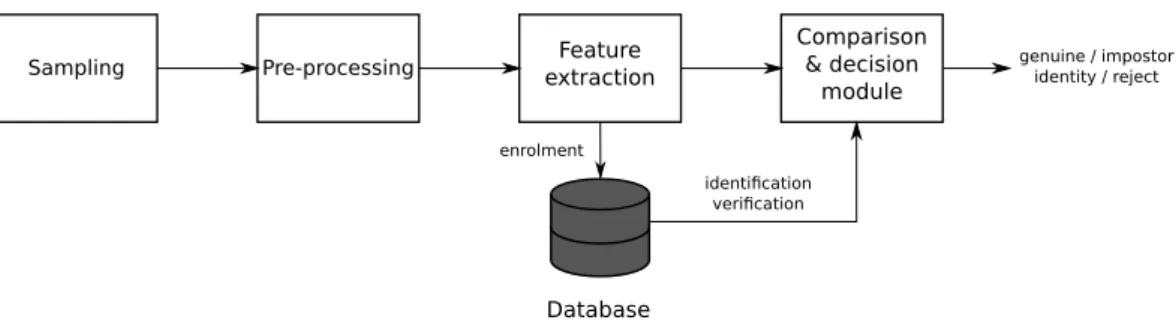
identication
verication
genuine / impostor identity / reject
Sampling Pre-processing extractionFeature
Comparison & decision
module
Database
enrolment
Figure 2.1: Block diagram of a biometric system.
Biometric characteristic Biometric characteristicsare measured from unique phys-ical, chemical or behavioural human attributes, which are usually calledtraits, indicators, identifiers or modalities. The biometric-based authentication has many advantages over the previous two categories. It is something natural and therefore the user needs not look after it. A biometric characteristic is much more difficult to fake and it cannot be lost, stolen or shared. As Jain and Ross [17] mention, the biometric-based authentication offers two more advantages over knowledge-based and token-based systems:
• Negative recognition can prevent a single person from using more identities. This identification3 capability is useful for welfare benefits or any other systems where nobody should be able to get the benefit twice (even under different names).
• Non-repudiation can log the user’s activities and prove his responsibility for the per-formed actions later.
2.1
Biometric system
A biometric system consists basically of several building blocks. The number of blocks varies in the literature, but they can be generalised in five blocks. The system design is shown in Figure 2.1. As it is, in fact, a pattern recognition system (although it does not performexact comparison and rather produces a comparison score, as will be shown later), it is predetermined to contain a reference pattern database and a comparing module. To acquire biometric data, the system also consists of a sensor module and a feature extraction module. The latter one also takes care of the sample quality before extracting the features.
2.1.1 Operational modes
Prior to describing the individual building blocks of a biometric system, its operational modes are presented. First, users must enrol in the system before they can use it. After that, the system can operate identification or verification mode. [5] Those modes differ from each other not only in the number of comparisons against the reference database, but also in the suitability for continuous authentication.
Enrolment A user has to be enrolled in the authentication system before he can use it. The condition holds for a biometric-based system as well. During the enrolment phase4, the system extracts features from the acquired samples for each user and creates their reference records (in the later text also referred as theuser’s template). Those are then stored in the database, alongside some personal information about the user.
In order to create a representative template, more input samples may be required. [8] The data capturing may be also supervised by a human, who verifies the user’s identity and guaranties genuineness of the template. The template is validated against different dataset of the same user before it is released for authentication. The purpose of this additional step is to ensure smallintra-class distance or to set personal threshold η.
Identification In the identification mode, the system performs one-to-many comparison between the acquired sample and all the records in the reference database in order to find the most similar records to the sample. This mode is used only in static authentication systems, mainly for physiological biometric features. As such, identification can play a big role in forensics. Searching the whole database brings also the capability of negative recognition (as discussed in the introduction of this chapter), which helps to preventdouble dipping5.
Verification In the verification mode, the system only checks whether the user is the one he claims to be. That means, the sample is compared only with one user-specific database entry and the procedure therefore operates much faster. According to whether the verification is performed statically (while proving the claimed identity) or dynamically (by monitoring whether the user is still the same person), we distinguishstatic and continuous verification.
Since it is impossible to perform a continuous identification, the continuous biometrics is usually understood as a synonym of continuous verification [44]. For that reason, ver-ification is the operational mode this thesis focuses on. All the samples are compared to a single template, which determines that each user’s template can use different weights for particular traits.
2.1.2 System operation
In the next few paragraphs, the five basic building blocks of a biometric system are de-scribed. The diagram of their operation is shown in Figure 2.1. It is also explained how their operation depends on the current operation mode.
Sensor module The sensor module works as a mediator between the biometric system and the user. The module is usually realised as a special piece of hardware. However, sometimes common hardware can be used, for example for behavioural biometrics. Speed of the sensor module is essential for the overall system speed.
Pre-processing Before extracting features, the sample is verified in order to be suitable for further processing. Quality of the data may be improved, e.g. noise can be removed. However, sometimes the sample is so poor that the user must provide the data again.
4
Sometimes also referred to aslearning ortrainingphase, especially in connection withmachine learn-ing-based systems.
5
Encyclopedia of Biometrics [23] characterises thedouble dipping as“the unethical act of seeking com-pensation, benefits, or privileges from one or more sources, given only a single legitimate entitlement.”
Feature extraction In this module, the biometric data is processed and discriminatory information is extracted. The extracted set of features, referred to as the user’s template, should evince small intra-class and large inter-class distance. Another reason for simplifying is to reduce dimensionality. The proper choice of features to extract influences the perfor-mance of matching module in a large manner. Therefore the features should be selected with respect to the matching algorithm.
Comparison & decision modules The comparing module compares incoming set of features (extracted from the acquired sample) with the template stored in the database. Generally, the comparison is made not only in verification (one-to-one comparison) and identification (one-to-many comparison) modes, but also during the enrolment phase, in order to ensure that the user is not enrolled in the system yet. In fact, the comparing module works in the identification mode during the enrolment. As a biometric feature is not completely stable in time, the matching algorithm does not perform the exact comparison. Instead, the comparing module generates a comparison score and lets the decision module to evaluate it. In the verification mode, the modules validate the claimed identity. In the identification mode, a list of candidate identities is returned or the sample is rejected when no match is found.
Database The system database acts as a storage for users’ templates along with some bi-ographic information such as name, address, username orPIN. The templates are extracted and saved during the enrolment phase. During the recognition phase, both in identification and verification mode, the templates are passed to the comparing module to be compared with the current sample.
2.2
Biometric methods
Various biometric modes6 are commonly used for user authentication. In this section, the criteria for proper choosing the method are discussed. As this work focuses on the continuous authentication on computers, some methods which are usable for that purpose will be briefly introduced as well.
2.2.1 Behavioural methods
Although majority of researchers in the area of biometrics are interested in physiological modes, such as fingerprints, iris scans, voice recognition, etc., the behavioural modes de-serve at least the same attention. The behavioural biometric characteristics evince higher variance, but they can be favourably used in a smaller circle.
As behaviour is rather a long-term process, behavioural biometrics (BB) is predeter-mined to be used in continuous verification. In computer use, keystroke dynamics, mouse dynamics or software interaction (such as e-mail behaviour, GUI interaction or program-ming style) can be counted in behavioural characteristics. Besides that, many motor skills (gait, lip movement, signature recognition) can be classified as behavioural characteristics as well.
Yampolskiy and Govindaraju [49] published an extensive survey on behavioural biomet-rics, concerning many different behavioural characteristics (even very rare) and compared
6
According to [15], themodeis defined as a“combination of a biometric characteristic type, a sensor type and a processing method.”
them. They pointed out that almost every aspect of human behaviour can be used as a ba-sis for personal profiling and many of them also for biometric verification. The behaviour profiling is already being employed in web-usage analysis, tracking down shopping manners or customising user interface. Several experiments were also performed to show that BB are suitable for continuous verification.
2.2.2 Feature suitability
Not all traits are equally convenient for biometric recognition use. Jain et al. [16] introduced seven aspects which should be considered when choosing the method. Yampolskiy and Govindaraju [49] extended their explanation forbehavioural biometrics.
1. Universality: Every user of the system should possess the trait. Although the universality of behavioural characteristics is low in the population, it is high enough for the applicable domains.
2. Uniqueness: The trait should be unique in the set of users of the system and should evince small intra-class and large inter-class distance. The behavioural features are expected to show larger intra-class distance. They are still unique enough for verifi-cation, but it is difficult to identify an individual from his behaviour.
3. Permanence: The modality should be sufficiently stable in time. As a user can learn new ways of accomplishing tasks, the permanence of his behavioural character-istics is low. Therefore the template should be periodically updated to overcome this drawback.
4. Measurability (also collectability): It should be easy to acquire and process the trait. Computer input devices handle this problem easily and without obtruding the user, who sometimes does not even notice capturing the data.
5. Performance: This property encapsulates the recognition accuracy which hugely varies according to the operational mode. For verification, the performance is usually high enough even for BB, however, it depends on the observed characteristic in the identification mode.
6. Acceptability: The capturing method should be unobtrusive for the user. To pro-vide an example, the footprint-based biometrics is proven to be usable as a biometric mode [33], but we can hardly expect Europeans to take off their shoes to be scanned.7 Behavioural characteristics, as usually collected without the user cooperation, evince high acceptability, but might be disapproved for ethical or privacy reasons [49]. 7. Circumvention: The effort for imitating the trait should be very high to prevent
obfuscating the system. BBsystems are very difficult to circumvent, since it is difficult to get to know someone’s behaviour and imitate it.
7
The authors of the research meant footprint-based biometrics for usage in Japanese environment, where taking off the shoes is a common habit when entering the dwelling.
2.2.3 Using computer input devices
In biometric systems common hardware can be utilised as a sensor module in applications in the personal computer. Although special hardware can be used for the login procedure, such as a fingerprint scanner, only the methods which can perform continuous verification will be discussed in this work. Nowadays, most of the research on this topic revolves around computer-related behaviour – typing keyboard or pointing with mouse. However, contin-uous verification based on physiological biometrics is also possible, as will be shown later. As far as the author knows, no commercial product for continuous biometric authentication exists.
Let’s now look at the three most significant methods.
Keystroke dynamics The keystroke dynamics biometrics is based on the way a user types. A computer keyboard is used as a sensor module. The signal from the keyboard is processed by the operating system (OS) that extracts low-level keyboard events – the key-down and the key-up events. The feature extraction module transforms a sequence of the low-level events to the sequence of features, which usually include timings of single keystrokes and digraphs8. However, some researchers [8, 25, 43] wanted to utilise the advantage of wider context and include also n-graphs (n >= 3) or whole words in the template. Such an approach, however, has one large drawback for practical use – a huge amount of data is required for a user to enrol. The whole Chapter 4 is dedicated to the topic of the keystroke dynamics.
Mouse dynamics Using mouse (and pointing devices in general) movements for biomet-ric recognition is a subject of study for much shorter time than the keystroke dynamics. It is obviously caused by expanding usage of pointing devices for controlling the computer. During the continuous authentication, the low-level mouse events data is being collected from theOS. Unlike keystroke dynamics, the low-level mouse events are too detailed to be processed directly. Pre-processing of such events is therefore necessary and aggregation is also used quite often [19]. Feher et al. [11] introduced an extensive study on the topic of the mouse-based user verification. They included many features in the template – not only movements, but also clicks and composed features such aspoint-and-click ordrag-and-drop.
Face recognition Sim et al. [44] proposed a method of multimodal continuous verification using a web-camera and a fingerprint scanner placed on a mouse. Performing stand-alone face recognition is also possible, but it has to overcome several difficulties including liveness detection or different poses and angles of capturing. However, it is usually considered as one of the less intrusive methods [26].
Summary
Biometric methods are considered ID-based authentication factors. A biometric character-istic is a unique physical, chemical or behavioural human attribute and is the most difficult to imitate from all the authentication factors.
A biometric system is a complex authentication mechanism that collects and processes individual samples, compare them to a user template stored in database and based on the
comparison predicts either the user identity (identification mode) or whether they are who they claim to be.
Behavioural methods observe specific parts of human behaviour and are suitable for authentication as well. However, they evince much smaller precision than physiological features and thus the authenticators can use combination of more behavioural traits.
Chapter 3
Continuous biometric
authentication
Although most researchers focus on static biometric recognition, in some situations it can be advantageous to monitor continuously the user’s identity. Considering the user is monitor continuously, the biometric system has to evaluate a large number of samples in a short time. Therefore its template has to be simpler than for static biometrics and it should be possible to update it regularly.
Moreover the continuous biometric system should forgive short-term deviation from the template. Concept of trust handles this problem by maintaining value of trust level which expresses rate how much the system believes the user is still the same person. If the trust level drops below pre-set value, the user is locked out.
3.1
Dynamic template
The dynamic template is usually understood as a database of biometric features which is being updated regularly during the continuous authentication. In contrast to the static template, the dynamic one must satisfy several requirements:
1. The dynamic template must be simple. Comparing a sample with the template is very frequent, since every single sample is examined individually. Several samples can appear every second and they must be processed in a short time with as little resources as possible.
2. It should allow adding new training samples during the run time with as little overhead as possible. It implies creating a simple procedure that does not need to process the whole enrolment dataset again. This is especially important for classifiers with long enrolment phase, such as neural networks.
The constraints above require much simpler features than for a static template. For example, for the statickeystroke dynamicsof a single password, the durations of characters and latencies between them9 are usually stored. The durations and latencies are directly bound to their positions in the password. For a password of n letters, such a template contains at least2n−1features (ndurations andn−1latencies). Additionally, some other features can be included, e.g. overall typing speed.
9
In contrast to that, a dynamic template can consist of a table of durations for every key (or a selected subset of the most frequent keys) and a table of latencies between digraphs. Of course, the template structure is adapted to the needs of the particular classifier but generally is composed of simpler features than a static template.
3.1.1 Template adjusting methods
As mentioned before, a typical way to create a biometric template is to capture the user’s traits during an enrolment phase. It is possible to divide the template creation into three phases: capturing, usage and adjusting. The typical operation – I will call it late adjust-mentmethod – keeps the mentioned order.
However, it is also possible to create the template during the recognition phase, which is more meaningful for behavioural biometrics. Let me call this approachearly adjustment
method. As the name suggests, early adjustment method starts the classification with a template made of very few samples (or even with a completely empty template). During the system operation, the template is being adjusted. From the beginning, the system will show higher error values (refer to Section 3.3). But as the template grows, the system gets more and more adapted to the user’s behaviour and is not so impacted by negative effects during the enrolment such as stress or confusion. The early adjustment method also requires less attention from the user.
3.2
Biometric evaluation
In static biometrics, a distance metric and a threshold is usually used to evaluate genuine-ness of a particular sample. It implies that the genuine user’s mistake can cause rejection when logging in. This quite simple approach does not suit continuous authentication, since the user types in a common way and he can make mistakes. Therefore, Bours [6] introduced theconcept of trust to overcome that problem.
3.2.1 Concept of trust
As mentioned in Section3.3, theFARandFRRdo not suit measuring quality of a continu-ous biometric system. They are limited to a certain number of samples, so they can be used at best for evaluating periodic authentication. In a dynamic system, the biometric evalua-tion should be done with every sample (i.e. in context of this work with every keystroke). Since nobody is perfect and not every sample from a genuine user is mated, the user must not be locked out immediately after one non-mated sample. On the other hand, the system should allow only a limited number of “bad” actions in order to reveal an impostor quickly. Therefore Bours [6] implemented thetrust level (TL)– a scale of genuineness of a user. TheTLis expressed as the probability that the currently typing user is genuine. When the system has started and the genuine user has just logged in, the TL is set to the value 100 to express 100 % genuineness of the user. Then, while he types, each sample is compared and classified10 whether it belongs to the genuine user or not.
Once the sample is classified, the trust level value is adjusted. Bours [6] introduced the penalty & rewards function for that purpose (see below). If the TL drops below the configured threshold Tlockout, the currently typing user is treated as an impostor and is
10 Many approaches for making this decision exist. Their application forkeystroke dynamicsis discussed
locked out. He has then to re-authenticate statically to restore the session (and to reset the TLback to 100 %).
3.2.2 Penalty & rewards function
When a sample is recognised as genuine, the user should be rewarded, i.e. his TL should increase. On the other hand, when it is non-mated, he should be penalised. It depends on the recognition algorithm, however, using statistical methods is a quite popular solution [6,
8]. The distance between the sample and the template is calculated and compared with the distance threshold η as mentioned in Section2.1.1.
There are more options how to implement the penalty & rewards function. They vary in how much they increase or decrease the trust level with a single sample. Basically, fixed or variable changes can be used. Practically, the function usually contains both of those options.
Using a fixed change, the trust level is adjusted for a certain fixed ∆+ when a sample
is mated and another fixed ∆− for a non-mated sample. By way of contrast, ∆+ and ∆−
based on the distance can be used as the variable change. It is also possible to combine those approaches and, e.g., to use a fixed ∆+ and a variable ∆−. Making that decision is up to the developer.
Of course, the distance can be calculated only for those samples that have patterns included in the template. If a sample is not found in the template, it may be ignored or the trust level may be decreased by a small constant.
3.3
Error metrics
The performance of a static biometric authentication system is usually measured by two error rates.
false acceptance rate (FAR) expresses how many times an impostor would gain access to the system, i.e. how many times the system would classify impostors as genuine users. FAR is defined as [2]:
F AR= # of false matches
Total # of impostor attempts (3.1) false rejection rate (FRR) tells how many times the system would not recognise the genuine user. FRRis defined as [2]:
F RR= # of false rejections
Total # of genuine user attempts (3.2)
Example 3.1 Let’s consider a static biometric system for logging in a program. In the table below, Ti denotes the template of user i, Sij denotes jth sample of user i and the
number in the table represents the distance between the particular sample and the particular template. For clarity, the genuine samples are highlighted.
T1 T2 T3 S11 94 102 166 S12 99 124 122 S13 131 105 148 S21 240 99 112 S2 2 133 61 147 S3 2 201 105 126 S31 188 121 124 S32 135 102 87 S33 144 194 104
Let’s now consider a global threshold η for classifying the sample as genuine or not. If the distance d is lower or equal toη, the sample is mated.
Let’s set η = 125 and calculate corresponding F AR and F RR. We will denote that as F AR125 and F RR125. Let’s start with simpler F RR125. We need to count how many
genuine samples (i.e. the highlighted ones) are aboveη. According to Equation 3.2 we get:
F RR125= 1
9 ≈11.1 % (3.3)
For calculating F AR125 we have to count the number of non-highlighted samples with
the distance lower or equalη. We get: F AR125 =
7
18 ≈38.9 % (3.4)
The FARin the example above is unacceptably high, it means that approximately two of five impostor’s trials to log into the system would be successful. We can change the thresholdη to achieve better FAR, but one should note that theFARand theFRRchange simultaneously. When one indicator increases, the second decreases and vice versa.
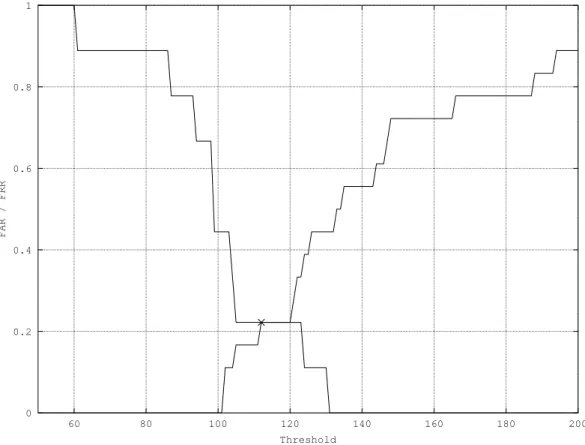
A frequently used option how to display the quality of a biometric system is to plot the dependency of the FAR and the FRR on the threshold η. Such a plot for Example 3.1 is shown in Figure 3.1. At the point where the FAR and the FRR are equal, there lies a significant point –equal error rate (EER), a frequently used indicator for measuring quality. [2,6]
Nevertheless, those metrics do not suit the continuous biometrics, since we need to express how fast the system locks out an impostor or a genuine user. Average number of impostor actions (ANIA)and average number of genuine actions (ANGA) metrics fit this [29]. We can express them for each particular user or as an average over the whole dataset. Average number of impostor actions (ANIA) metric expresses an average number of actions an impostor can perform before the system recognises him and locks him out. Naturally, a general effort is to decrease this number as much as possible, i.e. to reduce the damage the impostor can make.
Average number of genuine actions (ANGA) metric is the opposite of ANIA. It shows how many actions can a genuine user perform on an average before being locked out. As the system should be as unobtrusive as possible, ANGA should limit to infinity, i.e. a genuine user should be never locked out.
0 0.2 0.4 0.6 0.8 1 60 80 100 120 140 160 180 200 FAR / FRR Threshold
Figure 3.1: Plot of dependencyFAR(increasing) andFRR(decreasing) on the set thresh-old with marked EER point.
Example 3.2 Let’s now consider periodic authentication with the keystroke dynamics, per-formed every n = 30 keystrokes. Periodic authentication allows us to transform the FAR
and FRRmetrics to ANIA and ANGA. Let the FAR be 3 % and the FRR 0.2 %.
First, let’s transform FAR to ANIA. When an impostor comes to a computer, he can always type 30 keystrokes. After that, he is not recognised and can type further 30 keystrokes with a F AR= 3 % probability. ANIA is therefore defined as the infinite series:
AN IA= ∞ X i=0 n·F ARi = ∞ X i=0 30·0.03i ≈30.928 (3.5)
In the same way, we can transform FRR toANGA:
AN GA= ∞ X i=0 n·(1−F RR)i = ∞ X i=0 30·0.998i ≈15000 (3.6)
Example 3.3 If we use the continuous verification and Bours’s trust model as announced in Section3.2.1 instead, we have to test the system with the genuine user’s data (different from the enrolment dataset) and with some impostor data. Let’s use vectors G and I for collecting the numbers of actions since last lockout for a genuine user and an impostor (in that order). Both vectors are initially empty. Let’s start the simulation of the authentication system and every time the user is locked out, let’s append the number of actions since last lockout to the vectors G (for the genuine user lockouts) and I (for the impostor lockout). After each lockout the lock is removed and the trust level restored to 100 % value.
The error metrics would be then calculated in the following way:
AN GA= P G |G| (3.7) AN IA= P I |I| (3.8)
Summary
The biometric-based authentication is one of the methods from ID-based authentication category. Although physiological biometrics is quite popular, thebehavioural biometricsis more suitable for continuous authentication. Static biometric recognition usually evaluates a whole large feature set at once. In opposite, continuous authentication operates upon much smaller sets, since every single sample is evaluated individually.
Due to its lower classification precision for a single sample, the prediction are aggregated using so-called concept of trust. That allows a genuine user not to correspond his template perfectly while it can still recognise an impostor in a short time.
For quality evaluation, several error metrics are used. The differ for static and continu-ous authentication due to impossibility to compare samples directly. WhileFAR,FRRand EER are the most common error metrics for static biometrics, ANGAand ANIAdescribe average success rate in impostor detection.
Chapter 4
Keystroke dynamics
Every human being types the keyboard in a different way. In the history, even the skilled telegraphers were able to recognise who was transmitting on the wire. The way how one types depends on his typing skill, the context (i.e. the surrounding n letters, so called n -graph), the application and the language he types in, handedness, frame of mind, familiarity with used vocabulary and many other circumstances [8, 43, 6, 4, 40]. It can also be temporarily influenced by hand injuries, typing with one hand or by typing on different types of keyboards [40]. The human’s keystroke dynamics (KD)is not only unique, but it is also hardly artificially imitable and is therefore robust against automated attacks [45].
If we consider a static biometric recognition by the KD, we may face a problem with high FRR, especially when the conditions during enrolment and recognition are different (e.g. typing aPINcode on different ATM keyboards). High rejection rate makes the system less user-friendly, so the system administrators are still moderate with deploying behavioural biometrics solutions in order to give their customers no reason for discontent. [25]
The static biometric authentication can operate in achallenge-responsemode, in which the user is attempted to copy the displayed text. It can also be used for strengthening authenticating with a username and a password. This approach is often referred to as credential hardening [4].
In 1995, Shepherd [42] showed KD is also capable of user recognition on the free text. It was a very simple algorithm based on keystroke cadence11 without distinguishing keys.
In the last few years, KDon a free text has become more popular method of continuous biometrics, because it requires neither any special hardware nor user interaction. The typing manner can be captured on a computer keyboard or any input device with physical or emulated keys, which includes mobile phones, PDAs or tablets. Every device which can capture timing information can be used. [23,6]
Several studies focus on the keystroke dynamics usage for continuous authentication. They vary in data acquisition, in classifying methods and in features contained in the template.
According to [13], the first trial keystrokes dynamics analysis based on a free text was performed in 1997. Before that, studies used to concern the static and predefined text only, although the text was sometimes quite long. Authenticating the user by copying a text gave quite good results for static recognition (e.g. observing whether the password was written
11
Although termkeystroke cadence means number of keystrokes per second, Shepherd used the term for average value of duration and latency (see Section4.1.1).
in a genuine way). However, it gave very poor results for continuous recognition, since it did not reflect a way of typing a common text.
4.1
Features
A base of KD is a keystroke. It is delimited by two events recognised by an operating system: a key-down and a key-up event [4]. We can derive more features from a single keystroke or from a sequence but all of them are based on those two events. The features are more deeply discussed in Section4.1.
Creating a template during the enrolment phase means to select significant charac-teristics of the sample set. The majority of research studies use the duration of a single keystroke12 and the latency of an n-graph (a digraph, a trigraph, etc.). The features are related to a particular key or n-graph. It is good to point here that not all the keys must be stored in a template. For example, Bours [6] selected the most frequent characters and digraphs in English in order to obtain a representative pattern. However, this approach has one large drawback which should be pointed. Restricting the template to a language-characteristic-based subset limits world-wide spreading the algorithm.
According to [2], few older studies tried to include also a key pressure in the template. However, a special keyboard was necessary, which goes against the collactability require-ment require-mentioned in Section2.2.2. Other advanced features for long-term user authentication include typing speed, frequency of correcting errors (i.e. frequency of usingBackspace and
Delete), use of Shift key to capitalise letters, using navigation keys (arrows, PageDown,
PageUp, . . . ), etc. [49,40].
The user environment is sometimes also taken into consideration [2, 6]. The most observed variables are the keyboard layout and the running application the user is typing in. A separate template can exist for each combination of the environment variables.
4.1.1 Duration and latency
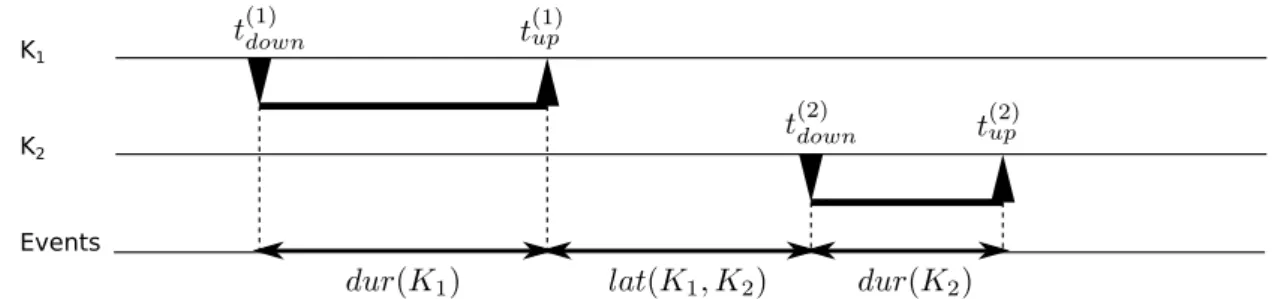
Having a digraph composed from keys K1 and K2, two events for each key press can be
observed, as shown in Figures 4.1and 4.2: thekey-down events when the key was pressed down (in timest(1)down,t(2)down) and thekey-up events when it was released (t(1)up,t(2)up). We can
then calculate the duration dur of keyKi as [6]:
dur(Ki) =t(upi)−t
(i)
down (4.1)
The duration can be only a positive number, since the key is always released after it is pressed down.
It should be stressed here that the key-down event is fired for all the time the key is held pressed. The speed of generating the event is customisable and is usually referred to as repeat rate13. Anyway, the intermediate key-down events between the initial key-down and
finishing key-up should be ignored when extracting the duration. To prevent such a long pressed key from influencing the template, a maximum-time threshold for duration can be set.
Thelatencylatof a digraph14(K1, K2)is a bit more confusing property, since studies
differ from each other in defining the latency. A frequently used approach is defining latency
12 Also reffered to asheld time [43] ordwell [40]. 13
In Microsoft Windows, the repeat rate is a parameter of theWM KEYDOWNevent messsage. [27]
14
K1
K2
Events
Figure 4.1: Events of a digraph with non-overlapping keys.
K1
K2
Events
Figure 4.2: Events of a digraph with overlapping keys.
of a digraph as the time delay between releasing the first key and pressing down the next key [6,8,25,43]:
lat(K1, K2) =t(2)down−t(1)up
As defined this way, latency of a digraph can be negative when the second key is pressed before the first is released. This approach is usually calledrelease-to-pressorinter-key time. Stefan and Yao [45] declare in their research that many users tend to write with negative inter-key times.
Other works define the latency by press-to-press or release-to-release time [2] which always results in a positive value. They are also easily extended to alatency of a general
n-graph. For example, Sim and Janakiraman [43] describe it as
”the time interval between the down keyevents of the first and last keystrokes that make up the n-graph“.
Since only then-graphs that two samples have in common are used during the authen-tication phase, n could be limited to a certain maximum value. Sim and Janakiraman [43] observed that n should be limited up to four to keep the n-graph discriminative.
4.1.2 Advanced features
As mentioned earlier, the template should store only the significant features extracted from the user’sKD. The decision what information to store depends mainly on the classification method, this problem is discussed in Section 4.2. However, some general features must be considered with all the classifiers.
Keyboard layout A user is usually more familiar with a certain layout than with another one. This does not apply only to the computer keyboard where different logical layouts can be used, but also for other devices. For example, if a user gets a new mobile phone with a different size or a different key layout, his typing behaviour would probably take a while to adjust and keep stable. The same stands for different types of laptops etc.
Modifier keys Special keys Shift,Ctrl and Alt which modify functions of other keys can be handled either as any other key (and then e.g.Shift + Tis considered as a digraph) or they can be stored in the template as a flag. Separate templates for any combination of these modifier keys can be then generated. The last approach is to ignore them completely in order to keep the design simple, but then a piece of information about different typing manners with the modifier key pressed are lost.
Dead keys Dead keys do not generate a character but modify a key pressed right after it. Examples of those are´(acute) orˇ(caron). Pressing ´and agenerates á. The keystroke dynamics should always be based on keys, not on characters.
Automatic key repeat When a letter key is held for a long time, the operating system starts to repeat writing down the letter automatically. Although the manner of using this feature may be included in the template, the circumstances when this event occurs happen so rarely that it does not pay off to use it. To eliminate this event, we can set a threshold of maximum time between key-down and key-up event. The repeat rate was more thoroughly discussed in Section 4.1.1.
Frequency of errors The less experienced typist, the more errors occur in the text. Error frequency can be measured as number of BackspaceorDeletekeys depressions. [42]
How the user feels Stress and tiredness also influence typing behaviour largely. How-ever, including this kind of information in the authentication system is almost impossible in order to keep it unobtrusive. The template should be compiled from a large enough number of the reference records to be able to handle different users’ temper.
Environment Results of the experiments also vary according to the environment where the users attend the experiment. Two environment classes are usually distinguished: con-trolled environment, typically run in a lab on the lab computer with programs specified by the researcher. Uncontrolled environment represents the second class. The user works on his own, familiar computer and performs common work as usual. The capturing program runs on the background and captures and stores the keyboard events.
4.2
Existing solutions
Using statistics (i.e. statistical algorithms or statistical classifiers), artificialneural networks (NNs)and machine learning (supervised or unsupervised) are the most popular approaches for the sample classification. [2]
Killourhy and Maxion [20] tested 14 classification techniques proposed by various au-thors in order to compare their results on a unified dataset. Although their work operates with static recognition, the classification techniques correspond to continuous recognition.
They covered distance-based probabilistic and statistical approaches with miscellaneous dis-tance metrics, as well as supervised and clustering machine learning (ML)methods. Seven of tested classifiers were observed as sufficient, but the authors chose none of them as the best, since the results were compared with several methods. Moreover, those results were obtained using static recognition and their validity for continuousKD should be verified.
4.2.1 Statistical methods
The statistical methods operate with aggregating functions of the feature vectors. The mean and the standard deviation of every key and every digraph are quite frequent, but some studies also operate with minimum and maximum values and other measures. In statistics, a distance metric is calculated to evaluate how much the sample and the template differ from each other. A distance threshold based on the standard deviation is set to classify the sample as genuine or not. However, several systems also use a system-wide threshold value.
Distance metrics
Among other methods, Killourhy and Maxion [20] compare also the performance of Eu-clidean, Manhattan and Mahalanobis metrics. Generalisation of the first two is called Minkowski distance.
Minkowski distance [32] d(X,Y), where X,Y are feature vectors of the same length n, is a parametric metrics with a parameterp. It is defined as:
d(X,Y) = ( n X i=1 |xi−yi|p) 1 p (4.2)
If p is substituted with 1, resp. 2, we get well-known Manhattan (p= 1, see Equation 4.3) and Euclidean (p= 2, see Equation4.4) distance metrics, respectively.
dM(X,Y) = n X i=1 |xi−yi| (4.3) dE(X,Y) = v u u t n X i=1 (xi−yi)2 (4.4)
Mahalanobis distance [23] can be used in situations when the feature vectors are too complex for Minkowski distance. The distance is calculated between mean feature vector
X and the sample feature vectorY. S denotes covariance matrix.
dM H(X,Y) = (X−Y)TS−1(X−Y) (4.5)
If the covariance matrix is diagonal, the resulting distance metric is called normalised Euclidean distance: dEN(X,Y) = v u u t N X i=1 (xi−yi)2 σ2 i (4.6)
where σi denotes standard deviation of ith feature in the training set. Its huge advantage
over the Euclidean distance is its range. The minimum range of Euclidean distance is zero (meaning identity) but the maximum range is unknown. With normalisation, the distance will remain in multiples of σi which wouldn’t usually exceed 3 for normal distribution.
4.2.2 Machine learning approaches
The user verification is a 2-class classification problem (a genuine user vs. an impostor). However, we have to handle the problem with non-available impostor data. Although the reference data of other users in the system can be employed as the impostor data to train the classifier, they are not always available (e.g. when running the continuous authentication system on a single-user PC). This problem can arise rather in static authentication, since the other users would have to type the same password as the genuine user. On the other hand, continuousKD system can run on a single-user computer.
Marsters [25] employed RapidMiner framework for testing three different classifiers on a continuousKDdataset –Bayesian Belief Network (BayesNet), K-StarandRandomForest classifiers. He tested them against the key durations set. They hugely vary in training time, but both BayesNet and RandomForest fit under one minute with the error rate of
2.39 %±0.88 %and 2.25 %±0.98 %, respectively15.
Yu and Cho [50] selected a support vector machine (SVM) for its short training time, which is 1,000 times shorter than the time required by aNN. They also introduced a novelty approach for selecting features to be included into the template and to pass to classifiers. The method employs genetic optimisation algorithm. They achieved the average error rate of 0.81 %.
Revett et al. [36] employed a probabilistic neural network (PNN) for authentication. The PNN operates in the supervised mode and both genuine and impostor samples are required to train it. They reported a much faster learning phase compared to a back-propagation basedNN. The PNNalgorithm achieved approximately4 %error rate.
As seen from this short overview and the overview in [2], theMLalgorithms can achieve similar results like statistical approaches. However, only a few studies worked with the dynamic verification and more research is needed to compare statistical andMLapproaches.
4.3
Performance
A performance of the keystroke dynamics in continuous authentication is somewhat vari-able, depending on many factors. In general, better results were achieved with digraphs, especially if a word [43] or an application [6] context was taken into consideration. However, the penalty & rewards function plays a big role as well. The best results in the studied literature were achieved by Bours [6] with detecting an impostor in 98 keystrokes on average (considering an application context).
Summary
In this chapter, several studies exercising the keystroke dynamics were presented. The features mainly concerning duration and latency of a digraph were discussed. Several clas-sification methods were introduced, including both statistical andmachine learning
meth-15
ods. Althoughmachine learningapproaches perform quite well for static authentication, no study employed them for the continuouskeystroke dynamics yet. The statistical approach is very popular with continuous verification researchers and several distance metrics were shown in the text.
Chapter 5
Collecting user data
It is not necessary to implement the whole authenticating system to show characteristics of different kinds of templates. Instead, I simulated the authenticating system on captured keyboard events captured on volunteers’ computers during their common work.
The keyboard events are usually implemented as hardware interrupts and as such are processed by the operating system. The operating system transforms the interrupts to the form ofevent messages. Therefore it is possible for a program to capture and process these messages along with the OS. Several tools for capturing keyboard events already exist in the research world. A short overview of available applications is provided in section 5.2.
Since a large amount of data is essential for proper analysis, many participants should be involved and observed for a long time period. A capturing program should follow similar guidelines as a continuous authentication system, especially be unobtrusive and completely automated. Additionally, it should consider users’ privacy and therefore it should not log any sensitive information such as passwords or bank account numbers.
The continuous biometric authentication is still a young discipline and only a few tools are available for that purpose. Many of the tools are moreover intended for using in different research areas such as human-computer interaction (HCI)(e.g. [21]) and they do not meet all the demands placed.
5.1
Existing databases
In the literature, many researchers collect data for their work. However, those datasets vary in quality and are often adapted to needs of the particular research. Moreover, most of the publicly available databases are designed for static authentication research (such as [12]) due to the risk of present sensitive information in the common work recording.
Montalv˜ao and Freire [30] built a publicly available database of free-text samples from 15 participants. The sample is unfortunately pretty short, it consists of only 10 rows of text, about 110 keystrokes each. In addition, the text was collected during only two sessions, which is a very small number for the purpose of my experiment.
Banerjee and Woodard’s survey [2] provide an overview of existingKDdatabases. Most of them concern static biometrics and, moreover, almost none of them is available now. Only one of the databases is marked as dynamic in the survey – the Montalv˜ao’s and Freire’s mentioned in the previous paragraph.
To summarise it, I have not found any publicly available database for continuous KD. I understand the worries about privacy of participants of the experiments, however, making such a database public could allow others to compare their results to each other.
5.2
Capturing tools
Many of the available tools are originally not meant to be employed in an authentication research, but rather in HCI area. However, some tools dedicated for biometric research have been developed.
Unfortunately, I have not found any truly cross-platform tool. Most are targeted for Microsoft Windows systems, however few of them cover also Mac OS X or GNU/Linux16.
RUI (Recording User Input) is a tool introduced by Kukreja et al. [21]. It is intended for re-search in area ofHCIand is able to capture keyboard and mouse events. The binaries are available for Microsoft Windows and Mac OS X operating systems. Unfortunately, as the tool is developed primarily for HCI research, it records only key-press events, not both key-down and key-up events. For that reason, it is useless for behavioural biometrics research, which needs to measure duration and latencies of the keys.
AppMonitor could be a great tool for logging keyboard events if it was extended a little. As its authors mention, only two applications (Microsoft Word and Adobe Reader) are supported and only special key combinations are captured in order to protect user privacy. [1]
Inputlog logs both key-down and key-up events and a researcher can obtain it on re-quest. However, a participant has to start and stop recording manually and has to remember to stop the tool when typing sensitive data like passwords or bank account numbers. [22]
BAKER by Marsters [25] favours user privacy and therefore captures wider context of the typed key, a trigraph for capturing durations and a quadgraph for storing sta-tistical data about latencies. Therefore both duration and latency are stored in a 3-dimensional matrix, which the author preferred to ordered logs to keep the users’ privacy. The statistical data are represented by the count of occurrences, the mean and the variance.
For all the mentioned reasons, BAKER would look as an ideal program for collecting data. However, the websites proposed in the work are not available any more, and the tool neither.
TUBA is not really a tool for the continuous authentication, but rather for periodic au-thentication triggered by certain combinations of network and typing events. TUBA is mentioned since it employs X window system (X11) and therefore represents the only tool available for Linux of those I have found. Its architecture is composed from a remote authentication server and a client. If a network security breach is detected, the server challenges the user to re-authenticate himself.
TUBA is also interesting for reducing the timing vector dimensions using principle component analysis (PCA), a method from data mining area. [45]
16
The Stefan and Yao’s work [45] covers particularly Linux systems withX Windows System (X11 in short). Actually, X11 can run also on other operating system, so it is partially platform-independent.
BeLT (Behaviour Logging Tool) by Stenvi, Øverbø and Johansen [46] is a tool specially developed for capturing user interaction in Microsoft Windows. It captures keyboard, mouse and software interaction events and relevant information about hardware (such as screen resolution etc.).
It observes user interface interaction employing UI Automation framework. [28] Therefore it can recognise types of user input fields and does not record passwords. This is a huge advance over the other tools since it improves users’ feeling of security. The program starts on system startup, runs minimised in the system tray and does not require any additional action from the user. Thus it fulfils the requirement of unobtrusiveness.
I was permitted to use BeLT for collecting the data for this master’s thesis.
5.3
Data capturing
This section describes the structure of participant set and how they took part in collecting the data.
5.3.1 Target participants
I had to restrict possible participants to Microsoft Windows users as BeLT is only available for Windows. The participants should actively use the computer in a period of at least two weeks to obtain enough data.
Originally, I intended to ask only people who currently learn to type the keyboard. However, I found only six high school students willing to participate and all of them rejected later for various reasons. Therefore the participant set consists users with different level of typing skill and wide range of how often they use the computer.
In total, almost 50 people promised to participate but only 22 of them eventually de-livered the data.
5.3.2 Participants’ task
The participants were informed about the purpose of the experiment and how to collect the data to keep high quality of the samples. They were acquainted with BeLT installation, interface, proper settings and operation. Every participant was also informed about the risk of collecting sensitive data and instructed how to prevent it. In order to keep the data free of other people’s samples, I also asked the participants to pause BeLT when they lend the computer to someone else, even for a short time.
The task was to do their common computer work with BeLT running in the background for at least two weeks. After that period, they were asked to send me the data for further analysis.
300 M M 162_31 7142677 299
301 M D 162_31 7142802 296 1 0 95 1350 711
302 S FC firefox.exe 7142848 301 4 Suche oder Adresse eingeben |empty| 107 25 906 40
303 M U 162_31 7142864 301 1 107 25 906 40
304 K D d 7143488 302 0
305 K U d 7143550 304 0 1
306 K D i 7143613 302 0
307 K U i 7143675 306 0 1
Figure 5.1: Excerpt of BeLT CSV file (opened in LibreOffice Calc).
5.4
BeLT data format
BeLT exports captured data into CSV17 files. Each row in the file represents one captured event message. BeLT captures keyboard, mouse and some software events and also logs some hardware information (mainly the screen resolution).
The row format varies18 depending on the event type. A sample excerpt from BeLT CSV file is shown in Figure5.1. The first three columns have identical meaning for all event types. The first contains event ID, a number unique within every file. In the second field, there is a basic event type (K for keyboard, M for mouse and S for software). An action is determined by the third value: e.g. for keyboard events, D denotes key down event and
Udenotes key up event.
Considering only the keyboard events, next columns provide information about the key, the event timestamp (in miliseconds from starting the computer), an ID of related event (for key up event refers to its respective key down event), flags indicating active system keys (e.g. Shift, Ctrl, Alt etc.) and repeat count (see Section 4.1.1). [46]
BeLT can also store the data in raw format19. It is not a binary format as one might suppose, but an ordinary text file. Its rows are more verbose than rows of the CSV format. However I discovered a bug in recording the time. On some special occasions (e.g. switch-ing the keyboard layout with Shift + Alt), a LCtrl key up event is generated (with no related key down event) and the time jumps about 50 days forward. Therefore the CSV format is a preferred way for collecting data.
5.5
BeLT drawbacks
It is advisable to be able to compare users from different countries. In real use, it would be necessary to build a solid database for training the classifier. Therefore storing the numerical key code (which is transformed to a key based on set keyboard layout in theOS) would be a better choice than storing the key. Although the keyboard is the same (usually generic 104/105 layout), the keys are not. I encountered this issue when I created templates for several users who had set a Cyrillic layout.
17 Comma-separated values (CSV) is a simple file format for tabular data. The format was specified in
RFC4180 [41].
18 The BeLT-exported data does not comply with the CSV specification due to variable column count
and data types.
19
BeLT’s raw format uses file extension.raw. This can be a bit confusing since.rawfiles usually store photographs in the camera.
The problem also occurred with Czech characters that have to be typed using a dead key20. In that case BeLT interpreted the combination Shift + ˇ, n as ˇn instead of ň. Particularly this issue discouraged about 10 potential data collectors from collaboration.
When processing the data, storing data in single-byte encoding proved not to be very comfortable to work with. The files are stored in system-wide set encoding instead of UTF-8 which is treated as present-day standard. Since the data collectors were of various nationalities, I had to convert each user’s data to UTF-8 separately. Without that, the data would not be comparable.
Summary
In this chapter, the existing tools for capturingkeystroke dynamicswere presented, as well as some existing databases. Unluckily, none of the tools and the databases has sufficient capabilities for the purpose of continuous dynamics. BAKER software would represent one exception, if it had been still available. Fortunately, I was permitted to utilise BeLT for acquiring the data from the users which made the data collection reachable.
BeLT is a program users install to their computers and keep it running in the back-ground. It collects data about how the user behaves, notably it tracks keyboard and mouse actions. BeLT stores data in CSV files where each line corresponds to one action.
20
Chapter 6
Data processing
Before the data can be pushed to classifiers, it has to be prepared to a suitable form. That includes converting from BeLT format to list of features. This way from BeLT to Python is not that straightforward as it might seem. It consists of four steps we will take a look at in the following sections:
Pre-processing normalises file names, encoding and formats (see Section 5.4 for more information on BeLT formats).
Converting CSV to EventList transforms each BeLT line to an instance of Eventclass and joins them in a list.
Extracting features step takesEventListas an input and creates features consisting of more events.
Packing for later use is a necessary step preventing from extracting the data again every time the data is required.
The first step was performed manually due to need of manual interception for selecting proper encoding. The others were run as a batch using scriptextractfeatures.py.
In the real continuous authenticator, the feature extraction would run online as soon as the data was captured. However, batch processing is much more convenient for the simulation.
6.1
Pre-processing
In Sections 5.4 and 5.5 we discussed how BeLT stores the data. The first precondition for convenient work with bash21 is to remove spaces from file names and convert them to common encoding. That was achieved withrenameand iconvcommands.
In order to determine proper initial encoding, python packagechardetwas employed. It provides also Linux command that can be called directly without starting Python shell and evaluates probabilities of various encodings. The proper one should be selected manually with knowledge of the originator operating system.
Moreover, two of the participants did not follow the instructions properly and collected data to the raw BeLT format. I wrote converting script raw2csv.py that performs the
21
Bash is a UNIX shell providing easy scripting language. It allows direct calls of programs and is therefore more convenient for semi-batch processing of files.
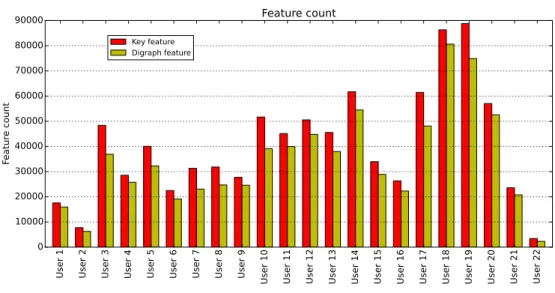
U se r 1 U se r 2 U se r 3 U se r 4 U se r 5 U se r 6 U se r 7 U se r 8 U se r 9 U se r 10 U se r 11 U se r 12 U se r 13 U se r 14 U se r 15 U se r 16 U se r 17 U se r 18 U se r 19 U se r 20 U se r 21 U se r 22 0 10000 20000 30000 40000 50000 60000 70000 80000 90000 Fe at ur e co un t Feature count Key feature Digraph feature
Figure 6.1: Feature count of participants by feature type.
Use r 1 Use r 2 Use r 3 Use r 4 Use r 5 Use r 6 Use r 7 Use r 8 Use r 9 Use r 1 0 Use r 1 1 Use r 1 2 Use r 1 3 Use r 1 4 Use r 1 5 Use r 1 6 Use r 1 7 Use r 1 8 Use r 1 9 Use r 2 0 Use r 2 1 Use r 2 2 100 0 100 200 300 400 500 Fe atu re tim e Feature time Key duration Digraph latency

![Figure 7.1: Overview of machine learning algorithms scikit-learn library provides. [47]](https://thumb-us.123doks.com/thumbv2/123dok_us/9675700.2849110/40.892.189.754.137.437/figure-overview-machine-learning-algorithms-scikit-library-provides.webp)