Georgia State University
ScholarWorks @ Georgia State University
Learning Technologies Division Faculty
Publications
Learning Technologies Division
2013
Subgoal Labeled Worked Examples Improve K-12
Teacher Performance in Computer Programming
Training
Lauren E. Margulieux
Georgia Institute of Technology, [email protected]
Richard Catrambone
Georgia Institute of Technology, [email protected]
Mark Guzdial
Georgia Institute of Technology - Main Campus, [email protected]
Follow this and additional works at:
https://scholarworks.gsu.edu/ltd_facpub
Part of the
Instructional Media Design Commons
This Article is brought to you for free and open access by the Learning Technologies Division at ScholarWorks @ Georgia State University. It has been accepted for inclusion in Learning Technologies Division Faculty Publications by an authorized administrator of ScholarWorks @ Georgia State University. For more information, please [email protected].
Recommended Citation
Margulieux, L. E., Catrambone, R., & Guzdial, M. (2013). Subgoal labeled worked examples improve K-12 teacher performance in computer programming training. In M. Knauff, M. Pauen, N. Sebanz, & I. Wachsmuth (Eds.) Margulieux, L. E., Catrambone, R., & Guzdial, M. (2013). Subgoal labeled worked examples improve K-12 teacher performance in computer programming training. In M. Knauff, M. Pauen, N. Sebanz, & I. Wachsmuth (Eds.) Proceedings of the 35th Annual Conference of the Cognitive Science Society (pp. 978-983). Austin, TX: 2013.
Subgoal Labeled Worked Examples Improve K-12 Teacher Performance in
Computer Programming Training
Lauren E. Margulieux (l.marg @gatech.edu)
Georgia Institute of Technology, School of PsychologyAtlanta, GA 30332-0170 USA
Richard Catrambone ([email protected])
Georgia Institute of Technology, School of PsychologyAtlanta, GA 30332-0170 USA
Mark Guzdial ([email protected])
Georgia Institute of Technology, School of Interactive Computing Atlanta, GA 30332-0760 USA
Abstract
Technology has become integrated into many facets of our lives. Due to the rapid onset of this integration, many current K-12 teachers do not have the skills required to supply the sudden demand for technical training. This deficit, in turn, has created a demand for professional development programs that allow working teachers to learn computer science so that they might become qualified to teach this increasingly important field. Subgoal labeled worked examples have been found to improve the performance of learners in highly procedural domains. The present study tested subgoal labeled worked examples in an online learning program for teachers. Teachers who received the subgoal labels solved novel problems more accurately than teachers who received the same worked examples without the subgoal labels. These findings have implications for the use of subgoal labels in professional development, other types of lifelong learning, and online learning.
Keywords: subgoal learning; worked examples; computer programming, K-12 teacher training.
Introduction
As technology becomes ubiquitous, being technically trained is frequently necessary for individuals to be effective in their professional and personal lives. Technology has advanced at such a rapid pace, however, that many of our educators are not qualified to train students in technical fields. Thus, it is important to train teachers, who have full schedules and possibly no technical training, to become qualified to teach technical subjects. Fortunately, because technical subjects tend to be highly procedural, methods used for teaching other highly procedural subjects like mathematics can be used in technical education.
One of the methods that has been effective for teaching procedural domains (e.g., statistics and physics) is to manipulate the format of worked examples that students receive (e.g., Catrambone, 1996). Catrambone (1998) found that worked examples that included subgoal labels were effective for helping students learn to solve problems in a new domain. This intervention has also been found to be effective for teaching computer programming (Margulieux, Guzdial, & Catrambone, 2012). Most of these subgoal
studies, however, have been conducted with undergraduate students in face-to-face learning environments. These are not the conditions that would be ideal for K-12 teacher professional development. The present study explores the effectiveness of the subgoal intervention for K-12 teachers interested in learning computer science in an online learning environment (i.e., with no face-to-face interaction).
Worked examples are an important instructional tool for learners in highly procedural domains like math or computer programming. Worked examples help learners because they provide specific information about how to apply domain principles to problem solving (Bassok, 1990). Furthermore, worked examples provide a step-by-step solution to a problem from which students can learn before they are able to solve problems independently (Atkinson, Derry, Renkl, & Wortham, 2000). When learners are presented with all of the steps of an example solution at once, however, they often have difficulty determining what information is important for solving problems in that domain (i.e., structural information) and what information represents details relevant for solving only that problem (Catrambone, 1994).
Using subgoal labels to group steps of worked examples into meaningful units can help learners recognize structural information in the examples. Subgoals are functional components of complex problem solutions; each subgoal is a necessary part of the solution. How a subgoal is achieved might vary between and within problems, but the subgoals needed to complete a problem do not. Subgoals are specific to a domain, but not to a problem; a multitude of problems in a domain might have the same subgoal structure, so by learning the subgoals in a domain, students can learn to solve problems in that domain (Catrambone, 1994).
Learners who study materials that label the subgoals of a worked example are more likely to solve novel problems than learners who study the same examples without the subgoal labels (Catrambone, 1998). There are several possible theoretical explanations for this phenomenon. Subgoal labels can help learners chunk problem-solving steps which might reduce the cognitive load required to learn them (Catrambone, 1994). Furthermore, subgoal labels might help learners create mental models in a domain by
providing them with a framework (i.e., the set of subgoals) that they can use to organize information in a way that can guide transfer to future problems (Atkinson et al., 2000, Catrambone, 1996). Moreover, apprising learners of the structure of worked examples can help them recognize similarities among examples and promote self-explanation (Catrambone, 1998; Renkl & Atkinson, 2002).
Expanding upon previous work (e.g., Catrambone, 1998), Margulieux et al. (2012) applied subgoal labeled worked examples to a previously untested domain, computer programming. They found that subgoal labels improved participants’ performance on novel computer programming construction tasks (i.e., creating applications (apps) for Android devices). The present study expands upon this work by testing the intervention in a new environment and with a new population.
Present Study
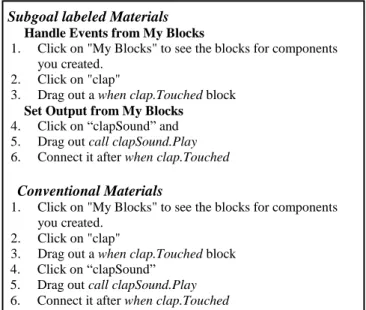
The present study manipulated the materials that K-12 teachers received to help them teach themselves how to program. Participants received either subgoal labeled worked examples or conventional worked examples (i.e., list of the steps of the solution with no labels). The conventional worked examples were adapted from material in the projects sections of the ICE Distance Education Portal (http://ice.cc.gatech.edu/dl/?q=node/641). The subgoals of the examples were determined using the TAPS procedure developed by Catrambone, Gane, Adams, Bujak, Kline, and Eiriksdottir (2013) and consultation with subject-matter experts (see Figure 1). The only difference between the materials that participants in the two conditions received was the added subgoal labels (see Figure 2).
Subgoal Labels
1. Create components 2. Set properties
3. Handle events from My Blocks 4. Set outputs from My Blocks 5. Define variable from Built-In 6. Set conditions from Built-In 7. Emulate app
Figure 1. Subgoals Used In Instructional Material The programming language that was used for the study is Android App Inventor, which is used to develop apps for Android devices. App Inventor is a drag-and-drop programming language; users are given pieces of code that they can drag from a menu and piece together in a programming area to make programs. Drag-and-drop programming languages can be useful for teaching novices because, instead of writing code, users select sections of code and piece them together like puzzle pieces. This type of code creation is easily understood by novices (Hundhausen, Farley, & Brown, 2009).
Subgoal labeled Materials Handle Events from My Blocks
1. Click on "My Blocks" to see the blocks for components you created.
2. Click on "clap"
3. Drag out a when clap.Touched block
Set Output from My Blocks
4. Click on “clapSound” and 5. Drag out call clapSound.Play
6. Connect it after when clap.Touched
Conventional Materials
1. Click on "My Blocks" to see the blocks for components you created.
2. Click on "clap"
3. Drag out a when clap.Touched block 4. Click on “clapSound”
5. Drag out call clapSound.Play 6. Connect it after when clap.Touched
Figure 2. Sample Materials from Two Groups Over four sessions participants learned to make apps using App Inventor. In each session, participants received instruction for how to make one app and assessments asking them to modify or make new parts of an app (see Table 1).
Table 1: Sections of experimental sessions
In the first session, participants learned to make an app that played sounds when the user interacted with objects on the screen. In the second session, participants learned to make an app that selected and displayed text when a button was pressed. In the third session, participants learned to make an app that counted the number of times the user pressed a button in a time frame. In the fourth session, participants learned to make an app similar to the game Pong.
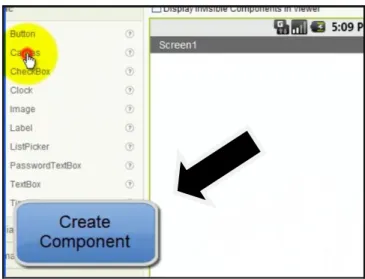
Instructional materials for each app included both a video demonstrating how to make an app and a text guide detailing how to make an app. Palmiter and Elkerton (1993) found that videos demonstrating how to complete tasks using a direct-manipulation interface can quickly and naturally teach users how to use the interface. They also concluded that only watching videos can lead to superficial processing while reading text instructions leads to deeper processing. Given that video demonstrations are a useful aid for learning to complete tasks using an unfamiliar interface and that text instructions lead to better transfer and retention for these tasks (Palmiter & Elkerton, 1993), both types of instruction were used in the present study. Subgoal labels were presented in the videos as callouts to present the information succinctly without overshadowing any verbal instructions (see Figure 3, arrow added).
Session 1st section 2nd section 3rd section 1 Introduction Instruction Assessment 2, 3, 4 Assessment Instruction Assessment
Figure 3. Sample of Subgoal Callout in Video To assess participants’ ability to solve problems using App Inventor, participants were asked to write the steps that they would take to program new features of an app. These assessment tasks were developed based on material that participants were exposed to during the sessions, but some assessment tasks required participants to use aspects of App Inventor that they had not used before to measure their ability to transfer their knowledge. Hints were given for tasks that required participants to use these unfamiliar features. The hints guided participants to the correct features but did not tell them how to use that feature (see Figure 4).
“1.5 Write the steps you would take to make the screen change colors depending on the orientation of the phone; specifically, the screen turns blue when the pitch is greater than 2 (hint: you’ll need to make an orientation sensor and use blocks from “Screen 1” in My Blocks).” “3.3 Write the steps you would take to create a list of colors and make the ball to change to a random color whenever it collided with something.”
Figure 4. Sample of Assessment Tasks
Two types of assessments were given. One type was given at the end of each session and intended to measure participants’ ability to solve novel problems, so it included near and far transfer tasks. The other type was given at the beginning of each session starting with the second session and intended to measure participants’ retention of problem solving procedures, so it included only near transfer tasks.
Near transfer tasks required participants to follow an identical procedure that they had used in the instructional session but substituted blocks or components of the same type. For example, one task asked participants to program the clap sound to play when the phone was tilted up. To complete this task, participants could follow the same steps that they used in the instructional session to program the drum sound to play when the phone was tilted to the right,
but they had to replace the drum sound with the clap sound and the x-axis acceleration sensor with the y-axis acceleration sensor.
Far transfer tasks required participants to follow the same general scheme that they had used in the instructional session but substituted blocks or components of a different type. For example, one task asked participants to program an ImageSprite to move 5 pixels to the right when touched. The steps to do this task were different than the steps in the instructional session because the type of block was different, but the subgoals that needed to be completed were the same. Participants were not permitted to use the video or text guides during the assessment period, but participants were encouraged to use the App Inventor interface to help them complete the assessment tasks. Participants were also allowed to access the apps that they had made during the session to serve as memory cues for the complex procedures they had learned in the session. Participants were instructed to not review instructional material between sessions, so their retention of problem solving procedures could be measured consistently.
Method
Participants
Participants were 18 K-12 teachers recruited through mailing lists for teachers interested in computer science education. Teachers with prior experience with Android App Inventor could not participate in the experiment, but they were not restricted by any other prior experience. The teachers had backgrounds that varied on a number of factors such as education, years as a teacher, years teaching computer science, level of computer science taught, and professional development completed. There were no correlations between participant performance and prior experience, so this issue will not be discussed further.
Procedure
The experiment was conducted online with no face-to-face interaction. Instructions and media for the apps were emailed to participants, and the sessions were hosted on surveymonkey.com. Each SurveyMonkey survey gave participants instructions for completing the instructional session and assessment tasks (first session survey: http://www.surveymonkey.com/s/RVCWTBX, use “test” as participant number). Through the survey, participants were asked to record how long they spent on each instructional session and each assessment task. Participants were also asked how difficult they thought each instructional session and assessment task was on a Likert-type scale from “1-Very Difficult” to “7-“1-Very Easy.”
The experiment comprised four sessions which were given one week apart. The timestamp on the surveys were checked to ensure participants completed the sessions at least six days apart. The sessions were similar to those in Margulieux et al. (2012) but adapted for online use. The major difference between the Margulieux et al. (2012) and
present administration of sessions is that the moderator instructions were given through text instead of speech. Each session taught participants how to make an app using a video and text guide. The video guide showed participants how to create the app, and the text guide gave step-by-step instructions for creating the app. After participants made the app for that session, they worked on the assessment tasks. Starting with the second session, participants also completed the retention assessment at the beginning of the session before they started making the app (see Table 1).
Completion rates for the sessions decreased during the study with a high level of participation for the demographic survey and low level for the last two sessions. Though the participants volunteered to be in the study, they did not receive any compensation for their time except instruction about App Inventor. Additionally, the assessment tasks were designed to be difficult in order to avoid a restriction of range problem caused by all participants performing well. Many participants commented that they were frustrated with the tasks. The teachers might have lost motivation to complete the sessions without more compensation. Few teachers experienced unforeseeable conflicts that ended their participation. There was not a recognizable pattern that distinguished participants who completed the study from those who did not. Data from only the first two sessions were analyzed due to low completion rates of the last two sessions.
These attrition rates are similar to those seen in other online learning environments such as Massive Open Online Courses (MOOCs). In an analysis of nearly 500,000 courses taken by over 40,000 students, Xu and Jaggars (2013) found that many of the factors that predict success in face-to-face learning environments also predict success in online learning environments (e.g., women were more successful, and students with higher GPAs were more successful). This finding suggests that attrition in online courses is similar to attrition in face-to-face courses but on a larger scale. However, the number of students that online courses can reach is much larger, so the number of students who complete an online course is generally greater than the number of students who complete an equivalent face-to-face course (Whiteman, 2013).
Results and Discussion
Each solution of the assessment tasks was deconstructed into the components necessary to complete the solution; that is, the subgoals of the solution. As discussed earlier, the subgoals are inherent in the solutions, but the tasks did not provide any information about which subgoals were necessary to complete the solution. Because the solutions for the assessment tasks are complex, scoring the pieces of each solution instead of scoring the entire solution as correct or incorrect allowed for more sensitivity in the measurement.
Problem-solving performance is represented by two scores: a “correct” score and an “attempted” score.
Participants were given a point for each subgoal that they completed correctly and each subgoal that they attempted. Attempting a subgoal was operationally defined as listing at least one of the steps required to complete the subgoal, listing an incorrect step that would achieve a similar function, or describing the purpose of the subgoal in some way. Participant responses were scored by multiple raters, and interrater reliability was high with a one-way random model intraclass correlation coefficient of agreement (ICC(A)) of .87. There were 32 subgoals across the assessment task solutions, so participants could get a maximum score of 32 for both the attempted and correct problem-solving measurements.
Correct Subgoals
Participants in the subgoal group (n = 9) completed 81% more subgoals correctly (M = 26.6, SD = 5.08) than the conventional group (n = 9, M = 14.7, SD = 6.63), F (1, 16) = 18.23, MSE = 34.89, p = .001, ω2 = .53, f = 1.01. These results mean that 53% of the variance for correct subgoals was accounted for by group. Furthermore, this is a very large effect size considering the amount of instruction that participants received (i.e., two, 30-45 minute instructional sessions). These findings suggest that the subgoal labeled worked examples, compared to conventional worked examples, can help people learn more efficiently to solve programming problems.
The difference between groups in this experiment is about twice as large as the difference between groups in Margulieux et al. (2012), f = 1.01 vs. f = .53, respectively, even though the present study was conducted in a less controlled environment and its participants had more varied backgrounds. Participants in the present study also had as much time as they wanted to work on the assessments instead of being limited like in Margulieux et al. (2012).
One explanation for this larger effect could be that participants in this study were teachers who volunteered because they wanted to learn the material to further their career while participants in the Margulieux et al. (2012) studies were undergraduates who were less likely to be motivated to learn the material. Therefore, this difference could mean that the subgoal intervention is more effective for learners who are motivated to learn the material for the long-term than it is for lab participants who might only try to learn the material for the duration of the experiment.
Another possible explanation is that the participants in Margulieux et al. (2012) were students whose skills for learning new material were sharper than those of teachers who might have been out of school for decades. The difference between groups for the undergraduate sample might be smaller than for teachers because the students had better strategies for studying conventional worked examples than the teachers. Therefore, undergraduates who received the conventional worked examples would have performed better than teachers who received the conventional worked examples, thereby creating a smaller difference between groups in Margulieux et al. (2012) than the present study.
For both near and far transfer tasks, the subgoal group completed more subgoals successfully (Near: M = 10.6, SD = 1.94; Far: M = 7.1, SD = 2.26) than the conventional group (Near: M = 5.2, SD = 3.70; Far: M = 3.3, SD = 2.35), Near: F (1, 16) = 14.65, MSE = 8.74, p = .001, ω2 = .48, f = .90, Far: F (1, 16) = 12.11, MSE = 5.31, p = .003, ω2 = .43, f = .82. These results suggest that subgoal labels help performance on both near and far transfer tasks. Given the nature of the near and far transfer tasks, these findings could mean that the subgoal labels helped participants learn the material better (near transfer) and apply the material to novel problems (far transfer).
On the first end-of-session assessment tasks, participants in the subgoal group completed 223% more subgoals correctly (M = 9.7, SD = 1.41) than the conventional group (M = 3.0, SD = 3.02), F (1, 16) = 27.04, MSE = 5.56, p < .001, ω2 = .63, f = 1.23. These results mean that 63% of the variance for correct subgoals was accounted for by group. On the second end-of-session assessment tasks, participants in the subgoal group completed 70% more subgoals correctly (M = 8.0, SD = 2.83) than the conventional group (M = 4.7, SD = 3.57), F (1, 16) = 4.82, MSE = 10.38, p = .043, ω2 = .23, f = .50. These results mean that 23% of the variance for correct subgoals was accounted for by group.
The two series of assessments suggest the subgoal group was better at solving novel problems than the conventional group. Because the effect size of the second assessment was smaller than that of the first assessment (f = .50 vs. f = 1.23, respectively), the difference between groups might decrease with repeated exposure to the same type of material. This decrease would be expected because as learners gain more knowledge, they are better able to identify important information and need less external guidance. This finding suggests that the subgoal labels are fulfilling the purpose for which they are intended: to highlight the information on which learners should focus so they can learn more effectively. Over time, both groups might achieve the same problem solving ability, but the learners who receive subgoal labels would reach a higher level faster than those who do not. This finding does not mean that subgoals are not valuable later, but it suggests that they are most effective when learners are first introduced to new material.
On the start-of-session assessment tasks (i.e., to measure retention of problem solving procedures), participants in the subgoal group completed 48% more subgoals correctly (M = 9.0, SD = 1.70) than the conventional group (M = 6.1, SD = 3.22), F (1, 16) = 6.17, MSE = 6.41, p = .024, ω2 = .27, f = .57. These results mean that 27% of the variance for correct subgoals was accounted for by group. All of the tasks in this series were near transfer tasks, so to complete the tasks participants had to use procedures that they had learned in the previous session. This result suggests that the subgoal intervention promotes retention of the procedures.
Attempted Subgoals
Participants in the subgoal group attempted 25% more subgoals (M = 28.6, SD = 3.50) than the conventional group
(M = 22.8, SD = 7.19), F (1, 16) = 4.70, MSE = 31.70, p = .046, ω2 = .23, f = .51. By attempting a subgoal, participants could be demonstrating that they know the solution needs a particular component. Therefore, this finding could mean that subgoal participants recognized more of the necessary components of the solutions than the conventional participants regardless of whether they were able to correctly complete the task.
Time on Task and Difficulty
There were no statistically reliable differences between the groups on the time and difficulty measures (viz., time spent on instructional periods, difficulty rating of instructional periods, time spent on assessment periods, and difficulty rating of assessment periods; see Table 2). These results suggest that participants in the subgoal group performed better than the conventional group without taking longer to complete the instructions or tasks and without finding the instructions or tasks more difficult.
Table 2: Difference between groups for time and difficulty measures; time in minutes, difficulty on 7-pt. scale (1-Very
Difficult and 7-Very Easy)
Category M subgoal M conv F p Time on Instruction 77.3 87.8 37.8 .37 .55 Difficulty of Instruction 4.9 4.5 1.0 .23 .64 Time on Assessments 76.6 56.7 33.1 1.44 .25 Difficulty of Assessments 4.3 3.8 1.1 .66 .43
This conclusion is supported by linear regression models. Group (β = .58, p = .005) and time (β = .41 p = .031) are both significant predictors of correct subgoal score suggesting that they account for different parts of the variance. When predicting attempted subgoal scores, group is no longer a significant predictor, and time (β = .54 p = .032) becomes the sole predictor. This model accounts for participants who spent relatively little time on the assessment tasks and did not write solutions (i.e., who did not attempt to solve the task). Furthermore, group (β = .62, p = .002) and difficulty rating (β = .42 p = .024) are both significant predictors of correct subgoal score suggesting that they also account for different parts of the variance in scores. When predicting attempted subgoal scores, however, group is no longer a significant predictor, and difficulty rating (β = .63 p = .009) becomes the sole predictor. This model accounts for participants who did not attempt to solve the problems and rated the difficulty of the tasks as high. Due to a high correlation between time on task and difficulty rating (r = .60, p = .015), these two predictors were analyzed in different models to avoid multicollinearity.
Conclusion
Subgoal labeled worked examples have been effective for teaching students to solve problems in procedural domains such as statistics (Catrambone, 1998) and computer programming (Margulieux et al., 2012). Most of these studies have taken place in a laboratory with undergraduates. The present study extends prior work with results that suggest subgoal labeled worked examples are effective for K-12 teachers learning App Inventor in an online learning environment. These findings demonstrate that subgoal labels can be effective in a learning environment outside of the laboratory with a different population of learners.
It is encouraging that the subgoal intervention improved online learners’ performance. The purpose of labeling subgoals in worked examples is to succinctly give the learner extra information to help them recognize the structure of the example. This type of extra information is what an instructor, who is an expert in the subject matter, might ideally provide to students in face-to-face instruction. Unfortunately, instructors are not always aware that they should provide this extra information, and even if they are aware, they do not necessarily know how to impart the information. In an online learning environment in which students rarely interact with an instructor, such as the one in this experiment, this extra information needs to be built into the instructions. Extra information could increase learning time. However, the present study demonstrates that, in the absence of an instructor, subgoal labeled worked examples provide enough extra information to help students learn more effectively without increasing the amount of time students take to learn.
The results of the experiments also imply that the subgoal intervention can be effective for populations other that undergraduates. The sample in the present experiment was heterogeneous in terms of age, education, and experience, so the amount of variance in the participants’ performance scores that was accounted for by experimental group (over 50% in some cases) was surprisingly large. This finding can justify the use of resources to implement subgoal interventions in professional development, classrooms, and other instructional environments, including those online.
The present study demonstrates that subgoal labeled worked examples can be an effective intervention for teaching highly procedural domains outside of the laboratory. Additional experiments can examine the intervention in a variety of learning environments.
Acknowledgments
Our thanks to Georgia Tech's GVU Center and IPaT for the grant that made this research possible. We also thank Barbara Ericson for her consultation and Andrea Crews for help scoring data.
References
Atkinson, R. K., Derry, S. J., Renkl, A., & Wortham, D. (2000). Learning from Examples: Instructional Principles from the Worked Examples Research. Review of the Educational Research, 70(2), 181-214. doi: 10.2307/ 1170661
Bassok, M. (1990). Transfer of Domain-specific Problem-solving Procedures. Journal of Experimental Psychology: Learning, Memory, and Cognition, 16(3), 522-533. doi: 10.1037/0278-7393.16.3.522
Catrambone, R. (1994). Improving examples to improve transfer to novel problems. Memory and Cognition, 22, 605‐615. doi: 10.3758/BF03198399
Catrambone, R. (1996). Generalizing solution procedures learned from examples. Journal of Experimental Psychology:Learning,Memory,andCognition,22, 1020-1031. doi: 10.1037/0278-7393.22.4.1020
Catrambone, R. (1998). The subgoal learning model: Creating better examples so that students can solve novel problems. Journal of Experimental Psychology: General, 127, 355-376. doi: 10.1037/0096-3445.127.4.355
Catrambone, R., Gane, B., Adams, A., Bujak, K., Kline, K., & Eiriksdottir, E. (2013). Task Analysis by Problem Solving (TAPS): A Method for Uncovering Expert Knowledge. Unpublished manuscript, Georgia Institute of Technology, Atlanta, GA.
Hundhausen, C. D., Farley, S. F., & Brown, J. L. (2009). Can direct manipulation lower the barriers to computer programming and promote transfer of training?: An experimental study. ACM Transactions in CHI, 16(3). doi: 10.1145/1592440.1592442
Margulieux, L. E., Guzdial, M., & Catrambone, R. (2012). Subgoal-labeled instructional material improves performance and transfer in learning to develop mobile applications. In Proceedings of the Ninth Annual International Conference on International Computing Education Research, 71-78. doi: 10.1145/2361276. 2361291
Palmiter, S., & Elkerton, J. (1993). Animated demonstrations for learning procedural computer-based tasks. Human-Computer Interaction, 8(3), 193-216. doi:10.1207/s15327051hci0803_1
Renkl, A., & Atkinson, R. K. (2002). Learning from examples: Fostering self-explanations in computer-based learning environments. Interactive Learning Environments, 10(2), 105-199. doi: 10.1076/ilee.10.2.105. 7441
Whiteman, W. (April, 2013). MOOCs in engineering education. Presented at the meeting of American Society of Engineering Education Georgia Tech Chapter, Atlanta, GA.
Xu, D., & Jaggars, S. S. (2013). Adaptability to online learning: Differences across types of students and academic subject areas (CCRC Working Paper No. 54). Teachers College, Columbia University.