School of Science
Master’s Programme in ICT Innovation: Human-Computer
Interaction & Design
Yuchen (Charles) Hu
Do People Want to Message Chatbots?
Developing and Comparing the
Usability of a Conversational vs.
Menu-based Chatbot in Context of New Hire
Onboarding
Master’s Thesis
Espoo, September 30, 2019
AALTO UNIVERSITY
School of Science ABSTRACT OF Master’s Programme in ICT Innovation MASTER´S THESIS
Author:
Yuchen (Charles) Hu
Title of the thesis:
Do People Want to Message Chatbots?
Developing and Comparing the Usability of a Conversational vs.
Menu-based Chatbot in Context of New Hire Onboarding
Number of pages:
76
Date:
Sept 30, 2019
Major or minor:
ICT Innovation: Human-Computer Interaction & Design
(SCI3020)
Supervisor:
Marko Nieminen, Aalto University
Thesis advisors:
N/A
How should people interact with chatbots? This question has become relevant as chatbots grow in recognition within the field of human-computer interaction. Should chatbots strive to have intelligent and realistic conversations with their users? Or, does a simplified, menu-based approach provide the better experience?
To answer these questions, a human-centred design process was used to design, develop, and evaluate the usability of two chatbots in context of new hire onboarding. A conversational chatbot with natural language processing was built using Google Dialogflow, while a technology-limited, menu-based chatbot was built with Landbot. 17 participants were split into three groups to perform a qualitative user test, where group 1 tested both bots, group 2 tested only the conversational bot, and group 3 tested only the menu-based bot. Afterwards, all
participants were given a quantitative, Likert-scale survey to measure the usability, intelligence, and satisfaction of the chatbots.
The results indicate that users preferred a menu-based over a conversational chatbot experience due to its greater ease of use, less likelihood for errors, convenience of graphical user interface elements, and suitability for scenarios where information needs to be provided rather than requested. Conversational chatbot experiences were found to be more convenient when users had direct questions, although they are more complex to implement when compared to menu-based chatbots.
Keywords:
chatbot, conversational agents, artificial intelligence, natural
language processing, graphical user interface, onboarding
Publishing language:
To my family, friends, coworkers, and professors, a sincere thank you as this thesis would not have been possible without your support.
Contents
1.
Introduction
...
7
1.1.
Partner company
...
8
1.2.
Structure of the thesis
...
9
2.
Goals and research questions
...
10
3.
Background
...
11
3.1.
Chatbot history
...
11
3.1.1. Chatbot origins ...11
3.1.2. Growth of chatbots ...11
3.1.3. Trends influencing chatbot growth ...12
3.2.
Chatbot challenges
...
13
3.3.
Chatbot definition
...
16
3.4.
Chatbot classification
...
17
3.4.1. Categories ...17 3.4.2. Design approaches ...18 3.4.3. Technologies ...193.5.
Overview of onboarding
...
20
3.5.1. The business case for onboarding ...20
3.5.2. Scope of onboarding ...21
4.
Methods
...
22
4.1.
Research
...
23
4.1.1. Users and stakeholders ...23
4.1.2. Context of use ...23
4.1.3. Environment ...25
4.3.
Design
...
27
4.3.1. Usability and User Experience ...27
4.3.2. Personality and tone of voice ...28
4.3.3. Conversational flow diagram ...28
4.4.
Evaluate
...
30
4.4.1. Participants ...30 4.4.2. Qualitative evaluation ...30 4.4.3. Quantitative evaluation ...325.
Implementation
...
34
5.1.
Platform selection
...
34
5.2.
Conversational bot implementation
...
35
5.3.
Menu-based bot implementation
...
39
5.4.
Comparison of chatbot implementations
...
41
6.
Results
...
43
6.1.
Qualitative evaluation results
...
43
6.2.
Quantitative evaluation results
...
45
6.2.1. Results for group 1 ...45
6.2.2. Results for groups 2 and 3 ...47
7.
Discussion
...
50
8.
Conclusion
...
52
8.1.
Summary
...
52
8.2.
Limitations
...
53
8.2.1. Dialogflow implementation difficulty ...53
8.2.2. User sample ...53
8.3.
Future work
...
53
9.
References
...
54
Appendix A - A
ffi
nity diagram
...
59
Appendix B - Conversational bot architecture
...
60
Appendix C - Menu bot architecture
...
66
1.
Introduction
“Pretty much everybody today who’s building applications …
will build chatbots as the new interface … they fundamentally
revolutionise how computing is experienced by everybody.”
—
Satya Nadella (Johnson, 2016)Microsoft CEO Satya Nadella captured the technological zeitgeist of the times in one succinct quote while on stage at the 2016 World Partner Conference in Toronto. Breathless hype around chatbots was at its zenith and they seemed poised to be the next great digital revolution after mobile computing.
After all, chatbots promised us the ability to obtain services and interact with businesses like how we do with our friends—by talking to them. Backed by powerful artificial intelligence, machine learning, and natural language processing capabilities, we could simply tell a restaurant bot to book a dinner reservation for two people at 7 pm on a Tuesday, instead of having to download and use a new mobile application. Bots pledged a more personal, intimate, and convenient experience for consumers, while businesses achieve cost savings through automation (Dale, 2016). At Facebook’s F8 developer conference in 2016, CEO Mark Zuckerberg proclaimed “We think that you should be able to message a business in the same way you message a friend … it shouldn’t take your full attention like a phone call would. And you shouldn’t have to install a new app (Heath, 2016).”
Fast forward three years later to 2019, and it appears that the revolutionary chatbot paradigm shift has yet to arrive. Several technology commentators have noted that user adoption of chatbots has lagged significantly in contrast to the initial optimism (Simonite, 2017). Despite recent progress, AI and 1
NLP technology have yet to reach the capability required to reliably 2
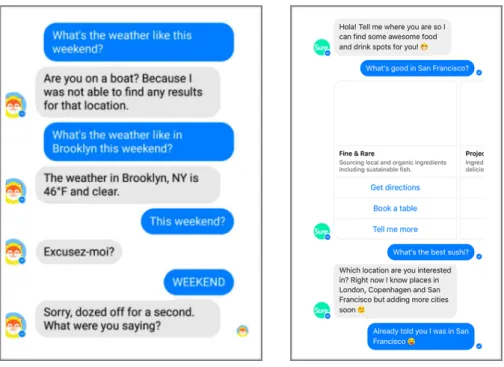
understand the complexity of human speech, leading to error and frustration. Indeed, Brandtzaeg and Følstad (2017) express that most available chatbots fail due to insufficient usability or nonsensical responses. Facebook admitted in 2017 that M, their AI-powered bot on its Messenger platform, could only
Artificial intelligence 1
Natural language processing 2
handle 30% of requests without human intervention and that they would scale back their scenarios to prevent further user disappointment.
The challenges facing intelligent bots today have led to the concurrent rise of so-called “dumb” chatbots, which utilise conventional GUI elements with 3
simple decision tree logic to minimise the potential for human-bot misunderstandings. Many successful bots in use today, such as Google Assistant, scale back on the amount of user typing required and instead introduce more graphical elements such as buttons (Piccolo et al., 2019). For example, the popular messaging app, Telegram, began removing friction by reducing the amount of typing required to interact with the bot only a few months after their chatbot platform went live (Lomas, 2016).
While several studies have been performed on the application of chatbots in various contexts, there is a lack of research comparing the usability of different chatbot implementation methods. Thus, this thesis extends existing chatbot research by developing and comparing the usability of a conversational “smart” chatbot with NLP, versus a menu-based “dumb” chatbot without any intelligent capabilities. The two chatbots are applied towards the scenario of new employee onboarding at Apegroup, a Stockholm-based design agency. New employee onboarding was the selected scenario because it is currently a widespread problem for many companies (Harpelund, 2019), while a technology-supported platform for obtaining HR information 4
has been identified as a key solution (Robinson et al., 2019).
It is challenging to develop a good chatbot, let alone two. However, given that the global chatbot market is expected to grow to USD $1.34 billion at a rate of 31% per year by 2024 (Bhutani & Wadhwani, 2018) and the technology still has major potential, it is a challenge worth tackling.
1.1. Partner company
Apegroup is the corporate collaboration partner for this thesis. Apegroup is an award-winning digital design consultancy based in Stockholm, Sweden. Composed of around 50 employees, it is dedicated to creating value through the design of meaningful digital products and experiences. Founded in 2001, it was also the first design studio in Sweden to create mobile apps.
The company’s motto is to bring tomorrow’s technology to today, making them an ideal partner for exploring the application of chatbots. Apegroup has also recently experienced a hiring spree, making new hire onboarding particularly relevant for them.
Graphical user interface 3
Human resources 4
1.2. Structure of the thesis
The structure of this thesis is outlined below:Chapter 1 includes the introduction of the thesis, partner company background, and structure of the thesis.
Chapter 2 presents the goals and research questions of the thesis.
Chapter 3 provides the academic and industry background of chatbots and new hire onboarding based on extensive literature review.
Chapter 4 presents the research, design, and evaluation methods of the study. Chapter 5 includes the implementation details of the chatbots.
Chapter 6 presents the results of the chatbots evaluation.
Chapter 7 provides an overall discussion and analysis of the results.
Chapter 8 presents the final conclusions of the study, including limitations and future work opportunities.
2.
Goals and research
questions
As mentioned in the introduction, the overall goal of this thesis is to develop and compare the usability of two chatbots—a conversational chatbot with NLP capabilities that a user primarily communicates with by typing freely, versus an intelligence limited menu-based chatbot in which the user interacts by using a menu system with buttons.
The corresponding research questions are:
RQ1: Do users prefer a conversational or menu-based chatbot experience?
There is currently much debate regarding the design of chatbots, specifically whether they should continue to strive for realistic messaging conversations, or follow a simplified approach using buttons. To investigate this discussion, the goal of RQ1 is to conduct a structured study to determine which chatbot style is preferred by users using measures of usability and satisfaction.
RQ2: To what extent does a realistic conversational experience influence usability?
The current assumption is that providing an intelligent, human-like conversational experience in chatbots is considered better than an experience that does not. The aim of RQ2 is to investigate this assumption. Does the perception of intelligence, enabled by free text interaction, make a bot more usable? Or can a menu-based bot that does not try to be smart become the better experience?
3.
Background
This section includes the literature review on chatbots and new employee onboarding. Chatbot history, definition, design techniques, technology, and an overview of onboarding are provided.
3.1. Chatbot history
3.1.1. Chatbot originsChatbots have actually existed for quite some time, when the first bot named ELIZA was built by Joseph Weizenbaum in 1966 to simulate psychotherapy (Io & Lee, 2017). In the next few decades, bots were designed using simple pattern matching and template-based response mechanisms, with the primary goal of passing the Turing test, a measure of how human-like a machine could be. Indeed, new bots including ALICE, Mitsuku, and Rose were developed for the Loebner prize competition, which since 1991 has become the de-facto contest for implementing the Turing test. The chatbot fantasy of the time was to fool people into believing they were talking to real humans, rather than accomplishing any specific business or user goals (Dale, 2016).
3.1.2. Growth of chatbots
With the rise of the internet and mobile computing, HCI researchers in 2008 5
predicted a growing presence of “increasingly clever computers” in people’s lives and a shift from simulating life-like behaviour to providing utility (Harper et al., 2008). The popular voice-based digital assistants including Amazon’s Alexa and Apple ’s Siri are now enjoyed by people throughout their homes to help check the weather, order items and play music. The growth of messaging platform based chatbots has also soared, with Facebook Messenger alone hosting more than 300,000 chatbots since 2016. Combined with Slack and Skype, the three platforms currently host over a million chatbots (Piccolo et al., 2019). These chatbots provide utility and accomplish a variety of use
Human-computer interaction 5
cases, from ordering pizza (Domino’s) to flight booking (Kayak) to shopping (Burberry) (Jain et al., 2018).
Recent studies have shown that the chatbot growth is expected to continue to increase. According to Gartner, chatbots will power 85% of all customer interactions by the year 2020, and that people will have more conversations with chatbots than with their spouse (Gartner, 2016). UK-based Juniper Research predicts that by 2022, bots will save businesses $8 billion per year (Dhanda, 2017).
3.1.3. Trends influencing chatbot growth
The growth of chatbots can be attributed to the following trends:
A. Advances in artificial intelligence, machine learning, natural language processing, and related technologies
The aforementioned technologies promise significant improvements in the ability for chatbots to understand human speech, including enhanced natural language interpretation and prediction capabilities. Additionally, progress in conversational modelling is enabling neural network based chatbots to surpass traditional pattern-based matching chatbots in effectiveness by a large margin (Brandtzaeg & Følstad, 2017). In short, the advances in technology are helping chatbots become smarter and more effective in understanding and responding to human input.
B. Adoption of messaging platforms
The way people communicate has dramatically shifted since the arrival of the Apple iPhone and mobile computing in general. 4.5 billion people worldwide use mobile messaging apps such as Facebook Messenger, WhatsApp, and WeChat as their preferred means of communication (Statista, 2019).
According to Dale (2016), messaging apps are a perfect environment for chatbots due to the ubiquity of the messaging interface effectively being a frictionless interface. Instead of requiring to download, install and open a new program just to book a restaurant, users could do so within the existing messaging apps that they already use daily.
C. Application fatigue
Not only has the popularity of messaging apps skyrocketed, but consumers are increasingly unwilling to download, install, and use new apps. According to Khorozov (2017), a typical user has an average of 30 apps on their mobile device, but uses less than five on a regular basis. Additionally, a 2017 report by Comscore found that 51% of US smartphone users don’t download any apps in a single month, 75% downloaded two or fewer, and a third abandon an app after using it only once (Comscore, 2017). The increasing app fatigue among consumers correlates well with the bold but trendy belief that conversational interfaces could replace apps entirely. Instead of needing to download a new app to obtain a service, consumers could simply communicate with a chatbot inside their favorite messaging platform instead. Prominent tech investor Chris Messina penned an article in 2016, claiming “you and I will be talking to brands and companies over Facebook Messenger, WhatsApp, Slack and everywhere else before year’s end, and will find it normal” (Messina, 2016).
D. Chatbot frameworks and lower development costs
Developing chatbots has become cheaper and more accessible than before. Over the past few years, the major technology giants including Microsoft, Facebook, and Google have all created frameworks to help speed up development while enabling engineers to utilise the latest in artificial intelligence and related technologies. For example, after launching the Bot Framework in 2016, Microsoft stated that they already had over 30,000 developers building bots for them on the Skype platform (Pall, 2016). When compared to traditional mobile apps, chatbots are typically cheaper to build and maintain due to them being essentially server-side applications with a simple user interface. They can also typically be deployed once without worrying about its adaptation to various screen sizes or operating systems.
3.2. Chatbot challenges
The previous section highlighted the impressive growth of chatbots over the past decade. However, it must be noted that growth does not equal adoption. While there have been a remarkable number of chatbots built in the past few years, the adoption of those bots is still lacking. Per Jain et al. (2018), a majority of users are first time chatbot users, and 84% of internet users have not used a chatbot yet. The growth of chatbot development has also been
scrutinised, with researchers expressing that their spread is often due to marketing pressure, rather than solving real customer needs (Piccolo et al., 2019). So why haven’t chatbots taken off with the consumer public as predicted? The reasons are expressed in the following section.
A. Technical difficulty
Despite advances in artificial intelligence and natural language processing, the technology is still far from the maturity level required to effectively converse with users. David Feldman, a former VP of conversational design at Google, expresses that even the best NLP today is limited compared to even a half-asleep human. He states that Siri and Alexa only understand words but not meaning, indicating a failure of NLP (Feldman, 2018). Furthermore, AI is still largely inaccessible and difficult to maintain because they require high attention to input, output, entity phrases and sentiment analysis in order to process the complexity of human language (Rahman et al., 2017). Jiaqi Pan, founder of chatbot startup Landbot, claims that the previous AI engine used to power their chatbot was growing increasingly chaotic, and that their own engineers could not understand why their bot was saying certain things (Lomas, 2018).
B. Poor user experience
As a consequence of the technical challenges in chatbot development mentioned above, most bots today are built with decision tree logic and lack true linguistic or natural language learning capabilities. Therefore, chatbots lack contextual awareness and can’t replicate the non-linearity of human conversation, where multiple topics weave around each other and discussions take unexpected left turns (Feldman, 2018).
Due to these limitations, users face a frustrating experience when interacting with chatbots. In a chatbot development study, Tavanapour and Bittner (2018) found that users were frustrated when bots consistently failed to understand them, and that users then began attempting to simplify their queries in an effort to predict what the bot would recognise. Pan also expressed that his users were becoming frustrated and attempting twenty different ways to indicate that they wanted to speak with a human (Lomas, 2018).
Furthermore, while chatbots promised a simpler experience by using existing messaging behaviour that was highly familiar, developers began trading app complexity for a different kind of complexity, as users were suddenly forced to type out lengthy instructions by hand instead of faster tap and swipe gestures (Feldman, 2018). The irony is clear when presented with the computing paradigm shift in the early 1980s, when text-based command lines were replaced with graphical user interfaces because the latter was easier and quicker to use.
C. Lack of focused use cases
When the chatbot fanfare was at its peak in 2016, technology experts were enraptured by its potential to make business services more personal, capable of small talk and quick messaging. Some technologists believed that chatbots could replace apps entirely (Dale, 2016). Sam Lessin, a respected Silicon Valley investor, expressed that “the 2016 bot paradigm shift is going to be far more disruptive and interesting than last decade’s move from web to mobile apps” (Lessin, 2016).
The hyperbole has led to the development of bots that attempt poorly to accomplish many different things rather than succeed at a few things (Feldman, 2018). The messaging app Kik initially staked its company future on chatbot development, but scaled back their operations a few months later after finding that customers were frustrated by their bot’s failure to accomplish several tasks (Griffith & Simonite, 2018). Feldman (2018) concludes that chatbots begin to fail when the language of replace is used instead of more nuanced concepts like extend or augment.
Furthermore, in a study investigating people’s motivations for using chatbots, Brandtzaeg and Følstad (2017) found that the 68% majority of those surveyed said that productivity was their key reason for using them. While 20% of participants indicated that it was important for chatbots to be perceived as fun or entertaining, they still needed to help them accomplish a goal.
3.3. Chatbot de
fi
nition
A quick internet search reveals many different chatbot definitions. The terminology varies based on the design techniques, interaction style, and technology used. For example, Ranoliya et al. (2017) define chatbots as “programs that mimic human conversation using artificial intelligence”, implying that they must have AI to be considered a chatbot. Meanwhile, Rahman et al. (2017) highlight the interaction style, calling them “is [sic] a virtual person who can effectively talk to any human being using interactive textual skills”.
For the purposes of this thesis, a broader chatbot definition will be used. Chatbots will later be segmented into different types based on the development methods mentioned above.
The definition of chatbots for this thesis is:
A chatbot is a digital service that can be interacted with through a chat interface in voice, written, or graphical input format.
This definition gives chatbots flexibility in their interaction modality, as users may use voice, written text, or traditional GUI elements to interact with it. Additionally, chatbots do not require artificial intelligence, as many employ simple rule-based logic and pattern matching to help users achieve their goals (McTear et al., 2016). Furthermore, the capacity to converse in a life-like manner is also not a prerequisite to being a chatbot. Given the current technological challenges in AI and NLP, several companies today have gradually used conventional tap and swipe gestures to replace the amount of chatting required in order to help users accomplish their goals faster (Brandtzaeg & Følstad, 2017). Therefore, the primary distinction between a chatbot and another service is that it must be contained within some form of chat interface.
According to Radziwill and Benton (2017), conversational agents are the overarching umbrella that encompass many types of conversation-based systems, including voice-based conversational agents, embodied conversational agents, and chatbots, the focus of this thesis. Voice-based conversational agents are probably the most well-known to the public, which are the voice-driven digital assistants from the major technology companies including Amazon’s Alexa, Apple’s Siri, and Google’s Assistant (Dale, 2016). These digital assistants are considered distinct from chatbots because they primarily exist outside of a traditional messaging interface (Radziwill & Benton, 2017). Embodied conversational agents meanwhile are computer-generated animated characters that combine facial expression, physical body language and speech gestures to mimic humans. They are also distinct from chatbots because they are typically deployed in role-play, simulations, or immersive virtual environments (McTear et al., 2016). Figure 3 illustrates these categorisations.
3.4. Chatbot classi
fi
cation
With chatbots now categorised within the conversational agents group, a classification of chatbots will be provided, along with an overview of the associated design techniques and technologies.
3.4.1. Categories
Chatbots can be classified into different categories based on the user scenarios, related design techniques, and technologies. Ramesh et al. (2017) highlight three broad categories which are presented below.
A. Retrieval-based vs. Generative-based
Retrieval-based chatbots provide pre-defined responses based on the user’s input and context. To determine the response, a variety of heuristics can be used, from simple rule-based expression matching, to a more complex combination using machine learning classifiers. Retrieval-based chatbots do not create new responses on their own—they choose from a pool of pre-defined responses that the developer creates. In contrast, generative chatbots are able to create new responses that are built from applying a set of machine translation and artificial intelligence techniques.
Both methods have distinct advantages and disadvantages. Retrieval-based chatbots are much easier to develop and make less grammatical errors because they pick from a pool of pre-defined responses. However, they are unable to handle unfamiliar inputs or understand context. Thus, information previously mentioned in a conversation like names or places can not be referred to again in this model. Generative models meanwhile are considered smarter because they can understand context and create their own responses. The challenge is that they are very difficult to build, prone to grammatical errors, and usually require huge amounts of training data.
B. Long vs. short conversations
Long versus short conversations relate to the complexity of the conversations that the chatbot need to handle. The longer the conversation, the harder it is to automate. Short conversations meanwhile typically require only one or two inputs and responses. An example of a long conversation scenario is customer care, where the customer’s problem is unique to them and requires several rounds of questions and answers to complete. Information retrieval, such as
finding a store’s opening hours, is a typical example of short conversations. C. Open vs. closed domain
Human conversations often weave from one topic to the next, without any particular reasoning. These conversations that can change domains are referred to as open domain conversations, where the chatbot models are not designed to serve a specific purpose. Social media conversations on Facebook and Twitter are examples of open domain conversations. They require considerable amounts of training and data to generate reasonable responses. Closed domain conversations meanwhile focus on a limited set of knowledge for a specific topic in order to provide an appropriate response. An example is a restaurant reservation system, where the system has a specific purpose (to book a table) and the conversation is based around that task. These systems generally use domain specific data for training.
3.4.2. Design approaches
Most chatbot systems today and historically employ pattern matching techniques, which utilise rules to generate appropriate responses. With the improvements in artificial intelligence and machine learning techniques, chatbot design is beginning to implement more sophisticated neural network modelling techniques. The two approaches are presented in broad terms in this section.
A. Pattern matching
Pattern matching is the most widely used methodology for designing chatbots, as some form of pattern matching algorithm is present in nearly every chatbot system. Pattern matching consists of identifying the structure of a sentence and providing a pre-defined response that can change according to the characteristic variables of the sentence (Ramesh et al., 2017). While pattern matching is relatively simple to implement, it suffers from responses that can become predictable and repetitive.
B. Neural network models
To overcome the limitations of pre-defined responses from pattern matching, modern approaches using neural networks have been utilised in chatbot design over the last few years. The general aim is to generate a target sequence by
examining the source sequence. In chatbots, the source sequence is the chat message from the user, while the target sequence is the machine’s reply.
A basic sequence to sequence model uses two recurrent neural networks and an encoder-decoder which uses a sequence as input and generates another sequence as output. The encoder maps the incoming sequence to an encoded representation of that sequence, which is then used by the decoder to generate an output sequence. Using the neural network model technique allows chatbots to create their own responses based on past information, but these models are very hard to train, are prone to grammatical errors, and usually require huge amounts of training data (Ramesh et al., 2017).
3.4.3. Technologies
The technologies used to support the chatbot design approaches are presented broadly in this section.
A. AIML
AIML (Artificial Intelligence Markup Language) is an XML-based markup language used to design chatbot conversations and is fully based on pattern matching. It is made up of fundamental knowledge units called categories, which contain pattern tags that define what the user is saying, and template tags that define the computer’s response. The three time Loebner prize winner in 2000, 2001 and 2004, ALICE, was built using AIML (Wallace, 2009).
B. ChatScript
While AIML is uncomplicated to learn, it has relatively weak pattern matching and is difficult to maintain. ChatScript is the successor to AIML and contains rules that are associated with topics. The best topic is associated to the user’s input, which then fires the linked rule. ChatScript was released in 2011 by Bruce Wilcox for implementation in the Suzette chatbot, winning a Loebner prize (Bradeško & Mladenić, 2012).
C. Natural Language Processing and Natural Language Understanding
Natural language processing and natural language understanding are more
flexible approaches to designing chatbots, as they parse conversations into intents, entities, and contexts. Intents are used to classify the goal of what the user is saying and the appropriate response, while entities extract specific variables from the intent, such as dates and times. Contexts are strings that store the context of the object that the user is talking about (Rahman et al., 2017).
3.5. Overview of onboarding
3.5.1. The business case for onboardingNew hire onboarding—who cares right? After all, from the company’s perspective, the new employee has already joined and is eager to make a good
first impression. In addition to meeting new colleagues, the new employee typically uses the first few weeks to get acclimated to their new workplace, including learning the company’s policies, culture, and how to perform administrative tasks like time reporting. These activities have traditionally been considered to be inconsequential and improving the onboarding process is near the bottom of a company’s priority list (Brown, 2007).
Critically, recent research has shown that onboarding plays a much bigger role in employee satisfaction and company success than previously thought, such as being positively related to job satisfaction, engagement, organisational commitment, performance, and inversely related to turnover (Meyer & Bartels, 2017). Harpelund (2019) states that in the US, 25% of new hires leave their company within the first 12 months, the cost of losing a new employee within the first 12 months equals to roughly 200–300% of their yearly salary, and that companies with good onboarding practices experience 54% higher productivity from their newly employed and twice the level of engagement. Despite these statistics, a Gallup poll found that only 12% of US employees strongly agreed that their organisation does a great job of onboarding new employees (Gallup, 2012).
Snell (2016) summarises the benefits of improved employee onboarding as the following:
• Reduced time and effort for HR, hiring managers, and others involved in onboarding.
• Improved speed and accuracy of data collection and transfer between payroll and HRIS systems.
• Ability to track new metrics for greater process efficiency.
• Better overall new hire experience including a single, self-service source of information during the crucial first days on the job.
• More effective employee–manager communication.
The business case for improving employee onboarding is becoming clearer and one of the keys to successful onboarding is a technology-supported platform that can handle data gathering, input, and display of HR information (Snell, 2006). Chatbots can assume the role of this technology-supported platform, as they open new possibilities for engaging new employees and customers alike (Robinson et al., 2019).
3.5.2. Scope of onboarding
The definition of onboarding can be very broad, encompassing a wide range of human resources related activities. Therefore, onboarding must be classified within the scope of this thesis to understand which scenarios the created chatbots will and will not solve.
Onboarding is the process by which newly hired employees learn about the business including daily functions, job responsibilities, culture, and values (Pike, 2014). The goal of successful onboarding is to bring new employees from being organisational outsiders to becoming organizational insiders quickly so they can acclimate and contribute (Bauer & Erdogan, 2011). Onboarding can be broken into two categories— person–organisation fit, where the employee learns about the organisation’s values, people, benefits, and daily routines. This contrasts with person-job fit, where the employee is focused on learning about their job responsibilities and expectations (Pike, 2014). Furthermore, onboarding is distinct from orientation, which is often a discrete, stand-alone event conducted by an HR representative that focuses on transactional tasks like filling out benefits forms and paperwork (Graybill et al., 2013).
The chatbots developed in this thesis focus on the category of person-organisation fit within onboarding.
4.
Methods
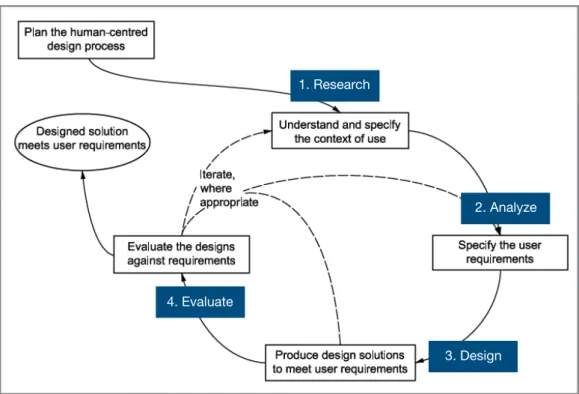
This section provides an overview of the methods that were used to design, develop, and evaluate the conversational versus menu-based chatbot. The project was based on methods from the classic ISO 9241 standard for human-centred design. The standard provides a framework for human-human-centred design, is intended to be complementary to existing design methodologies, and can be integrated into different design and development processes in a way that is appropriate to the particular context (ISO 9241-210, 2010). In general, ISO 9241 identifies four primary human-centred design activities:
1. Understanding and specifying the context of use (Research) In this step, users are studied to understand their context of use, which includes their characteristics, environment, problems, and needs.
2. Specifying the user requirements (Analysis)
Step 2 specifies the general features or specific requirements that the system needs to accomplish.
3. Producing design solutions (Design)
Step 3 represents the actual design and development of the system. 4. Evaluating the design (Evaluate)
The last step includes testing the completed product with the users of the system.
It should be noted that the ISO standard describes the design process as iterative in nature, and that designs should be updated based on feedback. However, iterations were not applied in this project, given that the two chatbots were being developed and evaluated under a tight timeframe.
An illustrative overview of the ISO 9241 design process is provided in Figure 4.
4.1. Research
In this phase, the users of the system and relevant stakeholders are identified, along with their context of use, which includes the user characteristics, goals, and system environment.
4.1.1. Users and stakeholders
The primary users of the chatbots were identified as new employees at Apegroup, defined as those who have been with the company for three months or less. However, given that the primary scope of employee onboarding for this project is related to obtaining relevant company information, all employees can still benefit from the chatbot. Therefore, all employees, representing those that have been with the company for longer than three months, were identified as secondary users. The stakeholders are the human resources employees at the company who will provide insights on their current process and how employees obtain company information today.
4.1.2. Context of use
To understand the context of use, individual semi-structured interviews lasting 30 minutes each were conducted with four new employees, two existing employees, and two HR professionals at Apegroup. Semi-structured interviews were used because they provide in-depth experiences of individuals by enabling a predetermined set of open-ended questions while allowing for more
Figure 4. ISO 9241 Human-centred design process 1. Research
2. Analyze
3. Design 4. Evaluate
probing when needed (DiCicco-Bloom & Crabtree, 2006). The interviews were recorded with permission from the interviewees. The interview questions were designed to first break the ice with the interviewees and build rapport rapidly, an essential component of semi-structured interviews (DiCicco-Bloom & Crabtree, 2006). The rest of the questions were designed to identify their needs regarding onboarding, and finally their experience with chatbots.
The interview templates for regular and HR employees are shown in Figures 5 and 6.
The relevant characteristics for the employees were that they were educated and technically savvy, which was expected as they were all technology professionals. Their experience with chatbots however was consistently
Figure 6. Interview questions for HR employees Figure 5. Interview questions for new and existing employees
limited, with one new employee expressing that she has never used one before. Most of them have used chatbots only once or twice, primarily for online customer service. Six out of eight interviewees expressed moderate attitudes towards chatbots, saying that they liked them only if they were useful and not too complex. Two out of eight interviewees had negative attitudes, saying that their experiences with them had many problems due to the bot being very limited and was unable to understand what they were saying.
Regarding problems and needs, a major pattern emerged amongst the six non-HR employees— the new hire onboarding process at Apegroup was poor in general. Five of the six new and existing employees expressed negative attitudes towards the process. Three of them indicated that it felt rushed, disorganised, and lacked clear information regarding benefits and policies, while two of them said they didn’t have onboarding at all because they were needed on an urgent project. One of the six employees indicated that her onboarding experience was fine because the HR representative had extra time to answer her questions, and she was diligent in writing down the answers. Another interesting insight was that two of the employees said that not having good onboarding was expected—they had bad experiences at their previous companies as well. On a positive note, all six of the new and existing employees said that the technology setup portion of the onboarding process was very good.
From the HR representative side, they acknowledged that the onboarding process needed improvement because they had a severe lack of time and resources. There were only two HR employees at the company—one of them handled technology setup while working full-time as a developer, while the other was solely responsible for all HR management, including recruiting. They expressed that a chatbot that could answer common questions about HR would be useful. Cultural fit and values were also critical to hiring at Apegroup, so they said that a chatbot that could communicate the company’s values would be useful.
More details regarding the needs and goals of the users will be provided in section 4.2 Analyze method.
4.1.3. Environment
It was also observed and recognised across Apegroup that all of the communication occurs in Slack, a popular workplace communication platform. Therefore, it was important that the chatbots are deployable to Slack.
4.2. Analyze
To determine what requirements or features should be in the chatbots, an affinity diagramming exercise was conducted. Affinity diagraming is a popular industry exercise for identifying design ideas from large sets of research
findings (Pernice, 2018). Affinity diagramming consists of writing down all the observations, findings, or ideas from research sessions onto post-it notes, and then clustering similar post-it notes together. The clusters represent insights, which can later be prioritised.
All eight recorded interviews were reviewed, and findings from each of them were placed onto sticky notes. Similar sticky notes were then clustered together, which revealed the needs that the chatbots should fulfil. The affinity diagram was created using Miro , an online SaaS tool for brainstorming. The 6
affinity diagram can be found in Appendix A. The needs from the affinity diagram were translated into high level requirements, as described below: • Ability to show key people at the company: A pattern emerged in
that getting to know the people in the company was very important to new hires. In particular, they wanted to know key stakeholders such as managers and HR representatives so they could ask questions. Knowing their team members was also important, but this was excluded from the MVP for the chatbots due to time constraints.
• Ability to show popular lunch spots and explain lunch habits: New hires, especially on their first day, wonder about how lunch works at the company, particularly if it’s common for people to eat out together or bring their own food. They also want recommendations on popular lunch spots.
• Ability to show key employee benefits: A pain point for new hires, the interviewees said they lacked clear information regarding their benefits, such as the fitness and educational budget. The HR employees also said that emphasising these benefits would be a good way for new employees to feel happy and engaged with the company.
• Ability to show company values: Although the newly hired employees did not indicate this was a need, the interviewed HR staff said this was very important for the company. Therefore, this was prioritised into the MVP.
• Ability to show key HR policies: Knowing the policies around common HR activities such as work from home were important. Interestingly, the policies were still very unfamiliar to even the existing employees.
https://miro.com/ 6
• Ability to show unspoken office culture: New hires also expressed interest in knowing more about the office culture. These are things that they may feel uncomfortable asking someone in person, such as when do people typically leave from work, or whether it’s appropriate to drink alcohol in the office.
4.3. Design
Prior to implementation, the usability, personality traits, and conversation
flow of the chatbots must be designed. Those elements are described in this section.
4.3.1. Usability and User Experience
There is currently a lack of academic literature regarding user experience and usability best practices for developing chatbots. This is due to chatbot design being a relatively new field when compared with traditional web design, which has numerous established principles such as Nielsen’s ten usability heuristics. Abdul-Kader & Woods (2015) conclude that researchers are reluctant to divulge improvement techniques, and that chatbot design practices are still a matter of debate with no common approach yet identified.
Nonetheless, industry experts have created their own set of best practices. Design principles from Shevat (2017), Hanson (2019), and Facebook (2019) were reviewed, and the relevant strategies are described below:
4.3.1.1. Set expectations: Begin by clearly explaining what the chatbot is for and what it can do. List out everything it can do if possible.
4.3.1.2. Be brief: People have limited attention. Messages should be brief, clear, and straight to the point.
4.3.1.3. Provide context: Ensure users understand where they are, what is being asked, and what will happen next.
4.3.1.4. Fail gracefully: If the bot does not understand a request, clearly state that it doesn’t understand and reiterate the possible options.
4.3.1.5. Provide flexible navigation: Allow users the flexibility to go back to their previous step or escape the path altogether.
4.3.1.6. Use contractions: Use shortened versions of words or groups of words to feel less robotic and more casual.
4.3.1.7. Be conversational: Avoid plain, impersonal statements which sound robotic, such as “The email you entered is invalid.”
4.3.1.8. Allow multiple expressions: Humans express the same thing in multiple ways (“Hi”, “Hello”, “Hey there”). Chatbots should allow diverse inputs and also have diverse responses
4.3.1.9. Use emoji and rich content such as images sensibly: Emoji and images can give chatbots more personality, but avoid excessive use.
4.3.1.10. Don’t leave dead ends: Ensure every path has an appropriate ending, or offer a return to the primary path.
4.3.2. Personality and tone of voice
Given that chatbots are conversational in nature, they have personality and can humanise a product (Radziwill & Benton, 2017). Norman (2004) concludes similar sentiments in his book, Emotional Design, stating that “People can more easily relate to a product, a service, a system, or an experience when they are able to connect with it at a personal level.”
Given that the corporate identity of Apegroup is very lighthearted and aloof, the chatbots should also feel casual, like talking to a friend. Personality in chatbots is manifested in the tone of voice through the copy. The copy will therefore be casual and informal while respecting the design principles in section 4.3.1, which highlights that conversations should be brief and concise without feeling robotic. The personality will also be reflected in bright colours and humour where appropriate.
4.3.3. Conversational flow diagram
A conversational flow diagram was also created. They are critical because they serve as the blueprint of the bot and provide an overview to ensure that users are led throughout the entire journey without friction (Jassova, 2019). The diagram is depicted in Figure 7. The white boxes represent bot actions, while the black boxes represent user input.
After the flow diagram was created, basic conversational scripts were written based on the design principles mentioned in section 4.3.1 Usability and User Experience. The contents of the script and details regarding navigation patterns will be further elaborated on in section 5 Implementation.
4.4. Evaluate
This section describes the participants and evaluation methods for the chatbots. 17 participants tested the chatbots and were evaluated with qualitative and quantitative methods.
4.4.1. Participants
A total of 17 participants were involved with testing and evaluating the two chatbots. The 17 participants were separated into three groups for qualitative evaluation. Group 1 consisted of seven people who tested both chatbots, one after the other. The sequence in which they tested the two chatbots was randomised in order to minimise any unexpected dependencies. Group 2 consisted of five people who tested only the conversational chatbot and group 3 consisted of five people who tested only the menu-based bot. After the tests were completed, all the participants were given a survey for further quantitative evaluation. The participants were chosen by the researcher to include as many new hires as possible from the company, and include employees from as many different teams as possible to maximise the sample diversity. In total, the participants consisted of seven new hires (those employed three months or less) and ten regular employees (employed over three months), from three different teams (business, design, engineering).
4.4.2. Qualitative evaluation
Qualitative evaluation was performed using the simplified cognitive walkthrough method, in which users are given a high level scenario with a goal and instructed to use the service (chatbots in this case) to achieve the goal (Rieman et al., 1995) without explicit guidance. The walkthrough was supplemented with specific tasks when needed to guide the users through all functions of the chatbot. The simplified cognitive walkthrough is suitable because the chatbots’ primary use case, obtaining HR information, is exploratory instead of task-based in nature. Employees at Apegroup choose information that is relevant to them at their own leisure.
Test participants were encouraged to think aloud as they explored the interface, because it provides a quick and informal way for the researcher to understand the participants’ thoughts and ask follow-up questions when needed (Van Someren et al., 2015). The cognitive walkthrough tests were conducted in the participant’s real world context, the Apegroup office. Each
test consisted of one participant and the researcher. The researcher took notes, indicating positives and negatives about the experience.
Prior to beginning the simplified cognitive walkthrough test, each participant was asked three questions to put them at ease and assess their experience with chatbots.
The three questions are below: 1. What is your role?
2. How long have you been working at Apegroup? 3. Have you used chatbots before?
Next, the participants were presented with the following scenario and encouraged to explore the chatbots on their own:
You are a new employee at Apegroup and this is your first week. Your goal is to learn HR-related information about the company, and this chatbot has been provided for you to explore.
To ensure that the full spectrum of functions was experienced by the participant during the test, a list of six tasks was available for the researcher to ask the participant to perform if they did not do so on their own. Each task was marked with an X to indicate whether it was completed successfully or needed help.
Once the test was finished, the participant was asked what they thought about the chatbot experience. Participants that tested both chatbots were also asked which experience they believed was better. Figure 8 depicts the qualitative user test template used.
4.4.3. Quantitative evaluation
After the qualitative chatbot test was completed, each participant was given a quantitative survey created on Typeform with ten questions to complete. The 7
questions were intended to assess how the chatbots successfully fulfil the ISO definition of usability—effectiveness, efficiency, and satisfaction, and also measure whether they were perceived as intelligent. Group 1, which tested both chatbots, was given two surveys, one for each bot, after they finished testing both bots.
The survey questions were based on a 7-point Likert scale, as it is an extremely popular and fundamental psychometric tool used in user experience and social sciences research. A 7-point scale may also perform better than a 5-point scale as it provides more variety of options which in turn increase the probability of meeting the objective reality of people (Joshi et al., 2015). Numerous usability metric evaluation systems were assessed, including the Usability Metrics for User Experience (UMUX), Technology Acceptance Model (TAM), and System Usability Scale (SUS). The UMUX questionnaire was ultimately adopted because it consists of only four questions but is very correlated (0.8) to the SUS method, which consists of ten questions (Finstad, 2010). In a separate study, Lewis et al. (2013) also confirms that UMUX is a viable alternative to the SUS if the researcher requires a shorter questionnaire. Furthermore, Finstad (2010) asserts that the UMUX questionnaire is representative of the ISO definition of usability. The TAM was rejected due to question overlap with the UMUX. Therefore, the four questions from UMUX were included, along with six additional questions designed to measure the user’s perception of intelligence in the chatbot and overall satisfaction. The popular net promoter score question was one of the six included, as it is an effective indicator for user satisfaction (Grisaffe, 2007).
The ten questions and their categorisation is listed in Figure 9.
Category Question
Usability The possibility of this chatbot meet my requirements. Usability Using this chatbot is a frustrating experience.
Usability This chatbot is easy to use.
Usability I waste too much time on correcting things in this chatbot. Intelligence To what extent did this chatbot seem personal?
Intelligence To what extent did this chatbot seem intelligent? Intelligence To what extent did this chatbot seem human-like?
https://www.typeform.com/ 7
Satisfaction How likely are you to use this chatbot again if it were implemented for real?
Satisfaction Overall, how satisfied are you with the system?
Satisfaction How likely are you to recommend this chatbot to a friend or colleague?
Category Question
5.
Implementation
This section describes the implementation details for the two chatbots.
5.1. Platform selection
Before developing the chatbots, their level of intelligence must be defined in order to select the most appropriate development platform. The intelligence definition is based on the classification mentioned above in section 2.4, where chatbots are classified into categories (retrieval vs. generative, long vs. short conversation, open vs. closed domain), design approaches (pattern matching vs. neural network models), and technologies (AIML, Chatscript, NLP/NLU). The intelligence definition and selected chatbot development framework for each bot is defined below.
Chatbot 1: Conversational bot with natural language processing This chatbot interacts with the user primarily through text messaging, therefore it is critical that some level of natural language processing is included. AIML and ChatScript languages are excluded because the bot will be built with an existing development platform. Given that the use case of new hire onboarding has a specific and limited knowledge base, the bot will be retrieval-based, utilising short conversations in a closed domain. Doing so also limits development complexity.
Several popular platforms were considered for the development of this chatbot, including Google Dialogflow , IBM Watson , Wit.ai , Chatfuel , and 8 9 10 11
https://dialogflow.com/ 8 https://www.ibm.com/watson 9 https://wit.ai/ 10 https://chatfuel.com/ 11
Manychat . Ultimately, Dialog12 flow was chosen because it was the easiest to use while maintaining AI/NLP capabilities, had the most documentation, and could be deployed to Slack, the primary communication channel for all Apegroup employees. Watson and Wit.ai were eliminated because they required more technical knowledge, while Chatfuel and Manychat were eliminated because they could only be deployed to Facebook Messenger. Dialogflow had also been experimented with on a previous project at Apegroup and was recommended by the company.
Chatbot 2: Menu-based bot
The menu-based bot is very simple and does not use traditional chatbot elements like intelligence or messaging. Instead, this chatbot wraps conventional, menu-based interaction into the form of a bot. Therefore, it does not use any of the previous technologies mentioned, nor pattern matching or neural networking models. Because this bot serves the same use case of employee onboarding, it is also retrieval-based with short conversations in a closed domain.
Landbot was the platform selected, as it was the only platform identi13 fied that offers an easy to use, drag and drop interface for creating purely menu-based bots. A weakness of Landbot is that it does not have native Slack integration, but a workaround was reached by creating a dedicated Slack channel with a link to the chatbot as a default message.
5.2. Conversational bot implementation
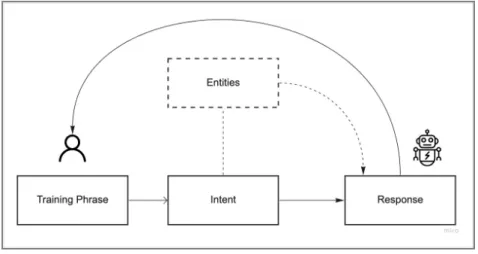
Link to conversational chatbot: N/A, Dialogflow does not allow public access to bots that are integrated with Slack.Link to conversational chatbot demo: https://youtu.be/GXHMDZfV9Us The conversational flow diagram was implemented into the structure provided by Dialogflow. Dialogflow contains four primary building blocks used to create functioning chatbots.
• Training phrases: Training phrases are the messages that the user sends to the chatbot during interaction.
• Intents: Intents are configured by the chatbot developer and are used to interpret the user’s goal, based on the training phrase. For example, an intent called GetLunchSpots could be mapped to a training phrase that asks “where can I go get some food?”.
https://manychat.com/ 12
https://landbot.io/ 13
• Entities: Entities are used to pick out specific pieces of information that users mention in their inputs—anything from product names, to dates, or amounts with units.
• Responses: Responses are how the chatbot responds to the user, after it has analysed the related intents and entities.
The relationship between the building blocks within Dialogflow is depicted in Figure 10. The list of intents, entities, and responses can be found in the conversational bot architecture in Appendix B.
To increase the conversational and personal feel for the intelligent bot, the conversation was designed so that the bot begins the chat by first asking the user for their name and team at Apegroup. After the initial introduction, the chatbot communicates its purpose and shows its available options in accordance to design principle 4.3.1.1 Set expectations. This is done so that the user immediately knows what the chatbot is capable of and can ask questions accordingly. This example is shown in Figure 11.
Figure 10. Dialogflow bot structure
In accordance to design principle 4.3.1.5 Provide flexible navigation, the user always has the ability to escape the current path and view all available options that the chatbot provides before choosing another topic. This is done to provide user flexibility and create a more natural, life-like conversation, where topics can shift quickly. Figure 12 depicts this example.
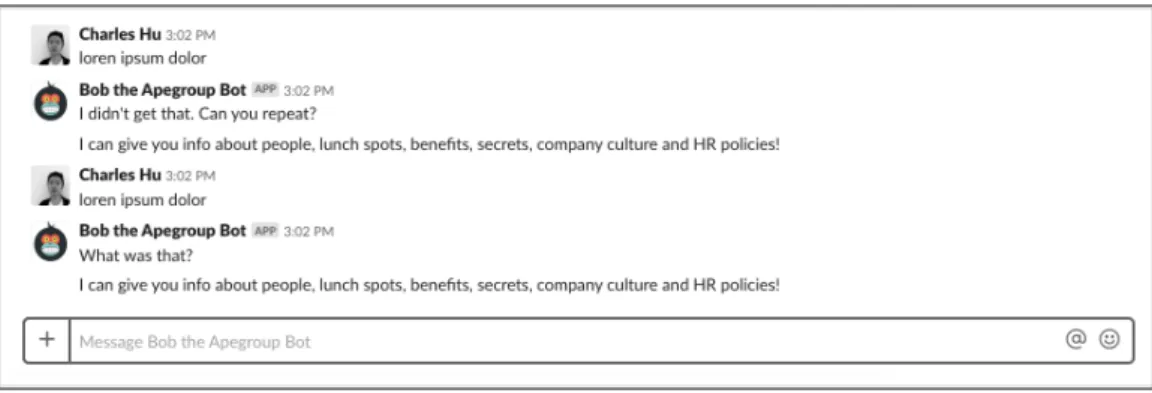
Given that the intelligent bot is conversational, it inevitably fails to understand certain user utterances given the diversity of human language and limitations of NLP. When this happens, the chatbot follows design principle
4.3.1.4 Fail gracefully. The chatbot apologises and rather than ending the conversation, it reiterates the available options. Additionally, the chatbot follows design principle 4.3.1.8 Allow multiple expressions. It can respond and apologise in multiple ways (“Sorry could you say that again?”, “I missed that, say that again?”). This makes the chatbot feel more natural and less robotic. These examples are shown in Figure 13.
The chatbot also follows design principles 4.3.1.2 Be brief, 4.3.1.6 Use contractions, 4.3.1.7 Be conversational, and 4.3.1.9. Use emoji and rich content such as images sensibly through out the experience. These principles are designed to make the chatbot feel more like a real conversation, and reflect
Figure 12. Flexible navigation in conversational bot
the casual personality defined in section 4.3.2 Personality and Tone of Voice. Examples of these principles can be found in Figure 14.
After the user is finished obtaining information from one path, the chatbot follows design principle 4.3.1.10 Don’t leave dead ends by presenting all of its different options again. This ensures that a user who wants more information is not stuck after completing one flow. Figure 15 depicts this example.
Figure 14. Personality and brief messages in conversational chatbot
5.3. Menu-based bot implementation
Link to menu-based chatbot: https://landbot.io/u/H-162644-XUKSM0HRZF86UAAQ/index.htmlLink to menu-based chatbot demo: https://youtu.be/sYl0Q5BGIbw The conversational flow diagram was mapped into the structure provided by Landbot. Landbot does not allow any text input from the user—rather, all user interaction comes from buttons. Meanwhile, bot messages can appear as text, menu systems with buttons, or images. Using the drag and drop interface, the conversational user flows were applied to the Landbot structure. The menu-based bot architecture built in Landbot can be found in Appendix C.
In accordance to design principles 4.3.1.1 Set expectations and 4.3.1.5. Provide flexible navigation, the chatbot was designed so that after a friendly introduction, it immediately explains its purpose and what services it can perform. In addition, the user always has the option to go backwards in the
flow by hitting the back button. This example is shown in the Welcome flow in Figure 16.
It should be noted that the menu-based bot does not strive to create a realistic and personal experience like the conversational bot, therefore it does not ask the user for their name or team.
After the user selects the type of information they want, the chatbot responds according to design principles 4.3.1.2 Be brief, 4.3.1.6 Use contractions,
4.3.1.7 Be conversational, and 4.3.1.9. Use emoji and rich content such as images sensibly. The chatbot keeps a casual, playful personality as determined in section 4.3.2 Personality and Tone of Voice through use of emoji and humour. This example is reflected in Figure 17.
After the user has received the information they requested, the chatbot follows design principle 4.3.1.10 Don’t leave dead ends by responding with all available options again so that the user does not get lost and can continue obtaining more information. This example is shown in Figure 18, after the user has obtained information about the Monday breakfast benefit.
5.4. Comparison of chatbot
implementations
The conversational chatbot built with Dialogflow was much more difficult and time-consuming to implement when compared to the menu-based chatbot built with Landbot. Whereas the menu-based bot took two days to complete, the conversational bot took over three weeks to complete and fine-tune. This is due to the complexity of natural language processing that is required in a
conversational chatbot. Mapping training phrases to logical intents, entities, and responses is extremely difficult and often leads to unpredictable responses.
6.
Results
This section provides the results of the qualitative and quantitative evaluation methods mentioned in section 4.4 Evaluation.
6.1. Qualitative evaluation results
The user tests showed that in general, of the participants that tested both chatbots, a majority preferred the menu-based bot. When asked “Which of the two chatbots was the better experience?” following the test, roughly 70% of participants (five out of seven) preferred the menu-based over the conversational experience. Of the two participants that preferred the conversational experience, one acknowledged its usability challenges, but indicated that he still preferred it because of its greater potential. The other participant had an error-free experience and liked that he could directly ask a question and receive the answer.
The qualitative findings from group 1, who tested both chatbots, are elaborated as follows:
• Menu-based bot has fewer errors: Six of seven participants said that the menu-based chatbot was easier to use because it was much more difficult to make errors. This is due to the fact that the menu-based bot does not allow for real conversational messaging—the user simply selects pre-defined menu options that are wrapped up into the look and feel of a conversation. Meanwhile, the conversational chatbot sometimes provided unpredictable responses.
• Menu-based bot interaction is more convenient: All seven participants indicated that while sending real messages was nice, pressing a menu button was more convenient because it was quicker. Once participant noted “I don’t want to send full messages to a bot, it's not fooling anyone into thinking it's human.”