International Technical Support Organization http://www.redbooks.ibm.com
Load Balancing for eNetwork Communications
Servers
Load Balancing for eNetwork Communications
Servers
April 1999
SG24-5305-00
First Edition (April 1999)
This edition applies to Version 5 of IBM eNetwork Communications Server for AIX, 5765-D20, Version 6 of IBM eNetwork Communications Server for Windows NT, 30L9022, Version 5 of IBM eNetwork Communications Server for UnixWare 7, 5765-D48, Version 1 Release 3.0 of IBM LoadLeveler, 5765-145, and Version 1.0 of IBM WebSphere Performance Pack, 04L9231.
Comments may be addressed to:
Before using this information and the product it supports, be sure to read the general information in Appendix D, “Special Notices” on page 243.
Contents
Preface . . . vii
The Team That Wrote This Redbook . . . vii
Comments Welcome . . . viii
Chapter 1. Introduction . . . 1
1.1 Load Balancing for TN3270 and TN5250 Clients . . . 1
1.1.1 ISS Functions . . . 1
1.2 Load Balancing for SNA API Clients . . . 2
1.3 IBM Products . . . 3
1.4 WebSphere Performance Pack Load Balancing Component . . . 4
1.4.1 eNetwork Dispatcher (No Manager) . . . 5
1.4.2 eNetwork Dispatcher with the Manager . . . 5
1.4.3 ISS Component of eNetwork Dispatcher . . . 6
1.5 Load Balancing with SLP . . . 7
1.6 Load Balancing CS/UnixWare Win32 Clients . . . 8
1.7 Load Balancing across Links on a Single Server . . . 9
1.8 IBM LoadLeveler 1.3.0 . . . 9
Chapter 2. WebSphere Load Balancing Component . . . 11
2.0.1 WebSphere Performance Pack Version 2.0 . . . 11
2.1 Load Balancing Component Overview . . . 12
2.2 Dispatcher . . . 13
2.2.1 How the Dispatcher Function Works . . . 14
2.2.2 Dispatcher Components . . . 15
2.2.3 Proportions of Importance . . . 17
2.2.4 Information Flow . . . 18
2.2.5 TCP Ports Used by the Dispatcher . . . 20
2.2.6 The Flow of the IP Packets . . . 20
2.3 Interactive Session Support . . . 24
2.4 Summary . . . 25
2.4.1 Using the Dispatcher Executor Alone . . . 25
2.4.2 Using the Dispatcher Executor with Advisor Input. . . 26
2.4.3 Using the ISS Component . . . 27
Chapter 3. Scenario 1: Using the WebSphere Dispatcher . . . 29
3.1 Network Environment . . . 29
3.2 Cluster Address and Non-Forwarding Address . . . 30
3.3 Dispatcher Configuration . . . 31
3.3.1 Starting the Server Component . . . 32
3.3.2 Starting the GUI . . . 33
3.3.4 Configuring the Executor . . . 37
3.4 TCP Server Configuration . . . 50
3.5 TCP/IP Server Configuration Unique to Communications Server . . . . 57
3.6 Round-Robin Load Balancing for TN3270 Servers . . . 60
Chapter 4. Scenario 2: WebSphere Dispatcher and the Advisors . . . . 67
4.0.1 Customization of the Manager and the Advisors . . . 71
4.0.2 Saving the Configuration . . . 72
Chapter 5. WebSphere Interactive Session Support . . . 75
5.1 ISS Cells and Services . . . 76
5.2 ISS Configuration Files. . . 76
5.2.1 Cell and Its Attributes . . . 80
5.2.2 Nodes. . . 82
5.2.3 Services . . . 82
5.2.4 Resources . . . 83
5.2.5 ISS Observers . . . 86
5.2.6 ISS Selection Methods . . . 88
5.3 Managing ISS. . . 89
5.3.1 The issd Command. . . 89
5.3.2 Controlling ISS . . . 91
5.3.3 Stopping ISS . . . 92
Chapter 6. Scenario 3: WebSphere ISS and DNS . . . 93
6.1 ISS Configuration . . . 94
6.1.1 Copy the File to Each Server . . . 97
6.2 Setting up the Domain Name Server . . . 97
6.3 Starting the ISS Monitor and Agents. . . 100
6.4 Load Balancing . . . 100
Chapter 7. Scenario 4: WebSphere ISS and Dispatcher . . . 107
7.1 ISS Configuration . . . 108
7.2 Starting the ISS Monitor and Agents. . . 111
7.3 Setting up the Dispatcher . . . 112
Chapter 8. CS/AIX and LoadLeveler . . . 115
8.1 When Would You Use the ISS Component of LoadLeveler? . . . 115
8.5.4 Other Important Things to Do . . . 126
8.5.5 Starting the Configuration . . . 127
8.6 LoadLeveler ISS Example Network . . . 128
8.6.1 RS600033 . . . 129
8.6.2 JUPITER and CSAIX1 . . . 134
8.6.3 ISS Monitor Output . . . 135
Chapter 9. Server Load Balancing Using SLP . . . 141
9.1 Overview . . . 141 9.2 Implementation. . . 142 9.2.1 Dependent LU Sessions . . . 143 9.2.2 Independent LU Sessions. . . 143 9.2.3 Scopes . . . 144 9.3 Design Tips . . . 144 9.4 Server Configuration . . . 147
9.4.1 Server Load Balancing Parameters . . . 149
9.4.2 Sample Server Configuration . . . 150
9.5 SNA API Client Configuration for LUA Sessions . . . 151
9.5.1 3270 Session Configuration . . . 153
9.6 Client Configuration for APPC Sessions . . . 155
9.6.1 5250 Client Session Configuration . . . 158
9.7 Using PCOMM 4.3 . . . 160
9.8 Monitoring Load Balancing . . . 162
Chapter 10. Load Balancing for CS/UnixWare Win32 Clients . . . 165
10.1 CS/UnixWare Client/Server Concepts . . . 165
10.1.1 SLIM Concepts . . . 166
10.1.2 The Server Role . . . 166
10.1.3 Master/Backup Handover . . . 167
10.1.4 Network Data File . . . 167
10.1.5 Connecting Clients to the Network . . . 168
10.1.6 Load Balancing and Hot Backup . . . 169
10.2 CS/UnixWare Win32 Client. . . 169
10.2.1 WIN32 Client Configuration . . . 170
10.3 Load Balancing Configuration Overview . . . 172
10.4 CS/UnixWare Load Balancing Scenario . . . 173
10.5 Setting Up the CS/UnixWare Servers . . . 175
10.5.1 The Domain . . . 175
10.5.2 LU Pools. . . 177
10.5.3 Defining Users . . . 179
10.5.4 TN3270 Setup . . . 182
10.6 Installing the CS/UnixWare Client . . . 183
10.7.1 Testing the Configuration . . . 191
Chapter 11. Single Server Load Balancing across Links . . . 195
Appendix A. Determining System Load with sys_load . . . 197
A.1 Values Returned by sys_load . . . 200
A.2 sys_load Script . . . 201
A.3 sys_load Modified . . . 210
Appendix B. WebSphere Load Balancing Component Installation . . 215
B.1 Installation on AIX . . . 215
B.2 Installation on Windows NT . . . 223
Appendix C. WebSphere Interactive Session Support Installation . . 237
C.1 Installation on AIX. . . 237
C.2 Installation on Windows NT . . . 239
Appendix D. Special Notices . . . 243
Appendix E. Related Publications . . . 247
E.1 International Technical Support Organization Publications . . . 247
E.2 Redbooks on CD-ROMs . . . 247
E.3 Other Publications. . . 247
How to Get ITSO Redbooks . . . 249
IBM Redbook Fax Order Form . . . 250
Index . . . 251
Preface
This redbook will help you design a load balancing technique for IBM eNetwork Communications Server environments. It covers techniques that include Interactive Session Support (ISS), the WebSphere load balancing component, and techniques unique to Communications Servers. It is primarily for environments with TCP/IP clients, such as TN3270, TN5250, and SNA API clients.
This book looks at IBM eNetwork Communications Servers on Windows NT, UnixWare, and AIX.
The Team That Wrote This Redbook
This redbook was produced by a team of specialists from around the world working at the International Technical Support Organization, Raleigh Center. Carla Sadtler is a Senior ITSO Specialist for Communications Server for AIX and network integration projects at the International Technical Support Organization, Raleigh Center. She has been with the ITSO for 13 years working in a number of areas including MVS, Communications Servers, Web-to-host integration, and Lotus Notes.
John Chambers is a software engineer in the United States. He has worked at IBM for four years and is currently assigned to the Host Access Server support team in the Research Triangle Park, NC. His areas of expertise include networking and communications on the Intel-based PC platform. He has written extensively on the use of digital imaging in scientific research during his previous life as a geologist.
Ariane Schuldhaus joined IBM Germany in 1984 and has been in the networking area since 1994. She is responsible for country-wide technical marketing support of Communications Servers for OS/2, Windows NT, AIX and UnixWare. She is one of the authors of the redbookIBM Communications
Server for OS/2 Warp Version 4.0 Enhancementsand is an IBM certified
communications specialist for Windows NT Enterprise Communications. Thanks to the following people for their invaluable contributions to this project:
Juan Rodriguez
Marco Pistoia
International Technical Support Organization, Raleigh Center Margaret Ticknor
International Technical Support Organization, Raleigh Center Dana Price
IBM Research Triangle Park Paul Dowds
IBM Research Triangle Park Paul Landay
IBM Research Triangle Park Donna Wooten
IBM Research Triangle Park Philip Pearl
Data Connection, Ltd.
Comments Welcome
Your comments are important to us!
We want our redbooks to be as helpful as possible. Please send us your comments about this or other redbooks in one of the following ways:
• Fax the evaluation form found in “ITSO Redbook Evaluation” on page 253 to the fax number shown on the form.
• Use the online evaluation form found at http://www.redbooks.ibm.com • Send your comments in an internet note [email protected]
Chapter 1. Introduction
This book will take a look at some of the techniques available for introducing load balancing into a Communications Server environment. There are two ways to think about load balancing in this type of environment. True load balancing determines the load on a server, including CPU utilization, available memory, and available resources. This is different from session balancing where the only attempt at load balancing is by ensuring that every session does not use the same server or host link. This can be done with round-robin or random selection techniques.
We will cover instances of both types of balancing. Often the term, load balancing, will be used to represent both load and session balancing
techniques. When we refer to session balancing, we will be talking only about balancing sessions through communications servers with no load information being considered in the decision.
For enterprises using IBM eNetwork Communications Servers, there are several solutions available for balancing incoming client requests among servers or host links. The appropriately balanced Communications Server environment can show increased availability, simpler client configuration and distribution of the work on your network that makes sense to you.
This book will discuss primarily, load balancing for TCP/IP workstations across Communications Servers. TCP/IP workstations include TN3270 clients, TN5250 clients, and SNA API clients. It will cover several IBM products in relation to their usefulness in this environment. All products discussed have many more features and should be investigated separately if you are considering implementing them in your environment.
1.1 Load Balancing for TN3270 and TN5250 Clients
Often, communications servers must handle large numbers of TN3270 or TN5250 clients. These are clients using TCP/IP to connect to a
communications server, which provides a Systems Network Architecture (SNA) session to the host for 3270 or 5250 emulation.
1.1.1 ISS Functions
Interactive Session Support (ISS) is a primary component of two of the IBM products we will cover extensively in this book. The ISS component has been a core component of the popular LoadLeveler product up through Version 1.3
and the eNetwork Dispatcher now included in the IBM WebSphere Performance Pack.
The way that ISS spreads the workload across many providers is both efficient and simple in its design. ISS can be configured to detect conditions in the environment, enabling it to determine the appropriate servers to forward requests to. Or, ISS can be set up with a static design that allows for simple load sharing.
ISS can directly influence the load balancing by altering a TCP/IP domain name server to ensure that a common pool name used by the clients resolves to the TCP/IP address of the preferred server. ISS can also be used as feedback to other components of LoadLeveler and WebSphere Performance Pack, allowing a deeper layer of load balancing techniques.
The load sharing technique, also known as round-robin, does not take into account any variables concerning how busy a particular server is, only whether it is actually running. This provides a moderate assurance of
availability for the users, in that they would request a resource from a system which in turn would assign a resource from a static list of servers it is
configured to use. If the server assigned did not respond, the load sharing service would in turn attempt the next server in its list until the request had been met.
The next layer of reliability and, therefore, complexity involves the use of variables configured for the servers to reflect their capabilities and current usage statistics. The current usage (load) on the server is detected by means of a portion of code that resides on the production servers that periodically queries aspects of the servers’ processor and memory utilization, connectivity options (such as speed of the links or available bandwidth) and the
availability of TN3270 sessions. You can also add custom variables into the mix that reflect a unique environment. As these reports are gathered, they accumulate an integer sum that reflects their load to ISS. ISS then chooses the preferred server based on these numbers and either updates the domain name server, or passes this information back to the appropriate component (LoadLeveler or WebSphere Performance Pack eNetwork Dispatcher) which determines the most effective path for the traffic.
By using SNA API code on the client system and an API-aware emulation program such as IBM’s Personal Communications (PCOMM), the servers can communicate their resource availability via the SNA API to the clients, which in turn then choose a server for connection. IBM has been able to do this by incorporating support for the Service Location Protocol (SLP) into
Communications Server for Windows NT 6.0, IntranetWare for SAA 3.0, and IBM eNetwork Personal Communications Server 4.3.
For an in-depth look at load balancing with SLP, review the Internet Draft document from the Internet Engineering Task Force (IETF), available via the Web at
http://www.ietf.org/internet-drafts/draft-ietf-tn3270e-service-loc-03.txt. There are also numerous white papers and overviews from IBM, Novell, and the Zephyr Corporation among others, discussing both client and server implementations and configurations.
Communications Server for UnixWare ships with the SNA API client for the Win32 platform (Microsoft Windows 95, 98 and NT V4). This works in conjunction with the CS/UnixWare server to randomly distribute the load of TN3270 sessions to a group of servers configured in a domain model. It does not use SLP. The clients can be configured with a list of servers to request resources from logical unit (LU) pools or can transmit user datagram protocol (UDP) broadcasts to the servers without knowing their names or addresses. Load balancing (or more accurately, session balancing) is achieved through the randomness of the clients choice of servers.
1.3 IBM Products
IBM current offerings for enhancing performance through various methods, including load balancing, are spread across a number of components within the WebSphere Performance Pack, the separate LoadLeveler for AIX product, and some features exclusive to individual products. While the current offerings are primarily available for the server platforms of AIX and Microsoft Windows NT, there are options within the WebSphere Performance Pack that simply require network connectivity and the appropriate TCP/IP program to participate in the control of a cluster or pool of available resources (such as the TN3270 Server, HTTP daemon, etc.).
The load balancing component of WebSphere Performance Pack consists of the eNetwork Dispatcher product and offers the user the ability to spread network traffic across a group of servers offering similar resources in a way transparent to the client. The two major parts to this component are ISS and the Dispatcher. You could use either piece or both depending on your
configuration needs. The Dispatcher can provide a simple weighted load sharing configuration regardless of the participating servers in the group. It runs on AIX, Sun Solaris or Microsoft Windows NT and can even provide support across networks in a WAN configuration. ISS can be used alone with a domain name server to balance the load or can be configured to pass information back to the Dispatcher component.
The LoadLeveler for AIX 1.3 product, which includes an ISS component, will be discussed in this book even though it is an older product. It has a
significant install base at the time of writing this manual and its setup might be more familiar to many readers. The current version, 2.1.0, is not covered, as it has since dropped the ISS component. The current offering for ISS is the eNetwork Dispatcher component of WebSphere Performance Pack.
LoadLeveler 1.3 does include ISS and is appropriate for balancing the load of CS/AIX TN3270 and TN5250 servers. As with WebSphere, the ISS
component of LoadLeveler can be used alone with a domain name server, or can pass load information back to the LoadLeveler component.
1.4 WebSphere Performance Pack Load Balancing Component
The former eNetwork Dispatcher product has been rolled into the WebSphere Performance Pack V1.0 as the load balancing component. Network
Dispatcher V2.0 is included in the WebSphere Performance Pack V1.0. The next release, called SecureWay Network Dispatcher V2.1 is included in WebSphere Performance Pack V2.0.
There are several ways the eNetwork Dispatcher can be used to balance TN3270/TN5250 loads among communications servers. The load balancing server can be configured to use the Dispatcher, the ISS component, or both. The Dispatcher includes a Manager component that can be used to provide load information to the Dispatcher. Without the Manager you have a weighted round-robin session balancing scheme. Adding the Manager to the
configuration allows information regarding the load of the servers to factor into the weighting mechanism, giving you a more accurate load balancing scheme.
1.4.1 eNetwork Dispatcher (No Manager)
Using the Dispatcher without the Manager gives you a weighted round-robin session balancing scheme. The highlights of the method are:
• This method works for any communications server platform.
• Servers are defined to the Dispatcher by TCP/IP port within a cluster. • Clients point to the IP address or host name of the Dispatcher cluster. • Incoming traffic from clients goes through the Dispatcher machine. • Traffic from the server to the client is direct and does not involve the
Dispatcher machine.
• Weights are assigned to each server by an administrator. They can be changed by the administrator dynamically.
• No load information from the servers is given to the Dispatcher.
• The Dispatcher does not recognize if a server is no longer available, but the administrator can manually tell the Dispatcher the server is down and it will be taken out of the round-robin sequence.
For an example of this type of configuration seeChapter 3, “Scenario 1: Using the WebSphere Dispatcher” on page 29.
1.4.2 eNetwork Dispatcher with the Manager
Using the Dispatcher with the Manager gives you a weighted round-robin session balancing scheme. The Manager uses input from advisors and other external sources to dynamically change the server weights so the least loaded server will be the most likely choice.
The highlights of the method are:
• This method works for any communications server platform.
• Servers are defined to the Dispatcher by TCP/IP port within a cluster. • Clients point to the IP address or host name of the Dispatcher cluster. • Incoming traffic from clients goes through the Dispatcher machine. • Traffic from the server to the client is direct and does not involve the
Dispatcher machine.
• Advisors that check the response time to servers are shipped with the product for the most popular TCP/IP ports. Advisors can be modified or created for other situations. An advisor is shipped for the Telnet port (23) and can be used if the TN3270 Server is customized to use port 23. Otherwise, an advisor can be written based on a sample sent with the product.
• The Manager can take input from advisors and from other external sources such as the ISS component.
• Weights are dynamically changed by the Manager based on load information from the advisors and external sources.
An example of this type of configuration using advisor input is in Chapter 4, “Scenario 2: WebSphere Dispatcher and the Advisors” on page 67.
An example of this type of configuration using ISS input is in Chapter 7, “Scenario 4: WebSphere ISS and Dispatcher” on page 107.
1.4.3 ISS Component of eNetwork Dispatcher
ISS can be configured to determine load information on the communications servers by using internal or external metrics. The information is fed back to an observer, which can either update a TCP/IP domain name server or send the information back to the Dispatcher component.
Highlights of this method include:
• Communications Servers must run the issd daemon and therefore must be one of the platforms supported by the WebSphere Performance Pack. The supported platforms are AIX, Windows NT, and Sun Solaris.
• Internal metrics are provided to measure CPU load and free physical memory.
• External metrics can be any executable on the server that returns a numerical value indicating its load.
• CS/AIX provides an external metric that was specifically written to determine the load on a server running CS/AIX.
• Load information can be sent back to more than one observer. The observer can be the Dispatcher for server weighting by the Manager, or it can be a domain name server.
For domain name server observers:
• ISS modifies the IP address of the server pool to reflect the least loaded server. Clients are configured to use the server pool host name and use TCP/IP name resolution to resolve this name to the IP address of the least loaded server. This means the client must use the name resolution for each session and must be able to handle the fact that one TCP/IP host name may resolve to different IP addresses. • The session between the client and the server is direct and does not
involve the load balancing server.
• Clients are configured to use the IP address of the server cluster. The IP address and TCP/IP host name are always the same.
• Advisor input can be included with the load balancing information from ISS to weight the servers.
• Incoming traffic from clients goes through the Dispatcher machine. • Traffic from the server to the client is direct and does not involve the
Dispatcher machine.
For an example of this type of configuration using external metrics supplied by CS/AIX and a TCP/IP domain name server see Chapter 6, “Scenario 3: WebSphere ISS and DNS” on page 93.
For an example of using ISS to feed back load information to the Dispatcher see Chapter 7, “Scenario 4: WebSphere ISS and Dispatcher” on page 107.
1.5 Load Balancing with SLP
IBM eNetwork Communications Server for Windows NT (CS/NT) and IntranetWare for SAA Version 3 provide users a client component allowing them to use TCP/IP to reach the server components’ SNA functions. The client/server, or split-stack operation, provides a load balancing feature using the Service Location Protocol (SLP). Servers register and advertise services that contain load factors. The clients use this information to select a server that satisfies its request.
The highlights of this load balancing method are:
• Servers can be CS/NT and IntranetWare for SAA servers.
• Clients can be CS/NT or IntranetWare for SAA SNA API clients, IBM eNetwork Personal Communications (PCOMM) 4.3 clients, QEL/MU 3270 sessions (NetWare), third party 3270 emulators.
• Load balancing is provided for both LUA (LU 0-3) and LU 6.2 sessions. • The load for dependent LUs represents a percentage of available
resources from a particular server. The load percentage is calculated by dividing the number of active application connections by the total number of LUs (0 to 3) available.
• The load for LU6.2 represents a percentage of available resources from a particular server. The load percentage is calculated by dividing the total number of conversations over all local LUs on a particular server by the cumulative maximum session limit for all local LUs. The maximum session limit is the LU 6.2 session limit specified during configuration. If the maximum session limit is specified as zero (0), indicating there is no session limit, the default maximum local LU session limit of 512 per local
LU is used when the load is calculated. The default maximum local LU session limit can also be specified during configuration.
• Load factors can be defined to compensate for the differences in servers. • Servers are organized into scopes. A server can be scoped or unscoped. • For LUA sessions, the load is balanced across a named LU pool. The
client provides the LU pool name and defines whether to use a named scope, unscoped servers, or any server. Each new session will
determine the best server, so one client may have multiple sessions using different servers.
• APPC sessions are distributed among servers in a named scope. The initial connection determines the server that all subsequent
connections will use.
An example of SLP load balancing can be seen in Chapter 9, “Server Load Balancing Using SLP” on page 141.
1.6 Load Balancing CS/UnixWare Win32 Clients
IBM eNetwork Communications Server for UnixWare (CS/UnixWare) provides client/server protocols, allowing clients to use TCP/IP to connect to server SNA functions. All servers and clients communicating with each other are referred to as a domain. LU pools can be defined across a domain, allowing clients to connect to any server with the requested LU. Session balancing is accomplished by having the clients randomly choose to which server to connect.
The highlights of this method are: • Servers are CS/UnixWare servers.
• Clients are Windows NT or Windows 95 machines with the CS/UnixWare Win32 client installed.
• Load balancing can be accomplished for both LUA and LU 6.2 sessions. • Clients belong to the same domain as the servers. They choose a server
by specifying a list of servers to try or by using a UDP broadcast.
• If a list is specified, clients will always choose the first server in the list. If it is not available they go to the second server, and so on. Session
The CS/UnixWare Win32 Client and load leveling functions are covered in Chapter 10, “Load Balancing for CS/UnixWare Win32 Clients” on page 165.
1.7 Load Balancing across Links on a Single Server
A common feature of the Communications Servers is the ability to define an LU pool that spans multiple links on the same server. Sessions for this LU pool will be automatically rotated among the host links containing LUs in this pool. This gives a very basic session balancing mechanism among host links. This load balancing feature is covered in Chapter 11, “Single Server Load Balancing across Links” on page 195.
1.8 IBM LoadLeveler 1.3.0
Another product we are including in this book is the IBM LoadLeveler 1.3.0, which included an earlier version of ISS than that included with eNetwork Dispatcher and the WebSphere Performance Pack. LoadLeveler 1.3.0 is still available for AIX platforms only. The latest release of LoadLeveler 2.1.0 does not include the ISS function. We include it here because there is a base of customers that have LoadLeveler installed and may want to use it for balancing sessions among communications servers.
You can find out more about using the ISS functions of LoadLeveler 1.3.0 in Chapter 8, “CS/AIX and LoadLeveler” on page 115.
Chapter 2. WebSphere Load Balancing Component
IBM WebSphere Performance Pack Version 1.0 provides a load balancing component known as IBM eNetwork Dispatcher Version 2.0. This component improves the performance of servers by directing TCP/IP session requests to different servers within a group, balancing the load transparently to end users and other applications. The load balancing component allows increased server capacity by allowing multiple TCP/IP servers to appear as a single logical server. TN3270 and TN5250 clients can benefit from this since they use TCP/IP to access the SNA servers.
The load balancing component of IBM WebSphere Performance Pack includes the following features:
• Rule-based Web traffic load balancing
• Load balancing through firewalls to remote locations
• Integration of HTTP, mail service, FTP, Telnet and news traffic load balancing
• Independent network return paths to enhance application server responses to clients
• Agents that give live multi-server monitoring feedback • High availability fail-over schemes
IBM WebSphere Performance Pack Version 1.0 is supported on the following platforms:
• IBM AIX 4.2.1 or later • Sun Solaris 2.5 or later • Microsoft Windows NT 4.0
2.0.1 WebSphere Performance Pack Version 2.0
At the time of this writing, WebSphere Performance Pack V2.0 had been announced but was not yet available. There have been some changes in the load balancing function. The changes do not affect the material in this book but are nice enhancements to be considered. The Network Dispatcher code has been upgraded and is now called SecureWay Network Dispatcher. Server Directed Affinity: Users can direct requests from specified clients to specific servers. An API provided in Network Dispatcher is used to define the client-to-server relationship desired in the Network Dispatcher affinity tables. The user defines to which server requests from the specified client are routed. Subsequent to that, for as long as the user wants it to remain in effect,
all requests from the client are routed to that server. The user has the capability of querying the relationships, adding relationships, or removing relationships from affinity tables.
Improved Logging and Statistics: The logging and statistical data kept by Network Dispatcher is maintained in binary format. In addition, the command line and graphical user interface (GUI) are used to set parameters on how the binary data will be logged. A sample Java program is included that provides access to and manipulation of the log data.
Remote Configuration: An authenticated link using the GUI as well as configuring at the Network Dispatcher server is now an option. This
productivity enhancement facilitates the centralization of Network Dispatcher administration and control. The authenticated link between the client
performing the remote configuration and the server uses a public key/private key pair for authentication. The private key must be distributed to the clients selected for remote configuration of the server.
Content-Based Forwarding: The administrator can route requests based on Universal Resource Locator (URL) content. The URL content of a request is matched to user-generated rules that determine to which server, or cluster of servers, it will be routed. If a user-generated rule results in a choice of multiple servers, Network Dispatcher determines the best server for the job. Star Cluster: This catch-all cluster includes two functions:
• Configure multiple aliases on the Network Dispatcher machine and have them all use the same port/server configuration
• Make the Network Dispatcher machine the default route for some traffic and have it load balance all the Internet Protocol (IP) traffic for ports configured on the star cluster, without configuring any aliases on the Network Dispatcher machine
Star Port: You can create a load balancing configuration for traffic to any port that has not been explicitly defined in your Network Dispatcher configuration. This could be used, for example, to load balance firewalls or discard requests for ports that have not been configured.
The Dispatcher function balances the load on a server within a LAN or WAN using a number of weights and measurements that are set manually or dynamically. It provides load balancing at a level of specific services, such as HTTP, FTP, SSL, NNTP, POP3, SMTP, and Telnet. The Dispatcher also has a built-in high availability feature.
The ISS component is a follow-on product to the ISS component in IBM LoadLeveler V1.3.0. Initially offered as a separate product, IBM eNetwork Dispatcher, this code is now included in the WebSphere Performance Pack. You can use the ISS function by itself to balance the load on servers within a local or wide area network using a TCP/IP domain name service (DNS) round-robin approach or a more advanced user-specified approach. Load balancing is performed at the machine level. ISS can also be used to provide server load information to a Dispatcher machine.
When used for load balancing, ISS works in conjunction with the DNS server to map DNS names of ISS services to IP addresses. When used to provide server load information, a DNS is not required.
2.2 Dispatcher
Unlike ISS, the Dispatcher function does not use a TCP/IP domain name server for load balancing. It balances traffic among your servers through a unique combination of load balancing and management software.
All client requests sent to the Dispatcher machine are directed to the server selected by the Dispatcher as optimal according to certain dynamically set weights. You can use the default values for those weights or change the values during the configuration process.
The Dispatcher has two important features:
1. The server sends a response back to the client without any involvement of the Dispatcher.
2. No additional code is required on your servers to communicate with the Dispatcher.
The Dispatcher offers a built-in high availability feature. This feature involves the use of a second Dispatcher machine that monitors the main, or primary, machine and stands by to take over the task of load balancing should the primary machine fail at any time.
2.2.1 How the Dispatcher Function Works
The Dispatcher creates the illusion of having just one server by grouping systems together into a cluster that behaves as a single, virtual server. The service provided is no longer tied to a specific server system, so you can add or remove systems from the cluster, or shut down systems for maintenance, while maintaining continuous service for your clients. The balanced traffic among servers seems for the end users to be a single, virtual server. The site thus appears as a single IP address to the world. All requests are sent to the IP address of the Dispatcher machine, which decides for each client request which server is the best one to accept requests, according to certain
dynamically set weights. The Dispatcher routes the client’s request to the selected server, and then the server responds directly to the client without any further involvement from the Dispatcher. The Dispatcher can also detect a failed server and route traffic around it.
The Dispatcher receives the packets sent to the cluster. These packets have a source and a destination address; the destination address is the IP address of the cluster. All servers in the cluster and in the Dispatcher system have their own IP address and an alias for the IP address of the cluster. The Dispatcher system checks which server is the next best server to handle the load and routes the packet to that server. Since all servers in the cluster have an alias for the cluster’s IP address, the Dispatcher routes this request based on the hardware address of the network adapter (MAC address) of the chosen server. It changes the hardware address of the packet to the
hardware address of the selected server and sends the packet to the server. The server receives the packet and responds directly to the client. We see a more detailed explanation of this process in “The Flow of the IP Packets” on page 20.
The Dispatcher can reside on the same machine as the server being balanced if the node is AIX or Solaris. This is not supported on Windows NT and will cause problems.
The server machines in the cluster could be a mixture of heterogeneous servers of different sizes and types, such as UNIX, Windows NT or OS/2 machines.
2.2.2 Dispatcher Components
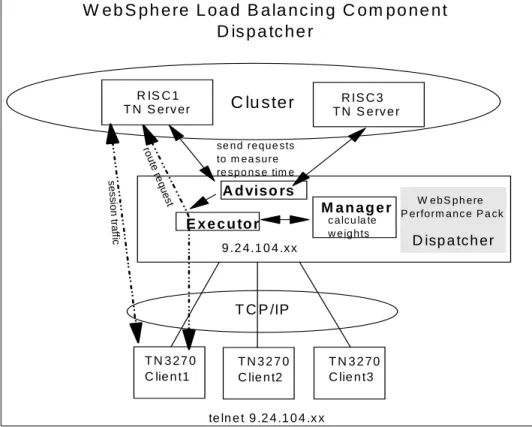
The Dispatcher consists of three main components: • Executor
This component supports port-based routing of TCP and UDP connections to servers based on the type of request received (for example HTTP, FTP or SSL). This module always runs when the Dispatcher function is being used.
• Manager
This component sets weights used by the Executor based on internal counters in the Executor itself and feedback from the advisors and ISS monitoring (if ISS is used as a monitoring tool). Each unit of information given to the Manager by the advisors, ISS and Executor has a relative proportion of importance. You can give more importance to one unit of information over the others, or totally ignore one or more units of
information. Using the Manager is optional, but if the Manager is not used, load balancing is performed using weighted, round-robin scheduling based on the current server weights.
• Advisors
Advisors send requests to the back-end servers to measure actual client response time for a particular protocol. These results are then fed to the Manager to adjust the load balancing weights. Currently, there are advisors available for HTTP, FTP, SSL, SMTP, NNTP, POP3 and Telnet. Using the advisors is optional, but recommended. You also have the option of writing your own advisors.
Figure 1 on page 16 shows an overview of the load balancing components. The example shows a TN3270 network, but this could be any type of TCP/IP network services.
Figure 1. Dispatcher Components
There is also an SNMP subagent component that allows an SNMP-based management application to monitor the status of the Dispatcher.
2.2.2.1 Customizable Advisors
The load balancing component of IBM WebSphere Performance Pack offers you the possibility to write customizable advisors that will provide the precise information about servers that you need. Advisors, like the rest of the
Dispatcher, must be compiled with Java 1.1. To ensure access to Dispatcher classes, make sure that the ibmnd.jar file (located in the lib subdirectory of the base directory) is included in the classpath system environment variable.
W e b S p h e re L o a d B a la n c in g C o m p o n e n t
D is p a tc h e r
T N 3 27 0 C lie n t1 T N 3 2 7 0 C lie n t2 T N 3 2 70 C lie n t3 R IS C 1 T N S erv er R IS C 3 T N S e rv e r T C P /IP 9 .2 4.1 0 4 .xx W e b S p h e re P e rfo rm a n c e P a ck te ln e t 9 .2 4 .1 0 4 .x xC lu s te r
A d viso rs se n d re q u e sts to m e a su re re sp o n s e tim e E x e c u to r M a n a g e r c a lcu la te w e ig h ts D isp a tc h er rou te re qu es t s e s si o n tra fficIn NT the files are located in:
Program Files\eND\dispatcher\Lib\CustomAdvisors
2.2.3 Proportions of Importance
The Manager decides which is the least loaded server on a particular port in the cluster by looking at the weight of each server. The Manager will
periodically update the weight of each of the server machines basing its decision on four parameters or policies:
1. The number of active connections on each TCP server 2. The number of new connections for each TCP server 3. Input from TCP server advisors
4. Information from system monitoring tools, such as ISS
Setting the server’s weights in the load-balancing process is performed by using the so-calledproportions of importance. Each of the above factors is attributed a number, from 0 to 100, that acts as a percentage. Zero means that the policy is not used, while 100 means that only that factor will be used. It is necessary that these proportions add up to 100. The default settings at the startup appears as:
50 50 0 0
2.2.3.1 Guidelines on Proportions of Importance Settings Although generally there are no fixed rules on how to set the proportion value, it is still possible to provide some useful guidelines, described in the following.
The first two proportions are related to active and new connections
respectively. Typically in an out-of-the-box configuration, this is all you will be able to use. That is why the default proportions at startup of Dispatcher appear as50 50 0 0.
The load on a server often depends mainly on the number of connections, both active and new. If you then start the Manager, it makes sense now to use a non-zero value for the advisor proportion. The standard advisors shipped with Dispatcher execute a trivial transaction on each TCP server. Normally you would expect a trivial response time to this transaction. Experience shows us that it is not a good idea to set the advisor proportion to a high value. We recommend49 49 2 0for this setup.
Things change if you start using a custom advisor. Your custom advisor can, for example, execute a Java servlet (or other application transaction) on the server side, and this servlet can gather very precise values about
performance, throughput and response time via the server's API and feed it to the advisor when asked. Thus, you may find it appropriate to put the advisor proportion at a higher value. However, we recommend that you do not over-compensate, and do not set active and new connection proportions too low, otherwise you begin to restrict Dispatcher's adaptive and smoothing capabilities. Moreover, you may end up with a load balancer that follows your advisor too closely, resulting in a choppy profile that is probably less than ideal. In the final analysis, what works for you is best; you need to experiment with your custom advisor to see what results you get in the real world. Finally, if you install the ISS daemon on your servers, it makes sense to add the ISS proportion to your mix. If you use a custom metric in ISS as well as a custom advisor, be sure to have them go after similar objectives, otherwise you may come to set one against the other with undesirable consequences.
2.2.4 Information Flow
The typical flow of information used in the Dispatcher is shown in the following diagram:
Figure 2. Information Flow Used in the Dispatcher
The logical information flow, represented in the above diagram, is described in the following list:
1. The Executor supplies information about new and active connections based on its internal counters to the Manager.
2. The advisors collect information about response time and availability from the servers for each service and each port.
3. After processing this information, they send it to the Manager.
4. The Manager uses all the information it receives (including information sent by the ISS component, if active, about the servers’ load balancing according to a specific metric), calculates the new weights to be used in connection routing and sends the results to the Executor.
5. The Executor uses these new weights for TCP and UDP routing. If the Manager and the advisors are not running, the Executor does the routing based on its internal counters.
Dispatcher ndcontrol GUI 1 2 3 4 5 Manager Executor Advisors Advisors Advisors Server 1 Server 2 Server N 5233\523302 6 ndserver
6. A command line interface, represented by thendcontrolcommand, and a graphical user interface (GUI) are provided to configure and manage the Executor, Advisors and the Manager.
2.2.5 TCP Ports Used by the Dispatcher
The Dispatcher uses three TCP ports for its communications: 1. Port 1099: This port is used for GUI communications. 2. Port 10003: This port is used for receiving commands.
3. Port 10004: This port is used to receive metric response from ISS. Sometimes it is necessary to use port numbers other than the defaults. If another application is already using port 1099 or port 10003 for
communication, then you will need to change the ND_PORTvalue in the Dispatcher scripts to use different ports:
• On AIX, these scripts are named ndadmin, ndserver and ndcontrol and are located by default under the /usr/bin directory.
• On Windows NT, these scripts are named ndadmin.cmd, ndserver.cmd and ndcontrol.cmd and are located by default under the Bin subdirectory of the Load Balancing component eND directory.
To change the port used to receive metric reports from ISS, use the metric_portoption when starting the Manager:
ndcontrol manager start log_file metric_port
Notice that if you specify a metric_portyou must also specify alog_file. The above command has a correspondent version in the GUI, as we see in “Activating the Manager” on page 68.
Moreover, when you define the Dispatcher Observer in the ISS configuration file, you should indicate the port you have decided to use:
Dispatcher hostname metric_port
2.2.6 The Flow of the IP Packets
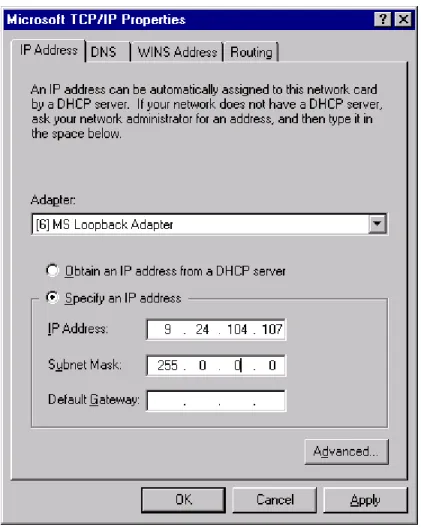
During the setup stage of the Dispatcher, an IP address is assigned to each cluster of servers to be balanced. This is the IP address representing all the servers that the clients use. On the load balancing server an alias for the cluster address must be defined to the network interface. On the servers, an alias for the cluster address must be defined to the loopback interface. The reason for defining an alias to the cluster address on the network interface on the Dispatcher machine and the loopback device on all the cluster’s TCP servers is based on the way the Dispatcher works and treats incoming IP packets.
The Dispatcher is designed to make several TCP servers appear as one in the TCP/IP environment. Let’s assume that a request for the service
managed by the cluster arrives. The incoming IP packets have, among other data, the source address, which identifies who has sent the packet, and the destination address, which is the IP address of the cluster. For example, in the environment we built, an incoming IP packet has 9.24.104.186 as its source IP address, since this was the address of our TN3270 client machine, and 9.24.104.107 as its destination IP address, since this was the cluster address (see Table 1 on page 29).
When the Dispatcher is installed, all the incoming IP packets sent by end users to the cluster address first arrive at the Dispatcher machine, not at one of the TCP servers. This is because the Dispatcher’s network interface, besides having its own unique IP address, has an alias to the cluster address. The TCP servers in the cluster also have an alias to the cluster address, but this is defined on the loopback interface. One other thing to keep in mind is that the Dispatcher runs at a low level in the machine operating system so it can directly intercept all the IP packets.
Each time a new connection is initiated by a client, the Dispatcher selects which TCP server in the cluster should receive the connection packet. Now the Dispatcher should be able to send that packet to the selected TCP server. How can the Dispatcher do that? The answer is that the Dispatcher routes the packet based on the MAC address of the network adapter on the chosen TCP server.
So, let’s assume that the Dispatcher has decided to send the connection IP packet to the TCP server that has the following attributes (see again Table 1 on page 29):
• The unique IP address 9.24.104.16 and host name Jupiter
• The cluster address 9.24.104.107 as the alias on the loopback interface • Adapter MAC address equal to 400052000001.
The Dispatcher must now transmit the IP packet over the token-ring network (but Ethernet would be similar), so it must know the MAC address of the selected TCP server.
Ethernet and token-ring devices require an adapter to physically attach to the LAN. This adapter must provide both physical and logical capabilities for the device. The adapter contains a unique 48-bit address, assigned to it during the manufacturer process, called Media Access Control (MAC). All the MAC addresses are assigned by the IEEE 802 committee. The IEEE provides the vendor building adapters with a range of MAC addresses to use for assigning adapters their unique 48-bit address so that no two adapters should ever have duplicate addresses.
Ethernet and token-ring require the MAC address for both the origin and the destination adapters when communicating over a LAN. Besides the IP address, the MAC address also must be known when sending data to a LAN-attached device.
Media Access Control (MAC) Address
If the TCP server’s MAC address is unknown to the Dispatcher, the same Dispatcher is able to discover it by issuing an Address Resolution Protocol (ARP) containing a broadcast LAN MAC address that will be read by all the network interfaces attached to the same LAN. This requests also specifies the IP address 9.24.104.16 of the TCP server. Each of the network adapters attached to the LAN will determine if its relative interface has been configured
The original destination MAC address on the IP packet was that of the network interface on the Dispatcher machine itself. When the Dispatcher knows the MAC address of the selected TCP server Jupiter, it changes the original destination MAC address on the packet to the MAC address
400052000001. This packet will be now encapsulated in the token-ring frame and transmitted to the chosen TCP server Jupiter.
The Dispatcher then sets up a connection table entry to make sure that subsequent incoming IP packets for this client continue being forwarded to the same server.
When the TCP server Jupiter receives the packet, the information related to the MAC addresses are eliminated and the source and destination IP addresses are extracted.
The destination IP address is still the cluster address 9.24.104.107, but the TCP server Jupiter has its own IP address 9.24.104.16. Jupiter can accept that packet anyway, since the cluster address is configured as an alias on the Jupiter’s loopback interface.
At this point, Jupiter sends a response to the client that originated the request. Now let’s see what happens to the outgoing packets.
Once all the IP packets of the originating client’s request are received, the TCP server Jupiter performs the standard TCP processing that is commonly performed by all TCP servers while responding to a client: it switches the IP source and destination addresses for the outgoing packets that form the response to the client. The source address in this case becomes the cluster address 9.24.104.107, while the destination address is now the client IP address 9.24.104.186. This operation has an important consequence: the balancing function is transparent both to the client and the clustered servers. The destination IP address is the client’s IP address, not the Dispatcher’s. For this reason, the TCP server Jupiter can route the IP packets through its default router directly to the client, and all the outgoing packets do not pass back through the Dispatcher. There is no need to return using the original physical path and a separate high bandwidth connection can be used. This is important, since in many cases, the volume of the outbound server-to-client traffic is substantially greater than the inbound traffic. For example, Hypertext Markup Language (HTML) pages and imbedded images are at least 10 times the size of the client URLs that requested them.
The source IP address in the outgoing packet sent by the TCP server shows as the cluster address, and not as the TCP server’s IP address. The cluster
address was also the destination IP address in the IP packets sent by the client in its request, so the client is not able to understand the TCP architecture of the target server. This security feature offered by the load balancing component ensures privacy for a site that is composed of multiple TCP servers load balanced by a Dispatcher machine.
Because the Dispatcher does not participate in bidirectional communications with the client but simply forwards the incoming packets unchanged, its presence is transparent to both client and server.
2.3 Interactive Session Support
You can use the ISS function with or without a DNS name server:
• If you are using ISS for load balancing, a DNS server is required. This can either be an actual DNS server or, if you set up a small, separate
subdomain for a new name server, a replacement name server provided by ISS. Using this approach, ISS runs on a DNS machine. A client submits a request for resolutions of the DNS name for an ISS-associated service, which has been set up by an administrator. ISS then resolves the name to the IP address of a server in the cell, and forwards this IP address to the client.
• If you are using ISS to collect server load information, a DNS is not needed. The ISS monitor collects server load information from the ISS agents running on the individual servers and forwards it to the Dispatcher. The Dispatcher uses this load information, along with other sources of information, to perform load balancing.
ISS periodically monitors the level of activity on a group of servers and detects which server is the least heavily loaded. It can also detect a failed server and forward traffic around it. Once every monitoring period, ISS ensures that the information used by the DNS server or the Dispatcher accurately reflects the load on the servers. The load is a measure of how hard each server is working. The system administrator controls both the type of measurement used to measure the load and the length of the load
monitoring period. You can configure ISS to suit your environment, taking into account such factors as frequency of access, the total number of users, and
ISS is described in detail in Chapter 5, “WebSphere Interactive Session Support” on page 75.
2.4 Summary
The following summary of the load balancing components will give you an idea of which configuration can help you in your networking environment.
2.4.1 Using the Dispatcher Executor Alone
Using the Dispatcher Executor component alone will give you a weighted round-robin load balancing scheme. No server code is required so it should work on a variety of platforms.
Weighted Round-Robin Algorithm
Weights are applied to all servers on a port. For any particular port, the requests will be distributed between servers based on their weights relative to each other. For example, if one server is set to a weight of 10, and the other to 5, the server set to 10 should get twice as many requests as the server set to 5.
A maximum weight can be set for each port, affecting the difference there can be between the number of requests a server can get. For example, at a maximum weight of 2, one server can get twice as many requests as another. At a maximum weight of 10, one server can get 10 times as many requests as another.
Things You Can Influence
• You can manually set the weight for the server.
• You can influence the round-robin mechanism by setting a maximum weight.
• You can tell the executor a server is down (this changes the weight to -1).
Drawbacks
The Executer isnot awareof:
• Server status (up/down) unless the administrator sets the status to show it is down manually.
• Service status, for example TN3270 services (up/down).
• Connections to the server outside of the Dispatcher. For example, if 100 Telnet sessions are started to a server, the Dispatcher is not aware of that and still treats the server as an equal to the others. Counters are internal to Websphere.
Structure
• The Executor is active.
• A port exists for the service (for example, TCP/IP port 23 for Telnet or TN3270).
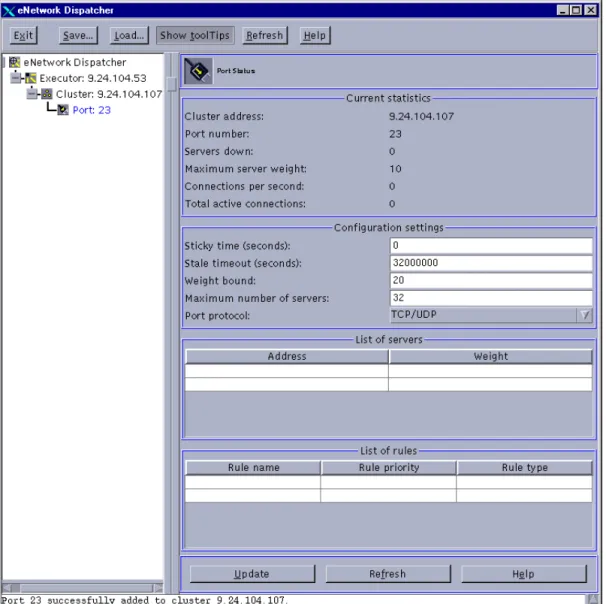
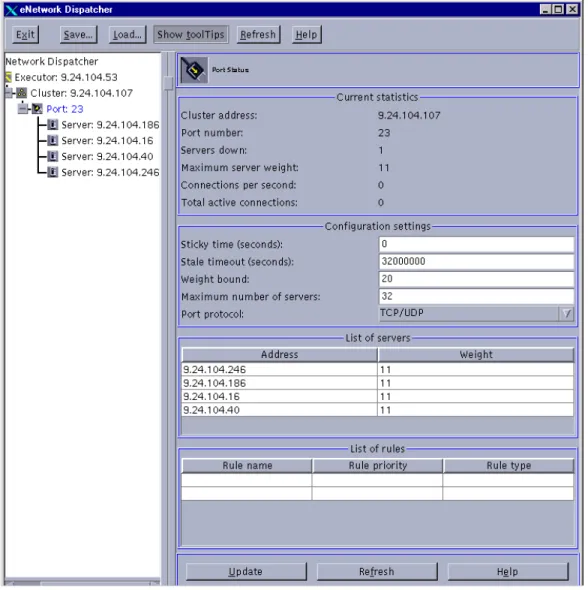
• Servers are defined to a port. The servers can be assigned a weight (the default is 10). The weights can be the same for a true round-robin balancing, or each server can be assigned a weight to determine how often it is used.
• The Executor is aware of the number of TCP connections that have been established to the port through the Dispatcher and how many are active. If the servers have different weights this is used to influence the selection of a server.
Figure 3. Weighted Round-Robin Using the Executor
2.4.2 Using the Dispatcher Executor with Advisor Input
Using the Dispatcher Executor and Advisor components will give you a weighted round-robin load balancing scheme. The difference in this and the previous situation (no advisors) is that the manager will be started and will use advisors to dynamically change the weight of the servers.
Round-Robin Algorithm
• WebSphere comes with a set of advisors. For advisors other than those shipped you must write or customize an advisor.
Structure
• The Executor is active. • The Manager is active.
• A port exists for the service (for example, TCP/IP port 23 for Telnet or TN3270).
• Servers are defined to the port.
• An advisor for the service (for example, Telnet) is active.
Figure 4. Weighted Round-Robin Using Advisors
2.4.3 Using the ISS Component
Using the ISS component allows you to use metrics for a more defined way of determining the preferred server. Metrics can be defined to specifically fit the environment, giving detailed information on server load and coming up with a metric to reflect that server’s load. Servers that are not available are taken out of the selection list automatically.
Things You Can Influence
• You can use internal metrics or custom metrics to get a more detailed picture of the server load.
• You can choose round-robin or best method.
• You can use a domain name server to implement the load balancing. • With the domain name server, the traffic to and from the client will be
direct, without any involvement from the load balancing machine. • Using a domain name server will cause some load on that machine
• As an alternative to using a domain name server, you can send the load information collected by ISS back to the Dispatcher. The information can then be combined with advisor input by the Manager to weight the servers.
Structure
• The ISS component (issd daemon) runs on each server, both the
monitoring server and the monitored. The ISS configuration file resides on each server.
• An observer is defined to get the load information. The observer can be the Dispatcher, or it can be a domain name server.
• The ISS component and Dispatcher are separate. You do not have to run the Dispatcher unless using it as an observer.
Chapter 3. Scenario 1: Using the WebSphere Dispatcher
In this section we will show you how to create a basic configuration for the Dispatcher to balance TN3270 and Telnet traffic among several servers. In this scenario, the only input to the Executor for balancing the load will be server weights set manually by the administrator. The balancing scheme is basically a round-robin approach, taking the server weights into account. This scenario is interesting because it allows you to balance the load among a variety of server platforms since there is minimal change to the server. It also allows you to use a user-defined port for TN3270 traffic.
For information on WebSphere Performance Pack installation, refer to Appendix B, “WebSphere Load Balancing Component Installation” on page 215.
3.1 Network Environment
A summary of the hardware, software and network configuration of the environment where we created this scenario is shown in the following table:
Table 1. Hardware, Software and Network Configuration
On the Windows NT Server 4.0 we also installed Service Pack 4. All of the above machines were provided with a token-ring interface and connected to the same LAN.
Notes:
1. The load balancing function is provided by the load balancing component (eNetwork Dispatcher) of IBM WebSphere Performance Pack Version 1.0. 2. Personal Communications V 4.2 and V 4.3 are the emulators used for the
TN3270 sessions running on the clients. Workstation Host
Name
IP Address Operating System Service
IBM RS/6000 1) csaix1 2) csaix2 1) 9.24.104.53 2) 9.24.104.107 AIX 4.3.0 eNetwork Dispatcher
IBM RS/6000 rs600033 9.24.104.246 AIX 4.3.1 TN3270 Server
IBM RS/6000 Jupiter 9.24.104.16 AIX 4.3.1 TN3270 Server
IBM PC wtr05147 9.24.104.40 Windows NT Server 4.0 TN3270 Server
3. The TN3270 Servers are provided by IBM eNetwork Communications Server for NT V 6.01, IBM eNetwork Communications Server for AIX V 5.0 and IBM eNetwork Communications Server for UnixWare 7.
The following figure shows the environment for this scenario:
Figure 5. Graphical Representation of the Scenario Environment
The configuration process can be divided into three logical phases: • The setup of the dispatcher machine
• The setup of the TN3270 Communication Server machines • TCP/IP configuration modifications on each server
WebSphere Scenario 1: eNetwork Dispatcher
Dispatcher / Executor TCP/IP AIX Client PCOMM V4.2 MVS WTR05142 CS/UW RS600033 CS/AIX TN Server / Port 23 TN Server / Port 23 Jupiter CS/AIX TN Server / Port 23 WTR05147 CS/NT TN Server / Port 23 9.24.104.107
Balanced by server weight Non-forwarding address: 9.24.104.53 csaix2.itso.ral.ibm.com Cluster address: 9.24.104.107 csaix1.itso.ral.ibm.com SNA Counters: #Active TCP Connections #New TCP Connections
Server weights set manually by the administrator
• The primary IP address for the Dispatcher machine is the IP address that is returned by the command:
host hostname
It is also callednon-forwarding address.
Through the non-forwarding address, you can connect to the machine for management purposes (using FTP or Telnet, for example). In our
configuration, the non-forwarding address was 9.24.104.53. In fact, by issuing the command:
host csaix1
The output produced was: csaix1 is 9.24.104.53
• Thecluster addressis the IP address that will be used by clients to access the entire site. The dispatcher’s job is to balance requests that come in to this address among the servers in the cluster. A host name can be associated to the cluster address. In our configuration, the cluster address of the Dispatcher was 9.24.104.107 and the associated host name was csaix2.itso.ral.ibm.com.
Notice that you need to define a cluster address for each cluster you are going to define in your environment.
3.3 Dispatcher Configuration
In the following, we will refer to the configuration of the Dispatcher on the AIX platform. The configuration process on Windows NT is very similar; if
something differs, we will explicitly mention it.
Three different methods can be adopted to configure the Dispatcher: • Command line
You can enter the configuration commands from a command prompt. • Scripts
You can write the commands into a configuration file script that acts as a batch file.
• Graphical user interface
We found this very easy to use. The user on the Dispatcher machine is able to perform all the configuration steps strictly related to the dispatcher function by using the graphical user interface (GUI). In fact, by using the GUI, you can issue thendcontrolcommand with the parameters and flags
that are used to configure the dispatcher machine, as we are going to explain. However, you cannot use the GUI for TCP/IP-related commands such as ifconfig, so this kind of command can be entered only from the command line.
In the following configuration steps, the GUI is usually the primary interface. Where appropriate, the command line configuration commands are also listed. To perform the Dispatcher configuration you must be the root user on AIX or, if the Dispatcher is installed on Windows NT, a system administrator.
3.3.1 Starting the Server Component
First, you need to start the server component of the Dispatcher. 3.3.1.1 Windows NT
In Windows NT the server component is a Windows NT service that starts automatically by default. The name of this service is IBM Network Dispatcher. If you want to stop or restart the IBM Network Dispatcher service, you should open the Services window of the Windows NT Control Panel, highlight IBM Network Dispatcher and then select Stop or Start respectively.
If you prefer that the IBM Network Dispatcher service does not start by default at each system reboot, select IBM Network Dispatcher, click on Startup..., and then set the Startup Type to Manual.
3.3.1.2 AIX
If on AIX, from a command line, enter: ndserver start
If you enter thepscommand after starting the server you can see that the server component is implemented as a Java class, running through the JVM java executable file.
Figure 6. Server Component of the Dispatcher
3.3.2 Starting the GUI
Next you can start the GUI. 3.3.2.1 Windows NT
Click Start, select Programs and then click Network Dispatcher. The Network Dispatcher item in the Programs menu was created during the installation.
3.3.2.2 AIX
To start the GUI on an AIX system enter: ndadmin
This message is not a real problem and does not affect the Dispatcher configuration.
3.3.3 Starting the Executor
Once the server is started you can start the Executor component of the Dispatcher. The Executor routes requests to the TCP and UDP servers. It also monitors the number of new, active and finished connections and performs garbage collection of complete or reset connections. In this
scenario, we are only using the Executor component. Later, when we modify this scenario and add the Manager component, the Executor will supply information about the new and active connections to the Manager.
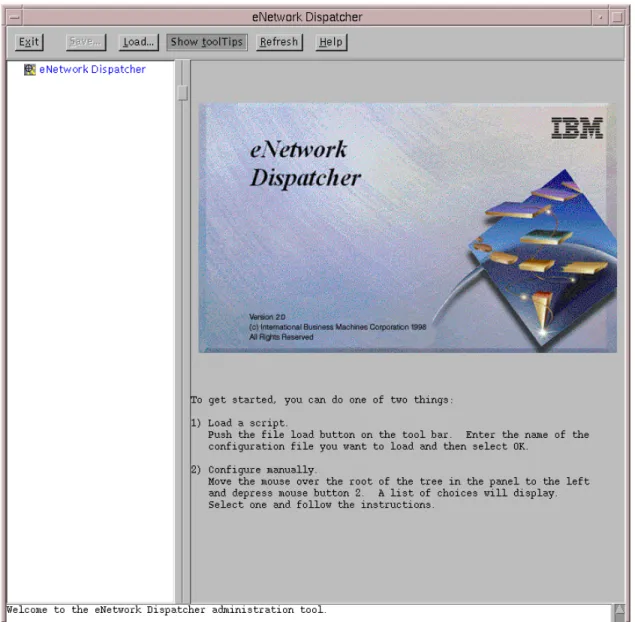
To start the Executor, right click with your mouse in the left white area of the window shown in Figure 7 on page 34, and in the pop-up window that appears select Start Executor.
You will get a window similar to Figure 8 on page 36. This window can be used to monitor and configure the Executor.
java.lang.NullPointerException at java.awt.LightweightDispatcher.retargetMouseEvent(Compiled Code) at java.awt.LightweightDispatcher.processMouseEvent(Compiled Code) at java.awt.LightweightDispatcher.dispatchEvent(Compiled Code) at java.awt.Container.dispatchEventImpl(CompiledCode) at java.awt.Window.dispatchEvemtImpl(Compiled Code) at java.awt.Component.dispatchEvent(Compiled Code) at java.awt.EventDispatchThread.run(Compiled Code)
3.3.4 Configuring the Executor
At this point, you might want to redefine the non-forwarding address or the host name of the Dispatcher machine. It is displayed by default in the
Configuration settings section of the Executor Status window (see Figure 8 on page 36). In our configuration the non-forwarding address appeared as 9.24.104.53, which was the correct address.
The Executor configuration section (see Figure 8 on page 36) lists a set of parameters you can change. Some of parameters are easy to interpret, such To set the non-forwarding address from the command line, you can enter the following command:
ndcontrol executor set nfa IP_address
and put the non-forwarding address in place ofIP_address. For example, on our platform, the full command should have been:
ndcontrol executor set nfa 9.24.104.53 Using the Command Line
The non-forwarding address (NFA) has a special meaning inside the kernel code. Any packets that have the non-forwarding address as the destination address are immediately given back to the local operating system for
processing. No Dispatcher logic is used to determine where the packet should go. This check is done immediately after receiving the packet.
Notice that no error checking is done to see that the non-forwarding address is an existing IP address on that machine; so you could even set the
non-forwarding address to an IP address that has not been defined on that machine, and your command would be accepted, even if you could not administer the Dispatcher machine using such an address.
Another use of the NFA is for co-located servers. If the Dispatcher logic determines that the destination server has the non-forwarding address as its address, the packet is given back to the underlying operating system, not routed out the network interface. This implies that in order for co-location to work, the server on the local machine must be added with the non-forwarding address.
as the Maximum number of clusters (default is 100), Default maximum ports per cluster (default is 8) and the Default maximum servers per port (default is 32). Others are more difficult to understand, such as the FIN count and the FIN timeout.
FIN is a control bit occupying one sequence number, which indicates that the sender will send no more data. A client sends a FIN after it has sent all its packets, so that the server will know that the transaction is finished. When the Dispatcher receives a FIN, it marks the transaction from active state to FIN state, and at this point the Dispatcher garbage collector can clear the memory reserved for those connections.
In general, you can safely take the default values for these settings. For detailed information about them, you may consult the eNetwork Dispatcher help, which can be accessed by clicking the Help button on the top menu bar, or see theeNetwork Dispatcher for Solaris, Windows NT, and AIX User’s
Guide Version 2, GC31-8496, shipped with the CD-ROM of IBM WebSphere
Performance Pack.
3.3.4.1 Alias the Network Interface to the Cluster Address
For the Dispatcher to route packets, each cluster address must be aliased to a network interface card. This is actually a TCP/IP function. You cannot use the GUI to create the alias. The reason for this is explained in “The Flow of the IP Packets” on page 20.
To determine the value of the netmask on AIX you can enter theifconfig command followed by the name of the network interface. If the platform is Windows NT,ifconfigshould be replaced by ndconfig.
For example, on the Dispatcher machine that we installed on AIX, we entered the command:
If your platform is AIX, you should use the TCP/IP commandifconfig. The full command syntax on AIX is:
ifconfig interface_name alias cluster_address netmask netmask where:
• interface_nameis the name assigned to the network interface.
On our platform, the network interface name was tr0, since our machine was equipped with a token-ring network adapter.
• cluster_addressis the cluster address assigned to the Dispatcher machine.
In our case we entered9.24.104.107, (see Table 1 on page 29).
• netmaskis the netmask value you are using in the TCP/IP configuration of the Dispatcher machine. It can be specified either in dotted-decimal or hexadecimal form.
In our case we could have entered either255.255.255.0or0xffffff00. AIX
If your platform is Windows NT, you should use thendconfigcommand. Actually, this command does not belong to the set of commands related to the TCP/IP protocol on the Windows NT operating system. However, during the installation of the L