How Cisco IT Implemented Cisco Virtual Office in India
The Cisco Virtual Office-India solution addresses local challenges to
provide reliable remote access for home workers.
Background
Early in 2008 the Cisco Virtual Office remote-access solution was deployed in a pilot comprising approximately 150 select employees working at the Cisco Globalisation Centre in Bangalore, India.
A home-office solution in India was welcomed. Like many other companies in the region with global presence, Cisco employees regularly need to collaborate across time zones and continents.
Remote network access from home eases the burden on employees who must attend meetings outside of regular business hours. What’s more, employees often use the time saved by not driving to the office for productive work. This is an especially appealing benefit in India where commuters typically can spend upwards of three hours a day traveling to and from the corporate office.
The Cisco Virtual Office solution combines a Cisco 800 Series Integrated Services Router with a high-speed broadband connection (usually DSL or cable), a 7900 Series Cisco Unified IP Phone, and Cisco Unified Video Advantage software and a Cisco VT Camera at the employee’s home. The Cisco IOS Software-based router provides hardware IP Security (IPSec), Triple Data Encryption Standard (3DES) encryption, and enhanced security features. “Zero-touch” provisioning automates the configuration process, eliminating virtually all the time and effort previously spent by technicians and simplifying the installation process for users.
Not long into the Cisco Virtual Office-India deployment, however, Cisco realized the impact that service availability and other technical issues prevalent in India were having on the employees’
“
Cisco Virtual Office gives me the
flexibility to stay fully connected
from home, while managing a global
portfolio. With Cisco Virtual Office, I
can access all of the collaborative
tools that I normally use in the
office, which otherwise would not be
available via a regular VPN.
”
Sameer Padhye, Senior Vice President, Advanced Services, Cisco India
experience. The remote-access solution was available to users only about 20 to 30 percent of the time. Employees, for the most part, were plagued by intermittent service quality and unstable ISP connectivity (“flapping links”).
The Cisco Virtual Office global team and Cisco’s Access Routing Technology Group worked fast to develop a solution that would overcome the local technical challenges. In the process, Cisco developed best practices that can be applied to Cisco Virtual Office deployments in other emerging markets.
Business Drivers
Employee work habits greatly affect the requirements that drive usability and make solution deployments successful. Several working conditions drive the need for a remote-access home solution in India.
Many meetings held outside normal working hours. Working for a US-based, global company
such as Cisco means that employees in India must hold many critical meetings in the early morning or evening hours, to simultaneously accommodate daylight hours in multiple time zones. This nearly 24-hour working schedule can upset the balance between an employee’s work and home life, and thus impact employee satisfaction and productivity.
Employees “on call” or working night shifts. Many support employees are either on call or will work night shifts to accommodate new product releases and like events. Besides being inconvenient for employees, night-time office hours raise safety concerns and yield building inefficiencies. Heating, cooling, and power usage is turned on for an entire building to support a handful of workers.
Onerous commute times and limited schedule flexibility in urban areas. A 90-minute commute both to and from work in a commercial center such as Bangalore is typical. Many employees will seek an experienced driver or take an autorickshaw cab, which is expensive on a daily basis. Alternatively, some employees use company-provided buses, but their rigid travel schedules often conflict with early or late business meetings.
Impact of pollution on the environment. Vehicle emissions contribute significantly to the growing pollution problem in India’s big cities. Providing employees with home working
solutions can have a meaningful, positive impact on the environment, especially in densely populated, high-growth urban areas. In the U.S., for example, Cisco estimates that users of the Cisco Virtual Office solution are reducing CO2 emissions by an average of 2.5 tons per employee per year.
High real estate costs and uncontrolled growth of urbanization. Real estate in India is quite expensive; and the rental costs of property can be as high as in Tokyo or New York.
Challenges
To assist in developing a workable home office solution for deployment in India, Cisco IT assembled a user pilot comprising approximately 150 executives, IT engineers, development engineers, and others who actively use Cisco Virtual Office. Pilot participants supplied important feedback that has shaped deployment and usage of the Cisco Virtual Office-India solution.
Cisco IT identified telecommunication service quality, proper software configuration, and power reliability as the top criteria required to deploy a successful remote-access home solution on a widespread scale with high user satisfaction.
Technical Issues
More than 85 percent of the technical difficulty encountered by users in the India pilot was associated with intermittent service availability, or flapping links (links that oscillate quickly between the down and up states). Compounding this problem is unstable power to India homes, especially in urban areas. Regular power outages, sometimes lasting two hours or longer, are common.
Personal home equipment is generally unreliable as well. Mobile phones, analog home phones, and dialup connections tend to have poor connection quality, and are often dropped because of flapping links, nonexistent service-level agreements, and power interruptions.
Localized Solution
First and foremost Cisco had to address the issue of flapping links, which accounted for more than 85 percent of deployment issues with the Cisco Virtual Office-India solution. In early 2009 Cisco IT engaged developers in the Access Routing Technology Group, who formed a SWAT
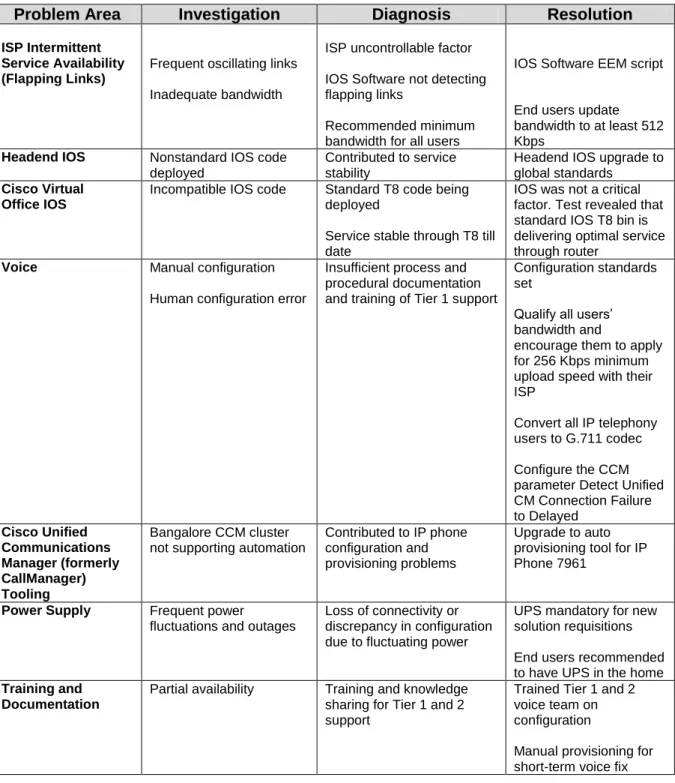
team to ascertain the cause of the flapping links and troubleshoot other issues that impacted the user experience during the Cisco Virtual Office-India deployment. Table 1 describes the main deployment issues and Cisco’s diagnosis and resolution. Chief among them:
Embedded Event Manager (EEM) eliminates flapping. After intensive
troubleshooting, the SWAT teamdiscovered that the IOS Software was not identifying flapping links. This caused the router to lose connectivity, which triggered the gear behind the ISP device to drop connectivity to corporate.
A feature of IOS, EEM allows network administrators to automate tasks such as
troubleshooting and fault detection within Cisco devices. EEM can be used to create and run policies or scripts directly on the Cisco Virtual Office router, without upgrading to a new version of IOS. These policies are programmed using either a simple command line interface (CLI) or a scripting language called Tool Command Language (TCL). The EEM script developed by the SWAT team recognizes flapping links and preempts connection loss. The required EEM script is available from Cisco.
IP Service-Level Agreements (IP SLAs) measure network health. With Cisco IOS IP
SLAs, network administrators can verify service guarantees, validate network
performance, and proactively identify network issues. IP SLAs use active monitoring to generate traffic in a continuous, reliable, predictable manner for measuring network performance. The Cisco India team used IP SLAs to monitor latency, jitter levels, packet loss, Round Trip Time (RTT), and Mean Opinion Score (MOS) for voice calls during the user pilot.
Cisco IOS IP SLA is included in the standard router configuration within the Cisco Virtual Office solution.
Cisco IT also learned that better training and documentation was needed for the local staff that would support the solution. Today Cisco India has a team dedicated to helping employees resolve deployment and technical issues with Cisco Virtual Office.
Assisting the India support team is a piece of code based on IOS EEM and developed by Cisco IT. Incorporated into the Cisco Virtual Office home router, this feature alerts the India team of
trouble with a particular link before the user is even aware of the problem. The capability has greatly enhanced the support level and reaction time of the India team. The required EEM script is available from Cisco.
Table 1. Cisco Virtual Office-India Issues and Cisco Resolution
Problem Area Investigation Diagnosis Resolution
ISP Intermittent Service Availability (Flapping Links)
Frequent oscillating links
Inadequate bandwidth
ISP uncontrollable factor
IOS Software not detecting flapping links
Recommended minimum bandwidth for all users
IOS Software EEM script
End users update bandwidth to at least 512 Kbps
Headend IOS Nonstandard IOS code
deployed
Contributed to service stability
Headend IOS upgrade to global standards
Cisco Virtual Office IOS
Incompatible IOS code Standard T8 code being deployed
Service stable through T8 till date
IOS was not a critical factor. Test revealed that standard IOS T8 bin is delivering optimal service through router
Voice Manual configuration
Human configuration error
Insufficient process and procedural documentation and training of Tier 1 support
Configuration standards set
Qualify all users’ bandwidth and
encourage them to apply for 256 Kbps minimum upload speed with their ISP
Convert all IP telephony users to G.711 codec
Configure the CCM parameter Detect Unified CM Connection Failure to Delayed Cisco Unified Communications Manager (formerly CallManager) Tooling Bangalore CCM cluster not supporting automation
Contributed to IP phone configuration and provisioning problems
Upgrade to auto provisioning tool for IP Phone 7961
Power Supply Frequent power
fluctuations and outages
Loss of connectivity or discrepancy in configuration due to fluctuating power
UPS mandatory for new solution requisitions
End users recommended to have UPS in the home
Training and Documentation
Partial availability Training and knowledge sharing for Tier 1 and 2 support
Trained Tier 1 and 2 voice team on configuration
Manual provisioning for short-term voice fix
power outages and insufficient bandwidth levels from their ISP. Because the infrastructure in India experiences frequent power fluctuations, it is recommended that users have an
uninterruptible power supply (UPS) at home to back up the Cisco Virtual Office equipment in an outage.
Cisco IT found that an important success factor was educating employees on the importance of requesting the proper bandwidth from their ISP, and then verifying the download and upload speeds they have contracted for. Cisco recommends that its employees seek the following minimum bandwidth upload speeds:
Cisco Virtual Office Service Upload Speed
Encrypted data Less than 256 Kbps
VoIP 256 Kbps and up
Video 700 Kbps and up
Results
Before Cisco addressed the technical issues described in Table 1, the Cisco Virtual Office-India solution was available to users only about 20 to 30 percent of the time, largely because of intermittent service quality, power fluctuations and outages, and phone line latency. These
service interruptions often resulted in users having to reset their system configuration after power to the hardware was dropped.
With the localized India solution, end users are enjoying about 98 percent uptime with their home equipment. Cisco India IT can now benefit from the automation and management simplicity of zero-touch deployment.
“Cisco Virtual Office gives me the flexibility to stay fully connected from home, while
managing a global portfolio. With Cisco Virtual Office, I can access all of the collaborative tools that I normally use in the office, which otherwise would not be available via a regular VPN,” says Sameer Padhye, senior vice president for Advanced Services, Cisco India.
Return on Investment
Cisco India is already recording a return on investment (ROI) in the Cisco Virtual Office solution, directly and indirectly. Direct benefits include lower LAN and cell phone costs, and a
projected decrease in expenses associated with real estate. Employees can use WebEx
teleconferencing, for example, to join VoIP calls. Indirect benefits include increased employee productivity and more timely followup and communication with Cisco customers and partners. Among the ROI highlights (calculations are made per user):
Average usage one day/week, eliminating three hours commute time/week
Cisco Virtual Office hardware cost is US$856, paid in first year only. First-year ROI slightly lower due to hardware purchase.
Annual operational cost is US$624
Payback period for hardware purchase is slightly more than one month
Productivity increase per user/year is equivalent to US$16,000 (savings based on increase in available work time with no commute; commute times in India are normalized for global productivity per Cisco employee)
Productivity boost approximately 15 percent per user
Reduction in real estate costs: savings being evaluated
Lessons Learned
Cisco IT offers the following lessons learned from deploying the Cisco Virtual Office-India solution.
Provide a reliable VPN service for employees working from home. Maintain
preemptive capacity planning and control the IP SLAs for every end device and service. Service availability, one-way latency, jitter, and the Mean Opinion Score for voice calls are the main parameters that should be measured for determining overall quality of the remote-access service.
Consider forming a temporary, virtual “ISP issues” troubleshooting team early in
the deployment, to help end users resolve ISP issues and work with the ISPs to improve their service. The ISP issues team should collaborate closely with the staff directly involved in procuring and provisioning telco circuits to the corporate premises.
Educate employees on the importance of requesting the proper bandwidth from
their ISP. IT should revalidate entitlement and service commitments for all employees using the Cisco Virtual Office solution, to ensure that user expectations are met and that requested services receive sufficient bandwidth.
Investigate peering relationships between service providers. An ISP that can carry all of a company’s traffic end to end, including the last mile to the employee’s home, is preferable to having traffic sent to an ISP peer who will not terminate circuits on the company’s premises.
Next Steps
Keep tabs on customer deployments in progress; pilots with a few customers completed successfully
Continue to work with service providers on defining service-level agreements
The Cisco IT India team is expanding; determine the impact, if any, this expansion will have on the Cisco Virtual Office-India solution
For More Information
For additional Cisco IT case studies on a variety of business solutions, visit Cisco on Cisco: Inside Cisco IT www.cisco.com/go/ciscoit
Note
This publication describes how Cisco has benefited from the deployment of its own products. Many factors may have contributed to the results and benefits described; Cisco does not guarantee comparable results elsewhere.
CISCO PROVIDES THIS PUBLICATION AS IS WITHOUT WARRANTY OF ANY KIND, EITHER EXPRESS OR IMPLIED, INCLUDING THE IMPLIED WARRANTIES OF
MERCHANTABILITY OR FITNESS FOR A PARTICULAR PURPOSE.
Some jurisdictions do not allow disclaimer of express or implied warranties, therefore this disclaimer may not apply to you.