SOCIAL MEDIA WIDGET FOR EMERGENCY RESPONSE
Shreeti Banerjee, Illinois State University, [email protected] Bryan Hosack, Illinois State University, [email protected]
Billy B. L. Lim, Illinois State University, [email protected] John Kostelnick, Illinois State University, [email protected]
ABSTRACT
Emergency planners and responders are increasingly investigating the potential of social media as an information source “from the crowd” for providing critical information for emergency response. The proposed map-based social media widget, which may be integrated into a variety of web-based mapping applications, will provide users with an organized and comprehensive pool of real-time data gathered from one of the most popular social media source, Twitter. The widget focuses on developing solutions for two primary challenges related to information from social media sources – gathering and storing real-time data, and filtering and visualizing the gathered information based on required criteria. Users can view filtered data by keyword, time, and location. A user-friendly map for graphical display of feed locations is generated in order to provide a geographic context to an emergency situation. Keywords: Social Media, Twitter and Emergency Management.
INTRODUCTION
Social media allows instantaneous sharing of real-time information. In an emergency situation, the people in the midst of the situation could potentially be first responders via their tweets. Previously, emergency-related updates were only “pushed’ by the emergency agencies; however now with the advancement of mobile devices and technologies as well as social media platforms, the ability to “pull” that data and putting that data in real-time usage for emergency response and management (i.e. data mobilization) is being realized [31]. Such applications could apply to the terrorist attacks, such as the Boston Marathon Bombings, or storm events, like the Oklahoma tornadoes in the early summer of 2013.
While, open-source social media tools, specifically micro-blog Twitter, can provide valuable information for aiding real-time situational awareness. The difficulty in extracting and visualizing the useful information from huge masses of data is like separating wheat from chaff.
This research shows how a social media tool, Twitter, can aid in emergency response. While a very small number of Twitter users have geolocation turned on, the potential of this research could drive campaigns to raise awareness to enable geolocation for specific uses could allow such tools to enter into more mainstream use. The paper is organized as follows: Background and Literature Review, Research Methodology, Results, followed by the Summary and Future Remarks.
RESEARCH METHODOLOGY
As a part of the research we did an exploratory study to examine how Twitter data can be gathered and analyzed for emergency management. A social media Widget was developed to provide categorized and filtered real-time information gathered from Twitter. The functionality for retrieving and viewing data is accomplished through widget, which are by definition components of an interface that enables a user to perform a function or access a service.
The widget would provide aggregated critical real-time data from social media source (Twitter) in a dynamic database over a given period of time and the aggregated real-time dataset is used for analysis of crisis patterns for emergency response. As per user’s requirements, he/she can enter keywords and the related data will be retrieved and presented to the user for viewing. The widget would provide interactive and user-friendly user-interface to view the filtered and sorted real-time data along with user-generated maps for graphical display of tweet locations.
interactions like viewing the organized data per user requirements, through widgets and pop-up screens.
The main users of the widget include general public in an emergency/crisis situation who wish to be updated with the latest information from tweets published by government/relief agencies and other public users. It can also be used by government and business organizations to coordinate a response in an actual emergency situation, to study crisis patterns, and to develop emergency management training exercises and preparation.
Hardware used includes database server, Windows 7 PC and the Software used are Flash Builder (4.5), Apache server, MySQL database, PhpMyAdmin.
The project involves development of a data driven social media widget and the scope of the project is limited to the collection, storage, sorting, filtering and display of emergency-related data from a popular social media source, Twitter. The project scope is defined in terms of the deliverables of the project (i.e. the final output of the project and its features). The main outcome of the project is a social media widget embedded with technical methods and solutions for managing, querying, and displaying trends in emergency-related data gathered from Twitter.
Cost analysis was also considered, and it was concluded that since most of the software and hardware to be used is available with the developer and some are open source so cost incurred is not substantial enough to be calculated. Risk Factor Identification provided with some potential risks related to the project including dependency on dynamic data from Twitter can possibly create data availability problems, actual performance of the system is dependent on the real-time data collected from users, and analyzing the genuine emergency-related data captured from Twitter is a big challenge as even with the presence of keywords the tweets might not be emergency related. Requirement Gathering was carried out to analyze present applications with similar features and the current trend in social media to identify application requirements and potential users and depict them diagrammatically. Main deliverables of requirement gathering were list of essential use cases, use-case diagram, use-case description, domain class diagram and system sequence diagram.
Development of the widget started with research of existing emergency management applications based on social media, and conclude to use the appropriate data streaming and aggregation technology as per the proposed application requirement. Data streaming and aggregation was done from Twitter.com using the Twitter API.
Initial Development Environment Set-up included: Application Server set up
Apache HTTP Server version 2.2 (Apache/2.2.21-Win32-x86-no_ssl) was downloaded and setup. It is an open source webserver for executing the application on computer.
Server side scripting language: PHP/5.3.9 (php-5.3.9-Win32-VC9-x86 was downloaded, installed and configured. PHP is a widely-used open source general-purpose scripting language that is especially suited for web development. Testing Apache plus PHP together: index.php created (<?php phpinfo();?>)and running it from localhost (webserver) shows the configuration information to confirm correct environment settings.
Database Server set up
MySQL 5 (mysql-5.5.20-winx64.msi) was downloaded, installed and configured. MySQL Community Edition is a freely downloadable version of open source database.
Testing Apache, PHP and MySQL: running the index.php presents the MySQL configuration details on a webpage. Firewall settings were reconfigured to allow outside web connections on port 3306. Command line PHP (CLI) and Pear was set up to run command line PHP and avail PHP library.
PhpMyAdmin 3 (phpMyAdmin-3.4.9-all-languages) is a free software tool written in PHP intended to handle the administration of MySQL over the World Wide Web. It supports a wide range of operations with MySQL. The most frequently used operations are supported by the user interface (managing databases, tables, fields, relations, indexes, users, permissions, etc.), along with the ability to directly execute any SQL statement.
Twitter Database Server was setup using 140dev Twitter framework which is a free source code library written in PHP and Javascript, by Adam Green. The goal of this framework is to provide a simplified interface to the Twitter API. It uses the Twitter streaming API to gather tweets for selected keywords and stores them in a MySQL database. [24]
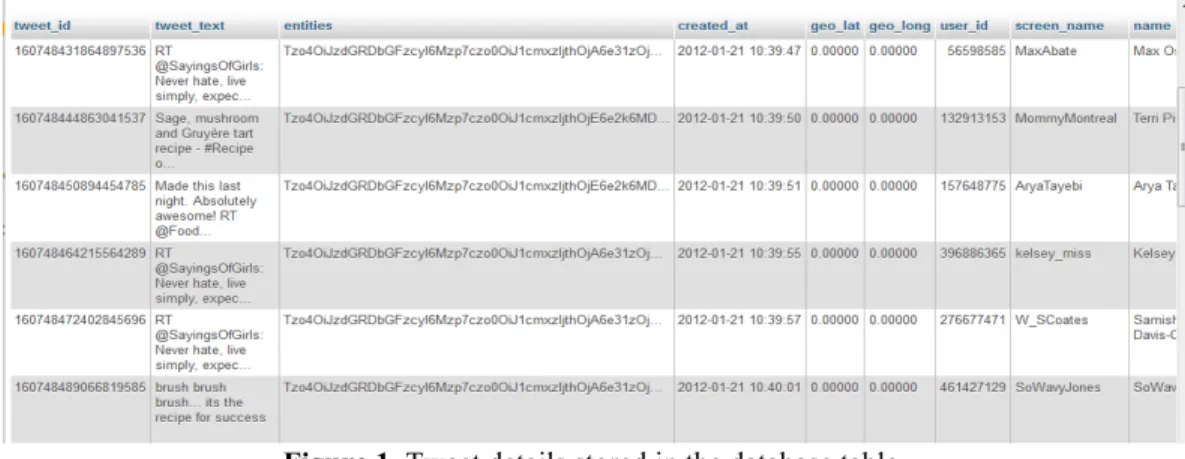
Streaming data from Twitter.com was done using Phirehose, which is the PHP interface to the Twitter API. Database table showing the tweets data streamed from Twitter.com and aggregated in MySQL database ‘Tweet’ table:
Figure 1. Tweet details stored in the database table.
PHP scripts have been extensively used for pulling, parsing, storing and conversion of unstructured Twitter data. The main PHP scripts used are:
A PHP interface to the Twitter Streaming API was implemented as a single abstract class (_Phirehose_) that is extended to utilize the Twitter streaming API. Phirehose library establishes and maintains a continuous connection to twitter stream. [24]
Another PHP script collects tweets from the Twitter streaming API, in which the ‘Phirehose’ class is extended in another new class (For example: Consumer) which needs to implement an enqueueStatus() method:
require_once('Phirehose.php'); class Consumer extends Phirehose {
public function enqueueStatus($status) {
print $status; }
}
$stream = new MyStream('username', 'password'); $stream->consume();
The Twitter streaming API uses basic authentication, so screen name and password for a valid Twitter account has to be provided to Phirehose. Keywords used to filter tweets from the API are passed as an array to Phirehose with the setTrack() function or the location can be passed in as an array of co-ordinates with the setLocations() function: $stream->setLocations(array(array(-90.0, 38.0, -70.0, 43.0)));
The above statement will filter all the tweets from East Coast and Midwest. Finally the consume () function is called to begin collection. ($stream->consume ();)
A PHP script populates the database with new tweet data from the JSON cache table, by processing each new tweet that is added to the JSON
cache
table by the former PHP script. The data for these tweets is extracted from thestored in the database in a RSS format, for being called and displayed in the widget. RESULTS
The Social Media Widget developed was integrated with an existing emergency management application which was developed for IEMA (Illinois Emergency Management Agency), Illinois earlier with the researcher being one of the members of the development team. After integration the widget fulfills the purpose of extracting and presenting the filtered twitter data which is relevant to emergency situation, on the widget in an easy to understand manner. Along with displaying the tweet text and time of creation, the tweets are plotted on the map in a visibly pleasing fashion with the usage of different colors for different categories of emergencies.
Figure 2. The social media widget in use with all tweets pulled based on a set of keywords and plotted.
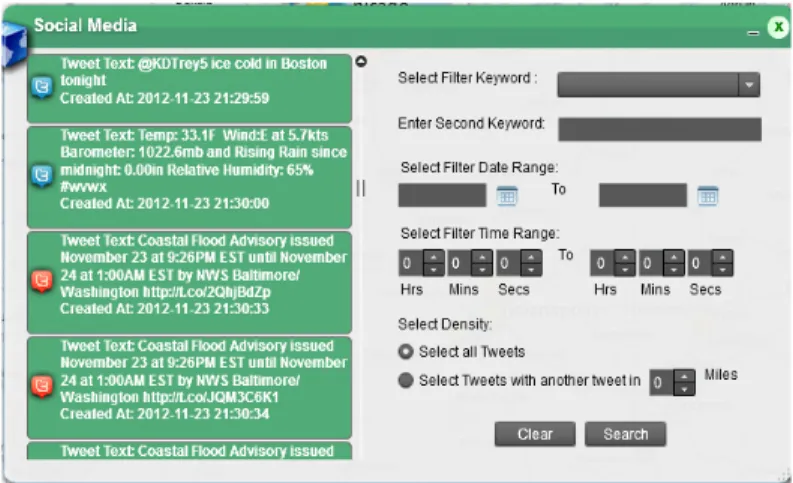
Figure 3. The social media widget displaying the tweets on left and functions on the right.
Figure 5. Keyword ‘rain’ selected and second keyword ‘wind’ – selects the tweets with the combination of both these keywords and also filters based on the date range selected.
Figure 6. The above filtered tweets plotted on the map: Pop--up box is configured with tweet details.
Figure 7. Tweets filtered on date range filter criteria: only date range can be entered for filtering the tweets on the basis of date of creation.
Figure 8. Tweets filtered on density criteria (10 miles density range selected in the above screenshot.
Figure 9. Tweets filtered on density criteria (60 miles density range selected in the above screenshot
Figure 10. Filtering tweets on two keywords together.
Figure 12. Tweets filtered on Keywords, date and density
CONCLUSIONS
The development process rendered a great opportunity for the developer to attain knowledge and practical experience in various fields like restful web services used in Twitter API. With the use of restful web services domain-specific data can be obtained simply by pointing a URL to a specific location. PHP scripts have been extensively used for pulling, parsing, storing and conversion of unstructured Twitter data. PHPMyAdmin which is a free software tool written in PHP, intended to handle the administration of MySQL over the World Wide Web was use was used for the UI operations like managing databases, tables, fields, relations, users etc as well as direct execution of SQL statements to test the data. [12] MySQL database which is an open source database was chosen to be used as it is the most reliable and easy to use database for applications built on the WAMP stack (Windows, Apache, MySQL, and PHP). Development with WAMP like stacks (Windows, Apache, MySQL, and PHP) is commonly being used and all four of these components were used in the development of the application for the server side processing, which is a great experience for working with the emerging technologies. Development of Web Application with use of Adobe Flex to develop the widget provided a great deal of experience with Flex. [13] Previously, the use of social media content was mostly obtained from what was read on the internet. However, with the practical experience gained through the development of the social media widget for the project described here, using some of the latest technologies, it can be concluded that it is actually possible to harness useful data from social media sources as a key source of information during crisis scenarios. The main challenge is to think of effective ways to filter and visualize this huge mass of crowd sourced data collected so it makes sense to a specific category of users, which in the case of this project is emergency responder. The effectiveness of the data presentation can be enhanced via integration of some other technologies like GIS, which also facilitates real-time tracking of resources. The need for real-time information anytime anywhere continues to be in high demand by the community, especially emergency responders, when responding to an emergency situation without delay is critical. Keeping this in mind, there is also a great need for the development of a mobile application within the simplistic functionality of a widget that will be helpful for the emergency responders to access real-time data on the go, which is a common requirement in their profession. Also, the social media data collected and presented via the widget will be more effective, if after being filtered, it is further analyzed for its relevance to an emergency situation through data mining or other analysis techniques. It is difficult to extract out only the “genuine” emergency-related data just with the use of filter keywords, which is an important requirement for emergency responders who need to have access to the not only filtered but also the analyzed information in order to perform their task more effectively. So, the researcher proposes this “context-based analysis” as the next step in the ongoing research once the data which has been extracted from Twitter, stored in the database and filtered on basis of location, keyword, and time.
REFERENCES
1. Mobile Search Use Cases, Mobile Marketing Association, Version 87, Available: http://mmaglobal.com/mobilesearchusecases.pdf
2. O Dell Jolie.(2011). How We Use Social Media During Emergencies [INFOGRAPHIC]. Mashable, February 11, Available:
http://mashable.com/2011/02/11/social-media-in-emergencies/ 3. Emergency Response and Planning News, Available:
www.ArcGIS.com
5. Elgan Mike. (2011). Natural disaster? There's an app for that. Computerworld, March 13, Available: http://www.computerworld.com/s/article/9214318/Natural_disaster_There_s_an_app_for_that?taxonomyId=17 &pageNumber=2
6. Esri, Available:
http://ec2-50-18-186-135.us-west-1.compute.amazonaws.com/yellowstoneriverspill/ 7. Esri, Horn of Africa Drought Crisis Map, Available:
http://www.esri.com/news/maps/2011/horn-of-africa-drought-crisis-map/index.html 8. Esri, Turkey Earthquake Map, Available:
http://www.esri.com/services/disaster-response/2011/turkey-earthquake/index.html 9. Esri, Libya Unrest Map, Available:
http://www.esri.com/news/maps/libya-protest-map-2011/index.html
10. Green Adam. “Twitter API Programming Tips, Tutorials, Source Code Libraries”, Available: http://140dev.com/free-twitter-api-source-code-library/twitter-database-server/phirehose/ 11. Github, Available: https://github.com/fennb/phirehose/wiki/Introduction 12. phpMyAdmin, Available: http://www.phpmyadmin.net/home_page/index.php 13. Flex, Available: http://www.adobe.com/products/flex.html 14. Apache HTTP Server Version 2.2, Available: http://httpd.apache.org/docs/2.2/
15. Webdevcodex, Available:
http://webdevcodex.com/tutorial-installing-apache2-php5-mysql5-phpmyadmin3-windows-7-vista/#installphp 16. PHP for Windows, Available:
http://windows.php.net/download/ 17. MySQL open source database, Available: http://www.mysql.com/downloads/mysql/ 18. Web developers notes, Available:
http://www.webdevelopersnotes.com/how-do-i/install-mysql-windows-7.php 19. Windows, Available:
http://windows.microsoft.com/en-US/windows7/Open-a-port-in-Windows-Firewall 20. Sitepoint, PEAR, Available:
http://www.sitepoint.com/getting-started-with-pear/ 21. phpMyAdmin downloads, Available:
http://www.phpmyadmin.net/home_page/downloads.php 22. PEAR, Manual, Available:
http://pear.php.net/manual/en/installation.checking.php
23. Green Adam. Twitter API Programming Tips, Tutorials, Source Code Libraries, Available: http://140dev.com/free-twitter-api-source-code-library/twitter-database-server/140dev-config-php/ 24. Green Adam. Twitter API Programming Tips, Tutorials, Source Code Libraries, Available: http://140dev.com/free-twitter-api-source-code-library/
25. Github souce code, Available:
https://raw.github.com/fennb/phirehose/master/lib/Phirehose.php
26. Gaudin Sharon, Twitter launches interactive map to track candidates' tweets, Computerworld, November 2, 2012, Available online at:
http://www.computerworld.com/s/article/9233228/Twitter_launches_interactive_map_to_track_candidates_twe ets?source=CTWNLE_nlt_pm_2012-11-02
27. Straw Joseph, (2011). Bird’s Eye View; IT Contingency Planning/Disaster Management, Security Management. February, Available:
http://www.securitymanagement.com/article/birds-eye-view-008113
28. Greniger Mark, (2011). Using Twitter and GIS to support emergency response, Los Angeles County Enterprise GIS. April 12, Available:
29. Williams Matt, (2009). Governments use Twitter for Emergency Alerts, Traffic Notices and More. Government Technology, January 7, Available:
http://www.govtech.com/public-safety/Governments-use-Twitter-for-Emergency-Alerts.html
30. Anas Brittany, (2011). Colo. student develops Twitter app for disasters. Homeland, Septemebr 29, Available: http://www.homeland1.com/business-continuity/articles/1130211-Colo-student-develops-Twitter-app-for- disasters/
31. Cloutier Patrice, (2011). Age of Social Convergence: What it means for emergency managers. Conference Board of Canada, October, Available online at: http://www.slideshare.net/patricecloutier/emergency-management-in-the-age-of-social-convergence?src=related_normal&rel=8079398#btnNext
32. Cree Chris, (2011). Social Media in Emergency Management. Chatham Emergency Management Agency, May 24, Available:
http://www.slideshare.net/ChrisCree/social-media-in-emergency-management 33. Tweak the tweet, Available: