1
Purchasing Contracts Management System
By
Arthi Subramanian
Bachelor of Engineering (B.E), Easwari Engineering College, Anna University, Chennai, India
A REPORT
submitted in partial fulfillment of the requirements for the degree of
MASTER OF SOFTWARE ENGINEERING
Department of Computing and Information Sciences College of Engineering
KANSAS STATE UNIVERSITY
Manhattan, Kansas
2 TABLE OF CONTENTS
Chapter 1 – Vision Document ... 6
1. Introduction ... ... 6 2. Project Overview ... ... 6 2.1 Introduction ... ... 6 2.1.1 Administrator Module... ... ... 7 2.1.2 User Module... ... ... 7 2.2 Goal ... ... ... ... 9 2.3 Purpose ... ... ... 9 3. Requirements Specification... ...9 3.1 Primary Requirements ... ... .... 9
3.2 External Interfaces Requirements ... 10
3.3 Critical Use Case Requirements ... 10
3.4 Assumptions ...14
3.5 Environment ...14
Chapter 2 – Project Plan ...15
1. Task Breakdown ...15
1.1 Inception Phase ... ...15
1.2 Elaboration Phase ... 15
1.3 Production Phase ... ... 16
2. Architecture Elaboration Plan ... 19
2.1 Revision of Vision Document ... 20
2.2 Revision of Project Plan ... 20
2.3 Architecture Design...20
2.4 Prototype Development...20
2.5 Test Plan ... 20
2.6 Formal Technical Inspections ... 20
2.7 Formal Requirements Specification ... 20
3. Cost Estimate...21
3.1. COCOMO Model...21
3.2. GANTT Chart...21
4. Implementation ...22
4.1 Deliverables ...22
4.2 Work Breakdown Structure ...22
Chapter 3 – Architecture Design . ...25
1. Introduction ... ...25
2. Architecture of the System ... ...25
2.1 Presentation Tier ... ...26
2.2 Business-Tier ... ...26
3. Formal Specification ... ...33
Chapter 4 – Inspection List ... ...42
3
2. Items to be Inspected ...42
Chapter 5 – Component Design ... ...44
1. Introduction ... ...44
2. Class Description and Diagrams ... ...44
Chapter 6 – Software Quality Assurance Plan ... ...50
1. Purpose ... ... ...50 2. Reference Documents ... ...50 3. Management ... ...50 3.1 Organization ... ...50 3.2 Responsibilities ... ...50 3.3 Tasks... ...51 4. Documentation ... ...51
5. Standards, Practices, Conventions, and Metrics ... ...52
6. Reviews and Audits ... ...52
7. Test ... ...52
8. Problem Reporting...52
9. Deliverales...53
Chapter 7 – Test Plan ... ... ...55
1. Introduction ...55
2. Features to be tested ... ... ...55
3 Test Cases 3.1 Test Cases for Administrator Requirements... ...56
3.2 Test cases for User Requirements ...60
4. Approach... ... ... ... ... ... ... ... ... ... ...62
4.1 Unit Testing ...62
4.2 Performance Testing ... ...62
5. Item Pass/Fail Criteria ... 63
6. Suspension Criteria and Resumption Requirements ... 63
6.1 Suspension Criteria ...63 6.2 Resumption Requirement ... ... 63 7. Test Deliverables ... ... ...63 8. Environmental Needs ... 64 8.1 Software ... 64 8.2 Operating System ... 64
Chapter 8 – Assessment Evaluation ... 65
1. Introduction ... 65
2. Test Case Result Summary ...65
3. Detailed Test Results ...65
3.1 Manual Testing ...65
3.2 Unit Testing ...68
3.3 Performance Testing ... 75
4
Chapter 9 – User Manual ... 82
1. Introduction ... ... 82
2. Installation and Set-up ... ... 82
2.1 Required Hardware ... 82
2.2 Required Software ... 82
2.3 Required Network Configuration ... 83
2.4 Software Setup ... 83
3. Purchasing Contracts Management System Usage ... 84
Chapter 10 – Project Evaluation... ... 94
1. Introduction ... 94
2. Problems Encountered...94
2.1 Identification of technology to be used ... 94
2.2 Features to implement ... ... 94
3. Source Lines of Code ... ...94
4. Project Duration ...95
5. Lessons Learnt ...98
5 LIST OF TABLES
Table 1 - The Work Breakdown Structure Table ... 24
Table 2 - Client Site ASP.NET Web Forms ... 26
Table 3 - Administrator Site ASP.NET Web Forms……... 26
Table 4 - Database Table ... 33
Table 5 - Formal Technical Inspection List... 43
Table 6 - Features to be Tested ... 55
Table 7 - Test Case Result Summary ... 76
Table 8 - Test 2 Results Summary………. 80
6 Chapter 1 – Vision Document
1. Introduction
1.1. Purpose and Motivation
The objective of this project is to implement a purchasing contracts management system. The motivation of this project comes from my desire to learn and explore the growing field of .NET technologies, AJAX that is gaining immense popularity in recent times and SQL server database designing. The project is being developed for the ‗Division of Financial Services‘ at Kansas State University. The system under consideration provides a more functional, usable and secure solution for handling purchasing contracts information.
Although web designing in the broader context might refer to the visual and user interface design of a system, the usability of a system gains a lot more importance when talking about holding the attention of a user in a website. If the site is hard to use or the information is not presented to the user in a clear and concise way it is quite natural for users to not use the website. Hence the design of the website should be created keeping in mind the target audience.
Scalability of a system is one of the most important features that need to be kept in mind while designing and implementing the system. The system must be designed so as to handle growing amounts of work in a graceful manner. Thus the primary motivation of the project is to build a functional, scalable and a reliable system.
2. Project Overview 2.1 Introduction
The purchasing contracts management system is a system that should be able to allow a procurement officer to insert new contracts into the system. Already existing contracts might be renewed and under such situations, data already present such as expiration date etc might have to be updated. Thus it is vital for the system to be able to allow updating existing information.
7 a) No pre-approval b) Human Resources Approval c) Telecom Approval d)
Facilities Approval. This information must be available to the end user of the system. The primary focus of the system is to ensure that information on the purchasing contracts is available to the end users easily. Hence the graphical user interface must be designed in such a manner that it achieves the single most important thing any GUI must accomplish, user friendliness.
The application is implemented using VB and ASP.NET. The application can be divided into two modules.
2.1.1 Administrator Module:
The procurement officer who plays the role of an administrator in our system is the only authority who can insert or update contract details. Thus the pages that are accessible by the administrator must be secure and only a valid administrator should be allowed to access these secure pages.
This module covers the following implementations: Adding new contract details
If a new contract detail is to be inserted, one of the basic checks that need to be implemented in the system is that the contract should not have existed in the system previously.
Update existing contract details
The update page will include the search functionality, since it is more user-friendly to search for contracts in the system and then further update them. Once the contracts are obtained, the update functionality is very similar to that of insert, wherein the new values are replaced with older values.
2.1.2 User Module:
The end users of the system are those who access the system with intent of finding details about contracts. This might be a department which is trying to purchase goods with the contract vendors or the telecom, human resources, facilities departments that might want to view those contracts details that require their approval.
Thus the user module covers the following implementations: Searching for contract details
8 With respect to the user interface, the user can search for contracts based on the contract number, title, vendor name, department name or any other keywords. On the other hand, users who are not sure about the contract number can request to display all the contracts and further filter the results by department name or vendor name or the department from which approval is required. All users must be allowed to view contract details and so this page is not an authenticated webpage.
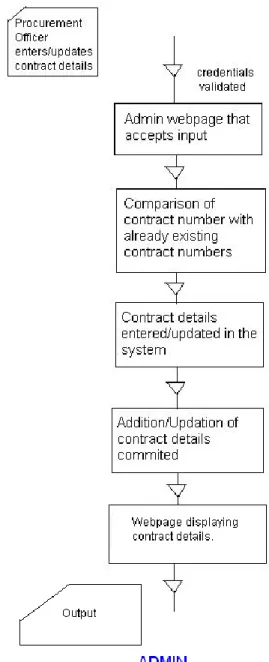
The diagram below captures the page flow model for the administrator and the user:
9 The system under consideration will interact as follows:
a. The client sends request and .NET form inputs over the network. b. The Internet Information Server (IIS) receives .Net form inputs. c. IIS Web server
i. Processes inputs
ii. If required, queries to the database and retrieves data
d. The IIS Web server sends back processed output over the network as a Web page. e. The client receives the output as a Web page.
2.2. Goal
The goal of this project is to provide an automated .NET Web application that allows a procurement officer to insert and update contract details and one that allows all users to view details of a contract in a fast and efficient manner instead of browsing through an excel document to find contract details.
2.3. Purpose
The purpose of this project is to explore the capabilities of the Microsoft .NET framework, the Ajax toolkit and provide a convenient service to add or update contracts. The system is also intended to retrieve contract details in a fast and efficient manner.
3. Requirement Specification 3.1. Primary Requirements
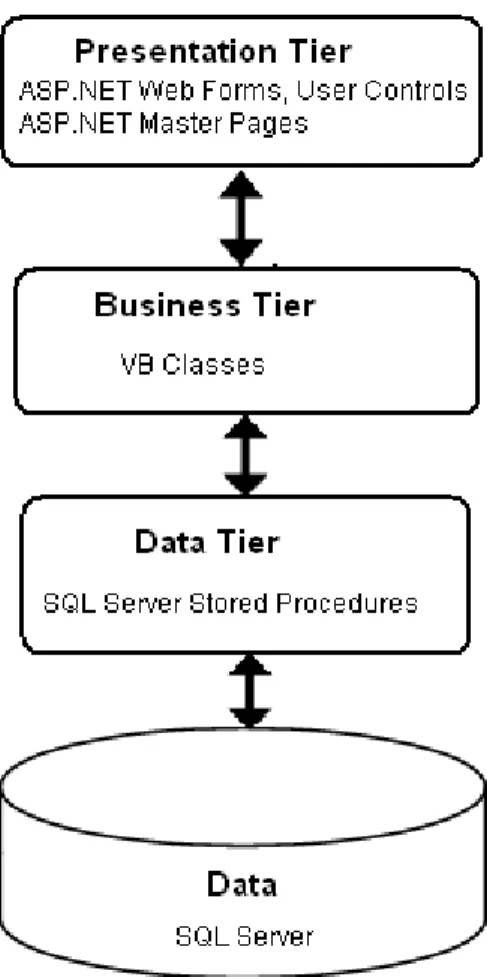
1. Construct a system with three-tier architecture. Figure 3 shows the system on three tier architecture.
2. Microsoft Visual Studio 2005, ASP.NET, VB language, Microsoft SQL Server 2005
3. Ajax will be used on client side to make the application user interactive.
4. The final product will be run on Internet Information Server (IIS).
10 3.2. External Interface Requirements
All user interfaces are ASP.NET-generated Web pages. In order to access the system, the user will need to use a workstation with Internet accessibility equipped with Internet Explorer. It is also a must that the Microsoft .NET Framework is installed and a
broadband connection is recommended to boost the performance. The Administrator can add new or update the contract details of existing contracts. The end user can
browse/search through the list of contracts and get details of the contract such the prior approval required from any department.
3.3. Critical Use Case Requirements
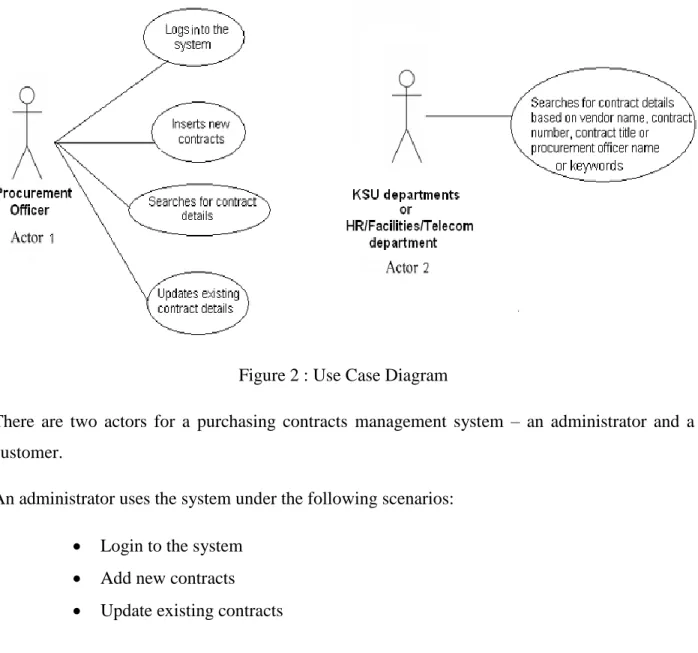
Figure 2 : Use Case Diagram
There are two actors for a purchasing contracts management system – an administrator and a customer.
An administrator uses the system under the following scenarios:
Login to the system Add new contracts Update existing contracts
11 Search for contract details
Use Case 1: Login to the system
Purpose : The administrator needs to login to the system in order to add new contract or update existing contracts in the system.
Input : The administrator will enter the email ID and password combination.
Output : If the administrator has entered a valid email, password combination he is allowed access to the secure webpages. If the email password combination is incorrect a message ―‖ is displayed to the administrator.
Use Case 2: Add new contracts to the system
Purpose : To add new contract details to the system.
Precondition : Administrator must be logged in to be able to create and add a new contracts to the system. Also, the contract number that is to be added should not exist in the system previously.
12
Input : The administrator will enter the contract number, contract title, vendor name, procurement officer name and the department name and click the ―Insert‖ button to complete the action.
Output : On completion of the insert action the new details will be added to the system and a ―Insert Successful‖ message will be displayed to the user.
Use Case 3 : Update existing contracts
Purpose: To update details of already existing contracts
Precondition : Administrator must be logged in to be able to create and add a new contracts to the system. Also, the contract number that is to be added should exist in the system previously.
Input: The administrator may enter new values for the contract title and/or vendor and/or start date etc and click the ―Update‖ button to complete the action.
Output: On completion of the update action the new details will replace the existing details in the system.
13 Use Case 4: Search contract details:
Purpose: The purpose of this use case is to enable the customer to find the details of an available contract without having to browse the entire contracts set.
Input: The user enters a valid search criteria in the search page, sets the search filter to an appropriate value and clicks on the search button.
Output : When the user enters a valid search criteria in the search page, sets the search filter to an appropriate value and clicks on the search button all the contracts pertaining to the search criteria are retrieved. Sometimes a number of records may be retrieved that matches the particular search entered and hence these records may further be filtered by setting the filter on the right side of the search page based on a particular department and/or a vendor and/or the department from which prior approval is required.
14 3.4. Assumptions
The user will interact with the system using a webpage.
The user will have internet connection whenever he/she is using the Purchasing Contracts Management website.
In order to view and interact with the webpage the user must have an active (if possible high-speed) internet connection.
The user will need a minimum of 512 MB of memory. 3.5. Environment
The application is programmed in Visual Basic and runs on Microsoft .NET platform. CSS is used to design the look of the webpage.
15 Chapter 2 – Project Plan
1. Task Breakdown 1.1.Inception Phase
The primary objective in the inception phase is to achieve concurrence among all stakeholders. Since the system under consideration is a new development effort and not an enhancement to an already existing system, the inception phase needs to be more detailed
addressing the requirements before the project can proceed. At the end of the inception phase we hope to establish the scope and boundary of the project including the vision and the project plan. Hence the deliverables at the end of this phase include:
The vision document that will include an overview of the project, its purpose, goals, risks, constraints, and direction. It will also discuss the main product features, quality
attributes, and external interfaces. It will also include the critical project requirements and the major use cases will be defined and elaborated in the requirements analysis.
The project plan document that will describe the work to be accomplished in each phase as well as the inclusion of an estimate of the workload of the project that will establish a schedule for the completion of all project activities.
The software quality assurance planthat defines the techniques, procedures, and methodologies that will be used to assure timely delivery of the software that meets the specified requirements within project resources.
An executable prototype of the user interface will be demonstrated in Presentation I to establish the feasibility of the important elements of the use case requirements. This will be a milestone for the inception phase.
1.2.Elaboration Phase
In this phase the architectural plan of the system is being developed and the requirement model must evolve to a 80% completion point. The high-priority risks associated with the project must be understood and the deliverables for this phase include the Formal Requirement Specification, the Architecture Design and an executable prototype that will address all critical requirements mentioned in the vision document.
On completion of the first presentation the suggestions that were provided by the supervisory committee should be included while developing the second prototype.
16 1.3.Production Phase
The production phase is concentrated on the implementation design requirements, deployment and testing of the system. In this phase, the developer will construct the code and ensure that it is well documented. The code will be tested entirely to guarantee that all requirements are met. All test results will be analyzed and documented. A user manual will also be produced by the
developer, which will describe how to install, run, and use the tool efficiently.
At the conclusion of this phase, the developer will present the final version of the software product as the final presentation as well as submit all the required documentation. Review and approval of final presentation determines the completion of project.
The Constructive Cost Model (COCOMO) is one of the most popular software cost estimation models. COCOMO II takes into account four cost drivers, each with a number of subsidiary attributes. The cost drivers are Product, Hardware, Personnel and Project attributes.
Each of these receives a rating from ―very low‖ to ―high‖. The following table describes the effort multiplier that is applied to the rating. The product of all effort multipliers results in an effort adjustment factor (EAF).
The table below lists all the adjustment factors and their corresponding ranges.
Cost Drivers Very
low
Low Nominal High Very High
Extra High
Product attributes
Required software reliability 0.75 0.88 1.00 1.15 1.40
Size of application database 0.94 1.00 1.08 1.16
Complexity of the product 0.70 0.85 1.00 1.15 1.30 1.65
Hardware attributes
17
Memory constraints 1.00 1.06 1.21 1.56
Volatility of the virtual machine environment 0.87 1.00 1.15 1.30
Required turnabout time 0.87 1.00 1.07 1.15
Personnel attributes
Analyst capability 1.46 1.19 1.00 0.86 0.71
Applications experience 1.29 1.13 1.00 0.91 0.82
Software engineer capability 1.42 1.17 1.00 0.86 0.70
Virtual machine experience 1.21 1.10 1.00 0.90
Programming language experience 1.14 1.07 1.00 0.95
Project attributes
Application of software engineering methods 1.24 1.10 1.00 0.91 0.82
Use of software tools 1.24 1.10 1.00 0.91 0.83
Required development schedule 1.23 1.08 1.00 1.10 1.10
For our KSU-Purchasing Contracts management system, the following will be values and the reason for the same is also mentioned under comments.
Cost Drivers Category Value Comments
18 Required software reliability Low 0.88 Reliability is the probability of
failure-free operation of a computer program in a specified environment for a specified time. Application is not very critical and hence the value can be low.
Size of application database Nominal 1.00 Users input, contract details that need to be stored in the db.
Complexity of the product Nominal 1.00 Web application that follows the 3 tier architecture.
Request: Client Browser -> Server -> DB
Response: DB>Server ->Browser
Hardware attributes
Run-time performance constraints Nominal 1.00 Important but not critical
Memory constraints Nominal 1.00 Not require high memory usage
Volatility of the virtual machine environment Low 0.87
Required turnabout time Low 0.87
Personnel attributes
Analyst capability High 0.86 Developer has been involved in
projects earlier.
Applications experience Nominal 1.00 Nominal experience in developing applications
19 Software engineer capability Nominal 1.00
Virtual machine experience Low 1.10
Programming language experience Nominal 1.00 6 months experience in developing .NET applications
Project attributes
Application of software engineering methods Nominal 1.00
Use of software tools Nominal 0.83 Style sheet editors, text editors
Required development schedule Nominal 1.00
Thus in our scenario the EAF is 0.523
In the second phase I estimated the total size of the project to be around 2200 LOC based on the current prototype and similar examples.
Total estimated SLOC for the entire project = 2200 SLOC
Effort = 2.45 * EAF * (KSLOC) 1.09 Time = 2.5 * (Effort) 0.38 Where:
Effort = the number of person months (PM) Time = Duration time in months for project
KSLOC = Estimated number of source lines of code for the project (Expressed in thousands) EAF = Effort Adjustment Factor
Applying the above formula for our KSU – Purchasing contracts management system we can calculate the effort and time required to complete the project.
Effort = 2.45 * 0.523 * (2.2) 1.09 = 3.04 man-months Time = 2.5 * (Effort) 0.38 = 3.8 months
Thus it is estimated that it will take 3.04 man months to complete the project. The time that is calculated should take around 3.8 months to complete it.
20 The following are the list of documents that need to be complete and submitted before the second presentation:
2.1. Vision Document Revision
The vision document that was submitted in the first presentation needs to be reviewed and revised such that it includes all the suggestions that were made by the supervisory committee. The requirements are all ordered by priority and further submitted to the committee for approval. 2.2. Project Plan Revision
Like the vision document the project plan document is also revised including suggestions made in the first presentation. This further means that based on the changes, the Gantt chart and the COCOMO estimates are all updated and further submitted to the committee for approval. 2.3. Architectural Design
The Architectural Design document explains the components and the scenarios of the
system under consideration with the help of UML diagrams which is further submitted to the committee for approval.
2.4. Prototype Development
As part of the first presentation, a prototype is developed and submitted to the supervisory committee. More features are added to this prototype and an enhanced version with new functionalities added will be part of the second presentation.
2.5. Test Plan
The test plan is a document that describes the test conditions, data, and coverage of a particular test or group of tests. Based on the vision document a test plan outlining all instructions about evaluating a product will be submitted to the committee.
2.6. Formal Technical Inspections
The technical inspectors will use a formal inspection checklist that will be produced during the Elaboration phase. The technical inspectors are Srunokshi Neelkantan.and Krishnaveena Ramavat
2.7. Formal Requirements Specification
Object Constraint Language (OCL) is a declarative language for describing rules that apply to Unified Modeling Language (UML) models. OCL will be used to specify one of the modules with the help of the USE tool.
21 3. Cost Estimate
3.1. COCOMO Model
In 1981, Barry Boehm designed "COnstructive COst MOdel" to give an estimate of the number of person-months it will take to develop a software product. The model also estimates the development schedule in months and produces an effort and schedule distribution by major phases. The model estimates cost using one of three different development modes: organic, semidetached and embedded. Organic projects - are relatively small, simple software projects in which small teams with good application experience work to a set of less than rigid
requirements. Semi-detached projects - are intermediate (in size and complexity) software projects in which teams with mixed experience levels must meet a mix of rigid and less than rigid requirements. Embedded projects - are software projects that must be developed within a set of tight hardware, software, and operational constraints.
The Effort Adjustment Factor is the product of the 15 adjustment parameters. Each of the 15 attributes receives a rating on a 6-point scale that ranges from "very low" to "extra high" (in importance or value). An effort multiplier from the table below applies to the rating. The product of all effort multipliers results in an 'effort adjustment factor (EAF). Typical values for EAF range from 0.9 to 1.4.
22 4. Implementation Plan
4.1. Deliverables
The following are the deliverables for Presentation III: Source Code
Well-documented source code will be submitted. This code will correspond directly to the architecture and component design.
Assessment Evaluation
Test cases that were identified in the Test Plan will be executed. Defect fixing will be done for all resolvable issues. All test results will be documented. The documentation will include a document detailing the testing done on the project along with the descriptions of the testing and known unresolved defects.
User Manual
The user manual will include an installation guide and a user guide. The installation guide will include detailed information on how to set up the software, while the user guide will give detailed explanations of common usage and user commands.
Component Design
The internal design of each component will be documented. UML diagrams will be used for the said design.
Project Evaluation
The entire software process starting from the first phase will be reviewed. This will include the usefulness of the methodologies used, the accuracy of the estimations, and the usefulness of the reviews. The tool will be reviewed and evaluated to check whether it accomplishes the goals presented in the vision document and if the quality of the product is achieved.
Formal Technical Inspection Letters
The two MSE students will perform the technical inspection of the architecture design. They will submit a formal letter stating that the project has successfully passed all technical requirements. References
The annotated bibliography will include cited references for all notations used in the portfolio.
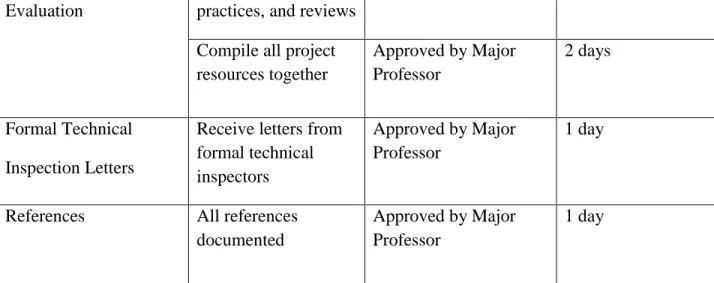
23 The following table breaks down the deliverables into tasks and lists the completion criteria and cost for each task.
Deliverable Tasks
Completion Criterion
Cost
Source Code Ajax features – User page, filter contracts in grid.
Executable code 5 days
Ajax features – calendar in Add contracts page
Executable code 2 days
Ajax features – Auto complete for users search contract page.
Executable code 2 days
Export the contract search results to an excel document
Executable code 2 days
Assessment
Evaluation and
Testing
Run test cases and fix resolvable issues
All test cases complete 5 days
Run Performance testing using Jmeter
All test cases complete 4 days
Document test results All the test case results evaluated and
documented
3 days
User Manual User Guide Approved by Major
Professor 3 days Component Design Document Purchasing contract management system design
All major features of the Purchasing contract management system are documented with UML
2 days
Project Document usefulness
of project, methodologies,
Approved by Major Professor
24 Evaluation practices, and reviews
Compile all project resources together Approved by Major Professor 2 days Formal Technical Inspection Letters
Receive letters from formal technical inspectors
Approved by Major Professor
1 day
References All references documented
Approved by Major Professor
1 day
25 Chapter 3 – Architecture Design
1. Introduction
The primary purpose of this document is to provide an architectural design for the purchasing contracts management system. The design will show the presentation tier, the business tier that composes the class and sequence diagrams, and the data tier. Each class will have a brief description about its purpose.
2. Architecture
The following diagram represents the three tier architecture that consists of the presentation tier, the business tier and the data tier. The presentation tier contains the UI (User Interface) elements of the site. This layer is responsible for displaying the contents to the users. The business tier receives requests from the presentation tier and based on the business logic it contains, the result is returned to the presentation tier. When the business tier requests for data, the data tier is responsible for sending the stored application‘s data.
26 2.1. Presentation Tier
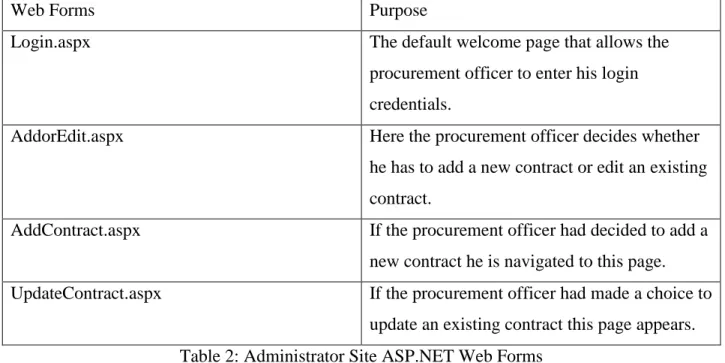
The .NET IDE is used in creating web forms that represents the presentation tier for the purchasing contracts management system. The following table represents the ASP.NET web forms for the clients and their respective purpose in the system.
Web Forms Purpose
Login.aspx The default welcome page that allows the
procurement officer to enter his login credentials.
AddorEdit.aspx Here the procurement officer decides whether
he has to add a new contract or edit an existing contract.
AddContract.aspx If the procurement officer had decided to add a new contract he is navigated to this page. UpdateContract.aspx If the procurement officer had made a choice to
update an existing contract this page appears. Table 2: Administrator Site ASP.NET Web Forms
The following table below shows ASP.NET Web forms for the end user of the system.
Web Forms Purpose
Contracts.aspx The default page that contains the search
textbox and search filters. On performing a valid search the page contains a grid that populates the search results.
Table 3: Client Site ASP.NET Web Forms 2.2. Business Tier
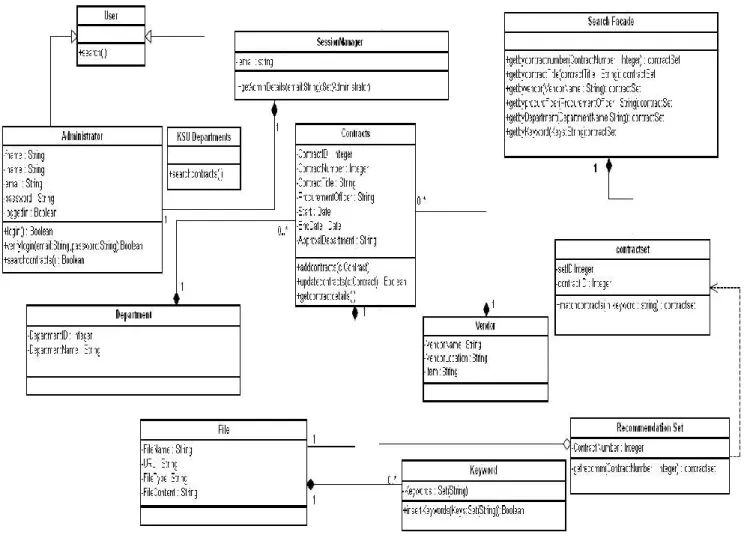
The business specific layer consists of twelve classes: User, Administrator, Department, KSU Departments, SessionManager, Contracts, SearchFacade, contractSet, Vendor,
RecommendationSet, File, Keyword. The diagram below captures the domain model of the Purchasing Contracts Management System.
27 Figure 4 : Domain Model
2.2.1. Class Descriptions 2.2.1.1. Administrator
Figure 5 : Administrator Class
This class will handle the actions that are performed by the procurement officer. The procurement officer of the purchasing department plays the role of an administrator in our system. The administrator has an unique email and password that allows them to login to the
28 system. The class includes methods such as login( ) that is called when the procurement officer logs onto the system. Once the procurement officer enters his valid credentials the verifylogin() method is called that accepts the email and password as its input and returns a Boolean value based on if the login is successful or not. Before performing a change to an existing contract, the searchcontracts( ) method is first called and a search for the contract to be updated is made.
2.2.1.2. KSU Departments
Figure 6 : Administrator Class
The KSU departments class will handle primarily one action of searching for contracts that is indicated by the searchcontracts( ) method. This method will look for contracts in the system based on the contract number/contract title/vendor name/procurement officer/any other keyword.
2.2.1.3. Users
Figure 7 : User Class
This class will handle all user actions. The User class is the super class of the KSU departments class and the Procurement Officer class. It includes a method search() that is used to search for contracts in the system. This method is called when a search field is entered, search filter set and the ―search‖ button I clicked.
2.2.1.4. Session Manager
29 The session manager class is responsible for maintaining the user information such as the email of the procurement officer for a particular session. The getAdminDetails( ) method is called when the administrator information needs to be displayed.
2.2.1.5. Contracts
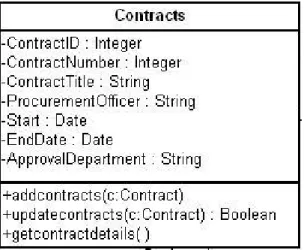
Figure 9 : Contracts Class
This class comprises of contracts with attributes such as the contract number, contract title, procurement officer, vendor name, start date and expiry date, ApprovalRequired, Link etc. The getcontractdetails( ) method is called when the user enters a search criteria and the system retrieves the contract details and the master contract file on click of the contract fields. The addcontracts(c:Contract) is called when the user chooses to add a new contract to the system. This method requires the contract details as an input. On the other hand when the user chooses to update existing contract details, the contract details are taken as an input and the changes are made.
2.2.1.6. Search Facade
30 This class primarily contains methods that are used to retrieve the search results based on the options chosen by the user. The getbycontractnumber(contractNumber:int) is called when the user enters search data, sets the search filter to ―contract number‖ and hits the search button. Likewise the getbycontractTitle(contractTitle:string), getbyvendorname(vendorName:string), getbyprocurofficer(procurOfficer:string), getbykeyword(Keys:String) are called when a search criteria is entered and the search filter is set to contractTitle, vendorname, procurement officer and keyword respectively.
2.2.1.7. Keyword
Figure 11 : Keyword Class
The keyword class contains a private method that inserts keywords as a set of strings for the file to be uploaded
2.2.1.8. Recommendation Set
Figure 12 : Recommendation Set Class
When an end user performs a search based on a particular contract number that does not exist in the system, the getrecomm() method is invoked. This method further returns a set of contracts whose contract number is the closest match to the number searched by the user.
2.2.2. Sequence Diagrams
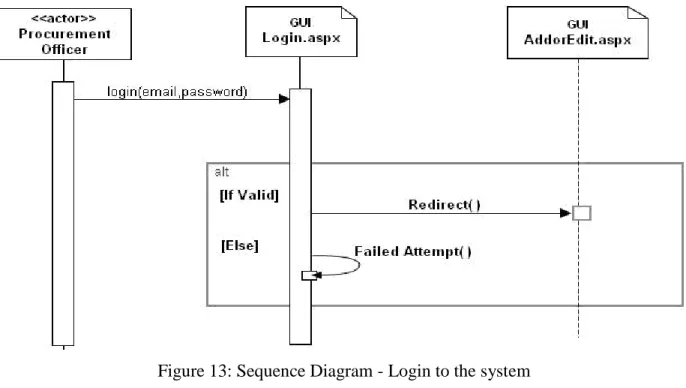
31 Figure 13: Sequence Diagram - Login to the system
In order to add or edit contracts the procurement officer needs to login to the system. The officer will also enter his/her email and password and logins to the system. On successful login the procurement officer is redirected to the AddorEdit.aspx page where he can perform the desired operation.
32 The above diagram represents the sequence of activities that the KSU departments go through to perform a search for contract details. The search keyword is entered and a search filter is set from 5 categories : contract number, contract title, vendor, procurement officer, keywords. The entered keyword is matched against the contracts table and the matched set is returned back to the user through the contracts.aspx page.
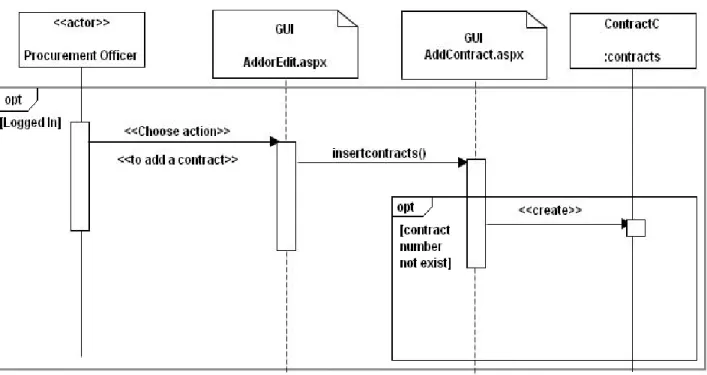
The following diagram represents the sequence of activities that are carried out by the procurement officer in order to insert/edit a contract. The procurement officer enters the contracts details and if the contract number does not exist, the contract is added to the system.
Figure 15: Sequence Diagram - Add contract
The following diagram represents the edit contracts scenario. When the procurement officer chooses to edit an existing contract, the updatecontract() method is called, he first has to search for the required contract number and if the contract exists further edit and save it. If no search results are returned then a message ―No results found‖ is displayed to the user.
33 Figure 16: Sequence Diagram - Edit contract
2.2.3. Data Tier
The system database has the following structure of tables:
Table Name Description
Contracts Contains the contract related information such
as the contract number, contract title, vendor information, procurement officer etc
Departments Contains the details of the departments such as
the department name and department ID that are provide approval for certain contracts. Administrators Contain the login details of the administrators.
Vendors Contain the vendor information such as the
vendor name, Item etc Table 4: Database Table
3. Formal Specification for the system --
34 --MODEL -- model PurchasingContractsManagementSystem -- -- CLASSES -- class User operations search() end
class KSUDepartments < User operations
searchcontracts() end
class Administrator < User attributes fname : String lname : String email : String password: String loggedin : Boolean administers : Set(Contract) operations login() : Boolean verifylogin(email:String,password:String):Boolean =
35 searchcontracts() : Boolean end class Department attributes DepartmentID : Integer DepartmentName : String end class Vendor attributes VendorName : String VendorLocation : String Item : String end class SessionManager attributes email : String operations getProcurementOfficer(email:String):Set(Administrator) =
if Administrator.allInstances->exists(u:Administrator| u.email = email) then Administrator.allInstances->select(u:Administrator| u.email = email)
else oclEmpty(Set(Administrator)) endif end class Contract attributes ContractID : Integer
36 ContractNumber : Integer ContractTitle : String ProcurementOfficer : String Start : String EndDate : String ApprovalDepartment : String operations addContracts(ContractID:Integer,ContractNumber:Integer,ContractTitle:String,ProcurementOffi cer:String,Vendor:String,Start:String,End:String,DepartmentName:String,ApprovalRequired:Bo olean,ApprovalDepartment:String,Link:Boolean,URL:String)
pre contractpre1: Contract.allInstances.ContractID -> excludes(ContractID)
pre contractpre2: Contract.allInstances.ContractNumber -> excludes(ContractNumber) post contractpost1: Contract.allInstances.ContractID ->includes(ContractID)
post contractpost2: Contract.allInstances.ContractNumber ->includes(ContractNumber)
updateContracts(ContractID:Integer,ContractNumber:Integer)
pre userpre3: Contract.allInstances.ContractID->includes(ContractID)
post userpost3: Contract.allInstances.ContractID=Contract.allInstances.ContractID@pre post userpost4: Contract.allInstances.ContractNumber=Contract.allInstances ->select(c:Contract|c.ContractID<>ContractID).ContractNumber@pre ->including(ContractNumber) end class SearchFacade operations getallContractsinDepartment(d:Department):Set(Contract) = Contract.allInstances->select(c:Contract | c.belongstodept = d) getbyVendor(v:Vendor):Set(Contract) = Contract.allInstances ->select(c:Contract | c.belongsto = v) getbyContractNumber(ContractNumber:Integer):Set(Contract)
37 = Contract.allInstances->select(c:Contract | c.ContractNumber = ContractNumber) getbyProcurementOfficer(ProcurementOfficer:String):Set(Contract) = Contract.allInstances->select(c:Contract | c.ProcurementOfficer = ProcurementOfficer) getbyKeyword(Keys:String):Set(Contract) = Contract.allInstances ->select(c:Contract | c.ContractTitle = Keys or c.ProcurementOfficer = Keys or c.associatedwith.contains.Keywords->includes(Keys)) end class File attributes FileName : String URL : String FileType: String FileContent : Set(String) end class Keyword attributes Keywords : Set(String) operations insertKeywords(Keys:Set(String)):Boolean end -- --ASSOCIATIONS --
--Association between contracts and department
38 Contract[0..*] role contracts
Department[1] role belongstodept end
--Association between a file and their keywords(meta-information)
association Filekeyword between File[1] role availablein Keyword[0..*] role contains end
--Association between contracts and the master contracts
association Filecontracts between File[1] role associatedwith Contract[1] role contain end
--Association between Contracts and the vendors
association VendorsandContract between Vendor[1] role belongsto
Contract[0..*] role owns end
association SessionManagerandAdmin between SessionManager[1] role sessionmanager Administrator[1] role containsuser End
--
--INVARIANTS --
39 --ProcurementOfficer's email is unique
context Administrator inv UniqueEmail :
Administrator.allInstances -> forAll(U1, U2 |U1 <> U2 implies U1.email <> U2.email)
--The Conrtact Number for each Contract must be unique.
context Contract
inv UniqueContractNumber:
Contract.allInstances -> forAll(c1, c2 |c1 <> c2 implies c1.ContractNumber<>c2.ContractNumber)
--The contract number must be a positive value
context Contract inv Contractpositive: self.ContractNumber > 0
--Each contract belongs to exactly one department
context Department
inv ContractbelongstoOneDepartment:
Department.allInstances -> forAll (d1,d2 | d1<>d2 implies d1.contracts->intersection(d2.contracts)->isEmpty())
--Each contract belongs to exactly one vendor
context Vendor
inv ContractbelongstoOneVendor:
Vendor.allInstances -> forAll (v1,v2 | v1<>v2 implies v1.owns ->intersection(v2.owns)->isEmpty())
40 context Contract
inv contractandfile:
self.associatedwith->notEmpty()
--Each file has atleast some keywords
context File
inv fileandkeyword: self.contains->notEmpty()
--The start date of a contract must be lesser than the end date
context Contract inv Startlesserthanend: self.Start < self.EndDate
--A file can be associated with only one contract number
context Contract inv Contracttoonefile:
Contract.allInstances -> forAll (f1,f2 | f1.ContractNumber<>f2.ContractNumber implies f1.associatedwith<>f2.associatedwith)
--A contract start date and end date must be 8 characters in length
context Contract inv lengthofdate: self.Start.size=8
--The ApprovalDept must be one of categories either 'NA','HR','Telecom','Facilities'
context Contract inv Approvaldept:
Contract.allInstances -> forAll(c1 | c1.ApprovalDepartment='NA' or c1.ApprovalDepartment='HR' or c1.ApprovalDepartment='Facilities' or c1.ApprovalDepartment='Telecom')
41
--The keywords for a file will be from the filecontent
context File inv dl:
42 Chapter 4 – Inspection List
1. Purpose
The purpose of this document is to provide a checklist for the technical inspectors of the Purchasing Contracts management system. The goal of the technical inspection process is to aid the developer in checking for correctness and consistency with the architectural design, which ensures the quality of the software design.
2. Items to be Inspected • Class diagrams • Sequence diagrams • Formal Specification • USE Model ITEMS TO BE INSPECTED PASS/FAIL/PARTIAL COMMENTS
Have the entire
requirements been stated clearly in the vision document?
Do the symbols used in the class diagram conform to UML standards?
Do the class diagrams have
descriptions that are being provide in the architectural design document
43 Has the USE model been
designed such that it matches with the classes and its respective attributes in the class diagram
Do the multiplicities in the
class diagram match the
associations in the USE model
44 Chapter 5 – Component Design
1. Introduction
The purpose of this document is to provide a component design for the Purchasing Contracts Management System. The design will outline the internal design of each component.
2. Class Diagram
2.1. Class Descriptions 2.1.1. Administrator
This class will handle the actions that are performed by the procurement officer. The procurement officer of the purchasing department plays the role of an administrator in our system. It also inherits all of the user class responsibilities and its functions.
45 Figure 17 :Administrator class component diagram
Attributes and Methods:
fname: The administrators first name . lname: The administrators last name. email: The administrators email address.
password: The administrators password required for logging into the system. loggedin: Responsible for authenticating and authorizing the user to user secure
pages of the website.
login() : Responsible for administrator login to the system.
verifylogin():Responsible for authenticating and authorizing the administrator to secure pages of the website.
searchcontracts():Responsible for searching details of a contract. 2.1.2. KSU Departments
Figure 18 : KSU Departments class component diagram
The KSU department‘s class will handle the actions that are performed by the departments of Kansas State University. It also inherits all of the user class responsibilities and its functions.
46 searchcontracts() : Responsible for searching the contract details based on users
input. 2.1.3. Users
Figure 19 : User class component diagram
This class will handle all user actions. The User class is the super class of KSU Departments and Administrator.
Attributes and Methods:
search() : Searches for contracts in the system. 2.1.4. SessionManager:
Figure 20 : Session Manager class component diagram Attributes and Methods:
email : The administrator‘s email id.
getAdminDetails() : Responsible for getting administrator‘s information based on the administrator email address.
2.1.5. Contracts
47 Figure 21 : Contracts class component diagram
Attributes and Methods:
ContractID : The contracts ID value.
ContractNumber :The number of the contract. ContractTitle : The contracts title.
ProcurementOfficer : The procurement officer responsible for the contract. Start : The starting date of the contract.
EndDate: The contract expiration date.
ApprovalDepartment : The department that needs to pre-approve before submitting the order for the item in the contract.
addcontracts() : Responsible for adding new contract details to the system. updatecontracts(): Responsible for updating the details of existing contracts. getcontractdetails(): Responsible for retrieving the details of contracts. 2.1.6. Vendor
This class primarily refers to the details of all the contracts.
Figure 22 : Vendor class component diagram
48 VendorName: Refers to the name of the vendor.
VendorLocation: Refers to the address of the vendor. Item: Refers to the item that the vendor is associated with. 2.1.7. SearchFacade
Figure 23 : Search facade class component diagram
This class primarily contains methods that are used to retrieve the search results based on the options chosen by the user.
Attributes and Methods:
getbycontractnumber() : Responsible for retrieving the details of the contract from the contract number entered by the user.
getbycontractTitle() : Responsible for retrieving the details of the contract from the contract title entered by the user.
getbyvendor() : Responsible for retrieving the details of the contract from the vendor name entered by the user.
getbyprocurofficer() : Responsible for retrieving the details of the contract from the name of the procurement officer entered by the user.
getbyDepartment() : Responsible for retrieving the details of the contract from the department name the contract belongs to, entered by the user.
getbyKeyword():Responsible for retrieving the details of the contract from the contract number/title/vendor name, procurement officer/any other keyword related to the contract entered by the user.
49 Figure 24 : Keyword class component diagram
This class primarily contains the method that inserts the keywords for the file that is being uploaded.
Attributes and Methods:
Keywords: The keywords saved in the meta information of the file uploaded. insertKeywords(): Responsible for inserting the document properties into the
50 Chapter 6 – Software Quality Assurance Plan
1. Purpose
The purpose of this document is to ensure that a high quality software product is being produced. The tools and techniques that are required in order to achieve the above goal are stated in the document and the deliverables at each phase are listed.
2. Reference Documents Vision Document Project Plan
IEEE Guide for Software Quality Assurance Planning IEEE Standard for Software Quality Assurance Planning 3. Management 3.1 Organization Supervisory Committee: Dr. Daniel Andresen Dr. Scott De Loach Dr. Mitchell Neilsen Major Professor: Dr. Daniel Andresen Developer Arthi Subramanian Formal Technical Inspectors
Srunokshi Neelakantan Krishnaveena Ramavat 3.2 Responsibilities
51 The role of the supervisory committee will be to provide comments and feedback about the progress of the project at the end of each phase. The developer takes the comments from the committee as an input and improves the project features and functionalities.
Major Professor
The major professor will supervise and evaluate the work and progress done by the developer on a weekly basis during the project meetings.
Developer
The developer meets with the major professor on a weekly/bi-weekly basis and discusses the progress of the projects. The major professor guides the developer by discussing the project expectations, goals and possible enhancements to the project. The developer maintains a timelog of project activities he has performed.
Formal Technical Inspectors
The formal technical inspectors are responsible for a formal inspection of the architecture design artifacts and the formal requirements specifications. On completion of the formal technical inspection, the technical inspectors will submit a report on their findings.
3.3 Tasks
All tasks to be performed are documented in the Project Plan. This is reviewed after the first phase to incorporate any changes. A Gantt chart that provides a schedule of each task is also included.
4. Documentation
The documentation consists of a vision document, project plan, software quality assurance plan, architecture design, test plan, formal technical inspection, prototype, user manual, component design, source code, assessment evaluation, project evaluation, references, and formal technical inspection letters. The committee members will review all documentation for final approval.
52 http://people.cis.ksu.edu/~arthis/Arthi_MSEProject/Arthi_MSEproject.html
5. Standards, Practices, Conventions and Metrics 5.1. Documentation Standards
IEEE standards will be followed for all applicable documentation throughout the course of the project documentation.
5.2. Coding Standards
The project follows the XHTML standard for web design and development. Each block of statements will be well commented. All the files, modules will contain the authors name, date, last modified on, description of what functionality the block of code achieves.
5.3. Metrics
COCOMO II will be used to estimate the project cost in terms of time and effort.
6. Reviews and Audits
The supervisory committee will evaluate the documentation and the executable product at the end of each phase. The primary purpose of conducting such reviews is to focus on the quality of the product being developed. The two formal inspectors will formally inspect the architecture, design and source code and report their findings.
7. Testing
The test plan will contain a list of all test procedures and their expected results. Further the results of these tests also form a part of the test plan document. Thus a list of test cases are first developed, further executed and documented.
8. Problems Reporting and Corrective Actions
All the problems detected during the development of the system will be recorded in the
Software Problem Report spreadsheet. Each problem detected will be recorded by defining the parameters – problem description, time consumed to fix the bug, the correction actions taken. If
53 there are any such problems that are not solved they will be brought to the notice of the major professor and discussed.
9. Deliverables
The following set of deliverables will be submitted at the end of each phase:
Phase I
Vision Document Project Plan
Software Quality Assurance Plan Time Log
Presentation
Phase II
Action Items – identified during Phase I Vision Document
Project Plan
Formal Requirement Specification Architecture Design
Test Plan
Formal Technical Inspection – submitted by two individual MSE students Executable Architecture Prototype
Time Log Presentation
54 Action Items – identified during phase II
User Manual Component Design Source Code Assessment Evaluation Project Evaluation Test Results References
Formal Technical Inspection – submitted by 2 MSE students Presentation
55 Chapter 7 – Test Plan
1. Introduction:
The purchasing contracts management system is a system designed for the purchasing department in the Division of financial services, Kansas State University. The system is primarily intended to ensure that adding, updating and searching for contract details are made much easier and user interactive than the current system.
Testing of this system is primarily done to order to ensure that the system meets the requirements stated in the Software requirement specification document; in order to do so we create a test plan for the system that follows the standards of IEEE test plan
document.
1.1.Objectives:
The test plan must include the entire features that need to be tested, the approach used to test the same, the tools used for testing and environment in which the test needs to be conducted. In addition it also needs to include the pass/fail criteria for each feature and the deliverables of the testing process.
2. Feature to be tested:
The following are the features that will be tested:
Role Feature Identifier Description
Administrator I-01 Application Login
Administrator I-02 Add a new contract
Administrator I-03 Update Existing contract
Administrator and user I-04 Search for contract details
56
3. Test Cases for Administrator
3.1.Application Login: 3.1.1. Test 1:
Purpose: Test that users can login to the system with the correct username and password.
Actual Input Incorrect email and/or password entered.
Pass criteria ―Incorrect login credentials‖ message must be displayed to the user.
Expected Input Email/password combination that matches with the one in the database.
Pass criteria User should be able to login on the website and directed to the requested Web page.
Steps 1. Visit Login.aspx Web page 2. enter username and password 3. click login button
4. ―Incorrect login credentials‖ message displayed. 3.1.2 Test 2:
Purpose: Test that users can login to the system with the correct username and password.
Actual Input Email and/or password not entered.
Pass criteria ―*‖ displayed near the corresponding text box. The user is not allowed access to other secure web pages.
Expected Input Email/password must be entered and the combination should match with the one in the database.
Pass criteria User should be able to login on the website and directed to the requested Web page.
Steps 1. Visit Login.aspx Web page 2. Blank email and/or password
57 3. click login button
4. ―*‖ displayed near the corresponding blank textbox indicating it is a required fields.
3.2 Add a new contract 3.2.1. Test 1:
Purpose: Test that administrators are able to add new contracts to the system.
Actual Input Already existing contract number.
Pass criteria ―Contract Number already exists. Click to update the contract‖ message should be displayed to the user. On clicking the update contract link the update page must be displayed to the user.
Expected Input Contract number that does not exist in the database is added. Pass criteria The contract number along with it respective details must be
stored in the database and a ―Contract details are saved successfully‖ message must be displayed to the user. Steps 1. Visit InsertContract.aspx Web page
2. Enter an already existing contract number and details 3. click Submit button
4. ―Contract Number already exists. Click to update the contract‖ message appears.
3.2.2. Test 2:
Purpose: Test that administrators are able to add new contracts to the system.
Actual Input Contract number and/or Contract title and/or Vendor and/or Procurement officer and/or Start date and/or End date and/or Department Name not entered
Pass criteria ―*‖ displayed near the corresponding text box. The details are not stored in the database.
58 Expected Input Contract number, contract title, vendor, procurement officer,
comments, departments approval if required, contract start date and end date, department, Contract file to be
uploaded/link to the contract file.
Pass criteria The contract details must be stored in the database and a ―Contract details are saved successfully‖ message must be displayed to the user.
Steps 1. Visit InsertContract.aspx Web page
2. Blank Contract number and/or Contract title and/or Vendor and/or Procurement officer and/or Start date 3. click Submit button
4. ―*‖ displayed next to the blank text box. 3.2.3. Test 3:
Purpose: Test that administrators are able to add new contracts to the system.
Actual Input Enter a negative contract number.
Pass criteria ―Please enter a valid contract number‖ message is displayed next to the contract number text box.
Expected Input A positive contract number not existing in the database Pass criteria The contract details must be stored in the database and a
―Contract details are saved successfully‖ message must be displayed to the user.
Steps 1. Visit InsertContract.aspx Web page 2. Enter a negative contract number.
3. ―Please enter a valid contract number‖ message is displayed.
3.2.4. Test 4:
Purpose: Test that administrators are able to add new contracts to the system.
59 Actual Input The URL containing the master contract is not entered/no
master file is uploaded.
Pass criteria ―*‖ message is displayed next to the ―Link to master contract‖ textbox.
Expected Input Either the master file is uploaded or a link to the URL containing the master contract file is mentioned.
Pass criteria The contract details along with the link to the master contract file must be stored in the database and a ―Contract details are saved successfully‖ message must be displayed to the user. Steps 1. Visit InsertContract.aspx Web page
2. Blank URL or no contract file is uploaded. 3. Click Submit
4. ―*‖ displayed next to the blank text box. 3.3. Update existing contracts
3.3.1. Test 1:
Purpose: Test that administrators are able to update details of an already existing contract.
Actual Input Edit the end date to be lesser than the start date. Pass criteria ―End date cannot be lesser than start date‖ message is
displayed.
Expected Input End date greater than start date
Pass criteria The contract details must be updated in the database and a ―Contract details updated successfully‖ message must be displayed to the user.
Steps 1. Visit UpdateContract.aspx Web page 2. Enter an end date lesser than the start date
3. ―End date cannot be lesser than start date‖ message is displayed.
60 3.4. Search for existing contracts
3.4.1. Test 1:
Purpose: Test that administrators are able to search details of an already existing contract.
Actual Input Enter a contract number not existing in the database and click the search button.
Pass criteria ―No records found‖ message is displayed.
Expected Input Enter a contract number existing in the database, set the search filter to ‗Contract Number‘ and click the Search button.
Pass criteria The contract details are retrieved from the database and populated in the grid.
Steps 1. Visit Contracts.aspx Web page
2. Enter a contract number in the search textbox and set the search by filter to ‗contract number‘.
3. ―No records found‖ message is displayed since the contract number does not exist in the contracts database. 3.4.2. Test 2:
Purpose: Test that administrators are able to search details of an already existing contract.
Actual Input Enter a search text, set the search filter to keywords and click on search
Pass criteria The text must be searched across the contract number, contract title, vendor name, procurement officer name, comments and the keywords of the uploaded file. The contract details corresponding to a successful match must be retrieved with a link to the master contract file.
Expected Input Enter a search text, set the search filter with respect to the type to search to be performed.
61 Pass criteria The contract details are retrieved from the database and
populated in the grid.
Steps 1. Visit Contracts.aspx Web page
2. Enter a contract number in the search textbox and set the search by filter to ‗Keywords‘.
3. Contracts that match the search criteria must be populated in the grid.
3.4.3. Test 3:
Purpose: Test that administrators are able to search details of an already existing contract.
Actual Input Click on the ―Display All‖ button and further set the ―filter by‖ field to a department name.
Pass criteria All the contracts are displayed initially and once the ―filter by‖ field is set o department name, only those contracts that are associated with that particular department are retrieved. Expected Input Click the ―Display all‖ button
Pass criteria All contracts are retrieved from the database and populated in the grid.
Steps 1. Visit Contracts.aspx Web page 2. Click the ―Display All‖ button
3. All the contracts and their respective details are populated in the grid.
4. Under filter by on the right side of the page, set the Departments to ―KSU‖.
5. Contracts that are associated with KSU are displayed on the grid.
62
4. Approach:
The features above mentioned describe the steps the user takes to interact with the system and hence it is important to do some manual testing in order to ensure that the navigation is functioning as expected. These interactions with the system will be
simulated through a series of test scenarios. The following are the various approaches that will used in order to test the purchasing contracts management system.
4.1. Unit Testing:
Each and every module will be tested separately to determine any errors that might exist in the code. This approach is followed so as to ensure that errors are easily identified and fixed. Since unit testing focuses on small portions of the functionality, for the application under consideration, unit tests verifying that correct data is saved to the database, the contract details pertaining to a given contract number are retrieved, contract details of a contract number are updated are verified. The primary focus of unit testing is to ensure that obvious errors are eliminated.
4.2. Performance Testing:
Performance testing is used to determine the speed/effectiveness of the system under consideration. JMeter is used to perform load testing and check for performance of the system. The search for contracts page will be primarily subjected to this kind of testing. The following components are analyzed for performance.
1. Searching for contracts
2. Updating: Searching for contracts, selecting a contract and further updating it.
It is important to define a clear set of expectations in order to conduct a meaningful performance testing. Some of the inputs for performance testing a web application are to define the performance acceptance criteria such as the response time, resource utilization, throughput etc. Once these parameters are clearly defined and we know where the value range must exist, we can slowly increase the load of the system and look for bottlenecks. The throughput refers to the number of transactions
63 per second an application can handle. Thus the main outcomes that performance testing helps us achieve are- potential bottlenecks might exist due to inefficiencies in code; inefficient or high load SQL statements etc, various performance measures such as throughput, resource utilization, and response time and the behavior of the
application at different load levels.
Manual Testing:
Manual testing is done to ensure the correctness of code.
5. Item Pass/Fail Criteria:
Test cases executed on the purchasing contracts management system will pass if the pre and post conditions produce expected results. If these conditions are not met then they the test case fails.
6. Suspension Criteria and Resumption Requirements 6.1 Suspension Criteria
In case a failure occurs when performing testing the testing will be suspended for all the dependent features. It is important to log the test along with a description of the reason behind the failure.
6.2 Resumption Requirement
There might be a number of test cases that are not dependent on each other and such test cases can be executed under any circumstance. However a number of test cases exist that depend on other test cases. For such test cases, if there is a bug in the primary test case, it first needs to be resolved before proceeding to execute the dependent test case.
7. Test Deliverables
The following documents are delivered after the testing is performed on purchasing contracts management system. They are as follows:
64 8. Environmental Needs
8.1 Software
Microsoft Visual Studio .NET 2005, and NUnit will be used for developing and testing respectively.
8.2 Operating System
Testing and developing is performed in Windows Vista