Interface Specification Reference Guide
CardioSoftTM is a trademark owned by GE Medical Systems Information Technologies, a General Electric
Company going to market as GE Healthcare. All other trademarks contained herein are the property of their respective owners.
Contents
Revision History . . . 1 Limitations . . . 1 Reference Documents . . . 1 Conventions . . . 1 Introduction . . . . 2 Purpose . . . 2 Legal Notice . . . 2 Interface Overview . . . 3 Functions . . . 3 Workflow . . . 3Workflow Scenario 1: Conduct / Edit (Review) / View Tests . . . 4
Workflow Scenario 2: Data Upload to EMR for Data Migration . . . 6
Workflow Scenario 3: Manual Reception of Resting ECGs via ECG Writer . . 8
Workflow Scenario 4: Automatic Reception of Resting ECGs via ECG Writer 10 Data Transfer: CardioSoft – EMR . . . 12
EMR to CardioSoft . . . 12
CardioSoft to EMR . . . 12
For Resting ECG . . . 12
For Stress Test . . . 13
For Spirometry . . . 13
For ABP . . . 13
HL7 Dataflow: CardioSoft – EMR . . . 14
Interface Specification . . . 14
EMR Interface Configuration . . . 15
Initial Steps . . . 15
Interface Configuration to Control CardioSoft via EMR . . . 16
Interface Configuration for Data Upload . . . 17
Interface Configuration for Test Mode . . . 17
Interface Configuration in Terms of User Administration . . . 17
HL7 Settings . . . 18
Functions Initiated by EMR . . . 18
New Test Launched by EMR . . . 19
Resting ECG . . . 21
Stress ECG . . . 25
Spirometry . . . 29
ABP: Configuration of ABP Device . . . 32
ABP: Read Data from ABP Device . . . 34
Data Upload of Existing CardioSoft Tests to EMR . . . 40
Data Upload of External Tests from ECG Writers . . . 42
HL7 Messages 42 General . . . 42
Legend . . . 43
ORU – Observation Reporting . . . 43
ORU Message Segments . . . 45
ORU-PID – Patient Identification . . . 46
ORU-PV1 – Patient Visit . . . 49
ORU-OBR – Observation Request . . . 51
ORU-OBX – Observation/Result . . . 53
MDM – Document Management . . . 55
MDM Message Segments . . . 57
MDM-MSH – Message Header . . . 57
MDM-EVN – Event Type . . . 58
MDM-PID – Patient Identification . . . 59
MDM-TXA – Transcription Document Header . . . 61
MDM-OBX – Observation/Result . . . 63
MDM-MSA – Message Acknowledgment . . . 64
ADT – Admission, Discharge and Transfer . . . 64
ADT Message Segments . . . 65
ADT-MSH – Message Header . . . 65
ADT-EVN – Event Type . . . 67
ADT-PID – Patient Identification . . . 67
ADT-MSA – Message Acknowledgment . . . 69
Appendix A – Interpretation of HL7 Data Types . . . 70
Character Set . . . 70
ST (String), TX (Text) and FT (Formatted Text) . . . 70
DT (Date) and TS (Timestamp) . . . 70
PN or PN - Person Name . . . 71
CN or XCN - Composite ID Number and Name . . . 71
Each page of the document has the document part number and revision letter at the bottom of the page. The revision letter changes each time the document is updated.
Limitations
The EMR Interface is not validated with Russian, Japanese, Chinese, Polish, Hungarian and Czech languages.
The EMR Interface is not validated within a Thin Client (e.g. CITRIX) environment.
Reference Documents
CardioSoft Service Manual (V6.0 and subsequent)
CardioSoft Software Installation Guide, English (V6.0 and
subsequent)
Conventions
The following list is a collection of helpful hints and general guidelines.
Items shown in Boldtext are keys on the keyboard, text to be
entered, or hardware items such as buttons or switches on the equipment.
Italicized items are software terms which identify menu items,
buttons, or options in various windows.
Revision History, PN 2023324-206
Revision Date Comment
A 25 October 2005 Initial release
Purpose
This document is intended to be used as a technical description of the CardioSoft EMR- Interface for external EMR systems.
The objective is to provide a quick and easy mechanism for launching the CardioSoft application via an EMR system. CardioSoft receives patient demographics and clinical data from the EMR and sends test data for Resting ECG, Stress ECG, Spirometry and Ambulatory Blood Pressure (ABP) to the EMR.
CardioSoft is launched by the EMR to run, edit or view a test in any of the four modalities.
The EMR interface is available from CardioSoft V6.0 and higher. This document has been created to be consistent with CardioSoft V6.0.
Legal Notice
Our equipment contains several fields which can be filled in before performing an ECG. Some of these fields must be filled in before performing an exam, some are optional and therefore left to the user to assess whether they are needed to perform the exam. A field RACE is one of these optional fields. It has been acknowledged by the medical
profession as useful to analyze some pathologies. You should be aware that, in some jurisdictions, the processing of data revealing an
individual’s racial origin is subject to legal requirements, such as obtaining the patient’s prior consent. If you elect to collect this type of data, it is your responsibility to ensure that you comply with all applicable legal requirements.
Interface Overview
Functions
Receive patient demographics and clinical data. Startup in acquisition mode of a selected modality.
Send results and a reference to the test after the test is completed. Selection of patient and modality is provided by the EMR system.
Changing patient demographics is only possible via EMR system.
Edit/View an existing test. The reference to the test is sent to the
EMR and is used by the EMR to edit/view the test.
Data migration is possible to update the EMR Database with
existing CardioSoft patient demographics and references to existing tests.
Data upload of received tests from ECG Writers (patient
demographics and reference to the test) can be performed automatically.
User Interface is adapted in EMR mode (automatic detection). No additional installation for the EMR interface is needed (Option
Code XEMR).
Data format is HL7 V2.3.
Workflow
Both CardioSoft and EMR client need to be installed on one workstation if interaction is needed (for Conduct / Edit (Review) / View tests).
Workflow Scenario 1
Client Workstation & Application Action / Description 1. EMR Client on PC1 Enter patient demographics
2. EMR Client on PC2 Enter order for a new test
3. EMR Client on PC3 Join entered order and launch CardioSoft for New Test
Patient demographics, clinical data and type of test are transferred
to CardioSoft (EMR order ID is part of the filename) 4. CardioSoft on PC3 Conduct test / Finish test
On end of test (when going to Post test Review screen) the defined
observation values (results) are transferred back (EMR order ID is part of the filename)
Go back to EMR (button). The defined observation values (results)
are transferred back again, if changes were made in Post test review screen
5. EMR Client on PC3 Retrieve Results (manually by button / automatically)
EMR reads/stores observation values and a reference to this test
6. EMR Client on PC2 Join open order and launch CardioSoft to review the test
Reference to the test is used by EMR
7. CardioSoft Client on PC2 Edit (Review) test
Go Back to EMR (button)
Defined observation values (results) are transferred back (with the
originally EMR order ID in filename)
8. EMR Client on PC2 Retrieve Results (manually by button / automatically) / Sign document
EMR reads/stores observation values and a reference to this test Sign Document (to make it part of the patients chart, from now only
view this test)
9. EMR Client on PC4 Launch CardioSoft for viewing test
Reference to the test is used by EMR
Workflow Scenario 2
Client Workstation & Application Action / Description 1. CardioSoft on PC1 Start CardioSoft directly via Icon on the desktop 2. CardioSoft on PC1 Start upload in System Configuration >> EMR tab
Patient demographics of all existing patients and references to all
existing tests (that are stored in the CardioSoft database) are sent to the EMR (HL7 via TCP/IP or shared file)
EMR needs to read the HL7 messages, create patients chart and
assign tests
3. EMR Client on PC2 Launch CardioSoft for viewing the test
Reference to the test is used by EMR
Workflow Scenario 3
Client Workstation & Application Action / Description 1. CardioSoft on PC1 Start CardioSoft directly via Icon on the desktop
2. CardioSoft on PC1 Go into the receive mode (System Configuration >> Receive data from ECG device)
3. ECG Writer Send the test via serial interface. On end of transmission:
CardioSoft on PC1
Automatic/manual assignment (selectable in dialog) of the test:
New patient record is created and test assigned or test is assigned to an existing patient. If patient demographics don't match, test is stored in a list to assign it manually
Corresponding patient demographics and a reference to the
test are sent to EMR (HL7 via TCP/IP or shared file) if the test was assigned successfully
EMR
Read HL7 messages, create patient’s chart and assign test
4. EMR Client on PC2 Launch CardioSoft for viewing the test
Reference to the test is used by EMR
Workflow Scenario 4
Client Workstation & Application Action / Description
1. CardioSoft on PC1 Start CardioSoft in Communication Server Mode (see CardioSoft Service Manual V6.0 and subsequent). The dialog for automatic reception of Resting ECGs via modem comes up (receive mode) 2. ECG Writer Send the test via modem.
On end of transmission:
CardioSoft on PC1
Automatic assignment of test: New patient record is created
and test assigned or test is assigned to an existing patient. If patient demographics don't match, test is stored in a list to assign it manually
Corresponding patient demographics and a reference to the
test are sent to EMR (HL7 via TCP/IP or shared file) if the test was assigned successfully
EMR
Read HL7 messages, create patient’s chart and assign test
3. EMR Client on PC2 Launch CardioSoft for viewing test
Reference to the test is used by EMR
Data Transfer: CardioSoft – EMR
EMR to CardioSoft
Patient demographics
Patient ID, Name, DOB, Gender, Race Test order (Start / View / Edit)
Test name (Stress, Resting, Spirometry, ABP) Clinical data
Height / Weight of patient Pacemaker
Attending physician Referring physician Ordering physician Reason for Test Medical History Medication
CardioSoft to EMR
Reference to the conducted test to edit/view it later
Test results (most observation values depend on the type of test)
For all tests:
Interpretation
Comment (any comment)
Extra Questions (2 short notes containing question and response)
For Resting ECG
NOTE
Also see Table 1, “Resting ECG,” on page 22.
Heart rate BP systolic / diastolic PR / QT / QTc interval QRS duration P / T / QRS axis P duration Average PP / RR Interval
For Stress Test
NOTE
Also see Table 2, “Stress Test,” on page 26.
Max. heart rate
Max. predicted heart rate Max. BP systolic / diastolic Max. load (Treadmill, Ergometer) Max. ST Level
Max. TWA (T-Wave Alternans) Test protocol (e.g. BRUCE …) Total test time
Stress test type (e.g. Treadmill, Ergometer, Persantine …) Baseline heart rate
Reason for termination Time in exercise
For Spirometry
NOTE
Also see Table 3, “Spirometry,” on page 30.
Spirometry test type (Spirometry, Before Bronchodilation, After
Bronchodilation)
Reference values equation (e.g. Knudson …) FVC (Forced vital capacity)
FEV1 (Forced expiratory volume in 1st second) FEV1 / FVC (FEV1 as percentage of FVC)
Interpretation mode ("CHS" on basis of American Thoracic Society,
"Europe" on basis of ECCS)
Measurement mode ("ATS" mode, "Envelope" mode)
For ABP
NOTE
Also see Table 4, “ABP,” on page 36.
Systolic / diastolic blood pressure, 24-hr average Systolic / diastolic blood pressure, day-time average Systolic / diastolic blood pressure, night-time average Total recording time
HL7 Dataflow: CardioSoft – EMR
Interface Specification
This interface uses HL7 Version 2.3.
For importing HL7 messages, CardioSoft also accepts Versions 2.2, 2.1, 2.0 or 2.0d.
EMR Interface Configuration
Initial Steps
To run CardioSoft with an EMR system (EMR mode), the following steps must be done:
On EMR side
1. Create the file emr.ini in the system folder (c:\winnt\ or c:\windows) with the following content:
[Installation]
LogicianInstallPathTo=<Your EMR Install Path>
2. Create folder <EMR Install Path>/CardioSoft before starting CardioSoft.
On CardioSoft side
1. Enter a valid Option Code XEMR in the CardioSoft System Configuration screen > Option Code tab.
Interface Configuration to Control CardioSoft via EMR
After completing the steps in “EMR Interface Configuration” on page 15 the EMR tab in System Configuration is available.
CardioSoft needs two communication folders for importing/exporting
the HL7 files for Observation Reporting. (These folders can be identical.)
CardioSoft imports the <xxx>.emr files from the “Read from”-folder.
The EMR system needs to write these files. CardioSoft is responsible for deleting them.
CardioSoft exports <xxx>.car files to the “Write To”-folder. The EMR
system reads these files and is responsible for deleting them. These communication folders are written and read from the file:
<Your EMR Install Path>/CardioSoft/CardioSoft.ini
It is intended, that the EMR system creates this file and writes the entries for the communication folders to be used by CardioSoft. However, this file is also created by CardioSoft, if it doesn’t exist (Important: Folder <EMR Install Path>/CardioSoft must exist). In this case, the default values for the communication folders are used (TMP path of the system, with folders /csoft_emr and /emr_csoft appended).
See the entries below that are used within the file CardioSoft.ini:
Interface Configuration for Data Upload
Data upload (patient demographics and links to the tests) is conducted:
Manually for data migration (initially existing patient records and
tests within CardioSoft)
Automatically when tests from ECG Writers are received and
assigned within CardioSoft
The settings for the upload are available within the EMR tab (see dialog above).
Depending on how you want to transfer the data, select the corresponding settings. For HL7 specification see See “Functions Initiated by CardioSoft” on page 40.
Interface Configuration for Test Mode
CardioSoft can be launched in test mode. This means the test is
conducted without acquisition modules (with simulated patient data). To achieve this, the following settings in the MSH and PID segments of the emr-file need to be edited:
1. Set MSH-11 (Processing ID) to “D”. 2. Set PID-5 Patient Name: “TEST DEMO” 3. Set PID-4 Patient ID: “TEST DEMO 000000”
4. Set PID-7 DOB: “19680428” (not required, internal data is taken) 5. Set PID-8 SEX: “M” (not required, internal data is taken)
6. Set PID-10 RACE: “U” (not required, internal data is taken) The result file (.car) reflects these data.
Interface Configuration in Terms of User Administration
CardioSoft in EMR mode bypasses the Login-Screen, because from the workflow standpoint the EMR client on this workstation already provides the user authentication.
If CardioSoft has enabled the Password function (System Configuration
>> User List), a mechanism is implemented to use the EMR User ID/ Name for confirming the reports in Post Test Review screen and event logging (System Configuration >> User List >> Log Setup).
To achieve this, the EMR needs to create the file: <Your EMR install path>\cfw,ini.
READDIR=<dir path> CardioSoft output directory
(“Write to” in system configuration dialog) WRITEDIR=<dir path> CardioSoft input directory
Each time a user logs in, the EMR writes the current User ID and Name as follows:
CURRENTUSER=George A. Johnson CURRENTUSERID=gjohnson
<Your EMR Install Path> is defined in emr.ini. (See “EMR Interface Configuration” on page 15.).
NOTE
If the EMR doesn’t provide the User ID/Name, confirmation of reports within CardioSoft and event logging is possible, but without User ID/Name it doesn’t make much sense.
HL7 Settings
All settings in terms of HL7 are stored in the file HL7.ini in section [GENERAL]. This file is stored on the CardioSoft server (network folder) and is valid for all CardioSoft clients.
Most settings are accessed by using the EMR tab of CardioSoft. However, there are additional settings, that can be changed manually by modifying HL7.ini. Please see those entries and their description below:
Functions Initiated by EMR
The functions New, Edit and View are supported through the EMR interface for the Resting ECG, Stress Test, Spirometry and ABP modalities.
NOTE
Holter and external programs are not supported. HL7 Setting Setting Description
GEN_ReqAckFromResponder=1 HL7 in Original Mode: Application Acknowledge mode (only with TCP/IP; default value is 0) GEN_AckTimeout=1000 Timeout after an expected Acknowledge Message
from the Responder in ms (value is valid from 500 to 5000ms; default value is 2000ms)
GEN_MaxSentMess=1 Total number of messages sent before a final error is assumed (original message and 1 repetition after first occurrence of error; value is valid from 1 to 5; default value is 2)
GEN_EndOfSegmWithCRLF=0 End of segments with CR/LF (that means all segments end with CR and LF; 0 means only CR; default is 1)
New Test Launched by EMR
General
Launching CardioSoft
CardioSoft is launched by EMR with the parameters EMR_N and the file name. This filename format must be: <Modality>_<ID>.emr.
The emr-file must be written by the EMR to the CardioSoft “Read from” folder, that is displayed in System Configuration >> EMR tab.
Example for launching CardioSoft to conduct a Resting ECG: c:\cardio\cardio.exe EMR_N R_ECG_80-TEST011_42.emr Path name:
See Win.ini (Folder C:\Winnt or C:\Windows): CardioInstallPath=C:\Cardio
Matching of Patient ID
The functions New Patient Record, Edit Patient Data, Delete Patient Record and Delete Examination are completely disabled in CardioSoft in EMR Mode.
So all patient IDs come from the EMR, except two special cases, Data migration (see See “Data Upload of Existing CardioSoft Tests to EMR” on page 40.) and reception of external tests; e.g., from an ECG Writer (see See “Data Upload of External Tests from ECG Writers” on page 42.). It is assumed, that the EMR system has unique patient IDs.
Patient Management of CardioSoft searches for the patient referenced in the message by PID-4. If PID-4 is empty, PID-3 is used.
Use always PID-3 for the EMRs patient ID.
Additionally use PID-4 for existing CardioSoft patient IDs in case of data migration (if data was initially uploaded to the EMR database) or in case of receiving tests from ECG Writers.
File Name Value Definitions <Modality> R_ECG (Resting ECG)
S_ECG (Stress ECG) SPIRO (Spirometry)
BPMONC (ABP: Configure ABP Device) BPMOND (ABP: Read Data from ABP Device)
<ID> Should be used by the EMR as a unique ID, e.g. Patient-ID plus a document number (order ID). It is stored in CardioSoft for each test and used for the filename of the observation results.
If there is a record in the database for this patient, this patient is selected and patient demographics are updated in the CardioSoft database. If there is no record found for this patient, a new record is created and this patient is selected.
Observation Results
Observation results depend on the selected modality. The results are written when Back to EMR or Post Test Review is clicked.
The observation result filename is: <Modality>_<ID>.car
whereas <ID> is identical with the incoming <ID> of the .emr-file. This file is written by CardioSoft to the “Write to” folder, that is displayed in System Configuration >> EMR tab.
The units of the result values are static and don’t depend on the CardioSoft System Configuration settings.
File Handling
CardioSoft deletes the .emr-file after processing. The EMR is responsible for deleting the .car file.
Resting ECG
Example for launching CardioSoft to conduct a Resting ECG test:
R_ECG_80-TEST011_42.emr
MSH|^~\&|CPO_EMR||CARDIOSOFT||20040327110218||ORU|20040327110218001|P|2.3|||NE PID|1||EMR_PID||MARKHAM^STEVE^||19650101|M||W
PV1|1||SOUTH||||^Winston^Harry^S.|^Ref-L^Ref-F
OBR|1|||R_ECG||20040327110218||||||||||Ordering^Ordering-L^Ordering-F OBX|1|ST|History||CORONARY ARTERY DISEASE (ICD-414.00)
OBX|1|ST|Reason||Therapy outcome control OBX|1|ST|Reason||Checkup
OBX|1|ST|Reason||Chest discomfort OBX|1|ST|Reason||Confirm/Rule out CAD OBX|1|ST|Reason||Angina Pectoris OBX|1|ST|Height||72|IN OBX|1|ST|Weight||160|LB OBX|1|ST|Pacemaker||Y OBX|1|ST|Medication||LISINOPRIL|180mg tablets OBX|1|ST|Medication||HEXORAL|1500ml OBX|1|ST|Medication||ASPIRIN|1100mg OBX|1|ST|Medication||ASPIRIN|13200mg OBX|1|ST|Medication||ISOSORB|175mg Items of Interest MSH-3=Sending App CPO_EMR MSH-4=Receiving App CARDIOSOFT MSH-10=Message Control ID Unique ID MSH-11=Operating mode P (Production)
D (Debug)
PID-3=Patient ID EMR Internal Patient ID PID-4=Alternate ID CardioSoft ID (if one exists) PID-5=Patient Name used: last^first^middle PID-7=Date of Birth yyyymmdd
PID-8=Sex M, F, U
PID-10=Race See Spec for correct values PV1-7=Attending Phys. used: ^last^first^middle^^^degree PV1-8=Referring Phys used: ^last^first^middle^^^degree OBR-4=Test Name R_ECG (Resting_ECG)
OBR-16=Ordering Phys ^last^first^middle^^^degree
OBX-3=Observation Name obs name (e.g. History, Reason, Height, Weight…)
OBX-5=Observation Value numeric or text value for observation OBX-6=Units If applicable, the unit assoc. with the value
NOTE
The “Medication” Observation name is reused for each medication sent. Each med is delivered with the medication name in OBX-3 and the dose in OBX-5.
Resting ECG is started and clinical data
Attending Physician Referring Physician Ordering Physician
Reason for Test (up to 4, rest is discarded) Medical-History
Medication (up to 5, rest is discarded)
are stored in CardioSoft. EMR should use the CardioSoft default list in the Reason for Test combo box. Medical-History and Medication are “Read Only” in CardioSoft.
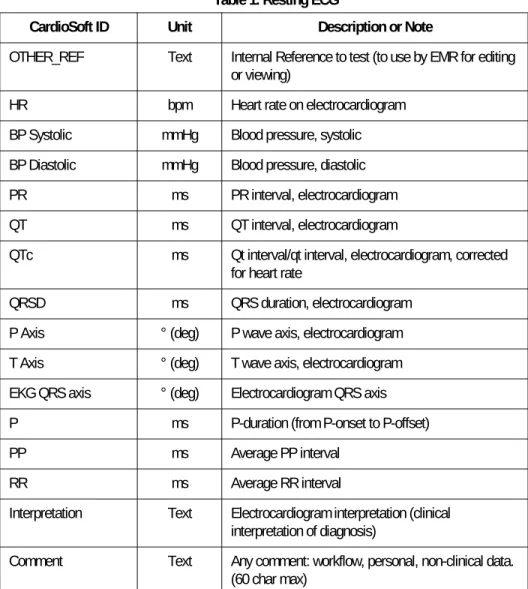
After the button Post Test Review or Back to EMR is pressed, the following data is provided by the Resting ECG module:
Table 1. Resting ECG
CardioSoft ID Unit Description or Note
OTHER_REF Text Internal Reference to test (to use by EMR for editing or viewing)
HR bpm Heart rate on electrocardiogram BP Systolic mmHg Blood pressure, systolic BP Diastolic mmHg Blood pressure, diastolic PR ms PR interval, electrocardiogram QT ms QT interval, electrocardiogram
QTc ms Qt interval/qt interval, electrocardiogram, corrected for heart rate
QRSD ms QRS duration, electrocardiogram P Axis ° (deg) P wave axis, electrocardiogram T Axis ° (deg) T wave axis, electrocardiogram EKG QRS axis ° (deg) Electrocardiogram QRS axis P ms P-duration (from P-onset to P-offset) PP ms Average PP interval
RR ms Average RR interval
Interpretation Text Electrocardiogram interpretation (clinical interpretation of diagnosis)
Comment Text Any comment: workflow, personal, non-clinical data. (60 char max)
Example for Resting ECG Observation Results:
R_ECG_80-TEST011_42.car:
Question 1 Text Short note containing a question and response (52 char max)
Question 2 Text Short note containing a question and response (52 char max)
CardioSoft ID Unit Description or Note
MSH|^~\&|CARDIOSOFT||CPO_EMR||20040812174632||ORU|20040812174632001|P|2.3|||NE PID|1||EMR_PID||MARKHAM^STEVE^^^^||19650101|M||W OBR|1|||R_ECG|||20040812174627|||||||20040812174627||||EK||||20040812174627|||F OBX|1|TX|OTHER_REF||000005_R_ECG_20040812174627.csoft OBX|1|ST|HR||60|bpm|||||F OBX|1|ST|BP Systolic|||mmHg|||||F OBX|1|ST|BP Diastolic|||mmHg|||||F OBX|1|ST|PR||164|ms|||||F OBX|1|ST|QT||364|ms|||||F OBX|1|ST|QTc||364|ms|||||F OBX|1|ST|QRSD||86|ms|||||F OBX|1|ST|P Axis||34|°|||||F OBX|1|ST|T Axis||48|°|||||F OBX|1|ST|EKG QRS axis||44|°|||||F OBX|1|ST|P||88|ms|||||F OBX|1|ST|PP||1000|ms|||||F OBX|1|ST|RR||1000|ms|||||F
OBX|1|ST|Interpretation||Normal sinus rhythm\.br\Normal ECG\.br\||||||F OBX|1|ST|Comment||This is the comment||||||F
OBX|1|ST|Question 1||Smoker Yes||||||F OBX|1|ST|Question 2||Athlete No||||||F
Items of Interest
MSH-3, MSH-4 Names reversed to indicate opposite send direction
OBR-4=Test Name R_ECG (Resting_ECG) OBR-18=Document Type EK (EKG Report) OBR-25=Result status F indicates normal status
OBX-3=Observation Name Obs name (e.g. History, Reason, Height, Weight…)
OBX-5=Observation Value Numeric or text value for observation OBX-6=Units If applicable, the unit assoc. with the value Question 1 & Question 2 The value field contains both the question and
answer (Prompt: value)
CardioSoft creates and stores an HL7-file (internally) to reference the conducted test. This filename is located in the OBX segment with OBX-3 OTHER_REF and must be used by the EMR to edit/view this test. When no test is started and button Back to EMR is pressed, an Abort
message is sent. The Abort message has the following format:
MSH|^~\&|CARDIOSOFT||CPO_EMR||20040812174812||ORU|20040812174812001|P|2.3|||NE PID|1||EMR_PID||MARKHAM^STEVE^^^^||19650101|M||W
OBR|1|||R_ECG|||20040812174812|||||||20040812174812||||EK||||20040812174812|||X OBX|1|ST|Comment||No test performed!||||||F
Items of Interest OBR-4=Test Name Resting_ECG
OBR-18=Document Type EK (EKG Report) OBR-25=Result status X indicates aborted test
OBX record Is used to return comment providing the reason for aborting the test. The comment is generated by the application. It is not entered by the user.
Stress ECG
Example for launching CardioSoft to conduct a Stress ECG test:
S_ECG_80-TEST011_43.emr
MSH|^~\&|CPO_EMR||CARDIOSOFT||20040327110218||ORU|20040327110218001|P|2.3|||NE PID|1||EMR_PID||MARKHAM^STEVE||19650101|M||W
PV1|1||SOUTH||||^Winston^Harry^S.|^Ref-L^Ref-F
OBR|1|||S_ECG||20040327110218||||||||||Ordering^Ordering-L^Ordering-F OBX|1|ST|History||ANGINA, FUNCTIONAL CLASS III (ICD-786.5)
OBX|1|ST|Reason||Abnormal ECG OBX|1|ST|Reason||Chest Discomfort OBX|1|ST|Reason||Vascular Disease OBX|1|ST|Reason||Pre-Op Evaluation OBX|1|ST|Reason||Evaluation OBX|1|ST|Height||72|IN OBX|1|ST|Weight||160|LB OBX|1|ST|Pacemaker||Y OBX|1|ST|Medication||LISINOPRIL 80mg tablets OBX|1|ST|Medication||HEXORAL|500ml OBX|1|ST|Medication||ASPIRIN|100mg OBX|1|ST|Medication||ASPIRIN|1320mg OBX|1|ST|Medication||ISOSORB|75mg OBX|1|ST|Medication||LISINOPRIL|180mg tablets OBX|1|ST|Medication||HEXORAL|1500ml OBX|1|ST|Medication||ASPIRIN|1100mg OBX|1|ST|Medication||ASPIRIN|13200mg OBX|1|ST|Medication||ISOSORB|175mg Items of Interest MSH-3=Sending App CPO_EMR MSH-4=Receiving App CARDIOSOFT MSH-10=Message Control ID Unique ID
MSH-11=Operating mode P (Production), D (Debug) PID-3=Patient ID EMR Internal Patient ID PID-4=Alternate ID CardioSoft ID (if one exists) PID-5=Patient Name used: last^first^middle PID-7=Date of Birth yyyymmdd
PID-8=Sex M, F, U
PID-10=Race See Spec for correct values PV1-7=Attending Phys. used: ^last^first^middle^^^degree PV1-8=Referring Phys used: ^last^first^middle^^^degree OBR-4=Test Name S_ECG (Stress ECG)
OBR-16=Ordering Phys used: ^last^first^middle^^^degree
NOTE
The “Medication” Observation name is reused for each medication sent. Each med is delivered with the medication name in OBX-3 and the dose in OBX-5.
Stress test is started and clinical data
Attending Physician Referring Physician Ordering Physician
Reason for Test (up to 3, rest is discarded) Medical-History
Medication (up to 10, rest is discarded)
are stored in CardioSoft. EMR should use the CardioSoft default list in the Reason for Test combo box. Medical-History and Medication are “read only” in CardioSoft.
After the button Post Test Review or Back to EMR is pressed, the following data is provided by the Stress ECG module:
Table 2. Stress Test
OBX-5=Observation Value numeric or text value for observation OBX-6=Units If applicable, the unit assoc. with the value
Items of Interest
Cardio Soft ID Unit Description
OTHER_REF Text Internal Reference to test (to use by EMR for editing or viewing)
Max HR bpm Maximum heart rate achieved Max predicted HR bpm Maximum predicted heart rate
Max BP Systolic mmHg Blood pressure, systolic, maximum exercise Max BP Diastolic mmHg Blood pressure, diastolic, maximum exercise Max Load METS Maximum load, treadmill
Max Load Watt Maximum load, ergometer
Max ST Level mv Maximum ST level (maximum ST depression) Max TWA uV Maximum TWA (T-Wave alternans)
Protocol Text Protocol, as in load sequence of a stress test such as Bruce, Naughton, Cornell, etc. Total Test Time Text Exercise tolerance test, total test time Interpretation Text Stress electrocardiogram, interpretation Comment Text Any comment: workflow, personal, non-clinical
Example for Stress ECG Observation Results
S_ECG_80-TEST011_43.car
Question 1 Text Short note containing a question and response (52 char max)
Question 2 Text Short note containing a question and response (52 char max)
Stress Test Type Text Stress test type (Treadmill, Egometer, Persantine…)
Baseline HR bpm Resting HR
Reas. For Term. Text Reason for Termination (Fatigue) Total Ex Time Text Time in Exercise
Cardio Soft ID Unit Description
MSH|^~\&|CARDIOSOFT||CPO_EMR||20040812175140||ORU|20040812175140001|P|2.3|||NE PID|1||EMR_PID||MARKHAM^STEVE^^^^||19650101|M||W OBR|1|||S_ECG|||20040812175027|||||||20040812175027||||EK||||20040812175027|||F OBX|1|TX|OTHER_REF||000002_S_ECG_20040812175027.csoft OBX|1|ST|Max HR||60|bpm|||||F OBX|1|ST|Max predicted HR||158|bpm|||||F OBX|1|ST|Max BP Systolic||155|mmHg|||||F OBX|1|ST|Max BP Diastolic||99|mmHg|||||F
OBX|1|ST|Stress Test Type||Treadmill Stress Test||||||F OBX|1|ST|Baseline HR||60|bpm|||||F
OBX|1|ST|Reas. for Term.||Leg discomfort||||||F OBX|1|ST|Max Load||2.90|METS|||||F
OBX|1|ST|Protocol||BRUCE||||||F OBX|1|ST|Total Ex Time||01:05||||||F OBX|1|ST|Total Test Time||01:42||||||F
OBX|1|ST|Interpretation||Reasons for Termination: Leg discomfort\.br\Summary: Resting ECG: normal. Functional Capacity: above average (>20%). \.br\Conclusion: This is the conclusion||||||F
OBX|1|ST|Comment||This is a comment||||||F OBX|1|ST|Question 1||Smoker Yes||||||F OBX|1|ST|Question 2||Athlete yes||||||F
Items of Interest
MSH-3, MSH-4 Names reversed to indicate opposite send direction OBR-4=Test Name S_ECG (Stress ECG)
OBR-18=Document Type EK (EKG Report) OBR-25=Result status F indicates normal status
OBX-3=Observation Name Obs name (e.g. History, Reason, Height, Weight…) OBX-5=Observation Value Numeric or text value for observation
CardioSoft creates and stores an HL7-file (internally) to reference the conducted test. This filename is located in the OBX segment with OBX-3 OTHER_REF and must be used by the EMR to edit/view this test. When no test is started and button Back to EMR is pressed, an Abort
message is sent. The Abort message has the following format:
After the button Back to EMR is pressed, the .car file described above is written again, when the test was modified during Post Test Review.
Question 1 & Question 2 The value field contains both the question and answer
OTHER_REF Value for this OBX is the reference to the test. Items of Interest
MSH|^~\&|CARDIOSOFT||CPO_EMR||20040812174812||ORU|20040812174812001|P|2.3|||NE PID|1||EMR_PID||MARKHAM^STEVE^^^^||19650101|M||W
OBR|1|||S_ECG|||20040812174812|||||||20040812174812||||EK||||20040812174812|||X OBX|1|ST|Comment||No test performed!||||||F
Items of Interest OBR-4=Test Name S_ECG (Stress ECG) OBR-18=Document Type EK (EKG Report) OBR-25=Result status X indicates aborted test
OBX record Is used to return comment providing the reason for aborting the test. The comment is generated by the application. It is not entered by the user.
Spirometry
Example for launching CardioSoft to conduct a Spirometry test:
SPIRO_80-TEST011_44.emr MSH|^~\&|CPO_EMR||CARDIOSOFT||20040327110218||ORU|20040327110218001|P|2.3|||NE PID|1||EMR_PID||MARKHAM^STEVE||19650101|M||W PV1|1||SOUTH||||^Winston^Harry^S.|^Ref-L^Ref-F OBR|1|||SPIRO||20040327110218||||||||||Ordering^Ordering-L^Ordering-F OBX|1|ST|History||DEPRESSION (ICD-311.) OBX|1|ST|Reason||Respiratory problems OBX|1|ST|Reason||Shortness of breath OBX|1|ST|Reason||Pain OBX|1|ST|Reason||Follow-up OBX|1|ST|Height||72|IN OBX|1|ST|Weight||160|LB OBX|1|ST|Pacemaker||Y OBX|1|ST|Medication||LISINOPRIL|180mg tablets OBX|1|ST|Medication||HEXORAL|1500ml OBX|1|ST|Medication||ASPIRIN|1100mg OBX|1|ST|Medication||ASPIRIN|13200mg OBX|1|ST|Medication||ISOSORB|175mg Items of Interest MSH-3=Sending App CPO_EMR MSH-4=Receiving App CARDIOSOFT MSH-10=Message Control ID Unique ID
MSH-11=Operating mode P (Production), D (Debug) PID-3=Patient ID EMR Internal Patient ID PID-4=Alternate ID CardioSoft ID (if one exists) PID-5=Patient Name used: last^first^middle PID-7=Date of Birth yyyymmdd
PID-8=Sex M, F, U
PID-10=Race See Spec for correct values PV1-7=Attending Phys. used: ^last^first^middle^^^degree PV1-8=Referring Phys used: ^last^first^middle^^^degree OBR-4=Test Name SPIRO (Spirometry)
OBR-16=Ordering Phys used: ^last^first^middle^^^degree OBX-3=Observation Name obs name (e.g. History, Reason, Height,
Weight…)
OBX-5=Observation Value numeric or text value for observation OBX-6=Units If applicable, the unit assoc. with the value
NOTE
The “Medication” Observation name is reused for each medication sent. Each med is delivered with the medication name in OBX-3 and the dose in OBX-5.
Spirometry test is started and clinical data
Attending Physician Referring Physician Ordering Physician
Reason for Test (up to 4, rest is discarded) Medical-History
Medication (up to 5, rest is discarded)
are stored in CardioSoft. EMR should use the CardioSoft default list in the Reason for Test combo box. Medical-History and Medication are “read only” in CardioSoft.
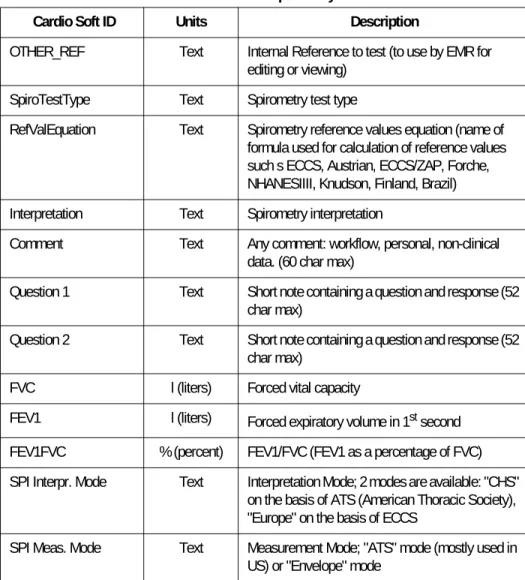
After the button Post Test Review or Back to EMR is pressed the following data is provided by the Spirometry module:
Table 3. Spirometry
Cardio Soft ID Units Description
OTHER_REF Text Internal Reference to test (to use by EMR for editing or viewing)
SpiroTestType Text Spirometry test type
RefValEquation Text Spirometry reference values equation (name of formula used for calculation of reference values such s ECCS, Austrian, ECCS/ZAP, Forche, NHANESIIII, Knudson, Finland, Brazil) Interpretation Text Spirometry interpretation
Comment Text Any comment: workflow, personal, non-clinical data. (60 char max)
Question 1 Text Short note containing a question and response (52 char max)
Question 2 Text Short note containing a question and response (52 char max)
FVC l (liters) Forced vital capacity
FEV1 l (liters) Forced expiratory volume in 1st second
FEV1FVC % (percent) FEV1/FVC (FEV1 as a percentage of FVC) SPI Interpr. Mode Text Interpretation Mode; 2 modes are available: "CHS"
on the basis of ATS (American Thoracic Society), "Europe" on the basis of ECCS
SPI Meas. Mode Text Measurement Mode; "ATS" mode (mostly used in US) or "Envelope" mode
Example for Spirometry Observation Results
SPIRO_80-TEST011_44.car
CardioSoft creates and stores an HL7-file (internally) to reference the conducted test. This filename is located in the OBX segment with OBX-3 OTHER_REF and must be used by the EMR to edit/view this test. When no test is started and button Back to EMR is pressed, an Abort
message is sent. The Abort message has the following format:
MSH|^~\&|CARDIOSOFT||CPO_EMR||20040812175140||ORU|20040812175140001|P|2.3|||NE PID|1||EMR_PID||MARKHAM^STEVE^^^^||19650101|M||W
OBR|1|||SPIRO|||20040812175548|||||||20040812175548||||DR||||20040812175548|||F OBX|1|TX|OTHER_REF||000003_SPIRO_20040812175548.csoft
OBX|1|ST|Comment||This is the comment||||||F OBX|1|ST|Question 1|| Smoker Yes||||||F OBX|1|ST|Question 2||Athlete No||||||F
OBX|1|ST|Interpretation||Normal spirometry||||||F OBX|1|ST|RefValEquation||Knudson||||||F OBX|1|ST|SpiroTestType||Spirometry||||||F OBX|1|ST|FVC||3.28|l|||||F OBX|1|ST|FEV1||2.88|l|||||F OBX|1|ST|FEV1FVC|| 87|%|||||F
OBX|1|ST|SPI Interpr. Mode||CHS||||||F OBX|1|ST|SPI Meas. Mode||Envelope||||||F
Items of Interest
MSH-3, MSH-4 Names reversed to indicate opposite send direction OBR-4=Test Name SPIRO (Spirometry)
OBR-18=Document Type DR (Diagnostic Report Other) OBR-25=Result status F indicates normal status
OBX-3=Observation Name Obs name (e.g. History, Reason, Height, Weight…) OBX-5=Observation Value Numeric or text value for observation
OBX-6=Units If applicable, the unit assoc. with the value
Question 1 & Question 2 The value field contains both the question and answer OTHER_REF Value for this OBX is the reference to the test
MSH|^~\&|CARDIOSOFT||CPO_EMR||20040812174812||ORU|20040812174812001|P|2.3|||NE PID|1||EMR_PID||MARKHAM^STEVE^^^^||19650101|M||W
OBR|1|||SPIRO|||20040812174812|||||||20040812174812||||DR||||20040812174812|||X OBX|1|ST|Comment||No test performed!||||||F
After the button Back to EMR is pressed, the .car file described above is written again when the test was modified during Post Test Review.
ABP: Configuration of ABP Device
Example for launching CardioSoft to configure an ABP device:
BPMONC_80-TEST011_45.emr
Items of Interest OBR-4=Test Name Stress ECG
OBR-18=Document Type DR (Diagnostic Report Other) OBR-25=Result status X indicates aborted test
OBX record Is used to return comment providing the reason for aborting the test. The comment is generated by the application. It is not entered by the user
MSH|^~\&|CPO_EMR||CARDIOSOFT||20040327110218||ORU|20040327110218001|P|2.3|||NE PID|1||EMR_PID||MARKHAM^STEVE||19650101|M||W
PV1|1||SOUTH||||^Winston^Harry^S.|^Ref-L^Ref-F
OBR|1|||BPMONC||20040327110218||||||||||Ordering^Ordering-L^Ordering-F OBX|1|ST|History||Text of the history goes here.
OBX|1|ST|Reason||Therapy outcome control OBX|1|ST|Reason||Suspected sleep-apnea syndrome OBX|1|ST|Reason||Kidney transplant
OBX|1|ST|Reason||Reason for Test-4 OBX|1|ST|Height||72|IN OBX|1|ST|Weight||160|LB OBX|1|ST|Pacemaker||Y OBX|1|ST|Medication||LISINOPRIL|180mg tablets OBX|1|ST|Medication||HEXORAL|1500ml OBX|1|ST|Medication||ASPIRIN|1100mg OBX|1|ST|Medication||ASPIRIN|13200mg OBX|1|ST|Medication||ISOSORB|175mg Items of Interest MSH-3=Sending App CPO_EMR MSH-4=Receiving App CARDIOSOFT MSH-10=Message Control ID Unique ID
MSH-11=Operating mode P (Production), D (Debug) PID-3=Patient ID EMR Internal Patient ID PID-4=Alternate ID CardioSoft ID (if one exists) PID-5=Patient Name used: last^first^middle
NOTE
The “Medication” Observation name is reused for each medication sent. Each med is delivered with the medication name in OBX-3 and the dose in OBX-5.
ABP modality is started and clinical data
Attending Physician Referring Physician Ordering Physician
Reason for Test (up to 4, rest is discarded) Medical-History
Medication (up to 5, rest is discarded)
are stored in CardioSoft. EMR should use the CardioSoft default list in the Reason for Test combo box. Medical-History and Medication are “read only” in CardioSoft.
In the ABP modality the user can clear data in the device and program the device. The button Download Data is disabled.
After the button Back to EMR is pressed, the Configuration Status is provided by the ABP module.
Example for ABP Observation Results (Configuration Status)
BPMONC_80-TEST011_45.car
PID-7=Date of Birth yyyymmdd PID-8=Sex M, F, U
PID-10=Race See Spec for correct values PV1-7=Attending Phys. used: ^last^first^middle^^^degree PV1-8=Referring Phys used: ^last^first^middle^^^degree OBR-4=Test Name BPMONC (ABP: Configuration) OBR-16=Ordering Phys used: ^last^first^middle^^^degree
OBX-3=Observation Name obs name (e.g. History, Reason, Height, Weight…) OBX-5=Observation Value numeric or text value for observation
OBX-6=Units If applicable, the unit assoc. with the value Items of Interest
MSH|^~\&|CARDIOSOFT||CPO_EMR||20040812174812||ORU|20040812174812001|P|2.3|||NE PID|1||EMR_PID||MARKHAM^STEVE^^^^||19650101|M||W
OBR|1|||BPMONC|||20040812174812|||||||20040812174812||||DR||||20040812174812|||X OBX|1|ST|Comment||Setup of BP device successfully completed!||||||F
This configuration status is only informational. CardioSoft does not store configuration status. An abort message is sent when CardioSoft cannot establish a connection to the ABP device. The OBX record (OBX-5) returns the reason for aborting the test (Message as shown above).
ABP: Read Data from ABP Device
Example for launching CardioSoft to read data from an ABP device:
BPMOND_80-TEST011_46.emr
Items of Interest
OBR-4=Test Name BPMONC (ABP: Configuration) OBR-18=Document Type DR (Diagnostic Report Other) OBR-25=Result status X indicates aborted test
OBX record Is used to return comment providing the configuration status. The comment is generated by the application. It is not entered by the user
MSH|^~\&|CPO_EMR||CARDIOSOFT||20040327110218||ORU|20040327110218001|P|2.3|||NE PID|1||EMR_PID||MARKHAM^STEVE||19650101|M||W
PV1|1||SOUTH||||^Winston^Harry^S.|^Ref-L^Ref-F
OBR|1|||BPMOND||20040327110218||||||||||Ordering^Ordering-L^Ordering-F OBX|1|ST|History||Text of the history goes here.
OBX|1|ST|Reason||Reason for Test-1 OBX|1|ST|Reason||Reason for Test-2 OBX|1|ST|Reason||Reason for Test-3 OBX|1|ST|Reason||Reason for Test-4 OBX|1|ST|Height||72|IN OBX|1|ST|Weight||160|LB OBX|1|ST|Pacemaker||Y OBX|1|ST|Medication||LISINOPRIL|180mg tablets OBX|1|ST|Medication||HEXORAL|1500ml OBX|1|ST|Medication||ASPIRIN|1100mg OBX|1|ST|Medication||ASPIRIN|13200mg OBX|1|ST|Medication||ISOSORB|175mg Items of Interest MSH-3=Sending App CPO_EMR MSH-4=Receiving App CARDIOSOFT MSH-10=Message Control ID Unique ID
MSH-11=Operating mode P (Production), D (Debug) PID-3=Patient ID EMR Internal Patient ID PID-4=Alternate ID CardioSoft ID (if one exists)
NOTE
Note that the “Medication” Observation name is reused for each medication sent. Each med is delivered with the medication name in OBX-3 and the dose in OBX-5.
ABP test is started and clinical data:
Attending Physician Referring Physician Ordering Physician
Reason for Test (up to 4, rest is discarded) Medical-History
Medication (up to 5, rest is discarded)
are stored in CardioSoft. EMR should use the CardioSoft default list in the Reason for Test combo box. Medical-History and Medication are “read only” in CardioSoft.
After connection to the ABP device is established, the user can download data from the BP monitor. The buttons to program and clear data in the ABP device is disabled.
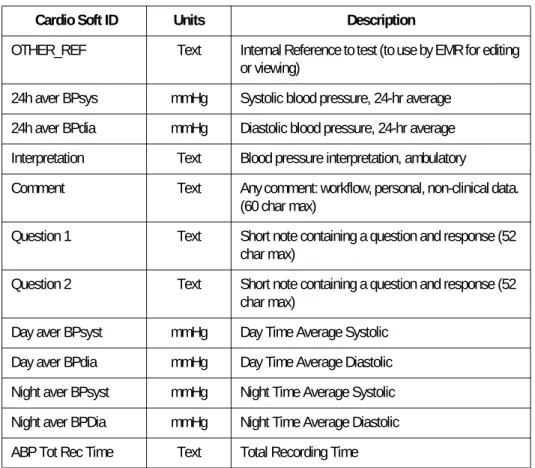
After the button Download Data is pressed, the following results are provided by the ABP module:
PID-5=Patient Name used: last^first^middle PID-7=Date of Birth yyyymmdd
PID-8=Sex M, F, U
PID-10=Race See Spec for correct values PV1-7=Attending Phys. used: ^last^first^middle^^^degree PV1-8=Referring Phys used: ^last^first^middle^^^degree
OBR-4=Test Name BPMOND (ABP: Read Data from ABP Device) OBR-16=Ordering Phys used: ^last^first^middle^^^degree
OBX-3=Observation Name obs name (e.g. History, Reason, Height, Weight…) OBX-5=Observation Value numeric or text value for observation
OBX-6=Units If applicable, the unit assoc. with the value Items of Interest
Table 4. ABP
Example for Observation Results (Data from ABP Device):
BPMOND_80-TEST011_46.car
Cardio Soft ID Units Description
OTHER_REF Text Internal Reference to test (to use by EMR for editing or viewing)
24h aver BPsys mmHg Systolic blood pressure, 24-hr average 24h aver BPdia mmHg Diastolic blood pressure, 24-hr average Interpretation Text Blood pressure interpretation, ambulatory
Comment Text Any comment: workflow, personal, non-clinical data. (60 char max)
Question 1 Text Short note containing a question and response (52 char max)
Question 2 Text Short note containing a question and response (52 char max)
Day aver BPsyst mmHg Day Time Average Systolic Day aver BPdia mmHg Day Time Average Diastolic Night aver BPsyst mmHg Night Time Average Systolic Night aver BPDia mmHg Night Time Average Diastolic ABP Tot Rec Time Text Total Recording Time
MSH|^~\&|CARDIOSOFT||CPO_EMR||20040812175140||ORU|20040812175140001|P|2.3|||NE PID|1|| EMR_PID||MARKHAM^STEVE^^^^||19650101|M||W
OBR|1|||BPMOND|||20040812175548|||||||20040812175548||||DR||||20040812175548|||F OBX|1|TX|OTHER_REF||000003_BPMOND_20040812175548.csoft
OBX|1|ST|Comment||This is a comment||||||F OBX|1|ST|Question 1||Smoker Yes||||||F OBX|1|ST|Question 2||Athlete Yes||||||F OBX|1|ST|Interpretation||||||||F
OBX|1|ST|24h aver BPsys||133.3 |mmHg|||||F OBX|1|ST|24h aver BPdia|| 86.6 |mmHg|||||F OBX|1|ST|Day aver BPsyst||133.3 |mmHg|||||F OBX|1|ST|Day aver BPdia|| 86.6 |mmHg|||||F OBX|1|ST|Night aver BPsyst|||mmHg|||||F OBX|1|ST|Night aver BPdia|||mmHg|||||F OBX|1|ST|ABP Tot Rec Time||0:10 h||||||F
Items of Interest
MSH-3, MSH-4 Names reversed to indicate opposite send direction OBR-4=Test Name BPMOND (ABP: Read Data from ABP Device)
CardioSoft creates and stores an HL7-file (internally) to reference the conducted test. This filename is located in the OBX segment with OBX-3 OTHER_REF and must be used by the EMR to edit/view this test. If no successful download of the data in the APB device was possible, an abort message is sent. The Abort message has the following format:
After the button Back to EMR is pressed, the .car file described above is written again when the test was modified during Post Test Review.
OBR-18=Document Type DR (Diagnostic Report Other) OBR-25=Result status F indicates normal status
OBX-3=Observation Name Obs name (e.g. History, Reason, Height, Weight…) OBX-5=Observation Value Numeric or text value for observation
OBX-6=Units If applicable, the unit assoc. with the value
Question 1 & Question 2 The value field contains both the question and answer OTHER_REF Value for this OBX is the reference to the test
Items of Interest
MSH|^~\&|CARDIOSOFT||CPO_EMR||20040812174812||ORU|20040812174812001|P|2.3|||NE PID|1||EMR_PID||MARKHAM^STEVE^^^^||19650101|M||W
OBR|1|||BPMOND|||20040812174812|||||||20040812174812||||DR||||20040812174812|||X OBX|1|ST|Comment||Ambulatory Blood Pressure test/ setup not done!||||||F
Items of Interest
OBR-4=Test Name BPMOND (ABP: Read Data from ABP Device) OBR-18=Document Type DR (Diagnostic Report Other)
OBR-25=Result status X indicates aborted test
OBX record Is used to return comment providing the reason for aborting the test. The comment is generated by the application. It is not entered by the user.
Edit Test
CardioSoft is launched in Edit-Mode by the EMR with the parameters:
EMR_E <internal patient id>_<modality>_<time of teststamp>.csoft.
The EMR needs to take the filename with the extension .csoft (this is the document reference) out of the .car-file, that was written to the “Write To” folder by CardioSoft, after a new test was finished.
It is located in OBX-5 of that OBX segment, whose OBX-3 value is OTHER_REF.
Examples for launching CardioSoft in Edit-Mode: Edit a Resting ECG test:
Edit a Stress ECG test:
Edit a Spirometry test:
Edit an ABP test::
Path name:
See Win.ini (Folder C:\Winnt or C:\Windows) in section [CARDIO]: CardioInstallPath=C:\Cardio
After having clicked Back to EMR, data is passed back as .car file, even if no changes were made. The format is identical as described in “Resting ECG” on page 21 for Resting ECG, “Stress ECG” on page 25 for Stress ECG, “Spirometry” on page 29 for Spirometry and “ABP: Read Data from ABP Device” on page 34 for ABP Read Data.
The ID in the .car filename is identical to that one, that was received within the .emr-filename, when this test initially was conducted. The EMR is responsible to delete the file.
C:\Cardio\Cardio.exe EMR_E 000002_R_ECG_20050802135947.csoft
C:\Cardio\Cardio.exe EMR_E 000003_S_ECG_20050902145947.csoft
C:\Cardio\Cardio.exe EMR_E 000004_SPIRO_20051002155947.csoft
View Test
CardioSoft is launched in View Only-Mode by the EMR with the parameters
EMR_O <internal patient id>_<modality>_<time of teststamp>.csoft.
The EMR needs to take the filename with the extension .csoft (this is the document reference) out of the .car-file, that was written to the “Write To” folder by CardioSoft, after a new test was finished.
It is located in OBX-5 of that one OBX segment, that has the string OTHER_REF as OBX-3.
With the CardioSoft Install program:
the system variable “Path” is expanded with the location of the
csoft-file
and the file extension .csoft is mapped to <CardioSoft Local Install
Folder>/Cardio.exe EMR_O <xxx>.csoft So to view tests, CardioSoft can be started:
either by using Cardio.exe and reading the Path name out of Win.ini
(as stated in “Edit Test” on page 38)
or directly by launching the .csoft-file
Examples for launching CardioSoft in View Only-Mode: View a Resting ECG test:
View a Stress ECG test:
View a Spirometry test:
C:\Cardio\Cardio.exe EMR_O 000002_R_ECG_20050802135947.csoft or directly launch
000002_R_ECG_20050802135947.csoft
C:\Cardio\Cardio.exe EMR_O 000003_S_ECG_20050902145947.csoft or directly launch
000003_S_ECG_20050902145947.csoft
C:\Cardio\Cardio.exe EMR_O 000004_SPIRO_20051002155947.csoft or directly launch
View an ABP test:
After having clicked Back to EMR, no data is passed back.
Functions Initiated by CardioSoft
CardioSoft is started directly via an icon on the desktop.
Data Upload of Existing CardioSoft Tests to EMR
In those cases where an EMR is newly installed into an environment that CardioSoft has been in for some time, CardioSoft provides one-time upload of data from CardioSoft to the EMR.
This ensures that a chart exists in the EMR for every patient on CardioSoft. In addition, CardioSoft provides document references, that allows access to test reports.
For each patient in the CardioSoft database a demographics file is created, then for each test a document reference file is created. All files are copied to a folder or data is sent via TCP/IP communication. See
System Configuration >> EMR Tab.
Acknowledging is configurable manually in HL7.ini: See “HL7 Settings” on page 18, HL7 settings.
Patient Demographics File (HL7-message: ADT, A04)
Example for a Demographics File: Name: 000002_S_ECG.hd Format:
C:\Cardio\Cardio.exe EMR_O 000005_BPMOND_20051102165947.csoft or directly launch
000005_BPMOND_20051102165947.csoft
Filename <pid>_<modality>.hd PID CardioSoft Internal Patient ID Modality R_ECG, S_ECG, SPIRO, BPMOND
MSH|^~\&|CARDIOSOFT||LINLOGIC|LOGICIAN|20040327110218||ADT^A04|20040327110218001|P|2.3|||NE EVN|A04|20040327110218||
Document Reference File (HL7-message: MDM, T02)
Example for Document Reference File:
Name: 000002_R_ECG_20040504140211.ht Format:
Items of interest:
NOTE
If the EMR wants to launch a new test with one of the uploaded patient IDs, EMR must use PID-4 of the uploaded A04 messages for PID-4 of the emr-file and use the EMR patient ID for PID-3 of the emr file.
Filename <pid>_<modality>_<time of testtimestamp>.ht PID CardioSoft Internal Patient ID
Timestamp time of test yyyymmddhhmmss (time of test) Modality R_ECG, S_ECG, SPIRO, BPMOND
MSH|^~\&|CARDIOSOFT||LINKLOGIC|LOGICIAN|20040327110218||MDM^T02|20040327110218001|P|2.3|||NE EVN|T02|20040504140211||
PID|1||Cardiosoft_PID||MARKHAM^STEVE||19650101|M||W
TXA||EK|TX|20040504140211||20040504140211||||||000002_R_ECG_20040504140211|||||| OBX|1|ST|||CASE/CardioSoft: Resting ECG||||||F
OBX|1|ST|||\.br\\.br\\.br\To review the test, click on the paperclip icon to the right.||||||F OBX|1|TX|OTHER_REF||000002_R_ECG_20040504140211.csoft
TXA-2 Document Type: DR for Diagnostic Report other or EK for EKG Report TXA-4 Time of Test
TXA-6 Time of Test
TXA-12 Unique Document number:
(<internal patient id>_<modality>_<time of test>)
Modality: R_ECG, S_ECG, SPIRO, BPMOND. To support legacy tests from CardioSoft releases prior V5.0, R_ECG42, S_ECG42 are used. These are old versions of stress and Resting ECG.
First OBX-5 Text: CardioSoft <Modality> report
Data Upload of External Tests from ECG Writers
When a test is received from an ECG Writer (System Configuration >>
Receive Data from ECG Device), CardioSoft does the Patient ID matching as follows:
If External Patient ID found:
If Patient’s Last Name and First Name and Gender and Date Of
Birth are identical (empty fields of received data don’t care) Assign test in CardioSoft to the patient’s chart
If different, assign the test manually (Side by Side-Dialog comes
up)
If External Patient ID not found:
Use received Patient ID and patient demographic data to create
a new patient record in the database
Assign this test
For each test that is received from an ECG Writer and assigned to the CardioSoft database, a patient demographics file and a document reference file will be created and written to a folder or sent via TCP/IP to the EMR.
Acknowledging is configurable manually in HL7.ini: See “HL7 Settings” on page 18., HL7 settings.
The same settings are used as for data migration of existing CardioSoft tests in “Data Upload of Existing CardioSoft Tests to EMR” on page 40. (See System Configuration >> EMR Tab).
Format of Patient demographics file and document reference file are identical to “Data Upload of Existing CardioSoft Tests to EMR” on page 40.
HL7 Messages
General
The abstract message definition syntax used to describe the supported HL7 messages is consistent with the syntax used in the HL7
specification, version 2.3.
Although not required, it is preferred that Ignored or Not Used message segments not be included in a supported HL7 message. When present, Ignored message segments are ignored and CardioSoft performs no data validation. When present, Not Used message segments are parsed and CardioSoft validates the data. If there is invalid data, CardioSoft generates an error and does not import the file or the segment with the invalid data.
HL7-Errors are logged in HL7_ERR.LOG with timestamp, reason of error plus reference to the HL7-Message. The HL7 message itself is completely stored by using MSH-10 as filename (<MSH-10>.log). The erroneous field is marked to identify the issue. If MSH-10 is not available, the type of error is only logged in HL7_ERR.LOG.
Legend
The following legend is used throughout the document.
ORU – Observation Reporting
The ORU message supports the import (patient demographics, observation request and clinical data) and export of observation data (including link to the report). It uses a subset of the complete HL7 message set for Observation Reporting and only includes support for the ORU message.
Each ORU message contains one OBR message segment in which observations were documented. Nested under the OBR message segment are one or more OBX message segments, one for each documented observation.
Legend: R = Required, O = Optional, C = Conditional, I = Ignored
Value Description
R Required. This field is required to have valid data. Missing or invalid data causes CardioSoft to generate an error and to not import the file or the segment with the missing or invalid data.
O Optional. This field is not required to have data. On import, if data is provided, it is validated. If the data is invalid, CardioSoft generates an error and does not import the file or the segment with the invalid data. On export, if CardioSoft has data, it exports it.
C Conditional. Data may be either required or optional, depending on the condition. For further clarification, read the associated footnote.
I Ignored. Data is not required and it is not used in CardioSoft. If there is data, CardioSoft does not validate it.
N Not Used. Data is not required and it is not used in CardioSoft. However, if data is present, CardioSoft parses and validates the data. If the data is invalid, CardioSoft generates an error and does not import the file or the segment with the invalid data.
U Used. CardioSoft exports data in this field.
ORU
Message Segments Import Export
MSH R R
{ [
PID R [0] R [0]
[PV1] O I ] { [ORC] I I OBR R [1] R [1] {[NTE]} I I { {[OBX]} O O {[NTE]} I I } } } [DSC] I [2] I [2] MSH C [3] C [3] MSA C [3] C [3] [ERR] I I Note Description
[0] Although this message segment is considered optional in the HL7 specification, CardioSoft requires it. One PID segment per message is allowed.
[1] One OBR segment per message is allowed.
[2] The application-specific HL7 message continuation protocol is not supported.
[3] Acknowledging is only supported in Upload mode. ORU
ORU Message Segments
ORU-MSH – Message Header
Legend: R = Required, O = Optional, C = Conditional, N = Not Used, U = Used
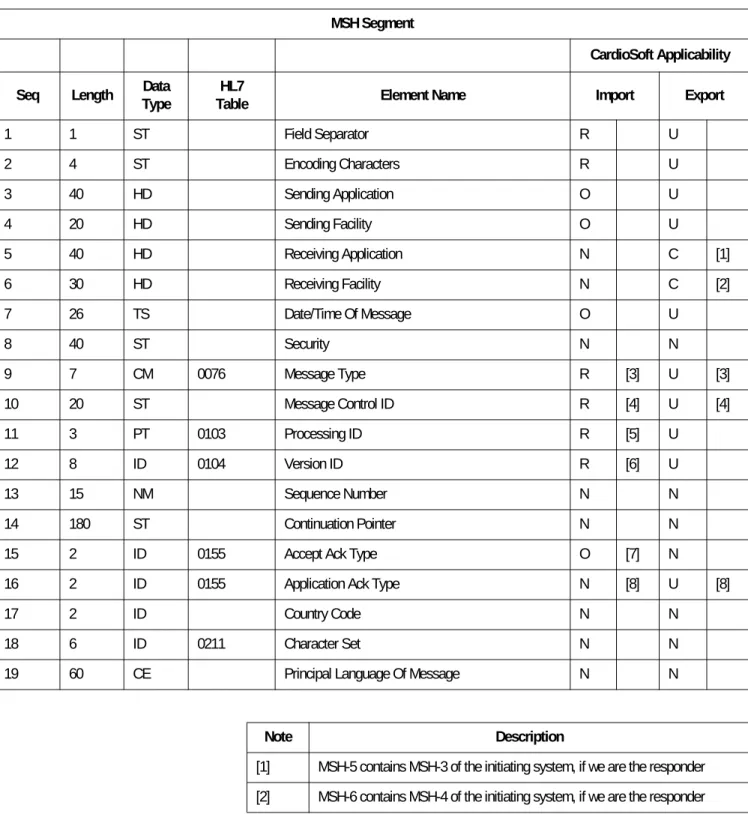
MSH Segment
CardioSoft Applicability Seq Length TypeData TableHL7 Element Name Import Export
1 1 ST Field Separator R U 2 4 ST Encoding Characters R U 3 40 HD Sending Application O U 4 20 HD Sending Facility O U 5 40 HD Receiving Application N C [1] 6 30 HD Receiving Facility N C [2] 7 26 TS Date/Time Of Message O U 8 40 ST Security N N 9 7 CM 0076 Message Type R [3] U [3] 10 20 ST Message Control ID R [4] U [4] 11 3 PT 0103 Processing ID R [5] U 12 8 ID 0104 Version ID R [6] U 13 15 NM Sequence Number N N 14 180 ST Continuation Pointer N N
15 2 ID 0155 Accept Ack Type O [7] N 16 2 ID 0155 Application Ack Type N [8] U [8]
17 2 ID Country Code N N
18 6 ID 0211 Character Set N N
19 60 CE Principal Language Of Message N N
Note Description
[1] MSH-5 contains MSH-3 of the initiating system, if we are the responder [2] MSH-6 contains MSH-4 of the initiating system, if we are the responder
ORU-PID – Patient Identification
Legend: R = Required, O = Optional, C = Conditional, N = Not Used, U = Used
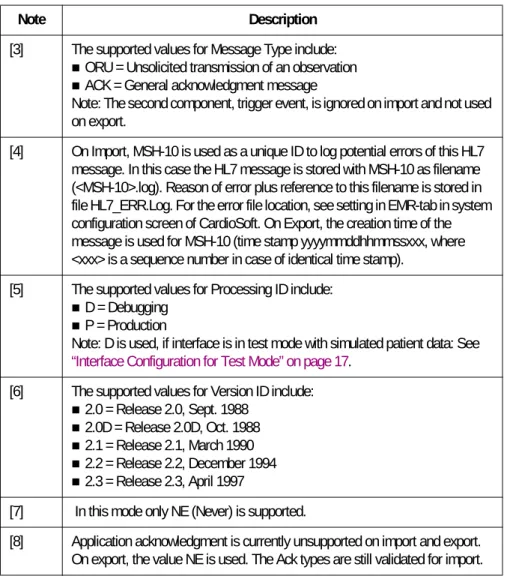
[3] The supported values for Message Type include:
ORU = Unsolicited transmission of an observation ACK = General acknowledgment message
Note: The second component, trigger event, is ignored on import and not used on export.
[4] On Import, MSH-10 is used as a unique ID to log potential errors of this HL7 message. In this case the HL7 message is stored with MSH-10 as filename (<MSH-10>.log). Reason of error plus reference to this filename is stored in file HL7_ERR.Log. For the error file location, see setting in EMR-tab in system configuration screen of CardioSoft. On Export, the creation time of the message is used for MSH-10 (time stamp yyyymmddhhmmssxxx, where <xxx> is a sequence number in case of identical time stamp).
[5] The supported values for Processing ID include:
D = Debugging P = Production
Note: D is used, if interface is in test mode with simulated patient data: See
“Interface Configuration for Test Mode” on page 17. [6] The supported values for Version ID include:
2.0 = Release 2.0, Sept. 1988 2.0D = Release 2.0D, Oct. 1988 2.1 = Release 2.1, March 1990 2.2 = Release 2.2, December 1994 2.3 = Release 2.3, April 1997
[7] In this mode only NE (Never) is supported.
[8] Application acknowledgment is currently unsupported on import and export. On export, the value NE is used. The Ack types are still validated for import.
Note Description
PID Segment
CardioSoft Applicability Seq Length TypeData TableHL7 Element Name Import Export
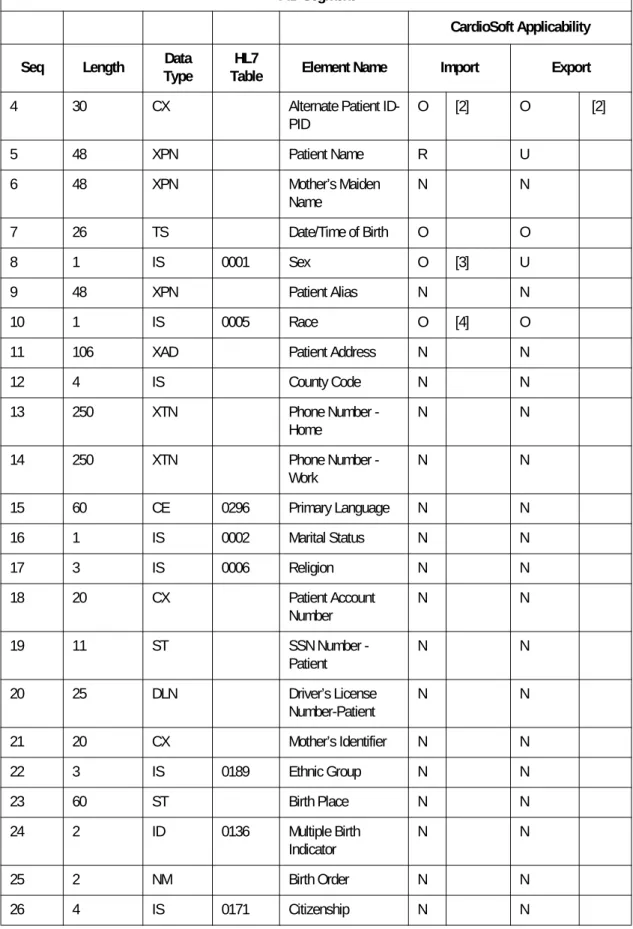
1 4 SI Set ID - Patient ID N N 2 20 CX Patient ID (External ID) N N 3 20 CX Patient ID (Internal ID) R [1] U [1]
4 30 CX Alternate Patient ID-PID O [2] O [2] 5 48 XPN Patient Name R U 6 48 XPN Mother’s Maiden Name N N 7 26 TS Date/Time of Birth O O 8 1 IS 0001 Sex O [3] U 9 48 XPN Patient Alias N N 10 1 IS 0005 Race O [4] O 11 106 XAD Patient Address N N
12 4 IS County Code N N 13 250 XTN Phone Number - Home N N 14 250 XTN Phone Number - Work N N 15 60 CE 0296 Primary Language N N 16 1 IS 0002 Marital Status N N 17 3 IS 0006 Religion N N 18 20 CX Patient Account Number N N 19 11 ST SSN Number - Patient N N 20 25 DLN Driver’s License Number-Patient N N 21 20 CX Mother’s Identifier N N 22 3 IS 0189 Ethnic Group N N 23 60 ST Birth Place N N 24 2 ID 0136 Multiple Birth Indicator N N 25 2 NM Birth Order N N 26 4 IS 0171 Citizenship N N PID Segment CardioSoft Applicability Seq Length TypeData TableHL7 Element Name Import Export
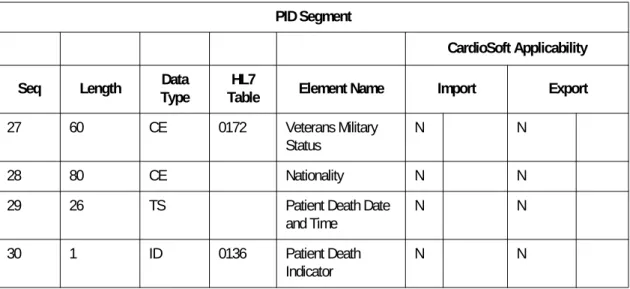
27 60 CE 0172 Veterans Military Status
N N
28 80 CE Nationality N N
29 26 TS Patient Death Date and Time N N 30 1 ID 0136 Patient Death Indicator N N PID Segment CardioSoft Applicability Seq Length TypeData TableHL7 Element Name Import Export
Note Description
[1] PID-3, Patient ID (Internal ID), is assumed to contain the patient identifier of the EMR system used to match the import data with a CardioSoft patient ID, if PID-4 is not available (See “General” on page 42.).
[2] PID-4, Alternate Patient ID, is assumed to be the CardioSoft’s Patient’s ID, that was previously uploaded to the EMR database (data migration of existing patients and tests). If available, PID-4 is used primarily to access to existing CardioSoft’s Patient IDs. Although HL7 states a length of 20, with CardioSoft a maximum length of 30 is possible (due to data migration of existing patients and tests).
[3] The supported values for Sex include: F = Female
M = Male
O = Other (treated as Unknown) U = Unknown
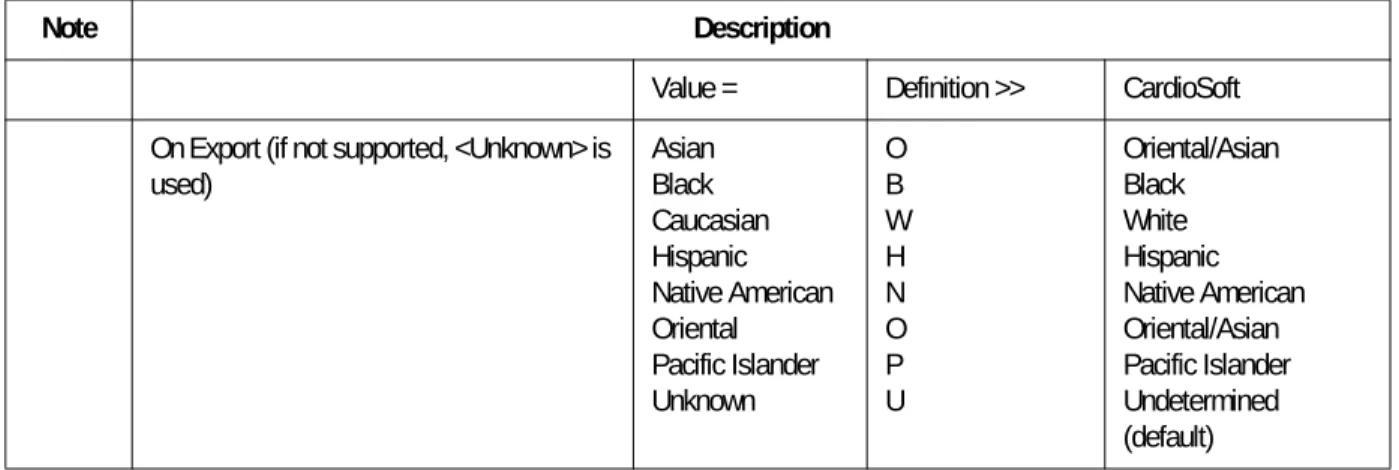
[4] The supported values for Race include:
Value = Definition >> CardioSoft On Import (if not supported, CardioSoft
uses <Unknown>) B C H J N 0 P W T U Black Chinese Hispanic Japanese Native Am. Orient./Asian Pacific Isl.r White Other Undeterm. Black Asian Hispanic Asian Native American Asian Pacific Islander Caucasian Unknown Unknown (Default)
ORU-PV1 – Patient Visit
Legend: R = Required, O = Optional, C = Conditional, N = Not Used, U = Used
Value = Definition >> CardioSoft On Export (if not supported, <Unknown> is
used) Asian Black Caucasian Hispanic Native American Oriental Pacific Islander Unknown O B W H N O P U Oriental/Asian Black White Hispanic Native American Oriental/Asian Pacific Islander Undetermined (default) Note Description PV1 Segment CardioSoft Applicability Seq Length TypeData TableHL7 Element Name Import Export
1 4 SI Set ID-PV1 N N
2 1 IS 0004 Patient Class N N 3 80 PL Assigned Patient Location N N 4 2 IS 0007 Admission Type N N
5 20 CX Preadmit Number N N
6 80 PL Prior Patient Location N N 7 60 XCN 0010 Attending Doctor O [1] N 8 60 XCN 0010 Referring Doctor O [1] N 9 60 XCN 0010 Consulting Doctor N N 10 3 IS 0069 Hospital Service N N 11 80 PL Temporary Location N N 12 2 IS 0087 Pre-admit Test Indicator N N 13 2 IS 0092 Readmission Indicator N N 14 3 IS 0023 Admit Source N N 15 2 IS 0009 Ambulatory Status N N 16 2 IS 0099 VIP Indicator N N
17 60 XCN 0010 Admitting Doctor N N 18 2 IS 0018 Patient Type N N
19 20 CX Visit Number N N
20 50 FC 0064 Financial Class N N 21 2 IS 0032 Charge Price Indicator N N 22 2 IS 0045 Courtesy Code N N 23 2 IS 0046 Credit Rating N N 24 2 IS 0044 Contract Code N N 25 8 DT Contract Effective Date N N
26 12 NM Contract Amount N N
27 3 NM Contract Period N N
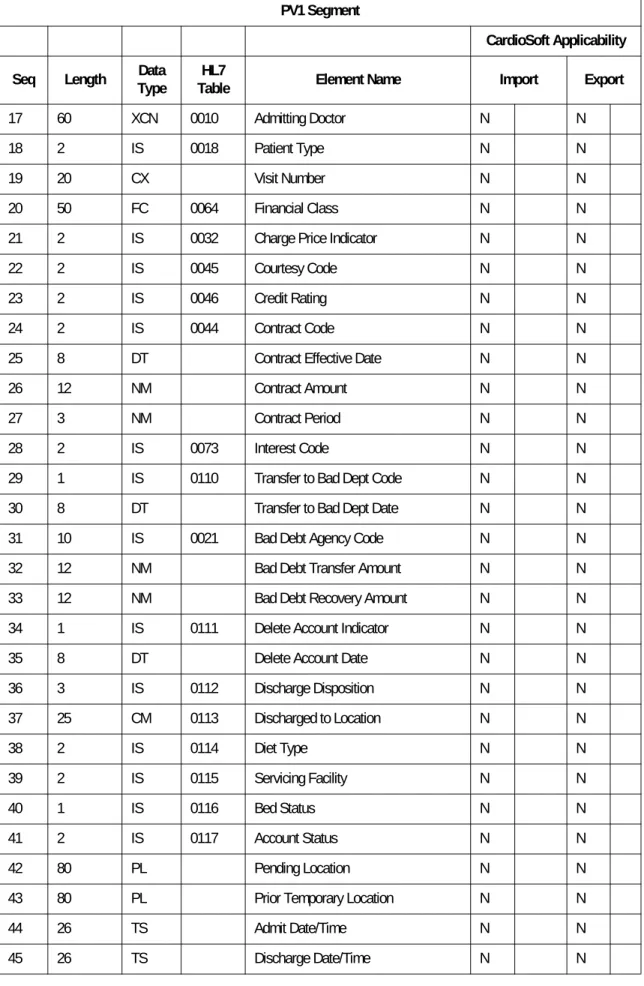
28 2 IS 0073 Interest Code N N 29 1 IS 0110 Transfer to Bad Dept Code N N 30 8 DT Transfer to Bad Dept Date N N 31 10 IS 0021 Bad Debt Agency Code N N 32 12 NM Bad Debt Transfer Amount N N 33 12 NM Bad Debt Recovery Amount N N 34 1 IS 0111 Delete Account Indicator N N 35 8 DT Delete Account Date N N 36 3 IS 0112 Discharge Disposition N N 37 25 CM 0113 Discharged to Location N N 38 2 IS 0114 Diet Type N N 39 2 IS 0115 Servicing Facility N N 40 1 IS 0116 Bed Status N N 41 2 IS 0117 Account Status N N 42 80 PL Pending Location N N
43 80 PL Prior Temporary Location N N
44 26 TS Admit Date/Time N N
45 26 TS Discharge Date/Time N N PV1 Segment
CardioSoft Applicability Seq Length TypeData TableHL7 Element Name Import Export
ORU-OBR – Observation Request
Legend: R = Required, O = Optional, C = Conditional, N = Not Used, U = Used
46 12 NM Current Patient Balance N N
47 12 NM Total Charges N N
48 12 NM Total Adjustments N N
49 12 NM Total Payments N N
50 20 CX 0192 Alternate Visit ID N N 51 1 IS 0326 Visit Indicator N N 52 60 XCN 0010 Other Healthcare Provider N N
PV1 Segment
CardioSoft Applicability Seq Length TypeData TableHL7 Element Name Import Export
Note Description
[1] Attending and Referring Doctor: Part of CardioSoft test information
OBR Segment
CardioSoft Applicability Seq Length TypeData TableHL7 Element Name Import Export