The popularity of Internet mapping APIs, such as the Google Maps API, has led to the creation of a multitude of web applications using geo-spatial information of all types. The Carolina Digital Library and Archives at the University of North Carolina at Chapel Hill (CDLA) has created close to 300 custom map tile sets from historic maps depicting locations throughout the state of North Carolina. These tile sets were designed to be displayed as overlays using the Google Maps API. This paper describes the design and implementation of a JavaScript API which will enable the CDLA to easily share these custom tile sets and allow scholars, educators, students, and others to include the CDLA’s maps in their own web pages. Usage examples, an API reference, and the complete JavaScript source code are included.
Headings:
by
Kevin M. Eckhardt
A Master’s paper submitted to the faculty of the School of Information and Library Science of the University of North Carolina at Chapel Hill
in partial fulfillment of the requirements for the degree of Master of Science in
Information Science.
Chapel Hill, North Carolina July 2009
Approved by
Table of Contents
1 Introduction ... 3
2 Web Map Use at CDLA ... 4
2.1 “Going to the Show”... 4
2.2 “North Carolina Maps” ... 6
2.3 Custom Tile Sets ... 6
3 The Benefits of an API ... 7
3.1 Reduced Maintenance Costs ... 8
3.2 Resource Reuse... 8
4 Design ... 9
4.1 Administration ... 9
4.1.1 Metadata Scheme. ... 9
4.1.2 Map IDs. ... 11
4.2 Access ... 13
4.2.1 Client. ... 13
4.2.2 Server. ... 14
4.2.3 Access Control. ... 14
5 Implementation ... 14
5.1 Server Application ... 15
5.1.1 Map Resource Management. ... 16
5.1.3 Resource Requests... 19
5.1.4 User Documentation. ... 20
5.2 JavaScript Library ... 24
5.2.1 Loading Metadata. ... 24
5.2.2 Code Structure. ... 25
5.2.3 Error Messages. ... 27
5.2.4 Mapping-API Support. ... 27
6 Usage Examples ... 28
6.1 Single Map Resource ... 28
6.2 Single Map Resource – Open Layers ... 31
6.3 Multiple Map Resources ... 33
6.4 Multiple Map Resources – Selectable ... 36
7 Next Steps ... 39
References ... 41
Appendix A – API Documentation ... 43
Appendix B – JavaScript Code ... 51
1 Introduction
Maps have proven to be useful tools for many purposes, from navigation to planning to historical research. It is no wonder that web-based maps have become both a common and popular feature of sites on the Internet. Restaurants, retail stores, and other businesses use maps to help customers get directions or find the nearest location.
Websites such as Google Maps and MapQuest allow users to view road maps, examine satellite imagery, and get driving directions around the world. Libraries and museums have digitized historical maps and made them available to many more users than were able to view the original artifacts.
Technological advances have changed the ways that websites are displayed on the Internet as well as the ways in which users can interact with them. Websites have
evolved from simple, statically created pages to dynamically generated pages with high levels of user interaction. Web-based maps have exhibited a similar evolution from small single images to interfaces which allowed users to zoom and pan by reloading the
displayed map view to today’s mapping applications which provide real-time interaction with the map.
The overlays can be “clickable” and used to display additional information or link to other pages or websites. In addition to simple geometric overlays, many mapping-APIs also allow users to create and display entire custom maps.
JavaScript mapping-APIs are available from many commercial mapping service providers including Google
available, the most prominent one being OpenLayers
2 Web Map Use at CDLA
The Carolina Digital Library and Archives has begun to use web maps in
collections created by its digital publishing initiative “Documenting the American South” Carolina Maps”
collections to include web maps. They both use the Google Maps API to display custom map layers created from historic maps.
2.1 “Going to the Show”
theater locations, racial policies, and other information for over 200 communities in the state of North Carolina and a scholarly case study of early movie-going for the city of Wilmington.
One of the focal points of GttS is its use of Sanborn® Fire Insurance Maps. These small-scale (typically 50 foot to the inch) and highly detailed maps were created to aid in determining fire insurance premiums, but are now an excellent resource for visualizing and researching the historic development of cities throughout the United States. Sanborn®
For GttS the individual maps sheets were digitally “stitched” together to create a single map for the central business district and other select areas of over 40 North Carolina communities. These maps were then geo-referenced to match the areas shown by the maps to the geographic coordinates of the actual physical locations they depict. The maps are presented to site visitors using an interface based on the Google Maps API. This interface allows users to interactively explore the maps and see them displayed as an overlay on top of current road maps and aerial imagery.
maps provide details about the construction materials of buildings along with the types and/or names of the businesses and organizations that used them. Maps were created and sold for individual cities. Each cities map set consisted of one or more individual map sheets. Small towns may have only a single sheet, while large cities could require over 50. New map sets were created for cities at approximately five year intervals.
viewing Sanborn®
2.2 “North Carolina Maps”
maps from multiple years along with the current maps users can gain a sense of how a city has developed.
“North Carolina Maps” (NCMaps) is a comprehensive collection of historic maps depicting the state of North Carolina. It is a collaborative effort between the North Carolina State Archives, the North Carolina Collection at UNC-Chapel Hill, and the Outer Banks History Center. Maps selected for this collection include “original, printed maps of North Carolina published prior to 1923; manuscript maps; maps from books and atlases published prior to 1923; and selected maps published by the state government after 1923” and “some maps showing larger regions, including many maps showing North Carolina with neighboring states, several maps depicting Southeastern states, and selected maps showing areas as large as all of North America, when these include
particularly notable depictions of North Carolina” (“About North Carolina Maps”, n.d.). The project, which is currently in its third and final year, will ultimately include over 2,000 digitized maps. A selection of maps from the collection have been geo-referenced and made available for display using the Google Maps API. Over 100 maps have been geo-referenced so far with plans to include at least one map for every county in North Carolina.
2.3 Custom Tile Sets
break the map image up into much smaller pieces which can be downloaded as needed to display sections of the map. The tile sets created for Tile Layer Overlays follow the structure used by Google to create the tiles for its own maps. The dimensions for each tile are 256 pixels wide by 256 pixels high. A different set of tiles is needed for each zoom level at which the map will be displayed. At the minimum zoom level, level 0, the entire world fits into a single tile. For each successive zoom level the region of the map represented by a single tile is split across four tiles: at zoom level 1 four tiles are used, positioned in a 2 x 2 grid; at zoom level 2 sixteen tiles are used, positioned in a 4 x 4 grid; and so on.
A custom tile set was created for each geo-referenced map using an Adobe Photoshop script. The script resizes the image as needed to match the dimensions of the region in the tile grid where it will be displayed and then creates the individual tile images. This is done for multiple zoom levels, starting with the zoom level that most closely matches the image’s original dimensions and working down through each zoom level until the entire map can be displayed using between 1 and 4 tiles. Each tile is named using the x, y, and z coordinates which identify its zoom level and position in the tile grid.
3 The Benefits of an API
3.1 Reduced Maintenance Costs
The current implementations of the “Going to the Show” and “North Carolina Maps” websites require direct knowledge of the file locations and filename structure of the map layer tile images along with other resource specific metadata for each map resource that they use. Any change to a map resource’s tile set would also require changes to any site that utilizes that resource. Relocating the storage of map resource metadata from the individual applications to the API allows changes to be made to the tile sets without the need to modify the applications.
In addition to managing map resource metadata, the CDL Maps API performs the creation of the map layer objects which are used by the mapping-API to display the resource as a custom tile set overlay. Moving creation of the map layer object from the website’s JavaScript code to the CDLA Maps API simplifies the website’s code. The website needs only to request the desired map layer object from the API and add it to the web map. Changes to the map layer object creation process which do not impact other aspects of the mapping-API can be implemented within the CDLA Maps API without the need to modify the web applications.
3.2 Resource Reuse
The CDLA has currently created custom tile sets for almost 300 different maps - a labor intensive undertaking requiring many 100s of hours. The GttS and NCMaps
to making the resources available to scholars, content creators, and other interested parties external to the organization.
4 Design
The CDLA Maps API acts as a layer of abstraction between the map resources and the web applications that use them. Functional needs for the CDLA Maps API fall into two high-level categories: administration and access. Administration deals with the creating and maintaining the metadata for the available map resources. Access deals with locating map resources and using them within a web map application.
4.1 Administration
Administrative tasks for the CDLA Maps API center around the creation and maintenance of the metadata associated with the individual map resources. This metadata is stored in a database. A secure web-based interface is used to assist with administrative tasks.
4.1.1 Metadata Scheme. In order to properly create the mapping-API layer objects used to display a map resource the API needs to keep track of the following information: the location and naming structure of the individual image files which make up the tile set, the minimum and maximum zoom levels for which tiles are available, and the geographic bounds of the map as displayed by the mapping API. To aid with
searching the maps and identifying the content of an individual map resource the following data is also collected: the name of the map, the date when the map was
is available for the original map from which a map resource was created. Instead of replicating this metadata, which has no practical application in the API, a URL for the source map within the library’s ContentDM repository is included. A full description of the metadata scheme is shown in Table 4-1.
Table 4-1. Map Resource Metadata Scheme
Field Name Description
Map ID Unique identifier for the map resource.
Title Title of the map used to create the resource.
Description Text description of the locations and information depicted by the map.
Date Publication date of the source map.
Date Precision The precision of the publication date. Permitted values are: day, month, year, decade, and century.
Spatial Extent A description of the geographic area depicted by the map.
Display Extent A description of the entire area “covered” by the map tiles when displayed within a web map. This includes the map legend, borders, etc. and not just the location depicted by the map.
Minimum Zoom The minimum zoom level for the map based the zoom levels used by the Google Maps API.
Maximum Zoom The maximum zoom level for the map based on the zoom levels used by the Google Maps API.
Tile Set URL An URL pattern defining the location and naming structure of the map tiles. The placeholders {X}, {Y}, and {Z} should be used for the location of the tile’s x, y, and z coordinates. For example:
http://lib.unc.edu/maps/mapname/{Z}_{X}_{Y}.png
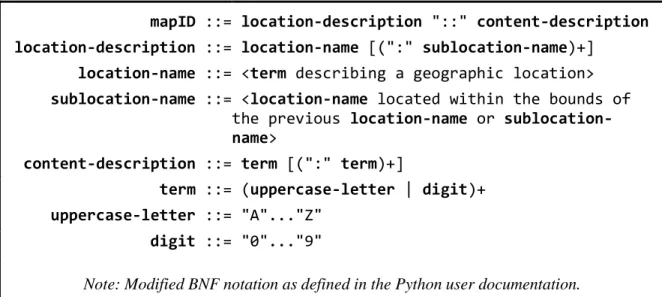
4.1.2 Map IDs. Each map resource managed by the API must have a unique identifier. This identifier is referred to as the resource’s “Map ID.” The format of the Map ID is designed to be descriptive of the map resource that it represents. The Map ID consists of two parts: a location description and a content description. The location component is intended to provide a hierarchical description of the geographic area depicted by the map. The content component provides a brief description of the
information presented by the map. A colon ( : ) is used as a separator between terms in each of the components. A double colon ( :: ) is used to join the two components. A formal specification of the Map ID format is shown in Figure 4-1. Example Map IDs are shown in Table 4-2.
Figure 4-1. Map ID Format Specification
mapID ::= location-description "::" content-description
location-description ::= location-name [(":" sublocation-name)+]
location-name ::= <term describing a geographic location>
sublocation-name ::= <location-name located within the bounds of
the previous location-name or sublocation-name>
content-description ::= term [(":" term)+]
term ::= (uppercase-letter | digit)+
uppercase-letter ::= "A"..."Z" digit ::= "0"..."9"
Note: Modified BNF notation as defined in the Python user documentation.
Table 4-2. Example Map IDs
Map ID
Map Name
NC:BUNCOMBE::SOILSURVEY:1920
1920 Soil Survey map of Buncombe County, NC
NC:BUNCOMBE:ASHEVILLE::SANBORN:1917
1917 Sanborn® Fire Insurance Map for Asheville, NC
NC:BUNCOMBE:ASHEVILLE::SANBORN:SET
4.2 Access
Two key pieces are needed to provide web applications access to the map resources: the client-side JavaScript which is executed by web applications inside the user’s browser and the server-side web service which provides access to the map resource metadata.
4.2.1 Client. The client-side component of the CDLA Maps API is a small JavaScript library. This library is used to request a map resource’s metadata and create the map layer object used to display it. A web application that wants to display a map resource should include this library in its HTML source along with the libraries needed by the mapping-API that will be used to create the map.
Map resources are accessed by creating one of two objects provided by the library. The cdla.maps.Map object provides access to a single resource identified by its Map ID. The object contains methods for accessing the map resource’s metadata and a method for creating a new instance of the map layer object used to display the resource on a web map.
The cdla.maps.MapSet object provides access to multiple map resources identified by a list of Map IDs and/or Map Set IDs. When using multiple map resources in a single web map it is often necessary to determine the minimum and maximum zoom levels and overall geographic bounds for the set of maps as a whole. The
cdla.maps.MapSet object contains methods for accessing this aggregate information as well as accessing the cdla.maps.Map object for each of the map resources in the set.
4.2.2 Server. The server-side component of the CDLA Maps API is responsible for responding to requests for map resource metadata. Web applications using the API make requests for map resource metadata using <script> tags in the <head> section of their HTML documents. Requests are made to a specific URL on the API server. The URL includes a Map ID or Map Set ID to identify which map resource is being requested. The server responds with a JavaScript file that loads the resource metadata into the API’s library. It should be noted that the API server does not directly provide the map layer tile image files, but instead provides a resource locator for them.
4.2.3 Access Control. The CDLA Maps API is intended to be freely available. Access control was not implemented to tightly restrict access but to provide a mechanism for monitoring usage of the service. URL-based API keys were selected as the access control method. This method requires a web application to provide a valid API key when requesting data from the service. API keys are matched to a specific domain name or URL. Access is not granted if the API key does not match with the URL of the web application making the request. This method relies on the referrer information included in the HTTP request and as a result it is not foolproof (Murray and Ort, 2007). Since the purpose of access control is monitoring and not securing the service this limitation is acceptable.
5 Implementation
5.1 Server Application
The server application is the most complex piece of the CDLA Maps API. It is responsible for: creating and maintaining map resources and their metadata, creating and verifying API keys, responding to requests for map resource metadata, and providing user documentation.
The server application implementation uses the Django web framework package for managing data and provides support for geo-spatial data types, operations, and queries through use of the GeoDjango package PostGI database. These software packages were chosen for implementing the API due to their feature sets, prior experience using them, and available software support at the CDLA.
Django-based applications loosely follow the Model-View-Controller architectural pattern (Buschmann et al., 1996). Django uses Models to describe an application’s data. Models are defined as Python classes and a model typically maps to a single table in the underlying database. Views process or retrieve data and prepare it for display or insertion into the database. Views are defined as Python methods. Display of information is accomplished through the use of a template system. The control aspect of the Django framework is performed by using regular expressions to match URLs with their respective view methods (Django Software Foundation, 2005-2009).
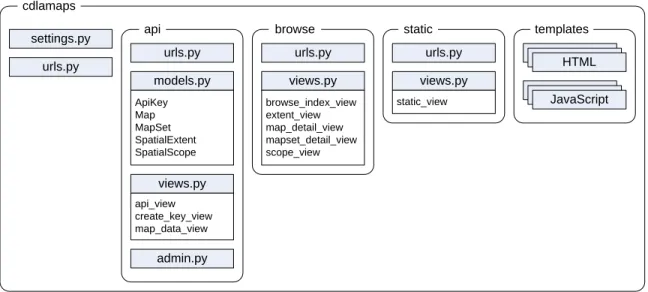
The CDLA Maps API consists of a project, cdlamaps, with three applications:
Figure 5-1. CDLA Maps Django Framework
urls.py
admin.py views.py
api_view create_key_view map_data_view
models.py
ApiKey Map MapSet SpatialExtent SpatialScope
views.py
browse_index_view extent_view map_detail_view mapset_detail_view scope_view
urls.py urls.py
settings.py cdlamaps
api browse
views.py
static_view urls.py
static templates
HTML
JavaScript
The api application contains the data models for the map resources and views for handling API key creation and requests for map resource metadata. The browse
application implements various views for exploring the available map resources. The
static application is used to generate static pages such as the user documentation.
5.1.1 Map Resource Management. Four models are used to represent the map resources and their metadata: Map, MapSet, SpatialExtent, and SpatialScope. The Map model implements the map resource metadata scheme. The MapSet model defines Map Set IDs and the individual map resources that are part of that set. The SpatialExtent and SpatialScope models are used to represent the Spatial Extent field in the map resource metadata scheme.
images. This region is rectangular in shape and therefore only four points need to be measured in order to define the polygon for the region. Spatial Extent describes the geographic region depicted by the map resource. These regions can often be irregular in shape and require a large number of points to define the polygon or multi-polygon that represents the region. The SpatialExtent model was created to allow administrators to select from a list of pre-defined geographic regions to use as the spatial extent value for a map resource. Public domain data sets obtained from NC OneMap
North Carolina, its three geographic regions, 100 counties, and over 500 towns and cities. These pre-defined spatial extents are based on modern boundaries and using them
reduces the accuracy of the spatial extent field for a map resource based on a historical map. More accurate values could be achieved by measuring the actual spatial extent for each map resource. However, it is unlikely that the increased labor cost to do so would prove to be beneficial for this application.
The SpatialScope model provides an abstract representation of the relative size a spatial extent. The initial scopes defined for the API are ‘City’, ‘County’, ‘Region’, and ‘State’. Each scope is also assigned a numeric value to allow for a hierarchical comparison of scope definitions. Every spatial extent is assigned a spatial scope. This provides a mechanism for easily identifying maps that depict similar types of geographic regions.
5.1.2 API Keys. API keys are freely available, but must be requested by users via an HTML form. To obtain an API key the user must provide a URL for the website or page where the API will be used along with a contact name and email address. Upon successful submission of the form an API key will be generated and displayed to the user. The generated API key can be used to validate a request for map resource data that
originates from any webpage whose URL starts with the URL string that was used to create the key. If the provided URL was a domain name, then any page hosted by that domain can use the API key. If any path information was included in the URL, then the requesting page must reside in that directory or one of its sub-directories. If the domain name of the provided URL begins with the prefix ‘www.’ the API key will validate URLs both with and without the prefix. This is provided as a convenience since many servers are configured to respond to requests both with and without the ‘www.’ prefix in the domain name.
API keys are stored using the ApiKey model. The model includes fields for the key value itself, the URL associated with the key, the name and email address for the person who requested the key, a regular expression pattern used when verifying the key, and a counter for the number of times that data has been successfully requested using the key.
The API key must be included as a part of the URL for requests which require validation. When validating a request the server looks up the regular expression pattern associated with the provided key. This pattern is then matched against the URL string contained in the HTTP Referrer header of the HTTP request. If the URL matches the pattern the API key is considered valid. If the HTTP referrer is not provided or its value is empty the verification process will consider the API key to be valid by default. This is considered acceptable behavior since the API keys are used to track service usage and not to prevent access to the resources.
Full definitions of the ApiKey model and its associated methods can be found in Appendix C.
5.1.3 Resource Requests. The server must handle requests from client applications for both the JavaScript library and map resource metadata. Both request types are implemented by view methods within the Django framework.
The api_view method is used to respond to requests for the JavaScript library. This method checks that the API key contained in the URL for the request is valid. If the key is valid the method returns the text file containing the JavaScript library to the client. If the key is invalid the method returns JavaScript code which causes the browser to display an alert box informing the client that the provided API key was not valid for the requesting page.
invalid keys. If the key is valid then the method retrieves the metadata for the map resource identified by the requested ID from the database. The metadata is placed inside of a JSON object JSON object will contain the metadata for each of the individual map resources that make up the map set. If no resource was found using the requested ID then the JSON object will be empty. This JSON object is returned to the client inside of a JavaScript file which loads the data into predetermined variables which can be accessed by the API’s
JavaScript library.
Full definitions of the api_view and mapdata_view methods can be found in Appendix C.
5.1.4 User Documentation. The server application also provides access to user documentation and an interface for browsing the available map resources. The user documentation is served as static HTML files. The map browsing interface is implemented using several view methods.
The index page for the browsing interface provides links for viewing available map resources for the state of North Carolina by geographic region, county, or city. Following one of these links loads a page created by the scope_view method. This method generates an alphabetical list of the spatial extents that have the requested spatial scope (city, county, or region) and a count of the available map resources contained within each spatial extent.
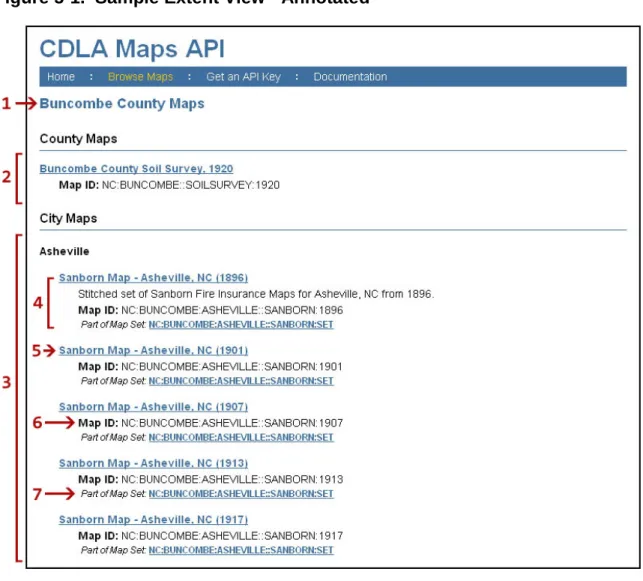
scope of the selected spatial extent will be included (i.e. if a county is selected then the list will include county and city maps, but not region maps). A sample extent view is shown in Figure 5-1.
Selecting one of the map resources loads a page created by the
map_detail_view method. This method displays the selected map resource using the Google Maps API along with a list of the maps descriptive metadata.
If a map resource is part of a map set, this will be noted on both the
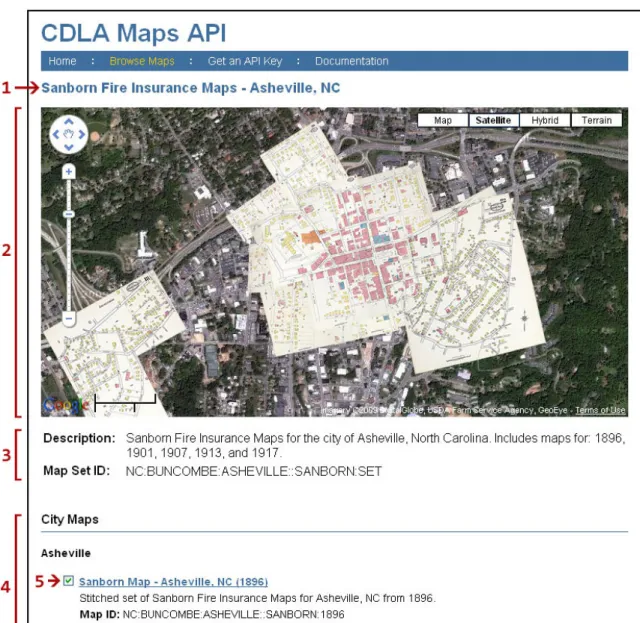
extent_view and map_detail_view pages by providing a link to details about the map set. This page is generated by the mapset_detail_view method. The page displays the map set using the Google Maps API and provides information about each map resource in the set. A sample map set view is shown in Figure 5-2.
Figure 5-1. Sample Extent View - Annotated
1. Name of the selected spatial extent
2. Maps having the selected spatial extent
3. Maps with a smaller spatial scope located within the spatial extent
4. A map resource
5. Link to more details about the map (map_detail_view)
6. The Map ID used to request the map using the JavaScript library
Figure 5-2. Sample Map Set View - Annotated
1. Name of the map set
2. Maps in the set displayed using the Google Maps API
3. Map Set metadata. Includes the Map Set ID which can be used to request the set using the JavaScript library
4. List of maps in the map set, organized by spatial scope and spatial extent
5.2 JavaScript Library
The JavaScript library is the client-side piece of the CDLA Maps API. It provides users with the methods needed to access map resources and create map layer objects. The complete code for the JavaScript library can be found in Appendix B.
5.2.1 Loading Metadata. The library does not initially include the metadata for the map resources. Metadata is requested for specific map resources and inserted into the library when the web page loads. A number of AJAX techniques are available for dynamically loading data. The typical method is to use the JavaScript XMLHttpRequest object to request the data from the server, however this method is restricted by
JavaScript’s same-origin policy. This policy only allows requests to be made using the same protocol, domain name, and port as the web page making the request (Zalewski, 2008). This will not work for the CDLA Maps API since it is intended to be used on third-party websites.
One method to work around the same-origin policy uses dynamically generated <script> tags, which are exempt from the same-origin policy, to load data from third-party servers. The data is sent in the form of JavaScript code. A common
implementation of this method encodes the data as a JSON object which is used as the argument to a callback function. The code requested by these dynamically generated script tags is not loaded synchronously. As a result, callback functions must be used to process the data after it has finished loading. Callback functions are common in AJAX applications (see
The CDLA Maps library uses a manual variation of the script tags method: when using the library a user includes a script tag to load the library along with one or more additional script tags to load the metadata for the map resources they intend to use. The JavaScript executed by these additional script tags loads the map resource metadata, contained within a JSON object, into variables which are accessible by the methods in the library. An example data loading script can be found in Appendix B.
5.2.2 Code Structure. The JavaScript library is intended to be used by
developers of web sites both internal and external to the CDLA. In order to do this safely the library needs to ensure that other JavaScript code is not likely to interfere with its own operation and that it is not likely to interfere with other JavaScript code running on the page.
Placing the library inside its own namespace helps to protect the publicly accessible variables and methods by reducing the likelihood that the user or another library will accidentally overwrite them. JavaScript does not support true namespaces, but they can be emulated be defining variables and methods to be properties of a parent object assigned to a variable with the same name as the desired namespace (Resig, 2007, p. 49). cdla.maps was selected as the namespace for the API library. This establishes the first level cdla namespace which can be used to package the Maps API together with other potential future libraries.
The simple explanation of a Closure is that ECMAScript allows inner functions; function definitions and function expressions that are inside the function bodes of other functions. And that those inner functions are allowed access to all of the local variables, parameters and declared inner functions within their outer function(s). A closure is formed when one of those inner functions is made accessible outside of the function in which it was contained, so that it may be executed after the outer function has returned. At which point it still has access to the local variables, parameters and inner function declarations of its outer
function. Those local variables, parameter and function declarations (initially) have the values that they had when the outer function returned and may be interacted with by the inner function. (para. 2)
This helps protect the library from external code and also prevents the library’s private variables and methods from accidentally overwriting variables or methods that have been defined outside of the library.
A code quality tool can help to identify potential issues in code which, while syntactically correct, may be poorly structured. The code quality tool JSLint
in the final library code when run with the following options:
• bitwise: true – do not allow bitwise operators: << >> >>> ~ & | • eqeqeq: true – requires use of the type checking equality operators: === !== • immed: true – immediate function invocations must be wrapped in parentheses • newcap: true – constructor functions must start with an intial capital letter • onevar: true – allows only a single var statement in each function • regexp: true – does not allow . in regular expression literals • undef: true – requires variables to be declared before they are used • white: true – requires strict whitespace rules
• indent: 4 – 4 spaces should be used for indentation
--operators because they could potentially cause confusion when reading the code. This option was disabled because the ++ operator is only used in for loop declarations where its meaning is clear. The nomen option does not allow leading underscores to be used in variable names. This option was disabled because the underscore was purposefully chosen to identify variables inside the cdla.maps namespace which are publicly accessible but are considered to be “private” to the library.
5.2.3 Error Messages. The library performs type checking on method arguments where possible. When invalid argument types are discovered an error message is thrown. An error message is also thrown if the user requests an invalid Map ID, Map Set ID, or API Type. These error messages are intended to be descriptive and helpful to the user in tracking down the source of the error.
6 Usage Examples
The following examples illustrate the use of the CDLA Maps API to display a historical map resource as a layer using a mapping API. Unless indicated all examples will use Google Maps as the mapping API. The first example demonstrates the basic use case of displaying a single map resource. The second example displays the same
resource using the OpenLayers mapping API. The third and fourth examples demonstrate use of the API for displaying more than one resource.
6.1 Single Map Resource
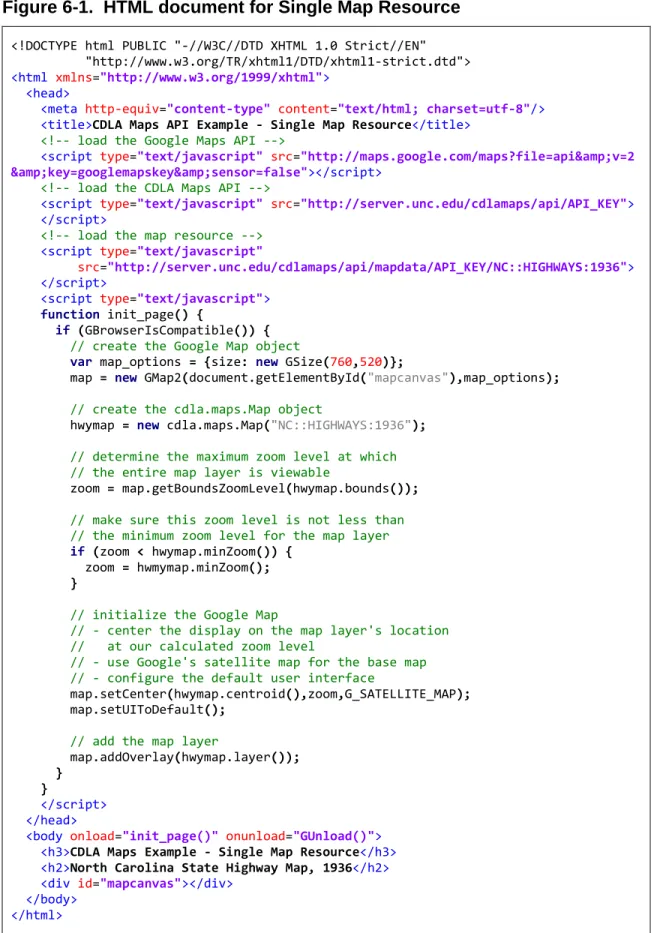
The simplest use case of the CDLA Maps API is to display a single map resource as an overlay. The basic steps to do this are:
1. Create the Google Map object
2. Create the cdla.maps.Map object for the resource you wish to display. 3. Add the resource’s layer object to the Google Map.
Figure 6-1. HTML document for Single Map Resource
<!DOCTYPE html PUBLIC "-//W3C//DTD XHTML 1.0 Strict//EN" "http://www.w3.org/TR/xhtml1/DTD/xhtml1-strict.dtd"> <html xmlns="http://www.w3.org/1999/xhtml">
<head>
<meta http-equiv="content-type" content="text/html; charset=utf-8"/>
<title>CDLA Maps API Example - Single Map Resource</title>
<!-- load the Google Maps API -->
<script type="text/javascript" src="http://maps.google.com/maps?file=api&v=2 &key=googlemapskey&sensor=false"></script>
<!-- load the CDLA Maps API -->
<script type="text/javascript" src="http://server.unc.edu/cdlamaps/api/API_KEY"> </script>
<!-- load the map resource --> <script type="text/javascript"
src="http://server.unc.edu/cdlamaps/api/mapdata/API_KEY/NC::HIGHWAYS:1936"> </script>
<script type="text/javascript"> function init_page() {
if (GBrowserIsCompatible()) {
// create the Google Map object
var map_options = {size: new GSize(760,520)};
map = new GMap2(document.getElementById("mapcanvas"),map_options);
// create the cdla.maps.Map object
hwymap = new cdla.maps.Map("NC::HIGHWAYS:1936");
// determine the maximum zoom level at which // the entire map layer is viewable
zoom = map.getBoundsZoomLevel(hwymap.bounds());
// make sure this zoom level is not less than // the minimum zoom level for the map layer
if (zoom < hwymap.minZoom()) {
zoom = hwmymap.minZoom();
}
// initialize the Google Map
// - center the display on the map layer's location // at our calculated zoom level
// - use Google's satellite map for the base map
// - configure the default user interface
map.setCenter(hwymap.centroid(),zoom,G_SATELLITE_MAP);
map.setUIToDefault();
// add the map layer
map.addOverlay(hwymap.layer()); }
}
</script> </head>
<body onload="init_page()" onunload="GUnload()">
<h3>CDLA Maps Example - Single Map Resource</h3>
<h2>North Carolina State Highway Map, 1936</h2>
<div id="mapcanvas"></div> </body>
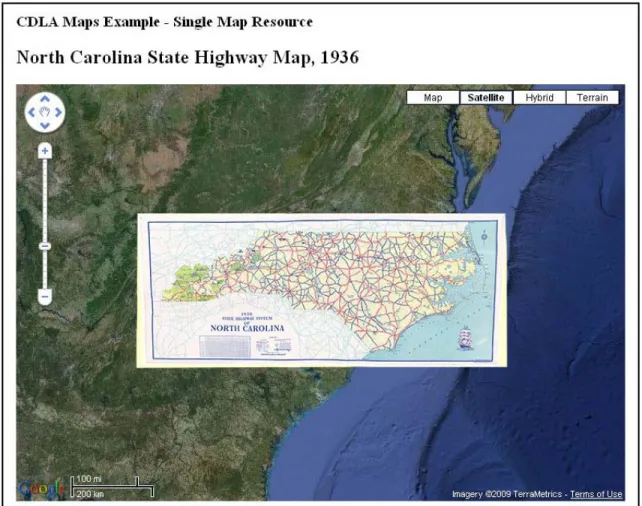
Figure 6-2. Single Map Resource
object which identifies the center of the resource’s geographic region. This object, along with the previously calculated zoom level, is passed to the Google map object’s
setCenter() method to change the map display to a centered view of the highway map resource.
6.2 Single Map Resource – Open Layers
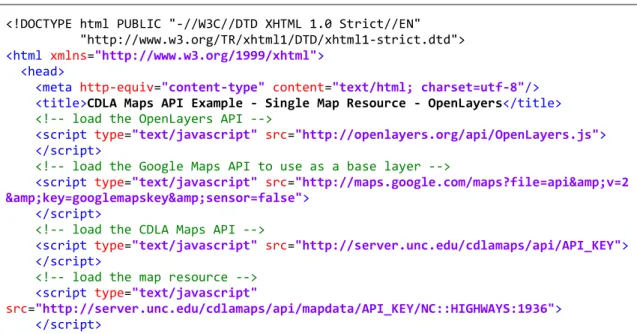
This example replicates the use case in the previous example but uses the
OpenLayers mapping API. The Google Maps API is also used in this example to provide the base layer for the map. When using the OpenLayers API with custom tile sets based on the tile structure used by the Google Maps API, such as those created by the CDLA, the map must be configured to use the Spherical Mercator projection. The additional configuration options can be seen in the HTML document shown in Figure 6-3. For more information on using the Spherical Mercator projection with OpenLayers see
Figure 6-3. HTML document for Single Map Resource - OpenLayers
<!DOCTYPE html PUBLIC "-//W3C//DTD XHTML 1.0 Strict//EN" "http://www.w3.org/TR/xhtml1/DTD/xhtml1-strict.dtd"> <html xmlns="http://www.w3.org/1999/xhtml">
<head>
<meta http-equiv="content-type" content="text/html; charset=utf-8"/>
<title>CDLA Maps API Example - Single Map Resource - OpenLayers</title>
<!-- load the OpenLayers API -->
<script type="text/javascript" src="http://openlayers.org/api/OpenLayers.js"> </script>
<!-- load the Google Maps API to use as a base layer -->
<script type="text/javascript" src="http://maps.google.com/maps?file=api&v=2 &key=googlemapskey&sensor=false">
</script>
<!-- load the CDLA Maps API -->
<script type="text/javascript" src="http://server.unc.edu/cdlamaps/api/API_KEY"> </script>
<!-- load the map resource --> <script type="text/javascript"
<script type="text/javascript"> function init_page() {
// create the OpenLayers map object
// configure it to use the Spherical Mercator projection
var map_options = {
maxExtent: new OpenLayers.Bounds(-20037508.34,-20037508.34,
20037508.34,20037508.34),
numZoomLevels:20,
maxResolution:156543.0339,
units:'m',
projection: new OpenLayers.Projection("EPSG:900913"),
displayProjection: new OpenLayers.Projection("EPSG:4326")
};
var map = new OpenLayers.Map('mapcanvas', map_options);
// create a base layer for the map
// this example uses Google Maps Satellite map
var gsat = new OpenLayers.Layer.Google(
"Google Satellite",
{type: G_SATELLITE_MAP, sphericalMercator: true}
);
map.addLayer(gsat);
// set the default API type to OpenLayers
cdla.maps.defaultAPI(cdla.maps.API_OPENLAYERS);
// create the cdla.maps.Map object
var hwymap = new cdla.maps.Map("NC::HIGHWAYS:1936");
// add the map layer
map.addLayer(hwymap.layer());
// center the map on the entire map layer
map.zoomToExtent(hwymap.bounds());
// make sure tiles are visible for the layer
if (map.getZoom() < hwymap.minZoom()) {
map.zoomTo(hwymap.minZoom());
}
}
</script> </head>
<body onload="init_page()" onunload="GUnload()">
<h3>CDLA Maps Example - Single Map Resource - OpenLayers</h3>
<h2>North Carolina State Highway Map, 1936</h2>
<div id="mapcanvas" style="height: 520px; width: 760px;"></div> </body>
6.3 Multiple Map Resources
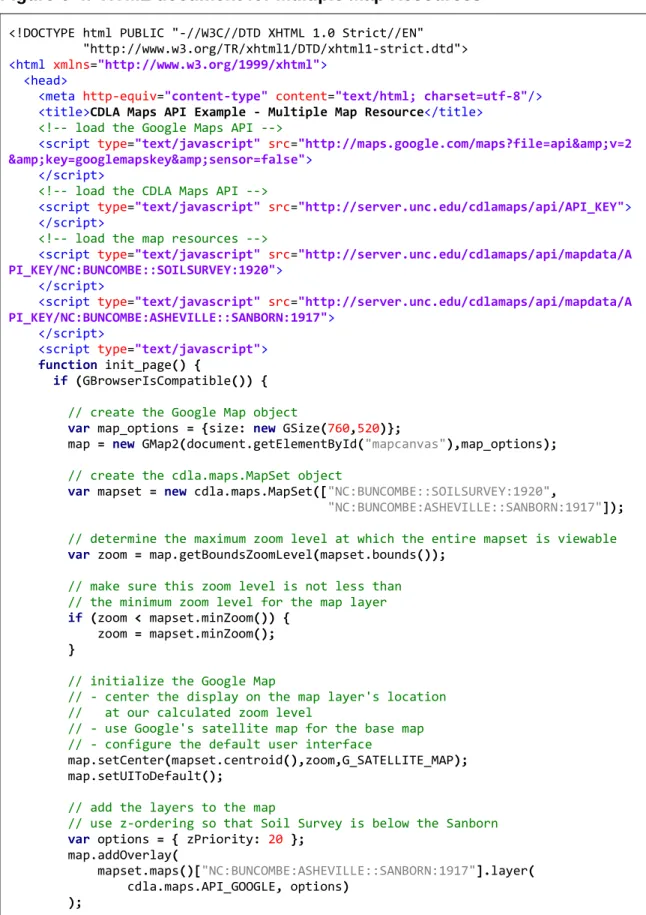
This example demonstrates the use of a cdla.maps.MapSet object to display multiple map resources at the same time. Multiple map resources could be displayed by creating their cdla.maps.Map objects individually; however using a
cdla.maps.MapSet object provides some helpful additional functionality. When displaying multiple map resources at the same time it is important to know the overall bounds, center point, minimum zoom level, and maximum zoom level for the entire set of map resources. The cdla.maps.MapSet object provides this information. The
example HTML document shown in Figure 6-4 displays a 1917 Sanborn®
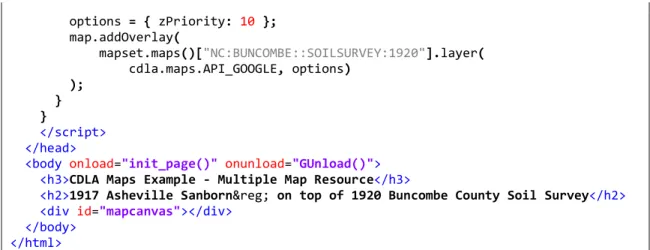
The cdla.maps.Map object’s layer() method allows additional configuration parameters to be passed to the mapping API layer object’s constructor. Here this is used to specify the z-ordering of the map resources by providing a Google Maps
GTileLayerOverlayOptions object. The z-order of the layer objects tells the map what order to use when drawing the map layers. A higher z-order value indicates that the layer should be placed on top of layers with a lower z-order value. For this example the Sanborn
Fire Insurance Map of Ashville, North Carolina overlaid on top of a Soil Survey map for Buncombe County from 1920. The output of the document is shown in Figure 6-5.
®
Figure 6-4. HTML document for Multiple Map Resources
<!DOCTYPE html PUBLIC "-//W3C//DTD XHTML 1.0 Strict//EN" "http://www.w3.org/TR/xhtml1/DTD/xhtml1-strict.dtd"> <html xmlns="http://www.w3.org/1999/xhtml">
<head>
<meta http-equiv="content-type" content="text/html; charset=utf-8"/>
<title>CDLA Maps API Example - Multiple Map Resource</title>
<!-- load the Google Maps API -->
<script type="text/javascript" src="http://maps.google.com/maps?file=api&v=2 &key=googlemapskey&sensor=false">
</script>
<!-- load the CDLA Maps API -->
<script type="text/javascript" src="http://server.unc.edu/cdlamaps/api/API_KEY"> </script>
<!-- load the map resources -->
<script type="text/javascript" src="http://server.unc.edu/cdlamaps/api/mapdata/A PI_KEY/NC:BUNCOMBE::SOILSURVEY:1920">
</script>
<script type="text/javascript" src="http://server.unc.edu/cdlamaps/api/mapdata/A PI_KEY/NC:BUNCOMBE:ASHEVILLE::SANBORN:1917">
</script>
<script type="text/javascript"> function init_page() {
if (GBrowserIsCompatible()) {
// create the Google Map object
var map_options = {size: new GSize(760,520)};
map = new GMap2(document.getElementById("mapcanvas"),map_options);
// create the cdla.maps.MapSet object
var mapset = new cdla.maps.MapSet(["NC:BUNCOMBE::SOILSURVEY:1920",
"NC:BUNCOMBE:ASHEVILLE::SANBORN:1917"]);
// determine the maximum zoom level at which the entire mapset is viewable
var zoom = map.getBoundsZoomLevel(mapset.bounds());
// make sure this zoom level is not less than // the minimum zoom level for the map layer
if (zoom < mapset.minZoom()) {
zoom = mapset.minZoom();
}
// initialize the Google Map
// - center the display on the map layer's location // at our calculated zoom level
// - use Google's satellite map for the base map
// - configure the default user interface
map.setCenter(mapset.centroid(),zoom,G_SATELLITE_MAP);
map.setUIToDefault();
// add the layers to the map
// use z-ordering so that Soil Survey is below the Sanborn
var options = { zPriority: 20 };
map.addOverlay(
mapset.maps()["NC:BUNCOMBE:ASHEVILLE::SANBORN:1917"].layer(
options = { zPriority: 10 };
map.addOverlay(
mapset.maps()["NC:BUNCOMBE::SOILSURVEY:1920"].layer(
cdla.maps.API_GOOGLE, options) );
}
}
</script> </head>
<body onload="init_page()" onunload="GUnload()">
<h3>CDLA Maps Example - Multiple Map Resource</h3>
<h2>1917 Asheville Sanborn® on top of 1920 Buncombe County Soil Survey</h2>
<div id="mapcanvas"></div> </body>
</html>
6.4 Multiple Map Resources – Selectable
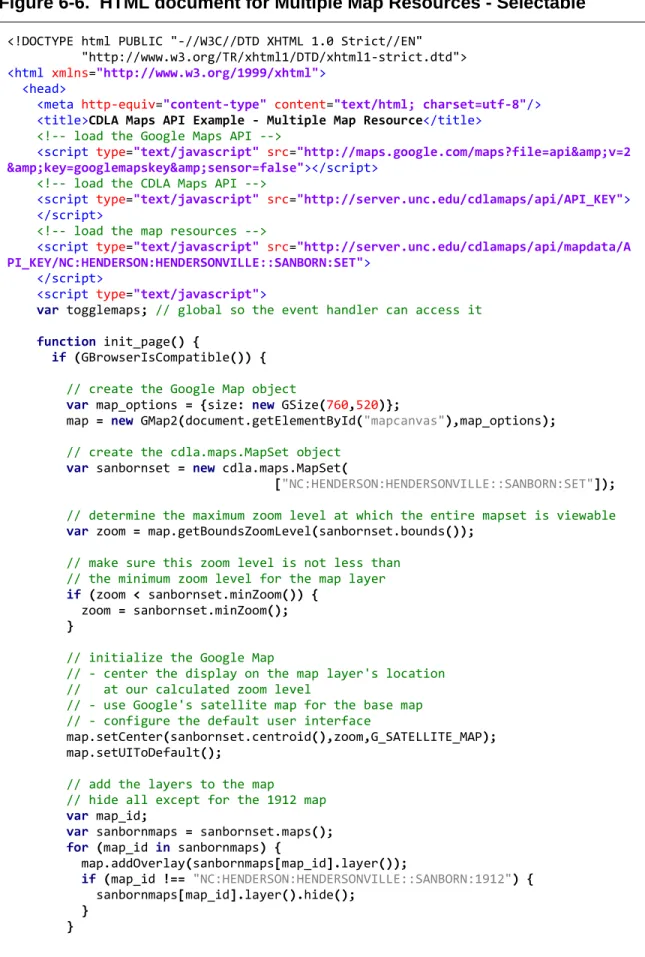
This example also uses a cdla.maps.MapSet object to display multiple map resources. This time the maps are selected using a Map Set ID instead of individual Map IDs for each map resource. The map resources selected for this example are a set of four Sanborn®
A function is defined which handles changing which map resource is displayed. This function, togglemaps(), is passed the Map ID of the desired map resource as its argument. When called it displays the requested map resource and hides the others. Four radio button <input> elements, one for each map resource, are defined in the body of the HTML with Map IDs for values. The onclick attribute of each radio button is used to call the togglemaps() function with the button’s value as the argument whenever that button is clicked.
Fire Insurance Maps for Hendersonville, North Carolina. These four maps are all at the same scale and all cover the same general area. Instead of displaying them all at the same time, JavaScript event handlers are combined with a set of radio buttons to allow the user to switch between the different maps.
Figure 6-6. HTML document for Multiple Map Resources - Selectable
<!DOCTYPE html PUBLIC "-//W3C//DTD XHTML 1.0 Strict//EN" "http://www.w3.org/TR/xhtml1/DTD/xhtml1-strict.dtd"> <html xmlns="http://www.w3.org/1999/xhtml">
<head>
<meta http-equiv="content-type" content="text/html; charset=utf-8"/>
<title>CDLA Maps API Example - Multiple Map Resource</title>
<!-- load the Google Maps API -->
<script type="text/javascript" src="http://maps.google.com/maps?file=api&v=2 &key=googlemapskey&sensor=false"></script>
<!-- load the CDLA Maps API -->
<script type="text/javascript" src="http://server.unc.edu/cdlamaps/api/API_KEY"> </script>
<!-- load the map resources -->
<script type="text/javascript" src="http://server.unc.edu/cdlamaps/api/mapdata/A PI_KEY/NC:HENDERSON:HENDERSONVILLE::SANBORN:SET">
</script>
<script type="text/javascript">
var togglemaps; // global so the event handler can access it
function init_page() {
if (GBrowserIsCompatible()) {
// create the Google Map object
var map_options = {size: new GSize(760,520)};
map = new GMap2(document.getElementById("mapcanvas"),map_options);
// create the cdla.maps.MapSet object
var sanbornset = new cdla.maps.MapSet(
["NC:HENDERSON:HENDERSONVILLE::SANBORN:SET"]);
// determine the maximum zoom level at which the entire mapset is viewable
var zoom = map.getBoundsZoomLevel(sanbornset.bounds());
// make sure this zoom level is not less than // the minimum zoom level for the map layer
if (zoom < sanbornset.minZoom()) {
zoom = sanbornset.minZoom();
}
// initialize the Google Map
// - center the display on the map layer's location // at our calculated zoom level
// - use Google's satellite map for the base map
// - configure the default user interface
map.setCenter(sanbornset.centroid(),zoom,G_SATELLITE_MAP);
map.setUIToDefault();
// add the layers to the map
// hide all except for the 1912 map
var map_id;
var sanbornmaps = sanbornset.maps();
for (map_id in sanbornmaps) {
map.addOverlay(sanbornmaps[map_id].layer());
if (map_id !== "NC:HENDERSON:HENDERSONVILLE::SANBORN:1912") {
sanbornmaps[map_id].layer().hide();
}
// create the event handler
togglemaps = function (display_id) {
var map_id;
for (map_id in sanbornmaps) {
if (map_id === display_id) {
sanbornmaps[map_id].layer().show();
}
else {
sanbornmaps[map_id].layer().hide();
}
} }
}
}
</script> </head>
<body onload="init_page()" onunload="GUnload()">
<h3>CDLA Maps Example - Multiple Map Resources - Selectable</h3>
<h2>Sanborn® Maps of Hendersonville, North Carolina</h2>
<div id="mapcanvas"></div>
<div style="text-align: center; margin: 10px; width: 760px; font-weight: bold;">
<form>
Map Year:
<input type="radio" name="sanbornselector"
value="NC:HENDERSON:HENDERSONVILLE::SANBORN:1896"
style="margin-left: 15px;" onclick="togglemaps(this.value);">1896 <input type="radio" name="sanbornselector"
value="NC:HENDERSON:HENDERSONVILLE::SANBORN:1901"
style="margin-left: 15px;" onclick="togglemaps(this.value);">1901 <input type="radio" name="sanbornselector"
value="NC:HENDERSON:HENDERSONVILLE::SANBORN:1908"
style="margin-left: 15px;" onclick="togglemaps(this.value);">1908 <input type="radio" name="sanbornselector"
value="NC:HENDERSON:HENDERSONVILLE::SANBORN:1912"
style="margin-left: 15px;" onclick="togglemaps(this.value);" checked="checked">1912
</form>
Figure 6-7. Multiple Map Resources - Selectable
7 Next Steps
The CDLA Maps API is currently a functional prototype, but plans are in place to move towards a public release. The API will first be deployed in a pre-production setting on the CDLA’s internal network. This will allow for further testing and refinement of the API in a controlled environment. Two focus areas for refinement are usability and
Two important tasks for users of the API are creating API keys and locating map resources. Creating API keys is a simple process; however there is currently no
automated method for a user to retrieve a lost key. Implementing this feature will
provide a service to users and reduce the likelihood that a single user will create multiple keys for the same URL. Locating map resources must currently be done by browsing the available maps by geographic location. Additional “browse by” categories will be added along with a text search.
Database optimization and caching will be explored in order to improve
performance. The most expensive database operations are the spatial queries used when generating pages for the map browsing interface. The results for these queries will only change if a map resource has been added, removed, or modified – an optimal scenario for caching. Improving the performance of the spatial operations will reduce load on the server and result in faster page loads for users.
On the administrative side, metadata for each of the almost 300 mapping resources will need to be added to the database. During this process the spatial extent and spatial scope models may need to be refined.
References
“About North Carolina Maps” (n.d.). Retrieved July 14, 2009 from
Bronn, J. (2008-2009). GeoDjango v1.1 documentation. Retrieved July 14, 2009 from
Buschmann, F., Meunier, R., Rohnert, H., Sommerlad, P., & Stal, M. (1996).
Pattern-oriented software architecture: A system of patterns (pp. 125-143). Chichester,
England: Wiley.
Cornford, R. (2004). Javascript closures. Retrieved July 14, 2009 from
Crockford, D. (2002). JSLint: The JavaScript code quality tool. Retrieved July 14, 2009 from
Django Software Foundation. (2005-2009). “Django appears to be a MVC framework, but…” Retrieved July 22, 2009 from
Google. (2009). Google Maps API. Retrieved July 14, 2009 from
National Institute of Standards and Technology. (2002). Secure Hash Standard (FIPS Publication No. 180-2). Retrieved July 22, 2009 from
Microsoft Corporation. (2009). Bing Maps for Enterprise from Microsoft: Developer resources, online map APIs, SDKs, and map web services. Retrieved July 14, 2009 from
Murray, G. and Ort, E. (2007) Restricting access to ajax services. Retrieved July 14, 2009 from NC Geographic Information Coordinating Council. (2009). NC OneMap. Retrieved
July 14, 2009 from
Open Source Geospatial Foundation. (n.d.) OpenLayers: Free maps for the web. Retrieved July 14, 2009 from
PostgreSQL Global Development Group. (1996-2009). PostgreSQL. Retrieved July 14, 2009 from
Refractions Research. (2009) PostGIS. Retrieved July 14, 2009 from
Resig, J. (2007). Pro JavaScript techniques [SpringerLink online edition]. doi:10.1007/978-1-4302-0283-7
Yahoo! Inc. (2009). Yahoo! Maps Web Services: The Yahoo! Maps Developer APIs. Retrieved July 14, 2009 from
Appendix A – API Documentation
CDLA Maps is a JavaScript API which lets you display geo-referenced historical maps from the collections of the Carolina Digital Library and Archives on your own web page. The API creates map layers which can easily be added to maps created using Google Maps and OpenLayers. Before you begin you will need to sign up for a free CDLA Maps API key.
Map IDs
The CDLA Maps API uses unique names, called Map IDs, to identify maps within the API. When you find a map resource that you want include on your page make note of the maps Map ID. Some maps, such as the Sanborn® Fire Insurance maps, are frequently used together. As a convenience a special Map ID, called a Map Set ID, can be used to refer to the entire map set. If a map is a part of a map set the Map Set ID will be listed alongside the Map ID on the map’s information page.
Including the API in your page
To use the API on a page you will need to load it by including <script> tags in the <head> section of the HTML document. Two or more tags will be needed. The first tag loads the API itself:
You will also need to include one tag for each map or map set that you wish to use:
The CDLA Maps API relies on methods of the mapping API you are using to create the map layer objects. Be sure that you load the mapping-API as well.
<script type="text/javascript"
src="http://server.unc.edu/cdlamaps/api/YOUR_API_KEY"></script>
Note: replace YOUR_API_KEY with your actual API key
<script type="text/javascript"
src="http://server.unc.edu/cdlamaps/api/mapdata/YOUR_API_KEY/MAP_ID"> </script>
The API in Action
To display your chosen historical map you will first need to create a map interface using your chosen mapping API. Please refer to the mapping API’s documentation if you are unsure how to do this. Next, use the CDLA Maps API to create a cdla.maps.Map object. This object contains metadata about the requested map - such as its name and a short description - along with information needed to create the map layer object used to display the map. Use the layer() method of the cdla.maps.Map object to obtain a map layer and then add that layer to the map interface you created earlier.
The following example uses the Google Maps API to display a 1920 Soil Survey map of Buncombe County, North Carolina.
For more information please refer to the API Reference. // Create the Google Map
var map = new GMap2(document.getElementById("map_div"); map.setUIToDefault();
// initialize the map display
map.setCenter();
// Create the cdla.maps.Map object
var soilmap = new cdla.maps.Map("NC:BUNCOME::SOILSURVEY:1920");
// add the map to the google map
map.addOverlay(soilmap.layer());
// view the map centered at its minimum zoom level
API Reference
API Methods:
cdla.maps.defaultAPI()
Return the current default mapping API used to create map layers.
Arguments: none
Returns: cdla.maps.API_TYPE
The current default API type.
cdla.maps.defaultAPI( api_type )
Set the default mapping API used to create map layers.
Arguments: api_type (cdla.maps.API_TYPE)
A constant indicating the default mapping API to use.
Returns: cdla.maps.API_TYPE
The value of the newly set default API type.
API Constants:
The following constants can be used where a cdla.maps.API_TYPE is required.
cdla.maps.API_GOOGLE – The Google Maps API, version 2 cdla.maps.API_OPENLAYERS – The OpenLayers API
cdla.maps.Bounds Object Literal:
This object literal is used to define a bounding rectangle and is returned by the bounds() method of the cdla.maps.Map and cdla.maps.MapSet objects.
Properties:
cdla.maps.Point Object Literal:
This object literal is used to define a set of geographic coordinates and is returned by the centroid() method of the cdla.maps.Map and cdla.maps.MapSet objects.
Properties:
lat (Number) – The latitude value of the coordinate. lng (Number) – The longitude value of the coordinate.
cdla.maps.Map Object:
This object represents a map resource. It includes methods for obtaining metadata for the resource and creating a layer object that can be used to display the map using a third-party mapping API.
Constructor:
cdla.maps.Map( map_id )
Arguments: map_id (String)
The unique Map ID of the resource being requested.
Methods:
title()
Returns the map’s title.
Arguments: none
Returns: String
id()
Returns the map’s unique Map ID.
Arguments: none
Returns: String
description()
Returns a text description of the map.
Arguments: none
bounds( [use_api [, api_type]] )
Returns an object defining the bounds of the area containing the map tiles. (Note: this is not the geographic extent of the area depicted by the map, but a bounding rectangle for the entire area covered by the map when displayed as an overlay. This includes the map legend, borders, etc.)
Arguments: use_api (Boolean)
True: Return an API specific map bounds object. False: Return a cdla.maps.Bounds object literal Default: true
api_type (cdla.maps.API_TYPE)
A constant indicating the mapping API to use. If no API type is specified the default API will be used. This value only applies if use_api is true.
Returns: use_api is true: a cdla.maps.Bounds object
use_api is false: The object type returned depends on the API type.
api_type value Return Object cdla.maps.API_GOOGLE GLatLngBound cdla.maps.API_OPENLAYERS OpenLayers.Bounds
centroid( [use_api [, api_type]] )
Returns an object defining the center point of the map’s bounds.
Arguments: use_api (Boolean)
True: Return an API specific map point object. False: Return a cdla.maps.Point object literal Default: true
api_type (cdla.maps.API_TYPE)
A constant indicating the mapping API to use. If no API type is specified the default API will be used. This value only applies if use_api is true.
Returns: use_api is true: a cdla.maps.Pount object
use_api is false: The object type returned depends on the API type.
api_type value Return Object cdla.maps.API_GOOGLE GLatLng
cdla.maps.API_OPENLAYERS OpenLayers.LonLat
minZoom()
Returns the minimum zoom level for which tiles exist for this map resource. The value is based on the tile structure used by the Google Maps API.
Arguments: none
maxZoom()
Returns the maximum zoom level for which tiles exist for this map resource. The value is based on the tile structure used by the Google Maps API.
Arguments: none
Returns: Number
layer( [api_type [, options]] )
Returns an API specific map layer object.
Arguments: api_type (cdla.maps.API_TYPE)
A constant indicating the default mapping API to use. If no API type is specified the default API will be used.
options (varies, mapping API specific)
Additional options to pass to the constructor for the map layer object. Use of this argument is an advanced technique.
Returns: The object type returned depends on the API type.
api_type value Return Object
cdla.maps.API_GOOGLE GTileLayerOverlay cdla.maps.API_OPENLAYERS OpenLayers.Layer.TMS
cdla.maps.MapSet Object:
This object represents a collection of map resources. It includes methods for obtaining metadata for set and the cdla.maps.Map objects for the maps in the set.
Constructor:
cdla.maps.MapSet( map_ids )
Arguments: map_ids (Array<String>)
List of Map IDs for the resources being requested. If a Map Set ID is included it will be expanded into its component maps.
Methods:
count()
Returns the number of maps in the map set.
Arguments: none
bounds( [use_api [, api_type]] )
Returns an object defining the area containing the maps in the set. (Note: this is not the geographic extent of the area depicted by the maps, but a bounding rectangle for the entire area covered by all maps in the set when displayed as overlays. This includes the map legends, borders, etc. for each map.)
Arguments: use_api (Boolean)
True: Return an API specific map bounds object. False: Return a cdla.maps.Bounds object literal Default: true
api_type (cdla.maps.API_TYPE)
A constant indicating the mapping API to use. If no API type is specified the default API will be used. This value only applies if use_api is true.
Returns: use_api is true: a cdla.maps.Bounds object
use_api is false: The object type returned depends on the API type.
api_type value Return Object cdla.maps.API_GOOGLE GLatLngBound cdla.maps.API_OPENLAYERS OpenLayers.Bounds
centroid([use_api [, api_type]])
Returns an object defining the center point of the map set’s bounds.
Arguments: use_api (Boolean)
True: Return an API specific map point object. False: Return a cdla.maps.Point object literal Default: true
api_type (cdla.maps.API_TYPE)
A constant indicating the mapping API to use. If no API type is specified the default API will be used. This value only applies if use_api is true.
Returns: use_api is true: a cdla.maps.Pount object
use_api is false: The object type returned depends on the API type.
api_type value Return Object cdla.maps.API_GOOGLE GLatLng
cdla.maps.API_OPENLAYERS OpenLayers.LonLat
minZoom()
Returns the minimum zoom level for all maps in the set. The value is based on the tile structure used by the Google Maps API.
Arguments: none
maxZoom()
Returns the maximum zoom level for all maps in the set. The value is based on the tile structure used by the Google Maps API.
Arguments: none
Returns: Number
mapIds()
Returns an array containing the map ID of every map in the set.
Arguments: none
Returns: Array<String>
maps()
Returns an object literal containing the cdla.mapsMap object of all maps in the set. This object can be used like an associative array indexed by Map ID.
Arguments: none