The paper documents the planning and design of an Internet interface to search the Ackland Art Museum’s collection database. Preliminary work included reviewing other museum on-line collection databases. The project itself consisted of five parts: a user needs assessment conducted to learn about the system’s potential users, developing and testing the design requirements derived from the assessment, the implementation of the proposed system and a usability study to test the system. Conclusions address the problems encountered during the implementation and their resolution, as well as recommendations for future enhancements to the system.
The lessons learned from this project may be used by other museums implementing a similar interface, especially small and medium sized museums such as the Ackland Art Museum. The results of the user needs assessment indicated a strong interest in
Internet access to museum collection databases which is a finding that may be useful to grant seeking.
Headings:
Web Interface Design
User Interface Design
Design Processes
AN INTERNET SEARCH INTERFACE FOR THE ACKLAND ART MUSEUM COLLECTION DATABASE
by
Carmen L. Beard
A Master's paper submitted to the faculty of the School of Information and Library Science of the University of North Carolina at Chapel Hill
in partial fulfillment of the requirements for the degree of Master of Science in
Information Science.
Chapel Hill, North Carolina April, 2004
Approved by:
TABLE OF CONTENTS
TABLE OF CONTENTS i
LIST OF TABLES iii
LIST OF FIGURES iv
1. – INTRODUCTION 1
2. – PREPARATION FOR DESIGN 2
2.1 – Museum Website Review 2
2.2 – Willoughby PHP Interface Configuration 9
2.3 – Summary 10
3. – USER NEEDS ASSESSMENT 11
3.1 – Patrons 11
3.1.1 – Methodology 11
3.1.2 – Results 12
3.2 – Staff 18
3.2.1 – Methodology 18
3.2.2 – Description of Instruments 20
3.2.3 – Purpose of Tasks 21
3.2.4 – Results 23
4. – DESIGN REQUIREMENTS AND PROTOTYPING THE DESIGN 33
4.1 – Design Requirements 33
Navigation 33
Page Layout 33
Desired Feature Specifications 33
4.2 – Prototypes 34
4.2.1 – Simple Search Prototype 36
4.2.2 – Advanced Search Prototype 37
4.2.3 – Browse Prototype 37
4.2.4 – Search Results Prototype 38
4.2.5 – Result Details Prototype 38
4.4 – Prototype Review Results 39
4.4.1 – Simple Search Prototype 39
4.4.2 – Advanced Search Prototype 39
4.4.3 – Browse Prototype 40
4.4.4 – Search Results Prototype 40
4.4.5 – Result Details Prototype 41
4.4.6 – Other Elements 42
4.4.7 – Comparison with User Requirements 43
5. – IMPLEMENTING THE DESIGN 44
5.1 – Hardware and Software Specifications 44
5.2 – Data Standardization and Integrity 45
5.3 – Web Server and Browser Problems 48
5.4 – Additional Design Decisions 49
5.5 – Features Not Implemented 50
6. – EVALUATING THE DESIGN 54
6.1 – Methodology 56
6.2 – Explanation of Tasks 57
6.3 – Results 59
7. – RECOMMENDATIONS FOR THE FUTURE 63
8. – CONCLUDING REMARKS 64
BIBLIOGRAPHY 66
APPENDICES
Appendix A – On-line Collections User Survey 68
Appendix B – On-line Collections User Survey Results 70
Appendix C – Staff Technology User Survey 74
Appendix D – Museum Interface Comparison Instructions
Museum Interface Comparison Instructions 75
Museum Interface Comparison Exercise [Begin with Peabody] 76 Museum Interface Comparison Exercise [Begin with Tate] 77 Appendix E – Museum Interface Comparison Survey
Peabody Museum Interface Comparison Survey 78
Tate Museum Interface Comparison Survey 79
Appendix F – Staff Technology Use Survey Results 80
Appendix G – Museum Interface Comparison Survey Results
Peabody Museum Interface Evaluation 81
Tate Museum Interface Evaluation 82
Museum Interface Comparison Results - Comparison by Tasks 83 Appendix H – Prototype Review Semi-Structured Interview Questions 85
Appendix I – Usability Study Instructions 87
LIST OF TABLES
Table 1 - List of Museum Interfaces Reviewed 3
Table 2 - Patron affiliation with the Ackland Art Museum 13
Table 3 - Museum community status 14
Table 4 - Educational status 14
Table 5 - Level of comfort using computers 14
Table 6 - Most frequent Internet use location 15
Table 7 - Connection speed from home 15
Table 8 - Internet Search preferences 15
Table 9 - Interest in using Ackland collection database on-line 16
Table 10 - On-line collection usage 16
Table 11 - Future additions to the Ackland collection on-line 17 Table 12 - Ease of finding search page from home page 25 Table 13 - Ease of navigation using the links provided 26 Table 14 - Ease of beginning new search using links provided 26 Table 15 - Overall, the layout of the pages, the text and graphics was pleasing 26 Table 16 - Clarity of the labels “who/what/where” vs “artist name, work title, object
type”
27
Table 17 - Helpfulness of keyword lists 29
Table 18 - Usefulness of browse categories in becoming familiar with the collection 30 Table 19 - Searches were successful using the browse feature 30 Table 20 - Searches were successful using simple search 30 Table 21 - Searches were successful using advanced search 31 Table 22 - [Peabody] Boolean operators were helpful in narrowing searches
[Tate] Advanced search provided adequate flexibility
31
LIST OF FIGURES
Figure 1 – Simple Search 1 4
Figure 2 – Simple Search 2 4
Figure 3 – Advanced Search 4
Figure 4 – Thumbnail list 4
Figure 5 – Thumbnail gallery 4
Figure 6 – Children’s Compass Search Page 5
Figure 7 – Seattle Museum of Art Search Interface 6
Figure 8 – List of objects without thumbnail 7
Figure 9 – Harvard University Art Museums’ advanced search interface 7
Figure 10 – Tate Museum Home Page 24
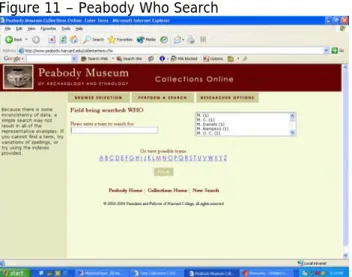
Figure 11 – Peabody Who Search 28
Figure 12 – Tate Artist Name Keyword List 28
Figure 13 – Peabody Browse Drop Down List 29
Figure 14 – Tate Browse Directory 29
Figure 15 – Microsoft Word Template for the Search Interface Prototype 35
Figure 16 - Prototype 1 36
Figure 17 - Prototype 2 36
Figure 18 - Prototype 3 36
Figure 19 - Prototype 4 37
Figure 20 - Prototype 5 37
Figure 21 - Prototype 6 38
Figure 22 - Prototype 7 38
Figure 23 – Simple Search (Search Collection Interface Home Page) 51
Figure 24 –Advanced Search 51
Figure 25 – Search Results Default View 52
Figure 26 – Search Results Thumbnail View 52
Figure 27 – Search Results Text-only View 53
Figure 28 – Details Page 53
1. INTRODUCTION
One of the missions of museums is to provide access to the works of art in their
collections. The advent of the World Wide Web has significantly increased the ability of museums to fulfill this mission by displaying works of art on their web sites. Museum patrons can see and learn about works of art even when they are not able to physically travel the museum itself. Over the past decade, many museums have made use of the opportunity presented by the World Wide Web and are using increasingly sophisticated technology to make their collections available over the Internet. This paper documents the process of one museum’s endeavor to incorporate the use of Internet technology as it works to fulfill its mission to bring people and art together.1
Four years ago, the Ackland Art Museum purchased the MultiMimsy Collection Management database system (Mimsy)2 from Willoughby Associates to assist in
managing their collection and would know like to make the collection available through the use of the Internet. To that end, a master’s project was undertaken to design an interface to allow Museum patrons and staff Internet access to the Mimsy collection database.
This paper is a discussion of the master’ project which occurred during the spring semester of 2004 and incorporated some preliminary work that was completed during the previous year from July to November, 2003. The preliminary work was conducted as part of a field experience at the Ackland Art Museum and consisted of two parts. First, a review of other museum web sites was undertaken to become familiar with the technology and features currently being used by museums to provide Internet access to their collection management systems. The second part of the field experience involved configuring the PHP script provided by Willoughby Associates so it would connect to the collection database. Although the PHP script was going to be replaced by the interface designed during the master’s project, it was beneficial to get basic parts of the script working, such as connecting the web pages to the database, because similar features would be used in the new interface.
The master’s project was conducted from January to April, 2004 and consisted of four parts. First, a user needs assessment was conducted with the Museum’s staff and patrons to determine the design requirements for the interface. The second part of the project used a paper prototype review conducted with Museum staff to test the design requirements gathered during the user needs assessment. The third part of the project was the implementation of the interface, and finally, a usability study was conducted with the Museum staff and a Museum patron to test the interface design. Following is a
1 Ackland Art Museum. "Ackland Art Museum Mission Statement." Available: http://www.ackland.org/mission_text.html (April 6, 2004).
2Willoughby Associates. (2000). MultiMimsy 2000 (Version 2.5) [Computer software].
discussion of each part of the field experience and the master’s project undertaken to design the Ackland Art Museum’s on-line collection search interface.
2. PREPARATION FOR DESIGN 2.1 - Museum Website Review
The ways in which museums provide Internet access to their collections vary, but often take one of two forms, static web pages and dynamic web pages. The most prevalent form is static web pages where museum curators select the most important works of art in their collections and display these objects on their web pages with detailed discussion about the works’ importance. This form of display is limited by the resources the
museums’ staff have to incorporate works of art into their static web pages.
Dynamic web pages are the second form museums often use to provide Internet access to their collections which allow patrons to search the collection databases used to store information on their works of art. Museum collection databases often include all of the works of art belonging to the museum, which significantly increases the number of objects available to Internet visitors and removes the constraint of limited staff resources to develop static web pages.
However, the use of dynamic web pages can be difficult for museums to incorporate into their web sites because the technical requirements are much higher than those required to implement static web pages. This is particularly true for small museums which generally have fewer resources than larger museums to devote to improving their technological resources. Despite these drawbacks, museums continue to implement this technology on their websites because once the initial difficulties are addressed, the museum’s ability to fulfill its mission is potentially increased to providing access to its entire collection to anyone in the world who has Internet access.
This section of the paper is a discussion of the work undertaken during the field experience with the Ackland Art Museum reviewing other museums’ web sites to examine how they used dynamic web pages to provided on-line access to their
collections. The purpose of this research was to determine the baseline standard among art museum on-line interfaces and the current state of the art to generate ideas about what types of features should be incorporated in the Ackland’s on-line collection search interface.
The objectives of the web site review were to discover what types of information are available through on-line collections, the tools that are provided for searching the collections, the tools provided to review the search results, how controlled vocabulary is being used and how on-line collections are being made available for children. This meant the scope of this review was limited only to the section of museum websites using dynamic web pages to provide access to museum collections and did not examine all aspects of museum websites such as exhibition and visitor information and on-line access to museum gift shops.
The websites included in the review were selected by the Museum’s registrar and
community that the registrars felt could provide information on the state of the art in on-line collection interfaces. Some of the museums included in this category were selected because their search interface had made the news among museums as having done something of particular interest that might be useful in this review. Several smaller museums that the Ackland staff consider to be their peer institutions were included to get a feel for the standard in on-line interfaces for museums with resources comparable to the Ackland. Two of these museums, Albright-Know and Smith College, were selected because they are using the MultiMimsy database system and the PHP interface that came with the database. Finally, all the schools in the Atlantic Coast Conference (ACC) with art museums were included as another way to gauge how the Ackland compares with its peer institutions. Table 1 lists the museums included in the review.
Table 1 - List of Museum Interfaces Reviewed Large Museums
Asia Society http://www.asiasocietymuseum.com
British Museum http://www.thebritishmuseum.ac.uk/compass/index.html Tate Modern, London http://www.tate.org.uk/home/default.htm
Louvre http://cartelen.louvre.fr/cartelen/visite?srv=crt_frm_rs&langue= fr&initCritere=true
Hirshhorn http://www.hirshhorn.si.edu LACMA http://CollectionsOnline.lacma.org Metropolitan Museum of Art http://www.metmuseum.org/
State Hermitage Museum http://www.hermitagemuseum.org/html_En/index.html Seattle Art Museum http://www.seattleartmuseum.org/eMuseum/
San Francisco Museum of
Fine Arts http://www.thinker.org/index.asp Cleveland Museum of Art http://www.clevelandart.org Peer Institutions
Albright Knox http://www.albrightknox.org/
Nelson-Atkins http://www.nelson-atkins.org/Default.htm
Yale http://www.peabody.yale.edu/
Harvard http://www.artmuseums.harvard.edu/ Peabody Museum of
Archaeology and Ethnography (Harvard)
http://www.peabody.harvard.edu/col/default.cfm
Smith College http://www.smith.edu/artmuseum/collections/ Williams College http://www.williams.edu/WCMA/argus/search-argus.html Allen Memorial Art Museum
(Oberlin) http://www.oberlin.edu/allenart Johnson Museum (Cornell) http://www.museum.cornell.edu/ Univ. of Michigan Museum of
Art http://www.umma.umich.edu/ ACC Museums
UVA – Blake Archive http://www.virginia.edu/artmuseum/
NCSU Design Library http://databases.lib.ncsu.edu/design/slides/search/ Duke University http://www.duke.edu/web/duma
FSU Museum of Fine Arts http://www.mofa.fsu.edu Wake Forest Museum of
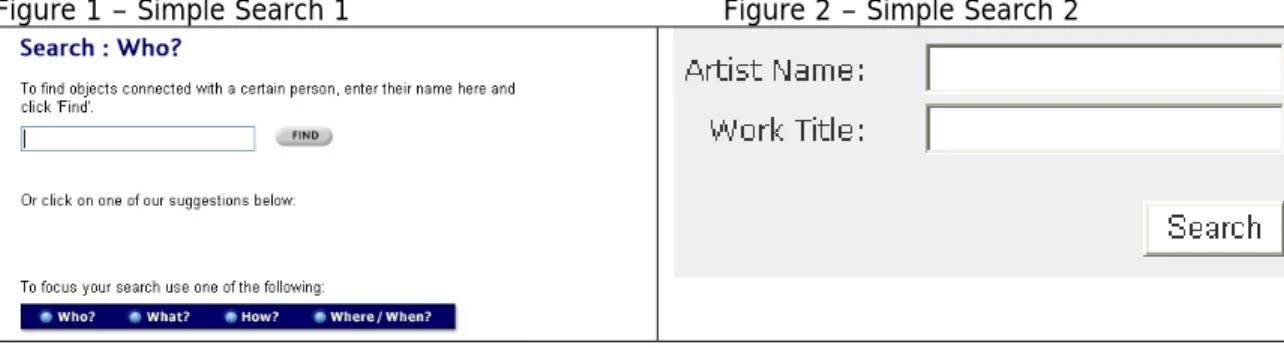
The first task of the review was to determine the standard tools for searching on-line collection databases and displaying search results. Most sites provided both a “simple search” interface and an “advanced search” interface. The majority of the simple search interfaces take one of two forms. Some of the simple search interfaces provide a single form field for users to enter a keyword and the system automatically searches all the relevant fields in the database (Figure 1). The other simple search interfaces provide individual text boxes on the form for the user to specify the criteria to be searched in each field (Figure 2). The fields available in the simple search interfaces vary, but are often restricted to two fields, one of which is almost always the artist name field. Figure 1 – Simple Search 1 Figure 2 – Simple Search 2
The advanced search interfaces are similar to the second style of simple search interfaces, but provide more fields (Figure 3). The fields available in the advanced search interfaces varied among institutions, but most included artist/maker, title, and medium; additional fields available on some sites were culture and date.
Figure 3 – Advanced Search
The templates for displaying results are not as standardized as the forms for entering search criteria. The most widely used displays are a list of thumbnails with basic
information (Figure 4) or a gallery of thumbnails with one of two descriptive labels under the thumbnail (Figure 5).
The interesting part of this survey was observing how museums deviated from the standard, either in tools provided to search the collection or in how they displayed the results. Not surprisingly, some of the large museums incorporated more sophisticated functionality, although not always to the advantage of the users.
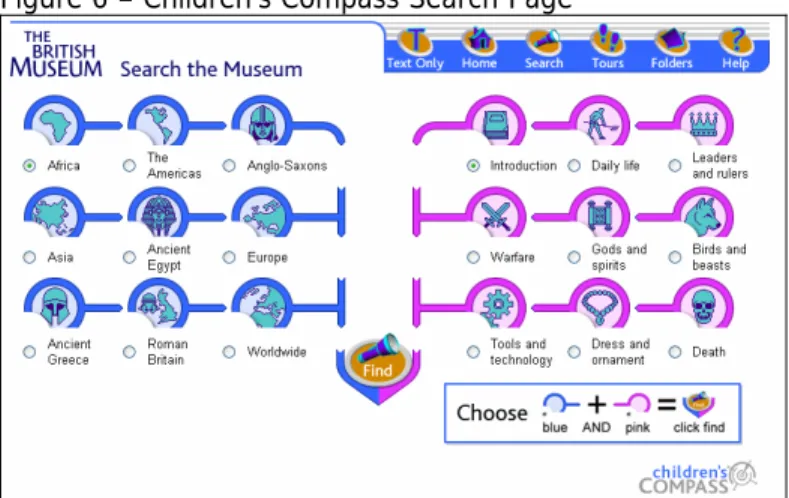
The British Museum search interface, named COMPASS, varies from the standard search forms in several ways. The underlying database, purchased from a British company, has fields for who, what, how, when and where. These are the fields exposed to the search interface and correspond to artist, medium, date and culture. There is no option to search on the title field. The interface is very easy to use, but there is no true advanced search option. There is a simple search that searches all the fields in the database, but for the advanced option, each form field is listed on a separate page of the interface, so there is a “who” page (Figure 1), a “what” page, etc. There is only one form field on each page. Users can enter multiple keywords in the form field, but the system will only search that one field in the database. This is really problematic because there are thousands of objects in the database and the only way to limit the result is adding additional search terms using Boolean operators in the form field on the simple search. It works really well for browsing, but not well at all for known item searches.
While the search pages have some serious limitations, the pages for displaying the results are very nice and have some interesting additional features. All items include a description and many items include a list of reference materials for further research. It also displays thumbnails of related items in the collection database.
Additionally, the British Museum has the only on-line search database for children among the museums included in this review. Children’s COMPASS
(http://www.thebritishmuseum.ac.uk/childrenscompass) mimics the main search site, but is completely tailored for use by children. There are no keyword searches, but pre-selected topics that children can mix and match to generate results. For example, a user can click on “Ancient Egypt” and “Birds and Beasts” and see objects of animals in the Egyptian collection. All of the descriptive text in children’s COMPASS is written for children. It is an excellent site, but unfortunately would require a lot of funding to implement, so it was not particularly pertinent to the Ackland’s needs.
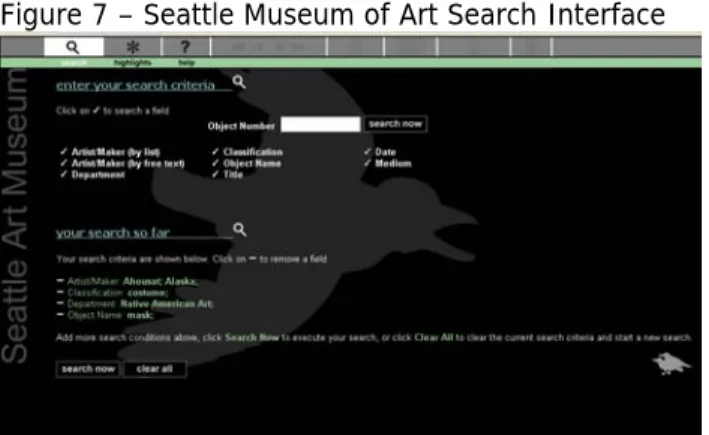
Another museum that has a less than user friendly search interface is the Seattle Art Museum (Figure 7). This Museum does not divide the searches into simple and advanced searches, but lists all of the fields available for the users to search on the main search page. Each field in the list is a hyperlink that takes the users to another page where they select search terms from a list of keywords. When the users are finished selecting keywords for that field, they click the next button which returns them to the first search screen. If the users are observant, they will notice that the bottom half of the screen contains their search criteria and a button to perform the search. If not, the users are left wondering how to perform the search. The interface allows users to keep selecting keywords from different search categories and appends the keywords onto the existing query. After the users have selected the first search criteria, the interface appears to limit the items available for additional criteria based on the first criteria selected.
Figure 7 – Seattle Museum of Art Search Interface
The Seattle Art Museum interface does have some advantages, for example, it allows users to see the queries they are building, but it is not intuitive and has a higher learning curve than traditional search forms. It seems the designers were trying to get away from the ubiquitous search forms, and were trying to make advanced searches easier, but in trying to capture the complexity involved in performing advanced
Figure 8 – List of objects without thumbnail
Another innovative interface is the Thinker at the San Francisco Museum of Fine Arts. This site is interesting because of the use of metadata. In addition to the information on the object itself, the search results provide keywords to related objects in the database. This helps users become familiar with the contents of the collection and the appropriate keywords to use in additional searches. The site also provides limited zoom capability which allows users to increase the resolution of the images.
In addition to learning what the large museums are doing, the Ackland staff also wanted to know what other university affiliated museums’ search interfaces look like. As
described above, a number of the larger museums tried to enhance the search tools on their interfaces to make it easier to use, but often only succeeded in making the
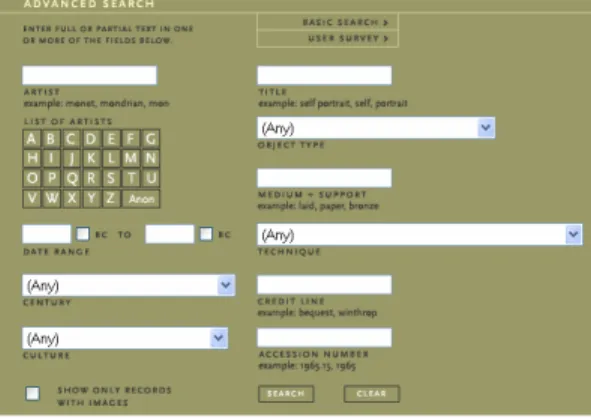
interface confusing and complicated. The Harvard University Art Museums actually succeeded in their attempt at this endeavor. One of the problems with both the simple and the advanced search forms used on most search interfaces is users who are just browsing the collection do not know what keywords to use. Harvard’s simple search form provides a grid with all the letters of the alphabet. Clicking on a letter produces a pop-up window with a list of artists’ names. When the user clicks on a name, it is automatically inserted into the artist name form field. On the advanced form (Figure 9), instead of having empty text boxes, Harvard uses drop down lists with values drawn from the database. The techniques used here are simple yet they add usable functionality without making the interface complicated. However, there are some drawbacks; many of the keywords do not produce results when the search is run and the interface requires the users’ browsers to support JavaScript.
The Harvard interface also does a nice job of displaying search results. When available, users are given the option to view information regarding marks and inscriptions,
bibliography, exhibition history, and provenance.
Two of the Ackland’s other peer institutions, the University of Michigan Museum of Art and the Johnson Museum at Cornell, are using sophisticated software in their interfaces. Michigan does not indicate if they purchased the software or custom built it. Their site allows users to view four different sizes of each image, but this functionality is only available to subscribers3. Cornell is using Luna, a commercially developed software
package that allows users to compare images side-by-side and magnify the resolution of the images. As with Michigan, Cornell’s images are not available to the general public. The other peer institutions included in the review did not have any additional features beneficial to the review. The director of the Ackland is concerned that they are lagging behind their peers, but this does not seem to be the case. Two sites were included in the review because they are using the same database as the Ackland, MultiMimsy. One of these schools, Smith College, is using the PHP interface provided with the database with no additional functionality and the other, Albright Knox, has made modifications, but it provides less functionality than the original version.
The ACC museums included in the museum website review also did not provided
additional features that were beneficial to the project, but both Duke and State recently bought new software and it is likely they will soon be making significant changes to their web sites.
A report produce by the Institute of Museum and Library Services (IMLS) 4, found that
many museums lag behind libraries in incorporating technology into their institutions. The report surveyed the level of digitization and technology implementation present in libraries and museums in 2002 and broke down the museum results into small, medium and large institutions. According to the report, small and medium sized museums are generally further behind than larger museums. It was not that the museums included in the survey were un-interested in technology, they just lack the funding to implement it. The results of the review conducted for the Ackland interface seem to support the findings of the IMLS report. Many of the larger museums, such as the Metropolitan Museum of Art, do not have significant portions of their collection available online which gives an indication of the difficulties facing the smaller and medium sized museums. The review of museum on-line collection interfaces was instrumental in determining both the current baseline standard and the state-of-the art5 among museum web sites and
3 For members of the UNC community, the University of Michigan Museum of Art’s restricted interface can be viewed by logging in through the UNC proxy server.
4 Institute of Museum and Library Services. (2002). Status of Technology and Digitization in the Nation’s Museums and Libraries 2002 Report [On-line]. Available:
http://purl.access.gpo.gov/GPO/LPS19451
played a very large role in determining the features proposed for the Ackland’s on-line search interface. Additionally, the findings of the IMLS report were also useful in assessing that the Museum’s level of digitization and technology implementation is at least as high as other small museums and with the implementation of an Internet interface to search the collection database, the Museum will be close to the level of technology current in some of the larger museums.
2.2 - Willoughby PHP Interface Configuration
In addition to reviewing other museums' on-line collection interfaces during the field experience at the Ackland, work was also done to configure the PHP script provided by Willoughby so that it would work. Willoughby provides the script free of charge, but does not support the interface because they also have an Internet interface that
museums can purchase. The work performed configuring the script was instrumental in the programming phase conducted later in the project because it produced a very simple, but functional search interface.
Under normal circumstances, simply configuring a web page to connect to a database would not warrant mentioning, but in this case, it turned out to be a monumental task and highlights some of the issues facing small museums that do not have a lot of resources available to support the implementation of new technology.
The Ackland Art Museum does not itself maintain either a database server or a web server. The MultiMimsy database is located on a database server in the University of North Carolina at Chapel Hill (UNC-CH) Administrative Information Services (AIS) department and the Museum’s web pages are located on a web server in the UNC-CH Academic Technology Networking (ATN) department.
In some respects the Ackland is fortunate to have resources such as AIS and ATN available. Many small museums would either have to run the servers themselves or pay for a private company to host the applications. The disadvantage of this configuration is that when something does not work, determining the source of the problem can be very difficult, as was the case with installing the Willoughby PHP script.
The first step when using an Internet interface to search a database is to get the web pages to establish a connection to the database. In order for the connection to work, the web site needs to know the location and name of the database to which it needs to connect and the username and password to connect with. The PHP script came with an administrative page where this information was to be stored, but even after it was correctly configured, the web pages could not establish a connection to the database. It took over 80 hours to resolve the problem which, spread out over the course of the field experience, took several months. Part of the problem was that ATN’s servers are configured not to show error messages to the user when a PHP script encounters an error, but instead, to log the errors to a text file on ATN’s servers. Given that the
Ackland’s PHP script was running on a production server this made sense, but it made pin-pointing problems very difficult.
The staff at the Ackland were not given access to the text file logging the error messages, presumably because the file contained error messages from every department using ATN’s servers, not just the Ackland. Every time tests were run to determine why the PHP script was failing, the Ackland programmer had to call the ATN programmer to ask him to email the Ackland’s error messages. If the ATN programmer was unavailable, the Ackland programmer just had to wait.
While this seriously slowed down the process, the real problem was the department where the error was occurring was resistant to believing that was the case. Although the department did eventually fix the problems, the Ackland programmer had to first prove that all the other applications involved with the PHP script were working correctly and that the only possible place the script could be failing was in that department. There were three errors occurring on the server in that department and this process of elimination had to be repeated for each error.
Configuring the Willoughby PHP script was instrumental to the search interface that would be designed during the implementation part of the master’s project because the interface would use the same connection as the PHP script and timely completion of the master’s project depended on the resolution of the connection problems.
The problems encountered while trying to configure the PHP script demonstrate some of the problems facing small and medium size museums trying to implement Internet interfaces to search their collection databases. This type of project requires someone with skills in web programming, web design and database design, and also requires the necessary hardware and software to run the application. Maintaining both the personnel and the computer equipment is expensive. While a museum may be able to fund the initial project with a grant, this does not address the problems of long term support of the application. This issue will be included in the list of recommendations discussed at the end of the paper, although no solution to the problem has been found.
2.3 – Summary
At the end of the field experience the PHP script was able to connect to the database and was returning search results. The search results pages were not fully functional, but since these pages were not being incorporated into the interface that would be designed during the master’s project, this did not impact the project. Configuring the PHP script to connect to the database was beneficial in preparing for the master’s project because it provided a working connection that could be used in the master’s project interface.
The museum website review conducted as part of the field experience was also
instrumental in preparing for the master’s project. The review provided a set of current standards in on-line search interfaces that was used to guide the development of the design requirements for the Ackland’s on-line search interface. These design
3 – USER NEEDS ASSESSMENT
The first step in designing the search interface for the Ackland Art Museum was to conduct a user needs assessment to understand the users; what their needs are and their capabilities. The users of the system will consist of two groups, the Ackland’s staff and the Ackland’s patrons. The patron group consists of two subgroups, the visitors to the physical Museum and the Museum’s on-line visitors. The characteristics of the staff were well known, as were some characteristics of the visitors to the physical museum, but no information existed for the Museum’s on-line visitors. The goals of the
assessment were to learn about the users and how they would use an Internet search interface, and to develop a set of design requirements for both the staff and the patrons. To gather feedback from both the staff and visitor groups, two different
methods were used to conduct the user needs assessment. The study was approved by the Academic Affairs Institutional Review Board; following is the description and results of the study.
3.1 - Patrons
With the advent of its web site over five years ago, the Ackland Art Museum now has two distinct groups of patrons, the visitors to the physical museum and the visitors to the virtual museum that currently exists in the form of static web pages. The Museum staff have some basic information about the visitors to the physical museum and their interests. Approximately one quarter of the Museum’s patrons are K-12 students and university students who come for guided tours. Three quarters are walk-in visitors who come for exhibitions or special events. The visitors come from within and outside the university and include students, faculty, staff, families with small children, retired people and visitors from other parts of North Carolina, the U.S. and other parts of the world. However, the Ackland has not undertaken a study of its on-line visitors and no
information has been gathered from the Museum’s physical visitors on their use of and/or interest in the Museum’s web site.
The design of the user needs assessment for the Ackland’s patrons was structured to gather input from both of these groups. In order to reach the on-line visitors, an instrument was needed that would be easily available to this population, but could also be used with the visitors to the physical museum. To achieve this goal, an Internet based survey was used to gather basic information about the patrons and what features they would like to see in future additions to the Ackland’s web site. Using this type of instrument also allowed for a higher number of participants.
The survey consisted of an 11 item questionnaire6 administered using the Internet that
took the participants approximately 10 minutes to complete. The web pages were written using Active Server Pages (ASP) and the answers were collected in an Access database with no identifying information. A password was used to ensure that only the intended audience was able to complete the survey.
3.1.1 - Methodology
Participants were recruited using two methods with the expectation that an equal number of surveys would be collected using each method to balance the study. The
first method consisted of asking visitors to the Ackland Art Museum if they were willing to complete the survey when they entered the Museum. If the visitors consented, they was escorted to a computer set up in the Ackland’s main gallery and given oral
instructions on how to complete and submit the survey. Due to the presence of the researcher, these participants were able to ask questions when they were unclear about an item on the survey. Half of the museum visitors were surveyed on a weekday and the other half on a weekend to represent the different populations that visit the museum at these times.
The second method involved soliciting participants by email using the Ackland’s email list of patrons. This method consisted of an email sent to all the patrons on the email list that explained the purpose of the study and included a link to the instruction page and the password to enter the site. The instructions for completing and submitting the survey were given on an introductory web page and included the contact information for the researcher to assist the participants if they had difficulty completing the survey.7 It
should be noted that one limitation of this methodology is that the people who have requested to be on the listserv are probably more interested in the affairs of the Museum and may not be representative of the general visitors.
The initial plan was to have 26 subjects participate in the survey, 13 of which would be museum visitors and 13 on-line visitors. Both male and female visitors over the age of 18 were recruited to participate in the survey which was conducted over a two week period, January 9th – 22nd, 2004.
3.1.2 - Results
The response from the patron listserv was quite surprising, with a total of 70 surveys received – more than five times the number expected. Keeping the survey balanced by having an equal number of participants for each method was no longer an option, but the number of participants recruited in the museum was increased from 13 to 20, 10 during the week and 10 on a weekend. There were a total of 90 surveys received from the Ackland’s patrons using these two methods.
Unfortunately, due to a programming error, some of the data were not captured. The structure of the questionnaire was that half the questions were the type "select all items in the list that apply" and half were "select only one option". For the questions that were “select all that apply”, the answer for each item was either yes or no which was recorded in the database as 1 or 0. For the “select only one item questions”, each item in the list had a number assigned to it beginning with 1. For example, question three asked the participants’ comfort level with computers. The answers were very
comfortable (1), somewhat comfortable (2), somewhat uncomfortable (3), and very uncomfortable (4).
The error arose by copying and pasting the ASP code from question 1, a yes/no type question, and using that pattern for all the questions. For the yes/no questions, the code was a conditional statement: “If 1a=1, insert the value for 1a, else insert 0”. This worked for yes/no questions because the only options were 1 or 0. However, this was a problem for questions like number three were the answers ranged from 0 for missing up to 4 for very uncomfortable. For these questions, if the user selected the first option in the list, the answer was recorded correctly because its numeric value was 1, but, if the participant selected any other option, it was recorded as 0.
This error was noticed before the study was completed so a portion of the surveys was recorded correctly. By chance, the number of correct surveys received was 26, the original number anticipated when designing the user needs assessment. Of these 26, 14 were completed by visitors to the museum and 12 by patrons from the Ackland’s listserv. For this reason, in the following discussion of the results there are three sets of numbers. For the yes/no (select all items that apply) type questions, there were 90 responses received because these questions were recorded correctly for all the surveys. For the select only one item type questions, there is a “complete” set of data for the 26 surveys recorded correctly and an “incomplete” set for the 64 where only a portion of the data were recorded correctly.
The first set of questions on the survey was designed to gather information about the Ackland patrons that would be helpful in designing an interface for the on-line collection. Table 2 shows the responses for question 1 which asked the participants to tell their affiliation with the Museum. The main item of interest from this question is almost half the respondents, 47%, said they are on-line visitors. While this number is skewed because a disproportionate number of responses came from the Ackland listserv group, it still indicates a clear interest in the Ackland’s Internet site; only 2 of the 14 (14%) museum visitors marked “on-line visitor” compared to 40 of the 70 (57%) Internet visitors.
Table 2 - Patron affiliation with the Ackland Art Museum
Infrequent visitor 50 (56%)
Online visitor 42 (47%)
Ackland Art Museum member 37 (41%)
Frequent visitor 34 (38%)
UNC University member (faculty, staff, student, other) 27 (30%)
Other 23 (26%)
Table 3 lists the responses to question two which asked the participants to indicate their status within the museum community. One of the items of interest from this question is the number of art and museum professionals that are potential users for the interface (visual artists, art historians, collectors or museum professionals). Twenty-nine percent (29%) of the survey respondents indicated they are both an art or museum professional and an on-line visitor. This has implications for the design because these users might be more interested in known item searches versus general browsing and also may need an option for an advanced search as well as a simple keyword search.
for classroom assignments, but the responses on this survey indicated that, at least initially, there is little interest with this interface for instructional purposes.
Table 3 - Museum community status General public 62 (69%)
Retired 30 (33%)
Visual artist 26 (29%)
Collector 20 (22%)
Art historian 17 (19%) Independent scholar 13 (14%)
Student 13 (14%)
Museum professional 12 (13%) University faculty 11 (12%)
Other 9 (10%)
K-12 teacher 6 (7%)
The results from question three which asked participants about their educational background are summarized in Table 4. This question and also questions four, five, six and eight are missing some data due to the error described earlier. For question three, none of the participants indicated they have less than a high school degree, so basic literacy is not likely to be a primary issue in designing the interface for the Ackland’s on-line collection. For the 26 complete responses, 88% have a bachelor’s degree or higher indicating that a significant portion of the user population for this interface is well educated.
Table 4 - Educational status
TOTAL COMPLETE INCOMPLETE
Less than a high school diploma 0 (0%) 0 (0%) 0 (0%)
High school graduate, no college 1 (4%) -
Some college or associates degree 2 (8%) -
Bachelors degree or higher 23 (88%) -
Missing 0 (0%) 64 (100%)
Table 5 summarizes the participants’ comfort level using computers. All of the
responses for the item “very comfortable” were recorded correctly because its numeric value is 1. Seventy percent (70%) of all participants are very comfortable using computers. For the 26 complete surveys, only 1 person marked “somewhat
uncomfortable” and no one indicated “very uncomfortable”. Based on these responses, the user population for the Museum has experience using computers so basic computer competency will also not be a primary issue in designing the interface.
Table 5 - Level of comfort using computers
TOTAL COMPLETE INCOMPLETE
Very comfortable 62 (69%) 14 (54%) 48 (75%)
Somewhat comfortable 10 (38%) -
Somewhat uncomfortable 1 (4%) -
Very uncomfortable 0 (0%) -
Missing 1 (4%) 16 (25%)
the 26 surveys that were recorded correctly which indicate that 73% of the participants are connecting from home. Additionally we know that only 6% of the total respondents are connecting from school.
Table 6 - Most frequent Internet use location
TOTAL COMPLETE INCOMPLETE
School 5 (6%) 3 (12%) 2 (3%)
Library 1 (4%) -
Work 3 (12%) -
Home 19 (73%) -
Other 0 (0%) -
Missing 0 (0%) 62 (97%)
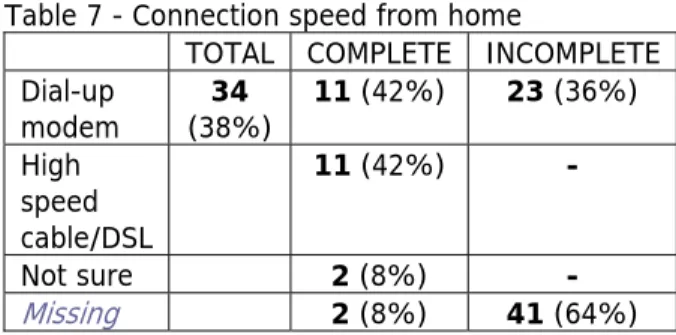
The participants who are connecting from home were asked what type of connection they are using. The answer “dial-up modem” was correctly recorded for all respondents and indicates that 38% of the participants have this type of connection. For the 26 complete responses, 42% have dial-up and 42% have high speed. The results from questions five and six, summarized in Table 6 and Table 7, indicate that most users would connect from home and that slow connection speeds will be a primary concern in designing the interface. As this is an interface for an image database, serious
consideration needs to be given to the sizes of images available on the web site. Table 7 - Connection speed from home
TOTAL COMPLETE INCOMPLETE
Dial-up
modem (38%) 34 11 (42%) 23 (36%) High
speed cable/DSL
11 (42%) -
Not sure 2 (8%) -
Missing 2 (8%) 41 (64%)
Question seven asked participants how they prefer to search for information on the Internet. This is of primary importance to this project because it has direct implications for the features that are incorporated in the interface. The question asked whether the users prefer to search or browse for information when using the Internet and if they are searching, whether they prefer keyword searches or a standardized list of items in a drop down box. Keyword searching was used by 89% of the survey respondents and indicates a clear preference for this functionality. That only 34% of the respondents use drop down lists also has implications because this type of functionality is planned for incorporation into the interface during Part 5 of the master’s project to provide users with lists of keywords. Such a low percentage may indicate that users are not familiar with drop downs lists and may need to be educated on how to use them, or more likely that the participants were simply unfamiliar with the terminology “drop down list”.
Table 8 - Internet Search preferences
Question eight is also of particular interest to this project since it asked participants if they would use the on-line database to search the collection if it were made available. Reassuringly, 73% of the total respondents indicate they would. The answers “no” and “not sure” are missing for 18 of the respondents, but the “Complete” data set indicates that most of participants who did not say yes were undecided indicating they were not unwilling to use the system, just uncertain. Overall, the responses indicate strong interest in using an on-line search interface should it exist.
Table 9 - Interest in using Ackland collection database on-line
TOTAL COMPLETE INCOMPLETE
Yes 66 (73%) 20 (77%) 46 (72%)
No 2 (8%) -
Not sure 3 (12%) -
Missing 1 (4%) 18 (28%)
To obtain some information about how the interface will be used, the participants were asked what features they would like to see incorporated into the interface. Despite the fact that only 39% of the respondents said they prefer to browse the Internet in
question seven, 76% of the participants would use the interface for general browsing. This has interesting implications because the Ackland collection database does not use a controlled vocabulary which is needed to create the categories available in the browse feature. This issue will be addressed in section 4 of this paper.
Table 10 - On-line collection usage
General browsing 68 (76%)
Preparation for a visit 53 (59%)
Image acquisition 35 (39%)
Research: Discovery 33 (37%)
Research: Fact Checking 33 (37%)
Classroom material/lesson plan (teachers) 21 (23%) Classroom material/assignment (students) 7 (6%)
Other 7 (6%)
Surprisingly, 59% said they would use the collection to prepare for a visit. At the time of the survey, it was thought the Ackland did not have enough staff to keep an accurate record in the database of what is on display, which could cause consternation for a visitor who finds something on-line they want to see, only to arrive at the Ackland and find it is in storage or out of the museum for some reason. During the usability test conducted at the end of the project it was determined the database does contain this information and it is available for use on the Interface.
Thirty-nine percent (39%) of the respondents indicated they would use the collection for image acquisition which is an issue that will need to be addressed by the Ackland staff due to copyright issues.
Another reason the results from this question are interesting is because they also support the findings in question two that the on-line collection is not currently being used to support educational or instructional uses of the collection. The Ackland has a strong program with local schools, so this is something that bears future investigation by the Ackland staff, although it will be outside the scope of this project. Table 10 contains the results for this question.
The final question on the survey asked the participants about features they would like to see incorporated in futures additions to the Ackland web site. The items in the list are outside the scope of this project, but the results can be viewed in Table 11.
Table 11 - Future additions to the Ackland collection on-line
High resolution images 68 (76%)
360 degree view of objects 64 (71%)
Zoom capability 62 (69%)
Videos of gallery walk-thrus, lectures, etc. 55 (61%) Side-by-side image comparison 55 (61%) Links to related materials such as catalog entries 55 (61%) Sound clips of music, gallery talks, lectures, etc. 51 (57%)
Ability to save searches 37 (41%)
Other 7 (8%)
In addition to the items in question ten, patrons were given the opportunity to provide comments at the end of the survey. Some of the more interesting suggestions included allowing visitors to add reviews of the objects, searches by artistic movement or content theme and indicating if the object is on display. As with the items in question ten, these suggestions are outside the scope of this project, but will be included in the list of future recommendations.8
One final and surprising development that arose from the email sent to the Ackland’s patron listserv was an invitation to interview a patron. The patron is a collector and a self-described connoisseur of museum web sites and he volunteered his expertise to provide a user’s prospective of some museum website features that are desirable and many that are not.
The interview lasted for two hours in which a number of museum websites were visited. Most of the patron’s concerns were familiar, but he did point out that very few museum websites include a printer friendly format and he was particularly frustrated by having the descriptive information for an object on the page with the thumbnail image and little or no descriptive information on the page with the enlarged image. In the cases where it does not violate copyright restrictions, a link to a printer friendly format would be a nice addition.
The patron also liked having links to other works of art by the same artist, for both the museum collection he was currently searching and other museums as well. Additionally, he liked having references to the artists, mediums, cultures and techniques related to the object. At the present time, this information is not available for the objects in the
Ackland’s database, but the possibility of including some static links or even a reference page to sites that could provide this information should be considered.
The interview also afforded the opportunity to show the patron some features on other museums’ websites that were being considered for inclusion on the Ackland’s interface. This included a discussion on how search results are displayed and the possibility of giving the user control over the display format.
The final interesting item that came from the interview was the patron’s confusion over static web pages versus dynamic pages generated by searching a database. Like anyone who uses the Internet, the patron was frustrated by pages that are there one day and gone the next. Museums seem to feel it necessary to change their websites on a frequent basis, just as they change the exhibits in their physical museums. In some ways the patron’s concern is outside the scope of this project because it does not address the existing static pages for the Ackland’s web site, however, the conversation produced the interesting suggestion of linking archived static pages from old exhibits to related objects in the database.
3.2 - Staff
The user needs assessment conducted with the Ackland patrons was intended to provide information about the characteristics of the people who would be using the interface and the types of tasks they would use it to perform. The user needs assessment
conducted with the staff had different objectives and employed a different methodology. The first objective was to learn how museum professionals use on-line image collections and the second was to determine the features they would prefer to have included in the Ackland’s interface.
3.2.1 - Methodology
In their book, Contextual Design Defining Customer-Center Systems9, Beyer and
Holtzblatt recommend the use of “contextual interviews” to gather design requirements during the systems analysis phase of a project. A typical contextual interview consists of an analyst observing a client while he/she performs work related tasks over the period of time deemed appropriate by the design staff. The purpose is to allow system designers to see the work the client is performing and the context in which it is
performed without having to rely solely on the client’s description. Conducting this type of interview with the Ackland staff was ruled out as an appropriate methodology for this study because it would not have collected the necessary information. To adequately answer the questions being address in the study, it was important to observe the staff using an on-line collection. This is not a task which the staff performs on a regular enough basis for it to be observed in a traditional contextual interview. A generic interview where individual staff members were asked their opinions about museum search interfaces was also deemed insufficient because the tools that users think will be helpful in theory may not be in practice.
The methodology employed was a cross between a contextual interview and a usability study. The participants were given a series of tasks to perform using two existing on-line museum search interfaces and asked to complete questionnaires evaluating each of the interfaces. Following are descriptions of the two web sites that were used in the contextual interviews and explanations for why each was selected.
The two museums used were the Peabody Museum of Archaeology and Ethnography at Harvard University (http://www.peabody.harvard.edu/col/default.cfm) and the Tate Museum in London (http://www.tate.org.uk/servlet/QuickSearch). The Peabody site is very clean and simple and does not contain a lot of text, links or graphics. The Tate, on the other hand, has a very complicated interface with numerous colors, links and animated images scrolling at the top of the screen. Both sites provide links to navigate the site, but the links are placed in different locations on the page and have different labels.
Both sites provide users the option to browse the collection or search it using either a simple or an advanced search. The advanced search form on the Peabody site allows users the option to use Boolean operators whereas the Tate does not. Additionally, both sites provide lists of the items in the database, such as a list of artist names to aid users in becoming familiar with the collection and performing keyword searches. Again, the techniques used to implement these aids are different on each site.
The last element of interest in the comparison is the labels used by each site. The Peabody site uses the terms “who, what, and where” instead of the terms “artist, medium and culture” used by the Tate and most other museums10. Also, both sites
have some variation in how they refer to the browse and advanced search features. The Peabody uses the widely accepted terms “browse” and “simple search”, but places the advanced search under the label “Researcher Options.” The Tate calls its browse feature “Subject Search” and its advanced search “Full Search.” Like the Peabody, the Tate employs the term “simple search” for that feature.
The methodology used to conduct the staff interviews was designed to compare the differences in these two interfaces to determine which features the Ackland staff found preferable and regardless of preference, which ones seemed to work best, which is not always the same thing. Additionally, the methodology was designed to provide insight on how relatively experienced users interact with an image database by allowing the researcher to observe the staff as they completed the tasks.
The interviews were designed to take approximately thirty minutes and were conducted in the offices of the individual staff members. Any differences in hardware that may have existed among the participants applied equally to each website; no bias due to performance problems was observed during the interviews.
The seven participants in the interviews were selected in consultation with the Ackland’s assistant director. The selection of these staff was based on their status as primary stakeholders in the new system. The participants consisted of the Director of the Ackland Art Museum, the Director of Communications, two of the Ackland’s educators,
the Collections Curator, the Registrar and the Assistant Registrar11. The Exhibitions
curator was unavailable to participate.
At the beginning of the interviews, participants were asked to complete the Staff
Technology Use Survey12 regarding their familiarity with computers, the Internet and
on-line image databases. After completing the technology use survey, the purpose and structure of the interview was explained to the participants who were then given the written instructions on what they were expected to do. The written instructions included the tasks comprising the Museum Interface Comparison Exercise13. After reading the
instructions, the participants were asked to perform the series of tasks for each website. Half of the participants started with the Tate interface and half started with the Peabody interface. After the final tasks for each museum interface were completed, the
participant was asked to complete the Museum Interface Evaluation Survey14, an 18
item survey used to evaluate each site. Both the tasks the participants were asked to perform and the evaluation surveys varied slightly due to differences in the interfaces, but the tasks were designed to compare similar features on each site.
While completing the tasks in the exercise, the participants were asked to speak aloud to aid the investigator in understanding their actions and re-actions. In addition to observing the participants, the investigator also took notes on the participants’ comments and actions.
3.2.2 - Description of Instruments
Following is a description of the Staff Technology Use Survey, the description and explanation of the tasks used in the Museum Interface Comparison Exercise and the description of the Museum Interface Evaluation Surveys.
The Staff Technology Use Survey was primarily used to determine if any of the staff had significantly less experience using computers, searching the Internet for information or using on-line image databases. The secondary purpose for the survey was to ask participants how they prefer to search for information on the Internet and to ascertain their motivations for previous use of image databases.
The Museum Interface Comparison Exercise was divided into three parts: Part A consisted of the first two tasks the users were asked to perform for both sites which included an unstructured and a structured activity for each interface. Part B introduced the evaluation survey instrument for the first interface, had the user perform an
additional series of structured tasks for the site, and then evaluate the site using the survey. Part C concluded the exercise by having the participant read the evaluation survey instrument for the second interface, complete the structured tasks for that site, and complete evaluation survey for it. The basic methodology of the usability interviews was borrowed from a research study conducted at UC Berkeley aimed at designing an
11 The Registrar and Assistant Registrar are responsible for the administration of the collection which includes maintaining the collection database.
image database interface using structured metadata. However, the methodology used here was significantly modified to support the purposes of this study. 15
Part of the reason for structuring the interview in this way was to allow the participants to become familiar with both sites and form their own impressions using the
unstructured activity in Part A without being biased by reading the evaluation surveys in Parts B & C. The unstructured activity in Part A also allowed the observer to see how the museum professionals would use the interfaces when left to their own devices. The tasks in parts B and C were designed to ensure that participants would use all the features they were being asked to evaluate. The participants were asked to return to the first interface after completing part A to remind them what it looked like. They were asked to read the evaluation questionnaire before completing the tasks in parts B and C so that they would know what questions they were going to be asked; this also helped the participants understand why they were being asked to perform such specific tasks. Finally, the overall structure allowed the participants to evaluate the merits of each interface individually and to compare the similar features between each interface to indicate which ones they preferred.
3.2.3 - Purpose of Tasks
The first task the participants were asked to complete with each interface was to search for images of interest. This allowed the participants to become familiar with the
interface and allowed the researcher to observe which features the participants chose to use when given an option, how well they navigated the site and what features caused confusion. It also allowed the participants to become comfortable with being observed without the added pressure of having to complete the tasks “correctly.”
The second task was designed to steer the participants toward the advanced search features, but the instructions did not indicate this. The easiest way to complete the second task was to use the advanced search, which allowed the participants to be observed to see if they would use this feature, and if so, any problems they encountered in doing so.
It should be noted that the second task for each interface asked the participants to perform searches that were not possible given the design of the interfaces. The original structure of this task was not to point out the shortcomings of each site, but to
encourage the participants to use the Boolean operator “OR” on the Peabody interface. This task for the Peabody Museum asked users to find all masks and carvings by the maker Buzi. If the participants used the “AND” operator, no results were returned because there were no records in the Peabody database for carved masks made by the Buzi tribe. However, if the participants used the “OR” operator, the database returned
15 A description of Berkeley’s tasks and methodology can be found under the section heading: “Usability Study” at this citation:
Yee, K., et al. (2003). Faceted Metadata for Image Search and Browsing. Proceedings of the conference on Human factors in computing systems [On-line], 401-408. Available:
all records for masks and carvings in the database regardless of who made them. Determining whether experienced museum professionals understood how to use Boolean operators was considered a necessary question for this project because it represented one of the design options when creating the advanced search feature. Structuring the task in this way was necessary to gather this information.
Initially, the comparable task designed for the Tate Museum only asked the participants to find all the works of art by the artist Gabo with the medium type “sculpture”. This task was devised so that it could only be completed by using the advanced search since the simple search only provided fields for artist and title of work, but not medium. After testing the tasks with two participants, it was realized that the Peabody interface was being perceived as inferior to the Tate interface because users could complete the second task for the Tate, but not for the Peabody. To correct for this, the second task for the Tate interface was changed to ask the participants to perform a task that also could not be completed given the design of the advance search. Specifically, the task required searching for two mediums when the interface only allowed the user to search for one medium at a time.
Changing the second task in this way added a secondary use for the task by pointing out the short comings for the advanced search features on each site. Namely, the Peabody provided a great deal more flexibility, but the Boolean operators were
confusing and either returned to many results or none at all. The Tate was much easier to use, but imposed serious limitations on the searches it could be used to perform which is problematic given that it is the tool designed for performing advanced searches. After completing Part A, participants were asked to complete a series of short tasks in Parts B and C to ensure they saw all the features on both interfaces they were being asked to evaluate. For both B and C, Tasks 1 and 2 directed the participants to the appropriate interface and asked them to read the Museum Interface Evaluation Survey. Task 3 asked the participants to use the browse feature to search for images of interest so that they would be familiar with this feature and also with the information and layout of the search Results page. Task 4 asked the participant to view the details for an item found using the browse feature. This ensured the participants saw the information and layout of the Details page for a specific object. Performing Task 4 placed the users several pages removed from the search page. This set up Tasks 5 and 6 which asked the participants to return to the search results page and then begin a new search. These tasks gave the participants the opportunity to become familiar with the navigation provided on the interfaces. Task 7 and 8 for the Peabody interface and Task 7 for the Tate were designed to have the participants use the Simple search feature and also become familiar with some of the keyword aids on the sites. Finally, Task 9 for the Peabody and Task 8 for the Tate asked the participants to complete the Museum Interface Evaluation Survey for the respective interfaces.
interface, the participants were also comparing the similar features of the interfaces. The seven point scale allowed the participants to make more subtle distinctions to assist them in the comparison.
The short answer questions were used to gather additional comments from the participants about the interfaces. The first short answer question asked about the navigation, labels and overall design of the site, the second question asked about the browse, simple search and advanced search features.
3.2.4 - Results
The results16 from the Staff Technology Use Survey were not very surprising. Of the
seven participants, four selected “very comfortable” with computers and three selected “somewhat comfortable”. Observing the participants as they completed the museum interface comparison activity, all the participants demonstrated proficiency in using computers.
All the staff preferred keyword searches to look for information on the Internet rather than browsing and all had previously used the Internet to search an image database. Five of the staff had used an image database for general interest and all seven had used one in the course of doing their work. Additionally, two of the staff had used an image database for school assignments.
All seven of the staff had used an image database to look for a specific object and five had just been browsing. Six staff had been using an image database that was part of a museum collection.
The conclusions drawn from the survey were all the staff had similar experience using computers, the Internet and image databases and no adjustments were needed when analyzing the results from the Museum Interface Evaluation Survey. Additionally, the Ackland staff preferred simple keyword searches over browsing.
The results from the Museum Interface Evaluation Survey17 were interesting, but not
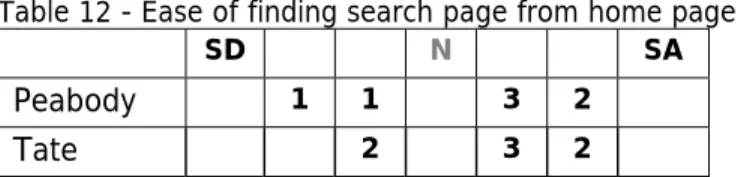
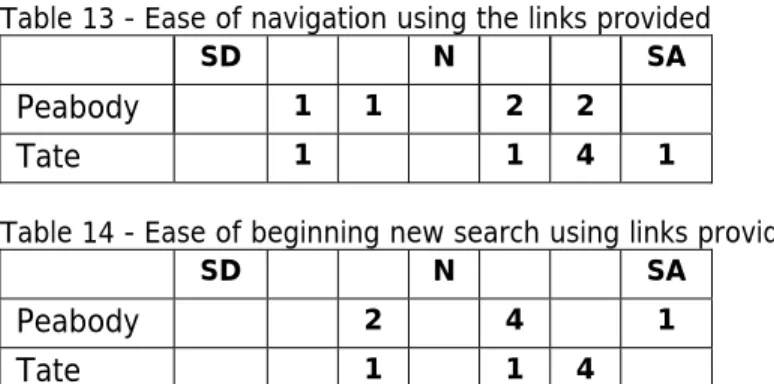
always as easy to interpret. The questions on the survey asked about navigation, labels, search features, and overall design of search pages. In the following discussion, the result tables show the responses for the Peabody interface in the first row and the Tate in the second. The numbers in the columns beside the museum name show the
distribution of answers for each museum. The abbreviation “SD” is for strongly
disagree, “N” is for neither and “SA” is for strongly agree. The responses for “neither” were removed to show the positive and negative trends more clearly.
All questions had seven responses with the exception of questions 3 and 4 for the Tate interface and question 4 on the Peabody interface. For question 4 on the Peabody interface, one participant marked two boxes, so this response was disqualified, leaving six valid answers for this question. For both questions 3 and 4 on the Tate interface, a
16 Appendix F.
participant failed to give a response, thus leaving only six valid responses for each of those questions.
Some of the questions included in the survey derived from the earlier work done reviewing museum interfaces. During the review, both elements that appeared to be problems on other interfaces and elements that seemed to be interesting solutions to problems were identified. These possible problems and solutions were incorporated into the tasks in the interface comparison exercise to test their impact with real interface users.
The first question, “It was easy to find the search pages from the museum home page”, fell into the problem category. Many museums provide a search feature on the home page that searches the entire museum website and a separate feature to search the collection database. The second search is usually located under the “Collections” link and is not visible on the home page. This configuration makes sense once a user become familiar with it, but it is not at all intuitive.
This is a problem for several reasons. First, many museums do not have an Internet accessible database so if users end up in the website search, it is possible that they will assume the museum does not provide the functionality to search the collection database and leave the site disappointed. Additionally, many museums now have small sections of their collection available on static pages which presents another problematic scenario where the user finds a few images using the website search, thinks that is all that is available and again leaves the site disappointed.
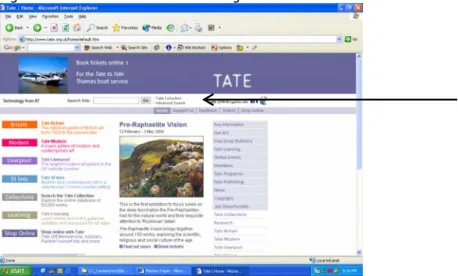
Both the Peabody Museum and the Tate Museum use confusing terminology on their home pages. To illustrate the problem, Figure 10 shows the Tate Museum’s home page. The black arrow is pointing to the form field to search the museum website.
Immediately to the right of the “Go” button used to perform the search are two small text hyperlinks labeled “Tate Collection” and “Advanced Search”. The advanced search link is part of the search of the entire museum website, but the link above it goes to the section of the web site where users can search the collection database. Putting the link “Tate Collection” next to the box to search the website is very confusing and misled more than one of the Ackland’s staff.