International Journal of Information Science and Technology
E-LEARNING: FROM A PEDAGOGICAL PERSPECTIVE
M. Siadaty, M.S. F. Taghiyareh, Ph.D. School of Electrical and School of Electrical and
Computer Engineering, University of Tehran Computer Engineering, University of Tehran Tehran, I. R. of Iran Tehran, I. R. of Iran
e-mail: [email protected] Corresponding Author: [email protected]
with. These outcomes would basically lead to determining basic factors of learner satisfaction and therefore improving educational performance.
Keywords: E-learning, Personalization, Authoring Tool, Social Skills, Student Modeling.
INTRODUCTION
“E-learning” is probably the most buzz term in current learning era. Numerous
universities and private institutes have launched this kind of learning in their long term
goals and invest mainly enormous capital in it. In early 1990s, e-learning appeared as
computer based learning and was proposed mostly by multi media CDs for learning
applications[2, 23] [11]. Authoring tools have been in existence since the early days of
computer-based learning. By the late of this decade, as internet became a more popular
vehicle for delivering online learning courses, learning contents were networked
presented to learners in propriety formats and in large sizes. These days, a great number
of advertisements on benefits and advantages of online learning solutions, lead college
and university presidents to rush for converting their traditional learning system into the
online ones. Online learning clearly has a growing presence in higher education, and
this bold presence has contributed to the emergence of the new generation of e-learning
authoring tools designed specifically for the purpose of e-learning content development.
However, most of the published research in this area, only discuss benefits and
prominent properties of “e” enabled learning/training and concept of “learning” along
with its personal, behavioral, social and cultural aspects are merely studied [1,4,16].
Following recent trend towards personalization on the World Wide Web, proposing an
educational web-based system with the ability to adapt intelligently to the goals, tasks,
interests, and other features of individuals and groups of users, is a challenging research
goal [18]. Considering limitations such as lack of face-to-face interaction in e-learning
basis along with its prominent features -like the extended access facility- makes it even
more complicated for the presidents of the learning industry to choose one of these two
learning types. Therefore, advantages and disadvantages of both learning systems
(e-based and traditional) should be borne in mind along each other. In addition,
expectations of e-learning systems and tools as well as their role as a complementary or
substitute for traditional ones should be clarified. The aim of this paper is to enhance
decision making procedure for managers and presidents of learning areas. Hence,
advantages and particularly deficiencies and disadvantages of e-learning systems are
discussed from a pedagogical standpoint. The most important authoring tools and their
potential features and capabilities are studied as well. Also some paradigms of applying
personalization methods in web-based learning environments are provided. These
e-learning environments, which would have a great impact on the decision-making
phase.
The paper is organized as follows. In the next section, definitions and concepts
related to e-learning are reviewed. After that, the most important advantages and
disadvantages of e-learning systems vs. traditional ones are explained. Then, the
personalization and adaptivity concepts are described at the outset of the section entitled
“A Review on Personalization / Adaptation Concepts”, and some different approaches
in personalized e-learning systems. The last three parts will deal with definitions and
classifications of authoring tools, comparison of the current popular authoring tools
based on the most important selection criteria and conclusions and future researches.
E-LEARNING: DEFIMITION AND TERMS
Many universities, institutes and in general learning centers are unsure what e-learning
means. The terms and definitions around e-learning can be confusing. Diverse range of
existing definitions makes it even more difficult to provide a comprehensive definition.
Some definitions are brief such as -“Use of Internet technology for Learning outside of
the classroom”[13]- and some stretch to a more detailed extend. The most comprehensive
and though brief one, which can be provided, is as follows:
“E-Learning describes the way new information and communication technologies (ICT) are set to reinvent education and learning in browser-based systems in a digital world”.
This diversity is however fueled by the gradual improvement of technology-based
training. In each step of this improvement, some new concepts are emerged from which
the most notable ones are as follows:
- INSTRUCTOR-LED TRAINING (ILT)
ILT is the instruction in classroom or virtual classroom under the direction of an
instructor or facilitator.
- EPSS (ELECTRONIC PERFORMANCE SUPPORT SYSTEM)
This term refers to applications, which provide information, advice, task accelerators,
just-in-time training and other tools to support employees in performing their tasks. In
other words, EPSS solutions are sophisticated helping applications. Supporting
- COMPUTER-BASED TRAINING (CBT)
In CBT, learning objects are typically delivered on CD-ROM or from a mainframe and
through a local area network, rather than over the Internet. Learning objects exploit
multimedia such as audio, video, animation and application simulation.
- WEB-BASED TRAINING (WBT)
In this case, learning materials are delivered over the internet. Distinction between CBT
and WBT is rapidly disappearing.
- COLLABORATIVE LEARNING
Collaborative Learning is online learning, based on interaction with others
(learners/instructors). Communication can be supported in one of two ways, either
asynchronously, or synchronously. Asynchronous collaboration is typically instructor
facilitated. Instructor is not available in real-time but interacts with the learners offline
via the same e-mails and shared databases. Typically, Synchronous collaboration is
instructor led. Instructor guides learners in a virtual classroom environment, through
interactive online learning, such as shared whiteboards, shared application software,
chat functionality and audio/video over the network.
MOST KNOWN PROS AND CONS OF E-LEARNING
In recent years, e-learning has had a blossoming impact on higher education. Over half
of all postsecondary institutions –90 percent of two-year public institutions, 89 percent
of four-year public institutions and 40 percent of private ones- have offered some types
of e-leaning courses in 2000-2001. Growth rate of online enrollments –from 19.8
percent in 2003 to 24.8 percent in 2004– is climbing up as well [16]. These numbers are
not only up, but also clearly indicate increasing popularity of e-learning among students
and educators. This pervasive welcome, however, has created sharply different views on
web-based learning both among academics and in the corporate world. On the one hand,
proponents point to empirical studies and cite that e-learning is at least as effective as
traditional learning. Enumerating its advantages, they conclude that e-learning is a
proper substitute for traditional learning. On the other hand, opponents point to lack of
direct contact between instructors and learners and its adverse effect on students’
performance. Identifying the learner, detecting and preventing cheating in computer
submitted assignments or exams are also limitations of e-learning systems, which are
are pedagogically much weaker than ideals of higher education.
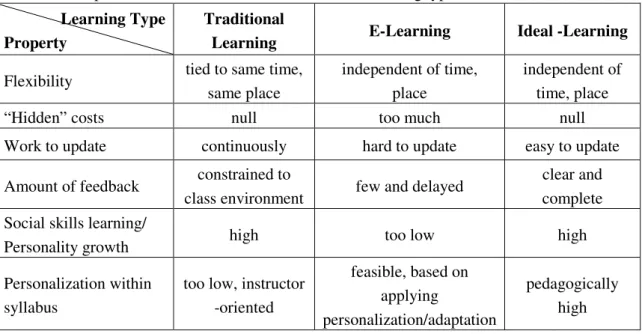
Arguments on both sides of the e-learning debate have their own merit. The most
important ones are discussed in Table 1.
Table 1: Comparison of the most known differences in learning types.
Learning Type Property
Traditional
Learning E-Learning Ideal -Learning
Flexibility tied to same time,
same place
independent of time, place
independent of time, place
“Hidden” costs null too much null
Work to update continuously hard to update easy to update
Amount of feedback constrained to
class environment few and delayed
clear and complete
Social skills learning/
Personality growth high too low high
Personalization within syllabus
too low, instructor -oriented
feasible, based on applying
personalization/adaptation
pedagogically high
- POSITIVE FEATURES
Traditional classroom instruction is inevitably tied to the same time and same place
model for lecture delivery. The main advantage of e-learning is however, that it
significantly increases access to advanced learning sources. The great flexibility of
e-learning courses allows access to higher education for people whose personal
constraints prevent them from enrolling in traditional courses (e.g., part-time students,
continuing education students). Also “asynchronous communication” with other
instructors/students would be possible.
An additional advantage of online courses and e-learning is the possibility for
instructional materials to be shared among different educators and academic institutions.
Evidently, sharing of instructional materials can lead to economies of scale and greater
dissemination of knowledge. Accordingly, by spending less time and cost, learning
objects could be re-targeted and re-used in other domains as well.
The most frequently cited benefit for e-learning in empirical studies is
“cost-savings”[23] [4,16]. This misconception is one of the most widely held beliefs among
proponents of e-learning. Online courses need high preparation time and also an
engaged instructor during course delivery, which would drastically reduce the potential
time savings of prerecorded lectures. Furthermore, using electronic media for
between students and instructors. While it is possible that e-learning courses will
sometimes cost less than their traditional counterparts, considering all of these “hidden
costs”, it is highly unlikely that e-learning will significantly reduce the overall costs of
higher education.
- LIMITATIONS AND DEFICIENCIES
About 75 percent of online learning contents include Information Technology and
software application topics [17]. According to speedy growth of knowledge and
technology, such course materials are subject to rapid obsolescence. The need of cost
and time to update them is inevitably one of the disadvantages of e-learning systems.
As mentioned earlier, current authentication technologies do not allow practical
detection and effective prevention of cheating in final evaluations over the web or
computer-submitted assignments. Furthermore, Internet is the best place to be
anonymous and uncommitted [7], which makes it even more difficult to authenticate
students taking part in final exams and web-based courses. This limitation has obvious
adverse effects on the credibility of educational programs relying exclusively on online
technologies.
“Lack of direct personal interactions between teachers and students” is evidently the
most notable deficiency of current e-learning systems. Many students rely primarily on
direct contact with teaching staff and other learners to absorb course materials
effectively and moreover, to detect their weak points. Most of instructors adjust pace of
course progress and its contents to the feedbacks received from direct interaction with
learners. Thereby, the lack of direct contact afforded by today’s technology makes
e-learning industry pedagogically weaker than traditional instruction.
One of the primary functionalities of educational systems is to prepare learners for
social life. This would be performed via teaching them behavioral skills, training how to
establish social relationships, how to recognize dominant cultural elements and finally
making them both mentally and personally mature. Although these skills are acquired
gradually and unintentionally, in e-learning environments, learners confront “virtual
space” instead of “society”, and have the minimum sociocultural practices of their
community. Thereby, since there is a mutual correlation between social participation
and educational effectiveness, lack of this correlation would have an adverse effect on
both learners’ satisfaction and performance of e-learning systems.
E-learning has yet to be “profitable” in any sense. Due to this belief, about thirty
percent of e-learning managers are thinking to stop their online learning activities [10].
Perhaps the benefits are not seen, because e-learning applications have for the most part
fulfill the potential of technology, there is a strong need to “revision” teaching and
learning from the standpoint of affordances of emerging technology. Two prominent
approaches in this endeavor are “personalization” and “adaptation”, which in spite of
the limitations and deficiencies in e-learning environments, would significantly distinct
e-learning from its traditional counterparts (Table 1). In this way, learners’ satisfaction
and therefore, efficiency of learning systems would drastically increase, however, in
traditional learning/training systems, it would be almost impossible. These concepts are
studied in the following section.
A REVIEW ON PERSONALIZATION / ADAPTATION CONCEPTS
In several application domains, user-adaptive software systems have already proved to
be more effective and/or usable than non-adaptive systems. Also, among the “e”-based
applications, personalization plays a prominent role. Personalized web-based systems
belong to the group of “adaptive hypermedia systems”, of which educational
hypermedia is the most popular application area [8].
Many definitions are available one of the most comprehensive of which perhaps is
as follows [3,5,14]:
“Personalization is the ability to provide content and services that are tailored to individuals based on knowledge of their preferences and behavior”.
Nowadays, confronting the broad range of e-learning users -with very different
prior knowledge of the domain, backgrounds, learning styles, interests and
preferences-is no more possible with the “one-size-fits-all” approach. Accordingly, it would be of
significant importance to propose an educational web-based system with the ability to
adapt intelligently to the goals, tasks, interests, and other features of individuals and
groups of users. In such a system, learners would only receive the content, which is
particularly created for them based on the above mentioned criteria. User modeling can
play an important role in this endeavor. The aim of user modeling phase is to capture
information concerning user characteristics that are considered significant for a
particular application. For example in the case of educational hyper media, being able to
predict future behavior and also recognizing learning preferences of the learners are
such valuable information. There are different methods for modeling users [13] the most
popular ones of which are discussed briefly in the following section.
- OVERLAY MODEL
This model is based on the structural model of the subject domain. The structural
domain model is represented as a network of domain concepts, which are related with
structure of the subject domain. Some systems use a simplified version of the domain
model without any links between the concepts, but the majority of adaptive hypermedia
systems use a more advanced domain model with several types of concepts representing
different kinds of knowledge elements and several kinds of links representing different
kinds of relationships between concepts. In this model, for each concept, some
estimated value of the user’s knowledge level of that concept is stored. This value might
be just a binary value (known–not known), a qualitative measure (good/average/poor),
or a quantitative measure (probability that the user knows the concept). An overlay
model of the user knowledge can also be represented as a set of pairs “concept – value”.
This model is often used for modeling the user in adaptive educational systems.
- STEREOTYPE MODEL
In this model, a set of possible stereotypes exist for each dimension of the user
modeling. A particular user is usually modeled by being assigned to one of these
stereotypes. This model can also be represented as a set of pairs “stereotype-value”,
where the value can be not only “T/F”, but also has some probabilistic value;
representing the probability that the user belongs to the stereotype.
- HYBRID MODEL
However, the best known model is the combination of the two above models. At the
beginning, the stereotype modeling is used to classify a new user and to set initial values
for overlay model, and then the overlay model will be applied.
Personalization systems often require a huge amount of data in order to apply
personalization methods and algorithms. Some of these data can be observed by the
system directly. However, the others may require one or more additional acquisition
steps. The following sub-sections deal with the most important kinds of such data [9,
19].
- USER DATA
User data include information about personal characteristics of the user, which might
be: record data (e.g., name, address, and phone number), geographic data (area code,
city, state and country), user characteristics (e.g., age, sex, education, and disposable
income), registration for information offerings and some other personal data.
- USER KNOWLEDGE
and relationships between concepts with regard to the domain of the application system.
These kinds of data have always been among the most important sources for
personalization algorithms.
USER INTERESTS AND PREFERENCES
Interests and preferences among the users of the same application may vary
enormously. Sometimes information offered to a group of users may not only be of no
interest to another group but may even also be in conflict with their preferences.
Bearing the scope of interests and preferences of the users in mind, particularly in
learning environments, would lead to a smoother interaction with and thereby, increased
learning motivations for the learners. In educational systems, these preferences may
vary from personality traits such as learning styles to some technology-based elements
such as type of the delivery of the learning content.
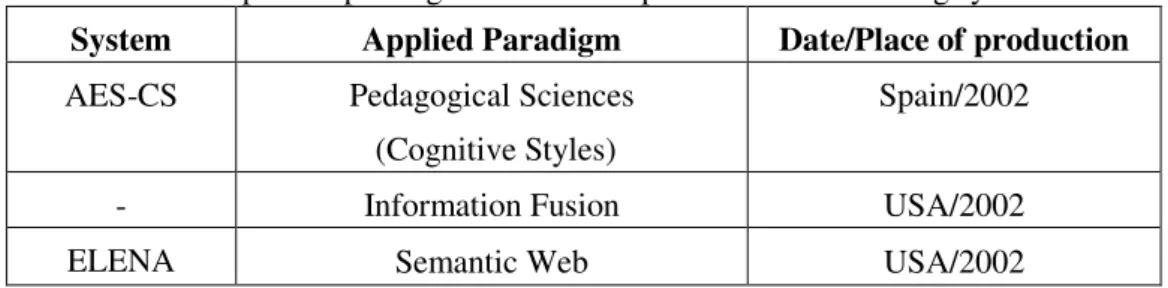
Production of the most current e-learning systems which cover the above concepts
in a way is mainly performed as university projects in research laboratories. In such
environments, paradigms used for applying personalization and/or user modeling
methods vary interestingly based on the application field of the educational system and
the learning approaches. The most important paradigms are shown in Table 2.
Table 2: Most important paradigms in research personalized e-learning systems.
System Applied Paradigm Date/Place of production
AES-CS Pedagogical Sciences
(Cognitive Styles)
Spain/2002
- Information Fusion USA/2002
ELENA Semantic Web USA/2002
- EXPLOITING COGNITIVE STYLES
Cognitive Style is often described as a personality dimension which influences attitudes
and social interaction. In this educational system research [20], Group Embedded
Figures Test (GEFT) is used to identify two distinct groups of learners, one group
includes learners with Field dependent cognitive style and the other one includes Field
independent ones. Personalized learning contents based on the preferences related to the
type of the cognitive style are then delivered to the learner.
- INFORMATION FUSION PARADIGM
order to identify user preferences. To achieve more accurate results, the combination is
performed via a feedback extractor with fusion capability. Personalized information is
delivered to the learners based on collaborative filtering algorithm.
- SEMANTIC WEB TECHNOLOGIES
The main component of the personalization service architecture in this research [6] is
the Personal Learning Assistant Service. This assistant integrates and uses the other
various web services -providing personalization functionality- to find learning
resources, courses, or complete learning paths suitable for a user. The integration is
performed via exploiting semantic web capabilities.
A REVIEW ON AUTHORING TOOLS: DEFINITIONS AND TYPES[12]
The term “authoring tool” is misleading. It can be easily confused with specialized form
of word-processing software for professional writers. Indeed, authoring tools go far
beyond writing and word processing. Among the extended available range of
definitions[2, 13, 21] [12], perhaps the most comprehensive one is as follows: “E-learning
authoring tools enable trainers to integrate an array of media to create professional,
engaging, interactive training content, and some make it possible to re-purpose elements
or learning objects from an existing course for re-use in a new one.” Due to different
approaches in applying authoring tools in e-learning environments, classification of
these tools varies widely in the e-learning industry[6, 11, 21] [11,12]. The most widely used
one includes the following three categories:
- WEB AUTHORING TOOLS
Any e-learning course can be considered a type of website or web page. Thereby, any
tool able to be used for creating a website can be used to create an e-learning course.
HTML Editors such as FrontPage and Dreamweaver[10] and Media and Application
Tools such as Flash[1] and Director[9] are sub-types of Web Authoring Tools [15]. The
majority of packages on the market fall into this category, and they are used to create
most of the e-learning courses currently used.
- COURSE AUTHORING TOOLS - END USER
These programs require practically no knowledge of programming and computer-based
training. These systems are often template or form-based and very easy for someone to
learn and use. Examples include Lectora Publisher[26], Tactic[4] and Web Course
- COURSE AUTHORING TOOLS - ADVANCED
Such authoring tools are specifically designed to create e-learning courses and have
great design flexibility. Tools in this category include Authorware[15], ToolBook[24] and
Quest[18]. Courses created with these tools rival computer games with their intricate and
complex sound and animation sequences.
Table 3 breaks down features and limitations of each of the above categories. There
are also two other types of authoring tools, which are not as powerful as the mentioned
ones, but however promise the new generation of e-learning authoring tools.
POWERPOINT CONVERSION TOOLS
These tools convert documents created in common software such as Microsoft’s Word
or PowerPoint into an online course. Some of these conversion tools simply the
PowerPoint document conversion to a Flash file or other web-enabled formats[7].
Examples include Impatica for PowerPoint[14], PowerConverter[17], and Viewlet
Presenter[25]. Another example is Articulate Presenter[3], which allows adding e-learning
elements such as quizzing and tracking. This is done via an additional menu added to
the PowerPoint software with all the e-learning and conversion features.
These tools have the shortest learning curve and development time. The downside is
that the final product may really take more the form of an online presentation than
online learning.
SIMULATION AUTHORING TOOLS
Simulation software is not new, but what is new is the application of simulation
technology to the area of e-learning. It has been estimated that by the end of 2006, 70
percent of all off-the-shelf as well as custom e-learning content will include some
application of simulations [4,8]. About 75 percent of e-learning content covers IT or
software application topics. Such training is best served by simulation programs, which
can capture screenshots and then play them back to replicate the behaviors of particular
software. Dazzlermax[8], RoboDemo[16] (the last version is called Captivate),
Table 3: Comparison table for different classes of authoring tools.
Class of Authoring Tool Disadvantages Advantages
Web Authoring
multi – purpose, not designed specifically for
e-learning
widely used, stable marketplace
Course Authoring – End User
locked into its limited features
easy to use and learn, rapid proto-typing
Course Authoring - Advanced
need of programming knowledge, steep learning
curve
extended creativity latitude, high flexibility
COMPARISON OF THE CURRENT MOST POPULAR AUTHORING TOOLS
Currently available e-learning authoring tools offer a variety of features and make it
even more complicated for the presidents of the learning industry, to make the most
proper decision in such an extended spectrum. One constraint on those decisions will be
what the authoring tool can do. Even before evaluating the available tools, the context
of the training/learning should be considered: why, how, and in what circumstances will
it be provided? Some tools will match this context better than others. The current
authoring tools support a variety of media and file types such as text, graphics, video,
and audio. Most include assessment and test creation features. To find the authoring tool
that works best for the organization and fits best into its pedagogical approaches, the
functionality which is very important to the organization should be determined. By
considering carefully the available resources and the goals of the specific learning event
of the organization, the right tool(s) could be chosen. The current most popular
authoring tools can be comparatively studied based on features and properties of each
type of authoring tools, considering the most common important criteria in choosing
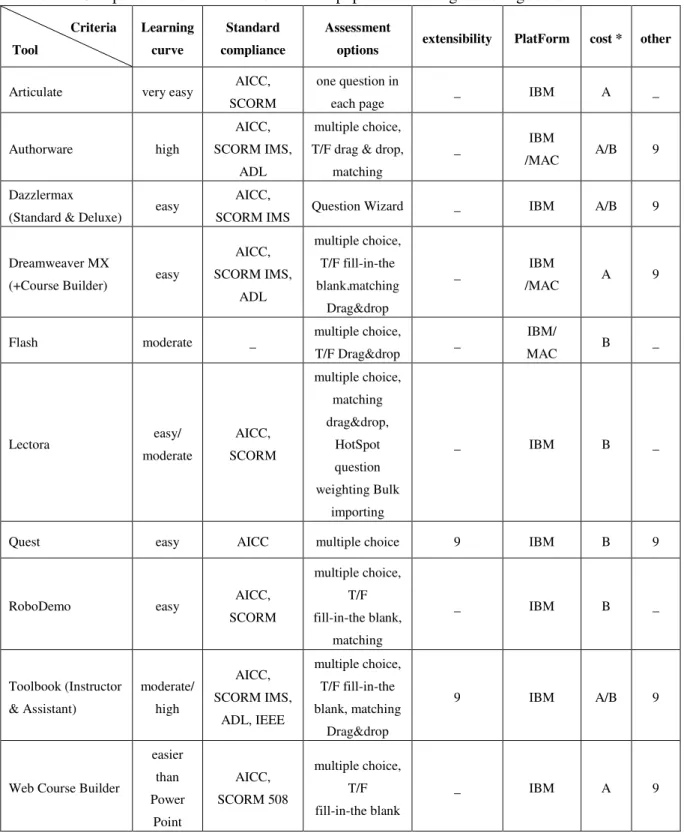
between them (Table 4) .The following sub-sections are intended to discuss these
Table 4: Comparison table for the most current popular e-learning authoring tools. Criteria Tool Learning curve Standard compliance Assessment
options extensibility PlatForm cost * other
Articulate very easy AICC, SCORM
one question in
each page _ IBM A _
Authorware high
AICC, SCORM IMS,
ADL
multiple choice, T/F drag & drop,
matching
_ IBM
/MAC A/B 9
Dazzlermax
(Standard & Deluxe) easy
AICC,
SCORM IMS Question Wizard _ IBM A/B 9
Dreamweaver MX
(+Course Builder) easy
AICC, SCORM IMS,
ADL
multiple choice, T/F fill-in-the blankmatching
Drag&drop
_ IBM
/MAC A 9
Flash moderate _ multiple choice,
T/F Drag&drop _
IBM/
MAC B _
Lectora easy/
moderate AICC, SCORM multiple choice, matching drag&drop, HotSpot question weighting Bulk importing
_ IBM B _
Quest easy AICC multiple choice 9 IBM B 9
RoboDemo easy AICC,
SCORM
multiple choice, T/F fill-in-the blank,
matching
_ IBM B _
Toolbook (Instructor & Assistant) moderate/ high AICC, SCORM IMS, ADL, IEEE multiple choice, T/F fill-in-the blank, matching Drag&drop
9 IBM A/B 9
Web Course Builder
easier than Power Point AICC, SCORM 508 multiple choice, T/F fill-in-the blank
_ IBM A 9
(*: A: up to approximately 1000 US$ B: from US$ 1000 to US$ 5000)
- EASE-OF-USE VS. CREATIVE FREEDOM
After reviewing examples of courses built by several authoring tools, obvious
course developer, they are also the result of limitations in the authoring tool. Hence, the
trade-off should be set and achieved carefully.
As the authoring tool becomes more advanced and powerful, it would need more
programming and computer knowledge as well (Table 4). The level of required
knowledge may vary from clicking a button (Articulate) to programming skills
(Authorware, ToolBook and Quest).
- INTEROPERABILITY AND STANDARDS
The ability of an authoring tool to work with other e-learning software and systems is
referred to as “interoperability”. Successful interoperability is the result of software
compliance to technology standards. E-learning community has several sets of
technology standards which are currently being developed. The ultimate vision is to
have interoperability throughout the entire e-learning market. Until then, the e-learning
community is fragmented into different systems adhering to various standards. The four
most common standards are Aviation Industry Computer-based Training Committee
(AICC), Sharable Content Object Reference Model (SCORM), IMS Global Learning
Consortium, and Microsoft LRN[22] [5,21]. Authoring tools differ in the standards they
support. If the organization currently uses a learning management system (LMS), the
selected authoring tool should be compatible with the LMS. Although almost all of the
studied tools support some types of standards (Table 4), the only tool which supports
“Section 508”, is Web Course Builder. Section 508, is a federal law for accessibility of
electronic communications to people with disabilities. If a course is Section 508
compliant, it meets the guidelines for people with visual, auditory, or motor disabilities.
- ASSESSMENT AND QUESTION TYPES
The trainers developing courses are always interested in the different types of
assessment questions that could be created with an authoring tool. These types include
fill-in-the-blank, matching, true or false, drag and drop or other interactive options.
Considering the favorite question type of the developer in selection of the authoring tool
would certainly result in a more comprehensive and effective course.
Among the studied tools, Lectora places in the first rank of supporting various
question types. Lectora includes the ability to easily build “hot spot” questions which
enable an author to tie a question to an object. This question type is ideal for identifying
product parts, finding locations, and much more. Using Lectora, authors can also add
weight to questions. Bulk importing of questions as an already existing file stored in
Dazzlermax -classified as a simulation authoring tool- provides question wizard. This
wizard facilitates rapid production of standard questions. However, other tools based on
the level of their performance cover different range of questions (Table 4).
- EXTENSIBILITY
Some trainers need to customize the software for specific purposes. The ability to
customize software is called “extensibility”. If the organization requires some
customization to the authoring software, certainly an open-source code tool should be
chosen, which allows a skilled computer programmer to customize software to meet the
trainer’s needs.
According to Table 4, only Quest and Toolbook Instructor have the ability to be
extended. Quest builds a script called Quest C which provides a powerful interfacing
capability to the C language and to Windows DLLs. Also it includes an interactive
debugger that traces all objects and C programs used within a course and helps
developers isolate and correct bugs. Toolbook Instructor has a powerful programming
language called OpenScript which provides considerable flexibility. It also includes an
Actions Editor which is a visual programming tool. It allows developers to add
sophisticated functionality to their courseware without using a programming language.
- COST
Prices of authoring tools vary from a few hundred dollars to tens of thousands of
dollars. On average, a cost between US$ 1,500 and US$ 2,500 might be paid. Cost is
another trade-off which should be considered along with needs of the organization and
expectations of the authoring tool. The more powerful an authoring tool is, the higher its
price would be (Table 4). Notable in this case is that, Authorware is presented lower
than US$1000 for educational users. CourseBuilder is also downloadable for free as an
extension for users of Dreamweaver[2].
- REQUIRED PLATFORM
Due to word wide welcome to IBM PC platforms, courses which are created by any of
the above mentioned tools could be run and delivered on IMP compatible PCs.
Dreamweaver and Authorware -and also Flash, with limited features- are the only tools
which supporting course creation on Macintosh PCs as well. This would significantly
- OTHER FEATURES AND CAPABILITIES
Some of these authoring tools have other outstanding features. Both Quest and
Toolbook Instructor provide a variety of techniques for analyzing answers to questions,
scoring and providing feedbacks. “Media Library” is one of the prominent features of
Authorware, which would be of great help in producing multilingual courses. Using
“predictive pre-load” option included in DazzlerMax Deluxe, the performance of the
training would not unnecessarily be degraded by delays in loading, rather DazzlerMax
would work it out that which files should be pre-loaded as the course progresses.
CONCLUSIONS AND FUTURE STUDY
After years of grandiose enthusiasm for E-learning, it seems that now students are much
more likely to focus on “learning” than “e-learning”. “E” is just an enabler which is
supposed to improve the quality, increase access and enhance the flexibility of learning
programs. In addition, different personality traits, learning motivations and even cultural
beliefs obviously exist among the wide range of e-learning users. These characteristics
could simply be in conflict with each other. Fulfilling the needs of all these users would
only be possible by invoking potentials of new technologies such as personalization and
adaptation approaches along with mentioned parameters. However, realization of such a
thing would practically be impossible in traditional learning environments. In this way,
e-learning would be a suitable substitution for traditional learning, only when personal
and individual needs are to be fulfilled. Accordingly, in the span of education, the focus
is not only on “learning”, but also on social, behavioral and pedagogical aspects.
Sociocultural practice with the community is one of the major functionalities of learning
systems. However, in web-based learning environments such social skills are hardly
realized. Thereby, it would be better to accompany e-learning systems with traditional
ones. In other words, e-learning would play a complimentary role rather than
substitution for traditional learning environments. Whichever the tool or combination of
tools is chosen, it should be borne in mind that the right tool can make the organization
efficient and productive. The wrong tool could cost countless hours on a project and
leaving with little or nothing to show the effort. As long as e-learning is based on good
instructional design, the interactivity that authoring tools are capable of producing, can
enhance the learner’s experience and though improve the educational performance …
Future work will involve exploring further the role of personalization/ adaptation in
learning environments, particularly “localized” ones. It will involve determining the
major cultural, social, and pedagogical factors and learning motivations among Iranian
satisfaction and which properties should be considered as the most effective ones in the
modeling of the users. Only in the case of implementation and evaluation, the actual
value of these new opportunities would be verified. Also, studying “Blended learning”
as a new paradigm in this field would contribute to further suggestive understandings.
ENDNOTES
1. «Adobe Flash Player», http://www.adobe.com/products/flashplayer/,Retrieved May,
2006.
2. «An Overview of authoring systems and learning management systems available in
the UK»; PeakDean Interactive Ltd., http://www.peakdean.co.uk, Retrieved March
22, 2006.
3. «Articulate Presenter», http://www.articulate.com/presenter.html, Retrieved May,
2006.
4. «Avec l’editeur Tactic 6», http://www.eduperformance.com/t6essai.html,Retrieved
May, 2006.
5. «Camtasia Studio Screen Recording and Presentation», http://www.techsmith.
com/camtasia.asp, Retrieved May, 2006.
6. «Checking out», http://www.fastrakconsulting.co.uk, Retrieved Feb 2, 2006.
7. «Comparison of PowerPoint to Flash converters, WYSIWYG tools, and ReadyGo
WCB», http://www.readygo.com/web01/04web01.htm, Retrieved April 26, 2005.
8. «Dazzlermax Deluxe 5.5 Release Notes», Dazzlermax Ltd, http://www.dazzlersoft.
com/dazzlermax55.pdf , Retrieved May, 2006.
9. «Director MX 2004», http://www.adobe.com/products/director/ ,Retrieved December
11, 2006.
10. «Dreamweaver 8», http://www.adobe.com/products/dreamweaver/,Retrieved May,
2006.
11. «E-Learning Authoring Tools: Product Reviews», Bersin & Associates, http://
www.bersin.com, Retrieved Feb 2006.
12. «E-Learning Technologies», http://www.intranetstoday.com, Retrieved December
11, 2005.
13. «Glossary of E-Learning Terms», http://www.brandon-hall.com, Retrieved
September 30, 2005
14. «Impatica for PowerPoint», http://www.impatica.com/imp4ppt/index.html,Retrieved
May, 2006.
15. «Macromedia Authorware 7», http://www.adobe.com/products/authorware/,
Retrieved May 2006.
May, 2006.
17. «Power Converter», http://www.presentationpro.com/products/Power converter.
asp,Retrieved May, 2006.
18. «Quest 7 Getting Started Tutorial», http://www.allencomm.com/download/files/
whitepapers/q7tutor.pdf,Retrieved May, 2006.
19. «RapidBuilder v4.0 Deluxe», http://www.xstreamsoftware.com/RBdeluxe4.0_
description.htm,Retrieved May, 2006.
20. «Ready Go Web Course Builder», http://www.readygo.com,Retrieved May, 2006.
21. «Section 4 from upcoming book, e-Learning: From Design to Execution», Alcorn,
Ward, & Partners, Inc., http://www.alcon-ward.com, Retrieved March 10, 2006.
22. «Sharable Content Object Reference Model (SCORM) version 2004. Advanced
Distributed Learning (2004).
23. «The DNA of Elearning», http://www.internettime.com, Retrieved March 22, 2006. 24. «Toolbook (Assistant and Instructor)», http://www.toolbook.com/index.php,
Retrieved May, 2005.
25. «Viewlet Builder», http://www.qarbon.com/presentation-software/viewletbuilder/,
May, 2006.
26. «What’s New Lectora», http://www.trivantis.com/authoring_tools_new_for_2005.
html,Retrieved May, 2006.
REFERENCES
[1] Baker, K., E-Learning: Myths and Realities for the IT Professional. Technology
Transfer Inc., 2000.
[2] Brusilovsky, P., “Adaptive Hypermedia.” User Modeling and User-Adapted
Interaction, Kluwer Academic Publishers, Vol. 11, pp. 87-110, 2000.
[3] Brusilovsky, P., “From Adaptive Hypermedia to the Adaptive Web.” Mensch &
Computer: Interaction in Bewegung, pp. 21-24, 2003.
[4] Buy, U., Debunking Some Common Misconceptions about E-Learning. USA:
University of Illinois, 2001.
[5] Carchiolo, V., et al., “Course Personalization in E-Learning Environment.” The 3rd
IEEE International Conference on Advanced Learning Technologies (ICALT’03),
2003.
[6] Dolog, P. and Sintek, M., “Personalization in Distributed E-Learning
Environments.” ACM, pp. 17-22, 2004.
[7] Dreyfus, H., “How Far is Distance Learning from Education?” Bulletin of Science
Technology Society, Vol. 21, pp. 165-174, 2001.
Computer Science, Vol. 10, No. 1, 2004.
[9] Fink, J. and Kobsa, A., “A Review and Analysis of Commercial User Modeling
Servers for Personalization on the World Wide Web.” User Modeling and
User-Adapted Interaction, Vol.10, pp. 209-249, 2000.
[10] Gibson, D., New Directions in E-Learning: Personalization, Simulation and
Program Assessment. National Institute for Community Innovation, 2002.
[11] Harris, J., “An Introduction to Authoring Tools.” ASTD's Learning Circuits Online
Magazine, 2002.
[12] Holden, G., “Instructional Design: Choosing the Proper Authoring Tool.” Intercom
Online, 2004.
[13] Kobsa, A., “Generic User Modeling Systems.” User Modeling and User-Adapted
Interaction, Kluwer Academic Publishers, Vol. 11, pp. 46-93, 2001.
[14] Li, X. and Chang, Sh., A Personalized E-Learning System Based on User Profile
Constructed Using Information Fusion. USA: University of Pitssburgh, 2004.
[15] Nouri, S., “Section 6: Islamic Republic of Iran.” Report of the APO Seminar on
Multimedia for Productivity Promotion and Enhancement (with Special Focus on
E-Learning), China, 2002.
[16] Oblinger, D. and Hawkins, B., “The Myth about E-Learning.” Educause Magazine,
Vol. 40, July/August, pp. 13-16, 2005.
[17] Paris, M., “Simulation Authoring Tools for Interactive E-Learning Courseware
Development.” Online Journal of the Higher Education Academy, UK, 2003.
[18] Siadaty, M. and Taghiyareh, F., “E-Learning: Complementary or Substitute.”
Electronical Learning Conference (in Persian), Zanjan University, Zanjan, Iran,
May, pp. 24-25, 2006.
[19] Treiblmaier, H., et al., Evaluating Personalization and Customization from an
Ethical Point of View: An Empirical Study. Vienna University of Economics and
Business Administration Austria, IEEE, 2004.
[20] Triantafillou, E., et al., “AES-CS: Adaptive Educational Systems Based on
Cognitiv Styles.” Proceedings of AH 2002 Workshop on Adaptive Systems for
Web-Based Education, 2002.
[21] Wagner, E. D., “E-Learning: Where Cognitive Strategies, Knowledge
Management, and Information Technology Converge.” Learning Without Limits,