Associate Study Guide, 5th Edition
(640-801)
Todd Lammle
Chapter 2: Internet Protocols
Copyright © 2004 SYBEX Inc., 1151 Marina Village Parkway, Alameda, CA 94501. World rights reserved. No part of this publication may be stored in a retrieval system, transmitted, or reproduced in any way, including but not limited to photocopy, photograph, magnetic or other record, without the prior agreement and written permission of the publisher.
ISBN: 0-7821-4391-1
SYBEX and the SYBEX logo are either registered trademarks or trademarks of SYBEX Inc. in the USA and other countries. TRADEMARKS: Sybex has attempted throughout this book to distinguish proprietary trademarks from descriptive terms by following the capitalization style used by the manufacturer. Copyrights and trademarks of all products and services listed or described herein are property of their respective owners and companies. All rules and laws pertaining to said copyrights and trademarks are inferred. This document may contain images, text, trademarks, logos, and/or other material owned by third parties. All rights reserved. Such material may not be copied, distributed, transmitted, or stored without the express, prior, written consent of the owner.
The author and publisher have made their best efforts to prepare this book, and the content is based upon final release software whenever possible. Portions of the manuscript may be based upon pre-release versions supplied by software manufacturers. The author and the publisher make no representation or warranties of any kind with regard to the completeness or accuracy of the contents herein and accept no liability of any kind including but not limited to performance, merchantability, fitness for any particular purpose, or any losses or damages of any kind caused or alleged to be caused directly or indirectly from this book.
Sybex Inc.
1151 Marina Village Parkway Alameda, CA 94501 U.S.A.
Phone: 510-523-8233 www.sybex.com
Chapter
2
Internet Protocols
THE CCNA EXAM TOPICS COVERED IN THIS
CHAPTER INCLUDE THE FOLLOWING:
TECHNOLOGY
Evaluate TCP/IP communication process and its associated protocols
The Transmission Control Protocol/Internet Protocol (TCP/IP)
suite was created by the Department of Defense (DoD) to ensure and preserve data integrity, as well as maintain communications in the event of catastrophic war. So it follows that if designed and implemented correctly, a TCP/IP network can be a truly dependable and resilient one. In this chapter, I’ll cover the protocols of TCP/IP, and throughout this book, you’ll learn how to create a marvelous TCP/IP network— using Cisco routers, of course.
We’ll begin by taking a look at the DoD’s version of TCP/IP and then compare this version and its protocols with the OSI reference model discussed in Chapter 1, “Internetworking.”
Once you understand the protocols used at the various levels of the DoD model, you’ll learn how to convert between a binary number, hexadecimal number, and decimal number. Then I’ll cover IP addressing and the different classes of addresses used in networks today.
Subnetting will be covered in Chapter 3, “IP Subnetting and Variable Length Subnet Masks (VLSMs).”
Because broadcast addresses are so important to understanding IP addressing, subnetting, and VLSM, an understanding of the various flavors of broadcast addresses is critical. I’ll cover the various types of broadcast addresses that you just must know. Lastly, I’ll provide an intro-duction to Network Address Translation (NAT) and how Cisco uses NAT.
TCP/IP and the DoD Model
The DoD model is basically a condensed version of the OSI model—it’s composed of four, instead of seven, layers:
Process/Application layer Host-to-Host layer Internet layer
Network Access layer
Figure 2.1 shows a comparison of the DoD model and the OSI reference model. As you can see, the two are similar in concept, but each has a different number of layers with dif-ferent names.
TCP/IP and the DoD Model 61
F I G U R E 2 . 1 The DoD and OSI models
When talking about the different protocols in the IP stack, the layers of the OSI and DoD models are interchangeable. In other words, the Internet layer and the Network layer describe the same thing, as do the Host-to-Host layer and the Transport layer.
A vast array of protocols combine at the DoD model’s Process/Application layer to integrate the various activities and duties spanning the focus of the OSI’s corresponding top three layers (Application, Presentation, and Session). We’ll be looking closely at those protocols in the next part of this chapter. The Process/Application layer defines protocols for node-to-node applica-tion communicaapplica-tion and also controls user-interface specificaapplica-tions.
The Host-to-Host layer parallels the functions of the OSI’s Transport layer, defining protocols for setting up the level of transmission service for applications. It tackles issues such as creating reliable end-to-end communication and ensuring the error-free delivery of data. It handles packet sequencing and maintains data integrity.
The Internet layer corresponds to the OSI’s Network layer, designating the protocols relating to the logical transmission of packets over the entire network. It takes care of the addressing of hosts by giving them an IP (Internet Protocol) address, and it handles the routing of packets among multiple networks.
At the bottom of the DoD model, the Network Access layer monitors the data exchange between the host and the network. The equivalent of the Data Link and Physical layers of the OSI model, the Network Access layer oversees hardware addressing and defines protocols for the physical transmission of data.
The DoD and OSI models are alike in design and concept and have similar functions in similar layers. Figure 2.2 shows the TCP/IP protocol suite and how its protocols relate to the DoD model layers.
62 Chapter 2 Internet Protocols
F I G U R E 2 . 2 The TCP/IP protocol suite
In the following sections, we will look at the different protocols in more detail, starting with the Process/Application layer protocols.
The Process/Application Layer Protocols
In this section, I’ll describe the different applications and services typically used in IP networks. The different protocols and applications covered in this section include the following:
Telnet FTP TFTP NFS SMTP LPD X Window SNMP DNS DHCP/BootP
TCP/IP and the DoD Model 63
Telnet
Telnet is the chameleon of protocols—its specialty is terminal emulation. It allows a user on a remote client machine, called the Telnet client, to access the resources of another machine, the Telnet server. Telnet achieves this by pulling a fast one on the Telnet server and making the client machine appear as though it were a terminal directly attached to the local network. This projection is actually a software image—a virtual terminal that can interact with the chosen remote host.
These emulated terminals are of the text-mode type and can execute refined procedures like displaying menus that give users the opportunity to choose options from them and access the applications on the duped server. Users begin a Telnet session by running the Telnet client soft-ware and then logging into the Telnet server.
The name Telnet comes from “telephone network,” which is how most Telnet sessions used to occur.
File Transfer Protocol (FTP)
File Transfer Protocol (FTP) is the protocol that actually lets us transfer files, and it can accom-plish this between any two machines using it. But FTP isn’t just a protocol; it’s also a program. Operating as a protocol, FTP is used by applications. As a program, it’s employed by users to perform file tasks by hand. FTP also allows for access to both directories and files and can accomplish certain types of directory operations, such as relocating into different ones. FTP teams up with Telnet to transparently log you into the FTP server and then provides for the transfer of files.
Accessing a host through FTP is only the first step, though. Users must then be subjected to an authentication login that’s probably secured with passwords and usernames implemented by system administrators to restrict access. But you can get around this somewhat by adopting the username “anonymous”—though what you’ll gain access to will be limited.
Even when employed by users manually as a program, FTP’s functions are limited to listing and manipulating directories, typing file contents, and copying files between hosts. It can’t exe-cute remote files as programs.
Trivial File Transfer Protocol (TFTP)
Trivial File Transfer Protocol (TFTP) is the stripped-down, stock version of FTP, but it’s the protocol of choice if you know exactly what you want and where to find it, plus it’s so easy to use and it’s fast too! It doesn’t give you the abundance of functions that FTP does, though. TFTP has no directory-browsing abilities; it can do nothing but send and receive files. This compact little protocol also skimps in the data department, sending much smaller blocks of data than FTP, and there’s no authentication as with FTP, so it’s insecure. Few sites support it because of the inherent security risks.
64 Chapter 2 Internet Protocols
Network File System (NFS)
Network File System (NFS) is a jewel of a protocol specializing in file sharing. It allows two dif-ferent types of file systems to interoperate. It works like this: Suppose the NFS server software is running on an NT server, and the NFS client software is running on a Unix host. NFS allows for a portion of the RAM on the NT server to transparently store Unix files, which can, in turn, be used by Unix users. Even though the NT file system and Unix file system are unlike—they have different case sensitivity, filename lengths, security, and so on—both Unix users and NT users can access that same file with their normal file systems, in their normal way.
Simple Mail Transfer Protocol (SMTP)
Simple Mail Transfer Protocol (SMTP), answering our ubiquitous call to e-mail, uses a spooled, or queued, method of mail delivery. Once a message has been sent to a destination, the message is spooled to a device—usually a disk. The server software at the destination posts a vigil, regularly checking this queue for messages. When it detects them, it proceeds to deliver them to their des-tination. SMTP is used to send mail; POP3 is used to receive mail.
Line Printer Daemon (LPD)
The Line Printer Daemon (LPD) protocol is designed for printer sharing. The LPD, along with the LPR (Line Printer) program, allows print jobs to be spooled and sent to the network’s printers using TCP/IP.
X Window
Designed for client-server operations, X Window defines a protocol for writing client/server appli-cations based on a graphical user interface (GUI). The idea is to allow a program, called a client, to run on one computer and have it display things through a window server on another computer. When should you use FTP?
Your San Francisco office needs a 50MB file e-mailed to them right away. What do you do? Most e-mail servers would reject the e-mail because they have size limits. Even if there’s no size limit on the server, it still would take a while to send this big file to SF. FTP to the rescue! If you need to give someone a large file or you need to get a large file from someone, FTP is a nice choice. Smaller files (less than 5MB) can just be sent via e-mail if you have the bandwidth of DSL or a cable modem. However, most ISPs don’t allow files larger than 5MB to be e-mailed, so FTP is an option you should consider if you are in need of sending and receiving large files (who isn’t these days?). To do this, you will need to set up an FTP server on the Internet so that the files can be shared. Besides, FTP is faster than e-mail, which is another reason to use FTP for sending or receiving large files. In addition, because it uses TCP and is connection-oriented, if the session dies, FTP can start up where it left off. Try that with your e-mail client!
TCP/IP and the DoD Model 65
Simple Network Management Protocol (SNMP)
Simple Network Management Protocol (SNMP) collects and manipulates this valuable net-work information. It gathers data by polling the devices on the netnet-work from a management station at fixed or random intervals, requiring them to disclose certain information. When all is well, SNMP receives something called a baseline—a report delimiting the operational traits of a healthy network. This protocol can also stand as a watchdog over the network, quickly notifying managers of any sudden turn of events. These network watchdogs are called agents, and when aberrations occur, agents send an alert called a trap to the man-agement station.
Domain Name Service (DNS)
Domain Name Service (DNS) resolves hostnames—specifically, Internet names, such as
www.routersim.com. You don’t have to use DNS; you can just type in the IP address of any device you want to communicate with. An IP address identifies hosts on a network and the Internet as well. However, DNS was designed to make our lives easier. Think about this: What would happen if you wanted to move your web page to a different service provider? The IP address would change and no one would know what the new one was. DNS allows you to use a domain name to specify an IP address. You can change the IP address as often as you want, and no one will know the difference.
DNS is used to resolve a fully qualified domain name (FQDN)—for example, www.lammle.com
or todd.lammle.com. An FQDN is a hierarchy that can logically locate a system based on its domain identifier.
If you want to resolve the name “todd,” you either must type in the FQDN of todd.lammle.com
or have a device such as a PC or router add the suffix for you. For example, on a Cisco router, you can use the command ipdomain-namelammle.com to append each request with the lammle.com
domain. If you don’t do that, you’ll have to type in the FQDN to get DNS to resolve the name.
An important thing to remember about DNS is that if you can ping a device with an IP address but cannot use its FQDN, then you might have some type of DNS configuration failure.
Dynamic Host Configuration Protocol (DHCP)/BootP
(Bootstrap Protocol)
Dynamic Host Configuration Protocol (DHCP) gives IP addresses to hosts. It allows easier administration and works well in small-to-even-very-large network environments. All types of hardware can be used as a DHCP server, including a Cisco router.
DHCP differs from BootP in that BootP gives an IP address to a host, but the host’s hardware address must be entered manually in a BootP table. You can think of DHCP as a dynamic BootP. But remember that BootP is also used to send an operating system that a host can boot from. DHCP can’t do that.
66 Chapter 2 Internet Protocols
But there is a lot of information a DHCP server can provide to a host when the host is requesting an IP address from the DHCP server. Here’s a list of the information a DHCP server can provide:
IP address Subnet mask
Domain name
Default gateway (routers)
DNS
WINS information
A DHCP server can give us even more information than this, but the items in that list are the most common.
A client that sends out a DHCP Discover message in order to receive an IP address sends out a broadcast at both layer 2 and layer 3. The layer 2 broadcast is all “Fs” in hex, which looks like this: FF:FF:FF:FF:FF:FF. The layer 3 broadcast is 255.255.255.255, which means all net-works and all hosts. DHCP is connectionless, which means it uses User Datagram Protocol (UDP) at the Transport layer, also known as the Host-to-Host layer—the layer that we’ll talk about next.
The Host-to-Host Layer Protocols
The main purpose of the Host-to-Host layer is to shield the upper-layer applications from the complexities of the network. This layer says to the upper layer, “Just give me your data stream, with any instructions, and I’ll begin the process of getting your information ready to send.”
The following sections describe the two protocols at this layer:
Transmission Control Protocol (TCP) User Datagram Protocol (UDP)
In addition, we’ll look at some of the key host-to-host protocol concepts, as well as the port numbers.
Remember: this is still considered layer 4, and Cisco really likes the way it can use acknowledgments, sequencing, and flow control.
Transmission Control Protocol (TCP)
Transmission Control Protocol (TCP) takes large blocks of information from an application and breaks them into segments. It numbers and sequences each segment so that the destination’s TCP protocol can put the segments back into the order the application intended. After these seg-ments are sent, TCP (on the transmitting host) waits for an acknowledgment of the receiving end’s TCP virtual circuit session, retransmitting those that aren’t acknowledged.
TCP/IP and the DoD Model 67
Before a transmitting host starts to send segments down the model, the sender’s TCP proto-col contacts the destination’s TCP protoproto-col to establish a connection. What is created is known as a virtual circuit. This type of communication is called connection-oriented. During this initial handshake, the two TCP layers also agree on the amount of information that’s going to be sent before the recipient’s TCP sends back an acknowledgment. With everything agreed upon in advance, the path is paved for reliable communication to take place.
TCP is a full-duplex, connection-oriented, reliable, and accurate protocol, but establishing all these terms and conditions, in addition to error checking, is no small task. TCP is very com-plicated and, not surprisingly, costly in terms of network overhead. And since today’s networks are much more reliable than those of yore, this added reliability is often unnecessary.
TCP Segment Format
Since the upper layers just send a data stream to the protocols in the Transport layers, I’ll dem-onstrate how TCP segments a data stream and prepares it for the Internet layer. The Internet layer then routes the segments as packets through an internetwork. The segments are handed to the receiving host’s Host-to-Host layer protocol, which rebuilds the data stream to hand to the upper-layer applications or protocols.
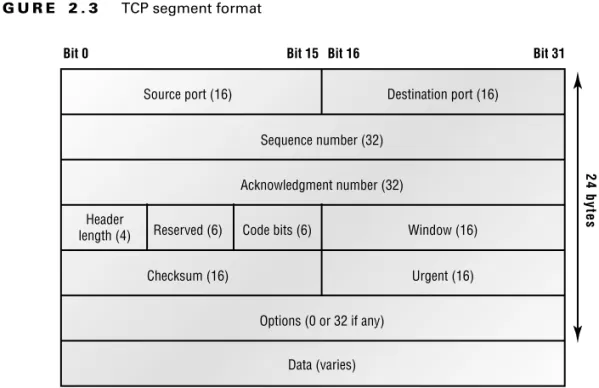
Figure 2.3 shows the TCP segment format. The figure shows the different fields within the TCP header.
The TCP header is 20 bytes long, or up to 24 bytes with options. You need to understand what each field in the TCP segment is. The TCP segment contains the following fields:
Source port The port number of the application on the host sending the data. (Port numbers
will be explained a little later in this section.) F I G U R E 2 . 3 TCP segment format
Bit 0 Bit 15
Source port (16) Destination port (16)
Window (16) Urgent (16) Code bits (6) Reserved (6) Checksum (16) Header length (4) Sequence number (32) Acknowledgment number (32) Options (0 or 32 if any) Data (varies) Bit 16 Bit 31 24 bytes
Destination port The port number of the application requested on the destination host.
Sequence number Puts the data back in the correct order or retransmits missing or damaged
data, a process called sequencing.
Acknowledgment number Defines which TCP octet is expected next.
Header length The number of 32-bit words in the TCP header. This indicates where the data
begins. The TCP header (even one including options) is an integral number of 32 bits in length.
Reserved Always set to zero.
Code bits Control functions used to set up and terminate a session.
Window The window size the sender is willing to accept, in octets.
Checksum The cyclic redundancy check (CRC), because TCP doesn’t trust the lower layers
and checks everything. The CRC checks the header and data fields.
Urgent A valid field only if the Urgent pointer in the code bits is set. If so, this value indicates
the offset from the current sequence number, in octets, where the first segment of non-urgent data begins.
Options May be 0 or a multiple of 32 bits, if any. What this means is that no options have to be
present (option size of 0). However, if any options are used that do not cause the option field to total a multiple of 32 bits, padding of 0s must be used to make sure the data begins on a 32-bit boundary. Data Handed down to the TCP protocol at the Transport layer, which includes the upper-layer headers.
Let’s take a look at a TCP segment copied from a network analyzer:
TCP - Transport Control Protocol Source Port: 5973 Destination Port: 23 Sequence Number: 1456389907 Ack Number: 1242056456 Offset: 5 Reserved: %000000 Code: %011000 Ack is valid Push Request Window: 61320 Checksum: 0x61a6 Urgent Pointer: 0 No TCP Options TCP Data Area: vL.5.+.5.+.5.+.5 76 4c 19 35 11 2b 19 35 11 2b 19 35 11 2b 19 35 +. 11 2b 19
Did you notice that everything I talked about above is in the segment? As you can see from the number of fields in the header, TCP creates a lot of overhead. Application developers may opt for efficiency over reliability to save overhead, so User Datagram Protocol was also defined at the Transport layer as an alternative.
User Datagram Protocol (UDP)
If you were to compare User Datagram Protocol (UDP) with TCP, the former is basically the scaled-down economy model that’s sometimes referred to as a thin protocol. Like a thin person on a park bench, a thin protocol doesn’t take up a lot of room—or in this case, much bandwidth on a network.
UDP doesn’t offer all the bells and whistles of TCP either, but it does do a fabulous job of transporting information that doesn’t require reliable delivery—and it does so using far fewer network resources. (UDP is covered thoroughly in Request for Comments 768.)
The Requests for Comments (RFCs) form a series of notes, started in 1969, about the Internet (originally the ARPAnet). The notes discuss many aspects of computer communication, focusing on networking protocols, procedures, pro-grams, and concepts but also including meeting notes, opinion, and some-times humor.
There are some situations where it would definitely be wise for developers to opt for UDP rather than TCP. Remember the watchdog SNMP up there at the Process/Application layer? SNMP monitors the network, sending intermittent messages and a fairly steady flow of status updates and alerts, especially when running on a large network. The cost in overhead to estab-lish, maintain, and close a TCP connection for each one of those little messages would reduce what would be an otherwise healthy, efficient network to a dammed-up bog in no time!
Another circumstance calling for UDP over TCP is when reliability is already handled at the Process/Application layer. Network File System (NFS) handles its own reliability issues, making the use of TCP both impractical and redundant. But ultimately, it’s up to the application devel-oper who decides whether to use UDP or TCP, not the user who wants to transfer data faster. UDP does not sequence the segments and does not care in which order the segments arrive at the destination. But after that, UDP sends the segments off and forgets about them. It doesn’t fol-low through, check up on them, or even alfol-low for an acknowledgment of safe arrival—complete abandonment. Because of this, it’s referred to as an unreliable protocol. This does not mean that UDP is ineffective, only that it doesn’t handle issues of reliability.
Further, UDP doesn’t create a virtual circuit, nor does it contact the destination before deliv-ering information to it. Because of this, it’s also considered a connectionless protocol. Since UDP assumes that the application will use its own reliability method, it doesn’t use any. This gives an application developer a choice when running the Internet Protocol stack: TCP for reli-ability or UDP for faster transfers.
So if you’re using Voice over IP (VoIP), for example, you really don’t want to use UDP, because if the segments arrive out of order (very common in IP networks), they’ll just pass the segments up to the next OSI (DoD) layer in whatever order they’re received, resulting in some
seriously garbled data. On the other hand, TCP sequences the segments so they get put back together in exactly the right order—something UDP just can’t do.
UDP Segment Format
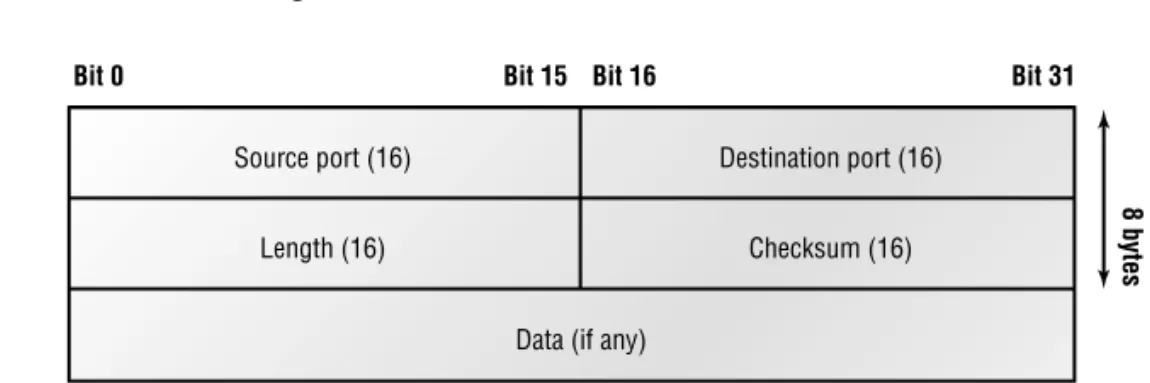
Figure 2.4 clearly illustrates UDP’s markedly low overhead as compared to TCP’s hungry usage. Look at the figure carefully—can you see that UDP doesn’t use windowing or provide for acknowledgments in the UDP header?
It’s important for you to understand what each field in the UDP segment is. The UDP seg-ment contains the following fields:
Source port Port number of the application on the host sending the data.
Destination port Port number of the application requested on the destination host.
Length Length of UDP header and UDP data.
Checksum Checksum of both the UDP header and UDP data fields.
Data Upper-layer data.
UDP, like TCP, doesn’t trust the lower layers and runs its own CRC. Remember that the Frame Check Sequence (FCS) is the field that houses the CRC, which is why you can see the FCS information.
The following shows a UDP segment caught on a network analyzer:
UDP - User Datagram Protocol Source Port: 1085 Destination Port: 5136 Length: 41 Checksum: 0x7a3c UDP Data Area:
..Z... 00 01 5a 96 00 01 00 00 00 00 00 11 00 00 00
...C..2...._C._C 2e 03 00 43 02 1e 32 0a 00 0a 00 80 43 00 80
Frame Check Sequence: 0x00000000
F I G U R E 2 . 4 UDP segment
Bit 0 Bit 15
Source port (16) Destination port (16)
Length (16) Checksum (16)
Data (if any)
Bit 16 Bit 31
Notice that low overhead! Try to find the sequence number, ack number, and window size in the UDP segment. You can’t (I hope) because they just aren’t there!
Key Concepts of Host-to-Host Protocols
Since you’ve seen both a connection-oriented (TCP) and connectionless (UDP) protocol in action, it would be good to summarize the two here. Table 2.1 highlights some of the key concepts that you should keep in mind regarding these two protocols. You should memorize this table.
A telephone analogy could really help you understand how TCP works. Most of us know that before you speak to someone on a phone, you must first establish a connection with that other person—wherever they are. This is like a virtual circuit with the TCP protocol. If you were giving someone important information during your conversation, you might say, “You know?” or ask, “Did you get that?” Saying something like this is a lot like a TCP acknowledgment—it’s designed to get you verification. From time to time (especially on cell phones), people also ask, “Are you still there?” They end their conversations with a “Goodbye” of some kind, putting closure on the phone call. TCP also performs these types of functions.
Alternately, using UDP is like sending a postcard. To do that, you don’t need to contact the other party first. You simply write your message, address the postcard, and mail it. This is anal-ogous to UDP’s connectionless orientation. Since the message on the postcard is probably not a matter of life or death, you don’t need an acknowledgment of its receipt. Similarly, UDP does not involve acknowledgments.
Port Numbers
TCP and UDP must use port numbers to communicate with the upper layers, because they’re what keeps track of different conversations crossing the network simultaneously. Originating-source port numbers are dynamically assigned by the Originating-source host and will equal some number starting at 1024. 1023 and below are defined in RFC 3232 (or just see www.iana.org), which discusses what are called well-known port numbers.
T A B L E 2 . 1 Key Features of TCP and UDP
TCP UDP
Sequenced Unsequenced
Reliable Unreliable
Connection-oriented Connectionless Virtual circuit Low overhead Acknowledgments No acknowledgment
Virtual circuits that don’t use an application with a well-known port number are assigned port numbers randomly from a specific range instead. These port numbers identify the source and destination application or process in the TCP segment.
Figure 2.5 illustrates how both TCP and UDP use port numbers. The different port numbers that can be used are explained next:
Numbers below 1024 are considered well-known port numbers and are defined in RFC 3232. Numbers 1024 and above are used by the upper layers to set up sessions with other hosts,
and by TCP to use as source and destination addresses in the TCP segment.
In the following sections we’ll take a look at an analyzer output showing a TCP session.
TCP Session: Source Port
The following listing shows a TCP session captured with Etherpeek analyzer software:
TCP - Transport Control Protocol Source Port: 5973 Destination Port: 23 Sequence Number: 1456389907 Ack Number: 1242056456 Offset: 5 Reserved: %000000 Code: %011000 Ack is valid Push Request Window: 61320 Checksum: 0x61a6 Urgent Pointer: 0 No TCP Options TCP Data Area: vL.5.+.5.+.5.+.5 76 4c 19 35 11 2b 19 35 11 2b 19 35 11 2b 19 35 +. 11 2b 19
Frame Check Sequence: 0x0d00000f
F I G U R E 2 . 5 Port numbers for TCP and UDP
FTP Telnet Doom DNS TFTP POP3
TCP Transport layer Application layer Port numbers UDP News 119 110 69 53 666 23 21
Notice that the source host makes up the source port and, in this case, is 5973. The destination port is 23, which is used to tell the receiving host the purpose of the intended connection (Telnet).
By looking at this session, you can see that the source host makes up the source port. But why does the source make up a port number? To differentiate between sessions with different hosts, my friend. How else would a server know where information is coming from if it didn’t have a different number from a sending host? TCP and the upper layers don’t use hardware and logical addresses to understand the sending host’s address as the Data Link and Network layer proto-cols do. Instead, they use port numbers. And it’s easy to imagine the receiving host getting thor-oughly confused if all the hosts used the same port number to get to FTP!
TCP Session: Destination Port
You’ll sometimes look at an analyzer and see that only the source port is above 1024 and the destination port is a well-known port, as shown in the following Etherpeek trace:
TCP - Transport Control Protocol Source Port: 1144
Destination Port: 80 World Wide Web HTTP
Sequence Number: 9356570 Ack Number: 0 Offset: 7 Reserved: %000000 Code: %000010 Synch Sequence Window: 8192 Checksum: 0x57E7 Urgent Pointer: 0 TCP Options:
Option Type: 2 Maximum Segment Size
Length: 4 MSS: 536
Option Type: 1 No Operation
Option Type: 1 No Operation
Option Type: 4 Length: 2 Opt Value: No More HTTP Data
Frame Check Sequence: 0x43697363
And sure enough, the source port is over 1024, but the destination port is 80, or HTTP service. The server, or receiving host, will change the destination port if it needs to.
In the preceding trace, a “syn” packet is sent to the destination device. The syn sequence is what’s telling the remote destination device that it wants to create a session.
TCP Session: Syn Packet Acknowledgment
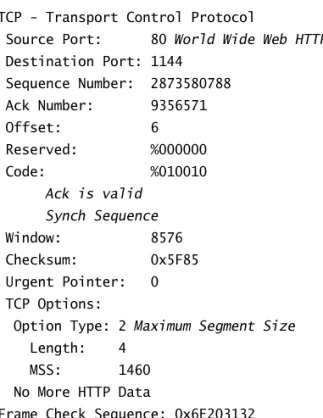
The next trace shows an acknowledgment to the syn packet:
TCP - Transport Control Protocol
Source Port: 80 World Wide Web HTTP
Destination Port: 1144 Sequence Number: 2873580788 Ack Number: 9356571 Offset: 6 Reserved: %000000 Code: %010010 Ack is valid Synch Sequence Window: 8576 Checksum: 0x5F85 Urgent Pointer: 0 TCP Options:
Option Type: 2 Maximum Segment Size
Length: 4 MSS: 1460 No More HTTP Data
Frame Check Sequence: 0x6E203132
Notice the Ack is valid, which means that the source port was accepted and the device agreed to create a virtual circuit with the originating host.
And here again, you can see that the response from the server shows the source is 80 and the destination is the 1144 sent from the originating host—all’s well.
Table 2.2 gives you a list of the typical applications used in the TCP/IP suite, their well-known port numbers, and the Transport layer protocols used by each application or process. T A B L E 2 . 2 Key Protocols That Use TCP and UDP
TCP UDP Telnet 23 SNMP 161 SMTP 25 TFTP 69 HTTP 80 DNS 53 FTP 21 DNS 53 HTTPS 443
Notice that DNS uses both TCP and UDP. Whether it opts for one or the other depends on what it’s trying to do. Even though it’s not the only application that can use both protocols, it’s certainly one that you should remember in your studies.
The Internet Layer Protocols
In the DoD model, there are two main reasons for the Internet layer’s existence: routing, and providing a single network interface to the upper layers.
None of the other upper- or lower-layer protocols have any functions relating to routing— that complex and important task belongs entirely to the Internet layer. The Internet layer’s sec-ond duty is to provide a single network interface to the upper-layer protocols. Without this layer, application programmers would need to write “hooks” into every one of their applica-tions for each different Network Access protocol. This would not only be a pain in the neck, but it would lead to different versions of each application—one for Ethernet, another one for Token Ring, and so on. To prevent this, IP provides one single network interface for the upper-layer protocols. That accomplished, it’s then the job of IP and the various Network Access protocols to get along and work together.
All network roads don’t lead to Rome—they lead to IP. And all the other protocols at this layer, as well as all those at the upper layers, use it. Never forget that. All paths through the DoD model go through IP. The following sections describe the protocols at the Internet layer:
Internet Protocol (IP)
Internet Control Message Protocol (ICMP) Address Resolution Protocol (ARP)
Reverse Address Resolution Protocol (RARP)
Proxy ARP
Internet Protocol (IP)
Internet Protocol (IP) essentially is the Internet layer. The other protocols found here merely exist to support it. IP holds the big picture and could be said to “see all,” in that it’s aware of all the interconnected networks. It can do this because all the machines on the network have a software, or logical, address called an IP address, which I’ll cover more thoroughly later in this chapter.
IP looks at each packet’s address. Then, using a routing table, it decides where a packet is to be sent next, choosing the best path. The protocols of the Network Access layer at the bottom of the DoD model don’t possess IP’s enlightened scope of the entire network; they deal only with physical links (local networks).
Identifying devices on networks requires answering these two questions: Which network is it on? And what is its ID on that network? The first answer is the software address, or logical address (the correct street). The second answer is the hardware address (the correct mailbox). All hosts on a network have a logical ID called an IP address. This is the software, or logical, address and contains valuable encoded information, greatly simplifying the complex task of routing. (IP is discussed in RFC 791.)
IP receives segments from the Host-to-Host layer and fragments them into datagrams (packets) if necessary. IP then reassembles datagrams back into segments on the receiving side. Each datagram is assigned the IP address of the sender and of the recipient. Each router (layer 3 device) that receives a datagram makes routing decisions based on the packet’s destination IP address.
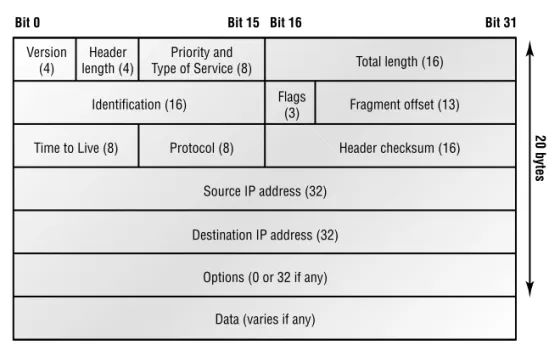
Figure 2.6 shows an IP header. This will give you an idea of what the IP protocol has to go through every time user data is sent from the upper layers and is to be sent to a remote network.
The following fields make up the IP header:
Version IP version number.
Header Length Header length (HLEN) in 32-bit words.
ToS with IP Precedence Bits Type of Service tells how the datagram should be handled. The
first 3 bits are the priority bits.
Total length Length of the packet including header and data.
Identifier Unique IP-packet value.
Flags Specifies whether fragmentation should occur.
Frag offset Provides fragmentation and reassembly if the packet is too large to put in a frame.
It also allows different maximum transmission units (MTUs) on the Internet. F I G U R E 2 . 6 IP header
Bit 0 Bit 15
Total length (16)
Header checksum (16) Time to Live (8) Protocol (8)
Version (4) Flags (3) Header length (4) Priority and Type of Service (8)
Identification (16) Fragment offset (13)
Options (0 or 32 if any) Destination IP address (32)
Source IP address (32)
Data (varies if any)
Bit 16 Bit 31
TTL The time to live (TTL) is set into a packet when it is originally generated. If it doesn’t get to where it wants to go before the TTL expires, boom—it’s gone. This stops IP packets from continuously circling the network looking for a home.
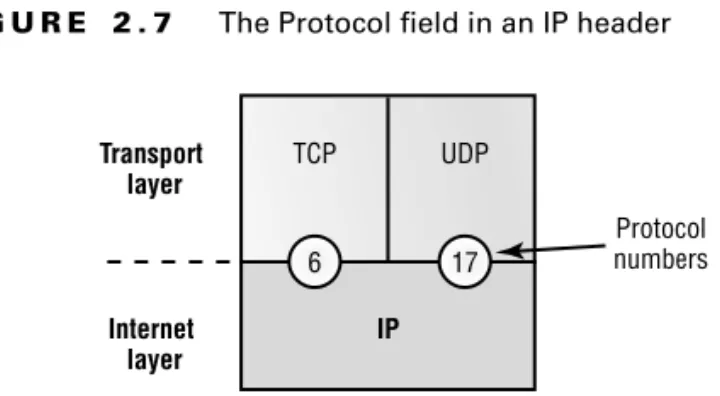
Protocol Port of upper-layer protocol (TCP is port 6 or UDP is port 17 [hex]). Also supports
Network layer protocols.
Header checksum Cyclic redundancy check (CRC) on header only.
Source IP address 32-bit IP address of sending station.
Destination IP address 32-bit IP address of the station this packet is destined for.
IP options Used for network testing, debugging, security, and more.
Data After the IP option field will be the upper-layer data.
Here’s a snapshot of an IP packet caught on a network analyzer (notice that all the header information discussed above appears here):
IP Header - Internet Protocol Datagram Version: 4 Header Length: 5 Precedence: 0 Type of Service: %000 Unused: %00 Total Length: 187 Identifier: 22486
Fragmentation Flags: %010 Do Not Fragment
Fragment Offset: 0 Time To Live: 60 IP Type: 0x06 TCP Header Checksum: 0xd031 Source IP Address: 10.7.1.30 Dest. IP Address: 10.7.1.10 No Internet Datagram Options
Can you distinguish the logical, or IP, addresses in this header?
The Type field—it’s typically a Protocol field, but this analyzer sees it as an IP Type field— is important. If the header didn’t carry the protocol information for the next layer, IP wouldn’t know what to do with the data carried in the packet. The example above tells IP to hand the seg-ment to TCP.
Figure 2.7 demonstrates how the Network layer sees the protocols at the Transport layer when it needs to hand a packet to the upper-layer protocols.
F I G U R E 2 . 7 The Protocol field in an IP header
In this example, the Protocol field tells IP to send the data to either TCP port 6 or UDP port 17 (both hex addresses). But it will only be UDP or TCP if the data is part of a data stream headed for an upper-layer service or application. It could just as easily be destined for Internet Control Message Protocol (ICMP), Address Resolution Protocol (ARP), or some other type of Network layer protocol.
Table 2.3 is a list of some other popular protocols that can be specified in the Protocol field.
Internet Control Message Protocol (ICMP)
Internet Control Message Protocol (ICMP) works at the Network layer and is used by IP for many different services. ICMP is a management protocol and messaging service provider for IP. Its messages are carried as IP datagrams. RFC 1256 is an annex to ICMP, which affords hosts’ extended capability in discovering routes to gateways.
T A B L E 2 . 3 Possible Protocols Found in the Protocol Field of an IP Header
Protocol Protocol Number
ICMP 1 IGRP 9 EIGRP 88 OSPF 89 IPv6 41 GRE 47 IPX in IP 111 Layer 2 tunnel (L2TP) 115 TCP UDP Protocol numbers IP Transport layer Internet layer 17 6
Periodically, router advertisements are announced over the network, reporting IP addresses for the router’s network interfaces. Hosts listen for these network infomercials to acquire route information. A router solicitation is a request for immediate advertisements and may be sent by a host when it starts up.
RFC 792 references ICMP and describes how ICMP must be implemented by all TCP/IP hosts.
The following are some common events and messages that ICMP relates to:
Destination Unreachable If a router can’t send an IP datagram any further, it uses ICMP to
send a message back to the sender, advising it of the situation. For example, if a router receives a packet destined for a network that the router doesn’t know about, it will send an ICMP Des-tination Unreachable message back to the sending station.
Buffer Full If a router’s memory buffer for receiving incoming datagrams is full, it will use
ICMP to send out this message until the congestion abates.
Hops Each IP datagram is allotted a certain number of routers, called hops, to pass through. If it reaches its limit of hops before arriving at its destination, the last router to receive that dat-agram deletes it. The executioner router then uses ICMP to send an obituary message, informing the sending machine of the demise of its datagram.
Ping Ping (Packet Internet Groper) uses ICMP echo messages to check the physical and logical connectivity of machines on an internetwork.
Traceroute Using ICMP timeouts, Traceroute is used to discover the path a packet takes as it
traverses an internetwork.
Both Ping and Traceroute (also just called Trace; Microsoft Windows uses trac-ert) allow you to verify address configurations in your internetwork.
The following data is from a network analyzer catching an ICMP echo request:
Flags: 0x00 Status: 0x00 Packet Length: 78 Timestamp: 14:04:25.967000 12/20/03 Ethernet Header Destination: 00:a0:24:6e:0f:a8 Source: 00:80:c7:a8:f0:3d Ether-Type: 08-00 IP
IP Header - Internet Protocol Datagram Version: 4
Header Length: 5 Precedence: 0 Type of Service: %000 Unused: %00 Total Length: 60 Identifier: 56325 Fragmentation Flags: %000 Fragment Offset: 0 Time To Live: 32 IP Type: 0x01 ICMP Header Checksum: 0x2df0 Source IP Address: 100.100.100.2 Dest. IP Address: 100.100.100.1 No Internet Datagram Options
ICMP - Internet Control Messages Protocol ICMP Type: 8 Echo Request
Code: 0 Checksum: 0x395c Identifier: 0x0300 Sequence Number: 4352 ICMP Data Area:
abcdefghijklmnop 61 62 63 64 65 66 67 68 69 6a 6b 6c 6d qrstuvwabcdefghi 71 72 73 74 75 76 77 61 62 63 64 65 66 Frame Check Sequence: 0x00000000
Notice anything unusual? Did you catch the fact that even though ICMP works at the Inter-net (Network) layer, it still uses IP to do the Ping request? The Type field in the IP header is
0x01, which specifies the ICMP protocol.
The Ping program just uses the alphabet in the data portion of the packet as a payload, 100 bytes by default.
If you remember reading about the Data Link layer and the different frame types in Chapter 1, you should be able to look at the preceding trace and tell what type of Ethernet frame this is. The only fields are destination hardware address, source hardware address, and Ether-Type. The only frame that uses an Ether-Type field exclusively is an Ethernet_II frame. (SNAP uses an Ether-Type field also, but only within an 802.2 LLC field, which isn’t present in the frame.)
Address Resolution Protocol (ARP)
Address Resolution Protocol (ARP) finds the hardware address of a host from a known IP address. Here’s how it works: When IP has a datagram to send, it must inform a Network
Access protocol, such as Ethernet or Token Ring, of the destination’s hardware address on the local network. (It has already been informed by upper-layer protocols of the destination’s IP address.) If IP doesn’t find the destination host’s hardware address in the ARP cache, it uses ARP to find this information.
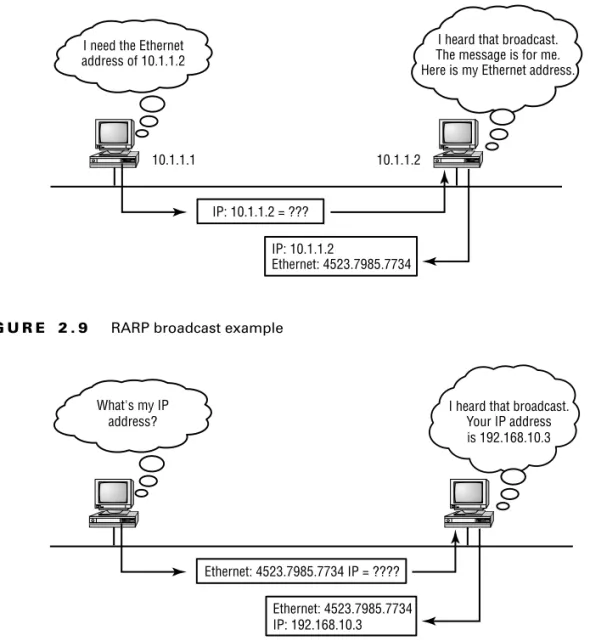
As IP’s detective, ARP interrogates the local network by sending out a broadcast asking the machine with the specified IP address to reply with its hardware address. So basically, ARP translates the software (IP) address into a hardware address—for example, the destination machine’s Ethernet board address—and from it, deduces its whereabouts on LAN by broad-casting for this address. Figure 2.8 shows how an ARP looks to a local network.
ARP resolves IP addresses to Ethernet (MAC) addresses.
The following trace shows an ARP broadcast—notice that the destination hardware address is unknown, and is all Fs in hex (all 1s in binary)—and is a hardware address broadcast:
Flags: 0x00 Status: 0x00 Packet Length: 64
Timestamp: 09:17:29.574000 12/06/03 Ethernet Header
Destination: FF:FF:FF:FF:FF:FF Ethernet Broadcast Source: 00:A0:24:48:60:A5
Protocol Type: 0x0806 IP ARP
ARP - Address Resolution Protocol
Hardware: 1 Ethernet (10Mb)
Protocol: 0x0800 IP
Hardware Address Length: 6 Protocol Address Length: 4
Operation: 1 ARP Request
Sender Hardware Address: 00:A0:24:48:60:A5 Sender Internet Address: 172.16.10.3
Target Hardware Address: 00:00:00:00:00:00 (ignored)
Target Internet Address: 172.16.10.10
Extra bytes (Padding):
... 0A 0A 0A 0A 0A 0A 0A 0A 0A 0A 0A 0A 0A 0A 0A 0A 0A 0A
Frame Check Sequence: 0x00000000
Reverse Address Resolution Protocol (RARP)
When an IP machine happens to be a diskless machine, it has no way of initially knowing its IP address. But it does know its MAC address. Reverse Address Resolution Protocol (RARP)
discovers the identity of the IP address for diskless machines by sending out a packet that includes its MAC address and a request for the IP address assigned to that MAC address. A des-ignated machine, called a RARP server, responds with the answer, and the identity crisis is over. RARP uses the information it does know about the machine’s MAC address to learn its IP address and complete the machine’s ID portrait.
RARP resolves Ethernet (MAC) addresses to IP addresses.
Figure 2.9 shows a diskless workstation asking for its IP address with a RARP broadcast: F I G U R E 2 . 8 Local ARP broadcast
F I G U R E 2 . 9 RARP broadcast example I need the Ethernet
address of 10.1.1.2
I heard that broadcast. The message is for me. Here is my Ethernet address.
10.1.1.1 10.1.1.2 IP: 10.1.1.2 = ??? IP: 10.1.1.2 Ethernet: 4523.7985.7734 What's my IP address?
I heard that broadcast. Your IP address is 192.168.10.3
Ethernet: 4523.7985.7734 IP = ???? Ethernet: 4523.7985.7734 IP: 192.168.10.3
Proxy Address Resolution Protocol (Proxy ARP)
On a network, your hosts can’t have more then one default-gateway configured. Think about this…What if the default-gateway (router) happens to go down? The host won’t just start send-ing to another router automatically—you’ve got to reconfigure that host. But Proxy ARP can actually help machines on a subnet reach remote subnets without configuring routing or even a default gateway.
One advantage of using Proxy ARP is that is can be added to a single router on a network without disturbing the routing tables of all the other routers that live there too. But there’s a serious downside to using Proxy ARP. Using Proxy ARP will definitely increase the amount of traffic on your network segment, and hosts will have a larger ARP table than usual in order to handle all the IP-to-MAC address mappings. And Proxy ARP is configured on all Cisco routers by default—you should disable it if you don’t think you’re going to use it.
One last thought on Proxy ARP: Proxy ARP really isn’t really a separate protocol. It is a ser-vice run by routers on behalf of other deser-vices that are separated from their query by a router, although they think they share the subnet with the other device.
Binary to Decimal and
Hexadecimal Conversion
Before we continue discussing the TCP/IP protocol stack and IP addressing, it’s really important for you to truly understand the differences between binary, decimal, and hexadecimal numbers, and how to convert one format into the other.
So we’ll start with binary numbering. It’s pretty simple, really. The digits used are limited to either a 1 (one) or a 0 (zero), with each digit being called one bit (short for binary digit). Typically, you count either 4 or 8 bits together, with these being referred to as a nibble or a byte, respectively.
What interests us in binary numbering is the value represented in a decimal format—the typical decimal format being the base 10 number scheme that we’ve all used since kindergarten. The binary numbers are placed in a value spot: starting at the right and moving left, with each spot having double the value of the previous spot.
Table 2.4 shows the decimal values of each bit location in a nibble and a byte. Remember, a nibble is 4 bits and a byte is 8 bits.
T A B L E 2 . 4 Binary Values
Nibble values Byte values
What all this means is that if a one digit (1) is placed in a value spot, then the nibble or byte takes on that decimal value, and adds it to any other value spots that have a one. And if a zero (0) is placed in a bit spot, then you don’t count that value.
Let me clarify things. If we have a 1 placed in each spot of our nibble, we would then add up 8 + 4 + 2 + 1, to give us a maximum value of 15. Another example for our nibble values would be 1010, which means that the 8 bit and the 2 bit are turned on, which equals a decimal value of 10. If we have a nibble binary value of 0110, then our decimal value would be 6, because the 4 and 2 bits are turned on.
But the byte values can add up to a value that’s significantly higher than 15. This is how: If we counted every bit as a one (1), then the byte binary value would look like this (remember, 8 bits equal a byte):
11111111
We would then count up every bit spot because each is turned on. It would look like this: 128 + 64 + 32 + 16 + 8 + 4 + 2 + 1 = 255
which demonstrates the maximum value of a byte.
There are plenty of other decimal values that a binary number can equal. Let’s work through a few examples:
10010110
Which bits are on? The 128, 16, 4, and 2 bits are on, so we’ll just add them up: 128 + 16 + 4 + 2 = 150.
01101100
Which bits are on? The 64, 32, 8, and 4 bits are on, so we just need to add them up: 64 + 32 + 8 + 4 = 108.
11101000
Which bits are on? The 128, 64, 32 and 8 bits are on, so just add the values up: 128 + 64 + 32 + 8 = 232
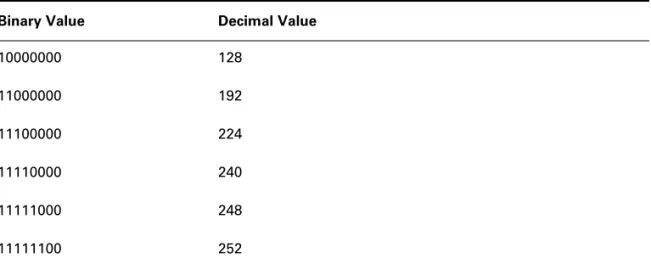
Table 2.5 is a table you should memorize before braving the subnetting section in Chapter 3. T A B L E 2 . 5 Binary to Decimal Memorization Chart
Binary Value Decimal Value
10000000 128 11000000 192 11100000 224 11110000 240 11111000 248 11111100 252
Perhaps it is needless to say (but just in case): You need to understand binary-to-decimal con-version before moving on to Chapter 3.
Hexadecimal addressing is completely different than binary or decimal—it’s converted by reading nibbles, not bytes. By using a nibble, we can convert these bits to hex pretty simply. First, understand that the hexadecimal addressing scheme uses only the numbers 0 through 9. And since the numbers 10, 11, 12, etc. can’t be used (because they are two digits), the letters A, B, C, D, E, and F are used to represent 10, 11, 12, 13, 14, and 15, respectively.
Table 2.6 shows both the binary value and the decimal value for each hexadecimal digit.
11111110 254
11111111 255
T A B L E 2 . 6 Hex to Binary to Decimal Chart
Hexadecimal Value Binary Value Decimal Value
0 0000 0 1 0001 1 2 0010 2 3 0011 3 4 0100 4 5 0101 5 6 0110 6 7 0111 7 8 1000 8 9 1001 9 A 1010 10 B 1011 11
T A B L E 2 . 5 Binary to Decimal Memorization Chart (continued)
Did you notice that the first 10 hexadecimal digits (0–9) are the same value as the decimal values? If not, look again. This handy fact makes those values super easy to convert.
So suppose you have something like this: 0x6A. (Sometimes Cisco likes to put 0x in front of characters so you know that they are a hex value. They don’t have any other special meaning.) What are the binary and decimal values? All you have to remember is that each hex character is one nibble and two hex characters together make a byte. To figure out the binary value, we need to put the hex characters into two nibbles, then put them together into a byte. 6 = 0110 and A (which is 10 in hex) = 0101, so the complete byte would be 01101010.
To convert from binary to hex, just take the byte and break it into nibbles. Here’s what I mean: Say you have the binary number 01010101. First, break it into nibbles—0101 and 0101— with the value of each nibble being 5, since the 1 and 4 bits are on. This makes the hex answer 55. Why? Because we’re converting a whole byte. And in decimal format, the binary number is 01101010, which converts to 64 + 32 + 8 + 2 = 106.
Here’s another binary number: 11001100
Your answer would be 1100 = 12 and 1100 = 12 (therefore, it’s converted to CC in hex). The decimal conversion answer would be 128 + 64 + 8 + 4 = 204.
One more example, then we’ve got to move on into IP addressing. Suppose you had the fol-lowing binary number:
10110101
The hex answer would be B5, since 1011 converts to B and 1010 converts to 5 in hex value. The decimal equivalent is 128 + 32 + 16 + 4 + 1 = 181.
IP Addressing
One of the most important topics in any discussion of TCP/IP is IP addressing. An IP address
is a numeric identifier assigned to each machine on an IP network. It designates the specific loca-tion of a device on the network.
An IP address is a software address, not a hardware address—the latter is hard-coded on a Network Interface Card (NIC) and used for finding hosts on a local network. IP addressing was
C 1100 12
D 1101 13
E 1110 14
F 1111 15
T A B L E 2 . 6 Hex to Binary to Decimal Chart (continued)
designed to allow a host on one network to communicate with a host on a different network, regardless of the type of LANs the hosts are participating in.
Before we get into the more complicated aspects of IP addressing, you need to understand some of the basics. First I’m going to explain some of the fundamentals of IP addressing and its termi-nology. Then you’ll learn about the hierarchical IP addressing scheme and private IP addresses.
IP Terminology
Throughout this chapter you’ll learn several important terms vital to your understanding of the Internet Protocol. Here are a few to get you started:
Bit A bit is one digit, either a 1 or a 0.
Byte A byte is 7 or 8 bits, depending on whether parity is used. For the rest of this chapter, always assume a byte is 8 bits.
Octet An octet, made up of 8 bits, is just an ordinary 8-bit binary number. In this chapter, the
terms byte and octet are completely interchangeable.
Network address This is the designation used in routing to send packets to a remote
net-work—for example, 10.0.0.0, 172.16.0.0, and 192.168.10.0.
Broadcast address The address used by applications and hosts to send information to all nodes
on a network is called the broadcast address. Examples include 255.255.255.255, which is all net-works, all nodes; 172.16.255.255, which is all subnets and hosts on network 172.16.0.0; and 10.255.255.255, which broadcasts to all subnets and hosts on network 10.0.0.0.
The Hierarchical IP Addressing Scheme
An IP address consists of 32 bits of information. These bits are divided into four sections, referred to as octets or bytes, each containing 1 byte (8 bits). You can depict an IP address using one of three methods:
Dotted-decimal, as in 172.16.30.56
Binary, as in 10101100.00010000.00011110.00111000 Hexadecimal, as in AC.10.1E.38
All these examples truly represent the same IP address. Hexadecimal isn’t used as often as dotted-decimal or binary when IP addressing is discussed, but you still might find an IP address stored in hexadecimal in some programs. The Windows Registry is a good example of a pro-gram that stores a machine’s IP address in hex.
The 32-bit IP address is a structured or hierarchical address, as opposed to a flat or nonhier-archical address. Although either type of addressing scheme could have been used, hierarchical addressing was chosen for a good reason. The advantage of this scheme is that it can handle a large number of addresses, namely 4.3 billion (a 32-bit address space with two possible values for each position—either 0 or 1—gives you 232, or 4,294,967,296). The disadvantage of the flat addressing
scheme, and the reason it’s not used for IP addressing, relates to routing. If every address were unique, all routers on the Internet would need to store the address of each and every machine on
the Internet. This would make efficient routing impossible, even if only a fraction of the possible addresses were used.
The solution to this problem is to use a two- or three-level, hierarchical addressing scheme that is structured by network and host, or network, subnet, and host.
This two- or three-level scheme is comparable to a telephone number. The first section, the area code, designates a very large area. The second section, the prefix, narrows the scope to a local calling area. The final segment, the customer number, zooms in on the specific connection. IP addresses use the same type of layered structure. Rather than all 32 bits being treated as a unique identifier, as in flat addressing, a part of the address is designated as the network address, and the other part is designated as either the subnet and host or just the node address.
In the following sections, I’m going to discuss IP network addressing and the different classes of address we can use to address our networks with.
Network Addressing
The network address (which can also be called the network number) uniquely identifies each network. Every machine on the same network shares that network address as part of its IP address. In the IP address 172.16.30.56, for example, 172.16 is the network address.
The node address is assigned to, and uniquely identifies, each machine on a network. This part of the address must be unique because it identifies a particular machine—an individual— as opposed to a network, which is a group. This number can also be referred to as a host address. In the sample IP address 172.16.30.56, the 30.56 is the node address.
The designers of the Internet decided to create classes of networks based on network size. For the small number of networks possessing a very large number of nodes, they created the rank
Class A network. At the other extreme is the Class C network, which is reserved for the numer-ous networks with a small number of nodes. The class distinction for networks between very large and very small is predictably called the Class B network.
Subdividing an IP address into a network and node address is determined by the class des-ignation of one’s network. Figure 2.10 summarizes the three classes of networks—a subject I’ll explain in much greater detail throughout this chapter.
To ensure efficient routing, Internet designers defined a mandate for the leading-bits sec-tion of the address for each different network class. For example, since a router knows that a Class A network address always starts with a 0, the router might be able to speed a packet on its way after reading only the first bit of its address. This is where the address schemes define the difference between a Class A, a Class B, and a Class C address. In the next sec-tions, I’ll discuss the differences between these three classes, followed by a discussion of the Class D and Class E addresses (class A, B and C are the only ranges that are used to address hosts in our networks).
Network Address Range: Class A
The designers of the IP address scheme said that the first bit of the first byte in a Class A net-work address must always be off, or 0. This means a Class A address must be between 0 and 127, inclusive.
F I G U R E 2 . 1 0 Summary of the three classes of networks
Consider the following network address: 0xxxxxxx
If we turn the other 7 bits all off and then turn them all on, we’ll find the Class A range of net-work addresses:
00000000 = 0
01111111 = 127
So, a Class A network is defined in the first octet between 0 and 127, and it can’t be less or more. (yes, I know 0 and 127 are not valid in a class A network—I’ll talk about illegal addresses in a minute.)
Network Address Range: Class B
In a Class B network, the RFCs state that the first bit of the first byte must always be turned on, but the second bit must always be turned off. If you turn the other 6 bits all off and then all on, you will find the range for a Class B network:
10000000 = 128
10111111 = 191
As you can see, a Class B network is defined when the first byte is configured from 128 to 191.
Network Address Range: Class C
For Class C networks, the RFCs define the first 2 bits of the first octet as always turned on, but the third bit can never be on. Following the same process as the previous classes, convert from binary to decimal to find the range. Here’s the range for a Class C network:
11000000 = 192
11011111 = 223
Network Host Host Host
Network Network Host Host
Network Network Network Host
Multicast Research Class A: Class B: Class C: Class D: Class E:
So, if you see an IP address that starts at 192 and goes to 223, you’ll know it is a Class C IP address.
Network Address Ranges: Classes D and E
The addresses between 224 and 255 are reserved for Class D and E networks. Class D (224–239) is used for multicast addresses and Class E (240–255) for scientific purposes, but I’m not going into these types of addresses in this book (and you don’t need to know them).
Network Addresses: Special Purpose
Some IP addresses are reserved for special purposes, so network administrators can’t ever assign these addresses to nodes. Table 2.7 lists the members of this exclusive little club and the reasons why they’re included in it.
Class A Addresses
In a Class A network address, the first byte is assigned to the network address, and the three remaining bytes are used for the node addresses. The Class A format is:
network.node.node.node
T A B L E 2 . 7 Reserved IP Addresses
Address Function
Network address of all 0s Interpreted to mean “this network or segment.” Network address of all 1s Interpreted to mean “all networks.”
Network 127.0.0.1 Reserved for loopback tests. Designates the local node and allows that node to send a test packet to itself without generating network traffic.
Node address of all 0s Interpreted to mean “network address” or any host on specified network.
Node address of all 1s Interpreted to mean “all nodes” on the specified network; for example, 128.2.255.255 means “all nodes” on network 128.2 (Class B address). Entire IP address set to all 0s Used by Cisco routers to designate the default
route. Could also mean “any network.” Entire IP address set to all 1s (same as
255.255.255.255)
Broadcast to all nodes on the current network; sometimes called an “all 1s broadcast” or limited broadcast.
For example, in the IP address 49.22.102.70, the 49 is the network address, and 22.102.70 is the node address. Every machine on this particular network would have the distinctive network address of 49.
Class A network addresses are one byte long, with the first bit of that byte reserved and the 7 remaining bits available for manipulation (addressing). As a result, the maximum number of Class A networks that can be created is 128. Why? Because each of the 7 bit positions can be either a 0 or a 1, thus 27 or 128.
To complicate matters further, the network address of all 0s (0000 0000) is reserved to des-ignate the default route (see Table 2.7 in the previous section). Additionally, the address 127, which is reserved for diagnostics, can’t be used either, which means that you can really only use the numbers 1 to 126 to designate Class A network addresses. This means the actual number of usable Class A network addresses is 128 minus 2, or 126.
Each Class A address has three bytes (24-bit positions) for the node address of a machine. This means there are 224—or 16,777,216—unique combinations and, therefore, precisely that
many possible unique node addresses for each Class A network. Because node addresses with the two patterns of all 0s and all 1s are reserved, the actual maximum usable number of nodes for a Class A network is 224 minus 2, which equals 16,777,214. Either way, that’s a huge
amount of hosts on a network segment!
Class A Valid Host IDs
Here’s an example of how to figure out the valid host IDs in a Class A network address:
All host bits off is the network address: 10.0.0.0.
All host bits on is the broadcast address: 10.255.255.255.
The valid hosts are the numbers in between the network address and the broadcast address: 10.0.0.1 through 10.255.255.254. Notice that 0s and 255s can be valid host IDs. All you need to remember when trying to find valid host addresses is that the host bits can’t all be turned off or all be on at the same time.
Class B Addresses
In a Class B network address, the first two bytes are assigned to the network address and the remaining two bytes are used for node addresses. The format is:
network.network.node.node
For example, in the IP address 172.16.30.56, the network address is 172.16, and the node address is 30.56.
With a network address being two bytes (8 bits each), there would be 216 unique
combina-tions. But the Internet designers decided that all Class B network addresses should start with the binary digit 1, then 0. This leaves 14 bit positions to manipulate, therefore 16,384 (that is, 214)
unique Class B network addresses.
A Class B address uses two bytes for node addresses. This is 216 minus the two reserved
Class B Valid Host IDs
Here’s an example of how to find the valid hosts in a Class B network:
All host bits turned off is the network address: 172.16.0.0. All host bits turned on is the broadcast address: 172.16.255.255.
The valid hosts would be the numbers in between the network address and the broadcast address: 172.16.0.1 through 172.16.255.254.
Class C Addresses
The first three bytes of a Class C network address are dedicated to the network portion of the address, with only one measly byte remaining for the node address. The format is
network.network.network.node
Using the example IP address 192.168.100.102, the network address is 192.168.100, and the node address is 102.
In a Class C network address, the first three bit positions are always the binary 110. The cal-culation is: 3 bytes, or 24 bits, minus 3 reserved positions, leaves 21 positions. Hence, there are 221, or 2,097,152, possible Class C networks.
Each unique Class C network has one byte to use for node addresses. This leads to 28 or 256,
minus the two reserved patterns of all 0s and all 1s, for a total of 254 node addresses for each Class C network.
Class C Valid Host IDs
Here’s an example of how to find a valid host ID in a Class C network:
All host bits turned off is the network ID: 192.168.100.0.
All host bits turned on is the broadcast address: 192.168.100.255.
The valid hosts would be the numbers in between the network address and the broadcast address: 192.168.100.1 through 192.168.100.254.
Private IP Addresses
The people who created the IP addressing scheme also created what we call private IP addresses. These addresses can be used on a private network, but they’re not routable through the Internet. This is designed for the purpose of creating a measure of well-needed security, but it also con-veniently saves valuable IP address space.
If every host on every network had to have real routable IP addresses, we would have run out of IP addresses to hand out years ago. But by using private IP addresses, ISPs, corporations, and home users only need a relatively tiny group of bona fide IP addresses to connect their networks to the Internet. This is economical because they can use private IP addresses on their inside net-works and get along just fine.
To accomplish this task, the ISP and the corporation—the end user, no matter who they are—need to use something called a Network Address Translation (NAT), which basically takes