Rui Hou. Development of a web application of social networking for college students. A Master’s Paper for the M.S. in IS degree. April, 2019. 47 pages. Advisor: Ryan Shaw.
This project-based study develops a social networking website for college students. This web application aims to help college students to find partners with similar interests. It supports registration and login, posting, making comments, searching, viewing others’ profiles, and finding partners with similar interests. This paper analyzes user requirements by gathered via surveys of UNC communities. This paper then summarizes the methodology of database design, use case design and user interface design to achieve all functions. Black box and white box testing, heuristic evaluation and usability testing are applied to evaluate this web application.
Headings:
DEVELOPMENT OF A WEB APPLICATION OF SOCIAL NETWORKING FOR COLLEGE STUDENTS
by Rui Hou
A Master’s paper submitted to the faculty of the School of Information and Library Science of the University of North Carolina at Chapel Hill
in partial fulfillment of the requirements for the degree of Master of Science in
Information Science.
Chapel Hill, North Carolina April 2019
Approved by
Table of Contents
1. Introduction ... 2
1.1. Motivation ... 2
1.2. Objective ... 3
2. User Requirements ... 4
3. Application Design and Development ... 7
3.1. Technology Stack ... 7
3.2. Database Design ... 10
3.2.1. Database Tables ... 10
3.2.2. E-R Diagram ... 16
3.3. Use Case Design ... 19
3.3.1. Use Case ... 19
3.3.2. User Workflow ... 22
3.4. User Interface Design ... 23
4. Evaluation ... 32
4.1. Functionality: Black Box and White Box Testing ... 33
4.2. User Interface: Heuristic Evaluation ... 34
4.3. Usability Test ... 36
5. Conclusion and Limitations ... 38
6. References ... 40
7. Appendix ... 43
7.1 User Requirement Questionnaire ... 43
7.2 Usability Test ... 44
7.2.1. Survey for Step One ... 44
1. Introduction
1.1. Motivation
Thus, students’ needs to connect with others from different departments and to find partners with similar interests are not being met.
Inspired by this situation, this project-based study aims to build a friendly community within universities. It will help students not only to obtain needed information more efficiently, but also to find collaborators with similar interests to strengthen connections between each other. This website will help students in following ways:
• Enable college students to enroll into different communities of interest like “academic development”, “foods”, “travelling”, etc.
• Enable students to post status and make comments. By clicking into others’ profile, students can easily get in touch with each other.
• Enable students to input queries and search for needed information.
1.2. Objective
• User registration / login with authenticated information
• Browsing information in different domains
• Making comments and Giving a thumb- up to other posts
• Searching for needed information
• Browsing others’ profile and get in touch with them
The following chapters will firstly analyze the user requirements, will then introduce the application design and user interface design, and will next evaluate the whole application and make conclusions accomplished by limitations at the end.
2. User Requirements
For the current situation of participants’ social circles, only two participants said they were satisfied with their current social circles since they were working in the student union and they could make lots of friends. Eight other participants said they were not satisfied. Within these eight students, two said English is not their first language and they could not communicate very well with others. Six said their daily routine is to go to class, go to dining hall and go back home. They could only know students in the same department. There is no official platform for them to know more students or to seek company with similar interests. Besides, all participants responded they would use this application to broaden their social circles. It can be concluded that college students’ current status is faced with a big challenge. This result enhanced the necessity and importance to create a new platform to help students connect with each other.
was just a way to look for “transient” partners. Therefore, this result pointed out one important feature of the web application: to share information.
For students’ concerns, all participants responded they would like to share only parts of their personal information, such as departments, email address. Besides, two participants expressed they felt embarrassed if they posted “stupid” questions on the platform. Plus, three participants said they would feel unsafe if others knew what activities they were participating in.
When it comes to what types of personal information students would like to share to the public, ten chose real name and email address; eight chose gender and department; three chose date of birth; one chose contact number.
3. Application Design and Development
This chapter introduces the development of the web application, including technology stack, database design, use case design and user interface design. The codes are hosted in GitHub repository:
https://github.com/RuiHou15/Find-Your-Partner
3.1. Technology Stack
This web application is divided into the server side and client side.
Server Side
In addition to the database, Django is used to develop the server side 3. Django is a popular Python web framework to help developers create database-driven websites. It follows the Model-Template-View (MTV) architecture pattern 4. View receives HTTP requests and returns HTTP responses. View accesses data needed to satisfy requests via models, and delegate the formatting of the response to templates. Model is Python object that defines the structure of the application's data, and provides mechanisms to add, modify, delete and query records in the database. A template is a text file defining the layout of HTML pages with placeholders used to represent actual content. The view can dynamically create an HTML page by populating the web page with data from a model. Another advantage is that Django provides the administrative interfaces like create, read, update, delete.5
Client Side
series of elements represented by tags such as head, body, table, form,
and so on.
CSS (cascading style sheets) is used to add styles such as fonts, colors, and spacing to web documents.6 It describes how HTML elements are to be displayed on the screen. There are totally three ways to insert CSS: external CSS, internal CSS and inline CSS. External CSS means CSS scripts are put in an external file and the HTML page must include a reference to the external file in the head section. Then the CSS file can change the look of the entire HTML page. Internal CSS means the internal style is defined in the style
element, inside the head section of HTML page. Inline CSS means a style
attribute is added to an HTML element and defines a unique style for that element.
Angular JS is a frontend JavaScript framework7 for dynamic web application. It is added to HTML pages with a script tag. One major reason Angular JS
and textarea) to application data; then ng- bind directive was used to bind
the data to the HTML view. AngularJS expressions can also bind AngularJS data to HTML the same way as the ng-bind directive. The data-binding can save developers from writing a substantial amount of boilerplate codes.
3.2. Database Design
3.2.1. Database Tables
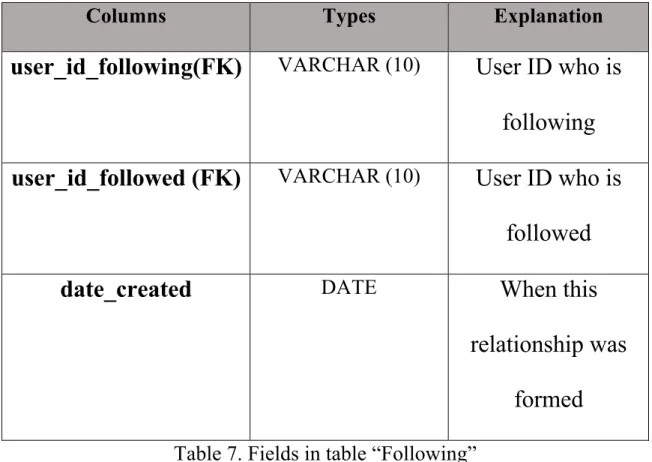
There are eight tables in the database.8 Table 1 “Users” is used to store user information; table 2 “User auths” is used to store information for login authentication; table 3 “Tags” is used to store images in the homepage; table 4 “Notes” is used to store users’ posts; table 5 “Comments” is used to store users’ comments; table 6 “ Likes” is used to record the thumb-up clicks by users; table 7 “Following” is used to record the following relationship between users; table 8 “Message” is used to send or receive messages between two users. Table 7 and table 8 have not been achieved currently in the demo web application and they are planned for further improvement. 9
Columns Types Explanation
user_ID (PK) VARCHAR (10) Unique UNC ID of a
user. Primary key.
email VARCHAR (20) The university email
address of a user
user_name VARCHAR (70) Real name of a user
first_name VARCHAR (20) First name of a user
last_name VARCHAR (20) Last name of a user
department VARCHAR (50) The department of the
user
gender VARCHAR (1) The gender of the user
profile_pic_url VARCHAR The avatar of a user
birthdate DATE Date of birth
date_created DATE Date this account was
created
date_updated DATE Date this account was
active_status ENUM Status of the user Table 1. Fields in table “Users”
Columns Types Explanation
user_ID (PK) VARCHAR (10) Unique UNC ID of a user
password VARCHAR (10) Login password of the user
Table 2. Fields in table “User auths
Columns Types Explanation
tag_id(PK) INT Identifier of images in the
homepage
title VARCHAR (50) Corresponding topic of the
image
image VARCHAR The location of the image
Columns Types Explanation
note_id (PK) INT Identifier of a post
user_ID (FK) VARCHAR (10) User who posted the note
content VARCHAR (100) Content of this post
date_created DATETIME The time when this note was
posted
date_updated DATE Date this post was updated
tag_id (FK) INT The id of the topic where
this post belongs to Table 4. Fields in table “Notes” (Posts)
Columns Types Explanation
comment_id INT The identifier of a comment
note_id (FK) INT Under which note this
comment was left
user_ID (FK) VARCHAR (10) The user id who left this
content VARCHAR (100) Content of this comment
date_created DATETIME The time when this
comment was left Table 5. Fields in table “Comments”
Columns Types Explanation
user_ID (FK) VARCHAR (10) The user of this post
note_id (FK) INT The identifier of this post
date_created DATE Date this “like” was
Columns Types Explanation
user_id_following(FK)
VARCHAR (10)User ID who is
following
user_id_followed (FK)
VARCHAR (10)User ID who is
followed
date_created
DATEWhen this
relationship was
formed
Table 7. Fields in table “Following”
Columns
Types
Explanation
Message_id (PK)
INT
Identifier of the
message
User_id from
VARCHAR (10)Who sent this
message
User_id_to
VARCHAR (10)Who will receive
this message
content
VARCHAR (500)Content of this
message
date_created
DATE
time of this message
3.2.2. E-R Diagram
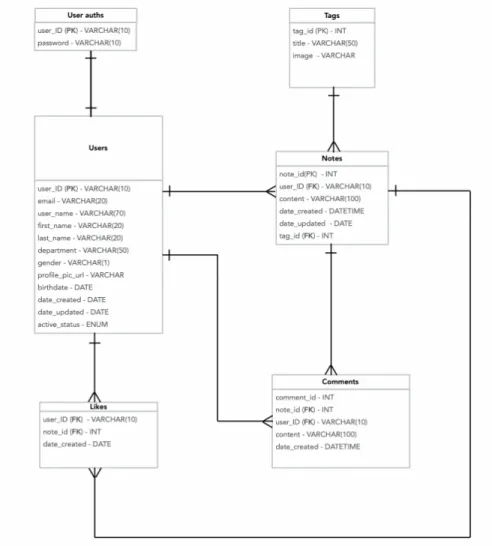
Figure 1 is the Entity- Relationship diagram which shows the database schema design. It explains how different entities relate to each other.10 The E-R diagram does not include the table Following and table Message which are designed for further improvement. Table 9 explains detailed relationship.
Entity Relationship Explanation
Users and Notes One-to-many A user can post many
notes, but a note can only belong to one person.
Users and Comments One-to-many A user can make many
comments, but a comment can only belong to one person.
Users and Likes One-to-many A user can like many
different comments, but a “like” can only belong to one person.
Tags and Notes One-to-many A topic can display
Notes and Comments One-to-many A post can have many comments, but a comment can only belong to one post.
Notes and Likes One-to-many A post can have many
“likes”, but a “like” can only belong to one post.
Users and User auths One-to-one A user only has one
3.3. Use Case Design
This chapter will introduce how the user is expected to interact with the demo application and user’s workflow within the system.
3.3.1. Use Case
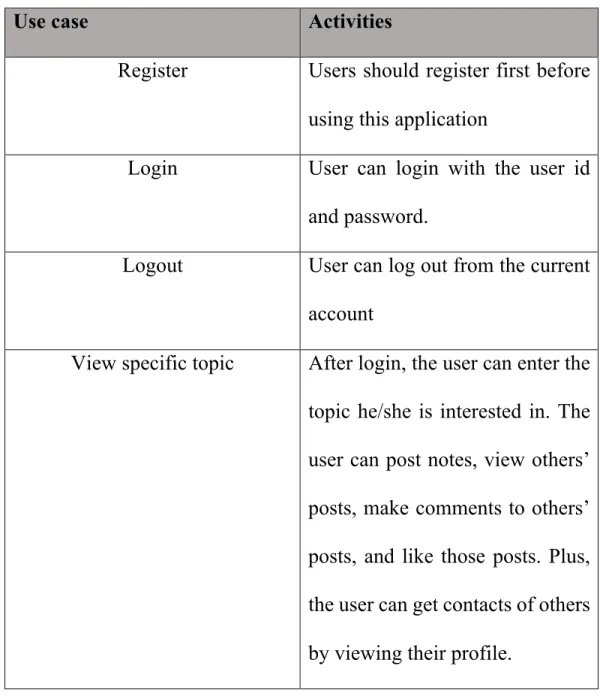
Table 10 gives detailed explanation of activities behind each use case.
Use case Activities
Register Users should register first before using this application
Login User can login with the user id and password.
Logout User can log out from the current account
Search Users can type a query into input box and then get search results from the database.
Table 10. Activities behind each use case
3.3.2. User Workflow
Figure 3. Workflow
3.4. User Interface Design
including registration, login, personal profile, post, making comments, like, search. The overall design follows a clear layout and color code.13 Figures below show all the interfaces.
1). Home page before login/registration
2). Login Interface
All users need to register and log in to use this web application. When the user clicks the “Login/Signup” button in the homepage, he or she will be directed to this login interface. The user will have two choices:
• The user can log in by entering correct UNC ID and password
• The use can also register an account by clicking the “Register” button.
Figure 5. Login Interface
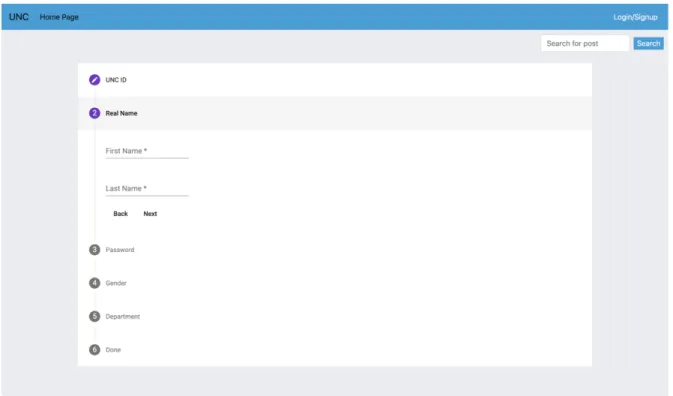
3). Registration Interface
department. After the user is all set, he or she can then successfully log in with the UNC ID and password.
Figure 6. Registration Interface
4). Home page after login/registration
Figure 7. Homepage after login
5). Personal Profile Interface
Figure 8. Profile Interface
6). Post, like, make comments interface
Figure 9. Post&Comment Interface
7). Search Interface
Figure 10. Search Interface
8). Expiration Interface
Figure 11. Expiration Interface
4. Evaluation
4.1. Functionality: Black Box and White Box Testing
After completing the demo application, I leveraged software testing method Black Box Testing and White Box Testing to test it.14 Black Box Testing, also called Closed Testing, means the tester does not know about internal implementation of the application. It is the behavior testing. So, I directly followed the workflow to use this application and to check whether all functions could run successfully. White Box Testing, also called Clear Box Testing,15 means the tester know internal design of the application. It is the logic testing. Therefore, based on features of the application, I wrote test cases to cover every possible single path and to check whether it executes as expected.
4.2. User Interface: Heuristic Evaluation
The user interface design could be evaluated by the usability heuristics raised by Jakob Nielsen in 1994.16 This part analyses how the user interface design of the application meets the heuristics17 and thus proofs the usability of the system.
Visibility of Application Status
This web application would always keep user informed about what is going on and would provide appropriate feedbacks when needed. For example, when a user enters a wrong password, the system will warn the user and encourage him to try again.
Match Between Application And The Real World
profile button at the top right corner of each page, which follows conventions and makes it reasonable for users to operate.
Consistency And Standard
This demo application uses consistent names for user interface elements. And different widgets apply different words. Therefore, users do not need to worry about different words or actions mean the same thing.
Flexibility And Efficiency Of Use
The functionality of the application includes registration, login, logout, search, post, making comment, etc. Users can access specific functionality according to their actual needs. For example, a user only wants to look for partners for an event. This application is still flexible to use and does not require the user to conduct other functionalities.
Aesthetic And Minimalist Design
information. Simple elements and straightforward words can lead to better user experiences.
4.3. Usability Test
Snowball sampling is a non-probability sampling method.18 It is where research participants recruit other participants for a test or study. It is used where potential participants are hard to find. Snowball sampling consists of two steps: 1) Identify potential subjects in the population. Often, one or two subjects will be found initially. 2) Ask those subjects to recruit other participants. Repeat the steps until the needed sample size is found. Therefore, for the usability test, I am going to apply snowball sampling and recruited totally 10 students in UNC community. These participants will cover multiple discipline user groups.
Step One
Step one will take place in a reserved study room in Davis Library in UNC. To start with, I am going to introduce this web application and the usability test process to the two participants. Then based on all functions of the web application, I will list four tasks and ask them to perform each task under my guidance. Four tasks will include:
• Task 1: Register and log in to your account.
• Task 2: View all topics in the homepage. Click your name on the top right corner to check your personal profile.
• Task 3: Click into at least three topics in the homepage to explore the detail pages. Post whatever you want to share and then make comments to others’ posts you are interested in. Click others’ username or avatar to get in touch with that person.
• Task 4: Enter keywords in the search box to search for needed information.
Step Two
Based on participants’ feedbacks, I am going to conduct interviews asking them about their suggestions to improve the demo application. The interview contains five open-ended questions about overall design of the application. The questionnaire can be found in Appendix 7.2:
• Question 1: what’s your overall experience of the web application?
• Question 2: what functions work a lot to you?
• Question 3: What functions are of little use to you?
• Question 4: What other functions you would like to add?
• Question 5: What modifications you would like to make to the user interface?
5. Conclusion and Limitations
find out issues related to functionality design and user interface design. Overall, this project achieved the proposed objectives to provide a bridge to shorten distances between college students.
However, due to effort limitations and the time, there still exist some limitations of the project:
• The user interface was designed with simple HTML/CSS syntax due to my limited experiences.
• The demo application only has several simple functions to satisfy students’ basic needs. It seems to be a little bit simple. More interesting functions will be good.
• This project is just a demo application and can only run on the local host. In the future, it will be deployed to a web server and becomes public. Therefore, it can cater to users’ practical use.
messages to others with the table “Following” and table “Message”. Thirdly, the usability test may be performed more than once to better find out issues and then make changes. At last, I would connect my database with the administration platform of my partner Yuxiao Yao and deploy the application to a public server.
6. References
1. V. Shilpa1 and P. K. Sreekala2 (2019). The usage and Upshots of Social N etworking Sites: A Study among Students of Engineering Colleges in Kozhiko
de City, Kerala.
2. Matan Sarig (May 4, 2019). MariaDB Vs MySQL In 2019: Compatibility, Performance, And Syntax.
3. Volodymyr Kirichinets (Apr 27, 2018). First Steps to Create the Website With Django.
6. “CSS: Cascading Style Sheet”. Retrieved April 5, 2020, from https://devel oper.mozilla.org/en-US/docs/Web/CSS
7. “Angular JS Tutorialspoint”. Retrieved Feb 1, 2020, from https://www.tut orialspoint.com/angularjs/index.htm
8. Chaitanya Singh (2013). Foreign Key in DBMS.
9. “Django Models”. Retrieved Feb 1, 2020, from https://djangobook.com/m dj2-models/
10. “ER Diagram Tutorial in DBMS (with example)”. Retrieved Feb 3, 2020, from https://www.guru99.com/er-diagram-tutorial-dbms.html
11. "UML Use Case Diagram Tutorial". Retrieved March 10, 2020, from htt ps://www.lucidchart.com/pages/uml-use-case-diagram.
12. “What is a Workflow Diagram”. Retrieved March 12, 2020, from https:// www.lucidchart.com/pages/tutorial/workflow-diagram
13. Christopher Murphy (Feb 21, 2018). A Comprehensive Guide To UI Desi gn.
14. Ulf Eriksson (2015). Black Box vs White Box Testing Techniques- Under stand the Differences.
16. Jakob Nielsen (Nov 1, 1994). How to Conduct a Heuristic Evaluation 17. Fabio Muniz (2015). An Introduction To Heuristic Evaluation.
18. “SnowBall Sampling: Definition, Advantages and Disadvantages”. Retri eved March 10, 2020, from https://www.statisticshowto.com/snowball-samp ling/